@geshan
Logging Best practices
Geshan Manandhar
Senior Software Engineer
THE ICONIC
@geshan
whoami
Geshan Manandhar
● Senior Software Engineer
● Microservices are good, agile is better :)
2
I work for THE ICONIC (Tech)
@geshan
“ If dog is a man’s best
friend, logs are software
engineer’s best friend.
@geshan
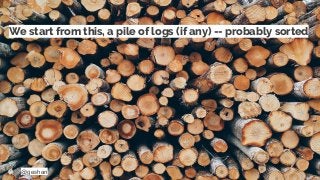
We start from this, a pile of logs (if any) -- probably sorted
@geshan
Hopefully, end up in this. Following best practices :)
@geshan
“ This feature we deployed last
week was working fine till
yesterday now I have no idea
why is it not working on
production!
@geshan
Logging from application level
● If errors should be reported, normal operation
also need to be logged
● Applications should log actions to provide
visibility and observability
● This allows the software engineers to debug and
pinpoint the problems faster in case of any issue
8
@geshan
How does logging help you?
● If you have logs are the right places, you will find
out where is the program not behaving as
expected
● It helps you find things on production you were
not sure of
● Be careful to not log secrets like passwords
though
9
@geshan
Having logs is like having a torch light in a dark place
@geshan@geshan
Too much logs = noise, too less =
inadequate information
Log information optimally
@geshan
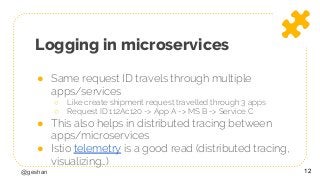
Logging in microservices
● Same request ID travels through multiple
apps/services
○ Like create shipment request travelled through 3 apps
○ Request ID 112Ac120 -> App A -> MS B -> Service C
● This also helps in distributed tracing between
apps/microservices
● Istio telemetry is a good read (distributed tracing,
visualizing…)
12
@geshan
Logs are not permanent, they are temporal
@geshan
Logging severity
standards
How is alert different from notice for instance
@geshan
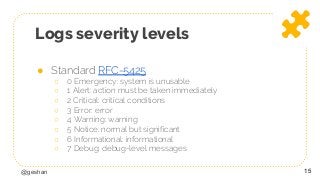
Logs severity levels
● Standard RFC-5425
○ 0 Emergency: system is unusable
○ 1 Alert: action must be taken immediately
○ 2 Critical: critical conditions
○ 3 Error: error
○ 4 Warning: warning
○ 5 Notice: normal but significant
○ 6 Informational: informational
○ 7 Debug: debug-level messages
15
@geshan@geshan
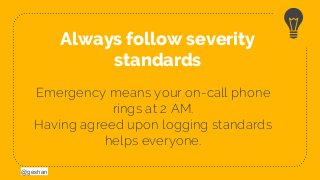
Emergency means your on-call phone
rings at 2 AM.
Having agreed upon logging standards
helps everyone.
Always follow severity
standards
@geshan
Have structure in logs
Structured logs go a long way as it is easier to parse
@geshan
Structure your logs
● Define a log format like date is required, log title
needs to be less than 255 characters
● Always add contextual information like request id,
id of the subject in context like order id/order nr
● JSON can be used to structure and parse logs
better
● Think of how to make searching ultra easy
18
@geshan@geshan
Follow a structure and format for logs.
Context always helps, JSON is your friend.
Always provide context with
structured logs
@geshan
Write logs carefully
Don’t add more milliseconds to your app
performance because of logging
@geshan
Write logs async as far as
possible
● If you start calling a 3rd party https API to write
your logs it will add milliseconds to your app
○ Writing it locally then shipping it some other way (ELK)
○ Queues for logs can also be a good option
● With non sequential executing languages like
javascript you can make it async easily
21
@geshan
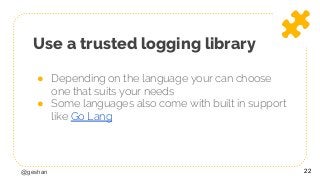
Use a trusted logging library
● Depending on the language your can choose
one that suits your needs
● Some languages also come with built in support
like Go Lang
22
@geshan
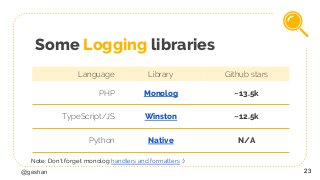
Some Logging libraries
Language Library Github stars
PHP Monolog ~13.5k
TypeScript/JS Winston ~12.5k
Python Native N/A
23
Note: Don’t forget monolog handlers and formatters :)
@geshan
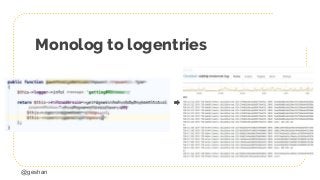
Monolog to logentries
@geshan@geshan
Non blocking logs are the best.
Be careful with console.log in JS/TS.
Log shipping is intelligent and efficient.
Write logs asynchronously
@geshan
Tools we are using
Logentries.com aggregates most of our logs
@geshan
Log aggregators and viewers
● Logs can be aggregated, shipped and viewed
multiple ways
● Primary choice might be between self
hosted/managed or SaaS
○ Graylog, ELK stack are self hosted, self managed solution
○ Logentries, loggly, Sematext Logsense, Scaylr are some
good SaaS options
27
@geshan
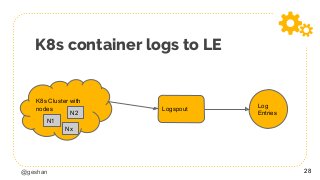
K8s container logs to LE
28
K8s Cluster with
nodes
N1
N2
Nx
Logspout
Log
Entries
@geshan
LogEntries
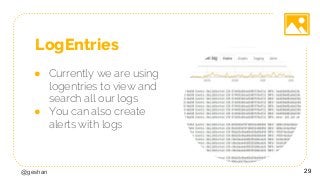
● Currently we are using
logentries to view and
search all our logs
● You can also create
alerts with logs
29
@geshan
Alerts with logs
● Searching and viewing logs are the primary
requirements of a log management system
● Alerts add that extra zing
○ If I get “these” logs more than 80 times in 5 minutes send me
an email or slack message is kind of an alert based on logs
30
@geshan@geshan
Know how to search your logs, add
dashboards if needed.
You can even set up alerts if some logs are
consistent over time.
Use the tools on disposal
efficiently
@geshan
Logging -> Instrumentation ->
Observability
● Instrument every meaningful number
available for capture - source
○ tends to be things like incoming request counts,
request durations, and error counts
○ No. of order per minute, no. of stuck payments
● Both logging and instrumentation are
ultimately just methods to achieve system
observability.
32
@geshan 33
Thanks!
Any questions?
@geshan
Credits/references
● https://blog.scalyr.com/2018/08/microservices-logging-best-practices/
● https://www.loggly.com/blog/30-best-practices-logging-scale/
● https://peter.bourgon.org/blog/2016/02/07/logging-v-instrumentation.ht
ml
● https://news.ycombinator.com/item?id=11054973
● https://surfingthe.cloud/dont-fear-node-js-console-log/
● https://tools.ietf.org/html/rfc5424
● https://en.wikipedia.org/wiki/Instrumentation_(computer_programming)
● https://www.loomsystems.com/blog/single-post/2017/01/26/9-logging-b
est-practices-based-on-hands-on-experience
● https://geshan.com.np/blog/2015/08/importance-of-logging-in-your-appli
cations/
● https://blog.scalyr.com/2018/06/go-logging/
● https://blog.codeship.com/how-to-understand-logs-with-logentries/ 34

Logging best practices

  • 1.
    @geshan Logging Best practices GeshanManandhar Senior Software Engineer THE ICONIC
  • 2.
    @geshan whoami Geshan Manandhar ● SeniorSoftware Engineer ● Microservices are good, agile is better :) 2
  • 3.
    I work forTHE ICONIC (Tech)
  • 4.
    @geshan “ If dogis a man’s best friend, logs are software engineer’s best friend.
  • 5.
    @geshan We start fromthis, a pile of logs (if any) -- probably sorted
  • 6.
    @geshan Hopefully, end upin this. Following best practices :)
  • 7.
    @geshan “ This featurewe deployed last week was working fine till yesterday now I have no idea why is it not working on production!
  • 8.
    @geshan Logging from applicationlevel ● If errors should be reported, normal operation also need to be logged ● Applications should log actions to provide visibility and observability ● This allows the software engineers to debug and pinpoint the problems faster in case of any issue 8
  • 9.
    @geshan How does logginghelp you? ● If you have logs are the right places, you will find out where is the program not behaving as expected ● It helps you find things on production you were not sure of ● Be careful to not log secrets like passwords though 9
  • 10.
    @geshan Having logs islike having a torch light in a dark place
  • 11.
    @geshan@geshan Too much logs= noise, too less = inadequate information Log information optimally
  • 12.
    @geshan Logging in microservices ●Same request ID travels through multiple apps/services ○ Like create shipment request travelled through 3 apps ○ Request ID 112Ac120 -> App A -> MS B -> Service C ● This also helps in distributed tracing between apps/microservices ● Istio telemetry is a good read (distributed tracing, visualizing…) 12
  • 13.
    @geshan Logs are notpermanent, they are temporal
  • 14.
    @geshan Logging severity standards How isalert different from notice for instance
  • 15.
    @geshan Logs severity levels ●Standard RFC-5425 ○ 0 Emergency: system is unusable ○ 1 Alert: action must be taken immediately ○ 2 Critical: critical conditions ○ 3 Error: error ○ 4 Warning: warning ○ 5 Notice: normal but significant ○ 6 Informational: informational ○ 7 Debug: debug-level messages 15
  • 16.
    @geshan@geshan Emergency means youron-call phone rings at 2 AM. Having agreed upon logging standards helps everyone. Always follow severity standards
  • 17.
    @geshan Have structure inlogs Structured logs go a long way as it is easier to parse
  • 18.
    @geshan Structure your logs ●Define a log format like date is required, log title needs to be less than 255 characters ● Always add contextual information like request id, id of the subject in context like order id/order nr ● JSON can be used to structure and parse logs better ● Think of how to make searching ultra easy 18
  • 19.
    @geshan@geshan Follow a structureand format for logs. Context always helps, JSON is your friend. Always provide context with structured logs
  • 20.
    @geshan Write logs carefully Don’tadd more milliseconds to your app performance because of logging
  • 21.
    @geshan Write logs asyncas far as possible ● If you start calling a 3rd party https API to write your logs it will add milliseconds to your app ○ Writing it locally then shipping it some other way (ELK) ○ Queues for logs can also be a good option ● With non sequential executing languages like javascript you can make it async easily 21
  • 22.
    @geshan Use a trustedlogging library ● Depending on the language your can choose one that suits your needs ● Some languages also come with built in support like Go Lang 22
  • 23.
    @geshan Some Logging libraries LanguageLibrary Github stars PHP Monolog ~13.5k TypeScript/JS Winston ~12.5k Python Native N/A 23 Note: Don’t forget monolog handlers and formatters :)
  • 24.
  • 25.
    @geshan@geshan Non blocking logsare the best. Be careful with console.log in JS/TS. Log shipping is intelligent and efficient. Write logs asynchronously
  • 26.
    @geshan Tools we areusing Logentries.com aggregates most of our logs
  • 27.
    @geshan Log aggregators andviewers ● Logs can be aggregated, shipped and viewed multiple ways ● Primary choice might be between self hosted/managed or SaaS ○ Graylog, ELK stack are self hosted, self managed solution ○ Logentries, loggly, Sematext Logsense, Scaylr are some good SaaS options 27
  • 28.
    @geshan K8s container logsto LE 28 K8s Cluster with nodes N1 N2 Nx Logspout Log Entries
  • 29.
    @geshan LogEntries ● Currently weare using logentries to view and search all our logs ● You can also create alerts with logs 29
  • 30.
    @geshan Alerts with logs ●Searching and viewing logs are the primary requirements of a log management system ● Alerts add that extra zing ○ If I get “these” logs more than 80 times in 5 minutes send me an email or slack message is kind of an alert based on logs 30
  • 31.
    @geshan@geshan Know how tosearch your logs, add dashboards if needed. You can even set up alerts if some logs are consistent over time. Use the tools on disposal efficiently
  • 32.
    @geshan Logging -> Instrumentation-> Observability ● Instrument every meaningful number available for capture - source ○ tends to be things like incoming request counts, request durations, and error counts ○ No. of order per minute, no. of stuck payments ● Both logging and instrumentation are ultimately just methods to achieve system observability. 32
  • 33.
  • 34.
    @geshan Credits/references ● https://blog.scalyr.com/2018/08/microservices-logging-best-practices/ ● https://www.loggly.com/blog/30-best-practices-logging-scale/ ●https://peter.bourgon.org/blog/2016/02/07/logging-v-instrumentation.ht ml ● https://news.ycombinator.com/item?id=11054973 ● https://surfingthe.cloud/dont-fear-node-js-console-log/ ● https://tools.ietf.org/html/rfc5424 ● https://en.wikipedia.org/wiki/Instrumentation_(computer_programming) ● https://www.loomsystems.com/blog/single-post/2017/01/26/9-logging-b est-practices-based-on-hands-on-experience ● https://geshan.com.np/blog/2015/08/importance-of-logging-in-your-appli cations/ ● https://blog.scalyr.com/2018/06/go-logging/ ● https://blog.codeship.com/how-to-understand-logs-with-logentries/ 34