friends
MAKING
WITH SVGS
FATIMA REMTULLAH @amitafr
THE
Agenda
Why this? Illustrations
in Sketch
How to Export
&Use
Final Recap&
Key Takeaways
THE
Beginning
Ai
THE
First Avatar
MAKING
friendsWITH SVGS
THE
Anatomy
WITH SPECIAL GUEST
THE
Anatomy
www.hasbro.com
THE
Anatomy
www.hasbro.com
THE
Anatomy
www.hasbro.com
THE
head&
shoulders
(SKIP KNEES & TOES)
Open Sketch & Insert a new Artboard
Step 1
Insert a picture of your friend for a visual guide
Tip
Create a colour palette by using the Colour Picker & adjusting tones
Tip
Add custom colours to the Document Colors for easy access
Tip
Insert > Shape > Oval for the head & adjust key points
Step 2
Add Inner Shadows to the head for depth
Step 2
Insert > Shape > Oval as a base for hair add key points & adjust
Step 3
Name & Union grouped features for a cleaner exported SVG
Tip
Step 4
Insert > Shape > Oval as a base for the ears add key points & adjust
Step 5
Use the head shape as a guide to create the beard & adjust the colour
Step 5
Duplicate the beard and add noise to create hair texture
THE
eyes, ears,
mouth&nose
Step 6
Insert > Shape > Oval as glass lens guide
Insert > Shape > Rectangle for frame side & nose bridge
Step 6
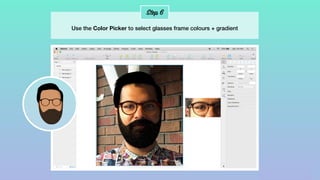
Use the Color Picker to select glasses frame colours + gradient
Step 7
Insert > Shape > Oval to form the top and bottom lip
Step 8
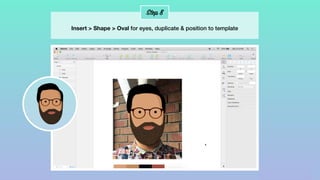
Insert > Shape > Oval for eyes, duplicate & position to template
Step 9
Add any distinctive facial features for a tailored look
Step 10
Insert > Shape > Rectangle for the neck & use shadow colour for contrast
Step 11
Be a stylist - dress your Avatar & Add Mask to form the shape
Step 12
Make any finishing touches to finesse the look & feel
IN THE
Wild
THE
Export
Varun Vachhar
@winkerVSbecks
THE FINAL
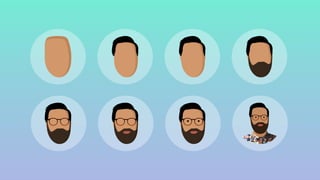
Recap
Try Templates Customize Make
Friends
Thankyou
FATIMA REMTULLAH @amitafr

Making Friends With SVGs