What is VPN?
AVPN (Virtual Private Network) is a
service that encrypts your internet traffic
and can protects your online identity
3.
Why do weneed VPN?
1. When using
public Wi-Fi
2. When we want
privacy
3. When certain areas restrict
information we want to access
4.
VPN
server
How does VPNwork?
Personal information
Split into packets
VPN wraps it in an outer packet
Get encrypted
Carry it to their own server
To the server you requested
Decryption process to remove the outer
packet
Requested
server
Why VPN canalso be risky?
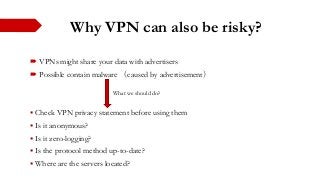
VPNs might share your data with advertisers
Possible contain malware (caused by advertisement)
Check VPN privacy statement before using them
Is it anonymous?
Is it zero-logging?
Is the protocol method up-to-date?
Where are the servers located?
What we should do?
7.
Reference
What isVPN? (https://us.norton.com/internetsecurity-privacy-what-is-a-vpn.html)
What is a VPN? (https://nordvpn.com/what-is-vpn-
video/?gclid=EAIaIQobChMIkY6Zs9OU5QIVCI3ICh1cwQRtEAAYASABEgKtqPD_BwE&utm
_expid=.a1VcZzAXSoio47Xp6WpeCg.1&utm_referrer=https%3A%2F%2Fwww.google.com%2F)
What is an internet service provider? (https://whatismyipaddress.com/isp)
What is VPN and how does it work? (YouTube video)
(https://www.youtube.com/watch?v=_wQTRMBAvzg)
How the internet works in five minutes? (YouTube video)
(https://www.youtube.com/watch?v=7_LPdttKXPc)
Are VPNs safe? (https://tech.co/vpn/are-vpns-safe)
7 hidden dangers to using free VPN (https://www.vpnmentor.com/blog/free-vpns-are-not-safe-to-
use/)
#3 Picture reference:
How to install a VPN on your router: https://www.pcmag.com/article/365618/how-to-install-a-vpn-on-your-router
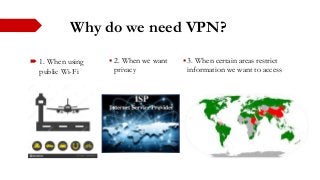
#4 When we are in a public area and trying to connect public Wi-Fi, it is normally not secure. With a VPN, your online actions get encrypted.
When we access a website on the internet, we started by connecting to our internet service provider (ISP). They redirect us to any website that we wish to visit. All the internet traffic passes through ISP’s servers, which means they can log everything we do online. Then, they can sell this history to advertisers or other third parties. And it can be dangerous sometimes.
Information is accessible in all over the world, take China as an example, google application is banned in China, if people in China wants to access those information, they need a VPN to use a different server in the areas that can access the information.
Reference:
Internet service provider: https://www.slideshare.net/juhikamnani/isp-70242523
Censorship of YouTube: https://en.wikipedia.org/wiki/Censorship_of_YouTube
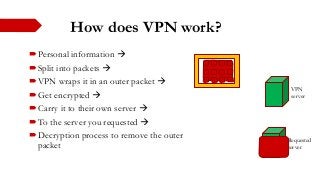
#5 The VPN redirects your internet traffic through a specially configured remote server. This way, it can hide your IP address and encrypts all the data you send or receive. The encrypted data looks like gibberish to anyone who intercepts it (Nord VPN).
When you send information online, a VPN creates a tunnel to encrypt information. Additionally, they have a server that your information will go through first so that’s basically helping hide IP address of your own. The server applies an encryption protocol. Two common protocols are OpenVPN and IKEv2/IPSec. Before sending and receiving data, they are first split into packets. The VPN wraps it in an outer packet which then encrypted through a process called encapsulation. When data arrives to server, the decryption process remove the outer packet and this process going back and forth between you and internet.
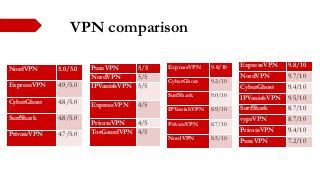
#7 There are free VPNs out there in the market and they may “share your data with advertisers, or even share your bandwidth with paying customers, leaving your data and connection exposed.
Possible contain malware. 38% of VPNs showed signs of infection. Most free VPNs make profit by using advertisement and most of the malware is related to advertisement.
Check the VPN privacy statement before using them. For example, is it anonymous? Is it zero-logging? Is the protocol method up-to-date? Where are the servers located?