Prepared by
Mr. BK. Chinna Maddileti
Assistant Professor
Contact: 9885527397
UNIT-I 2
TEXTBOOKS
1. DesignPatternbyErichGamma, PearsonEducation
2. Pattern‘sinJAVAVol-I BYMarkGrand,WileyDreamTech
3. Pattern‘s inJAVAVol-II BYMarkGrand,WileyDreamTech
4. JAVAEnterpriseDesign PatternsVol-IIIMarkGrand,WileyDreamTech
5. HeadFirstDesign PatternsByEricFreeman-Oreilly-spd..
6.Design PatternsExplainedByAlan Shalloway,PearsonEducation
https://booksdrive.org/design-patterns-elements-by-erich-gamma-pdf/#google_vignette
UNIT-I 3
Syllabus
Sn o Topic Lectures PPT Slides
1 What is Design Pattern? L1 3 – 9
2 Design Patterns in Smalltalk MVC L2 10 – 13
3 Describing Design Patterns L3 14 – 18
4 The catalog of Design Patterns L4 19 – 28
5 Organizing the catalog L5 29 – 30
6 How Design Patterns Solve Design Problems L6 31 – 59
7 How to select Design Patterns L7 60 – 61
8 How to Use a Design Pattern L8 62 – 63
9 Review Unit-I, Online resources L9 64 – 64
UNIT 1
UNIT-I 4
WhatisaDesignPattern?
• Each pattern Describes a problem which occurs over and over
againinourenvironment ,andthendescribesthe coreof theproblem.
• Novelists, playwrights and other writers rarely invent new stories.
• Often ideasare reused, suchasthe TragicHero from HamletorMacbeth.
• Designersreusesolutionsalso,preferablythegood ones
• Problems areaddressed withoutrediscovering solutions fromscratch.
L1
UNIT-I 5
DesignPatterns
• Design Patterns are the well defined solutions for there occurring
problemsin theapplicationprogramming environment.
• It is atemplate method.
• MainlyusedinObjectOrientedprogramming.
L1
Common Problems
Creating a class properly
Instantiating an Object
Interaction between objects
Write loosely coupled code
Write re-usable code
Benefits of Design Patterns
Code Re-usability
High maintenance
Reduced cost
Loosely coupled application
UNIT-I 7
DesignPatternElements
1. Pattern Name
Handle used to describe the design problem
Naming a pattern immediately increases our
vocabulary
It makes it easier to think about designs and
communicate them
Finding good names has been one of the hardest
parts of developing our catalog
L1
UNIT-I 8
Design Pattern Elements
2. Problem
Describes when to apply the pattern
It explains the problem and its context.
It might describe specific design problems such as how
to represent algorithms as objects.
It may include conditions for the pattern to be
applicable symptoms of an inflexible design or limitation.
L1
UNIT-I 9
Design Pattern Elements
3. Solution
The solution describes elements for the design
includes relationships, responsibilities, and
collaborations.
Does not describe a particular concrete designs or
implementations, because a pattern is like a template.
L1
UNIT-I 10
DesignPatternElements
4. Consequences
Consequences are the Results and Trade Offs of
applying the Pattern
Critical for design pattern evaluation Often
space and time trade offs
Consequences of a pattern include its impact
of a system’s flexibility, extensibility or
probability
Language strengths and limitations
(Broken into benefits and drawbacks for this discussion)
L1
UNIT-I 11
Oneperson‘spatternmay beanotherperson‘s
primitive buildingblock.
Thefocusoftheselecteddesignpatternsare:Objectandclass
communication
Customized tosolveageneraldesignproblem
Solutioniscontextspecific
L1
UNIT-I 12
DesignpatternsinSmalltalk MVC
 TheModel/View/Controllertriadof classesisusedtobuilduser
interfacesinSmalltalk-80
 MVCconsistsofthreekindsof objects.
 M->>MODEListheApplicationobject.
 V->>Viewisthescreenpresentation.
 C->>Controlleristhewaytheuserinterfacereactstouserinput.
MVCdecouplestoincreaseflexibilityandreuse.
L2
UNIT-I 13
DesignpatternsinSmalltalkMVC
• MVCdecouples viewsandmodelsbyestablishingasubscribe/notify
protocolbetweenthem.
 Aviewmustensurethatitsappearancemustreflects thestateofthe
model.
 Wheneverthemodel‘sdatachanges,themodelnotifiesviewsthat
dependsonit.
 Youcanalsocreatenewviewsfor amodelwithout Rewritingit.
L2
UNIT-I 14
DesignPatternsinSmalltalk MVC
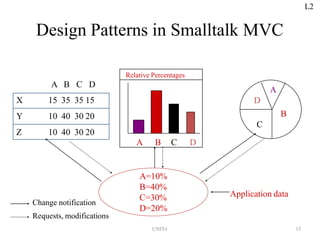
 Thebelowdiagramshowsamodelandthreeviews.
 Themodelcontainssomedata values, and the views defininga
spreadsheet,histogram,andpiechartdisplay thesedatainvarious
ways.
 Themodelcommunicateswithit‘svalues change, and the views
communicatewiththemodeltoaccessthesevalues.
 FeatureofMVCisthatviewscanbenested.
 Easytomaintainandenhancement.
L2
Design Patterns in Smalltalk MVC
A=10%
B=40%
C=30%
D=20%
Application data
A
D
B
C
Relative Percentages
A B C D
X 15 35 35 15
Y 10 40 30 20
Z 10 40 30 20
A B C D
Change notification
Requests, modifications
L2
UNIT-I 15
UNIT-I 16
Describing DesignPatterns
 Graphicalnotations,whileimportantanduseful,aren‘tsufficient.
 Theysimplycapturetheendproductofthedesignprocessas
relationshipsbetweenclassesandobjects.
 Describethedesign patternusingaconsistentformat.
 Eachpatternisdividedintosections accordingtothe following
template.
 Thetemplate lends auniformstructureto theinformation,
makingadesignpatterns easier to learn, compareanduse.
L3
DescribingDesignPatterns
Template
1. Pattern Name and Classification
2. Intent
3. Also Known As
4. Motivation
5. Applicability
6. Structure
7. Participants
8. Collaborations
9. Consequences
10. Implementation
11. Sample Code
12. Known Uses
13. Related Patterns
UNIT-I 18
Describing Design Patterns
1.Pattern Name and Classification
 It conveys the essence of the pattern succinctly(in a brief and
clearly expressed manner)
 A good name is vital, because it will become part of our design
vocabulary.
2.Intent
It answers the following questions,
What does the design pattern do?
 What is its rationale(consistent with or based on or using reason)
and intent?
 What particular design issue or problem does it address?
L3
3.Also Known As
Other well-known names for the pattern, if any.
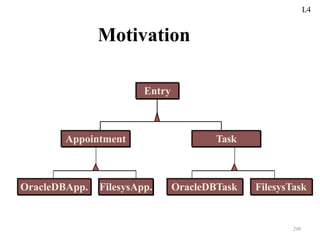
4.Motivation
A scenario that illustrates a design problem and how the class
and object structures in the pattern solve the problem.
 The scenario will help you to understand the more abstract
description of the pattern that follows.
5.Applicability
 What are the situations in which the design patterns can be applied?
 What are example of the poor designs that the pattern can address?
 How can you recognize these situations?
6.Structure
 Graphical representation of the classes in the pattern using a
notation based on the Object Modeling Technique(OMT).
(https://www.geeksforgeeks.org/software-engineering-object-modeling-technique-omt/)
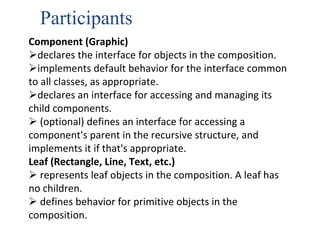
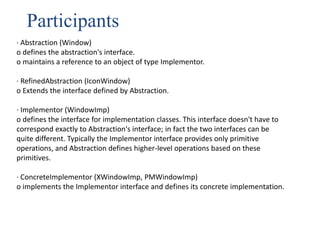
7. Participants
 The classes and/or objects participating in the design pattern and
their responsibilities.
1
L3
UNIT-I 21
8. Collaborations
 How the participants collaborate to carry out their
responsibilities.
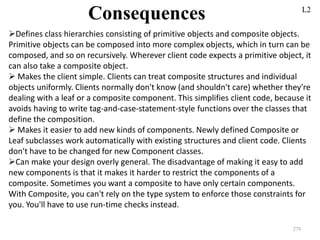
9. Consequences(results of an action or situation)
 How does the pattern support its objectives?
 What are the trade-offs and result of using the
pattern ?
 What aspect of the system structure does it let you
vary independently?
10. Implementation
 What Pitfalls(a likely mistake or problem in a situation),
Hints, Techniques should be aware of when
implementing the pattern ?
 Are there language-specific issues?
L3
UNIT-I 22
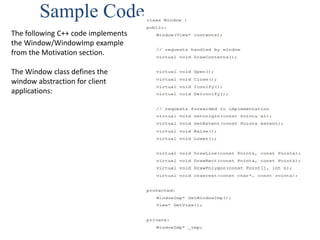
11.Sample Code
 Code fragments that illustrate how you might implement the
pattern in C++ or Smalltalk.
12.Known Uses
Examples of the pattern found in real systems.
We include at least two examples from different domains
 13.Related Patterns
 What design patterns are closely related to this one? What are the
important differences?
 With Which other patterns should this one be used?
L3
UNIT-I 23
The Catalog of Design Pattern
1. Abstract Factory: Provide an interface for creating
families of related or dependent objects without
specifying their concrete classes.
2. Adapter: Convert the interface of a class into another
interface clients expect.
3. Bridge: Decouple an abstraction from its implementation
so that two can vary independently.
L4
UNIT-I 24
The Catalog of Design Pattern
4. Builder: Separates the construction of the complex object from
its representation so that the same construction process can
createdifferent representations.
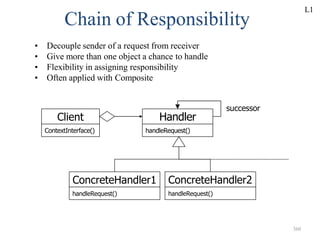
5. Chain of Responsibility: Avoid coupling the sender of a request
to it‘s receiver by giving more than one object a chance to
handle the request. Chain the receiving objects and pass the
requestalongthechain untilanobjectshandlesit.
L4
UNIT-I 25
The Catalog of Design Pattern
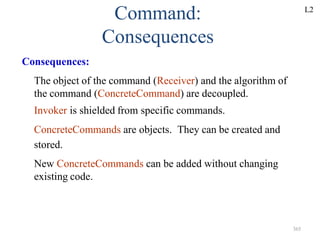
6. Command: Encapsulate a request as an object,
thereby letting parameterize clients with different
request, queue or log requests, and support
undoable operations.
7. Composite: Compose objects into three objects to
represent part-whole hierarchies. Composite lets
clients treat individual objects and compositions
of objects uniformly.
L4
UNIT-I 26
The Catalog of Design Pattern
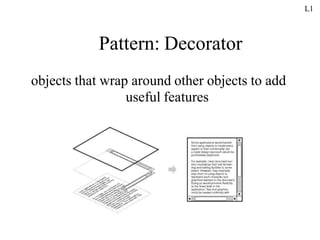
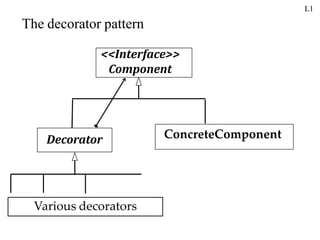
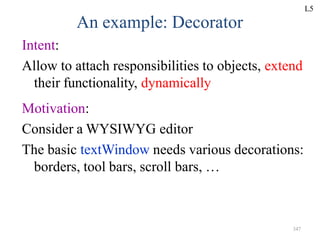
8. Decorator: Attach additional responsibilities to
an object dynamically. Decorators provide a
flexible alternative to sub classing for
extending functionality.
9. Facade: Provide a unified interface to a set of
interfaces in a subsystem's Facade defines a
higher-level interface that makes the
subsystem easier to use.
L4
UNIT-I 27
The Catalog of Design Pattern
10. Factory Method: Defines an interface for creating an
object ,but let subclasses decide which class to
instantiate. Factory Method lets a class defer
instantiation to subclasses.
11. Flyweight: Use sharing to support large numbers of
fine- grained objects efficiently.
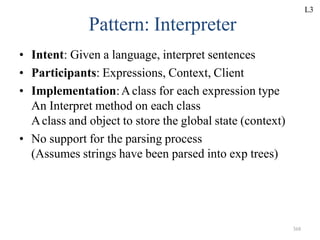
12. Interpreter: Given a language, defining a representation
of its grammar along with an interpreter that uses the
representation to interpret sentences in the language.
L4
UNIT-I 28
TheCatalogofDesignPattern
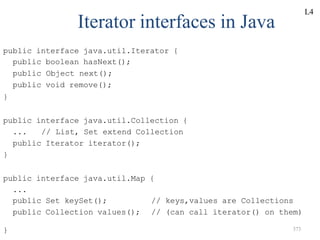
13. Iterator: Provide a way to access the element of an
aggregate object sequentially without exposing its
underlying representation.
14.Mediator:Defineanobjectthatencapsulatehowa setof
objectsinteract.Mediatorpromotesloose couplingbykeeping
objectsfromreferringtoeach otherexplicitly,andlet‘syouvery
theirinteraction independently.
L4
UNIT-I 29
TheCatalogofDesign Pattern
15. Memento: Without violating encapsulation,
capture and externalize an object‘s internal state
so that object can be restored to this state later.
16. Observer: Define a one-to-many dependency
between objects
so that when one object changes state, all
it‘s dependents are notified and updated
automatically.
UNIT-I 30
TheCatalogofDesign Pattern
17. Prototype: Specify the kinds of objects to create
using a prototypical instance, and create new objects
by copying this prototype.
18. Proxy: Provide a surrogate or placeholder for another
object to control access to it.
19. Singleton: Ensure a class has only one instance, and
provide a point of access to it.
20. State: Allow an object to alter its behavior when its
internal state changes. the object will appear to change
its class.
L4
UNIT-I 31
TheCatalogofDesignPattern
21. Strategy: Define a family of algorithms, encapsulate each
one, and make them interchangeable. Strategy lets the
algorithm vary independently from clients that use it.
22.Template Method: Define the Skelton of an operation,
deferring some steps to subclasses. Template method
subclasses redefine certain steps of an algorithm without
changing the algorithms structure.
23.Visitor: Represent an operation to be performed on the
elements of an object structure. Visitor lets you define a
new operation without changing the classes of the
elements on which it operates.
UNIT-I 32
•Two criteria
 Purpose: what a pattern does
Creational: The process of object creation
Structural: The composition of classes or objects
Behavioral: Characterize the ways in which classes or
objects interact and distribute responsibility
 Scope: whether the pattern applies primarily to
classes or to objects
Organizing the Catalog L5
UNIT-I 33
Organizing the Catalog
Purpose
Creational Structural Behavioral
Scope
Class Factory Method Adapter (class)
Interpreter
&
Template Method
Object Abstract Factory
Builder
Prototype
Singleton
Adapter (object)
Bridge
Composite
Decorator
Facade
Flyweight
Proxy
Chain of
Responsibility
Command
Iterator
Mediator
Memento
Observer
State
Strategy
Visitor
L5
UNIT-I 36
How Design Patterns Solve Design Problems
• FindingAppropriate Objects
– Decomposing a system into objects is the hard part
– Object Oriented Designs often end up with classes
with no counterparts in real world (low-level classes
like arrays)
– Strict modeling of the real world leads to a system
that reflects today‘s realities but not necessarily
tomorrows
– Design patterns identify less-obvious abstractions
L6
UNIT-I 37
How Design Patterns Solve Design Problems
• Determining Object Granularity
– Objects can vary tremendously in size and number
– Facade pattern describes how to represent
subsystems as objects
– Flyweight pattern(Sharing) describes how to
support huge numbers of objects
L6
Design Pattern Relationship
• Mapping
Builder
Proxy
saving state
of iteration
Memento
Adapter
Bridge
Command
Iterator
Composite
Decorator
Enumerating
children
adding
respnsibilities
to objects
composed
using
sharing
composites
Flyweight
defining
grammar
Interpreter
Visitor
Chain of
Responsibility
changing skin
versus guts
Strategy
State
sharing
strategies
Mediator Observer
Template Method
defining
algorithm´s
steps
Prototype
Abstract Factory
Singleton Facade
Factory Method
single
instance
single
instance
L6
UNIT-I 38
UNIT-I 39
Specifying Object Interfaces
• Interface:
– Set of all signatures defined by an object‘s operations
– Any request matching a signature in the objects interface
may be sent to the object
– Interfaces may contain other interfaces as subsets
• Type:
– Denotes a particular interfaces
– An object may have many types
– Widely different object may share a type
– Objects of the same type need only share parts of their
interfaces
– Asubtype contains the interface of its super type
• Dynamic binding, polymorphism
L6
UNIT-I 40
Specifying Object Interfaces
• An object‘s implementation is defined by its class
• The class specifies the object‘s internal data and
defines the operations the object can perform
• Objects is created by instantiating a class
– an object = an instance of a class
• Class inheritance
– parent class and subclass
L6
UNIT-I 41
Specifying Object Implementations (cont.)
• Abstract class versus concrete class
– abstract operations
• Override an operation
• Class versus type
– An object‘s class defines how the object is implemented
– An object‘s type only refers to its interface
– An object can have many types, and objects of different
classes can have the same type
L6
UNIT-I 42
Specifying Object Implementations (cont.)
• Class versus Interface Inheritance
– class inheritance defines an object‘s implementation in
terms of another object‘s implementation (code and
representation sharing)
– interface inheritance (or subtyping) describes when an
object can be used in place of another
• Many of the design patterns depend on this
distinction
L6
UNIT-I 43
Specifying Object Implementations (cont.)
• Programming to an Interface, not an
Implementation
• Benefits
– clients remain unaware of the specific types of
objects they use
– clients remain unaware of the classes that
implement these objects
L6
UNIT-I 44
Program to an interface, not an Implementation
• Manipulate objects solely in terms of interfaces
defined by abstract classes!
• Benefits:
1. Clients remain unaware of the specific types of objects they
use.
2. Clients remain unaware of the classes that implement the
objects.
Clients only know about abstract class(es) defining the
interfaces
• Do not declare variables to be instances of particular
concrete classes
• Use creational patterns to create actual objects.
L6
UNIT-I 45
Favor object composition over class inheritance
• White-box reuse:
– Reuse by sub classing (class inheritance)
– Internals of parent classes are often visible to subclasses
– works statically, compile-time approach
– Inheritance breaks encapsulation
• Black-box reuse:
– Reuse by object composition
– Requires objects to have well-defined interfaces
– No internal details of objects are visible
L6
UNIT-I 46
Putting Reuse Mechanisms to Work
• Inheritance versus Composition
• Delegation
• Inheritance versus Parameterized Types
L6
UNIT-I 47
Inheritance versus Composition
• Two most common techniques for reuse
– class inheritance
• white-box reuse
– object composition
• black-box reuse
• Class inheritance
– advantages
• static, straightforward to use
• make the implementations being reuse more easily
L6
UNIT-I 48
Inheritance versus Composition (cont.)
• Class inheritance (cont.)
– disadvantages
• the implementations inherited can‘t be changed at
run time
• parent classes often define at least part of their
subclasses‘ physical representation
– breaks encapsulation
• implementation dependencies can cause problems
when you‘re trying to reuse a subclass
L6
UNIT-I 49
Inheritance versus Composition (cont.)
• Object composition
– dynamic at run time
– composition requires objects to respect each
others‘ interfaces
• but does not break encapsulation
– any object can be replaced at run time
– Favoring object composition over class
inheritance helps you keep each class
encapsulated and focused on one task
L6
UNIT-I 50
Inheritance versus Composition (cont.)
• Object composition (cont.)
– class and class hierarchies will remain small
– but will have more objects
• Favor object composition over class
inheritance
• Inheritance and object composition should
work together
L6
Delegation
• Two objects are involved in handling a
request: a receiving object delegates
operations to its delegate
Window
Area()
Rectangle
Area()
width
height
rectangle
UNIT-I 51
L6
UNIT-I 52
Delegation (cont.)
• Makes it easy to compose behaviors at run-time and
to change the way they‘re composed
• Disadvantage:dynamic, highly parameterized
software is harder to understand than more static
software
• Delegation is a good design choice only when it
simplifies more than it complicates
• Delegation is an extreme example of object
composition
L6
UNIT-I 53
Inheritance versus Parameterized Types
• Let you define a type without specifying all the
other types it uses, the unspecified types are
supplied as parameters at the point of use
• Parameterized types, generics, or templates
• Parameterized types give us a third way to
compose behavior in object-oriented systems
L6
UNIT-I 54
Inheritance versus Parameterized Types (cont.)
• Three ways to compose
– object composition lets you change the behavior being
composed at run-time, but it requires indirection and
can be less efficient
– inheritance lets you provide default implementations
for operations and lets subclasses override them
– parameterized types let you change the types that a
class can use
L6
UNIT-I 55
Relating Run-Time and Compile-Time Structures
• An object-oriented program‘s run-time structure often
bears little resemblance to its code structure
• The code structure is frozen at compile-time
• Aprogram‘s run-time structure consists of rapidly
changing networks of communicating objects
• aggregation versus acquaintance (association)
– part-of versus knows of
L6
UNIT-I 56
Relating Run-Time and Compile-Time Structures
• The distinction between acquaintance and
aggregation is determined more by intent
than by explicit language mechanisms
• The system‘s run-time structure must be
imposed more by the designer than the
language
L6
UNIT-I 57
Designing for Change
• Adesign that doesn‘t take change into
account risks major redesign in the future
• Design patterns help you avoid this by
ensuring that a system can change in
specific ways
– each design pattern lets some aspect of system
structure vary independently of other aspects
L6
UNIT-I 58
Common Causes of Redesign
• Creating an object by specifying a class
explicitly
• Dependence on specific operations
• Dependence on hardware and software
platform
• Dependence on object representations or
implementations
• Algorithmic dependencies
L6
UNIT-I 59
Common Causes of Redesign (cont.)
• Tight coupling
• Extending functionality by subclassing
• Inability to alter classes conveniently
L6
UNIT-I 60
Design for Change (cont.)
• Design patterns in application programs
– Design patterns that reduce dependencies can
increase internal reuse
– Design patterns also make an application more
maintainable when they‘re used to limit
platform dependencies and to layer a system
L6
UNIT-I 61
Design for Change (cont.)
• Design patterns in toolkits
– Atoolkit is a set of related and reusable classes
designed to provide useful, general-purpose
functionality
– Toolkits emphasize code reuse. They are the
object-oriented equivalent of subroutine
libraries
– Toolkit design is arguably harder than
application design
L6
UNIT-I 62
Design for Change (cont.)
• Design patterns in framework
– A framework is a set of cooperating classes that make
up a reusable design for a specific class of software
– You customize a framework to a particular application
by creating application-specific subclasses of abstract
classes from the framework
– The framework dictates the architecture of your
application
L6
UNIT-I 63
Design for Change (cont.)
• Design patterns in framework (cont.)
– Frameworks emphasize design reuse over code reuse
– When you use a toolkit, you write the main body of the
application and call the code you want to reuse. When
you use a framework, you reuse the main body and
write the code it calls.
– Advantages: build an application faster, easier to
maintain, and more consistent to their users
L6
UNIT-I 64
Design for Change (cont.)
• Design patterns in framework (cont.)
– Mature frameworks usually incorporate several design
patterns
– People who know the patterns gain insight into the
framework faster
– differences between framework and design pattern
• design patterns are more abstract than frameworks
• design patterns are smaller architectural elements than frameworks
• design patterns are less specialized than frameworks
L6
UNIT-I 65
How To Select a Design Pattern
 Consider how design patterns solve design Problems.
 Scan Intent sections.
 Study how patterns interrelate.
 Study patterns of like purpose.
 Examine a Cause of redesign.
 Consider what should be variable in your design.
L7
UNIT-I
62
L7
How To Use a Design Pattern
 Read the pattern once through for an overview.
 Go Back and study the Structure, Participants ,and Collaborations
sections.
 Look At the Sample Code section to see a concrete
Example of the pattern in code.
 Choose names for pattern participants that are meaningful in the
application context.
 Define the classes.
 Define App’n-specific names for operations in the Pattern
 Implement the operations to carry out responsibilities in the
pattern.
UNIT-I 63
L8
UNIT-I 64
L8
UNIT-I 65
Online resources
• Pattern FAQ
• http://g.oswego.edu/dl/pd-FAQ/pd-FAQ.html
• Basic patterns
• http://exciton.cs.oberlin.edu/javaresources/DesignPa
tterns/default.htm
• Patterns home page
• http://hillside.net/patterns/
L9
Unit -II
ACase Study:
Designing a Document Editor
66
UNIT-I 67
S.NO. TOPIC PPT Slides
1 Document structure L1 4 – 13
2 Formatting L2 14 – 20
3 Embellishment L3 21 – 25
4 Multiple look & feels L4 26 – 30
5 Multiple window systems L5 31 – 35
6 User operations L6 36 – 46
7 Spelling checking & hyphenation L7 47 – 60
8 Concluding Remarks L8 61 – 61
9 Pattern References L8 62 – 67
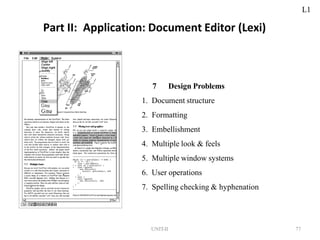
Design Problems in LEXI-Document Editor
This chapter presents a case study in the design of “What You See Is
What You Get” (WYSIWYG) document editor called Lexi (Lexi’s design is
based on Doc, a text editing application developed by Calder).
A WYSIWYG representation of the document occupies the large
rectangular area in the centre.
The document can mix text and graphics freely in a variety of
formatting styles.
Surrounding the document are the usual pull-down menus and
scrollbars, a collection of page icons for jumping to a particular page in
the document.
Design Problems in LEXI
Seven Problems
1. Document Structure
2. Formatting
3. Embellishing(Make more attractive by adding ornament, color,
etc) the user interface
4. Supporting multiple look-and-feel standards
5. Supporting multiple window systems
6. User Operations
7. Spelling checking and hyphenation(to separate the parts of a
compound word)
Design Problems in LEXI-Document Editor
• Seven problems in Lexis's design
1. Document Structure
 The choice of internal representation for the document affects nearly every aspect of
Lexis's design. All editing , formatting, displaying, and textual analysis will require
traversing the representation.
2. Formatting
 How does Lexi actually arrange text and graphics into lines and columns?
 What objects are responsible for carrying out different formatting policies?
 How do these policies interact with the document‘s internal representation?
3. Embellishing(Make more attractive by adding ornament, color, etc) the user interface
Lexis user interface include scroll bar, borders and drop shadows that embellish the
WYSIWYG document interface. Such embellishments are likely to change as Lexis user
interface evolves.
UNIT-II 68
L1
UNIT-I 69
4. Supporting multiple look-and-feel standards
Lexi should adapt easily to different look-and-feel standards such as Motif (a pattern or design)
and Presentation Manager (PM) without major modification.
5. Supporting multiple window systems
Different look-and-feel standards are usually implemented on different window system. Lexi‘s
design should be independent of the window system as possible.
6. User Operations
User control Lexi through various interfaces, including buttons and pull-down menus. The
functionality beyond these interfaces is scattered throughout the objects in the application.
7. Spelling checking and hyphenation
How does Lexi support analytical operations checking for misspelled words and
determining hyphenation points? How can we minimize the number of classes we have to
modify to add a new analytical operation?
Part II: Application: Document Editor (Lexi)
7 Design Problems
1. Document structure
2. Formatting
3. Embellishment
4. Multiple look & feels
5. Multiple window systems
6. User operations
7. Spelling checking & hyphenation
UNIT-II 77
L1
UNIT-II 78
1. Document Structure
Goals:
– present document‘s visual aspects
– drawing, hit detection, alignment
– support physical structure
(e.g., lines, columns)
Constraints/forces:
– treat text & graphics uniformly
– no distinction between one & many
L1
UNIT-II 79
Document Structure
• The internal representation for a document
• The internal representation should support
– maintaining the document‘s physical structure
– generating and presenting the document visually
– mapping positions on the display to elements in the
internal representations
L1
UNIT-II 80
Document Structure (cont.)
• Some constraints
– we should treat text and graphics uniformly
– our implementation shouldn‘t have to distinguish between single
elements and groups of elements in the internal representation
• Recursive Composition
– a common way to represent hierarchically structured
information
L1
L1
UNIT-II 81
UNIT-II 82
Document Structure (cont.)
• Glyphs(a symbolic figure)
– an abstract class for all objects that can appear in a document
structure
– three basic responsibilities, they know
• how to draw themselves, what space they occupy, and their
children and parent
• Composite Pattern
– captures the essence of recursive composition in object-oriented
terms
L1
UNIT-II 76
L1
L1
UNIT-II 84
UNIT-II 85
2. Formatting
• Astructure that corresponds to a properly
formatted document
• Representation and formatting are distinct
– the ability to capture the document‘s physical structure
doesn‘t tell us how to arrive at a particular structure
• here, we‘ll restrict ―formatting‖ to mean breaking
a collection of glyphs in to lines
L2
UNIT-II 86
Formatting (cont.)
• Encapsulating the formatting algorithm
– keep formatting algorithms completely
independent of the document structure
– make it is easy to change the formatting
algorithm
– We‘ll define a separate class hierarchy for
objects that encapsulate formatting algorithms
L2
UNIT-II 87
Formatting (cont.)
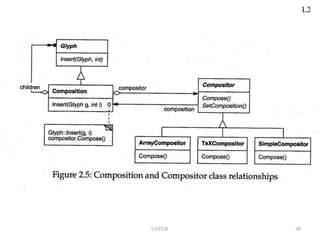
• Compositor and Composition
– We‘ll define a Compositor class for objects that can
encapsulate a formatting algorithm
– The glyphs Compositor formats are the children of a
special Glyph subclass called Composition
– When the composition needs formatting, it calls its
compositor‘s Compose operation
– Each Compositor subclass can implement a different line
breaking algorithm
L2
L2
UNIT-II 88
UNIT-II 89
Formatting (cont.)
• Compositor and Composition (cont.)
– The Compositor-Composition class split ensures a
strong separation between code that supports the
document‘s physical structure and the code for different
formatting algorithms
• Strategy pattern
– intent: encapsulating an algorithm in an object
– Compositors are strategies.Acomposition is the
context for a compositor strategy
L2
L2
UNIT-II 90
L2
UNIT-II 91
UNIT-II 92
Embellishing the User Interface
• Considering adds a border around the text editing
area and scrollbars that let the user view the different
parts of the page here
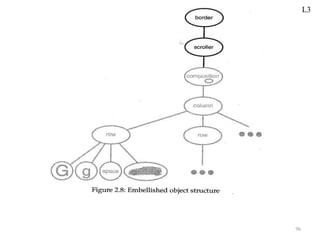
• Transparent Enclosure
– inheritance-based approach will result in some problems
• Composition, ScollableComposition,
BorderedScrollableComposition, …
– object composition offers a potentially more workable and
flexible extension mechanism
L3
UNIT-II 93
Embellishing the User Interface
(cont.)
• Transparent enclosure (cont.)
– object composition (cont.)
• Border and Scroller should be a subclass of Glyph
– two notions
• single-child (single-component) composition
• compatible interfaces
L3
UNIT-II 87
Embellishing the User Interface
(cont.)
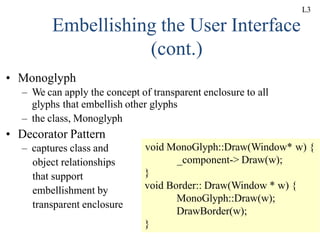
• Monoglyph
– We can apply the concept of transparent enclosure to all
glyphs that embellish other glyphs
– the class, Monoglyph
• Decorator Pattern
– captures class and
object relationships
that support
embellishment by
transparent enclosure
void MonoGlyph::Draw(Window* w) {
_component-> Draw(w);
}
void Border:: Draw(Window * w) {
MonoGlyph::Draw(w);
DrawBorder(w);
}
L3
L3
95
L3
96
97
Supporting Multiple Look-and-
Feel Standards
• Design to support the look-and-feel changing at run-
time
• Abstracting Object Creation
– widgets
– two sets of widget glyph classes for this purpose
• a set of abstract glyph subclasses for each category of widget glyph
(e.g., ScrollBar)
• a set of concrete subclasses for each abstract subclass that
implement different look-and-feel standards (e.g., MotifScrollBar
and PMScrollBar)
L4
98
Supporting Multiple Look-and-
Feel Standards (cont.)
• Abstracting Object Creation (cont.)
– Lexi needs a way to determine the look-and-
feel standard being targeted
– We must avoid making explicit constructor
calls
– We must also be able to replace an entire
widget set easily
– We can achieve both by abstracting the process
of object creation
L4
99
Supporting Multiple Look-and-
Feel Standards (cont.)
• Factories and Product Classes
– Factories create product objects
– The example
• Abstract Factory Pattern
– capture how to create families of related
product objects without instantiating classes
directly
L4
L4
10
0
L4
10
1
10
2
Supporting Multiple Window
Systems
• We‘d like Lexi to run on many existing window systems
having different programming interfaces
• Can we use anAbstract Factory?
– As the different programming interfaces on these existing
window systems, theAbstract Factory pattern doesn‘ t work
– We need a uniform set of windowing abstractions that lets us
take different window system impelementations and slide any
one of them under a common interface
L5
10
3
Supporting Multiple Window
Systems (cont.)
• Encapsulating Implementation Dependencies
– The Window class interface encapsulates the things
windows tend to do across window systems
– The Window class is an abstract class
– Where does the implementation live?
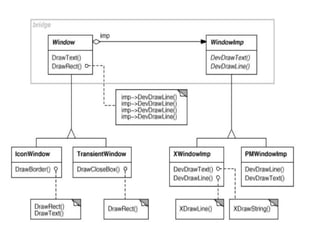
• Window and WindowImp
• Bridge Pattern
– to allow separate class hierarchies to work together even as
they evolve independently
L5
10
4
105
L5
106
107
User Operations
• Requirements
– Lexi provides different user interfaces for the
operations it supported
– These operations are implemented in many different
classes
– Lexi supports undo and redo
• The challenge is to come up with a simple and
extensible mechanism that satisfies all of these
needs
L6
108
User Operations (cont.)
• Encapsulating a Request
– We could parameterize MenuItem with a function to
call, but that‘s not a complete solution
• it doesn‘t address the undo/redo problem
• it‘s hard to associate state with a function
• functions are hard to extent, and it‘s hard to reuse part of them
– We should parameterize MenuItems with an object, not
a function
L6
109
User Operations (cont.)
• Command Class and Subclasses
– The Command abstract class consists of a
single abstract operation called Execute
– MenuItem can store a Command object that
encapsulates a request
– When a user choose a particular menu item, the
MenuItem simply calls Execute on its
Command object to carry out the request
L6
L6
110
104
112
User Operations (cont.)
• Undoability
– To undo and redo commands, we add an Unexecute
operation to Command‘s interface
– Aconcrete Command would store the state of the
Command for Unexecute
– Reversible operation returns a Boolean value to
determine if a command is undoable
• Command History
– a list of commands that have been executed
L6
Implementing a Command History
• The command history can be seen as a list of past
commands commands
• As new commands are executed they are added to
the front of the history
present
113
past commands
L6
• To undo a command, unexecute() is called on the
command on the front of the list
• The ―
present‖ position is moved past the last
command
Undoing the Last Command
unexecute()
present present
114
L6
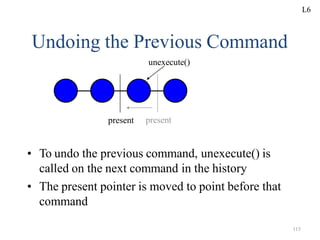
• To undo the previous command, unexecute() is
called on the next command in the history
• The present pointer is moved to point before that
command
present
Undoing the Previous Command
unexecute()
present
115
L6
Redoing the Next Command
execute()
• To redo the command that was just undone,
execute() is called on that command
• The present pointer is moved up past that
command
present
present
UNIT-II 116
L6
117
The Command Pattern
• Encapsulate a request as an object
• The Command Patterns lets you
– parameterize clients with different requests
– queue or log requests
– support undoable operations
• Also KnownAs:Action, Transaction
• Covered on pg. 233 in the book
L6
118
Spelling Checking & Hyphenation
Goals:
– analyze text for spelling errors
– introduce potential hyphenation sites
Constraints/forces:
– support multiple algorithms
– don‘t tightly couple algorithms with document
structure
L7
Spelling Checking & Hyphenation (cont‘d)
119
Solution: Encapsulate Traversal
Iterator
– encapsulates a
traversal algorithm
without exposing
representation details
to callers
– uses Glyph‘s child
enumeration
operation
– This is an example of
a preorder iterator
L7
Spelling Checking & Hyphenation (cont‘d)
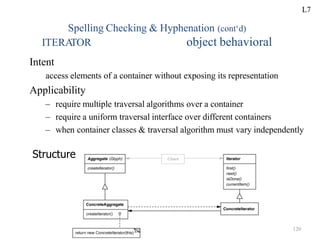
object behavioral
ITERA
TOR
Intent
access elements of a container without exposing its representation
Applicability
– require multiple traversal algorithms over a container
– require a uniform traversal interface over different containers
– when container classes & traversal algorithm must vary independently
Structure
L7
120
114
Spelling Checking & Hyphenation (cont‘d)
ITERATOR (cont‘d) object behavioral
cout << endl;
return 0;
Iterators are used heavily in the C++ Standard
Template Library (STL)
int main (int argc, char *argv[])
{
vector<string> args;
for (int i = 0; i < argc; i++)
args.push_back (string (argv[i]));
for (vector<string>::iterator i (args.begin ());i != args.end (); i++)
cout << *i;
The same iterator pattern can be
applied to any STL container!
}
for (Glyph::iterator i = glyphs.begin (); i != glyphs.end ();i++)
...
L7
115
Spelling Checking & Hyphenation (cont‘d)
ITERATOR (cont‘d) object behavioral
Consequences
+ flexibility: aggregate & traversal are independent
-multiple iterators & multiple traversal algorithms
– additional communication overhead between iterator & aggregate
Implementation
– internal versus external iterators
– violating the object structure‘s encapsulation
– robust iterators
– synchronization overhead in multi-threaded programs
– batching in distributed & concurrent programs
Known Uses
– C++ STL iterators
– JDK Enumeration, Iterator
– Unidraw Iterator
L7
123
Spelling Checking & Hyphenation (cont‘d)
Visitor
• defines action(s) at each step of traversal
• avoids wiring action(s) into Glyphs
• iterator calls glyph‘s accept(Visitor) at each node
• accept() calls back on visitor (a form of static
polymorphism based on method overloading by type)
void Character::accept (Visitor &v) { v.visit (*this); }
class Visitor {
public:
virtual void visit (Character &);
virtual void visit (Rectangle &);
virtual void visit (Row &);
// etc. for all relevant Glyph subclasses
};
L7
124
Spelling Checking & Hyphenation (cont‘d)
SpellingCheckerVisitor
• gets character code from each character glyph
Can define getCharCode() operation just on Character()
class
• checks words accumulated from character glyphs
• combine with PreorderIterator
class SpellCheckerVisitor : public Visitor {
public:
virtual void visit (Character &);
virtual void visit (Rectangle &);
virtual void visit (Row &);
// etc. for all relevant Glyph subclasses
Private:
std::string accumulator_;
};
L7
Spelling Checking & Hyphenation (cont‘d)
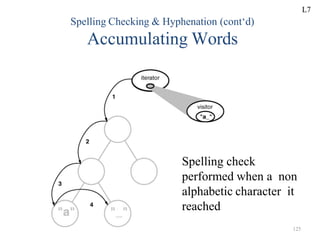
Accumulating Words
Spelling check
performed when a non
alphabetic character it
reached
L7
125
Spelling Checking & Hyphenation (cont‘d)
Interaction Diagram
• The iterator controls the order in which accept() is called on each glyph in
the composition
• accept() then visits the glyph to perform the desired action
• The Visitor can be sub-classed to implement various desired actions
126
L7
127
Spelling Checking & Hyphenation (cont‘d)
HyphenationVisitor
• gets character code from each character glyph
• examines words accumulated from character glyphs
• at potential hyphenation point, inserts a...
class HyphenationVisitor : public Visitor {
public:
void visit (Character &);
void visit (Rectangle &);
void visit (Row &);
// etc. for all relevant Glyph subclasses
};
L7
Spelling Checking & Hyphenation (cont‘d)
Discretionary(left to individual choice or judgment) Glyph
• looks like a hyphen when at end of a line
• has no appearance otherwise
• Compositor considers its presence when determining
linebreaks
L7
128
Spelling Checking & Hyphenation (cont‘d)
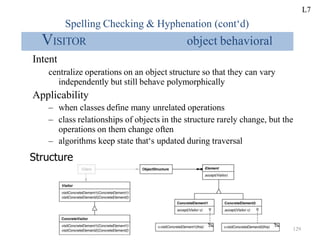
VISITOR object behavioral
Intent
centralize operations on an object structure so that they can vary
independently but still behave polymorphically
Applicability
– when classes define many unrelated operations
– class relationships of objects in the structure rarely change, but the
operations on them change often
– algorithms keep state that‘s updated during traversal
Structure
L7
129
130
Spelling Checking & Hyphenation (cont‘d)
VISITOR (cont‘d) object behavioral
SpellCheckerVisitor spell_check_visitor;
for (Glyph::iterator i = glyphs.begin ();
i != glyphs.end ();
i++) {
(*i)->accept (spell_check_visitor);
}
HyphenationVisitor hyphenation_visitor;
for (Glyph::iterator i = glyphs.begin ();
i != glyphs.end ();
i++) {
(*i)->accept (hyphenation_visitor);
}
L7
124
Spelling Checking & Hyphenation (cont‘d)
VISITOR (cont‘d)
Consequences
object behavioral
+ flexibility: visitor & object structure are independent
+ localized functionality
– circular dependency between Visitor & Element interfaces
– Visitor brittle to new ConcreteElement classes
Implementation
– double dispatch
– general interface to elements of object structure
Known Uses
– ProgramNodeEnumerator in Smalltalk-80 compiler
– IRIS Inventor scene rendering
– TAO IDL compiler to handle different backends
L8
132
Part III: Wrap-Up
Concluding Remarks
• design reuse
• uniform design vocabulary
• understanding, restructuring, & team
communication
• provides the basis for automation
• a ―
new‖ way to think about design
L8
133
Pattern References
Books
Timeless Way of Building, Alexander, ISBN 0-19-502402-8
APattern Language, Alexander, 0-19-501-919-9
Design Patterns, Gamma, et al., 0-201-63361-2 CD version 0-201-63498-8
Pattern-Oriented Software Architecture, Vol. 1, Buschmann, et al.,
0-471-95869-7
Pattern-Oriented Software Architecture, Vol. 2, Schmidt, et al.,
0-471-60695-2
Pattern-Oriented Software Architecture, Vol. 3, Jain & Kircher,
0-470-84525-2
Pattern-Oriented Software Architecture, Vol. 4, Buschmann, et al.,
0-470-05902-8
L8
134
Pattern References (cont‘d)
More Books
Analysis Patterns, Fowler; 0-201-89542-0
Concurrent Programming in Java, 2nd ed., Lea, 0-201-31009-0
Pattern Languages of Program Design
Vol. 1, Coplien, et al., eds., ISBN 0-201-60734-4
Vol. 2, Vlissides, et al., eds., 0-201-89527-7
Vol. 3, Martin, et al., eds., 0-201-31011-2
Vol. 4, Harrison, et al., eds., 0-201-43304-4
Vol. 5, Manolescu, et al., eds., 0-321-32194-4
AntiPatterns, Brown, et al., 0-471-19713-0
Applying UML & Patterns, 2nd ed., Larman, 0-13-092569-1
Pattern Hatching, Vlissides, 0-201-43293-5
The Pattern Almanac 2000, Rising, 0-201-61567-3
L8
135
Pattern References (cont‘d)
Even More Books
Small Memory Software, Noble & Weir, 0-201-59607-5
Microsoft Visual Basic Design Patterns, Stamatakis, 1-572-31957-7
Smalltalk Best Practice Patterns, Beck; 0-13-476904-X
The Design Patterns Smalltalk Companion, Alpert, et al.,
0-201-18462-1
Modern C++ Design, Alexandrescu, ISBN 0-201-70431-5
Building Parsers with Java, Metsker, 0-201-71962-2
Core J2EE Patterns,Alur, et al., 0-130-64884-1
Design Patterns Explained, Shalloway & Trott, 0-201-71594-5
The Joy of Patterns, Goldfedder, 0-201-65759-7
The Manager Pool, Olson & Stimmel, 0-201-72583-5
L8
136
Pattern References (cont‘d)
Early Papers
―Object-Oriented Patterns,‖ P. Coad; Comm. of theACM, 9/92
―Documenting Frameworks using Patterns,‖ R. Johnson; OOPSLA ‘92
―Design Patterns: Abstraction & Reuse of Object-Oriented Design,‖
Gamma, Helm, Johnson, Vlissides, ECOOP ‘93
Articles
Java Report, Java Pro, JOOP, Dr. Dobb‘s Journal,
Java Developers Journal, C++ Report
L8
137
Pattern-Oriented Conferences
PLoP2007: Pattern Languages of Programs
October 2007, Collocated with OOPSLA
EuroPLoP2007, July 2007, Kloster Irsee, Germany
…
See hillside.net/conferences/ for
up-to-the-minute info.
L8
138
Mailing Lists
patterns@cs.uiuc.edu: present & refine patterns
patterns-discussion@cs.uiuc.edu: general discussion
gang-of-4-patterns@cs.uiuc.edu: discussion on Design Patterns
siemens-patterns@cs.uiuc.edu: discussion on
Pattern-Oriented Software Architecture
ui-patterns@cs.uiuc.edu: discussion on user interface patterns
business-patterns@cs.uiuc.edu: discussion on patterns for business processes
ipc-patterns@cs.uiuc.edu: discussion on patterns for distributed systems
See http://hillside.net/patterns/mailing.htm for an up-to-date list.
L8
139
Unit-III
S.NO. TOPIC
1 Creational Pattern Part-I Introduction
2
3
4
Abstract Factory
Builder
Factory Method
5 Prototype
6 Singleton
7 Repeated key points for Structural Patterns (Intent,
Motivation,Also KnownAs ……………)
8 (discussion of Creational patterns) Review
PPT Slides
L1 4 – 8
L2
L3
L4
L5
9 – 28
29 – 39
40 – 47
48 – 54
L6 55 – 66
140
What are creational patterns?
• The Creational Designpatternsthatdealwithobjectcreation
mechanisms,tryingto createobjectsinamannersuitableto thesituation.
• The creational patterns aim to separate a system from how its
objects are created, composed, and represented.
• They increase the system’s flexibility in terms of the what, who,
how, and when of object creation.
• Creational design patterns are composed of two dominant
ideas.
1. Encapsulating (to express or show the most important facts)
knowledge about which concrete classes the system uses.
2. Hiding how instances of these concrete classes are created and
combined.
L1
141
Benefits of creational patterns
• Creational patterns let you program to an interface defined
by an abstract class
• That lets you configure a system with “product”
objects that vary widely in structure and functionality
• Example: GUI systems
– InterViews GUI class library
– Multiple look-and-feels
– Abstract Factories for different screen
components
L1
142
Benefits of creational patterns
• Generic instantiation – Objects are instantiated without
havingto identifyaspecificclass typein clientcode(Abstract
Factory
,Factory)
• Simplicity – Make instantiation easier: callers do not have to
write long complex code to instantiate and set up an object
(Builder,Prototype pattern)
• Creationconstraints – Creationalpatterns canput bounds on
whocancreateobjects,howtheyare created,and whentheyare
created
L1
Creational patterns
1. Abstract Factory
2. Builder
3. Factory Method
4. Prototype
5. Singleton
144
Abstract Factory
Design Pattern
L2
145
Abstract Factory
Provide an interface for creating families of related
or dependent objects without specifying their
concrete classes
L2
146
ABSTRACT FACTORY
(Object Creational)
• Intent:
– Provide an interface for creating families of
related or dependent objects without specifying
their concrete classes
• Also KnownAs: Kit.
L2
147
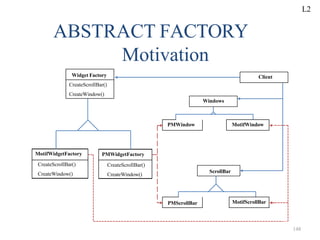
Motivation
• Motivation:
•User interface toolkit supports multiple look- and-
feel standards
(Motif (a decorative image or design, especially a
repeated one forming a pattern.), Presentation
Manager)
•Different appearances and behaviors for UI
widgets(an application, or a component of an
interface, that enables a user to perform a
function or access a service)
•Apps should not hard-code its widgets
L2
Widget Factory
CreateScrollBar()
CreateWindow()
MotifWidgetFactory
CreateScrollBar()
CreateWindow()
PMWidgetFactory
CreateScrollBar()
CreateWindow()
Client
Windows
PMWindow MotifWindow
ScrollBar
PMScrollBar MotifScrollBar
ABSTRACT FACTORY
Motivation
148
L2
149
• Solution:
•Abstract Widget Factory class
•Interfaces for creating each basic kind of
widget
•Abstract class for each kind of widgets,
•Concrete classes implement specific look-
and-feel.
Solution:
L2
150
Applicability
Use theAbstract Factory pattern when
– Asystem should be independent of how its products
are created, composed, and represented
– A system should be configured with one of multiple
families of produces
– A family of related product objects is designed to be
used together, and you need to enforce this constraint
– You want to provide a class library of products, and
you want to reveal just their interfaces, not their
implementations
L2
14
4
CreateProcB( )
AbstractFactory
Operations:
CreateProdA( )
Operations:
CreateProdA( )
CreateProcB( )
ConcreteFactory1
Operations:
CreateProdA( )
CreateProcB( )
ConcreteFactory2
AbstractProductA
ConcreteProductA1 ConcreteProductA2
AbstractProductB
ConcreteProductB1 ConcreteProductB2
client
Abstract Factory Structure L2
152
ABSTRACT FACTORY
Participants
• AbtractFactory
– Declares interface for operations that create
abstract product objects
• ConcreteFactory
– Implements operations to create concrete product
objects
• AbstractProduct
– Declares an interface for a type of product object
L2
153
• ABSTRACT FACTORY
Participants(cont..)
• Concrete Product:
•Defines a product object to be created by concrete
factory
•Implements the abstract product interface
• Client:
•Uses only interfaces declared byAbstract Factory
andAbstractProduct classes
L2
154
Collaborators
• Usually only one ConcreteFactory instance is used fo
an activation, matched to a specific application
context. It builds a specific product family for client
use the client doesn‘t care which family is used i
simply needs the services appropriate for the current
context.
• The client may use theAbstractFactory interface to
initiate creation, or some other agent may use the
AbstractFactory on the client‘s behalf.
L2
155
Presentation Remark
• Here, we often use a sequence diagram
(event-trace) to show the dynamic
interactions between participants.
• For the Abstract Factory Pattern, the
dynamic interaction is simple, and a
sequence diagram would not add much new
information.
L2
150
Consequences
• TheAbstract Factory Pattern has the following
benefits:
– It isolates concrete classes from the client.
• You use the Abstract Factory to control the classes of objects the
client creates.
• Product names are isolated in the implementation of the
ConcreteFactory, clients use the instances through their abstract
interfaces.
– Exchanging product families is easy.
• None of the client code breaks because the abstract interfaces
don‘t change.
• Because the abstract factory creates a complete family of
products, the whole product family changes when the concrete
factory is changed.
L2
151
Consequences
• More benefits of theAbstract Factory
Pattern
– It supports the imposition of constraints on
product families, e.g., always useA1 and B1
together, otherwise useA2 and B2 together.
L2
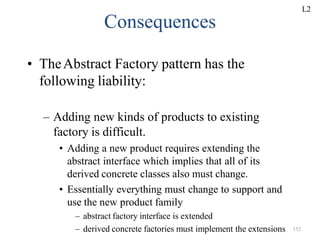
– Adding new kinds of products to existing
factory is difficult.
• Adding a new product requires extending the
abstract interface which implies that all of its
derived concrete classes also must change.
• Essentially everything must change to support and
use the new product family
– abstract factory interface is extended
– derived concrete factories must implement the extensions 152
Consequences
• TheAbstract Factory pattern has the
following liability:
L2
– alternately concrete factory can be implemented using
prototype.
• only one is needed for all families of products
• product classes now have special requirements - they
participate in the creation
159
Implementation
• Concrete factories are often implemented as
singletons.
• Creating the products
– Concrete factory usually use the factory method.
• simple
• new concrete factory is required for each product family
L2
155
Implementation
• Defining extensible factories by using
create function with an argument
– only one virtual create function is needed for
theAbstractFactory interface
– all products created by a factory must have the
same base class or be able to be safely coerced
to a given type
– it is difficult to implement subclass specific
operations
L2
161
Code Examples
• Skeleton Example
– Abstract Factory Structure
– Skeleton Code
• Neural Net Example
– Neural Net Physical Structure
– Neural Net Logical Structure
– Simulated Neural Net Example
L2
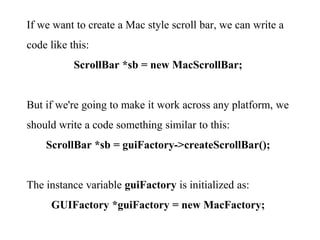
If we want to create a Mac style scroll bar, we can write a
code like this:
ScrollBar *sb = new MacScrollBar;
But if we're going to make it work across any platform, we
should write a code something similar to this:
ScrollBar *sb = guiFactory->createScrollBar();
The instance variable guiFactory is initialized as:
GUIFactory *guiFactory = new MacFactory;
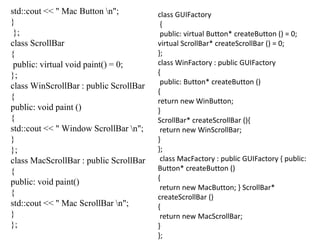
Here is the example code:
#include <iostream>
class Button
{
public: virtual void paint() = 0;
};
class WinButton : public Button
{
public: void paint ()
{
std::cout << " Window Button n";
}
};
class MacButton : public Button
{
public: void paint ()
{
std::cout << " Mac Button n";
}
};
class ScrollBar
{
public: virtual void paint() = 0;
};
class WinScrollBar : public ScrollBar
{
public: void paint ()
{
std::cout << " Window ScrollBar n";
}
};
class MacScrollBar : public ScrollBar
{
public: void paint()
{
std::cout << " Mac ScrollBar n";
}
};
class GUIFactory
{
public: virtual Button* createButton () = 0;
virtual ScrollBar* createScrollBar () = 0;
};
class WinFactory : public GUIFactory
{
public: Button* createButton ()
{
return new WinButton;
}
ScrollBar* createScrollBar (){
return new WinScrollBar;
}
};
class MacFactory : public GUIFactory { public:
Button* createButton ()
{
return new MacButton; } ScrollBar*
createScrollBar ()
{
return new MacScrollBar;
}
};
int main()
{
GUIFactory* guiFactory;
Button *btn;
ScrollBar *sb;
guiFactory = new MacFactory;
btn = guiFactory->createButton();
btn -> paint();
sb = guiFactory->createScrollBar();
sb -> paint();
guiFactory = new WinFactory;
btn = guiFactory->createButton();
btn -> paint();
sb = guiFactory->createScrollBar();
sb -> paint();
return 0;
}
Output:
Mac Button Mac ScrollBar Window
Button Window ScrollBar iPhone
Button iPhone ScrollBar
156
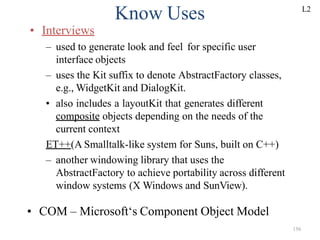
Know Uses
• Interviews
– used to generate look and feel for specific user
interface objects
– uses the Kit suffix to denote AbstractFactory classes,
e.g., WidgetKit and DialogKit.
• also includes a layoutKit that generates different
composite objects depending on the needs of the
current context
ET++(A Smalltalk-like system for Suns, built on C++)
– another windowing library that uses the
AbstractFactory to achieve portability across different
window systems (X Windows and SunView).
• COM – Microsoft‘s Component Object Model
L2
167
Related Patterns
• Factory Method - a virtual constructor
• Prototype -asks products to clone
themselves
• Singleton -allows creation of only a single
instance
L2
168
BUILDER
(Object Creational)
• Intent:
Separate the construction of a complex object from
its representation so that the same construction
process can create different representations
• Motivation:
– RTF(Rich Text Format) reader should be able to
convert RTF to many text format
– Adding new conversions without modifying the
reader should be easy
L3
170
• Solution:
•Configure RTFReader class with a Text
Converter object
•Subclasses of Text Converter specialize in
different conversions and formats
•TextWidgetConverter will produce a
complex UI object and lets the user see and
edit the text
L3
171
Why do we use Builder?
• Common manner
to Create an
Instance
– Constructor!
– Each Parts
determined by
Parameter of the
Constructor
public class Room {
private int area;
private int windows;
public String purpose;
Room() {
}
Room(int newArea, int newWindows,
String newPurpose){
area = newArea;
windows = newWindows;
purpose = newPurpose;
}
}
There are Only 2 different ways
to Create an Instance part-by-part.
L3
172
Why do we use Builder?
• In the previous example,
– We can either determine all the arguments
or determine nothing and just construct.
We can‘t determine arguments partially.
– We can‘t control whole process to
Create an instance.
– Restriction of ways to Create an Object
☞ Bad Abstraction & Flexibility
L3
173
Discussion
• Uses Of Builder
– Parsing Program(RTF converter)
– GUI
L3
Applicability
Use the Builder pattern when
The algorithm for creating a complex object should be
independent of the parts that make up the object and how
they are assembled
The construction process must allow different
representations for the object that is constructed.
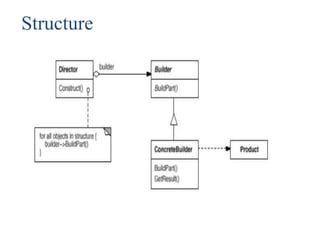
Structure
Participants
Builder (TextConverter)
 Specifies an abstract interface for creating parts of a Product object.
ConcreteBuilder (ASCIIConverter, TeXConverter, TextWidgetConverter)
 Constructs and assembles parts of the product by implementing the Builder interface.
Defines and keeps track of the representation it creates.
Provides an interface for retrieving the product (e.g., GetASCIIText, GetTextWidget).
Director (RTFReader)
Constructs an object using the Builder interface.
Product (ASCIIText, TeXText, TextWidget)
 Represents the complex object under construction. ConcreteBuilder builds the
product's internal representation and defines the process by which it's assembled.
Includes classes that define the constituent parts, including interfaces for assembling the
parts into the final result.
Collaborations
The client creates the Director object and configures it
with the desired Builder object.
Director notifies the builder whenever a part of the
product should be built.
Builder handles requests from the director and adds
parts to the product.
The client retrieves the product from the builder.
The following interaction diagram illustrates how
Builder and Director cooperate with a client.
Consequences
1. It lets you vary a product's internal representation.
2. It isolates code for construction and representation.
3. It gives you finer control over the construction process.
Implementation
Typically there's an abstract Builder class that defines an operation
for each component that a director may ask it to create. The
operations do nothing by default. A ConcreteBuilder class
overrides operations for components it's interested in creating.
Here are other implementation issues to consider:
1. Assembly and construction interface.
2. Why no abstract class for products?
3. Empty methods as default in Builder.
Sample Code
#include <iostream.h>
#include <stdio.h>
#include <string.h>
enum PersistenceType
{
File, Queue, Pathway
};
struct PersistenceAttribute
{
PersistenceType type;
char value[30];
};
class DistrWorkPackage
{
public:
DistrWorkPackage(char *type)
{
sprintf(_desc, "Distributed Work Package for: %s", type);
}
void setFile(char *f, char *v)
{
sprintf(_temp, "n File(%s): %s", f, v);
strcat(_desc, _temp);
}
void setQueue(char *q, char *v)
{
sprintf(_temp, "n Queue(%s): %s", q, v);
strcat(_desc, _temp);
}
void setPathway(char *p, char *v)
{
sprintf(_temp, "n Pathway(%s): %s", p, v);
strcat(_desc, _temp);
}
const char *getState()
{
return _desc;
}
private:
char _desc[200], _temp[80];
};
class Builder
{
public:
virtual void configureFile(char*) = 0;
virtual void configureQueue(char*) = 0;
virtual void configurePathway(char*) = 0;
DistrWorkPackage *getResult()
{
return _result;
}
protected:
DistrWorkPackage *_result;
};
class UnixBuilder: public Builder
{
public:
UnixBuilder()
{
_result = new DistrWorkPackage("Unix");
}
void configureFile(char *name)
{
_result->setFile("flatFile", name);
}
void configureQueue(char *queue)
{
_result->setQueue("FIFO", queue);
}
void configurePathway(char *type)
{
_result->setPathway("thread", type);
}
};
class VmsBuilder: public Builder
{
public:
VmsBuilder()
{
_result = new DistrWorkPackage("Vms");
}
void configureFile(char *name)
{
_result->setFile("ISAM", name);
}
void configureQueue(char *queue)
{
_result->setQueue("priority", queue);
}
void configurePathway(char *type)
{
_result->setPathway("LWP", type);
}
};
class Reader
{
public:
void setBuilder(Builder *b)
{
_builder = b;
}
void construct(PersistenceAttribute[], int);
private:
Builder *_builder;
};
void Reader::construct(PersistenceAttribute list[], int num)
{
for (int i = 0; i < num; i++)
if (list[i].type == File)
_builder->configureFile(list[i].value);
else if (list[i].type == Queue)
_builder->configureQueue(list[i].value);
else if (list[i].type == Pathway)
_builder->configurePathway(list[i].value);
}
const int NUM_ENTRIES = 6;
PersistenceAttribute input[NUM_ENTRIES] =
{
{
File, "state.dat"
}
,
{
File, "config.sys"
}
,
{
Queue, "compute"
}
,
{
Queue, "log"
}
,
{
Pathway, "authentication"
}
,
{
Pathway, "error processing"
}
};
int main()
{
UnixBuilder unixBuilder;
VmsBuilder vmsBuilder;
Reader reader;
reader.setBuilder(&unixBuilder);
reader.construct(input, NUM_ENTRIES);
cout << unixBuilder.getResult()->getState() << endl;
reader.setBuilder(&vmsBuilder);
reader.construct(input, NUM_ENTRIES);
cout << vmsBuilder.getResult()->getState() << endl;
}
Output
Distributed Work Package for: Unix File(flatFile): state.dat File(flatFile): config.sys Queue(FIFO): compute
Queue(FIFO): log Pathway(thread): authentication Pathway(thread): error processing Distributed Work
Package for: Vms File(ISAM): state.dat File(ISAM): config.sys Queue(priority): compute Queue(priority):
log Pathway(LWP): authentication Pathway(LWP): error processing
Known Uses
The RTF converter application is from ET++ [WGM88].
Its text building block uses a builder to process text stored in the RTF format.
Builder is a common pattern in Smalltalk-80 [Par90]:
The Parser class in the compiler subsystem is a Director that takes a
ProgramNodeBuilder object as an argument. A Parser object notifies its
ProgramNodeBuilder object each time it recognizes a syntactic construct. When the
parser is done, it asks the builder for the parse tree it built and returns it to the
client.
ClassBuilder is a builder that Classes use to create subclasses for themselves. In
this case a Class is both the Director and the Product.
ByteCodeStream is a builder that creates a compiled method as a byte array.
ByteCodeStream is a nonstandard use of the Builder pattern, because the complex
object it builds is encoded as a byte array, not as a normal Smalltalk object. But the
interface to ByteCodeStream is typical of a builder, and it would be easy to replace
ByteCodeStream with a different class that represented programs as a composite
object.
Related Patterns
Abstract Factory (99) is similar to Builder in that it too
may construct complex objects.
A Composite (183) is what the builder often builds.
186
FACTORY METHOD
(Class Creational)
• Intent:
– Define an interface for creating an object, but let
subclasses decide which class to instantiate.
– Factory Method lets a class defer instantiation to
subclasses.
• Motivation:
– Framework use abstract classes to define and maintain
relationships between objects
– Framework has to create objects as well - must instantiate
classes but only knows about abstract classes - which it
cannot instantiate
L4
187
Motivation:
• Motivation: Factory method encapsulates
knowledge of which subclass to create -
moves this knowledge out of the framework
• Also Known As: Virtual Constructor
L4
docs
Document
Open()
Close()
Save()
Revert()
Application
MyDocument
CreateDocument()
NewDocument()
OpenDocument()
MyApplication
CreateDocument()
Document* doc=CreateDocument();
docs.Add(doc);
doc->Open();
return new MyDocument
FACTORY METHOD
Motivation
188
L4
189
Applicability
• Use the Factory Method pattern when
– a class can´t anticipate the class of objects it must
create.
– a class wants its subclasses to specify the objects
it creates.
– classes delegate responsibility to one of several
helper subclasses, and you want to localize the
knowledge of which helper subclass is the
delegate.
L4
Product
ConcreteProduct
Creator
FactoryMethod()
AnOperation()
ConcreteCreator
FactoryMethod()
...
product = FactoryMethod()
...
return new ConcreteProduct
FACTORY METHOD
Structure
190
L4
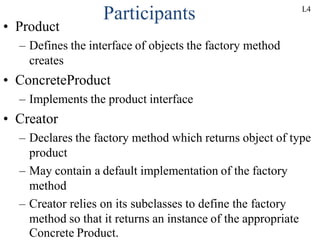
Participants
• Product
– Defines the interface of objects the factory method
creates
• ConcreteProduct
– Implements the product interface
• Creator
– Declares the factory method which returns object of type
product
– May contain a default implementation of the factory
method
– Creator relies on its subclasses to define the factory
method so that it returns an instance of the appropriate
Concrete Product.
L4
177
Factory Method
Creator
Product createProduct()
Product
• Defer object instantiation to subclasses
• Eliminates binding of application-specific subclasses
• Connects parallel class hierarchies
• Arelated pattern isAbstractFactory
operation()
ConcreteCreator
Product createProduct()
ConcreteProduct
operation()
return new ConcreteProduct();
L4
178
Factory Method (2)
• Example: creating manipulators on connectors
Figure
createManipulator()
0..1
Manipulator
attach(Figure)
ArcManipulator
attach(Figure)
BoundsManipulator
attach(Figure)
Connector
createManipulator()
RectFigure
createManipulator()
manip = new BoundUsMNIT
a-nIIIipulator();
manip = newArcManipulator();
Interactor
L4
Collaborations
Creator relies on its subclasses to define the factory
method so that it returns an instance of the appropriate
ConcreteProduct.
Consequences
Factory methods eliminate the need to bind application-specific
classes into your code. The code only deals with the Product
interface; therefore it can work with any user-defined
ConcreteProduct classes.
A potential disadvantage of factory methods is that clients might
have to subclass the Creator class just to create a particular
ConcreteProduct object. Subclassing is fine when the client has to
subclass the Creator class anyway, but otherwise the client now
must deal with another point of evolution.
Consequences
Here are two additional consequences of the Factory
Method pattern:
1. Provides hooks for subclasses.
2. Connects parallel class hierarchies.
Implementation
Consider the following issues when applying the Factory
Method pattern:
1. Two major varieties.
2. Parameterized factory methods.
3. Language-specific variants and issues.
4. Using templates to avoid subclassing.
5. Naming conventions.
Sample Code
The function CreateMaze builds and returns a maze. One
problem with this function is that it hard-codes the classes
of maze, rooms, doors, and walls. We'll introduce factory
methods to let subclasses choose these components. First
we'll define factory methods in MazeGame for creating
the maze, room, wall, and door objects:
class MazeGame
{
public: Maze* CreateMaze(); // factory methods:
virtual Maze* MakeMaze() const
{
return new Maze;
}
virtual Room* MakeRoom(int n) const
{ return new Room(n);
} virtual Wall* MakeWall() const
{
return new Wall;
}
virtual Door* MakeDoor(Room* r1, Room* r2)const
{
return new Door(r1, r2);
}
};
Now we can rewrite CreateMaze to use these factory methods: Maze*
MazeGame::CreateMaze ()
{
Maze* aMaze = MakeMaze();
Room* r1 = MakeRoom(1);
Room* r2 = MakeRoom(2);
Door* theDoor = MakeDoor(r1, r2);
aMaze->AddRoom(r1);
aMaze->AddRoom(r2);
r1->SetSide(North, MakeWall());
r1->SetSide(East, theDoor);
r1->SetSide(South, MakeWall());
r1->SetSide(West, MakeWall());
r2->SetSide(North, MakeWall());
r2->SetSide(East, MakeWall());
r2->SetSide(South, MakeWall());
r2->SetSide(West, theDoor); return aMaze;
}
class BombedMazeGame :
public MazeGame
{
public: BombedMazeGame();
virtual Wall* MakeWall() const
{
return new BombedWall;
}
virtual Room* MakeRoom(int n) const
{
return new RoomWithABomb(n); } };
An EnchantedMazeGame variant might be
defined like this: class EnchantedMazeGame :
public MazeGame
{
public: EnchantedMazeGame();
virtual Room* MakeRoom(int n) const
{
return new EnchantedRoom(n, CastSpell());
}
virtual Door* MakeDoor(Room* r1, Room* r2)
const
{
return new DoorNeedingSpell(r1, r2);
}
protected: Spell* CastSpell() const;
};
Known Uses
Factory methods pervade toolkits and frameworks. The preceding
document example is a typical use in MacApp and ET++
[WGM88]. The manipulator example is from Unidraw.
Class View in the Smalltalk-80 Model/View/Controller framework
has a method defaultController that creates a controller, and this
might appear to be a factory method [Par90].
But subclasses of View specify the class of their default controller
by defining defaultControllerClass, which returns the class from
which defaultController creates instances. So
defaultControllerClass is the real factory method, that is, the
method that subclasses should override.
A more esoteric example in Smalltalk-80 is the factory method
parserClass defined by Behavior (a superclass of all objects
representing classes). This enables a class to use a customized
parser for its source code.
For example, a client can define a class SQLParser to analyze
the source code of a class with embedded SQL statements.
The Behavior class implements parserClass to return the
standard Smalltalk Parser class. A class that includes embedded
SQL statements overrides this method (as a class method) and
returns the SQLParser class.
The Orbix ORB system from IONA Technologies [ION94] uses
Factory Method to generate an appropriate type of proxy (see
Proxy (233)) when an object requests a reference to a remote
object.
Factory Method makes it easy to replace the default proxy with
one that uses client-side caching, for example.
Related Patterns
Abstract Factory (99) is often implemented with factory
methods. The Motivation example in the Abstract Factory pattern
illustrates Factory Method as well.
Factory methods are usually called within Template Methods
(360). In the document example above, NewDocument is a
template method.
Prototypes (133) don't require subclassing Creator. However,
they often require an Initialize operation on the Product class.
Creator uses Initialize to initialize the object. Factory Method
doesn't require such an operation.
202
PROTOTYPE
(Object Creational)
• Intent:
– Specify the kinds of objects to create using a
prototypical instance, and create new objects by
copying this prototype.
• Motivation:
– Framework implements Graphic class for
graphical components and GraphicTool class for
tools manipulating/creating those components
L5
203
Motivation
– Actual graphical components are application-
specific
– How to parameterize instances of Graphic Tool
class with type of objects to create?
– Solution: create new objects in Graphic Tool by
cloning a prototype object instance
L5
Tool
Manipulate()
Rotate Tool Graphic Tool
Manipulate() Manipulate()
Staff MusicalNote
WholeNote
Return copy of self
HalfNote
Graphic
Draw(Position)
Clone()
p = prototype ->Clone()
while(user drags mouse){
p ->Draw(new position)
}
Insert p into drawing
Draw(Position)
Clone()
Draw(Position)
Clone()
Return copy of self
Draw(Position)
Clone()
prototype
PROTOTYPE
Motivation
204
L5
205
Applicability
• Use the Prototype pattern when a system should
be independent of how its products are created,
composed, and represented;
– when the classes to instantiate are specified at run-
time, for example, by dynamic loading; or
– to avoid building a class hierarchy of factories that
parallels the class hierarchy of products; or
L5
206
Applicability
– when instances of a class can have one of only a
few different combinations of state. It may be
more convenient to install a corresponding
number of prototypes and clone them rather than
instantiating the class manually, each time with
the appropriate state.
L5
client
Operation()
p = prototype ->Clone()
ConcretePrototype1
return copy of self
prototype
Prototype
Clone()
return copy of self
Clone()
ConcretePrototype2
Clone()
PROTOTYPE
Structure
207
L5
208
Participants:
• Prototype (Graphic)
– Declares an interface for cloning itself
• ConcretePrototype (Staff, WholeNote, HalfNote)
– Implements an interface for cloning itself
• Client (GraphicTool)
– Creates a new object by asking a prototype to clone itself
Collaborations:
• Aclient asks a prototype to clone Itself.
L5
Consequences
Prototype has many of the same consequences that Abstract
Factory (99) and Builder (110) have: It hides the concrete
product classes from the client, thereby reducing the number of
names clients know about. Moreover, these patterns let a client
work with application-specific classes without modification.
Additional benefits of the Prototype pattern are listed below.
1. Adding and removing products at run-time.
2. Specifying new objects by varying values.
3. Specifying new objects by varying structure.
4. Reduced subclassing.
5. Configuring an application with classes dynamically.
Implementation Sample Code
Consider the following issues when implementing
prototypes:
1. Using a prototype manager.
2. Implementing the Clone operation.
3. Initializing clones.
Sample Code
#include <iostream>
#include <vector>
#include <algorithm>
#include <functional>
using namespace std;
const int N = 4;
// Prototype
class Document
{
public:
virtual Document* clone() const = 0;
virtual void store() const = 0;
virtual ~Document() { }
};
// Concrete prototypes : xmlDoc, plainDoc,
spreadsheetDoc
class xmlDoc : public Document
{
public:
Document* clone() const { return new xmlDoc; }
void store() const { cout << "xmlDocn"; }
};
class plainDoc : public Document
{
public:
Document* clone() const { return new plainDoc; }
void store() const { cout << "plainDocn"; }
};
class spreadsheetDoc : public Document
{
public:
Document* clone() const { return new spreadsheetDoc; }
void store() const { cout << "spreadsheetDocn"; }
};
// makeDocument() calls Concrete Portotype's clone() method
// inherited from Prototype
class DocumentManager {
public:
static Document* makeDocument( int choice );
~DocumentManager(){}
private:
static Document* mDocTypes[N];
};
Document* DocumentManager::mDocTypes[] =
{
0, new xmlDoc, new plainDoc, new spreadsheetDoc
};
Document* DocumentManager::makeDocument( int choice
)
{
return mDocTypes[choice]->clone();
}
// for_each op ()
struct Destruct
{
void operator()(Document *a) const {
delete a;
}
};
// Client
int main() {
vector<Document*> docs(N);
int choice;
cout << "quit(0), xml(1), plain(2), spreadsheet(3): n";
while (true) {
cout << "Type in your choice (0-3)n";
cin >> choice;
if (choice <= 0 || choice >= N)
break;
docs[choice] =
DocumentManager::makeDocument( choice );
}
for (int i = 1; i < docs.size(); ++i)
if(docs[i]) docs[i]->store();
Destruct d;
// this calls Destruct::operator()
for_each(docs.begin(), docs.end(), d);
return 0;
}
Output:
quit(0), xml(1), plain(2), spreadsheet(3):
Type in your choice (0-3)
1
Type in your choice (0-3)
2
Type in your choice (0-3)
3
Type in your choice (0-3)
0
xmlDoc
plainDoc
spreadsheetDoc
Known Uses
Perhaps the first example of the Prototype pattern was in
Ivan Sutherland's Sketchpad system [Sut63]. The first
widely known application of the pattern in an object-
oriented language was in ThingLab, where users could
form a compositeobject and then promote it to a prototype
by installing it in a library of reusable objects [Bor81].
Goldberg and Robson mention prototypes as a pattern
[GR83], but Coplien [Cop92] gives a much more complete
description. He describes idioms related to the Prototype
pattern for C++ and gives many examples and variations.
Etgdb is a debugger front-end based on ET++ that provides a point-and-click
interface to different line-oriented debuggers. Each debugger has a corresponding
DebuggerAdaptor subclass. For example, GdbAdaptor adapts etgdb to the
command syntax of GNU gdb, while SunDbxAdaptor adapts etgdb to Sun's dbx
debugger. Etgdb does not have a set of DebuggerAdaptor classes hard-coded into
it.
Instead, it reads the name of the adaptor to use from an environment variable,
looks for a prototype with the specified name in a global table, and then clones the
prototype. New debuggers can be added to etgdb by linking it with the
DebuggerAdaptor that works for that debugger.
The "interaction technique library" in Mode Composer stores prototypes of
objects that support various interaction techniques [Sha90]. Any interaction
technique created by the Mode Composer can be used as a prototype by placing it
in this library. The Prototype pattern lets Mode Composer support an unlimited
set of interaction techniques. The music editor example discussed earlier is based
on the Unidraw drawing framework [VL90].
Related Patterns
Prototype and Abstract Factory (99) are competing patterns in
some ways, as we discuss at the end of this chapter. They can also
be used together, however. An Abstract Factory might store a set
of prototypes from which to clone and return product objects.
Designs that make heavy use of the Composite (183) and
Decorator (196) patterns often can benefit from Prototype as well.
216
SINGELTON
• Intent:
– Ensure a class only has one instance, and provide
a global point of access to it.
• Motivation:
– Some classes should have exactly one instance
(one print spooler, one file system, one window
manager)
– Aglobal variable makes an object accessible but
doesn‘t prohibit instantiation of multiple objects
– Class should be responsible for keeping track of
its sole interface
L6
217
Applicability
• Use the Singleton pattern when
– there must be exactly one instance of a class, and
it must be accessible to clients from a well-known
access point.
– when the sole instance should be extensible by
subclassing, and clients should be able to use an
extended instance without modifying their code.
L6
Singleton
static Instance()
SingletonOperation()
GetSingletonData()
Static uniquelnstance
singletonData
return uniquelnstance
SINGLETON
Structure
218
L6
219
Participants and Collaborations
• Singleton: Defines an instance operation that lets
clients access its unique interface
• Instance is a class operation (static in Java)
• May be responsible for creating its own unique
instance
• Collaborations: Clients access a Singleton instance
solely through Singleton‘s Instance operation.
L6
Consequences
The Singleton pattern has several benefits:
1. Controlled access to sole instance.
2. Reduced name space.
3. Permits refinement of operations and representation.
4. Permits a variable number of instances.
5. More flexible than class operations.
221
Implementation Points
• Generally, a single instance is held by the
object, and controlled by a single interface.
• Sub classing the Singleton may provide
both default and overridden functionality.
L6
222
Singleton – Example 1
• AnApplication class, where instantiating it makes
a connection to the base operating system and sets
up the rest of the toolkit‘s framework for the user
interface.
• In the Qt toolkit:
QApplication* app = new QApplication(argc, argv)
L6
223
Singleton – Example 2
• Astatus bar is required for the application, and
various application pieces need to be able to
update the text to display information to the user.
However, there is only one status bar, and the
interface to it should be limited. It could be
implemented as a Singleton object, allowing only
one instance and a focal point for updates. This
would allow updates to be queued, and prevent
messages from being overwritten too quickly for
the user to read them.
L6
Sample Code
#include <iostream>
using namespace std;
class Singleton
{
public: static Singleton *getInstance();
private: Singleton()
{}
static Singleton* instance;
};
Singleton* Singleton::instance = 0;
Singleton* Singleton::getInstance()
{
if(!instance)
{
instance = new Singleton();
cout << "getInstance():
First instancen";
return instance;
}
else
{
cout << "getInstance():
previous instancen";
return instance;
}
}
int main()
{
Singleton *s1 = Singleton::getInstance();
Singleton *s2 = Singleton::getInstance();
return 0;
}
Output from the run:
getInstance(): First instance
getInstance(): previous instance
Known Uses
An example of the Singleton pattern in Smalltalk-80
[Par90] is the set of changes to the code, which is
ChangeSet current. A more subtle example is the
relationship between classes and their metaclasses. A
metaclass is the class of a class, and each metaclass has
one instance. Metaclasses do not have names (except
indirectly through their sole instance), but they keep track
of their sole instance and will not normally create another.
The InterViews user interface toolkit [LCI+92] uses the
Singleton pattern to access the unique instance of its
Session and WidgetKit classes, among others.
Session defines the application's main event dispatch
loop, stores the user's database of stylistic preferences, and
manages connections to one or more physical displays.
WidgetKit is an Abstract Factory (99) for defining the
look and feel of user interface widgets.
The WidgetKit::instance() operation determines the
particular WidgetKit subclass that's instantiated based on
an environment variable that Session defines.
A similar operation on Session determines whether
monochrome or color displays are supported and
configures the singleton Session instance accordingly.
Related Patterns
Many patterns can be implemented using the Singleton
pattern.
Abstract Factory (99),
Builder (110), and
Prototype (133).
Singleton Code [1]
class Singleton {
public:
static Singleton* Instance();
}
protected:
Singleton();
private:
Static Singleton* _instance
// Only one instance can ever be created.
// Creation hidden inside Instance().
// Cannot access directly.
L6
228
229
Singleton Code [2]
Singleton* Singleton::_instance=0;
Singleton* Singleton:: Instance(){
if (_instance ==0) {
_instance=new Singleton;
}
Return _instance;
} // Clients access the singleton
// exclusively via the Instance member
// function.
L6
230
UNIT-IV
Structural patterns
231
Structural Pattern part-I introduction
Adaptor
Bridge
Composite
Repeated key points for Structural Patterns
(Intent, Motivation, Also Known As…)
Code Examples
Reference
S. No TOPIC
1
2
3
4
5
6
7
PPT Slides
L1
L2
L3
3 – 18
19 – 31
32 – 37
L4 38 – 40
L5 41 – 42
L6 43 – 44
L7 45 – 45
Structural patterns
 Structural patterns are concerned with how classes
and objects are composed to form larger structures.
 Structural class patterns use inheritance to compose
interfaces or implementations.
 As a simple example,
consider how multiple inheritance mixes two or
more classes into one. The result is a class that
combines the properties of its parent classes. This
pattern is particularly useful for making independently
developed class libraries work together.
Another example is the class form of the Adapter (157)
pattern.
1.Adapter
2.Bridge
3.Composite
4.Decorator
5.Façade
6.Flyweight
7.Proxy
Structural patterns
1. Adapter
• Intent:
Convert the interface of a
class into another interface
which is expected by the
client.
• Also KnowAs:
Wrapper
L1
234
Sometimes a toolkit class that's designed for reuse isn't reusable
only because its interface doesn't match the domain-specific
interface an application requires. Consider for example a drawing
editor that lets users draw and arrange graphical elements (lines,
polygons, text, etc.) into pictures and diagrams.
The drawing editor's key abstraction is the graphical object,
which has an editable shape and can draw itself. The interface for
graphical objects is defined by an abstract class called Shape.
The editor defines a subclass of Shape for each kind of graphical
object: a LineShape class for lines, a PolygonShape class for
polygons, and so forth.
Classes for elementary geometric shapes like LineShape and
PolygonShape are rather easy to implement, because their
drawing and editing capabilities are inherently limited.
Motivation
We can do this in one of two ways:
(1) by inheriting Shape's interface and TextView's
implementation or
(2) by composing a TextView instance within a TextShape
and implementing TextShape in terms of TextView's
interface.
These two approaches correspond to the class and object
versions of the Adapter pattern. We call TextShape an
adapter.
Motivation
1
237
1
L1
Applicability
• Use an existing class whose interface does not
match the requirement
• Create a reusable class though the
interfaces are not necessary compatible
with callers
• Want to use several existing subclasses,but
it is impractical to subclass everyone.
(Object Adapter Only)
238
L1
Structure (Class)
L1
239
Structure (Object)
L1
240
Class Adapter Pattern
• Pros
– Only 1 new object, no additional indirection
– Less code required than the objectAdapter
– Can overrideAdaptee's behaviour as required
• Cons
– Requires sub-classing (tough for single
inheritance)
– Less flexible than objectAdapter
L1
241
Object Adapter Pattern
• Pros
– More flexible than classAdapter
– Doesn't require sub-classing to work
– Adapter works withAdaptee and all of its
subclasses
• Cons
– Harder to overrideAdaptee behavior
– Requires more code to implement properly
L1
242
Participants
· Target (Shape)
Defines the domain-specific interface that Client uses.
· Client (DrawingEditor)
Collaborates with objects conforming to the Target interface.
· Adaptee (TextView)
Defines an existing interface that needs adapting.
· Adapter (TextShape)
Adapts the interface of Adaptee to the Target interface.
Collaborations
Clients call operations on an Adapter
instance. In turn, the adapter calls Adaptee
operations that carry out the request.
Consequences
Class and object adapters have different trade-offs.
A class adapter
adapts Adaptee to Target by committing to a concrete
Adapter class. As a consequence, a class adapter won't
work when we want to adapt a class and all its subclasses.
lets Adapter override some of Adaptee's behavior, since
Adapter is a subclass of Adaptee.
introduces only one object, and no additional pointer
indirection is needed to get to the adaptee.
An object adapter
lets a single Adapter work with many Adaptees—that is, the
Adaptee itself and all of its subclasses (if any). The Adapter can also
add functionality to all Adaptees at once.
 makes it harder to override Adaptee behavior. It will require
subclassing Adaptee and making Adapter refer to the subclass rather
than the Adaptee itself.
Here are other issues to consider when using the Adapter pattern:
1. How much adapting does Adapter do?
2. Pluggable adapters.
3. Using two-way adapters to provide transparency.
Implementation
Although the implementation of Adapter is usually
straightforward, here are some issues to keep in mind:
1. Implementing class adapters in C++.
2. Pluggable adapters.
The narrow interface leads to three implementation
approaches:
a. Using abstract operations.
b. Using delegate objects.
c. Parameterized adapters.
248
Sample Code
• You have
– legacy code
– current client
• Adapter changes interface of legacy code so client
can use it
• Adapter fills the gap b/w two interfaces
• No changes needed for either
– legacy code, or
– client
L1
249
class NewTime
{
public:
int GetTime() {
return
m_oldtime.get_time() *
1000 + 8;
}
private:
OldTime m_oldtime;
};
L1
Known Uses
The Motivation example comes from ET++Draw, a drawing
application based on ET++ [WGM88]. ET++Draw reuses the
ET++ classes for text editing by using a TextShape adapter class.
InterViews 2.6 defines an Interactor abstract class for user
interface elements such as scroll bars, buttons, and menus
[VL88]. It also defines a Graphic abstract class for structured
graphic objects such as lines, circles, polygons, and splines.
Both Interactors and Graphics have graphical appearances, but
they have different interfaces and implementations (they share
no common parent class) and are therefore incompatible—you
can't embed a structured graphic object in, say, a dialog box
directly
252
Related Patterns
• Adapter can be similar to the remote form
of Proxy. However, Proxy doesn't change
interfaces.
• Decorator enhances another object
without changing its interface.
• Bridge similar structure to Adapter, but
different intent. Separates interface from
implementation.
L1
253
2. The Bridge Pattern
L2
254
BRIDGE (Object Structural)
• Intent:
Decouple as abstraction from its implementation
so that the two can vary independently.
• Also KnownAs:
Handle/Body
L2
When an abstraction can have one of several possible
implementations, the usual way to accommodate them is to use
inheritance.
An abstract class defines the interface to the abstraction, and
concrete subclasses implement it in different ways. But this
approach isn't always flexible enough.
Inheritance binds an implementation to the abstraction
permanently, which makes it difficult to modify, extend, and
reuse abstractions and implementations independently.
Motivation
Consider the implementation of a portable Window abstraction
in a user interface toolkit.
This abstraction should enable us to write applications that
work on both the X Window System and IBM's Presentation
Manager (PM), for example.
Using inheritance, we could define an abstract class Window
and subclasses XWindow and PMWindow that implement the
Window interface for the different platforms
Motivation
Bridge
Entry
getText()
setText()
Destroy()
PersistentImp.
initialize()
store()
load()
Destroy()
Task
getPriority()
setPriority()
getText()
setText()
Destroy()
Appointment
getAlarm()
setAlarm()
getText()
setText()
Destroy()
OraclePImp
initialize()
store()
load()
destroy()
AccessPImp
initialize()
store()
load()
destroy()
L2
258
259
Applicability
When you want to avoid a permanent binding between an abstraction and its
implementation.
Both the abstractions and their implementations should be extensible by sub
classing.
Changes in the implementation of an abstraction should have no impact on
clients
When the implementation should be completely hidden from the client. (C++)
When you have a proliferation(the fact of something increasing a lot and
suddenly in number or amount) of classes.
When, unknown to the client, implementations are shared among multiple
objects.
L2
Structure
RefinedAbstraction ConcreteImplementerA ConcreteImplementerB
Implementer
OperationImp()
Client
Abstraction
L2
260
Participants
Abstraction (Window)
Defines the abstraction's interface.
Maintains a reference to an object of type Implementor.
RefinedAbstraction (IconWindow)
 Extends the interface defined by Abstraction.
Implementor (WindowImp)
 Defines the interface for implementation classes. This
interface doesn't have to correspond exactly to Abstraction's
interface; in fact the two interfaces can be quite different.
Typically the Implementor interface provides only primitive
operations, and Abstraction defines higher-level operations based
on these primitives.
ConcreteImplementor (XWindowImp, PMWindowImp)
Implements the Implementor interface and defines its
concrete implementation.
Collaborations
Abstraction forwards client requests to
its Implementor object.
Consequences
1. Decoupling interface and implementation.
2. Improved extensibility
3. Hiding implementation details from
clients.
Implementation
1. Only one Implementor.
2. Creating the right Implementor object.
3. Sharing implementors.
4. Using multiple inheritance.
Sample Code
// Java code to demonstrate
// bridge design pattern
// abstraction in bridge pattern
abstract class Vehicle {
protected Workshop workShop1;
protected Workshop workShop2;
protected Vehicle(Workshop workShop1,
Workshop workShop2)
{
this.workShop1 = workShop1;
this.workShop2 = workShop2;
}
abstract public void manufacture();
}
// Refine abstraction 1 in bridge
pattern
class Car extends Vehicle {
public Car(Workshop
workShop1, Workshop workShop2)
{
super(workShop1,
workShop2);
}
@Override
public void manufacture()
{
System.out.print("Car ");
workShop1.work();
workShop2.work();
}
}
// Refine abstraction 2 in bridge pattern
class Bike extends Vehicle {
public Bike(Workshop workShop1, Workshop
workShop2)
{
super(workShop1, workShop2);
}
@Override
public void manufacture()
{
System.out.print("Bike ");
workShop1.work();
workShop2.work();
}
}
// Implementor for bridge pattern
interface Workshop
{
abstract public void work();
}
// Concrete implementation 1 for bridge pattern
class Produce implements Workshop {
@Override
public void work()
{
System.out.print("Produced");
}
}
// Concrete implementation 2 for bridge pattern
class Assemble implements Workshop {
@Override
public void work()
{
System.out.print(" And");
System.out.println(" Assembled.");
}
}
// Demonstration of bridge design pattern
class BridgePattern {
public static void main(String[] args)
{
Vehicle vehicle1 = new Car(new
Produce(), new Assemble());
vehicle1.manufacture();
Vehicle vehicle2 = new Bike(new
Produce(), new Assemble());
vehicle2.manufacture();
}
}
Known Uses
The Window example above comes from ET++
[WGM88]. In ET++, WindowImp is called "WindowPort"
and has subclasses such as XWindowPort and
SunWindowPort.
The Window object creates its corresponding Implementor
object by requesting it from an abstract factory called
"WindowSystem." WindowSystem provides an interface
for creating platform-specific objects such as fonts,
cursors, bitmaps, and so forth. The ET++
Window/WindowPort design extends the Bridge pattern in
that the WindowPort also keeps a reference back to the
Window. The WindowPort implementor class usesthis
reference to notify Window about WindowPort-specific
events: the arrival of input events, window resizes, etc.
Related Patterns
An Abstract Factory (99) can create and configure a
particular Bridge.
The Adapter (157) pattern is geared toward making
unrelated classes work together.
It is usually applied to systems after they're designed.
Bridge, on the other hand, is used up-front in a design to
let abstractions and implementations vary independently.
269
Composite Pattern
• Intent :
Compose
represent
objects into tree structures to
part-whole hierarchies. Composite
lets clients treat individual objects and
compositions of objects uniformly.
L2
Motivation
Graphics applications like drawing editors and schematic capture
systems let users build complex diagrams out of simple
components.
The user can group components to form larger components,
which in turn can be grouped to form still larger components.
A simple implementation could define classes for graphical
primitives such as Text and Lines plus other classes that act as
containers for these primitives.
But there's a problem with this approach: Code that uses these
classes must treat primitive and container objects differently, even
if most of the time the user treats them identically.
Having to distinguish these objects makes the application more
complex. The Composite pattern describes how to use recursive
composition so that clients don't have to make this distinction.
The key to the Composite pattern is an abstract class that
represents both primitives and their containers. For the graphics
system, this class is Graphic. Graphic declares operations like Draw
that are specific to graphical objects.
It also declares operations that all composite objects share, such
as operations for accessing and managing its children. The
subclasses Line, Rectangle, and Text (see preceding class diagram)
define primitive graphical objects.
These classes implement Draw to draw lines, rectangles, and text,
respectively.
Since primitive graphics have no child graphics, none of these
subclasses implements child-related operations. The Picture class
defines an aggregate of Graphic objects.
Picture implements Draw to call Draw on its children, and it
implements child-related operations accordingly. Because the
Picture interface conforms to the Graphic interface, Picture objects
can compose other Pictures recursively.
Applicability
Use the Composite pattern when
You want to represent part-whole hierarchies of
objects.
You want clients to be able to ignore the difference
between compositions of objects and individual objects.
Clients will treat all objects in the composite structure
uniformly.
Structure
Participants
Component (Graphic)
declares the interface for objects in the composition.
implements default behavior for the interface common
to all classes, as appropriate.
declares an interface for accessing and managing its
child components.
 (optional) defines an interface for accessing a
component's parent in the recursive structure, and
implements it if that's appropriate.
Leaf (Rectangle, Line, Text, etc.)
 represents leaf objects in the composition. A leaf has
no children.
 defines behavior for primitive objects in the
composition.
Composite (Picture)
Defines behavior for components
having children.
 Stores child components.
 Implements child-related operations in
the Component interface.
Client
 Manipulates objects in the
composition through the Component
interface.
Collaborations
Clients use the Component class interface to interact
with objects in the composite structure.
If the recipient is a Leaf, then the request is handled
directly.
If the recipient is a Composite, then it usually forwards
requests to its child components, possibly performing
additional operations before and/or after forwarding.
279
Consequences L2
Defines class hierarchies consisting of primitive objects and composite objects.
Primitive objects can be composed into more complex objects, which in turn can be
composed, and so on recursively. Wherever client code expects a primitive object, it
can also take a composite object.
 Makes the client simple. Clients can treat composite structures and individual
objects uniformly. Clients normally don't know (and shouldn't care) whether they're
dealing with a leaf or a composite component. This simplifies client code, because it
avoids having to write tag-and-case-statement-style functions over the classes that
define the composition.
 Makes it easier to add new kinds of components. Newly defined Composite or
Leaf subclasses work automatically with existing structures and client code. Clients
don't have to be changed for new Component classes.
Can make your design overly general. The disadvantage of making it easy to add
new components is that it makes it harder to restrict the components of a
composite. Sometimes you want a composite to have only certain components.
With Composite, you can't rely on the type system to enforce those constraints for
you. You'll have to use run-time checks instead.
Implementation
There are many issues to consider when implementing the
Composite pattern:
1. Explicit parent references.
2. Sharing components.
3. Maximizing the Component interface.
4. Declaring the child management operations.
5. Should Component implement a list of Components?
6. Child ordering.
7. Caching to improve performance.
8. Who should delete components?
9. What's the best data structure for storing components?
Sample Code
Equipment such as computers and stereo components are often
organized into part-whole or containment hierarchies. For
example, a chassis can contain drives and planar boards, a bus can
contain cards, and a cabinet can contain chassis, buses, and so
forth. Such structures can be modeled naturally with the
Composite pattern. Equipment class defines an interface for all
equipment in the part-whole hierarchy.
class Equipment
{
public:
virtual Equipment();
const char* Name()
{
return _name;
}
virtual Watt Power();
virtual Currency NetPrice();
virtual Currency DiscountPrice();
virtual void Add(Equipment*);
virtual void Remove(Equipment*);
virtual Iterator* CreateIterator();
protected:
Equipment(const char*);
private:
const char* _name;
};
CompositeEquipment is the base class for equipment that
contains other equipment. It's also a subclass of Equipment.
Known Uses
288
BRIDGE (Object Structural)
• Intent: Decouple as abstraction from its
implementation so that the two can vary
independently.
• Also KnownAs: Handle/Body
L4
Motivation
Entry
oracleDBEntry FilesysEntry
L4
289
Oracle dbEntry FilesysEntry
Motivation
Entry
Appointment
OracleDBTask
Task
OracleDBApp. FilesysApp. FilesysTask
L4
290
245
Two-way Adapters
class SquarePeg {
public:
void virtual squarePegOperation() {
blah }
}
class RoundPeg {
public:
void virtual roundPegOperation() { blah
}
}
class PegAdapter: public SquarePeg,
RoundPeg {
public:
void virtual roundPegOperation() {
add some corners;
squarePegOperation();
}
void virtual squarePegOperation() {
add some corners;
roundPegOperation();
}
L5
Adapting Local Classes to RMI
Comparison:
• Increases reusability of
local class
• Improves performance
of local class
• Doesn't use Java single
parent by subclassing
(uses composition)
L5
292
Motivation
Bridge
Entry
getText()
setText()
Destroy()
PersistentImp.
initialize()
store()
load()
Destroy()
Task
getPriority()
setPriority()
getText()
setText()
Destroy()
Appointment
getAlarm()
setAlarm()
getText()
setText()
Destroy()
OraclePImp
initialize()
store()
load()
destroy()
AccessPImp
initialize()
store()
load()
destroy()
L6
293
294
Applicability
L6
Use the Bridge pattern when
· you want to avoid a permanent binding between an abstraction and its
implementation. This might be the case, for example, when the implementation
must be selected or switched at run-time.
· both the abstractions and their implementations should be extensible by
subclassing. In this case, the Bridge pattern lets you combine the different
abstractions and implementations and extend them independently.
· changes in the implementation of an abstraction should have no impact on
clients; that is, their code should not have to be recompiled.
· (C++) you want to hide the implementation of an abstraction completely from
clients. In C++ the representation of a class is visible in the class interface.
Structure
Participants
· Abstraction (Window)
o defines the abstraction's interface.
o maintains a reference to an object of type Implementor.
· RefinedAbstraction (IconWindow)
o Extends the interface defined by Abstraction.
· Implementor (WindowImp)
o defines the interface for implementation classes. This interface doesn't have to
correspond exactly to Abstraction's interface; in fact the two interfaces can be
quite different. Typically the Implementor interface provides only primitive
operations, and Abstraction defines higher-level operations based on these
primitives.
· ConcreteImplementor (XWindowImp, PMWindowImp)
o implements the Implementor interface and defines its concrete implementation.
Collaborations
Abstraction forwards client requests to its Implementor object.
Consequences
1. Decoupling interface and implementation.
2. Improved extensibility
3. Hiding implementation details from clients
Implementation
1. Only one Implementor. In situations where there's only one implementation,
creating an abstract Implementor class isn't necessary. This is a degenerate case of
the Bridge pattern;
2. Creating the right Implementor object. How, when, and where do you decide which
Implementor class to instantiate when there's more than one? If Abstraction knows
about all ConcreteImplementor classes, then it can instantiate one of them in its
constructor; it can decide between them based on parameters passed to its
constructor.
Sample Code
The following C++ code implements
the Window/WindowImp example
from the Motivation section.
The Window class defines the
window abstraction for client
applications:
Known Uses
The Window example above comes from ET++ [WGM88].
In ET++, WindowImp is called "WindowPort" and has subclasses such as
XWindowPort and SunWindowPort.
The Window object creates its corresponding Implementor object by requesting it
from an abstract factory called "WindowSystem."
WindowSystem provides an interface for creating platform-specific objects such
as fonts, cursors, bitmaps, and so forth.
Related Patterns
An Abstract Factory (99) can create and configure a particular Bridge.
The Adapter (157) pattern is geared toward making unrelated classes work
together. It is usually applied to systems after they're designed.
Bridge, on the other hand, is used up-front in a design to let abstractions and
implementations vary independently.
Decorator Design Pattern
• Design Purpose
Add responsibilities to an object at runtime.
• Design Pattern Summary
– Provide for a linked list of objects, each
encapsulating responsibility.
L1
Decorator: Class Model
Decorator creates an aggregated linked list of
Decoration objects ending with the basic
Substance object.
L1
Pattern: Decorator
objects that wrap around other objects to add
useful features
L1
Decorator pattern
• decorator: an object that modifies behavior of, or adds
features to, another object
– decorator must maintain the common interface of the object it
wraps up
• used so that we can add features to an existing simple object
without needing to disrupt the interface that client code
expects when using the simple object
• examples in Java:
– multilayered input streams adding useful I/O methods
– adding designs, scroll bars and borders to GUI controls
L1
Decorator example: I/O
• normal InputStream class has only public int read() method
to read one letter at a time
• decorators such as BufferedReader or Scanner add
additional functionality to read the stream more easily
// InputStreamReader/BufferedReader decorate InputStream
InputStream in = new FileInputStream("hardcode.txt");
InputStreamReader isr = new InputStreamReader(in);
BufferedReader br = new BufferedReader(isr);
// because of decorator streams, I can read an
// entire line from the file in one call
// (InputStream only provides public int read() )
String wholeLine = br.readLine();
L1
Decorator example: GUI
• normal GUI components don't have scroll bars
• JScrollPane is a container with scroll bars to which
you can add any component to make it scrollable
// JScrollPane decorates GUI components
JTextArea area = new JTextArea(20, 30);
JScrollPane scrollPane =
new JScrollPane(area);
contentPane.add(scrollPane);
L1
An example: Decorator
Intent:
Allow to attach responsibilities to objects, extend
their functionality, dynamically
Motivation:
Consider a WYSIWYG editor
The basic textWindow needs various decorations:
borders, tool bars, scroll bars, …
L1
An ―obvious‖ solution: sub-classing
• Asub-class for every option
Disadvantages:
• Sub-classing is static – compile-time
• # of sub-classes = # of combinations –
exponential
L1
The preferred solution: Use
decorator objects
• Each decorator adds one decoration – property,
behavior  Linear
• Can add more than one, to obtain
combinations of properties
• And, do it dynamically
L1
Structure, participants, collaborations:
• Component – an interface, describes the
operations of a (GUI) component
• ConcreteComponent (extends Component)
class of objects to which decorations can be
added (e.g. the original TextWindow)
• Decorator (extends Component)– a class of decorator
objects (there are several such classes)
L1
Implementation:
• Each decorator has a (private) reference to a
Component object (CC or D)
• For each operation, the decorator performs its
decoration job, & delegates Component
operations to the Component object it contains
• Decorator extends Component (can accept
Component requests)
L1
Decorators can perform all the operations of
Component, often more
Decorators can be combined :
D3 D2 D1 CC
(but some combinations may hide some functionalities)
L1
The decorator pattern
<<Interface>>
Component
Decorator ConcreteComponent
Various decorators
L1
Consequences :
• Decoration can be done dynamically, at run-
time
• When it makes sense, a decoration can be
added several times
• The # of decorators is smaller than the # of
sub-classes in original solution;
avoids lots of feature-heavy classes in the
inheritance hierarchy
L1
Issues to remember :
• Adecorator and the Component object it
contains are not identical
• Many small objects; one has to learn their
roles, the legal connections, etc.
(but, still much better than sub-classing)
L1
Decorators in a java library:
Stream decorators
Abyte stream – r or w bytes
Decorators add:
• Buffering (does not add services)
• r or w primitive types, objects,… (adds services)
L1
Lessons from Decorator
More dynamic, flexible, less expensive
Composition is (often) superior to sub-classing
Program to interfaces,
not to concrete classes
L1
Facade Design Pattern
• Design Purpose
Provide an interface to a package of classes.
• Design Pattern Summary
– Define a singleton which is the sole means for
obtaining functionality from the package.
L1
Façade (2)
Entity
CompositeEntit
y
AtomicEntity
Port
Relation
BufferedRelation
Graph
SchematicEditor
• Example: graph interface to a simulation engine
Actor
Director
0..*
2
Token
L2
Facade:
Encapsulating Subsystems
Name: Facade design pattern
Problem description:
Reduce coupling between a set of related classes and the rest of
the system.
Solution:
A single Facade class implements a high-level interface for a
subsystem by invoking the methods of the lower-level classes.
Example. A Compiler is composed of several classes:
LexicalAnalyzer, Parser, CodeGenerator, etc. Acaller, invokes
only the Compiler (Facade) class, which invokes the contained
classes.
L2
Facade:
Class Diagram
Facade
service()
Class1
service1()
Class2
service2()
Class3
service3()
Facade
L2
Facade:
Consequences
Consequences:
Shields a client from the low-level classes of a subsystem.
Simplifies the use of a subsystem by providing higher-level
methods.
Enables lower-level classes to be restructured without
changes to clients.
Note. The repeated use of Facade patterns yields a layered
system.
L2
Facade: Motivation
• Clients communicate with the package (subsystem
) by sending requests to Facade, which forwards
them to the appropriate package object(s).
L2
Facade: Applicability
• To provide simple interface to a complex
package, which is useful for most clients.
• To reduce the dependencies between the
client and the package, or dependencies
between various packages.
L2
Facade: Consequences
• It shields clients from package components,
thereby reducing the number of objects that
clients deal with and making the package
easier to use.
• It promotes weak coupling between the
package and its clients and other packages,
thereby promoting package independence
and portability.
L2
Proxy
• You want to
– delay expensive computations,
– use memory only when needed, or
– check access before loading an object into memory
• Proxy
– has same interface as Real object
– stores subset of attributes
– does lazy evaluation
L3
Proxy Design Pattern
• Design Purpose
Avoid the unnecessary execution of expensive
functionality in a manner transparent to clients.
• Design Pattern Summary
– Interpose a substitute class which accesses the
expensive functionality only when required.
L3
Proxy: Class Model
L3
Proxy: Class Model
L3
Telephone Record Example
L3
Telephone Record Example (Cont’d)
L3
Proxy: Consequences
• Proxy promotes:
– Efficiency: avoids time-consuming operations when necessary.
– Correctness: separates design and code that are independent of retrieval/efficiency
from parts concerned with this issue.
– Reusability: design and code that are independent of retrieval efficiency are most
likely to be reusable.
– Flexibility: we can replace one module concerned with retrieval with another.
– Robustness: isolates parts that check for the validity of retrieved data.
• The penalties we pay can sometimes be too high:
– If the proxy forces us to keep very large amount of data in the memory and its use is
infrequent.
L3
Proxy:
Encapsulating Expensive Objects
Name: Proxy design pattern
Problem description:
Improve performance or security of a system by delaying
expensive computations, using memory only when needed, or
checking access before loading an object into memory.
Solution:
The ProxyObject class acts on behalf of a RealObject class. Both
implement the same interface. ProxyObject stores a subset of the
attributes of RealObject. ProxyObject handles certain requests,
whereas others are delegated to RealObject. After delegation, the
RealObject is created and loaded into memory.
L3
Proxy:
Class Diagram
Object
filename
op1()
op2()
RealObject
data:byte[]
op1()
op2()
ProxyObject
filename
op1()
op2()
1 0..1
Client
L3
Proxy:
Consequences
Consequences:
Adds a level of indirection between Client and RealObject.
The Client is shielded from any optimization for creating
RealObjects.
L3
Pattern Hatching
Proxy Pattern
Subject
request()
…
RealSubject
request()
…
Proxy
request()
…
realSubject
realSubject->request();
L3
Pattern Hatching
Proxy Pattern
We need to find a common structure for the
proxy pattern with our composite pattern
As we recognize, our common interface that we
still want to use for the file-system is Node
And because the Composite structure uses a
common interface already, we can combine the
Proxy ―Subject‖ Interface into our Node
Interface
L3
Pattern Hatching
Proxy
Pattern
Node
getName()
streamIn(istream)
streamOut(ostream)
getChild(int)
adopt(Node)
orphan(Node)
Link
streamIn(istream)
streamOut(ostream)
getSubject()
File
streamIn(istream)
streamOut(ostream)
Directory
streamIn(istream)
streamOut(ostream)
getChild(int)
adopt(Node)
orphan(Node)
children
subject
Composite Pattern
L3
Flyweight Design Pattern
• Design Purpose
Manage a large number of objects without
constructing them all.
• Design Pattern Summary
– Share representatives for the objects; use context
to obtain the effect of multiple instances.
L4
Flyweight: Class Model
L4
Flyweight: Sequence Diagram
L4
Text Magnifier Example
L4
Text Magnifier Example (Cont’d)
L4
Text Magnifier Example (Cont’d)
L4
Flyweight: Consequences
• Space savings increase as more flyweights are
shared.
L4
347
An example: Decorator
Intent:
Allow to attach responsibilities to objects, extend
their functionality, dynamically
Motivation:
Consider a WYSIWYG editor
The basic textWindow needs various decorations:
borders, tool bars, scroll bars, …
L5
348
An ―obvious‖ solution: sub-classing
• Asub-class for every option
Disadvantages:
• Sub-classing is static – compile-time
• # of sub-classes = # of combinations –
exponential
L5
349
The preferred solution: Use
decorator objects
• Each decorator adds one decoration – property,
behavior  Linear
• Can add more than one, to obtain
combinations of properties
• And, do it dynamically
L5
350
Structure, participants, collaborations:
• Component – an interface, describes the
operations of a (GUI) component
• ConcreteComponent (extends Component)
class of objects to which decorations can be
added (e.g. the original TextWindow)
• Decorator (extends Component)– a class of
decorator objects (there are several such classes)
L5
351
Implementation:
• Each decorator has a (private) reference to a
Component object (CC or D)
• For each operation, the decorator performs its
decoration job, & delegates Component
operations to the Component object it contains
• Decorator extends Component (can accept Component
requests)
L5
352
Facade Design Pattern
• Design Purpose
Provide an interface to a package of classes.
• Design Pattern Summary
– Define a singleton which is the sole means for
obtaining functionality from the package.
L6
Façade (2)
Entity
CompositeEntit
y
AtomicEntity
Port
Relation
BufferedRelation
Graph
SchematicEditor
• Example: graph interface to a simulation engine
Actor
Director
0..*
353
2
Token
L6
354
Facade:
Encapsulating Subsystems
Name: Facade design pattern
Problem description:
Reduce coupling between a set of related classes and the rest of
the system.
Solution:
A single Facade class implements a high-level interface for a
subsystem by invoking the methods of the lower-level classes.
Example. A Compiler is composed of several classes:
LexicalAnalyzer, Parser, CodeGenerator, etc. Acaller, invokes
only the Compiler (Facade) class, which invokes the contained
classes.
L6
Facade:
Class Diagram
Facade
service()
Class1
service1()
Class2
service2()
Class3
service3()
Facade
L6
355
356
Facade:
Consequences
Consequences:
Shields a client from the low-level classes of a subsystem.
Simplifies the use of a subsystem by providing higher-level
methods.
Enables lower-level classes to be restructured without
changes to clients.
Note. The repeated use of Facade patterns yields a layered
system.
L6
Summary of Structural Design Patterns
• Structural Design Patterns relate objects (as trees,
lists etc.)
– Facade provides an interface to collections of objects
– Decorator adds to objects at runtime
– Composite represents trees of objects
– Adapter simplifies the use of external functionality
– Flyweight gains the advantages of using multiple instances
while minimizing space penalties
– Proxy avoids calling expensive operations unnecessarily
L7
Unit-5
Behavioural patterns part-1
359
TOPIC
Behavioral Patterns Part-I introduction UNIT-5
Chain of Responsibility
Command
interpreter
Iterator
Reusable points in Behavioral Patterns
(Intent, Motivation,Also KnownAs ……………)
Review Unit-V
S. No PPT Slides
1
2
3
4
5
6
7
L1 2 – 3
L2 4 – 9
L3 10 – 12
L4 13 – 17
L5 18 – 21
L6 22 – 24
L7 25 – 25
Chain of Responsibility
Handler
handleRequest()
ConcreteHandler2
handleRequest()
Client
ContextInterface()
ConcreteHandler1
handleRequest()
• Decouple sender of a request from receiver
• Give more than one object a chance to handle
• Flexibility in assigning responsibility
• Often applied with Composite
successor
L1
360
Chain of Responsibility (2)
Figure
handleEvent(Event)
CompositeFigure
Interactor
children
0..*
If interactor != null
interactor.handle(event,this)
else
parent.handleEvent(event)
parent
361
• Example: handling events in a graphical hierarchy
handle(Event,Figure)
0..1 0..*
L1
362
Command:
Encapsulating Control Flow
Name: Command design pattern
Problem description:
Encapsulates requests so that they can be executed, undone, or
queued independently of the request.
Solution:
ACommand abstract class declares the interface supported by all
ConcreteCommands. ConcreteCommands encapsulate a service
to be applied to a Receiver. The Client creates
ConcreteCommands and binds them to specific Receivers. The
Invoker actually executes a command.
L2
Command:
Class Diagram
Receiver
Command
execute()
ConcreteCommand1
execute()
Invoker
invokes
<<binds>>
ConcreteCommand2
execute()
L2
363
Command:
Class Diagram for Match
GameBoard
Move
play()
replay()
Game1Move
play()
replay()
Match
invokes
<<binds>>
Game1Move
play()
replay()
L2
364
365
Command:
Consequences
Consequences:
The object of the command (Receiver) and the algorithm of
the command (ConcreteCommand) are decoupled.
Invoker is shielded from specific commands.
ConcreteCommands are objects. They can be created and
stored.
New ConcreteCommands can be added without changing
existing code.
L2
366
Command
• You have commands that need to be
– executed,
– undone, or
– queued
• Command design pattern separates
– Receiver from Invoker from Commands
• All commands derive from Command and
implement do(), undo(), and redo()
L2
Command Design Pattern
• Separates command invoker and receiver
L2
367
368
Pattern: Interpreter
• Intent: Given a language, interpret sentences
• Participants: Expressions, Context, Client
• Implementation:Aclass for each expression type
An Interpret method on each class
Aclass and object to store the global state (context)
• No support for the parsing process
(Assumes strings have been parsed into exp trees)
L3
369
Pattern: Interpreter with Macros
• Example: Definite Clause Grammars
• Alanguage for writing parsers/interpreters
• Macros make it look like (almost) standard BNF
Command(move(D)) -> ―
go‖, Direction(D).
• Built-in to Prolog; easy to implement in Dylan, Lisp
• Does parsing as well as interpretation
• Builds tree structure only as needed
(Or, can automatically build complete trees)
• May or may not use expression classes
L3
370
Method Combination
• Build a method from components in different classes
• Primary methods: the ―normal‖ methods; choose the
most specific one
• Before/After methods: guaranteed to run;
No possibility of forgetting to call super
Can be used to implement Active Value pattern
• Around methods: wrap around everything;
Used to add tracing information, etc.
• Is added complexity worth it?
Common Lisp: Yes; Most languages: No
L3
371
Iterator pattern
• iterator: an object that provides a standard way to
examine all elements of any collection
• uniform interface for traversing many different data
structures without exposing their implementations
• supports concurrent iteration and element removal
• removes need to know about internal structure of
collection or different methods differentcollections
L4
Pattern: Iterator
objects that traverse collections
372
L4
} 373
Iterator interfaces in Java
public interface java.util.Iterator {
public boolean hasNext();
public Object next();
public void remove();
}
public interface java.util.Collection {
... // List, Set extend Collection
public Iterator iterator();
}
public interface java.util.Map {
...
public Set keySet();
public Collection values();
// keys,values are Collections
// (can call iterator() on them)
L4
Iterators in Java
• all Java collections have a method iterator that returns an
iterator for the elements of the collection
• can be used to look through the elements of any kind of
collection (an alternative to for loop)
List list = new ArrayList();
... add some elements ...
for (Iterator itr = list.iterator(); itr.hasNext()) {
BankAccount ba = (BankAccount)itr.next();
System.out.println(ba);
set.iterator()
map.keySet().iterator()
map.values().iterator()
L4
} 374
Adding your own Iterators
• when implementing your own collections, it can be
very convenient to use Iterators
– discouraged (has nonstandard interface):
public class PlayerList {
public int getNumPlayers() { ... }
public boolean empty() { ... }
public Player getPlayer(int n) { ... }
}
– preferred:
public class PlayerList {
public Iterator iterator() { ... }
public int size() { ... }
public boolean isEmpty() { ... }
}
L4
375
376
Command:
Encapsulating Control Flow
Name: Command design pattern
Problem description:
Encapsulates requests so that they can be executed, undone, or
queued independently of the request.
Solution:
ACommand abstract class declares the interface supported by all
ConcreteCommands. ConcreteCommands encapsulate a service
to be applied to a Receiver. The Client creates
ConcreteCommands and binds them to specific Receivers. The
Invoker actually executes a command.
L5
Command:
Class Diagram
Receiver
Command
execute()
ConcreteCommand1
execute()
Invoker
invokes
<<binds>>
ConcreteCommand2
execute()
L5
377
Command:
Class Diagram for Match
GameBoard
Move
play()
replay()
Game1Move
play()
replay()
Match
invokes
<<binds>>
Game1Move
play()
replay()
L5
378
379
Command:
Consequences
Consequences:
The object of the command (Receiver) and the algorithm of
the command (ConcreteCommand) are decoupled.
Invoker is shielded from specific commands.
ConcreteCommands are objects. They can be created and
stored.
New ConcreteCommands can be added without changing
existing code.
L5
380
Pattern: Interpreter
• Intent: Given a language, interpret sentences
• Participants: Expressions, Context, Client
• Implementation:Aclass for each expression type
An Interpret method on each class
Aclass and object to store the global state (context)
• No support for the parsing process
(Assumes strings have been parsed into exp trees)
L6
381
Pattern: Interpreter with Macros
• Example: Definite Clause Grammars
• Alanguage for writing parsers/interpreters
• Macros make it look like (almost) standard BNF
Command(move(D)) -> “go”, Direction(D).
• Built-in to Prolog; easy to implement in Dylan, Lisp
• Does parsing as well as interpretation
• Builds tree structure only as needed
(Or, can automatically build complete trees)
• May or may not use expression classes
L6
382
Method Combination
• Build a method from components in different classes
• Primary methods: the ―normal‖ methods; choose the
most specific one
• Before/After methods: guaranteed to run;
No possibility of forgetting to call super
Can be used to implement Active Value pattern
• Around methods: wrap around everything;
Used to add tracing information, etc.
• Is added complexity worth it?
Common Lisp: Yes; Most languages: No
L6
UNIT-VI 383
References
• Information about Design Patterns:
– http://msdn.microsoft.com/library/en-
us/dnpag/html/intpatt.asp
– http://www.patternshare.org/
– http://msdn.microsoft.com/architecture/
– http://msdn.microsoft.com/practices/
– http://www.dofactory.com/Patterns/Patterns.aspx
– http://hillside.net/
• Contact: alex@stonebroom.com
• Slides & code: http://www.daveandal.net/download/
• Article: http://www.daveandal.net/articles/
L7
Unit-5
Behavioural patterns part-2
385
Behavioral patterns part-II introduction
Mediator
Memento
Observer
1
2
3
4
S. No TOPIC PPT Slides
L1 2 – 4
L2 5 – 12
L3 13 – 32
L4 33 – 54
386
Behavioral Patterns (1)
•Deal with the way objects interact and distribute
responsibility
•Chain of Responsibility: Avoid coupling the sender of arequest to
its receiver by giving more than one object achance to handle the
request. Chain the receiving objects an dpass the request along the
chain until anobject handles it.
•Command: Encapsulate a request as an object, therebyletting you
paramaterize clients with different requests,queue or log requests,
and support undoable operations.
•Interpreter: Given a language, define a representationfor its
grammar along with an interpreter that uses therepresentation to
interpret sentences in the language.23
L1
387
Behavioral Patterns (2)
•Iterator: Provide a way to access the elements of anaggregate
object sequentially without exposing itsunderlying
representation.
•Mediator: Define an object that encapsulates how a setof
objects interact. Mediator promotes loose coupling bykeeping
objects from referring to each other explicitly,and lets you vary
their interaction independently.
•Memento: Without violating encapsulation, capture
andexternalize an object‘s internal state so that the object
can be restored to this state later.
•Observer: Define a one-to-many dependency betweenobjects
so that when one object changes state, all itsdependents are
notified and updated automatically.
L1
388
Behavioral Patterns (3)
•State: Allow an object to alter its behavior when its
internal state changes. The object will appear to change
its class.
•Strategy: Define a family of algorithms, encapsulate
each one, and make them interchangeable. Strategy
lets the algorithm vary independently from clients that
use it.
•Template Method: Define the skeleton of an algorithm
in an operation, deferring some steps to subclasses.
Template Method lets subclasseses redefine certain
steps of an algorithm without changing the algorithm‘s
structure.
•Visitor: Represent an operation to be performed on the
elements of an object structure. Visitor lets you define a
new operation without changing the classes of the
elements on which it operates.
L1
389
The Mediator Pattern
• The Mediator
simplifies code
pattern
when
reduces
several
coupling and
objects must
negotiate a complex interaction.
• Classes interact only with a mediator class rather
than with each other.
• Classes are coupled only to the mediator where
interaction control code resides.
• Mediator is like a multi-way Façade pattern.
• Analogy: a meeting scheduler
L2
Using a Mediator
collaboratorA
mediator
collaboratorD
collaboratorC
collaboratorB
1: op1() 2.1: op2()
1.3: op3()
1.4: op4()
3: op4()
2: op2()
collaboratorA
collaboratorD
collaboratorC
collaboratorB
1.2: op2()
1.1: op1()
1.5: op2()
1: op()
Unmediated
Collaboration
Mediated
Collaboration
2.2: op3()
L2
390
Mediator Pattern Structure
Mediator Collaborator
ColleagueB
ColleagueA
ColleagueC
L2
391
Mediator as a Broker
«broker»
Mediator
Collaborator
«supplier»
ColleagueB
«client»
ColleagueA
«supplier»
ColleagueC
L2
392
Mediator Behavior
self:Mediator :ColleagueA :ColleagueB :ColleagueC
consult()
consult()
notify()
consult()
sd requestService()
L2
393
394
When to Use a Mediator
• Use the Mediator pattern when a
complex interaction between
collaborators must be encapsulated to
– Decouple collaborators,
– Centralize control of an interaction, and
– Simplify the collaborators.
• Using a mediator may compromise
performance.
L2
395
Mediators, Façades, and Control
Styles
• The Façade and Mediator patterns
provide means to make control more
centralized.
• The Façade and Mediator patterns
should be used to move from a
dispersed to a delegated style, but
not from a delegated to a centralized
style.
L2
396
Summary
• Broker patterns use a Broker class to
facilitate the interaction between a Client
and a Supplier.
• The Façade pattern uses a broker (the
façade) to provide a simplified interface
to a complex sub-system.
• The Mediator pattern uses a broker to
encapsulate and control a complex
interaction among several suppliers.
L2
397
Memento Pattern
L3
398
References
• doFactory.com
– http://www.dofactory.com/Patterns/PatternMemento.as
px
• Marc Clifton‘s Blog
– http://www.marcclifton.com/tabid/99/Default.aspx
• SoftwareArchitecture, ETH, Zurich Switzerland
– http://se.ethz.ch/teaching/ss2005/0050/slides/60_softarc
h_patterns_6up.pdf
L3
Intent
• Capture and externalize an object‘s state
without violating encapsulation.
• Restore the object‘s state at some later time.
– Useful when implementing checkpoints and
undo mechanisms that let users back out of
tentative operations or recover from errors.
– Entrusts other objects with the information it
needs to revert to a previous state without
exposing its internal structure and
representations.
399
L3
400
Forces
• Application needs to capture states at certain times
or at user discretion. May be used for:
– Undue / redo
– Log errors or events
– Backtracking
• Need to preserve encapsulation
– Don‘t share knowledge of state with other objects
• Object owning state may not know when to take
state snapshot.
L3
401
Motivation
• Many technical processes involve the
exploration of some complex data
structure.
• Often we need to backtrack when a
particular path proves unproductive.
– Examples are graph algorithms, searching
knowledge bases, and text navigation.
L3
Motivation
• Memento stores a snapshot of another object‘s internal
state, exposure of which would violate encapsulation and
compromise the application‘s reliability and extensibility.
• A graphical editor may encapsulate the connectivity
relationships between objects in a class, whose public
interface might be insufficient to allow precise reversal of
a move operation.
Undo
Move
402
L3
403
Motivation
Memento pattern solves this problem as
follows:
• The editor requests a memento from the
object before executing move operation.
• Originator creates and returns a memento.
• During undo operation, the editor gives the
memento back to the originator.
L3
404
Applicability
• Use the Memento pattern when:
– Asnapshot of an object‘s state must be saved so
that it can be restored later, and
– direct access to the state would expose
implementation details and break
encapsulation.
L3
Structure
Originator
Attribute
:
state
Operation:
SetMemento(Memento
m) CreateMemento( )
Memento
Attribute
:
state
Operation:
GetState( )
SetState( )
caretaker
return new Memento(state)
state = m->GetState( )
L3
405
406
Participants
• Memento
– Stores internal state of the Originator object.
Originator decides how much.
– Protects against access by objects other than the
originator.
– Mementos have two interfaces:
• Caretaker sees a narrow interface.
• Originator sees a wide interface.
L3
407
Participants (continued)
• Originator
– Creates a memento containing a snapshot
of its current internal state.
– Uses the memento to restore its internal
state.
L3
408
Caretaker
• Is responsible for the memento’s
safekeeping.
• Never operates on or examines the
contents of a memento.
L3
Event Trace
CreateMemento( )
SetMemento(aMemento)
anOriginator
aCaretaker aMemento
new Memento
SetState( )
GetState( )
409
L3
410
Collaborations
• A caretaker requests a memento from an
originator, holds it for a time, and passes it
back to the originator.
• Mementos are passive. Only the originator
that created a memento will assign or
retrieve its state.
L3
411
Consequences
• Memento has several consequences:
– Memento avoids exposing information that
only an originator should manage, but for
simplicity should be stored outside the
originator.
– Having clients manage the state they ask
for simplifies the originator.
L3
412
Consequences (continued)
• Using mementos may be expensive,
due to copying of large amounts of
state or frequent creation of mementos.
• A caretaker is responsible for deleting
the mementos it cares for.
• A caretaker may incur large storage
costs when it stores mementos.
L3
413
Implementation
• When mementos get created and passed
back to their originator in a predictable
sequence, then Memento can save just
incremental changes to originator‘s state.
L3
Known Uses
• Memento is a 2000
film about Leonard
Shelby and his quest
to revenge the brutal
murder of his wife.
Though Leonard is
hampered with short-
term memory loss, he
uses notes and tatoos
to compile .
L3
414
415
Known Use of Pattern
• Dylan language uses memento to provide
iterators for its collection facility.
– Dylan is a dynamic object oriented language
using the functional style.
– Development started by Apple, but
subsequently moved to open source.
L3
416
Related Patterns
• Command
Commands can use mementos to maintain
state for undo mechanisms.
• Iterator
Mementos can be used for iteration.
L3
417
Observer Pattern
• Define a one-to-many dependency, all the
dependents are notified and updated
automatically
• The interaction is known as publish-
subscribe or subscribe-notify
• Avoiding observer-specific update protocol:
pull model vs. push model
• Other consequences and open issues
L4
418
Observer Pattern
• Intent:
– Define a one-to-many dependency between objects so that
when one object changes state, all its dependents are
notified and updated automatically
• Key forces:
– There may be many observers
– Each observer may react differently to the same notification
– The subject should be as decoupled as possible from the
observers to allow observers to change independently of
the subject
L4
369
Observer
• Many-to-one dependency between objects
• Use when there are two or more views on the same ―data‖
• aka ―Publish and subscribe‖ mechanism
• Choice of ―push‖ or ―pull‖ notification styles
Observer
update()
Subject
attach(Observer)
detach(Observer)
notify()
ConcreteObserver
update()
ConcreteSubject
getState()
state=subject.getState();
forall o in observers
o.update()
L4
420
Observer:
Encapsulating Control Flow
Name: Observer design pattern
Problem description:
Maintains consistency across state of one Subject and many Observers.
Solution:
ASubject has a primary function to maintain some state (e.g., a data
structure). One or more Observers use this state, which introduces
redundancy between the states of Subject and Observer.
Observer invokes the subscribe() method to synchronize the state.
Whenever the state changes, Subject invokes its notify() method to
iteratively invoke each Observer.update() method.
L4
Observer:
Class Diagram
Subject
subscribe()
unsubscribe()
notify()
subscribers Observer
1 *
update()
ConcreteSubject
state
getstate()
setstate()
ConcreteObserver
observeState
update()
421
L4
422
Observer:
Consequences
Consequences:
Decouples Subject, which maintains state, from Observers,
who make use of the state.
Can result in many spurious broadcasts when the state of
Subject changes.
L4
Collaborations in Observer Pattern
S 1 : C onc reteS ubjec t obs 1 : C onc reteO bs erv er obs 2 : C onc reteO bs erv er
s etS tate()
423
notify ()
update()
getS tate()
update()
getS tate()
L4
424
Observer Pattern [1]
• Need to separate presentational aspects with the data, i.e.
separate views and data.
• Classes defining application data and presentation can be
reused.
• Change in one view automatically reflected in other views.
Also, change in the application data is reflected in all views.
• Defines one-to-many dependency amongst objects so that
when one object changes its state, all its dependents are
notified.
L4
Observer Pattern [2]
A=10%
B=40%
C=30%
D=20%
Application data
A
D
B
C
Relative Percentages
A B C D
X 15 35 35 15
Y 10 40 30 20
Z 10 40 30 20
A B C D
Change notification
Requests, modifications
L4
425
Observer Pattern [3]
Subject
attach (Observer)
detach (Observer)
Notify ()
Observer
Update()
Concrete Observer
Update()
observerState
Concrete Subject
GetState()
SetState()
subjectState
observers
subject
For all x in observers{
x  Update(); }
observerState=
subject  getState();
L4
426
Class collaboration in Observer
:ConcreteSubject :ConcreteObserver-1 :ConcreteObserver-2
GetState()
SetState()
Notify()
Update()
GetState()
Update()
L4
427
Observer Pattern: Observer code
class Subject;
class observer {
public:
virtual ~observer;
Note the support for multiple subjects.
virtual void Update (Subject* theChangedSubject)=0;
protected:
observer ();
};
Abstract class defining
the Observer interface.
L4
428
Observer Pattern: Subject Code [1]
class Subject {
public:
virtual ~Subject;
virtual
virtual
virtual
void Attach (observer*);
void Detach (observer*) ;
void Notify();
protected:
Subject ();
private:
List <Observer*> *_observers;
};
Abstract class defining
the Subject interface.
L4
429
430
Observer Pattern: Subject Code [2]
void Subject ::Attach (Observer* o){
_observers -> Append(o);
}
void Subject :: Detach (Observer* o){
_observers -> Remove(o);
}
void Subject :: Notify (){
ListIterator<Observer*> iter(_observers);
for ( iter.First(); !iter.IsDone(); iter.Next()) {
iter.CurrentItem() -> Update(this);
}
}
L4
431
Observer Pattern: A Concrete Subject [1]
class ClockTimer : public Subject {
public:
ClockTimer();
virtual int GetHour();
virtual int GetMinutes();
virtual int GetSecond();
void Tick ();
}
L4
432
Observer Pattern: A Concrete Subject [2]
ClockTimer :: Tick {
// Update internal time keeping state.
// gets called on regular intervals by an internal timer.
Notify();
}
L4
Observer Pattern: A Concrete Observer [1]
class DigitalClock: public Widget, public Observer {
public:
DigitalClock(ClockTimer*);
virtual ~DigitalClock();
virtual void Update(Subject*);
virtual void Draw();
private:
ClockTimer* _subject;
}
Override Observer operation.
Override Widget operation.
L4
433
434
Observer Pattern: A Concrete Observer [2]
DigitalClock ::DigitalClock (ClockTimer* s) {
_subject = s;
_subjectAttach(this);
}
DigitalClock ::~DigitalClock() {
_subject->Detach(this);
}
L4
Observer Pattern: A Concrete Observer [3]
void DigitalClock ::Update (subject* theChangedSubject ) {
If (theChangedSubject == _subject) {
Draw();
}
}
void DigitalClock ::Draw () {
int hour = _subject->GetHour();
int minute = _subject->GeMinute(); // etc.
// Code for drawing the digital clock.
}
Check if this is the clock’s subject.
L4
435
436
Observer Pattern: Main (skeleton)
ClockTimer* timer = new ClockTimer;
DigitalClock* digitalClock = new DigitalClock (timer);
L4
437
Observer Pattern: Consequences
• Abstract coupling between subject and observer. Subject has
no knowledge of concrete observer classes. (What design
principle is used?)
• Support for broadcast communication.Asubject need not
specify the receivers; all interested objects receive the
notification.
• Unexpected updates: Observers need not be concerned about
when then updates are to occur. They are not concerned about
each other‘s presence. In some cases this may lead to
unwanted updates.
L4
438
When to use the Observer Pattern?
• When an abstraction has two aspects: one dependent on the
other. Encapsulating these aspects in separate objects allows
one to vary and reuse them independently.
• When a change to one object requires changing others and the
number of objects to be changed is not known.
• When an object should be able to notify others without
knowing who they are.Avoid tight coupling between objects.
L4
439
STATE Pattern
L5
440
General Description
• Atype of Behavioral pattern.
• Allows an object to alter its behavior when its
internal state changes. The object will appear
to change its class.
• Uses Polymorphism to define different
behaviors for different states of an object.
L5
441
When to use STATE pattern ?
• State pattern is useful when
there is an object that can be
in one of several states, with
different behavior in each
state.
• To simplify operations that
have large conditional
statements that depend on
the object‘s state.
if (myself = happy) then
{
eatIceCream();
….
}
else if (myself = sad) then
{
goToPub();
….
}
else if (myself = ecstatic) then
{
….
L5
Example I
WaterVapor LiquidWater Ice
increaseTemp()
decreaseTemp()
Client
increaseTemp()
water
state variable
increaseTemp()
decreaseTemp()
StateOfWater
increaseTemp()
decreaseTemp()
increaseTemp()
decreaseTemp()
increaseTemp()
decreaseTemp()
L5
442
443
How is STATE pattern
implemented ?
•―
Context‖ class:
Represents the interface to the outside world.
•―
State‖ abstract class:
Base class which defines the different states of
the ―
state machine‖.
•―Derived‖ classes from the State class:
Defines the true nature of the state that the state
machine can be in.
Context class maintains a pointer to the current state. To
change the state of the state machine, the pointer needs to
be changed.
L5
Example II
MyMood MoodState
doSomething()
mad angry happy
doSomething() doSomething() doSomething()
state variable
Client
doSomething()
L5
444
445
Benefits of using STATE pattern
• Localizes all behavior associated with a particular state into one object.
 New state and transitions can be added easily by defining new subclasses.
 Simplifies maintenance.
• It makes state transitions explicit.
 Separate objects for separate states makes transition explicit rather than using
internal data values to define transitions in one combined object.
• State objects can be shared.
 Context can share State objects if there are no instance variables.
L5
446
Food for thought…
• To have a monolithic single class or many subclasses ?
 Increases the number of classes and is less compact.
 Avoids large conditional statements.
• Where to define the state transitions ?
 If criteria is fixed, transition can be defined in the context.
 More flexible if transition is specified in the State subclass.
 Introduces dependencies between subclasses.
• Whether to create State objects as and when required or to
create-them-once-and-use-many-times ?
 First is desirable if the context changes state infrequently.
 Later is desirable if the context changes state frequently.
L5
Pattern: Strategy
objects that hold alternate algorithms to solve a
problem
L6
447
448
• pulling an algorithm out from the object that contains it, and
encapsulating the algorithm (the "strategy") as an object
• each strategy implements one behavior, one implementation of how to
solve the same problem
– how is this different from Command pattern?
• separates algorithm for behavior from object that wants to act
• allows changing an object's behavior dynamically without extending /
changing the object itself
• examples:
– file saving/compression
– layout managers on GUI containers
– AI algorithms for computer game players
Strategy pattern
L6
449
Strategy example: Card player
// Strategy hierarchy parent
// (an interface or abstract class)
public interface Strategy {
public Card getMove();
}
// setting a strategy
player1.setStrategy(new SmartStrategy());
// using a strategy
Card p1move = player1.move(); // uses strategy
L6
450
Strategy:
Encapsulating Algorithms
Name: Strategy design pattern
Problem description:
Decouple a policy-deciding class from a set of mechanisms, so
that different mechanisms can be changed transparently.
Example:
A mobile computer can be used with a wireless network, or
connected to an Ethernet, with dynamic switching between
networks based on location and network costs.
L6
451
Strategy:
Encapsulating Algorithms
Solution:
AClient accesses services provided by a Context.
The Context services are realized using one of several
mechanisms, as decided by a Policy object.
The abstract class Strategy describes the interface that is common
to all mechanisms that Context can use. Policy class creates a
ConcreteStrategy object and configures Context to use it.
L6
Strategy Example:
Class Diagram for Mobile Computer
NetworkConnection
send()
setNetworkInterface()
NetworkInterface
open()
close()
send()
Application LocationManager
Ethernet
open()
close()
send()
WirelessNet
452
open()
close()
send()
Note the
similarities to
Bridge pattern
L6
Strategy:
Class Diagram
Context
contextInterface()
Strategy
algorithmInterface()
Client
ConcreteStrategy2
Policy
ConcreteStrategy1
L6
453
454
Strategy:
Consequences
Consequences:
ConcreteStrategies can be substituted transparently
from Context.
Policy decides which Strategy is best, given the current
circumstances.
New policy algorithms can be added without modifying
Context or Client.
L6
455
Strategy
• You want to
– use different algorithms depending upon the context
– avoid having to change the context or client
• Strategy
– decouples interface from implementation
– shields client from implementations
– Context is not aware which strategy is being used;
Client configures the Context
– strategies can be substituted at runtime
– example: interface to wired and wireless networks
L6
Strategy
Strategy
Operation()
ConcreteStrategy2
Operation()
Context
• Make algorithms interchangeable---‖changing the guts‖
• Alternative to subclassing
• Choice of implementation at run-time
• Increases run-time complexity
ContextInterface()
ConcreteStrategy1
Operation()
L6
456
457
Design Patterns & Frameworks
Chapter 6 – Template Method
L7
458
Topics – Template Method
• Introduction to Template Method
Design Pattern
• Structure of Template Method
• Generic Class and Concrete Class
• Plotter class and Plotter Function Class
L7
459
Introduction
The DBAnimationApplet illustrates the use of an abstract class
that serves as a template for classes with shared functionality.
An abstract class contains behavior that is common to all its
subclasses. This behavior is encapsulated in nonabstract methods,
which may even be declared final to prevent any modification.
This action ensures that all subclasses will inherit the same
common behavior and its implementation.
The abstract methods in such templates ensure the interface of the
subclasses and require that context specific behavior be
implemented for each concrete subclass.
L7
460
Hook Method and Template Method
The abstract method paintFrame() acts as a placeholder for the
behavior that is implemented differently for each specific context.
We call such methods, hook methods, upon which context specific
behavior may be hung, or implemented.
The paintFrame() hook is placed within the method update(),
which is common to all concrete animation applets. Methods
containing hooks are called template methods.
L7
461
The abstract method paintFrame() represents the behavior
that is changeable, and its implementation is deferred to the
concrete animation applets.
We call paintFrame() a hook method. Using the hook
method, we are able to define the update() method, which
represents a behavior common to all the concrete animation
applets.
Hook Method and Template Method (Con‘t)
L7
462
Atemplate method uses hook methods to define a common
behavior.
Template method describes the fixed behaviors of a generic
class, which are sometimes called frozen spots.
Hook methods indicate the changeable behaviors of a
generic class, which are sometimes called hot spots.
Frozen Spots and Hot Spots
L7
463
The abstract method paintFrame() represents the behavior
that is changeable, and its implementation is deferred to the
concrete animation applets.
We call paintFrame() a hook method. Using the hook
method, we are able to define the update() method, which
represents a behavior common to all the concrete animation
applets.
Hook Method and Template Method (Con‘t)
L7
Structure of the Template Method Design Pattern
ConcreteClass
hookMethod1()
hookMethod2()
GenericClass
…
hookMethod1()
…
hookMethod2()
…
templateMethod()
hookMethod1()
hookMethod2()
L7
464
465
GenericClass (e.g., DBAnimationApplet), which defines
abstract hook methods (e.g., paintFrame()) that concrete
subclasses (e.g., Bouncing-Ball2) override to implement
steps of an algorithm and implements a template method
(e.g., update()) that defines the skeleton of an algorithm by
calling the hook methods;
ConcreteClass (e.g., Bouncing-Ball2) which
implements the hook methods (e.g., paintFrame()) to
carry out subclass specific steps of the algorithm
defined in the template method.
Structure of the Template Method Design Pattern (Con’t)
L7
466
In the Template Method design pattern, hook methods do
not have to be abstract.
The generic class may provide default implementations for
the hook methods.
Thus the subclasses have the option of overriding the hook
methods or using the default implementation.
The initAnimator() method in DBAnimationApplet is a
nonabstract hook method with a default implementation.
The init() method is another template method.
Structure of the Template Method Design Pattern (Con’t)
L7
467
The generic plotter should factorize all the behavior related to
drawing and leave only the definition of the function to be plotted
to its subclasses.
Aconcrete plotter PlotSine will be implemented to plot the function
y = sin x
A Generic Function Plotter
L8
Pattern Hatching
Visitor pattern
Visitor
Visited
instance
visited.accept(this);
468
v.visit(this);
L8
Pattern Hatching
Visitor Pattern
void Visitor::visit (File* f)
{f->streamOut(cout);}
Class Visitor {
public:
Visitor();
void visit(File*);
void visit(Directory*);
void visit (Link*);
};
void Visitor::visit (Directory* d)
{cerr << “no printout for a
directory”;}
void Visitor::visit (Link* l)
{l->getSubject()->accept(*this);}
Visitor cat;
node->accept(cat);
469
void File::accept (Visitor& v)
void Directory::accept (Visitor& v)
void Link::accept (Visitor& v)
{v.visit(this);}
{v.visit(this);}
{v.visit(this);}
L8
470
References
• JavaAPI pages
– http://java.sun.com/j2se/1.4.2/docs/api/java/util/Collection.html
– http://java.sun.com/j2se/1.4.2/docs/api/java/util/Iterator.html
– http://java.sun.com/j2se/1.4.2/docs/api/java/awt/Container.html
– http://java.sun.com/j2se/1.4.2/docs/api/java/awt/LayoutManager.html
– http://java.sun.com/j2se/1.4.2/docs/api/javax/swing/JScrollPane.html
• Cunningham & Cunningham OO Consultancy, Inc.
– http://c2.com/cgi/wiki?IteratorPattern
– http://c2.com/cgi/wiki?DecoratorPattern
– http://c2.com/cgi/wiki?CompositePattern
• Design Patterns Java Companion
– http://www.patterndepot.com/put/8/JavaPatterns.htm
L9
471
What to Expect from Design Patterns
ABrief History
The Pattern CommunityAn Invention
AParting Thought.
Design Patterns advantageous
and disadvantageous
Scope of the design patterns in application
programming.
7 Review Unit-V
S. No TOPIC PPT Slides
1
2
3
4
5
6
What to Expect from Design Patterns
• ACommon Design V
ocabulary
-ADocumentation and LearningAid
• AnAdjunct to Existing Methods
• ATarget for Refactoring
472
L1
473
A common design vocabulary
1. Studies of expert programmers for conventional languages have shown that
knowledge and experience isn‘t organized simply around syntax but in larger
conceptual structures such as algorithms, data structures and idioms [AS85,
Cop92, Cur89, SS86], and plans for fulfilling a particular goal [SE84].
2. Designers probably don‘t think about the notation they are using for recording
the designing as much as they try to match the current design situation against
plans, data structures, and idioms they have learned in the past.
3. Computer scientists name and catalog algorithms and data structures, but we
don‘t often name other kinds of patterns. Design patterns provide a common
vocabulary for designers to use to communicate, document, and explore
design alternatives.
L1
474
A document and learning aid
1. Knowing the design patterns makes it easier to understand
existing systems.
2. Most large object-oriented systems use this design patterns
people learning object-oriented programming often complain
that the systems they are working with use inheritance in
convoluted ways and that it is difficult to follow the flow of
control.
3. In large part this is because they do not understand the design
patterns in the system learning these design patterns will help
you understand existing object-oriented system.
L1
475
An adjacent to existing methods
1. Object-oriented design methods are supposed to promote good design, to teach
new designers how to design well, and standardize the way designs are developed.
2. A design method typically defines a set of notations (usually graphical) for
modeling various aspects of design along with a set of rules that govern how and
when to use each notation.
3. Design methods usually describe problems that occur in a design, how to resolve
them and how to evaluate design. But then have not been able to capture the
experience of expert designers.
4. A full fledged design method requires more kinds of patterns than just design
patterns there can also be analysis patterns, user interface design patterns, or
performance tuning patterns but the design patterns are an essential part, one that‘s
been missing until now.
L1
476
A target for refactoring
1. One of the problems in developing reusable software is that
it often has to be recognized or refactored [OJ90].
2. Design patterns help you determine how to recognize a
design and they can reduce a amount of refactoring need to
later.
3. The life cycle of object-oriented software has several faces.
Brain Foote identifies these phases as the prototyping
expansionary, and consolidating phases [Foo92]
L1
429
Design Patterns Applied
Example:An Hierarchical File System
Tree Structure
Patterns Overview
Symbolic Links
 Composite
 Proxy
Extending Functionality  Visitor
Single User Protection
Method
 Template
Multi User Protection  Singleton
User and Groups  Mediator
L1
A Brief History of Design Patterns
• 1979--ChristopherAlexander pens The Timeless
Way of Building
– Building Towns for Dummies
– Had nothing to do with software
• 1994--Erich Gamma, Richard Helm, Ralph
Johnson, and John Vlissides (the Gang of Four,
or GoF) publish Design patterns: Elements of
Reusable Object-Oriented Software
– Capitalized on the work ofAlexander
– The seminal publication on software design patterns
478
L2
479
What‘s In a Design Pattern--1994
• The GOF book describes a pattern using the
following four attributes:
• The name to describes the pattern, its solutions and
consequences in a word or two
• The problem describes when to apply the pattern
• The solution describes the elements that make up the
design, their relationships, responsibilities, and
collaborations
• The consequences are the results and trade-offs in
applying the pattern
• All examples in C++ and Smalltalk
L2
480
What‘s In a Design Pattern - 2002
• Grand‘s book is the latest offering in the field and is
very Java centric. He develops the GOF attributes to a
greater granularity and adds the Java specifics
• Pattern name—same as GOF attribute
• Synopsis—conveys the essence of the solution
• Context—problem the pattern addresses
• Forces—reasons to, or not to use a solution
• Solution—general purpose solution to the problem
• Implementation—important considerations when using a solution
• Consequences—implications, good or bad, of using a solution
• Java API usage—examples from the core Java API
• Code example—self explanatory
• Related patterns—self explanatory
L2
481
Grand‘s Classifications of
Design Pattern
• Fundamental patterns
• Creational patterns
• Partitioning patterns
• Structural patterns
• Behavioral patterns
• Concurrency patterns
L2
The Pattern Community An Invention
482
ChristopherAlexander is the architect who first
studied
Patterns in buildings and communities and developed
APA
TTERN LANGUAGE for generating them.
His work has inspired time and again. So it‘s fitting worth
while To compare our work to his.
Then we‘ll look at other‘s work in software-related patterns.
L3
483
What‘s In a Design Pattern--1994
• The GOF book describes a pattern using the
following four attributes:
• The name to describes the pattern, its solutions and
consequences in a word or two
• The problem describes when to apply the pattern
• The solution describes the elements that make up the
design, their relationships, responsibilities, and
collaborations
• The consequences are the results and trade-offs in
applying the pattern
• All examples in C++ and Smalltalk
L3
484
What‘s In a Design Pattern - 2002
• Grand‘s book is the latest offering in the field and is
very Java centric. He develops the GOF attributes to a
greater granularity and adds the Java specifics
• Pattern name—same as GOF attribute
• Synopsis—conveys the essence of the solution
• Context—problem the pattern addresses
• Forces—reasons to, or not to use a solution
• Solution—general purpose solution to the problem
• Implementation—important considerations when using a solution
• Consequences—implications, good or bad, of using a solution
• Java API usage—examples from the core Java API
• Code example—self explanatory
• Related patterns—self explanatory
L3
485
Alexander‘s Pattern Languages
There are many ways in which our work is likeAlexander's
Both are based on observing existing systems and looking for patterns in them.
Both have templates for describing patterns although
our templates are quite different)..
But there are just as many ways in which our work different.
People have been making buildings for thousands of years, and there are many
classic examples to draw upon. We have been making Software systems for a
Relatively short time, and few are considered classics.
Alexander gives an order in which his patterns should be used; we have not.
L3
486
Alexander‘s patterns emphasize the problems they adderss ,
where as design patterns describes the solutions in more detail.
Alexander claims his patterns will generate complete buildings.
We do not claim that our patterns will generate complete programs.
When Alexander claims you can design a house simply applying his patterns one after
Another ,he has goals similar to those of object-oriented design methodologies who
Gives step-by-step rules for design,
In fact ,we think it‘s unlikely that there will ever be a compete pattern language for soft
-ware.
But certainly possible to make one that is more complte.
L3
487
A Parting Thought.
The best designs will use many design patterns that dovetail
And intertwine to produce a greater whole.
AsAlexander says:
It is possible to make buildings by stringing together pattern‘s,
In a rather loose way,
Abuilding made like this , is an assembly of patterns. it is not
Dense.
It is not profound. but it is also possible to put pattern‘s together
In such a way that many patterns overlap in the same physical
Space: the building is very dense; it has many meaning captured
In a small space; and through this density, it becomes profound.
L3

DP PPTS by BK.pptx

  • 1.
    Prepared by Mr. BK.Chinna Maddileti Assistant Professor Contact: 9885527397
  • 2.
    UNIT-I 2 TEXTBOOKS 1. DesignPatternbyErichGamma,PearsonEducation 2. Pattern‘sinJAVAVol-I BYMarkGrand,WileyDreamTech 3. Pattern‘s inJAVAVol-II BYMarkGrand,WileyDreamTech 4. JAVAEnterpriseDesign PatternsVol-IIIMarkGrand,WileyDreamTech 5. HeadFirstDesign PatternsByEricFreeman-Oreilly-spd.. 6.Design PatternsExplainedByAlan Shalloway,PearsonEducation https://booksdrive.org/design-patterns-elements-by-erich-gamma-pdf/#google_vignette
  • 3.
    UNIT-I 3 Syllabus Sn oTopic Lectures PPT Slides 1 What is Design Pattern? L1 3 – 9 2 Design Patterns in Smalltalk MVC L2 10 – 13 3 Describing Design Patterns L3 14 – 18 4 The catalog of Design Patterns L4 19 – 28 5 Organizing the catalog L5 29 – 30 6 How Design Patterns Solve Design Problems L6 31 – 59 7 How to select Design Patterns L7 60 – 61 8 How to Use a Design Pattern L8 62 – 63 9 Review Unit-I, Online resources L9 64 – 64 UNIT 1
  • 4.
    UNIT-I 4 WhatisaDesignPattern? • Eachpattern Describes a problem which occurs over and over againinourenvironment ,andthendescribesthe coreof theproblem. • Novelists, playwrights and other writers rarely invent new stories. • Often ideasare reused, suchasthe TragicHero from HamletorMacbeth. • Designersreusesolutionsalso,preferablythegood ones • Problems areaddressed withoutrediscovering solutions fromscratch. L1
  • 5.
    UNIT-I 5 DesignPatterns • DesignPatterns are the well defined solutions for there occurring problemsin theapplicationprogramming environment. • It is atemplate method. • MainlyusedinObjectOrientedprogramming. L1
  • 6.
    Common Problems Creating aclass properly Instantiating an Object Interaction between objects Write loosely coupled code Write re-usable code Benefits of Design Patterns Code Re-usability High maintenance Reduced cost Loosely coupled application
  • 7.
    UNIT-I 7 DesignPatternElements 1. PatternName Handle used to describe the design problem Naming a pattern immediately increases our vocabulary It makes it easier to think about designs and communicate them Finding good names has been one of the hardest parts of developing our catalog L1
  • 8.
    UNIT-I 8 Design PatternElements 2. Problem Describes when to apply the pattern It explains the problem and its context. It might describe specific design problems such as how to represent algorithms as objects. It may include conditions for the pattern to be applicable symptoms of an inflexible design or limitation. L1
  • 9.
    UNIT-I 9 Design PatternElements 3. Solution The solution describes elements for the design includes relationships, responsibilities, and collaborations. Does not describe a particular concrete designs or implementations, because a pattern is like a template. L1
  • 10.
    UNIT-I 10 DesignPatternElements 4. Consequences Consequencesare the Results and Trade Offs of applying the Pattern Critical for design pattern evaluation Often space and time trade offs Consequences of a pattern include its impact of a system’s flexibility, extensibility or probability Language strengths and limitations (Broken into benefits and drawbacks for this discussion) L1
  • 11.
    UNIT-I 11 Oneperson‘spatternmay beanotherperson‘s primitivebuildingblock. Thefocusoftheselecteddesignpatternsare:Objectandclass communication Customized tosolveageneraldesignproblem Solutioniscontextspecific L1
  • 12.
    UNIT-I 12 DesignpatternsinSmalltalk MVC TheModel/View/Controllertriadof classesisusedtobuilduser interfacesinSmalltalk-80  MVCconsistsofthreekindsof objects.  M->>MODEListheApplicationobject.  V->>Viewisthescreenpresentation.  C->>Controlleristhewaytheuserinterfacereactstouserinput. MVCdecouplestoincreaseflexibilityandreuse. L2
  • 13.
    UNIT-I 13 DesignpatternsinSmalltalkMVC • MVCdecouplesviewsandmodelsbyestablishingasubscribe/notify protocolbetweenthem.  Aviewmustensurethatitsappearancemustreflects thestateofthe model.  Wheneverthemodel‘sdatachanges,themodelnotifiesviewsthat dependsonit.  Youcanalsocreatenewviewsfor amodelwithout Rewritingit. L2
  • 14.
    UNIT-I 14 DesignPatternsinSmalltalk MVC Thebelowdiagramshowsamodelandthreeviews.  Themodelcontainssomedata values, and the views defininga spreadsheet,histogram,andpiechartdisplay thesedatainvarious ways.  Themodelcommunicateswithit‘svalues change, and the views communicatewiththemodeltoaccessthesevalues.  FeatureofMVCisthatviewscanbenested.  Easytomaintainandenhancement. L2
  • 15.
    Design Patterns inSmalltalk MVC A=10% B=40% C=30% D=20% Application data A D B C Relative Percentages A B C D X 15 35 35 15 Y 10 40 30 20 Z 10 40 30 20 A B C D Change notification Requests, modifications L2 UNIT-I 15
  • 16.
    UNIT-I 16 Describing DesignPatterns Graphicalnotations,whileimportantanduseful,aren‘tsufficient.  Theysimplycapturetheendproductofthedesignprocessas relationshipsbetweenclassesandobjects.  Describethedesign patternusingaconsistentformat.  Eachpatternisdividedintosections accordingtothe following template.  Thetemplate lends auniformstructureto theinformation, makingadesignpatterns easier to learn, compareanduse. L3
  • 17.
    DescribingDesignPatterns Template 1. Pattern Nameand Classification 2. Intent 3. Also Known As 4. Motivation 5. Applicability 6. Structure 7. Participants 8. Collaborations 9. Consequences 10. Implementation 11. Sample Code 12. Known Uses 13. Related Patterns
  • 18.
    UNIT-I 18 Describing DesignPatterns 1.Pattern Name and Classification  It conveys the essence of the pattern succinctly(in a brief and clearly expressed manner)  A good name is vital, because it will become part of our design vocabulary. 2.Intent It answers the following questions, What does the design pattern do?  What is its rationale(consistent with or based on or using reason) and intent?  What particular design issue or problem does it address? L3
  • 19.
    3.Also Known As Otherwell-known names for the pattern, if any. 4.Motivation A scenario that illustrates a design problem and how the class and object structures in the pattern solve the problem.  The scenario will help you to understand the more abstract description of the pattern that follows.
  • 20.
    5.Applicability  What arethe situations in which the design patterns can be applied?  What are example of the poor designs that the pattern can address?  How can you recognize these situations? 6.Structure  Graphical representation of the classes in the pattern using a notation based on the Object Modeling Technique(OMT). (https://www.geeksforgeeks.org/software-engineering-object-modeling-technique-omt/) 7. Participants  The classes and/or objects participating in the design pattern and their responsibilities. 1 L3
  • 21.
    UNIT-I 21 8. Collaborations How the participants collaborate to carry out their responsibilities. 9. Consequences(results of an action or situation)  How does the pattern support its objectives?  What are the trade-offs and result of using the pattern ?  What aspect of the system structure does it let you vary independently? 10. Implementation  What Pitfalls(a likely mistake or problem in a situation), Hints, Techniques should be aware of when implementing the pattern ?  Are there language-specific issues? L3
  • 22.
    UNIT-I 22 11.Sample Code Code fragments that illustrate how you might implement the pattern in C++ or Smalltalk. 12.Known Uses Examples of the pattern found in real systems. We include at least two examples from different domains  13.Related Patterns  What design patterns are closely related to this one? What are the important differences?  With Which other patterns should this one be used? L3
  • 23.
    UNIT-I 23 The Catalogof Design Pattern 1. Abstract Factory: Provide an interface for creating families of related or dependent objects without specifying their concrete classes. 2. Adapter: Convert the interface of a class into another interface clients expect. 3. Bridge: Decouple an abstraction from its implementation so that two can vary independently. L4
  • 24.
    UNIT-I 24 The Catalogof Design Pattern 4. Builder: Separates the construction of the complex object from its representation so that the same construction process can createdifferent representations. 5. Chain of Responsibility: Avoid coupling the sender of a request to it‘s receiver by giving more than one object a chance to handle the request. Chain the receiving objects and pass the requestalongthechain untilanobjectshandlesit. L4
  • 25.
    UNIT-I 25 The Catalogof Design Pattern 6. Command: Encapsulate a request as an object, thereby letting parameterize clients with different request, queue or log requests, and support undoable operations. 7. Composite: Compose objects into three objects to represent part-whole hierarchies. Composite lets clients treat individual objects and compositions of objects uniformly. L4
  • 26.
    UNIT-I 26 The Catalogof Design Pattern 8. Decorator: Attach additional responsibilities to an object dynamically. Decorators provide a flexible alternative to sub classing for extending functionality. 9. Facade: Provide a unified interface to a set of interfaces in a subsystem's Facade defines a higher-level interface that makes the subsystem easier to use. L4
  • 27.
    UNIT-I 27 The Catalogof Design Pattern 10. Factory Method: Defines an interface for creating an object ,but let subclasses decide which class to instantiate. Factory Method lets a class defer instantiation to subclasses. 11. Flyweight: Use sharing to support large numbers of fine- grained objects efficiently. 12. Interpreter: Given a language, defining a representation of its grammar along with an interpreter that uses the representation to interpret sentences in the language. L4
  • 28.
    UNIT-I 28 TheCatalogofDesignPattern 13. Iterator:Provide a way to access the element of an aggregate object sequentially without exposing its underlying representation. 14.Mediator:Defineanobjectthatencapsulatehowa setof objectsinteract.Mediatorpromotesloose couplingbykeeping objectsfromreferringtoeach otherexplicitly,andlet‘syouvery theirinteraction independently. L4
  • 29.
    UNIT-I 29 TheCatalogofDesign Pattern 15.Memento: Without violating encapsulation, capture and externalize an object‘s internal state so that object can be restored to this state later. 16. Observer: Define a one-to-many dependency between objects so that when one object changes state, all it‘s dependents are notified and updated automatically.
  • 30.
    UNIT-I 30 TheCatalogofDesign Pattern 17.Prototype: Specify the kinds of objects to create using a prototypical instance, and create new objects by copying this prototype. 18. Proxy: Provide a surrogate or placeholder for another object to control access to it. 19. Singleton: Ensure a class has only one instance, and provide a point of access to it. 20. State: Allow an object to alter its behavior when its internal state changes. the object will appear to change its class. L4
  • 31.
    UNIT-I 31 TheCatalogofDesignPattern 21. Strategy:Define a family of algorithms, encapsulate each one, and make them interchangeable. Strategy lets the algorithm vary independently from clients that use it. 22.Template Method: Define the Skelton of an operation, deferring some steps to subclasses. Template method subclasses redefine certain steps of an algorithm without changing the algorithms structure. 23.Visitor: Represent an operation to be performed on the elements of an object structure. Visitor lets you define a new operation without changing the classes of the elements on which it operates.
  • 32.
    UNIT-I 32 •Two criteria Purpose: what a pattern does Creational: The process of object creation Structural: The composition of classes or objects Behavioral: Characterize the ways in which classes or objects interact and distribute responsibility  Scope: whether the pattern applies primarily to classes or to objects Organizing the Catalog L5
  • 33.
    UNIT-I 33 Organizing theCatalog Purpose Creational Structural Behavioral Scope Class Factory Method Adapter (class) Interpreter & Template Method Object Abstract Factory Builder Prototype Singleton Adapter (object) Bridge Composite Decorator Facade Flyweight Proxy Chain of Responsibility Command Iterator Mediator Memento Observer State Strategy Visitor L5
  • 36.
    UNIT-I 36 How DesignPatterns Solve Design Problems • FindingAppropriate Objects – Decomposing a system into objects is the hard part – Object Oriented Designs often end up with classes with no counterparts in real world (low-level classes like arrays) – Strict modeling of the real world leads to a system that reflects today‘s realities but not necessarily tomorrows – Design patterns identify less-obvious abstractions L6
  • 37.
    UNIT-I 37 How DesignPatterns Solve Design Problems • Determining Object Granularity – Objects can vary tremendously in size and number – Facade pattern describes how to represent subsystems as objects – Flyweight pattern(Sharing) describes how to support huge numbers of objects L6
  • 38.
    Design Pattern Relationship •Mapping Builder Proxy saving state of iteration Memento Adapter Bridge Command Iterator Composite Decorator Enumerating children adding respnsibilities to objects composed using sharing composites Flyweight defining grammar Interpreter Visitor Chain of Responsibility changing skin versus guts Strategy State sharing strategies Mediator Observer Template Method defining algorithm´s steps Prototype Abstract Factory Singleton Facade Factory Method single instance single instance L6 UNIT-I 38
  • 39.
    UNIT-I 39 Specifying ObjectInterfaces • Interface: – Set of all signatures defined by an object‘s operations – Any request matching a signature in the objects interface may be sent to the object – Interfaces may contain other interfaces as subsets • Type: – Denotes a particular interfaces – An object may have many types – Widely different object may share a type – Objects of the same type need only share parts of their interfaces – Asubtype contains the interface of its super type • Dynamic binding, polymorphism L6
  • 40.
    UNIT-I 40 Specifying ObjectInterfaces • An object‘s implementation is defined by its class • The class specifies the object‘s internal data and defines the operations the object can perform • Objects is created by instantiating a class – an object = an instance of a class • Class inheritance – parent class and subclass L6
  • 41.
    UNIT-I 41 Specifying ObjectImplementations (cont.) • Abstract class versus concrete class – abstract operations • Override an operation • Class versus type – An object‘s class defines how the object is implemented – An object‘s type only refers to its interface – An object can have many types, and objects of different classes can have the same type L6
  • 42.
    UNIT-I 42 Specifying ObjectImplementations (cont.) • Class versus Interface Inheritance – class inheritance defines an object‘s implementation in terms of another object‘s implementation (code and representation sharing) – interface inheritance (or subtyping) describes when an object can be used in place of another • Many of the design patterns depend on this distinction L6
  • 43.
    UNIT-I 43 Specifying ObjectImplementations (cont.) • Programming to an Interface, not an Implementation • Benefits – clients remain unaware of the specific types of objects they use – clients remain unaware of the classes that implement these objects L6
  • 44.
    UNIT-I 44 Program toan interface, not an Implementation • Manipulate objects solely in terms of interfaces defined by abstract classes! • Benefits: 1. Clients remain unaware of the specific types of objects they use. 2. Clients remain unaware of the classes that implement the objects. Clients only know about abstract class(es) defining the interfaces • Do not declare variables to be instances of particular concrete classes • Use creational patterns to create actual objects. L6
  • 45.
    UNIT-I 45 Favor objectcomposition over class inheritance • White-box reuse: – Reuse by sub classing (class inheritance) – Internals of parent classes are often visible to subclasses – works statically, compile-time approach – Inheritance breaks encapsulation • Black-box reuse: – Reuse by object composition – Requires objects to have well-defined interfaces – No internal details of objects are visible L6
  • 46.
    UNIT-I 46 Putting ReuseMechanisms to Work • Inheritance versus Composition • Delegation • Inheritance versus Parameterized Types L6
  • 47.
    UNIT-I 47 Inheritance versusComposition • Two most common techniques for reuse – class inheritance • white-box reuse – object composition • black-box reuse • Class inheritance – advantages • static, straightforward to use • make the implementations being reuse more easily L6
  • 48.
    UNIT-I 48 Inheritance versusComposition (cont.) • Class inheritance (cont.) – disadvantages • the implementations inherited can‘t be changed at run time • parent classes often define at least part of their subclasses‘ physical representation – breaks encapsulation • implementation dependencies can cause problems when you‘re trying to reuse a subclass L6
  • 49.
    UNIT-I 49 Inheritance versusComposition (cont.) • Object composition – dynamic at run time – composition requires objects to respect each others‘ interfaces • but does not break encapsulation – any object can be replaced at run time – Favoring object composition over class inheritance helps you keep each class encapsulated and focused on one task L6
  • 50.
    UNIT-I 50 Inheritance versusComposition (cont.) • Object composition (cont.) – class and class hierarchies will remain small – but will have more objects • Favor object composition over class inheritance • Inheritance and object composition should work together L6
  • 51.
    Delegation • Two objectsare involved in handling a request: a receiving object delegates operations to its delegate Window Area() Rectangle Area() width height rectangle UNIT-I 51 L6
  • 52.
    UNIT-I 52 Delegation (cont.) •Makes it easy to compose behaviors at run-time and to change the way they‘re composed • Disadvantage:dynamic, highly parameterized software is harder to understand than more static software • Delegation is a good design choice only when it simplifies more than it complicates • Delegation is an extreme example of object composition L6
  • 53.
    UNIT-I 53 Inheritance versusParameterized Types • Let you define a type without specifying all the other types it uses, the unspecified types are supplied as parameters at the point of use • Parameterized types, generics, or templates • Parameterized types give us a third way to compose behavior in object-oriented systems L6
  • 54.
    UNIT-I 54 Inheritance versusParameterized Types (cont.) • Three ways to compose – object composition lets you change the behavior being composed at run-time, but it requires indirection and can be less efficient – inheritance lets you provide default implementations for operations and lets subclasses override them – parameterized types let you change the types that a class can use L6
  • 55.
    UNIT-I 55 Relating Run-Timeand Compile-Time Structures • An object-oriented program‘s run-time structure often bears little resemblance to its code structure • The code structure is frozen at compile-time • Aprogram‘s run-time structure consists of rapidly changing networks of communicating objects • aggregation versus acquaintance (association) – part-of versus knows of L6
  • 56.
    UNIT-I 56 Relating Run-Timeand Compile-Time Structures • The distinction between acquaintance and aggregation is determined more by intent than by explicit language mechanisms • The system‘s run-time structure must be imposed more by the designer than the language L6
  • 57.
    UNIT-I 57 Designing forChange • Adesign that doesn‘t take change into account risks major redesign in the future • Design patterns help you avoid this by ensuring that a system can change in specific ways – each design pattern lets some aspect of system structure vary independently of other aspects L6
  • 58.
    UNIT-I 58 Common Causesof Redesign • Creating an object by specifying a class explicitly • Dependence on specific operations • Dependence on hardware and software platform • Dependence on object representations or implementations • Algorithmic dependencies L6
  • 59.
    UNIT-I 59 Common Causesof Redesign (cont.) • Tight coupling • Extending functionality by subclassing • Inability to alter classes conveniently L6
  • 60.
    UNIT-I 60 Design forChange (cont.) • Design patterns in application programs – Design patterns that reduce dependencies can increase internal reuse – Design patterns also make an application more maintainable when they‘re used to limit platform dependencies and to layer a system L6
  • 61.
    UNIT-I 61 Design forChange (cont.) • Design patterns in toolkits – Atoolkit is a set of related and reusable classes designed to provide useful, general-purpose functionality – Toolkits emphasize code reuse. They are the object-oriented equivalent of subroutine libraries – Toolkit design is arguably harder than application design L6
  • 62.
    UNIT-I 62 Design forChange (cont.) • Design patterns in framework – A framework is a set of cooperating classes that make up a reusable design for a specific class of software – You customize a framework to a particular application by creating application-specific subclasses of abstract classes from the framework – The framework dictates the architecture of your application L6
  • 63.
    UNIT-I 63 Design forChange (cont.) • Design patterns in framework (cont.) – Frameworks emphasize design reuse over code reuse – When you use a toolkit, you write the main body of the application and call the code you want to reuse. When you use a framework, you reuse the main body and write the code it calls. – Advantages: build an application faster, easier to maintain, and more consistent to their users L6
  • 64.
    UNIT-I 64 Design forChange (cont.) • Design patterns in framework (cont.) – Mature frameworks usually incorporate several design patterns – People who know the patterns gain insight into the framework faster – differences between framework and design pattern • design patterns are more abstract than frameworks • design patterns are smaller architectural elements than frameworks • design patterns are less specialized than frameworks L6
  • 65.
    UNIT-I 65 How ToSelect a Design Pattern  Consider how design patterns solve design Problems.  Scan Intent sections.  Study how patterns interrelate.  Study patterns of like purpose.  Examine a Cause of redesign.  Consider what should be variable in your design. L7
  • 66.
  • 67.
    How To Usea Design Pattern  Read the pattern once through for an overview.  Go Back and study the Structure, Participants ,and Collaborations sections.  Look At the Sample Code section to see a concrete Example of the pattern in code.  Choose names for pattern participants that are meaningful in the application context.  Define the classes.  Define App’n-specific names for operations in the Pattern  Implement the operations to carry out responsibilities in the pattern. UNIT-I 63 L8
  • 68.
  • 69.
    UNIT-I 65 Online resources •Pattern FAQ • http://g.oswego.edu/dl/pd-FAQ/pd-FAQ.html • Basic patterns • http://exciton.cs.oberlin.edu/javaresources/DesignPa tterns/default.htm • Patterns home page • http://hillside.net/patterns/ L9
  • 70.
    Unit -II ACase Study: Designinga Document Editor 66
  • 71.
    UNIT-I 67 S.NO. TOPICPPT Slides 1 Document structure L1 4 – 13 2 Formatting L2 14 – 20 3 Embellishment L3 21 – 25 4 Multiple look & feels L4 26 – 30 5 Multiple window systems L5 31 – 35 6 User operations L6 36 – 46 7 Spelling checking & hyphenation L7 47 – 60 8 Concluding Remarks L8 61 – 61 9 Pattern References L8 62 – 67
  • 72.
    Design Problems inLEXI-Document Editor This chapter presents a case study in the design of “What You See Is What You Get” (WYSIWYG) document editor called Lexi (Lexi’s design is based on Doc, a text editing application developed by Calder). A WYSIWYG representation of the document occupies the large rectangular area in the centre. The document can mix text and graphics freely in a variety of formatting styles. Surrounding the document are the usual pull-down menus and scrollbars, a collection of page icons for jumping to a particular page in the document.
  • 74.
    Design Problems inLEXI Seven Problems 1. Document Structure 2. Formatting 3. Embellishing(Make more attractive by adding ornament, color, etc) the user interface 4. Supporting multiple look-and-feel standards 5. Supporting multiple window systems 6. User Operations 7. Spelling checking and hyphenation(to separate the parts of a compound word)
  • 75.
    Design Problems inLEXI-Document Editor • Seven problems in Lexis's design 1. Document Structure  The choice of internal representation for the document affects nearly every aspect of Lexis's design. All editing , formatting, displaying, and textual analysis will require traversing the representation. 2. Formatting  How does Lexi actually arrange text and graphics into lines and columns?  What objects are responsible for carrying out different formatting policies?  How do these policies interact with the document‘s internal representation? 3. Embellishing(Make more attractive by adding ornament, color, etc) the user interface Lexis user interface include scroll bar, borders and drop shadows that embellish the WYSIWYG document interface. Such embellishments are likely to change as Lexis user interface evolves. UNIT-II 68 L1
  • 76.
    UNIT-I 69 4. Supportingmultiple look-and-feel standards Lexi should adapt easily to different look-and-feel standards such as Motif (a pattern or design) and Presentation Manager (PM) without major modification. 5. Supporting multiple window systems Different look-and-feel standards are usually implemented on different window system. Lexi‘s design should be independent of the window system as possible. 6. User Operations User control Lexi through various interfaces, including buttons and pull-down menus. The functionality beyond these interfaces is scattered throughout the objects in the application. 7. Spelling checking and hyphenation How does Lexi support analytical operations checking for misspelled words and determining hyphenation points? How can we minimize the number of classes we have to modify to add a new analytical operation?
  • 77.
    Part II: Application:Document Editor (Lexi) 7 Design Problems 1. Document structure 2. Formatting 3. Embellishment 4. Multiple look & feels 5. Multiple window systems 6. User operations 7. Spelling checking & hyphenation UNIT-II 77 L1
  • 78.
    UNIT-II 78 1. DocumentStructure Goals: – present document‘s visual aspects – drawing, hit detection, alignment – support physical structure (e.g., lines, columns) Constraints/forces: – treat text & graphics uniformly – no distinction between one & many L1
  • 79.
    UNIT-II 79 Document Structure •The internal representation for a document • The internal representation should support – maintaining the document‘s physical structure – generating and presenting the document visually – mapping positions on the display to elements in the internal representations L1
  • 80.
    UNIT-II 80 Document Structure(cont.) • Some constraints – we should treat text and graphics uniformly – our implementation shouldn‘t have to distinguish between single elements and groups of elements in the internal representation • Recursive Composition – a common way to represent hierarchically structured information L1
  • 81.
  • 82.
    UNIT-II 82 Document Structure(cont.) • Glyphs(a symbolic figure) – an abstract class for all objects that can appear in a document structure – three basic responsibilities, they know • how to draw themselves, what space they occupy, and their children and parent • Composite Pattern – captures the essence of recursive composition in object-oriented terms L1
  • 83.
  • 84.
  • 85.
    UNIT-II 85 2. Formatting •Astructure that corresponds to a properly formatted document • Representation and formatting are distinct – the ability to capture the document‘s physical structure doesn‘t tell us how to arrive at a particular structure • here, we‘ll restrict ―formatting‖ to mean breaking a collection of glyphs in to lines L2
  • 86.
    UNIT-II 86 Formatting (cont.) •Encapsulating the formatting algorithm – keep formatting algorithms completely independent of the document structure – make it is easy to change the formatting algorithm – We‘ll define a separate class hierarchy for objects that encapsulate formatting algorithms L2
  • 87.
    UNIT-II 87 Formatting (cont.) •Compositor and Composition – We‘ll define a Compositor class for objects that can encapsulate a formatting algorithm – The glyphs Compositor formats are the children of a special Glyph subclass called Composition – When the composition needs formatting, it calls its compositor‘s Compose operation – Each Compositor subclass can implement a different line breaking algorithm L2
  • 88.
  • 89.
    UNIT-II 89 Formatting (cont.) •Compositor and Composition (cont.) – The Compositor-Composition class split ensures a strong separation between code that supports the document‘s physical structure and the code for different formatting algorithms • Strategy pattern – intent: encapsulating an algorithm in an object – Compositors are strategies.Acomposition is the context for a compositor strategy L2
  • 90.
  • 91.
  • 92.
    UNIT-II 92 Embellishing theUser Interface • Considering adds a border around the text editing area and scrollbars that let the user view the different parts of the page here • Transparent Enclosure – inheritance-based approach will result in some problems • Composition, ScollableComposition, BorderedScrollableComposition, … – object composition offers a potentially more workable and flexible extension mechanism L3
  • 93.
    UNIT-II 93 Embellishing theUser Interface (cont.) • Transparent enclosure (cont.) – object composition (cont.) • Border and Scroller should be a subclass of Glyph – two notions • single-child (single-component) composition • compatible interfaces L3
  • 94.
    UNIT-II 87 Embellishing theUser Interface (cont.) • Monoglyph – We can apply the concept of transparent enclosure to all glyphs that embellish other glyphs – the class, Monoglyph • Decorator Pattern – captures class and object relationships that support embellishment by transparent enclosure void MonoGlyph::Draw(Window* w) { _component-> Draw(w); } void Border:: Draw(Window * w) { MonoGlyph::Draw(w); DrawBorder(w); } L3
  • 95.
  • 96.
  • 97.
    97 Supporting Multiple Look-and- FeelStandards • Design to support the look-and-feel changing at run- time • Abstracting Object Creation – widgets – two sets of widget glyph classes for this purpose • a set of abstract glyph subclasses for each category of widget glyph (e.g., ScrollBar) • a set of concrete subclasses for each abstract subclass that implement different look-and-feel standards (e.g., MotifScrollBar and PMScrollBar) L4
  • 98.
    98 Supporting Multiple Look-and- FeelStandards (cont.) • Abstracting Object Creation (cont.) – Lexi needs a way to determine the look-and- feel standard being targeted – We must avoid making explicit constructor calls – We must also be able to replace an entire widget set easily – We can achieve both by abstracting the process of object creation L4
  • 99.
    99 Supporting Multiple Look-and- FeelStandards (cont.) • Factories and Product Classes – Factories create product objects – The example • Abstract Factory Pattern – capture how to create families of related product objects without instantiating classes directly L4
  • 100.
  • 101.
  • 102.
    10 2 Supporting Multiple Window Systems •We‘d like Lexi to run on many existing window systems having different programming interfaces • Can we use anAbstract Factory? – As the different programming interfaces on these existing window systems, theAbstract Factory pattern doesn‘ t work – We need a uniform set of windowing abstractions that lets us take different window system impelementations and slide any one of them under a common interface L5
  • 103.
    10 3 Supporting Multiple Window Systems(cont.) • Encapsulating Implementation Dependencies – The Window class interface encapsulates the things windows tend to do across window systems – The Window class is an abstract class – Where does the implementation live? • Window and WindowImp • Bridge Pattern – to allow separate class hierarchies to work together even as they evolve independently L5
  • 104.
  • 105.
  • 106.
  • 107.
    107 User Operations • Requirements –Lexi provides different user interfaces for the operations it supported – These operations are implemented in many different classes – Lexi supports undo and redo • The challenge is to come up with a simple and extensible mechanism that satisfies all of these needs L6
  • 108.
    108 User Operations (cont.) •Encapsulating a Request – We could parameterize MenuItem with a function to call, but that‘s not a complete solution • it doesn‘t address the undo/redo problem • it‘s hard to associate state with a function • functions are hard to extent, and it‘s hard to reuse part of them – We should parameterize MenuItems with an object, not a function L6
  • 109.
    109 User Operations (cont.) •Command Class and Subclasses – The Command abstract class consists of a single abstract operation called Execute – MenuItem can store a Command object that encapsulates a request – When a user choose a particular menu item, the MenuItem simply calls Execute on its Command object to carry out the request L6
  • 110.
  • 111.
  • 112.
    112 User Operations (cont.) •Undoability – To undo and redo commands, we add an Unexecute operation to Command‘s interface – Aconcrete Command would store the state of the Command for Unexecute – Reversible operation returns a Boolean value to determine if a command is undoable • Command History – a list of commands that have been executed L6
  • 113.
    Implementing a CommandHistory • The command history can be seen as a list of past commands commands • As new commands are executed they are added to the front of the history present 113 past commands L6
  • 114.
    • To undoa command, unexecute() is called on the command on the front of the list • The ― present‖ position is moved past the last command Undoing the Last Command unexecute() present present 114 L6
  • 115.
    • To undothe previous command, unexecute() is called on the next command in the history • The present pointer is moved to point before that command present Undoing the Previous Command unexecute() present 115 L6
  • 116.
    Redoing the NextCommand execute() • To redo the command that was just undone, execute() is called on that command • The present pointer is moved up past that command present present UNIT-II 116 L6
  • 117.
    117 The Command Pattern •Encapsulate a request as an object • The Command Patterns lets you – parameterize clients with different requests – queue or log requests – support undoable operations • Also KnownAs:Action, Transaction • Covered on pg. 233 in the book L6
  • 118.
    118 Spelling Checking &Hyphenation Goals: – analyze text for spelling errors – introduce potential hyphenation sites Constraints/forces: – support multiple algorithms – don‘t tightly couple algorithms with document structure L7
  • 119.
    Spelling Checking &Hyphenation (cont‘d) 119 Solution: Encapsulate Traversal Iterator – encapsulates a traversal algorithm without exposing representation details to callers – uses Glyph‘s child enumeration operation – This is an example of a preorder iterator L7
  • 120.
    Spelling Checking &Hyphenation (cont‘d) object behavioral ITERA TOR Intent access elements of a container without exposing its representation Applicability – require multiple traversal algorithms over a container – require a uniform traversal interface over different containers – when container classes & traversal algorithm must vary independently Structure L7 120
  • 121.
    114 Spelling Checking &Hyphenation (cont‘d) ITERATOR (cont‘d) object behavioral cout << endl; return 0; Iterators are used heavily in the C++ Standard Template Library (STL) int main (int argc, char *argv[]) { vector<string> args; for (int i = 0; i < argc; i++) args.push_back (string (argv[i])); for (vector<string>::iterator i (args.begin ());i != args.end (); i++) cout << *i; The same iterator pattern can be applied to any STL container! } for (Glyph::iterator i = glyphs.begin (); i != glyphs.end ();i++) ... L7
  • 122.
    115 Spelling Checking &Hyphenation (cont‘d) ITERATOR (cont‘d) object behavioral Consequences + flexibility: aggregate & traversal are independent -multiple iterators & multiple traversal algorithms – additional communication overhead between iterator & aggregate Implementation – internal versus external iterators – violating the object structure‘s encapsulation – robust iterators – synchronization overhead in multi-threaded programs – batching in distributed & concurrent programs Known Uses – C++ STL iterators – JDK Enumeration, Iterator – Unidraw Iterator L7
  • 123.
    123 Spelling Checking &Hyphenation (cont‘d) Visitor • defines action(s) at each step of traversal • avoids wiring action(s) into Glyphs • iterator calls glyph‘s accept(Visitor) at each node • accept() calls back on visitor (a form of static polymorphism based on method overloading by type) void Character::accept (Visitor &v) { v.visit (*this); } class Visitor { public: virtual void visit (Character &); virtual void visit (Rectangle &); virtual void visit (Row &); // etc. for all relevant Glyph subclasses }; L7
  • 124.
    124 Spelling Checking &Hyphenation (cont‘d) SpellingCheckerVisitor • gets character code from each character glyph Can define getCharCode() operation just on Character() class • checks words accumulated from character glyphs • combine with PreorderIterator class SpellCheckerVisitor : public Visitor { public: virtual void visit (Character &); virtual void visit (Rectangle &); virtual void visit (Row &); // etc. for all relevant Glyph subclasses Private: std::string accumulator_; }; L7
  • 125.
    Spelling Checking &Hyphenation (cont‘d) Accumulating Words Spelling check performed when a non alphabetic character it reached L7 125
  • 126.
    Spelling Checking &Hyphenation (cont‘d) Interaction Diagram • The iterator controls the order in which accept() is called on each glyph in the composition • accept() then visits the glyph to perform the desired action • The Visitor can be sub-classed to implement various desired actions 126 L7
  • 127.
    127 Spelling Checking &Hyphenation (cont‘d) HyphenationVisitor • gets character code from each character glyph • examines words accumulated from character glyphs • at potential hyphenation point, inserts a... class HyphenationVisitor : public Visitor { public: void visit (Character &); void visit (Rectangle &); void visit (Row &); // etc. for all relevant Glyph subclasses }; L7
  • 128.
    Spelling Checking &Hyphenation (cont‘d) Discretionary(left to individual choice or judgment) Glyph • looks like a hyphen when at end of a line • has no appearance otherwise • Compositor considers its presence when determining linebreaks L7 128
  • 129.
    Spelling Checking &Hyphenation (cont‘d) VISITOR object behavioral Intent centralize operations on an object structure so that they can vary independently but still behave polymorphically Applicability – when classes define many unrelated operations – class relationships of objects in the structure rarely change, but the operations on them change often – algorithms keep state that‘s updated during traversal Structure L7 129
  • 130.
    130 Spelling Checking &Hyphenation (cont‘d) VISITOR (cont‘d) object behavioral SpellCheckerVisitor spell_check_visitor; for (Glyph::iterator i = glyphs.begin (); i != glyphs.end (); i++) { (*i)->accept (spell_check_visitor); } HyphenationVisitor hyphenation_visitor; for (Glyph::iterator i = glyphs.begin (); i != glyphs.end (); i++) { (*i)->accept (hyphenation_visitor); } L7
  • 131.
    124 Spelling Checking &Hyphenation (cont‘d) VISITOR (cont‘d) Consequences object behavioral + flexibility: visitor & object structure are independent + localized functionality – circular dependency between Visitor & Element interfaces – Visitor brittle to new ConcreteElement classes Implementation – double dispatch – general interface to elements of object structure Known Uses – ProgramNodeEnumerator in Smalltalk-80 compiler – IRIS Inventor scene rendering – TAO IDL compiler to handle different backends L8
  • 132.
    132 Part III: Wrap-Up ConcludingRemarks • design reuse • uniform design vocabulary • understanding, restructuring, & team communication • provides the basis for automation • a ― new‖ way to think about design L8
  • 133.
    133 Pattern References Books Timeless Wayof Building, Alexander, ISBN 0-19-502402-8 APattern Language, Alexander, 0-19-501-919-9 Design Patterns, Gamma, et al., 0-201-63361-2 CD version 0-201-63498-8 Pattern-Oriented Software Architecture, Vol. 1, Buschmann, et al., 0-471-95869-7 Pattern-Oriented Software Architecture, Vol. 2, Schmidt, et al., 0-471-60695-2 Pattern-Oriented Software Architecture, Vol. 3, Jain & Kircher, 0-470-84525-2 Pattern-Oriented Software Architecture, Vol. 4, Buschmann, et al., 0-470-05902-8 L8
  • 134.
    134 Pattern References (cont‘d) MoreBooks Analysis Patterns, Fowler; 0-201-89542-0 Concurrent Programming in Java, 2nd ed., Lea, 0-201-31009-0 Pattern Languages of Program Design Vol. 1, Coplien, et al., eds., ISBN 0-201-60734-4 Vol. 2, Vlissides, et al., eds., 0-201-89527-7 Vol. 3, Martin, et al., eds., 0-201-31011-2 Vol. 4, Harrison, et al., eds., 0-201-43304-4 Vol. 5, Manolescu, et al., eds., 0-321-32194-4 AntiPatterns, Brown, et al., 0-471-19713-0 Applying UML & Patterns, 2nd ed., Larman, 0-13-092569-1 Pattern Hatching, Vlissides, 0-201-43293-5 The Pattern Almanac 2000, Rising, 0-201-61567-3 L8
  • 135.
    135 Pattern References (cont‘d) EvenMore Books Small Memory Software, Noble & Weir, 0-201-59607-5 Microsoft Visual Basic Design Patterns, Stamatakis, 1-572-31957-7 Smalltalk Best Practice Patterns, Beck; 0-13-476904-X The Design Patterns Smalltalk Companion, Alpert, et al., 0-201-18462-1 Modern C++ Design, Alexandrescu, ISBN 0-201-70431-5 Building Parsers with Java, Metsker, 0-201-71962-2 Core J2EE Patterns,Alur, et al., 0-130-64884-1 Design Patterns Explained, Shalloway & Trott, 0-201-71594-5 The Joy of Patterns, Goldfedder, 0-201-65759-7 The Manager Pool, Olson & Stimmel, 0-201-72583-5 L8
  • 136.
    136 Pattern References (cont‘d) EarlyPapers ―Object-Oriented Patterns,‖ P. Coad; Comm. of theACM, 9/92 ―Documenting Frameworks using Patterns,‖ R. Johnson; OOPSLA ‘92 ―Design Patterns: Abstraction & Reuse of Object-Oriented Design,‖ Gamma, Helm, Johnson, Vlissides, ECOOP ‘93 Articles Java Report, Java Pro, JOOP, Dr. Dobb‘s Journal, Java Developers Journal, C++ Report L8
  • 137.
    137 Pattern-Oriented Conferences PLoP2007: PatternLanguages of Programs October 2007, Collocated with OOPSLA EuroPLoP2007, July 2007, Kloster Irsee, Germany … See hillside.net/conferences/ for up-to-the-minute info. L8
  • 138.
    138 Mailing Lists patterns@cs.uiuc.edu: present& refine patterns patterns-discussion@cs.uiuc.edu: general discussion gang-of-4-patterns@cs.uiuc.edu: discussion on Design Patterns siemens-patterns@cs.uiuc.edu: discussion on Pattern-Oriented Software Architecture ui-patterns@cs.uiuc.edu: discussion on user interface patterns business-patterns@cs.uiuc.edu: discussion on patterns for business processes ipc-patterns@cs.uiuc.edu: discussion on patterns for distributed systems See http://hillside.net/patterns/mailing.htm for an up-to-date list. L8
  • 139.
    139 Unit-III S.NO. TOPIC 1 CreationalPattern Part-I Introduction 2 3 4 Abstract Factory Builder Factory Method 5 Prototype 6 Singleton 7 Repeated key points for Structural Patterns (Intent, Motivation,Also KnownAs ……………) 8 (discussion of Creational patterns) Review PPT Slides L1 4 – 8 L2 L3 L4 L5 9 – 28 29 – 39 40 – 47 48 – 54 L6 55 – 66
  • 140.
    140 What are creationalpatterns? • The Creational Designpatternsthatdealwithobjectcreation mechanisms,tryingto createobjectsinamannersuitableto thesituation. • The creational patterns aim to separate a system from how its objects are created, composed, and represented. • They increase the system’s flexibility in terms of the what, who, how, and when of object creation. • Creational design patterns are composed of two dominant ideas. 1. Encapsulating (to express or show the most important facts) knowledge about which concrete classes the system uses. 2. Hiding how instances of these concrete classes are created and combined. L1
  • 141.
    141 Benefits of creationalpatterns • Creational patterns let you program to an interface defined by an abstract class • That lets you configure a system with “product” objects that vary widely in structure and functionality • Example: GUI systems – InterViews GUI class library – Multiple look-and-feels – Abstract Factories for different screen components L1
  • 142.
    142 Benefits of creationalpatterns • Generic instantiation – Objects are instantiated without havingto identifyaspecificclass typein clientcode(Abstract Factory ,Factory) • Simplicity – Make instantiation easier: callers do not have to write long complex code to instantiate and set up an object (Builder,Prototype pattern) • Creationconstraints – Creationalpatterns canput bounds on whocancreateobjects,howtheyare created,and whentheyare created L1
  • 143.
    Creational patterns 1. AbstractFactory 2. Builder 3. Factory Method 4. Prototype 5. Singleton
  • 144.
  • 145.
    145 Abstract Factory Provide aninterface for creating families of related or dependent objects without specifying their concrete classes L2
  • 146.
    146 ABSTRACT FACTORY (Object Creational) •Intent: – Provide an interface for creating families of related or dependent objects without specifying their concrete classes • Also KnownAs: Kit. L2
  • 147.
    147 Motivation • Motivation: •User interfacetoolkit supports multiple look- and- feel standards (Motif (a decorative image or design, especially a repeated one forming a pattern.), Presentation Manager) •Different appearances and behaviors for UI widgets(an application, or a component of an interface, that enables a user to perform a function or access a service) •Apps should not hard-code its widgets L2
  • 148.
  • 149.
    149 • Solution: •Abstract WidgetFactory class •Interfaces for creating each basic kind of widget •Abstract class for each kind of widgets, •Concrete classes implement specific look- and-feel. Solution: L2
  • 150.
    150 Applicability Use theAbstract Factorypattern when – Asystem should be independent of how its products are created, composed, and represented – A system should be configured with one of multiple families of produces – A family of related product objects is designed to be used together, and you need to enforce this constraint – You want to provide a class library of products, and you want to reveal just their interfaces, not their implementations L2
  • 151.
    14 4 CreateProcB( ) AbstractFactory Operations: CreateProdA( ) Operations: CreateProdA() CreateProcB( ) ConcreteFactory1 Operations: CreateProdA( ) CreateProcB( ) ConcreteFactory2 AbstractProductA ConcreteProductA1 ConcreteProductA2 AbstractProductB ConcreteProductB1 ConcreteProductB2 client Abstract Factory Structure L2
  • 152.
    152 ABSTRACT FACTORY Participants • AbtractFactory –Declares interface for operations that create abstract product objects • ConcreteFactory – Implements operations to create concrete product objects • AbstractProduct – Declares an interface for a type of product object L2
  • 153.
    153 • ABSTRACT FACTORY Participants(cont..) •Concrete Product: •Defines a product object to be created by concrete factory •Implements the abstract product interface • Client: •Uses only interfaces declared byAbstract Factory andAbstractProduct classes L2
  • 154.
    154 Collaborators • Usually onlyone ConcreteFactory instance is used fo an activation, matched to a specific application context. It builds a specific product family for client use the client doesn‘t care which family is used i simply needs the services appropriate for the current context. • The client may use theAbstractFactory interface to initiate creation, or some other agent may use the AbstractFactory on the client‘s behalf. L2
  • 155.
    155 Presentation Remark • Here,we often use a sequence diagram (event-trace) to show the dynamic interactions between participants. • For the Abstract Factory Pattern, the dynamic interaction is simple, and a sequence diagram would not add much new information. L2
  • 156.
    150 Consequences • TheAbstract FactoryPattern has the following benefits: – It isolates concrete classes from the client. • You use the Abstract Factory to control the classes of objects the client creates. • Product names are isolated in the implementation of the ConcreteFactory, clients use the instances through their abstract interfaces. – Exchanging product families is easy. • None of the client code breaks because the abstract interfaces don‘t change. • Because the abstract factory creates a complete family of products, the whole product family changes when the concrete factory is changed. L2
  • 157.
    151 Consequences • More benefitsof theAbstract Factory Pattern – It supports the imposition of constraints on product families, e.g., always useA1 and B1 together, otherwise useA2 and B2 together. L2
  • 158.
    – Adding newkinds of products to existing factory is difficult. • Adding a new product requires extending the abstract interface which implies that all of its derived concrete classes also must change. • Essentially everything must change to support and use the new product family – abstract factory interface is extended – derived concrete factories must implement the extensions 152 Consequences • TheAbstract Factory pattern has the following liability: L2
  • 159.
    – alternately concretefactory can be implemented using prototype. • only one is needed for all families of products • product classes now have special requirements - they participate in the creation 159 Implementation • Concrete factories are often implemented as singletons. • Creating the products – Concrete factory usually use the factory method. • simple • new concrete factory is required for each product family L2
  • 160.
    155 Implementation • Defining extensiblefactories by using create function with an argument – only one virtual create function is needed for theAbstractFactory interface – all products created by a factory must have the same base class or be able to be safely coerced to a given type – it is difficult to implement subclass specific operations L2
  • 161.
    161 Code Examples • SkeletonExample – Abstract Factory Structure – Skeleton Code • Neural Net Example – Neural Net Physical Structure – Neural Net Logical Structure – Simulated Neural Net Example L2
  • 162.
    If we wantto create a Mac style scroll bar, we can write a code like this: ScrollBar *sb = new MacScrollBar; But if we're going to make it work across any platform, we should write a code something similar to this: ScrollBar *sb = guiFactory->createScrollBar(); The instance variable guiFactory is initialized as: GUIFactory *guiFactory = new MacFactory;
  • 163.
    Here is theexample code: #include <iostream> class Button { public: virtual void paint() = 0; }; class WinButton : public Button { public: void paint () { std::cout << " Window Button n"; } }; class MacButton : public Button { public: void paint () {
  • 164.
    std::cout << "Mac Button n"; } }; class ScrollBar { public: virtual void paint() = 0; }; class WinScrollBar : public ScrollBar { public: void paint () { std::cout << " Window ScrollBar n"; } }; class MacScrollBar : public ScrollBar { public: void paint() { std::cout << " Mac ScrollBar n"; } }; class GUIFactory { public: virtual Button* createButton () = 0; virtual ScrollBar* createScrollBar () = 0; }; class WinFactory : public GUIFactory { public: Button* createButton () { return new WinButton; } ScrollBar* createScrollBar (){ return new WinScrollBar; } }; class MacFactory : public GUIFactory { public: Button* createButton () { return new MacButton; } ScrollBar* createScrollBar () { return new MacScrollBar; } };
  • 165.
    int main() { GUIFactory* guiFactory; Button*btn; ScrollBar *sb; guiFactory = new MacFactory; btn = guiFactory->createButton(); btn -> paint(); sb = guiFactory->createScrollBar(); sb -> paint(); guiFactory = new WinFactory; btn = guiFactory->createButton(); btn -> paint(); sb = guiFactory->createScrollBar(); sb -> paint(); return 0; } Output: Mac Button Mac ScrollBar Window Button Window ScrollBar iPhone Button iPhone ScrollBar
  • 166.
    156 Know Uses • Interviews –used to generate look and feel for specific user interface objects – uses the Kit suffix to denote AbstractFactory classes, e.g., WidgetKit and DialogKit. • also includes a layoutKit that generates different composite objects depending on the needs of the current context ET++(A Smalltalk-like system for Suns, built on C++) – another windowing library that uses the AbstractFactory to achieve portability across different window systems (X Windows and SunView). • COM – Microsoft‘s Component Object Model L2
  • 167.
    167 Related Patterns • FactoryMethod - a virtual constructor • Prototype -asks products to clone themselves • Singleton -allows creation of only a single instance L2
  • 168.
    168 BUILDER (Object Creational) • Intent: Separatethe construction of a complex object from its representation so that the same construction process can create different representations • Motivation: – RTF(Rich Text Format) reader should be able to convert RTF to many text format – Adding new conversions without modifying the reader should be easy L3
  • 170.
    170 • Solution: •Configure RTFReaderclass with a Text Converter object •Subclasses of Text Converter specialize in different conversions and formats •TextWidgetConverter will produce a complex UI object and lets the user see and edit the text L3
  • 171.
    171 Why do weuse Builder? • Common manner to Create an Instance – Constructor! – Each Parts determined by Parameter of the Constructor public class Room { private int area; private int windows; public String purpose; Room() { } Room(int newArea, int newWindows, String newPurpose){ area = newArea; windows = newWindows; purpose = newPurpose; } } There are Only 2 different ways to Create an Instance part-by-part. L3
  • 172.
    172 Why do weuse Builder? • In the previous example, – We can either determine all the arguments or determine nothing and just construct. We can‘t determine arguments partially. – We can‘t control whole process to Create an instance. – Restriction of ways to Create an Object ☞ Bad Abstraction & Flexibility L3
  • 173.
    173 Discussion • Uses OfBuilder – Parsing Program(RTF converter) – GUI L3
  • 174.
    Applicability Use the Builderpattern when The algorithm for creating a complex object should be independent of the parts that make up the object and how they are assembled The construction process must allow different representations for the object that is constructed.
  • 175.
  • 176.
    Participants Builder (TextConverter)  Specifiesan abstract interface for creating parts of a Product object. ConcreteBuilder (ASCIIConverter, TeXConverter, TextWidgetConverter)  Constructs and assembles parts of the product by implementing the Builder interface. Defines and keeps track of the representation it creates. Provides an interface for retrieving the product (e.g., GetASCIIText, GetTextWidget). Director (RTFReader) Constructs an object using the Builder interface. Product (ASCIIText, TeXText, TextWidget)  Represents the complex object under construction. ConcreteBuilder builds the product's internal representation and defines the process by which it's assembled. Includes classes that define the constituent parts, including interfaces for assembling the parts into the final result.
  • 177.
    Collaborations The client createsthe Director object and configures it with the desired Builder object. Director notifies the builder whenever a part of the product should be built. Builder handles requests from the director and adds parts to the product. The client retrieves the product from the builder. The following interaction diagram illustrates how Builder and Director cooperate with a client.
  • 179.
    Consequences 1. It letsyou vary a product's internal representation. 2. It isolates code for construction and representation. 3. It gives you finer control over the construction process.
  • 180.
    Implementation Typically there's anabstract Builder class that defines an operation for each component that a director may ask it to create. The operations do nothing by default. A ConcreteBuilder class overrides operations for components it's interested in creating. Here are other implementation issues to consider: 1. Assembly and construction interface. 2. Why no abstract class for products? 3. Empty methods as default in Builder.
  • 181.
    Sample Code #include <iostream.h> #include<stdio.h> #include <string.h> enum PersistenceType { File, Queue, Pathway }; struct PersistenceAttribute { PersistenceType type; char value[30]; }; class DistrWorkPackage { public: DistrWorkPackage(char *type) { sprintf(_desc, "Distributed Work Package for: %s", type); } void setFile(char *f, char *v) { sprintf(_temp, "n File(%s): %s", f, v); strcat(_desc, _temp); } void setQueue(char *q, char *v) { sprintf(_temp, "n Queue(%s): %s", q, v); strcat(_desc, _temp); } void setPathway(char *p, char *v) { sprintf(_temp, "n Pathway(%s): %s", p, v); strcat(_desc, _temp); } const char *getState() { return _desc; } private: char _desc[200], _temp[80]; };
  • 182.
    class Builder { public: virtual voidconfigureFile(char*) = 0; virtual void configureQueue(char*) = 0; virtual void configurePathway(char*) = 0; DistrWorkPackage *getResult() { return _result; } protected: DistrWorkPackage *_result; }; class UnixBuilder: public Builder { public: UnixBuilder() { _result = new DistrWorkPackage("Unix"); } void configureFile(char *name) { _result->setFile("flatFile", name); } void configureQueue(char *queue) { _result->setQueue("FIFO", queue); } void configurePathway(char *type) { _result->setPathway("thread", type); } }; class VmsBuilder: public Builder { public: VmsBuilder() { _result = new DistrWorkPackage("Vms"); } void configureFile(char *name) { _result->setFile("ISAM", name); } void configureQueue(char *queue) { _result->setQueue("priority", queue); } void configurePathway(char *type) { _result->setPathway("LWP", type); } };
  • 183.
    class Reader { public: void setBuilder(Builder*b) { _builder = b; } void construct(PersistenceAttribute[], int); private: Builder *_builder; }; void Reader::construct(PersistenceAttribute list[], int num) { for (int i = 0; i < num; i++) if (list[i].type == File) _builder->configureFile(list[i].value); else if (list[i].type == Queue) _builder->configureQueue(list[i].value); else if (list[i].type == Pathway) _builder->configurePathway(list[i].value); } const int NUM_ENTRIES = 6; PersistenceAttribute input[NUM_ENTRIES] = { { File, "state.dat" } , { File, "config.sys" } , { Queue, "compute" } , { Queue, "log" } , { Pathway, "authentication" } , { Pathway, "error processing" } }; int main() { UnixBuilder unixBuilder; VmsBuilder vmsBuilder; Reader reader; reader.setBuilder(&unixBuilder); reader.construct(input, NUM_ENTRIES); cout << unixBuilder.getResult()->getState() << endl; reader.setBuilder(&vmsBuilder); reader.construct(input, NUM_ENTRIES); cout << vmsBuilder.getResult()->getState() << endl; } Output Distributed Work Package for: Unix File(flatFile): state.dat File(flatFile): config.sys Queue(FIFO): compute Queue(FIFO): log Pathway(thread): authentication Pathway(thread): error processing Distributed Work Package for: Vms File(ISAM): state.dat File(ISAM): config.sys Queue(priority): compute Queue(priority): log Pathway(LWP): authentication Pathway(LWP): error processing
  • 184.
    Known Uses The RTFconverter application is from ET++ [WGM88]. Its text building block uses a builder to process text stored in the RTF format. Builder is a common pattern in Smalltalk-80 [Par90]: The Parser class in the compiler subsystem is a Director that takes a ProgramNodeBuilder object as an argument. A Parser object notifies its ProgramNodeBuilder object each time it recognizes a syntactic construct. When the parser is done, it asks the builder for the parse tree it built and returns it to the client. ClassBuilder is a builder that Classes use to create subclasses for themselves. In this case a Class is both the Director and the Product. ByteCodeStream is a builder that creates a compiled method as a byte array. ByteCodeStream is a nonstandard use of the Builder pattern, because the complex object it builds is encoded as a byte array, not as a normal Smalltalk object. But the interface to ByteCodeStream is typical of a builder, and it would be easy to replace ByteCodeStream with a different class that represented programs as a composite object.
  • 185.
    Related Patterns Abstract Factory(99) is similar to Builder in that it too may construct complex objects. A Composite (183) is what the builder often builds.
  • 186.
    186 FACTORY METHOD (Class Creational) •Intent: – Define an interface for creating an object, but let subclasses decide which class to instantiate. – Factory Method lets a class defer instantiation to subclasses. • Motivation: – Framework use abstract classes to define and maintain relationships between objects – Framework has to create objects as well - must instantiate classes but only knows about abstract classes - which it cannot instantiate L4
  • 187.
    187 Motivation: • Motivation: Factorymethod encapsulates knowledge of which subclass to create - moves this knowledge out of the framework • Also Known As: Virtual Constructor L4
  • 188.
  • 189.
    189 Applicability • Use theFactory Method pattern when – a class can´t anticipate the class of objects it must create. – a class wants its subclasses to specify the objects it creates. – classes delegate responsibility to one of several helper subclasses, and you want to localize the knowledge of which helper subclass is the delegate. L4
  • 190.
  • 191.
    Participants • Product – Definesthe interface of objects the factory method creates • ConcreteProduct – Implements the product interface • Creator – Declares the factory method which returns object of type product – May contain a default implementation of the factory method – Creator relies on its subclasses to define the factory method so that it returns an instance of the appropriate Concrete Product. L4
  • 192.
    177 Factory Method Creator Product createProduct() Product •Defer object instantiation to subclasses • Eliminates binding of application-specific subclasses • Connects parallel class hierarchies • Arelated pattern isAbstractFactory operation() ConcreteCreator Product createProduct() ConcreteProduct operation() return new ConcreteProduct(); L4
  • 193.
    178 Factory Method (2) •Example: creating manipulators on connectors Figure createManipulator() 0..1 Manipulator attach(Figure) ArcManipulator attach(Figure) BoundsManipulator attach(Figure) Connector createManipulator() RectFigure createManipulator() manip = new BoundUsMNIT a-nIIIipulator(); manip = newArcManipulator(); Interactor L4
  • 194.
    Collaborations Creator relies onits subclasses to define the factory method so that it returns an instance of the appropriate ConcreteProduct. Consequences Factory methods eliminate the need to bind application-specific classes into your code. The code only deals with the Product interface; therefore it can work with any user-defined ConcreteProduct classes. A potential disadvantage of factory methods is that clients might have to subclass the Creator class just to create a particular ConcreteProduct object. Subclassing is fine when the client has to subclass the Creator class anyway, but otherwise the client now must deal with another point of evolution.
  • 195.
    Consequences Here are twoadditional consequences of the Factory Method pattern: 1. Provides hooks for subclasses. 2. Connects parallel class hierarchies.
  • 196.
    Implementation Consider the followingissues when applying the Factory Method pattern: 1. Two major varieties. 2. Parameterized factory methods. 3. Language-specific variants and issues. 4. Using templates to avoid subclassing. 5. Naming conventions.
  • 197.
    Sample Code The functionCreateMaze builds and returns a maze. One problem with this function is that it hard-codes the classes of maze, rooms, doors, and walls. We'll introduce factory methods to let subclasses choose these components. First we'll define factory methods in MazeGame for creating the maze, room, wall, and door objects: class MazeGame { public: Maze* CreateMaze(); // factory methods: virtual Maze* MakeMaze() const { return new Maze; } virtual Room* MakeRoom(int n) const { return new Room(n); } virtual Wall* MakeWall() const { return new Wall; } virtual Door* MakeDoor(Room* r1, Room* r2)const { return new Door(r1, r2); } };
  • 198.
    Now we canrewrite CreateMaze to use these factory methods: Maze* MazeGame::CreateMaze () { Maze* aMaze = MakeMaze(); Room* r1 = MakeRoom(1); Room* r2 = MakeRoom(2); Door* theDoor = MakeDoor(r1, r2); aMaze->AddRoom(r1); aMaze->AddRoom(r2); r1->SetSide(North, MakeWall()); r1->SetSide(East, theDoor); r1->SetSide(South, MakeWall()); r1->SetSide(West, MakeWall()); r2->SetSide(North, MakeWall()); r2->SetSide(East, MakeWall()); r2->SetSide(South, MakeWall()); r2->SetSide(West, theDoor); return aMaze; } class BombedMazeGame : public MazeGame { public: BombedMazeGame(); virtual Wall* MakeWall() const { return new BombedWall; } virtual Room* MakeRoom(int n) const { return new RoomWithABomb(n); } }; An EnchantedMazeGame variant might be defined like this: class EnchantedMazeGame : public MazeGame { public: EnchantedMazeGame(); virtual Room* MakeRoom(int n) const { return new EnchantedRoom(n, CastSpell()); } virtual Door* MakeDoor(Room* r1, Room* r2) const { return new DoorNeedingSpell(r1, r2); } protected: Spell* CastSpell() const; };
  • 199.
    Known Uses Factory methodspervade toolkits and frameworks. The preceding document example is a typical use in MacApp and ET++ [WGM88]. The manipulator example is from Unidraw. Class View in the Smalltalk-80 Model/View/Controller framework has a method defaultController that creates a controller, and this might appear to be a factory method [Par90]. But subclasses of View specify the class of their default controller by defining defaultControllerClass, which returns the class from which defaultController creates instances. So defaultControllerClass is the real factory method, that is, the method that subclasses should override.
  • 200.
    A more esotericexample in Smalltalk-80 is the factory method parserClass defined by Behavior (a superclass of all objects representing classes). This enables a class to use a customized parser for its source code. For example, a client can define a class SQLParser to analyze the source code of a class with embedded SQL statements. The Behavior class implements parserClass to return the standard Smalltalk Parser class. A class that includes embedded SQL statements overrides this method (as a class method) and returns the SQLParser class. The Orbix ORB system from IONA Technologies [ION94] uses Factory Method to generate an appropriate type of proxy (see Proxy (233)) when an object requests a reference to a remote object. Factory Method makes it easy to replace the default proxy with one that uses client-side caching, for example.
  • 201.
    Related Patterns Abstract Factory(99) is often implemented with factory methods. The Motivation example in the Abstract Factory pattern illustrates Factory Method as well. Factory methods are usually called within Template Methods (360). In the document example above, NewDocument is a template method. Prototypes (133) don't require subclassing Creator. However, they often require an Initialize operation on the Product class. Creator uses Initialize to initialize the object. Factory Method doesn't require such an operation.
  • 202.
    202 PROTOTYPE (Object Creational) • Intent: –Specify the kinds of objects to create using a prototypical instance, and create new objects by copying this prototype. • Motivation: – Framework implements Graphic class for graphical components and GraphicTool class for tools manipulating/creating those components L5
  • 203.
    203 Motivation – Actual graphicalcomponents are application- specific – How to parameterize instances of Graphic Tool class with type of objects to create? – Solution: create new objects in Graphic Tool by cloning a prototype object instance L5
  • 204.
    Tool Manipulate() Rotate Tool GraphicTool Manipulate() Manipulate() Staff MusicalNote WholeNote Return copy of self HalfNote Graphic Draw(Position) Clone() p = prototype ->Clone() while(user drags mouse){ p ->Draw(new position) } Insert p into drawing Draw(Position) Clone() Draw(Position) Clone() Return copy of self Draw(Position) Clone() prototype PROTOTYPE Motivation 204 L5
  • 205.
    205 Applicability • Use thePrototype pattern when a system should be independent of how its products are created, composed, and represented; – when the classes to instantiate are specified at run- time, for example, by dynamic loading; or – to avoid building a class hierarchy of factories that parallels the class hierarchy of products; or L5
  • 206.
    206 Applicability – when instancesof a class can have one of only a few different combinations of state. It may be more convenient to install a corresponding number of prototypes and clone them rather than instantiating the class manually, each time with the appropriate state. L5
  • 207.
    client Operation() p = prototype->Clone() ConcretePrototype1 return copy of self prototype Prototype Clone() return copy of self Clone() ConcretePrototype2 Clone() PROTOTYPE Structure 207 L5
  • 208.
    208 Participants: • Prototype (Graphic) –Declares an interface for cloning itself • ConcretePrototype (Staff, WholeNote, HalfNote) – Implements an interface for cloning itself • Client (GraphicTool) – Creates a new object by asking a prototype to clone itself Collaborations: • Aclient asks a prototype to clone Itself. L5
  • 209.
    Consequences Prototype has manyof the same consequences that Abstract Factory (99) and Builder (110) have: It hides the concrete product classes from the client, thereby reducing the number of names clients know about. Moreover, these patterns let a client work with application-specific classes without modification. Additional benefits of the Prototype pattern are listed below. 1. Adding and removing products at run-time. 2. Specifying new objects by varying values. 3. Specifying new objects by varying structure. 4. Reduced subclassing. 5. Configuring an application with classes dynamically.
  • 210.
    Implementation Sample Code Considerthe following issues when implementing prototypes: 1. Using a prototype manager. 2. Implementing the Clone operation. 3. Initializing clones. Sample Code #include <iostream> #include <vector> #include <algorithm> #include <functional> using namespace std; const int N = 4; // Prototype class Document { public: virtual Document* clone() const = 0; virtual void store() const = 0; virtual ~Document() { } }; // Concrete prototypes : xmlDoc, plainDoc, spreadsheetDoc
  • 211.
    class xmlDoc :public Document { public: Document* clone() const { return new xmlDoc; } void store() const { cout << "xmlDocn"; } }; class plainDoc : public Document { public: Document* clone() const { return new plainDoc; } void store() const { cout << "plainDocn"; } }; class spreadsheetDoc : public Document { public: Document* clone() const { return new spreadsheetDoc; } void store() const { cout << "spreadsheetDocn"; } }; // makeDocument() calls Concrete Portotype's clone() method // inherited from Prototype class DocumentManager { public: static Document* makeDocument( int choice ); ~DocumentManager(){} private: static Document* mDocTypes[N]; }; Document* DocumentManager::mDocTypes[] = { 0, new xmlDoc, new plainDoc, new spreadsheetDoc }; Document* DocumentManager::makeDocument( int choice ) { return mDocTypes[choice]->clone(); } // for_each op () struct Destruct { void operator()(Document *a) const { delete a; } }; // Client int main() { vector<Document*> docs(N); int choice; cout << "quit(0), xml(1), plain(2), spreadsheet(3): n"; while (true) { cout << "Type in your choice (0-3)n";
  • 212.
    cin >> choice; if(choice <= 0 || choice >= N) break; docs[choice] = DocumentManager::makeDocument( choice ); } for (int i = 1; i < docs.size(); ++i) if(docs[i]) docs[i]->store(); Destruct d; // this calls Destruct::operator() for_each(docs.begin(), docs.end(), d); return 0; } Output: quit(0), xml(1), plain(2), spreadsheet(3): Type in your choice (0-3) 1 Type in your choice (0-3) 2 Type in your choice (0-3) 3 Type in your choice (0-3) 0 xmlDoc plainDoc spreadsheetDoc
  • 213.
    Known Uses Perhaps thefirst example of the Prototype pattern was in Ivan Sutherland's Sketchpad system [Sut63]. The first widely known application of the pattern in an object- oriented language was in ThingLab, where users could form a compositeobject and then promote it to a prototype by installing it in a library of reusable objects [Bor81]. Goldberg and Robson mention prototypes as a pattern [GR83], but Coplien [Cop92] gives a much more complete description. He describes idioms related to the Prototype pattern for C++ and gives many examples and variations.
  • 214.
    Etgdb is adebugger front-end based on ET++ that provides a point-and-click interface to different line-oriented debuggers. Each debugger has a corresponding DebuggerAdaptor subclass. For example, GdbAdaptor adapts etgdb to the command syntax of GNU gdb, while SunDbxAdaptor adapts etgdb to Sun's dbx debugger. Etgdb does not have a set of DebuggerAdaptor classes hard-coded into it. Instead, it reads the name of the adaptor to use from an environment variable, looks for a prototype with the specified name in a global table, and then clones the prototype. New debuggers can be added to etgdb by linking it with the DebuggerAdaptor that works for that debugger. The "interaction technique library" in Mode Composer stores prototypes of objects that support various interaction techniques [Sha90]. Any interaction technique created by the Mode Composer can be used as a prototype by placing it in this library. The Prototype pattern lets Mode Composer support an unlimited set of interaction techniques. The music editor example discussed earlier is based on the Unidraw drawing framework [VL90].
  • 215.
    Related Patterns Prototype andAbstract Factory (99) are competing patterns in some ways, as we discuss at the end of this chapter. They can also be used together, however. An Abstract Factory might store a set of prototypes from which to clone and return product objects. Designs that make heavy use of the Composite (183) and Decorator (196) patterns often can benefit from Prototype as well.
  • 216.
    216 SINGELTON • Intent: – Ensurea class only has one instance, and provide a global point of access to it. • Motivation: – Some classes should have exactly one instance (one print spooler, one file system, one window manager) – Aglobal variable makes an object accessible but doesn‘t prohibit instantiation of multiple objects – Class should be responsible for keeping track of its sole interface L6
  • 217.
    217 Applicability • Use theSingleton pattern when – there must be exactly one instance of a class, and it must be accessible to clients from a well-known access point. – when the sole instance should be extensible by subclassing, and clients should be able to use an extended instance without modifying their code. L6
  • 218.
  • 219.
    219 Participants and Collaborations •Singleton: Defines an instance operation that lets clients access its unique interface • Instance is a class operation (static in Java) • May be responsible for creating its own unique instance • Collaborations: Clients access a Singleton instance solely through Singleton‘s Instance operation. L6
  • 220.
    Consequences The Singleton patternhas several benefits: 1. Controlled access to sole instance. 2. Reduced name space. 3. Permits refinement of operations and representation. 4. Permits a variable number of instances. 5. More flexible than class operations.
  • 221.
    221 Implementation Points • Generally,a single instance is held by the object, and controlled by a single interface. • Sub classing the Singleton may provide both default and overridden functionality. L6
  • 222.
    222 Singleton – Example1 • AnApplication class, where instantiating it makes a connection to the base operating system and sets up the rest of the toolkit‘s framework for the user interface. • In the Qt toolkit: QApplication* app = new QApplication(argc, argv) L6
  • 223.
    223 Singleton – Example2 • Astatus bar is required for the application, and various application pieces need to be able to update the text to display information to the user. However, there is only one status bar, and the interface to it should be limited. It could be implemented as a Singleton object, allowing only one instance and a focal point for updates. This would allow updates to be queued, and prevent messages from being overwritten too quickly for the user to read them. L6
  • 224.
    Sample Code #include <iostream> usingnamespace std; class Singleton { public: static Singleton *getInstance(); private: Singleton() {} static Singleton* instance; }; Singleton* Singleton::instance = 0; Singleton* Singleton::getInstance() { if(!instance) { instance = new Singleton(); cout << "getInstance(): First instancen"; return instance; } else { cout << "getInstance(): previous instancen"; return instance; } } int main() { Singleton *s1 = Singleton::getInstance(); Singleton *s2 = Singleton::getInstance(); return 0; } Output from the run: getInstance(): First instance getInstance(): previous instance
  • 225.
    Known Uses An exampleof the Singleton pattern in Smalltalk-80 [Par90] is the set of changes to the code, which is ChangeSet current. A more subtle example is the relationship between classes and their metaclasses. A metaclass is the class of a class, and each metaclass has one instance. Metaclasses do not have names (except indirectly through their sole instance), but they keep track of their sole instance and will not normally create another.
  • 226.
    The InterViews userinterface toolkit [LCI+92] uses the Singleton pattern to access the unique instance of its Session and WidgetKit classes, among others. Session defines the application's main event dispatch loop, stores the user's database of stylistic preferences, and manages connections to one or more physical displays. WidgetKit is an Abstract Factory (99) for defining the look and feel of user interface widgets. The WidgetKit::instance() operation determines the particular WidgetKit subclass that's instantiated based on an environment variable that Session defines. A similar operation on Session determines whether monochrome or color displays are supported and configures the singleton Session instance accordingly.
  • 227.
    Related Patterns Many patternscan be implemented using the Singleton pattern. Abstract Factory (99), Builder (110), and Prototype (133).
  • 228.
    Singleton Code [1] classSingleton { public: static Singleton* Instance(); } protected: Singleton(); private: Static Singleton* _instance // Only one instance can ever be created. // Creation hidden inside Instance(). // Cannot access directly. L6 228
  • 229.
    229 Singleton Code [2] Singleton*Singleton::_instance=0; Singleton* Singleton:: Instance(){ if (_instance ==0) { _instance=new Singleton; } Return _instance; } // Clients access the singleton // exclusively via the Instance member // function. L6
  • 230.
  • 231.
    231 Structural Pattern part-Iintroduction Adaptor Bridge Composite Repeated key points for Structural Patterns (Intent, Motivation, Also Known As…) Code Examples Reference S. No TOPIC 1 2 3 4 5 6 7 PPT Slides L1 L2 L3 3 – 18 19 – 31 32 – 37 L4 38 – 40 L5 41 – 42 L6 43 – 44 L7 45 – 45
  • 232.
    Structural patterns  Structuralpatterns are concerned with how classes and objects are composed to form larger structures.  Structural class patterns use inheritance to compose interfaces or implementations.  As a simple example, consider how multiple inheritance mixes two or more classes into one. The result is a class that combines the properties of its parent classes. This pattern is particularly useful for making independently developed class libraries work together. Another example is the class form of the Adapter (157) pattern.
  • 233.
  • 234.
    1. Adapter • Intent: Convertthe interface of a class into another interface which is expected by the client. • Also KnowAs: Wrapper L1 234
  • 235.
    Sometimes a toolkitclass that's designed for reuse isn't reusable only because its interface doesn't match the domain-specific interface an application requires. Consider for example a drawing editor that lets users draw and arrange graphical elements (lines, polygons, text, etc.) into pictures and diagrams. The drawing editor's key abstraction is the graphical object, which has an editable shape and can draw itself. The interface for graphical objects is defined by an abstract class called Shape. The editor defines a subclass of Shape for each kind of graphical object: a LineShape class for lines, a PolygonShape class for polygons, and so forth. Classes for elementary geometric shapes like LineShape and PolygonShape are rather easy to implement, because their drawing and editing capabilities are inherently limited. Motivation
  • 236.
    We can dothis in one of two ways: (1) by inheriting Shape's interface and TextView's implementation or (2) by composing a TextView instance within a TextShape and implementing TextShape in terms of TextView's interface. These two approaches correspond to the class and object versions of the Adapter pattern. We call TextShape an adapter.
  • 237.
  • 238.
    Applicability • Use anexisting class whose interface does not match the requirement • Create a reusable class though the interfaces are not necessary compatible with callers • Want to use several existing subclasses,but it is impractical to subclass everyone. (Object Adapter Only) 238 L1
  • 239.
  • 240.
  • 241.
    Class Adapter Pattern •Pros – Only 1 new object, no additional indirection – Less code required than the objectAdapter – Can overrideAdaptee's behaviour as required • Cons – Requires sub-classing (tough for single inheritance) – Less flexible than objectAdapter L1 241
  • 242.
    Object Adapter Pattern •Pros – More flexible than classAdapter – Doesn't require sub-classing to work – Adapter works withAdaptee and all of its subclasses • Cons – Harder to overrideAdaptee behavior – Requires more code to implement properly L1 242
  • 243.
    Participants · Target (Shape) Definesthe domain-specific interface that Client uses. · Client (DrawingEditor) Collaborates with objects conforming to the Target interface. · Adaptee (TextView) Defines an existing interface that needs adapting. · Adapter (TextShape) Adapts the interface of Adaptee to the Target interface.
  • 244.
    Collaborations Clients call operationson an Adapter instance. In turn, the adapter calls Adaptee operations that carry out the request.
  • 245.
    Consequences Class and objectadapters have different trade-offs. A class adapter adapts Adaptee to Target by committing to a concrete Adapter class. As a consequence, a class adapter won't work when we want to adapt a class and all its subclasses. lets Adapter override some of Adaptee's behavior, since Adapter is a subclass of Adaptee. introduces only one object, and no additional pointer indirection is needed to get to the adaptee.
  • 246.
    An object adapter letsa single Adapter work with many Adaptees—that is, the Adaptee itself and all of its subclasses (if any). The Adapter can also add functionality to all Adaptees at once.  makes it harder to override Adaptee behavior. It will require subclassing Adaptee and making Adapter refer to the subclass rather than the Adaptee itself. Here are other issues to consider when using the Adapter pattern: 1. How much adapting does Adapter do? 2. Pluggable adapters. 3. Using two-way adapters to provide transparency.
  • 247.
    Implementation Although the implementationof Adapter is usually straightforward, here are some issues to keep in mind: 1. Implementing class adapters in C++. 2. Pluggable adapters. The narrow interface leads to three implementation approaches: a. Using abstract operations. b. Using delegate objects. c. Parameterized adapters.
  • 248.
    248 Sample Code • Youhave – legacy code – current client • Adapter changes interface of legacy code so client can use it • Adapter fills the gap b/w two interfaces • No changes needed for either – legacy code, or – client L1
  • 249.
    249 class NewTime { public: int GetTime(){ return m_oldtime.get_time() * 1000 + 8; } private: OldTime m_oldtime; }; L1
  • 251.
    Known Uses The Motivationexample comes from ET++Draw, a drawing application based on ET++ [WGM88]. ET++Draw reuses the ET++ classes for text editing by using a TextShape adapter class. InterViews 2.6 defines an Interactor abstract class for user interface elements such as scroll bars, buttons, and menus [VL88]. It also defines a Graphic abstract class for structured graphic objects such as lines, circles, polygons, and splines. Both Interactors and Graphics have graphical appearances, but they have different interfaces and implementations (they share no common parent class) and are therefore incompatible—you can't embed a structured graphic object in, say, a dialog box directly
  • 252.
    252 Related Patterns • Adaptercan be similar to the remote form of Proxy. However, Proxy doesn't change interfaces. • Decorator enhances another object without changing its interface. • Bridge similar structure to Adapter, but different intent. Separates interface from implementation. L1
  • 253.
  • 254.
    254 BRIDGE (Object Structural) •Intent: Decouple as abstraction from its implementation so that the two can vary independently. • Also KnownAs: Handle/Body L2
  • 255.
    When an abstractioncan have one of several possible implementations, the usual way to accommodate them is to use inheritance. An abstract class defines the interface to the abstraction, and concrete subclasses implement it in different ways. But this approach isn't always flexible enough. Inheritance binds an implementation to the abstraction permanently, which makes it difficult to modify, extend, and reuse abstractions and implementations independently. Motivation
  • 256.
    Consider the implementationof a portable Window abstraction in a user interface toolkit. This abstraction should enable us to write applications that work on both the X Window System and IBM's Presentation Manager (PM), for example. Using inheritance, we could define an abstract class Window and subclasses XWindow and PMWindow that implement the Window interface for the different platforms
  • 258.
  • 259.
    259 Applicability When you wantto avoid a permanent binding between an abstraction and its implementation. Both the abstractions and their implementations should be extensible by sub classing. Changes in the implementation of an abstraction should have no impact on clients When the implementation should be completely hidden from the client. (C++) When you have a proliferation(the fact of something increasing a lot and suddenly in number or amount) of classes. When, unknown to the client, implementations are shared among multiple objects. L2
  • 260.
  • 261.
    Participants Abstraction (Window) Defines theabstraction's interface. Maintains a reference to an object of type Implementor. RefinedAbstraction (IconWindow)  Extends the interface defined by Abstraction. Implementor (WindowImp)  Defines the interface for implementation classes. This interface doesn't have to correspond exactly to Abstraction's interface; in fact the two interfaces can be quite different. Typically the Implementor interface provides only primitive operations, and Abstraction defines higher-level operations based on these primitives. ConcreteImplementor (XWindowImp, PMWindowImp) Implements the Implementor interface and defines its concrete implementation.
  • 262.
    Collaborations Abstraction forwards clientrequests to its Implementor object.
  • 263.
    Consequences 1. Decoupling interfaceand implementation. 2. Improved extensibility 3. Hiding implementation details from clients.
  • 264.
    Implementation 1. Only oneImplementor. 2. Creating the right Implementor object. 3. Sharing implementors. 4. Using multiple inheritance.
  • 265.
    Sample Code // Javacode to demonstrate // bridge design pattern // abstraction in bridge pattern abstract class Vehicle { protected Workshop workShop1; protected Workshop workShop2; protected Vehicle(Workshop workShop1, Workshop workShop2) { this.workShop1 = workShop1; this.workShop2 = workShop2; } abstract public void manufacture(); } // Refine abstraction 1 in bridge pattern class Car extends Vehicle { public Car(Workshop workShop1, Workshop workShop2) { super(workShop1, workShop2); } @Override public void manufacture() { System.out.print("Car "); workShop1.work(); workShop2.work(); } }
  • 266.
    // Refine abstraction2 in bridge pattern class Bike extends Vehicle { public Bike(Workshop workShop1, Workshop workShop2) { super(workShop1, workShop2); } @Override public void manufacture() { System.out.print("Bike "); workShop1.work(); workShop2.work(); } } // Implementor for bridge pattern interface Workshop { abstract public void work(); } // Concrete implementation 1 for bridge pattern class Produce implements Workshop { @Override public void work() { System.out.print("Produced"); } } // Concrete implementation 2 for bridge pattern class Assemble implements Workshop { @Override public void work() { System.out.print(" And"); System.out.println(" Assembled."); } } // Demonstration of bridge design pattern class BridgePattern { public static void main(String[] args) { Vehicle vehicle1 = new Car(new Produce(), new Assemble()); vehicle1.manufacture(); Vehicle vehicle2 = new Bike(new Produce(), new Assemble()); vehicle2.manufacture(); } }
  • 267.
    Known Uses The Windowexample above comes from ET++ [WGM88]. In ET++, WindowImp is called "WindowPort" and has subclasses such as XWindowPort and SunWindowPort. The Window object creates its corresponding Implementor object by requesting it from an abstract factory called "WindowSystem." WindowSystem provides an interface for creating platform-specific objects such as fonts, cursors, bitmaps, and so forth. The ET++ Window/WindowPort design extends the Bridge pattern in that the WindowPort also keeps a reference back to the Window. The WindowPort implementor class usesthis reference to notify Window about WindowPort-specific events: the arrival of input events, window resizes, etc.
  • 268.
    Related Patterns An AbstractFactory (99) can create and configure a particular Bridge. The Adapter (157) pattern is geared toward making unrelated classes work together. It is usually applied to systems after they're designed. Bridge, on the other hand, is used up-front in a design to let abstractions and implementations vary independently.
  • 269.
    269 Composite Pattern • Intent: Compose represent objects into tree structures to part-whole hierarchies. Composite lets clients treat individual objects and compositions of objects uniformly. L2
  • 270.
    Motivation Graphics applications likedrawing editors and schematic capture systems let users build complex diagrams out of simple components. The user can group components to form larger components, which in turn can be grouped to form still larger components. A simple implementation could define classes for graphical primitives such as Text and Lines plus other classes that act as containers for these primitives. But there's a problem with this approach: Code that uses these classes must treat primitive and container objects differently, even if most of the time the user treats them identically. Having to distinguish these objects makes the application more complex. The Composite pattern describes how to use recursive composition so that clients don't have to make this distinction.
  • 272.
    The key tothe Composite pattern is an abstract class that represents both primitives and their containers. For the graphics system, this class is Graphic. Graphic declares operations like Draw that are specific to graphical objects. It also declares operations that all composite objects share, such as operations for accessing and managing its children. The subclasses Line, Rectangle, and Text (see preceding class diagram) define primitive graphical objects. These classes implement Draw to draw lines, rectangles, and text, respectively. Since primitive graphics have no child graphics, none of these subclasses implements child-related operations. The Picture class defines an aggregate of Graphic objects. Picture implements Draw to call Draw on its children, and it implements child-related operations accordingly. Because the Picture interface conforms to the Graphic interface, Picture objects can compose other Pictures recursively.
  • 273.
    Applicability Use the Compositepattern when You want to represent part-whole hierarchies of objects. You want clients to be able to ignore the difference between compositions of objects and individual objects. Clients will treat all objects in the composite structure uniformly.
  • 274.
  • 276.
    Participants Component (Graphic) declares theinterface for objects in the composition. implements default behavior for the interface common to all classes, as appropriate. declares an interface for accessing and managing its child components.  (optional) defines an interface for accessing a component's parent in the recursive structure, and implements it if that's appropriate. Leaf (Rectangle, Line, Text, etc.)  represents leaf objects in the composition. A leaf has no children.  defines behavior for primitive objects in the composition.
  • 277.
    Composite (Picture) Defines behaviorfor components having children.  Stores child components.  Implements child-related operations in the Component interface. Client  Manipulates objects in the composition through the Component interface.
  • 278.
    Collaborations Clients use theComponent class interface to interact with objects in the composite structure. If the recipient is a Leaf, then the request is handled directly. If the recipient is a Composite, then it usually forwards requests to its child components, possibly performing additional operations before and/or after forwarding.
  • 279.
    279 Consequences L2 Defines classhierarchies consisting of primitive objects and composite objects. Primitive objects can be composed into more complex objects, which in turn can be composed, and so on recursively. Wherever client code expects a primitive object, it can also take a composite object.  Makes the client simple. Clients can treat composite structures and individual objects uniformly. Clients normally don't know (and shouldn't care) whether they're dealing with a leaf or a composite component. This simplifies client code, because it avoids having to write tag-and-case-statement-style functions over the classes that define the composition.  Makes it easier to add new kinds of components. Newly defined Composite or Leaf subclasses work automatically with existing structures and client code. Clients don't have to be changed for new Component classes. Can make your design overly general. The disadvantage of making it easy to add new components is that it makes it harder to restrict the components of a composite. Sometimes you want a composite to have only certain components. With Composite, you can't rely on the type system to enforce those constraints for you. You'll have to use run-time checks instead.
  • 280.
    Implementation There are manyissues to consider when implementing the Composite pattern: 1. Explicit parent references. 2. Sharing components. 3. Maximizing the Component interface. 4. Declaring the child management operations. 5. Should Component implement a list of Components? 6. Child ordering. 7. Caching to improve performance. 8. Who should delete components? 9. What's the best data structure for storing components?
  • 281.
    Sample Code Equipment suchas computers and stereo components are often organized into part-whole or containment hierarchies. For example, a chassis can contain drives and planar boards, a bus can contain cards, and a cabinet can contain chassis, buses, and so forth. Such structures can be modeled naturally with the Composite pattern. Equipment class defines an interface for all equipment in the part-whole hierarchy. class Equipment { public: virtual Equipment(); const char* Name() { return _name; }
  • 282.
    virtual Watt Power(); virtualCurrency NetPrice(); virtual Currency DiscountPrice(); virtual void Add(Equipment*); virtual void Remove(Equipment*); virtual Iterator* CreateIterator(); protected: Equipment(const char*); private: const char* _name; };
  • 284.
    CompositeEquipment is thebase class for equipment that contains other equipment. It's also a subclass of Equipment.
  • 285.
  • 288.
    288 BRIDGE (Object Structural) •Intent: Decouple as abstraction from its implementation so that the two can vary independently. • Also KnownAs: Handle/Body L4
  • 289.
  • 290.
  • 291.
    245 Two-way Adapters class SquarePeg{ public: void virtual squarePegOperation() { blah } } class RoundPeg { public: void virtual roundPegOperation() { blah } } class PegAdapter: public SquarePeg, RoundPeg { public: void virtual roundPegOperation() { add some corners; squarePegOperation(); } void virtual squarePegOperation() { add some corners; roundPegOperation(); } L5
  • 292.
    Adapting Local Classesto RMI Comparison: • Increases reusability of local class • Improves performance of local class • Doesn't use Java single parent by subclassing (uses composition) L5 292
  • 293.
  • 294.
    294 Applicability L6 Use the Bridgepattern when · you want to avoid a permanent binding between an abstraction and its implementation. This might be the case, for example, when the implementation must be selected or switched at run-time. · both the abstractions and their implementations should be extensible by subclassing. In this case, the Bridge pattern lets you combine the different abstractions and implementations and extend them independently. · changes in the implementation of an abstraction should have no impact on clients; that is, their code should not have to be recompiled. · (C++) you want to hide the implementation of an abstraction completely from clients. In C++ the representation of a class is visible in the class interface.
  • 295.
  • 296.
    Participants · Abstraction (Window) odefines the abstraction's interface. o maintains a reference to an object of type Implementor. · RefinedAbstraction (IconWindow) o Extends the interface defined by Abstraction. · Implementor (WindowImp) o defines the interface for implementation classes. This interface doesn't have to correspond exactly to Abstraction's interface; in fact the two interfaces can be quite different. Typically the Implementor interface provides only primitive operations, and Abstraction defines higher-level operations based on these primitives. · ConcreteImplementor (XWindowImp, PMWindowImp) o implements the Implementor interface and defines its concrete implementation.
  • 297.
    Collaborations Abstraction forwards clientrequests to its Implementor object. Consequences 1. Decoupling interface and implementation. 2. Improved extensibility 3. Hiding implementation details from clients Implementation 1. Only one Implementor. In situations where there's only one implementation, creating an abstract Implementor class isn't necessary. This is a degenerate case of the Bridge pattern; 2. Creating the right Implementor object. How, when, and where do you decide which Implementor class to instantiate when there's more than one? If Abstraction knows about all ConcreteImplementor classes, then it can instantiate one of them in its constructor; it can decide between them based on parameters passed to its constructor.
  • 298.
    Sample Code The followingC++ code implements the Window/WindowImp example from the Motivation section. The Window class defines the window abstraction for client applications:
  • 300.
    Known Uses The Windowexample above comes from ET++ [WGM88]. In ET++, WindowImp is called "WindowPort" and has subclasses such as XWindowPort and SunWindowPort. The Window object creates its corresponding Implementor object by requesting it from an abstract factory called "WindowSystem." WindowSystem provides an interface for creating platform-specific objects such as fonts, cursors, bitmaps, and so forth.
  • 301.
    Related Patterns An AbstractFactory (99) can create and configure a particular Bridge. The Adapter (157) pattern is geared toward making unrelated classes work together. It is usually applied to systems after they're designed. Bridge, on the other hand, is used up-front in a design to let abstractions and implementations vary independently.
  • 302.
    Decorator Design Pattern •Design Purpose Add responsibilities to an object at runtime. • Design Pattern Summary – Provide for a linked list of objects, each encapsulating responsibility. L1
  • 303.
    Decorator: Class Model Decoratorcreates an aggregated linked list of Decoration objects ending with the basic Substance object. L1
  • 304.
    Pattern: Decorator objects thatwrap around other objects to add useful features L1
  • 305.
    Decorator pattern • decorator:an object that modifies behavior of, or adds features to, another object – decorator must maintain the common interface of the object it wraps up • used so that we can add features to an existing simple object without needing to disrupt the interface that client code expects when using the simple object • examples in Java: – multilayered input streams adding useful I/O methods – adding designs, scroll bars and borders to GUI controls L1
  • 306.
    Decorator example: I/O •normal InputStream class has only public int read() method to read one letter at a time • decorators such as BufferedReader or Scanner add additional functionality to read the stream more easily // InputStreamReader/BufferedReader decorate InputStream InputStream in = new FileInputStream("hardcode.txt"); InputStreamReader isr = new InputStreamReader(in); BufferedReader br = new BufferedReader(isr); // because of decorator streams, I can read an // entire line from the file in one call // (InputStream only provides public int read() ) String wholeLine = br.readLine(); L1
  • 307.
    Decorator example: GUI •normal GUI components don't have scroll bars • JScrollPane is a container with scroll bars to which you can add any component to make it scrollable // JScrollPane decorates GUI components JTextArea area = new JTextArea(20, 30); JScrollPane scrollPane = new JScrollPane(area); contentPane.add(scrollPane); L1
  • 308.
    An example: Decorator Intent: Allowto attach responsibilities to objects, extend their functionality, dynamically Motivation: Consider a WYSIWYG editor The basic textWindow needs various decorations: borders, tool bars, scroll bars, … L1
  • 309.
    An ―obvious‖ solution:sub-classing • Asub-class for every option Disadvantages: • Sub-classing is static – compile-time • # of sub-classes = # of combinations – exponential L1
  • 310.
    The preferred solution:Use decorator objects • Each decorator adds one decoration – property, behavior  Linear • Can add more than one, to obtain combinations of properties • And, do it dynamically L1
  • 311.
    Structure, participants, collaborations: •Component – an interface, describes the operations of a (GUI) component • ConcreteComponent (extends Component) class of objects to which decorations can be added (e.g. the original TextWindow) • Decorator (extends Component)– a class of decorator objects (there are several such classes) L1
  • 312.
    Implementation: • Each decoratorhas a (private) reference to a Component object (CC or D) • For each operation, the decorator performs its decoration job, & delegates Component operations to the Component object it contains • Decorator extends Component (can accept Component requests) L1
  • 313.
    Decorators can performall the operations of Component, often more Decorators can be combined : D3 D2 D1 CC (but some combinations may hide some functionalities) L1
  • 314.
    The decorator pattern <<Interface>> Component DecoratorConcreteComponent Various decorators L1
  • 315.
    Consequences : • Decorationcan be done dynamically, at run- time • When it makes sense, a decoration can be added several times • The # of decorators is smaller than the # of sub-classes in original solution; avoids lots of feature-heavy classes in the inheritance hierarchy L1
  • 316.
    Issues to remember: • Adecorator and the Component object it contains are not identical • Many small objects; one has to learn their roles, the legal connections, etc. (but, still much better than sub-classing) L1
  • 317.
    Decorators in ajava library: Stream decorators Abyte stream – r or w bytes Decorators add: • Buffering (does not add services) • r or w primitive types, objects,… (adds services) L1
  • 318.
    Lessons from Decorator Moredynamic, flexible, less expensive Composition is (often) superior to sub-classing Program to interfaces, not to concrete classes L1
  • 319.
    Facade Design Pattern •Design Purpose Provide an interface to a package of classes. • Design Pattern Summary – Define a singleton which is the sole means for obtaining functionality from the package. L1
  • 320.
  • 321.
    Facade: Encapsulating Subsystems Name: Facadedesign pattern Problem description: Reduce coupling between a set of related classes and the rest of the system. Solution: A single Facade class implements a high-level interface for a subsystem by invoking the methods of the lower-level classes. Example. A Compiler is composed of several classes: LexicalAnalyzer, Parser, CodeGenerator, etc. Acaller, invokes only the Compiler (Facade) class, which invokes the contained classes. L2
  • 322.
  • 323.
    Facade: Consequences Consequences: Shields a clientfrom the low-level classes of a subsystem. Simplifies the use of a subsystem by providing higher-level methods. Enables lower-level classes to be restructured without changes to clients. Note. The repeated use of Facade patterns yields a layered system. L2
  • 324.
    Facade: Motivation • Clientscommunicate with the package (subsystem ) by sending requests to Facade, which forwards them to the appropriate package object(s). L2
  • 325.
    Facade: Applicability • Toprovide simple interface to a complex package, which is useful for most clients. • To reduce the dependencies between the client and the package, or dependencies between various packages. L2
  • 326.
    Facade: Consequences • Itshields clients from package components, thereby reducing the number of objects that clients deal with and making the package easier to use. • It promotes weak coupling between the package and its clients and other packages, thereby promoting package independence and portability. L2
  • 327.
    Proxy • You wantto – delay expensive computations, – use memory only when needed, or – check access before loading an object into memory • Proxy – has same interface as Real object – stores subset of attributes – does lazy evaluation L3
  • 328.
    Proxy Design Pattern •Design Purpose Avoid the unnecessary execution of expensive functionality in a manner transparent to clients. • Design Pattern Summary – Interpose a substitute class which accesses the expensive functionality only when required. L3
  • 329.
  • 330.
  • 331.
  • 332.
  • 333.
    Proxy: Consequences • Proxypromotes: – Efficiency: avoids time-consuming operations when necessary. – Correctness: separates design and code that are independent of retrieval/efficiency from parts concerned with this issue. – Reusability: design and code that are independent of retrieval efficiency are most likely to be reusable. – Flexibility: we can replace one module concerned with retrieval with another. – Robustness: isolates parts that check for the validity of retrieved data. • The penalties we pay can sometimes be too high: – If the proxy forces us to keep very large amount of data in the memory and its use is infrequent. L3
  • 334.
    Proxy: Encapsulating Expensive Objects Name:Proxy design pattern Problem description: Improve performance or security of a system by delaying expensive computations, using memory only when needed, or checking access before loading an object into memory. Solution: The ProxyObject class acts on behalf of a RealObject class. Both implement the same interface. ProxyObject stores a subset of the attributes of RealObject. ProxyObject handles certain requests, whereas others are delegated to RealObject. After delegation, the RealObject is created and loaded into memory. L3
  • 335.
  • 336.
    Proxy: Consequences Consequences: Adds a levelof indirection between Client and RealObject. The Client is shielded from any optimization for creating RealObjects. L3
  • 337.
  • 338.
    Pattern Hatching Proxy Pattern Weneed to find a common structure for the proxy pattern with our composite pattern As we recognize, our common interface that we still want to use for the file-system is Node And because the Composite structure uses a common interface already, we can combine the Proxy ―Subject‖ Interface into our Node Interface L3
  • 339.
  • 340.
    Flyweight Design Pattern •Design Purpose Manage a large number of objects without constructing them all. • Design Pattern Summary – Share representatives for the objects; use context to obtain the effect of multiple instances. L4
  • 341.
  • 342.
  • 343.
  • 344.
  • 345.
  • 346.
    Flyweight: Consequences • Spacesavings increase as more flyweights are shared. L4
  • 347.
    347 An example: Decorator Intent: Allowto attach responsibilities to objects, extend their functionality, dynamically Motivation: Consider a WYSIWYG editor The basic textWindow needs various decorations: borders, tool bars, scroll bars, … L5
  • 348.
    348 An ―obvious‖ solution:sub-classing • Asub-class for every option Disadvantages: • Sub-classing is static – compile-time • # of sub-classes = # of combinations – exponential L5
  • 349.
    349 The preferred solution:Use decorator objects • Each decorator adds one decoration – property, behavior  Linear • Can add more than one, to obtain combinations of properties • And, do it dynamically L5
  • 350.
    350 Structure, participants, collaborations: •Component – an interface, describes the operations of a (GUI) component • ConcreteComponent (extends Component) class of objects to which decorations can be added (e.g. the original TextWindow) • Decorator (extends Component)– a class of decorator objects (there are several such classes) L5
  • 351.
    351 Implementation: • Each decoratorhas a (private) reference to a Component object (CC or D) • For each operation, the decorator performs its decoration job, & delegates Component operations to the Component object it contains • Decorator extends Component (can accept Component requests) L5
  • 352.
    352 Facade Design Pattern •Design Purpose Provide an interface to a package of classes. • Design Pattern Summary – Define a singleton which is the sole means for obtaining functionality from the package. L6
  • 353.
  • 354.
    354 Facade: Encapsulating Subsystems Name: Facadedesign pattern Problem description: Reduce coupling between a set of related classes and the rest of the system. Solution: A single Facade class implements a high-level interface for a subsystem by invoking the methods of the lower-level classes. Example. A Compiler is composed of several classes: LexicalAnalyzer, Parser, CodeGenerator, etc. Acaller, invokes only the Compiler (Facade) class, which invokes the contained classes. L6
  • 355.
  • 356.
    356 Facade: Consequences Consequences: Shields a clientfrom the low-level classes of a subsystem. Simplifies the use of a subsystem by providing higher-level methods. Enables lower-level classes to be restructured without changes to clients. Note. The repeated use of Facade patterns yields a layered system. L6
  • 357.
    Summary of StructuralDesign Patterns • Structural Design Patterns relate objects (as trees, lists etc.) – Facade provides an interface to collections of objects – Decorator adds to objects at runtime – Composite represents trees of objects – Adapter simplifies the use of external functionality – Flyweight gains the advantages of using multiple instances while minimizing space penalties – Proxy avoids calling expensive operations unnecessarily L7
  • 358.
  • 359.
    359 TOPIC Behavioral Patterns Part-Iintroduction UNIT-5 Chain of Responsibility Command interpreter Iterator Reusable points in Behavioral Patterns (Intent, Motivation,Also KnownAs ……………) Review Unit-V S. No PPT Slides 1 2 3 4 5 6 7 L1 2 – 3 L2 4 – 9 L3 10 – 12 L4 13 – 17 L5 18 – 21 L6 22 – 24 L7 25 – 25
  • 360.
    Chain of Responsibility Handler handleRequest() ConcreteHandler2 handleRequest() Client ContextInterface() ConcreteHandler1 handleRequest() •Decouple sender of a request from receiver • Give more than one object a chance to handle • Flexibility in assigning responsibility • Often applied with Composite successor L1 360
  • 361.
    Chain of Responsibility(2) Figure handleEvent(Event) CompositeFigure Interactor children 0..* If interactor != null interactor.handle(event,this) else parent.handleEvent(event) parent 361 • Example: handling events in a graphical hierarchy handle(Event,Figure) 0..1 0..* L1
  • 362.
    362 Command: Encapsulating Control Flow Name:Command design pattern Problem description: Encapsulates requests so that they can be executed, undone, or queued independently of the request. Solution: ACommand abstract class declares the interface supported by all ConcreteCommands. ConcreteCommands encapsulate a service to be applied to a Receiver. The Client creates ConcreteCommands and binds them to specific Receivers. The Invoker actually executes a command. L2
  • 363.
  • 364.
    Command: Class Diagram forMatch GameBoard Move play() replay() Game1Move play() replay() Match invokes <<binds>> Game1Move play() replay() L2 364
  • 365.
    365 Command: Consequences Consequences: The object ofthe command (Receiver) and the algorithm of the command (ConcreteCommand) are decoupled. Invoker is shielded from specific commands. ConcreteCommands are objects. They can be created and stored. New ConcreteCommands can be added without changing existing code. L2
  • 366.
    366 Command • You havecommands that need to be – executed, – undone, or – queued • Command design pattern separates – Receiver from Invoker from Commands • All commands derive from Command and implement do(), undo(), and redo() L2
  • 367.
    Command Design Pattern •Separates command invoker and receiver L2 367
  • 368.
    368 Pattern: Interpreter • Intent:Given a language, interpret sentences • Participants: Expressions, Context, Client • Implementation:Aclass for each expression type An Interpret method on each class Aclass and object to store the global state (context) • No support for the parsing process (Assumes strings have been parsed into exp trees) L3
  • 369.
    369 Pattern: Interpreter withMacros • Example: Definite Clause Grammars • Alanguage for writing parsers/interpreters • Macros make it look like (almost) standard BNF Command(move(D)) -> ― go‖, Direction(D). • Built-in to Prolog; easy to implement in Dylan, Lisp • Does parsing as well as interpretation • Builds tree structure only as needed (Or, can automatically build complete trees) • May or may not use expression classes L3
  • 370.
    370 Method Combination • Builda method from components in different classes • Primary methods: the ―normal‖ methods; choose the most specific one • Before/After methods: guaranteed to run; No possibility of forgetting to call super Can be used to implement Active Value pattern • Around methods: wrap around everything; Used to add tracing information, etc. • Is added complexity worth it? Common Lisp: Yes; Most languages: No L3
  • 371.
    371 Iterator pattern • iterator:an object that provides a standard way to examine all elements of any collection • uniform interface for traversing many different data structures without exposing their implementations • supports concurrent iteration and element removal • removes need to know about internal structure of collection or different methods differentcollections L4
  • 372.
    Pattern: Iterator objects thattraverse collections 372 L4
  • 373.
    } 373 Iterator interfacesin Java public interface java.util.Iterator { public boolean hasNext(); public Object next(); public void remove(); } public interface java.util.Collection { ... // List, Set extend Collection public Iterator iterator(); } public interface java.util.Map { ... public Set keySet(); public Collection values(); // keys,values are Collections // (can call iterator() on them) L4
  • 374.
    Iterators in Java •all Java collections have a method iterator that returns an iterator for the elements of the collection • can be used to look through the elements of any kind of collection (an alternative to for loop) List list = new ArrayList(); ... add some elements ... for (Iterator itr = list.iterator(); itr.hasNext()) { BankAccount ba = (BankAccount)itr.next(); System.out.println(ba); set.iterator() map.keySet().iterator() map.values().iterator() L4 } 374
  • 375.
    Adding your ownIterators • when implementing your own collections, it can be very convenient to use Iterators – discouraged (has nonstandard interface): public class PlayerList { public int getNumPlayers() { ... } public boolean empty() { ... } public Player getPlayer(int n) { ... } } – preferred: public class PlayerList { public Iterator iterator() { ... } public int size() { ... } public boolean isEmpty() { ... } } L4 375
  • 376.
    376 Command: Encapsulating Control Flow Name:Command design pattern Problem description: Encapsulates requests so that they can be executed, undone, or queued independently of the request. Solution: ACommand abstract class declares the interface supported by all ConcreteCommands. ConcreteCommands encapsulate a service to be applied to a Receiver. The Client creates ConcreteCommands and binds them to specific Receivers. The Invoker actually executes a command. L5
  • 377.
  • 378.
    Command: Class Diagram forMatch GameBoard Move play() replay() Game1Move play() replay() Match invokes <<binds>> Game1Move play() replay() L5 378
  • 379.
    379 Command: Consequences Consequences: The object ofthe command (Receiver) and the algorithm of the command (ConcreteCommand) are decoupled. Invoker is shielded from specific commands. ConcreteCommands are objects. They can be created and stored. New ConcreteCommands can be added without changing existing code. L5
  • 380.
    380 Pattern: Interpreter • Intent:Given a language, interpret sentences • Participants: Expressions, Context, Client • Implementation:Aclass for each expression type An Interpret method on each class Aclass and object to store the global state (context) • No support for the parsing process (Assumes strings have been parsed into exp trees) L6
  • 381.
    381 Pattern: Interpreter withMacros • Example: Definite Clause Grammars • Alanguage for writing parsers/interpreters • Macros make it look like (almost) standard BNF Command(move(D)) -> “go”, Direction(D). • Built-in to Prolog; easy to implement in Dylan, Lisp • Does parsing as well as interpretation • Builds tree structure only as needed (Or, can automatically build complete trees) • May or may not use expression classes L6
  • 382.
    382 Method Combination • Builda method from components in different classes • Primary methods: the ―normal‖ methods; choose the most specific one • Before/After methods: guaranteed to run; No possibility of forgetting to call super Can be used to implement Active Value pattern • Around methods: wrap around everything; Used to add tracing information, etc. • Is added complexity worth it? Common Lisp: Yes; Most languages: No L6
  • 383.
    UNIT-VI 383 References • Informationabout Design Patterns: – http://msdn.microsoft.com/library/en- us/dnpag/html/intpatt.asp – http://www.patternshare.org/ – http://msdn.microsoft.com/architecture/ – http://msdn.microsoft.com/practices/ – http://www.dofactory.com/Patterns/Patterns.aspx – http://hillside.net/ • Contact: alex@stonebroom.com • Slides & code: http://www.daveandal.net/download/ • Article: http://www.daveandal.net/articles/ L7
  • 384.
  • 385.
    385 Behavioral patterns part-IIintroduction Mediator Memento Observer 1 2 3 4 S. No TOPIC PPT Slides L1 2 – 4 L2 5 – 12 L3 13 – 32 L4 33 – 54
  • 386.
    386 Behavioral Patterns (1) •Dealwith the way objects interact and distribute responsibility •Chain of Responsibility: Avoid coupling the sender of arequest to its receiver by giving more than one object achance to handle the request. Chain the receiving objects an dpass the request along the chain until anobject handles it. •Command: Encapsulate a request as an object, therebyletting you paramaterize clients with different requests,queue or log requests, and support undoable operations. •Interpreter: Given a language, define a representationfor its grammar along with an interpreter that uses therepresentation to interpret sentences in the language.23 L1
  • 387.
    387 Behavioral Patterns (2) •Iterator:Provide a way to access the elements of anaggregate object sequentially without exposing itsunderlying representation. •Mediator: Define an object that encapsulates how a setof objects interact. Mediator promotes loose coupling bykeeping objects from referring to each other explicitly,and lets you vary their interaction independently. •Memento: Without violating encapsulation, capture andexternalize an object‘s internal state so that the object can be restored to this state later. •Observer: Define a one-to-many dependency betweenobjects so that when one object changes state, all itsdependents are notified and updated automatically. L1
  • 388.
    388 Behavioral Patterns (3) •State:Allow an object to alter its behavior when its internal state changes. The object will appear to change its class. •Strategy: Define a family of algorithms, encapsulate each one, and make them interchangeable. Strategy lets the algorithm vary independently from clients that use it. •Template Method: Define the skeleton of an algorithm in an operation, deferring some steps to subclasses. Template Method lets subclasseses redefine certain steps of an algorithm without changing the algorithm‘s structure. •Visitor: Represent an operation to be performed on the elements of an object structure. Visitor lets you define a new operation without changing the classes of the elements on which it operates. L1
  • 389.
    389 The Mediator Pattern •The Mediator simplifies code pattern when reduces several coupling and objects must negotiate a complex interaction. • Classes interact only with a mediator class rather than with each other. • Classes are coupled only to the mediator where interaction control code resides. • Mediator is like a multi-way Façade pattern. • Analogy: a meeting scheduler L2
  • 390.
    Using a Mediator collaboratorA mediator collaboratorD collaboratorC collaboratorB 1:op1() 2.1: op2() 1.3: op3() 1.4: op4() 3: op4() 2: op2() collaboratorA collaboratorD collaboratorC collaboratorB 1.2: op2() 1.1: op1() 1.5: op2() 1: op() Unmediated Collaboration Mediated Collaboration 2.2: op3() L2 390
  • 391.
    Mediator Pattern Structure MediatorCollaborator ColleagueB ColleagueA ColleagueC L2 391
  • 392.
    Mediator as aBroker «broker» Mediator Collaborator «supplier» ColleagueB «client» ColleagueA «supplier» ColleagueC L2 392
  • 393.
    Mediator Behavior self:Mediator :ColleagueA:ColleagueB :ColleagueC consult() consult() notify() consult() sd requestService() L2 393
  • 394.
    394 When to Usea Mediator • Use the Mediator pattern when a complex interaction between collaborators must be encapsulated to – Decouple collaborators, – Centralize control of an interaction, and – Simplify the collaborators. • Using a mediator may compromise performance. L2
  • 395.
    395 Mediators, Façades, andControl Styles • The Façade and Mediator patterns provide means to make control more centralized. • The Façade and Mediator patterns should be used to move from a dispersed to a delegated style, but not from a delegated to a centralized style. L2
  • 396.
    396 Summary • Broker patternsuse a Broker class to facilitate the interaction between a Client and a Supplier. • The Façade pattern uses a broker (the façade) to provide a simplified interface to a complex sub-system. • The Mediator pattern uses a broker to encapsulate and control a complex interaction among several suppliers. L2
  • 397.
  • 398.
    398 References • doFactory.com – http://www.dofactory.com/Patterns/PatternMemento.as px •Marc Clifton‘s Blog – http://www.marcclifton.com/tabid/99/Default.aspx • SoftwareArchitecture, ETH, Zurich Switzerland – http://se.ethz.ch/teaching/ss2005/0050/slides/60_softarc h_patterns_6up.pdf L3
  • 399.
    Intent • Capture andexternalize an object‘s state without violating encapsulation. • Restore the object‘s state at some later time. – Useful when implementing checkpoints and undo mechanisms that let users back out of tentative operations or recover from errors. – Entrusts other objects with the information it needs to revert to a previous state without exposing its internal structure and representations. 399 L3
  • 400.
    400 Forces • Application needsto capture states at certain times or at user discretion. May be used for: – Undue / redo – Log errors or events – Backtracking • Need to preserve encapsulation – Don‘t share knowledge of state with other objects • Object owning state may not know when to take state snapshot. L3
  • 401.
    401 Motivation • Many technicalprocesses involve the exploration of some complex data structure. • Often we need to backtrack when a particular path proves unproductive. – Examples are graph algorithms, searching knowledge bases, and text navigation. L3
  • 402.
    Motivation • Memento storesa snapshot of another object‘s internal state, exposure of which would violate encapsulation and compromise the application‘s reliability and extensibility. • A graphical editor may encapsulate the connectivity relationships between objects in a class, whose public interface might be insufficient to allow precise reversal of a move operation. Undo Move 402 L3
  • 403.
    403 Motivation Memento pattern solvesthis problem as follows: • The editor requests a memento from the object before executing move operation. • Originator creates and returns a memento. • During undo operation, the editor gives the memento back to the originator. L3
  • 404.
    404 Applicability • Use theMemento pattern when: – Asnapshot of an object‘s state must be saved so that it can be restored later, and – direct access to the state would expose implementation details and break encapsulation. L3
  • 405.
  • 406.
    406 Participants • Memento – Storesinternal state of the Originator object. Originator decides how much. – Protects against access by objects other than the originator. – Mementos have two interfaces: • Caretaker sees a narrow interface. • Originator sees a wide interface. L3
  • 407.
    407 Participants (continued) • Originator –Creates a memento containing a snapshot of its current internal state. – Uses the memento to restore its internal state. L3
  • 408.
    408 Caretaker • Is responsiblefor the memento’s safekeeping. • Never operates on or examines the contents of a memento. L3
  • 409.
    Event Trace CreateMemento( ) SetMemento(aMemento) anOriginator aCaretakeraMemento new Memento SetState( ) GetState( ) 409 L3
  • 410.
    410 Collaborations • A caretakerrequests a memento from an originator, holds it for a time, and passes it back to the originator. • Mementos are passive. Only the originator that created a memento will assign or retrieve its state. L3
  • 411.
    411 Consequences • Memento hasseveral consequences: – Memento avoids exposing information that only an originator should manage, but for simplicity should be stored outside the originator. – Having clients manage the state they ask for simplifies the originator. L3
  • 412.
    412 Consequences (continued) • Usingmementos may be expensive, due to copying of large amounts of state or frequent creation of mementos. • A caretaker is responsible for deleting the mementos it cares for. • A caretaker may incur large storage costs when it stores mementos. L3
  • 413.
    413 Implementation • When mementosget created and passed back to their originator in a predictable sequence, then Memento can save just incremental changes to originator‘s state. L3
  • 414.
    Known Uses • Mementois a 2000 film about Leonard Shelby and his quest to revenge the brutal murder of his wife. Though Leonard is hampered with short- term memory loss, he uses notes and tatoos to compile . L3 414
  • 415.
    415 Known Use ofPattern • Dylan language uses memento to provide iterators for its collection facility. – Dylan is a dynamic object oriented language using the functional style. – Development started by Apple, but subsequently moved to open source. L3
  • 416.
    416 Related Patterns • Command Commandscan use mementos to maintain state for undo mechanisms. • Iterator Mementos can be used for iteration. L3
  • 417.
    417 Observer Pattern • Definea one-to-many dependency, all the dependents are notified and updated automatically • The interaction is known as publish- subscribe or subscribe-notify • Avoiding observer-specific update protocol: pull model vs. push model • Other consequences and open issues L4
  • 418.
    418 Observer Pattern • Intent: –Define a one-to-many dependency between objects so that when one object changes state, all its dependents are notified and updated automatically • Key forces: – There may be many observers – Each observer may react differently to the same notification – The subject should be as decoupled as possible from the observers to allow observers to change independently of the subject L4
  • 419.
    369 Observer • Many-to-one dependencybetween objects • Use when there are two or more views on the same ―data‖ • aka ―Publish and subscribe‖ mechanism • Choice of ―push‖ or ―pull‖ notification styles Observer update() Subject attach(Observer) detach(Observer) notify() ConcreteObserver update() ConcreteSubject getState() state=subject.getState(); forall o in observers o.update() L4
  • 420.
    420 Observer: Encapsulating Control Flow Name:Observer design pattern Problem description: Maintains consistency across state of one Subject and many Observers. Solution: ASubject has a primary function to maintain some state (e.g., a data structure). One or more Observers use this state, which introduces redundancy between the states of Subject and Observer. Observer invokes the subscribe() method to synchronize the state. Whenever the state changes, Subject invokes its notify() method to iteratively invoke each Observer.update() method. L4
  • 421.
    Observer: Class Diagram Subject subscribe() unsubscribe() notify() subscribers Observer 1* update() ConcreteSubject state getstate() setstate() ConcreteObserver observeState update() 421 L4
  • 422.
    422 Observer: Consequences Consequences: Decouples Subject, whichmaintains state, from Observers, who make use of the state. Can result in many spurious broadcasts when the state of Subject changes. L4
  • 423.
    Collaborations in ObserverPattern S 1 : C onc reteS ubjec t obs 1 : C onc reteO bs erv er obs 2 : C onc reteO bs erv er s etS tate() 423 notify () update() getS tate() update() getS tate() L4
  • 424.
    424 Observer Pattern [1] •Need to separate presentational aspects with the data, i.e. separate views and data. • Classes defining application data and presentation can be reused. • Change in one view automatically reflected in other views. Also, change in the application data is reflected in all views. • Defines one-to-many dependency amongst objects so that when one object changes its state, all its dependents are notified. L4
  • 425.
    Observer Pattern [2] A=10% B=40% C=30% D=20% Applicationdata A D B C Relative Percentages A B C D X 15 35 35 15 Y 10 40 30 20 Z 10 40 30 20 A B C D Change notification Requests, modifications L4 425
  • 426.
    Observer Pattern [3] Subject attach(Observer) detach (Observer) Notify () Observer Update() Concrete Observer Update() observerState Concrete Subject GetState() SetState() subjectState observers subject For all x in observers{ x  Update(); } observerState= subject  getState(); L4 426
  • 427.
    Class collaboration inObserver :ConcreteSubject :ConcreteObserver-1 :ConcreteObserver-2 GetState() SetState() Notify() Update() GetState() Update() L4 427
  • 428.
    Observer Pattern: Observercode class Subject; class observer { public: virtual ~observer; Note the support for multiple subjects. virtual void Update (Subject* theChangedSubject)=0; protected: observer (); }; Abstract class defining the Observer interface. L4 428
  • 429.
    Observer Pattern: SubjectCode [1] class Subject { public: virtual ~Subject; virtual virtual virtual void Attach (observer*); void Detach (observer*) ; void Notify(); protected: Subject (); private: List <Observer*> *_observers; }; Abstract class defining the Subject interface. L4 429
  • 430.
    430 Observer Pattern: SubjectCode [2] void Subject ::Attach (Observer* o){ _observers -> Append(o); } void Subject :: Detach (Observer* o){ _observers -> Remove(o); } void Subject :: Notify (){ ListIterator<Observer*> iter(_observers); for ( iter.First(); !iter.IsDone(); iter.Next()) { iter.CurrentItem() -> Update(this); } } L4
  • 431.
    431 Observer Pattern: AConcrete Subject [1] class ClockTimer : public Subject { public: ClockTimer(); virtual int GetHour(); virtual int GetMinutes(); virtual int GetSecond(); void Tick (); } L4
  • 432.
    432 Observer Pattern: AConcrete Subject [2] ClockTimer :: Tick { // Update internal time keeping state. // gets called on regular intervals by an internal timer. Notify(); } L4
  • 433.
    Observer Pattern: AConcrete Observer [1] class DigitalClock: public Widget, public Observer { public: DigitalClock(ClockTimer*); virtual ~DigitalClock(); virtual void Update(Subject*); virtual void Draw(); private: ClockTimer* _subject; } Override Observer operation. Override Widget operation. L4 433
  • 434.
    434 Observer Pattern: AConcrete Observer [2] DigitalClock ::DigitalClock (ClockTimer* s) { _subject = s; _subjectAttach(this); } DigitalClock ::~DigitalClock() { _subject->Detach(this); } L4
  • 435.
    Observer Pattern: AConcrete Observer [3] void DigitalClock ::Update (subject* theChangedSubject ) { If (theChangedSubject == _subject) { Draw(); } } void DigitalClock ::Draw () { int hour = _subject->GetHour(); int minute = _subject->GeMinute(); // etc. // Code for drawing the digital clock. } Check if this is the clock’s subject. L4 435
  • 436.
    436 Observer Pattern: Main(skeleton) ClockTimer* timer = new ClockTimer; DigitalClock* digitalClock = new DigitalClock (timer); L4
  • 437.
    437 Observer Pattern: Consequences •Abstract coupling between subject and observer. Subject has no knowledge of concrete observer classes. (What design principle is used?) • Support for broadcast communication.Asubject need not specify the receivers; all interested objects receive the notification. • Unexpected updates: Observers need not be concerned about when then updates are to occur. They are not concerned about each other‘s presence. In some cases this may lead to unwanted updates. L4
  • 438.
    438 When to usethe Observer Pattern? • When an abstraction has two aspects: one dependent on the other. Encapsulating these aspects in separate objects allows one to vary and reuse them independently. • When a change to one object requires changing others and the number of objects to be changed is not known. • When an object should be able to notify others without knowing who they are.Avoid tight coupling between objects. L4
  • 439.
  • 440.
    440 General Description • Atypeof Behavioral pattern. • Allows an object to alter its behavior when its internal state changes. The object will appear to change its class. • Uses Polymorphism to define different behaviors for different states of an object. L5
  • 441.
    441 When to useSTATE pattern ? • State pattern is useful when there is an object that can be in one of several states, with different behavior in each state. • To simplify operations that have large conditional statements that depend on the object‘s state. if (myself = happy) then { eatIceCream(); …. } else if (myself = sad) then { goToPub(); …. } else if (myself = ecstatic) then { …. L5
  • 442.
    Example I WaterVapor LiquidWaterIce increaseTemp() decreaseTemp() Client increaseTemp() water state variable increaseTemp() decreaseTemp() StateOfWater increaseTemp() decreaseTemp() increaseTemp() decreaseTemp() increaseTemp() decreaseTemp() L5 442
  • 443.
    443 How is STATEpattern implemented ? •― Context‖ class: Represents the interface to the outside world. •― State‖ abstract class: Base class which defines the different states of the ― state machine‖. •―Derived‖ classes from the State class: Defines the true nature of the state that the state machine can be in. Context class maintains a pointer to the current state. To change the state of the state machine, the pointer needs to be changed. L5
  • 444.
    Example II MyMood MoodState doSomething() madangry happy doSomething() doSomething() doSomething() state variable Client doSomething() L5 444
  • 445.
    445 Benefits of usingSTATE pattern • Localizes all behavior associated with a particular state into one object.  New state and transitions can be added easily by defining new subclasses.  Simplifies maintenance. • It makes state transitions explicit.  Separate objects for separate states makes transition explicit rather than using internal data values to define transitions in one combined object. • State objects can be shared.  Context can share State objects if there are no instance variables. L5
  • 446.
    446 Food for thought… •To have a monolithic single class or many subclasses ?  Increases the number of classes and is less compact.  Avoids large conditional statements. • Where to define the state transitions ?  If criteria is fixed, transition can be defined in the context.  More flexible if transition is specified in the State subclass.  Introduces dependencies between subclasses. • Whether to create State objects as and when required or to create-them-once-and-use-many-times ?  First is desirable if the context changes state infrequently.  Later is desirable if the context changes state frequently. L5
  • 447.
    Pattern: Strategy objects thathold alternate algorithms to solve a problem L6 447
  • 448.
    448 • pulling analgorithm out from the object that contains it, and encapsulating the algorithm (the "strategy") as an object • each strategy implements one behavior, one implementation of how to solve the same problem – how is this different from Command pattern? • separates algorithm for behavior from object that wants to act • allows changing an object's behavior dynamically without extending / changing the object itself • examples: – file saving/compression – layout managers on GUI containers – AI algorithms for computer game players Strategy pattern L6
  • 449.
    449 Strategy example: Cardplayer // Strategy hierarchy parent // (an interface or abstract class) public interface Strategy { public Card getMove(); } // setting a strategy player1.setStrategy(new SmartStrategy()); // using a strategy Card p1move = player1.move(); // uses strategy L6
  • 450.
    450 Strategy: Encapsulating Algorithms Name: Strategydesign pattern Problem description: Decouple a policy-deciding class from a set of mechanisms, so that different mechanisms can be changed transparently. Example: A mobile computer can be used with a wireless network, or connected to an Ethernet, with dynamic switching between networks based on location and network costs. L6
  • 451.
    451 Strategy: Encapsulating Algorithms Solution: AClient accessesservices provided by a Context. The Context services are realized using one of several mechanisms, as decided by a Policy object. The abstract class Strategy describes the interface that is common to all mechanisms that Context can use. Policy class creates a ConcreteStrategy object and configures Context to use it. L6
  • 452.
    Strategy Example: Class Diagramfor Mobile Computer NetworkConnection send() setNetworkInterface() NetworkInterface open() close() send() Application LocationManager Ethernet open() close() send() WirelessNet 452 open() close() send() Note the similarities to Bridge pattern L6
  • 453.
  • 454.
    454 Strategy: Consequences Consequences: ConcreteStrategies can besubstituted transparently from Context. Policy decides which Strategy is best, given the current circumstances. New policy algorithms can be added without modifying Context or Client. L6
  • 455.
    455 Strategy • You wantto – use different algorithms depending upon the context – avoid having to change the context or client • Strategy – decouples interface from implementation – shields client from implementations – Context is not aware which strategy is being used; Client configures the Context – strategies can be substituted at runtime – example: interface to wired and wireless networks L6
  • 456.
    Strategy Strategy Operation() ConcreteStrategy2 Operation() Context • Make algorithmsinterchangeable---‖changing the guts‖ • Alternative to subclassing • Choice of implementation at run-time • Increases run-time complexity ContextInterface() ConcreteStrategy1 Operation() L6 456
  • 457.
    457 Design Patterns &Frameworks Chapter 6 – Template Method L7
  • 458.
    458 Topics – TemplateMethod • Introduction to Template Method Design Pattern • Structure of Template Method • Generic Class and Concrete Class • Plotter class and Plotter Function Class L7
  • 459.
    459 Introduction The DBAnimationApplet illustratesthe use of an abstract class that serves as a template for classes with shared functionality. An abstract class contains behavior that is common to all its subclasses. This behavior is encapsulated in nonabstract methods, which may even be declared final to prevent any modification. This action ensures that all subclasses will inherit the same common behavior and its implementation. The abstract methods in such templates ensure the interface of the subclasses and require that context specific behavior be implemented for each concrete subclass. L7
  • 460.
    460 Hook Method andTemplate Method The abstract method paintFrame() acts as a placeholder for the behavior that is implemented differently for each specific context. We call such methods, hook methods, upon which context specific behavior may be hung, or implemented. The paintFrame() hook is placed within the method update(), which is common to all concrete animation applets. Methods containing hooks are called template methods. L7
  • 461.
    461 The abstract methodpaintFrame() represents the behavior that is changeable, and its implementation is deferred to the concrete animation applets. We call paintFrame() a hook method. Using the hook method, we are able to define the update() method, which represents a behavior common to all the concrete animation applets. Hook Method and Template Method (Con‘t) L7
  • 462.
    462 Atemplate method useshook methods to define a common behavior. Template method describes the fixed behaviors of a generic class, which are sometimes called frozen spots. Hook methods indicate the changeable behaviors of a generic class, which are sometimes called hot spots. Frozen Spots and Hot Spots L7
  • 463.
    463 The abstract methodpaintFrame() represents the behavior that is changeable, and its implementation is deferred to the concrete animation applets. We call paintFrame() a hook method. Using the hook method, we are able to define the update() method, which represents a behavior common to all the concrete animation applets. Hook Method and Template Method (Con‘t) L7
  • 464.
    Structure of theTemplate Method Design Pattern ConcreteClass hookMethod1() hookMethod2() GenericClass … hookMethod1() … hookMethod2() … templateMethod() hookMethod1() hookMethod2() L7 464
  • 465.
    465 GenericClass (e.g., DBAnimationApplet),which defines abstract hook methods (e.g., paintFrame()) that concrete subclasses (e.g., Bouncing-Ball2) override to implement steps of an algorithm and implements a template method (e.g., update()) that defines the skeleton of an algorithm by calling the hook methods; ConcreteClass (e.g., Bouncing-Ball2) which implements the hook methods (e.g., paintFrame()) to carry out subclass specific steps of the algorithm defined in the template method. Structure of the Template Method Design Pattern (Con’t) L7
  • 466.
    466 In the TemplateMethod design pattern, hook methods do not have to be abstract. The generic class may provide default implementations for the hook methods. Thus the subclasses have the option of overriding the hook methods or using the default implementation. The initAnimator() method in DBAnimationApplet is a nonabstract hook method with a default implementation. The init() method is another template method. Structure of the Template Method Design Pattern (Con’t) L7
  • 467.
    467 The generic plottershould factorize all the behavior related to drawing and leave only the definition of the function to be plotted to its subclasses. Aconcrete plotter PlotSine will be implemented to plot the function y = sin x A Generic Function Plotter L8
  • 468.
  • 469.
    Pattern Hatching Visitor Pattern voidVisitor::visit (File* f) {f->streamOut(cout);} Class Visitor { public: Visitor(); void visit(File*); void visit(Directory*); void visit (Link*); }; void Visitor::visit (Directory* d) {cerr << “no printout for a directory”;} void Visitor::visit (Link* l) {l->getSubject()->accept(*this);} Visitor cat; node->accept(cat); 469 void File::accept (Visitor& v) void Directory::accept (Visitor& v) void Link::accept (Visitor& v) {v.visit(this);} {v.visit(this);} {v.visit(this);} L8
  • 470.
    470 References • JavaAPI pages –http://java.sun.com/j2se/1.4.2/docs/api/java/util/Collection.html – http://java.sun.com/j2se/1.4.2/docs/api/java/util/Iterator.html – http://java.sun.com/j2se/1.4.2/docs/api/java/awt/Container.html – http://java.sun.com/j2se/1.4.2/docs/api/java/awt/LayoutManager.html – http://java.sun.com/j2se/1.4.2/docs/api/javax/swing/JScrollPane.html • Cunningham & Cunningham OO Consultancy, Inc. – http://c2.com/cgi/wiki?IteratorPattern – http://c2.com/cgi/wiki?DecoratorPattern – http://c2.com/cgi/wiki?CompositePattern • Design Patterns Java Companion – http://www.patterndepot.com/put/8/JavaPatterns.htm L9
  • 471.
    471 What to Expectfrom Design Patterns ABrief History The Pattern CommunityAn Invention AParting Thought. Design Patterns advantageous and disadvantageous Scope of the design patterns in application programming. 7 Review Unit-V S. No TOPIC PPT Slides 1 2 3 4 5 6
  • 472.
    What to Expectfrom Design Patterns • ACommon Design V ocabulary -ADocumentation and LearningAid • AnAdjunct to Existing Methods • ATarget for Refactoring 472 L1
  • 473.
    473 A common designvocabulary 1. Studies of expert programmers for conventional languages have shown that knowledge and experience isn‘t organized simply around syntax but in larger conceptual structures such as algorithms, data structures and idioms [AS85, Cop92, Cur89, SS86], and plans for fulfilling a particular goal [SE84]. 2. Designers probably don‘t think about the notation they are using for recording the designing as much as they try to match the current design situation against plans, data structures, and idioms they have learned in the past. 3. Computer scientists name and catalog algorithms and data structures, but we don‘t often name other kinds of patterns. Design patterns provide a common vocabulary for designers to use to communicate, document, and explore design alternatives. L1
  • 474.
    474 A document andlearning aid 1. Knowing the design patterns makes it easier to understand existing systems. 2. Most large object-oriented systems use this design patterns people learning object-oriented programming often complain that the systems they are working with use inheritance in convoluted ways and that it is difficult to follow the flow of control. 3. In large part this is because they do not understand the design patterns in the system learning these design patterns will help you understand existing object-oriented system. L1
  • 475.
    475 An adjacent toexisting methods 1. Object-oriented design methods are supposed to promote good design, to teach new designers how to design well, and standardize the way designs are developed. 2. A design method typically defines a set of notations (usually graphical) for modeling various aspects of design along with a set of rules that govern how and when to use each notation. 3. Design methods usually describe problems that occur in a design, how to resolve them and how to evaluate design. But then have not been able to capture the experience of expert designers. 4. A full fledged design method requires more kinds of patterns than just design patterns there can also be analysis patterns, user interface design patterns, or performance tuning patterns but the design patterns are an essential part, one that‘s been missing until now. L1
  • 476.
    476 A target forrefactoring 1. One of the problems in developing reusable software is that it often has to be recognized or refactored [OJ90]. 2. Design patterns help you determine how to recognize a design and they can reduce a amount of refactoring need to later. 3. The life cycle of object-oriented software has several faces. Brain Foote identifies these phases as the prototyping expansionary, and consolidating phases [Foo92] L1
  • 477.
    429 Design Patterns Applied Example:AnHierarchical File System Tree Structure Patterns Overview Symbolic Links  Composite  Proxy Extending Functionality  Visitor Single User Protection Method  Template Multi User Protection  Singleton User and Groups  Mediator L1
  • 478.
    A Brief Historyof Design Patterns • 1979--ChristopherAlexander pens The Timeless Way of Building – Building Towns for Dummies – Had nothing to do with software • 1994--Erich Gamma, Richard Helm, Ralph Johnson, and John Vlissides (the Gang of Four, or GoF) publish Design patterns: Elements of Reusable Object-Oriented Software – Capitalized on the work ofAlexander – The seminal publication on software design patterns 478 L2
  • 479.
    479 What‘s In aDesign Pattern--1994 • The GOF book describes a pattern using the following four attributes: • The name to describes the pattern, its solutions and consequences in a word or two • The problem describes when to apply the pattern • The solution describes the elements that make up the design, their relationships, responsibilities, and collaborations • The consequences are the results and trade-offs in applying the pattern • All examples in C++ and Smalltalk L2
  • 480.
    480 What‘s In aDesign Pattern - 2002 • Grand‘s book is the latest offering in the field and is very Java centric. He develops the GOF attributes to a greater granularity and adds the Java specifics • Pattern name—same as GOF attribute • Synopsis—conveys the essence of the solution • Context—problem the pattern addresses • Forces—reasons to, or not to use a solution • Solution—general purpose solution to the problem • Implementation—important considerations when using a solution • Consequences—implications, good or bad, of using a solution • Java API usage—examples from the core Java API • Code example—self explanatory • Related patterns—self explanatory L2
  • 481.
    481 Grand‘s Classifications of DesignPattern • Fundamental patterns • Creational patterns • Partitioning patterns • Structural patterns • Behavioral patterns • Concurrency patterns L2
  • 482.
    The Pattern CommunityAn Invention 482 ChristopherAlexander is the architect who first studied Patterns in buildings and communities and developed APA TTERN LANGUAGE for generating them. His work has inspired time and again. So it‘s fitting worth while To compare our work to his. Then we‘ll look at other‘s work in software-related patterns. L3
  • 483.
    483 What‘s In aDesign Pattern--1994 • The GOF book describes a pattern using the following four attributes: • The name to describes the pattern, its solutions and consequences in a word or two • The problem describes when to apply the pattern • The solution describes the elements that make up the design, their relationships, responsibilities, and collaborations • The consequences are the results and trade-offs in applying the pattern • All examples in C++ and Smalltalk L3
  • 484.
    484 What‘s In aDesign Pattern - 2002 • Grand‘s book is the latest offering in the field and is very Java centric. He develops the GOF attributes to a greater granularity and adds the Java specifics • Pattern name—same as GOF attribute • Synopsis—conveys the essence of the solution • Context—problem the pattern addresses • Forces—reasons to, or not to use a solution • Solution—general purpose solution to the problem • Implementation—important considerations when using a solution • Consequences—implications, good or bad, of using a solution • Java API usage—examples from the core Java API • Code example—self explanatory • Related patterns—self explanatory L3
  • 485.
    485 Alexander‘s Pattern Languages Thereare many ways in which our work is likeAlexander's Both are based on observing existing systems and looking for patterns in them. Both have templates for describing patterns although our templates are quite different).. But there are just as many ways in which our work different. People have been making buildings for thousands of years, and there are many classic examples to draw upon. We have been making Software systems for a Relatively short time, and few are considered classics. Alexander gives an order in which his patterns should be used; we have not. L3
  • 486.
    486 Alexander‘s patterns emphasizethe problems they adderss , where as design patterns describes the solutions in more detail. Alexander claims his patterns will generate complete buildings. We do not claim that our patterns will generate complete programs. When Alexander claims you can design a house simply applying his patterns one after Another ,he has goals similar to those of object-oriented design methodologies who Gives step-by-step rules for design, In fact ,we think it‘s unlikely that there will ever be a compete pattern language for soft -ware. But certainly possible to make one that is more complte. L3
  • 487.
    487 A Parting Thought. Thebest designs will use many design patterns that dovetail And intertwine to produce a greater whole. AsAlexander says: It is possible to make buildings by stringing together pattern‘s, In a rather loose way, Abuilding made like this , is an assembly of patterns. it is not Dense. It is not profound. but it is also possible to put pattern‘s together In such a way that many patterns overlap in the same physical Space: the building is very dense; it has many meaning captured In a small space; and through this density, it becomes profound. L3