© 2018, Amazon Web Services, Inc. or its Affiliates. All rights reserved.
AWS Elastic Beanstalk 활용하여 수 분만에
코드 배포하기
최원근 솔루션즈 아키텍트
AWS
© 2018, Amazon Web Services, Inc. or its Affiliates. All rights reserved.
Agenda
• AWS Elastic Beanstalk는 왜 쓸까요?
• AWS Elastic Beanstalk 살펴보기
• AWS Elastic Beanstalk 인프라스트럭처 스택 구성
• AWS Elastic Beanstalk에서 애플리케이션 배포 옵션
• AWS Elastic Beanstalk에서 애플리케이션 관리와 모니터링
• References
© 2018, Amazon Web Services, Inc. or its Affiliates. All rights reserved.
AWS Elastic Beanstalk는 왜 쓸까요?
© 2018, Amazon Web Services, Inc. or its Affiliates. All rights reserved.
개발자들이 언제나 가지고 있는 Pain Point
• 코드의 배포, 프로비저닝, 관리가 복잡
: 코딩도 힘든데
• 서버, 데이터베이스, 로드 밸런서, 방화벽 그리고 복잡한
네트워크를 구성하고 관리하는데 전문성과 시간이 필요
: 하지만 언제나 충분치 않음
• 어플리케이션의 스케일 아웃/인을 자동화 해야하는데
: 이걸 어떻게 하면 좋을지
• 팀내/팀간 갈등
: 늘 항상 그래왔듯이
© 2018, Amazon Web Services, Inc. or its Affiliates. All rights reserved.
.아이디어 어플리케이션
© 2018, Amazon Web Services, Inc. or its Affiliates. All rights reserved.
On-premise에서
수동 구성
100%
.아이디어 어플리케이션
© 2018, Amazon Web Services, Inc. or its Affiliates. All rights reserved.
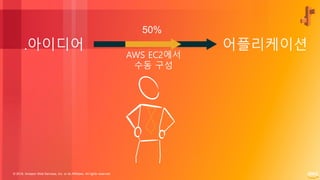
.아이디어 어플리케이션
50%
AWS EC2에서
수동 구성
© 2018, Amazon Web Services, Inc. or its Affiliates. All rights reserved.
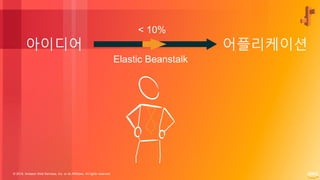
Elastic Beanstalk
아이디어 어플리케이션
< 10%
© 2018, Amazon Web Services, Inc. or its Affiliates. All rights reserved.
어플리케이션
프로토타입
원-클릭
배포
프로덕션 환경에 사용 가능한
AWS infrastructure
© 2018, Amazon Web Services, Inc. or its Affiliates. All rights reserved.
AWS Elastic Beanstalk 는
이 두 가지를 절감해줍니다
© 2018, Amazon Web Services, Inc. or its Affiliates. All rights reserved.
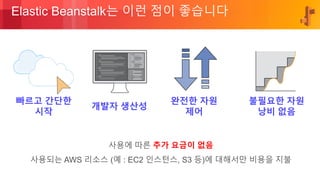
Elastic Beanstalk는 이런 점이 좋습니다
사용에 따른 추가 요금이 없음
사용되는 AWS 리소스 (예 : EC2 인스턴스, S3 등)에 대해서만 비용을 지불
빠르고 간단한
시작
개발자 생산성
완전한 자원
제어
불필요한 자원
낭비 없음
© 2018, Amazon Web Services, Inc. or its Affiliates. All rights reserved.
AWS Elastic Beanstalk 살펴보기
© 2018, Amazon Web Services, Inc. or its Affiliates. All rights reserved.
Elastic Beanstalk은 무엇인가요?
Elastic Beanstalk는 웹 어플리케이션/웹 서비스를 배포하고, 확장하고,
관리하는데 있어 쉽고 빠르게 할 수 있도록 돕는 완전 관리형 서비스입니다.
© 2018, Amazon Web Services, Inc. or its Affiliates. All rights reserved.
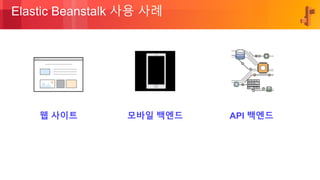
Elastic Beanstalk 사용 사례
웹 사이트 모바일 백엔드 API 백엔드
© 2018, Amazon Web Services, Inc. or its Affiliates. All rights reserved.
Elastic Beanstalk: 고객 스토리
• Reference: https://aws.amazon.com/ko/elasticbeanstalk/
© 2018, Amazon Web Services, Inc. or its Affiliates. All rights reserved.
Elastic Beanstalk: 그 외 고객 사례
© 2018, Amazon Web Services, Inc. or its Affiliates. All rights reserved.
AWS Elastic Beanstalk
인프라스트럭처 스택 구성
© 2018, Amazon Web Services, Inc. or its Affiliates. All rights reserved.
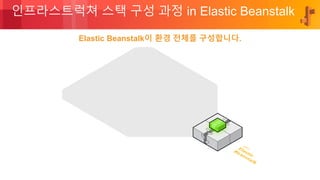
인프라스트럭쳐 스택 구성 과정 in Elastic Beanstalk
Elastic Beanstalk이 환경 전체를 구성합니다.
© 2018, Amazon Web Services, Inc. or its Affiliates. All rights reserved.
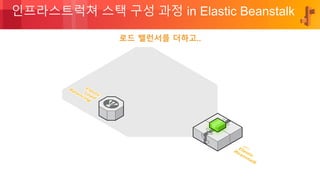
인프라스트럭쳐 스택 구성 과정 in Elastic Beanstalk
로드 밸런서를 더하고..
© 2018, Amazon Web Services, Inc. or its Affiliates. All rights reserved.
인프라스트럭쳐 스택 구성 과정 in Elastic Beanstalk
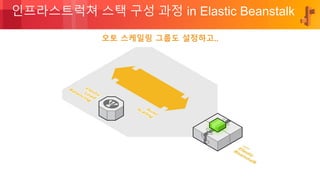
오토 스케일링 그룹도 설정하고..
© 2018, Amazon Web Services, Inc. or its Affiliates. All rights reserved.
인프라스트럭쳐 스택 구성 과정 in Elastic Beanstalk
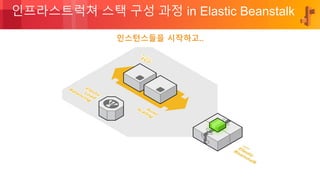
인스턴스들을 시작하고..
© 2018, Amazon Web Services, Inc. or its Affiliates. All rights reserved.
인프라스트럭쳐 스택 구성 과정 in Elastic Beanstalk
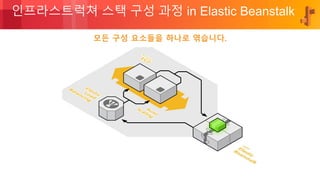
모든 구성 요소들을 하나로 엮습니다.
© 2018, Amazon Web Services, Inc. or its Affiliates. All rights reserved.
인프라스트럭쳐 스택 구성 과정 in Elastic Beanstalk
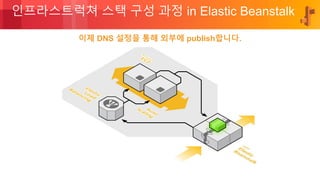
이제 DNS 설정을 통해 외부에 publish합니다.
© 2018, Amazon Web Services, Inc. or its Affiliates. All rights reserved.
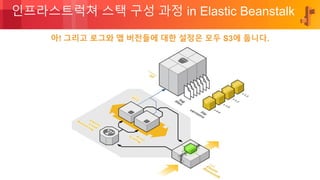
인프라스트럭쳐 스택 구성 과정 in Elastic Beanstalk
아! 그리고 로그와 앱 버전들에 대한 설정은 모두 S3에 둡니다.
© 2018, Amazon Web Services, Inc. or its Affiliates. All rights reserved.
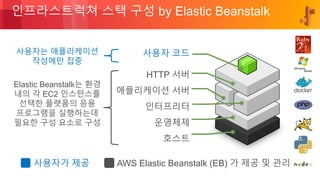
인프라스트럭쳐 스택 구성 by Elastic Beanstalk
사용자 코드
HTTP 서버
애플리케이션 서버
인터프리터
운영체제
호스트
Elastic Beanstalk는 환경
내의 각 EC2 인스턴스를
선택한 플랫폼의 응용
프로그램을 실행하는데
필요한 구성 요소로 구성
사용자는 애플리케이션
작성에만 집중
사용자가 제공 AWS Elastic Beanstalk (EB) 가 제공 및 관리
© 2018, Amazon Web Services, Inc. or its Affiliates. All rights reserved.
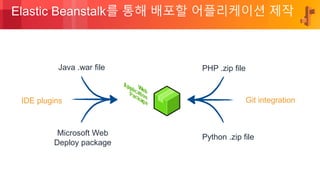
Elastic Beanstalk를 통해 배포할 어플리케이션 제작
Java .war file
Microsoft Web
Deploy package
PHP .zip file
Python .zip file
Git integrationIDE plugins
© 2018, Amazon Web Services, Inc. or its Affiliates. All rights reserved.
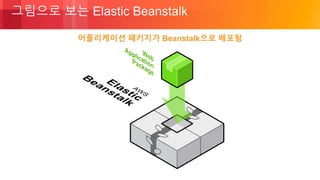
어플리케이션 패키지가 Beanstalk으로 배포됨
그림으로 보는 Elastic Beanstalk
© 2018, Amazon Web Services, Inc. or its Affiliates. All rights reserved.
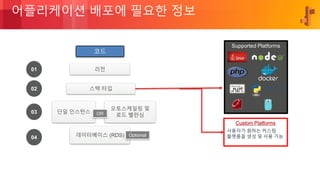
어플리케이션 배포에 필요한 정보
01
02
03
04
리전
스택 타입
단일 인스턴스
오토스케일링 및
로드 밸런싱OR
데이터베이스 (RDS)
코드
Optional
사용자가 원하는 커스텀
플랫폼을 생성 및 사용 가능
Supported Platforms
© 2018, Amazon Web Services, Inc. or its Affiliates. All rights reserved.
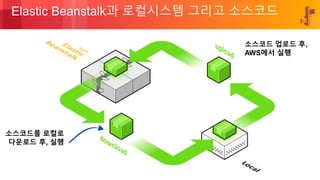
Elastic Beanstalk과 로컬시스템 그리고 소스코드
소스코드 업로드 후,
AWS에서 실행
소스코드를 로컬로
다운로드 후, 실행
© 2018, Amazon Web Services, Inc. or its Affiliates. All rights reserved.
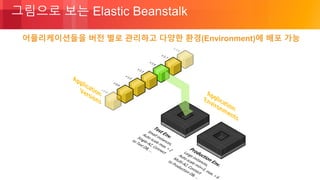
그림으로 보는 Elastic Beanstalk
어플리케이션들을 버전 별로 관리하고 다양한 환경(Environment)에 배포 가능
© 2018, Amazon Web Services, Inc. or its Affiliates. All rights reserved.
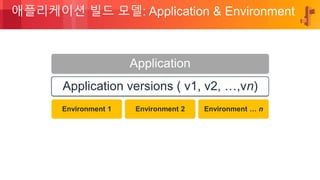
애플리케이션 빌드 모델: Application & Environment
Application
Application versions ( v1, v2, …,vn)
Environment 1 Environment 2 Environment … n
© 2018, Amazon Web Services, Inc. or its Affiliates. All rights reserved.
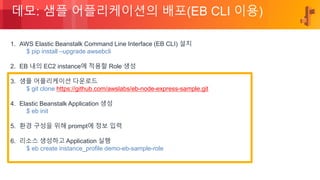
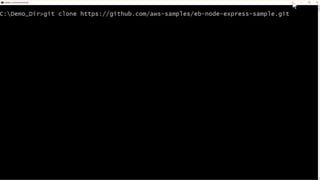
데모: 샘플 어플리케이션의 배포(EB CLI 이용)
1. AWS Elastic Beanstalk Command Line Interface (EB CLI) 설치
$ pip install –upgrade awsebcli
2. EB 내의 EC2 instance에 적용할 Role 생성
3. 샘플 어플리케이션 다운로드
$ git clone https://github.com/awslabs/eb-node-express-sample.git
4. Elastic Beanstalk Application 생성
$ eb init
5. 환경 구성을 위해 prompt에 정보 입력
6. 리소스 생성하고 Application 실행
$ eb create instance_profile demo-eb-sample-role
© 2018, Amazon Web Services, Inc. or its Affiliates. All rights reserved.
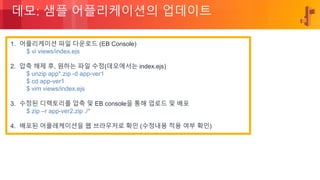
데모: 샘플 어플리케이션의 업데이트
1. 어플리케이션 파일 다운로드 (EB Console)
$ vi views/index.ejs
2. 압축 해제 후, 원하는 파일 수정(데모에서는 index.ejs)
$ unzip app*.zip -d app-ver1
$ cd app-ver1
$ vim views/index.ejs
3. 수정된 디렉토리를 압축 및 EB console을 통해 업로드 및 배포
$ zip –r app-ver2.zip ./*
4. 배포된 어플레케이션을 웹 브라우저로 확인 (수정내용 적용 여부 확인)
© 2018, Amazon Web Services, Inc. or its Affiliates. All rights reserved.
데모:
ElasticBeanstalk Sample App
Deployment & Update (Using EB CLI)
© 2018, Amazon Web Services, Inc. or its Affiliates. All rights reserved.
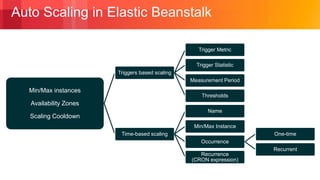
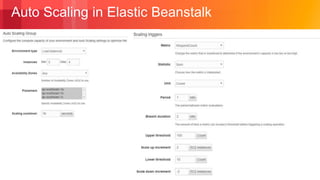
Auto Scaling in Elastic Beanstalk
Min/Max instances
Availability Zones
Scaling Cooldown
Triggers based scaling
Trigger Metric
Trigger Statistic
Measurement Period
Thresholds
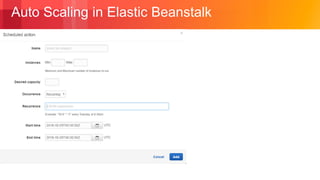
Time-based scaling
Name
Min/Max Instance
Occurrence
One-time
Recurrent
Recurrence
(CRON expression)
© 2018, Amazon Web Services, Inc. or its Affiliates. All rights reserved.
Auto Scaling in Elastic Beanstalk
© 2018, Amazon Web Services, Inc. or its Affiliates. All rights reserved.
Auto Scaling in Elastic Beanstalk
© 2018, Amazon Web Services, Inc. or its Affiliates. All rights reserved.
AWS Elastic Beanstalk에서
애플리케이션 배포 옵션
© 2018, Amazon Web Services, Inc. or its Affiliates. All rights reserved.
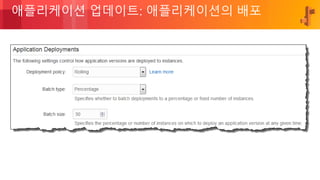
애플리케이션 업데이트: 애플리케이션의 배포
© 2018, Amazon Web Services, Inc. or its Affiliates. All rights reserved.
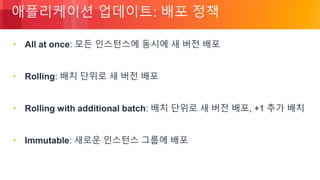
애플리케이션 업데이트: 배포 정책
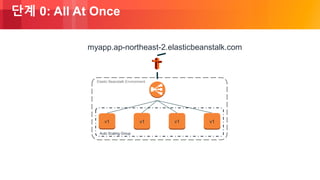
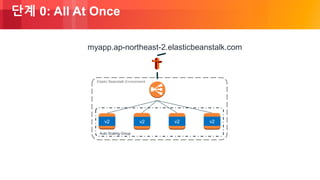
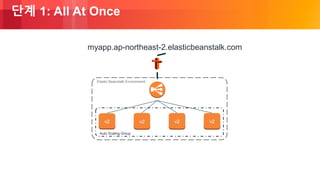
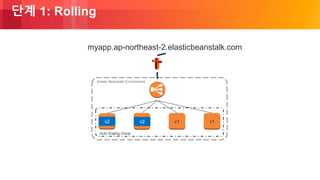
• All at once: 모든 인스턴스에 동시에 새 버전 배포
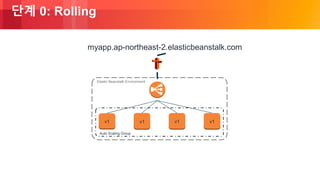
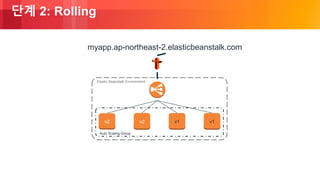
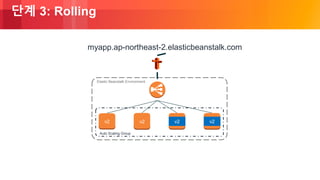
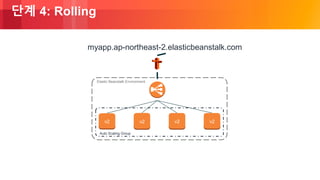
• Rolling: 배치 단위로 새 버전 배포
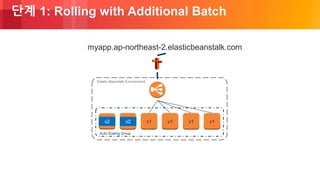
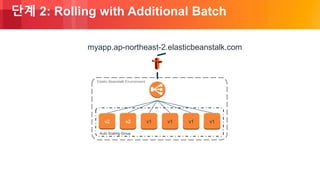
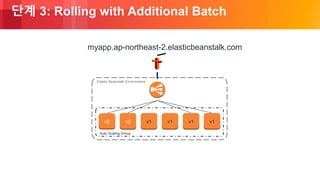
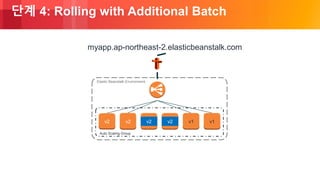
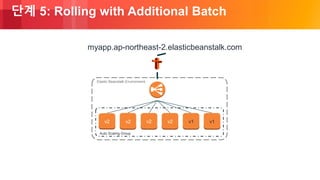
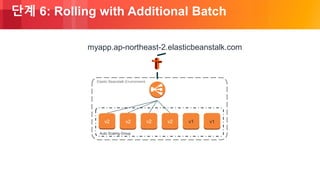
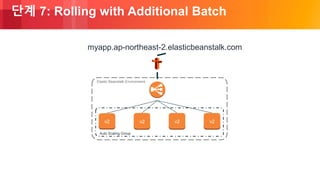
• Rolling with additional batch: 배치 단위로 새 버전 배포, +1 추가 배치
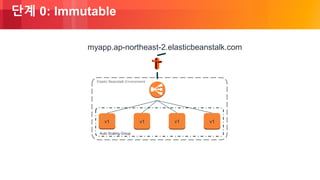
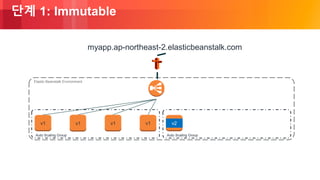
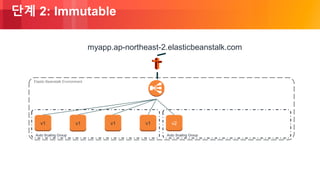
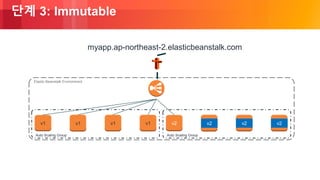
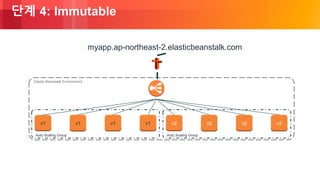
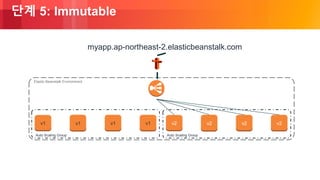
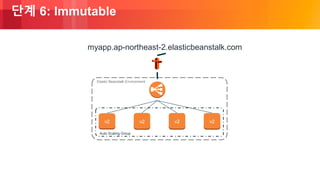
• Immutable: 새로운 인스턴스 그룹에 배포
© 2018, Amazon Web Services, Inc. or its Affiliates. All rights reserved.
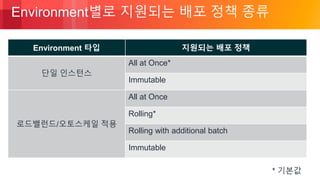
Environment별로 지원되는 배포 정책 종류
* 기본값
Environment 타입 지원되는 배포 정책
단일 인스턴스
All at Once*
Immutable
로드밸런드/오토스케일 적용
All at Once
Rolling*
Rolling with additional batch
Immutable
© 2018, Amazon Web Services, Inc. or its Affiliates. All rights reserved.
배포 정책:
All At Once Deployments
© 2018, Amazon Web Services, Inc. or its Affiliates. All rights reserved.
단계 0: All At Once
Auto Scaling Group
Elastic Beanstalk Environment
v1 v1
myapp.ap-northeast-2.elasticbeanstalk.com
v1v1
© 2018, Amazon Web Services, Inc. or its Affiliates. All rights reserved.
단계 0: All At Once
Auto Scaling Group
Elastic Beanstalk Environment
v2 v2 v2v2
myapp.ap-northeast-2.elasticbeanstalk.com
© 2018, Amazon Web Services, Inc. or its Affiliates. All rights reserved.
단계 1: All At Once
Auto Scaling Group
Elastic Beanstalk Environment
v2 v2 v2v2
myapp.ap-northeast-2.elasticbeanstalk.com
© 2018, Amazon Web Services, Inc. or its Affiliates. All rights reserved.
배포 정책:
Rolling
© 2018, Amazon Web Services, Inc. or its Affiliates. All rights reserved.
단계 0: Rolling
Auto Scaling Group
Elastic Beanstalk Environment
v1 v1 v1v1
myapp.ap-northeast-2.elasticbeanstalk.com
© 2018, Amazon Web Services, Inc. or its Affiliates. All rights reserved.
단계 1: Rolling
Auto Scaling Group
Elastic Beanstalk Environment
v2 v2 v1v1
myapp.ap-northeast-2.elasticbeanstalk.com
© 2018, Amazon Web Services, Inc. or its Affiliates. All rights reserved.
단계 2: Rolling
Auto Scaling Group
Elastic Beanstalk Environment
v2 v2 v1v1
myapp.ap-northeast-2.elasticbeanstalk.com
© 2018, Amazon Web Services, Inc. or its Affiliates. All rights reserved.
단계 3: Rolling
Auto Scaling Group
Elastic Beanstalk Environment
v2 v2 v2v2
myapp.ap-northeast-2.elasticbeanstalk.com
© 2018, Amazon Web Services, Inc. or its Affiliates. All rights reserved.
단계 4: Rolling
Auto Scaling Group
Elastic Beanstalk Environment
v2 v2 v2v2
myapp.ap-northeast-2.elasticbeanstalk.com
© 2018, Amazon Web Services, Inc. or its Affiliates. All rights reserved.
배포 정책:
Rolling with Additional Batch
© 2018, Amazon Web Services, Inc. or its Affiliates. All rights reserved.
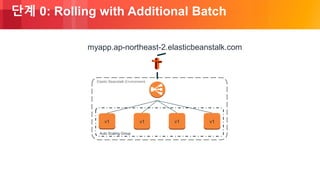
단계 0: Rolling with Additional Batch
Auto Scaling Group
Elastic Beanstalk Environment
v1 v1 v1v1
myapp.ap-northeast-2.elasticbeanstalk.com
© 2018, Amazon Web Services, Inc. or its Affiliates. All rights reserved.
단계 1: Rolling with Additional Batch
Auto Scaling Group
Elastic Beanstalk Environment
v2 v2 v1 v1 v1v1
myapp.ap-northeast-2.elasticbeanstalk.com
© 2018, Amazon Web Services, Inc. or its Affiliates. All rights reserved.
단계 2: Rolling with Additional Batch
Auto Scaling Group
Elastic Beanstalk Environment
v2 v2 v1 v1 v1v1
myapp.ap-northeast-2.elasticbeanstalk.com
© 2018, Amazon Web Services, Inc. or its Affiliates. All rights reserved.
단계 3: Rolling with Additional Batch
Auto Scaling Group
Elastic Beanstalk Environment
v2 v2 v1 v1 v1v1
myapp.ap-northeast-2.elasticbeanstalk.com
© 2018, Amazon Web Services, Inc. or its Affiliates. All rights reserved.
단계 4: Rolling with Additional Batch
Auto Scaling Group
Elastic Beanstalk Environment
v2 v2 v2 v2 v1v1
myapp.ap-northeast-2.elasticbeanstalk.com
© 2018, Amazon Web Services, Inc. or its Affiliates. All rights reserved.
단계 5: Rolling with Additional Batch
Auto Scaling Group
Elastic Beanstalk Environment
v2 v2 v2 v2 v1v1
myapp.ap-northeast-2.elasticbeanstalk.com
© 2018, Amazon Web Services, Inc. or its Affiliates. All rights reserved.
단계 6: Rolling with Additional Batch
Auto Scaling Group
Elastic Beanstalk Environment
v2 v2 v2 v2 v1v1
myapp.ap-northeast-2.elasticbeanstalk.com
© 2018, Amazon Web Services, Inc. or its Affiliates. All rights reserved.
단계 7: Rolling with Additional Batch
Auto Scaling Group
Elastic Beanstalk Environment
v2 v2 v2v2
myapp.ap-northeast-2.elasticbeanstalk.com
© 2018, Amazon Web Services, Inc. or its Affiliates. All rights reserved.
배포 정책:
Immutable
© 2018, Amazon Web Services, Inc. or its Affiliates. All rights reserved.
단계 0: Immutable
Auto Scaling Group
Elastic Beanstalk Environment
v1 v1 v1v1
myapp.ap-northeast-2.elasticbeanstalk.com
© 2018, Amazon Web Services, Inc. or its Affiliates. All rights reserved.
단계 1: Immutable
Auto Scaling Group
Elastic Beanstalk Environment
v1 v1 v1v1
Auto Scaling Group
v2
myapp.ap-northeast-2.elasticbeanstalk.com
© 2018, Amazon Web Services, Inc. or its Affiliates. All rights reserved.
단계 2: Immutable
Auto Scaling Group
Elastic Beanstalk Environment
v1 v1 v1v1
Auto Scaling Group
v2
myapp.ap-northeast-2.elasticbeanstalk.com
© 2018, Amazon Web Services, Inc. or its Affiliates. All rights reserved.
단계 3: Immutable
Auto Scaling Group
Elastic Beanstalk Environment
v1 v1 v1v1
Auto Scaling Group
v2 v2 v2v2
myapp.ap-northeast-2.elasticbeanstalk.com
© 2018, Amazon Web Services, Inc. or its Affiliates. All rights reserved.
단계 4: Immutable
Auto Scaling Group
Elastic Beanstalk Environment
v1 v1 v1v1
Auto Scaling Group
v2 v2 v2v2
myapp.ap-northeast-2.elasticbeanstalk.com
© 2018, Amazon Web Services, Inc. or its Affiliates. All rights reserved.
단계 5: Immutable
Auto Scaling Group
Elastic Beanstalk Environment
v1 v1 v1v1
Auto Scaling Group
v2 v2 v2v2
myapp.ap-northeast-2.elasticbeanstalk.com
© 2018, Amazon Web Services, Inc. or its Affiliates. All rights reserved.
단계 6: Immutable
Auto Scaling Group
Elastic Beanstalk Environment
v2 v2 v2v2
myapp.ap-northeast-2.elasticbeanstalk.com
© 2018, Amazon Web Services, Inc. or its Affiliates. All rights reserved.
어플리케이션 업데이트:
Blue/Green
© 2018, Amazon Web Services, Inc. or its Affiliates. All rights reserved.
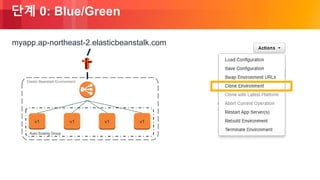
단계 0: Blue/Green
Auto Scaling Group
Elastic Beanstalk Environment
v1 v1 v1v1
myapp.ap-northeast-2.elasticbeanstalk.com
© 2018, Amazon Web Services, Inc. or its Affiliates. All rights reserved.
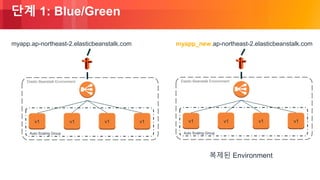
단계 1: Blue/Green
Auto Scaling Group
Elastic Beanstalk Environment
v1 v1 v1v1
myapp.ap-northeast-2.elasticbeanstalk.com
Auto Scaling Group
Elastic Beanstalk Environment
v1 v1 v1v1
myapp_new.ap-northeast-2.elasticbeanstalk.com
복제된 Environment
© 2018, Amazon Web Services, Inc. or its Affiliates. All rights reserved.
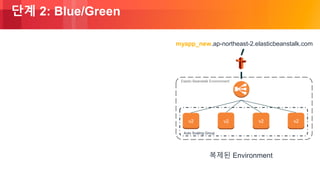
단계 2: Blue/Green
Auto Scaling Group
Elastic Beanstalk Environment
v2 v2 v2v2
myapp_new.ap-northeast-2.elasticbeanstalk.com
복제된 Environment
© 2018, Amazon Web Services, Inc. or its Affiliates. All rights reserved.
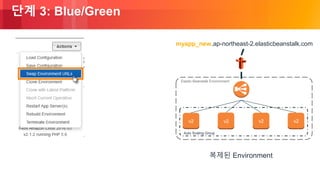
단계 3: Blue/Green
Auto Scaling Group
Elastic Beanstalk Environment
v2 v2 v2v2
myapp_new.ap-northeast-2.elasticbeanstalk.com
복제된 Environment
© 2018, Amazon Web Services, Inc. or its Affiliates. All rights reserved.
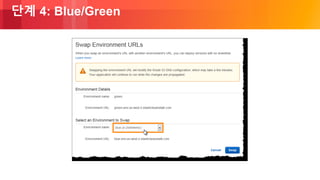
단계 4: Blue/Green
© 2018, Amazon Web Services, Inc. or its Affiliates. All rights reserved.
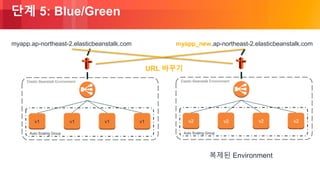
단계 5: Blue/Green
Auto Scaling Group
Elastic Beanstalk Environment
v1 v1 v1v1
myapp.ap-northeast-2.elasticbeanstalk.com
복제된 Environment
Auto Scaling Group
Elastic Beanstalk Environment
v2 v2 v2v2
myapp_new.ap-northeast-2.elasticbeanstalk.com
URL 바꾸기
© 2018, Amazon Web Services, Inc. or its Affiliates. All rights reserved.
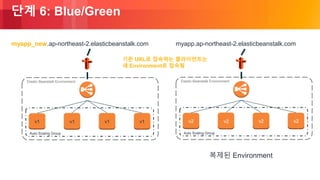
단계 6: Blue/Green
Auto Scaling Group
Elastic Beanstalk Environment
v1 v1 v1v1
myapp_new.ap-northeast-2.elasticbeanstalk.com
복제된 Environment
Auto Scaling Group
Elastic Beanstalk Environment
v2 v2 v2v2
myapp.ap-northeast-2.elasticbeanstalk.com
기존 URL로 접속하는 클라이언트는
새 Environment로 접속됨
© 2018, Amazon Web Services, Inc. or its Affiliates. All rights reserved.
애플리케이션 업데이트: Blue/Green
• 장점:
• 이전 환경이 여전히 실행 중이므로 언제든지 빠른 롤백 가능
• 다운타임 없이 배포 가능
• 새로운 환경 배포가 실패하더라도, 기존 인스턴스에 영향 X
• 단점:
• 새로운 환경 생성으로 인해 느린 배치 (5 분)
• RDS 까지 구축되어 있는 경우 RDS는 별도 복제 필요 (자동으로 Clone 안 됨)
© 2018, Amazon Web Services, Inc. or its Affiliates. All rights reserved.
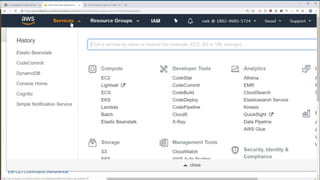
데모:
Blue/Green Deployment in
ElasticBeanstalk (Using EB Console)
© 2018, Amazon Web Services, Inc. or its Affiliates. All rights reserved.
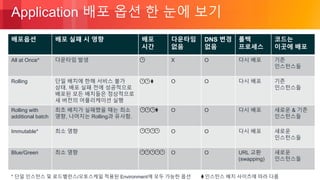
Application 배포 옵션 한 눈에 보기
* 단일 인스턴스 및 로드밸런스/오토스케일 적용된 Environment에 모두 가능한 옵션
배포옵션 배포 실패 시 영향 배포
시간
다운타임
없음
DNS 변경
없음
롤백
프로세스
코드는
이곳에 배포
All at Once* 다운타임 발생 X O 다시 배포 기존
인스턴스들
Rolling 단일 배치에 한해 서비스 불가
상태. 배포 실패 전에 성공적으로
배포된 모든 배치들은 정상적으로
새 버전의 어플리케이션 실행
O O 다시 배포 기존
인스턴스들
Rolling with
additional batch
최초 배치가 실패했을 때는 최소
영향, 나머지는 Rolling과 유사함.
O O 다시 배포 새로운 & 기존
인스턴스들
Immutable* 최소 영향 O O 다시 배포 새로운
인스턴스들
Blue/Green 최소 영향 O O URL 교환
(swapping)
새로운
인스턴스들
인스턴스 배치 사이즈에 따라 다름
© 2018, Amazon Web Services, Inc. or its Affiliates. All rights reserved.
AWS Elastic Beanstalk에서
애플리케이션 관리와 모니터링
© 2018, Amazon Web Services, Inc. or its Affiliates. All rights reserved.
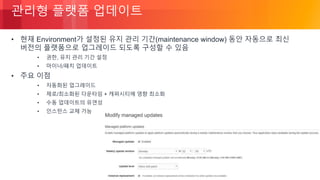
관리형 플랫폼 업데이트
• 현재 Environment가 설정된 유지 관리 기간(maintenance window) 동안 자동으로 최신
버전의 플랫폼으로 업그레이드 되도록 구성할 수 있음
• 권한, 유지 관리 기간 설정
• 마이너/패치 업데이트
• 주요 이점
• 자동화된 업그레이드
• 제로/최소화된 다운타임 + 캐퍼시티에 영향 최소화
• 수동 업데이트의 유연성
• 인스턴스 교체 가능
© 2018, Amazon Web Services, Inc. or its Affiliates. All rights reserved.
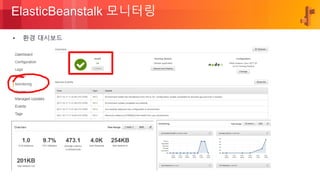
ElasticBeanstalk 모니터링
• 환경 대시보드
© 2018, Amazon Web Services, Inc. or its Affiliates. All rights reserved.
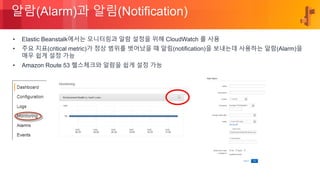
알람(Alarm)과 알림(Notification)
• Elastic Beanstalk에서는 모니터링과 알람 설정을 위해 CloudWatch 를 사용
• 주요 지표(critical metric)가 정상 범위를 벗어났을 때 알림(notification)을 보내는데 사용하는 알람(Alarm)을
매우 쉽게 설정 가능
• Amazon Route 53 헬스체크와 알람을 쉽게 설정 가능
© 2018, Amazon Web Services, Inc. or its Affiliates. All rights reserved.
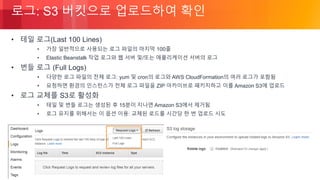
로그: S3 버킷으로 업로드하여 확인
• 테일 로그(Last 100 Lines)
• 가장 일반적으로 사용되는 로그 파일의 마지막 100줄
• Elastic Beanstalk 작업 로그와 웹 서버 및/또는 애플리케이션 서버의 로그
• 번들 로그 (Full Logs)
• 다양한 로그 파일의 전체 로그: yum 및 cron의 로그와 AWS CloudFormation의 여러 로그가 포함됨
• 요청하면 환경의 인스턴스가 전체 로그 파일을 ZIP 아카이브로 패키지하고 이를 Amazon S3에 업로드
• 로그 교체를 S3로 활성화
• 테일 및 번들 로그는 생성된 후 15분이 지나면 Amazon S3에서 제거됨
• 로그 유지를 위해서는 이 옵션 이용: 교체된 로드를 시간당 한 번 업로드 시도
© 2018, Amazon Web Services, Inc. or its Affiliates. All rights reserved.
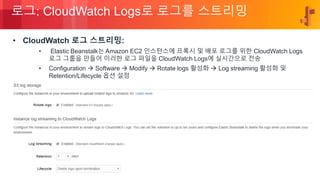
로그: CloudWatch Logs로 로그를 스트리밍
• CloudWatch 로그 스트리밍:
• Elastic Beanstalk는 Amazon EC2 인스턴스에 프록시 및 배포 로그를 위한 CloudWatch Logs
로그 그룹을 만들어 이러한 로그 파일을 CloudWatch Logs에 실시간으로 전송
• Configuration  Software  Modify  Rotate logs 활성화  Log streaming 활성화 및
Retention/Lifecycle 옵션 설정
© 2018, Amazon Web Services, Inc. or its Affiliates. All rights reserved.
References
© 2018, Amazon Web Services, Inc. or its Affiliates. All rights reserved.
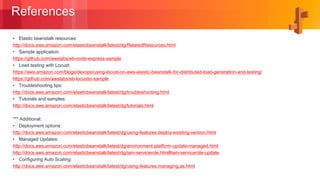
References
• Elastic beanstalk resources:
http://docs.aws.amazon.com/elasticbeanstalk/latest/dg/RelatedResources.html
• Sample application:
https://github.com/awslabs/eb-node-express-sample
• Load testing with Locust:
https://aws.amazon.com/blogs/devops/using-locust-on-aws-elastic-beanstalk-for-distributed-load-generation-and-testing/
https://github.com/awslabs/eb-locustio-sample
• Troubleshooting tips:
http://docs.aws.amazon.com/elasticbeanstalk/latest/dg/troubleshooting.html
• Tutorials and samples:
http://docs.aws.amazon.com/elasticbeanstalk/latest/dg/tutorials.html
*** Additional:
• Deployment options:
http://docs.aws.amazon.com/elasticbeanstalk/latest/dg/using-features.deploy-existing-version.html
• Managed Updates:
http://docs.aws.amazon.com/elasticbeanstalk/latest/dg/environment-platform-update-managed.html
http://docs.aws.amazon.com/elasticbeanstalk/latest/dg/iam-servicerole.html#iam-servicerole-update
• Configuring Auto Scaling:
http://docs.aws.amazon.com/elasticbeanstalk/latest/dg/using-features.managing.as.html
© 2018, Amazon Web Services, Inc. or its Affiliates. All rights reserved.
Q&A
• 세션 후, 설문에 참여해 주시면 행사 후 소정의 선물을 드립니다.
• #AWSDevDay 해시 태그로 의견을 남겨주세요!

AWS Elastic Beanstalk 활용하여 수 분만에 코드 배포하기 (최원근, AWS 솔루션즈 아키텍트) :: AWS DevDay2018

  • 1.
    © 2018, AmazonWeb Services, Inc. or its Affiliates. All rights reserved. AWS Elastic Beanstalk 활용하여 수 분만에 코드 배포하기 최원근 솔루션즈 아키텍트 AWS
  • 2.
    © 2018, AmazonWeb Services, Inc. or its Affiliates. All rights reserved. Agenda • AWS Elastic Beanstalk는 왜 쓸까요? • AWS Elastic Beanstalk 살펴보기 • AWS Elastic Beanstalk 인프라스트럭처 스택 구성 • AWS Elastic Beanstalk에서 애플리케이션 배포 옵션 • AWS Elastic Beanstalk에서 애플리케이션 관리와 모니터링 • References
  • 3.
    © 2018, AmazonWeb Services, Inc. or its Affiliates. All rights reserved. AWS Elastic Beanstalk는 왜 쓸까요?
  • 4.
    © 2018, AmazonWeb Services, Inc. or its Affiliates. All rights reserved. 개발자들이 언제나 가지고 있는 Pain Point • 코드의 배포, 프로비저닝, 관리가 복잡 : 코딩도 힘든데 • 서버, 데이터베이스, 로드 밸런서, 방화벽 그리고 복잡한 네트워크를 구성하고 관리하는데 전문성과 시간이 필요 : 하지만 언제나 충분치 않음 • 어플리케이션의 스케일 아웃/인을 자동화 해야하는데 : 이걸 어떻게 하면 좋을지 • 팀내/팀간 갈등 : 늘 항상 그래왔듯이
  • 5.
    © 2018, AmazonWeb Services, Inc. or its Affiliates. All rights reserved. .아이디어 어플리케이션
  • 6.
    © 2018, AmazonWeb Services, Inc. or its Affiliates. All rights reserved. On-premise에서 수동 구성 100% .아이디어 어플리케이션
  • 7.
    © 2018, AmazonWeb Services, Inc. or its Affiliates. All rights reserved. .아이디어 어플리케이션 50% AWS EC2에서 수동 구성
  • 8.
    © 2018, AmazonWeb Services, Inc. or its Affiliates. All rights reserved. Elastic Beanstalk 아이디어 어플리케이션 < 10%
  • 9.
    © 2018, AmazonWeb Services, Inc. or its Affiliates. All rights reserved. 어플리케이션 프로토타입 원-클릭 배포 프로덕션 환경에 사용 가능한 AWS infrastructure
  • 10.
    © 2018, AmazonWeb Services, Inc. or its Affiliates. All rights reserved. AWS Elastic Beanstalk 는 이 두 가지를 절감해줍니다
  • 11.
    © 2018, AmazonWeb Services, Inc. or its Affiliates. All rights reserved. Elastic Beanstalk는 이런 점이 좋습니다 사용에 따른 추가 요금이 없음 사용되는 AWS 리소스 (예 : EC2 인스턴스, S3 등)에 대해서만 비용을 지불 빠르고 간단한 시작 개발자 생산성 완전한 자원 제어 불필요한 자원 낭비 없음
  • 12.
    © 2018, AmazonWeb Services, Inc. or its Affiliates. All rights reserved. AWS Elastic Beanstalk 살펴보기
  • 13.
    © 2018, AmazonWeb Services, Inc. or its Affiliates. All rights reserved. Elastic Beanstalk은 무엇인가요? Elastic Beanstalk는 웹 어플리케이션/웹 서비스를 배포하고, 확장하고, 관리하는데 있어 쉽고 빠르게 할 수 있도록 돕는 완전 관리형 서비스입니다.
  • 14.
    © 2018, AmazonWeb Services, Inc. or its Affiliates. All rights reserved. Elastic Beanstalk 사용 사례 웹 사이트 모바일 백엔드 API 백엔드
  • 15.
    © 2018, AmazonWeb Services, Inc. or its Affiliates. All rights reserved. Elastic Beanstalk: 고객 스토리 • Reference: https://aws.amazon.com/ko/elasticbeanstalk/
  • 16.
    © 2018, AmazonWeb Services, Inc. or its Affiliates. All rights reserved. Elastic Beanstalk: 그 외 고객 사례
  • 17.
    © 2018, AmazonWeb Services, Inc. or its Affiliates. All rights reserved. AWS Elastic Beanstalk 인프라스트럭처 스택 구성
  • 18.
    © 2018, AmazonWeb Services, Inc. or its Affiliates. All rights reserved. 인프라스트럭쳐 스택 구성 과정 in Elastic Beanstalk Elastic Beanstalk이 환경 전체를 구성합니다.
  • 19.
    © 2018, AmazonWeb Services, Inc. or its Affiliates. All rights reserved. 인프라스트럭쳐 스택 구성 과정 in Elastic Beanstalk 로드 밸런서를 더하고..
  • 20.
    © 2018, AmazonWeb Services, Inc. or its Affiliates. All rights reserved. 인프라스트럭쳐 스택 구성 과정 in Elastic Beanstalk 오토 스케일링 그룹도 설정하고..
  • 21.
    © 2018, AmazonWeb Services, Inc. or its Affiliates. All rights reserved. 인프라스트럭쳐 스택 구성 과정 in Elastic Beanstalk 인스턴스들을 시작하고..
  • 22.
    © 2018, AmazonWeb Services, Inc. or its Affiliates. All rights reserved. 인프라스트럭쳐 스택 구성 과정 in Elastic Beanstalk 모든 구성 요소들을 하나로 엮습니다.
  • 23.
    © 2018, AmazonWeb Services, Inc. or its Affiliates. All rights reserved. 인프라스트럭쳐 스택 구성 과정 in Elastic Beanstalk 이제 DNS 설정을 통해 외부에 publish합니다.
  • 24.
    © 2018, AmazonWeb Services, Inc. or its Affiliates. All rights reserved. 인프라스트럭쳐 스택 구성 과정 in Elastic Beanstalk 아! 그리고 로그와 앱 버전들에 대한 설정은 모두 S3에 둡니다.
  • 25.
    © 2018, AmazonWeb Services, Inc. or its Affiliates. All rights reserved. 인프라스트럭쳐 스택 구성 by Elastic Beanstalk 사용자 코드 HTTP 서버 애플리케이션 서버 인터프리터 운영체제 호스트 Elastic Beanstalk는 환경 내의 각 EC2 인스턴스를 선택한 플랫폼의 응용 프로그램을 실행하는데 필요한 구성 요소로 구성 사용자는 애플리케이션 작성에만 집중 사용자가 제공 AWS Elastic Beanstalk (EB) 가 제공 및 관리
  • 26.
    © 2018, AmazonWeb Services, Inc. or its Affiliates. All rights reserved. Elastic Beanstalk를 통해 배포할 어플리케이션 제작 Java .war file Microsoft Web Deploy package PHP .zip file Python .zip file Git integrationIDE plugins
  • 27.
    © 2018, AmazonWeb Services, Inc. or its Affiliates. All rights reserved. 어플리케이션 패키지가 Beanstalk으로 배포됨 그림으로 보는 Elastic Beanstalk
  • 28.
    © 2018, AmazonWeb Services, Inc. or its Affiliates. All rights reserved. 어플리케이션 배포에 필요한 정보 01 02 03 04 리전 스택 타입 단일 인스턴스 오토스케일링 및 로드 밸런싱OR 데이터베이스 (RDS) 코드 Optional 사용자가 원하는 커스텀 플랫폼을 생성 및 사용 가능 Supported Platforms
  • 29.
    © 2018, AmazonWeb Services, Inc. or its Affiliates. All rights reserved. Elastic Beanstalk과 로컬시스템 그리고 소스코드 소스코드 업로드 후, AWS에서 실행 소스코드를 로컬로 다운로드 후, 실행
  • 30.
    © 2018, AmazonWeb Services, Inc. or its Affiliates. All rights reserved. 그림으로 보는 Elastic Beanstalk 어플리케이션들을 버전 별로 관리하고 다양한 환경(Environment)에 배포 가능
  • 31.
    © 2018, AmazonWeb Services, Inc. or its Affiliates. All rights reserved. 애플리케이션 빌드 모델: Application & Environment Application Application versions ( v1, v2, …,vn) Environment 1 Environment 2 Environment … n
  • 32.
    © 2018, AmazonWeb Services, Inc. or its Affiliates. All rights reserved. 데모: 샘플 어플리케이션의 배포(EB CLI 이용) 1. AWS Elastic Beanstalk Command Line Interface (EB CLI) 설치 $ pip install –upgrade awsebcli 2. EB 내의 EC2 instance에 적용할 Role 생성 3. 샘플 어플리케이션 다운로드 $ git clone https://github.com/awslabs/eb-node-express-sample.git 4. Elastic Beanstalk Application 생성 $ eb init 5. 환경 구성을 위해 prompt에 정보 입력 6. 리소스 생성하고 Application 실행 $ eb create instance_profile demo-eb-sample-role
  • 33.
    © 2018, AmazonWeb Services, Inc. or its Affiliates. All rights reserved. 데모: 샘플 어플리케이션의 업데이트 1. 어플리케이션 파일 다운로드 (EB Console) $ vi views/index.ejs 2. 압축 해제 후, 원하는 파일 수정(데모에서는 index.ejs) $ unzip app*.zip -d app-ver1 $ cd app-ver1 $ vim views/index.ejs 3. 수정된 디렉토리를 압축 및 EB console을 통해 업로드 및 배포 $ zip –r app-ver2.zip ./* 4. 배포된 어플레케이션을 웹 브라우저로 확인 (수정내용 적용 여부 확인)
  • 34.
    © 2018, AmazonWeb Services, Inc. or its Affiliates. All rights reserved. 데모: ElasticBeanstalk Sample App Deployment & Update (Using EB CLI)
  • 35.
    © 2018, AmazonWeb Services, Inc. or its Affiliates. All rights reserved.
  • 36.
    © 2018, AmazonWeb Services, Inc. or its Affiliates. All rights reserved. Auto Scaling in Elastic Beanstalk Min/Max instances Availability Zones Scaling Cooldown Triggers based scaling Trigger Metric Trigger Statistic Measurement Period Thresholds Time-based scaling Name Min/Max Instance Occurrence One-time Recurrent Recurrence (CRON expression)
  • 37.
    © 2018, AmazonWeb Services, Inc. or its Affiliates. All rights reserved. Auto Scaling in Elastic Beanstalk
  • 38.
    © 2018, AmazonWeb Services, Inc. or its Affiliates. All rights reserved. Auto Scaling in Elastic Beanstalk
  • 39.
    © 2018, AmazonWeb Services, Inc. or its Affiliates. All rights reserved. AWS Elastic Beanstalk에서 애플리케이션 배포 옵션
  • 40.
    © 2018, AmazonWeb Services, Inc. or its Affiliates. All rights reserved. 애플리케이션 업데이트: 애플리케이션의 배포
  • 41.
    © 2018, AmazonWeb Services, Inc. or its Affiliates. All rights reserved. 애플리케이션 업데이트: 배포 정책 • All at once: 모든 인스턴스에 동시에 새 버전 배포 • Rolling: 배치 단위로 새 버전 배포 • Rolling with additional batch: 배치 단위로 새 버전 배포, +1 추가 배치 • Immutable: 새로운 인스턴스 그룹에 배포
  • 42.
    © 2018, AmazonWeb Services, Inc. or its Affiliates. All rights reserved. Environment별로 지원되는 배포 정책 종류 * 기본값 Environment 타입 지원되는 배포 정책 단일 인스턴스 All at Once* Immutable 로드밸런드/오토스케일 적용 All at Once Rolling* Rolling with additional batch Immutable
  • 43.
    © 2018, AmazonWeb Services, Inc. or its Affiliates. All rights reserved. 배포 정책: All At Once Deployments
  • 44.
    © 2018, AmazonWeb Services, Inc. or its Affiliates. All rights reserved. 단계 0: All At Once Auto Scaling Group Elastic Beanstalk Environment v1 v1 myapp.ap-northeast-2.elasticbeanstalk.com v1v1
  • 45.
    © 2018, AmazonWeb Services, Inc. or its Affiliates. All rights reserved. 단계 0: All At Once Auto Scaling Group Elastic Beanstalk Environment v2 v2 v2v2 myapp.ap-northeast-2.elasticbeanstalk.com
  • 46.
    © 2018, AmazonWeb Services, Inc. or its Affiliates. All rights reserved. 단계 1: All At Once Auto Scaling Group Elastic Beanstalk Environment v2 v2 v2v2 myapp.ap-northeast-2.elasticbeanstalk.com
  • 47.
    © 2018, AmazonWeb Services, Inc. or its Affiliates. All rights reserved. 배포 정책: Rolling
  • 48.
    © 2018, AmazonWeb Services, Inc. or its Affiliates. All rights reserved. 단계 0: Rolling Auto Scaling Group Elastic Beanstalk Environment v1 v1 v1v1 myapp.ap-northeast-2.elasticbeanstalk.com
  • 49.
    © 2018, AmazonWeb Services, Inc. or its Affiliates. All rights reserved. 단계 1: Rolling Auto Scaling Group Elastic Beanstalk Environment v2 v2 v1v1 myapp.ap-northeast-2.elasticbeanstalk.com
  • 50.
    © 2018, AmazonWeb Services, Inc. or its Affiliates. All rights reserved. 단계 2: Rolling Auto Scaling Group Elastic Beanstalk Environment v2 v2 v1v1 myapp.ap-northeast-2.elasticbeanstalk.com
  • 51.
    © 2018, AmazonWeb Services, Inc. or its Affiliates. All rights reserved. 단계 3: Rolling Auto Scaling Group Elastic Beanstalk Environment v2 v2 v2v2 myapp.ap-northeast-2.elasticbeanstalk.com
  • 52.
    © 2018, AmazonWeb Services, Inc. or its Affiliates. All rights reserved. 단계 4: Rolling Auto Scaling Group Elastic Beanstalk Environment v2 v2 v2v2 myapp.ap-northeast-2.elasticbeanstalk.com
  • 53.
    © 2018, AmazonWeb Services, Inc. or its Affiliates. All rights reserved. 배포 정책: Rolling with Additional Batch
  • 54.
    © 2018, AmazonWeb Services, Inc. or its Affiliates. All rights reserved. 단계 0: Rolling with Additional Batch Auto Scaling Group Elastic Beanstalk Environment v1 v1 v1v1 myapp.ap-northeast-2.elasticbeanstalk.com
  • 55.
    © 2018, AmazonWeb Services, Inc. or its Affiliates. All rights reserved. 단계 1: Rolling with Additional Batch Auto Scaling Group Elastic Beanstalk Environment v2 v2 v1 v1 v1v1 myapp.ap-northeast-2.elasticbeanstalk.com
  • 56.
    © 2018, AmazonWeb Services, Inc. or its Affiliates. All rights reserved. 단계 2: Rolling with Additional Batch Auto Scaling Group Elastic Beanstalk Environment v2 v2 v1 v1 v1v1 myapp.ap-northeast-2.elasticbeanstalk.com
  • 57.
    © 2018, AmazonWeb Services, Inc. or its Affiliates. All rights reserved. 단계 3: Rolling with Additional Batch Auto Scaling Group Elastic Beanstalk Environment v2 v2 v1 v1 v1v1 myapp.ap-northeast-2.elasticbeanstalk.com
  • 58.
    © 2018, AmazonWeb Services, Inc. or its Affiliates. All rights reserved. 단계 4: Rolling with Additional Batch Auto Scaling Group Elastic Beanstalk Environment v2 v2 v2 v2 v1v1 myapp.ap-northeast-2.elasticbeanstalk.com
  • 59.
    © 2018, AmazonWeb Services, Inc. or its Affiliates. All rights reserved. 단계 5: Rolling with Additional Batch Auto Scaling Group Elastic Beanstalk Environment v2 v2 v2 v2 v1v1 myapp.ap-northeast-2.elasticbeanstalk.com
  • 60.
    © 2018, AmazonWeb Services, Inc. or its Affiliates. All rights reserved. 단계 6: Rolling with Additional Batch Auto Scaling Group Elastic Beanstalk Environment v2 v2 v2 v2 v1v1 myapp.ap-northeast-2.elasticbeanstalk.com
  • 61.
    © 2018, AmazonWeb Services, Inc. or its Affiliates. All rights reserved. 단계 7: Rolling with Additional Batch Auto Scaling Group Elastic Beanstalk Environment v2 v2 v2v2 myapp.ap-northeast-2.elasticbeanstalk.com
  • 62.
    © 2018, AmazonWeb Services, Inc. or its Affiliates. All rights reserved. 배포 정책: Immutable
  • 63.
    © 2018, AmazonWeb Services, Inc. or its Affiliates. All rights reserved. 단계 0: Immutable Auto Scaling Group Elastic Beanstalk Environment v1 v1 v1v1 myapp.ap-northeast-2.elasticbeanstalk.com
  • 64.
    © 2018, AmazonWeb Services, Inc. or its Affiliates. All rights reserved. 단계 1: Immutable Auto Scaling Group Elastic Beanstalk Environment v1 v1 v1v1 Auto Scaling Group v2 myapp.ap-northeast-2.elasticbeanstalk.com
  • 65.
    © 2018, AmazonWeb Services, Inc. or its Affiliates. All rights reserved. 단계 2: Immutable Auto Scaling Group Elastic Beanstalk Environment v1 v1 v1v1 Auto Scaling Group v2 myapp.ap-northeast-2.elasticbeanstalk.com
  • 66.
    © 2018, AmazonWeb Services, Inc. or its Affiliates. All rights reserved. 단계 3: Immutable Auto Scaling Group Elastic Beanstalk Environment v1 v1 v1v1 Auto Scaling Group v2 v2 v2v2 myapp.ap-northeast-2.elasticbeanstalk.com
  • 67.
    © 2018, AmazonWeb Services, Inc. or its Affiliates. All rights reserved. 단계 4: Immutable Auto Scaling Group Elastic Beanstalk Environment v1 v1 v1v1 Auto Scaling Group v2 v2 v2v2 myapp.ap-northeast-2.elasticbeanstalk.com
  • 68.
    © 2018, AmazonWeb Services, Inc. or its Affiliates. All rights reserved. 단계 5: Immutable Auto Scaling Group Elastic Beanstalk Environment v1 v1 v1v1 Auto Scaling Group v2 v2 v2v2 myapp.ap-northeast-2.elasticbeanstalk.com
  • 69.
    © 2018, AmazonWeb Services, Inc. or its Affiliates. All rights reserved. 단계 6: Immutable Auto Scaling Group Elastic Beanstalk Environment v2 v2 v2v2 myapp.ap-northeast-2.elasticbeanstalk.com
  • 70.
    © 2018, AmazonWeb Services, Inc. or its Affiliates. All rights reserved. 어플리케이션 업데이트: Blue/Green
  • 71.
    © 2018, AmazonWeb Services, Inc. or its Affiliates. All rights reserved. 단계 0: Blue/Green Auto Scaling Group Elastic Beanstalk Environment v1 v1 v1v1 myapp.ap-northeast-2.elasticbeanstalk.com
  • 72.
    © 2018, AmazonWeb Services, Inc. or its Affiliates. All rights reserved. 단계 1: Blue/Green Auto Scaling Group Elastic Beanstalk Environment v1 v1 v1v1 myapp.ap-northeast-2.elasticbeanstalk.com Auto Scaling Group Elastic Beanstalk Environment v1 v1 v1v1 myapp_new.ap-northeast-2.elasticbeanstalk.com 복제된 Environment
  • 73.
    © 2018, AmazonWeb Services, Inc. or its Affiliates. All rights reserved. 단계 2: Blue/Green Auto Scaling Group Elastic Beanstalk Environment v2 v2 v2v2 myapp_new.ap-northeast-2.elasticbeanstalk.com 복제된 Environment
  • 74.
    © 2018, AmazonWeb Services, Inc. or its Affiliates. All rights reserved. 단계 3: Blue/Green Auto Scaling Group Elastic Beanstalk Environment v2 v2 v2v2 myapp_new.ap-northeast-2.elasticbeanstalk.com 복제된 Environment
  • 75.
    © 2018, AmazonWeb Services, Inc. or its Affiliates. All rights reserved. 단계 4: Blue/Green
  • 76.
    © 2018, AmazonWeb Services, Inc. or its Affiliates. All rights reserved. 단계 5: Blue/Green Auto Scaling Group Elastic Beanstalk Environment v1 v1 v1v1 myapp.ap-northeast-2.elasticbeanstalk.com 복제된 Environment Auto Scaling Group Elastic Beanstalk Environment v2 v2 v2v2 myapp_new.ap-northeast-2.elasticbeanstalk.com URL 바꾸기
  • 77.
    © 2018, AmazonWeb Services, Inc. or its Affiliates. All rights reserved. 단계 6: Blue/Green Auto Scaling Group Elastic Beanstalk Environment v1 v1 v1v1 myapp_new.ap-northeast-2.elasticbeanstalk.com 복제된 Environment Auto Scaling Group Elastic Beanstalk Environment v2 v2 v2v2 myapp.ap-northeast-2.elasticbeanstalk.com 기존 URL로 접속하는 클라이언트는 새 Environment로 접속됨
  • 78.
    © 2018, AmazonWeb Services, Inc. or its Affiliates. All rights reserved. 애플리케이션 업데이트: Blue/Green • 장점: • 이전 환경이 여전히 실행 중이므로 언제든지 빠른 롤백 가능 • 다운타임 없이 배포 가능 • 새로운 환경 배포가 실패하더라도, 기존 인스턴스에 영향 X • 단점: • 새로운 환경 생성으로 인해 느린 배치 (5 분) • RDS 까지 구축되어 있는 경우 RDS는 별도 복제 필요 (자동으로 Clone 안 됨)
  • 79.
    © 2018, AmazonWeb Services, Inc. or its Affiliates. All rights reserved. 데모: Blue/Green Deployment in ElasticBeanstalk (Using EB Console)
  • 80.
    © 2018, AmazonWeb Services, Inc. or its Affiliates. All rights reserved.
  • 81.
    © 2018, AmazonWeb Services, Inc. or its Affiliates. All rights reserved. Application 배포 옵션 한 눈에 보기 * 단일 인스턴스 및 로드밸런스/오토스케일 적용된 Environment에 모두 가능한 옵션 배포옵션 배포 실패 시 영향 배포 시간 다운타임 없음 DNS 변경 없음 롤백 프로세스 코드는 이곳에 배포 All at Once* 다운타임 발생 X O 다시 배포 기존 인스턴스들 Rolling 단일 배치에 한해 서비스 불가 상태. 배포 실패 전에 성공적으로 배포된 모든 배치들은 정상적으로 새 버전의 어플리케이션 실행 O O 다시 배포 기존 인스턴스들 Rolling with additional batch 최초 배치가 실패했을 때는 최소 영향, 나머지는 Rolling과 유사함. O O 다시 배포 새로운 & 기존 인스턴스들 Immutable* 최소 영향 O O 다시 배포 새로운 인스턴스들 Blue/Green 최소 영향 O O URL 교환 (swapping) 새로운 인스턴스들 인스턴스 배치 사이즈에 따라 다름
  • 82.
    © 2018, AmazonWeb Services, Inc. or its Affiliates. All rights reserved. AWS Elastic Beanstalk에서 애플리케이션 관리와 모니터링
  • 83.
    © 2018, AmazonWeb Services, Inc. or its Affiliates. All rights reserved. 관리형 플랫폼 업데이트 • 현재 Environment가 설정된 유지 관리 기간(maintenance window) 동안 자동으로 최신 버전의 플랫폼으로 업그레이드 되도록 구성할 수 있음 • 권한, 유지 관리 기간 설정 • 마이너/패치 업데이트 • 주요 이점 • 자동화된 업그레이드 • 제로/최소화된 다운타임 + 캐퍼시티에 영향 최소화 • 수동 업데이트의 유연성 • 인스턴스 교체 가능
  • 84.
    © 2018, AmazonWeb Services, Inc. or its Affiliates. All rights reserved. ElasticBeanstalk 모니터링 • 환경 대시보드
  • 85.
    © 2018, AmazonWeb Services, Inc. or its Affiliates. All rights reserved. 알람(Alarm)과 알림(Notification) • Elastic Beanstalk에서는 모니터링과 알람 설정을 위해 CloudWatch 를 사용 • 주요 지표(critical metric)가 정상 범위를 벗어났을 때 알림(notification)을 보내는데 사용하는 알람(Alarm)을 매우 쉽게 설정 가능 • Amazon Route 53 헬스체크와 알람을 쉽게 설정 가능
  • 86.
    © 2018, AmazonWeb Services, Inc. or its Affiliates. All rights reserved. 로그: S3 버킷으로 업로드하여 확인 • 테일 로그(Last 100 Lines) • 가장 일반적으로 사용되는 로그 파일의 마지막 100줄 • Elastic Beanstalk 작업 로그와 웹 서버 및/또는 애플리케이션 서버의 로그 • 번들 로그 (Full Logs) • 다양한 로그 파일의 전체 로그: yum 및 cron의 로그와 AWS CloudFormation의 여러 로그가 포함됨 • 요청하면 환경의 인스턴스가 전체 로그 파일을 ZIP 아카이브로 패키지하고 이를 Amazon S3에 업로드 • 로그 교체를 S3로 활성화 • 테일 및 번들 로그는 생성된 후 15분이 지나면 Amazon S3에서 제거됨 • 로그 유지를 위해서는 이 옵션 이용: 교체된 로드를 시간당 한 번 업로드 시도
  • 87.
    © 2018, AmazonWeb Services, Inc. or its Affiliates. All rights reserved. 로그: CloudWatch Logs로 로그를 스트리밍 • CloudWatch 로그 스트리밍: • Elastic Beanstalk는 Amazon EC2 인스턴스에 프록시 및 배포 로그를 위한 CloudWatch Logs 로그 그룹을 만들어 이러한 로그 파일을 CloudWatch Logs에 실시간으로 전송 • Configuration  Software  Modify  Rotate logs 활성화  Log streaming 활성화 및 Retention/Lifecycle 옵션 설정
  • 88.
    © 2018, AmazonWeb Services, Inc. or its Affiliates. All rights reserved. References
  • 89.
    © 2018, AmazonWeb Services, Inc. or its Affiliates. All rights reserved. References • Elastic beanstalk resources: http://docs.aws.amazon.com/elasticbeanstalk/latest/dg/RelatedResources.html • Sample application: https://github.com/awslabs/eb-node-express-sample • Load testing with Locust: https://aws.amazon.com/blogs/devops/using-locust-on-aws-elastic-beanstalk-for-distributed-load-generation-and-testing/ https://github.com/awslabs/eb-locustio-sample • Troubleshooting tips: http://docs.aws.amazon.com/elasticbeanstalk/latest/dg/troubleshooting.html • Tutorials and samples: http://docs.aws.amazon.com/elasticbeanstalk/latest/dg/tutorials.html *** Additional: • Deployment options: http://docs.aws.amazon.com/elasticbeanstalk/latest/dg/using-features.deploy-existing-version.html • Managed Updates: http://docs.aws.amazon.com/elasticbeanstalk/latest/dg/environment-platform-update-managed.html http://docs.aws.amazon.com/elasticbeanstalk/latest/dg/iam-servicerole.html#iam-servicerole-update • Configuring Auto Scaling: http://docs.aws.amazon.com/elasticbeanstalk/latest/dg/using-features.managing.as.html
  • 90.
    © 2018, AmazonWeb Services, Inc. or its Affiliates. All rights reserved. Q&A • 세션 후, 설문에 참여해 주시면 행사 후 소정의 선물을 드립니다. • #AWSDevDay 해시 태그로 의견을 남겨주세요!