Computer Networks
Introduction:
ComputerNetworkisacollectionof autonomouscomputersinterconnectedbyasingle
technology. Twoormore computersare saidto be interconnectedif theyare able toexchange
information. A computernetworkisasystemthatconnectsindependentcomputersinorderto
share information andresources.
Brief History of Network
 In 1967, ARPA (Advance ResearchProjectAgencybyDepartmentof Defence)
proposed the ideaof ARPANET– a small network of computers.
 By 1969, ARPANETbecame realitythatconnectfournodesatUniversityof California
at Los Angeles(UCLA),Universityof CaliforniaatSanta Barbara (UCSB),Stanford
ResearchInstitute (SRI) andUniversityof Utahvai IMPs ( Interface Message
Processor– a specializedcomputer).
 In 1973, VintCerf andBob Kahnpresented paperoutlinedthe protocol(
Transmission Control Protocol) toachieve end-to-enddelivery of packets.
Advantage of ComputerNetwork:
 Central Storage of Data
 Sharingof Information
 Sharingof Resources(Hardware&Software)
 Reliability
 Communication
 Reduced Cost
Disadvantage of ComputerNetwork:
 Computernetworks require aspecificsetup
 Lack of Security
 Costof network hardware andsoftware
Componentsof Data Communication:
 Message – it information tobe communicated
 Sender– The device whichsendthe message
 Receiver–The device whichreceivethe message
 Transmissionmedia–Itis physical pathbywhichmessage travel fromsenderto
receiver
 Protocol – It is setof rulesthatgovernsdatacommunication.Actuallyitis
agreementbetweenthe senderandreceiverregardingvariouscommunication
parameter.
Data Flow
 Simplex –Inthismode of communication, dataistransmittedin one direction only.
e.g. Keyboard, monitor. Itusesentirecapacity of channel tosendthe data.
 Half Duplex – Communicationisbi-directional butnotsame time.i.e.Walkie-Talkie.
It usesentire capacity of channel is utilizedforeach direction.
KENDRIYA VIDYALAYA SANGATHANRANCHI REGION Page No- 53
MM : MM : MM : SS : SS : SS
 Full Duplex –Communicationsisbi-directional simultaneouslyi.e.bothsenderand
receivercanbe send data at same time.
NetworkTerminology
 Node- The device connected toanetwork.
 Client–The device thatrequestforaservice
 Server– The Device thatrender the services
 Client-Server- Inthismodel,the data are storedon powerful computerscalled
Server that can be accessedbya much simplercomputercalled Clientthatare
connected by a network.
 NetworkInterface CardorUnit (NetworkAdapterorLAN card) - It is hardware that
allows acomputer(or device) to connecttonetwork.
 MAC (MediaAccessControl) address –Each NICis assignedaunique 12 digit
hexadecimalnumber,knownaMAC address,isusedasnetworkaddressin
communication. The formatforthe MACaddress is
Manufacturer ID Card Id
 IP Address:Everydevice onnetworkhasunique identifiercalledIPaddress.It
consistsof 4 bytes(IPv4) decimal number(between0to 255) separatedby‘.’
(Period).
 Channel –It is communication paththroughwhichdataisactually transmitted.
 CommunicationMedia- Itisallowsdataorsignal to be communicatedacrossthe
devices. Itismeansof communication.
 Data – Information storedwithinthe computersysteminform of ‘0’ and‘1’
 Signal- Itiselectricor electromagneticencodingof datatobe transmitted.Itcanbe
categorized into:
o AnalogSignal – that hasinfinitelymanylevel of intensityoveraperiodof
time.
o Digital Signal –that can have only a limitednumberof definedvalues.
 Bit rate – It definesthe amountof datatransferred.Itisdefinedasnumberof bits
persecond (bps).[Bps – BytesperSecond]
 Baud – The numberof changes insignal persecond.
 Bandwidth – Itis difference betweenthe highestandthe lowestfrequencies
containedin the signal.
Mode of Transmission
 Analog or Broadband Transmission
 It usesanalogsignalstotransmitthe information
KENDRIYA VIDYALAYA SANGATHANRANCHI REGION Page No- 54
 The data can be sentsimultaneously usingvarious frequencies.
 It isa unidirectionalmethodof datatransmission.
 Multiple signalscanbe transmittedusingmultiple frequencies usingonlyone
channel
 Signal range islong.
 Example- Usedtotransmitcable TV topremises
 Digital or basebandTransmission
 It usesdigital signal (square wave) totransmitthe information.
 It isbi-directional transmission.
 Entire bandwidth isforsingle signal transmission.
 Shortdistance signal travelling
 EthernetisusingBasebandsforLAN
 Parallel Communication
 SeriesCommunication
 Synchronous Transmission
 Asynchronous Transmission
SwitchingTechnique
 A switchednetworkconsistsof aseriesof interlinkednodescalledswitchescapableof
creatingtemporaryconnectionsbetween twoormore likeddevices.
 There are three basicswitchingtechnique
 Circuit–Switching
 PacketSwitching
 Message Switching
CircuitSwitchingvs Packet Switching
NetworkDevices
 Modem
 It standsformodulatoranddemodulator
 It a computerhardware device thatconvertsdatafrom a digital formatintoa format
suitable forananalog.
 A modemtransmitsdataby modulatingone ormore carrierwave signalstoencode
digital information,whilethe receiverdemodulatesthe signal torecreate the original
digital information.
 Repeater
 Repeatersare networkdevicesthatamplifyorregenerateanincomingsignal before
retransmittingit.
 It operate atphysical layerof the OSI model.
 The repeaterallows totransferthe data throughlarge area distance
KENDRIYA VIDYALAYA SANGATHANRANCHI REGION Page No- 55
 Hub
 It isa multiportdevicethatallowsmultiple computerstocommunicate witheachother
overa network.
 It isa non-intelligentnetwork device thatsends message toall ports( i.e. Broadcast)
 Types of Hub
 Active Hub –
 It strengthen the signal mayboostnoisetoo.
 It needelectricity.
 Passive Hub –
 It repeat/copy signals.
 It doesnotneed electricity
 Switch
 NetworkSwitchorswitchisalsoa networkmultiportdevice thatallow multiple
computertoconnecttogether.
 Networkswitchinspectsthe packet,determine source anddestinationaddressand
route the packetaccordingly.
 It operates atData LinkLayer (layer2) of OSI model.
 Bridge
 It connectsmultiplenetworksegmentshavingsame protocol
 It worksat Data LinkLayer (Layer2).
 Bridge doesnotsimply broadcasttrafficfromone network.
 Bridges use bridge table tosendframesacrossnetwork segments.
 It alsoimproves the overallnetwork performance.
 Router
 Gateway
 RJ45
 Ethernet Card
 Wi-Fi card
Type of Network
 PAN
 It standsforPersonal AreaNetwork.
 It isa computernetworkformed around aperson.
 It generally consistsof acomputer, mobile, orpersonal digital assistant.
 Appliances use forPAN:cordless mice,keyboards, andBluetoothsystems.
 PAN includes mobiledevices, tablet, andlaptop.
 LAN
 It isa groupof computerandperipheral deviceswhichare connectedinalimitedarea
such as room,building&campus.
 HigherData Speed.
 LowerError Rate.
 LANsare ina narrowergeographicscope (upto1Km).
 It isa private network.
KENDRIYA VIDYALAYA SANGATHANRANCHI REGION Page No- 56
 MAN
 A MetropolitanArea Networkor MAN is consistingof acomputernetworkthatspan
across a city.
 It mostlycovers townsand citiesinamaximum50 km range.
 The dual businMAN networkprovidessupporttotransmitdatainboth directions
concurrently.
 Moderate Data Rate.
 Moderate Error Rate.
 WAN
 It connectdevice across globe.
 It usespublicnetwork
 Internet
 BSNL
 VSNL
NetworkMedia
TwistedPair Cable
 A twistedpaircable comprisesof twoseparate insulatedcopperwires,whichare twisted
togetherandrun inparallel.
 A STP (ShieldedTwistedPair)cable hasafine wire meshsurroundingthe wiresto
protectthe transmission
 UTP (Unshielded TwistedPair) cable doesnothasa fine wire mess.
 It isalsoknown as Cat# cable where # denote number.e.g. Cat6
 Connector: RJ 45
TwistedPair Cable – Advantages
 It isthe leastexpensivemediumof transmission forshortdistances.
 It isrelativelyeasy toimplementandterminate.
KENDRIYA VIDYALAYA SANGATHANRANCHI REGION Page No- 57
 It isflexible andlightweight.
 It iseasy to setup and install.
 Lesssusceptibletoelectrical interference causedbynearby equipmentorusesof wires.
TwistedPair Cable – Disadvantages
 Attenuation isvery high.
 It offerspoornoise immunityas the resultsignal distortion istoomuchmore.
 STP calledshielded twistedpaircable ismore difficulttoconnecttoa terminatingblock.
 Susceptibletonoise andinterference.
Co-axial Cable
 Coaxial cablinghasa single copperconductoratits center, anda plasticlayerthatprovides
insulation betweenthe centerconductoranda braided metal shield.
 Connector:BNC(BayonetNeill-Concelman)
Co-axial Cable Advantage


 The cost of a coaxial cable isless.
 Highlyresistant tophysical damage.
 Highly resistanttoEMI.
 Great channel capacity.
 The transmission rate ishigh.
 It islesssusceptible tonoise interference compare totwistedpair.
 It iseasy to wire andeasyto expand toflexibility.
 It supporthighbandwidth signaltransmissioncompare totwisted pair.
 It requiresfewerrepeaterthantwistedpair.
Co-axial Cable – Disadvantage:
 It isexpensive to install.
 Costmaintenance isalsohigh.
 Inflexible construction.
 Unsupported bynewernetworkingstandards.
 It isbulky.
 It has a more security problem.
 It doesnotsupporthigh-speed transmission.
 It mustbe grounded to preventinterference.
 In case of failure inone cable,the entirenetwork willbe down byusingthiswire.
Optical Fibre
 An optical fiberisaflexible,transparentfibermade bydrawingglassorplasticto a diameter
slightlythickerthan thatof a humanhair.
58
Page No-
KENDRIYA VIDYALAYA SANGATHANRANCHI REGION
 It useslightfordatatransmission usingtotal internal reflection.
Optical Fibre- Advantages
 Higherbandwidth
 Lesssignal attenuation
 Immune tocross-talk
 Optical fiberhave longlifemore than100 or above years
 Grater immune totapping
 Resistance tocorrosive material
 Long distance transmission ispossible
 Immunity toelectromagneticinterference
Optical Fibre-Disadvantage
 Unidirectionalpropagation
 Highinitial cost
 Optical fibermore tensile stressthancoppercables
 Installation andmaintenance
 Fiberjoiningprocessisverycostly andrequireskilledmenpower
 Difficulttosplice (join)
 Difficulttofinderror
UnguidedMediaor WirelessMedia
 NoPhysical mediaisused
 LessSecure
 Relatively lowspeed
 Can be usedforlongerdistance
 Bestsuitedfordifficultterrain
 There isno needtoacquire landrights
Radio Wave
 Frequency –3KHz – 1GHz
 Omni-Directional
 Penetrate obstacle
 Antennaof senderand receivershouldnotbe aligned
Infrared
 300GHz to 400THz
 Line of sight- antennaof senderand receivermustbe aligned
 Shortdistance communication
 It cannotpenetrate obstacle –bestsuitedforindoor
 Secure
 Supporthighdata rate
 TV Remote
Microwave
KENDRIYA VIDYALAYA SANGATHANRANCHI REGION Page No- 59
 1GHz to 300 GHz
 Line of sight- antennaof senderandreceiver mustbe aligned
 Cannotpenetrate obstacles
 Rainor otherdisturbance cause issue withMicrowave
 Types of microwave propagation
 Terrestrial Microwave propagation
 SatelliteMicrowave propagation
Bluetooth
 It alsousesradiowaves
 2.4 GHz
 Range 10mtr
 Shortdistance
Topology
 Physical andLogical arrangementof nodesin the network iscalledNetwork Topology.
 The Key Elements tobe considered tochoose correcttopology foryournetwork
 Length of the Cable Needed– longerthe cable, more workisrequired forsetup
 Cable Type- Dependingonrequirement of bandwidth
 Cost- Installation CostandComplexity
 Scalability– Ease of expansion
 Robustness– Ability torecoverfromerror
Typesof Topology
 Bus
 Ring
 Star
 Tree
 Mess
 Hybrid
Bus Topology
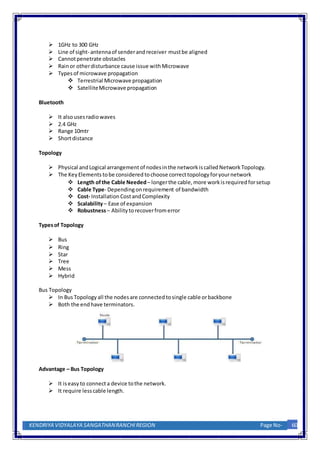
 In BusTopology all the nodesare connected tosingle cable orbackbone
 Both the end have terminators.
Advantage – Bus Topology
 It iseasy to connecta device tothe network.
 It require lesscable length.
KENDRIYA VIDYALAYA SANGATHANRANCHI REGION Page No- 60
 Low setupcost
 There isno needof Hub/Switch.
 It can be extended easily.
Disadvantage – Bus Topology
 Failure of one node canshutdown entire network
 There isa limitoncentral cable lengthand numberof nodesthatcan be connected.
 Difficulttofindandcorrecterrors
 Terminatorisrequired.
 Maintenance costs can gethigherwithtime.
 Notsuitable forBignetwork.
 Low Security due tobroadcastingof data.
Ring Topology
� In RingTopologyall the nodesare connected toeach-othertoforma loop.
� Each workstation isconnected totwoothercomponents oneitherside
� It communicateswith thesetwoadjacentneighbors.
� Data is sentandreceived usingToken.
Advantage – Ring Topology
 It iseasy to connecta device tothe network.
 It require lesscable length.
 Low setupcost
 There isno needof Hub/Switch
 Minimumcollision
 Suitable forOptical Fibre Network
Disadvantage – Ring Topology
 Failure of one node canshutdown entire network
 There isa limitoncentral cable lengthand numberof nodesthatcan be connected.
 Difficulttofind andcorrecterrors.
 Maintenance costs can gethigherwithtime.
 Notsuitable forBignetwork.
 Low Security due tobroadcastingof data.
 Unidirectional
KENDRIYA VIDYALAYA SANGATHANRANCHI REGION Page No- 61
Star Topology
 In StarTopology all the nodes are connected toa central device calledHub/Switch.
 All communication is controlled bythe central Device(Hub/Switch)
Advantages–Star Topology
 Reliable
 Robust
 Failure of node does notaffectthe workingof the network.
 Faultdetection andisolation iseasy.
 Maintenance of the networkis easy.
 It doesn’tcreate bottleneckswhere datacollisions occur.
Disadvantages – Star Topology
 Require more cable length
 Central Device dependency
 More costly
 Performance dependonHub/Switch
Tree Topology
 In Tree Topology, the devicesare arrangedinatree fashion similartothe branches of a tree.
 It multilayerarchitecture.
KENDRIYA VIDYALAYA SANGATHANRANCHI REGION Page No- 62
Advantages- Tree Topology
 It isa combination of busand star topology
 It provides highscalability, asleaf nodes canaddmore nodesin the hierarchical chain.
 Othernodesin a networkare not affected,if one of theirnodesgetdamaged
 It provides easy maintenanceandfaultidentification.
 Point-to-pointwiringforindividualsegments.
Disadvantages -Tree Topology
 Large cablingisrequired ascompared tostar and bus topology.
 On the failure of ahub, the entire network fails.
 Tree network isvery difficulttoconfigure thanothernetwork topologies.
Protocol
 It issetof rulesorstandardthat governs communication.
Typesof Protocol
 TCP/IP
 FTP
 HTTP/HTTPS
 IMAP
 POP3
 SMTP
 PPP
 TELNET
 VoIP
TCP/IP – TransmissionControl Protocol/ InternetProtocol
 It isa protocol suite consistof twoprotocols TransmissionControl Protocol and Internet
Protocol.
 TCP ensures reliabletransmission ordelivery of packets onthe network.
 TCP isstate full protocol.
 IP isresponsible foraddressingof node onthe network
HTTP (HyperText TransferProtocol)
 It isis anapplication-layerprotocol fortransmittinghypermediadocuments, suchasHTML.
 It isdesigned forcommunication betweenClient(WebBrowser)andWebServer.
 It usesportnumber80.
 It isstateless protocol.
HTTPS (Secure HyperText TransferProtocol)
 It isis an extensionof HTTPprotocol for transmittinghypermediadocuments,suchasHTML
securely overanetwork.
KENDRIYA VIDYALAYA SANGATHANRANCHI REGION Page No- 63
 It encryptsdatato be sentusingTLS (TransportLayerSecurity)/SSL(Secure
SocketsLayer).
 The defaultportis443.
FTP (File TransmissionProtocol)
 It isusedforthe transferof computerfilesamonghostsoverTCP/IP (internet).
 It allowsaccess to directoriesorfoldersonremote computers.
 It usesclient-serverarchitecture.
 It isstatefull protocol
 The defaultportis21
Telnet(TErminaL NETWork)
 It isan application protocol thatallowsauserto communicate witharemote
device.
 It usesportno 23
SMTP (Simple MainTransferProtocol)
 It isused to sendmail frommail clienttomail serveroverinternet.
 It can senda single messagetoone ormore recipients.
 Sendingmessage can includetext, voice, videoorgraphics.
 It isconnection OrientedProtocol.
POP3 (PostOffice Protocol)
 It provides mechanismforretrievingemailsfromaremote serverforamail
recipient.
 POP3 downloadsthe email fromaservertoa single computer,then
deletesthe emailfromthe server.
 DefaultportforPOP3 110 and secure port995
IMAP(InternetMessage AccessProtocol)
 It isalsoused to retrieve mail frommailservertoclientoverinternet(TCP/IP).
 It allowsaccesstomail fromdifferent device.
 E-mail clientestablishesaconnectionwiththe servereverytime
youlog inand maintainedforthe whole session.
 Email will notautomaticallygetsdeleted.
 DefaultPortis– 143 and Secure portis 993.

Computer Networks.docx

  • 1.
    Computer Networks Introduction: ComputerNetworkisacollectionof autonomouscomputersinterconnectedbyasingle technology.Twoormore computersare saidto be interconnectedif theyare able toexchange information. A computernetworkisasystemthatconnectsindependentcomputersinorderto share information andresources. Brief History of Network  In 1967, ARPA (Advance ResearchProjectAgencybyDepartmentof Defence) proposed the ideaof ARPANET– a small network of computers.  By 1969, ARPANETbecame realitythatconnectfournodesatUniversityof California at Los Angeles(UCLA),Universityof CaliforniaatSanta Barbara (UCSB),Stanford ResearchInstitute (SRI) andUniversityof Utahvai IMPs ( Interface Message Processor– a specializedcomputer).  In 1973, VintCerf andBob Kahnpresented paperoutlinedthe protocol( Transmission Control Protocol) toachieve end-to-enddelivery of packets. Advantage of ComputerNetwork:  Central Storage of Data  Sharingof Information  Sharingof Resources(Hardware&Software)  Reliability  Communication  Reduced Cost Disadvantage of ComputerNetwork:  Computernetworks require aspecificsetup  Lack of Security  Costof network hardware andsoftware Componentsof Data Communication:  Message – it information tobe communicated  Sender– The device whichsendthe message  Receiver–The device whichreceivethe message  Transmissionmedia–Itis physical pathbywhichmessage travel fromsenderto receiver  Protocol – It is setof rulesthatgovernsdatacommunication.Actuallyitis agreementbetweenthe senderandreceiverregardingvariouscommunication parameter. Data Flow  Simplex –Inthismode of communication, dataistransmittedin one direction only. e.g. Keyboard, monitor. Itusesentirecapacity of channel tosendthe data.  Half Duplex – Communicationisbi-directional butnotsame time.i.e.Walkie-Talkie. It usesentire capacity of channel is utilizedforeach direction. KENDRIYA VIDYALAYA SANGATHANRANCHI REGION Page No- 53
  • 2.
    MM : MM: MM : SS : SS : SS  Full Duplex –Communicationsisbi-directional simultaneouslyi.e.bothsenderand receivercanbe send data at same time. NetworkTerminology  Node- The device connected toanetwork.  Client–The device thatrequestforaservice  Server– The Device thatrender the services  Client-Server- Inthismodel,the data are storedon powerful computerscalled Server that can be accessedbya much simplercomputercalled Clientthatare connected by a network.  NetworkInterface CardorUnit (NetworkAdapterorLAN card) - It is hardware that allows acomputer(or device) to connecttonetwork.  MAC (MediaAccessControl) address –Each NICis assignedaunique 12 digit hexadecimalnumber,knownaMAC address,isusedasnetworkaddressin communication. The formatforthe MACaddress is Manufacturer ID Card Id  IP Address:Everydevice onnetworkhasunique identifiercalledIPaddress.It consistsof 4 bytes(IPv4) decimal number(between0to 255) separatedby‘.’ (Period).  Channel –It is communication paththroughwhichdataisactually transmitted.  CommunicationMedia- Itisallowsdataorsignal to be communicatedacrossthe devices. Itismeansof communication.  Data – Information storedwithinthe computersysteminform of ‘0’ and‘1’  Signal- Itiselectricor electromagneticencodingof datatobe transmitted.Itcanbe categorized into: o AnalogSignal – that hasinfinitelymanylevel of intensityoveraperiodof time. o Digital Signal –that can have only a limitednumberof definedvalues.  Bit rate – It definesthe amountof datatransferred.Itisdefinedasnumberof bits persecond (bps).[Bps – BytesperSecond]  Baud – The numberof changes insignal persecond.  Bandwidth – Itis difference betweenthe highestandthe lowestfrequencies containedin the signal. Mode of Transmission  Analog or Broadband Transmission  It usesanalogsignalstotransmitthe information KENDRIYA VIDYALAYA SANGATHANRANCHI REGION Page No- 54
  • 3.
     The datacan be sentsimultaneously usingvarious frequencies.  It isa unidirectionalmethodof datatransmission.  Multiple signalscanbe transmittedusingmultiple frequencies usingonlyone channel  Signal range islong.  Example- Usedtotransmitcable TV topremises  Digital or basebandTransmission  It usesdigital signal (square wave) totransmitthe information.  It isbi-directional transmission.  Entire bandwidth isforsingle signal transmission.  Shortdistance signal travelling  EthernetisusingBasebandsforLAN  Parallel Communication  SeriesCommunication  Synchronous Transmission  Asynchronous Transmission SwitchingTechnique  A switchednetworkconsistsof aseriesof interlinkednodescalledswitchescapableof creatingtemporaryconnectionsbetween twoormore likeddevices.  There are three basicswitchingtechnique  Circuit–Switching  PacketSwitching  Message Switching CircuitSwitchingvs Packet Switching NetworkDevices  Modem  It standsformodulatoranddemodulator  It a computerhardware device thatconvertsdatafrom a digital formatintoa format suitable forananalog.  A modemtransmitsdataby modulatingone ormore carrierwave signalstoencode digital information,whilethe receiverdemodulatesthe signal torecreate the original digital information.  Repeater  Repeatersare networkdevicesthatamplifyorregenerateanincomingsignal before retransmittingit.  It operate atphysical layerof the OSI model.  The repeaterallows totransferthe data throughlarge area distance KENDRIYA VIDYALAYA SANGATHANRANCHI REGION Page No- 55
  • 4.
     Hub  Itisa multiportdevicethatallowsmultiple computerstocommunicate witheachother overa network.  It isa non-intelligentnetwork device thatsends message toall ports( i.e. Broadcast)  Types of Hub  Active Hub –  It strengthen the signal mayboostnoisetoo.  It needelectricity.  Passive Hub –  It repeat/copy signals.  It doesnotneed electricity  Switch  NetworkSwitchorswitchisalsoa networkmultiportdevice thatallow multiple computertoconnecttogether.  Networkswitchinspectsthe packet,determine source anddestinationaddressand route the packetaccordingly.  It operates atData LinkLayer (layer2) of OSI model.  Bridge  It connectsmultiplenetworksegmentshavingsame protocol  It worksat Data LinkLayer (Layer2).  Bridge doesnotsimply broadcasttrafficfromone network.  Bridges use bridge table tosendframesacrossnetwork segments.  It alsoimproves the overallnetwork performance.  Router  Gateway  RJ45  Ethernet Card  Wi-Fi card Type of Network  PAN  It standsforPersonal AreaNetwork.  It isa computernetworkformed around aperson.  It generally consistsof acomputer, mobile, orpersonal digital assistant.  Appliances use forPAN:cordless mice,keyboards, andBluetoothsystems.  PAN includes mobiledevices, tablet, andlaptop.  LAN  It isa groupof computerandperipheral deviceswhichare connectedinalimitedarea such as room,building&campus.  HigherData Speed.  LowerError Rate.  LANsare ina narrowergeographicscope (upto1Km).  It isa private network. KENDRIYA VIDYALAYA SANGATHANRANCHI REGION Page No- 56
  • 5.
     MAN  AMetropolitanArea Networkor MAN is consistingof acomputernetworkthatspan across a city.  It mostlycovers townsand citiesinamaximum50 km range.  The dual businMAN networkprovidessupporttotransmitdatainboth directions concurrently.  Moderate Data Rate.  Moderate Error Rate.  WAN  It connectdevice across globe.  It usespublicnetwork  Internet  BSNL  VSNL NetworkMedia TwistedPair Cable  A twistedpaircable comprisesof twoseparate insulatedcopperwires,whichare twisted togetherandrun inparallel.  A STP (ShieldedTwistedPair)cable hasafine wire meshsurroundingthe wiresto protectthe transmission  UTP (Unshielded TwistedPair) cable doesnothasa fine wire mess.  It isalsoknown as Cat# cable where # denote number.e.g. Cat6  Connector: RJ 45 TwistedPair Cable – Advantages  It isthe leastexpensivemediumof transmission forshortdistances.  It isrelativelyeasy toimplementandterminate. KENDRIYA VIDYALAYA SANGATHANRANCHI REGION Page No- 57
  • 6.
     It isflexibleandlightweight.  It iseasy to setup and install.  Lesssusceptibletoelectrical interference causedbynearby equipmentorusesof wires. TwistedPair Cable – Disadvantages  Attenuation isvery high.  It offerspoornoise immunityas the resultsignal distortion istoomuchmore.  STP calledshielded twistedpaircable ismore difficulttoconnecttoa terminatingblock.  Susceptibletonoise andinterference. Co-axial Cable  Coaxial cablinghasa single copperconductoratits center, anda plasticlayerthatprovides insulation betweenthe centerconductoranda braided metal shield.  Connector:BNC(BayonetNeill-Concelman) Co-axial Cable Advantage    The cost of a coaxial cable isless.  Highlyresistant tophysical damage.  Highly resistanttoEMI.  Great channel capacity.  The transmission rate ishigh.  It islesssusceptible tonoise interference compare totwistedpair.  It iseasy to wire andeasyto expand toflexibility.  It supporthighbandwidth signaltransmissioncompare totwisted pair.  It requiresfewerrepeaterthantwistedpair. Co-axial Cable – Disadvantage:  It isexpensive to install.  Costmaintenance isalsohigh.  Inflexible construction.  Unsupported bynewernetworkingstandards.  It isbulky.  It has a more security problem.  It doesnotsupporthigh-speed transmission.  It mustbe grounded to preventinterference.  In case of failure inone cable,the entirenetwork willbe down byusingthiswire. Optical Fibre  An optical fiberisaflexible,transparentfibermade bydrawingglassorplasticto a diameter slightlythickerthan thatof a humanhair. 58 Page No- KENDRIYA VIDYALAYA SANGATHANRANCHI REGION
  • 7.
     It useslightfordatatransmissionusingtotal internal reflection. Optical Fibre- Advantages  Higherbandwidth  Lesssignal attenuation  Immune tocross-talk  Optical fiberhave longlifemore than100 or above years  Grater immune totapping  Resistance tocorrosive material  Long distance transmission ispossible  Immunity toelectromagneticinterference Optical Fibre-Disadvantage  Unidirectionalpropagation  Highinitial cost  Optical fibermore tensile stressthancoppercables  Installation andmaintenance  Fiberjoiningprocessisverycostly andrequireskilledmenpower  Difficulttosplice (join)  Difficulttofinderror UnguidedMediaor WirelessMedia  NoPhysical mediaisused  LessSecure  Relatively lowspeed  Can be usedforlongerdistance  Bestsuitedfordifficultterrain  There isno needtoacquire landrights Radio Wave  Frequency –3KHz – 1GHz  Omni-Directional  Penetrate obstacle  Antennaof senderand receivershouldnotbe aligned Infrared  300GHz to 400THz  Line of sight- antennaof senderand receivermustbe aligned  Shortdistance communication  It cannotpenetrate obstacle –bestsuitedforindoor  Secure  Supporthighdata rate  TV Remote Microwave KENDRIYA VIDYALAYA SANGATHANRANCHI REGION Page No- 59
  • 8.
     1GHz to300 GHz  Line of sight- antennaof senderandreceiver mustbe aligned  Cannotpenetrate obstacles  Rainor otherdisturbance cause issue withMicrowave  Types of microwave propagation  Terrestrial Microwave propagation  SatelliteMicrowave propagation Bluetooth  It alsousesradiowaves  2.4 GHz  Range 10mtr  Shortdistance Topology  Physical andLogical arrangementof nodesin the network iscalledNetwork Topology.  The Key Elements tobe considered tochoose correcttopology foryournetwork  Length of the Cable Needed– longerthe cable, more workisrequired forsetup  Cable Type- Dependingonrequirement of bandwidth  Cost- Installation CostandComplexity  Scalability– Ease of expansion  Robustness– Ability torecoverfromerror Typesof Topology  Bus  Ring  Star  Tree  Mess  Hybrid Bus Topology  In BusTopology all the nodesare connected tosingle cable orbackbone  Both the end have terminators. Advantage – Bus Topology  It iseasy to connecta device tothe network.  It require lesscable length. KENDRIYA VIDYALAYA SANGATHANRANCHI REGION Page No- 60
  • 9.
     Low setupcost There isno needof Hub/Switch.  It can be extended easily. Disadvantage – Bus Topology  Failure of one node canshutdown entire network  There isa limitoncentral cable lengthand numberof nodesthatcan be connected.  Difficulttofindandcorrecterrors  Terminatorisrequired.  Maintenance costs can gethigherwithtime.  Notsuitable forBignetwork.  Low Security due tobroadcastingof data. Ring Topology � In RingTopologyall the nodesare connected toeach-othertoforma loop. � Each workstation isconnected totwoothercomponents oneitherside � It communicateswith thesetwoadjacentneighbors. � Data is sentandreceived usingToken. Advantage – Ring Topology  It iseasy to connecta device tothe network.  It require lesscable length.  Low setupcost  There isno needof Hub/Switch  Minimumcollision  Suitable forOptical Fibre Network Disadvantage – Ring Topology  Failure of one node canshutdown entire network  There isa limitoncentral cable lengthand numberof nodesthatcan be connected.  Difficulttofind andcorrecterrors.  Maintenance costs can gethigherwithtime.  Notsuitable forBignetwork.  Low Security due tobroadcastingof data.  Unidirectional KENDRIYA VIDYALAYA SANGATHANRANCHI REGION Page No- 61
  • 10.
    Star Topology  InStarTopology all the nodes are connected toa central device calledHub/Switch.  All communication is controlled bythe central Device(Hub/Switch) Advantages–Star Topology  Reliable  Robust  Failure of node does notaffectthe workingof the network.  Faultdetection andisolation iseasy.  Maintenance of the networkis easy.  It doesn’tcreate bottleneckswhere datacollisions occur. Disadvantages – Star Topology  Require more cable length  Central Device dependency  More costly  Performance dependonHub/Switch Tree Topology  In Tree Topology, the devicesare arrangedinatree fashion similartothe branches of a tree.  It multilayerarchitecture. KENDRIYA VIDYALAYA SANGATHANRANCHI REGION Page No- 62
  • 11.
    Advantages- Tree Topology It isa combination of busand star topology  It provides highscalability, asleaf nodes canaddmore nodesin the hierarchical chain.  Othernodesin a networkare not affected,if one of theirnodesgetdamaged  It provides easy maintenanceandfaultidentification.  Point-to-pointwiringforindividualsegments. Disadvantages -Tree Topology  Large cablingisrequired ascompared tostar and bus topology.  On the failure of ahub, the entire network fails.  Tree network isvery difficulttoconfigure thanothernetwork topologies. Protocol  It issetof rulesorstandardthat governs communication. Typesof Protocol  TCP/IP  FTP  HTTP/HTTPS  IMAP  POP3  SMTP  PPP  TELNET  VoIP TCP/IP – TransmissionControl Protocol/ InternetProtocol  It isa protocol suite consistof twoprotocols TransmissionControl Protocol and Internet Protocol.  TCP ensures reliabletransmission ordelivery of packets onthe network.  TCP isstate full protocol.  IP isresponsible foraddressingof node onthe network HTTP (HyperText TransferProtocol)  It isis anapplication-layerprotocol fortransmittinghypermediadocuments, suchasHTML.  It isdesigned forcommunication betweenClient(WebBrowser)andWebServer.  It usesportnumber80.  It isstateless protocol. HTTPS (Secure HyperText TransferProtocol)  It isis an extensionof HTTPprotocol for transmittinghypermediadocuments,suchasHTML securely overanetwork. KENDRIYA VIDYALAYA SANGATHANRANCHI REGION Page No- 63
  • 12.
     It encryptsdatatobe sentusingTLS (TransportLayerSecurity)/SSL(Secure SocketsLayer).  The defaultportis443. FTP (File TransmissionProtocol)  It isusedforthe transferof computerfilesamonghostsoverTCP/IP (internet).  It allowsaccess to directoriesorfoldersonremote computers.  It usesclient-serverarchitecture.  It isstatefull protocol  The defaultportis21 Telnet(TErminaL NETWork)  It isan application protocol thatallowsauserto communicate witharemote device.  It usesportno 23 SMTP (Simple MainTransferProtocol)  It isused to sendmail frommail clienttomail serveroverinternet.  It can senda single messagetoone ormore recipients.  Sendingmessage can includetext, voice, videoorgraphics.  It isconnection OrientedProtocol. POP3 (PostOffice Protocol)  It provides mechanismforretrievingemailsfromaremote serverforamail recipient.  POP3 downloadsthe email fromaservertoa single computer,then deletesthe emailfromthe server.  DefaultportforPOP3 110 and secure port995 IMAP(InternetMessage AccessProtocol)  It isalsoused to retrieve mail frommailservertoclientoverinternet(TCP/IP).  It allowsaccesstomail fromdifferent device.  E-mail clientestablishesaconnectionwiththe servereverytime youlog inand maintainedforthe whole session.  Email will notautomaticallygetsdeleted.  DefaultPortis– 143 and Secure portis 993.