HOW TO IDENTIFY AND FIX A HACKED WORDPRESS WEBSITEWEBINAR
Ben Martin| @sucurisecurity #AskSucuri
WEBINAR
How to
Identify and Fix
a Hacked
WordPress Website
HOW TO IDENTIFY AND FIX A HACKED WORDPRESS WEBSITEWEBINAR
Ben Martin| @sucurisecurity #AskSucuri
KRISTEN THOMAS
Community Manager
Community Engagement Team
@kdthomas327
HOW TO IDENTIFY AND FIX A HACKED WORDPRESS WEBSITEWEBINAR
Ben Martin| @sucurisecurity #AskSucuri
HOUSEKEEPING ITEMS
● Poll questions on your screen
● Q&A
● Place questions in Q&A box
● Ask questions right away
● Use #AskSucuri on Twitter to engage
● Questions will be answered and delivered post-webinar
● Brief survey at the end of the presentation
● Presentation video
HOW TO IDENTIFY AND FIX A HACKED WORDPRESS WEBSITEWEBINAR
Ben Martin| @sucurisecurity #AskSucuri
WEBINAR
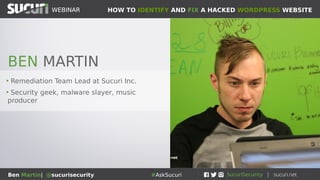
• Remediation Team Lead at Sucuri Inc.
• Security geek, malware slayer, music
producer
BEN MARTIN
HOW TO IDENTIFY AND FIX A HACKED WORDPRESS WEBSITEWEBINAR
Ben Martin| @sucurisecurity #AskSucuri
WEBINAR
Victoria, BC, Canada
HOW TO IDENTIFY AND FIX A HACKED WORDPRESS WEBSITEWEBINAR
Ben Martin| @sucurisecurity #AskSucuri
WEBINAR
Ben & WordPress
• 6 years working in cybersecurity and IT / software
• Has cleaned thousands of WordPress (and other) websites
• Helps to identify new malware campaigns and stop hacks
• Spoke at WordCamp Vancouver, Toronto and Portland
HOW TO IDENTIFY AND FIX A HACKED WORDPRESS WEBSITEWEBINAR
Ben Martin| @sucurisecurity #AskSucuri
WEBINAR
Overview of Sections
• Signs that your website has been pwned
• Find and remove the source of the infection
• What to do after a hack
HOW TO IDENTIFY AND FIX A HACKED WORDPRESS WEBSITEWEBINAR
Ben Martin| @sucurisecurity #AskSucuri
WEBINAR
Have I been pwned?
Tell tale signs that your website has been compromised
HOW TO IDENTIFY AND FIX A HACKED WORDPRESS WEBSITEWEBINAR
Ben Martin| @sucurisecurity #AskSucuri
WEBINAR
How can I tell if I’ve been hacked?
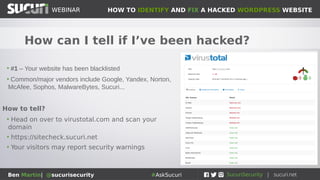
• #1 – Your website has been blacklisted
• Common/major vendors include Google, Yandex, Norton,
McAfee, Sophos, MalwareBytes, Sucuri...
How to tell?
• Head on over to virustotal.com and scan your
domain
• https://sitecheck.sucuri.net
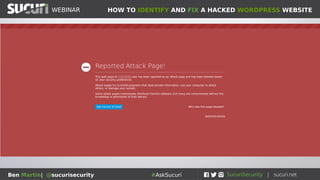
• Your visitors may report security warnings
HOW TO IDENTIFY AND FIX A HACKED WORDPRESS WEBSITEWEBINAR
Ben Martin| @sucurisecurity #AskSucuri
HOW TO IDENTIFY AND FIX A HACKED WORDPRESS WEBSITEWEBINAR
Ben Martin| @sucurisecurity #AskSucuri
WEBINAR
How can I tell if I’ve been hacked?
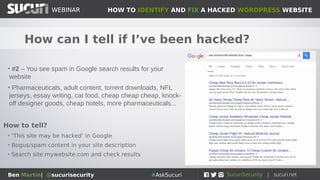
• #2 – You see spam in Google search results for your
website
• Pharmaceuticals, adult content, torrent downloads, NFL
jerseys, essay writing, cat food, cheap cheap cheap, knock-
off designer goods, cheap hotels, more pharmaceuticals...
How to tell?
• ‘This site may be hacked’ in Google
• Bogus/spam content in your site description
• Search site:mywebsite.com and check results
HOW TO IDENTIFY AND FIX A HACKED WORDPRESS WEBSITEWEBINAR
Ben Martin| @sucurisecurity #AskSucuri
WEBINAR
How can I tell if I’ve been hacked?
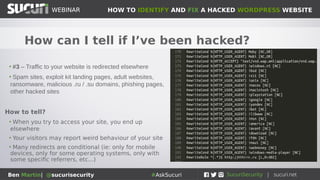
• #3 – Traffic to your website is redirected elsewhere
• Spam sites, exploit kit landing pages, adult websites,
ransomware, malicious .ru / .su domains, phishing pages,
other hacked sites
How to tell?
• When you try to access your site, you end up
elsewhere
• Your visitors may report weird behaviour of your site
• Many redirects are conditional (ie: only for mobile
devices, only for some operating systems, only with
some specific referrers, etc...)
HOW TO IDENTIFY AND FIX A HACKED WORDPRESS WEBSITEWEBINAR
Ben Martin| @sucurisecurity #AskSucuri
WEBINAR
How can I tell if I’ve been hacked?
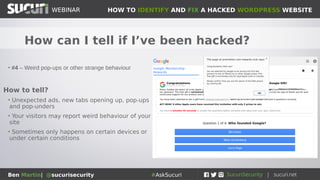
• #4 – Weird pop-ups or other strange behaviour
How to tell?
• Unexpected ads, new tabs opening up, pop-ups
and pop-unders
• Your visitors may report weird behaviour of your
site
• Sometimes only happens on certain devices or
under certain conditions
HOW TO IDENTIFY AND FIX A HACKED WORDPRESS WEBSITEWEBINAR
Ben Martin| @sucurisecurity #AskSucuri
WEBINAR
How can I tell if I’ve been hacked?
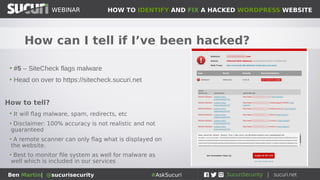
• #5 – SiteCheck flags malware
• Head on over to https://sitecheck.sucuri.net
How to tell?
• It will flag malware, spam, redirects, etc
• Disclaimer: 100% accuracy is not realistic and not
guaranteed
• A remote scanner can only flag what is displayed on
the website.
• Best to monitor file system as well for malware as
well which is included in our services
HOW TO IDENTIFY AND FIX A HACKED WORDPRESS WEBSITEWEBINAR
Ben Martin| @sucurisecurity #AskSucuri
WEBINAR
How can I tell if I’ve been hacked?
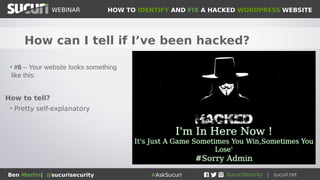
• #6 – Your website looks something
like this:
How to tell?
• Pretty self-explanatory
HOW TO IDENTIFY AND FIX A HACKED WORDPRESS WEBSITEWEBINAR
Ben Martin| @sucurisecurity #AskSucuri
WEBINAR
So now what do I do?
Some helpful pointers on fixing the hack
HOW TO IDENTIFY AND FIX A HACKED WORDPRESS WEBSITEWEBINAR
Ben Martin| @sucurisecurity #AskSucuri
WEBINAR
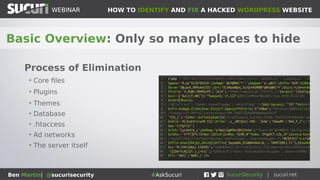
Basic Overview: Only so many places to hide
Process of Elimination
• Core files
• Plugins
• Themes
• Database
• .htaccess
• Ad networks
• The server itself
HOW TO IDENTIFY AND FIX A HACKED WORDPRESS WEBSITEWEBINAR
Ben Martin| @sucurisecurity #AskSucuri
WEBINAR
Tools of the trade: Add these to your tool-belt
Security and Development Tools
• Sucuri-scanner WordPress plugin
• Filezilla (FTP client)
• NoScript (Script blocker)
• VirtualBox (Virtualization tool)
• ublock Origin (Ad blocker)
• PHPMyAdmin or Adminer (database management)
• User Agent Switcher
• Support forums (ie: wordpress.org)
HOW TO IDENTIFY AND FIX A HACKED WORDPRESS WEBSITEWEBINAR
Ben Martin| @sucurisecurity #AskSucuri
WEBINAR
Heads up: Back up your website first!
Modifying files/database can cause damage
if any mistakes are made
• Make a website backup before making any changes
• This includes your file structure and database
• These can be safely stored as a .ZIP somewhere, but do not store
it on the server because it can be a security risk
HOW TO IDENTIFY AND FIX A HACKED WORDPRESS WEBSITEWEBINAR
Ben Martin| @sucurisecurity #AskSucuri
WEBINAR
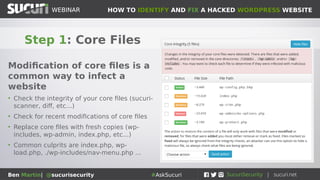
Step 1: Core Files
Modification of core files is a
common way to infect a
website
• Check the integrity of your core files (sucuri-
scanner, diff, etc...)
• Check for recent modifications of core files
• Replace core files with fresh copies (wp-
includes, wp-admin, index.php, etc...)
• Common culprits are index.php, wp-
load.php, ./wp-includes/nav-menu.php ...
HOW TO IDENTIFY AND FIX A HACKED WORDPRESS WEBSITEWEBINAR
Ben Martin| @sucurisecurity #AskSucuri
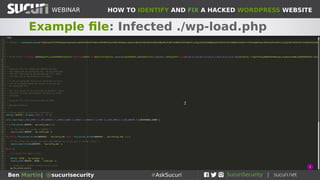
Example file: Infected ./wp-load.php
HOW TO IDENTIFY AND FIX A HACKED WORDPRESS WEBSITEWEBINAR
Ben Martin| @sucurisecurity #AskSucuri
WEBINAR
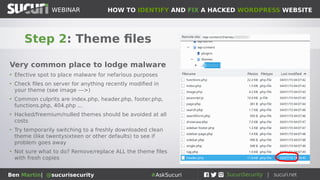
Step 2: Theme files
Very common place to lodge malware
• Efective spot to place malware for nefarious purposes
• Check files on server for anything recently modified in
your theme (see image --->)
• Common culprits are index.php, header.php, footer.php,
functions.php, 404.php ...
• Hacked/freemium/nulled themes should be avoided at all
costs
• Try temporarily switching to a freshly downloaded clean
theme (like twentysixteen or other defaults) to see if
problem goes away
• Not sure what to do? Remove/replace ALL the theme files
with fresh copies
HOW TO IDENTIFY AND FIX A HACKED WORDPRESS WEBSITEWEBINAR
Ben Martin| @sucurisecurity #AskSucuri
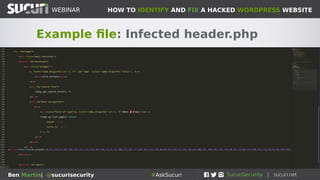
Example file: Infected header.php
HOW TO IDENTIFY AND FIX A HACKED WORDPRESS WEBSITEWEBINAR
Ben Martin| @sucurisecurity #AskSucuri
WEBINAR
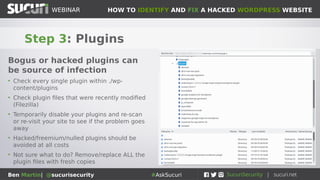
Step 3: Plugins
Bogus or hacked plugins can
be source of infection
• Check every single plugin within ./wp-
content/plugins
• Check plugin files that were recently modified
(Filezilla)
• Temporarily disable your plugins and re-scan
or re-visit your site to see if the problem goes
away
• Hacked/freemium/nulled plugins should be
avoided at all costs
• Not sure what to do? Remove/replace ALL the
plugin files with fresh copies
HOW TO IDENTIFY AND FIX A HACKED WORDPRESS WEBSITEWEBINAR
Ben Martin| @sucurisecurity #AskSucuri
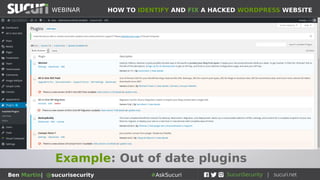
Example: Out of date plugins
HOW TO IDENTIFY AND FIX A HACKED WORDPRESS WEBSITEWEBINAR
Ben Martin| @sucurisecurity #AskSucuri
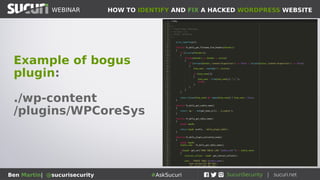
Example of bogus
plugin:
./wp-content
/plugins/WPCoreSys
HOW TO IDENTIFY AND FIX A HACKED WORDPRESS WEBSITEWEBINAR
Ben Martin| @sucurisecurity #AskSucuri
WEBINAR
Step 4: Database
Spam, iframes, hidden div
tags...
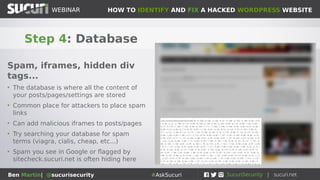
• The database is where all the content of
your posts/pages/settings are stored
• Common place for attackers to place spam
links
• Can add malicious iframes to posts/pages
• Try searching your database for spam
terms (viagra, cialis, cheap, etc...)
• Spam you see in Google or flagged by
sitecheck.sucuri.net is often hiding here
HOW TO IDENTIFY AND FIX A HACKED WORDPRESS WEBSITEWEBINAR
Ben Martin| @sucurisecurity #AskSucuri
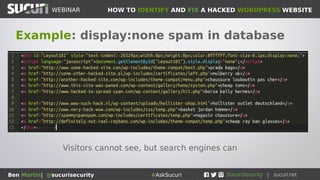
Example: display:none spam in database
Visitors cannot see, but search engines can
HOW TO IDENTIFY AND FIX A HACKED WORDPRESS WEBSITEWEBINAR
Ben Martin| @sucurisecurity #AskSucuri
WEBINAR
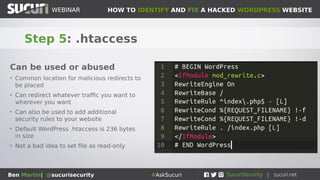
Step 5: .htaccess
Can be used or abused
• Common location for malicious redirects to
be placed
• Can redirect whatever traffic you want to
wherever you want
• Can also be used to add additional
security rules to your website
• Default WordPress .htaccess is 236 bytes
in size
• Not a bad idea to set file as read-only
HOW TO IDENTIFY AND FIX A HACKED WORDPRESS WEBSITEWEBINAR
Ben Martin| @sucurisecurity #AskSucuri
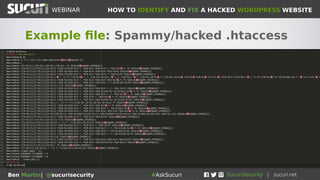
Example file: Spammy/hacked .htaccess
HOW TO IDENTIFY AND FIX A HACKED WORDPRESS WEBSITEWEBINAR
Ben Martin| @sucurisecurity #AskSucuri
WEBINAR
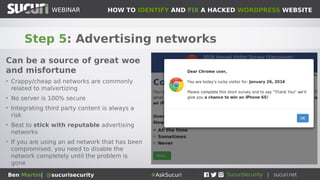
Step 5: Advertising networks
Can be a source of great woe
and misfortune
• Crappy/cheap ad networks are commonly
related to malvertizing
• No server is 100% secure
• Integrating third party content is always a
risk
• Best to stick with reputable advertising
networks
• If you are using an ad network that has been
compromised, you need to disable the
network completely until the problem is
gone
HOW TO IDENTIFY AND FIX A HACKED WORDPRESS WEBSITEWEBINAR
Ben Martin| @sucurisecurity #AskSucuri
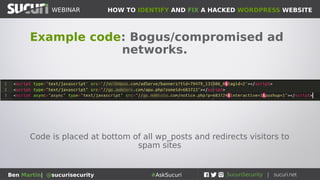
Example code: Bogus/compromised ad
networks.
Code is placed at bottom of all wp_posts and redirects visitors to
spam sites
HOW TO IDENTIFY AND FIX A HACKED WORDPRESS WEBSITEWEBINAR
Ben Martin| @sucurisecurity #AskSucuri
WEBINAR
Step 6: The server itself
Not as common, but still happens
• Sometimes the server on which your website resides is
itself rooted
• Choose your hosting provider carefully
• What will your host do if your website or server is
compromised?
• VPS is a good solution for a safer, private server
• If your server is infected, it is possible to clean it but
the best option is to migrate whe website to a new
server
• Do not re-use ANY passwords
HOW TO IDENTIFY AND FIX A HACKED WORDPRESS WEBSITEWEBINAR
Ben Martin| @sucurisecurity #AskSucuri
WEBINAR
Step 7: Backdoors
The hardest part!
• If backdoors are inserted on your site the
attackers will still have access, even if you delete
the other malware
• Backdoors are always coupled with main payload
• New backdoors written all the time, lots of variety
• Check which files were recently modified on your
server
• Check logs to see any strange files being
accessed directly (especially from weird IP’s)
HOW TO IDENTIFY AND FIX A HACKED WORDPRESS WEBSITEWEBINAR
Ben Martin| @sucurisecurity #AskSucuri
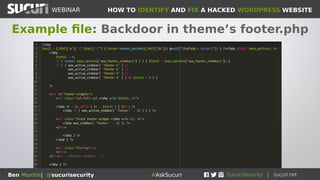
Example file: Backdoor in theme’s footer.php
HOW TO IDENTIFY AND FIX A HACKED WORDPRESS WEBSITEWEBINAR
Ben Martin| @sucurisecurity #AskSucuri
WEBINAR
Pro Tip: Some More Helpful Resources
Can help to determine problem:
• https://sitecheck.sucuri.net
●
Website malware scanner
• https://aw-snap.info
●
Can find redirects, spam, malvertizing
• https://www.webpagetest.org
●
See what’s loading on your website/server
• https://portswigger.net/burp
●
A more advanced web application tool
• http://ddecode.com and https://unphp.net
●
Useful for decoding malware and obfuscated code
HOW TO IDENTIFY AND FIX A HACKED WORDPRESS WEBSITEWEBINAR
Ben Martin| @sucurisecurity #AskSucuri
WEBINAR
The malware is gone, now what?
Gotta’ protect those Interwebs
HOW TO IDENTIFY AND FIX A HACKED WORDPRESS WEBSITEWEBINAR
Ben Martin| @sucurisecurity #AskSucuri
WEBINAR
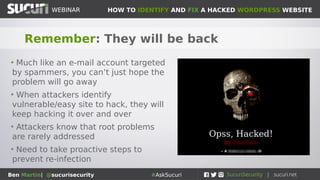
Remember: They will be back
• Much like an e-mail account targeted
by spammers, you can’t just hope the
problem will go away
• When attackers identify
vulnerable/easy site to hack, they will
keep hacking it over and over
• Attackers know that root problems
are rarely addressed
• Need to take proactive steps to
prevent re-infection
HOW TO IDENTIFY AND FIX A HACKED WORDPRESS WEBSITEWEBINAR
Ben Martin| @sucurisecurity #AskSucuri
WEBINAR
Step 1: Update all the things!
Out of date software is leading
cause of infection
• Update WordPress, all plugins, themes
• Make sure your server is up to date (cPanel, apache,
etc...)
• Basic and proactive website maintenance is first line
of defense
• This is a constant process, never let your guard down
HOW TO IDENTIFY AND FIX A HACKED WORDPRESS WEBSITEWEBINAR
Ben Martin| @sucurisecurity #AskSucuri
WEBINAR
Step 2: Change all the passwords!
Easy to guess/crappy/compromised
passwords is #2 reason for website
compromise
• Change all admin passwords to your site
• That includes wp-admin, FTP/SFTP, cPanel, hosting,
database, basically everything
• Consider using password manager like LastPass
• The harder it is for you to type/remember the harder it
will be to brute force
HOW TO IDENTIFY AND FIX A HACKED WORDPRESS WEBSITEWEBINAR
Ben Martin| @sucurisecurity #AskSucuri
WEBINAR
Step 3: Review who has access!
Have as few administrator
users as absolutely necessary
• This applies to everything from wp-admin, FTP, any
other connection mechanism
• The more admin accounts you have, the more likely
something will go wrong
• Ensure that all passwords are strong and complex
• Perform admin work from admin account, and have
separate account for blog posting etc.
HOW TO IDENTIFY AND FIX A HACKED WORDPRESS WEBSITEWEBINAR
Ben Martin| @sucurisecurity #AskSucuri
WEBINAR
Step 4: Clean your kitchen!
Decrease the attack surface
• Remove unused plugins and themes from the server
• Remove any old versions of your website, dev sites and
backups of your website from your server and store
them somewhere else
• Remove unnecessary administrator accounts
• Exercise ‘least privilege’ only grant minimum privileges
necessary for people to perform work
HOW TO IDENTIFY AND FIX A HACKED WORDPRESS WEBSITEWEBINAR
Ben Martin| @sucurisecurity #AskSucuri
WEBINAR
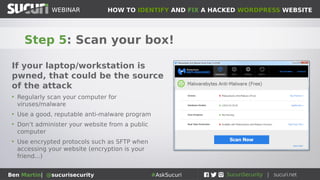
Step 5: Scan your box!
If your laptop/workstation is
pwned, that could be the source
of the attack
• Regularly scan your computer for
viruses/malware
• Use a good, reputable anti-malware program
• Don’t administer your website from a public
computer
• Use encrypted protocols such as SFTP when
accessing your website (encryption is your
friend...)
HOW TO IDENTIFY AND FIX A HACKED WORDPRESS WEBSITEWEBINAR
Ben Martin| @sucurisecurity #AskSucuri
WEBINAR
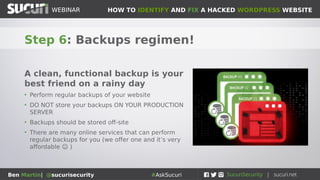
Step 6: Backups regimen!
A clean, functional backup is your
best friend on a rainy day
• Perform regular backups of your website
• DO NOT store your backups ON YOUR PRODUCTION
SERVER
• Backups should be stored off-site
• There are many online services that can perform
regular backups for you (we offer one and it’s very
affordable ☺ )
HOW TO IDENTIFY AND FIX A HACKED WORDPRESS WEBSITEWEBINAR
Ben Martin| @sucurisecurity #AskSucuri
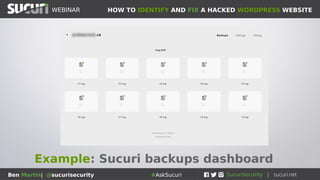
Example: Sucuri backups dashboard
HOW TO IDENTIFY AND FIX A HACKED WORDPRESS WEBSITEWEBINAR
Ben Martin| @sucurisecurity #AskSucuri
WEBINAR
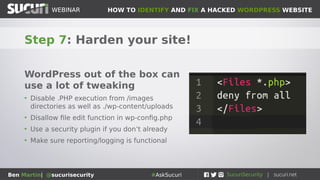
Step 7: Harden your site!
WordPress out of the box can
use a lot of tweaking
• Disable .PHP execution from /images
directories as well as ./wp-content/uploads
• Disallow file edit function in wp-config.php
• Use a security plugin if you don’t already
• Make sure reporting/logging is functional
HOW TO IDENTIFY AND FIX A HACKED WORDPRESS WEBSITEWEBINAR
Ben Martin| @sucurisecurity #AskSucuri
WEBINAR
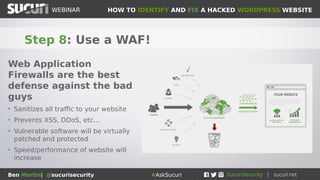
Step 8: Use a WAF!
Web Application
Firewalls are the best
defense against the bad
guys
• Sanitizes all traffic to your website
• Prevents XSS, DDoS, etc...
• Vulnerable software will be virtually
patched and protected
• Speed/performance of website will
increase
HOW TO IDENTIFY AND FIX A HACKED WORDPRESS WEBSITEWEBINAR
Ben Martin| @sucurisecurity #AskSucuri
WEBINAR
• Questions?
• Tweet us @sucurisecurity #AskSucuri
THANK YOU!

Sucuri Webinar: How to clean hacked WordPress sites

  • 2.
    HOW TO IDENTIFYAND FIX A HACKED WORDPRESS WEBSITEWEBINAR Ben Martin| @sucurisecurity #AskSucuri WEBINAR How to Identify and Fix a Hacked WordPress Website
  • 3.
    HOW TO IDENTIFYAND FIX A HACKED WORDPRESS WEBSITEWEBINAR Ben Martin| @sucurisecurity #AskSucuri KRISTEN THOMAS Community Manager Community Engagement Team @kdthomas327
  • 4.
    HOW TO IDENTIFYAND FIX A HACKED WORDPRESS WEBSITEWEBINAR Ben Martin| @sucurisecurity #AskSucuri HOUSEKEEPING ITEMS ● Poll questions on your screen ● Q&A ● Place questions in Q&A box ● Ask questions right away ● Use #AskSucuri on Twitter to engage ● Questions will be answered and delivered post-webinar ● Brief survey at the end of the presentation ● Presentation video
  • 5.
    HOW TO IDENTIFYAND FIX A HACKED WORDPRESS WEBSITEWEBINAR Ben Martin| @sucurisecurity #AskSucuri WEBINAR • Remediation Team Lead at Sucuri Inc. • Security geek, malware slayer, music producer BEN MARTIN
  • 6.
    HOW TO IDENTIFYAND FIX A HACKED WORDPRESS WEBSITEWEBINAR Ben Martin| @sucurisecurity #AskSucuri WEBINAR Victoria, BC, Canada
  • 7.
    HOW TO IDENTIFYAND FIX A HACKED WORDPRESS WEBSITEWEBINAR Ben Martin| @sucurisecurity #AskSucuri WEBINAR Ben & WordPress • 6 years working in cybersecurity and IT / software • Has cleaned thousands of WordPress (and other) websites • Helps to identify new malware campaigns and stop hacks • Spoke at WordCamp Vancouver, Toronto and Portland
  • 8.
    HOW TO IDENTIFYAND FIX A HACKED WORDPRESS WEBSITEWEBINAR Ben Martin| @sucurisecurity #AskSucuri WEBINAR Overview of Sections • Signs that your website has been pwned • Find and remove the source of the infection • What to do after a hack
  • 9.
    HOW TO IDENTIFYAND FIX A HACKED WORDPRESS WEBSITEWEBINAR Ben Martin| @sucurisecurity #AskSucuri WEBINAR Have I been pwned? Tell tale signs that your website has been compromised
  • 10.
    HOW TO IDENTIFYAND FIX A HACKED WORDPRESS WEBSITEWEBINAR Ben Martin| @sucurisecurity #AskSucuri WEBINAR How can I tell if I’ve been hacked? • #1 – Your website has been blacklisted • Common/major vendors include Google, Yandex, Norton, McAfee, Sophos, MalwareBytes, Sucuri... How to tell? • Head on over to virustotal.com and scan your domain • https://sitecheck.sucuri.net • Your visitors may report security warnings
  • 11.
    HOW TO IDENTIFYAND FIX A HACKED WORDPRESS WEBSITEWEBINAR Ben Martin| @sucurisecurity #AskSucuri
  • 12.
    HOW TO IDENTIFYAND FIX A HACKED WORDPRESS WEBSITEWEBINAR Ben Martin| @sucurisecurity #AskSucuri WEBINAR How can I tell if I’ve been hacked? • #2 – You see spam in Google search results for your website • Pharmaceuticals, adult content, torrent downloads, NFL jerseys, essay writing, cat food, cheap cheap cheap, knock- off designer goods, cheap hotels, more pharmaceuticals... How to tell? • ‘This site may be hacked’ in Google • Bogus/spam content in your site description • Search site:mywebsite.com and check results
  • 13.
    HOW TO IDENTIFYAND FIX A HACKED WORDPRESS WEBSITEWEBINAR Ben Martin| @sucurisecurity #AskSucuri WEBINAR How can I tell if I’ve been hacked? • #3 – Traffic to your website is redirected elsewhere • Spam sites, exploit kit landing pages, adult websites, ransomware, malicious .ru / .su domains, phishing pages, other hacked sites How to tell? • When you try to access your site, you end up elsewhere • Your visitors may report weird behaviour of your site • Many redirects are conditional (ie: only for mobile devices, only for some operating systems, only with some specific referrers, etc...)
  • 14.
    HOW TO IDENTIFYAND FIX A HACKED WORDPRESS WEBSITEWEBINAR Ben Martin| @sucurisecurity #AskSucuri WEBINAR How can I tell if I’ve been hacked? • #4 – Weird pop-ups or other strange behaviour How to tell? • Unexpected ads, new tabs opening up, pop-ups and pop-unders • Your visitors may report weird behaviour of your site • Sometimes only happens on certain devices or under certain conditions
  • 15.
    HOW TO IDENTIFYAND FIX A HACKED WORDPRESS WEBSITEWEBINAR Ben Martin| @sucurisecurity #AskSucuri WEBINAR How can I tell if I’ve been hacked? • #5 – SiteCheck flags malware • Head on over to https://sitecheck.sucuri.net How to tell? • It will flag malware, spam, redirects, etc • Disclaimer: 100% accuracy is not realistic and not guaranteed • A remote scanner can only flag what is displayed on the website. • Best to monitor file system as well for malware as well which is included in our services
  • 16.
    HOW TO IDENTIFYAND FIX A HACKED WORDPRESS WEBSITEWEBINAR Ben Martin| @sucurisecurity #AskSucuri WEBINAR How can I tell if I’ve been hacked? • #6 – Your website looks something like this: How to tell? • Pretty self-explanatory
  • 17.
    HOW TO IDENTIFYAND FIX A HACKED WORDPRESS WEBSITEWEBINAR Ben Martin| @sucurisecurity #AskSucuri WEBINAR So now what do I do? Some helpful pointers on fixing the hack
  • 18.
    HOW TO IDENTIFYAND FIX A HACKED WORDPRESS WEBSITEWEBINAR Ben Martin| @sucurisecurity #AskSucuri WEBINAR Basic Overview: Only so many places to hide Process of Elimination • Core files • Plugins • Themes • Database • .htaccess • Ad networks • The server itself
  • 19.
    HOW TO IDENTIFYAND FIX A HACKED WORDPRESS WEBSITEWEBINAR Ben Martin| @sucurisecurity #AskSucuri WEBINAR Tools of the trade: Add these to your tool-belt Security and Development Tools • Sucuri-scanner WordPress plugin • Filezilla (FTP client) • NoScript (Script blocker) • VirtualBox (Virtualization tool) • ublock Origin (Ad blocker) • PHPMyAdmin or Adminer (database management) • User Agent Switcher • Support forums (ie: wordpress.org)
  • 20.
    HOW TO IDENTIFYAND FIX A HACKED WORDPRESS WEBSITEWEBINAR Ben Martin| @sucurisecurity #AskSucuri WEBINAR Heads up: Back up your website first! Modifying files/database can cause damage if any mistakes are made • Make a website backup before making any changes • This includes your file structure and database • These can be safely stored as a .ZIP somewhere, but do not store it on the server because it can be a security risk
  • 21.
    HOW TO IDENTIFYAND FIX A HACKED WORDPRESS WEBSITEWEBINAR Ben Martin| @sucurisecurity #AskSucuri WEBINAR Step 1: Core Files Modification of core files is a common way to infect a website • Check the integrity of your core files (sucuri- scanner, diff, etc...) • Check for recent modifications of core files • Replace core files with fresh copies (wp- includes, wp-admin, index.php, etc...) • Common culprits are index.php, wp- load.php, ./wp-includes/nav-menu.php ...
  • 22.
    HOW TO IDENTIFYAND FIX A HACKED WORDPRESS WEBSITEWEBINAR Ben Martin| @sucurisecurity #AskSucuri Example file: Infected ./wp-load.php
  • 23.
    HOW TO IDENTIFYAND FIX A HACKED WORDPRESS WEBSITEWEBINAR Ben Martin| @sucurisecurity #AskSucuri WEBINAR Step 2: Theme files Very common place to lodge malware • Efective spot to place malware for nefarious purposes • Check files on server for anything recently modified in your theme (see image --->) • Common culprits are index.php, header.php, footer.php, functions.php, 404.php ... • Hacked/freemium/nulled themes should be avoided at all costs • Try temporarily switching to a freshly downloaded clean theme (like twentysixteen or other defaults) to see if problem goes away • Not sure what to do? Remove/replace ALL the theme files with fresh copies
  • 24.
    HOW TO IDENTIFYAND FIX A HACKED WORDPRESS WEBSITEWEBINAR Ben Martin| @sucurisecurity #AskSucuri Example file: Infected header.php
  • 25.
    HOW TO IDENTIFYAND FIX A HACKED WORDPRESS WEBSITEWEBINAR Ben Martin| @sucurisecurity #AskSucuri WEBINAR Step 3: Plugins Bogus or hacked plugins can be source of infection • Check every single plugin within ./wp- content/plugins • Check plugin files that were recently modified (Filezilla) • Temporarily disable your plugins and re-scan or re-visit your site to see if the problem goes away • Hacked/freemium/nulled plugins should be avoided at all costs • Not sure what to do? Remove/replace ALL the plugin files with fresh copies
  • 26.
    HOW TO IDENTIFYAND FIX A HACKED WORDPRESS WEBSITEWEBINAR Ben Martin| @sucurisecurity #AskSucuri Example: Out of date plugins
  • 27.
    HOW TO IDENTIFYAND FIX A HACKED WORDPRESS WEBSITEWEBINAR Ben Martin| @sucurisecurity #AskSucuri Example of bogus plugin: ./wp-content /plugins/WPCoreSys
  • 28.
    HOW TO IDENTIFYAND FIX A HACKED WORDPRESS WEBSITEWEBINAR Ben Martin| @sucurisecurity #AskSucuri WEBINAR Step 4: Database Spam, iframes, hidden div tags... • The database is where all the content of your posts/pages/settings are stored • Common place for attackers to place spam links • Can add malicious iframes to posts/pages • Try searching your database for spam terms (viagra, cialis, cheap, etc...) • Spam you see in Google or flagged by sitecheck.sucuri.net is often hiding here
  • 29.
    HOW TO IDENTIFYAND FIX A HACKED WORDPRESS WEBSITEWEBINAR Ben Martin| @sucurisecurity #AskSucuri Example: display:none spam in database Visitors cannot see, but search engines can
  • 30.
    HOW TO IDENTIFYAND FIX A HACKED WORDPRESS WEBSITEWEBINAR Ben Martin| @sucurisecurity #AskSucuri WEBINAR Step 5: .htaccess Can be used or abused • Common location for malicious redirects to be placed • Can redirect whatever traffic you want to wherever you want • Can also be used to add additional security rules to your website • Default WordPress .htaccess is 236 bytes in size • Not a bad idea to set file as read-only
  • 31.
    HOW TO IDENTIFYAND FIX A HACKED WORDPRESS WEBSITEWEBINAR Ben Martin| @sucurisecurity #AskSucuri Example file: Spammy/hacked .htaccess
  • 32.
    HOW TO IDENTIFYAND FIX A HACKED WORDPRESS WEBSITEWEBINAR Ben Martin| @sucurisecurity #AskSucuri WEBINAR Step 5: Advertising networks Can be a source of great woe and misfortune • Crappy/cheap ad networks are commonly related to malvertizing • No server is 100% secure • Integrating third party content is always a risk • Best to stick with reputable advertising networks • If you are using an ad network that has been compromised, you need to disable the network completely until the problem is gone
  • 33.
    HOW TO IDENTIFYAND FIX A HACKED WORDPRESS WEBSITEWEBINAR Ben Martin| @sucurisecurity #AskSucuri Example code: Bogus/compromised ad networks. Code is placed at bottom of all wp_posts and redirects visitors to spam sites
  • 34.
    HOW TO IDENTIFYAND FIX A HACKED WORDPRESS WEBSITEWEBINAR Ben Martin| @sucurisecurity #AskSucuri WEBINAR Step 6: The server itself Not as common, but still happens • Sometimes the server on which your website resides is itself rooted • Choose your hosting provider carefully • What will your host do if your website or server is compromised? • VPS is a good solution for a safer, private server • If your server is infected, it is possible to clean it but the best option is to migrate whe website to a new server • Do not re-use ANY passwords
  • 35.
    HOW TO IDENTIFYAND FIX A HACKED WORDPRESS WEBSITEWEBINAR Ben Martin| @sucurisecurity #AskSucuri WEBINAR Step 7: Backdoors The hardest part! • If backdoors are inserted on your site the attackers will still have access, even if you delete the other malware • Backdoors are always coupled with main payload • New backdoors written all the time, lots of variety • Check which files were recently modified on your server • Check logs to see any strange files being accessed directly (especially from weird IP’s)
  • 36.
    HOW TO IDENTIFYAND FIX A HACKED WORDPRESS WEBSITEWEBINAR Ben Martin| @sucurisecurity #AskSucuri Example file: Backdoor in theme’s footer.php
  • 37.
    HOW TO IDENTIFYAND FIX A HACKED WORDPRESS WEBSITEWEBINAR Ben Martin| @sucurisecurity #AskSucuri WEBINAR Pro Tip: Some More Helpful Resources Can help to determine problem: • https://sitecheck.sucuri.net ● Website malware scanner • https://aw-snap.info ● Can find redirects, spam, malvertizing • https://www.webpagetest.org ● See what’s loading on your website/server • https://portswigger.net/burp ● A more advanced web application tool • http://ddecode.com and https://unphp.net ● Useful for decoding malware and obfuscated code
  • 38.
    HOW TO IDENTIFYAND FIX A HACKED WORDPRESS WEBSITEWEBINAR Ben Martin| @sucurisecurity #AskSucuri WEBINAR The malware is gone, now what? Gotta’ protect those Interwebs
  • 39.
    HOW TO IDENTIFYAND FIX A HACKED WORDPRESS WEBSITEWEBINAR Ben Martin| @sucurisecurity #AskSucuri WEBINAR Remember: They will be back • Much like an e-mail account targeted by spammers, you can’t just hope the problem will go away • When attackers identify vulnerable/easy site to hack, they will keep hacking it over and over • Attackers know that root problems are rarely addressed • Need to take proactive steps to prevent re-infection
  • 40.
    HOW TO IDENTIFYAND FIX A HACKED WORDPRESS WEBSITEWEBINAR Ben Martin| @sucurisecurity #AskSucuri WEBINAR Step 1: Update all the things! Out of date software is leading cause of infection • Update WordPress, all plugins, themes • Make sure your server is up to date (cPanel, apache, etc...) • Basic and proactive website maintenance is first line of defense • This is a constant process, never let your guard down
  • 41.
    HOW TO IDENTIFYAND FIX A HACKED WORDPRESS WEBSITEWEBINAR Ben Martin| @sucurisecurity #AskSucuri WEBINAR Step 2: Change all the passwords! Easy to guess/crappy/compromised passwords is #2 reason for website compromise • Change all admin passwords to your site • That includes wp-admin, FTP/SFTP, cPanel, hosting, database, basically everything • Consider using password manager like LastPass • The harder it is for you to type/remember the harder it will be to brute force
  • 42.
    HOW TO IDENTIFYAND FIX A HACKED WORDPRESS WEBSITEWEBINAR Ben Martin| @sucurisecurity #AskSucuri WEBINAR Step 3: Review who has access! Have as few administrator users as absolutely necessary • This applies to everything from wp-admin, FTP, any other connection mechanism • The more admin accounts you have, the more likely something will go wrong • Ensure that all passwords are strong and complex • Perform admin work from admin account, and have separate account for blog posting etc.
  • 43.
    HOW TO IDENTIFYAND FIX A HACKED WORDPRESS WEBSITEWEBINAR Ben Martin| @sucurisecurity #AskSucuri WEBINAR Step 4: Clean your kitchen! Decrease the attack surface • Remove unused plugins and themes from the server • Remove any old versions of your website, dev sites and backups of your website from your server and store them somewhere else • Remove unnecessary administrator accounts • Exercise ‘least privilege’ only grant minimum privileges necessary for people to perform work
  • 44.
    HOW TO IDENTIFYAND FIX A HACKED WORDPRESS WEBSITEWEBINAR Ben Martin| @sucurisecurity #AskSucuri WEBINAR Step 5: Scan your box! If your laptop/workstation is pwned, that could be the source of the attack • Regularly scan your computer for viruses/malware • Use a good, reputable anti-malware program • Don’t administer your website from a public computer • Use encrypted protocols such as SFTP when accessing your website (encryption is your friend...)
  • 45.
    HOW TO IDENTIFYAND FIX A HACKED WORDPRESS WEBSITEWEBINAR Ben Martin| @sucurisecurity #AskSucuri WEBINAR Step 6: Backups regimen! A clean, functional backup is your best friend on a rainy day • Perform regular backups of your website • DO NOT store your backups ON YOUR PRODUCTION SERVER • Backups should be stored off-site • There are many online services that can perform regular backups for you (we offer one and it’s very affordable ☺ )
  • 46.
    HOW TO IDENTIFYAND FIX A HACKED WORDPRESS WEBSITEWEBINAR Ben Martin| @sucurisecurity #AskSucuri Example: Sucuri backups dashboard
  • 47.
    HOW TO IDENTIFYAND FIX A HACKED WORDPRESS WEBSITEWEBINAR Ben Martin| @sucurisecurity #AskSucuri WEBINAR Step 7: Harden your site! WordPress out of the box can use a lot of tweaking • Disable .PHP execution from /images directories as well as ./wp-content/uploads • Disallow file edit function in wp-config.php • Use a security plugin if you don’t already • Make sure reporting/logging is functional
  • 48.
    HOW TO IDENTIFYAND FIX A HACKED WORDPRESS WEBSITEWEBINAR Ben Martin| @sucurisecurity #AskSucuri WEBINAR Step 8: Use a WAF! Web Application Firewalls are the best defense against the bad guys • Sanitizes all traffic to your website • Prevents XSS, DDoS, etc... • Vulnerable software will be virtually patched and protected • Speed/performance of website will increase
  • 49.
    HOW TO IDENTIFYAND FIX A HACKED WORDPRESS WEBSITEWEBINAR Ben Martin| @sucurisecurity #AskSucuri WEBINAR • Questions? • Tweet us @sucurisecurity #AskSucuri THANK YOU!