SolarWinds®
                        Web Help Desk – Level I Customer Training


© 2012 SOLARWINDS WORLDWIDE, LLC. ALL RIGHTS RESERVED.
Today’s Session

 Hosts
         » Andy McBride – Support Specialist
         » Rob Hock – Product Manager


                                                                              ®


                                                         Are you Certified?


© 2012 SOLARWINDS WORLDWIDE, LLC. ALL RIGHTS RESERVED.
                                                                   2
Agenda

 Introductions & Housekeeping
 The Basics
       Understanding Ticket Logic
   Using the Setup Pages
   Using the Top Menu Bar
   LDAP Connections
   Import Tools
   HTTPS/SSL
   Summary and Q&A


© 2012 SOLARWINDS WORLDWIDE, LLC. ALL RIGHTS RESERVED.
                                                         3
A Few Notes about Today’s Session

 Today’s content will mostly be live feature use!
         » We only have an hour.


 Ask questions!
         » Don’t be afraid to ask deeper questions
         » Don’t wait until the end – ask away


 Today’s session is being recorded
         » Recorded session on SolarWinds.com
         » Slides available on slideshare® .com


© 2012 SOLARWINDS WORLDWIDE, LLC. ALL RIGHTS RESERVED.
                                                         4
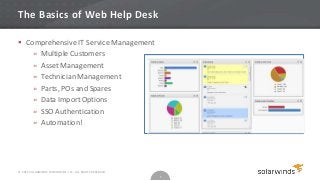
The Basics of Web Help Desk

 Comprehensive IT Service Management
    » Multiple Customers
    » Asset Management
    » Technician Management
    » Parts, POs and Spares
    » Data Import Options
    » SSO Authentication
    » Automation!


© 2012 SOLARWINDS WORLDWIDE, LLC. ALL RIGHTS RESERVED.
                                                         5
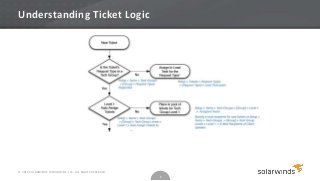
Understanding Ticket Logic


© 2012 SOLARWINDS WORLDWIDE, LLC. ALL RIGHTS RESERVED.
                                                         6
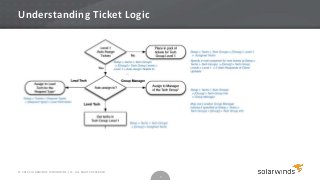
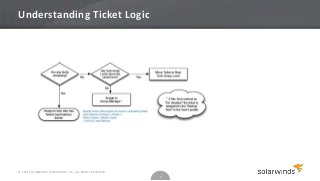
Understanding Ticket Logic


© 2012 SOLARWINDS WORLDWIDE, LLC. ALL RIGHTS RESERVED.
                                                         7
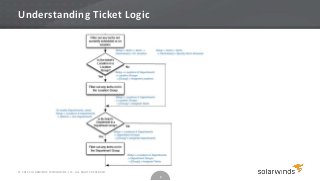
Understanding Ticket Logic


© 2012 SOLARWINDS WORLDWIDE, LLC. ALL RIGHTS RESERVED.
                                                         8
Understanding Ticket Logic


© 2012 SOLARWINDS WORLDWIDE, LLC. ALL RIGHTS RESERVED.
                                                         9
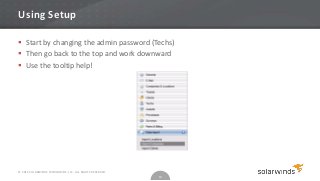
Using Setup

 Start by changing the admin password (Techs)
 Then go back to the top and work downward
 Use the tooltip help!


© 2012 SOLARWINDS WORLDWIDE, LLC. ALL RIGHTS RESERVED.
                                                         10
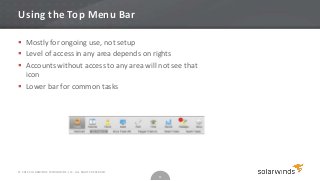
Using the Top Menu Bar

 Mostly for ongoing use, not setup
 Level of access in any area depends on rights
 Accounts without access to any area will not see that
  icon
 Lower bar for common tasks


© 2012 SOLARWINDS WORLDWIDE, LLC. ALL RIGHTS RESERVED.
                                                         11
Using LDAP in WHD

           Requires some knowledge of X.500 Directory Services or Active Directory®
         » You have knowledge of the LDAP structure
           May be unnecessary
         » For an implementation with few clients and client admins
           Avoid bulk import/sync
         » If you use bulk sync, do so carefully
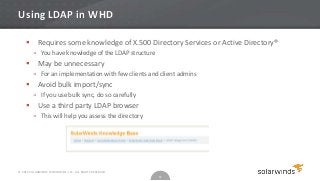
           Use a third party LDAP browser
         » This will help you assess the directory


© 2012 SOLARWINDS WORLDWIDE, LLC. ALL RIGHTS RESERVED.
                                                         12
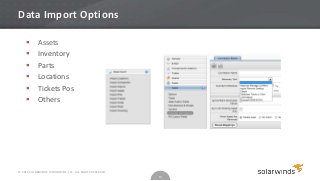
Data Import Options

           Assets
           Inventory
           Parts
           Locations
           Tickets Pos
           Others


© 2012 SOLARWINDS WORLDWIDE, LLC. ALL RIGHTS RESERVED.
                                                         13
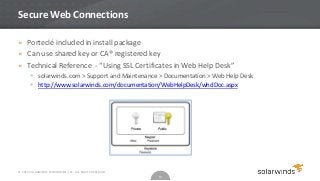
Secure Web Connections

» Porteclé included in install package
» Can use shared key or CA® registered key
» Technical Reference - “Using SSL Certificates in Web Help Desk”
        solarwinds.com > Support and Maintenance > Documentation > Web Help Desk
        http://www.solarwinds.com/documentation/WebHelpDesk/whdDoc.aspx


© 2012 SOLARWINDS WORLDWIDE, LLC. ALL RIGHTS RESERVED.
                                                         14
What’s Next?

» Level II WHD Training
           Tips
           Best Practices
           Common Issues
           Advanced Features Walkthrough
           Level 2 - November 15!
» What we are working on.
        http://forums.webhelpdesk.com/forums/?CategoryID=6
» What would you like to see in WHD?
        http://forums.webhelpdesk.com/forums/?CategoryID=4


© 2012 SOLARWINDS WORLDWIDE, LLC. ALL RIGHTS RESERVED.
                                                         15

Customer Training: Web Help Desk Part 1

  • 1.
    SolarWinds® Web Help Desk – Level I Customer Training © 2012 SOLARWINDS WORLDWIDE, LLC. ALL RIGHTS RESERVED.
  • 2.
    Today’s Session  Hosts » Andy McBride – Support Specialist » Rob Hock – Product Manager ® Are you Certified? © 2012 SOLARWINDS WORLDWIDE, LLC. ALL RIGHTS RESERVED. 2
  • 3.
    Agenda  Introductions &Housekeeping  The Basics  Understanding Ticket Logic  Using the Setup Pages  Using the Top Menu Bar  LDAP Connections  Import Tools  HTTPS/SSL  Summary and Q&A © 2012 SOLARWINDS WORLDWIDE, LLC. ALL RIGHTS RESERVED. 3
  • 4.
    A Few Notesabout Today’s Session  Today’s content will mostly be live feature use! » We only have an hour.  Ask questions! » Don’t be afraid to ask deeper questions » Don’t wait until the end – ask away  Today’s session is being recorded » Recorded session on SolarWinds.com » Slides available on slideshare® .com © 2012 SOLARWINDS WORLDWIDE, LLC. ALL RIGHTS RESERVED. 4
  • 5.
    The Basics ofWeb Help Desk  Comprehensive IT Service Management » Multiple Customers » Asset Management » Technician Management » Parts, POs and Spares » Data Import Options » SSO Authentication » Automation! © 2012 SOLARWINDS WORLDWIDE, LLC. ALL RIGHTS RESERVED. 5
  • 6.
    Understanding Ticket Logic ©2012 SOLARWINDS WORLDWIDE, LLC. ALL RIGHTS RESERVED. 6
  • 7.
    Understanding Ticket Logic ©2012 SOLARWINDS WORLDWIDE, LLC. ALL RIGHTS RESERVED. 7
  • 8.
    Understanding Ticket Logic ©2012 SOLARWINDS WORLDWIDE, LLC. ALL RIGHTS RESERVED. 8
  • 9.
    Understanding Ticket Logic ©2012 SOLARWINDS WORLDWIDE, LLC. ALL RIGHTS RESERVED. 9
  • 10.
    Using Setup  Startby changing the admin password (Techs)  Then go back to the top and work downward  Use the tooltip help! © 2012 SOLARWINDS WORLDWIDE, LLC. ALL RIGHTS RESERVED. 10
  • 11.
    Using the TopMenu Bar  Mostly for ongoing use, not setup  Level of access in any area depends on rights  Accounts without access to any area will not see that icon  Lower bar for common tasks © 2012 SOLARWINDS WORLDWIDE, LLC. ALL RIGHTS RESERVED. 11
  • 12.
    Using LDAP inWHD  Requires some knowledge of X.500 Directory Services or Active Directory® » You have knowledge of the LDAP structure  May be unnecessary » For an implementation with few clients and client admins  Avoid bulk import/sync » If you use bulk sync, do so carefully  Use a third party LDAP browser » This will help you assess the directory © 2012 SOLARWINDS WORLDWIDE, LLC. ALL RIGHTS RESERVED. 12
  • 13.
    Data Import Options  Assets  Inventory  Parts  Locations  Tickets Pos  Others © 2012 SOLARWINDS WORLDWIDE, LLC. ALL RIGHTS RESERVED. 13
  • 14.
    Secure Web Connections »Porteclé included in install package » Can use shared key or CA® registered key » Technical Reference - “Using SSL Certificates in Web Help Desk”  solarwinds.com > Support and Maintenance > Documentation > Web Help Desk  http://www.solarwinds.com/documentation/WebHelpDesk/whdDoc.aspx © 2012 SOLARWINDS WORLDWIDE, LLC. ALL RIGHTS RESERVED. 14
  • 15.
    What’s Next? » LevelII WHD Training  Tips  Best Practices  Common Issues  Advanced Features Walkthrough  Level 2 - November 15! » What we are working on.  http://forums.webhelpdesk.com/forums/?CategoryID=6 » What would you like to see in WHD?  http://forums.webhelpdesk.com/forums/?CategoryID=4 © 2012 SOLARWINDS WORLDWIDE, LLC. ALL RIGHTS RESERVED. 15