Basic of the Google Glass programming
April 7, 2014
Miki Yutani
Strategic Technology Center, TIS Inc.
2
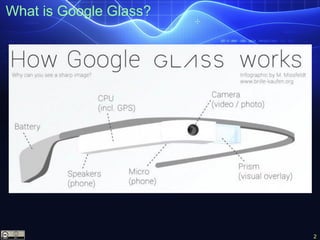
What is Google Glass?
3
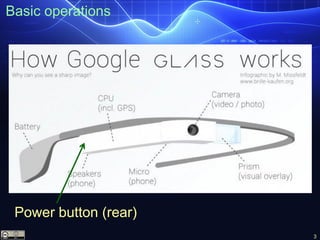
Basic operations
Power button (rear)
4
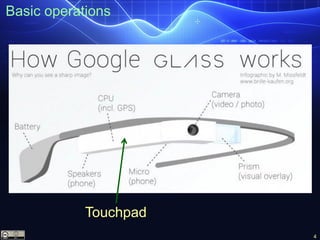
Basic operations
Touchpad
5
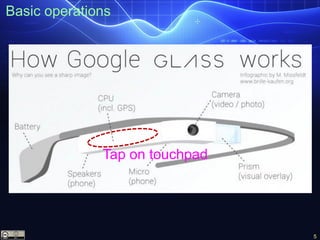
Basic operations
Tap on touchpad
6
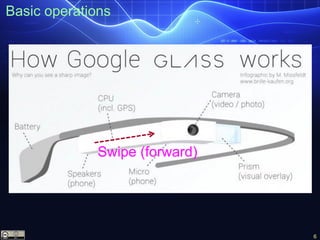
Basic operations
Swipe (forward)
7
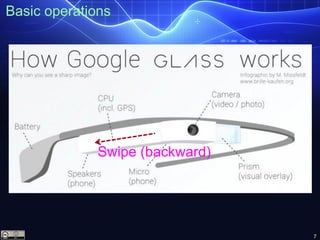
Basic operations
Swipe (backward)
8
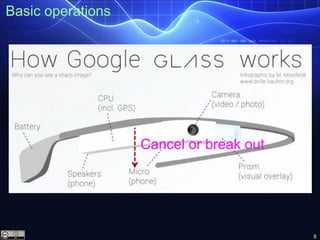
Basic operations
Cancel or break out
9
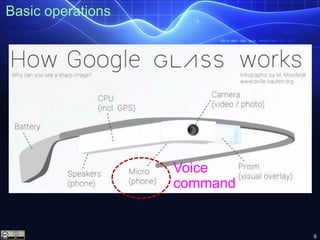
Basic operations
Voice
command
10
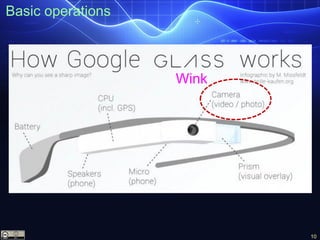
Basic operations
Wink
11
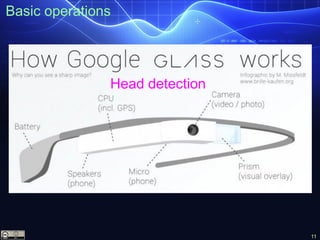
Basic operations
Head detection
12
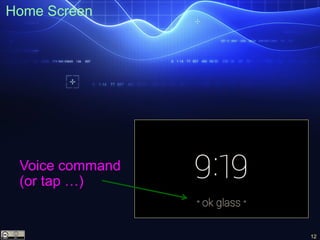
Home Screen
Voice command
(or tap …)
13
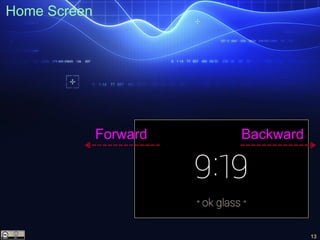
Home Screen
Forward Backward
14
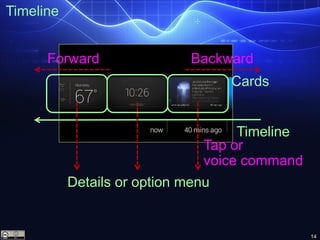
Timeline
Forward Backward
Cards
Timeline
Tap or
voice command
Details or option menu
15
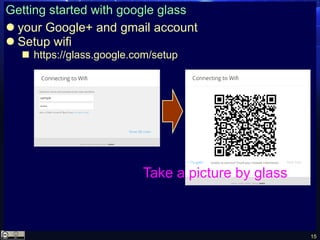
Getting started with google glass
 your Google+ and gmail account
 Setup wifi
 https://glass.google.com/setup
Take a picture by glass
16
Getting started with google glass
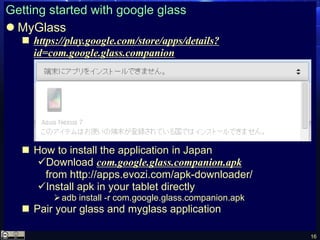
 MyGlass
 https://play.google.com/store/apps/details?
id=com.google.glass.companion
 How to install the application in Japan
Download com.google.glass.companion.apk
from http://apps.evozi.com/apk-downloader/
Install apk in your tablet directly
adb install -r com.google.glass.companion.apk
 Pair your glass and myglass application
17
Glass application
 Two API options of glass application
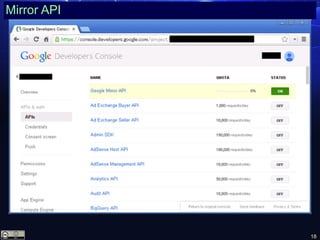
 Mirror API
Google API: https://code.google.com/apis/console/
Platform independent
Common infrastructure
Built-in functionality
 Glass Development Kit (GDK)
Android SDK
Real-time user interaction
Offline functionality
Access to hardware
18
Mirror API
19
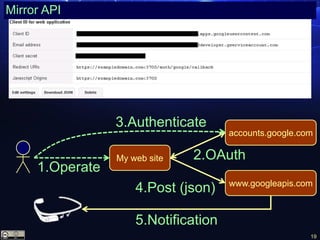
Mirror API
www.googleapis.com
My web site
accounts.google.com
2.OAuth
4.Post (json)
5.Notification
3.Authenticate
1.Operate
20
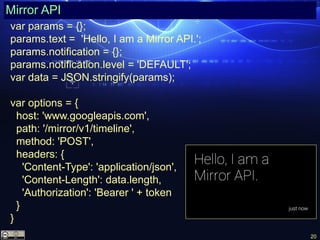
Mirror API
var params = {};
params.text = 'Hello, I am a Mirror API.';
params.notification = {};
params.notification.level = 'DEFAULT';
var data = JSON.stringify(params);
var options = {
host: 'www.googleapis.com',
path: '/mirror/v1/timeline',
method: 'POST',
headers: {
'Content-Type': 'application/json',
'Content-Length': data.length,
'Authorization': 'Bearer ' + token
}
}
21
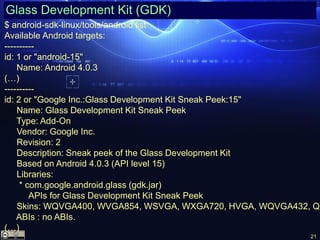
Glass Development Kit (GDK)
$ android-sdk-linux/tools/android list
Available Android targets:
----------
id: 1 or "android-15"
Name: Android 4.0.3
(…)
----------
id: 2 or "Google Inc.:Glass Development Kit Sneak Peek:15"
Name: Glass Development Kit Sneak Peek
Type: Add-On
Vendor: Google Inc.
Revision: 2
Description: Sneak peek of the Glass Development Kit
Based on Android 4.0.3 (API level 15)
Libraries:
* com.google.android.glass (gdk.jar)
APIs for Glass Development Kit Sneak Peek
Skins: WQVGA400, WVGA854, WSVGA, WXGA720, HVGA, WQVGA432, QV
ABIs : no ABIs.
(…)
22
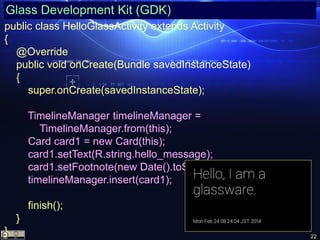
Glass Development Kit (GDK)
public class HelloGlassActivity extends Activity
{
@Override
public void onCreate(Bundle savedInstanceState)
{
super.onCreate(savedInstanceState);
TimelineManager timelineManager =
TimelineManager.from(this);
Card card1 = new Card(this);
card1.setText(R.string.hello_message);
card1.setFootnote(new Date().toString());
timelineManager.insert(card1);
finish();
}
}
23
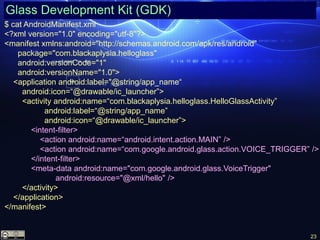
Glass Development Kit (GDK)
$ cat AndroidManifest.xml
<?xml version="1.0" encoding="utf-8"?>
<manifest xmlns:android="http://schemas.android.com/apk/res/android"
package="com.blackaplysia.helloglass"
android:versionCode="1"
android:versionName="1.0">
<application android:label="@string/app_name“
android:icon=“@drawable/ic_launcher”>
<activity android:name=“com.blackaplysia.helloglass.HelloGlassActivity”
android:label=“@string/app_name”
android:icon=“@drawable/ic_launcher”>
<intent-filter>
<action android:name=“android.intent.action.MAIN” />
<action android:name=“com.google.android.glass.action.VOICE_TRIGGER” />
</intent-filter>
<meta-data android:name="com.google.android.glass.VoiceTrigger"
android:resource="@xml/hello" />
</activity>
</application>
</manifest>
24
Glass Development Kit (GDK)
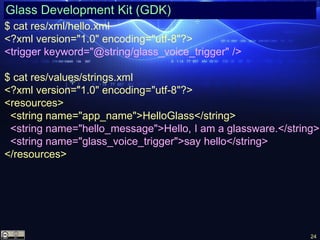
$ cat res/xml/hello.xml
<?xml version="1.0" encoding="utf-8"?>
<trigger keyword="@string/glass_voice_trigger" />
$ cat res/values/strings.xml
<?xml version="1.0" encoding="utf-8"?>
<resources>
<string name="app_name">HelloGlass</string>
<string name="hello_message">Hello, I am a glassware.</string>
<string name="glass_voice_trigger">say hello</string>
</resources>
25
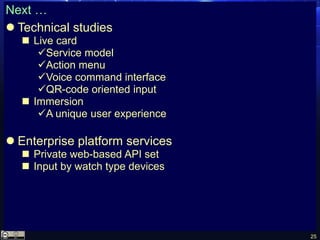
Next …
 Technical studies
 Live card
Service model
Action menu
Voice command interface
QR-code oriented input
 Immersion
A unique user experience
 Enterprise platform services
 Private web-based API set
 Input by watch type devices

Basics of the Google Glass programming

  • 1.
    Basic of theGoogle Glass programming April 7, 2014 Miki Yutani Strategic Technology Center, TIS Inc.
  • 2.
  • 3.
  • 4.
  • 5.
  • 6.
  • 7.
  • 8.
  • 9.
  • 10.
  • 11.
  • 12.
  • 13.
  • 14.
  • 15.
    15 Getting started withgoogle glass  your Google+ and gmail account  Setup wifi  https://glass.google.com/setup Take a picture by glass
  • 16.
    16 Getting started withgoogle glass  MyGlass  https://play.google.com/store/apps/details? id=com.google.glass.companion  How to install the application in Japan Download com.google.glass.companion.apk from http://apps.evozi.com/apk-downloader/ Install apk in your tablet directly adb install -r com.google.glass.companion.apk  Pair your glass and myglass application
  • 17.
    17 Glass application  TwoAPI options of glass application  Mirror API Google API: https://code.google.com/apis/console/ Platform independent Common infrastructure Built-in functionality  Glass Development Kit (GDK) Android SDK Real-time user interaction Offline functionality Access to hardware
  • 18.
  • 19.
    19 Mirror API www.googleapis.com My website accounts.google.com 2.OAuth 4.Post (json) 5.Notification 3.Authenticate 1.Operate
  • 20.
    20 Mirror API var params= {}; params.text = 'Hello, I am a Mirror API.'; params.notification = {}; params.notification.level = 'DEFAULT'; var data = JSON.stringify(params); var options = { host: 'www.googleapis.com', path: '/mirror/v1/timeline', method: 'POST', headers: { 'Content-Type': 'application/json', 'Content-Length': data.length, 'Authorization': 'Bearer ' + token } }
  • 21.
    21 Glass Development Kit(GDK) $ android-sdk-linux/tools/android list Available Android targets: ---------- id: 1 or "android-15" Name: Android 4.0.3 (…) ---------- id: 2 or "Google Inc.:Glass Development Kit Sneak Peek:15" Name: Glass Development Kit Sneak Peek Type: Add-On Vendor: Google Inc. Revision: 2 Description: Sneak peek of the Glass Development Kit Based on Android 4.0.3 (API level 15) Libraries: * com.google.android.glass (gdk.jar) APIs for Glass Development Kit Sneak Peek Skins: WQVGA400, WVGA854, WSVGA, WXGA720, HVGA, WQVGA432, QV ABIs : no ABIs. (…)
  • 22.
    22 Glass Development Kit(GDK) public class HelloGlassActivity extends Activity { @Override public void onCreate(Bundle savedInstanceState) { super.onCreate(savedInstanceState); TimelineManager timelineManager = TimelineManager.from(this); Card card1 = new Card(this); card1.setText(R.string.hello_message); card1.setFootnote(new Date().toString()); timelineManager.insert(card1); finish(); } }
  • 23.
    23 Glass Development Kit(GDK) $ cat AndroidManifest.xml <?xml version="1.0" encoding="utf-8"?> <manifest xmlns:android="http://schemas.android.com/apk/res/android" package="com.blackaplysia.helloglass" android:versionCode="1" android:versionName="1.0"> <application android:label="@string/app_name“ android:icon=“@drawable/ic_launcher”> <activity android:name=“com.blackaplysia.helloglass.HelloGlassActivity” android:label=“@string/app_name” android:icon=“@drawable/ic_launcher”> <intent-filter> <action android:name=“android.intent.action.MAIN” /> <action android:name=“com.google.android.glass.action.VOICE_TRIGGER” /> </intent-filter> <meta-data android:name="com.google.android.glass.VoiceTrigger" android:resource="@xml/hello" /> </activity> </application> </manifest>
  • 24.
    24 Glass Development Kit(GDK) $ cat res/xml/hello.xml <?xml version="1.0" encoding="utf-8"?> <trigger keyword="@string/glass_voice_trigger" /> $ cat res/values/strings.xml <?xml version="1.0" encoding="utf-8"?> <resources> <string name="app_name">HelloGlass</string> <string name="hello_message">Hello, I am a glassware.</string> <string name="glass_voice_trigger">say hello</string> </resources>
  • 25.
    25 Next …  Technicalstudies  Live card Service model Action menu Voice command interface QR-code oriented input  Immersion A unique user experience  Enterprise platform services  Private web-based API set  Input by watch type devices