Visual COBOL Development for
       Windows & .NET
            Michael Bleistein
          Sr. Solution Architect
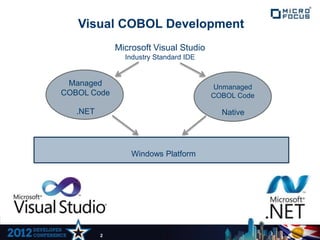
Visual COBOL Development
              Microsoft Visual Studio
                Industry Standard IDE


 Managed                                Unmanaged
COBOL Code                              COBOL Code

   .NET                                   Native


                  Windows Platform


          2
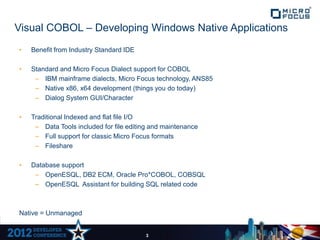
Visual COBOL – Developing Windows Native Applications
•   Benefit from Industry Standard IDE

•   Standard and Micro Focus Dialect support for COBOL
     – IBM mainframe dialects, Micro Focus technology, ANS85
     – Native x86, x64 development (things you do today)
     – Dialog System GUI/Character

•   Traditional Indexed and flat file I/O
     – Data Tools included for file editing and maintenance
     – Full support for classic Micro Focus formats
     – Fileshare

•   Database support
     – OpenESQL, DB2 ECM, Oracle Pro*COBOL, COBSQL
     – OpenESQL Assistant for building SQL related code


Native = Unmanaged


                                         3
Visual COBOL – Developing Windows .NET Applications

•   COBOL is a .NET language !
     – Full access to the .NET framework classes
     – Can call or be called by C#, VB.NET, and other .NET languages

•   Standard and Micro Focus Dialect support for COBOL – compiled as managed code
     – IBM mainframe dialects, Micro Focus technology, ANS85
     – Extended Syntax for .NET and Object Oriented programming
     – Use OO syntax and standard syntax together
     – Easily CALL unmanaged code from Managed code

•   Traditional Indexed and flat file I/O
     – Data Tools included for file editing and maintenance
     – Full support for classic Micro Focus formats
     – Fileshare


                                       4
Visual COBOL – Developing Windows .NET Applications

•   .NET User Interface support – Using Designers in Visual Studio 2010
     – ASP.NET Web Forms including AJAX and HTML 5
     – WPF (Windows Presentation Foundation) and XAML
     – Winforms

•   Database support
     – OpenESQL pre-processor for standard ESQL
     – OpenESQL Assistant for building SQL related code
     – ADO Connection Editor
     – ADO.NET classes (Visual COBOL is a .NET language)

•   Services
     – WCF (Windows Communication Foundation)
     – Legacy IIS based ASP.NET Http Web Services - .ASMX


                                       5
What do we mean by Integrate?

•   Can Visual COBOL directly take advantage of the .NET framework?

•   Can Visual COBOL use C# or VB.NET classes?

•   Can Visual COBOL use other technology based on .NET? i.e. 3rd party
    classes or .NET based libraries

•   Can C# or VB.NET use Visual COBOL classes?

•   Can C# or VB.NET use traditional COBOL modules?

•   Can COBOL.NET Perform as well as other .NET languages?


                                  6
How do we Integrate?
•   Visual COBOL Syntax
    – Enhanced syntax to play in the Object Oriented world
    – Traditional COBOL
    – Traditional and OO syntax can be mixed together

•   Data
    –   Objects
    –   Strings
    –   Numeric data
    –   Properties
    –   Enumerations
    –   Even some Tradition COBOL data (Pic x, Pic 9)


•   For Just showing up…
    – Being a .NET language gets you a lot of welcome gifts
    – Binding controls, AJAX, WPF .XAML, WCF configuration


                                      7
What kinds of things do you have access to?

•    Consuming and Exposing Web Services

•    3rd party .NET classes and Libraries written in whatever language

•    Collaboration Classes
      –   Social Network API’s: Facebook, OAuth, Twitter
      –   .NET email classes


•    .NET enabled middleware - BizTalk, CICS Transaction Gateway

•    Different streams of Data – Filestream, Memory Stream, Byte Array

•    Multimedia

•    Databases – COBOL stored procedures with SQL Server

•    AJAX

•    You can still seamlessly call “unmanaged” routines

•    All kinds of Tools and technologies that are .NET enabled

•    Microsoft Platform Technologies – Azure Cloud, Sharepoint, SQL Server

•    Testing and Logging Tools – nUnit, Testing technology built into VS and .NET
Things to remember…

•   One Product


•   One IDE


•   Native or Managed on the Windows Platform


                                 9

Visual COBOL Development for Windows & .Net

  • 1.
    Visual COBOL Developmentfor Windows & .NET Michael Bleistein Sr. Solution Architect
  • 2.
    Visual COBOL Development Microsoft Visual Studio Industry Standard IDE Managed Unmanaged COBOL Code COBOL Code .NET Native Windows Platform 2
  • 3.
    Visual COBOL –Developing Windows Native Applications • Benefit from Industry Standard IDE • Standard and Micro Focus Dialect support for COBOL – IBM mainframe dialects, Micro Focus technology, ANS85 – Native x86, x64 development (things you do today) – Dialog System GUI/Character • Traditional Indexed and flat file I/O – Data Tools included for file editing and maintenance – Full support for classic Micro Focus formats – Fileshare • Database support – OpenESQL, DB2 ECM, Oracle Pro*COBOL, COBSQL – OpenESQL Assistant for building SQL related code Native = Unmanaged 3
  • 4.
    Visual COBOL –Developing Windows .NET Applications • COBOL is a .NET language ! – Full access to the .NET framework classes – Can call or be called by C#, VB.NET, and other .NET languages • Standard and Micro Focus Dialect support for COBOL – compiled as managed code – IBM mainframe dialects, Micro Focus technology, ANS85 – Extended Syntax for .NET and Object Oriented programming – Use OO syntax and standard syntax together – Easily CALL unmanaged code from Managed code • Traditional Indexed and flat file I/O – Data Tools included for file editing and maintenance – Full support for classic Micro Focus formats – Fileshare 4
  • 5.
    Visual COBOL –Developing Windows .NET Applications • .NET User Interface support – Using Designers in Visual Studio 2010 – ASP.NET Web Forms including AJAX and HTML 5 – WPF (Windows Presentation Foundation) and XAML – Winforms • Database support – OpenESQL pre-processor for standard ESQL – OpenESQL Assistant for building SQL related code – ADO Connection Editor – ADO.NET classes (Visual COBOL is a .NET language) • Services – WCF (Windows Communication Foundation) – Legacy IIS based ASP.NET Http Web Services - .ASMX 5
  • 6.
    What do wemean by Integrate? • Can Visual COBOL directly take advantage of the .NET framework? • Can Visual COBOL use C# or VB.NET classes? • Can Visual COBOL use other technology based on .NET? i.e. 3rd party classes or .NET based libraries • Can C# or VB.NET use Visual COBOL classes? • Can C# or VB.NET use traditional COBOL modules? • Can COBOL.NET Perform as well as other .NET languages? 6
  • 7.
    How do weIntegrate? • Visual COBOL Syntax – Enhanced syntax to play in the Object Oriented world – Traditional COBOL – Traditional and OO syntax can be mixed together • Data – Objects – Strings – Numeric data – Properties – Enumerations – Even some Tradition COBOL data (Pic x, Pic 9) • For Just showing up… – Being a .NET language gets you a lot of welcome gifts – Binding controls, AJAX, WPF .XAML, WCF configuration 7
  • 8.
    What kinds ofthings do you have access to? • Consuming and Exposing Web Services • 3rd party .NET classes and Libraries written in whatever language • Collaboration Classes – Social Network API’s: Facebook, OAuth, Twitter – .NET email classes • .NET enabled middleware - BizTalk, CICS Transaction Gateway • Different streams of Data – Filestream, Memory Stream, Byte Array • Multimedia • Databases – COBOL stored procedures with SQL Server • AJAX • You can still seamlessly call “unmanaged” routines • All kinds of Tools and technologies that are .NET enabled • Microsoft Platform Technologies – Azure Cloud, Sharepoint, SQL Server • Testing and Logging Tools – nUnit, Testing technology built into VS and .NET
  • 9.
    Things to remember… • One Product • One IDE • Native or Managed on the Windows Platform 9