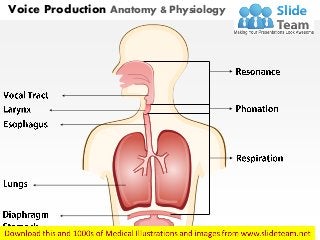
Voice Production Anatomy & Physiology
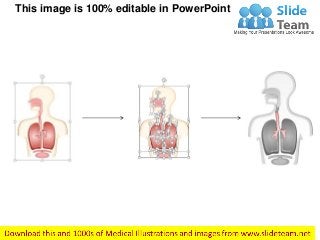
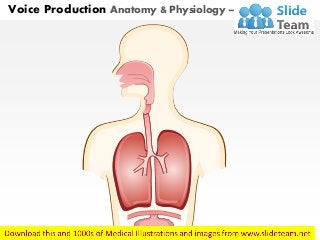
Voice Production Anatomy & Physiology – With labels Removed
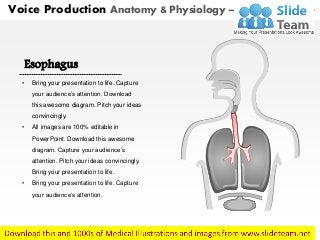
Esophagus
• Bring your presentation to life. Capture
your audience’s attention. Download
this awesome diagram. Pitch your ideas
convincingly.
• All images are 100% editable in
PowerPoint. Download this awesome
diagram. Capture your audience’s
attention. Pitch your ideas convincingly.
Bring your presentation to life.
• Bring your presentation to life. Capture
your audience’s attention.
Voice Production Anatomy & Physiology – With Highlighted Part
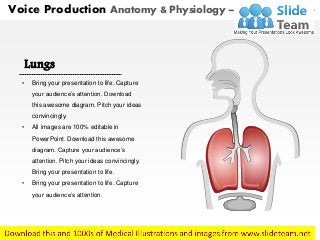
Lungs
• Bring your presentation to life. Capture
your audience’s attention. Download
this awesome diagram. Pitch your ideas
convincingly.
• All images are 100% editable in
PowerPoint. Download this awesome
diagram. Capture your audience’s
attention. Pitch your ideas convincingly.
Bring your presentation to life.
• Bring your presentation to life. Capture
your audience’s attention.
Voice Production Anatomy & Physiology – With Highlighted Part
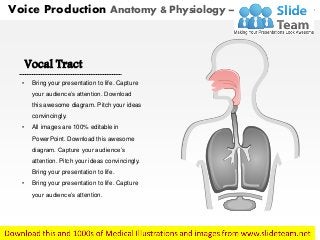
Vocal Tract
• Bring your presentation to life. Capture
your audience’s attention. Download
this awesome diagram. Pitch your ideas
convincingly.
• All images are 100% editable in
PowerPoint. Download this awesome
diagram. Capture your audience’s
attention. Pitch your ideas convincingly.
Bring your presentation to life.
• Bring your presentation to life. Capture
your audience’s attention.
Voice Production Anatomy & Physiology – With Highlighted Part
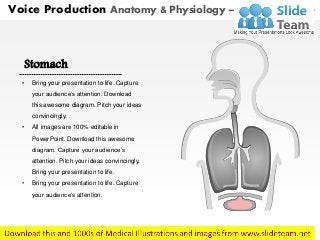
Stomach
• Bring your presentation to life. Capture
your audience’s attention. Download
this awesome diagram. Pitch your ideas
convincingly.
• All images are 100% editable in
PowerPoint. Download this awesome
diagram. Capture your audience’s
attention. Pitch your ideas convincingly.
Bring your presentation to life.
• Bring your presentation to life. Capture
your audience’s attention.
Voice Production Anatomy & Physiology – With Highlighted Part
" Add your Own Lables and Highlight Any section"
This image is 100% editable in PowerPoint
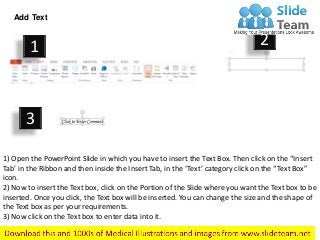
Add Text
1) Open the PowerPoint Slide in which you have to insert the Text Box. Then click on the “Insert
Tab’ in the Ribbon and then inside the Insert Tab, in the ‘Text’ category click on the “Text Box”
icon.
2) Now to insert the Text box, click on the Portion of the Slide where you want the Text box to be
inserted. Once you click, the Text box will be inserted. You can change the size and the shape of
the Text box as per your requirements.
3) Now click on the Text box to enter data into it.
1 2
3
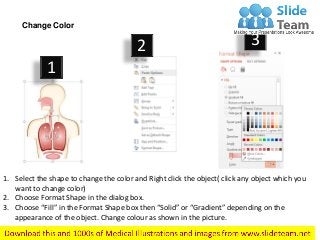
1. Select the shape to change the color and Right click the object( click any object which you
want to change color)
2. Choose Format Shape in the dialog box.
3. Choose “Fill” in the Format Shape box then “Solid” or “Gradient” depending on the
appearance of the object. Change colour as shown in the picture.
Change Color
1
2 3
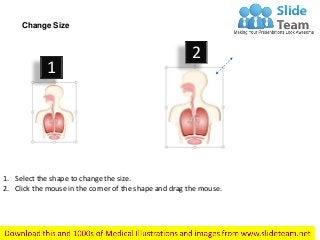
1. Select the shape to change the size.
2. Click the mouse in the corner of the shape and drag the mouse.
Change Size
1
2
Voice production anatomy & physiology medical images for power point

  • 1.
  • 2.
    Voice Production Anatomy& Physiology – With labels Removed
  • 3.
    Esophagus • Bring yourpresentation to life. Capture your audience’s attention. Download this awesome diagram. Pitch your ideas convincingly. • All images are 100% editable in PowerPoint. Download this awesome diagram. Capture your audience’s attention. Pitch your ideas convincingly. Bring your presentation to life. • Bring your presentation to life. Capture your audience’s attention. Voice Production Anatomy & Physiology – With Highlighted Part
  • 4.
    Lungs • Bring yourpresentation to life. Capture your audience’s attention. Download this awesome diagram. Pitch your ideas convincingly. • All images are 100% editable in PowerPoint. Download this awesome diagram. Capture your audience’s attention. Pitch your ideas convincingly. Bring your presentation to life. • Bring your presentation to life. Capture your audience’s attention. Voice Production Anatomy & Physiology – With Highlighted Part
  • 5.
    Vocal Tract • Bringyour presentation to life. Capture your audience’s attention. Download this awesome diagram. Pitch your ideas convincingly. • All images are 100% editable in PowerPoint. Download this awesome diagram. Capture your audience’s attention. Pitch your ideas convincingly. Bring your presentation to life. • Bring your presentation to life. Capture your audience’s attention. Voice Production Anatomy & Physiology – With Highlighted Part
  • 6.
    Stomach • Bring yourpresentation to life. Capture your audience’s attention. Download this awesome diagram. Pitch your ideas convincingly. • All images are 100% editable in PowerPoint. Download this awesome diagram. Capture your audience’s attention. Pitch your ideas convincingly. Bring your presentation to life. • Bring your presentation to life. Capture your audience’s attention. Voice Production Anatomy & Physiology – With Highlighted Part
  • 7.
    " Add yourOwn Lables and Highlight Any section"
  • 8.
    This image is100% editable in PowerPoint
  • 9.
    Add Text 1) Openthe PowerPoint Slide in which you have to insert the Text Box. Then click on the “Insert Tab’ in the Ribbon and then inside the Insert Tab, in the ‘Text’ category click on the “Text Box” icon. 2) Now to insert the Text box, click on the Portion of the Slide where you want the Text box to be inserted. Once you click, the Text box will be inserted. You can change the size and the shape of the Text box as per your requirements. 3) Now click on the Text box to enter data into it. 1 2 3
  • 10.
    1. Select theshape to change the color and Right click the object( click any object which you want to change color) 2. Choose Format Shape in the dialog box. 3. Choose “Fill” in the Format Shape box then “Solid” or “Gradient” depending on the appearance of the object. Change colour as shown in the picture. Change Color 1 2 3
  • 11.
    1. Select theshape to change the size. 2. Click the mouse in the corner of the shape and drag the mouse. Change Size 1 2