

Node.js Connector
Diego DUPIN
MariaDB Connector Engineer
MariaDB Corporation
PROGRAM
- Getting started
- Best practice
- Advanced topic
- ORM
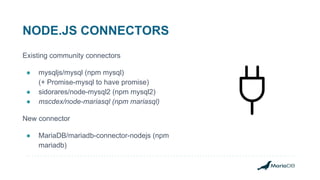
NODE.JS CONNECTORS
Existing community connectors
● mysqljs/mysql (npm mysql)
(+ Promise-mysql to have promise)
● sidorares/node-mysql2 (npm mysql2)
● mscdex/node-mariasql (npm mariasql)
New connector
● MariaDB/mariadb-connector-nodejs (npm
mariadb)
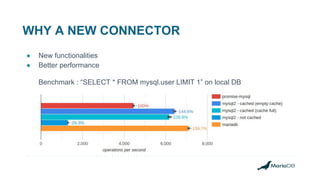
WHY A NEW CONNECTOR
● New functionalities
● Better performance
Benchmark : “SELECT * FROM mysql.user LIMIT 1” on local DB
Getting started
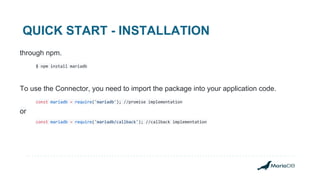
QUICK START - INSTALLATION
through npm.
$ npm install mariadb
To use the Connector, you need to import the package into your application code.
const mariadb = require('mariadb'); //promise implementation
or
const mariadb = require('mariadb/callback'); //callback implementation
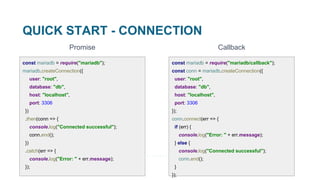
QUICK START - CONNECTION
Promise
const mariadb = require("mariadb");
mariadb.createConnection({
user: "root",
database: "db",
host: "localhost",
port: 3306
})
.then(conn => {
console.log("Connected successful");
conn.end();
})
.catch(err => {
console.log("Error: " + err.message);
});
const mariadb = require("mariadb/callback");
const conn = mariadb.createConnection({
user: "root",
database: "db",
host: "localhost",
port: 3306
});
conn.connect(err => {
if (err) {
console.log("Error: " + err.message);
} else {
console.log("Connected successful");
conn.end();
}
});
Callback
QUICK START - INSERT
conn.query(
"CREATE TEMPORARY TABLE myTable " +
"(id int NOT NULL AUTO_INCREMENT, firstName varchar(256), lastName varchar(256), " +
" PRIMARY KEY (id))"
)
.then(() => {
return conn.query("INSERT INTO myTable(firstName, lastName) VALUES (?, ?)", [
"john",
"smith"
]);
})
.then(res => {
console.log(res); //{ affectedRows: 1, insertId: 1, warningStatus: 0 }
conn.end();
})
.catch(err => { });
QUICK START - SELECT
conn.query(
"SELECT ID,COLLATION_NAME FROM INFORMATION_SCHEMA.COLLATIONS " +
"WHERE CHARACTER_SET_NAME = ? LIMIT 2",
["utf8mb4"]
)
.then(res => {
console.log(res);
/* resultset is an array of rows, represented by JSON object
[
{ ID: 45, COLLATION_NAME: 'utf8mb4_general_ci' },
{ ID: 46, COLLATION_NAME: 'utf8mb4_bin' }
]
*/
conn.end();
})
.catch(err => { … });
CONNECTION ESSENTIAL API
● connection.query(sql[, values]) → Promise: Executes a query.
● connection.queryStream(sql[, values]) → Emitter: Executes a query, streaming results.
● connection.batch(sql, values) → Promise: fast batch processing.
● connection.beginTransaction() → Promise: Begins a transaction.
● connection.commit() → Promise: Commits the current transaction, if any.
● connection.rollback() → Promise: Rolls back the current transaction, if any.
● connection.ping() → Promise: Sends a 1 byte packet to the database to validate the connection.
● connection.end() → Promise: Gracefully close the connection.
SSL
SSL
One-Way SSL Authentication or Two-Way SSL Authentication
const fs = require("fs");
const mariadb = require('mariadb');
//reading certificates from file
const serverCert = [fs.readFileSync("server.pem", "utf8")];
//connecting
mariadb
.createConnection({
user: "myUser",
host: "myHost.com",
ssl: {
ca: serverCert
}
}).then(conn => {})
Pooling
POOLING
Basically a database connection cache implementation
Connections are expensive. On local DB:
● 2.4ms for a basic connection
● 0.05ms for a simple query
Problem : correctness and reliability
POOLING
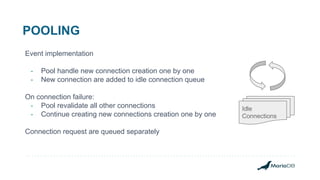
Event implementation
- Pool handle new connection creation one by one
- New connection are added to idle connection queue
On connection failure:
- Pool revalidate all other connections
- Continue creating new connections creation one by one
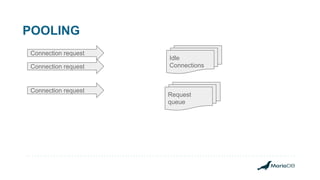
Connection request are queued separately
Idle
Connections
POOLING
Connection request
Idle
ConnectionsConnection request
Connection request
Request
queue
POOLING
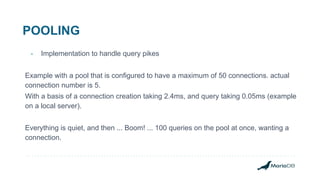
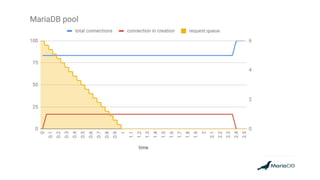
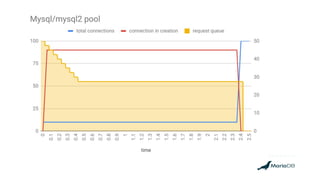
- Implementation to handle query pikes
Example with a pool that is configured to have a maximum of 50 connections. actual
connection number is 5.
With a basis of a connection creation taking 2.4ms, and query taking 0.05ms (example
on a local server).
Everything is quiet, and then ... Boom! ... 100 queries on the pool at once, wanting a
connection.
POOLING
POOLING
POOLING
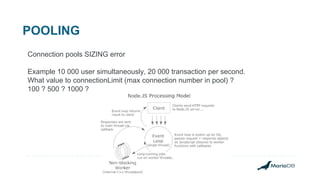
Connection pools SIZING error
Example 10 000 user simultaneously, 20 000 transaction per second.
What value to connectionLimit (max connection number in pool) ?
100 ? 500 ? 1000 ?
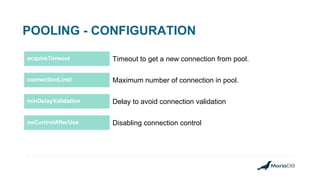
POOLING - CONFIGURATION
acquireTimeout
t
acquireTimeout Timeout to get a new connection from pool.
Maximum number of connection in pool.
Delay to avoid connection validation
Disabling connection control
connectionLimit
minDelayValidation
noControlAfterUse
POOL API
● pool.getConnection() → Promise : Creates a new connection.
● pool.query(sql[, values]) → Promise: Executes a query.
● pool.batch(sql, values) → Promise: Executes a batch
Stats
● pool.activeConnections() → Number: Gets current active connection number.
● pool.totalConnections() → Number: Gets current total connection number.
● pool.idleConnections() → Number: Gets current idle connection number.
● pool.taskQueueSize() → Number: Gets current stacked request.
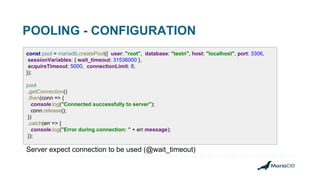
POOLING - CONFIGURATION
const pool = mariadb.createPool({ user: "root", database: "testn", host: "localhost", port: 3306,
sessionVariables: { wait_timeout: 31536000 },
acquireTimeout: 5000, connectionLimit: 8,
});
pool
.getConnection()
.then(conn => {
console.log("Connected successfully to server");
conn.release();
})
.catch(err => {
console.log("Error during connection: " + err.message);
});
Server expect connection to be used (@wait_timeout)
MULTI-SERVER
MULTI-HOST - ESSENTIAL API
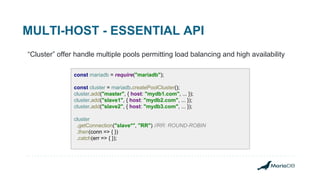
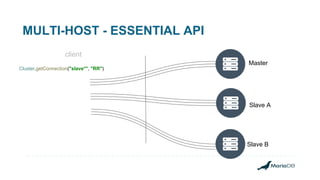
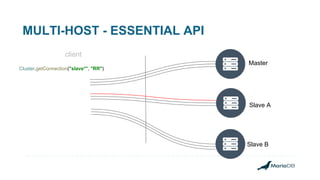
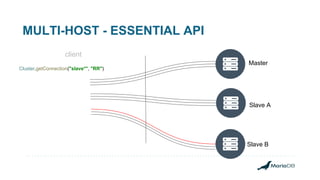
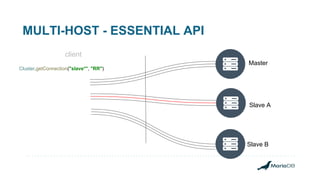
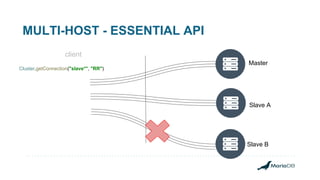
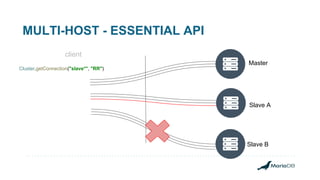
“Cluster” offer handle multiple pools permitting load balancing and high availability
const mariadb = require("mariadb");
const cluster = mariadb.createPoolCluster();
cluster.add("master", { host: "mydb1.com", ... });
cluster.add("slave1", { host: "mydb2.com", ... });
cluster.add("slave2", { host: "mydb3.com", ... });
cluster
.getConnection("slave*", "RR") //RR: ROUND-ROBIN
.then(conn => { })
.catch(err => { });
MULTI-HOST - ESSENTIAL API
client
Master
Slave B
Slave A
Cluster.getConnection("slave*", "RR")
MULTI-HOST - ESSENTIAL API
client
Master
Slave B
Slave A
Cluster.getConnection("slave*", "RR")
MULTI-HOST - ESSENTIAL API
client
Master
Slave B
Slave A
Cluster.getConnection("slave*", "RR")
MULTI-HOST - ESSENTIAL API
client
Master
Slave B
Slave A
Cluster.getConnection("slave*", "RR")
MULTI-HOST - ESSENTIAL API
client
Master
Slave B
Slave A
Cluster.getConnection("slave*", "RR")
MULTI-HOST - ESSENTIAL API
client
Master
Slave B
Slave A
Cluster.getConnection("slave*", "RR")
MULTI-HOST
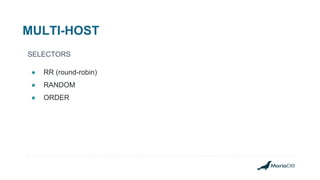
SELECTORS
● RR (round-robin)
● RANDOM
● ORDER
MULTI-HOST - ESSENTIAL API
● poolCluster.add(id, config) : add a pool to cluster.
● poolCluster.remove(pattern) : remove and end pool according to pattern.
● poolCluster.end() → Promise : end cluster.
● poolCluster.getConnection(pattern, selector) → Promise : return a connection from
cluster.
● poolCluster.of(pattern, selector) → FilteredPoolCluster : return a subset of cluster.
MULTI-HOST - ESSENTIAL API
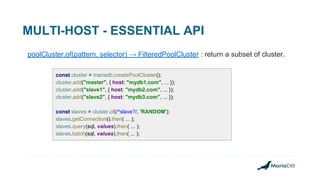
poolCluster.of(pattern, selector) → FilteredPoolCluster : return a subset of cluster.
const cluster = mariadb.createPoolCluster();
cluster.add("master", { host: "mydb1.com", ... });
cluster.add("slave1", { host: "mydb2.com", ... });
cluster.add("slave2", { host: "mydb3.com", ... });
const slaves = cluster.of(/^slave?/, 'RANDOM');
slaves.getConnection().then( ... );
slaves.query(sql, values).then( ... );
slaves.batch(sql, values).then( ... );
New features
Pipelining
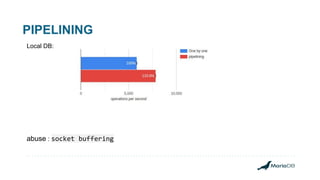
PIPELINING
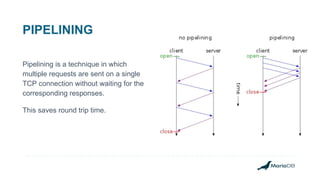
Pipelining is a technique in which
multiple requests are sent on a single
TCP connection without waiting for the
corresponding responses.
This saves round trip time.
PIPELINING - without
const uuid = uuidv1(); //generate new UUID
conn
.beginTransaction()
.then(() => {
return conn.query("INSERT INTO basket(basketId) values (?)", uuid);
})
.then(() => {
return conn.query(
"INSERT INTO basket_item(basketId, itemId) VALUES (?, ?)",
[ uuid, 100 ]);
})
.then(() => {
return conn.query(
"INSERT INTO basket_item(basketId, itemId) VALUES (?, ?)",
[ uuid, 101 ]);
})
.then(() => { conn.commit(); })
.catch(err => { conn.rollback(); });
PIPELINING - with
const uuid = uuidv1(); //generate new UUID
conn
.beginTransaction()
.then(() => {
return Promise.all([
conn.query("INSERT INTO basket(basketId) values (?)", uuid),
conn.query(
"INSERT INTO basket_item(basketId, itemId) VALUES (?, ?)",
[uuid, 100]),
conn.query(
"INSERT INTO basket_item(basketId, itemId) VALUES (?, ?)",
[uuid, 101])
]);
})
.then(() => { conn.commit(); })
.catch(err => { conn.rollback(); });
PIPELINING
Local DB:
abuse : socket buffering
Streaming
Streaming
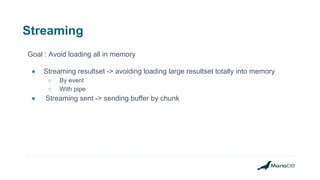
Goal : Avoid loading all in memory
● Streaming resultset -> avoiding loading large resultset totally into memory
○ By event
○ With pipe
● Streaming sent -> sending buffer by chunk
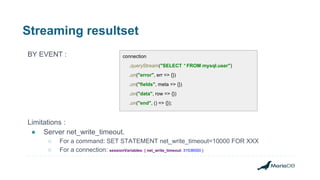
Streaming resultset
BY EVENT :
Limitations :
● Server net_write_timeout.
○ For a command: SET STATEMENT net_write_timeout=10000 FOR XXX
○ For a connection: sessionVariables: { net_write_timeout: 31536000 }
connection
.queryStream("SELECT * FROM mysql.user")
.on("error", err => {})
.on("fields", meta => {})
.on("data", row => {})
.on("end", () => {});
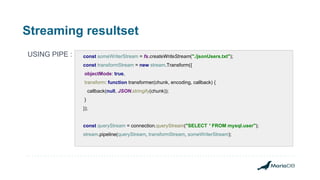
Streaming resultset
USING PIPE : const someWriterStream = fs.createWriteStream("./jsonUsers.txt");
const transformStream = new stream.Transform({
objectMode: true,
transform: function transformer(chunk, encoding, callback) {
callback(null, JSON.stringify(chunk));
}
});
const queryStream = connection.queryStream("SELECT * FROM mysql.user");
stream.pipeline(queryStream, transformStream, someWriterStream);
Streaming - sending
const https = require("https");
https.get(
"https://node.green/#ES2018-features-Promise-prototype-finally-basic-support", //3Mb page
readableStream => {
connection
.query("INSERT INTO StreamingContent (b) VALUE (?)", [readableStream])
.then(res => {})
.catch(err => {});
});
Limitations :
● Server net_read_timeout : SET STATEMENT net_read_timeout=10000 FOR XXX
○ For a connection: sessionVariables: { net_read_timeout: 10000 }
● max_allowed_packet
Batching
BATCH INSERT
conn.batch("INSERT INTO myTable(firstName, lastName) VALUES (?, ?)", [
["john", "smith"],
["jack", "brown"]
]);
})
.then(res => { })
.catch(err => { });
Benchmark : 100 * insert 100 characters on local DB
ORM - sequelize
ORM
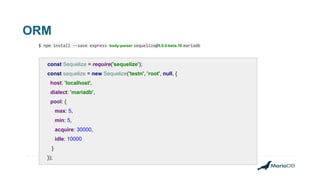
$ npm install --save express body-parser sequelize@5.0.0-beta.16 mariadb
const Sequelize = require('sequelize');
const sequelize = new Sequelize('testn', 'root', null, {
host: 'localhost',
dialect: 'mariadb',
pool: {
max: 5,
min: 5,
acquire: 30000,
idle: 10000
}
});
ORM
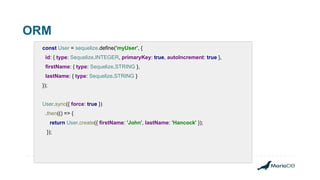
const User = sequelize.define('myUser', {
id: { type: Sequelize.INTEGER, primaryKey: true, autoIncrement: true },
firstName: { type: Sequelize.STRING },
lastName: { type: Sequelize.STRING }
});
User.sync({ force: true })
.then(() => {
return User.create({ firstName: 'John', lastName: 'Hancock' });
});
ORM
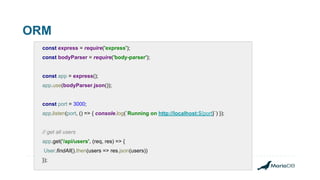
const express = require('express');
const bodyParser = require('body-parser');
const app = express();
app.use(bodyParser.json());
const port = 3000;
app.listen(port, () => { console.log(`Running on http://localhost:${port}`) });
// get all users
app.get('/api/users', (req, res) => {
User.findAll().then(users => res.json(users))
});
tricks
DEBUGGING
Connection options ‘trace’ default to false, nice to have in development mode.
{ Error: (conn=149, no: 1146, SQLState: 42S02) Table 'testn.unknownTable' doesn't exist
sql: SELECT * FROM unknownTable - parameters:[]
at Object.module.exports.createError (/home/diego/IdeaProjects/test_node/node_modules/mariadb/lib/misc/errors.js:55:10)
at Packet.readError (/home/diego/IdeaProjects/test_node/node_modules/mariadb/lib/io/packet.js:506:19)
at Query.readResponsePacket (/home/diego/IdeaProjects/test_node/node_modules/mariadb/lib/cmd/resultset.js:47:28)
at PacketInputStream.receivePacket (/home/diego/IdeaProjects/test_node/node_modules/mariadb/lib/io/packet-input-stream.js:73:9)
at PacketInputStream.onData (/home/diego/IdeaProjects/test_node/node_modules/mariadb/lib/io/packet-input-stream.js:129:20)
at Socket.emit (events.js:197:13)
at addChunk (_stream_readable.js:288:12)
at readableAddChunk (_stream_readable.js:269:11)
at Socket.Readable.push (_stream_readable.js:224:10)
at TCP.onStreamRead [as onread] (internal/stream_base_commons.js:145:17)
fatal: false,
errno: 1146,
sqlState: '42S02',
code: 'ER_NO_SUCH_TABLE' }
DEBUGGING
With trace
{ Error: (conn=150, no: 1146, SQLState: 42S02) Table 'testn.unknownTable' doesn't exist
sql: SELECT * FROM unknownTable - parameters:[]
at Object.module.exports.createError (/home/diego/IdeaProjects/test_node/node_modules/mariadb/lib/misc/errors.js:55:10)
...
at TCP.onStreamRead [as onread] (internal/stream_base_commons.js:145:17)
From event:
at /home/diego/IdeaProjects/test_node/node_modules/mariadb/lib/connection.js:166:29
at new Promise (<anonymous>)
at Connection.query (/home/diego/IdeaProjects/test_node/node_modules/mariadb/lib/connection.js:164:12)
at mariadb.createConnection.then.conn (/home/diego/IdeaProjects/test_node/lib/promise/trace.js:13:8)
at processTicksAndRejections (internal/process/next_tick.js:81:5)
fatal: false,
errno: 1146,
sqlState: '42S02',
code: 'ER_NO_SUCH_TABLE' }
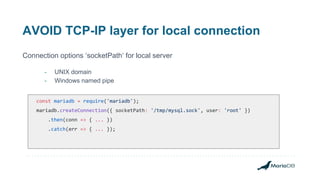
AVOID TCP-IP layer for local connection
Connection options ‘socketPath‘ for local server
- UNIX domain
- Windows named pipe
const mariadb = require('mariadb');
mariadb.createConnection({ socketPath: '/tmp/mysql.sock', user: 'root' })
.then(conn => { ... })
.catch(err => { ... });
METADATA
● Select query = row datas + metadata
Metadata = datatype, format, and lots of additional infos: schema, table name,
table alias, column name, column alias, … Not always needed
conn.query("select * from mysql.user u LIMIT 1")
.then(rows => {
console.log(rows);
// [
// { Host: 'localhost', User: 'root', … }
// ]
});
conn .query({
sql: "select * from mysql.user u LIMIT 1",
rowsAsArray: true
})
.then(rows => {
console.log(rows);
// [
// [ 'localhost', 'root', …]
// ]
});
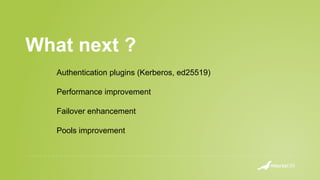
What next ?
Authentication plugins (Kerberos, ed25519)
Performance improvement
Failover enhancement
Pools improvement
THANK YOU!

Building better Node.js applications on MariaDB

  • 1.
    Node.js Connector Diego DUPIN MariaDBConnector Engineer MariaDB Corporation
  • 2.
    PROGRAM - Getting started -Best practice - Advanced topic - ORM
  • 3.
    NODE.JS CONNECTORS Existing communityconnectors ● mysqljs/mysql (npm mysql) (+ Promise-mysql to have promise) ● sidorares/node-mysql2 (npm mysql2) ● mscdex/node-mariasql (npm mariasql) New connector ● MariaDB/mariadb-connector-nodejs (npm mariadb)
  • 4.
    WHY A NEWCONNECTOR ● New functionalities ● Better performance Benchmark : “SELECT * FROM mysql.user LIMIT 1” on local DB
  • 5.
  • 6.
    QUICK START -INSTALLATION through npm. $ npm install mariadb To use the Connector, you need to import the package into your application code. const mariadb = require('mariadb'); //promise implementation or const mariadb = require('mariadb/callback'); //callback implementation
  • 7.
    QUICK START -CONNECTION Promise const mariadb = require("mariadb"); mariadb.createConnection({ user: "root", database: "db", host: "localhost", port: 3306 }) .then(conn => { console.log("Connected successful"); conn.end(); }) .catch(err => { console.log("Error: " + err.message); }); const mariadb = require("mariadb/callback"); const conn = mariadb.createConnection({ user: "root", database: "db", host: "localhost", port: 3306 }); conn.connect(err => { if (err) { console.log("Error: " + err.message); } else { console.log("Connected successful"); conn.end(); } }); Callback
  • 8.
    QUICK START -INSERT conn.query( "CREATE TEMPORARY TABLE myTable " + "(id int NOT NULL AUTO_INCREMENT, firstName varchar(256), lastName varchar(256), " + " PRIMARY KEY (id))" ) .then(() => { return conn.query("INSERT INTO myTable(firstName, lastName) VALUES (?, ?)", [ "john", "smith" ]); }) .then(res => { console.log(res); //{ affectedRows: 1, insertId: 1, warningStatus: 0 } conn.end(); }) .catch(err => { });
  • 9.
    QUICK START -SELECT conn.query( "SELECT ID,COLLATION_NAME FROM INFORMATION_SCHEMA.COLLATIONS " + "WHERE CHARACTER_SET_NAME = ? LIMIT 2", ["utf8mb4"] ) .then(res => { console.log(res); /* resultset is an array of rows, represented by JSON object [ { ID: 45, COLLATION_NAME: 'utf8mb4_general_ci' }, { ID: 46, COLLATION_NAME: 'utf8mb4_bin' } ] */ conn.end(); }) .catch(err => { … });
  • 10.
    CONNECTION ESSENTIAL API ●connection.query(sql[, values]) → Promise: Executes a query. ● connection.queryStream(sql[, values]) → Emitter: Executes a query, streaming results. ● connection.batch(sql, values) → Promise: fast batch processing. ● connection.beginTransaction() → Promise: Begins a transaction. ● connection.commit() → Promise: Commits the current transaction, if any. ● connection.rollback() → Promise: Rolls back the current transaction, if any. ● connection.ping() → Promise: Sends a 1 byte packet to the database to validate the connection. ● connection.end() → Promise: Gracefully close the connection.
  • 11.
  • 12.
    SSL One-Way SSL Authenticationor Two-Way SSL Authentication const fs = require("fs"); const mariadb = require('mariadb'); //reading certificates from file const serverCert = [fs.readFileSync("server.pem", "utf8")]; //connecting mariadb .createConnection({ user: "myUser", host: "myHost.com", ssl: { ca: serverCert } }).then(conn => {})
  • 13.
  • 14.
    POOLING Basically a databaseconnection cache implementation Connections are expensive. On local DB: ● 2.4ms for a basic connection ● 0.05ms for a simple query Problem : correctness and reliability
  • 15.
    POOLING Event implementation - Poolhandle new connection creation one by one - New connection are added to idle connection queue On connection failure: - Pool revalidate all other connections - Continue creating new connections creation one by one Connection request are queued separately Idle Connections
  • 16.
  • 17.
    POOLING - Implementation tohandle query pikes Example with a pool that is configured to have a maximum of 50 connections. actual connection number is 5. With a basis of a connection creation taking 2.4ms, and query taking 0.05ms (example on a local server). Everything is quiet, and then ... Boom! ... 100 queries on the pool at once, wanting a connection.
  • 18.
  • 19.
  • 20.
    POOLING Connection pools SIZINGerror Example 10 000 user simultaneously, 20 000 transaction per second. What value to connectionLimit (max connection number in pool) ? 100 ? 500 ? 1000 ?
  • 21.
    POOLING - CONFIGURATION acquireTimeout t acquireTimeoutTimeout to get a new connection from pool. Maximum number of connection in pool. Delay to avoid connection validation Disabling connection control connectionLimit minDelayValidation noControlAfterUse
  • 22.
    POOL API ● pool.getConnection()→ Promise : Creates a new connection. ● pool.query(sql[, values]) → Promise: Executes a query. ● pool.batch(sql, values) → Promise: Executes a batch Stats ● pool.activeConnections() → Number: Gets current active connection number. ● pool.totalConnections() → Number: Gets current total connection number. ● pool.idleConnections() → Number: Gets current idle connection number. ● pool.taskQueueSize() → Number: Gets current stacked request.
  • 23.
    POOLING - CONFIGURATION constpool = mariadb.createPool({ user: "root", database: "testn", host: "localhost", port: 3306, sessionVariables: { wait_timeout: 31536000 }, acquireTimeout: 5000, connectionLimit: 8, }); pool .getConnection() .then(conn => { console.log("Connected successfully to server"); conn.release(); }) .catch(err => { console.log("Error during connection: " + err.message); }); Server expect connection to be used (@wait_timeout)
  • 24.
  • 25.
    MULTI-HOST - ESSENTIALAPI “Cluster” offer handle multiple pools permitting load balancing and high availability const mariadb = require("mariadb"); const cluster = mariadb.createPoolCluster(); cluster.add("master", { host: "mydb1.com", ... }); cluster.add("slave1", { host: "mydb2.com", ... }); cluster.add("slave2", { host: "mydb3.com", ... }); cluster .getConnection("slave*", "RR") //RR: ROUND-ROBIN .then(conn => { }) .catch(err => { });
  • 26.
    MULTI-HOST - ESSENTIALAPI client Master Slave B Slave A Cluster.getConnection("slave*", "RR")
  • 27.
    MULTI-HOST - ESSENTIALAPI client Master Slave B Slave A Cluster.getConnection("slave*", "RR")
  • 28.
    MULTI-HOST - ESSENTIALAPI client Master Slave B Slave A Cluster.getConnection("slave*", "RR")
  • 29.
    MULTI-HOST - ESSENTIALAPI client Master Slave B Slave A Cluster.getConnection("slave*", "RR")
  • 30.
    MULTI-HOST - ESSENTIALAPI client Master Slave B Slave A Cluster.getConnection("slave*", "RR")
  • 31.
    MULTI-HOST - ESSENTIALAPI client Master Slave B Slave A Cluster.getConnection("slave*", "RR")
  • 32.
  • 33.
    MULTI-HOST - ESSENTIALAPI ● poolCluster.add(id, config) : add a pool to cluster. ● poolCluster.remove(pattern) : remove and end pool according to pattern. ● poolCluster.end() → Promise : end cluster. ● poolCluster.getConnection(pattern, selector) → Promise : return a connection from cluster. ● poolCluster.of(pattern, selector) → FilteredPoolCluster : return a subset of cluster.
  • 34.
    MULTI-HOST - ESSENTIALAPI poolCluster.of(pattern, selector) → FilteredPoolCluster : return a subset of cluster. const cluster = mariadb.createPoolCluster(); cluster.add("master", { host: "mydb1.com", ... }); cluster.add("slave1", { host: "mydb2.com", ... }); cluster.add("slave2", { host: "mydb3.com", ... }); const slaves = cluster.of(/^slave?/, 'RANDOM'); slaves.getConnection().then( ... ); slaves.query(sql, values).then( ... ); slaves.batch(sql, values).then( ... );
  • 35.
  • 36.
  • 37.
    PIPELINING Pipelining is atechnique in which multiple requests are sent on a single TCP connection without waiting for the corresponding responses. This saves round trip time.
  • 38.
    PIPELINING - without constuuid = uuidv1(); //generate new UUID conn .beginTransaction() .then(() => { return conn.query("INSERT INTO basket(basketId) values (?)", uuid); }) .then(() => { return conn.query( "INSERT INTO basket_item(basketId, itemId) VALUES (?, ?)", [ uuid, 100 ]); }) .then(() => { return conn.query( "INSERT INTO basket_item(basketId, itemId) VALUES (?, ?)", [ uuid, 101 ]); }) .then(() => { conn.commit(); }) .catch(err => { conn.rollback(); });
  • 39.
    PIPELINING - with constuuid = uuidv1(); //generate new UUID conn .beginTransaction() .then(() => { return Promise.all([ conn.query("INSERT INTO basket(basketId) values (?)", uuid), conn.query( "INSERT INTO basket_item(basketId, itemId) VALUES (?, ?)", [uuid, 100]), conn.query( "INSERT INTO basket_item(basketId, itemId) VALUES (?, ?)", [uuid, 101]) ]); }) .then(() => { conn.commit(); }) .catch(err => { conn.rollback(); });
  • 40.
  • 41.
  • 42.
    Streaming Goal : Avoidloading all in memory ● Streaming resultset -> avoiding loading large resultset totally into memory ○ By event ○ With pipe ● Streaming sent -> sending buffer by chunk
  • 43.
    Streaming resultset BY EVENT: Limitations : ● Server net_write_timeout. ○ For a command: SET STATEMENT net_write_timeout=10000 FOR XXX ○ For a connection: sessionVariables: { net_write_timeout: 31536000 } connection .queryStream("SELECT * FROM mysql.user") .on("error", err => {}) .on("fields", meta => {}) .on("data", row => {}) .on("end", () => {});
  • 44.
    Streaming resultset USING PIPE: const someWriterStream = fs.createWriteStream("./jsonUsers.txt"); const transformStream = new stream.Transform({ objectMode: true, transform: function transformer(chunk, encoding, callback) { callback(null, JSON.stringify(chunk)); } }); const queryStream = connection.queryStream("SELECT * FROM mysql.user"); stream.pipeline(queryStream, transformStream, someWriterStream);
  • 45.
    Streaming - sending consthttps = require("https"); https.get( "https://node.green/#ES2018-features-Promise-prototype-finally-basic-support", //3Mb page readableStream => { connection .query("INSERT INTO StreamingContent (b) VALUE (?)", [readableStream]) .then(res => {}) .catch(err => {}); }); Limitations : ● Server net_read_timeout : SET STATEMENT net_read_timeout=10000 FOR XXX ○ For a connection: sessionVariables: { net_read_timeout: 10000 } ● max_allowed_packet
  • 46.
  • 47.
    BATCH INSERT conn.batch("INSERT INTOmyTable(firstName, lastName) VALUES (?, ?)", [ ["john", "smith"], ["jack", "brown"] ]); }) .then(res => { }) .catch(err => { }); Benchmark : 100 * insert 100 characters on local DB
  • 48.
  • 49.
    ORM $ npm install--save express body-parser sequelize@5.0.0-beta.16 mariadb const Sequelize = require('sequelize'); const sequelize = new Sequelize('testn', 'root', null, { host: 'localhost', dialect: 'mariadb', pool: { max: 5, min: 5, acquire: 30000, idle: 10000 } });
  • 50.
    ORM const User =sequelize.define('myUser', { id: { type: Sequelize.INTEGER, primaryKey: true, autoIncrement: true }, firstName: { type: Sequelize.STRING }, lastName: { type: Sequelize.STRING } }); User.sync({ force: true }) .then(() => { return User.create({ firstName: 'John', lastName: 'Hancock' }); });
  • 51.
    ORM const express =require('express'); const bodyParser = require('body-parser'); const app = express(); app.use(bodyParser.json()); const port = 3000; app.listen(port, () => { console.log(`Running on http://localhost:${port}`) }); // get all users app.get('/api/users', (req, res) => { User.findAll().then(users => res.json(users)) });
  • 52.
  • 53.
    DEBUGGING Connection options ‘trace’default to false, nice to have in development mode. { Error: (conn=149, no: 1146, SQLState: 42S02) Table 'testn.unknownTable' doesn't exist sql: SELECT * FROM unknownTable - parameters:[] at Object.module.exports.createError (/home/diego/IdeaProjects/test_node/node_modules/mariadb/lib/misc/errors.js:55:10) at Packet.readError (/home/diego/IdeaProjects/test_node/node_modules/mariadb/lib/io/packet.js:506:19) at Query.readResponsePacket (/home/diego/IdeaProjects/test_node/node_modules/mariadb/lib/cmd/resultset.js:47:28) at PacketInputStream.receivePacket (/home/diego/IdeaProjects/test_node/node_modules/mariadb/lib/io/packet-input-stream.js:73:9) at PacketInputStream.onData (/home/diego/IdeaProjects/test_node/node_modules/mariadb/lib/io/packet-input-stream.js:129:20) at Socket.emit (events.js:197:13) at addChunk (_stream_readable.js:288:12) at readableAddChunk (_stream_readable.js:269:11) at Socket.Readable.push (_stream_readable.js:224:10) at TCP.onStreamRead [as onread] (internal/stream_base_commons.js:145:17) fatal: false, errno: 1146, sqlState: '42S02', code: 'ER_NO_SUCH_TABLE' }
  • 54.
    DEBUGGING With trace { Error:(conn=150, no: 1146, SQLState: 42S02) Table 'testn.unknownTable' doesn't exist sql: SELECT * FROM unknownTable - parameters:[] at Object.module.exports.createError (/home/diego/IdeaProjects/test_node/node_modules/mariadb/lib/misc/errors.js:55:10) ... at TCP.onStreamRead [as onread] (internal/stream_base_commons.js:145:17) From event: at /home/diego/IdeaProjects/test_node/node_modules/mariadb/lib/connection.js:166:29 at new Promise (<anonymous>) at Connection.query (/home/diego/IdeaProjects/test_node/node_modules/mariadb/lib/connection.js:164:12) at mariadb.createConnection.then.conn (/home/diego/IdeaProjects/test_node/lib/promise/trace.js:13:8) at processTicksAndRejections (internal/process/next_tick.js:81:5) fatal: false, errno: 1146, sqlState: '42S02', code: 'ER_NO_SUCH_TABLE' }
  • 55.
    AVOID TCP-IP layerfor local connection Connection options ‘socketPath‘ for local server - UNIX domain - Windows named pipe const mariadb = require('mariadb'); mariadb.createConnection({ socketPath: '/tmp/mysql.sock', user: 'root' }) .then(conn => { ... }) .catch(err => { ... });
  • 56.
    METADATA ● Select query= row datas + metadata Metadata = datatype, format, and lots of additional infos: schema, table name, table alias, column name, column alias, … Not always needed conn.query("select * from mysql.user u LIMIT 1") .then(rows => { console.log(rows); // [ // { Host: 'localhost', User: 'root', … } // ] }); conn .query({ sql: "select * from mysql.user u LIMIT 1", rowsAsArray: true }) .then(rows => { console.log(rows); // [ // [ 'localhost', 'root', …] // ] });
  • 57.
    What next ? Authenticationplugins (Kerberos, ed25519) Performance improvement Failover enhancement Pools improvement
  • 58.