

XML PIPELINES
USING STYLUS STUDIO
OUTLINES
• Building workflow applications with XML (data integration)
• XPROC the W3C xml pipeline language
• XPROC implementations
• XPROC graphical design tools
• Stylus studio pipeline editor and processor
• XML PIPELINES with stylus studio in details
• Conclusions
BUILDING WORKFLOW APPLICATIONS
WITH XML (BY DR. MICHAEL KAY)
• “XML fits very well with workflow applications, because it's natural to think of
them in terms of documents. In fact, I think it's such a good fit that I think one
should often design an application as an XML-based workflow where we
might have adopted a completely different approach in the past.”
• “Generally when we do the initial modeling for an application we split it into
two parts: the data model and the process model. Sometimes we focus more
on one, sometimes more on the other. One of the difficulties is often in seeing
how the two models relate to each other.”
• “the XML approach to information management is a half-way house between
the rigid discipline of the traditional database approach, and the
uncontrolled chaos of the email-and-spreadsheet culture. But that doesn't
mean it's a messy compromise: on the contrary, I would argue that it gives you
the best of both worlds”
WHAT IS XPROC?
• XProc is an XML Pipeline Language
• XProc enables you to declaratively express the
activities you want to perform on XML documents
• XProc is a W3C recommendation (2010)
• http://www.w3.org/TR/xproc/
BENEFITS OF XPROC?
• XProc takes care of orchestrating all the activities
• XProc is a standard way of expressing processing
activities
• Since an XProc document is an XML document, you
can send it around, transform it, mine it, store it, just
like any other XML document
XPROC USE CASES
• XProc’s goal is to promote an interoperable and
standard approach to the processing of XML
documents. Some of the XPROC Use Cases are
listed below:
• Apply a sequence of operations to XML documents.
• Parse XML, validate it against a schema, and then apply an
XSLT transformation.
• Combine multiple XML documents (document
aggregation).
• Interact with Web services.
• Use metadata retrieval
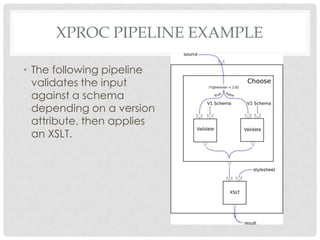
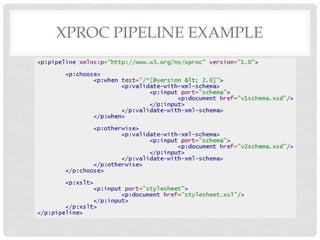
XPROC PIPELINE EXAMPLE
• The following pipeline
validates the input
against a schema
depending on a version
attribute, then applies
an XSLT.
XPROC PIPELINE EXAMPLE
THE NEED FOR XPROC
• XProc’s declarative format, combined with the simplicity of
thinking in terms of pipelines, will mean that non-technical people
can be involved in writing and maintaining processing workflows.
• XProc, in many configurations, is amenable to streaming, whereas
other approaches to control XML processes are not (for
example, XSLT).
• XProc steps focus on performing specific operations, which over
time should experience greater optimization (in an XProc
processor used by many) versus one-off code that you or I write
(used by few).
• XProc's standard step library and extensibility mechanisms
position XProc to be an all-encompassing solution.
• Structured data (such as XProc markup) is typically easier to reuse
than structured code.
• One of XProc's inspirations is UNIX® pipelines, which hopefully all
can agree is a good thing!
XPROC IMPLEMENTATIONS
• Calabash maintained by Norman Walsh
• Calumet, EMC’s XProc implementation
• QuiXProc, Innovimax's (GPL) version in Java
implementing Streaming and Parallel
processing
• Tubular (LGPL) maintained by Herve Quiroz
• xprocxq, XQuery implementation on top of
eXist
XPROC GRAPHICAL TOOLS
• The EMC XProc Designer is graphical tool for
designing XML Processing pipelines
according to the W3C standard Xproc.

• The stylus studio Pipeline editor
EMC XPROC DESIGNER
• Is a graphical tool for designing XML Processing
pipelines according to the W3C standard Xproc.
• Intuitive design of XProc pipelines using Drag and Drop
• On-the-fly validation of pipelines
• Pipeline execution using the embedded EMC Documentum
XProc Engine
• Compliant to the W3C XProc specification
• On-line Help
EMC XPROC DESIGNER : KNOWN ISSUES
• The EMC XProc Designer is currently an early access
release and there are known issues and missing
features, including:
• Currently unsupported XProc constructs:
• p:import

•
•
•
•

Only basic support for authoring inline content
Limited support for namespaces
Not all static XProc errors are checked for
Currently the XProc Designer is available as a browser
application only.
EMC XPROC DESIGNER : ROADMAP
• The EMC XProc Designer is currently an early access
release and there are known issues and missing
features.
•
•
•
•
•
•
•

Importing pipeline libraries
Better support for opening 3rd party pipelines
Support for local step declarations and recursive pipelines
Better support for authoring XPath expressions
Visual debugger
Round trip text editing - visual design
Usability improvements
THE STYLUS STUDIO XML PIPELINE
TOOL
• is a powerful XML application design tool that lets
software architects design XML data services at a
higher and more integrated level, rather than
manually editing individual
stylesheets, queries, schemas, Web services.
• allows developers to quickly and easily model their
entire application as a sequence of XML processing
operations:
• A typical XML application might involve converting legacy
data into an XML format, validating the resulting XML
document, then transforming it to HTML.
STYLUS STUDIO XML PIPELINE EDITOR
IN DETAILS
• Helps create and generate code for xml pipelines
• Pipeline=Applications that perform a series of linked
xml processing operations:
• XQuery , XSLT, and xml conversion and validation

• Nodes represent xml operations, and application
processing,
• Lines between nodes, represent flow of data from
on node to another. They are called pipes.
STYLUS STUDIO XML PIPELINE EDITOR
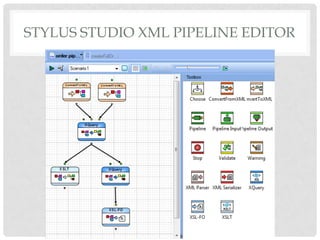
• An xml pipeline
example that
converts a text file
and an EDI file to
xml, and uses xslt
and xquery, to
create html and pdf
reports.
INPUT FILES
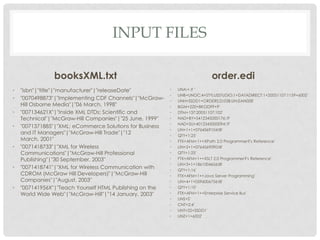
booksXML.txt
•
•
•
•

•

•

•

"isbn"|"title"|"manufacturer"|"releaseDate"
"0070498873"|"Implementing CDF Channels"|"McGrawHill Osborne Media"|"06 March, 1998"
"007134621X"|"Inside XML DTDs: Scientific and
Technical"|"McGraw-Hill Companies"|"25 June, 1999"
"0071371885"|"XML: eCommerce Solutions for Business
and IT Managers"|"McGraw-Hill Trade"|"12
March, 2001"
"0071418733"|"XML for Wireless
Communications"|"McGraw-Hill Professional
Publishing"|"30 September, 2003"
"0071418741"|"XML for Wireless Communication with
CDROM (McGraw Hill Developers)"|"McGraw-Hill
Companies"|"August, 2003"
"007141956X"|"Teach Yourself HTML Publishing on the
World Wide Web"|"McGraw-Hill"|"14 January, 2003"

order.edi
•
•
•
•
•
•
•
•
•
•
•
•
•
•
•
•
•
•
•
•
•
•
•

UNA:+.? '
UNB+UNOC:4+STYLUSSTUDIO:1+DATADIRECT:1+20051107:1159+6002'
UNH+SSDD1+ORDERS:D:03B:UN:EAN008'
BGM+220+BKOD99+9'
DTM+137:20051107:102'
NAD+BY+5412345000176::9'
NAD+SU+4012345000094::9'
LIN+1+1+0764569104:IB'
QTY+1:25'
FTX+AFM+1++XPath 2.0 Programmer?'s Reference'
LIN+2+1+0764569090:IB'
QTY+1:25'
FTX+AFM+1++XSLT 2.0 Programmer?'s Reference'
LIN+3+1+1861004656:IB'
QTY+1:16'
FTX+AFM+1++Java Server Programming'
LIN+4+1+0596006756:IB'
QTY+1:10'
FTX+AFM+1++Enterprise Service Bus'
UNS+S'
CNT+2:4'
UNT+22+SSDD1'
UNZ+1+6002'
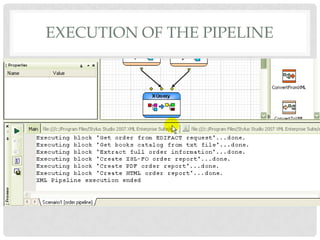
EXECUTION OF THE PIPELINE
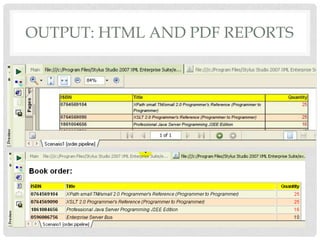
OUTPUT: HTML AND PDF REPORTS
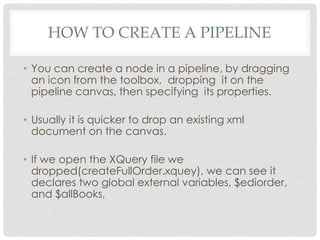
HOW TO CREATE A PIPELINE
• You can create a node in a pipeline, by dragging
an icon from the toolbox, dropping it on the
pipeline canvas, then specifying its properties.
• Usually it is quicker to drop an existing xml
document on the canvas.
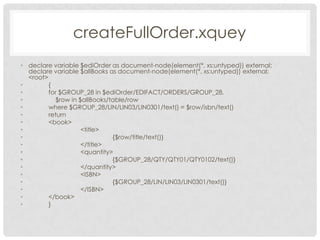
• If we open the XQuery file we
dropped(createFullOrder.xquey), we can see it
declares two global external variables, $ediorder,
and $allBooks,
createFullOrder.xquey
• declare variable $ediOrder as document-node(element(*, xs:untyped)) external;
declare variable $allBooks as document-node(element(*, xs:untyped)) external;
<root>
•
{
•
for $GROUP_28 in $ediOrder/EDIFACT/ORDERS/GROUP_28,
•
$row in $allBooks/table/row
•
where $GROUP_28/LIN/LIN03/LIN0301/text() = $row/isbn/text()
•
return
•
<book>
•
<title>
•
{$row/title/text()}
•
</title>
•
<quantity>
•
{$GROUP_28/QTY/QTY01/QTY0102/text()}
•
</quantity>
•
<ISBN>
•
{$GROUP_28/LIN/LIN03/LIN0301/text()}
•
</ISBN>
•
</book>
•
}
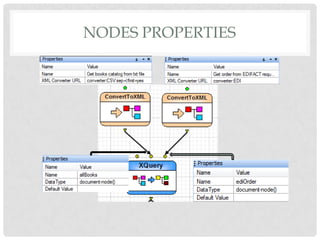
NODES PROPERTIES
createFullOrder.xquey -> SCENARIO

PROPERTIES

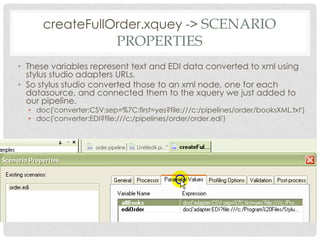
• These variables represent text and EDI data converted to xml using
stylus studio adapters URLs.
• So stylus studio converted those to an xml node, one for each
datasource, and connected them to the xquery we just added to
our pipeline.

• doc('converter:CSV:sep=%7C:first=yes?file:///c:/pipelines/order/booksXML.txt')
• doc('converter:EDI?file:///c:/pipelines/order/order.edi')
XQUERY OUTPUT FILE
CONFIGURATION
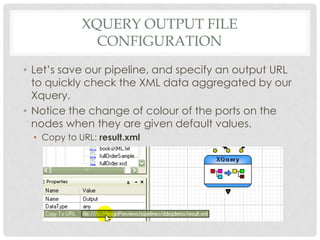
• Let’s save our pipeline, and specify an output URL
to quickly check the XML data aggregated by our
Xquery.
• Notice the change of colour of the ports on the
nodes when they are given default values.
• Copy to URL: result.xml
XQUERY OUTPUT
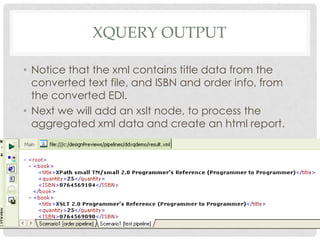
• Notice that the xml contains title data from the
converted text file, and ISBN and order info, from
the converted EDI.
• Next we will add an xslt node, to process the
aggregated xml data and create an html report.
EXECUTION FRAMEWORK
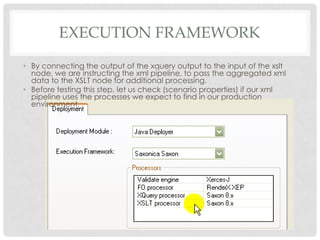
• By connecting the output of the xquery output to the input of the xslt
node, we are instructing the xml pipeline, to pass the aggregated xml
data to the XSLT node for additional processing.
• Before testing this step, let us check (scenario properties) if our xml
pipeline uses the processes we expect to find in our production
environment,
TESTING AND VIEWING THE OUTPUT
• We need to specify an additional output URL to the XSLT
output port, before testing, and as expected, it generates an
html report (result.html), designed using the stylus studio xml
publisher .
• Finally let us add the Xquery document that generates the
XSL-FO.
• Because that xquery document was specified to perform postprocessing on the xsl-fo it generates, stylus studio automatically
creates an xsl-fo node.
• We use the same output from the createFullOrder xquery node, as the
input for this step of processing.

• If we test our xml pipeline now, we see it generates both html
and pdf reports, from converted text and EDI data sources.
XML PIPELINE: CODE GENERATION
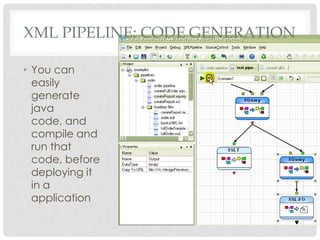
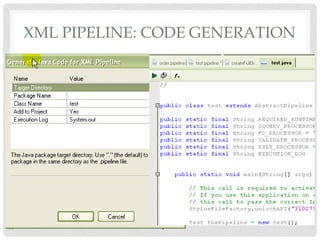
• You can
easily
generate
java
code, and
compile and
run that
code, before
deploying it
in a
application
XML PIPELINE: CODE GENERATION
DEBUGGING
• With a Built-in debugger that supports cross
language debugging, stylus studio has all the xml
pipeline developping covered.

XML Pipelines

  • 1.
  • 2.
    OUTLINES • Building workflowapplications with XML (data integration) • XPROC the W3C xml pipeline language • XPROC implementations • XPROC graphical design tools • Stylus studio pipeline editor and processor • XML PIPELINES with stylus studio in details • Conclusions
  • 3.
    BUILDING WORKFLOW APPLICATIONS WITHXML (BY DR. MICHAEL KAY) • “XML fits very well with workflow applications, because it's natural to think of them in terms of documents. In fact, I think it's such a good fit that I think one should often design an application as an XML-based workflow where we might have adopted a completely different approach in the past.” • “Generally when we do the initial modeling for an application we split it into two parts: the data model and the process model. Sometimes we focus more on one, sometimes more on the other. One of the difficulties is often in seeing how the two models relate to each other.” • “the XML approach to information management is a half-way house between the rigid discipline of the traditional database approach, and the uncontrolled chaos of the email-and-spreadsheet culture. But that doesn't mean it's a messy compromise: on the contrary, I would argue that it gives you the best of both worlds”
  • 4.
    WHAT IS XPROC? •XProc is an XML Pipeline Language • XProc enables you to declaratively express the activities you want to perform on XML documents • XProc is a W3C recommendation (2010) • http://www.w3.org/TR/xproc/
  • 5.
    BENEFITS OF XPROC? •XProc takes care of orchestrating all the activities • XProc is a standard way of expressing processing activities • Since an XProc document is an XML document, you can send it around, transform it, mine it, store it, just like any other XML document
  • 6.
    XPROC USE CASES •XProc’s goal is to promote an interoperable and standard approach to the processing of XML documents. Some of the XPROC Use Cases are listed below: • Apply a sequence of operations to XML documents. • Parse XML, validate it against a schema, and then apply an XSLT transformation. • Combine multiple XML documents (document aggregation). • Interact with Web services. • Use metadata retrieval
  • 7.
    XPROC PIPELINE EXAMPLE •The following pipeline validates the input against a schema depending on a version attribute, then applies an XSLT.
  • 8.
  • 9.
    THE NEED FORXPROC • XProc’s declarative format, combined with the simplicity of thinking in terms of pipelines, will mean that non-technical people can be involved in writing and maintaining processing workflows. • XProc, in many configurations, is amenable to streaming, whereas other approaches to control XML processes are not (for example, XSLT). • XProc steps focus on performing specific operations, which over time should experience greater optimization (in an XProc processor used by many) versus one-off code that you or I write (used by few). • XProc's standard step library and extensibility mechanisms position XProc to be an all-encompassing solution. • Structured data (such as XProc markup) is typically easier to reuse than structured code. • One of XProc's inspirations is UNIX® pipelines, which hopefully all can agree is a good thing!
  • 10.
    XPROC IMPLEMENTATIONS • Calabashmaintained by Norman Walsh • Calumet, EMC’s XProc implementation • QuiXProc, Innovimax's (GPL) version in Java implementing Streaming and Parallel processing • Tubular (LGPL) maintained by Herve Quiroz • xprocxq, XQuery implementation on top of eXist
  • 11.
    XPROC GRAPHICAL TOOLS •The EMC XProc Designer is graphical tool for designing XML Processing pipelines according to the W3C standard Xproc. • The stylus studio Pipeline editor
  • 12.
    EMC XPROC DESIGNER •Is a graphical tool for designing XML Processing pipelines according to the W3C standard Xproc. • Intuitive design of XProc pipelines using Drag and Drop • On-the-fly validation of pipelines • Pipeline execution using the embedded EMC Documentum XProc Engine • Compliant to the W3C XProc specification • On-line Help
  • 13.
    EMC XPROC DESIGNER: KNOWN ISSUES • The EMC XProc Designer is currently an early access release and there are known issues and missing features, including: • Currently unsupported XProc constructs: • p:import • • • • Only basic support for authoring inline content Limited support for namespaces Not all static XProc errors are checked for Currently the XProc Designer is available as a browser application only.
  • 14.
    EMC XPROC DESIGNER: ROADMAP • The EMC XProc Designer is currently an early access release and there are known issues and missing features. • • • • • • • Importing pipeline libraries Better support for opening 3rd party pipelines Support for local step declarations and recursive pipelines Better support for authoring XPath expressions Visual debugger Round trip text editing - visual design Usability improvements
  • 15.
    THE STYLUS STUDIOXML PIPELINE TOOL • is a powerful XML application design tool that lets software architects design XML data services at a higher and more integrated level, rather than manually editing individual stylesheets, queries, schemas, Web services. • allows developers to quickly and easily model their entire application as a sequence of XML processing operations: • A typical XML application might involve converting legacy data into an XML format, validating the resulting XML document, then transforming it to HTML.
  • 16.
    STYLUS STUDIO XMLPIPELINE EDITOR IN DETAILS • Helps create and generate code for xml pipelines • Pipeline=Applications that perform a series of linked xml processing operations: • XQuery , XSLT, and xml conversion and validation • Nodes represent xml operations, and application processing, • Lines between nodes, represent flow of data from on node to another. They are called pipes.
  • 17.
    STYLUS STUDIO XMLPIPELINE EDITOR
  • 18.
    STYLUS STUDIO XMLPIPELINE EDITOR • An xml pipeline example that converts a text file and an EDI file to xml, and uses xslt and xquery, to create html and pdf reports.
  • 19.
    INPUT FILES booksXML.txt • • • • • • • "isbn"|"title"|"manufacturer"|"releaseDate" "0070498873"|"Implementing CDFChannels"|"McGrawHill Osborne Media"|"06 March, 1998" "007134621X"|"Inside XML DTDs: Scientific and Technical"|"McGraw-Hill Companies"|"25 June, 1999" "0071371885"|"XML: eCommerce Solutions for Business and IT Managers"|"McGraw-Hill Trade"|"12 March, 2001" "0071418733"|"XML for Wireless Communications"|"McGraw-Hill Professional Publishing"|"30 September, 2003" "0071418741"|"XML for Wireless Communication with CDROM (McGraw Hill Developers)"|"McGraw-Hill Companies"|"August, 2003" "007141956X"|"Teach Yourself HTML Publishing on the World Wide Web"|"McGraw-Hill"|"14 January, 2003" order.edi • • • • • • • • • • • • • • • • • • • • • • • UNA:+.? ' UNB+UNOC:4+STYLUSSTUDIO:1+DATADIRECT:1+20051107:1159+6002' UNH+SSDD1+ORDERS:D:03B:UN:EAN008' BGM+220+BKOD99+9' DTM+137:20051107:102' NAD+BY+5412345000176::9' NAD+SU+4012345000094::9' LIN+1+1+0764569104:IB' QTY+1:25' FTX+AFM+1++XPath 2.0 Programmer?'s Reference' LIN+2+1+0764569090:IB' QTY+1:25' FTX+AFM+1++XSLT 2.0 Programmer?'s Reference' LIN+3+1+1861004656:IB' QTY+1:16' FTX+AFM+1++Java Server Programming' LIN+4+1+0596006756:IB' QTY+1:10' FTX+AFM+1++Enterprise Service Bus' UNS+S' CNT+2:4' UNT+22+SSDD1' UNZ+1+6002'
  • 20.
  • 21.
    OUTPUT: HTML ANDPDF REPORTS
  • 22.
    HOW TO CREATEA PIPELINE • You can create a node in a pipeline, by dragging an icon from the toolbox, dropping it on the pipeline canvas, then specifying its properties. • Usually it is quicker to drop an existing xml document on the canvas. • If we open the XQuery file we dropped(createFullOrder.xquey), we can see it declares two global external variables, $ediorder, and $allBooks,
  • 23.
    createFullOrder.xquey • declare variable$ediOrder as document-node(element(*, xs:untyped)) external; declare variable $allBooks as document-node(element(*, xs:untyped)) external; <root> • { • for $GROUP_28 in $ediOrder/EDIFACT/ORDERS/GROUP_28, • $row in $allBooks/table/row • where $GROUP_28/LIN/LIN03/LIN0301/text() = $row/isbn/text() • return • <book> • <title> • {$row/title/text()} • </title> • <quantity> • {$GROUP_28/QTY/QTY01/QTY0102/text()} • </quantity> • <ISBN> • {$GROUP_28/LIN/LIN03/LIN0301/text()} • </ISBN> • </book> • }
  • 24.
  • 25.
    createFullOrder.xquey -> SCENARIO PROPERTIES •These variables represent text and EDI data converted to xml using stylus studio adapters URLs. • So stylus studio converted those to an xml node, one for each datasource, and connected them to the xquery we just added to our pipeline. • doc('converter:CSV:sep=%7C:first=yes?file:///c:/pipelines/order/booksXML.txt') • doc('converter:EDI?file:///c:/pipelines/order/order.edi')
  • 26.
    XQUERY OUTPUT FILE CONFIGURATION •Let’s save our pipeline, and specify an output URL to quickly check the XML data aggregated by our Xquery. • Notice the change of colour of the ports on the nodes when they are given default values. • Copy to URL: result.xml
  • 27.
    XQUERY OUTPUT • Noticethat the xml contains title data from the converted text file, and ISBN and order info, from the converted EDI. • Next we will add an xslt node, to process the aggregated xml data and create an html report.
  • 28.
    EXECUTION FRAMEWORK • Byconnecting the output of the xquery output to the input of the xslt node, we are instructing the xml pipeline, to pass the aggregated xml data to the XSLT node for additional processing. • Before testing this step, let us check (scenario properties) if our xml pipeline uses the processes we expect to find in our production environment,
  • 29.
    TESTING AND VIEWINGTHE OUTPUT • We need to specify an additional output URL to the XSLT output port, before testing, and as expected, it generates an html report (result.html), designed using the stylus studio xml publisher . • Finally let us add the Xquery document that generates the XSL-FO. • Because that xquery document was specified to perform postprocessing on the xsl-fo it generates, stylus studio automatically creates an xsl-fo node. • We use the same output from the createFullOrder xquery node, as the input for this step of processing. • If we test our xml pipeline now, we see it generates both html and pdf reports, from converted text and EDI data sources.
  • 30.
    XML PIPELINE: CODEGENERATION • You can easily generate java code, and compile and run that code, before deploying it in a application
  • 31.
  • 32.
    DEBUGGING • With aBuilt-in debugger that supports cross language debugging, stylus studio has all the xml pipeline developping covered.

Editor's Notes

  • #14 The save button is therefore disabled. Use View Source to view the source of your pipeline
  • #26 doc(&apos;converter:CSV:sep=%7C:first=yes?file:///c:/pipelines/order/booksXML.txt&apos;)doc(&apos;converter:EDI?file:///c:/pipelines/order/order.edi&apos;)