2015
Custom ActiveX Control
in SAP GUI
A STEP BY STEP GUIDE
DR. KEREM KOSEOGLU
http://kerem.koseoglu.info
2
Tableof Contents
ActiveX Development in .NET...................................................................................................3
ActiveX Registration..................................................................................................................7
ActiveX Wrapper in SAP............................................................................................................8
Application in SAP...................................................................................................................11
http://kerem.koseoglu.info
3
ActiveX Development in .NET
Create new class library project.
Open AssemblyInfo.cs and make sure that the assembly is ComVisible.
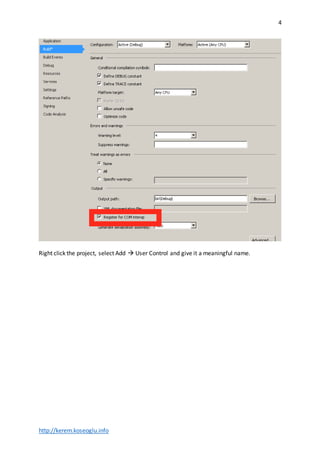
Right click the project, select “Properties”. On the Build tab, ensure that “Register for COM
interop” is selected.
http://kerem.koseoglu.info
4
Right click the project, select Add  User Control and give it a meaningful name.
http://kerem.koseoglu.info
5
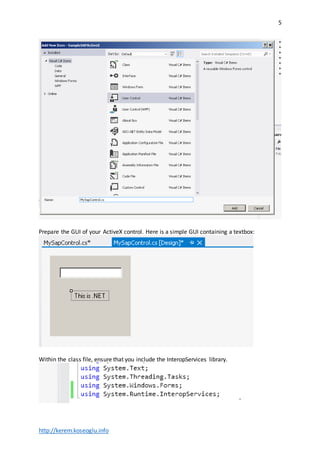
Prepare the GUI of your ActiveX control. Here is a simple GUI containing a textbox:
Within the class file, ensure that you include the InteropServices library.
http://kerem.koseoglu.info
6
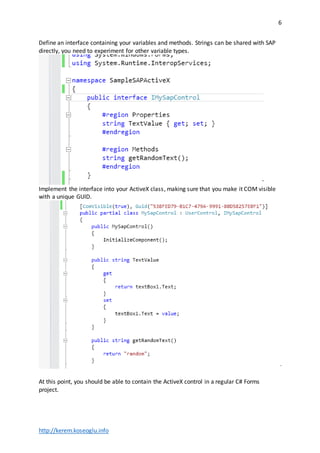
Define an interface containing your variables and methods. Strings can be shared with SAP
directly, you need to experiment for other variable types.
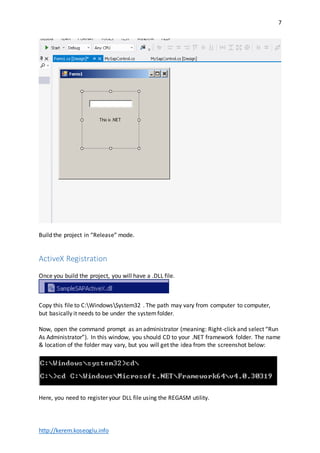
Implement the interface into your ActiveX class, making sure that you make it COM visible
with a unique GUID.
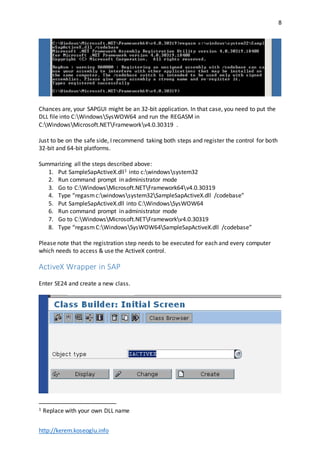
At this point, you should be able to contain the ActiveX control in a regular C# Forms
project.
http://kerem.koseoglu.info
7
Build the project in “Release” mode.
ActiveX Registration
Once you build the project, you will have a .DLL file.
Copy this file to C:WindowsSystem32 . The path may vary from computer to computer,
but basically it needs to be under the systemfolder.
Now, open the command prompt as an administrator (meaning: Right-click and select “Run
As Administrator”). In this window, you should CD to your .NET framework folder. The name
& location of the folder may vary, but you will get the idea from the screenshot below:
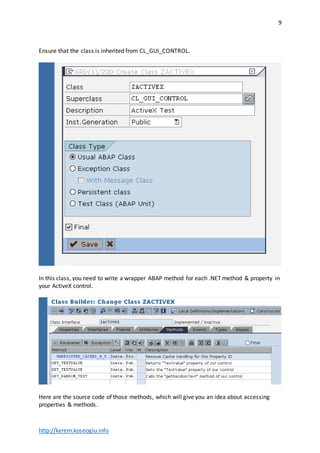
Here, you need to register your DLL file using the REGASM utility.
http://kerem.koseoglu.info
8
Chances are, your SAPGUI might be an 32-bit application. In that case, you need to put the
DLL file into C:WindowsSysWOW64 and run the REGASM in
C:WindowsMicrosoft.NETFrameworkv4.0.30319 .
Just to be on the safe side, I recommend taking both steps and register the control for both
32-bit and 64-bit platforms.
Summarizing all the steps described above:
1. Put SampleSapActiveX.dll1 into c:windowssystem32
2. Run command prompt in administrator mode
3. Go to C:WindowsMicrosoft.NETFramework64v4.0.30319
4. Type “regasmc:windowssystem32SampleSapActiveX.dll /codebase”
5. Put SampleSapActiveX.dll into C:WindowsSysWOW64
6. Run command prompt in administrator mode
7. Go to C:WindowsMicrosoft.NETFrameworkv4.0.30319
8. Type “regasm C:WindowsSysWOW64SampleSapActiveX.dll /codebase”
Please note that the registration step needs to be executed for each and every computer
which needs to access & use the ActiveX control.
ActiveX Wrapper in SAP
Enter SE24 and create a new class.
1 Replace with your own DLL name
http://kerem.koseoglu.info
9
Ensure that the class is inherited from CL_GUI_CONTROL.
In this class, you need to write a wrapper ABAP method for each .NET method & property in
your ActiveX control.
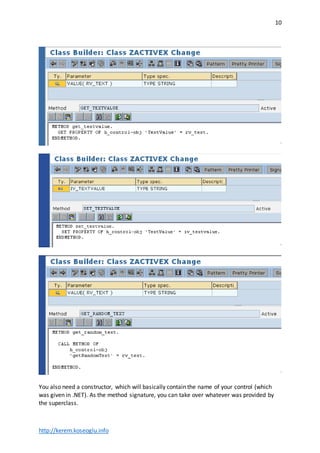
Here are the source code of those methods, which will give you an idea about accessing
properties & methods.
http://kerem.koseoglu.info
10
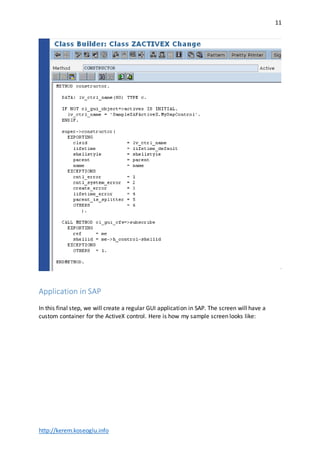
You also need a constructor, which will basically contain the name of your control (which
was given in .NET). As the method signature, you can take over whatever was provided by
the superclass.
http://kerem.koseoglu.info
11
Application in SAP
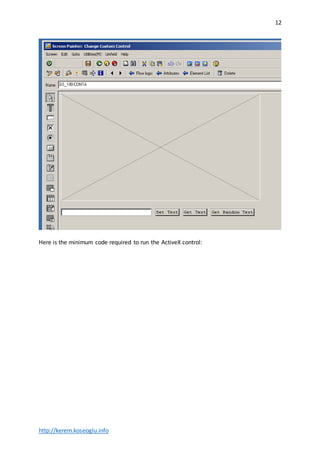
In this final step, we will create a regular GUI application in SAP. The screen will have a
custom container for the ActiveX control. Here is how my sample screen looks like:
http://kerem.koseoglu.info
12
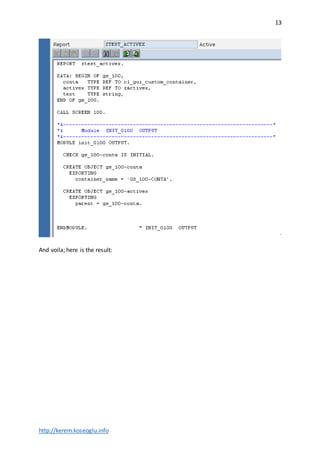
Here is the minimum code required to run the ActiveX control:
http://kerem.koseoglu.info
13
And voila; here is the result:
http://kerem.koseoglu.info
14
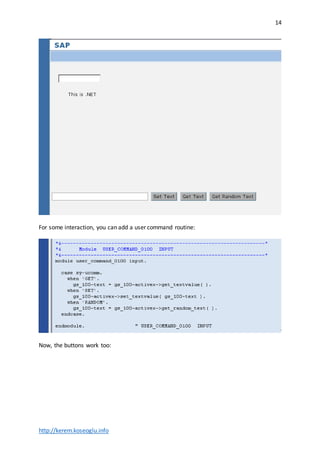
For some interaction, you can add a user command routine:
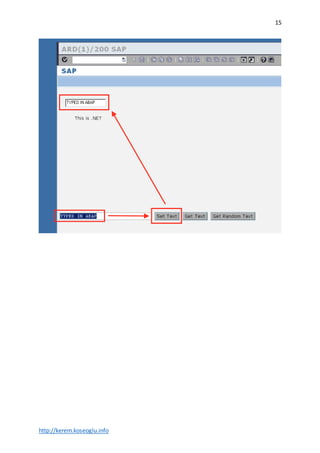
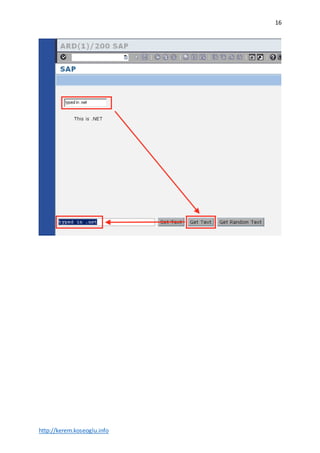
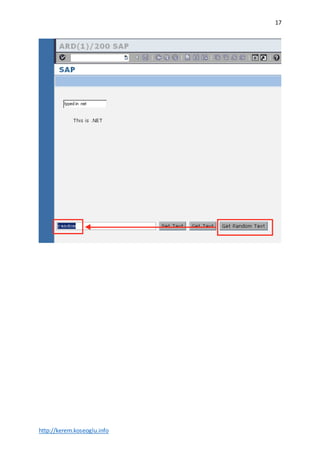
Now, the buttons work too:
http://kerem.koseoglu.info
15
http://kerem.koseoglu.info
16
http://kerem.koseoglu.info
17

Embedding custom ActiveX controls into SAP GUI

  • 1.
    2015 Custom ActiveX Control inSAP GUI A STEP BY STEP GUIDE DR. KEREM KOSEOGLU
  • 2.
    http://kerem.koseoglu.info 2 Tableof Contents ActiveX Developmentin .NET...................................................................................................3 ActiveX Registration..................................................................................................................7 ActiveX Wrapper in SAP............................................................................................................8 Application in SAP...................................................................................................................11
  • 3.
    http://kerem.koseoglu.info 3 ActiveX Development in.NET Create new class library project. Open AssemblyInfo.cs and make sure that the assembly is ComVisible. Right click the project, select “Properties”. On the Build tab, ensure that “Register for COM interop” is selected.
  • 4.
    http://kerem.koseoglu.info 4 Right click theproject, select Add  User Control and give it a meaningful name.
  • 5.
    http://kerem.koseoglu.info 5 Prepare the GUIof your ActiveX control. Here is a simple GUI containing a textbox: Within the class file, ensure that you include the InteropServices library.
  • 6.
    http://kerem.koseoglu.info 6 Define an interfacecontaining your variables and methods. Strings can be shared with SAP directly, you need to experiment for other variable types. Implement the interface into your ActiveX class, making sure that you make it COM visible with a unique GUID. At this point, you should be able to contain the ActiveX control in a regular C# Forms project.
  • 7.
    http://kerem.koseoglu.info 7 Build the projectin “Release” mode. ActiveX Registration Once you build the project, you will have a .DLL file. Copy this file to C:WindowsSystem32 . The path may vary from computer to computer, but basically it needs to be under the systemfolder. Now, open the command prompt as an administrator (meaning: Right-click and select “Run As Administrator”). In this window, you should CD to your .NET framework folder. The name & location of the folder may vary, but you will get the idea from the screenshot below: Here, you need to register your DLL file using the REGASM utility.
  • 8.
    http://kerem.koseoglu.info 8 Chances are, yourSAPGUI might be an 32-bit application. In that case, you need to put the DLL file into C:WindowsSysWOW64 and run the REGASM in C:WindowsMicrosoft.NETFrameworkv4.0.30319 . Just to be on the safe side, I recommend taking both steps and register the control for both 32-bit and 64-bit platforms. Summarizing all the steps described above: 1. Put SampleSapActiveX.dll1 into c:windowssystem32 2. Run command prompt in administrator mode 3. Go to C:WindowsMicrosoft.NETFramework64v4.0.30319 4. Type “regasmc:windowssystem32SampleSapActiveX.dll /codebase” 5. Put SampleSapActiveX.dll into C:WindowsSysWOW64 6. Run command prompt in administrator mode 7. Go to C:WindowsMicrosoft.NETFrameworkv4.0.30319 8. Type “regasm C:WindowsSysWOW64SampleSapActiveX.dll /codebase” Please note that the registration step needs to be executed for each and every computer which needs to access & use the ActiveX control. ActiveX Wrapper in SAP Enter SE24 and create a new class. 1 Replace with your own DLL name
  • 9.
    http://kerem.koseoglu.info 9 Ensure that theclass is inherited from CL_GUI_CONTROL. In this class, you need to write a wrapper ABAP method for each .NET method & property in your ActiveX control. Here are the source code of those methods, which will give you an idea about accessing properties & methods.
  • 10.
    http://kerem.koseoglu.info 10 You also needa constructor, which will basically contain the name of your control (which was given in .NET). As the method signature, you can take over whatever was provided by the superclass.
  • 11.
    http://kerem.koseoglu.info 11 Application in SAP Inthis final step, we will create a regular GUI application in SAP. The screen will have a custom container for the ActiveX control. Here is how my sample screen looks like:
  • 12.
    http://kerem.koseoglu.info 12 Here is theminimum code required to run the ActiveX control:
  • 13.
  • 14.
    http://kerem.koseoglu.info 14 For some interaction,you can add a user command routine: Now, the buttons work too:
  • 15.
  • 16.
  • 17.