Your Admin Toolbelt is not complete
without Salesforce DX
Christian Szandor Knapp
Lead Salesforce Developer * appero
sz@appero.com
@ch_sz_knapp
Learn to Leverage and Love the aDmin eXperience
Daniel Stange
Technical Architect * DIA die.interaktiven
daniel.stange@die-interaktiven.de
@stangomat
Agenda
1) Let’s talk shop
2) DX for admins I
• What you need to know and don’t need to know
3) Interlude:
• Installation
• The Structure of a DX Command
• The most important DX parameter
4) DX for admins II
• What you need to know and don’t need to know
5) How to instantly make your life easier with DX and DX instant recipes
Let’s Talk Shop
no admins were harmed preparing this session
How many clicks do you need...
… to assign a permission set to
one user?
?
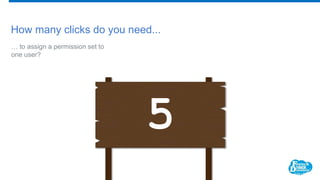
How many clicks do you need...
… to assign a permission set to
one user?
5
How many clicks do you need...
… to deactivate your user
and add “X” to Lastname and
Firstname?
?
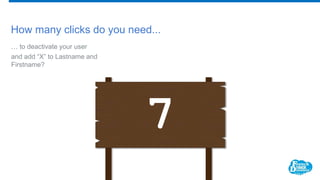
How many clicks do you need...
… to deactivate your user
and add “X” to Lastname and
Firstname?
7
How many clicks do you need...
… to upload - yet again - the latest
responses CSV from your User
Group event invitation Campaign?
?
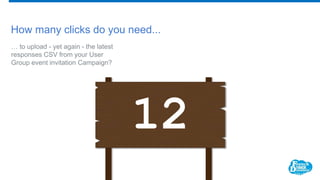
How many clicks do you need...
… to upload - yet again - the latest
responses CSV from your User
Group event invitation Campaign?
12
Did you pay close attention?
How many clicks do you need to do ALL of the above?
?
How many clicks do you need to do ALL of the above?
NONE
DX for Admins
What you need to know
and what you don’t need to know I
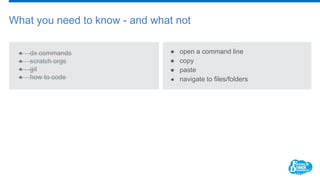
What you need to know - and what not
● dx commands
● scratch orgs
● git
● how to code
● open a command line
● copy
● paste
● navigate to files/folders
Interlude
sounds more exciting than setup
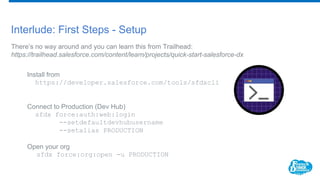
Interlude: First Steps - Setup
There’s no way around and you can learn this from Trailhead:
https://trailhead.salesforce.com/content/learn/projects/quick-start-salesforce-dx
Install from
https://developer.salesforce.com/tools/sfdxcli
Connect to Production (Dev Hub)
sfdx force:auth:web:login
--setdefaultdevhubusername
--setalias PRODUCTION
Open your org
sfdx force:org:open -u PRODUCTION
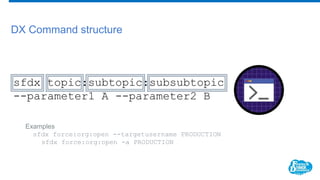
DX Command structure
Examples
sfdx force:org:open --targetusername PRODUCTION
sfdx force:org:open -a PRODUCTION
sfdx topic:subtopic:subsubtopic
--parameter1 A --parameter2 B
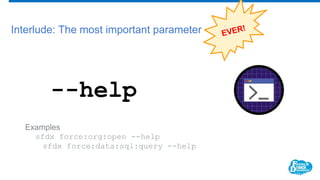
Interlude: The most important parameter
--help
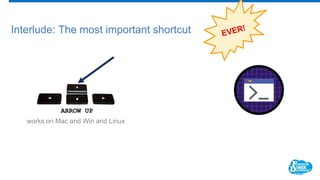
Interlude: The most important shortcut
Demo
DX for Admins
What you need to know
and what you don’t need to know II
DX works with Scratch Orgs only
… Wrong. Since Winter 19 it’s become more
intuitive but never has been a real issue.
Common Misconceptions
DX is about source control and versioning
… Yes, ideally, but no one is forcing you.
DX is for developers only
… No. They might have a bit of a head start,
though.
DX is brand new
… the term is, the CLI isn’t and neither is most
functionality. Scratch Orgs are a new thing
indeed.
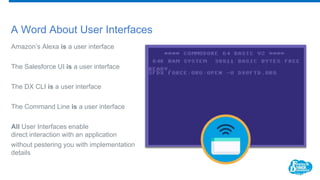
A Word About User Interfaces
Amazon’s Alexa is a user interface
The Salesforce UI is a user interface
The DX CLI is a user interface
The Command Line is a user interface
All User Interfaces enable
direct interaction with an application
without pestering you with implementation
details
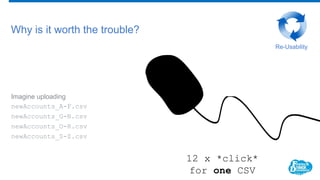
Imagine uploading
newAccounts_A-F.csv
newAccounts_G-N.csv
newAccounts_O-R.csv
newAccounts_S-Z.csv
Why is it worth the trouble?
12 x *click*
for one CSV
Re-Usability
Imagine uploading
newAccounts_A-F.csv
newAccounts_G-N.csv
newAccounts_O-R.csv
newAccounts_S-Z.csv
Why is it worth the trouble?
sfdx force:data:bulk:upsert [...] ---csvfile newAccounts_A-
F.csv
sfdx force:data:bulk:upsert [...] ---csvfile newAccounts_G-
N.csv
sfdx force:data:bulk:upsert [...] ---csvfile newAccounts_O-
R.csv
sfdx force:data:bulk:upsert [...] ---csvfile newAccounts_S-Z.csv
Re-Usability
1 x copy & paste
for all CSVs
DX Instant Recipes
let’s start cooking
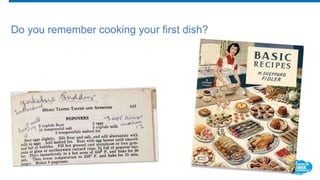
Do you remember cooking your first dish?
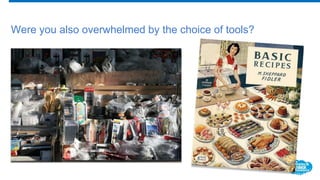
Were you also overwhelmed by the choice of tools?
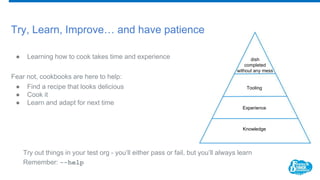
Try, Learn, Improve… and have patience
● Learning how to cook takes time and experience
Fear not, cookbooks are here to help:
● Find a recipe that looks delicious
● Cook it
● Learn and adapt for next time
Try out things in your test org - you’ll either pass or fail, but you’ll always learn
Remember: --help
Knowledge
Experience
Tooling
dish
completed
without any mess
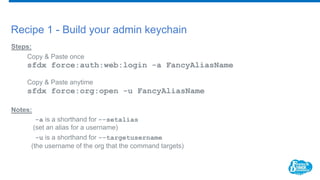
Recipe 1 - Build your admin keychain
Steps:
Copy & Paste once
sfdx force:auth:web:login -a FancyAliasName
Copy & Paste anytime
sfdx force:org:open -u FancyAliasName
Notes:
-a is a shorthand for --setalias
(set an alias for a username)
-u is a shorthand for --targetusername
(the username of the org that the command targets)
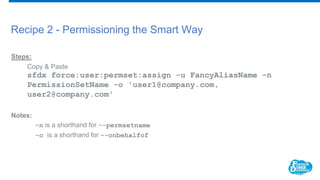
Recipe 2 - Permissioning the Smart Way
Steps:
Copy & Paste
sfdx force:user:permset:assign -u FancyAliasName -n
PermissionSetName -o 'user1@company.com,
user2@company.com'
Notes:
-n is a shorthand for --permsetname
-o is a shorthand for --onbehalfof
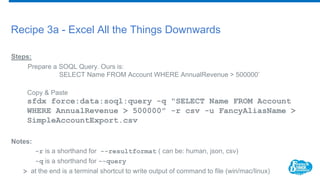
Recipe 3a - Excel All the Things Downwards
Steps:
Prepare a SOQL Query. Ours is:
SELECT Name FROM Account WHERE AnnualRevenue > 500000’
Copy & Paste
sfdx force:data:soql:query -q "SELECT Name FROM Account
WHERE AnnualRevenue > 500000" -r csv -u FancyAliasName >
SimpleAccountExport.csv
Notes:
-r is a shorthand for --resultformat ( can be: human, json, csv)
-q is a shorthand for --query
> at the end is a terminal shortcut to write output of command to file (win/mac/linux)
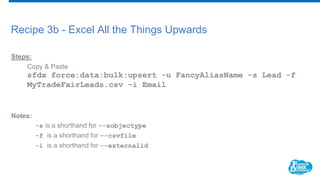
Recipe 3b - Excel All the Things Upwards
Steps:
Copy & Paste
sfdx force:data:bulk:upsert -u FancyAliasName -s Lead -f
MyTradeFairLeads.csv -i Email
Notes:
-s is a shorthand for --sobjectype
-f is a shorthand for --csvfile
-i is a shorthand for --externalid
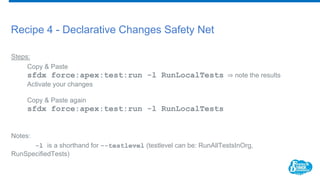
Recipe 4 - Declarative Changes Safety Net
Steps:
Copy & Paste
sfdx force:apex:test:run -l RunLocalTests ⇒ note the results
Activate your changes
Copy & Paste again
sfdx force:apex:test:run -l RunLocalTests
Notes:
-l is a shorthand for --testlevel (testlevel can be: RunAllTestsInOrg,
RunSpecifiedTests)
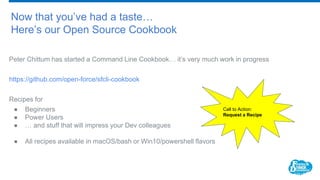
Now that you’ve had a taste…
Here’s our Open Source Cookbook
Peter Chittum has started a Command Line Cookbook… it’s very much work in progress
https://github.com/open-force/sfcli-cookbook
Recipes for
● Beginners
● Power Users
● … and stuff that will impress your Dev colleagues
● All recipes available in macOS/bash or Win10/powershell flavors
Call to Action:
Request a Recipe
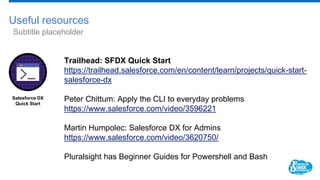
Useful resources
Subtitle placeholder
Trailhead: SFDX Quick Start
https://trailhead.salesforce.com/en/content/learn/projects/quick-start-
salesforce-dx
Peter Chittum: Apply the CLI to everyday problems
https://www.salesforce.com/video/3596221
Martin Humpolec: Salesforce DX for Admins
https://www.salesforce.com/video/3620750/
Pluralsight has Beginner Guides for Powershell and Bash
Salesforce DX
Quick Start
FIN
Q & A
Thank You
First Name Last Name
Title of Presenter
email@salesforce.com
@twitterhandle
Remember to tell us what you think in the event survey
www.frenchtouchdreamin.com/survey

Your admin toolbelt is not complete without Salesforce DX

  • 1.
    Your Admin Toolbeltis not complete without Salesforce DX Christian Szandor Knapp Lead Salesforce Developer * appero sz@appero.com @ch_sz_knapp Learn to Leverage and Love the aDmin eXperience Daniel Stange Technical Architect * DIA die.interaktiven daniel.stange@die-interaktiven.de @stangomat
  • 2.
    Agenda 1) Let’s talkshop 2) DX for admins I • What you need to know and don’t need to know 3) Interlude: • Installation • The Structure of a DX Command • The most important DX parameter 4) DX for admins II • What you need to know and don’t need to know 5) How to instantly make your life easier with DX and DX instant recipes
  • 3.
    Let’s Talk Shop noadmins were harmed preparing this session
  • 4.
    How many clicksdo you need... … to assign a permission set to one user? ?
  • 5.
    How many clicksdo you need... … to assign a permission set to one user? 5
  • 6.
    How many clicksdo you need... … to deactivate your user and add “X” to Lastname and Firstname? ?
  • 7.
    How many clicksdo you need... … to deactivate your user and add “X” to Lastname and Firstname? 7
  • 8.
    How many clicksdo you need... … to upload - yet again - the latest responses CSV from your User Group event invitation Campaign? ?
  • 9.
    How many clicksdo you need... … to upload - yet again - the latest responses CSV from your User Group event invitation Campaign? 12
  • 10.
    Did you payclose attention?
  • 11.
    How many clicksdo you need to do ALL of the above? ?
  • 12.
    How many clicksdo you need to do ALL of the above? NONE
  • 13.
    DX for Admins Whatyou need to know and what you don’t need to know I
  • 14.
    What you needto know - and what not ● dx commands ● scratch orgs ● git ● how to code ● open a command line ● copy ● paste ● navigate to files/folders
  • 15.
  • 16.
    Interlude: First Steps- Setup There’s no way around and you can learn this from Trailhead: https://trailhead.salesforce.com/content/learn/projects/quick-start-salesforce-dx Install from https://developer.salesforce.com/tools/sfdxcli Connect to Production (Dev Hub) sfdx force:auth:web:login --setdefaultdevhubusername --setalias PRODUCTION Open your org sfdx force:org:open -u PRODUCTION
  • 17.
    DX Command structure Examples sfdxforce:org:open --targetusername PRODUCTION sfdx force:org:open -a PRODUCTION sfdx topic:subtopic:subsubtopic --parameter1 A --parameter2 B
  • 18.
    Interlude: The mostimportant parameter --help
  • 19.
    Interlude: The mostimportant shortcut
  • 20.
  • 21.
    DX for Admins Whatyou need to know and what you don’t need to know II
  • 22.
    DX works withScratch Orgs only … Wrong. Since Winter 19 it’s become more intuitive but never has been a real issue. Common Misconceptions DX is about source control and versioning … Yes, ideally, but no one is forcing you. DX is for developers only … No. They might have a bit of a head start, though. DX is brand new … the term is, the CLI isn’t and neither is most functionality. Scratch Orgs are a new thing indeed.
  • 23.
    A Word AboutUser Interfaces Amazon’s Alexa is a user interface The Salesforce UI is a user interface The DX CLI is a user interface The Command Line is a user interface All User Interfaces enable direct interaction with an application without pestering you with implementation details
  • 24.
  • 25.
    Imagine uploading newAccounts_A-F.csv newAccounts_G-N.csv newAccounts_O-R.csv newAccounts_S-Z.csv Why isit worth the trouble? sfdx force:data:bulk:upsert [...] ---csvfile newAccounts_A- F.csv sfdx force:data:bulk:upsert [...] ---csvfile newAccounts_G- N.csv sfdx force:data:bulk:upsert [...] ---csvfile newAccounts_O- R.csv sfdx force:data:bulk:upsert [...] ---csvfile newAccounts_S-Z.csv Re-Usability 1 x copy & paste for all CSVs
  • 26.
  • 27.
    Do you remembercooking your first dish?
  • 28.
    Were you alsooverwhelmed by the choice of tools?
  • 29.
    Try, Learn, Improve…and have patience ● Learning how to cook takes time and experience Fear not, cookbooks are here to help: ● Find a recipe that looks delicious ● Cook it ● Learn and adapt for next time Try out things in your test org - you’ll either pass or fail, but you’ll always learn Remember: --help Knowledge Experience Tooling dish completed without any mess
  • 30.
    Recipe 1 -Build your admin keychain Steps: Copy & Paste once sfdx force:auth:web:login -a FancyAliasName Copy & Paste anytime sfdx force:org:open -u FancyAliasName Notes: -a is a shorthand for --setalias (set an alias for a username) -u is a shorthand for --targetusername (the username of the org that the command targets)
  • 31.
    Recipe 2 -Permissioning the Smart Way Steps: Copy & Paste sfdx force:user:permset:assign -u FancyAliasName -n PermissionSetName -o 'user1@company.com, user2@company.com' Notes: -n is a shorthand for --permsetname -o is a shorthand for --onbehalfof
  • 32.
    Recipe 3a -Excel All the Things Downwards Steps: Prepare a SOQL Query. Ours is: SELECT Name FROM Account WHERE AnnualRevenue > 500000’ Copy & Paste sfdx force:data:soql:query -q "SELECT Name FROM Account WHERE AnnualRevenue > 500000" -r csv -u FancyAliasName > SimpleAccountExport.csv Notes: -r is a shorthand for --resultformat ( can be: human, json, csv) -q is a shorthand for --query > at the end is a terminal shortcut to write output of command to file (win/mac/linux)
  • 33.
    Recipe 3b -Excel All the Things Upwards Steps: Copy & Paste sfdx force:data:bulk:upsert -u FancyAliasName -s Lead -f MyTradeFairLeads.csv -i Email Notes: -s is a shorthand for --sobjectype -f is a shorthand for --csvfile -i is a shorthand for --externalid
  • 34.
    Recipe 4 -Declarative Changes Safety Net Steps: Copy & Paste sfdx force:apex:test:run -l RunLocalTests ⇒ note the results Activate your changes Copy & Paste again sfdx force:apex:test:run -l RunLocalTests Notes: -l is a shorthand for --testlevel (testlevel can be: RunAllTestsInOrg, RunSpecifiedTests)
  • 35.
    Now that you’vehad a taste… Here’s our Open Source Cookbook Peter Chittum has started a Command Line Cookbook… it’s very much work in progress https://github.com/open-force/sfcli-cookbook Recipes for ● Beginners ● Power Users ● … and stuff that will impress your Dev colleagues ● All recipes available in macOS/bash or Win10/powershell flavors Call to Action: Request a Recipe
  • 36.
    Useful resources Subtitle placeholder Trailhead:SFDX Quick Start https://trailhead.salesforce.com/en/content/learn/projects/quick-start- salesforce-dx Peter Chittum: Apply the CLI to everyday problems https://www.salesforce.com/video/3596221 Martin Humpolec: Salesforce DX for Admins https://www.salesforce.com/video/3620750/ Pluralsight has Beginner Guides for Powershell and Bash Salesforce DX Quick Start
  • 37.
  • 38.
  • 39.
    Thank You First NameLast Name Title of Presenter email@salesforce.com @twitterhandle Remember to tell us what you think in the event survey www.frenchtouchdreamin.com/survey