Customer Statement and Customer
Overdue Payments Reports in Odoo
Sensing your needs
Browseinfo
App Features :
Account Statements of customers
and suppliers.
Sends customer statement report through
email.
Partner wise Ledger Report
App Features :
Send automatically customer
statement.
Statement filter by Date
Sends Customer overdue payments report
to customers.
App Uses :
1) To view customers or vendor statements reports
with overdue invoices and payment details
2) To send statements of account reports by email to
your customers and suppliers
3) To print customer overdue statement reports
App Uses :
4) To send overdue payment and statement report
automatically to your customer and vendors every
month using the automatic send email feature
5) To filter customer and supplier statements with
start date and end date
6) To print and send this filter statements too
Let’s see How this App works :
customer statement and
payments report in odoo
Find Video Tutorial here :
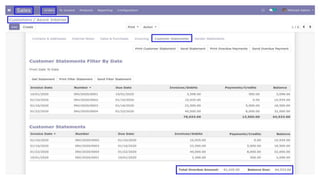
Customer Statement :
User can find "Customer Statement" and "Vendor
Statement" tabs on customer/vendor form view.
Find this App related article here : customer statement
management in odoo
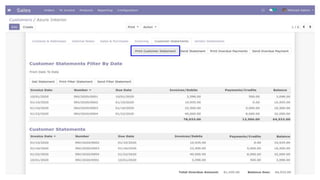
Print Customer Statement
Report :
Accounting User/Accountant can also able print
statements of customers and suppliers by "Print
Statement Button".
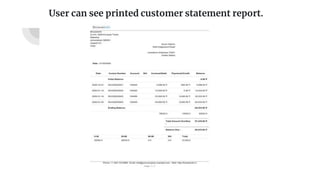
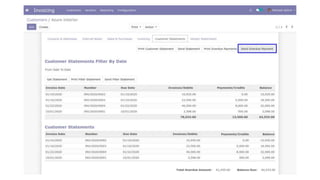
User can see printed customer statement report.
Send Customer Statement
Report :
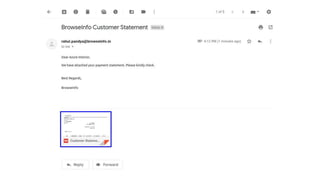
User can send customer statement report by mail.
Print Customer Overdue
Payment :
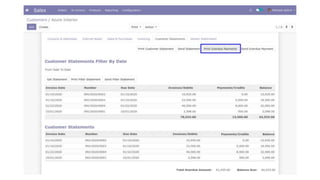
User can print customer overdue payment report
from button as shown figure.
Send Customer Overdue
Payment :
User can send customer overdue payment report
from button as shown figure.
Statement Filter By dates:
When there are many lines on statements then we
provide extra feature to filter statement by date to see
statement for certain selected period and easily print
it for selected date range,This also print balance
overdue and total amount overdue for selected date
range.
Customer Statement Report
With Date Filter
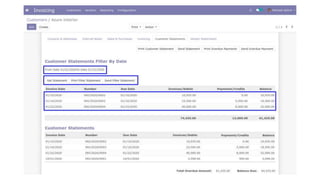
When you click on "Get statement" after applied the
filter it will provide statement details for selected
date range as shown in image.
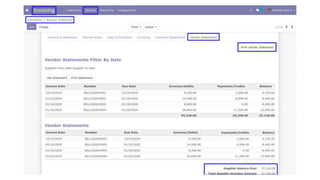
Supplier Statement :
Accounting User/Accountant can also able print
Statements of customers and suppliers by "Print
Statement Button".
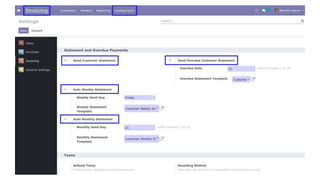
Auto Send Statement Mail :
When you tick "Send Customer Statement" in invoice
setting you can set date for when customer statement
report will be send to all customer and you can set
period also like if monthly period is set than system
will automatically send statement of last month and
if All option is select then system will send customer
statement till date. When you tick "Send Overdue
Customer Statement" in invoice setting you can set
date for when customer overdue statement Reports
will be send to all customer.
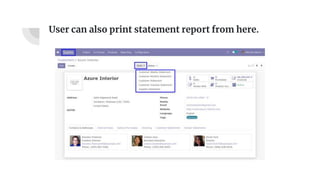
User can also print statement report from here.
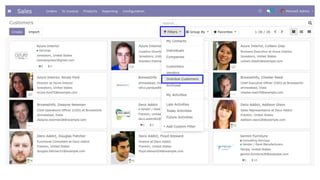
Overdue Customer Filter :
There is a filter to find customer who have the "Total
Overdue Amount" more than zero.
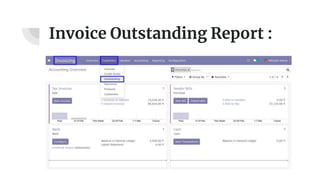
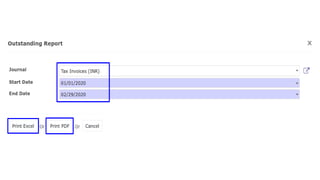
Invoice Outstanding Report :
In next wizard you have to select journal for invoices,
select start date and end date for Outstanding
Report.You can print XLS report as well as PDF
Outstanding report.
Conclusion :
● By using this Odoo app you can easily print
statement and payment reports in Odoo.
● More simplicity and flexibility
● This app is available in many updated version like
V13, V12, V11, V10, V9, V8.
● Find this app here : Customer overdue payment report
Apps May You Like :
ODOO QUICK
SUPPORT
ODOO
CONSULTANCY
ODOO
MIGRATION
ODOO
INTEGRATION
05
01
02 03
04
ODOO APP
CUSTOMIZATION
OUR SERVICES :
Browseinfo
Sensing your needs
Contact : 079-29700001
Email : contact@browseinfo.in
Address :
Website : https://browseinfo.in/
A-310, Siddhivinayak Tower,
Makarba, Ahmedabad,
380051, Gujarat, India.

Customer Statement and Customer Overdue Payments Reports Odoo

  • 1.
    Customer Statement andCustomer Overdue Payments Reports in Odoo Sensing your needs Browseinfo
  • 2.
    App Features : AccountStatements of customers and suppliers. Sends customer statement report through email. Partner wise Ledger Report
  • 3.
    App Features : Sendautomatically customer statement. Statement filter by Date Sends Customer overdue payments report to customers.
  • 4.
    App Uses : 1)To view customers or vendor statements reports with overdue invoices and payment details 2) To send statements of account reports by email to your customers and suppliers 3) To print customer overdue statement reports
  • 5.
    App Uses : 4)To send overdue payment and statement report automatically to your customer and vendors every month using the automatic send email feature 5) To filter customer and supplier statements with start date and end date 6) To print and send this filter statements too
  • 6.
    Let’s see Howthis App works : customer statement and payments report in odoo Find Video Tutorial here :
  • 7.
    Customer Statement : Usercan find "Customer Statement" and "Vendor Statement" tabs on customer/vendor form view. Find this App related article here : customer statement management in odoo
  • 9.
    Print Customer Statement Report: Accounting User/Accountant can also able print statements of customers and suppliers by "Print Statement Button".
  • 11.
    User can seeprinted customer statement report.
  • 12.
    Send Customer Statement Report: User can send customer statement report by mail.
  • 14.
    Print Customer Overdue Payment: User can print customer overdue payment report from button as shown figure.
  • 16.
    Send Customer Overdue Payment: User can send customer overdue payment report from button as shown figure.
  • 18.
    Statement Filter Bydates: When there are many lines on statements then we provide extra feature to filter statement by date to see statement for certain selected period and easily print it for selected date range,This also print balance overdue and total amount overdue for selected date range.
  • 19.
    Customer Statement Report WithDate Filter When you click on "Get statement" after applied the filter it will provide statement details for selected date range as shown in image.
  • 21.
    Supplier Statement : AccountingUser/Accountant can also able print Statements of customers and suppliers by "Print Statement Button".
  • 23.
    Auto Send StatementMail : When you tick "Send Customer Statement" in invoice setting you can set date for when customer statement report will be send to all customer and you can set period also like if monthly period is set than system will automatically send statement of last month and if All option is select then system will send customer statement till date. When you tick "Send Overdue Customer Statement" in invoice setting you can set date for when customer overdue statement Reports will be send to all customer.
  • 25.
    User can alsoprint statement report from here.
  • 26.
    Overdue Customer Filter: There is a filter to find customer who have the "Total Overdue Amount" more than zero.
  • 28.
  • 29.
    Invoice Outstanding Report: In next wizard you have to select journal for invoices, select start date and end date for Outstanding Report.You can print XLS report as well as PDF Outstanding report.
  • 31.
    Conclusion : ● Byusing this Odoo app you can easily print statement and payment reports in Odoo. ● More simplicity and flexibility ● This app is available in many updated version like V13, V12, V11, V10, V9, V8. ● Find this app here : Customer overdue payment report
  • 32.
  • 33.
  • 34.
    Browseinfo Sensing your needs Contact: 079-29700001 Email : contact@browseinfo.in Address : Website : https://browseinfo.in/ A-310, Siddhivinayak Tower, Makarba, Ahmedabad, 380051, Gujarat, India.