Integrated version control with Fossil SCM Tech Talk  2009-12-01 Arne Bachmann
Overview Web address www.fossil-scm.org Author Dr. D.R. Hipp  -  Author of  License GPL v2 Motto No information gets ever lost
Fossil principles In Fossil, a revision is called  check-in Every file, branch and check-in is an immutable artifact with an artifact identifier (AID), which is a SHA-1 hash E.g.  f3859e6842b68349fe52128767e64c4329e4a4 But it suffices to use prefixes (e.g.  f385 , usually 8 letters) Additionally you can tag (name) branches for easier access
Fossil principles Fossil is leightweight Compilation is a matter of seconds, including SQLite code One executable 787kB including self-tests & documentation No dependency whatsoever on external libs or tools: gzip, diff, rsync, Python, Perl, Tcl, Java, Apache, Dbs, patch, … Fossil is self-hosted The website  fossil-scm.org  runs on fossil as CGI
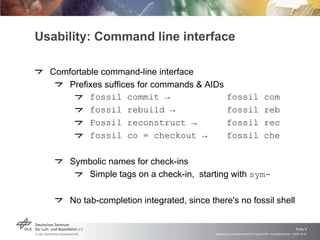
Usability: Command line interface Comfortable command-line interface Prefixes suffices for commands & AIDs fossil commit  ->  fossil com fossil rebuild ->  fossil reb Fossil reconstruct ->  fossil rec fossil co = checkout ->  fossil che Symbolic names for check-ins Simple tags on a check-in,  starting with  sym- No tab-completion integrated, since there's no fossil shell
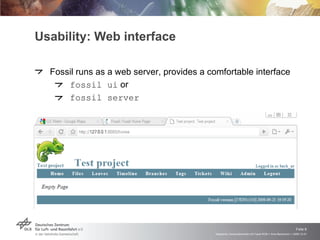
Usability: Web interface Fossil runs as a web server, provides a comfortable interface fossil ui  or fossil server
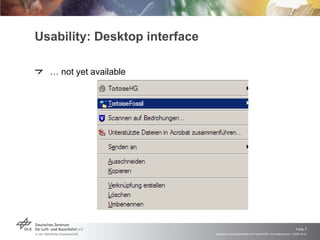
Usability: Desktop interface …  not yet available
Features Distributed version control system Similar to Mercurial & Bazaar (Python), Git (C), BitKeeper Very fast (pure C code) Data-efficient (stores and syncs (binary) deltas, zlib'ed) Fossil is safe: SQLite manages all data + BLOBs, transactional Extensive self-testing upon each action (zlib-(de)compress), checksumming for every artifact and every action
Features Very simple and persistent data structures for deltas, tables and file formats No need to  dump  data off a repository, because each repository is always exactly one file Migration very easy:  close ,  <move> ,  open No need to  import  dumped data, because upgrading a repository to a younger fossil executable is that easy: fossil all rebuild
Fossil: Main building blocks (SCM) Fossil is a VCS, but additionally each repository contains A ticket system (bugtracker) History independent of check-in history A simple Wiki with edit-inside-the-browser Each wiki page has its own history, independent of check-ins Pages can theoretically be branched and merged But currently no UI or API for that Embedded documentation linked with check-ins Reachable by  <server>/ doc /<dir>/<page>.wiki CSS can be changed via admin options from the UI
Tags …  can be attached to any leaf Can have a value (= property), but mostly need none Can be symbolic (starting with  sym- ) Are passed on to descendants Unless cancelled ( fossil tag cancel <name> ) Unless merging with another branch There are two default tags: branch=trunk represents the current branch sym-trunk  (= NULL) symbolic name of branch After branching sym-trunk : cancelled
Branching Forking vs. Branching? Fork  defined as an &quot;accidental&quot; split of the check-in tree Branch  defined as deliberate e.g. a test branch is often merged into the main development branch, point of branch =  branch point Merging No integrated conflict editor (but the usual in-file notation)
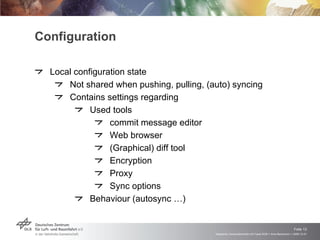
Configuration Local configuration state Not shared when pushing, pulling, (auto) syncing Contains settings regarding Used tools commit message editor Web browser (Graphical) diff tool Encryption Proxy Sync options Behaviour (autosync …)
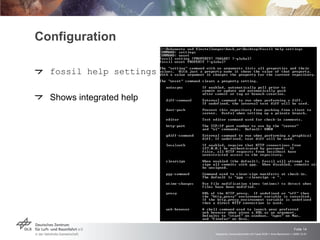
Configuration fossil help settings Shows integrated help
Server mode Fossil allows to quickly sync with other developers' repositories fossil server  or  fossil ui  (opens local web browser) fossil push  offers changes to remote fossil instance fossil pull  loads changes from a remote fossil instance But doesn't change current check-in state (use update) fossil sync  pulls and pushes As above Autosync mode offers operation similar to working with a central subversion repository  ->  fossil is very flexible
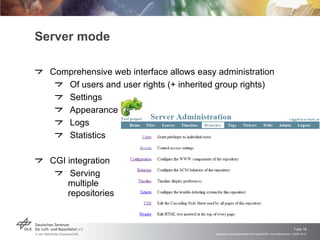
Server mode Comprehensive web interface allows easy administration Of users and user rights (+ inherited group rights) Settings Appearance Logs Statistics CGI integration Serving multiple repositories
Additional advantages of Fossil User rights management Uses current login name under Windows/Linux Separate rights for check-ins and web interface users Integrated check-in signing Via PGP/GPG keys or similar Or use  --nosign  upon commit and branch Robust and reliable Several years of experience in multi-project, multi-GB source trees with thousands of files and check-ins
Drawbacks Commercial support from a very small company (only 2 persons?) No graphical Windows client available yet Especially no conflict editor and explorer integration
Questions? http://www.walle-derfilm.de/

Integrated version control with Fossil SCM

  • 1.
    Integrated version controlwith Fossil SCM Tech Talk 2009-12-01 Arne Bachmann
  • 2.
    Overview Web addresswww.fossil-scm.org Author Dr. D.R. Hipp - Author of License GPL v2 Motto No information gets ever lost
  • 3.
    Fossil principles InFossil, a revision is called check-in Every file, branch and check-in is an immutable artifact with an artifact identifier (AID), which is a SHA-1 hash E.g. f3859e6842b68349fe52128767e64c4329e4a4 But it suffices to use prefixes (e.g. f385 , usually 8 letters) Additionally you can tag (name) branches for easier access
  • 4.
    Fossil principles Fossilis leightweight Compilation is a matter of seconds, including SQLite code One executable 787kB including self-tests & documentation No dependency whatsoever on external libs or tools: gzip, diff, rsync, Python, Perl, Tcl, Java, Apache, Dbs, patch, … Fossil is self-hosted The website fossil-scm.org runs on fossil as CGI
  • 5.
    Usability: Command lineinterface Comfortable command-line interface Prefixes suffices for commands & AIDs fossil commit -> fossil com fossil rebuild -> fossil reb Fossil reconstruct -> fossil rec fossil co = checkout -> fossil che Symbolic names for check-ins Simple tags on a check-in, starting with sym- No tab-completion integrated, since there's no fossil shell
  • 6.
    Usability: Web interfaceFossil runs as a web server, provides a comfortable interface fossil ui or fossil server
  • 7.
    Usability: Desktop interface… not yet available
  • 8.
    Features Distributed versioncontrol system Similar to Mercurial & Bazaar (Python), Git (C), BitKeeper Very fast (pure C code) Data-efficient (stores and syncs (binary) deltas, zlib'ed) Fossil is safe: SQLite manages all data + BLOBs, transactional Extensive self-testing upon each action (zlib-(de)compress), checksumming for every artifact and every action
  • 9.
    Features Very simpleand persistent data structures for deltas, tables and file formats No need to dump data off a repository, because each repository is always exactly one file Migration very easy: close , <move> , open No need to import dumped data, because upgrading a repository to a younger fossil executable is that easy: fossil all rebuild
  • 10.
    Fossil: Main buildingblocks (SCM) Fossil is a VCS, but additionally each repository contains A ticket system (bugtracker) History independent of check-in history A simple Wiki with edit-inside-the-browser Each wiki page has its own history, independent of check-ins Pages can theoretically be branched and merged But currently no UI or API for that Embedded documentation linked with check-ins Reachable by <server>/ doc /<dir>/<page>.wiki CSS can be changed via admin options from the UI
  • 11.
    Tags … can be attached to any leaf Can have a value (= property), but mostly need none Can be symbolic (starting with sym- ) Are passed on to descendants Unless cancelled ( fossil tag cancel <name> ) Unless merging with another branch There are two default tags: branch=trunk represents the current branch sym-trunk (= NULL) symbolic name of branch After branching sym-trunk : cancelled
  • 12.
    Branching Forking vs.Branching? Fork defined as an &quot;accidental&quot; split of the check-in tree Branch defined as deliberate e.g. a test branch is often merged into the main development branch, point of branch = branch point Merging No integrated conflict editor (but the usual in-file notation)
  • 13.
    Configuration Local configurationstate Not shared when pushing, pulling, (auto) syncing Contains settings regarding Used tools commit message editor Web browser (Graphical) diff tool Encryption Proxy Sync options Behaviour (autosync …)
  • 14.
    Configuration fossil helpsettings Shows integrated help
  • 15.
    Server mode Fossilallows to quickly sync with other developers' repositories fossil server or fossil ui (opens local web browser) fossil push offers changes to remote fossil instance fossil pull loads changes from a remote fossil instance But doesn't change current check-in state (use update) fossil sync pulls and pushes As above Autosync mode offers operation similar to working with a central subversion repository -> fossil is very flexible
  • 16.
    Server mode Comprehensiveweb interface allows easy administration Of users and user rights (+ inherited group rights) Settings Appearance Logs Statistics CGI integration Serving multiple repositories
  • 17.
    Additional advantages ofFossil User rights management Uses current login name under Windows/Linux Separate rights for check-ins and web interface users Integrated check-in signing Via PGP/GPG keys or similar Or use --nosign upon commit and branch Robust and reliable Several years of experience in multi-project, multi-GB source trees with thousands of files and check-ins
  • 18.
    Drawbacks Commercial supportfrom a very small company (only 2 persons?) No graphical Windows client available yet Especially no conflict editor and explorer integration
  • 19.

Editor's Notes

  • #3 Sqlite is hosted on fossil, actually Hipp works in his own Company hwaci, mostly in TCL/TK development motto: immutability
  • #5 CGI = common gateway interface
  • #6 Das erste nicht-ambige Prefix reicht zur Angabe von AIDs, min. ist hierbei 4 zeichen
  • #7 Server doesn&apos;t start up the local browser
  • #9 SQLite very mature (FF. TB) and relatively safe for single file-based DB
  • #10 All hat bestimmte maintenance befehle
  • #11 When using the web UI tickets: 1. because bugs can be attached to artifacts later (and they&apos;re immutable) 2. we don&apos;t want to clutter the source tree 3. are synced with others, since they exist in the global configuration state
  • #12 Leaf = youngest check-in of a branch