TRACKING AND VISUALIZING
COVID-19 WITH ELASTIC STACK
Elastic Stockholm User Group
AGENDA AND
INTRODUCTIOS
1. General information
- Anna Ossowski
2. Tracking and visualizing
COVID-19 with Elastic stack
3. Q&A -Julie Zhong
4. Kahoot - win a K&C gift
card - Bolero AB
GENERAL
INFORMATION
1. Elastic meetup moves online
2. Thanks for our sponsor: Elastic
and Bolero AB
3. Elastic speaker desired
JULIE ZHONG
• Elastic Stockholm User Group Co-organizer
• Certified Elastic Engineer
• Work at Bolero AB, Kista, Stockholm
• https://www.linkedin.com/in/julie-zhong/
TRACKING AND VISUALIZING
COVID-19 WITH ELASTIC STACK
JULIE ZHONG
AGENDA
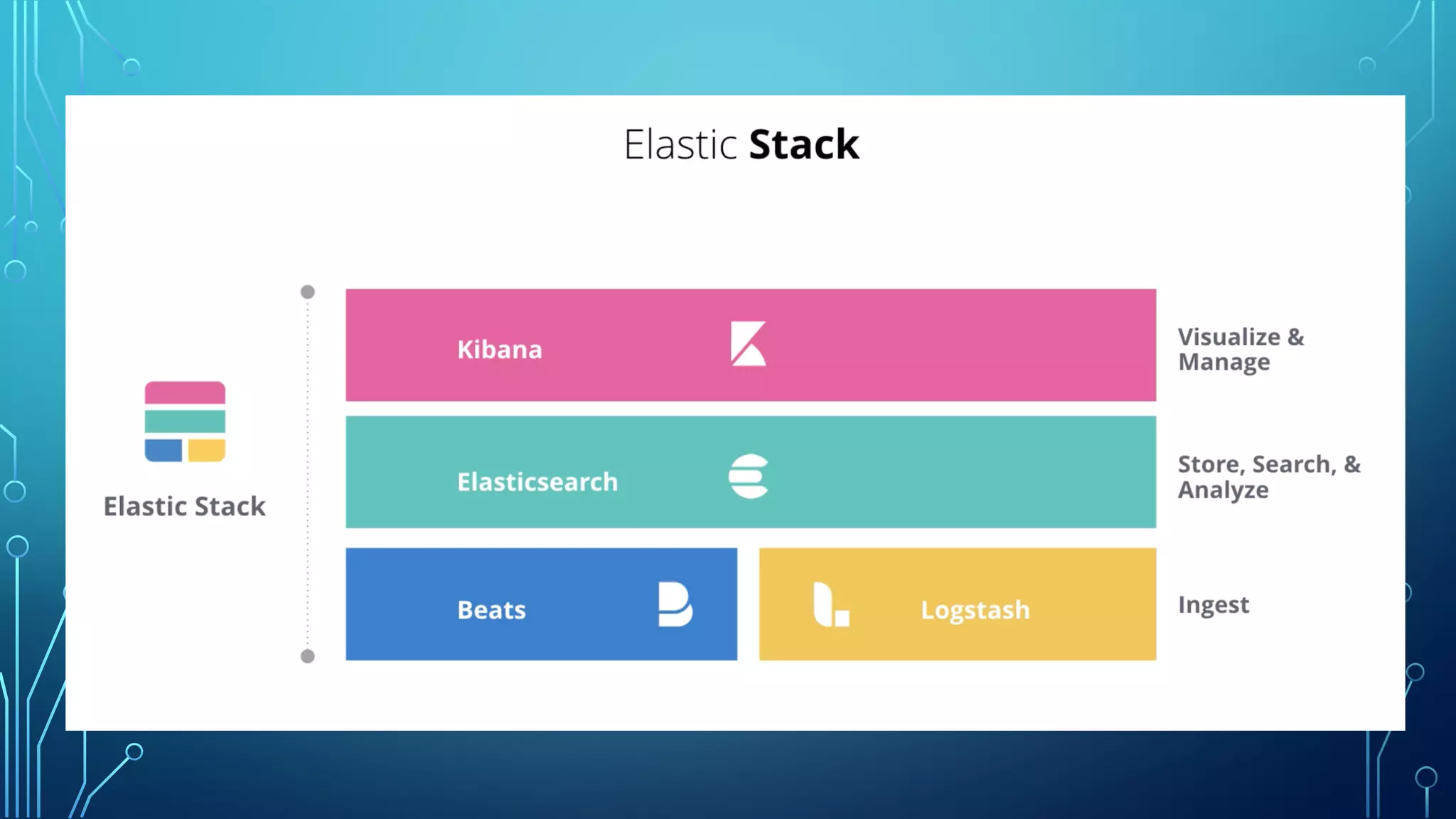
• 1. Elastic Stack
• 2. ECE
• 3. Indexing and Ingesting data
• 4. Search and aggregation
• 5. Discovery and Visulization
• 6. Dashboard
• 7. Demo
• 8. Q&A
ELASTIC CLOUD ENTERPRISE (ECE)
• ECE, centrally manage Elasticsearch clusters,
available for installation in the environment
you choose - on public or private clouds,
virtual machines, or even on bare metal
hardware, supporting a wide range of
configurations.
CREATE DEPLOYMENT IN ECE
• Deploy Elasticsearch, Kibana and other products or features of the Elastic Stack quickly by picking one of
configuration and templates step by step.
• Each clusters in ECE created the nodes of Elasticsearch, Kibana, and APM (Application Performance Monitoring)
(optional), machine learning(optional).
• To change the configuration by “Edit” it.
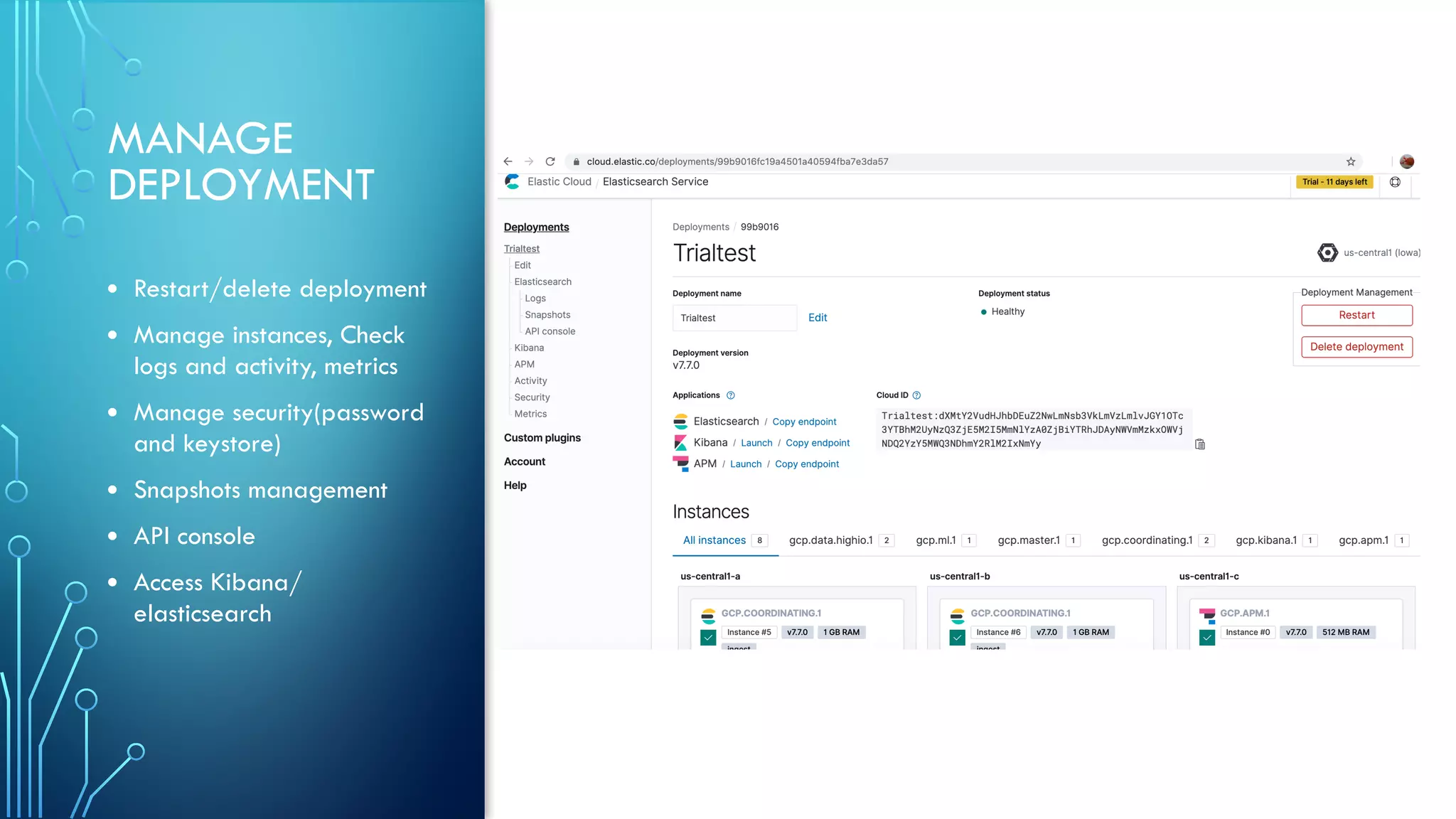
MANAGE
DEPLOYMENT
• Restart/delete deployment
• Manage instances, Check
logs and activity, metrics
• Manage security(password
and keystore)
• Snapshots management
• API console
• Access Kibana/
elasticsearch
INDEX DATA PUT secorona/_doc/1
{ "number":"1",
"age_range":{
"lte":30,
"gte":20
}, "infected_in":"China",
"date_in":"2020-01-31",
"date_out":"2020-03-03",
"gender":"woman",
"recovered": true,
"death":false
“location”: "Jönköping”,
"comments":"from Wuhan, didn’t infect
anyone"}
Return response:
{
"_index" : "secorona",
"_type" : "_doc",
"_id" : "1",
"_version" : 1,
"result" : "created",
"_shards" : {
"total" : 2,
"successful" : 1,
"failed" : 0
},
"_seq_no" : 0,
"_primary_term" : 1
}
Elasticsearch is a distributed
document store.
A document is a serialized JSON
object that is stored in Elasticsearch
under a unique ID
Documents are Indexed into an
Index.
A shard is a single piece of an
Elasticsearch index
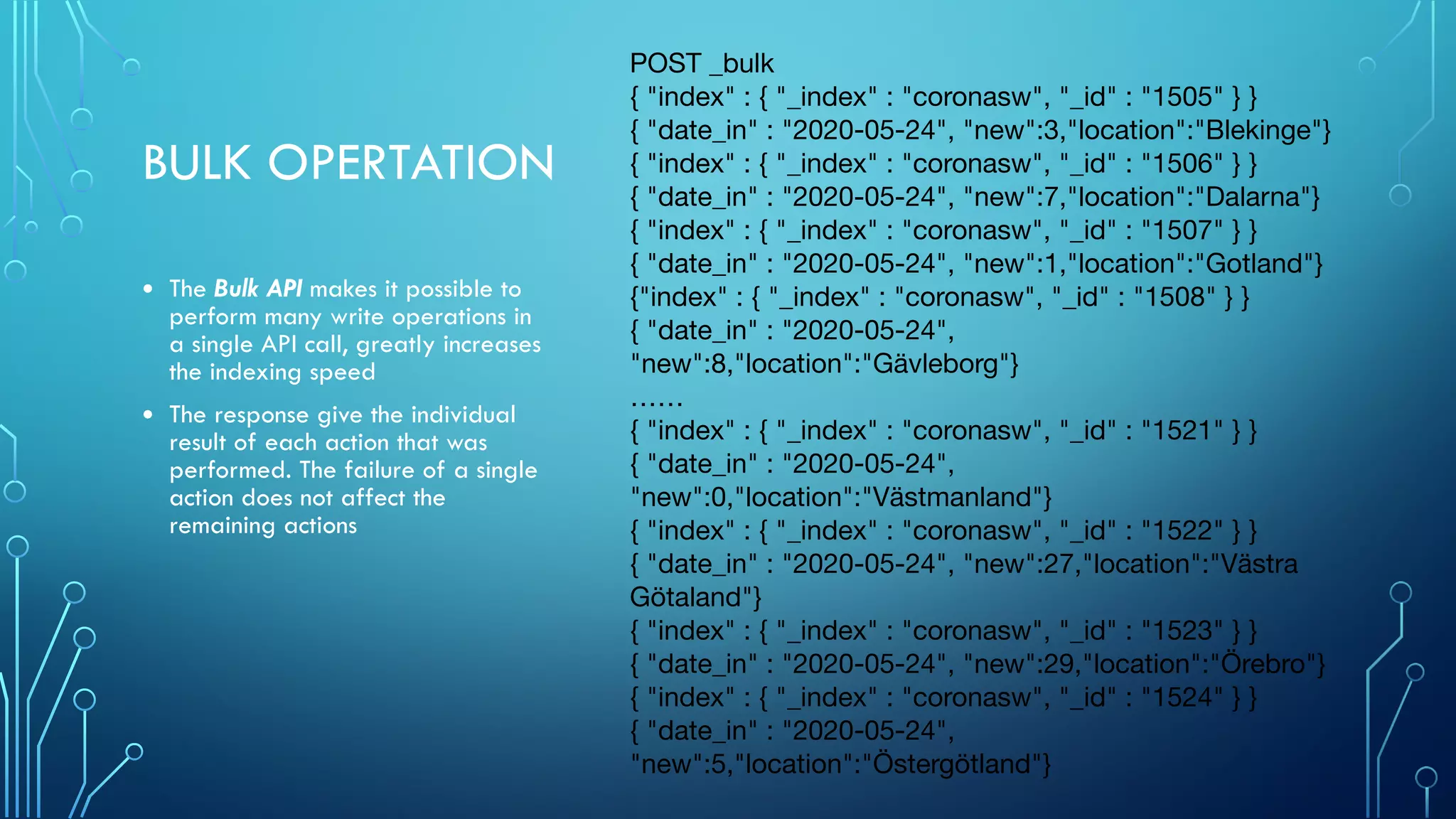
BULK OPERTATION
• The Bulk API makes it possible to
perform many write operations in
a single API call, greatly increases
the indexing speed
• The response give the individual
result of each action that was
performed. The failure of a single
action does not affect the
remaining actions
POST _bulk

{ "index" : { "_index" : "coronasw", "_id" : "1505" } }

{ "date_in" : "2020-05-24", "new":3,"location":"Blekinge"}

{ "index" : { "_index" : "coronasw", "_id" : "1506" } }

{ "date_in" : "2020-05-24", "new":7,"location":"Dalarna"}

{ "index" : { "_index" : "coronasw", "_id" : "1507" } }

{ "date_in" : "2020-05-24", "new":1,"location":"Gotland"}

{"index" : { "_index" : "coronasw", "_id" : "1508" } }

{ "date_in" : "2020-05-24",
"new":8,"location":"Gävleborg"}

……

{ "index" : { "_index" : "coronasw", "_id" : "1521" } }

{ "date_in" : "2020-05-24",
"new":0,"location":"Västmanland"}

{ "index" : { "_index" : "coronasw", "_id" : "1522" } }

{ "date_in" : "2020-05-24", "new":27,"location":"Västra
Götaland"}

{ "index" : { "_index" : "coronasw", "_id" : "1523" } }

{ "date_in" : "2020-05-24", "new":29,"location":"Örebro"}

{ "index" : { "_index" : "coronasw", "_id" : "1524" } }

{ "date_in" : "2020-05-24",
"new":5,"location":"Östergötland"}
INGEST COVID-19 DATA
• 1.Logstash –ingest pipeline
• 2 Load CSV, JSON files via Kibana machine learning-data visualization
(demo)
• 3. Push data through API via Python, etc
• 4. Upload GEOJSON in the Kibana map.
COVID-19 DATA SET DOWNLOAD:
• Sweden Folkhalsomyndigheten (Excel):
https://www.arcgis.com/sharing/rest/content/items/
b5e7488e117749c19881cce45db13f7e/data
• Global: CSV or JSON or Excel:
https://www.ecdc.europa.eu/en/publications-data/download-todays-data-
geographic-distribution-covid-19-cases-worldwide
• Github
SEARCH
• In search, we look for a subset
of the original dataset, and
results are hits that match our
search parameters.
• Query DSL (Domain Specific
Language) allows you to write
queries in a JSON format
• There are many query/filter
clauses and parameters to
combine for a search.
GET coronadeath/_search
{
"size": 20,
"query": {
"bool": {
"filter": [
{"range": {
"date_in": {
"gte": "2020-05-13",
"lte": "2020-05-20"
}
}}
]
}
}}
Return response: ->
{
"took" : 3,
"timed_out" : false,
"_shards" : {
"total" : 1,
"successful" : 1,
"skipped" : 0,
"failed" : 0
},
"hits" : {
"total" : {
"value" : 99,
"relation" : "eq"
},
"max_score" : 0.0,
"hits" : [
{
"_index" : "coronadeath",
"_type" : "_doc",
"_id" : "QqDLRXIBhONC5PQEda-x",
"_score" : 0.0,
"_source" : {
"date_in" : "2020-05-14",
"death" : 46,
"location" : "Stockholm”
……
AGGREGATION
• Aggregations are a way to perform
analytics on your indexed data.
• There are two basic type of
aggregations and can be combined
or nested:
1. Buckets, a collection of documents
that meet a criterion, like
histogram and terms
2. Metrics, compute numeric values
based on your dataset, like min,
max, avg
3. Other aggregations: pipeline
aggregation, Matrix
GET coronadeath/_doc/_search
{
"size":0,
"aggs" : {
"corornadeath_overtime" : {
"date_histogram" : {
"field" : "date_in",
"interval" : "day”
},
"aggs":{
"sum_of_theday":{
"sum":{
"field":"death"
} } } } } }
Return response: ->
"aggregations" : {
"corornadeath_overtime" : {
"buckets" : [
……
{
"key_as_string" : "2020-04-22T00:00:0
"key" : 1587513600000,
"doc_count" : 19,
"sum_of_theday" : {
"value" : 144.0
}
},
{
"key_as_string" : "2020-04-15T00:00:0
"key" : 1586908800000,
"doc_count" : 18,
"sum_of_theday" : {
"value" : 141.0
}
},
…….
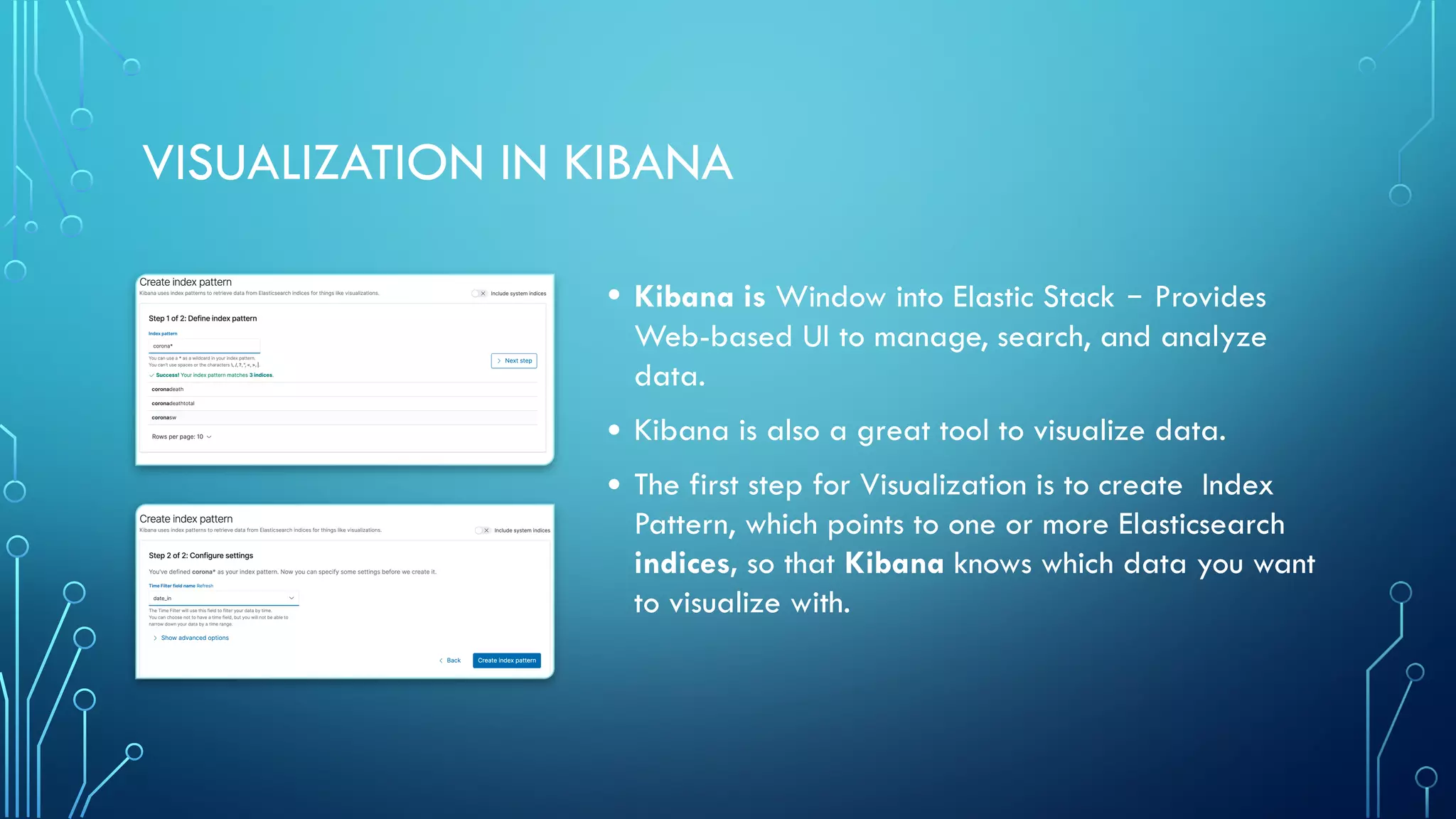
VISUALIZATION IN KIBANA
• Kibana is Window into Elastic Stack ‒ Provides
Web-based UI to manage, search, and analyze
data.
• Kibana is also a great tool to visualize data.
• The first step for Visualization is to create Index
Pattern, which points to one or more Elasticsearch
indices, so that Kibana knows which data you want
to visualize with.
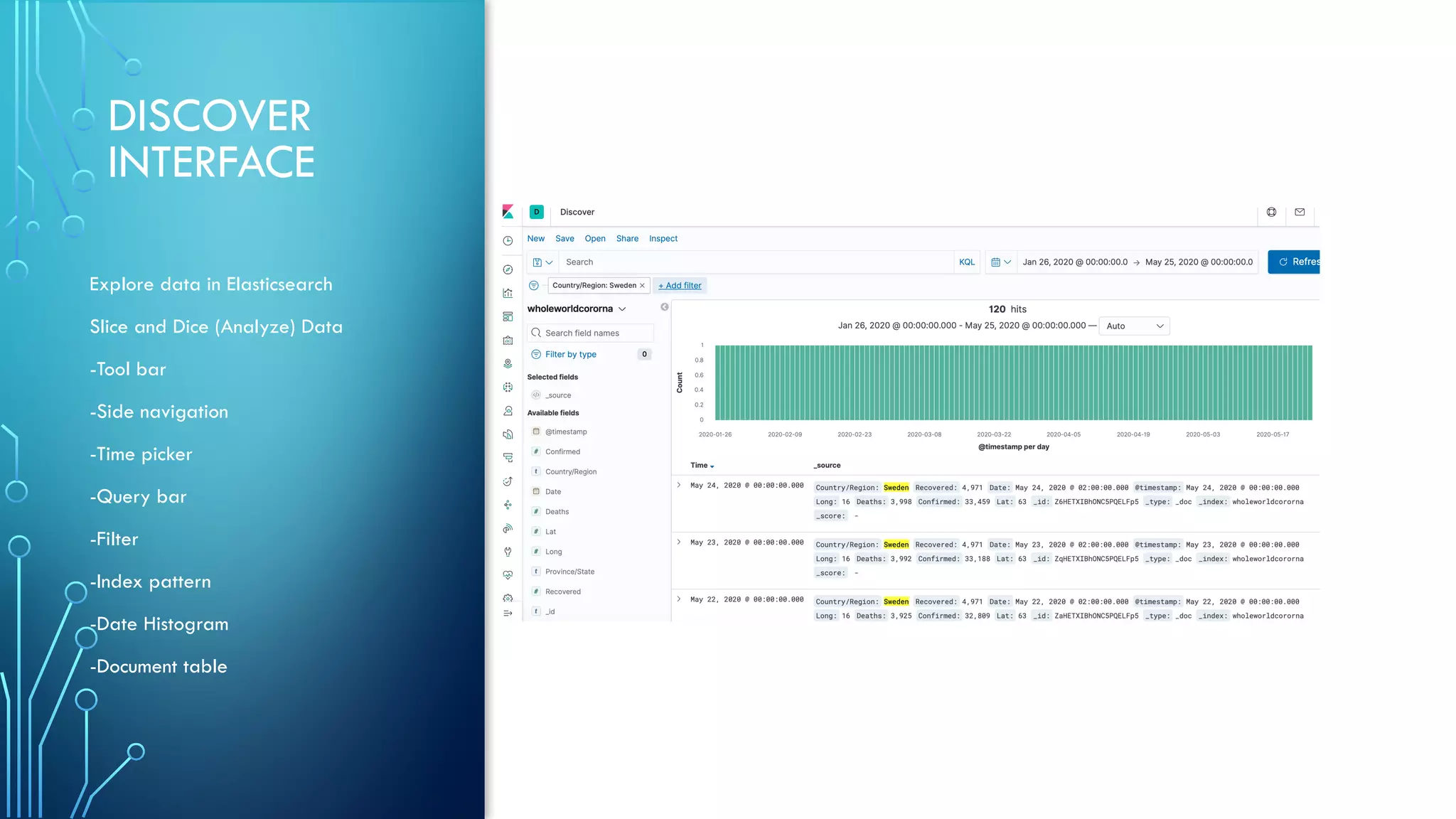
DISCOVER
INTERFACE
Explore data in Elasticsearch
Slice and Dice (Analyze) Data
-Tool bar
-Side navigation
-Time picker
-Query bar
-Filter
-Index pattern
-Date Histogram
-Document table
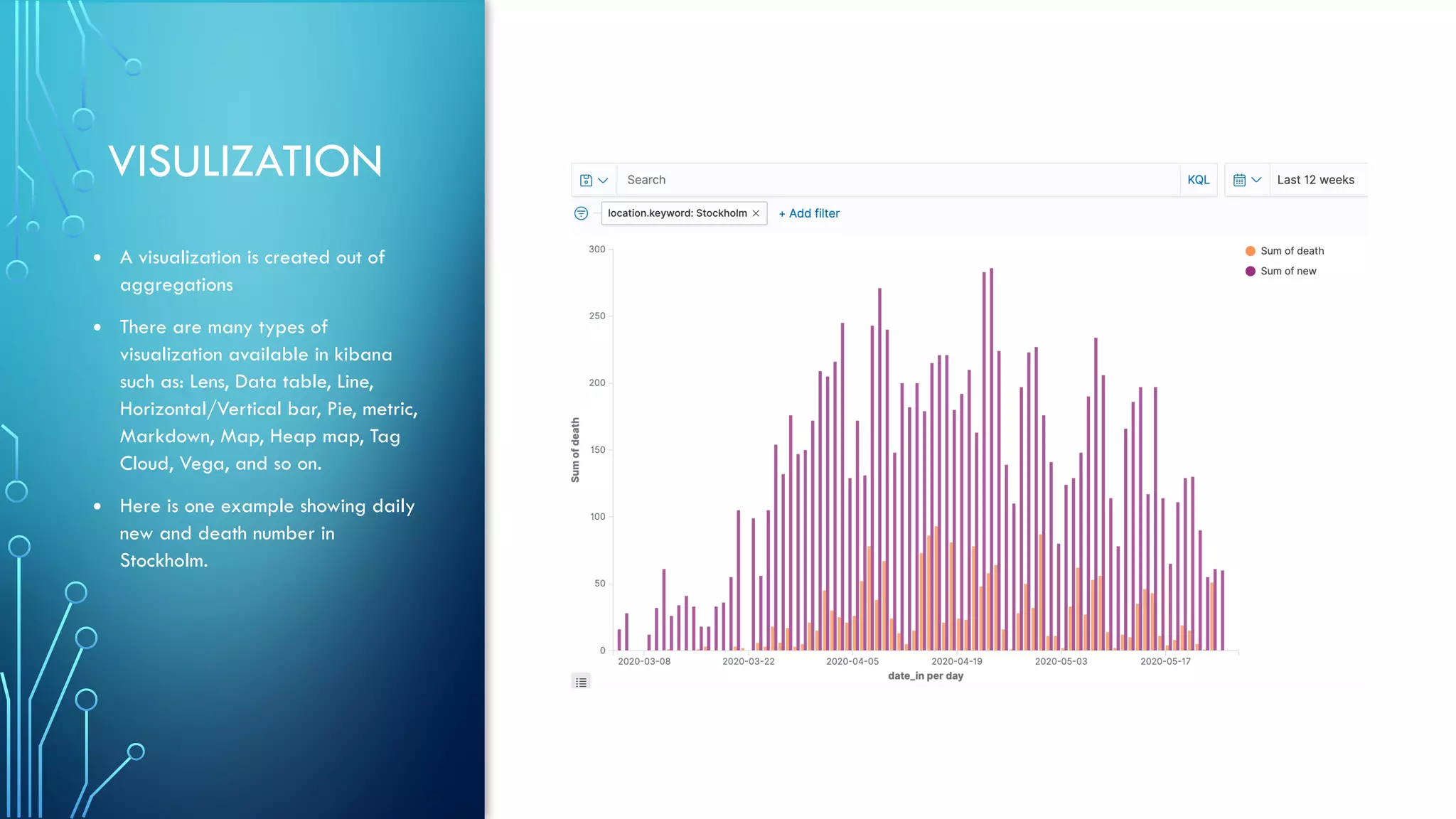
VISULIZATION
• A visualization is created out of
aggregations
• There are many types of
visualization available in kibana
such as: Lens, Data table, Line,
Horizontal/Vertical bar, Pie, metric,
Markdown, Map, Heap map, Tag
Cloud, Vega, and so on.
• Here is one example showing daily
new and death number in
Stockholm.
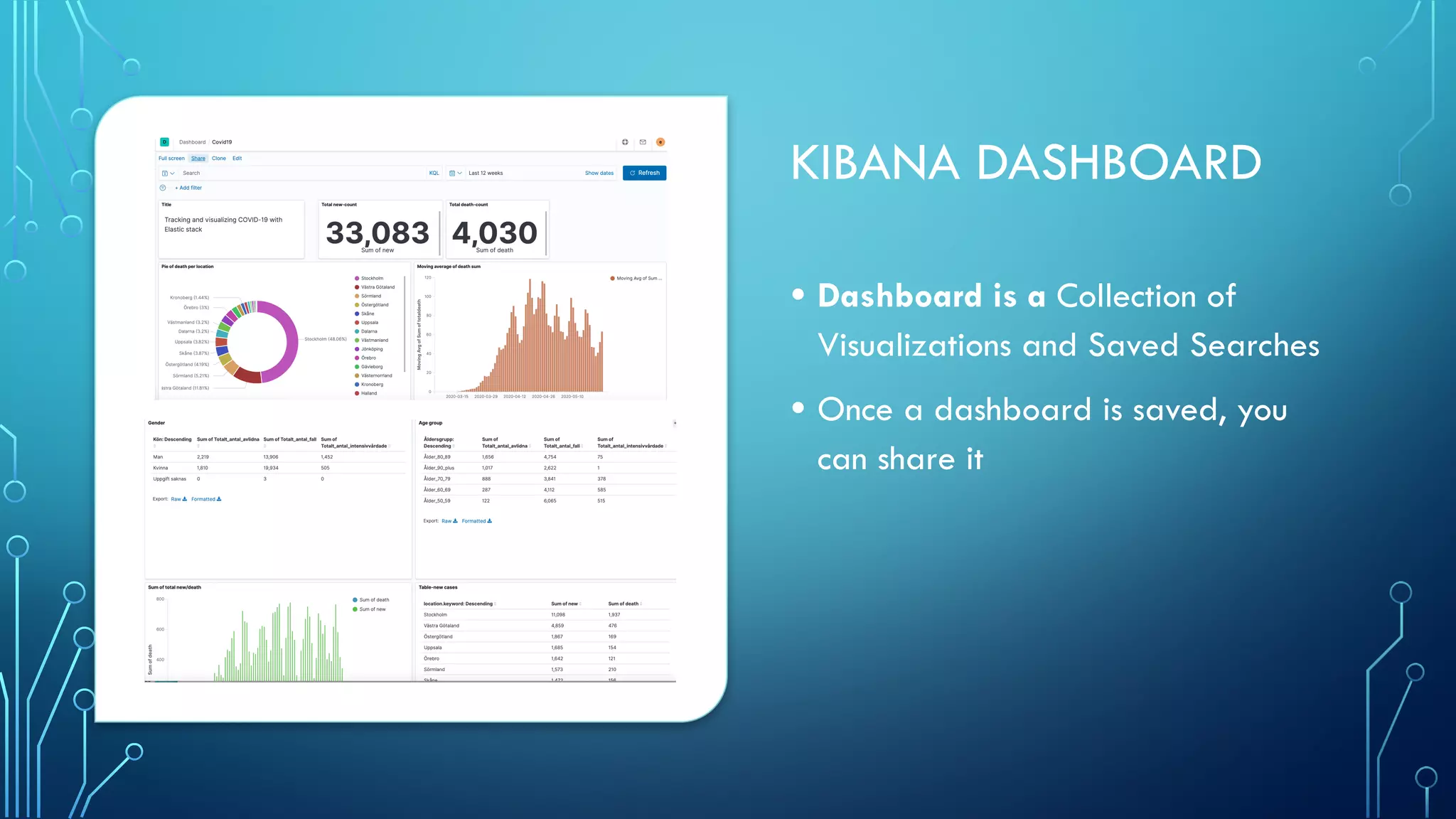
KIBANA DASHBOARD
• Dashboard is a Collection of
Visualizations and Saved Searches
• Once a dashboard is saved, you
can share it
Demo
Q&A
KAHOOT • Win a  Kjell o company gift card, sponsored by Bolero AB
THANK YOU
EVERYONE
• Hope to see you
again soon

Tracking and visualizing COVID-19 with Elastic stack

  • 1.
    TRACKING AND VISUALIZING COVID-19WITH ELASTIC STACK Elastic Stockholm User Group
  • 2.
    AGENDA AND INTRODUCTIOS 1. Generalinformation - Anna Ossowski 2. Tracking and visualizing COVID-19 with Elastic stack 3. Q&A -Julie Zhong 4. Kahoot - win a K&C gift card - Bolero AB
  • 3.
    GENERAL INFORMATION 1. Elastic meetupmoves online 2. Thanks for our sponsor: Elastic and Bolero AB 3. Elastic speaker desired
  • 4.
    JULIE ZHONG • ElasticStockholm User Group Co-organizer • Certified Elastic Engineer • Work at Bolero AB, Kista, Stockholm • https://www.linkedin.com/in/julie-zhong/
  • 5.
    TRACKING AND VISUALIZING COVID-19WITH ELASTIC STACK JULIE ZHONG
  • 6.
    AGENDA • 1. ElasticStack • 2. ECE • 3. Indexing and Ingesting data • 4. Search and aggregation • 5. Discovery and Visulization • 6. Dashboard • 7. Demo • 8. Q&A
  • 8.
    ELASTIC CLOUD ENTERPRISE(ECE) • ECE, centrally manage Elasticsearch clusters, available for installation in the environment you choose - on public or private clouds, virtual machines, or even on bare metal hardware, supporting a wide range of configurations.
  • 9.
    CREATE DEPLOYMENT INECE • Deploy Elasticsearch, Kibana and other products or features of the Elastic Stack quickly by picking one of configuration and templates step by step. • Each clusters in ECE created the nodes of Elasticsearch, Kibana, and APM (Application Performance Monitoring) (optional), machine learning(optional). • To change the configuration by “Edit” it.
  • 10.
    MANAGE DEPLOYMENT • Restart/delete deployment •Manage instances, Check logs and activity, metrics • Manage security(password and keystore) • Snapshots management • API console • Access Kibana/ elasticsearch
  • 11.
    INDEX DATA PUTsecorona/_doc/1 { "number":"1", "age_range":{ "lte":30, "gte":20 }, "infected_in":"China", "date_in":"2020-01-31", "date_out":"2020-03-03", "gender":"woman", "recovered": true, "death":false “location”: "Jönköping”, "comments":"from Wuhan, didn’t infect anyone"} Return response: { "_index" : "secorona", "_type" : "_doc", "_id" : "1", "_version" : 1, "result" : "created", "_shards" : { "total" : 2, "successful" : 1, "failed" : 0 }, "_seq_no" : 0, "_primary_term" : 1 } Elasticsearch is a distributed document store. A document is a serialized JSON object that is stored in Elasticsearch under a unique ID Documents are Indexed into an Index. A shard is a single piece of an Elasticsearch index
  • 12.
    BULK OPERTATION • TheBulk API makes it possible to perform many write operations in a single API call, greatly increases the indexing speed • The response give the individual result of each action that was performed. The failure of a single action does not affect the remaining actions POST _bulk { "index" : { "_index" : "coronasw", "_id" : "1505" } } { "date_in" : "2020-05-24", "new":3,"location":"Blekinge"} { "index" : { "_index" : "coronasw", "_id" : "1506" } } { "date_in" : "2020-05-24", "new":7,"location":"Dalarna"} { "index" : { "_index" : "coronasw", "_id" : "1507" } } { "date_in" : "2020-05-24", "new":1,"location":"Gotland"} {"index" : { "_index" : "coronasw", "_id" : "1508" } } { "date_in" : "2020-05-24", "new":8,"location":"Gävleborg"} …… { "index" : { "_index" : "coronasw", "_id" : "1521" } } { "date_in" : "2020-05-24", "new":0,"location":"Västmanland"} { "index" : { "_index" : "coronasw", "_id" : "1522" } } { "date_in" : "2020-05-24", "new":27,"location":"Västra Götaland"} { "index" : { "_index" : "coronasw", "_id" : "1523" } } { "date_in" : "2020-05-24", "new":29,"location":"Örebro"} { "index" : { "_index" : "coronasw", "_id" : "1524" } } { "date_in" : "2020-05-24", "new":5,"location":"Östergötland"}
  • 13.
    INGEST COVID-19 DATA •1.Logstash –ingest pipeline • 2 Load CSV, JSON files via Kibana machine learning-data visualization (demo) • 3. Push data through API via Python, etc • 4. Upload GEOJSON in the Kibana map.
  • 14.
    COVID-19 DATA SETDOWNLOAD: • Sweden Folkhalsomyndigheten (Excel): https://www.arcgis.com/sharing/rest/content/items/ b5e7488e117749c19881cce45db13f7e/data • Global: CSV or JSON or Excel: https://www.ecdc.europa.eu/en/publications-data/download-todays-data- geographic-distribution-covid-19-cases-worldwide • Github
  • 15.
    SEARCH • In search,we look for a subset of the original dataset, and results are hits that match our search parameters. • Query DSL (Domain Specific Language) allows you to write queries in a JSON format • There are many query/filter clauses and parameters to combine for a search. GET coronadeath/_search { "size": 20, "query": { "bool": { "filter": [ {"range": { "date_in": { "gte": "2020-05-13", "lte": "2020-05-20" } }} ] } }} Return response: -> { "took" : 3, "timed_out" : false, "_shards" : { "total" : 1, "successful" : 1, "skipped" : 0, "failed" : 0 }, "hits" : { "total" : { "value" : 99, "relation" : "eq" }, "max_score" : 0.0, "hits" : [ { "_index" : "coronadeath", "_type" : "_doc", "_id" : "QqDLRXIBhONC5PQEda-x", "_score" : 0.0, "_source" : { "date_in" : "2020-05-14", "death" : 46, "location" : "Stockholm” ……
  • 16.
    AGGREGATION • Aggregations area way to perform analytics on your indexed data. • There are two basic type of aggregations and can be combined or nested: 1. Buckets, a collection of documents that meet a criterion, like histogram and terms 2. Metrics, compute numeric values based on your dataset, like min, max, avg 3. Other aggregations: pipeline aggregation, Matrix GET coronadeath/_doc/_search { "size":0, "aggs" : { "corornadeath_overtime" : { "date_histogram" : { "field" : "date_in", "interval" : "day” }, "aggs":{ "sum_of_theday":{ "sum":{ "field":"death" } } } } } } Return response: -> "aggregations" : { "corornadeath_overtime" : { "buckets" : [ …… { "key_as_string" : "2020-04-22T00:00:0 "key" : 1587513600000, "doc_count" : 19, "sum_of_theday" : { "value" : 144.0 } }, { "key_as_string" : "2020-04-15T00:00:0 "key" : 1586908800000, "doc_count" : 18, "sum_of_theday" : { "value" : 141.0 } }, …….
  • 17.
    VISUALIZATION IN KIBANA •Kibana is Window into Elastic Stack ‒ Provides Web-based UI to manage, search, and analyze data. • Kibana is also a great tool to visualize data. • The first step for Visualization is to create Index Pattern, which points to one or more Elasticsearch indices, so that Kibana knows which data you want to visualize with.
  • 18.
    DISCOVER INTERFACE Explore data inElasticsearch Slice and Dice (Analyze) Data -Tool bar -Side navigation -Time picker -Query bar -Filter -Index pattern -Date Histogram -Document table
  • 19.
    VISULIZATION • A visualizationis created out of aggregations • There are many types of visualization available in kibana such as: Lens, Data table, Line, Horizontal/Vertical bar, Pie, metric, Markdown, Map, Heap map, Tag Cloud, Vega, and so on. • Here is one example showing daily new and death number in Stockholm.
  • 20.
    KIBANA DASHBOARD • Dashboardis a Collection of Visualizations and Saved Searches • Once a dashboard is saved, you can share it
  • 21.
  • 22.
  • 23.
    KAHOOT • Wina  Kjell o company gift card, sponsored by Bolero AB
  • 24.
    THANK YOU EVERYONE • Hopeto see you again soon