Activity Recognition
Internet of Things 2019
OUR TEAM
Alessandro Giannetti | Andrea Napoletani
Riccardo Pattuglia
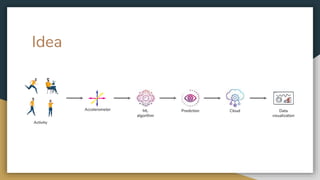
Activity
ML
algorithm
PredictionAccelerometer Data
visualization
Idea
Cloud
Technologies
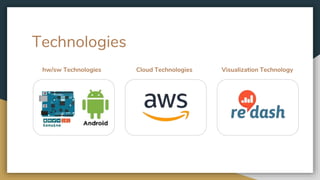
Cloud Technologies Visualization Technologyhw/sw Technologies
Project workflow
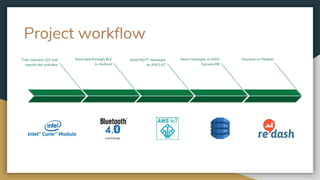
Visualize on RedashTrain Genuino 101 and
classify the activities
Send data through BLE
to Android
Store messages in AWS
DynamoDB
Send MQTT messages
to AWS IoT
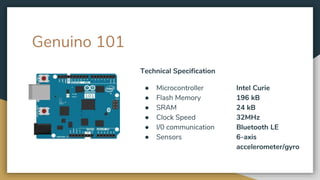
Genuino 101
Technical Specification
● Microcontroller Intel Curie
● Flash Memory 196 kB
● SRAM 24 kB
● Clock Speed 32MHz
● I/0 communication Bluetooth LE
● Sensors 6-axis
accelerometer/gyro
Genuino 101
● Low-Power Consumption
● Onboard Bluetooth LE and
a 6-axis
accelerometer/gyro.
● Dedicated core for pattern
matching capabilities.
PRO CONS
● The memory is very low
● The Pattern Matching Engine
has some limitations
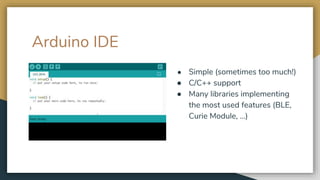
Arduino IDE
● Simple (sometimes too much!)
● C/C++ support
● Many libraries implementing
the most used features (BLE,
Curie Module, …)
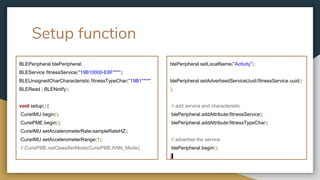
Setup function
BLEPeripheral blePeripheral;
BLEService fitnessService("19B10000-E8F***");
BLEUnsignedCharCharacteristic fitnessTypeChar("19B1****",
BLERead | BLENotify);
void setup() {
CurieIMU.begin();
CuriePME.begin();
CurieIMU.setAccelerometerRate(sampleRateHZ);
CurieIMU.setAccelerometerRange(1);
// CuriePME.setClassifierMode(CuriePME.KNN_Mode);
blePeripheral.setLocalName("Activity");
blePeripheral.setAdvertisedServiceUuid(fitnessService.uuid()
);
// add service and characteristic
blePeripheral.addAttribute(fitnessService);
blePeripheral.addAttribute(fitnessTypeChar);
// advertise the service
blePeripheral.begin();
}
Loop function
BLECentral central = blePeripheral.central();
byte vector[120];
unsigned int category;
if (central) {
while (central.connected()) {
readVectorFromIMU(vector);
category = CuriePME.classify(vector, 120);
switch (category) {
case 1: Serial.println(F("Still")); break;
case 2: Serial.println(F("Sit")); break;
case 3: Serial.println(F("Walk")); break;
case 4: Serial.println(F("Run")); break;
default:Serial.println(F("Unknown")); break;
}
fitnessTypeChar.setValue((byte) category);
Serial.println(fitnessTypeChar.value());
}
}
void readVectorFromIMU(byte vector[]){
byte accel[250];
int raw[3];
unsigned int samples = 0;
unsigned int i = 0;
while (samples < 250) {
if (CurieIMU.dataReady()) {
CurieIMU.readAccelerometer(raw[0], raw[1], raw[2]);
/* Map raw values to 0-255, only z axis taken */
accel[i] = (byte) map(raw[0], IMULow, IMUHigh, 0, 255);
i += 1;
++samples;
}
}
undersample(accel, samples, vector);
}
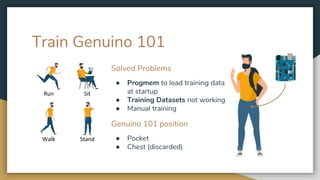
Train Genuino 101
Run Sit
Walk Stand
Solved Problems
● Progmem to load training data
at startup
● Training Datasets not working
● Manual training
Genuino 101 position
● Pocket
● Chest (discarded)
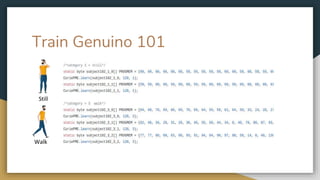
Train Genuino 101
Train Genuino 101
Walk
Still
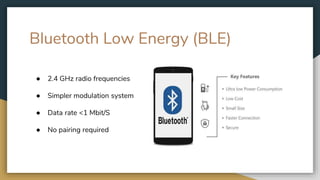
Bluetooth Low Energy (BLE)
● 2.4 GHz radio frequencies
● Simpler modulation system
● Data rate <1 Mbit/S
● No pairing required
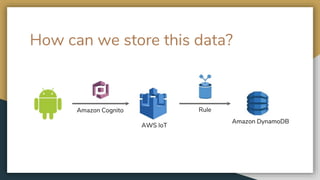
How can we store this data?
Amazon Cognito Rule
Amazon DynamoDB
AWS IoT
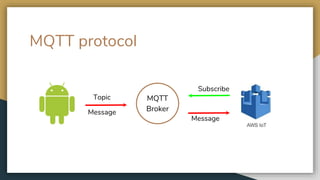
MQTT protocol
MQTT
Broker
Topic
Message
Message
Subscribe
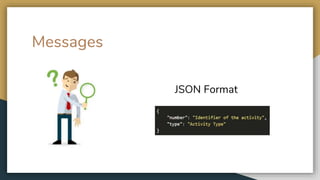
JSON Format
Messages
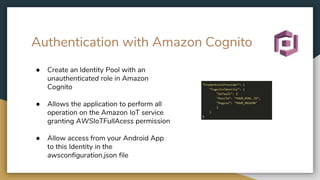
Authentication with Amazon Cognito
● Create an Identity Pool with an
unauthenticated role in Amazon
Cognito
● Allows the application to perform all
operation on the Amazon IoT service
granting AWSIoTFullAcess permission
● Allow access from your Android App
to this Identity in the
awsconfiguration.json file
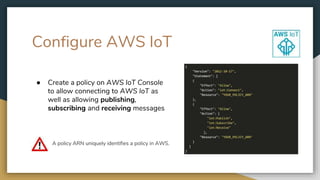
Configure AWS IoT
● Create a policy on AWS IoT Console
to allow connecting to AWS IoT as
well as allowing publishing,
subscribing and receiving messages
A policy ARN uniquely identifies a policy in AWS.
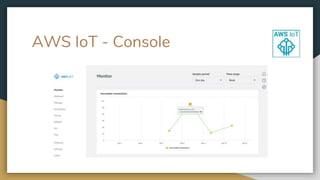
AWS IoT - Console
Store data on AWS DynamoDB
Store our messages in a table
We need a rule that allows us to take information from
an incoming MQTT message and write it to a
DynamoDB table
Create the rule
● Create a table in DynamoDB
● Create a rule to read
messages from our topic and
store them in our new table
Data visualization - Mango Display
PROBLEMS WITH MANGO DISPLAY/MIRROR
● Apple device + Android device.
● The software is not Open Source
● Limited Data Sources (Apple health and Fitbit)
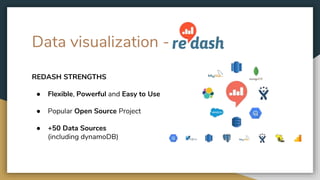
Data visualization -
REDASH STRENGTHS
● Flexible, Powerful and Easy to Use
● Popular Open Source Project
● +50 Data Sources
(including dynamoDB)
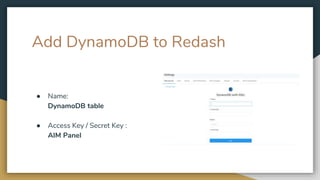
Add DynamoDB to Redash
● Name:
DynamoDB table
● Access Key / Secret Key :
AIM Panel
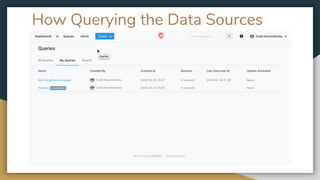
How Querying the Data Sources
Querying DynamoDB
PROBLEM WITH DYNAMODB
● The QL of DynamoDB don’t support the aggregation functions like SUM(),
AVG(), complex COUNT() and specific operation for the dates like
FORMAT().
SOLUTION TO THE PROBLEM
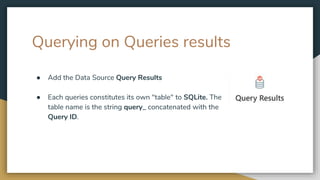
● Redash allows you to query results from other queries
Querying on Queries results
● Add the Data Source Query Results
● Each queries constitutes its own "table" to SQLite. The
table name is the string query_ concatenated with the
Query ID.
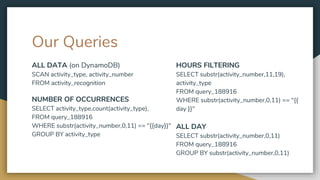
HOURS FILTERING
SELECT substr(activity_number,11,19),
activity_type
FROM query_188916
WHERE substr(activity_number,0,11) == "{{
day }}"
ALL DAY
SELECT substr(activity_number,0,11)
FROM query_188916
GROUP BY substr(activity_number,0,11)
ALL DATA (on DynamoDB)
SCAN activity_type, activity_number
FROM activity_recognition
NUMBER OF OCCURRENCES
SELECT activity_type,count(activity_type),
FROM query_188916
WHERE substr(activity_number,0,11) == "{{day}}"
GROUP BY activity_type
Our Queries
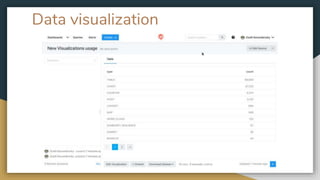
Data visualization
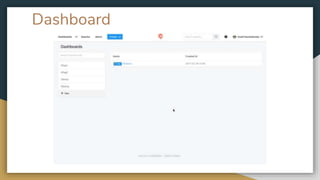
Dashboard
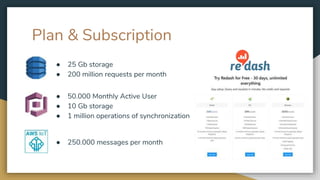
Plan & Subscription
● 25 Gb storage
● 200 million requests per month
● 50.000 Monthly Active User
● 10 Gb storage
● 1 million operations of synchronization
● 250.000 messages per month
References
● GITHUB: https://github.com/riccardo97p/IoT_ActivityRecognition
● HACKSTER: https://www.hackster.io/andreanapoletani/activity-recognition-using-genuino-101-and-aws-iot-fbeea2
● PROJECT
PRESENTATION: https://www.slideshare.net/AndreaNapoletani/activity-recognition-137479240
● REDASH GIFs: https://redash.io/
● IMGs: https://www.vectorstock.com/
● ALESSANDRO GIANNETTI: https://www.linkedin.com/in/alessandro-giannetti-2b1864b4/
● ANDREA NAPOLETANI: https://www.linkedin.com/in/andrea-napoletani-aa0b87166/
● RICCARDO PATTUGLIA: https://www.linkedin.com/in/riccardo-pattuglia-3a09ab182/
DEMO

Activity Recognition project

  • 1.
  • 2.
    OUR TEAM Alessandro Giannetti| Andrea Napoletani Riccardo Pattuglia
  • 3.
  • 4.
  • 5.
    Project workflow Visualize onRedashTrain Genuino 101 and classify the activities Send data through BLE to Android Store messages in AWS DynamoDB Send MQTT messages to AWS IoT
  • 6.
    Genuino 101 Technical Specification ●Microcontroller Intel Curie ● Flash Memory 196 kB ● SRAM 24 kB ● Clock Speed 32MHz ● I/0 communication Bluetooth LE ● Sensors 6-axis accelerometer/gyro
  • 7.
    Genuino 101 ● Low-PowerConsumption ● Onboard Bluetooth LE and a 6-axis accelerometer/gyro. ● Dedicated core for pattern matching capabilities. PRO CONS ● The memory is very low ● The Pattern Matching Engine has some limitations
  • 8.
    Arduino IDE ● Simple(sometimes too much!) ● C/C++ support ● Many libraries implementing the most used features (BLE, Curie Module, …)
  • 9.
    Setup function BLEPeripheral blePeripheral; BLEServicefitnessService("19B10000-E8F***"); BLEUnsignedCharCharacteristic fitnessTypeChar("19B1****", BLERead | BLENotify); void setup() { CurieIMU.begin(); CuriePME.begin(); CurieIMU.setAccelerometerRate(sampleRateHZ); CurieIMU.setAccelerometerRange(1); // CuriePME.setClassifierMode(CuriePME.KNN_Mode); blePeripheral.setLocalName("Activity"); blePeripheral.setAdvertisedServiceUuid(fitnessService.uuid() ); // add service and characteristic blePeripheral.addAttribute(fitnessService); blePeripheral.addAttribute(fitnessTypeChar); // advertise the service blePeripheral.begin(); }
  • 10.
    Loop function BLECentral central= blePeripheral.central(); byte vector[120]; unsigned int category; if (central) { while (central.connected()) { readVectorFromIMU(vector); category = CuriePME.classify(vector, 120); switch (category) { case 1: Serial.println(F("Still")); break; case 2: Serial.println(F("Sit")); break; case 3: Serial.println(F("Walk")); break; case 4: Serial.println(F("Run")); break; default:Serial.println(F("Unknown")); break; } fitnessTypeChar.setValue((byte) category); Serial.println(fitnessTypeChar.value()); } } void readVectorFromIMU(byte vector[]){ byte accel[250]; int raw[3]; unsigned int samples = 0; unsigned int i = 0; while (samples < 250) { if (CurieIMU.dataReady()) { CurieIMU.readAccelerometer(raw[0], raw[1], raw[2]); /* Map raw values to 0-255, only z axis taken */ accel[i] = (byte) map(raw[0], IMULow, IMUHigh, 0, 255); i += 1; ++samples; } } undersample(accel, samples, vector); }
  • 11.
    Train Genuino 101 RunSit Walk Stand Solved Problems ● Progmem to load training data at startup ● Training Datasets not working ● Manual training Genuino 101 position ● Pocket ● Chest (discarded)
  • 12.
  • 13.
  • 14.
    Bluetooth Low Energy(BLE) ● 2.4 GHz radio frequencies ● Simpler modulation system ● Data rate <1 Mbit/S ● No pairing required
  • 15.
    How can westore this data? Amazon Cognito Rule Amazon DynamoDB AWS IoT
  • 16.
  • 17.
  • 18.
    Authentication with AmazonCognito ● Create an Identity Pool with an unauthenticated role in Amazon Cognito ● Allows the application to perform all operation on the Amazon IoT service granting AWSIoTFullAcess permission ● Allow access from your Android App to this Identity in the awsconfiguration.json file
  • 19.
    Configure AWS IoT ●Create a policy on AWS IoT Console to allow connecting to AWS IoT as well as allowing publishing, subscribing and receiving messages A policy ARN uniquely identifies a policy in AWS.
  • 20.
    AWS IoT -Console
  • 21.
    Store data onAWS DynamoDB Store our messages in a table We need a rule that allows us to take information from an incoming MQTT message and write it to a DynamoDB table
  • 22.
    Create the rule ●Create a table in DynamoDB ● Create a rule to read messages from our topic and store them in our new table
  • 23.
    Data visualization -Mango Display PROBLEMS WITH MANGO DISPLAY/MIRROR ● Apple device + Android device. ● The software is not Open Source ● Limited Data Sources (Apple health and Fitbit)
  • 24.
    Data visualization - REDASHSTRENGTHS ● Flexible, Powerful and Easy to Use ● Popular Open Source Project ● +50 Data Sources (including dynamoDB)
  • 25.
    Add DynamoDB toRedash ● Name: DynamoDB table ● Access Key / Secret Key : AIM Panel
  • 26.
    How Querying theData Sources
  • 27.
    Querying DynamoDB PROBLEM WITHDYNAMODB ● The QL of DynamoDB don’t support the aggregation functions like SUM(), AVG(), complex COUNT() and specific operation for the dates like FORMAT(). SOLUTION TO THE PROBLEM ● Redash allows you to query results from other queries
  • 28.
    Querying on Queriesresults ● Add the Data Source Query Results ● Each queries constitutes its own "table" to SQLite. The table name is the string query_ concatenated with the Query ID.
  • 29.
    HOURS FILTERING SELECT substr(activity_number,11,19), activity_type FROMquery_188916 WHERE substr(activity_number,0,11) == "{{ day }}" ALL DAY SELECT substr(activity_number,0,11) FROM query_188916 GROUP BY substr(activity_number,0,11) ALL DATA (on DynamoDB) SCAN activity_type, activity_number FROM activity_recognition NUMBER OF OCCURRENCES SELECT activity_type,count(activity_type), FROM query_188916 WHERE substr(activity_number,0,11) == "{{day}}" GROUP BY activity_type Our Queries
  • 30.
  • 31.
  • 32.
    Plan & Subscription ●25 Gb storage ● 200 million requests per month ● 50.000 Monthly Active User ● 10 Gb storage ● 1 million operations of synchronization ● 250.000 messages per month
  • 33.
    References ● GITHUB: https://github.com/riccardo97p/IoT_ActivityRecognition ●HACKSTER: https://www.hackster.io/andreanapoletani/activity-recognition-using-genuino-101-and-aws-iot-fbeea2 ● PROJECT PRESENTATION: https://www.slideshare.net/AndreaNapoletani/activity-recognition-137479240 ● REDASH GIFs: https://redash.io/ ● IMGs: https://www.vectorstock.com/ ● ALESSANDRO GIANNETTI: https://www.linkedin.com/in/alessandro-giannetti-2b1864b4/ ● ANDREA NAPOLETANI: https://www.linkedin.com/in/andrea-napoletani-aa0b87166/ ● RICCARDO PATTUGLIA: https://www.linkedin.com/in/riccardo-pattuglia-3a09ab182/
  • 34.

Editor's Notes

  • #7 The module contains two tiny cores, an x86 (Quark) and an ARC, both clocked at 32MHz. The Quark core runs ViperOS RTOS and helps the Arduino core to accomplish the most demanding tasks.
  • #15 The next step is to send messages generated by Genuino to our Android application. To do that we exploit the BLE technology. As the “normal” Bluetooth BLE uses 2.4 GHz radio frequencies but a simpler modulation system to send a very small amount of data, in fact, it has less than 1 Mbit/s data rate and, differently from Bluetooth doesn’t need any pairing. For those reasons it is widely used in IoT applications.
  • #16 This is the entire process for storing our data, starting from Android App we send messages coming from Genuino to AWS IoT using Amazon Cognito to authenticate this connection. From AWS IoT we need a way to store our data so we create a rule that allows us to take data from AWS IoT and store it in an AWS DynamoDB table.
  • #17 First of all, let me introduce what kind of messages and how we send them. We exploit the MQTT protocol, it is just a Machine to Machine connectivity protocol designed as an extremely lightweight publish/subscribe messaging transport. In our project, we create a topic called “my/iotminiproject” that will be exploited by the Android app to publish messages on it. On the other side, AWS IoT will subscribe to this topic and start receiving its messages.
  • #18 Which is the form of our messages? We use a JSON format for our messages that includes two field name/value. They identify the activity number that in our case will be the timestamp of the activity and the type that is the result of the classification on a pattern.
  • #19 In order to send data to AWS IoT, we need to authenticate the sender using Amazon Cognito. We simply do that creating an Identity Pool on the Amazon Cognito Console with Full Access permission to allow it doing all the operations on AWS IoT. Finally, we have to allow access from our Android App to this new Identity configuring in the awsconfiguration.json file of our project.
  • #20 We also create a policy on AWS IoT console to allow operations like: publishing, subscribing and receiving messages.
  • #21 This is the AWS Console where we can control some information like the number of connections of our devices to the Cloud or the number of MQTT received messages.
  • #22 The next step is the storage of our messages in a database. For this goal, we use AWS DynamoDB and what we have to do is create a rule that automatically takes MQTT messages that arrive at AWS IoT and write them in a DynamoDB table.
  • #23 We create a table in DynamoDB and the new rule that query our topic to take all the messages.
  • #32 omg stop moving the slide, you ll make me throw up