ABAP DICTIONARY
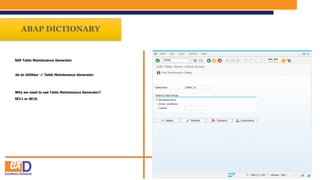
SAP Table Maintenance Generator
Go to Utilities -> Table Maintenance Generator.
Why we need to use Table Maintenance Generator?
SE11 or SE16
Table Maintenance
Generator
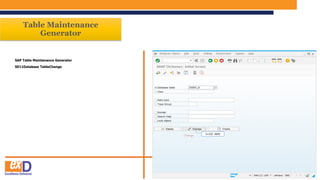
SAP Table Maintenance Generator
SE11Database TableChange
CLICK HERE
Table Maintenance
Generator
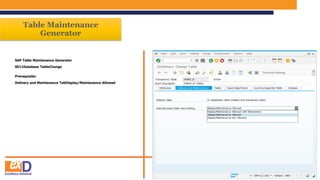
SAP Table Maintenance Generator
SE11Database TableChange
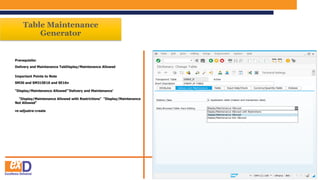
Prerequisite:
Delivery and Maintenance TabDisplay/Maintenance Allowed
Table Maintenance
Generator
SAP Table Maintenance Generator
SE11Database TableChange
Delivery and Maintenance TabDisplay/Maintenance Allowed
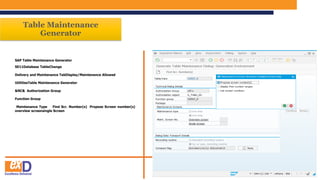
UtilitiesTable Maintenance Generator
Table Maintenance
Generator
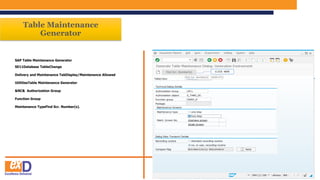
SAP Table Maintenance Generator
SE11Database TableChange
Delivery and Maintenance TabDisplay/Maintenance Allowed
UtilitiesTable Maintenance Generator
&NC& Authorization Group
Function Group
Maintenance TypeFind Scr. Number(s).
CLICK HERE
Table Maintenance
Generator
SAP Table Maintenance Generator
SE11Database TableChange
Delivery and Maintenance TabDisplay/Maintenance Allowed
UtilitiesTable Maintenance Generator
&NC& Authorization Group
Function Group
Maintenance Type Find Scr. Number(s) Propose Screen number(s)
overview screensingle Screen
Table Maintenance
Generator
SAP Table Maintenance Generator
SE11Database TableChange
Delivery and Maintenance TabDisplay/Maintenance Allowed
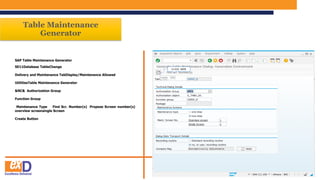
UtilitiesTable Maintenance Generator
&NC& Authorization Group
Function Group
Maintenance Type Find Scr. Number(s) Propose Screen number(s)
overview screensingle Screen
Create Button
CLICK HERE
Table Maintenance
Generator
SAP Table Maintenance Generator
SE11Database TableChange
Delivery and Maintenance TabDisplay/Maintenance Allowed
UtilitiesTable Maintenance Generator
&NC& Authorization Group
Function Group
Maintenance Type Find Scr. Number(s) Propose Screen number(s)
overview screensingle Screen
Create Button
Request Completed Successfully.
Table Maintenance
Generator
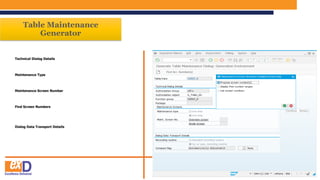
Technical Dialog Details
Maintenance Type
Maintenance Screen Number
Find Screen Numbers
Dialog Data Transport Details
Table Maintenance
Generator
Technical Dialog Details
Authorization Group :
&NC&
Function group:
Generally Function Group name can be same as table name.
Table Maintenance
Generator
What are the different Maintenance type?
One StepTwo Step
One Step Method 1000 to 1010, which is reserved for selection screen
overview screen
Two Step Method On single screen you can only maintain screenLike Delete
and Insert When you press 'New Entries' button then it will take you to
Single Screenwhen you had selected Two step method.
In Short Maintenance can be done in 2 ways
Table Maintenance
Generator
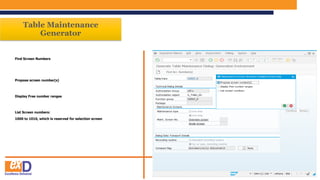
Find Screen Numbers
Propose screen number(s)
Display Free number ranges
List Screen numbers:
1000 to 1010, which is reserved for selection screen
Table Maintenance
Generator
Dialog Data Transport Details
Standard Recording routine
'Standard recording routine'
Standard recording routine
Environment-->Maintenance Objects-->Generate .
No, or user, recording routine
no, or user, recording routine
Table Maintenance
Generator
Prerequisite:
Delivery and Maintenance TabDisplay/Maintenance Allowed
Important Points to Note
SM30 and SM31SE16 and SE16n
"Display/Maintenance Allowed"'Delivery and Maintenance'
"Display/Maintenance Allowed with Restrictions" "Display/Maintenance
Not Allowed"
re-adjustre-create
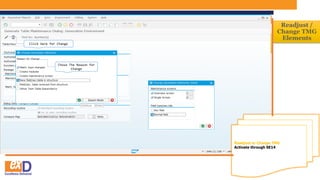
Readjust or Change TMG
Activate through SE14
Readjust /
Change TMG
Elements
Chose The Reason for
Change
Click here for Change
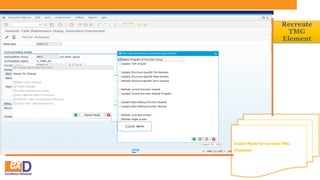
Expert Mode for recreate TMG
Elements
Recreate
TMG
Element
Click Here
TEST TMG USING SM30 TCODE
TEST TMG
SM30
CLICK HERE
Education Presentation ABAP Week-11.pptx

Education Presentation ABAP Week-11.pptx

  • 3.
    ABAP DICTIONARY SAP TableMaintenance Generator Go to Utilities -> Table Maintenance Generator. Why we need to use Table Maintenance Generator? SE11 or SE16
  • 4.
    Table Maintenance Generator SAP TableMaintenance Generator SE11Database TableChange CLICK HERE
  • 5.
    Table Maintenance Generator SAP TableMaintenance Generator SE11Database TableChange Prerequisite: Delivery and Maintenance TabDisplay/Maintenance Allowed
  • 6.
    Table Maintenance Generator SAP TableMaintenance Generator SE11Database TableChange Delivery and Maintenance TabDisplay/Maintenance Allowed UtilitiesTable Maintenance Generator
  • 7.
    Table Maintenance Generator SAP TableMaintenance Generator SE11Database TableChange Delivery and Maintenance TabDisplay/Maintenance Allowed UtilitiesTable Maintenance Generator &NC& Authorization Group Function Group Maintenance TypeFind Scr. Number(s). CLICK HERE
  • 8.
    Table Maintenance Generator SAP TableMaintenance Generator SE11Database TableChange Delivery and Maintenance TabDisplay/Maintenance Allowed UtilitiesTable Maintenance Generator &NC& Authorization Group Function Group Maintenance Type Find Scr. Number(s) Propose Screen number(s) overview screensingle Screen
  • 9.
    Table Maintenance Generator SAP TableMaintenance Generator SE11Database TableChange Delivery and Maintenance TabDisplay/Maintenance Allowed UtilitiesTable Maintenance Generator &NC& Authorization Group Function Group Maintenance Type Find Scr. Number(s) Propose Screen number(s) overview screensingle Screen Create Button CLICK HERE
  • 10.
    Table Maintenance Generator SAP TableMaintenance Generator SE11Database TableChange Delivery and Maintenance TabDisplay/Maintenance Allowed UtilitiesTable Maintenance Generator &NC& Authorization Group Function Group Maintenance Type Find Scr. Number(s) Propose Screen number(s) overview screensingle Screen Create Button Request Completed Successfully.
  • 11.
    Table Maintenance Generator Technical DialogDetails Maintenance Type Maintenance Screen Number Find Screen Numbers Dialog Data Transport Details
  • 12.
    Table Maintenance Generator Technical DialogDetails Authorization Group : &NC& Function group: Generally Function Group name can be same as table name.
  • 13.
    Table Maintenance Generator What arethe different Maintenance type? One StepTwo Step One Step Method 1000 to 1010, which is reserved for selection screen overview screen Two Step Method On single screen you can only maintain screenLike Delete and Insert When you press 'New Entries' button then it will take you to Single Screenwhen you had selected Two step method. In Short Maintenance can be done in 2 ways
  • 14.
    Table Maintenance Generator Find ScreenNumbers Propose screen number(s) Display Free number ranges List Screen numbers: 1000 to 1010, which is reserved for selection screen
  • 15.
    Table Maintenance Generator Dialog DataTransport Details Standard Recording routine 'Standard recording routine' Standard recording routine Environment-->Maintenance Objects-->Generate . No, or user, recording routine no, or user, recording routine
  • 16.
    Table Maintenance Generator Prerequisite: Delivery andMaintenance TabDisplay/Maintenance Allowed Important Points to Note SM30 and SM31SE16 and SE16n "Display/Maintenance Allowed"'Delivery and Maintenance' "Display/Maintenance Allowed with Restrictions" "Display/Maintenance Not Allowed" re-adjustre-create
  • 17.
    Readjust or ChangeTMG Activate through SE14 Readjust / Change TMG Elements Chose The Reason for Change Click here for Change
  • 18.
    Expert Mode forrecreate TMG Elements Recreate TMG Element Click Here
  • 19.
    TEST TMG USINGSM30 TCODE TEST TMG SM30 CLICK HERE