Download free for 30 days
Sign in
Upload
Language (EN)
Support
Business
Mobile
Social Media
Marketing
Technology
Art & Photos
Career
Design
Education
Presentations & Public Speaking
Government & Nonprofit
Healthcare
Internet
Law
Leadership & Management
Automotive
Engineering
Software
Recruiting & HR
Retail
Sales
Services
Science
Small Business & Entrepreneurship
Food
Environment
Economy & Finance
Data & Analytics
Investor Relations
Sports
Spiritual
News & Politics
Travel
Self Improvement
Real Estate
Entertainment & Humor
Health & Medicine
Devices & Hardware
Lifestyle
Change Language
Language
English
Español
Português
Français
Deutsche
Cancel
Save
Submit search
EN
Uploaded by
Yoshito Tabuchi
1,467 views
Xamarin.Formsでアプリをリリースした素人の話
第6回 Japan Xamarin User Group Conference 東京 (JXUGC#6) でアプリリリースした話をしました。クソコードですみません。
Technology
◦
Read more
4
Save
Share
Embed
Embed presentation
Download
Download to read offline
1
/ 21
2
/ 21
3
/ 21
4
/ 21
5
/ 21
6
/ 21
7
/ 21
8
/ 21
9
/ 21
10
/ 21
11
/ 21
12
/ 21
13
/ 21
14
/ 21
15
/ 21
16
/ 21
17
/ 21
18
/ 21
19
/ 21
20
/ 21
21
/ 21
More Related Content
PPTX
Xamarin入門(技術というより心構え編)
by
Makoto Nishimura
PPTX
2016年11月.NETラボLT:超余談ゲームプラットフォームの話
by
Makoto Nishimura
PPTX
ReactiveProperty
by
一希 大田
PDF
Prism + ReactiveProperty入門
by
一希 大田
PDF
Kong Summit 2021 振り返り
by
Yoshito Tabuchi
PDF
Kong 概要
by
Yoshito Tabuchi
PDF
勉強会参加のススメ
by
Yoshito Tabuchi
PDF
Kong Enterprise の紹介
by
Yoshito Tabuchi
Xamarin入門(技術というより心構え編)
by
Makoto Nishimura
2016年11月.NETラボLT:超余談ゲームプラットフォームの話
by
Makoto Nishimura
ReactiveProperty
by
一希 大田
Prism + ReactiveProperty入門
by
一希 大田
Kong Summit 2021 振り返り
by
Yoshito Tabuchi
Kong 概要
by
Yoshito Tabuchi
勉強会参加のススメ
by
Yoshito Tabuchi
Kong Enterprise の紹介
by
Yoshito Tabuchi
More from Yoshito Tabuchi
PDF
How does a sales person grow up his community
by
Yoshito Tabuchi
PDF
C# と Xamarin
by
Yoshito Tabuchi
PDF
Xamarin で Cognitive Services を使う
by
Yoshito Tabuchi
PDF
Xamarin で Cognitive Services を使ってみよう
by
Yoshito Tabuchi
PDF
Xamarin.Forms のこれまでとこれから
by
Yoshito Tabuchi
PDF
Xamarinを触り始めた頃の話〜触りたい人に向けて〜
by
Yoshito Tabuchi
PDF
2018年のXamarinの概要と活用方法
by
Yoshito Tabuchi
PDF
20171202 Xamarinの歩き方
by
Yoshito Tabuchi
PDF
Xamarin概要と活用方法
by
Yoshito Tabuchi
PDF
Xamarin概要と活用方法
by
Yoshito Tabuchi
PDF
Realm Mobile Platform 概要
by
Yoshito Tabuchi
PDF
Computer Vision と Translator Text API 使ってみた
by
Yoshito Tabuchi
PDF
Xamarin から使う Azure
by
Yoshito Tabuchi
PDF
Xamarin 概要~Windows Embedded の業務用端末から Android へのシームレスな移行~
by
Yoshito Tabuchi
PDF
NET Standard と Xamarin
by
Yoshito Tabuchi
PDF
モバイル向けクロスプラットフォーム開発ツール Xamarin の概要とその利点
by
Yoshito Tabuchi
PDF
Xamarin概要+最新情報
by
Yoshito Tabuchi
PDF
ちょっとエモい話
by
Yoshito Tabuchi
PDF
Xamarin の概要と活用事例
by
Yoshito Tabuchi
PDF
Xamarinをこれから始める皆様へ
by
Yoshito Tabuchi
How does a sales person grow up his community
by
Yoshito Tabuchi
C# と Xamarin
by
Yoshito Tabuchi
Xamarin で Cognitive Services を使う
by
Yoshito Tabuchi
Xamarin で Cognitive Services を使ってみよう
by
Yoshito Tabuchi
Xamarin.Forms のこれまでとこれから
by
Yoshito Tabuchi
Xamarinを触り始めた頃の話〜触りたい人に向けて〜
by
Yoshito Tabuchi
2018年のXamarinの概要と活用方法
by
Yoshito Tabuchi
20171202 Xamarinの歩き方
by
Yoshito Tabuchi
Xamarin概要と活用方法
by
Yoshito Tabuchi
Xamarin概要と活用方法
by
Yoshito Tabuchi
Realm Mobile Platform 概要
by
Yoshito Tabuchi
Computer Vision と Translator Text API 使ってみた
by
Yoshito Tabuchi
Xamarin から使う Azure
by
Yoshito Tabuchi
Xamarin 概要~Windows Embedded の業務用端末から Android へのシームレスな移行~
by
Yoshito Tabuchi
NET Standard と Xamarin
by
Yoshito Tabuchi
モバイル向けクロスプラットフォーム開発ツール Xamarin の概要とその利点
by
Yoshito Tabuchi
Xamarin概要+最新情報
by
Yoshito Tabuchi
ちょっとエモい話
by
Yoshito Tabuchi
Xamarin の概要と活用事例
by
Yoshito Tabuchi
Xamarinをこれから始める皆様へ
by
Yoshito Tabuchi
Xamarin.Formsでアプリをリリースした素人の話
1.
Xamarin.Forms でア プリをリリースした 素人の話+α 2015/10/3 JXUGC #6
東京 エクセルソフト株式会社 ソフトウェア事業部 Business Development Manager 田淵 義人
2.
宣伝 • ユーザーグループに是非ご参加ください •
http://jxug.org • https://www.facebook.com/groups/xm.jxug • Xamarin 日本語情報 • http://ytabuchi.hatenablog.com • ペゾルドさんの Xamarin.Forms 本 (PDF) • http://bit.ly/xmfbook • Xamarin 本 • http://www.amazon.co.jp/dp/4822298345 (書 籍) • http://www.amazon.co.jp/gp/product/B00MN5 P6PY (Kindle)
3.
宣伝その2 • 今日は登壇いただけませんでしたが、ライ フベアさんが
Xamarin 使いを募集していま す。 事例を頂けるのを待ってますw • フェンリルさんも(ry
4.
少しエモーショナルです 技術ネタは他の方がやってくださったので、主にリ リースまでの体験談などを。
5.
自己紹介 • 田淵義人 •
目指せ!Xamarin エバンジェリスト • 目指せ!開発もチョットデキル営業 • 目指せ!Xamarin でググれ の自己紹介 • Twitter を Xamarin でエゴサしてる • Androider, Google 信者 • Twitter: @ytabuchi • facebook: ytabuchi.xlsoft • Blog: http://ytabuchi.hatenablog.com/
6.
自己紹介 • 田淵義人 •
目指せ!Xamarin エバンジェリスト • 目指せ!開発もチョットデキル営業 • アプリリリースしました!今日はその話 • 目指せ!Xamarin でググれ の自己紹介 • Twitter を Xamarin でエゴサしてる • Androider, Google 信者 → MS も良いな • Twitter: @ytabuchi • facebook: ytabuchi.xlsoft • Blog: http://ytabuchi.hatenablog.com/
7.
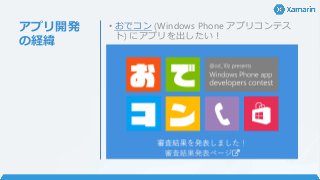
アプリ開発 の経緯 • おでコン (Windows
Phone アプリコンテス ト) にアプリを出したい!
8.
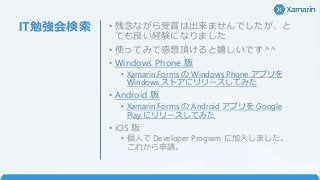
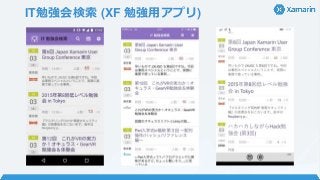
IT勉強会検索 • 残念ながら受賞は出来ませんでしたが、と ても良い経験になりました •
使ってみて感想頂けると嬉しいです^^ • Windows Phone 版 • Xamarin.Forms の Windows Phone アプリを Windows ストアにリリースしてみた • Android 版 • Xamarin.Forms の Android アプリを Google Play にリリースしてみた • iOS 版 • 個人で Developer Program に加入しました。 これから申請。
9.
開発もチョット デキル営業へ の道 • 大事なもの • モチベーション •
素人にもやさしく教えてくれる同僚 • 営業時間内に営業がコード書いても 20-80 の法則で許容してくれる環境 • 偉大な先人の方々の情報 • ビルドしてアプリが動いた時の感動
10.
リリースっ て大変 • 画像ファイル結構沢山用意しないといけな い • ベクターで作った方が楽なので
アイコン作成 ツールに期待 • Gimp は辛いw • 説明文が 1,000 文字とか必要 • タイトル、キャッチ、説明文などでかなりダウ ンロード数とかが変わるらしい • A/B テストなど、マーケティングの要素もあっ て面白い • ダウンロード数が伸びない問題
11.
こんなの作りました
12.
IT勉強会検索 (XF 勉強用アプリ)
13.
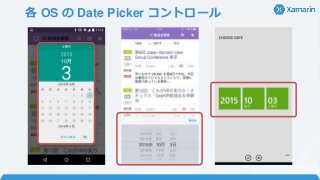
各 OS の
Date Picker コントロール
14.
ざっくり中身説明
15.
httpclient / Json.NET
楽ちん try { using (var client = new HttpClient()) { var response = await client.GetAsync(uri); response.EnsureSuccessStatusCode(); // StatusCode が 200 以外なら Exception using (var stream = await response.Content.ReadAsStreamAsync()) { using (var streamReader = new StreamReader(stream)) { var json = await streamReader.ReadToEndAsync(); var res = JsonConvert.DeserializeObject<ConnpassJson>(json); return res; } } } } catch (Exception e) {}
16.
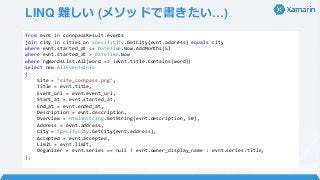
LINQ 難しい (メソッドで書きたい…) from
evnt in connpassResult.events join city in cities on SpecifyCity.GetCity(evnt.address) equals city where evnt.started_at <= DateTime.Now.AddMonths(5) where evnt.started_at > DateTime.Now where ngWordsList.All(word => !evnt.title.Contains(word)) select new AllEventsInfo { Site = "site_connpass.png", Title = evnt.title, Event_uri = evnt.event_url, Start_at = evnt.started_at, End_at = evnt.ended_at, Description = evnt.description, Overview = HtmlToString.GetString(evnt.description, 50), Address = evnt.address, City = SpecifyCity.GetCity(evnt.address), Accepted = evnt.accepted, Limit = evnt.limit, Organizer = evnt.series == null ? evnt.owner_display_name : evnt.series.title, };
17.
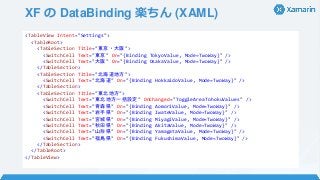
XF の DataBinding
楽ちん (XAML) <TableView Intent="Settings"> <TableRoot> <TableSection Title="東京・大阪"> <SwitchCell Text="東京" On="{Binding TokyoValue, Mode=TwoWay}" /> <SwitchCell Text="大阪" On="{Binding OsakaValue, Mode=TwoWay}" /> </TableSection> <TableSection Title="北海道地方"> <SwitchCell Text="北海道" On="{Binding HokkaidoValue, Mode=TwoWay}" /> </TableSection> <TableSection Title="東北地方"> <SwitchCell Text="東北地方一括設定" OnChanged="ToggleAreaTohokuValues" /> <SwitchCell Text="青森県" On="{Binding AomoriValue, Mode=TwoWay}" /> <SwitchCell Text="岩手県" On="{Binding IwateValue, Mode=TwoWay}" /> <SwitchCell Text="宮城県" On="{Binding MiyagiValue, Mode=TwoWay}" /> <SwitchCell Text="秋田県" On="{Binding AkitaValue, Mode=TwoWay}" /> <SwitchCell Text="山形県" On="{Binding YamagataValue, Mode=TwoWay}" /> <SwitchCell Text="福島県" On="{Binding FukushimaValue, Mode=TwoWay}" /> </TableSection> </TableRoot> </TableView>
18.
XF の DataBinding
楽ちん (C#) // コード側 var dateLabel = new Label { Style = Application.Current.Resources[“SubColoredLabel”] as Style, // Styles 指定 }; dateLabel.SetBinding(Label.TextProperty, new Binding("Start_at", stringFormat: "日時: {0:yyyy/M/d HH:mm} ~")); // stringFormat var contentLabel = new Label { }; contentLabel.SetBinding(Label.TextProperty, new Binding("Description", converter: new HtmlToPlainConverter())); // IValueConverter // IValueConverter 実装 public object Convert(object value, Type targetType, object parameter, CultureInfo culture) { // HtmlAgilityPack を使用してタグ付きの string からタグを除去します。 var hap = new HtmlAgilityPack.HtmlDocument(); hap.LoadHtml(value.ToString()); var doc = hap.DocumentNode.InnerText; // logic }
19.
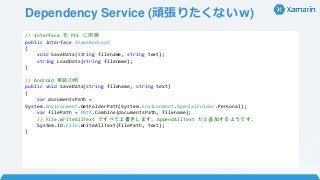
Dependency Service (頑張りたくないw) //
Interface を PCL に用意 public interface ISaveAndLoad { void SaveData(string filename, string text); string LoadData(string filename); } // Android 実装の例 public void SaveData(string filename, string text) { var documentsPath = System.Environment.GetFolderPath(System.Environment.SpecialFolder.Personal); var filePath = Path.Combine(documentsPath, filename); // File.WriteAllText ですべて上書きします。AppendAllText だと追加するようです。 System.IO.File.WriteAllText(filePath, text); }
20.
営業でもXamarin.Formsで アプリが作れるよ!
21.
ご清聴ありがとうございます
Download








![XF の DataBinding 楽ちん (C#)
// コード側
var dateLabel = new Label
{
Style = Application.Current.Resources[“SubColoredLabel”] as Style, // Styles 指定
};
dateLabel.SetBinding(Label.TextProperty,
new Binding("Start_at", stringFormat: "日時: {0:yyyy/M/d HH:mm} ~")); // stringFormat
var contentLabel = new Label { };
contentLabel.SetBinding(Label.TextProperty,
new Binding("Description", converter: new HtmlToPlainConverter())); // IValueConverter
// IValueConverter 実装
public object Convert(object value, Type targetType, object parameter, CultureInfo culture)
{
// HtmlAgilityPack を使用してタグ付きの string からタグを除去します。
var hap = new HtmlAgilityPack.HtmlDocument();
hap.LoadHtml(value.ToString());
var doc = hap.DocumentNode.InnerText;
// logic
}](https://image.slidesharecdn.com/xamarin-151005031002-lva1-app6892/85/Xamarin-Forms-18-320.jpg?cb=1444025138)