The 8-fold Path to Web Searching Power* Patricia F. Anderson June 20, 2007 [email_address] http://www.umich.edu/~pfa/pro/8fold/ © 2007 Regents of the University of Michigan. All rights reserved. * more of what you want, less of what you don’t
Power Searching on the Web: Tips Quotation marks OR  Parentheses Limit by site Limit by filetype + (plus sign) - (minus sign) ~ (tilde sign)
Power Searching on the Web: Tips Quotation marks = Phrase searching OR = Concept groupings Parentheses = Multiple concept groups Limit by site Limit by filetype + (plus sign) = Stopword searching - (minus sign) = Exclude ~ (tilde sign) = Thesaurus or synonym searching
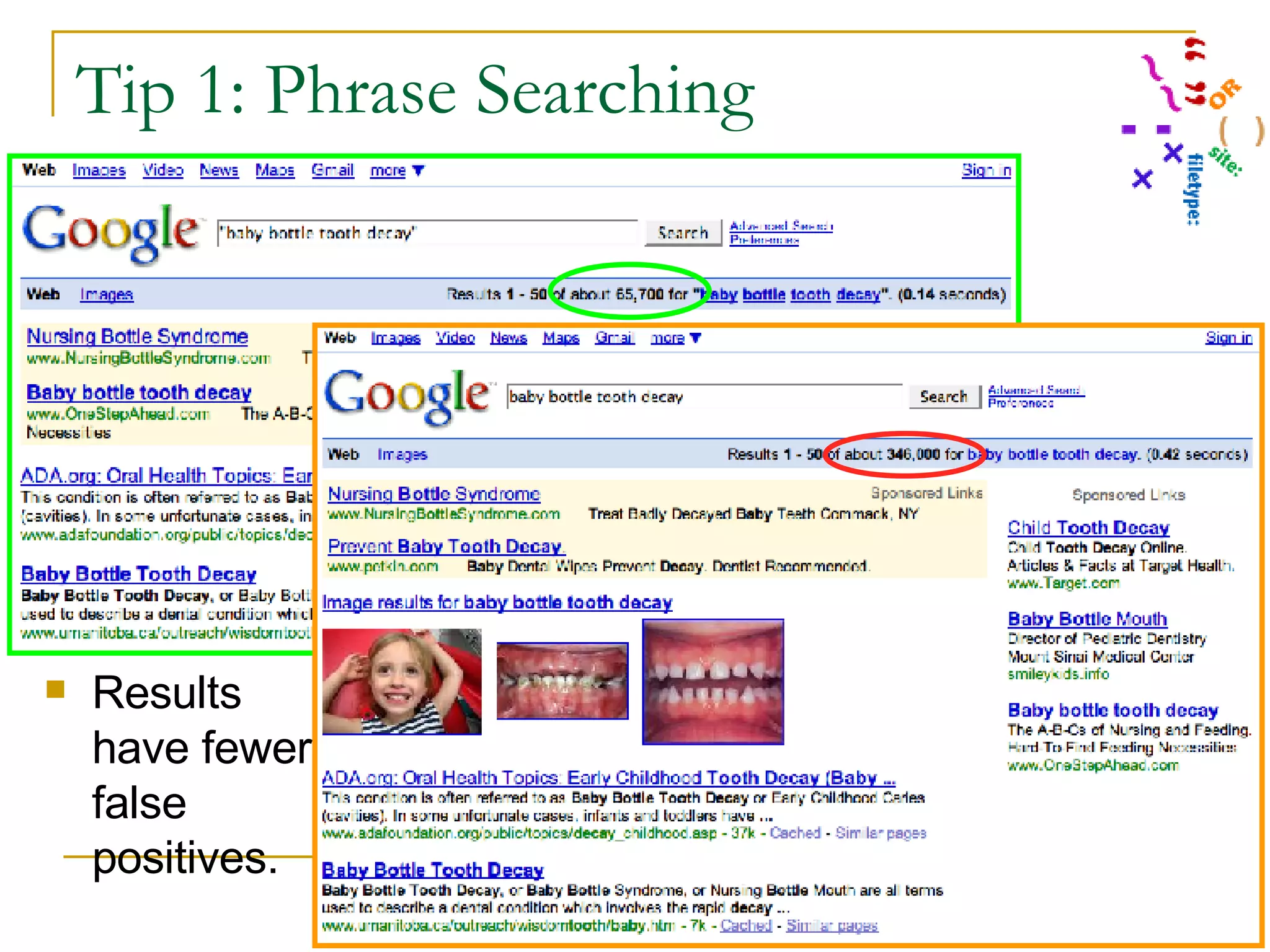
Tip 1: Quotation marks for Phrase Searching This is most useful when the words to be searched are not very specific, have different meanings in various subject areas, when having the words adjacent to each other changes the meaning, or when it is important that the same word is repeated. “ baby bottle tooth decay” “ curve of monson” “ head and neck cancers”
Tip 1: Phrase Searching  Results have fewer false positives.
Tip 2: OR Use this when you want  any  of the terms, not  all  of the terms. Be sure to capitalize the word “or” so Google does not ignore it. “ baby bottle tooth decay” OR “early childhood caries” OR “nursing caries” OR “milk caries” OR bbtd Child OR children OR youth OR teen OR kids
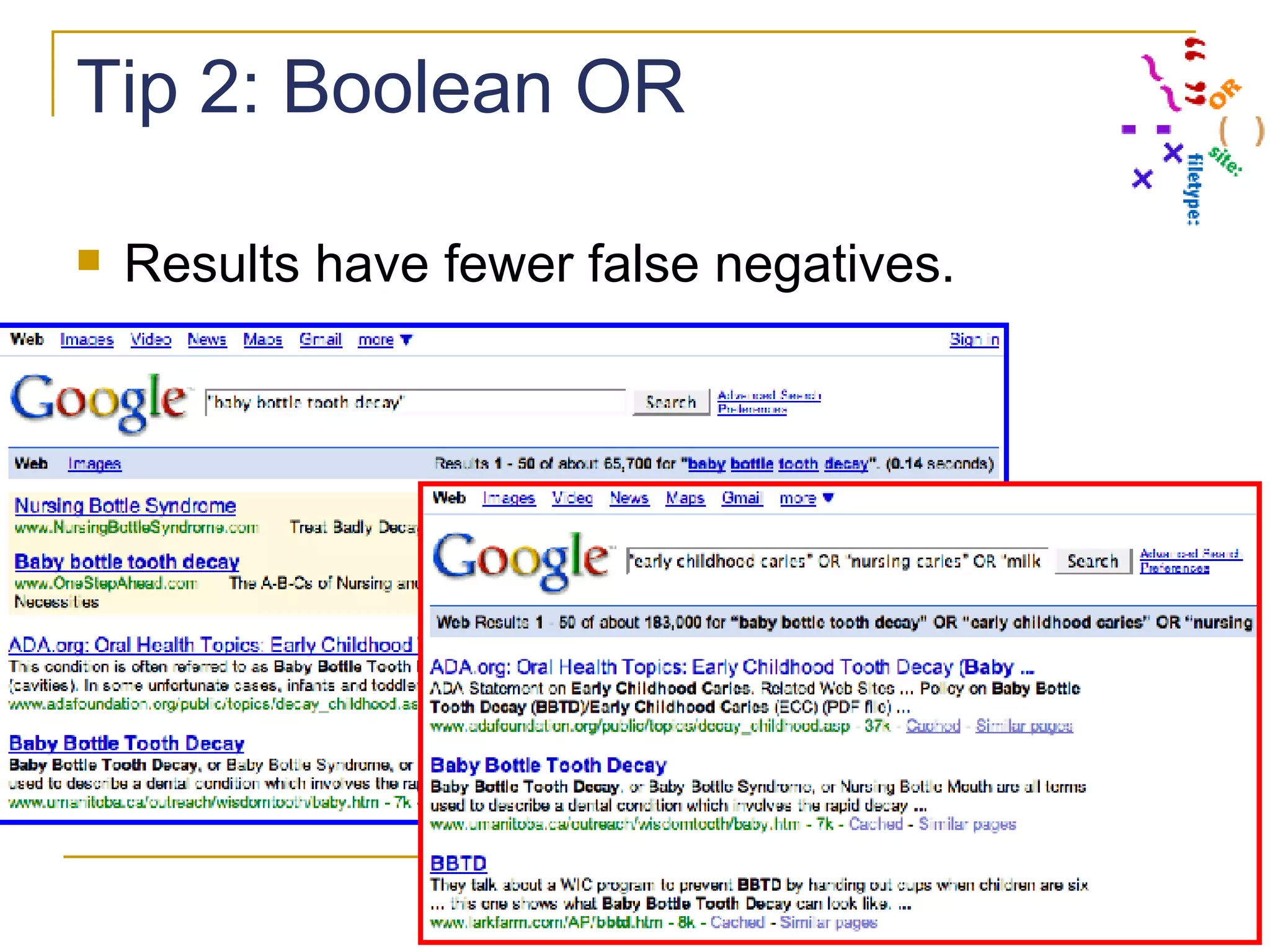
Tip 2: Boolean OR  Results have fewer false negatives.
Tip 3: Concept group searching with parentheses Useful to group terms that should be processed together, at the same time and in the same way in the search, but which you want to combine with another concept or term.   Question: Do sports drinks erode the teeth? Concept 1 = “sports drinks” Concept 2 = “teeth” Concept 3 = “erosion”
Tip 3: Concept group searching with parentheses Note:  This is most useful with complex questions, questions with many separate concepts, for which initial simple searches provide erratic quality results. EXAMPLE: Question: Do sports drinks erode the teeth? Concept 1 Terms = "sports drinks" OR gatorade OR "isotonic solutions" Concept 2 Terms = dental OR dentistry OR tooth OR teeth Concept 3 = erode OR erosion OR erosive OR "tooth wear” OR caries
Tip 3: Concept group searching with parentheses Question: Do sports drinks erode the teeth? Concept 1 Terms = "sports drinks" OR gatorade OR "isotonic solutions" Concept 2 Terms = dental OR dentistry OR tooth OR teeth Concept 3 = erode OR erosion OR erosive OR "tooth wear” OR caries Can you put all those terms on one line like this? "sports drinks" OR gatorade OR "isotonic solutions" dental OR dentistry OR tooth OR teeth erode OR erosion OR erosive OR "tooth wear” OR caries NO!!! There are three different ideas here. If you try this, you will get strange (& probably useless) results because Google won’t be able to tell them apart. Can you search each group separately, and then tell Google to mix and match the results of the 3 searches? I wish, but not yet.
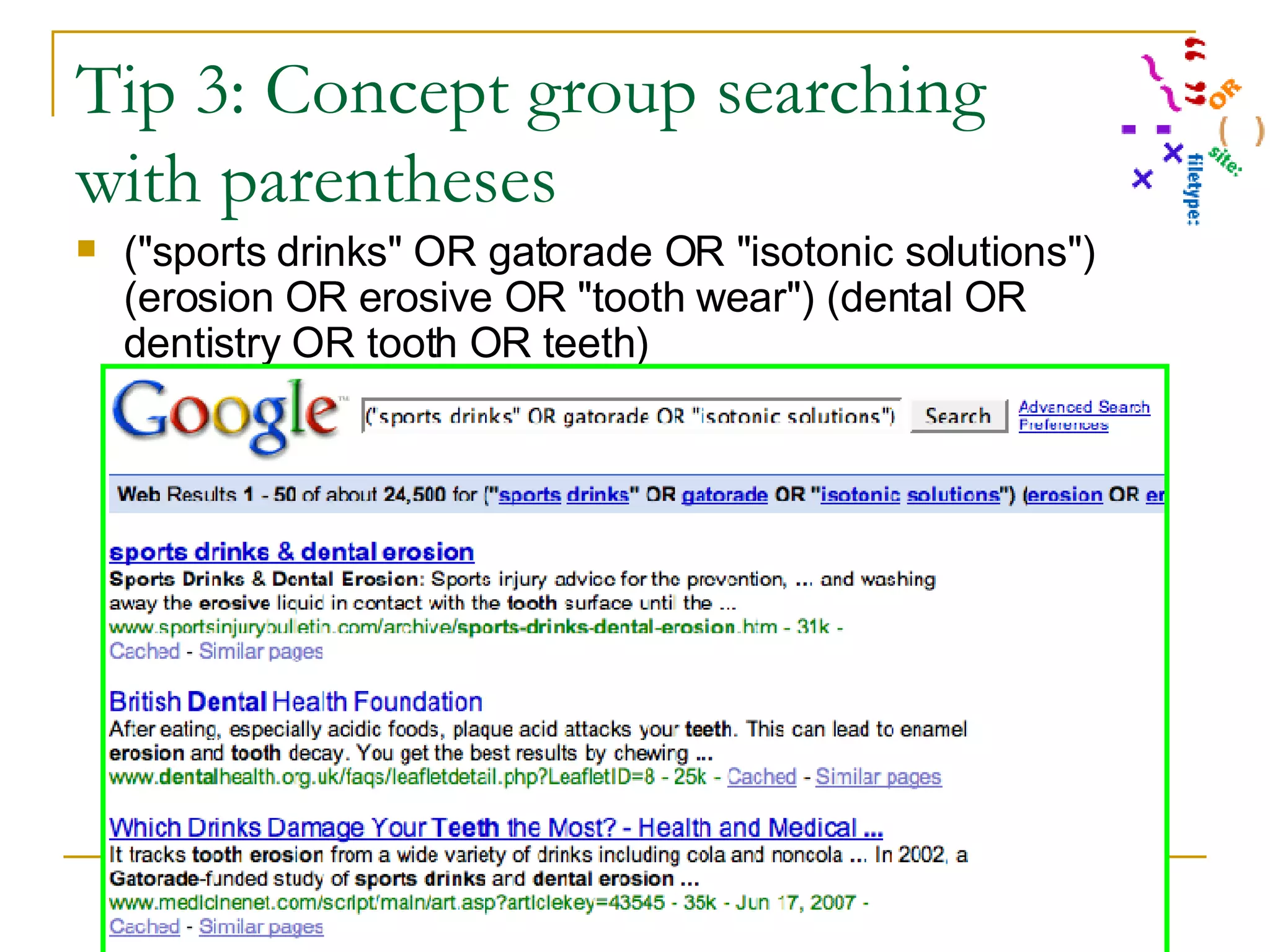
Tip 3: Concept group searching with parentheses So what can you do? This -- collect each group of terms by placing parentheses around them to show the beginning and end of a single concept group. Question: Do sports drinks erode the teeth? Concept 1 Terms = ("sports drinks" OR gatorade OR "isotonic solutions”) Concept 2 Terms = (dental OR dentistry OR tooth OR teeth) Concept 3 = (erode OR erosion OR erosive OR "tooth wear” OR caries) Becomes this: ("sports drinks" OR gatorade OR "isotonic solutions") (erosion OR erosive OR "tooth wear") (dental OR dentistry OR tooth OR teeth)
Tip 3: Concept group searching with parentheses ("sports drinks" OR gatorade OR "isotonic solutions") (erosion OR erosive OR "tooth wear") (dental OR dentistry OR tooth OR teeth)
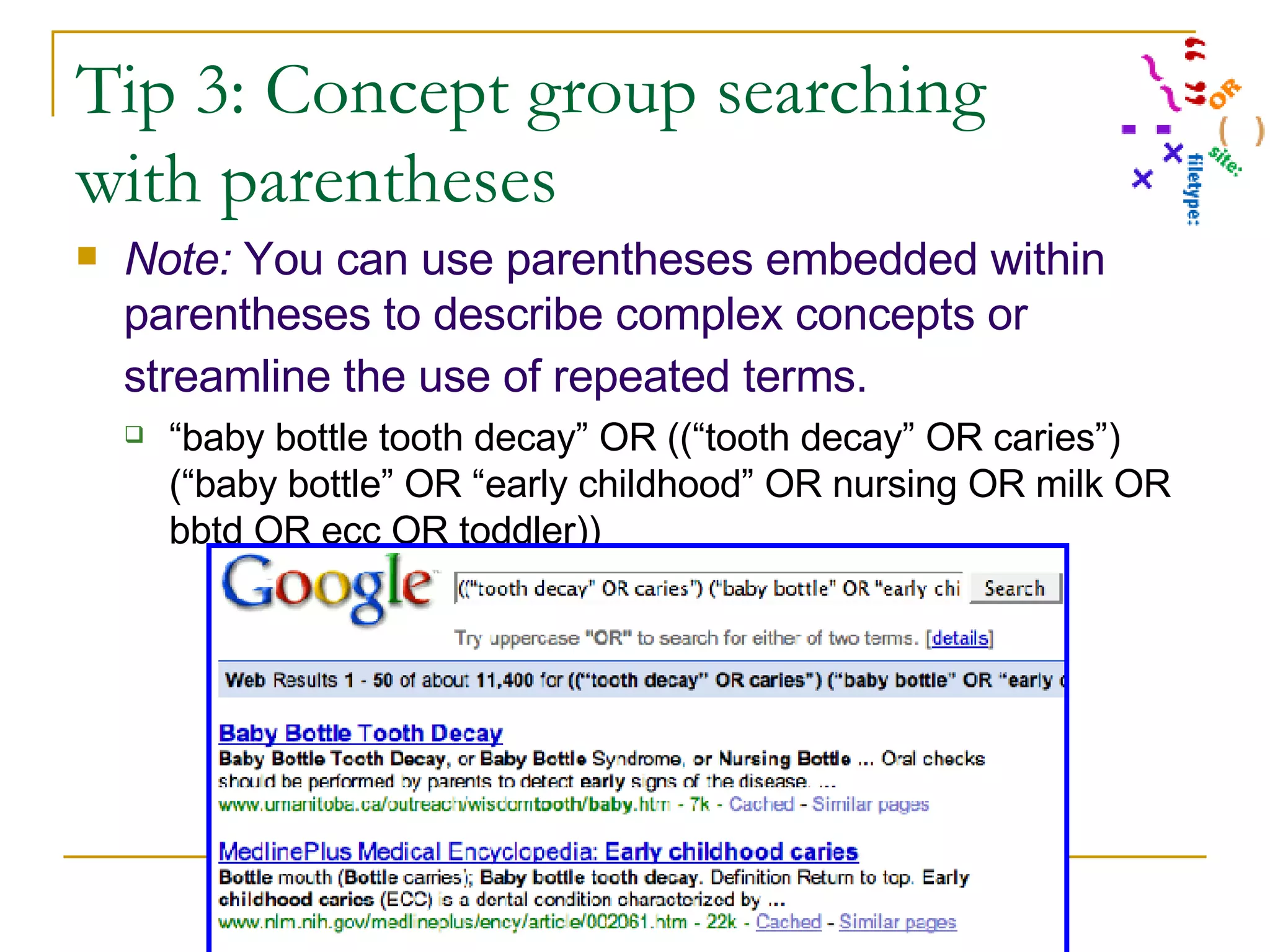
Tip 3: Concept group searching with parentheses Note:  You can use parentheses embedded within parentheses to describe complex concepts or streamline the use of repeated terms.   “ baby bottle tooth decay” OR ((“tooth decay” OR caries”) (“baby bottle” OR “early childhood” OR nursing OR milk OR bbtd OR ecc OR toddler))
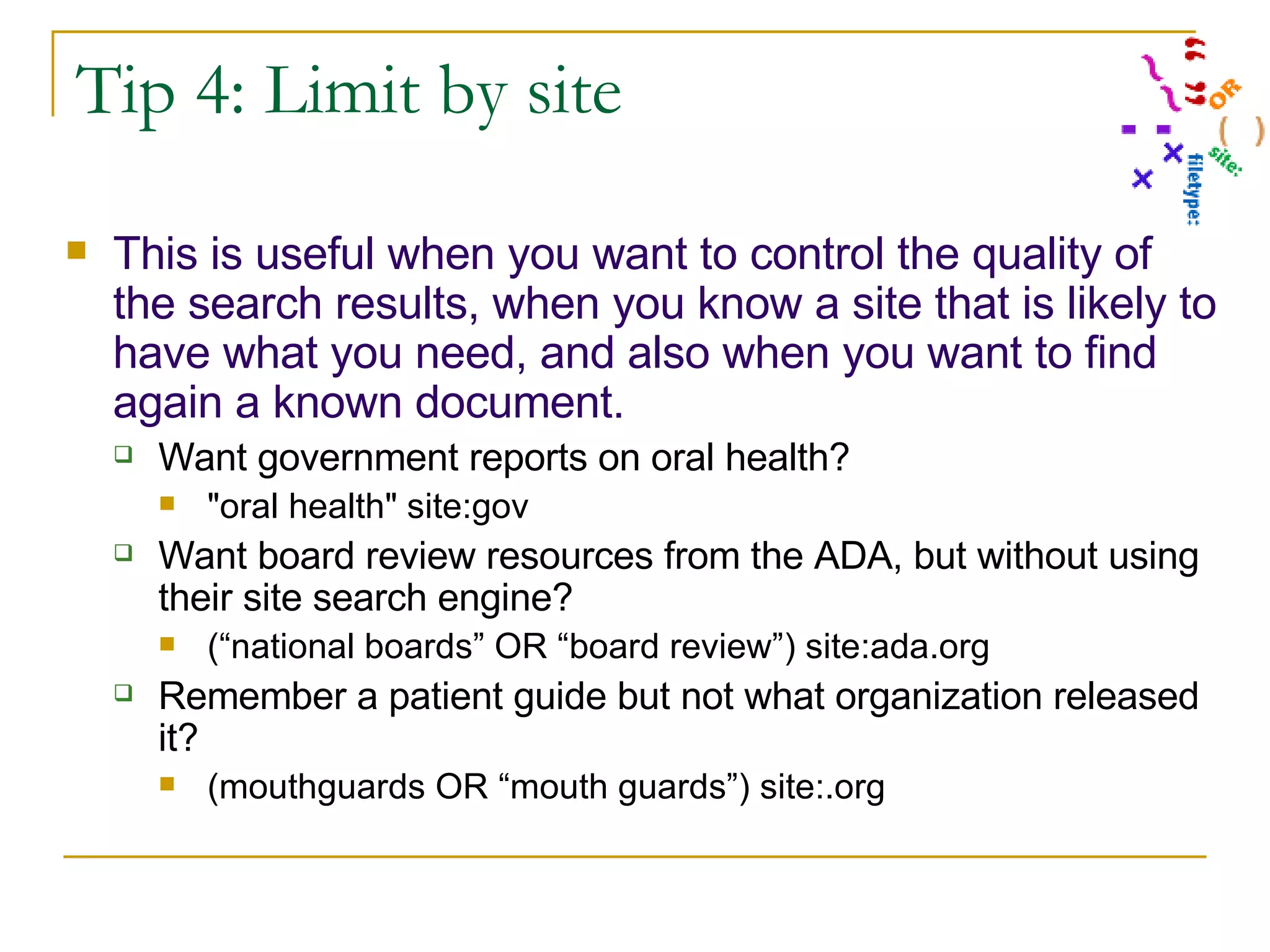
Tip 4: Limit by site This is useful when you want to control the quality of the search results, when you know a site that is likely to have what you need, and also when you want to find again a known document. Want government reports on oral health? "oral health" site:gov Want board review resources from the ADA, but without using their site search engine? (“national boards” OR “board review”) site:ada.org Remember a patient guide but not what organization released it? (mouthguards OR “mouth guards”) site:.org
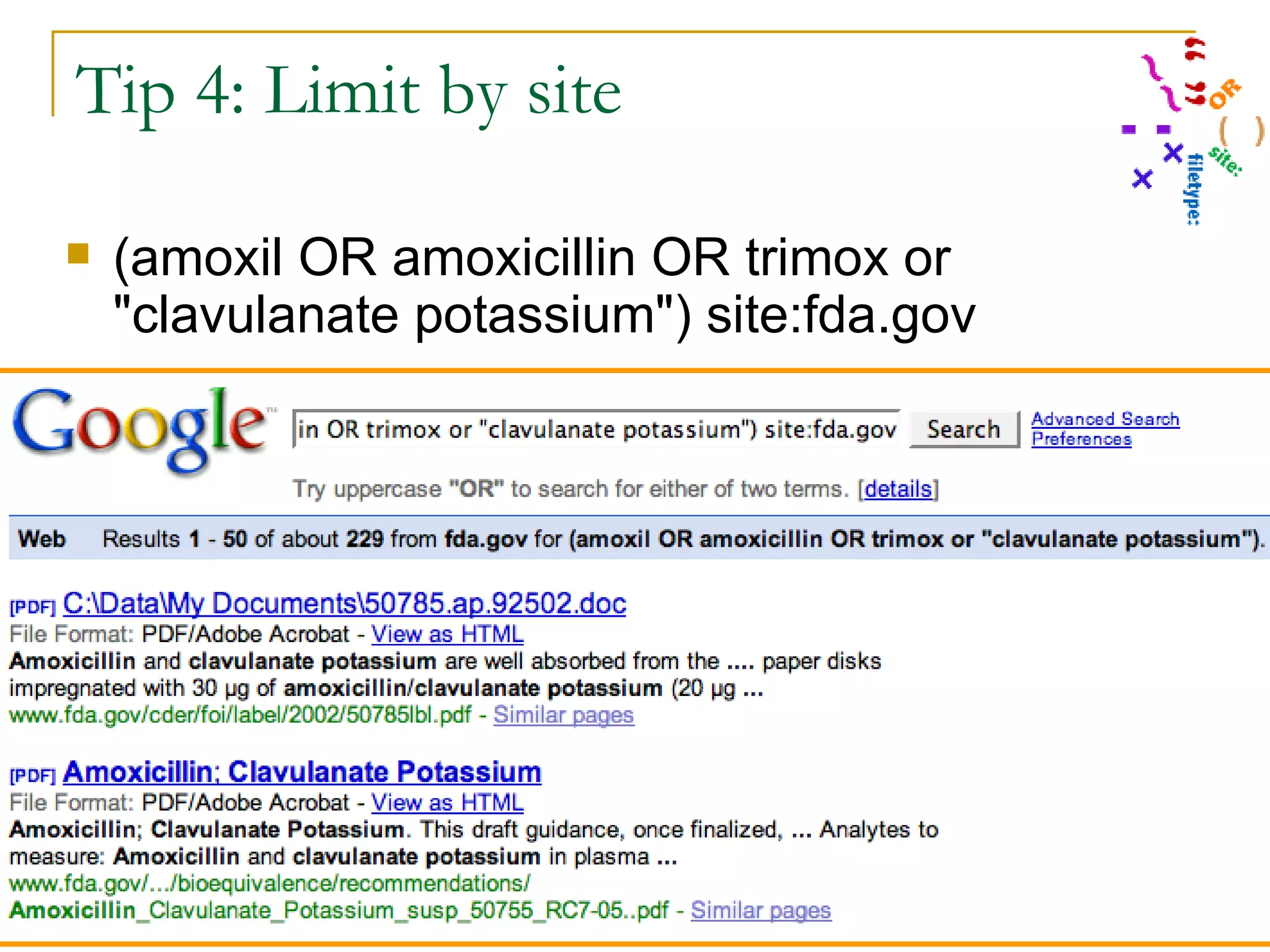
Tip 4: Limit by site (amoxil OR amoxicillin OR trimox or "clavulanate potassium") site:fda.gov
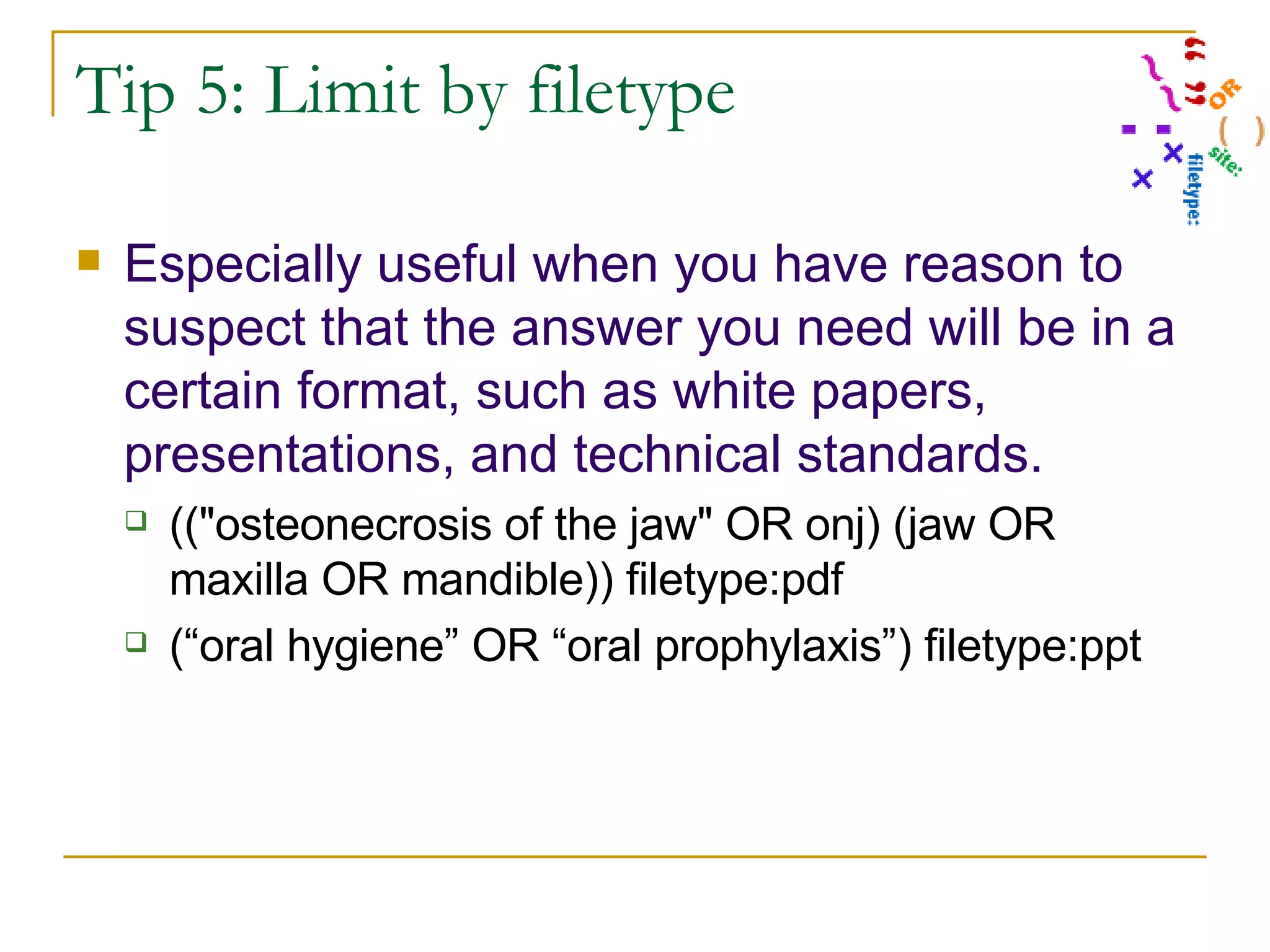
Tip 5: Limit by filetype Especially useful when you have reason to suspect that the answer you need will be in a certain format, such as white papers, presentations, and technical standards.  (("osteonecrosis of the jaw" OR onj) (jaw OR maxilla OR mandible)) filetype:pdf (“oral hygiene” OR “oral prophylaxis”) filetype:ppt
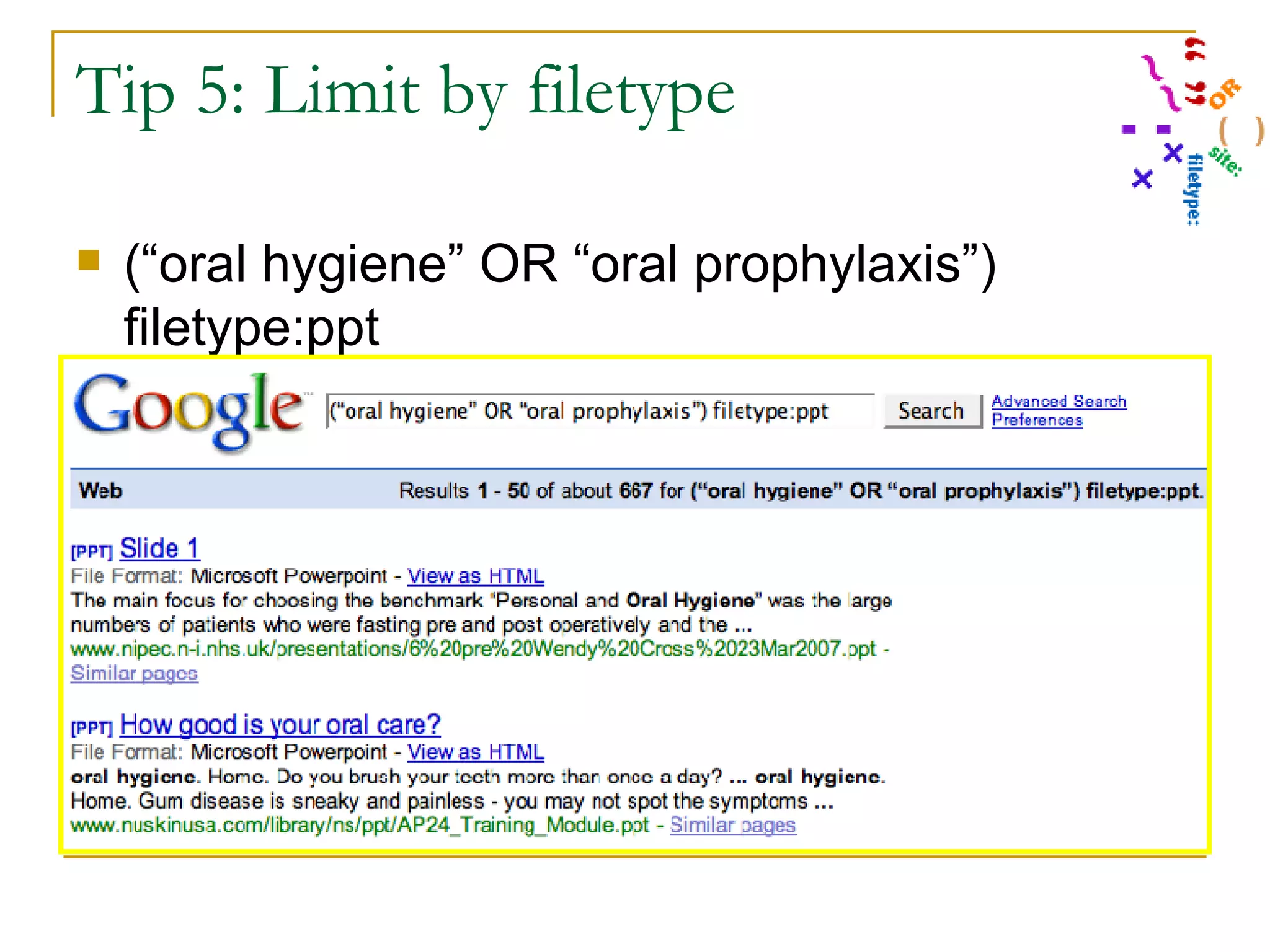
Tip 5: Limit by filetype (“oral hygiene” OR “oral prophylaxis”) filetype:ppt
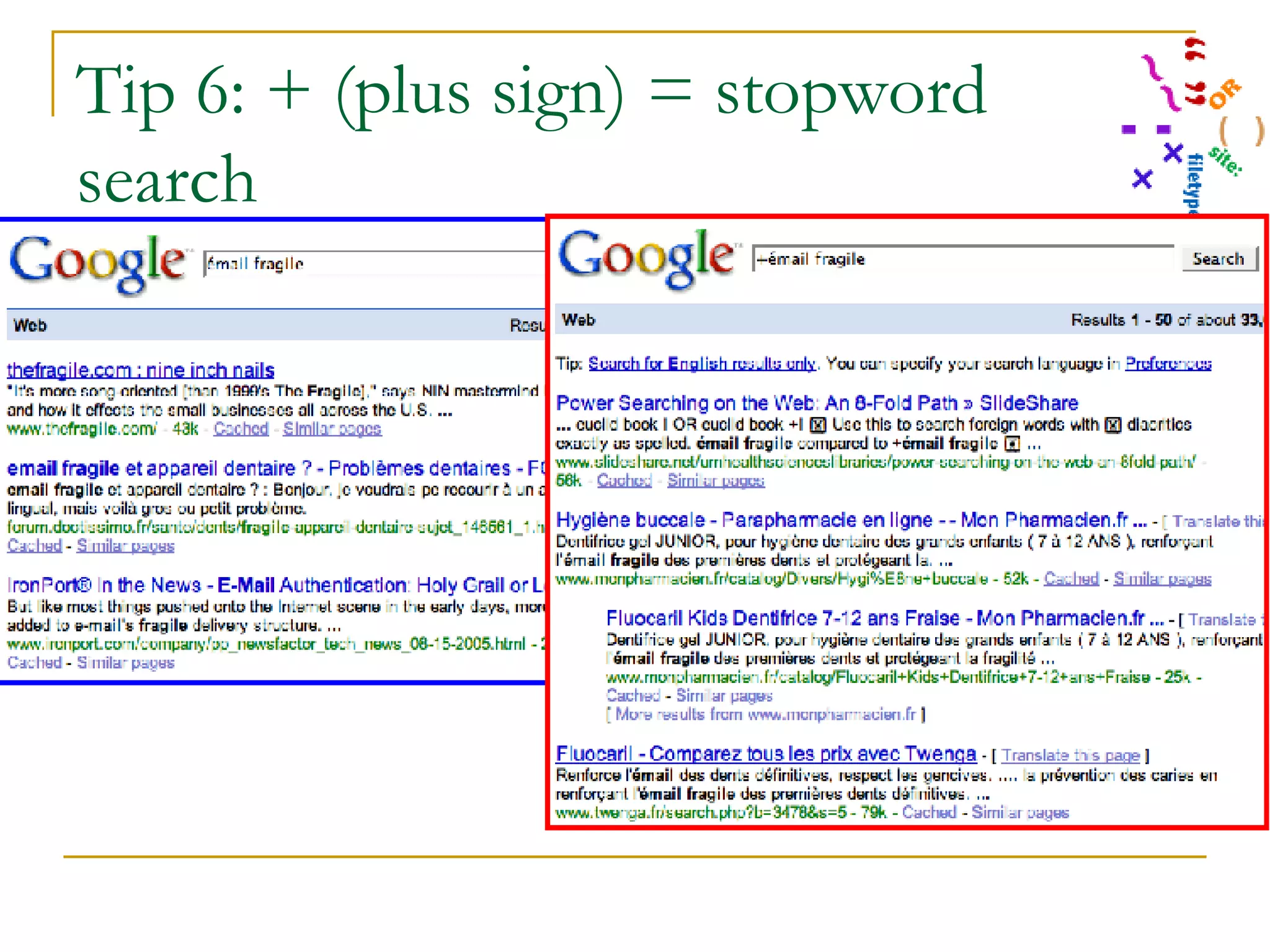
Tip 6: + (plus sign) = stopword search Use the  plus sign  to force the inclusion of stop words. Angle class +I malocclusion Use this to search foreign words with diacritics exactly as spelled. É mail fragile compared to +émail fragile
Tip 6: + (plus sign) = stopword search Émail fragile compared to +émail fragile (phrase means “fragile enamel” in French)
Tip 7: - (minus sign) Use the  minus sign  to exclude terms from results when there is a clustering of irrelevant results. This is most useful when you are new to searching a topic. tongue cancer -xxx -porn -pornography -paid craniofacial support -teens -youth -parents -child find dentist -site:.com
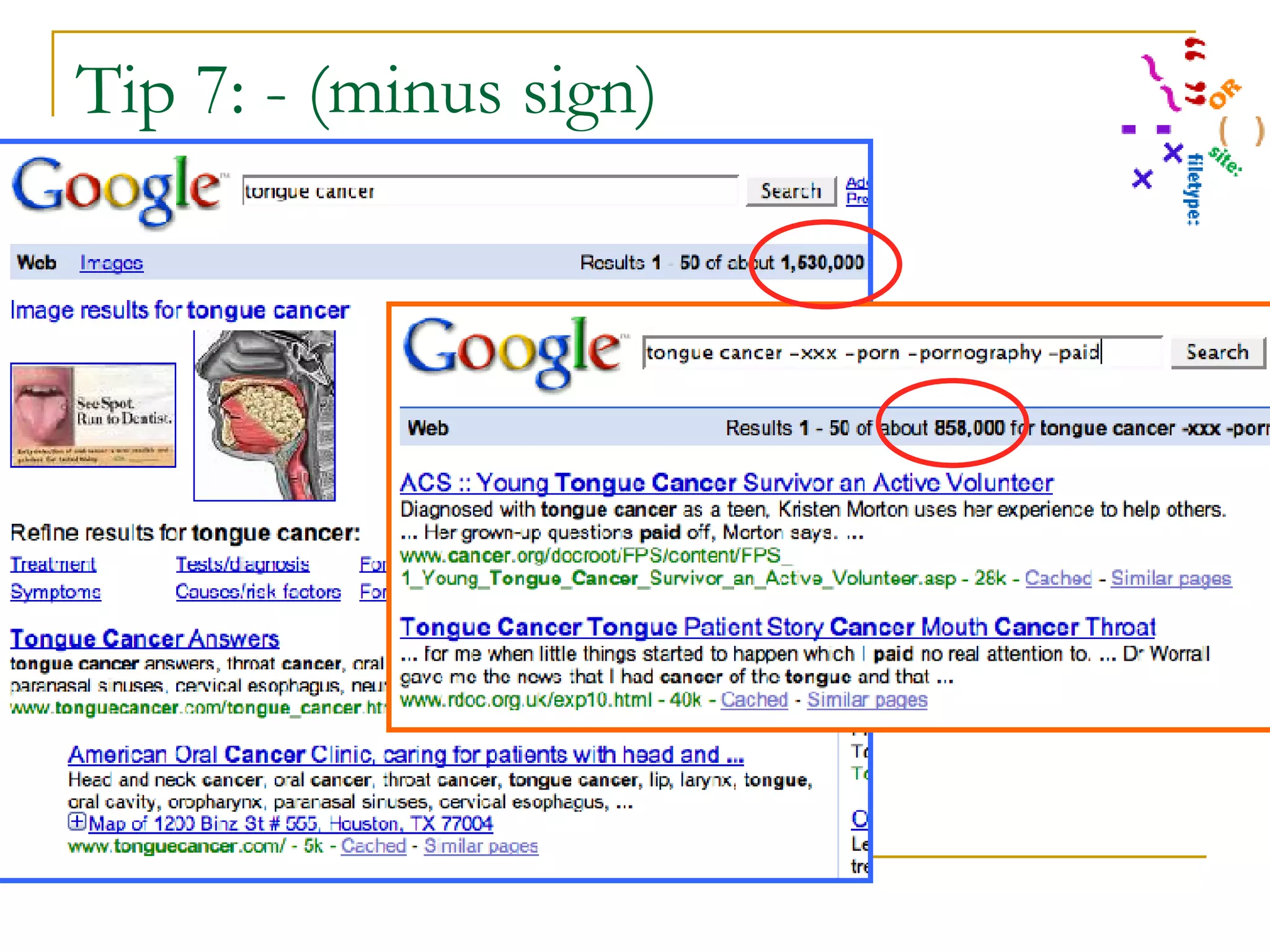
Tip 7: - (minus sign)  Demo of effectiveness of quick and dirty porn filter: tongue cancer -xxx -porn -pornography Results without filter = 1,530,000; with filter = 858,000
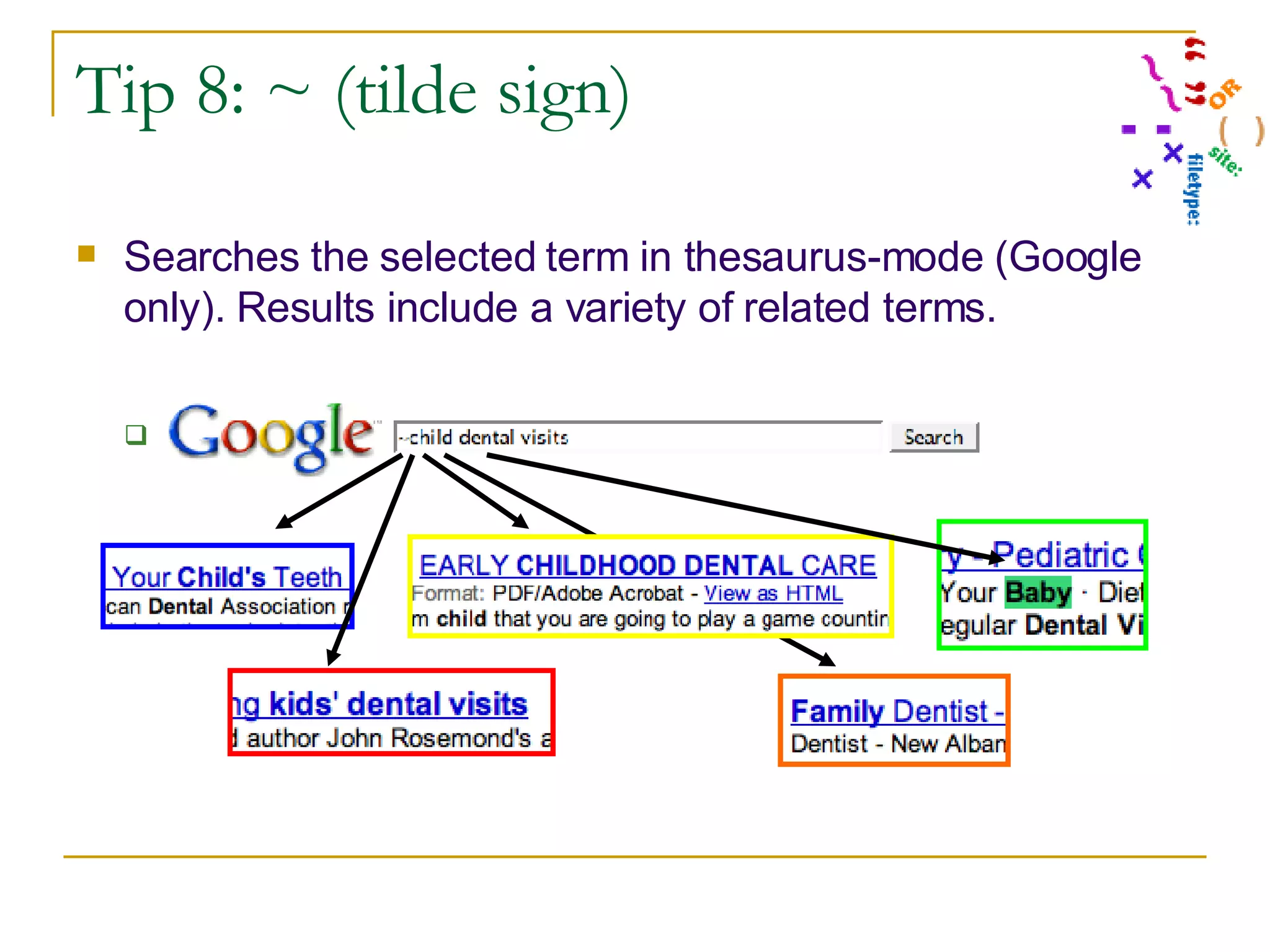
Tip 8: ~ (tilde sign) Searches the selected term in thesaurus-mode (Google only). Results include a variety of related terms. ~child dental visits
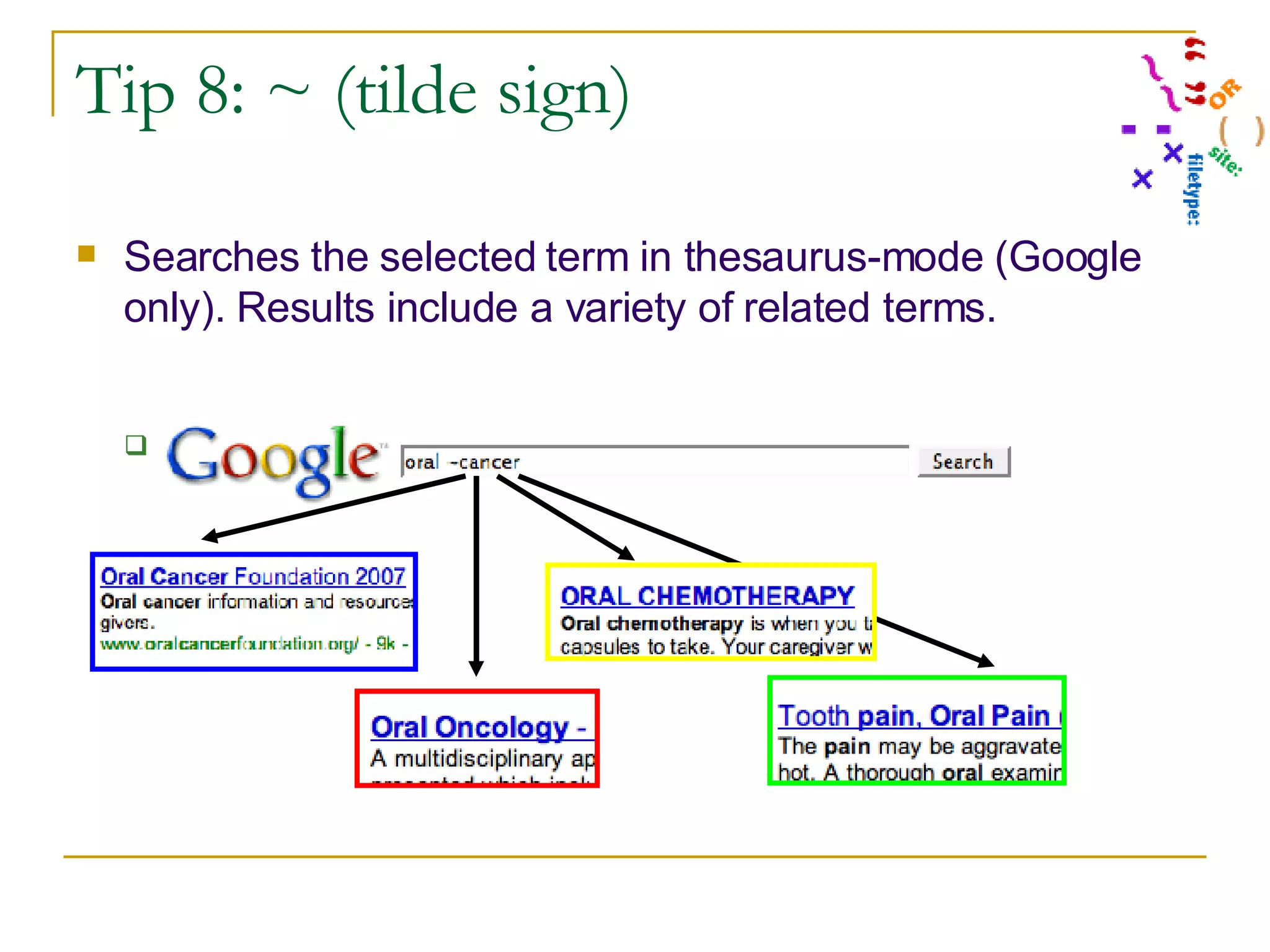
Tip 8: ~ (tilde sign) Searches the selected term in thesaurus-mode (Google only). Results include a variety of related terms. cancer survivor  or  ~cancer survivor
More Search Strategy Tips Compare results from multiple search engines Use advanced search features Use concept and term suggestions Use reviewed search results/links Use special search engine features

The 8-Fold Path to Web Searching Power

  • 1.
    The 8-fold Pathto Web Searching Power* Patricia F. Anderson June 20, 2007 [email_address] http://www.umich.edu/~pfa/pro/8fold/ © 2007 Regents of the University of Michigan. All rights reserved. * more of what you want, less of what you don’t
  • 2.
    Power Searching onthe Web: Tips Quotation marks OR Parentheses Limit by site Limit by filetype + (plus sign) - (minus sign) ~ (tilde sign)
  • 3.
    Power Searching onthe Web: Tips Quotation marks = Phrase searching OR = Concept groupings Parentheses = Multiple concept groups Limit by site Limit by filetype + (plus sign) = Stopword searching - (minus sign) = Exclude ~ (tilde sign) = Thesaurus or synonym searching
  • 4.
    Tip 1: Quotationmarks for Phrase Searching This is most useful when the words to be searched are not very specific, have different meanings in various subject areas, when having the words adjacent to each other changes the meaning, or when it is important that the same word is repeated. “ baby bottle tooth decay” “ curve of monson” “ head and neck cancers”
  • 5.
    Tip 1: PhraseSearching Results have fewer false positives.
  • 6.
    Tip 2: ORUse this when you want any of the terms, not all of the terms. Be sure to capitalize the word “or” so Google does not ignore it. “ baby bottle tooth decay” OR “early childhood caries” OR “nursing caries” OR “milk caries” OR bbtd Child OR children OR youth OR teen OR kids
  • 7.
    Tip 2: BooleanOR Results have fewer false negatives.
  • 8.
    Tip 3: Conceptgroup searching with parentheses Useful to group terms that should be processed together, at the same time and in the same way in the search, but which you want to combine with another concept or term. Question: Do sports drinks erode the teeth? Concept 1 = “sports drinks” Concept 2 = “teeth” Concept 3 = “erosion”
  • 9.
    Tip 3: Conceptgroup searching with parentheses Note: This is most useful with complex questions, questions with many separate concepts, for which initial simple searches provide erratic quality results. EXAMPLE: Question: Do sports drinks erode the teeth? Concept 1 Terms = "sports drinks" OR gatorade OR "isotonic solutions" Concept 2 Terms = dental OR dentistry OR tooth OR teeth Concept 3 = erode OR erosion OR erosive OR "tooth wear” OR caries
  • 10.
    Tip 3: Conceptgroup searching with parentheses Question: Do sports drinks erode the teeth? Concept 1 Terms = "sports drinks" OR gatorade OR "isotonic solutions" Concept 2 Terms = dental OR dentistry OR tooth OR teeth Concept 3 = erode OR erosion OR erosive OR "tooth wear” OR caries Can you put all those terms on one line like this? "sports drinks" OR gatorade OR "isotonic solutions" dental OR dentistry OR tooth OR teeth erode OR erosion OR erosive OR "tooth wear” OR caries NO!!! There are three different ideas here. If you try this, you will get strange (& probably useless) results because Google won’t be able to tell them apart. Can you search each group separately, and then tell Google to mix and match the results of the 3 searches? I wish, but not yet.
  • 11.
    Tip 3: Conceptgroup searching with parentheses So what can you do? This -- collect each group of terms by placing parentheses around them to show the beginning and end of a single concept group. Question: Do sports drinks erode the teeth? Concept 1 Terms = ("sports drinks" OR gatorade OR "isotonic solutions”) Concept 2 Terms = (dental OR dentistry OR tooth OR teeth) Concept 3 = (erode OR erosion OR erosive OR "tooth wear” OR caries) Becomes this: ("sports drinks" OR gatorade OR "isotonic solutions") (erosion OR erosive OR "tooth wear") (dental OR dentistry OR tooth OR teeth)
  • 12.
    Tip 3: Conceptgroup searching with parentheses ("sports drinks" OR gatorade OR "isotonic solutions") (erosion OR erosive OR "tooth wear") (dental OR dentistry OR tooth OR teeth)
  • 13.
    Tip 3: Conceptgroup searching with parentheses Note: You can use parentheses embedded within parentheses to describe complex concepts or streamline the use of repeated terms. “ baby bottle tooth decay” OR ((“tooth decay” OR caries”) (“baby bottle” OR “early childhood” OR nursing OR milk OR bbtd OR ecc OR toddler))
  • 14.
    Tip 4: Limitby site This is useful when you want to control the quality of the search results, when you know a site that is likely to have what you need, and also when you want to find again a known document. Want government reports on oral health? "oral health" site:gov Want board review resources from the ADA, but without using their site search engine? (“national boards” OR “board review”) site:ada.org Remember a patient guide but not what organization released it? (mouthguards OR “mouth guards”) site:.org
  • 15.
    Tip 4: Limitby site (amoxil OR amoxicillin OR trimox or "clavulanate potassium") site:fda.gov
  • 16.
    Tip 5: Limitby filetype Especially useful when you have reason to suspect that the answer you need will be in a certain format, such as white papers, presentations, and technical standards. (("osteonecrosis of the jaw" OR onj) (jaw OR maxilla OR mandible)) filetype:pdf (“oral hygiene” OR “oral prophylaxis”) filetype:ppt
  • 17.
    Tip 5: Limitby filetype (“oral hygiene” OR “oral prophylaxis”) filetype:ppt
  • 18.
    Tip 6: +(plus sign) = stopword search Use the plus sign to force the inclusion of stop words. Angle class +I malocclusion Use this to search foreign words with diacritics exactly as spelled. É mail fragile compared to +émail fragile
  • 19.
    Tip 6: +(plus sign) = stopword search Émail fragile compared to +émail fragile (phrase means “fragile enamel” in French)
  • 20.
    Tip 7: -(minus sign) Use the minus sign to exclude terms from results when there is a clustering of irrelevant results. This is most useful when you are new to searching a topic. tongue cancer -xxx -porn -pornography -paid craniofacial support -teens -youth -parents -child find dentist -site:.com
  • 21.
    Tip 7: -(minus sign) Demo of effectiveness of quick and dirty porn filter: tongue cancer -xxx -porn -pornography Results without filter = 1,530,000; with filter = 858,000
  • 22.
    Tip 8: ~(tilde sign) Searches the selected term in thesaurus-mode (Google only). Results include a variety of related terms. ~child dental visits
  • 23.
    Tip 8: ~(tilde sign) Searches the selected term in thesaurus-mode (Google only). Results include a variety of related terms. cancer survivor or ~cancer survivor
  • 24.
    More Search StrategyTips Compare results from multiple search engines Use advanced search features Use concept and term suggestions Use reviewed search results/links Use special search engine features