






Mapping Mashups in SharePoint
          Designer
                               Tom Resing
                         Senior Software Engineer
                              MicroLink, LLC


 MicroLink LLC  8330 Boone Boulevard  Suite 300  Vienna, Virginia 22182  (703) 556-4440
                                www.MicroLinkLLC.com
Mapping Mashups in SharePoint Designer
Tom Resing

INTRODUCTION


                                         www.MicroLinkLLC.com
About Tom

 Microsoft Certified      12 Years of Technical
  Technology Specialist     Experience
  • MOSS Configuration      • Public Sector and
  • WSS Configuration         Private Sector
  • MOSS Application        • Web Focused
    Development
  • WSS Application
    Development


                                 www.MicroLinkLLC.com
About MicroLink

 Microsoft Gold Partner
  • Main Office in Vienna, Virginia
 Microsoft’s Federal Partner of the Year for 2007
 Microsoft’s DoD Partner of the Year for 2007
  and 2006


                                      www.MicroLinkLLC.com
Agenda

 Overview
 SharePoint Designer Techniques
 Demonstration of Mapping List Items


                                 www.MicroLinkLLC.com
OVERVIEW


           www.MicroLinkLLC.com
Mashups

a mashup is a
web application
that combines
data from more
than one source
into a single
integrated tool
                      www.MicroLinkLLC.com
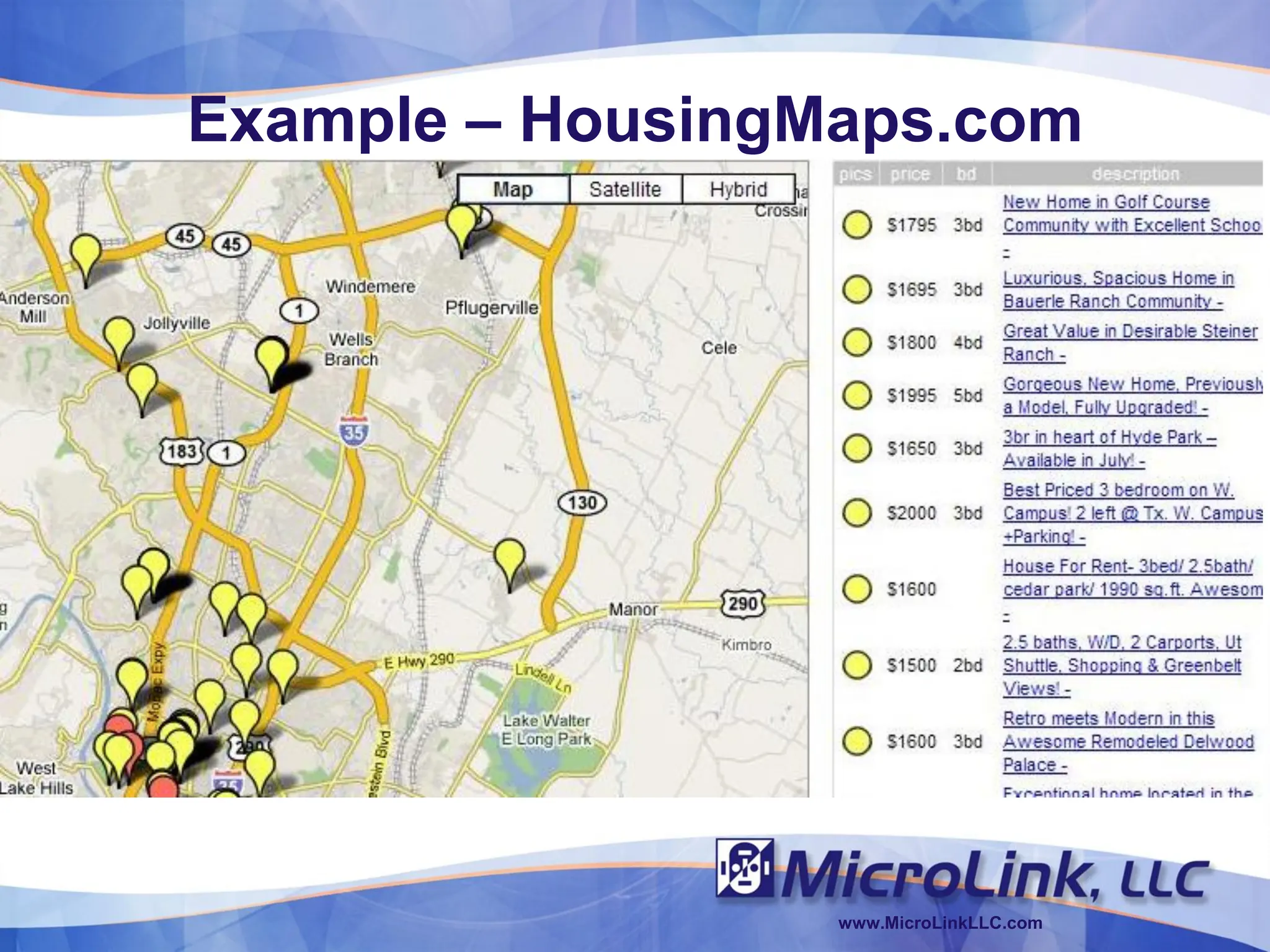
Example – HousingMaps.com


                  www.MicroLinkLLC.com
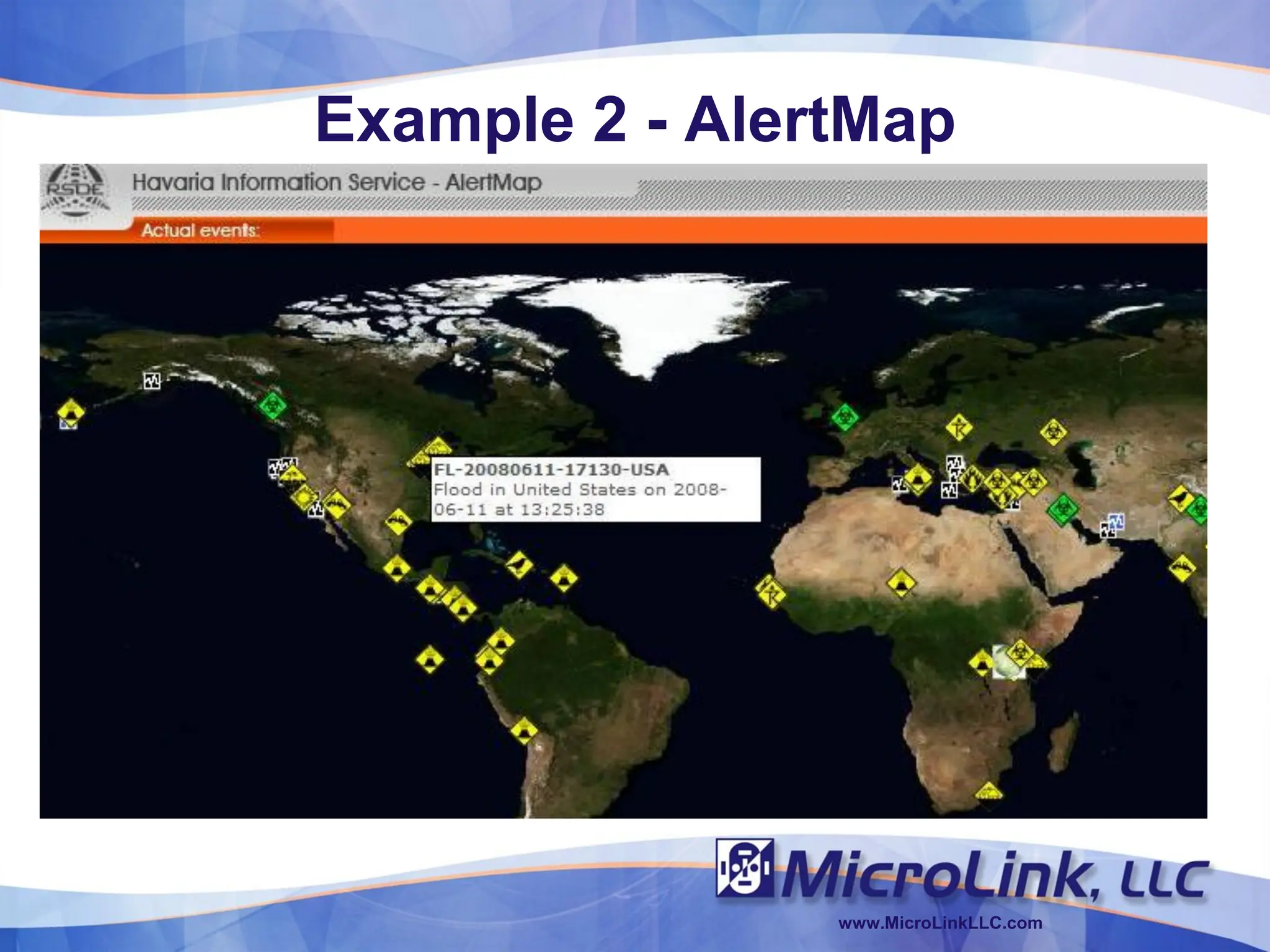
Example 2 - AlertMap


                www.MicroLinkLLC.com
Mashups and SharePoint
 Data View Web Part
  • Formats data from any data source for display in
    SharePoint
  • Lists on other SharePoint Sites, RSS Feeds, Web
    Services or even your own Database Servers
 Business Data Catalog
  • Allows for single sign-on access to data sources
  • More configuration required, but with that comes
    added flexibility
 Excel Services and Reporting Services

                                      www.MicroLinkLLC.com
SHAREPOINT DESIGNER
TECHNIQUES

                www.MicroLinkLLC.com
Why SharePoint Designer?

   Anyone can use it
   Rapid Prototyping
   Data View Web Part – Swiss Army Knife
   Reduces the Complexity of the Solution


                                  www.MicroLinkLLC.com
2 Keys to Designer Mashups

1. A web service
  • RSS Feeds – estimated at least 1.2 million in 2005
  • API – Microsoft, Google, Yahoo, Amazon, Ebay all
    provide Web Service APIs
2. The Data View Web Part
  • XSLT Processor
  • “Extensible Stylesheet Language Transformations
    (XSLT) is an XML-based language used for the
    transformation of XML documents into other XML or
    "human-readable" documents.” – Wikipedia.org


                                      www.MicroLinkLLC.com
Demo

 How to Integrate Virtual Earth Maps with a
  SharePoint List
  • http://blogs.msdn.com/sharepointdesigner/archive/20
    07/06/15/how-to-integrate-virtual-earth-maps-with-a-
    sharepoint-list.aspx


                                      www.MicroLinkLLC.com
DEMONSTRATION OF
MAPPING LIST ITEMS

                 www.MicroLinkLLC.com
Google Maps API

 Key Required
  • http://code.google.com/apis/maps/


                                        www.MicroLinkLLC.com
Demo 2


         www.MicroLinkLLC.com
Offline Mapping

 Google Earth Enterprise
  • 2D and 3D mapping inside the firewall
  • Good solution for limited connectivity or confidential
    information
 VEXCEL Virtual Earth Appliance
  • More recent competitive offering from a Microsoft
    Subsidiary
  • http://www.vexcel.com


                                        www.MicroLinkLLC.com
Questions

 Email me at microlinkblog@resing.net
 Twitter: @resing


 Tom Resing’s SharePoint Blog
  • http://blogs.microlinkllc.com/tresing


                                            www.MicroLinkLLC.com
Resources

 Tom Resing’s SharePoint Blog
  • http://blogs.microlinkllc.com/tresing
 Microsoft SharePoint Designer Team Blog
  • http://blogs.msdn.com/sharepointdesigner
 ProgrammableWeb Mapping Section
  • http://www.programmableweb.com/mapping
 Mike Williams' Google Maps API Tutorial
  • http://econym.googlepages.com/


                                            www.MicroLinkLLC.com
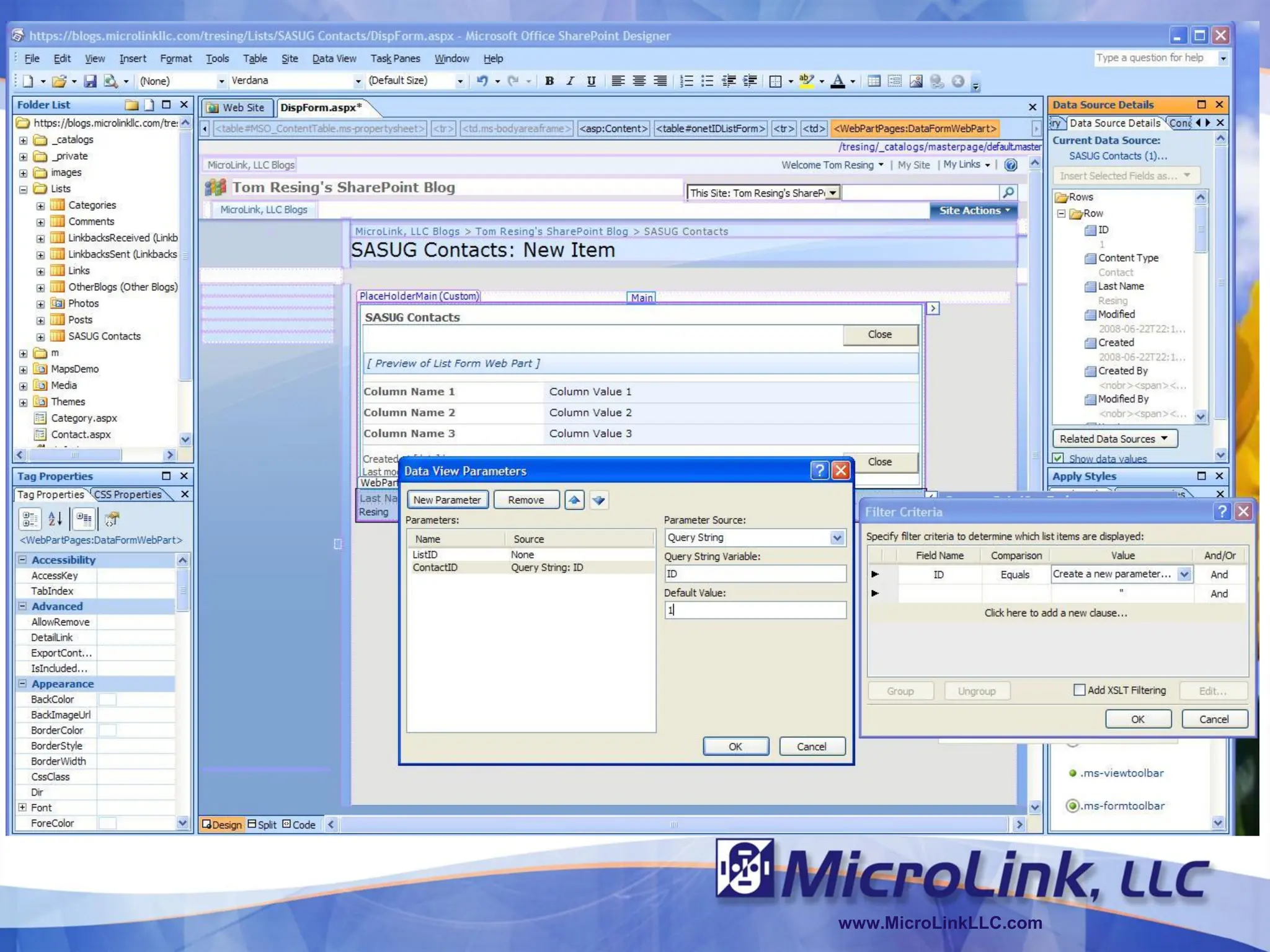
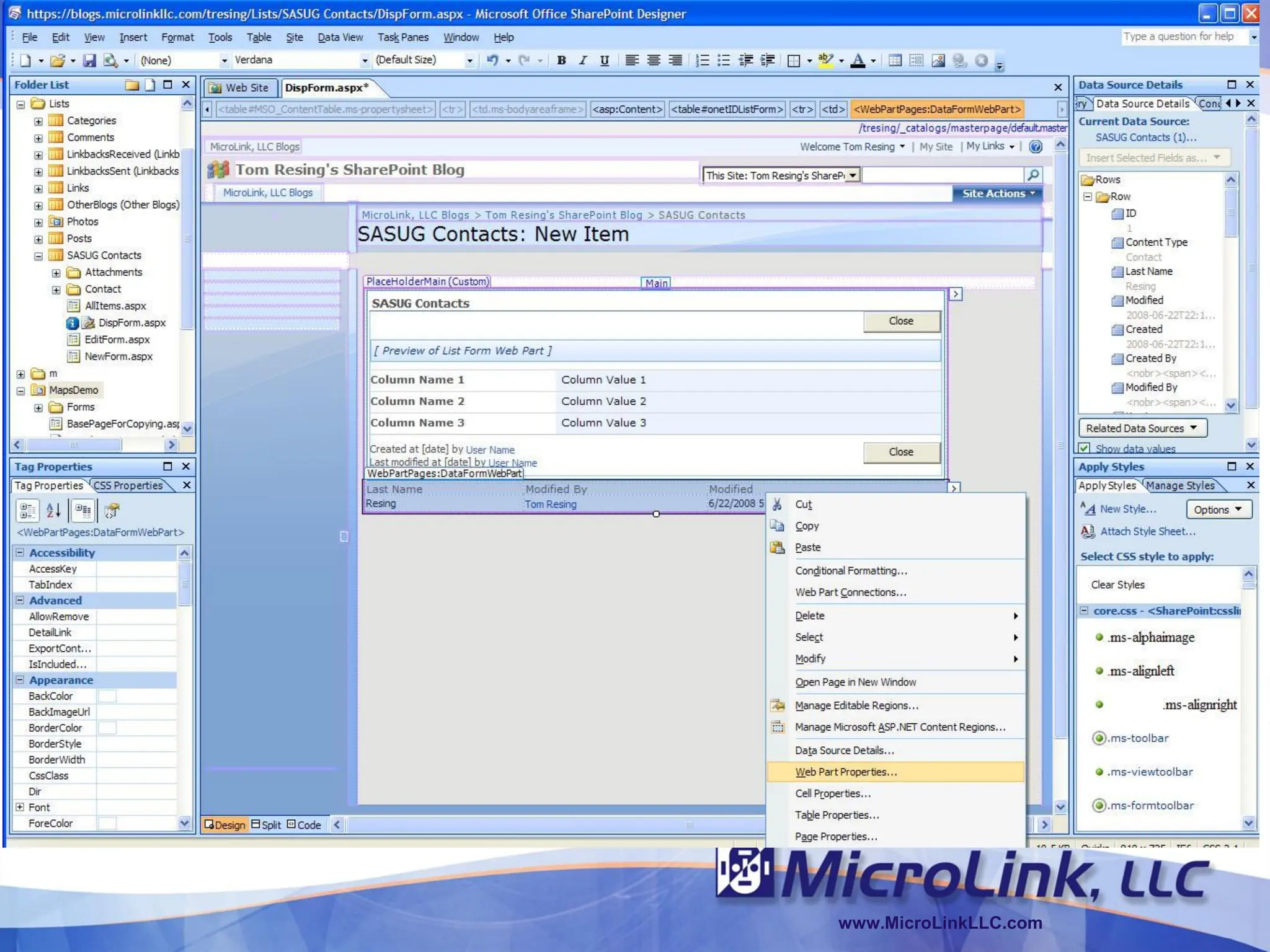
BACKUP SLIDES


                www.MicroLinkLLC.com
www.MicroLinkLLC.com

Mapping Mashups in SharePoint Designer

  • 1.
    Mapping Mashups inSharePoint Designer Tom Resing Senior Software Engineer MicroLink, LLC MicroLink LLC  8330 Boone Boulevard  Suite 300  Vienna, Virginia 22182  (703) 556-4440 www.MicroLinkLLC.com
  • 2.
    Mapping Mashups inSharePoint Designer Tom Resing INTRODUCTION www.MicroLinkLLC.com
  • 3.
    About Tom  MicrosoftCertified  12 Years of Technical Technology Specialist Experience • MOSS Configuration • Public Sector and • WSS Configuration Private Sector • MOSS Application • Web Focused Development • WSS Application Development www.MicroLinkLLC.com
  • 4.
    About MicroLink  MicrosoftGold Partner • Main Office in Vienna, Virginia  Microsoft’s Federal Partner of the Year for 2007  Microsoft’s DoD Partner of the Year for 2007 and 2006 www.MicroLinkLLC.com
  • 5.
    Agenda  Overview  SharePointDesigner Techniques  Demonstration of Mapping List Items www.MicroLinkLLC.com
  • 6.
    OVERVIEW www.MicroLinkLLC.com
  • 7.
    Mashups a mashup isa web application that combines data from more than one source into a single integrated tool www.MicroLinkLLC.com
  • 8.
    Example – HousingMaps.com www.MicroLinkLLC.com
  • 9.
    Example 2 -AlertMap www.MicroLinkLLC.com
  • 10.
    Mashups and SharePoint Data View Web Part • Formats data from any data source for display in SharePoint • Lists on other SharePoint Sites, RSS Feeds, Web Services or even your own Database Servers  Business Data Catalog • Allows for single sign-on access to data sources • More configuration required, but with that comes added flexibility  Excel Services and Reporting Services www.MicroLinkLLC.com
  • 11.
    SHAREPOINT DESIGNER TECHNIQUES www.MicroLinkLLC.com
  • 12.
    Why SharePoint Designer?  Anyone can use it  Rapid Prototyping  Data View Web Part – Swiss Army Knife  Reduces the Complexity of the Solution www.MicroLinkLLC.com
  • 13.
    2 Keys toDesigner Mashups 1. A web service • RSS Feeds – estimated at least 1.2 million in 2005 • API – Microsoft, Google, Yahoo, Amazon, Ebay all provide Web Service APIs 2. The Data View Web Part • XSLT Processor • “Extensible Stylesheet Language Transformations (XSLT) is an XML-based language used for the transformation of XML documents into other XML or "human-readable" documents.” – Wikipedia.org www.MicroLinkLLC.com
  • 14.
    Demo  How toIntegrate Virtual Earth Maps with a SharePoint List • http://blogs.msdn.com/sharepointdesigner/archive/20 07/06/15/how-to-integrate-virtual-earth-maps-with-a- sharepoint-list.aspx www.MicroLinkLLC.com
  • 15.
    DEMONSTRATION OF MAPPING LISTITEMS www.MicroLinkLLC.com
  • 16.
    Google Maps API Key Required • http://code.google.com/apis/maps/ www.MicroLinkLLC.com
  • 17.
    Demo 2 www.MicroLinkLLC.com
  • 18.
    Offline Mapping  GoogleEarth Enterprise • 2D and 3D mapping inside the firewall • Good solution for limited connectivity or confidential information  VEXCEL Virtual Earth Appliance • More recent competitive offering from a Microsoft Subsidiary • http://www.vexcel.com www.MicroLinkLLC.com
  • 19.
    Questions  Email meat microlinkblog@resing.net  Twitter: @resing  Tom Resing’s SharePoint Blog • http://blogs.microlinkllc.com/tresing www.MicroLinkLLC.com
  • 20.
    Resources  Tom Resing’sSharePoint Blog • http://blogs.microlinkllc.com/tresing  Microsoft SharePoint Designer Team Blog • http://blogs.msdn.com/sharepointdesigner  ProgrammableWeb Mapping Section • http://www.programmableweb.com/mapping  Mike Williams' Google Maps API Tutorial • http://econym.googlepages.com/ www.MicroLinkLLC.com
  • 21.
    BACKUP SLIDES www.MicroLinkLLC.com
  • 22.
  • 23.