Download free for 30 days
Sign in
Upload
Language (EN)
Support
Business
Mobile
Social Media
Marketing
Technology
Art & Photos
Career
Design
Education
Presentations & Public Speaking
Government & Nonprofit
Healthcare
Internet
Law
Leadership & Management
Automotive
Engineering
Software
Recruiting & HR
Retail
Sales
Services
Science
Small Business & Entrepreneurship
Food
Environment
Economy & Finance
Data & Analytics
Investor Relations
Sports
Spiritual
News & Politics
Travel
Self Improvement
Real Estate
Entertainment & Humor
Health & Medicine
Devices & Hardware
Lifestyle
Change Language
Language
English
Español
Português
Français
Deutsche
Cancel
Save
Submit search
EN
Uploaded by
성일 한
21,772 views
챗봇 시작해보기
ABCD 의 11월 세미나 자료입니다. :)
Software
◦
Read more
60
Save
Share
Embed
Embed presentation
Download
Downloaded 334 times
1
/ 71
2
/ 71
3
/ 71
4
/ 71
5
/ 71
6
/ 71
7
/ 71
8
/ 71
9
/ 71
10
/ 71
11
/ 71
12
/ 71
13
/ 71
14
/ 71
15
/ 71
16
/ 71
17
/ 71
18
/ 71
19
/ 71
20
/ 71
21
/ 71
22
/ 71
23
/ 71
24
/ 71
25
/ 71
26
/ 71
27
/ 71
28
/ 71
29
/ 71
30
/ 71
31
/ 71
32
/ 71
33
/ 71
34
/ 71
35
/ 71
36
/ 71
37
/ 71
38
/ 71
39
/ 71
40
/ 71
41
/ 71
42
/ 71
43
/ 71
44
/ 71
45
/ 71
46
/ 71
47
/ 71
48
/ 71
49
/ 71
50
/ 71
51
/ 71
52
/ 71
53
/ 71
54
/ 71
55
/ 71
56
/ 71
57
/ 71
58
/ 71
59
/ 71
60
/ 71
61
/ 71
62
/ 71
63
/ 71
64
/ 71
65
/ 71
66
/ 71
67
/ 71
68
/ 71
69
/ 71
70
/ 71
71
/ 71
More Related Content
PDF
처음배우는 자바스크립트, 제이쿼리 #3
by
성일 한
PPTX
Slackbot with Python
by
Joong Hyeon Kim
PDF
처음배우는 자바스크립트, 제이쿼리 #4
by
성일 한
PDF
Python 으로 Slackbot 개발하기
by
성일 한
PDF
간단한 블로그를 만들며 Django 이해하기
by
Kyoung Up Jung
PDF
QnA Blog Using Django - 회원가임/로그인폼, Post, 글보기
by
Kwangyoun Jung
PDF
파이썬 플라스크로 배우는 웹프로그래밍 #3 (ABCD)
by
성일 한
PDF
Laravel 로 배우는 서버사이드 #2
by
성일 한
처음배우는 자바스크립트, 제이쿼리 #3
by
성일 한
Slackbot with Python
by
Joong Hyeon Kim
처음배우는 자바스크립트, 제이쿼리 #4
by
성일 한
Python 으로 Slackbot 개발하기
by
성일 한
간단한 블로그를 만들며 Django 이해하기
by
Kyoung Up Jung
QnA Blog Using Django - 회원가임/로그인폼, Post, 글보기
by
Kwangyoun Jung
파이썬 플라스크로 배우는 웹프로그래밍 #3 (ABCD)
by
성일 한
Laravel 로 배우는 서버사이드 #2
by
성일 한
What's hot
PDF
Django, 저는 이렇게 씁니다.
by
Kyoung Up Jung
PDF
처음배우는 자바스크립트, 제이쿼리 #1
by
성일 한
PPTX
휴봇-슬랙 OSX 설치
by
Juneyoung Oh
PDF
[커빙 아키텍쳐] 커빙은 어떻게 소셜 컨텐츠를 모아올까요?
by
Sang-ho Choi
PDF
슬랙에 귀여운 휴봇 하나 키워보자
by
명호 박
PDF
Django admin site 커스텀하여 적극적으로 활용하기
by
영우 박
PDF
Django를 Django답게, Django로 뉴스 사이트 만들기
by
Kyoung Up Jung
PDF
처음배우는 자바스크립트, 제이쿼리 #2
by
성일 한
PDF
테스트가 뭐예요?
by
Kyoung Up Jung
PDF
Django in Production
by
Hyun-woo Park
PDF
Laravel 로 배우는 서버사이드 #3
by
성일 한
PDF
Meteor2015 codelab
by
WebFrameworks
PPTX
플라스크 템플릿
by
Thomas Hyunsik Kim
PDF
Secrets of the JavaScript Ninja - Chapter 12. DOM modification
by
Hyuncheol Jeon
PDF
Node.js 심화과정
by
Seokyou (Kevin) Hong
PPSX
스프링시큐리티와 소셜연습 이해를 위한 글
by
라한사 아
PDF
진짜기초 Node.js
by
Woo Jin Kim
PDF
Vuejs 시작하기
by
성일 한
PDF
Clean Front-End Development
by
지수 윤
PPTX
Django View Part 1
by
Joong Hyeon Kim
Django, 저는 이렇게 씁니다.
by
Kyoung Up Jung
처음배우는 자바스크립트, 제이쿼리 #1
by
성일 한
휴봇-슬랙 OSX 설치
by
Juneyoung Oh
[커빙 아키텍쳐] 커빙은 어떻게 소셜 컨텐츠를 모아올까요?
by
Sang-ho Choi
슬랙에 귀여운 휴봇 하나 키워보자
by
명호 박
Django admin site 커스텀하여 적극적으로 활용하기
by
영우 박
Django를 Django답게, Django로 뉴스 사이트 만들기
by
Kyoung Up Jung
처음배우는 자바스크립트, 제이쿼리 #2
by
성일 한
테스트가 뭐예요?
by
Kyoung Up Jung
Django in Production
by
Hyun-woo Park
Laravel 로 배우는 서버사이드 #3
by
성일 한
Meteor2015 codelab
by
WebFrameworks
플라스크 템플릿
by
Thomas Hyunsik Kim
Secrets of the JavaScript Ninja - Chapter 12. DOM modification
by
Hyuncheol Jeon
Node.js 심화과정
by
Seokyou (Kevin) Hong
스프링시큐리티와 소셜연습 이해를 위한 글
by
라한사 아
진짜기초 Node.js
by
Woo Jin Kim
Vuejs 시작하기
by
성일 한
Clean Front-End Development
by
지수 윤
Django View Part 1
by
Joong Hyeon Kim
Viewers also liked
PDF
20170227 파이썬으로 챗봇_만들기
by
Kim Sungdong
PDF
챗봇 개발을 위한 네이버 랩스 api
by
NAVER D2
PDF
Developing Korean Chatbot 101
by
Jaemin Cho
PPTX
부동산 텔레그램봇 사내공유 @Tech
by
HoChul Shin
PDF
왓슨 컨버세이션으로 챗봇 만들기 ! WCS 활용법
by
HyeonJeong Jo
PPTX
한양대학교 스마트창작터 사업계획서_중고거래 구매대행 서비스 Buying_오세훈
by
세훈 오
PPTX
사업계획서 알음알음 포스코기술투자
by
Sangmo Kang
PDF
29th Meetup 실습 설명 및 실습 자료 링크
by
HyeonJeong Jo
PDF
[트래블챗] Ai기반 챗봇 커머스 플랫폼 사업계획서 20170213_f
by
Lee Hansub
20170227 파이썬으로 챗봇_만들기
by
Kim Sungdong
챗봇 개발을 위한 네이버 랩스 api
by
NAVER D2
Developing Korean Chatbot 101
by
Jaemin Cho
부동산 텔레그램봇 사내공유 @Tech
by
HoChul Shin
왓슨 컨버세이션으로 챗봇 만들기 ! WCS 활용법
by
HyeonJeong Jo
한양대학교 스마트창작터 사업계획서_중고거래 구매대행 서비스 Buying_오세훈
by
세훈 오
사업계획서 알음알음 포스코기술투자
by
Sangmo Kang
29th Meetup 실습 설명 및 실습 자료 링크
by
HyeonJeong Jo
[트래블챗] Ai기반 챗봇 커머스 플랫폼 사업계획서 20170213_f
by
Lee Hansub
Similar to 챗봇 시작해보기
PPTX
리스펙토링 세미나 - 나만의 카카오 챗봇 만들기
by
Wooyoung Ko
PDF
Hubot
by
Yongjae Choi
PDF
Dialogflow로 카카오톡 챗봇 만들기
by
deepseaswjh
PPTX
부동산 텔레그램 봇
by
HoChul Shin
PPTX
Linebot
by
SeongSik Choi
PDF
왕초보, 코딩없이 챗봇 만들기
by
deepseaswjh
PDF
채팅 소스부터 Https 주소까지
by
Kenu, GwangNam Heo
PDF
WebSocket 기반 쌍방향 메시징
by
trustinlee
PDF
Web Socket API
by
JeongHwan Jang
PDF
HTTPS를 이용한 챗봇 웹 어플리케이션
by
Lee Geonhee
PDF
NODE.JS 글로벌 기업 적용 사례 그리고, real-time 어플리케이션 개발하기
by
John Kim
PPTX
비영리 섹터를 위한 챗봇 발표
by
Hong Min Kim
PDF
루비온레일즈로 카카오톡 봇 만들기
by
Junghyun Park
PPTX
1인칭 관점에서 본 챗봇(Chotbot) 서비스
by
Seunghyeon Kim
PDF
[아이펀팩토리] 2018 데브데이 서버위더스 _01 HTML5/WebSocket으로 Pong 게임 만들기
by
iFunFactory Inc.
PDF
SKHUFEEDS 소개 발표자료(노트 포함)
by
Youngbin Han
PDF
막하는 스터디 첫 번째 만남 Node.js
by
연웅 조
PPTX
한양대학교 셔틀시스템 셔틀콕 개발기
by
Yunhwan Na
PDF
트위터 봇 개발 후기
by
종빈 오
PDF
Node.js intro
by
Chul Ju Hong
리스펙토링 세미나 - 나만의 카카오 챗봇 만들기
by
Wooyoung Ko
Hubot
by
Yongjae Choi
Dialogflow로 카카오톡 챗봇 만들기
by
deepseaswjh
부동산 텔레그램 봇
by
HoChul Shin
Linebot
by
SeongSik Choi
왕초보, 코딩없이 챗봇 만들기
by
deepseaswjh
채팅 소스부터 Https 주소까지
by
Kenu, GwangNam Heo
WebSocket 기반 쌍방향 메시징
by
trustinlee
Web Socket API
by
JeongHwan Jang
HTTPS를 이용한 챗봇 웹 어플리케이션
by
Lee Geonhee
NODE.JS 글로벌 기업 적용 사례 그리고, real-time 어플리케이션 개발하기
by
John Kim
비영리 섹터를 위한 챗봇 발표
by
Hong Min Kim
루비온레일즈로 카카오톡 봇 만들기
by
Junghyun Park
1인칭 관점에서 본 챗봇(Chotbot) 서비스
by
Seunghyeon Kim
[아이펀팩토리] 2018 데브데이 서버위더스 _01 HTML5/WebSocket으로 Pong 게임 만들기
by
iFunFactory Inc.
SKHUFEEDS 소개 발표자료(노트 포함)
by
Youngbin Han
막하는 스터디 첫 번째 만남 Node.js
by
연웅 조
한양대학교 셔틀시스템 셔틀콕 개발기
by
Yunhwan Na
트위터 봇 개발 후기
by
종빈 오
Node.js intro
by
Chul Ju Hong
More from 성일 한
PDF
Ionic으로 모바일앱 만들기 #4
by
성일 한
PDF
파이어베이스 스터디
by
성일 한
PDF
Electron 개발하기
by
성일 한
PPTX
2016 ABCD 소개
by
성일 한
PDF
Laravel 로 배우는 서버사이드 #5
by
성일 한
PDF
Laravel 로 배우는 서버사이드 #4
by
성일 한
PDF
Laravel 로 배우는 서버사이드 #1
by
성일 한
PDF
인플루언서 마케팅 (INFLUENCER MARKETING)
by
성일 한
PDF
Ionic으로 모바일앱 만들기 #5
by
성일 한
PDF
Ionic으로 모바일앱 만들기 #3
by
성일 한
PDF
Ionic으로 모바일앱 만들기 #2
by
성일 한
PDF
Ionic으로 모바일앱 만들기 #1
by
성일 한
PDF
CSS 선택자와 디버그
by
성일 한
PDF
워드프레스 기초 (ABCD) #2
by
성일 한
PDF
워드프레스 기초 (ABCD) #1
by
성일 한
PDF
파이썬 플라스크로 배우는 웹프로그래밍 #4 (ABCD)
by
성일 한
PDF
파이썬 플라스크로 배우는 웹프로그래밍 #2 (ABCD)
by
성일 한
PDF
파이썬 플라스크로 배우는 웹프로그래밍 #1 (ABCD Foundation)
by
성일 한
Ionic으로 모바일앱 만들기 #4
by
성일 한
파이어베이스 스터디
by
성일 한
Electron 개발하기
by
성일 한
2016 ABCD 소개
by
성일 한
Laravel 로 배우는 서버사이드 #5
by
성일 한
Laravel 로 배우는 서버사이드 #4
by
성일 한
Laravel 로 배우는 서버사이드 #1
by
성일 한
인플루언서 마케팅 (INFLUENCER MARKETING)
by
성일 한
Ionic으로 모바일앱 만들기 #5
by
성일 한
Ionic으로 모바일앱 만들기 #3
by
성일 한
Ionic으로 모바일앱 만들기 #2
by
성일 한
Ionic으로 모바일앱 만들기 #1
by
성일 한
CSS 선택자와 디버그
by
성일 한
워드프레스 기초 (ABCD) #2
by
성일 한
워드프레스 기초 (ABCD) #1
by
성일 한
파이썬 플라스크로 배우는 웹프로그래밍 #4 (ABCD)
by
성일 한
파이썬 플라스크로 배우는 웹프로그래밍 #2 (ABCD)
by
성일 한
파이썬 플라스크로 배우는 웹프로그래밍 #1 (ABCD Foundation)
by
성일 한
챗봇 시작해보기
1.
챗봇 시작해보기 파이썬과 노드로
만들어 보는 챗봇 (Slack, facebook..) ABCD, 한성일
2.
0. 챗봇이란?
3.
챗봇이란? 고객의 요청을 대신
응답해주는 채팅로봇 인공지능 빅데이터 자연어처리 프로그래밍 나이가 어떻게 되 시나요? 텍스트 음성 … 묻지 마세요.. 응답요청 Chatbot 머신러닝
4.
챗봇 예 심심이 페이스북
챗봇
5.
어디에 쓸까요? 가장 쉽게
떠오르는 곳은 콜 센터입니다.
6.
또 어디가 있을까요? 물건주문,
호텔예약, 비서…
7.
생각보다 간단할지 모릅니다.
8.
1. 챗봇 플로우
9.
챗봇 프레임웍 http://kitt.ai/ https://dev.botframework.com/
10.
챗봇 플랫폼 라인 슬렉 텔레그램
페이스북
11.
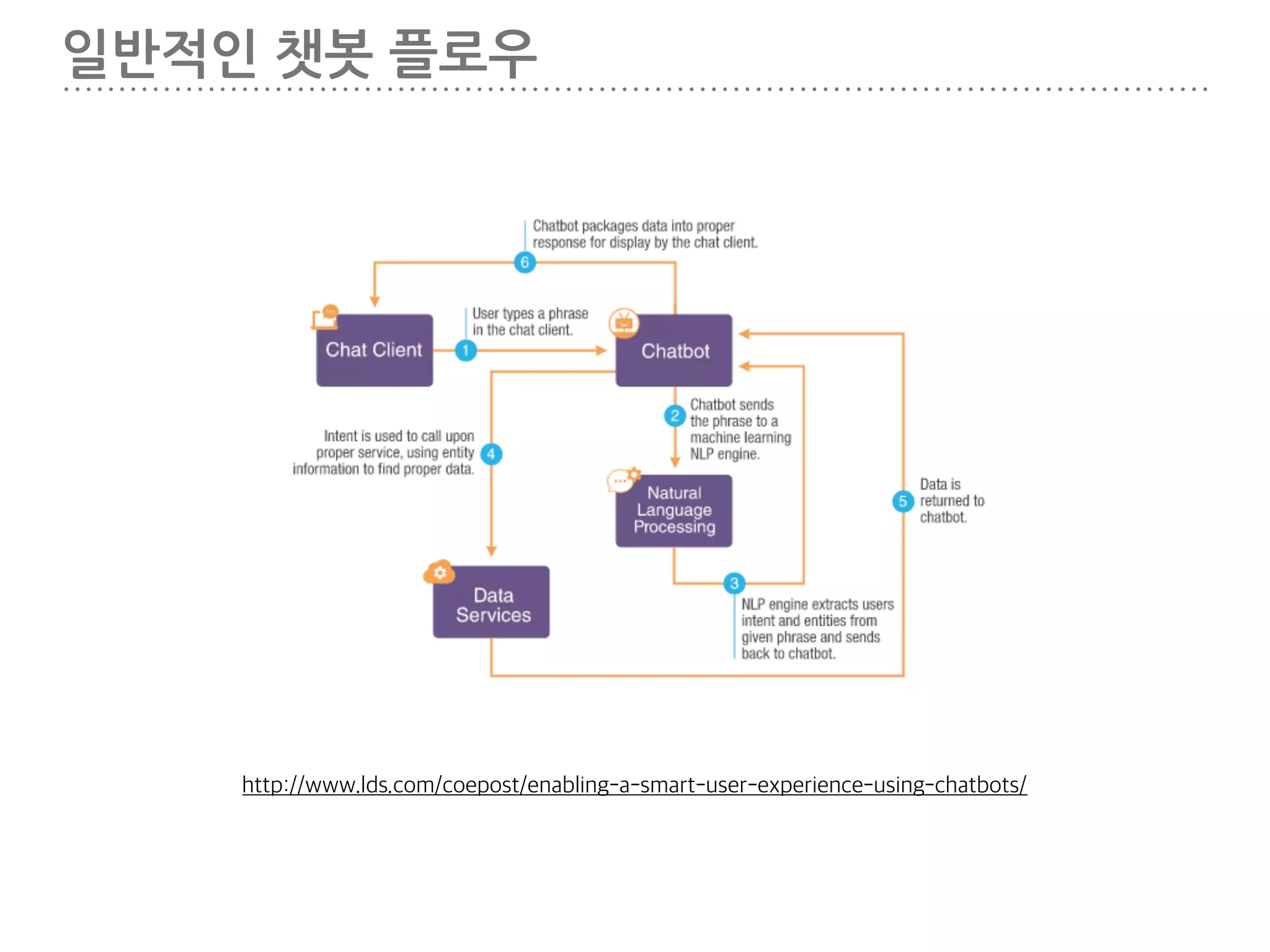
일반적인 챗봇 플로우 http://www.lds.com/coepost/enabling-a-smart-user-experience-using-chatbots/
12.
슬랙과 페이스북 API
를 이용해서 챗봇을 만들어보겠습니다. 간단한..
13.
2. 파이썬으로 슬렉챗봇
만들기
14.
선작업 1. 파이썬 설치 https://realpython.com/blog/python/getting-started-with-the-slack-api-using-python-and-flask/ 참고 2.
슬랙 커뮤니티 생성
15.
VIRTUAL ENV 설정 $
mkdir abcd-python-slack-bot $ virtualenv venv $ source venv/bin/activate (venv)$ pip install slackclient==1.0.0
16.
토큰생성 https://api.slack.com/web
17.
토큰생성 https://api.slack.com/docs/oauth-test-tokens
18.
토큰을 환경 변수로
지정 (venv)$ export SLACK_TOKEN=‘생성된 토큰'
19.
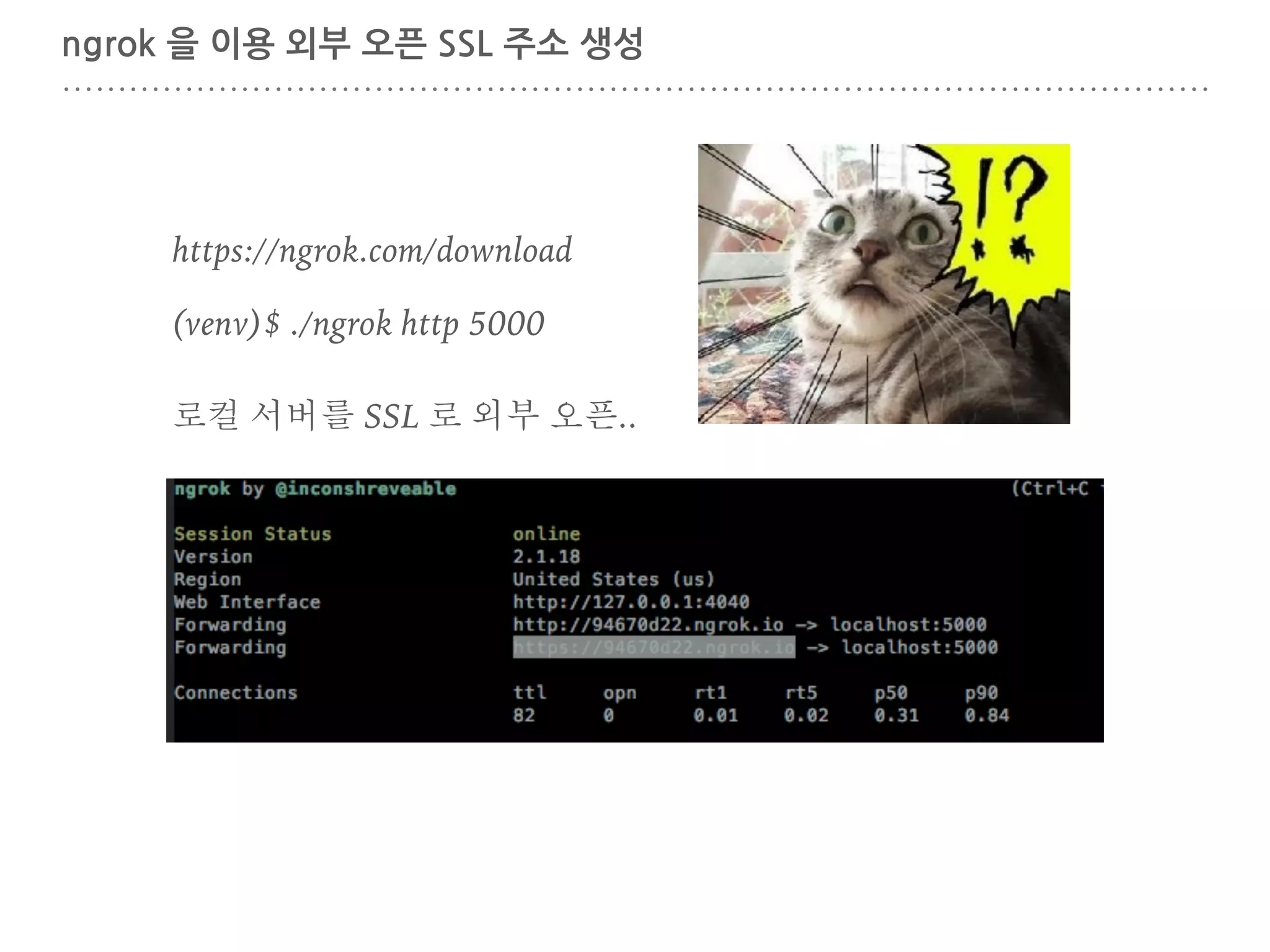
ngrok 을 이용
외부 오픈 SSL 주소 생성 https://ngrok.com/download (venv)$ ./ngrok http 5000 로컬 서버를 SSL 로 외부 오픈..
20.
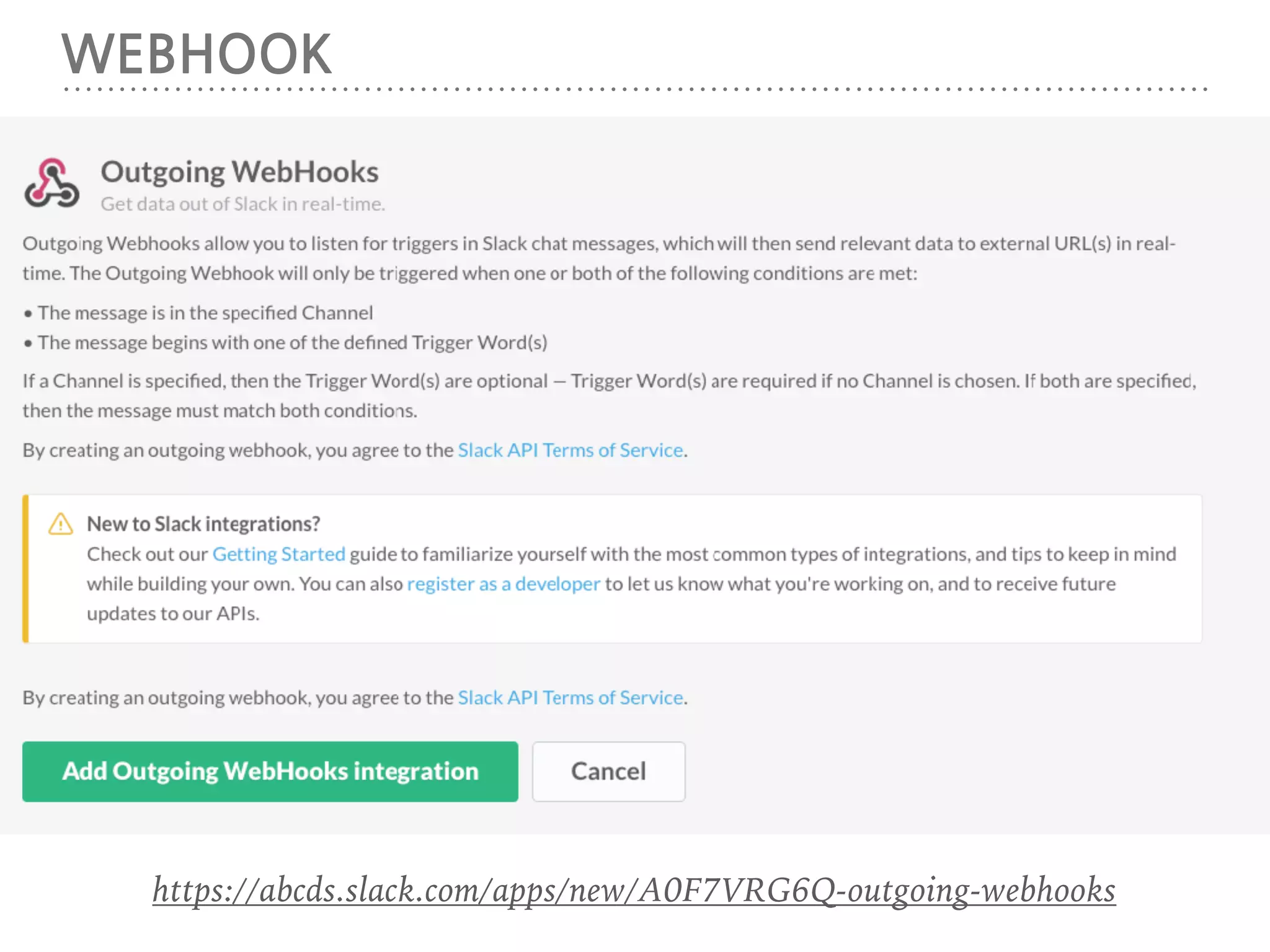
WEBHOOK https://api.slack.com/outgoing-webhooks
21.
WEBHOOK https://abcds.slack.com/apps/new/A0F7VRG6Q-outgoing-webhooks
22.
INTEGRATION SETTINGS https://abcds.slack.com/services/B37GEBQBZ?added=1 ngrok 으로
생성된 주소 + /webhook 사용될 채널 웹훅 토큰
23.
WEBHOOK (venv)$ export SLACK_WEBHOOK_SECRET=‘생성된
웹훅 토큰'
24.
FLASK 설치 (venv)$ pip
install flask
25.
RECEIVE.PY # -*- coding:
utf-8 -*- import os from flask import Flask, request, Response from slackclient import SlackClient app = Flask(__name__) SLACK_WEBHOOK_SECRET = os.environ.get('SLACK_WEBHOOK_SECRET') SLACK_TOKEN = os.environ.get('SLACK_TOKEN', None) slack_client = SlackClient(SLACK_TOKEN) def send_message(channel_id, message): slack_client.api_call( "chat.postMessage", channel=channel_id, text=message, username='abcdBot', icon_emoji=':monkey_face:' ) @app.route('/webhook', methods=['POST']) def inbound(): print("get " + request.form.get('token')) print("username " + request.form.get('user_name')) username = request.form.get('user_name') if request.form.get('token') == SLACK_WEBHOOK_SECRET and username != 'slackbot': channel_name = request.form.get('channel_name') channel_id = request.form.get('channel_id') username = request.form.get('user_name') text = request.form.get('text') inbound_message = username + " in " + channel_name + " says: " + text send_message(channel_id, unicode("따라쟁이 ", 'utf-8') + " " + text) print(inbound_message) return Response(), 200 @app.route('/', methods=['GET']) def test(): return Response('It works!') if __name__ == "__main__": app.run(debug=True) receive.py
26.
RECEIVE.PY (venv)$ python receive.py
27.
구동화면
28.
실제 서버를 설정해서
포팅해봅시다.
29.
3. 노드로 페이스북
챗봇 만들기 (HEROKU)
30.
선작업 http://x-team.com/2016/04/how-to-get-started-with-facebook-messenger-bots/ nodejs 설치 참고 https://nodejs.org/ko/download/
31.
선작업 heroku 가입이 되어있어야
함 https://heroku.com/ https://devcenter.heroku.com/articles/getting-started-with-nodejs#set-up heroku CLI 가 설치되어있어야 함
32.
프로젝트 생성 $ mkdir
abcd-node-bot $ cd abcd-node-bot/ $ npm init $ npm install express body-parser request --save { "name": "testbot", "version": "1.0.0", "description": "", "main": "index.js", "scripts": { "test": "echo "Error: no test specified" && exit 1", "start": "node index.js" }, "author": "", "license": "ISC", "dependencies": { "body-parser": "^1.15.2", "express": "^4.14.0", "request": "^2.79.0" } }
33.
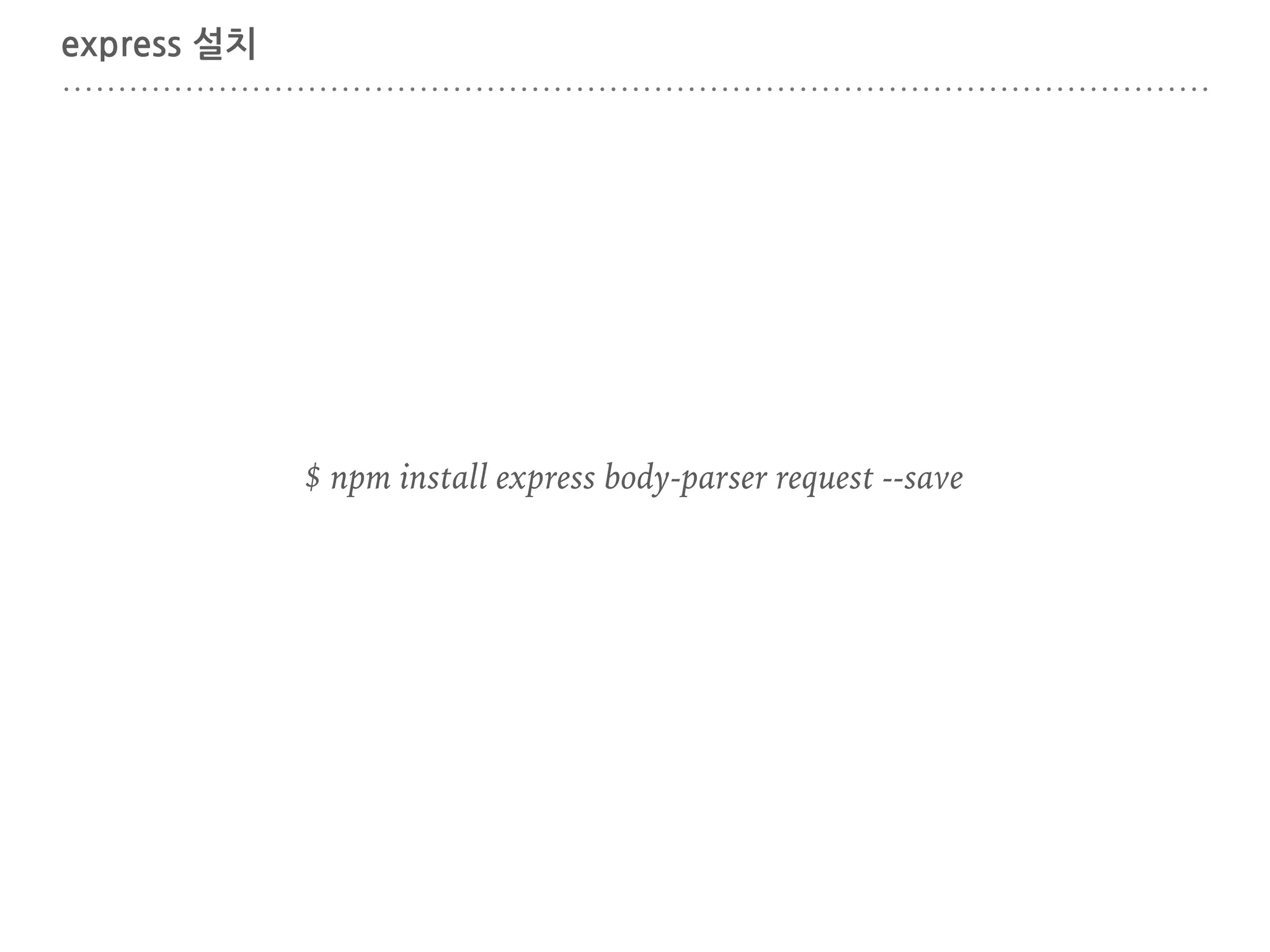
express 설치 $ npm
install express body-parser request --save
34.
INDEX.JS 생성 index.js 생성 var
express = require('express'); var bodyParser = require('body-parser'); var request = require('request'); var app = express(); app.use(bodyParser.urlencoded({extended: false})); app.use(bodyParser.json()); app.listen((process.env.PORT || 3000)); // Server frontpage app.get('/', function (req, res) { res.send('잘돈다.'); }); // Facebook Webhook app.get('/webhook', function (req, res) { console.log(req.query['hub.verify_token']); if (req.query['hub.verify_token'] === 'abcd_verify_token') { // webhook 설정에 입력된 토큰 res.send(req.query['hub.challenge']); } else { res.send('Invalid verify token'); } }); node index.js
35.
HEROKU 생성 $ heroku
login
36.
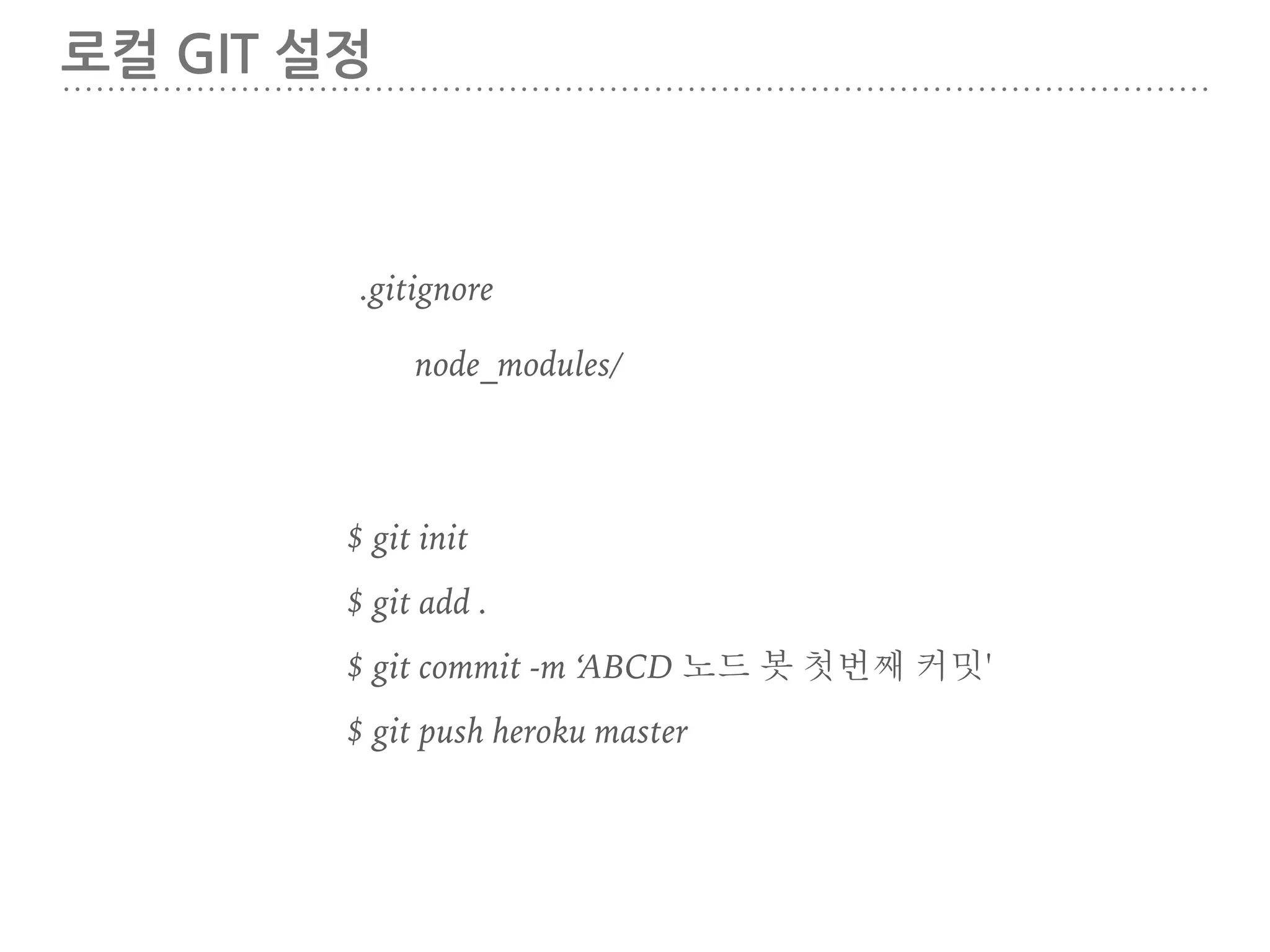
로컬 GIT 설정 $
git init $ heroku create $ git add . $ git commit -m ‘ABCD 노드 봇 첫번째 커밋' $ git push heroku master .gitignore node_modules
37.
작동확인 https://warm-spire-76279.herokuapp.com/
38.
페이스북 페이지 만들기 https://www.facebook.com/pages/create/
39.
페이지 생성 완료
40.
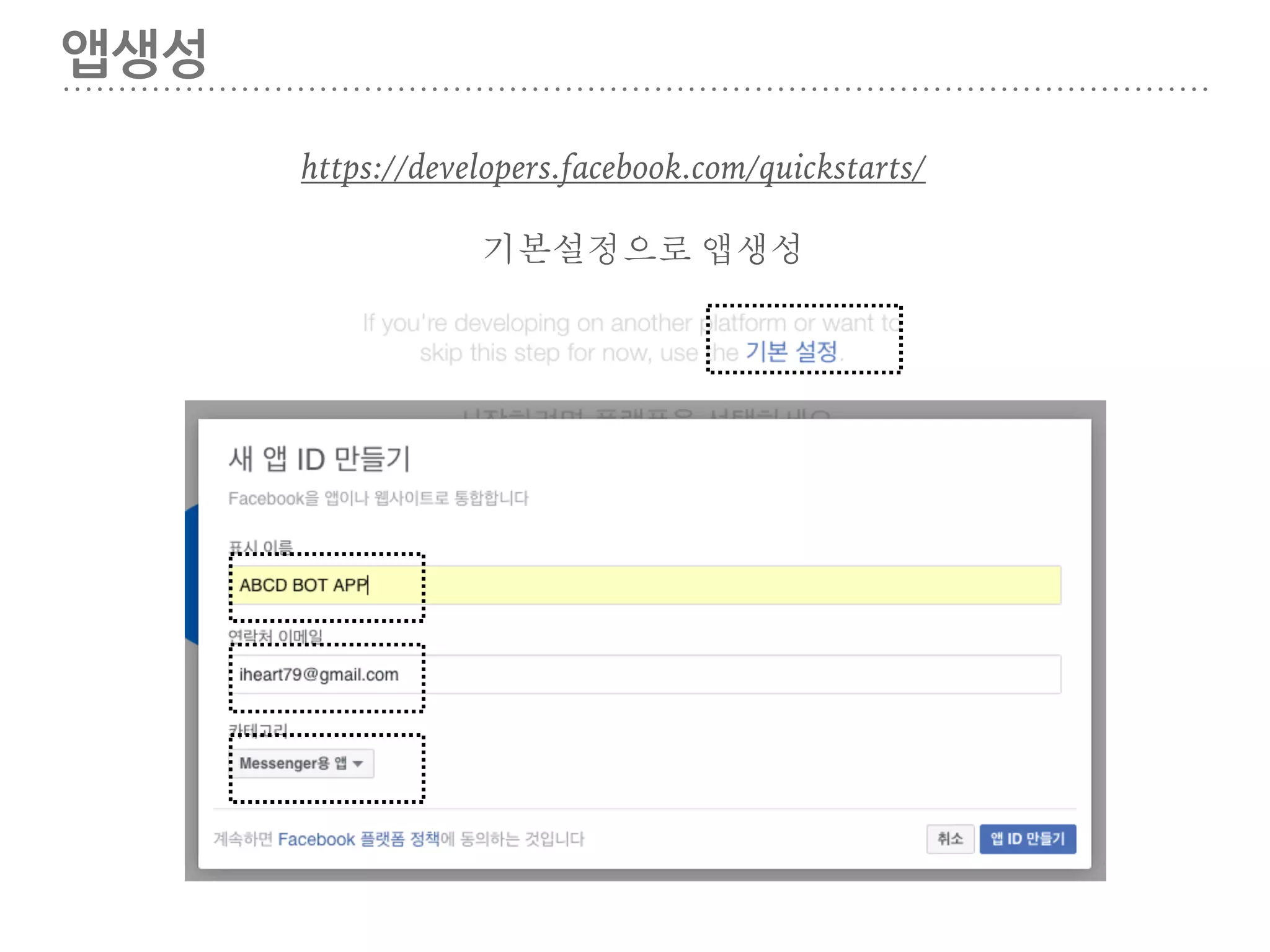
앱생성 https://developers.facebook.com/quickstarts/ 기본설정으로 앱생성
41.
제품추가
42.
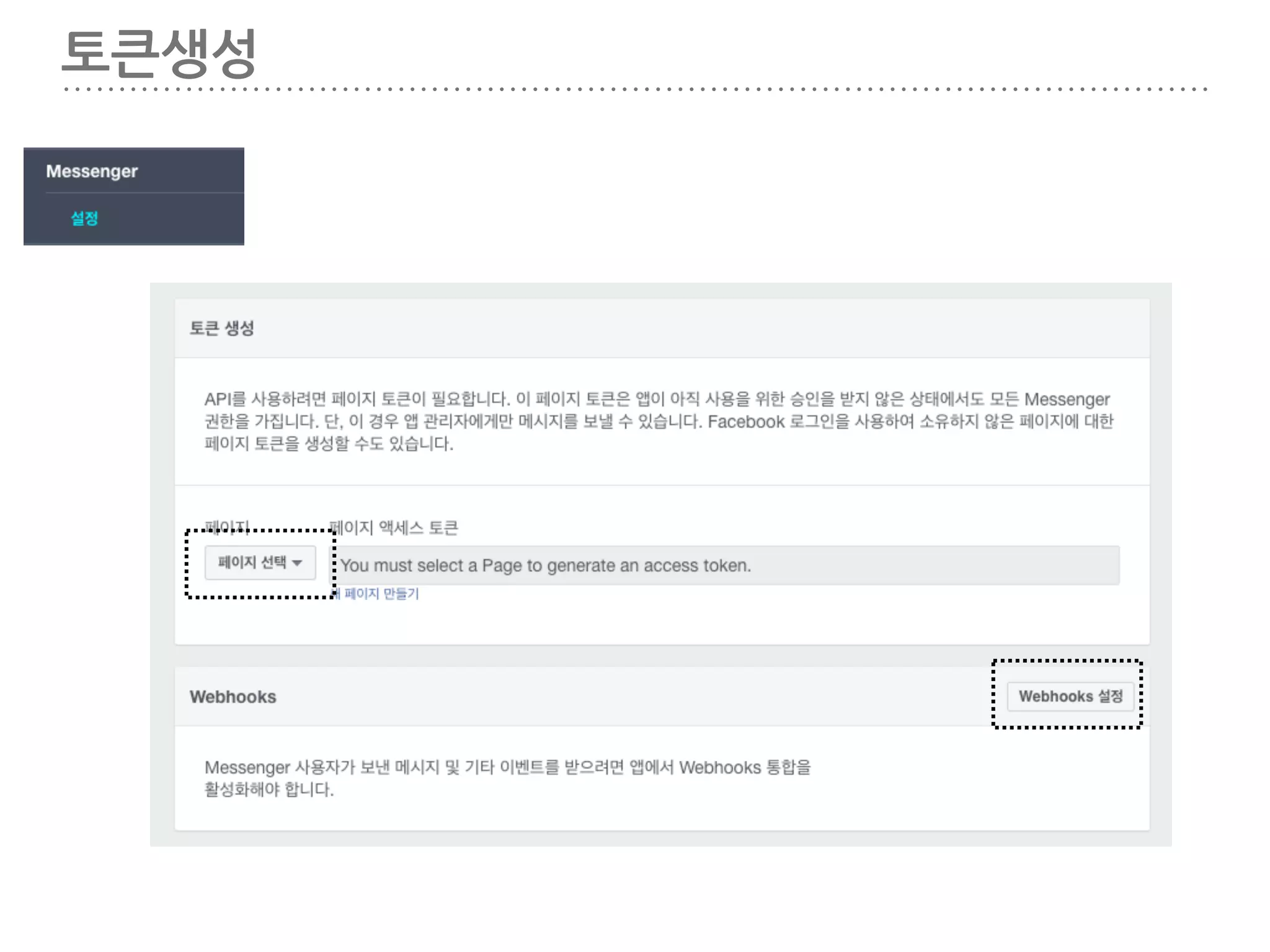
토큰생성
43.
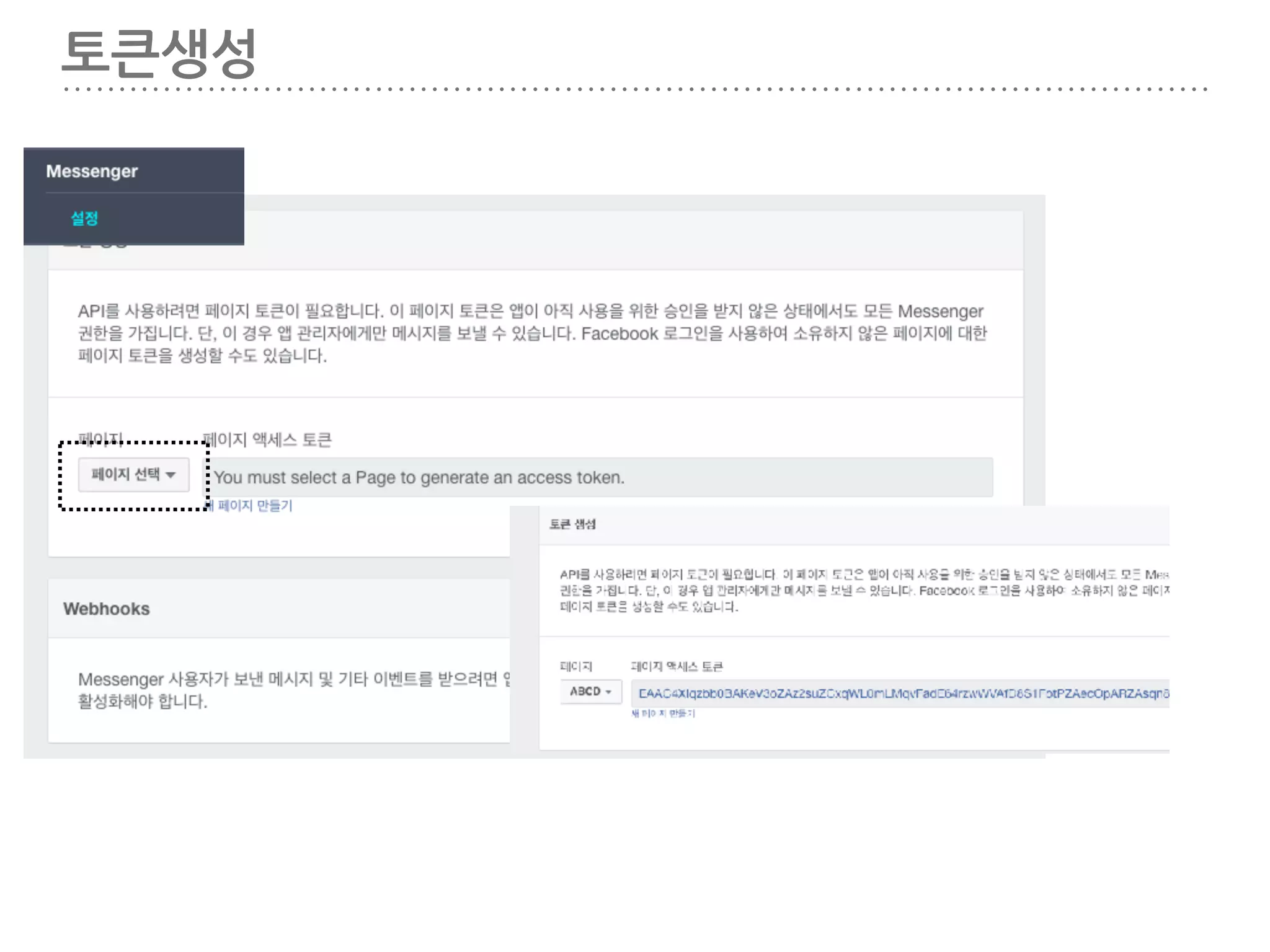
토큰생성
44.
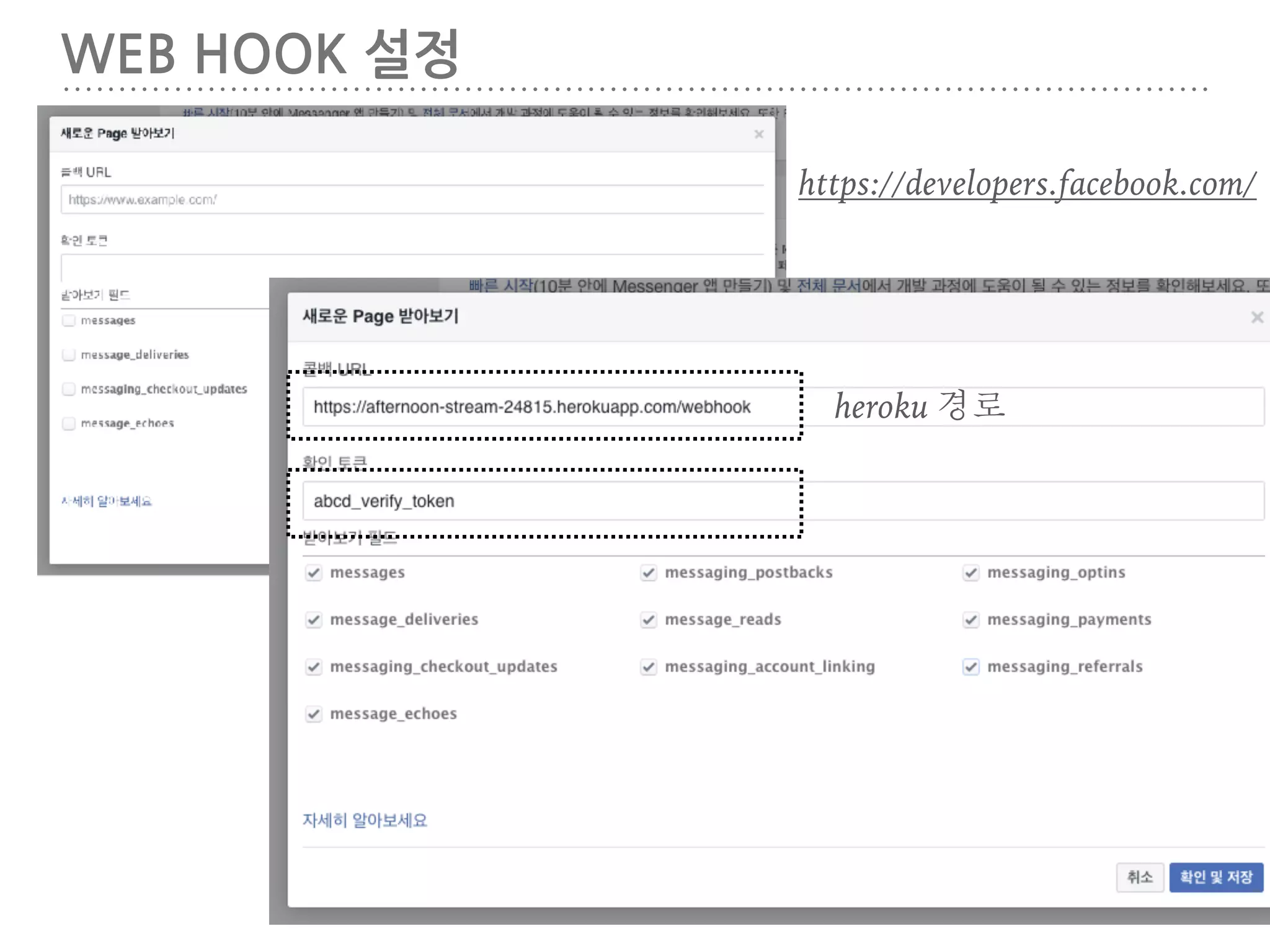
WEB HOOK 설정 https://developers.facebook.com/ heroku
경로
45.
WEB HOOK 설정 페이지를
선택해주세요!
46.
WEBHOOK 설정
47.
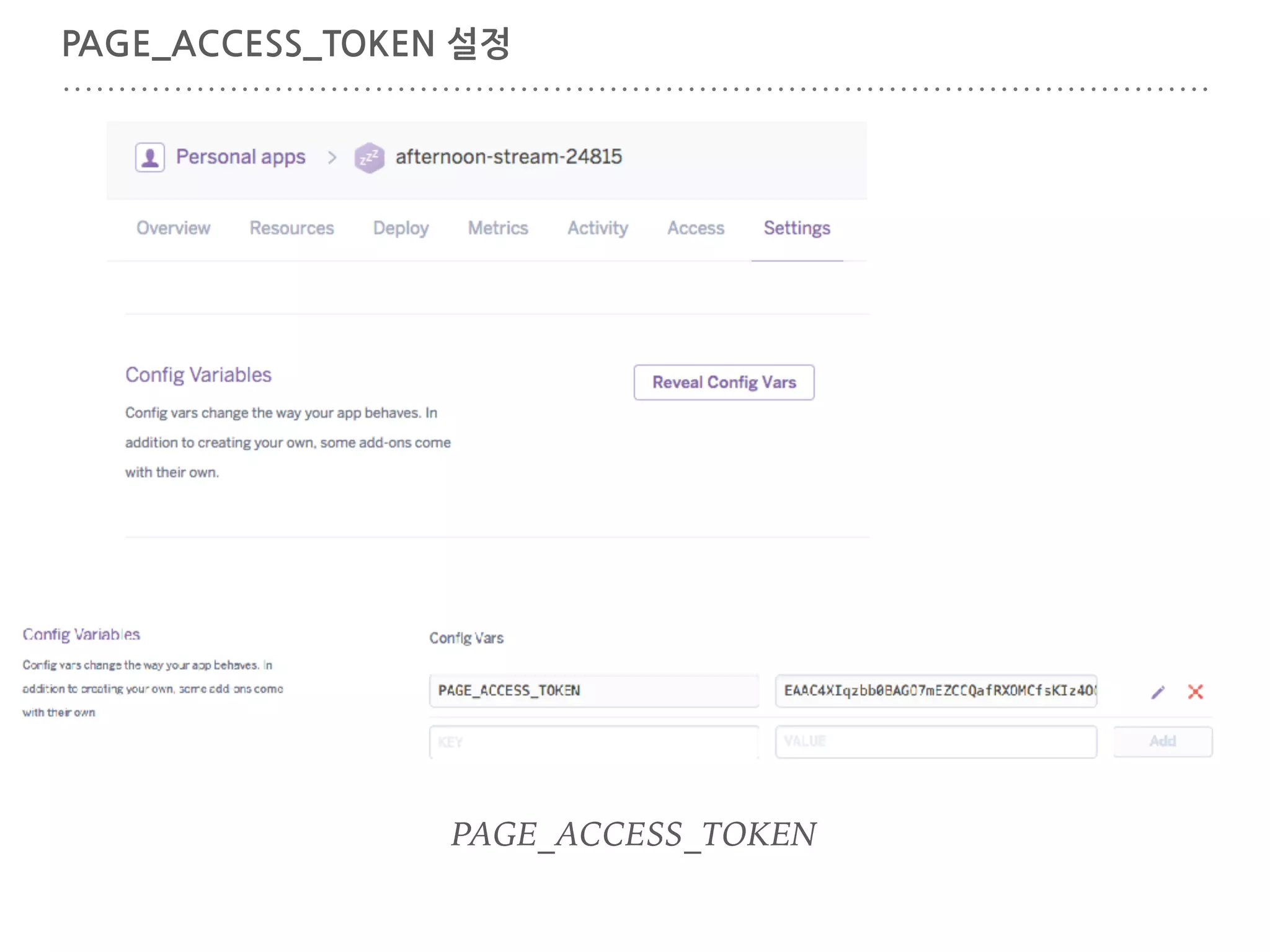
PAGE_ACCESS_TOKEN 설정 PAGE_ACCESS_TOKEN
48.
토큰 유효성 확인 https://warm-spire-76279.herokuapp.com/webhook? hub.verify_token=abcd_verify_token
49.
따라하기 봇 테스트
50.
KITTEN https://placekitten.com/ kitten 300 200
51.
따라하기 & 키튼
봇 소스 1 var express = require('express'); var bodyParser = require('body-parser'); var request = require('request'); var app = express(); app.use(bodyParser.urlencoded({extended: false})); app.use(bodyParser.json()); app.listen((process.env.PORT || 3000)); // Server frontpage app.get('/', function (req, res) { res.send('This is TestBot Server'); }); // Facebook Webhook app.get('/webhook', function (req, res) { console.log(req.query['hub.verify_token']); if (req.query['hub.verify_token'] === 'abcd_verify_token') { // webhook 설정에 입력된 토큰 res.send(req.query['hub.challenge']); } else { res.send('Invalid verify token'); } });
52.
따라하기 & 키튼
봇 소스 2 // handler receiving messages app.post('/webhook', function (req, res) { var events = req.body.entry[0].messaging; for (i = 0; i < events.length; i++) { var event = events[i]; if (event.message && event.message.text) { if (!kittenMessage(event.sender.id, event.message.text)) { sendMessage(event.sender.id, {text: event.message.text}); } } else if (event.postback) { console.log("Postback received: " + JSON.stringify(event.postback)); } } res.sendStatus(200); }); // generic function sending messages function sendMessage(recipientId, message) { request({ url: 'https://graph.facebook.com/v2.6/me/messages', qs: {access_token: process.env.PAGE_ACCESS_TOKEN}, method: 'POST', json: { recipient: {id: recipientId}, message: message, } }, function(error, response, body) { if (error) { console.log('Error sending message: ', error); } else if (response.body.error) { console.log('Error: ', response.body.error); } }); };
53.
따라하기 & 키튼
봇 소스 3 // send rich message with kitten function kittenMessage(recipientId, text) { text = text || ""; var values = text.split(' '); if (values.length === 3 && values[0] === 'kitten') { if (Number(values[1]) > 0 && Number(values[2]) > 0) { var imageUrl = "https://placekitten.com/" + Number(values[1]) + "/" + Number(values[2]); message = { "attachment": { "type": "template", "payload": { "template_type": "generic", "elements": [{ "title": "Kitten", "subtitle": "Cute kitten picture", "image_url": imageUrl , "buttons": [{ "type": "web_url", "url": imageUrl, "title": "Show kitten" }, { "type": "postback", "title": "I like this", "payload": "User " + recipientId + " likes kitten " + imageUrl, }] }] } } }; sendMessage(recipientId, message); return true; } } return false; };
54.
4. 조금 더해보기
55.
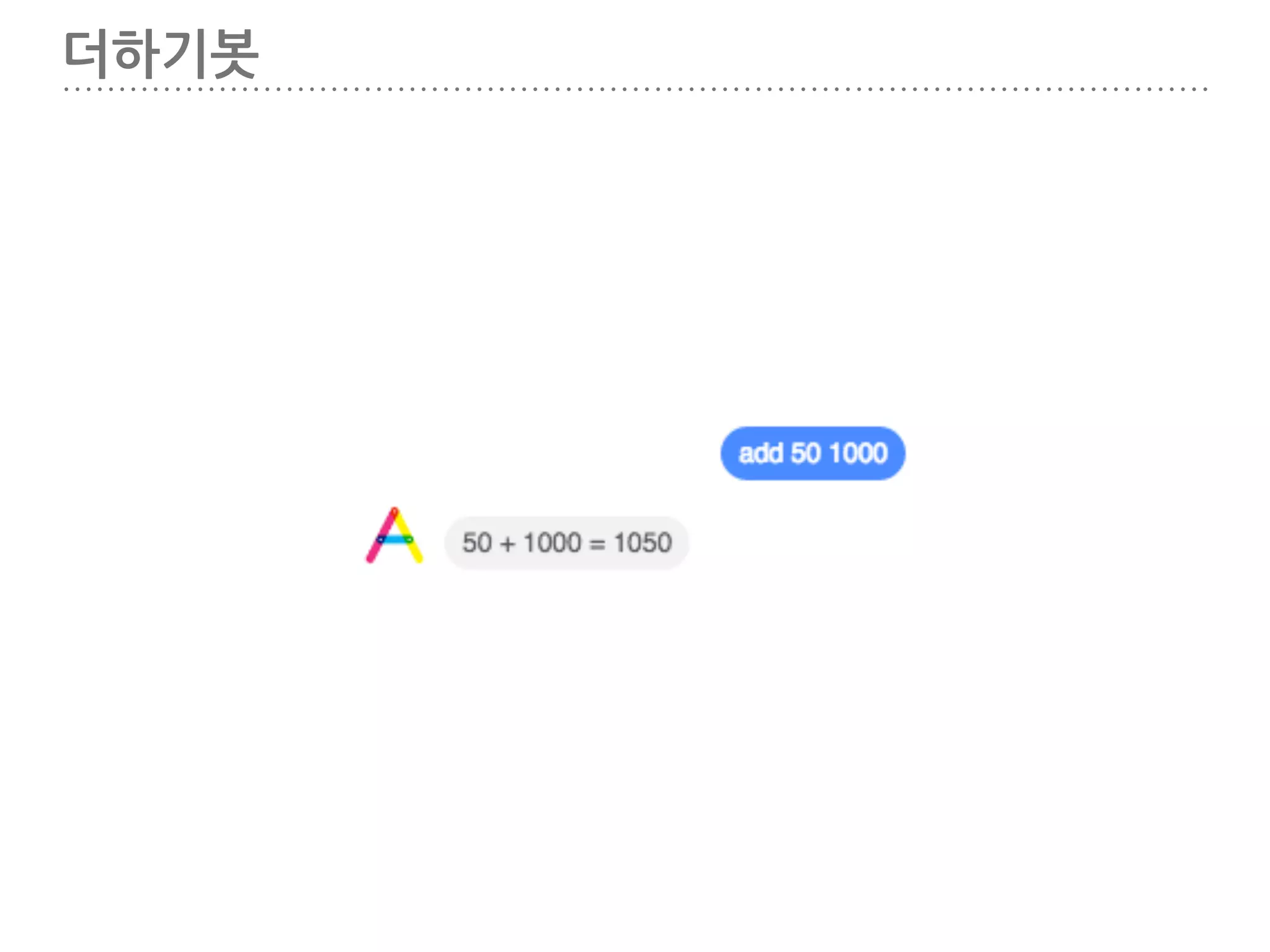
더하기봇
56.
더하기 봇 소스
#1 var express = require('express'); var bodyParser = require('body-parser'); var request = require('request'); var app = express(); app.use(bodyParser.urlencoded({extended: false})); app.use(bodyParser.json()); app.listen((process.env.PORT || 3000)); // Server frontpage app.get('/', function (req, res) { res.send('This is TestBot Server'); }); app.get('/forecast', function (req, res) { forecast.get([35.9335, 139.6181], function(err, weather) { if(err) return console.dir(err); console.dir(weather); console.dir(weather.latitude); console.log("weather.latitude " + weather.latitude); console.log("오늘 " + weather.timezone + "의 날씨는 " + weather.currently.summary + "입니다. "); }); res.send('forecast'); });
57.
더하기 봇 소스
#2 // Facebook Webhook app.get('/webhook', function (req, res) { if (req.query['hub.verify_token'] === 'abcd_verify_token') { res.send(req.query['hub.challenge']); } else { res.send('Invalid verify token'); } }); // handler receiving messages app.post('/webhook', function (req, res) { var events = req.body.entry[0].messaging; for (i = 0; i < events.length; i++) { var event = events[i]; if (event.message && event.message.text) { addMessage(event.sender.id, event.message.text); } } res.sendStatus(200); });
58.
더하기 봇 소스
#3 // generic function sending messages function sendMessage(recipientId, message) { request({ url: 'https://graph.facebook.com/v2.6/me/messages', qs: {access_token: process.env.PAGE_ACCESS_TOKEN}, method: 'POST', json: { recipient: {id: recipientId}, message: message, } }, function(error, response, body) { if (error) { console.log('Error sending message: ', error); } else if (response.body.error) { console.log('Error: ', response.body.error); } }); }; function addMessage(recipientId, text) { text = text || ""; var values = text.split(' '); if (values.length === 3 && values[0] === 'add') { if (Number(values[1]) > 0 && Number(values[2]) > 0) { addText = values[1] + " + " + values[2] + " = " + (Number(values[1]) + Number(values[2])); message = {text: addText}; sendMessage(recipientId, message); } } };
59.
FORECAST 설치 $ npm
install --save forecast
60.
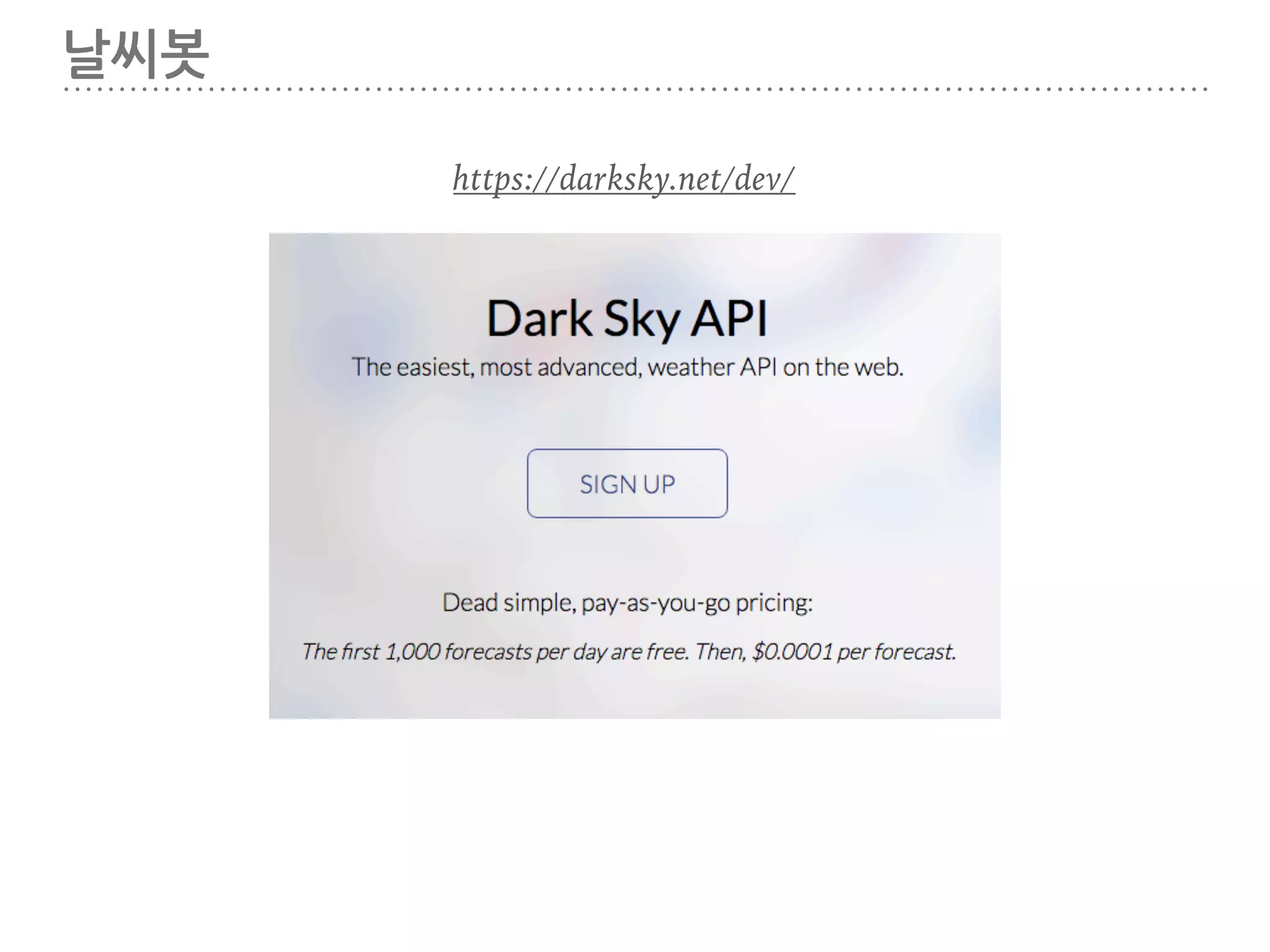
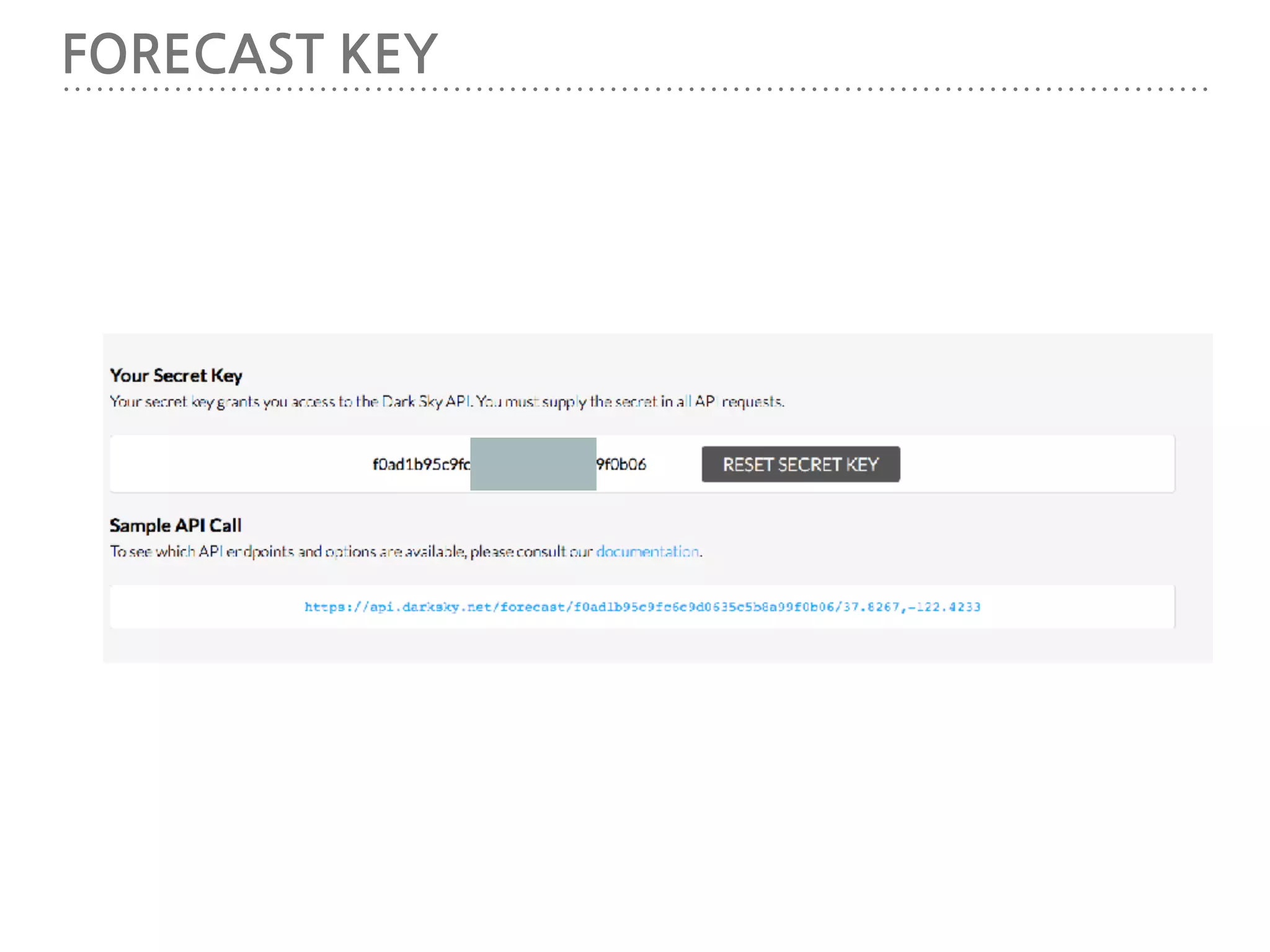
날씨봇 https://darksky.net/dev/
61.
FORECAST KEY
62.
날씨앱 테스트
63.
날씨 봇 소스
#1 var express = require('express'); var bodyParser = require('body-parser'); var request = require('request'); var app = express(); app.use(bodyParser.urlencoded({extended: false})); app.use(bodyParser.json()); app.listen((process.env.PORT || 3000)); var Forecast = require('forecast'); // Initialize var forecast = new Forecast({ service: 'darksky', key: ‘your-api-key‘, units: 'celcius', cache: true, // Cache API requests ttl: { minutes: 27, seconds: 45 } });
64.
날씨 봇 소스
#2 // Server frontpage app.get('/', function (req, res) { res.send('This is TestBot Server'); }); app.get('/forecast', function (req, res) { forecast.get([35.9335, 139.6181], function(err, weather) { if(err) return console.dir(err); console.dir(weather); }); res.send('forecast'); }); // Facebook Webhook app.get('/webhook', function (req, res) { if (req.query['hub.verify_token'] === 'abcd_verify_token') { res.send(req.query['hub.challenge']); } else { res.send('Invalid verify token'); } });
65.
날씨 봇 소스
#3 // handler receiving messages app.post('/webhook', function (req, res) { var events = req.body.entry[0].messaging; for (i = 0; i < events.length; i++) { var event = events[i]; if (event.message && event.message.text) { weatherMessage(event.sender.id, event.message.text); } } res.sendStatus(200); }); // generic function sending messages function sendMessage(recipientId, message) { request({ url: 'https://graph.facebook.com/v2.6/me/messages', qs: {access_token: process.env.PAGE_ACCESS_TOKEN}, method: 'POST', json: { recipient: {id: recipientId}, message: message, } }, function(error, response, body) { if (error) { console.log('Error sending message: ', error); } else if (response.body.error) { console.log('Error: ', response.body.error); } }); };
66.
날씨 봇 소스
#4 function weatherMessage(recipientId, text){ text = text || ""; var values = text.split(' '); if (values[0] === '날씨') { forecast.get([35.9335, 139.6181], function(err, weather) { console.log(weather); weatherText = "오늘 " + weather.timezone + "의 날씨는 " + weather.currently.summary + "입니다. "; message = {text: weatherText}; sendMessage(recipientId, message); }); } }
67.
더하기와 날씨봇을 확장해
보세요.
68.
또 어떤걸 해보고
싶으신가요? 머신러닝, 자연어처리, 음성인식…
69.
파이썬 https://github.com/snowkiwi/slack-python-bot-tutorial 소스는 이곳을 참고하세요. 노드 https://github.com/snowkiwi/facebook-node-bot
70.
Q & A
71.
수고하셨습니다. :) ABCD http://abcds.kr https://www.facebook.com/groups/562787713823026/ 한성일 https://www.facebook.com/jamie.han.16 iheart79@gmail.com
Download











![RECEIVE.PY
# -*- coding: utf-8 -*-
import os
from flask import Flask, request, Response
from slackclient import SlackClient
app = Flask(__name__)
SLACK_WEBHOOK_SECRET = os.environ.get('SLACK_WEBHOOK_SECRET')
SLACK_TOKEN = os.environ.get('SLACK_TOKEN', None)
slack_client = SlackClient(SLACK_TOKEN)
def send_message(channel_id, message):
slack_client.api_call(
"chat.postMessage",
channel=channel_id,
text=message,
username='abcdBot',
icon_emoji=':monkey_face:'
)
@app.route('/webhook', methods=['POST'])
def inbound():
print("get " + request.form.get('token'))
print("username " + request.form.get('user_name'))
username = request.form.get('user_name')
if request.form.get('token') == SLACK_WEBHOOK_SECRET and username != 'slackbot':
channel_name = request.form.get('channel_name')
channel_id = request.form.get('channel_id')
username = request.form.get('user_name')
text = request.form.get('text')
inbound_message = username + " in " + channel_name + " says: " + text
send_message(channel_id, unicode("따라쟁이 ", 'utf-8') + " " + text)
print(inbound_message)
return Response(), 200
@app.route('/', methods=['GET'])
def test():
return Response('It works!')
if __name__ == "__main__":
app.run(debug=True)
receive.py](https://image.slidesharecdn.com/random-161125091649/75/slide-25-2048.jpg)






![INDEX.JS 생성
index.js 생성
var express = require('express');
var bodyParser = require('body-parser');
var request = require('request');
var app = express();
app.use(bodyParser.urlencoded({extended: false}));
app.use(bodyParser.json());
app.listen((process.env.PORT || 3000));
// Server frontpage
app.get('/', function (req, res) {
res.send('잘돈다.');
});
// Facebook Webhook
app.get('/webhook', function (req, res) {
console.log(req.query['hub.verify_token']);
if (req.query['hub.verify_token'] === 'abcd_verify_token') {
// webhook 설정에 입력된 토큰
res.send(req.query['hub.challenge']);
} else {
res.send('Invalid verify token');
}
});
node index.js](https://image.slidesharecdn.com/random-161125091649/75/slide-34-2048.jpg)







![따라하기 & 키튼 봇 소스 1
var express = require('express');
var bodyParser = require('body-parser');
var request = require('request');
var app = express();
app.use(bodyParser.urlencoded({extended: false}));
app.use(bodyParser.json());
app.listen((process.env.PORT || 3000));
// Server frontpage
app.get('/', function (req, res) {
res.send('This is TestBot Server');
});
// Facebook Webhook
app.get('/webhook', function (req, res) {
console.log(req.query['hub.verify_token']);
if (req.query['hub.verify_token'] === 'abcd_verify_token') { // webhook 설정에 입력된 토큰
res.send(req.query['hub.challenge']);
} else {
res.send('Invalid verify token');
}
});](https://image.slidesharecdn.com/random-161125091649/75/slide-51-2048.jpg)
![따라하기 & 키튼 봇 소스 2
// handler receiving messages
app.post('/webhook', function (req, res) {
var events = req.body.entry[0].messaging;
for (i = 0; i < events.length; i++) {
var event = events[i];
if (event.message && event.message.text) {
if (!kittenMessage(event.sender.id, event.message.text)) {
sendMessage(event.sender.id, {text: event.message.text});
}
} else if (event.postback) {
console.log("Postback received: " + JSON.stringify(event.postback));
}
}
res.sendStatus(200);
});
// generic function sending messages
function sendMessage(recipientId, message) {
request({
url: 'https://graph.facebook.com/v2.6/me/messages',
qs: {access_token: process.env.PAGE_ACCESS_TOKEN},
method: 'POST',
json: {
recipient: {id: recipientId},
message: message,
}
}, function(error, response, body) {
if (error) {
console.log('Error sending message: ', error);
} else if (response.body.error) {
console.log('Error: ', response.body.error);
}
});
};](https://image.slidesharecdn.com/random-161125091649/75/slide-52-2048.jpg)
![따라하기 & 키튼 봇 소스 3
// send rich message with kitten
function kittenMessage(recipientId, text) {
text = text || "";
var values = text.split(' ');
if (values.length === 3 && values[0] === 'kitten') {
if (Number(values[1]) > 0 && Number(values[2]) > 0) {
var imageUrl = "https://placekitten.com/" + Number(values[1]) + "/" + Number(values[2]);
message = {
"attachment": {
"type": "template",
"payload": {
"template_type": "generic",
"elements": [{
"title": "Kitten",
"subtitle": "Cute kitten picture",
"image_url": imageUrl ,
"buttons": [{
"type": "web_url",
"url": imageUrl,
"title": "Show kitten"
}, {
"type": "postback",
"title": "I like this",
"payload": "User " + recipientId + " likes kitten " + imageUrl,
}]
}]
}
}
};
sendMessage(recipientId, message);
return true;
}
}
return false;
};](https://image.slidesharecdn.com/random-161125091649/75/slide-53-2048.jpg)

![더하기 봇 소스 #1
var express = require('express');
var bodyParser = require('body-parser');
var request = require('request');
var app = express();
app.use(bodyParser.urlencoded({extended: false}));
app.use(bodyParser.json());
app.listen((process.env.PORT || 3000));
// Server frontpage
app.get('/', function (req, res) {
res.send('This is TestBot Server');
});
app.get('/forecast', function (req, res) {
forecast.get([35.9335, 139.6181], function(err, weather) {
if(err) return console.dir(err);
console.dir(weather);
console.dir(weather.latitude);
console.log("weather.latitude " + weather.latitude);
console.log("오늘 " + weather.timezone + "의 날씨는 " + weather.currently.summary + "입니다. ");
});
res.send('forecast');
});](https://image.slidesharecdn.com/random-161125091649/75/slide-56-2048.jpg)
![더하기 봇 소스 #2
// Facebook Webhook
app.get('/webhook', function (req, res) {
if (req.query['hub.verify_token'] === 'abcd_verify_token') {
res.send(req.query['hub.challenge']);
} else {
res.send('Invalid verify token');
}
});
// handler receiving messages
app.post('/webhook', function (req, res) {
var events = req.body.entry[0].messaging;
for (i = 0; i < events.length; i++) {
var event = events[i];
if (event.message && event.message.text) {
addMessage(event.sender.id, event.message.text);
}
}
res.sendStatus(200);
});](https://image.slidesharecdn.com/random-161125091649/75/slide-57-2048.jpg)
![더하기 봇 소스 #3
// generic function sending messages
function sendMessage(recipientId, message) {
request({
url: 'https://graph.facebook.com/v2.6/me/messages',
qs: {access_token: process.env.PAGE_ACCESS_TOKEN},
method: 'POST',
json: {
recipient: {id: recipientId},
message: message,
}
}, function(error, response, body) {
if (error) {
console.log('Error sending message: ', error);
} else if (response.body.error) {
console.log('Error: ', response.body.error);
}
});
};
function addMessage(recipientId, text) {
text = text || "";
var values = text.split(' ');
if (values.length === 3 && values[0] === 'add') {
if (Number(values[1]) > 0 && Number(values[2]) > 0) {
addText = values[1] + " + " + values[2] + " = " + (Number(values[1]) + Number(values[2]));
message = {text: addText};
sendMessage(recipientId, message);
}
}
};](https://image.slidesharecdn.com/random-161125091649/75/slide-58-2048.jpg)


![날씨 봇 소스 #2
// Server frontpage
app.get('/', function (req, res) {
res.send('This is TestBot Server');
});
app.get('/forecast', function (req, res) {
forecast.get([35.9335, 139.6181], function(err, weather) {
if(err) return console.dir(err);
console.dir(weather);
});
res.send('forecast');
});
// Facebook Webhook
app.get('/webhook', function (req, res) {
if (req.query['hub.verify_token'] === 'abcd_verify_token') {
res.send(req.query['hub.challenge']);
} else {
res.send('Invalid verify token');
}
});](https://image.slidesharecdn.com/random-161125091649/75/slide-64-2048.jpg)
![날씨 봇 소스 #3
// handler receiving messages
app.post('/webhook', function (req, res) {
var events = req.body.entry[0].messaging;
for (i = 0; i < events.length; i++) {
var event = events[i];
if (event.message && event.message.text) {
weatherMessage(event.sender.id, event.message.text);
}
}
res.sendStatus(200);
});
// generic function sending messages
function sendMessage(recipientId, message) {
request({
url: 'https://graph.facebook.com/v2.6/me/messages',
qs: {access_token: process.env.PAGE_ACCESS_TOKEN},
method: 'POST',
json: {
recipient: {id: recipientId},
message: message,
}
}, function(error, response, body) {
if (error) {
console.log('Error sending message: ', error);
} else if (response.body.error) {
console.log('Error: ', response.body.error);
}
});
};](https://image.slidesharecdn.com/random-161125091649/75/slide-65-2048.jpg)
![날씨 봇 소스 #4
function weatherMessage(recipientId, text){
text = text || "";
var values = text.split(' ');
if (values[0] === '날씨') {
forecast.get([35.9335, 139.6181], function(err, weather) {
console.log(weather);
weatherText = "오늘 " + weather.timezone + "의 날씨는 " + weather.currently.summary + "입니다. ";
message = {text: weatherText};
sendMessage(recipientId, message);
});
}
}](https://image.slidesharecdn.com/random-161125091649/75/slide-66-2048.jpg)


![[커빙 아키텍쳐] 커빙은 어떻게 소셜 컨텐츠를 모아올까요?](https://cdn.slidesharecdn.com/ss_thumbnails/cubbyingtechstackfinal-130825210422-phpapp01-thumbnail.jpg?width=640&height=640&fit=bounds)


![[트래블챗] Ai기반 챗봇 커머스 플랫폼 사업계획서 20170213_f](https://cdn.slidesharecdn.com/ss_thumbnails/ai20170213f-170213052629-thumbnail.jpg?width=640&height=640&fit=bounds)


![[아이펀팩토리] 2018 데브데이 서버위더스 _01 HTML5/WebSocket으로 Pong 게임 만들기](https://cdn.slidesharecdn.com/ss_thumbnails/2018devday-html5websocketmakepong-180329003606-thumbnail.jpg?width=640&height=640&fit=bounds)


