Real Data Models of Silicon 
Valley 
Patrick McFadin 
Chief Evangelist for Apache Cassandra 
! 
@PatrickMcFadin
It's been an epic year
I've had a ton of fun! 
• Traveling the world 
talking to people like 
you! 
Stockholm 
Warsaw 
Melbourne 
New York 
Vancouver 
Dublin
What's new? 
• 2.1 is out! 
• Amazing changes for performance and 
stability
Where are we going? 
• 3.0 is next. Just hold on…
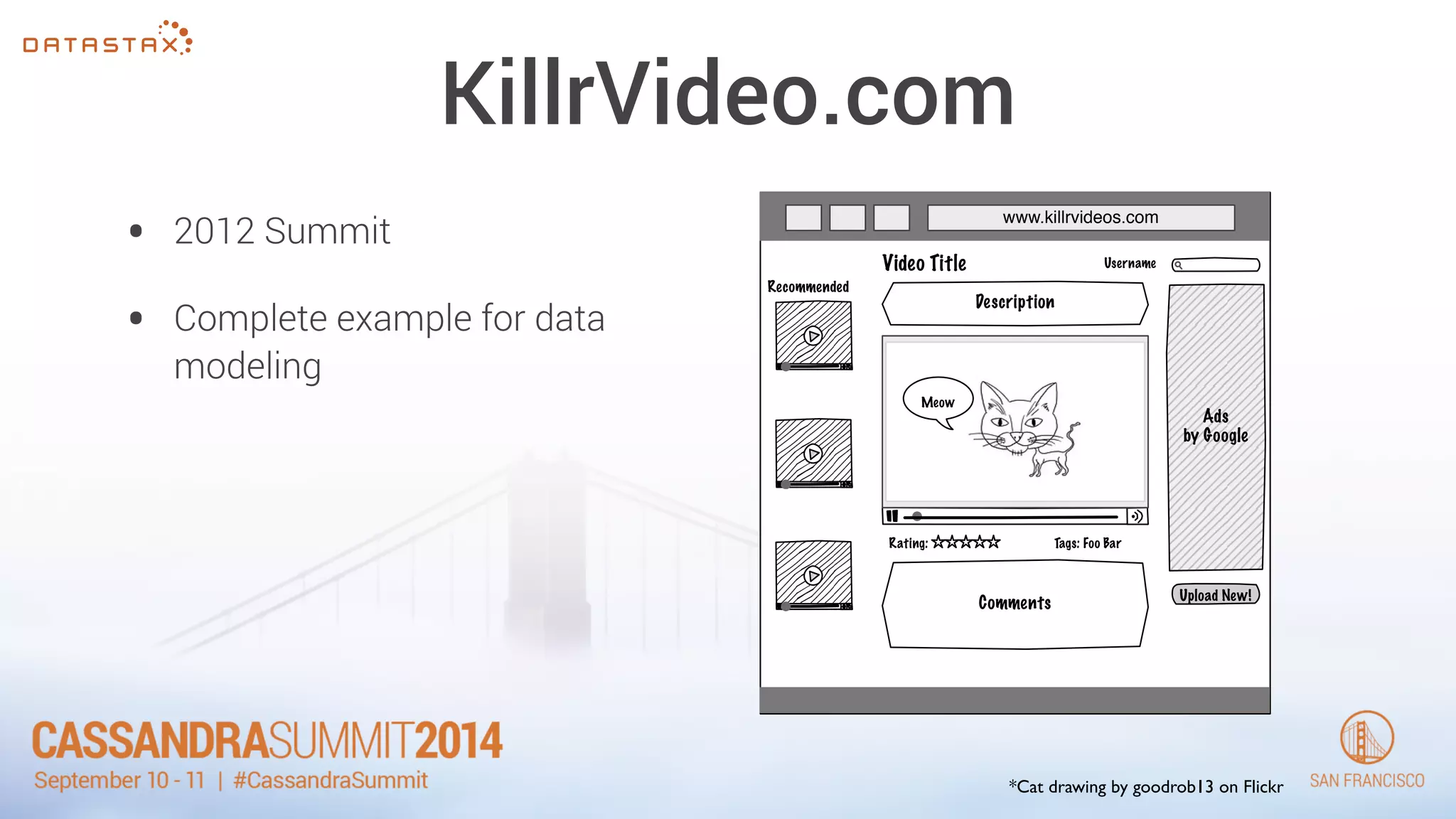
KillrVideo.com 
• 2012 Summit 
• Complete example for data 
modeling 
www.killrvideos.com 
Video Title 
Recommended 
Meow 
Ads 
by Google 
Description 
Comments 
Upload New! 
Username 
Rating: Tags: Foo Bar 
*Cat drawing by goodrob13 on Flickr
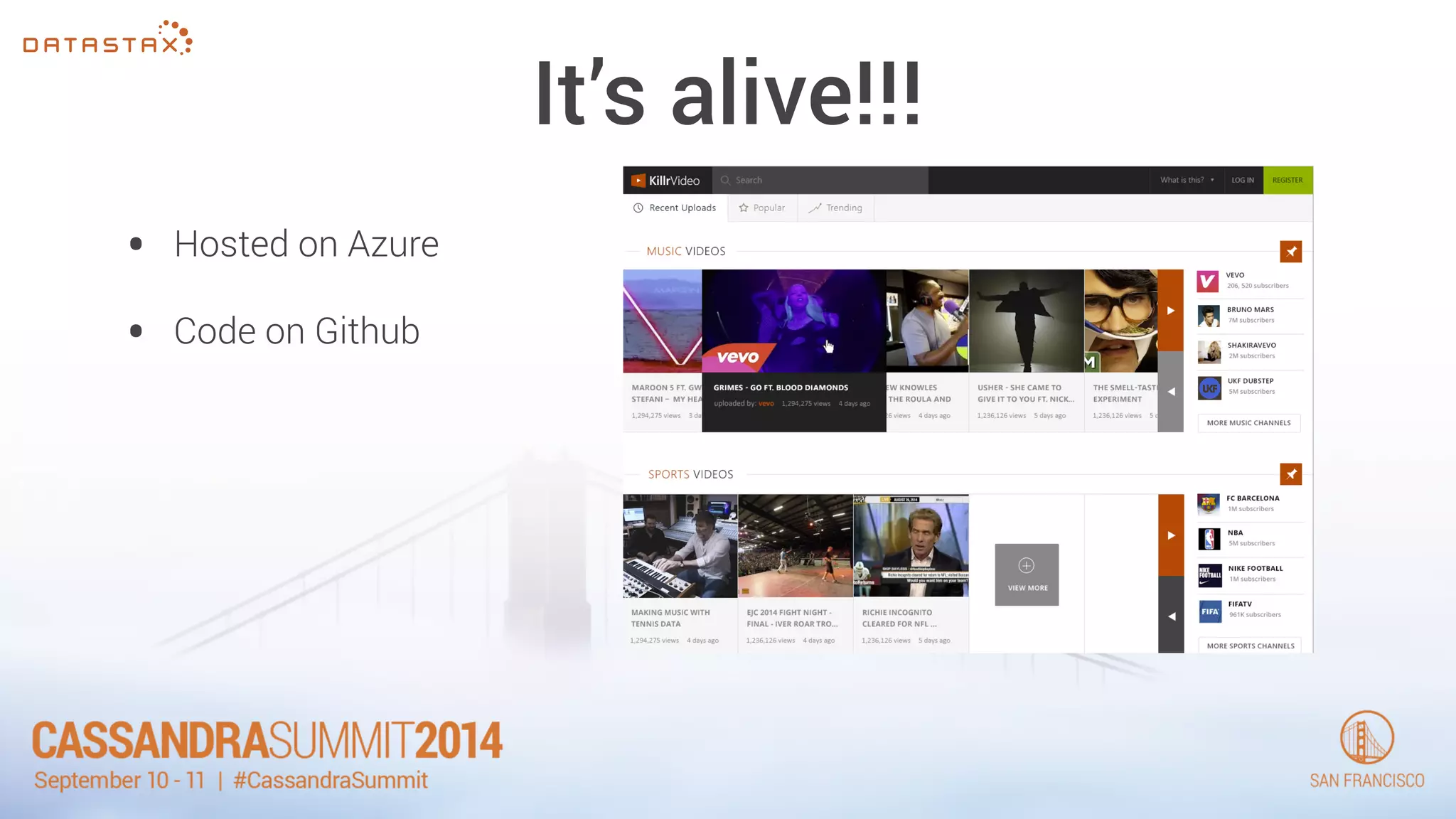
It’s alive!!! 
• Hosted on Azure 
• Code on Github
Data Model - Revisited 
• Add in some 2.1 data models 
• Replace (or remove) some app code 
• Become a part of Cassandra OSS download
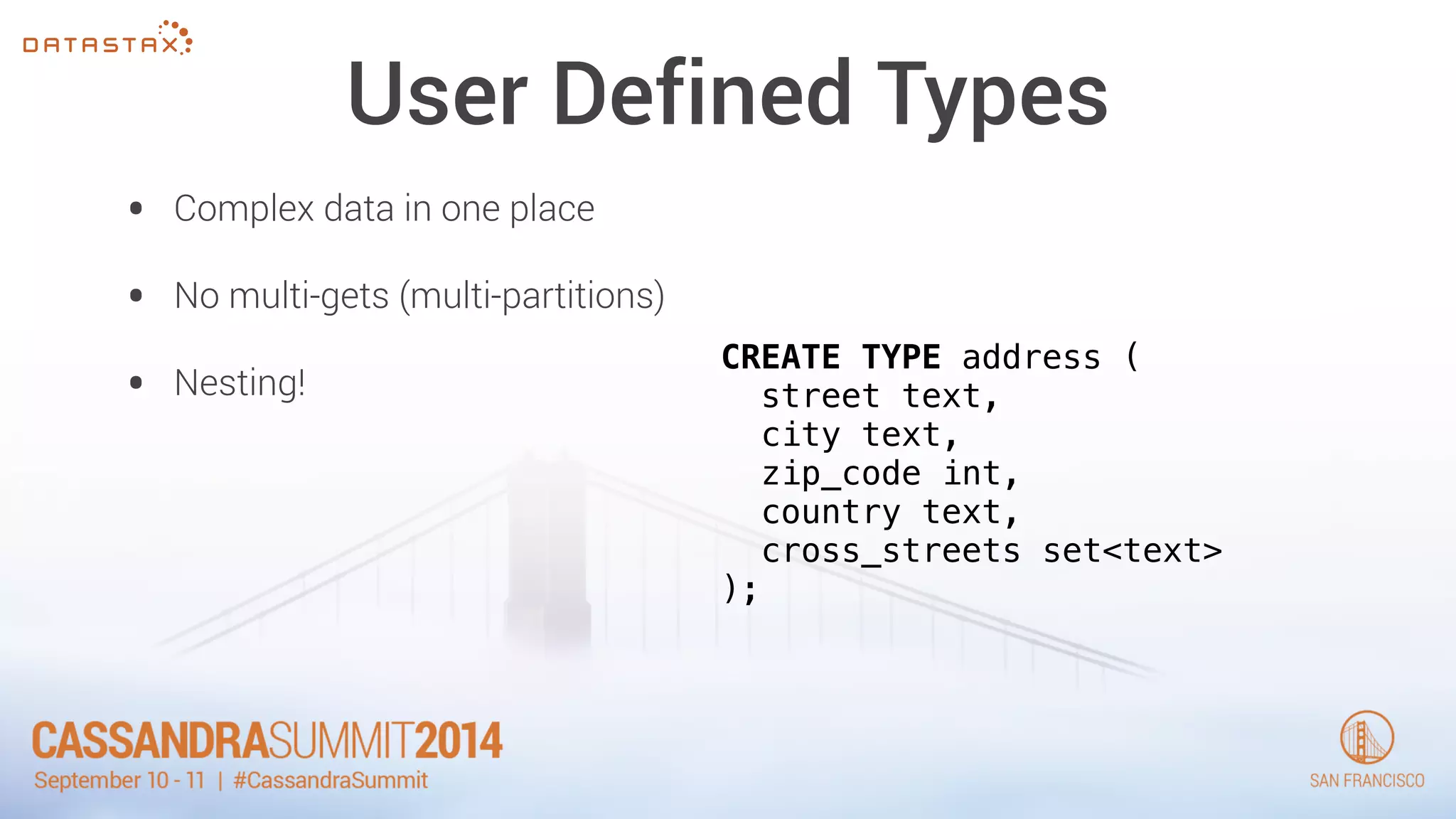
User Defined Types 
• Complex data in one place 
• No multi-gets (multi-partitions) 
• Nesting! CREATE TYPE address ( 
street text, 
city text, 
zip_code int, 
country text, 
cross_streets set<text> 
);
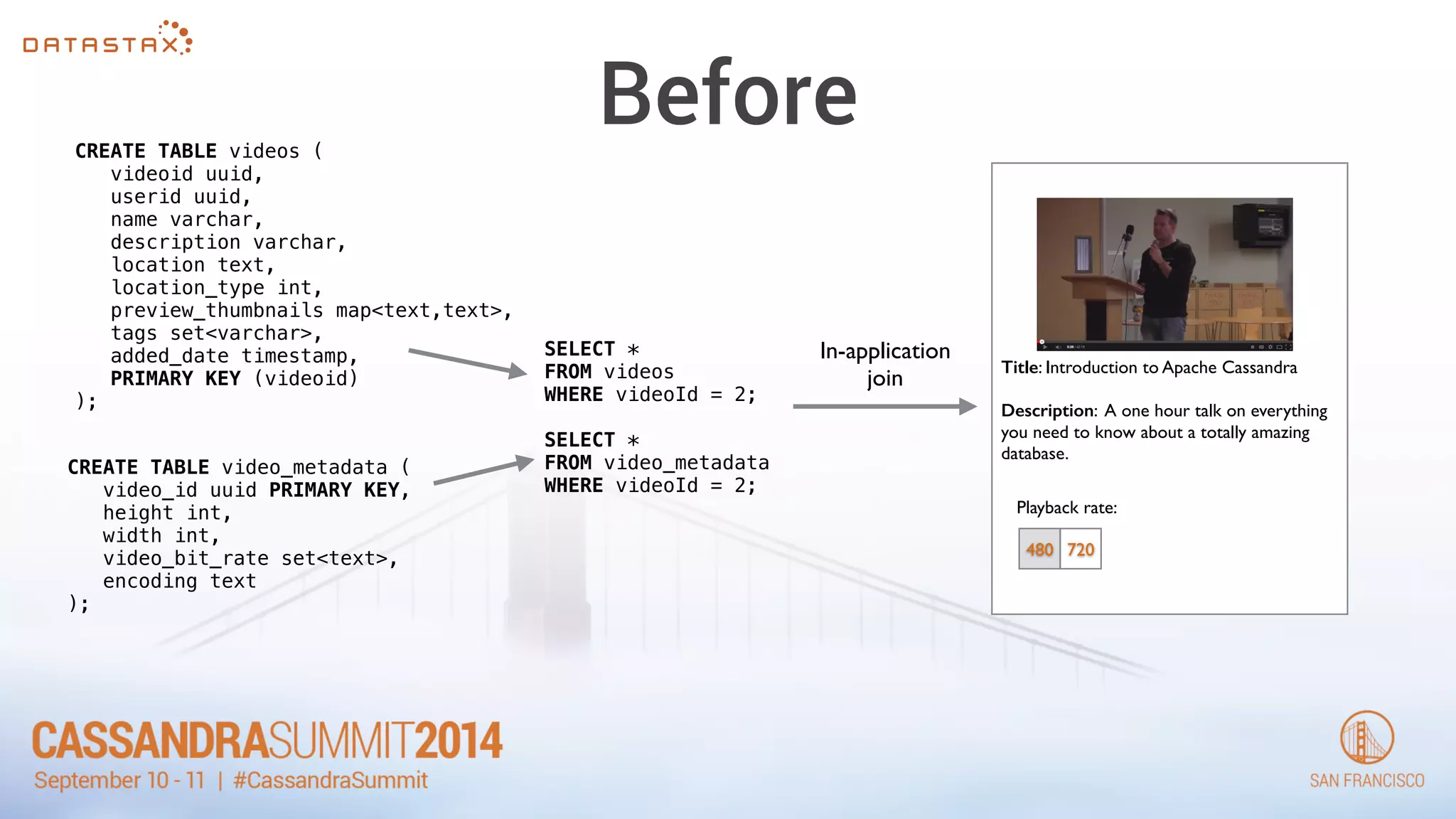
Before 
CREATE TABLE videos ( 
videoid uuid, 
userid uuid, 
name varchar, 
description varchar, 
location text, 
location_type int, 
preview_thumbnails map<text,text>, 
tags set<varchar>, 
added_date timestamp, 
PRIMARY KEY (videoid) 
); 
CREATE TABLE video_metadata ( 
video_id uuid PRIMARY KEY, 
height int, 
width int, 
video_bit_rate set<text>, 
encoding text 
); 
SELECT * 
FROM videos 
WHERE videoId = 2; 
! 
SELECT * 
FROM video_metadata 
WHERE videoId = 2; 
Title: Introduction to Apache Cassandra 
! 
Description: A one hour talk on everything 
you need to know about a totally amazing 
database. 
Playback rate: 
480 720 
In-application 
join
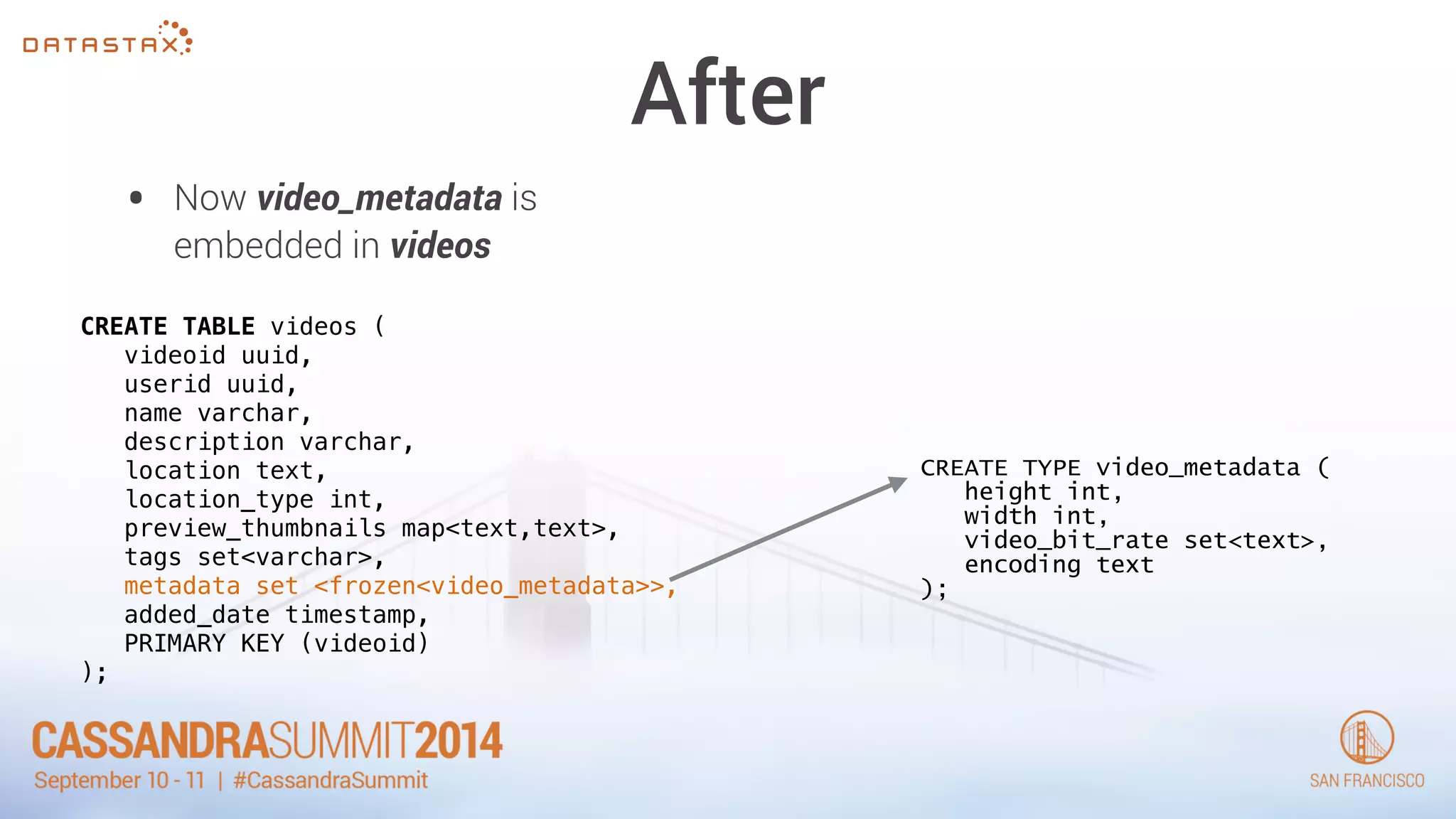
After 
• Now video_metadata is 
embedded in videos 
CREATE TYPE video_metadata ( 
height int, 
width int, 
video_bit_rate set<text>, 
encoding text 
); 
CREATE TABLE videos ( 
videoid uuid, 
userid uuid, 
name varchar, 
description varchar, 
location text, 
location_type int, 
preview_thumbnails map<text,text>, 
tags set<varchar>, 
metadata set <frozen<video_metadata>>, 
added_date timestamp, 
PRIMARY KEY (videoid) 
);
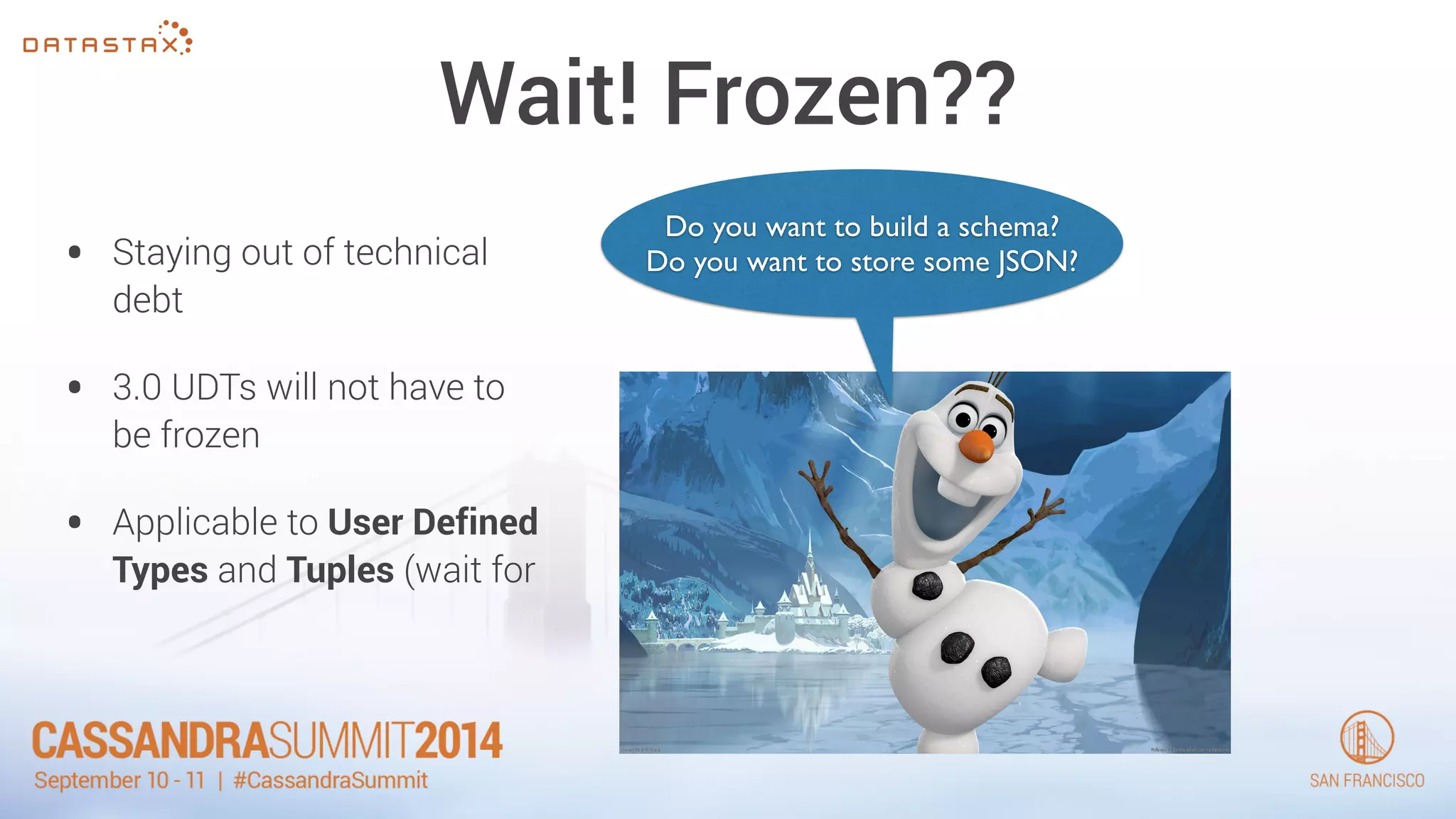
Wait! Frozen?? 
• Staying out of technical 
debt 
• 3.0 UDTs will not have to 
be frozen 
• Applicable to User Defined 
Types and Tuples (wait for 
Do you want to build a schema? 
Do you want to store some JSON?
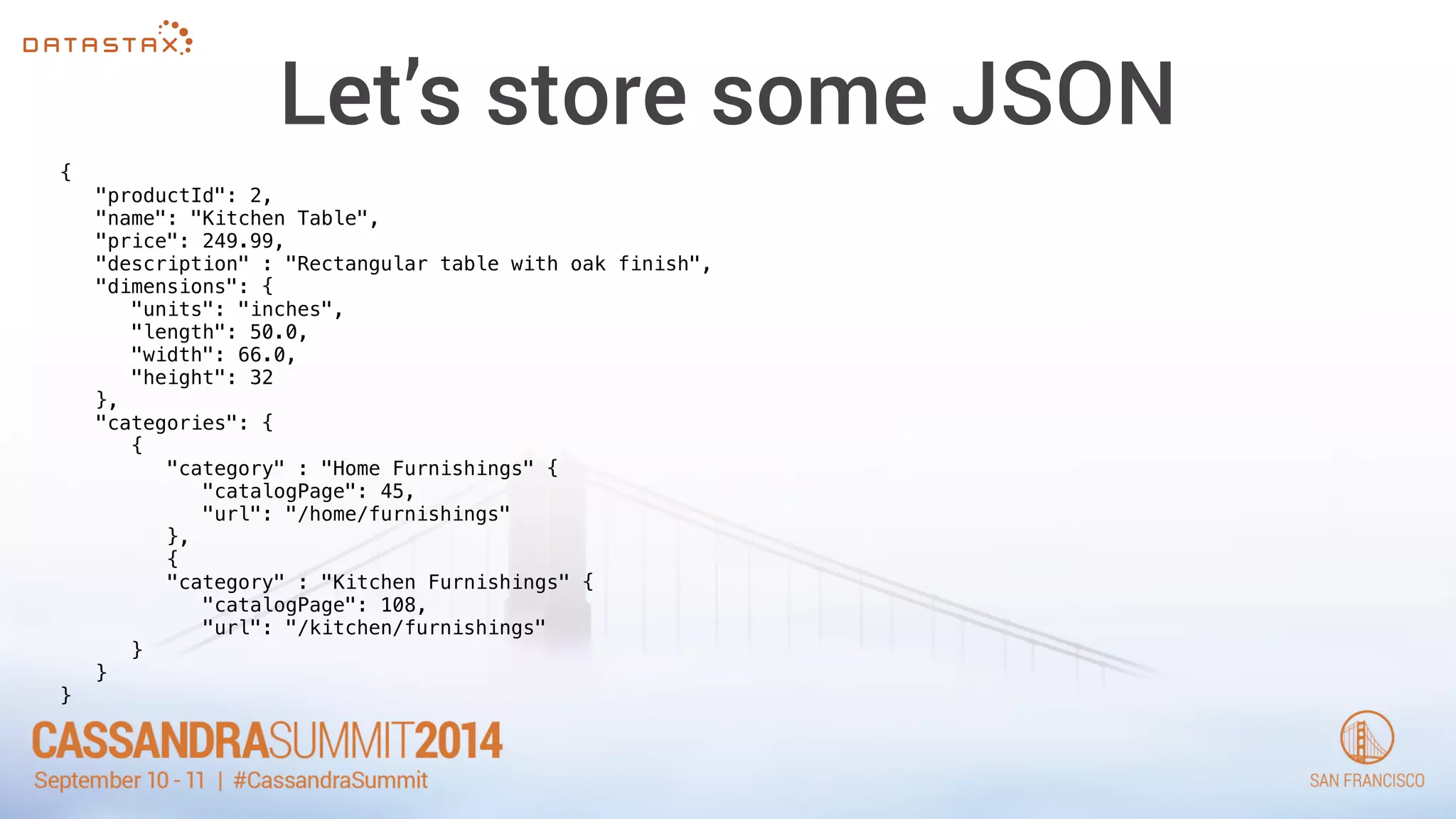
Let’s store some JSON 
{ 
"productId": 2, 
"name": "Kitchen Table", 
"price": 249.99, 
"description" : "Rectangular table with oak finish", 
"dimensions": { 
"units": "inches", 
"length": 50.0, 
"width": 66.0, 
"height": 32 
}, 
"categories": { 
{ 
"category" : "Home Furnishings" { 
"catalogPage": 45, 
"url": "/home/furnishings" 
}, 
{ 
"category" : "Kitchen Furnishings" { 
"catalogPage": 108, 
"url": "/kitchen/furnishings" 
} 
} 
}
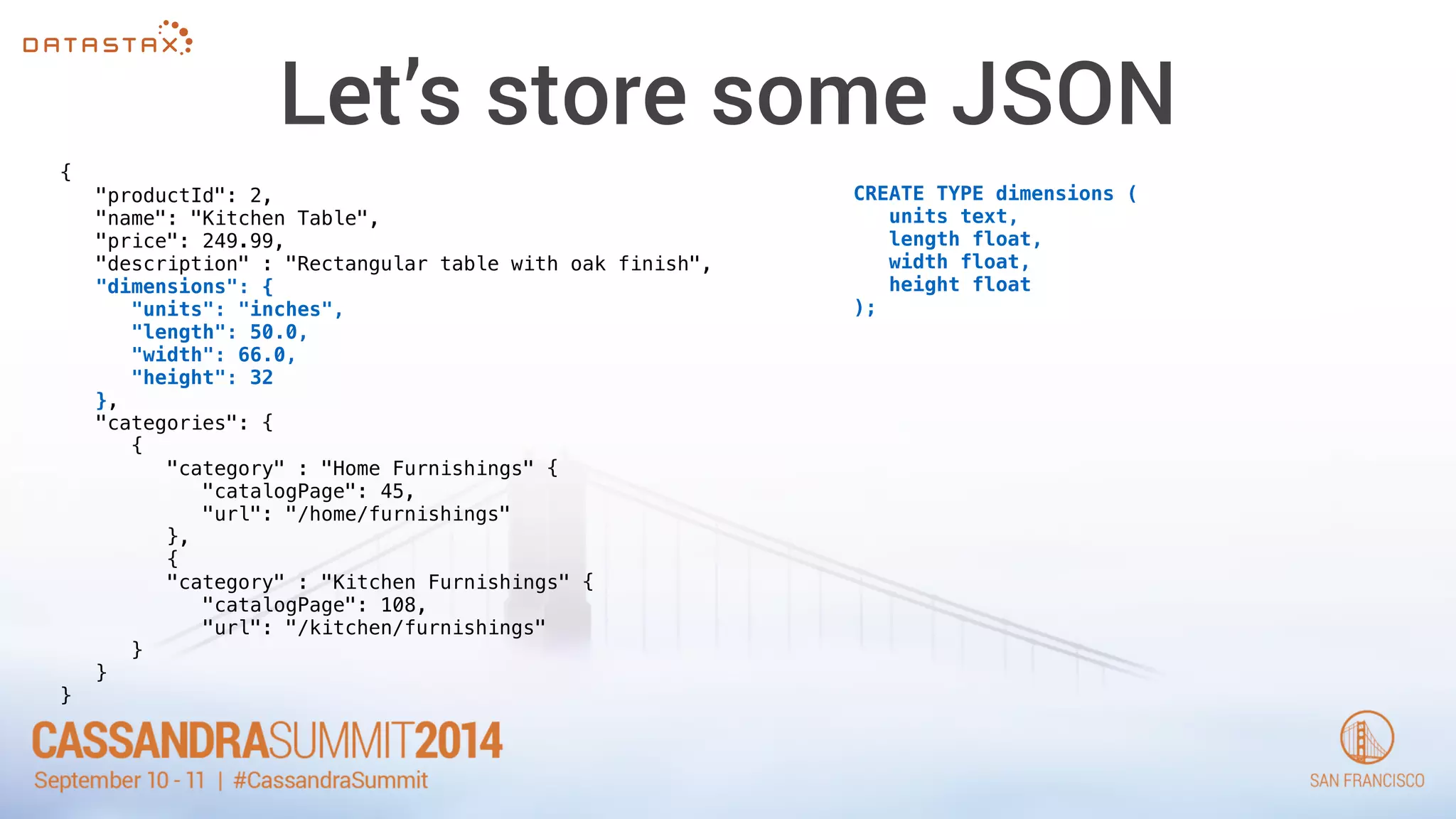
Let’s store some JSON 
{ 
"productId": 2, 
"name": "Kitchen Table", 
"price": 249.99, 
"description" : "Rectangular table with oak finish", 
"dimensions": { 
"units": "inches", 
"length": 50.0, 
"width": 66.0, 
"height": 32 
}, 
"categories": { 
{ 
"category" : "Home Furnishings" { 
"catalogPage": 45, 
"url": "/home/furnishings" 
}, 
{ 
"category" : "Kitchen Furnishings" { 
"catalogPage": 108, 
"url": "/kitchen/furnishings" 
} 
} 
} 
CREATE TYPE dimensions ( 
units text, 
length float, 
width float, 
height float 
);
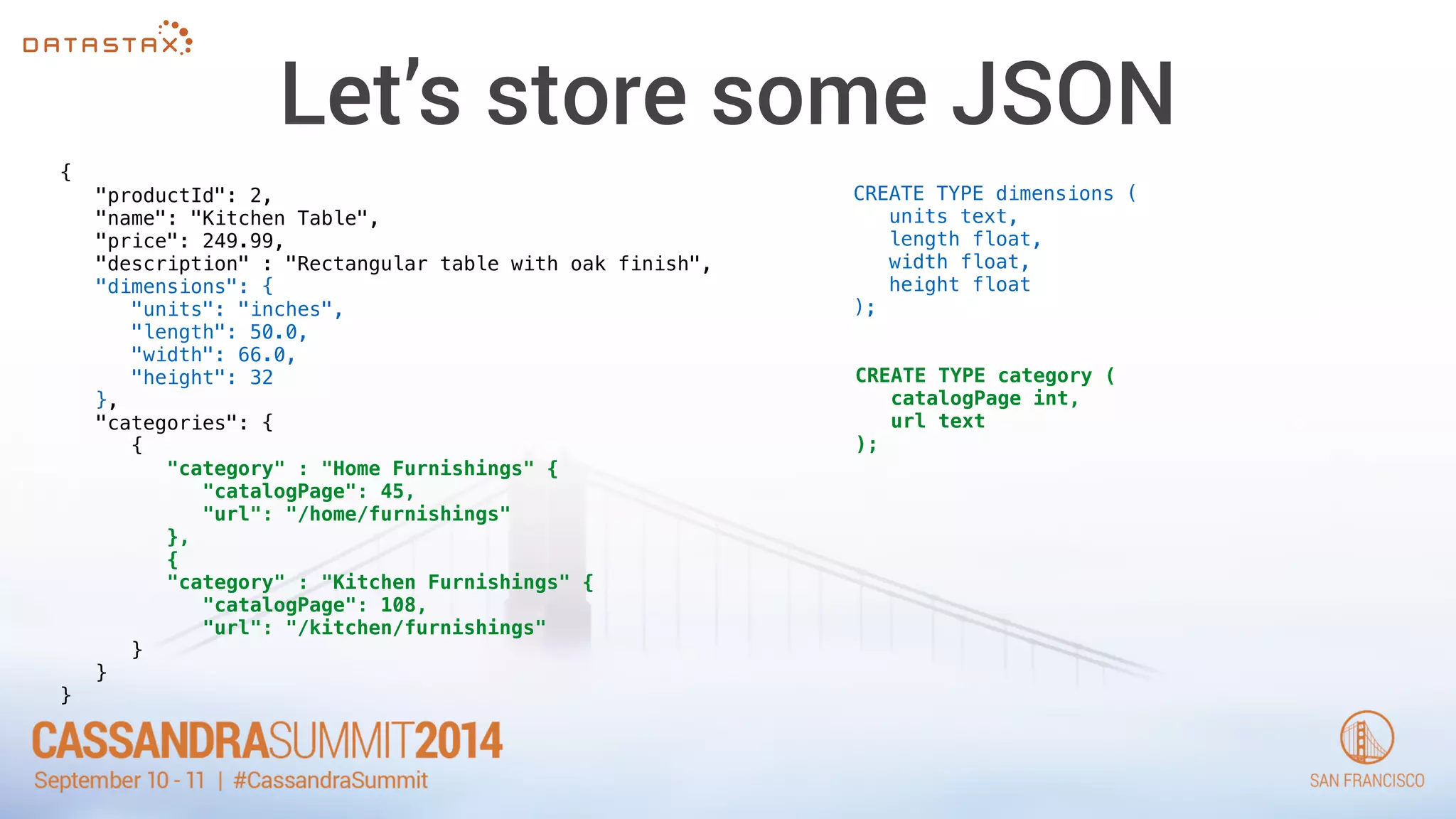
Let’s store some JSON 
{ 
"productId": 2, 
"name": "Kitchen Table", 
"price": 249.99, 
"description" : "Rectangular table with oak finish", 
"dimensions": { 
"units": "inches", 
"length": 50.0, 
"width": 66.0, 
"height": 32 
}, 
"categories": { 
{ 
"category" : "Home Furnishings" { 
"catalogPage": 45, 
"url": "/home/furnishings" 
}, 
{ 
"category" : "Kitchen Furnishings" { 
"catalogPage": 108, 
"url": "/kitchen/furnishings" 
} 
} 
} 
CREATE TYPE dimensions ( 
units text, 
length float, 
width float, 
height float 
); 
CREATE TYPE category ( 
catalogPage int, 
url text 
);
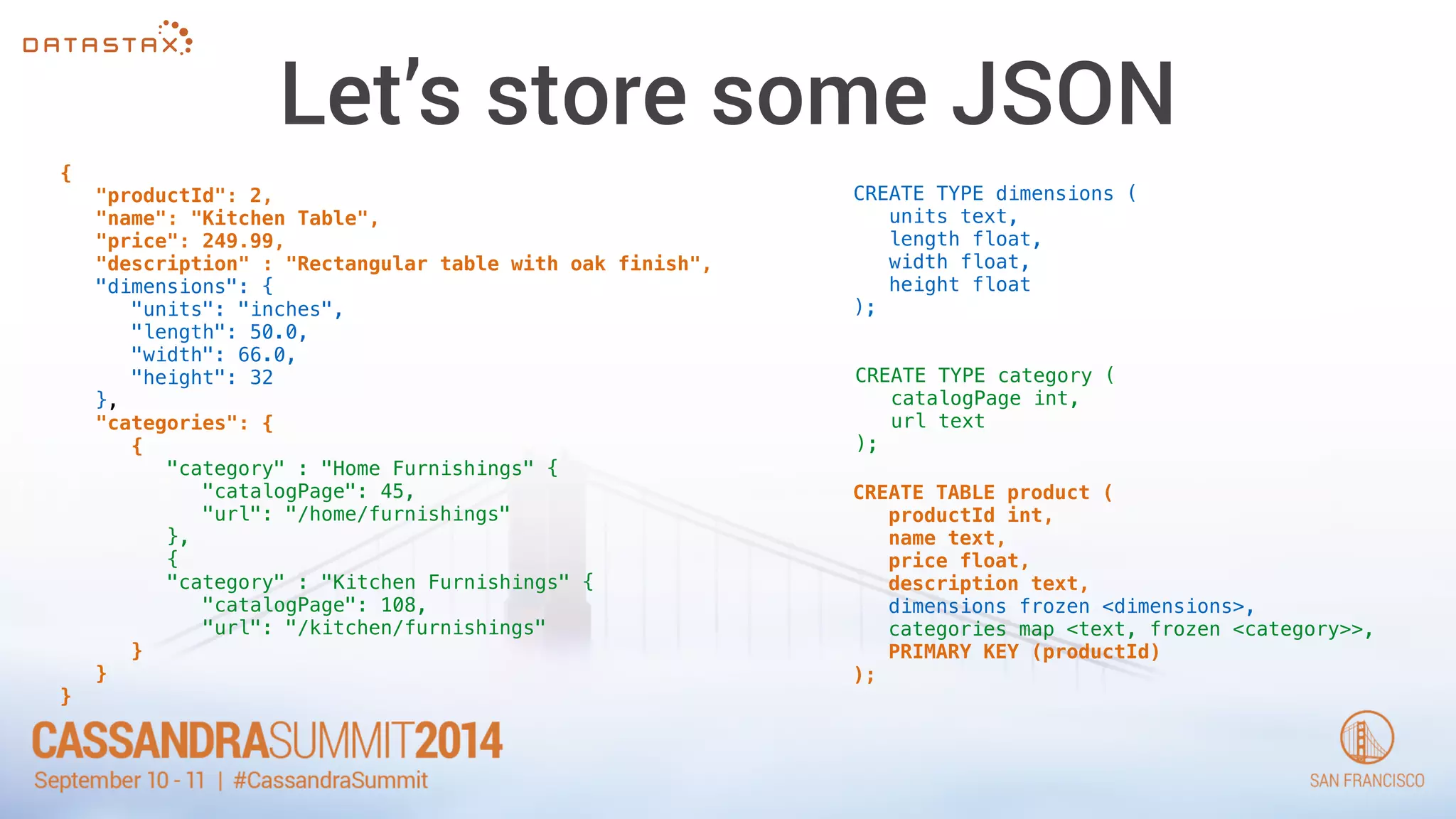
Let’s store some JSON 
{ 
"productId": 2, 
"name": "Kitchen Table", 
"price": 249.99, 
"description" : "Rectangular table with oak finish", 
"dimensions": { 
"units": "inches", 
"length": 50.0, 
"width": 66.0, 
"height": 32 
}, 
"categories": { 
{ 
"category" : "Home Furnishings" { 
"catalogPage": 45, 
"url": "/home/furnishings" 
}, 
{ 
"category" : "Kitchen Furnishings" { 
"catalogPage": 108, 
"url": "/kitchen/furnishings" 
} 
} 
} 
CREATE TYPE dimensions ( 
units text, 
length float, 
width float, 
height float 
); 
CREATE TYPE category ( 
catalogPage int, 
url text 
); 
CREATE TABLE product ( 
productId int, 
name text, 
price float, 
description text, 
dimensions frozen <dimensions>, 
categories map <text, frozen <category>>, 
PRIMARY KEY (productId) 
);
Let’s store some JSON 
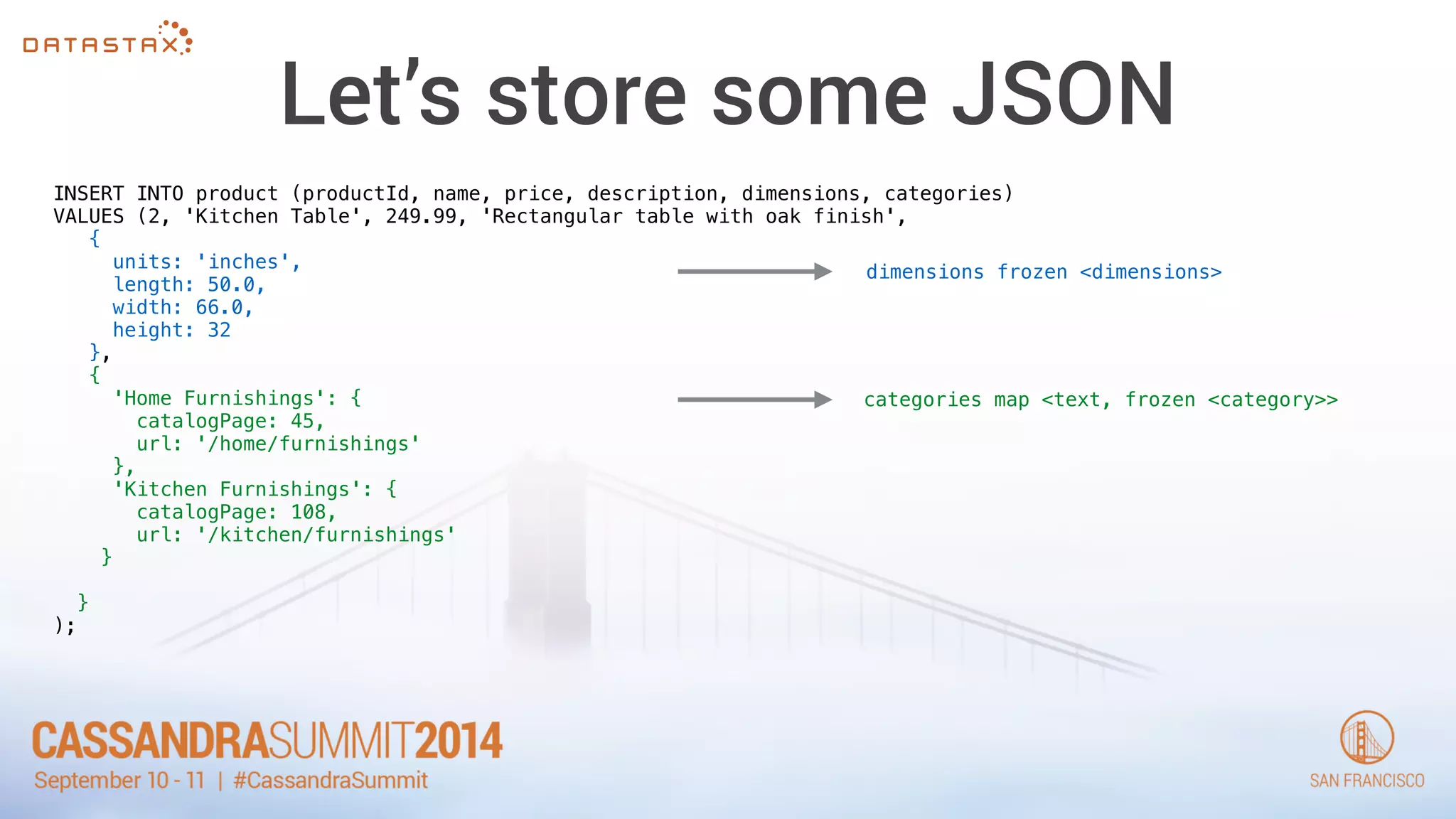
INSERT INTO product (productId, name, price, description, dimensions, categories) 
VALUES (2, 'Kitchen Table', 249.99, 'Rectangular table with oak finish', 
{ 
units: 'inches', 
length: 50.0, 
width: 66.0, 
height: 32 
}, 
{ 
'Home Furnishings': { 
catalogPage: 45, 
url: '/home/furnishings' 
}, 
'Kitchen Furnishings': { 
catalogPage: 108, 
url: '/kitchen/furnishings' 
} 
! 
} 
); 
dimensions frozen <dimensions> 
categories map <text, frozen <category>>
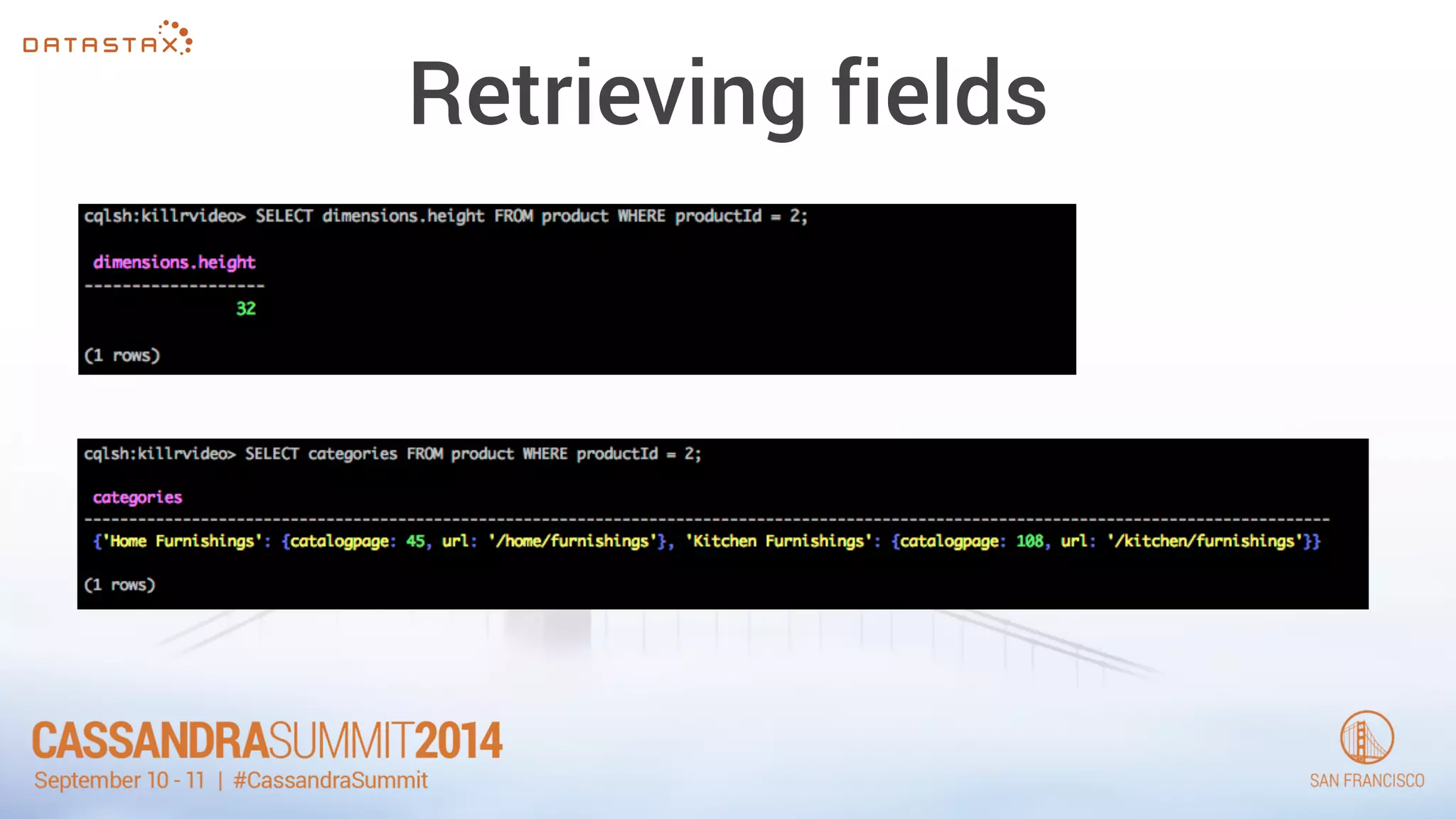
Retrieving fields
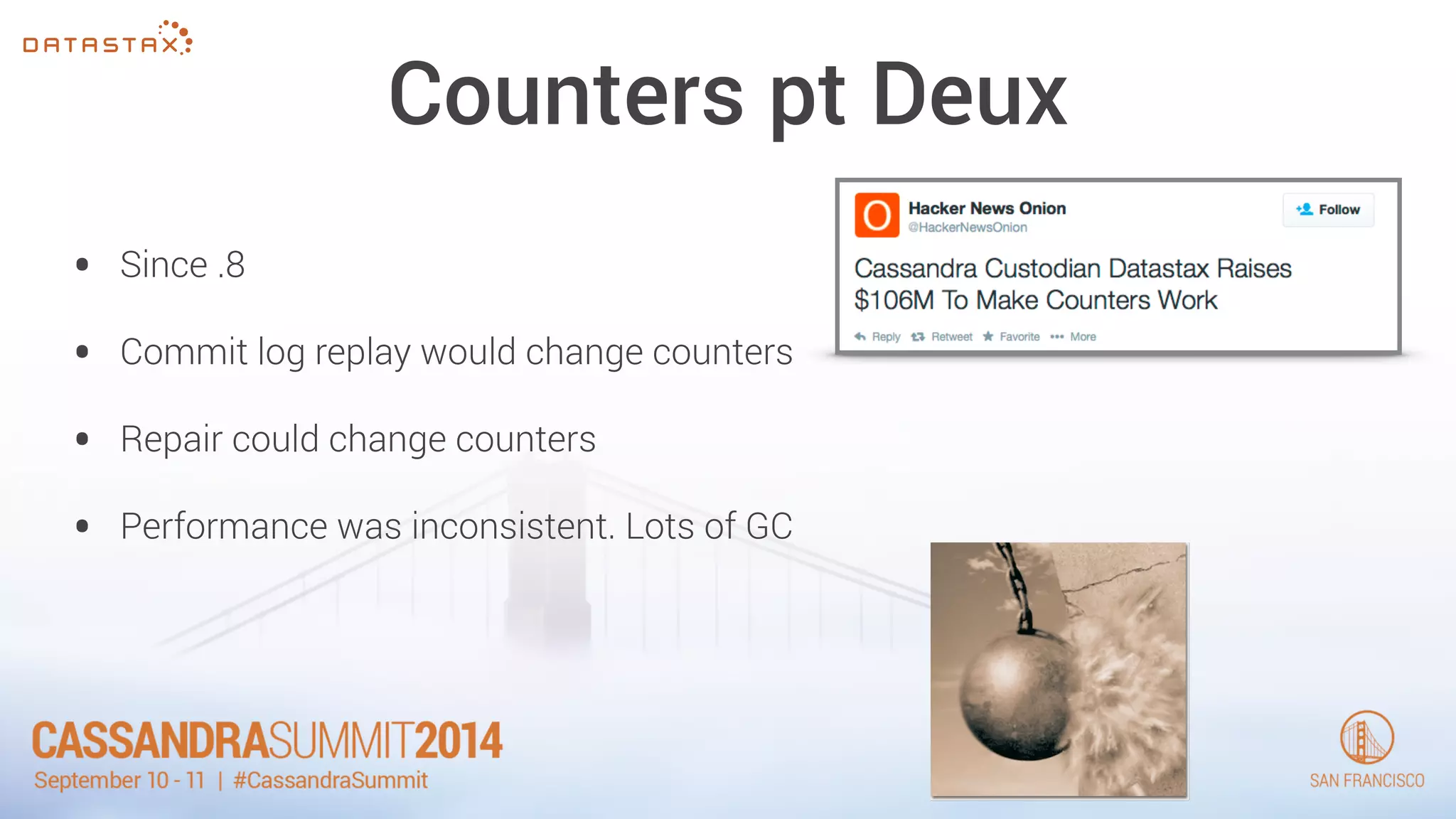
Counters pt Deux 
• Since .8 
• Commit log replay would change counters 
• Repair could change counters 
• Performance was inconsistent. Lots of GC
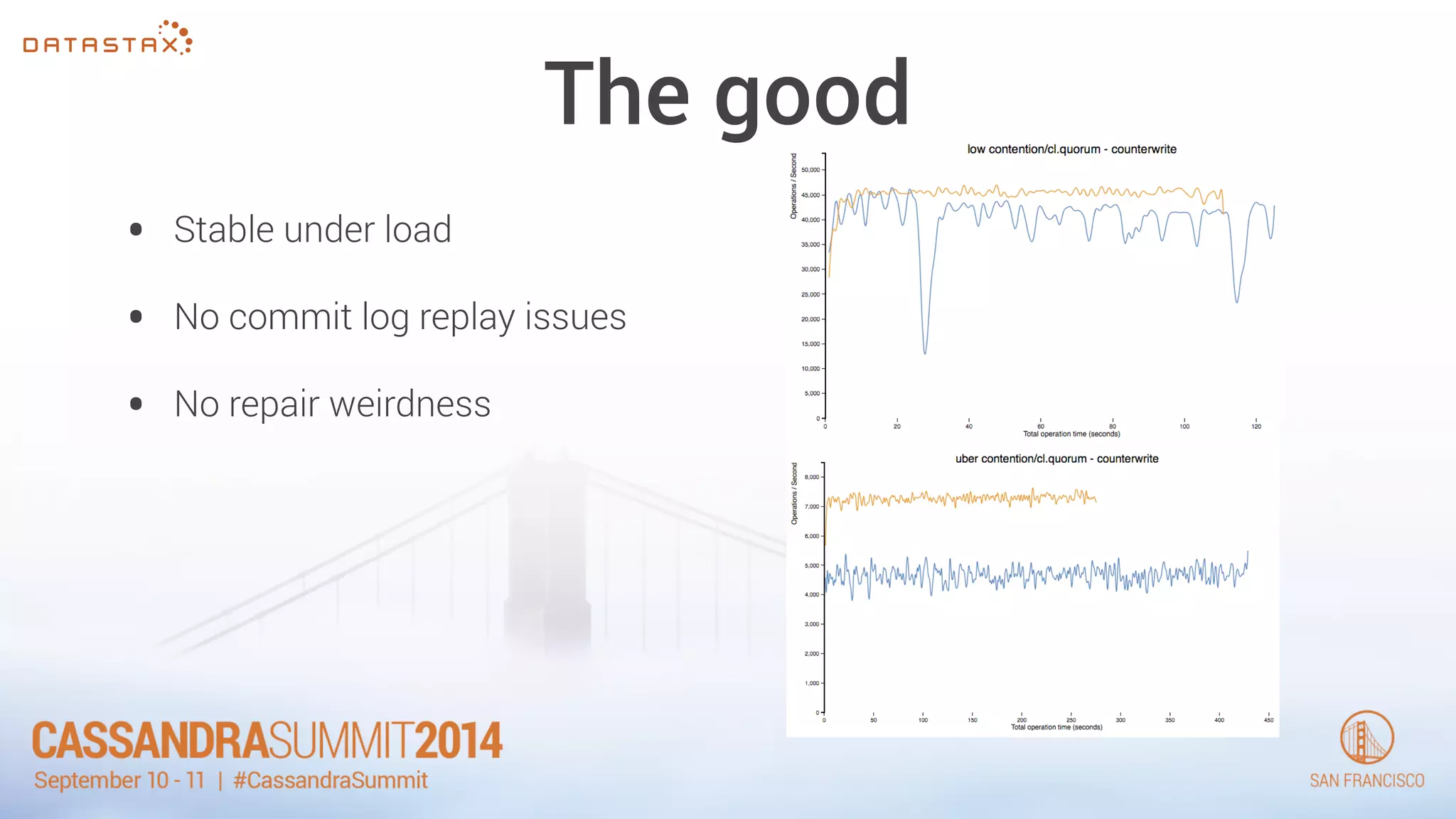
The good 
• Stable under load 
• No commit log replay issues 
• No repair weirdness
The bad 
• Still can’t delete/reset counters 
• Still needs to do a read before write.
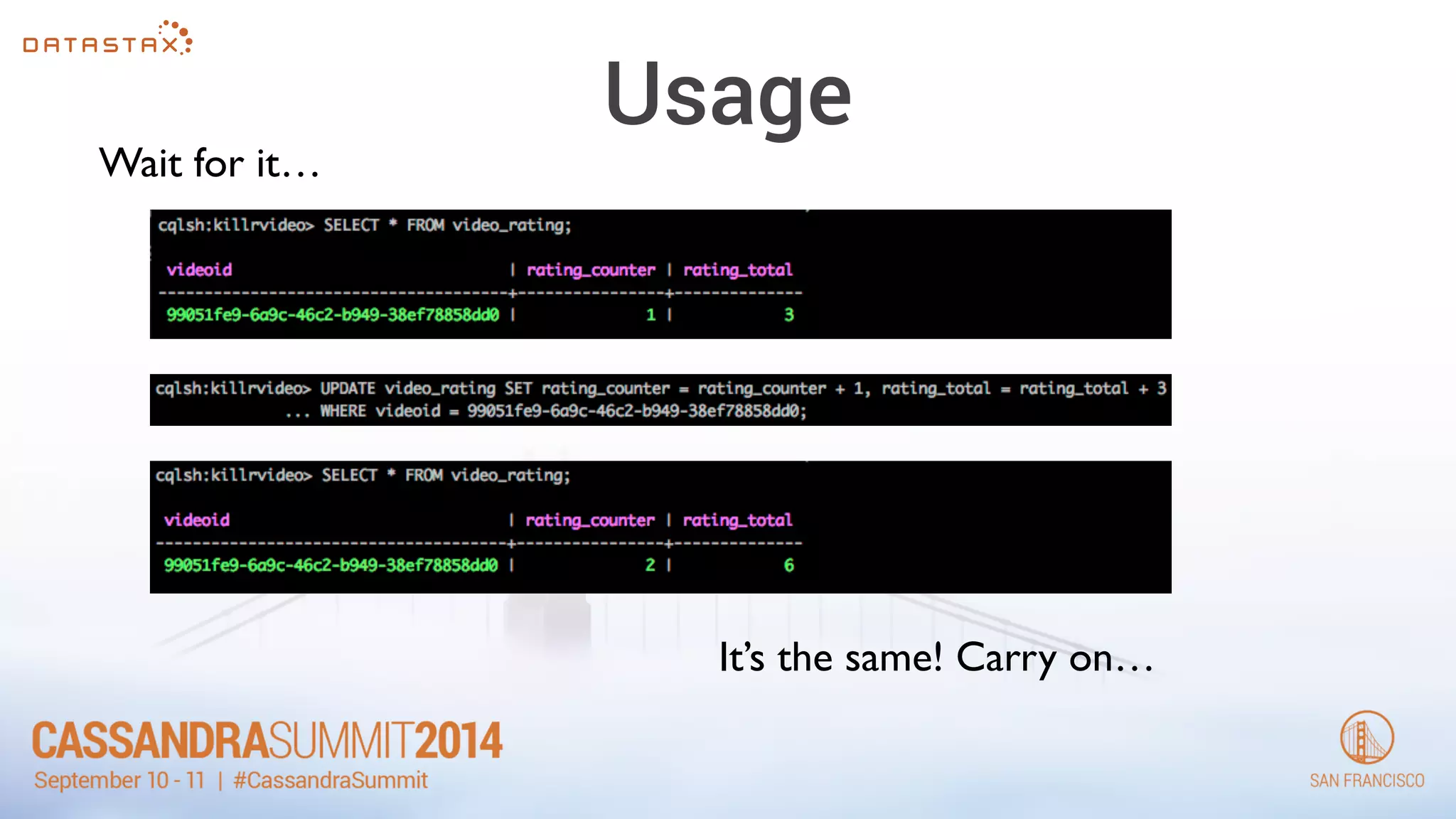
Usage 
Wait for it… 
It’s the same! Carry on…
Static Fields 
• New as of 2.0.6 
• VERY specific, but useful 
• Thrift people will like this 
CREATE TABLE t ( 
k text, 
s text STATIC, 
i int, 
PRIMARY KEY (k, i) 
);
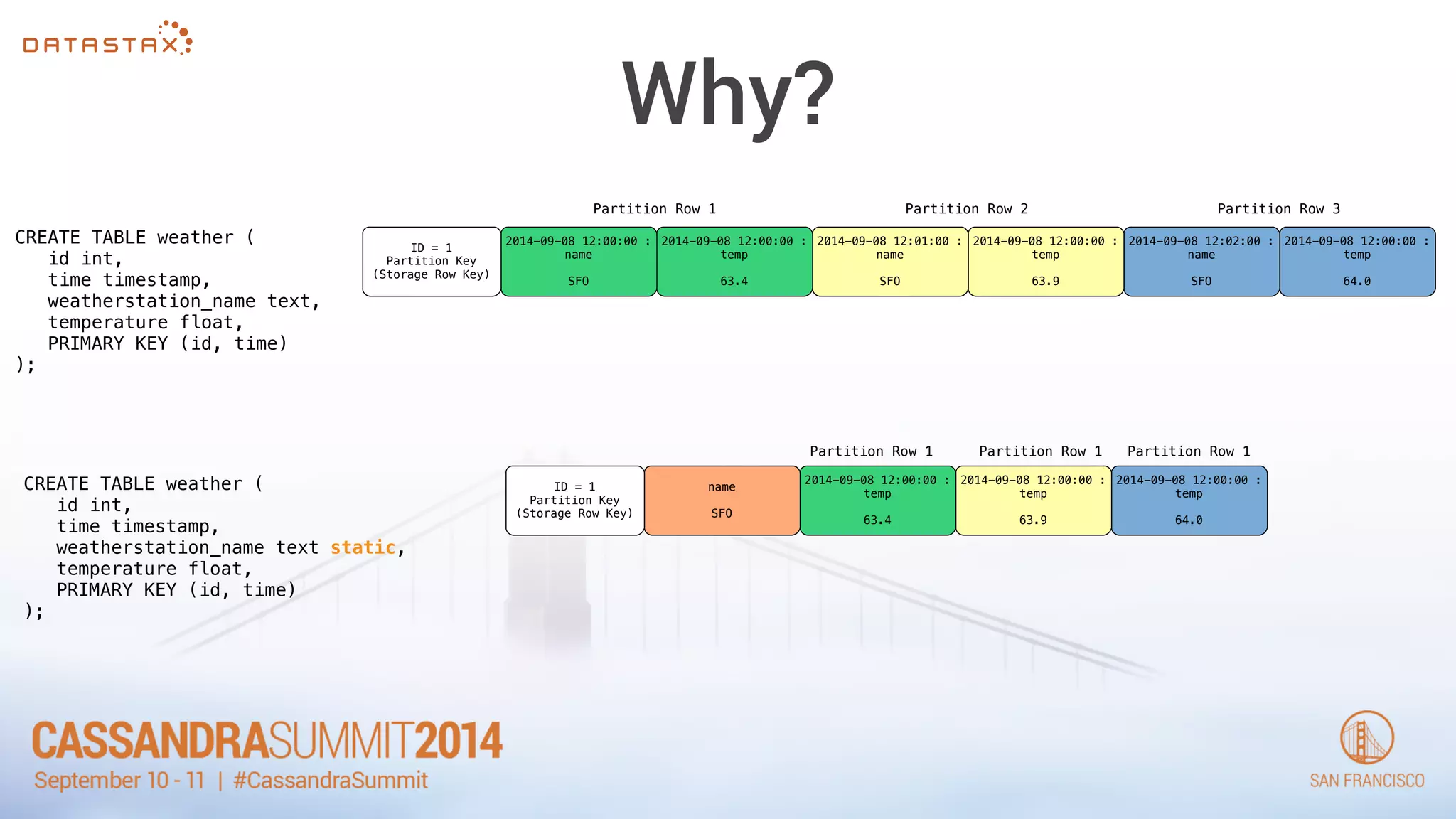
Why? 
CREATE TABLE weather ( 
id int, 
time timestamp, 
weatherstation_name text, 
temperature float, 
PRIMARY KEY (id, time) 
); 
ID = 1 
Partition Key 
(Storage Row Key) 
2014-09-08 12:00:00 : 
name 
SFO 
2014-09-08 12:00:00 : 
temp 
63.4 
2014-09-08 12:01:00 : 
name 
SFO 
2014-09-08 12:00:00 : 
temp 
63.9 
2014-09-08 12:02:00 : 
name 
SFO 
2014-09-08 12:00:00 : 
temp 
64.0 
Partition Row 1 Partition Row 2 Partition Row 3 
ID = 1 
Partition Key 
(Storage Row Key) 
name 
SFO 
Partition Row 1 Partition Row 1 Partition Row 1 
2014-09-08 12:00:00 : 
temp 
63.4 
2014-09-08 12:00:00 : 
temp 
63.9 
2014-09-08 12:00:00 : 
temp 
64.0 
CREATE TABLE weather ( 
id int, 
time timestamp, 
weatherstation_name text static, 
temperature float, 
PRIMARY KEY (id, time) 
);
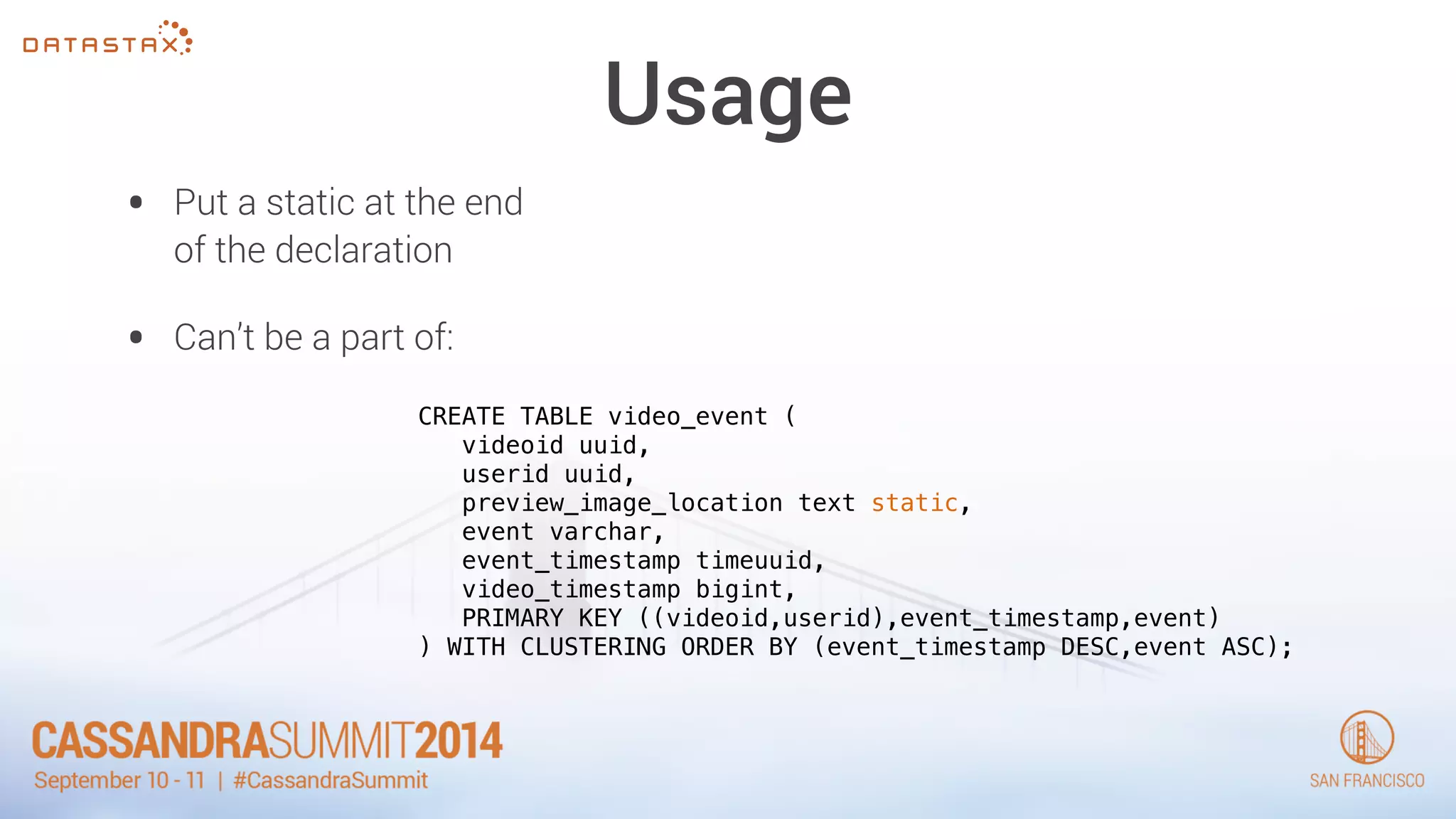
Usage 
• Put a static at the end 
of the declaration 
• Can’t be a part of: 
CREATE TABLE video_event ( 
videoid uuid, 
userid uuid, 
preview_image_location text static, 
event varchar, 
event_timestamp timeuuid, 
video_timestamp bigint, 
PRIMARY KEY ((videoid,userid),event_timestamp,event) 
) WITH CLUSTERING ORDER BY (event_timestamp DESC,event ASC);
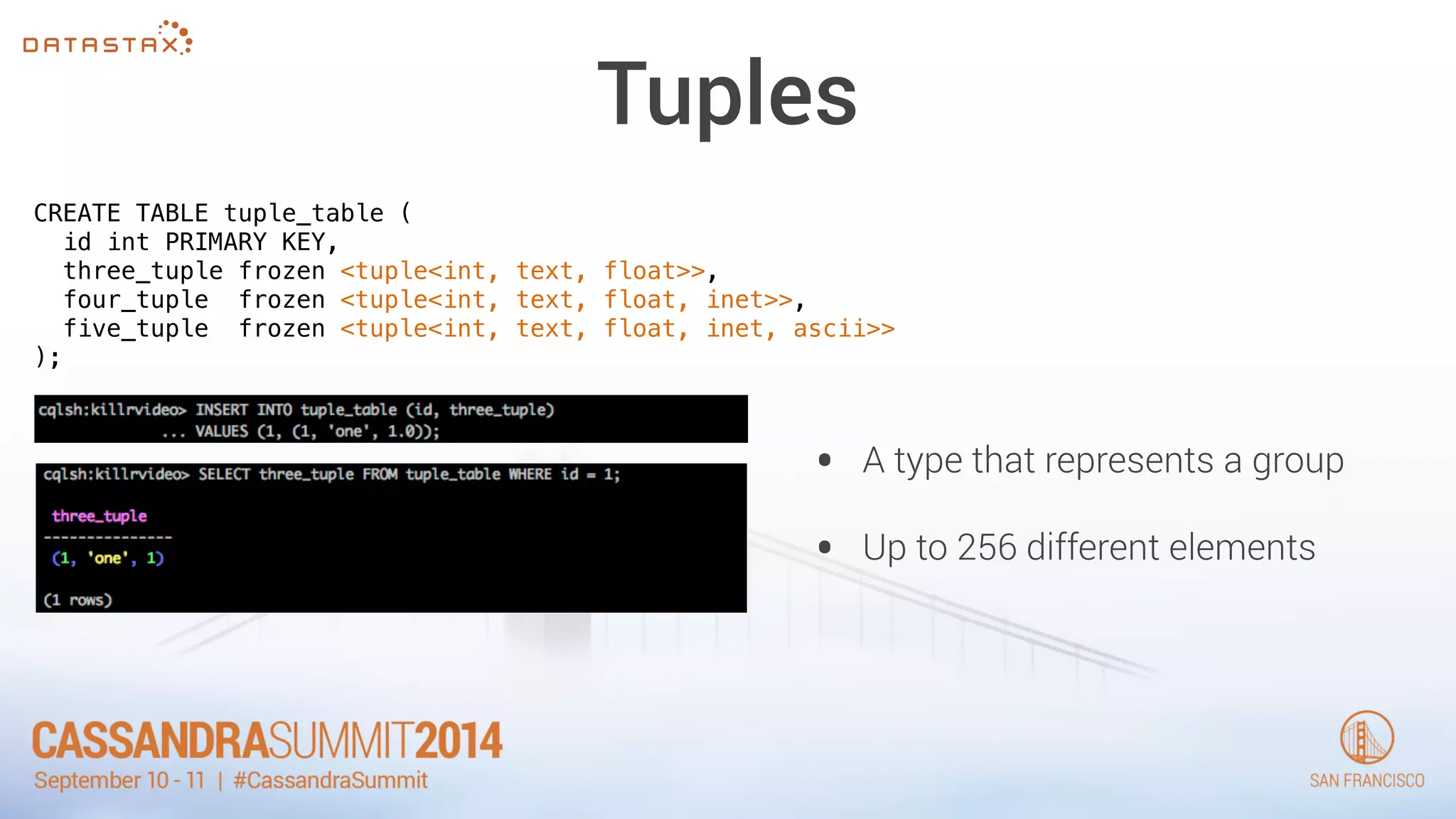
Tuples 
CREATE TABLE tuple_table ( 
id int PRIMARY KEY, 
three_tuple frozen <tuple<int, text, float>>, 
four_tuple frozen <tuple<int, text, float, inet>>, 
five_tuple frozen <tuple<int, text, float, inet, ascii>> 
); 
• A type that represents a group 
• Up to 256 different elements
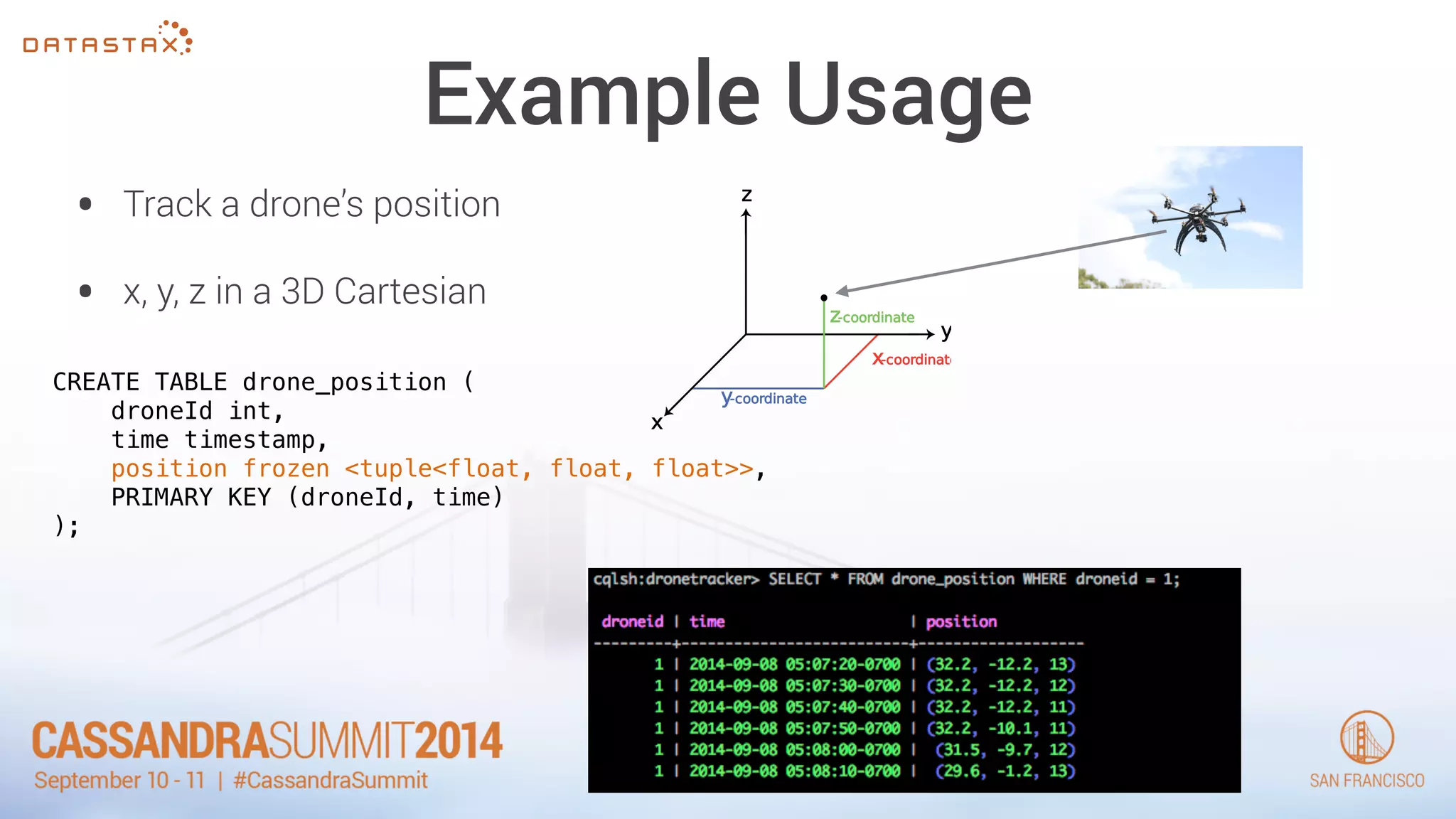
Example Usage 
• Track a drone’s position 
• x, y, z in a 3D Cartesian 
CREATE TABLE drone_position ( 
droneId int, 
time timestamp, 
position frozen <tuple<float, float, float>>, 
PRIMARY KEY (droneId, time) 
);
What about partition size? 
• A CQL partition is a logical projection of a storage row 
• Storage rows can have up to 2 billion cells 
• Each cell can hold up to 2G of data
How much is too much? 
• How many cells before performance degrades? 
• How many bytes per partition before it’s unmanageable 
• What is “practical”
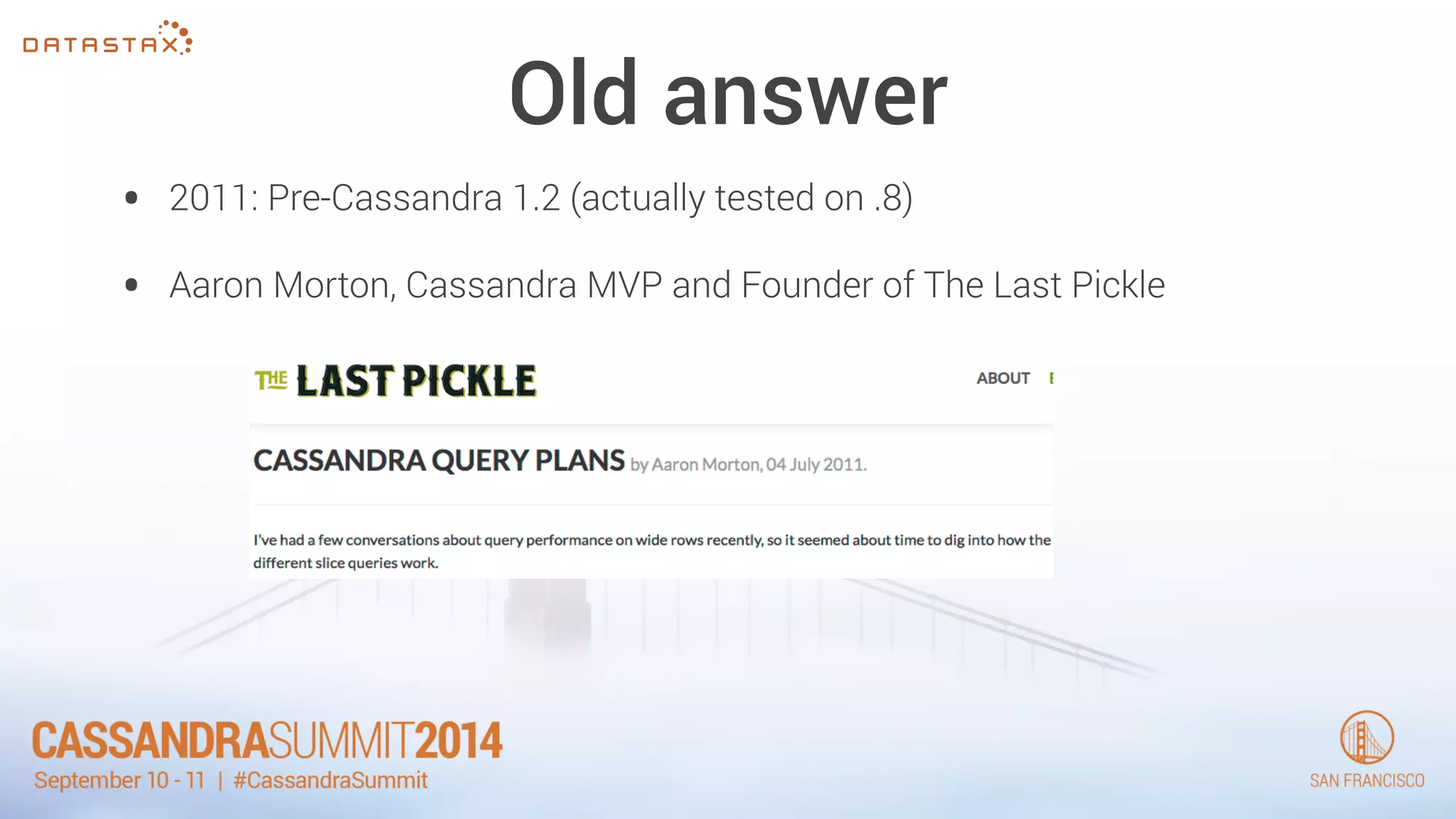
Old answer 
• 2011: Pre-Cassandra 1.2 (actually tested on .8) 
• Aaron Morton, Cassandra MVP and Founder of The Last Pickle
Conclusion 
• Keep partition (storage row) length < 10k cells 
• Total size in bytes below 64M (Multi-pass compaction) 
• Multiple hits to 64k page size will start to hurt 
TL;DR - It’s a performance tunable
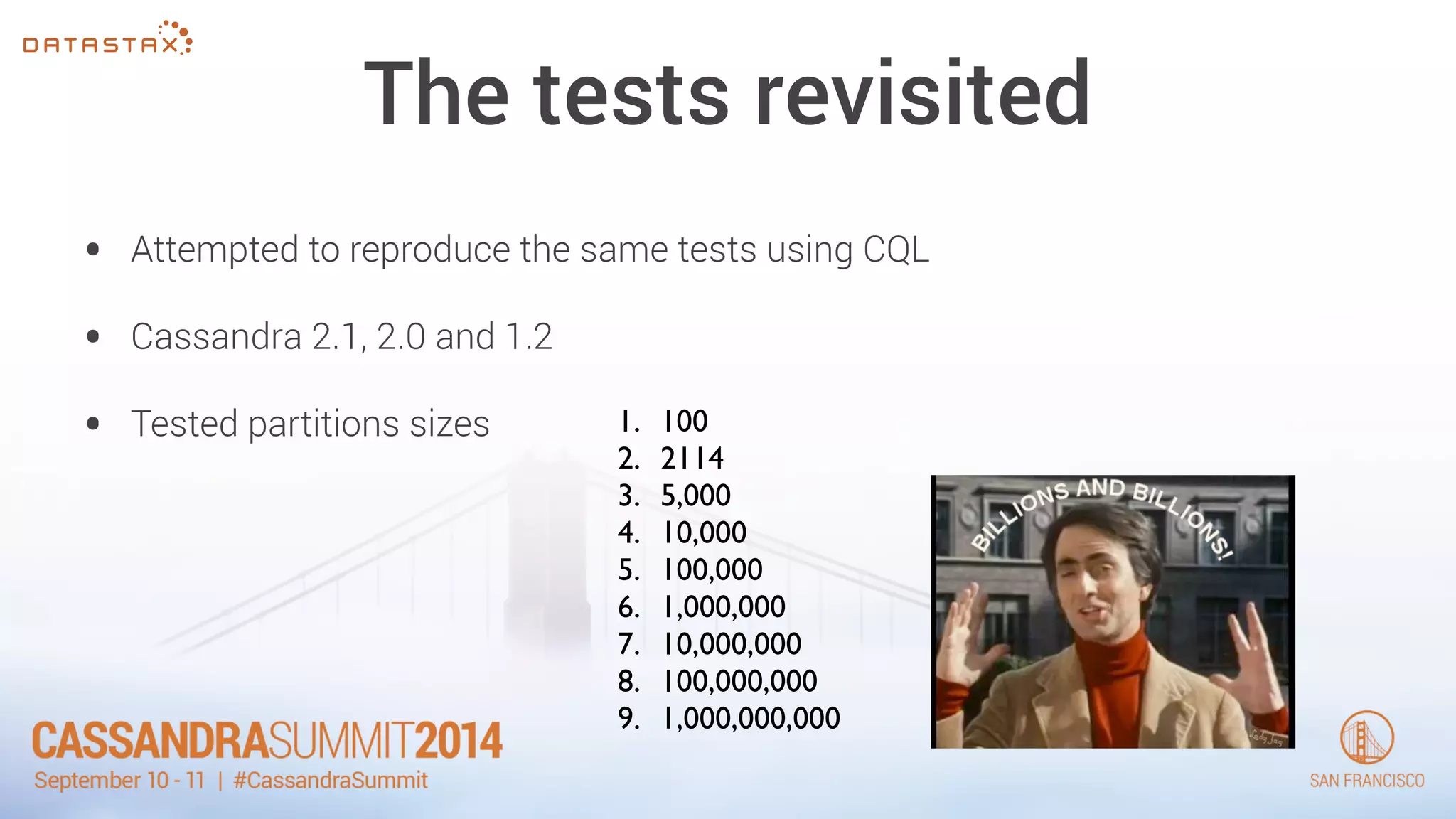
The tests revisited 
• Attempted to reproduce the same tests using CQL 
• Cassandra 2.1, 2.0 and 1.2 
• Tested partitions sizes 1. 100 
2. 2114 
3. 5,000 
4. 10,000 
5. 100,000 
6. 1,000,000 
7. 10,000,000 
8. 100,000,000 
9. 1,000,000,000
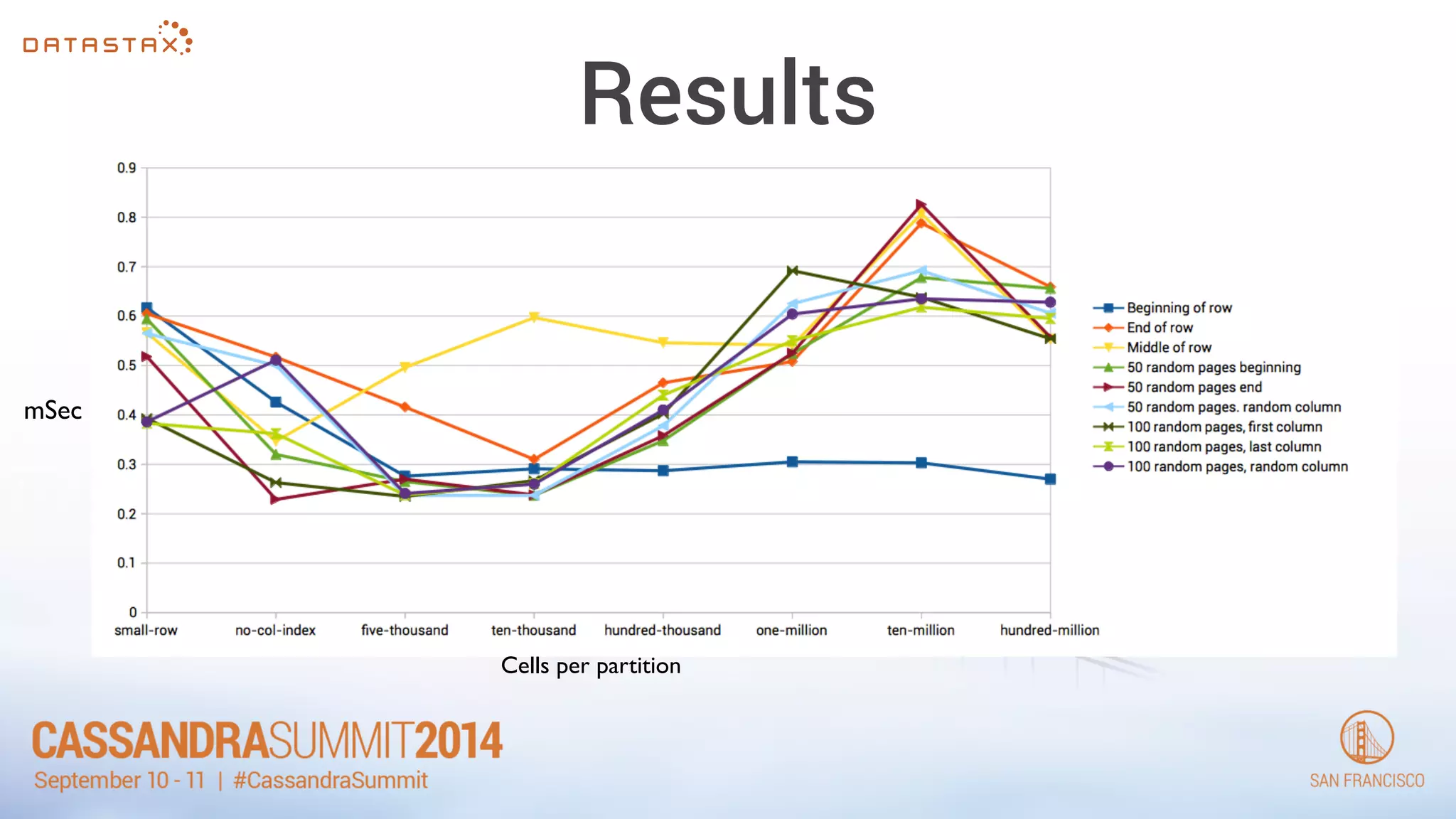
Results 
mSec 
Cells per partition
The new answer 
• 100’s of thousands is not problem 
• 100’s of megs per partition is best operationally 
• The issue to manage is operations
Thank You! 
Follow me on twitter for more 
@PatrickMcFadin
CASSANDRASUMMIT2014 
September 10 - 11 | #CassandraSummit

Cassandra Summit 2014: Real Data Models of Silicon Valley

  • 1.
    Real Data Modelsof Silicon Valley Patrick McFadin Chief Evangelist for Apache Cassandra ! @PatrickMcFadin
  • 2.
    It's been anepic year
  • 3.
    I've had aton of fun! • Traveling the world talking to people like you! Stockholm Warsaw Melbourne New York Vancouver Dublin
  • 4.
    What's new? •2.1 is out! • Amazing changes for performance and stability
  • 5.
    Where are wegoing? • 3.0 is next. Just hold on…
  • 6.
    KillrVideo.com • 2012Summit • Complete example for data modeling www.killrvideos.com Video Title Recommended Meow Ads by Google Description Comments Upload New! Username Rating: Tags: Foo Bar *Cat drawing by goodrob13 on Flickr
  • 7.
    It’s alive!!! •Hosted on Azure • Code on Github
  • 8.
    Data Model -Revisited • Add in some 2.1 data models • Replace (or remove) some app code • Become a part of Cassandra OSS download
  • 9.
    User Defined Types • Complex data in one place • No multi-gets (multi-partitions) • Nesting! CREATE TYPE address ( street text, city text, zip_code int, country text, cross_streets set<text> );
  • 10.
    Before CREATE TABLEvideos ( videoid uuid, userid uuid, name varchar, description varchar, location text, location_type int, preview_thumbnails map<text,text>, tags set<varchar>, added_date timestamp, PRIMARY KEY (videoid) ); CREATE TABLE video_metadata ( video_id uuid PRIMARY KEY, height int, width int, video_bit_rate set<text>, encoding text ); SELECT * FROM videos WHERE videoId = 2; ! SELECT * FROM video_metadata WHERE videoId = 2; Title: Introduction to Apache Cassandra ! Description: A one hour talk on everything you need to know about a totally amazing database. Playback rate: 480 720 In-application join
  • 11.
    After • Nowvideo_metadata is embedded in videos CREATE TYPE video_metadata ( height int, width int, video_bit_rate set<text>, encoding text ); CREATE TABLE videos ( videoid uuid, userid uuid, name varchar, description varchar, location text, location_type int, preview_thumbnails map<text,text>, tags set<varchar>, metadata set <frozen<video_metadata>>, added_date timestamp, PRIMARY KEY (videoid) );
  • 12.
    Wait! Frozen?? •Staying out of technical debt • 3.0 UDTs will not have to be frozen • Applicable to User Defined Types and Tuples (wait for Do you want to build a schema? Do you want to store some JSON?
  • 13.
    Let’s store someJSON { "productId": 2, "name": "Kitchen Table", "price": 249.99, "description" : "Rectangular table with oak finish", "dimensions": { "units": "inches", "length": 50.0, "width": 66.0, "height": 32 }, "categories": { { "category" : "Home Furnishings" { "catalogPage": 45, "url": "/home/furnishings" }, { "category" : "Kitchen Furnishings" { "catalogPage": 108, "url": "/kitchen/furnishings" } } }
  • 14.
    Let’s store someJSON { "productId": 2, "name": "Kitchen Table", "price": 249.99, "description" : "Rectangular table with oak finish", "dimensions": { "units": "inches", "length": 50.0, "width": 66.0, "height": 32 }, "categories": { { "category" : "Home Furnishings" { "catalogPage": 45, "url": "/home/furnishings" }, { "category" : "Kitchen Furnishings" { "catalogPage": 108, "url": "/kitchen/furnishings" } } } CREATE TYPE dimensions ( units text, length float, width float, height float );
  • 15.
    Let’s store someJSON { "productId": 2, "name": "Kitchen Table", "price": 249.99, "description" : "Rectangular table with oak finish", "dimensions": { "units": "inches", "length": 50.0, "width": 66.0, "height": 32 }, "categories": { { "category" : "Home Furnishings" { "catalogPage": 45, "url": "/home/furnishings" }, { "category" : "Kitchen Furnishings" { "catalogPage": 108, "url": "/kitchen/furnishings" } } } CREATE TYPE dimensions ( units text, length float, width float, height float ); CREATE TYPE category ( catalogPage int, url text );
  • 16.
    Let’s store someJSON { "productId": 2, "name": "Kitchen Table", "price": 249.99, "description" : "Rectangular table with oak finish", "dimensions": { "units": "inches", "length": 50.0, "width": 66.0, "height": 32 }, "categories": { { "category" : "Home Furnishings" { "catalogPage": 45, "url": "/home/furnishings" }, { "category" : "Kitchen Furnishings" { "catalogPage": 108, "url": "/kitchen/furnishings" } } } CREATE TYPE dimensions ( units text, length float, width float, height float ); CREATE TYPE category ( catalogPage int, url text ); CREATE TABLE product ( productId int, name text, price float, description text, dimensions frozen <dimensions>, categories map <text, frozen <category>>, PRIMARY KEY (productId) );
  • 17.
    Let’s store someJSON INSERT INTO product (productId, name, price, description, dimensions, categories) VALUES (2, 'Kitchen Table', 249.99, 'Rectangular table with oak finish', { units: 'inches', length: 50.0, width: 66.0, height: 32 }, { 'Home Furnishings': { catalogPage: 45, url: '/home/furnishings' }, 'Kitchen Furnishings': { catalogPage: 108, url: '/kitchen/furnishings' } ! } ); dimensions frozen <dimensions> categories map <text, frozen <category>>
  • 18.
  • 19.
    Counters pt Deux • Since .8 • Commit log replay would change counters • Repair could change counters • Performance was inconsistent. Lots of GC
  • 20.
    The good •Stable under load • No commit log replay issues • No repair weirdness
  • 21.
    The bad •Still can’t delete/reset counters • Still needs to do a read before write.
  • 22.
    Usage Wait forit… It’s the same! Carry on…
  • 23.
    Static Fields •New as of 2.0.6 • VERY specific, but useful • Thrift people will like this CREATE TABLE t ( k text, s text STATIC, i int, PRIMARY KEY (k, i) );
  • 24.
    Why? CREATE TABLEweather ( id int, time timestamp, weatherstation_name text, temperature float, PRIMARY KEY (id, time) ); ID = 1 Partition Key (Storage Row Key) 2014-09-08 12:00:00 : name SFO 2014-09-08 12:00:00 : temp 63.4 2014-09-08 12:01:00 : name SFO 2014-09-08 12:00:00 : temp 63.9 2014-09-08 12:02:00 : name SFO 2014-09-08 12:00:00 : temp 64.0 Partition Row 1 Partition Row 2 Partition Row 3 ID = 1 Partition Key (Storage Row Key) name SFO Partition Row 1 Partition Row 1 Partition Row 1 2014-09-08 12:00:00 : temp 63.4 2014-09-08 12:00:00 : temp 63.9 2014-09-08 12:00:00 : temp 64.0 CREATE TABLE weather ( id int, time timestamp, weatherstation_name text static, temperature float, PRIMARY KEY (id, time) );
  • 25.
    Usage • Puta static at the end of the declaration • Can’t be a part of: CREATE TABLE video_event ( videoid uuid, userid uuid, preview_image_location text static, event varchar, event_timestamp timeuuid, video_timestamp bigint, PRIMARY KEY ((videoid,userid),event_timestamp,event) ) WITH CLUSTERING ORDER BY (event_timestamp DESC,event ASC);
  • 26.
    Tuples CREATE TABLEtuple_table ( id int PRIMARY KEY, three_tuple frozen <tuple<int, text, float>>, four_tuple frozen <tuple<int, text, float, inet>>, five_tuple frozen <tuple<int, text, float, inet, ascii>> ); • A type that represents a group • Up to 256 different elements
  • 27.
    Example Usage •Track a drone’s position • x, y, z in a 3D Cartesian CREATE TABLE drone_position ( droneId int, time timestamp, position frozen <tuple<float, float, float>>, PRIMARY KEY (droneId, time) );
  • 28.
    What about partitionsize? • A CQL partition is a logical projection of a storage row • Storage rows can have up to 2 billion cells • Each cell can hold up to 2G of data
  • 29.
    How much istoo much? • How many cells before performance degrades? • How many bytes per partition before it’s unmanageable • What is “practical”
  • 30.
    Old answer •2011: Pre-Cassandra 1.2 (actually tested on .8) • Aaron Morton, Cassandra MVP and Founder of The Last Pickle
  • 31.
    Conclusion • Keeppartition (storage row) length < 10k cells • Total size in bytes below 64M (Multi-pass compaction) • Multiple hits to 64k page size will start to hurt TL;DR - It’s a performance tunable
  • 32.
    The tests revisited • Attempted to reproduce the same tests using CQL • Cassandra 2.1, 2.0 and 1.2 • Tested partitions sizes 1. 100 2. 2114 3. 5,000 4. 10,000 5. 100,000 6. 1,000,000 7. 10,000,000 8. 100,000,000 9. 1,000,000,000
  • 33.
    Results mSec Cellsper partition
  • 34.
    The new answer • 100’s of thousands is not problem • 100’s of megs per partition is best operationally • The issue to manage is operations
  • 35.
    Thank You! Followme on twitter for more @PatrickMcFadin
  • 36.
    CASSANDRASUMMIT2014 September 10- 11 | #CassandraSummit