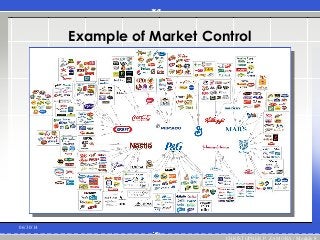
1. Market Control
Supervision or management of the
distribution of goods and services by a
government or other entity. Market control
is an attempt to achieve specified
economic or political goals through the
deliberate manipulation of factors such as
supply, demand, pricing, transportation, or
taxation.
it emphasizes the use of extensive market
mechanisms.
Read more: http://www.businessdictionary.com/definition/market-
control.html#ixzz30o41RQ7q
06/30/14
CHRISTOPHER P. ZAMORA / Module 8
Characteristics of MarketControl
Firm’s products or services
are clearly specified
It is also distinct
There must be considerable
marketplace competition
06/30/14
CHRISTOPHER P. ZAMORA / Module 8
2. Bureaucratic Control
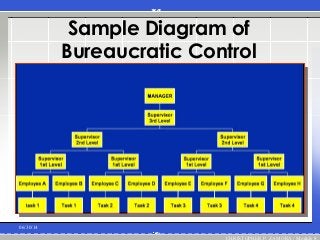
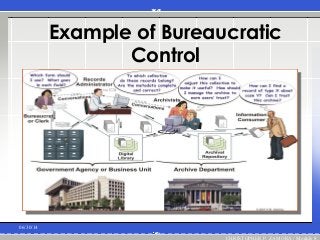
Control of an organization and the individuals
that make up the organization through systems of
standardized rules, methods, and verification
procedures. Bureaucratic control is used to
ensure efficient operation of large organizations,
where face-to-face communication is not
possible or practical and informal methods of
enforcing compliance may not be sufficient.
Emphasizes organizational authority.
Read more: http://www.businessdictionary.com/definition/bureaucratic-
control.html#ixzz30o3LINbJ
06/30/14
CHRISTOPHER P. ZAMORA / Module 8
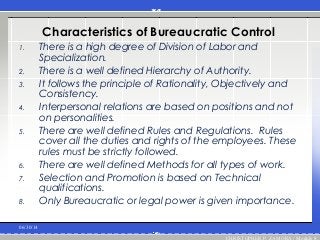
Characteristics of BureaucraticControl
1. There is a high degree of Division of Labor and
Specialization.
2. There is a well defined Hierarchy of Authority.
3. It follows the principle of Rationality, Objectively and
Consistency.
4. Interpersonal relations are based on positions and not
on personalities.
5. There are well defined Rules and Regulations. Rules
cover all the duties and rights of the employees. These
rules must be strictly followed.
6. There are well defined Methods for all types of work.
7. Selection and Promotion is based on Technical
qualifications.
8. Only Bureaucratic or legal power is given importance.
06/30/14
CHRISTOPHER P. ZAMORA / Module 8
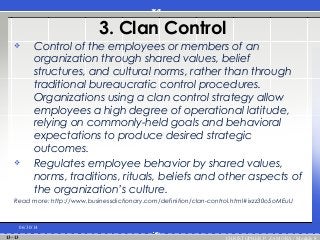
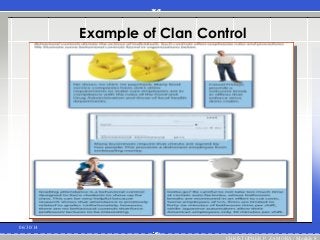
3. Clan Control
Control of the employees or members of an
organization through shared values, belief
structures, and cultural norms, rather than through
traditional bureaucratic control procedures.
Organizations using a clan control strategy allow
employees a high degree of operational latitude,
relying on commonly-held goals and behavioral
expectations to produce desired strategic
outcomes.
Regulates employee behavior by shared values,
norms, traditions, rituals, beliefs and other aspects of
the organization’s culture.
Read more: http://www.businessdictionary.com/definition/clan-control.html#ixzz30o5oMEuU
06/30/14
CHRISTOPHER P. ZAMORA / Module 813–13
14.
Example of ClanControl
06/30/14
CHRISTOPHER P. ZAMORA / Module 813–14
15.
Example of ClanControl
06/30/14
CHRISTOPHER P. ZAMORA / Module 8
16.
06/30/14
CHRISTOPHER P. ZAMORA/ Module 8
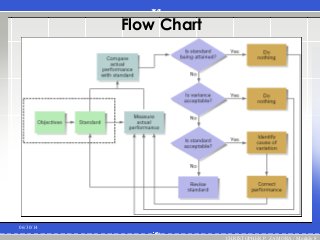
Is one that measures actual performance,
compares it against a standard or
objective, and takes managerial action to
correct any deviations or gap in meeting
the standards.
17.
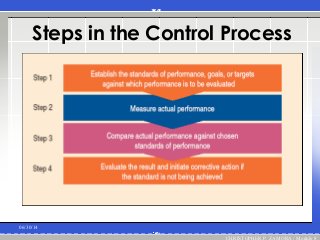
Steps in theControl Process
06/30/14
CHRISTOPHER P. ZAMORA / Module 8
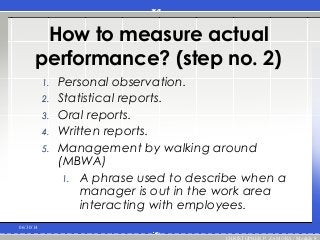
How to measureactual
performance? (step no. 2)
1. Personal observation.
2. Statistical reports.
3. Oral reports.
4. Written reports.
5. Management by walking around
(MBWA)
1. A phrase used to describe when a
manager is out in the work area
interacting with employees.
06/30/14
CHRISTOPHER P. ZAMORA / Module 8
20.
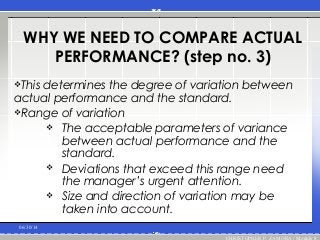
WHY WE NEEDTO COMPARE ACTUAL
PERFORMANCE? (step no. 3)
This determines the degree of variation between
actual performance and the standard.
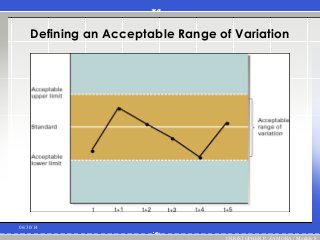
Range of variation
The acceptable parameters of variance
between actual performance and the
standard.
Deviations that exceed this range need
the manager’s urgent attention.
Size and direction of variation may be
taken into account.
06/30/14
CHRISTOPHER P. ZAMORA / Module 8
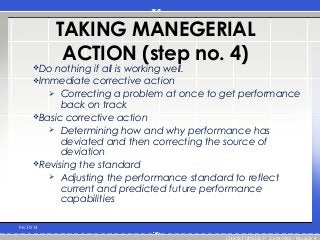
TAKING MANEGERIAL
ACTION (stepno. 4)
Do nothing if all is working well.
Immediate corrective action
Correcting a problem at once to get performance
back on track
Basic corrective action
Determining how and why performance has
deviated and then correcting the source of
deviation
Revising the standard
Adjusting the performance standard to reflect
current and predicted future performance
capabilities
06/30/14
CHRISTOPHER P. ZAMORA / Module 8
23.
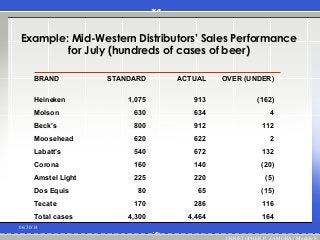
Example: Mid-Western Distributors’Sales Performance
for July (hundreds of cases of beer)
06/30/14
CHRISTOPHER P. ZAMORA / Module 8
BRAND STANDARD ACTUAL OVER (UNDER)
Heineken 1,075 913 (162)
Molson 630 634 4
Beck’s 800 912 112
Moosehead 620 622 2
Labatt’s 540 672 132
Corona 160 140 (20)
Amstel Light 225 220 (5)
Dos Equis 80 65 (15)
Tecate 170 286 116
Total cases 4,300 4,464 164
24.
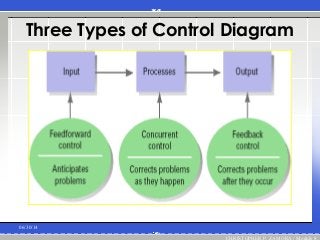
3 Types OfControl
1. Feedforward control
Control that prevents anticipated problems
1. Concurrent control
Control that takes place while an activity is in
progress (management by walking around
[MBWA])
1. Feedback control
Control that takes place after an action
Provides evidence of planning
effectiveness
Provides motivational information to
employees06/30/14
CHRISTOPHER P. ZAMORA / Module 8
25.
Three Types ofControl Diagram
06/30/14
CHRISTOPHER P. ZAMORA / Module 8
26.
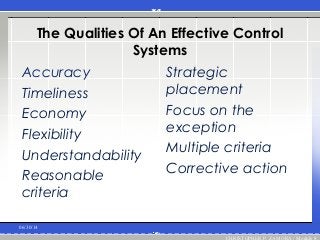
The Qualities OfAn Effective Control
Systems
Accuracy
Timeliness
Economy
Flexibility
Understandability
Reasonable
criteria
Strategic
placement
Focus on the
exception
Multiple criteria
Corrective action
06/30/14
CHRISTOPHER P. ZAMORA / Module 8
#28 Thank You(Basic)To reproduce the video effects on this slide, do the following:
On the Home tab, in the Slides group, click Layout, and then click Blank.
On the Insert tab, in the Media group, click Video, and then click Video from File.
In the left pane of the Insert Video dialog box, click the drive or library that contains the video. In the right pane of the dialog box, click the video that you want and then click Insert.
Under Video Tools, on the Format tab, in the Sizing group, click the arrow to the right of Size launching the Format Video dialog box, select Size from the left pane and under Size in the right pane do the following:
Click the Lock Aspect Ratio box.
In the Height box, enter 6.03”.
In the Width box enter 8.03”.
Also in the Format Video dialog box, click Border Color in the left pane, under Border Color in the right pane select Solid Line, and then click the arrow to the right of Color, and under Theme colors select Black, Text 1, Lighter 25% (fourth row, second option from left).
Also in the Format Video dialog box, select Border Style in the left pane, under Border Style in the right pane set the Width to 15 pt.
Also in the Format Video dialog box, select Shadow in the left pane, under Shadow in the Right pane, click the arrow to the right of Colors and under Theme Colors, select Black, Text 1 (first row, second option from left), and then do the following:
In the Transparency box, enter 60%.
In the Size box, enter 100%.
In the Blur box, enter 21 pt.
In the Angle box, enter 40 degrees.
In the Distance box, enter 19 pt.
Also in the Format Video dialog box, select 3-D Format in the left pane, under Bevel in the right pane click the arrow to the right of Top and under Bevel, select Relaxed Inset (first row, second option from left), and then do the following:
To the right of Top, in the Width box, enter 6 pt.
To the right of Top, in the Height box, enter 16.5 pt.
On the Home tab, in the Drawing group, click Arrange, point to Align, and then do the following:
Click Align Center.
Click Align Middle.
Under Video Tools, on the Playback tab, in the Video Options group, select Loop until Stopped.
On the Animations tab, in the Animation group, select Play.
On the Animations tab in the Timing group, click the arrow to the right of Start and select With Previous.
To reproduce the text effects on this slide, do the following:
On the Insert tab, in the Text group, click Text Box, and then on the slide drag to draw a text box.
Type text in the text box (“Thank You” – or whatever text suits your message).
Select the text, on the Home tab, in the Font group, select Garamond from the Font list, select 88 pt from the Font Size list, and then click on the Bold icon.
Also in the Home tab, in the Font group, select the arrow to the right of the Font Color Icon, and then under Theme Colors, select White, Background 1 (first row, first option from left).
With the text box selected, under Drawing Tools, on the Format tab, click the arrow in the bottom right corner of the WordArt Styles group, click the arrow opening the Format Text Effects dialog box.
In the Format Text Effects dialog box, click 3-D Format on the left pane, under Bevel on the right pane, click the arrow next to Top and under Bevel select Relaxed Inset (first row, second option from left). Set the Width to 5 pt and the Height to 3 pt.
Also in the 3-D Format right pane, under Surface, click the arrow next to Material and under Special Effect select Dark Edge (first row, first option from left).
Also in the 3-D Format right pane, under Surface, click the arrow next to Lighting and under Neutral select Soft (first row, third option from left).
Also in the 3-D Format right pane, under Surface, set the Angle to 290 Degrees.
Close the Format Text Effects dialog box.
To reproduce the background effects on this slide, do the following:
On the Design tab, in the bottom right corner of the Background group, click the arrow at the bottom right corner launching the Format Background dialog box.
In the Format Background dialog box, select Fill in the left pane, and under Fill in the right pane select Solid fill, then click the arrow to the right of Color and under Theme Colors select White, Background 1, Darker 50% (sixth row, first option from left).
Close the Format Background dialog.
![3 Types Of Control
1. Feedforward control
Control that prevents anticipated problems
1. Concurrent control
Control that takes place while an activity is in
progress (management by walking around
[MBWA])
1. Feedback control
Control that takes place after an action
Provides evidence of planning
effectiveness
Provides motivational information to
employees06/30/14
CHRISTOPHER P. ZAMORA / Module 8](https://image.slidesharecdn.com/approachestodesigningcontrolsystemsandthecontrolprocess-140630181301-phpapp02/85/Approaches-to-designing-control-systems-and-the-control-process-24-320.jpg?cb=1404152220)