Workshop
SPOCK: Testing (in the) Enterprise!
Fernando Redondo Ramírez
@pronoide_fer
Roadmap
Whoami
• Entrepreneur and Business Manager at
Pronoide since 2003
• Currently working for Hybris (SAP) as
technical trainer
• Java & Friends trainer for last ten years
• Doing things with Java from 1999 on
• Computer Engineer
• Happily married and proud father of two
children
• Not that Trekky yet (Sure!)
Brief introduction
- Groovy based testing and
specification framework
- Can test anything that runs
inside the JVM (even Java)
- Beautiful and highly expressive specification
language
- Compatible with most IDEs, build tools, and
continuous integration servers (JUnit runner)
Terminology and definitions
- Spock lets you write specifications that
describe expected features (properties,
aspects) exhibited by a system of interest.
- The system of interest could be anything between a
single class and a whole application, and is also called
system under specification (SUS).
- The description of a feature starts from a specific
snapshot of the SUS and its collaborators; this
snapshot is called the feature’s fixture.
Brief introduction
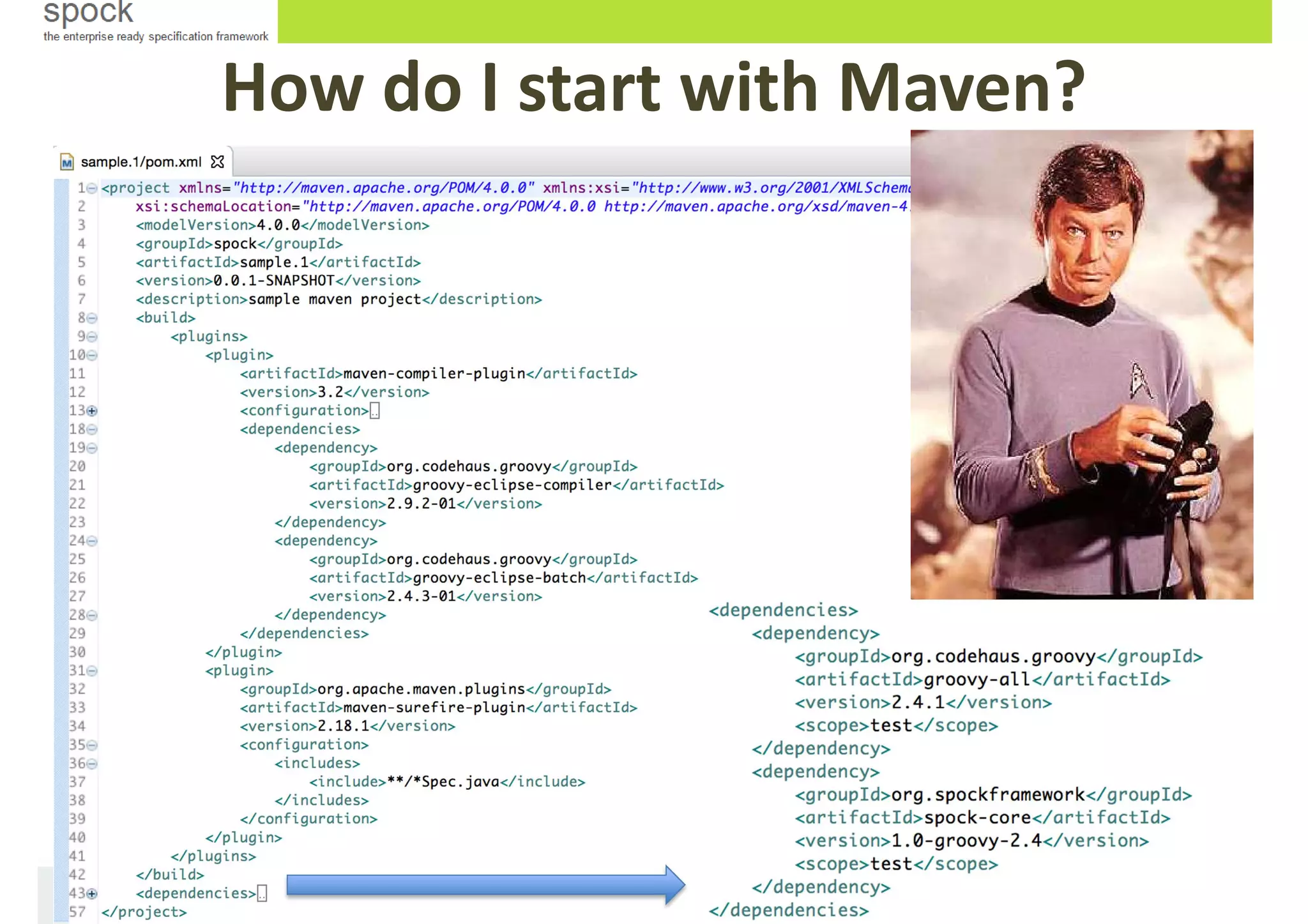
How do I start with Maven?
-
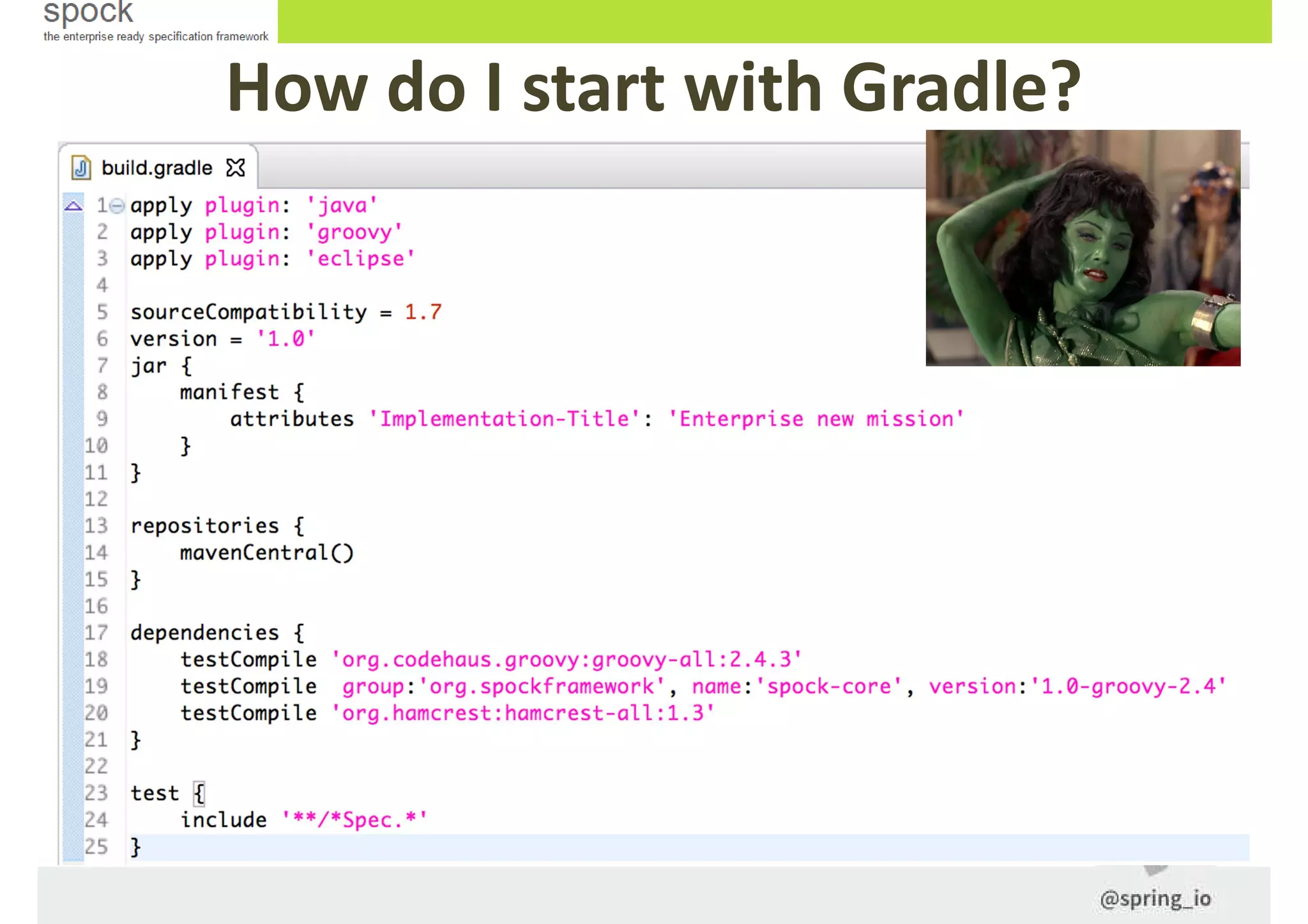
How do I start with Gradle?
Hands on!
Before start, you have to…
1. Start Groovy/Grails Tool Suite 3.6 (GGTS) and create a workspace (remember to
run it with a JDK and install the gradle extension for eclipse). Groovy 2.4 compiler
as well.
2. Download http://pronoide.com/downloads/springio-workshop-2015.zip
and unzip it into workspace folder. Or take it from
https://github.com/fredondo/springio2015-spock-workshop
3. Hold on! Please wait me right here…
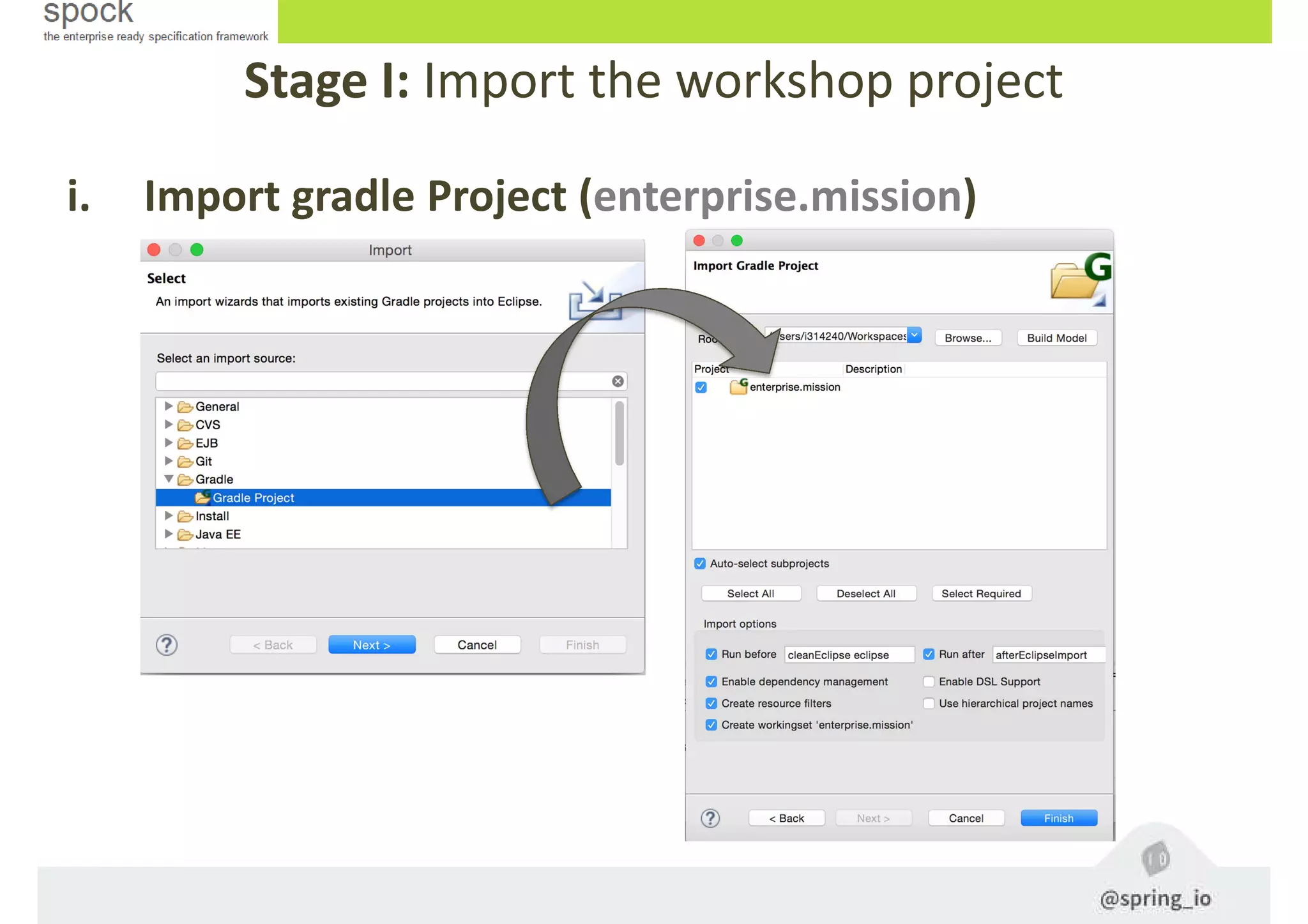
Stage I: Import the workshop project
i. Import gradle Project (enterprise.mission)
Specifications
Test classes are known as Specifications
- All specifications (Specs) must extend
from spock.lang.Specification
- Each specification must have at least ONE test
method, all of these are called feature methods
- The most simple assert within a feature method is
the expect block, all its sentences must be evaluated
to true so that the feature will be OK
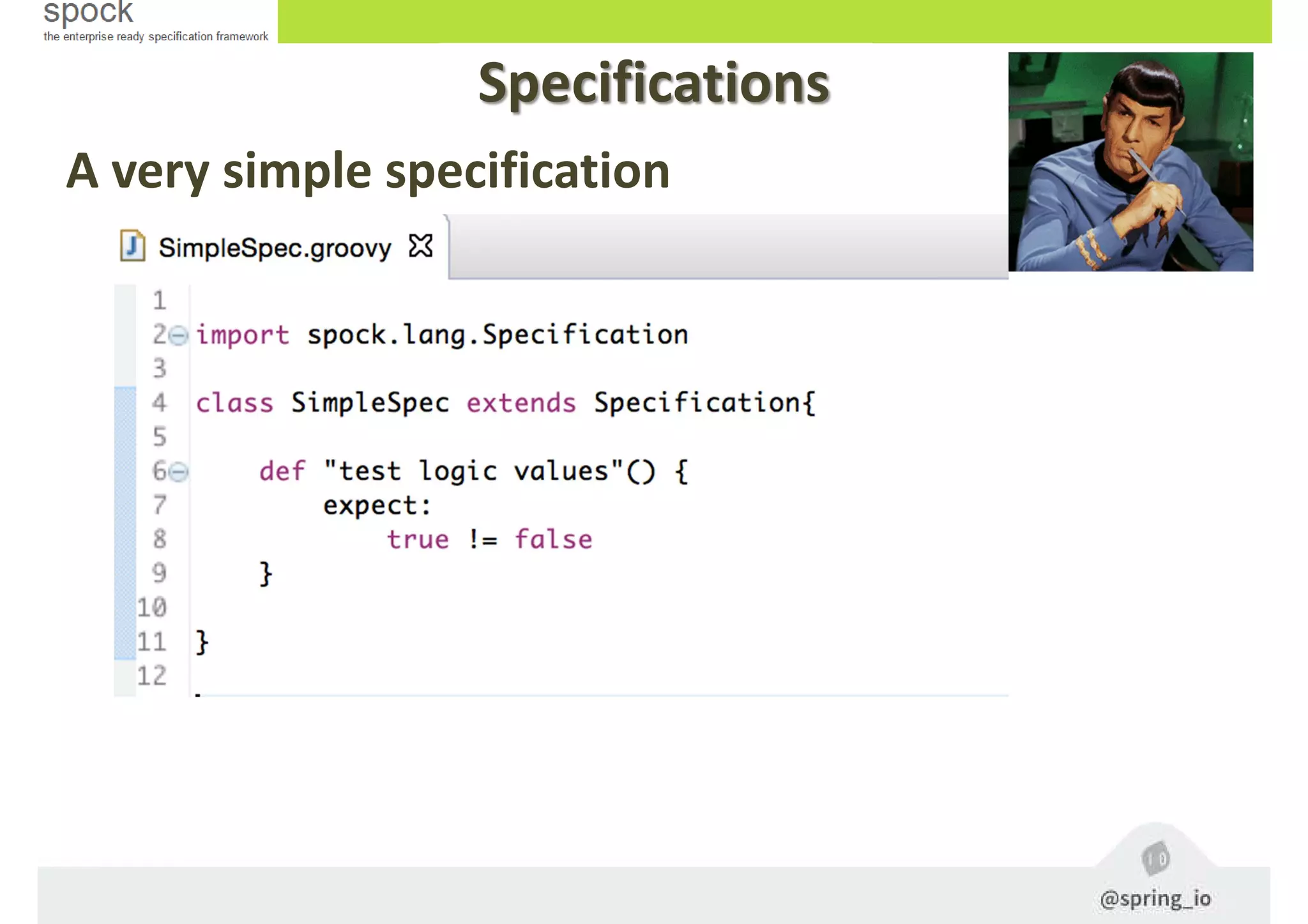
A very simple specification
Specifications
Stage II: Creating Specs
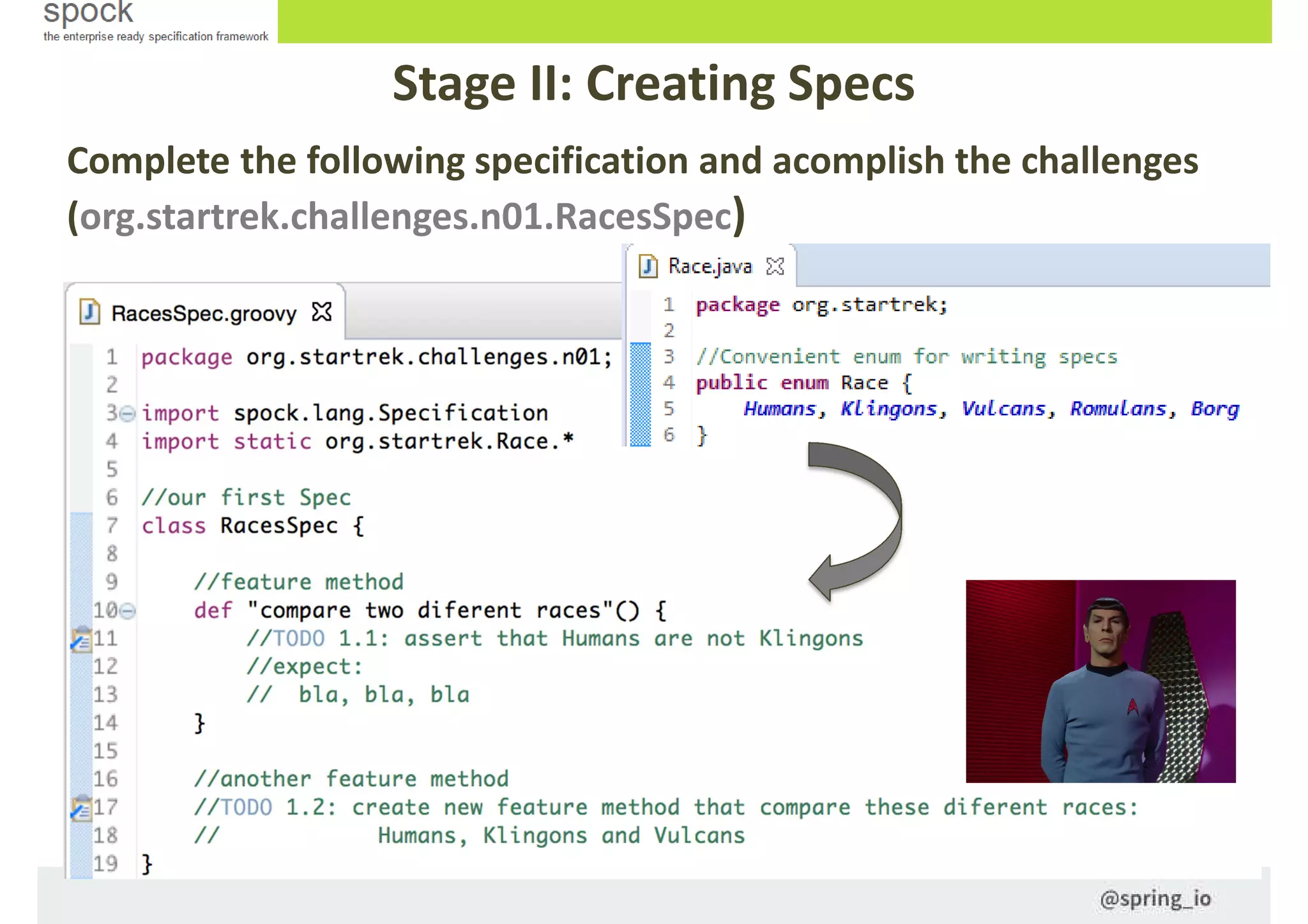
Complete the following specification and acomplish the challenges
(org.startrek.challenges.n01.RacesSpec)
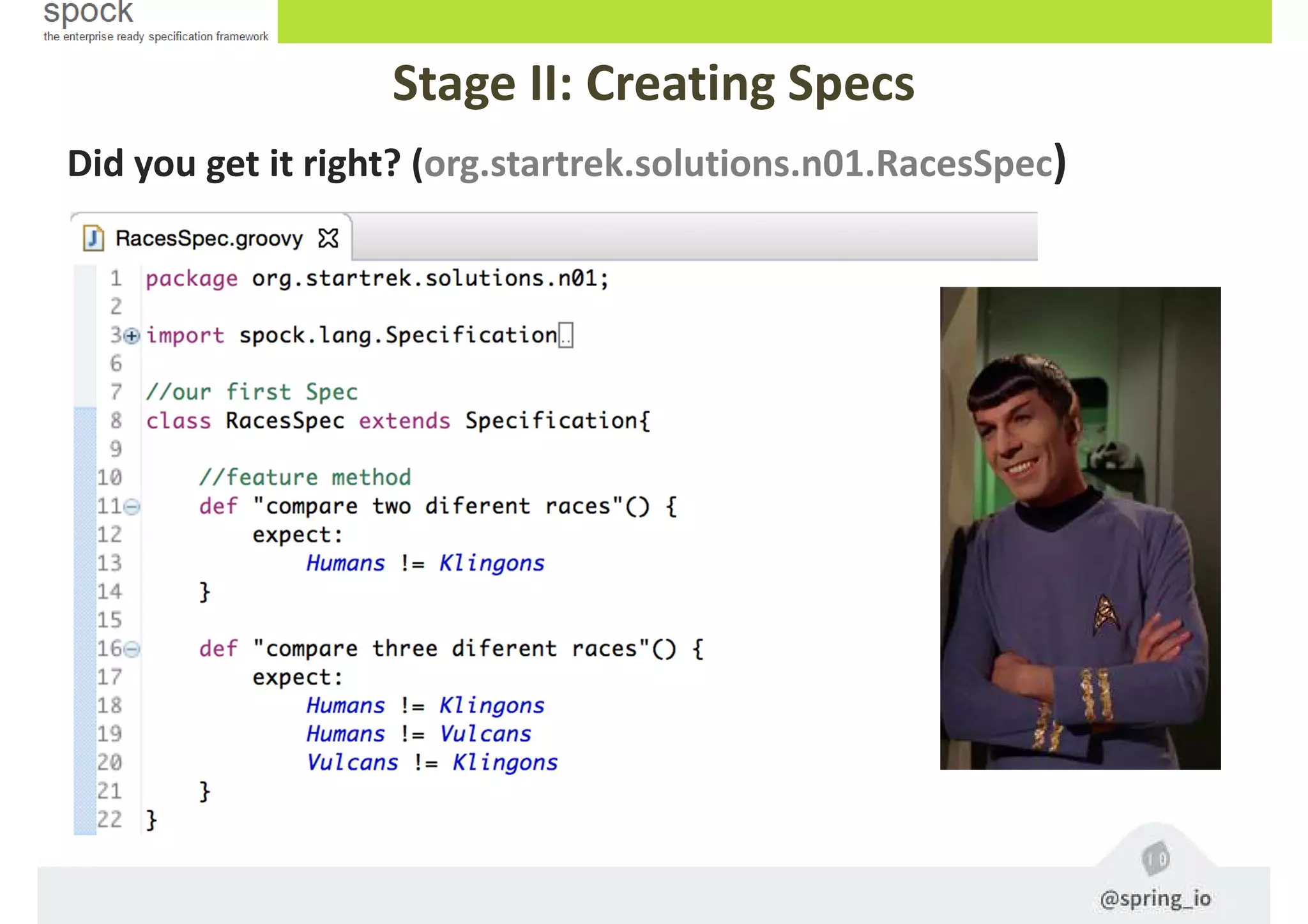
Did you get it right? (org.startrek.solutions.n01.RacesSpec)
Stage II: Creating Specs
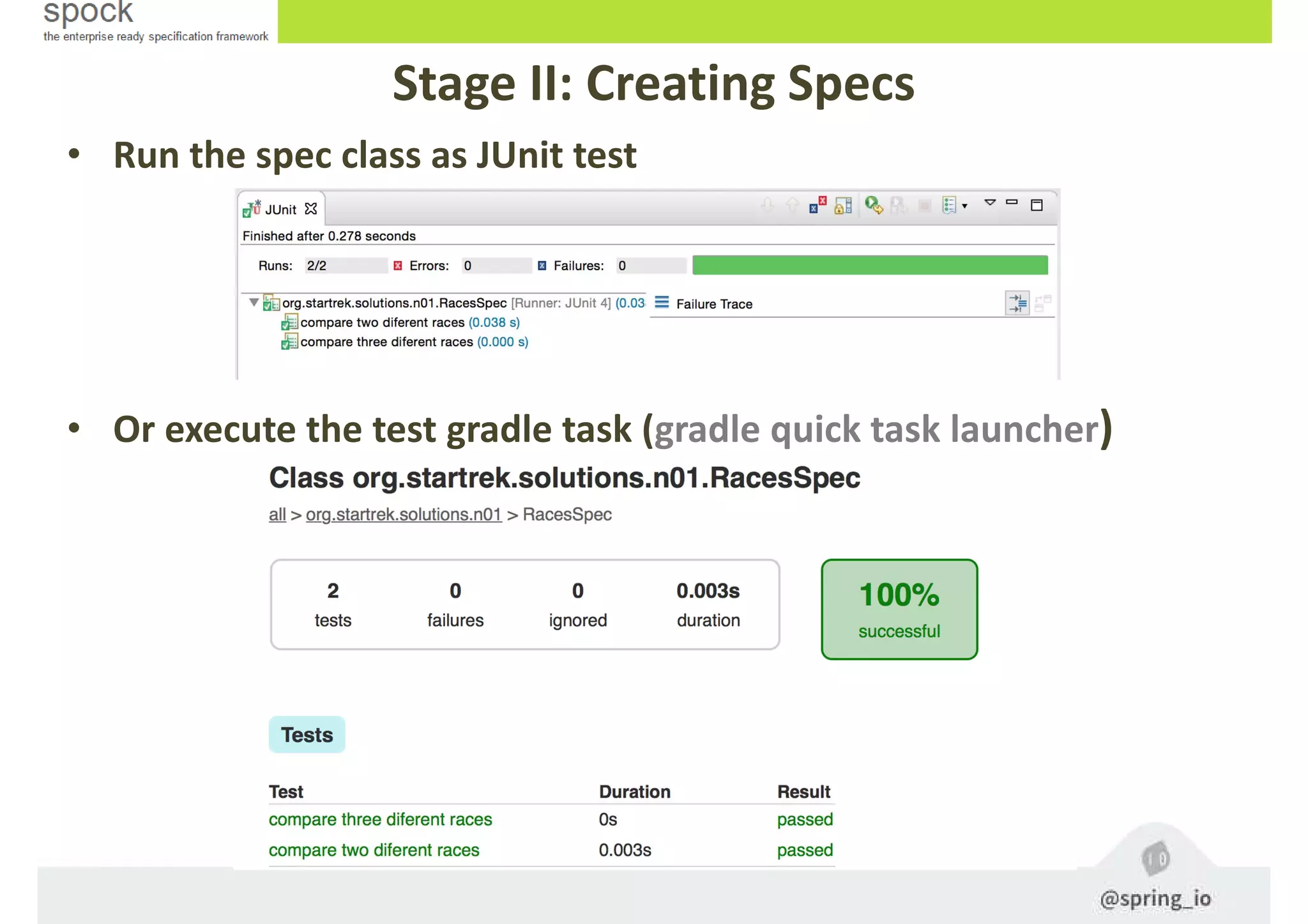
• Run the spec class as JUnit test
• Or execute the test gradle task (gradle quick task launcher)
Specfication methods
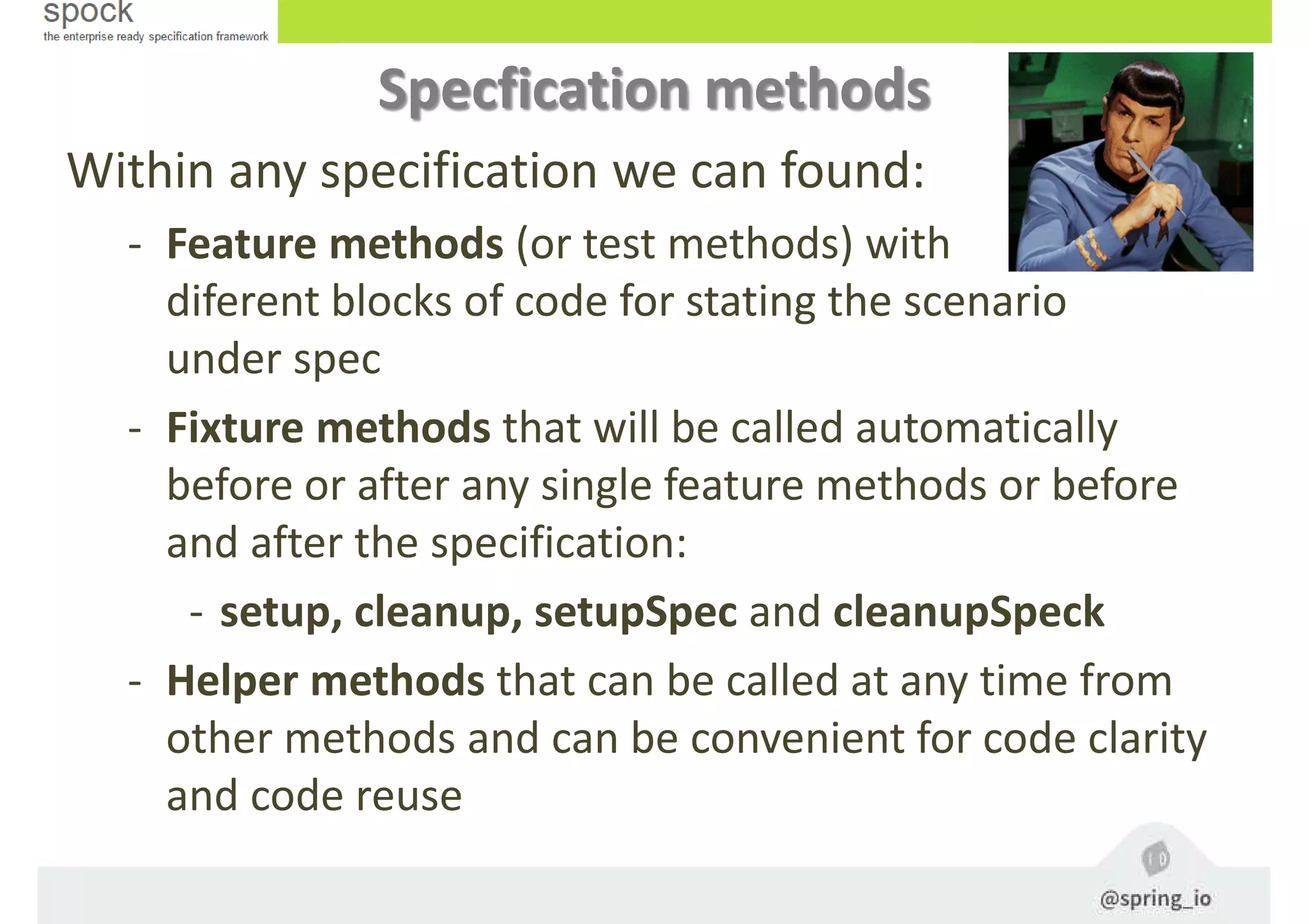
Within any specification we can found:
- Feature methods (or test methods) with
diferent blocks of code for stating the scenario
under spec
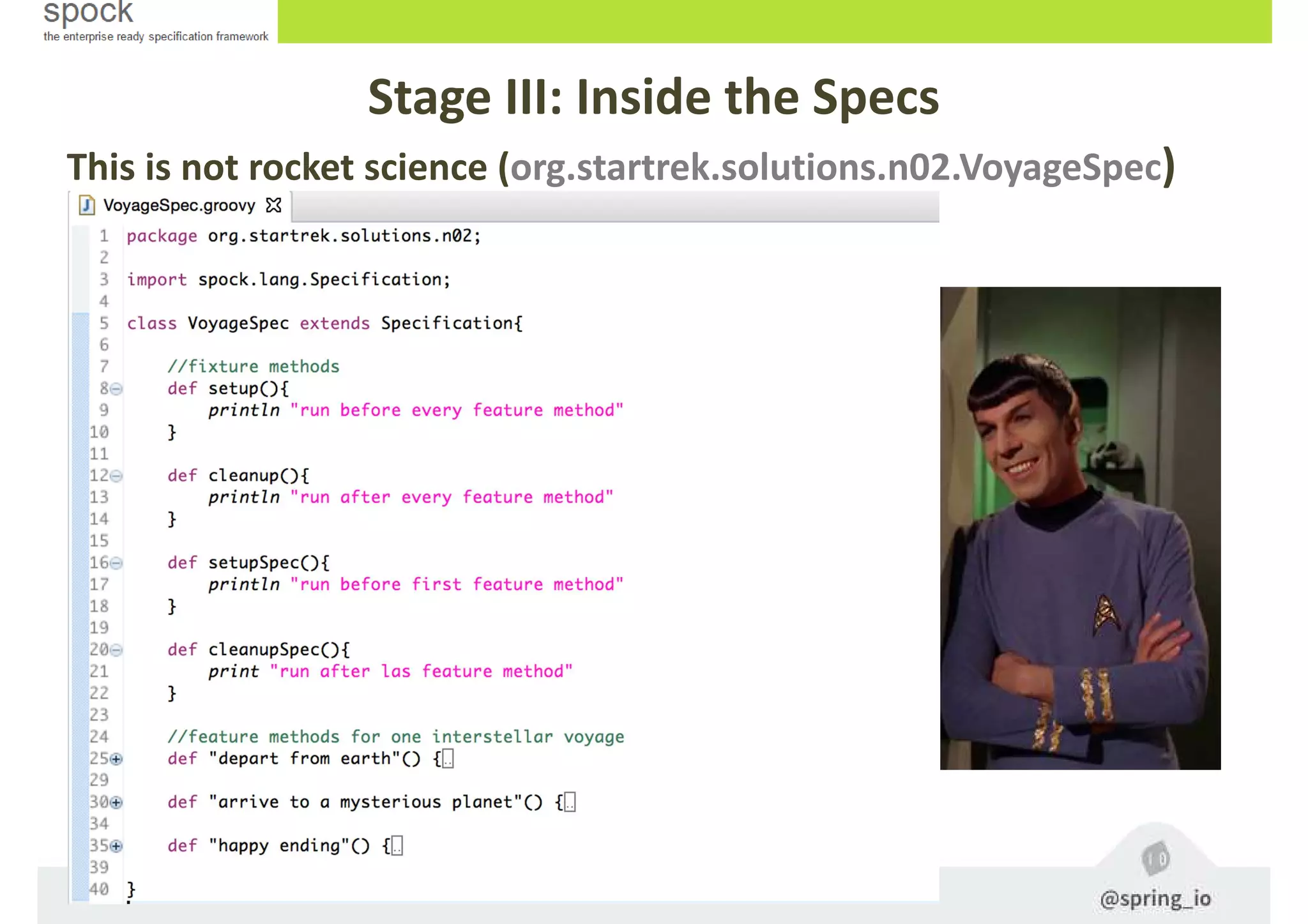
- Fixture methods that will be called automatically
before or after any single feature methods or before
and after the specification:
- setup, cleanup, setupSpec and cleanupSpeck
- Helper methods that can be called at any time from
other methods and can be convenient for code clarity
and code reuse
Stage III: Inside the Specs
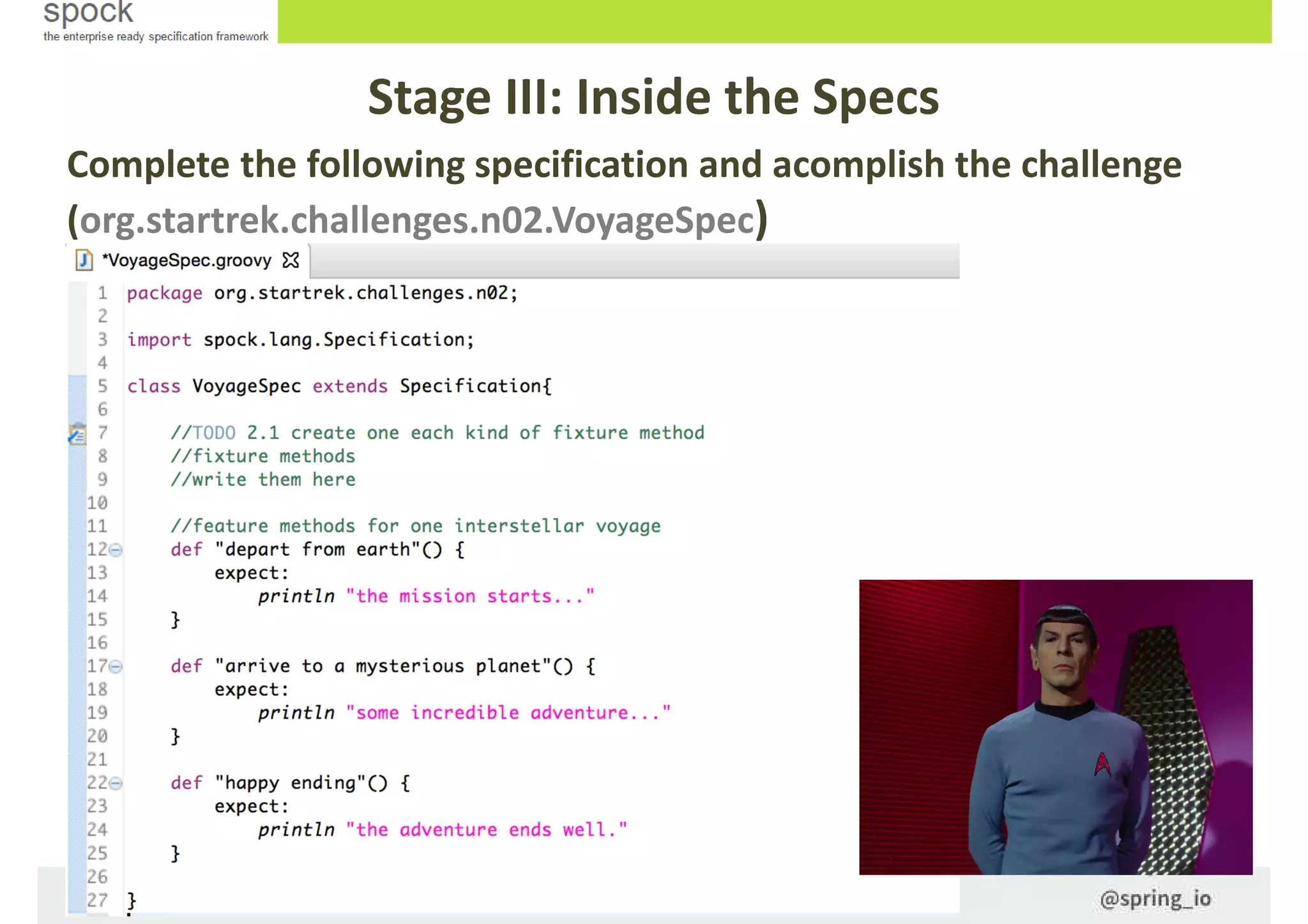
Complete the following specification and acomplish the challenge
(org.startrek.challenges.n02.VoyageSpec)
Stage III: Inside the Specs
This is not rocket science (org.startrek.solutions.n02.VoyageSpec)
Feature method blocks
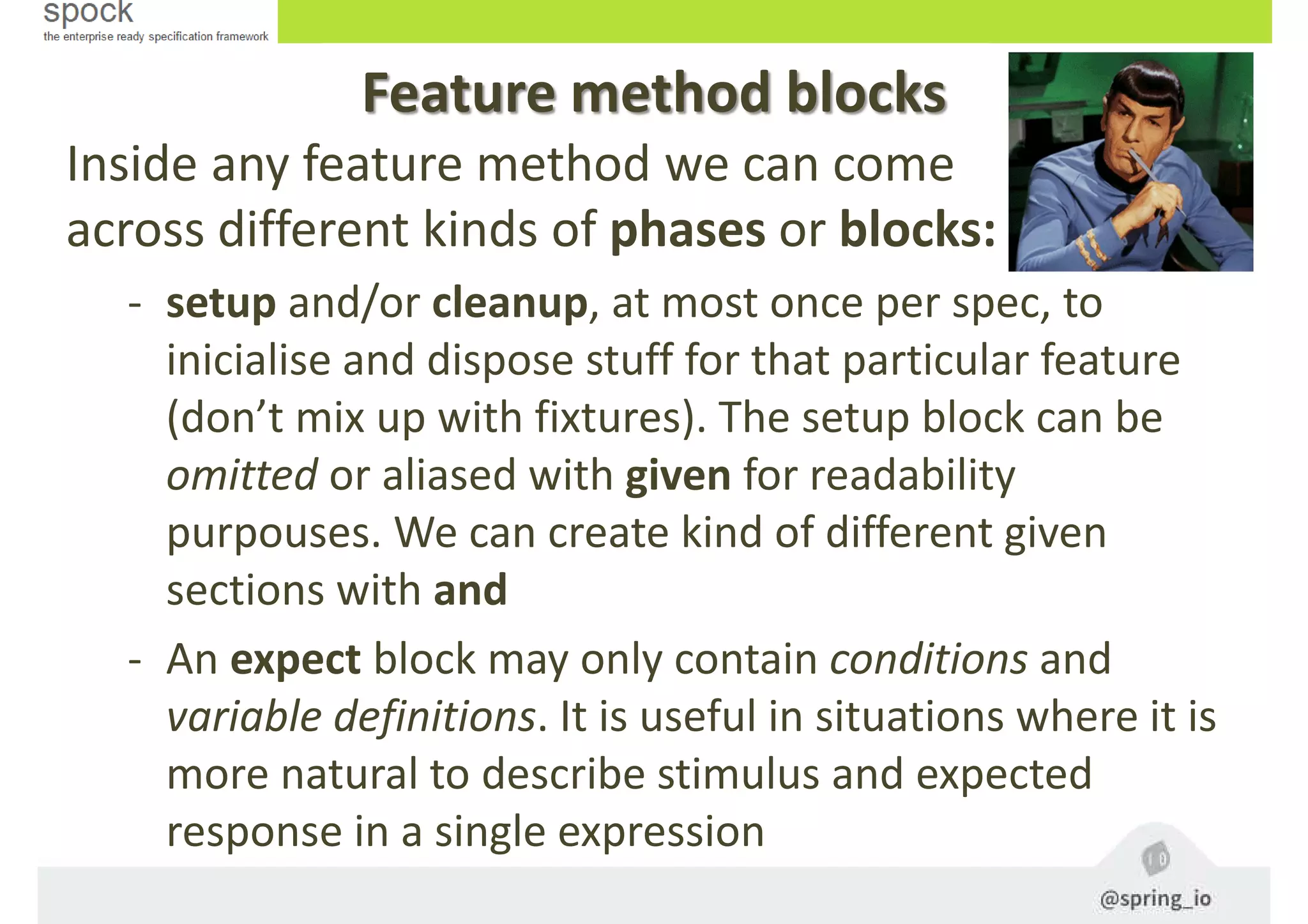
Inside any feature method we can come
across different kinds of phases or blocks:
- setup and/or cleanup, at most once per spec, to
inicialise and dispose stuff for that particular feature
(don’t mix up with fixtures). The setup block can be
omitted or aliased with given for readability
purpouses. We can create kind of different given
sections with and
- An expect block may only contain conditions and
variable definitions. It is useful in situations where it is
more natural to describe stimulus and expected
response in a single expression
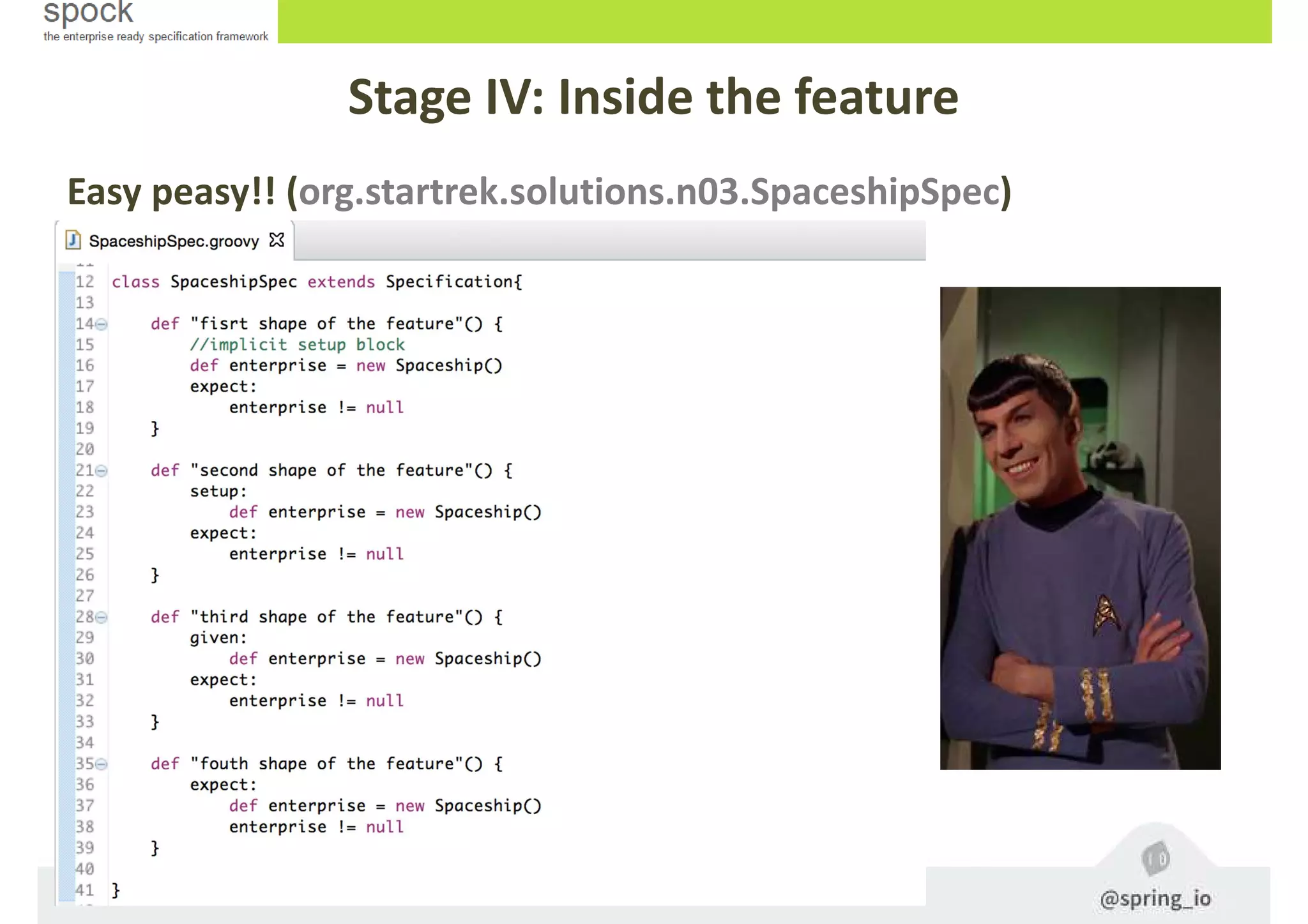
Stage IV: Inside the feature
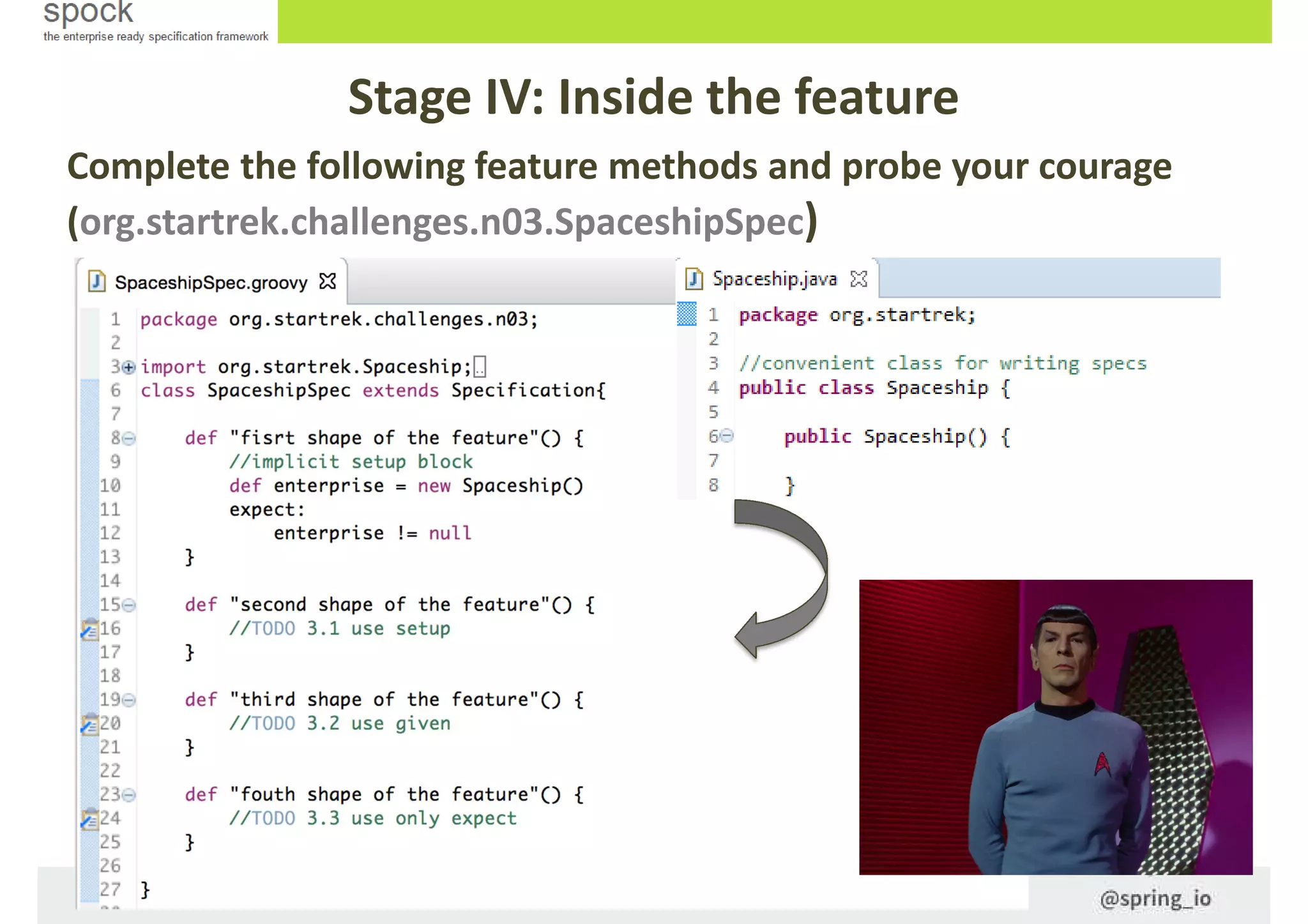
Complete the following feature methods and probe your courage
(org.startrek.challenges.n03.SpaceshipSpec)
Easy peasy!! (org.startrek.solutions.n03.SpaceshipSpec)
Stage IV: Inside the feature
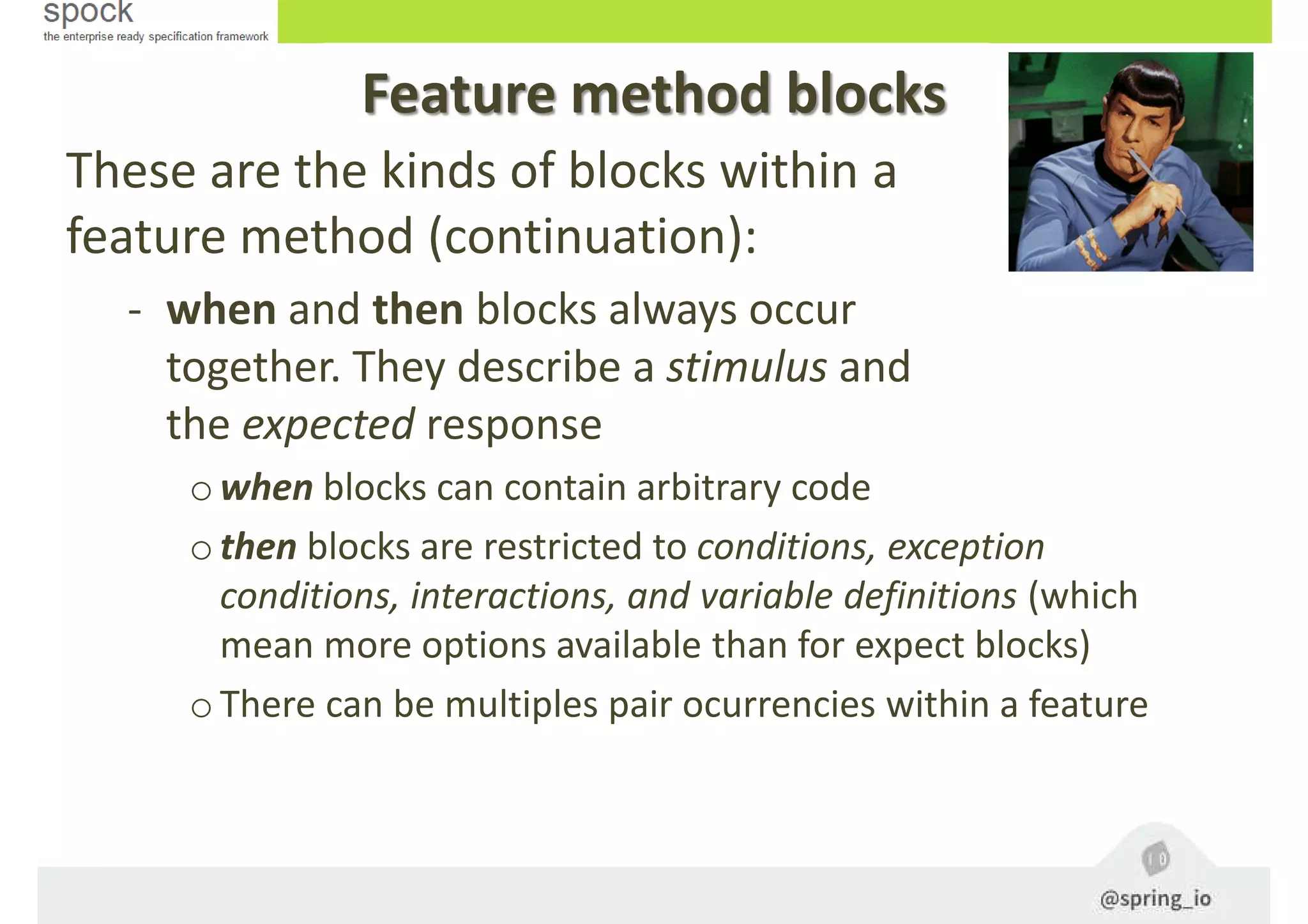
Feature method blocks
These are the kinds of blocks within a
feature method (continuation):
- when and then blocks always occur
together. They describe a stimulus and
the expected response
owhen blocks can contain arbitrary code
othen blocks are restricted to conditions, exception
conditions, interactions, and variable definitions (which
mean more options available than for expect blocks)
oThere can be multiples pair ocurrencies within a feature
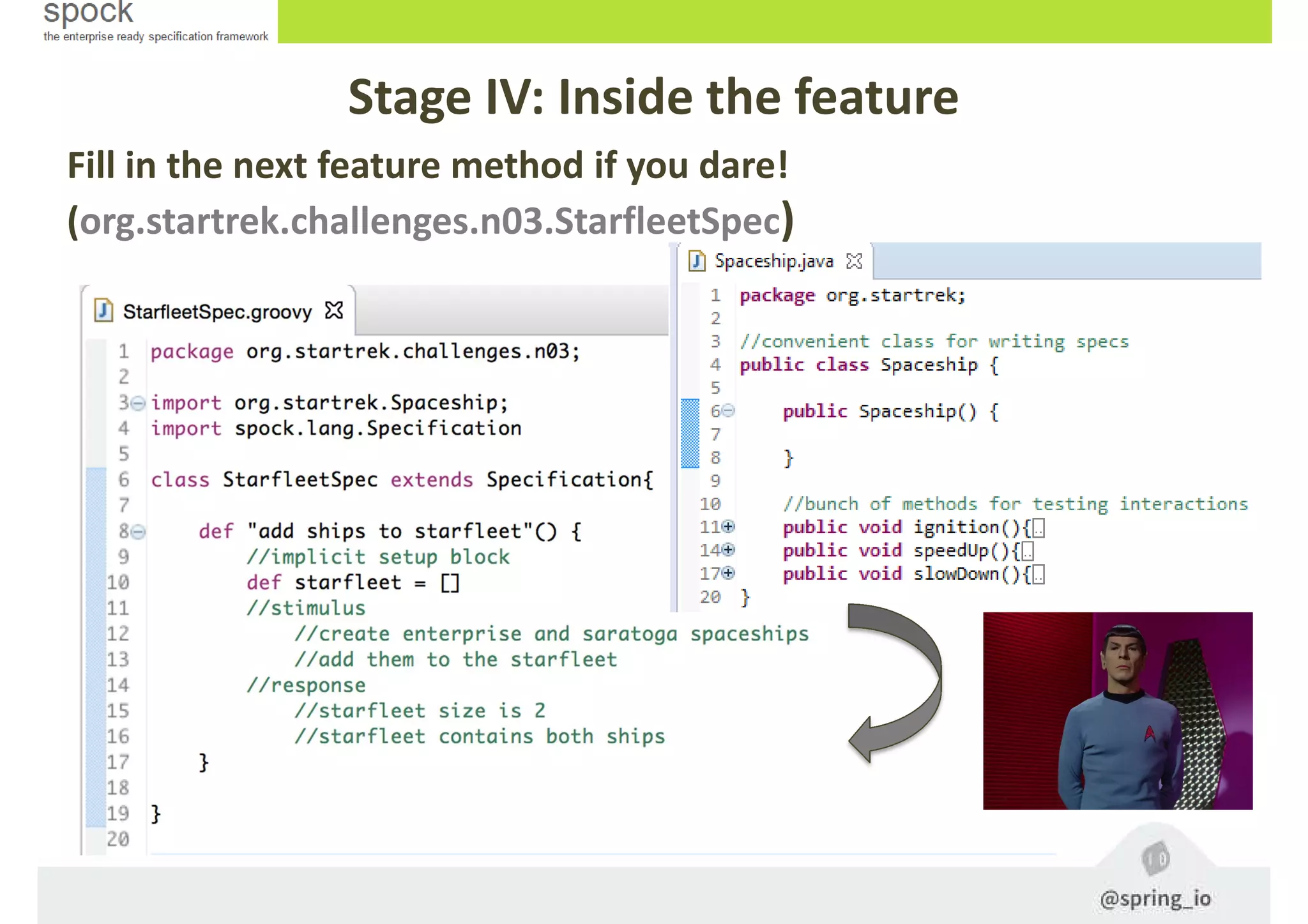
Stage IV: Inside the feature
Fill in the next feature method if you dare!
(org.startrek.challenges.n03.StarfleetSpec)
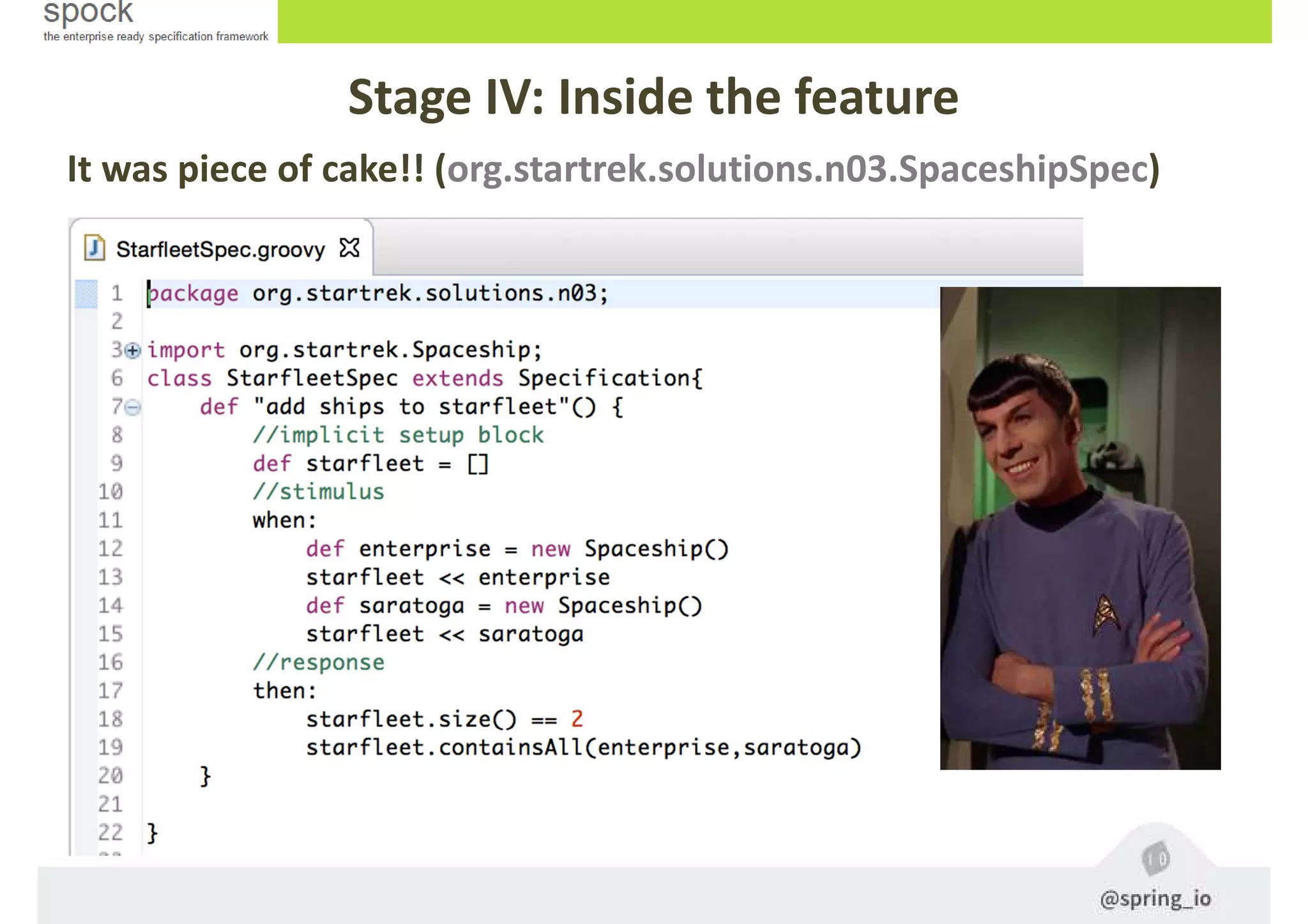
It was piece of cake!! (org.startrek.solutions.n03.SpaceshipSpec)
Stage IV: Inside the feature
Feature method blocks
These are the kinds of blocks (cont.):
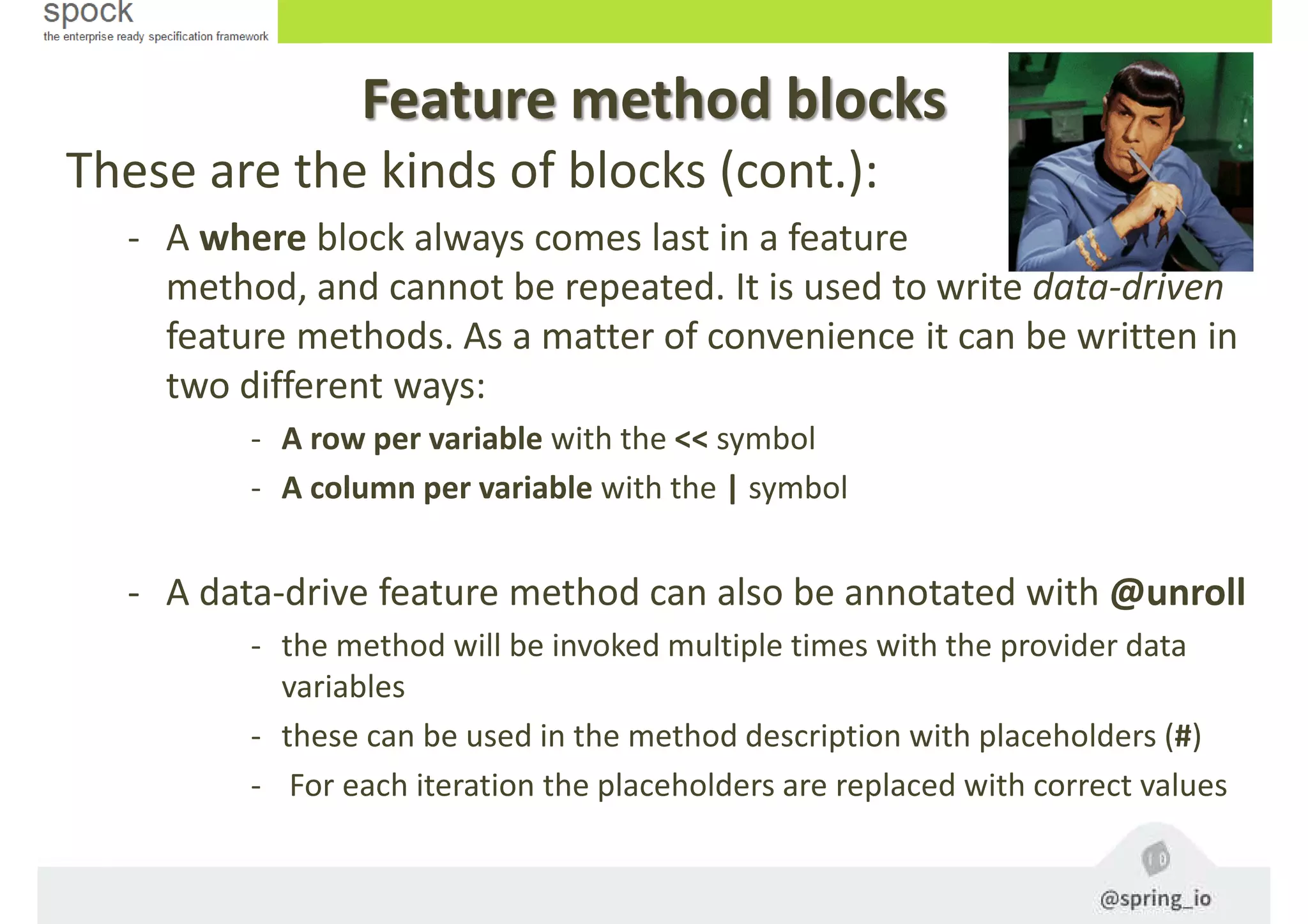
- A where block always comes last in a feature
method, and cannot be repeated. It is used to write data-driven
feature methods. As a matter of convenience it can be written in
two different ways:
- A row per variable with the << symbol
- A column per variable with the | symbol
- A data-drive feature method can also be annotated with @unroll
- the method will be invoked multiple times with the provider data
variables
- these can be used in the method description with placeholders (#)
- For each iteration the placeholders are replaced with correct values
Stage IV: Inside the feature
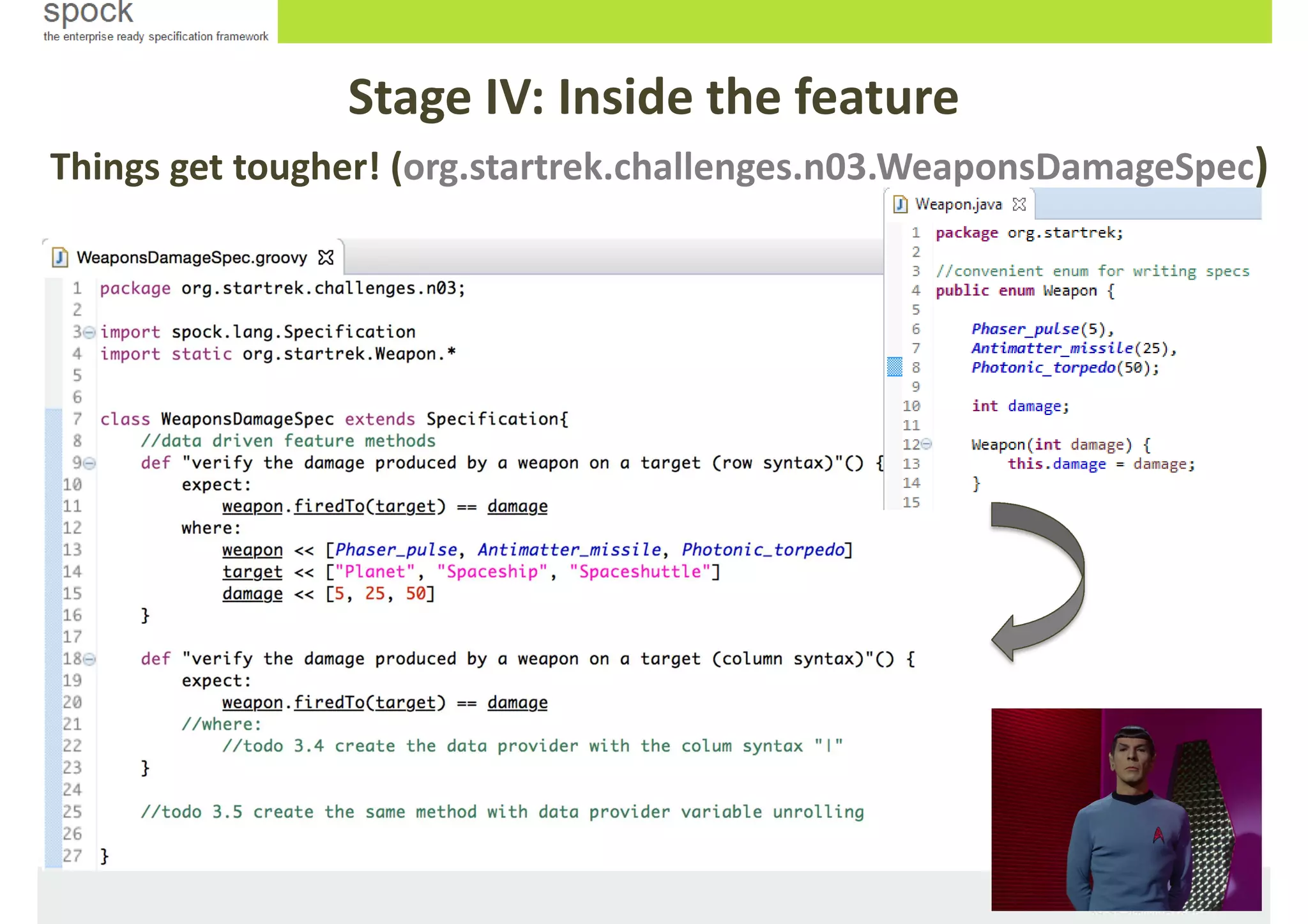
Things get tougher! (org.startrek.challenges.n03.WeaponsDamageSpec)
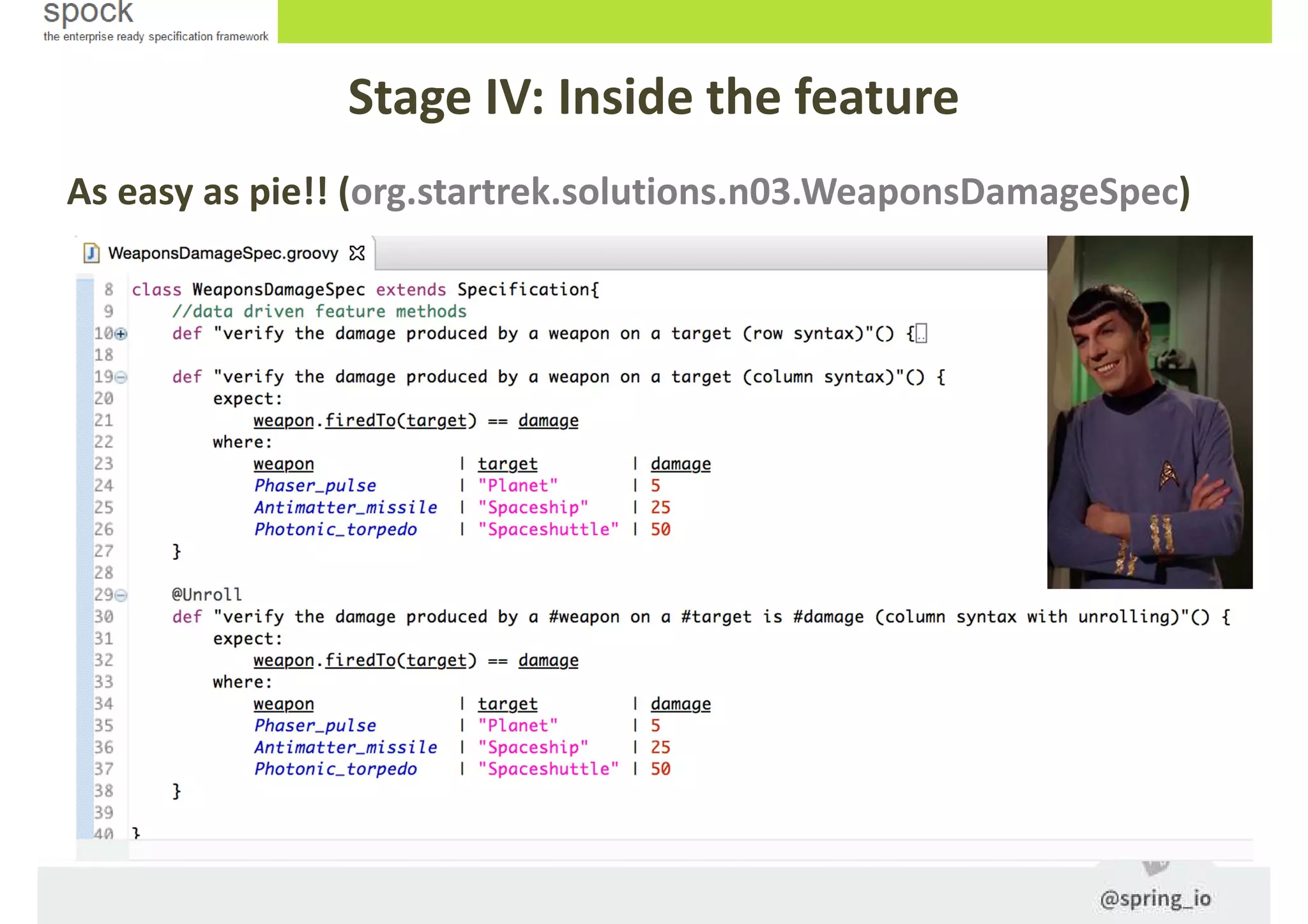
As easy as pie!! (org.startrek.solutions.n03.WeaponsDamageSpec)
Stage IV: Inside the feature
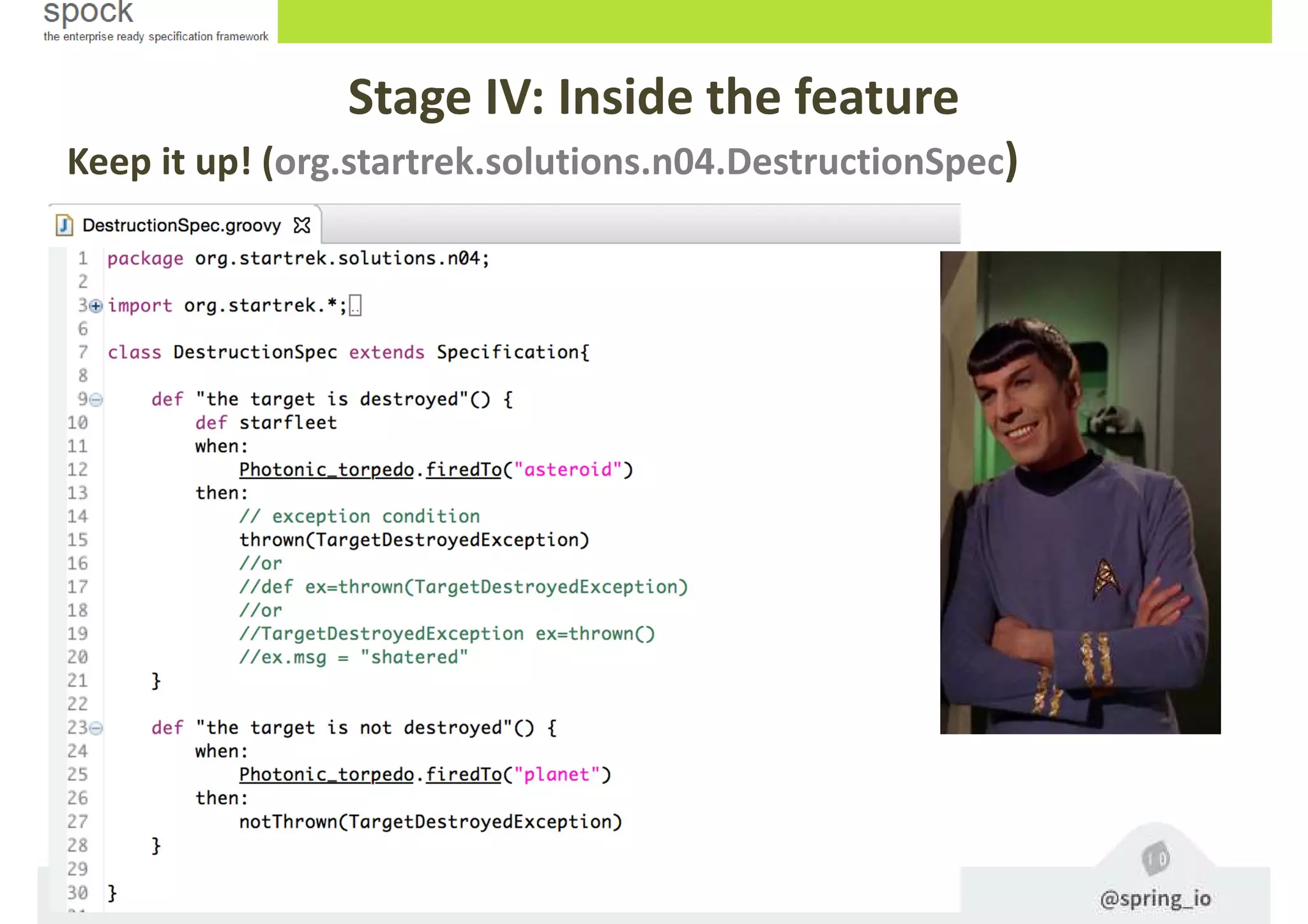
Testing exceptions
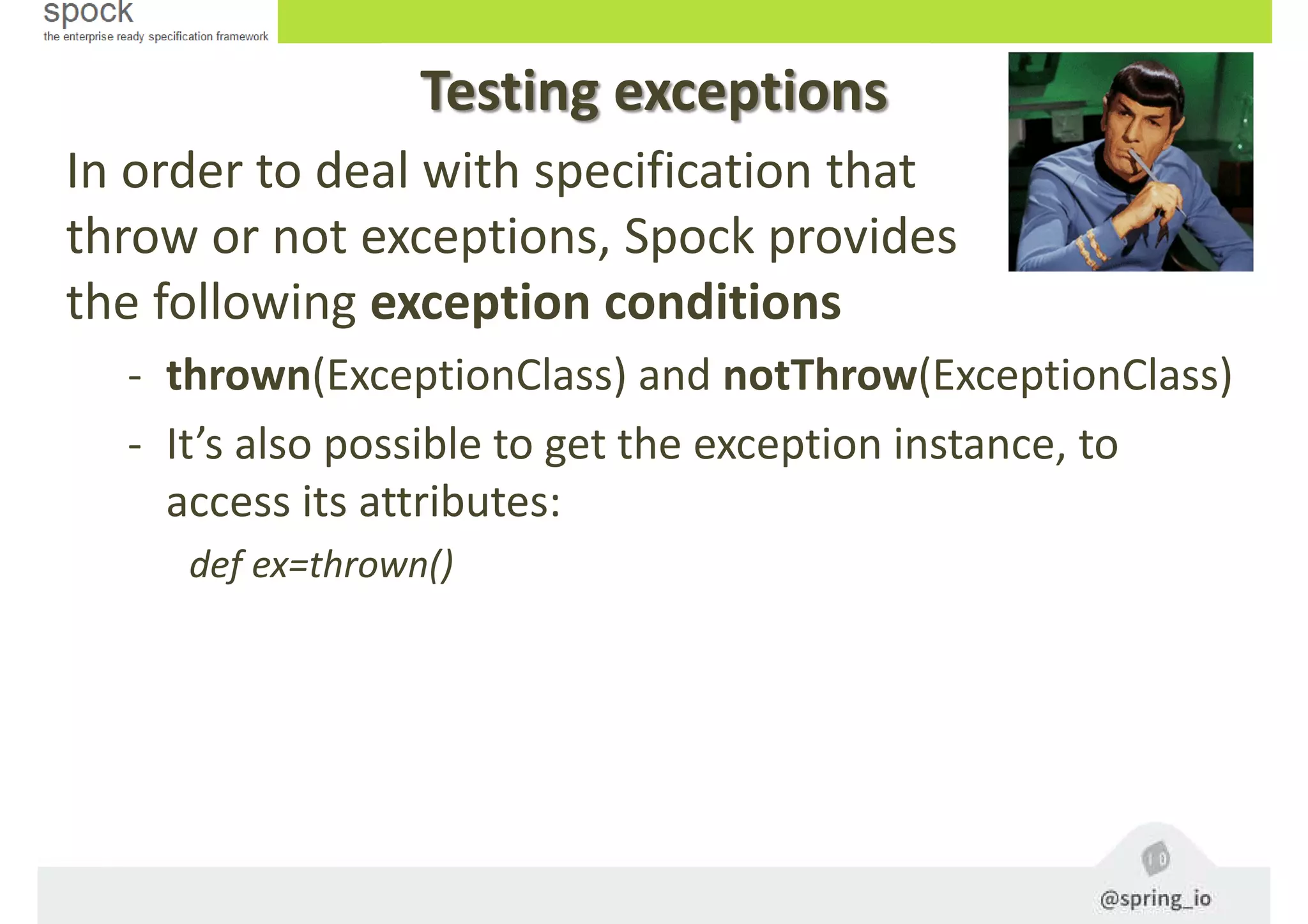
In order to deal with specification that
throw or not exceptions, Spock provides
the following exception conditions
- thrown(ExceptionClass) and notThrow(ExceptionClass)
- It’s also possible to get the exception instance, to
access its attributes:
def ex=thrown()
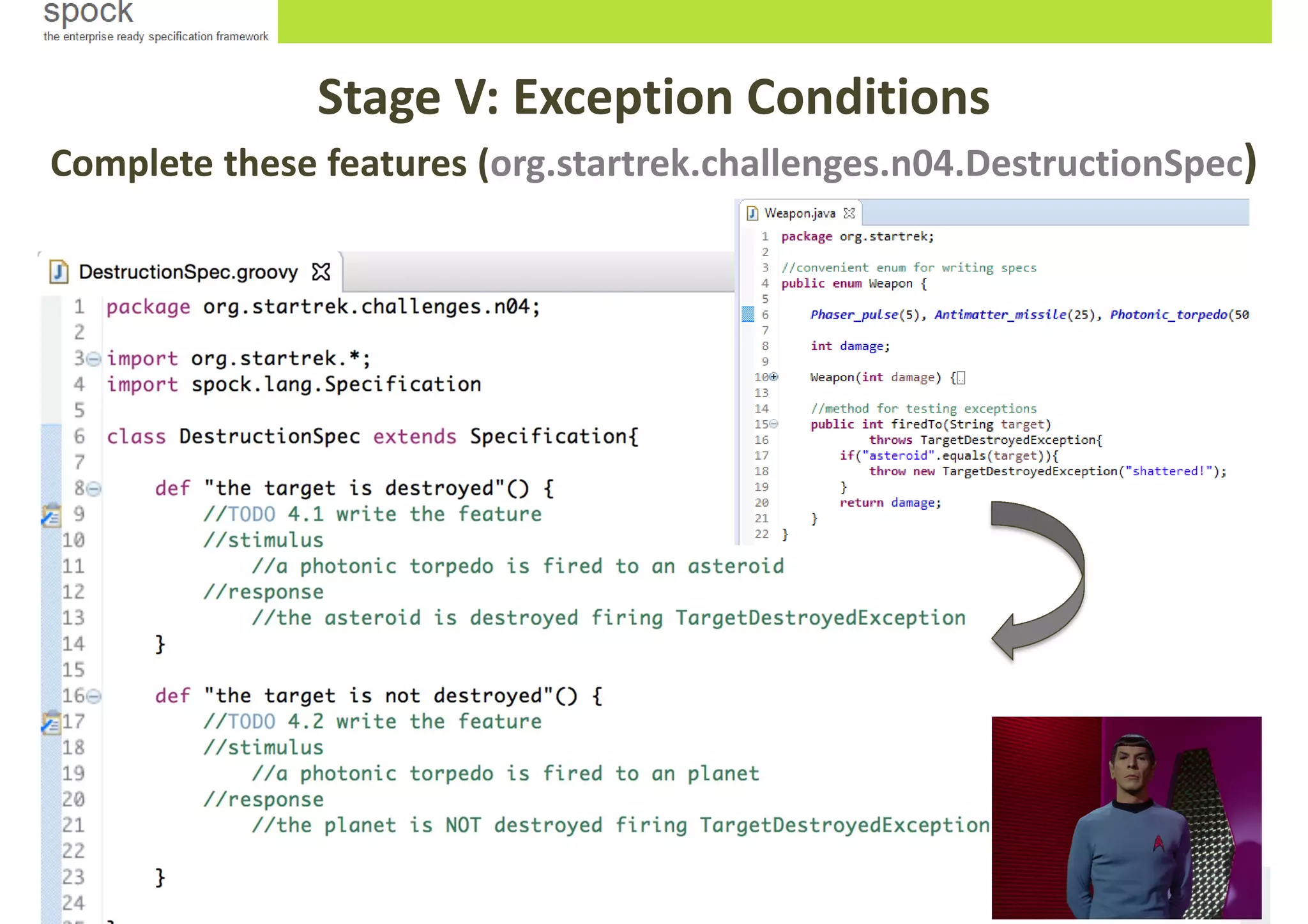
Stage V: Exception Conditions
Complete these features (org.startrek.challenges.n04.DestructionSpec)
Keep it up! (org.startrek.solutions.n04.DestructionSpec)
Stage IV: Inside the feature
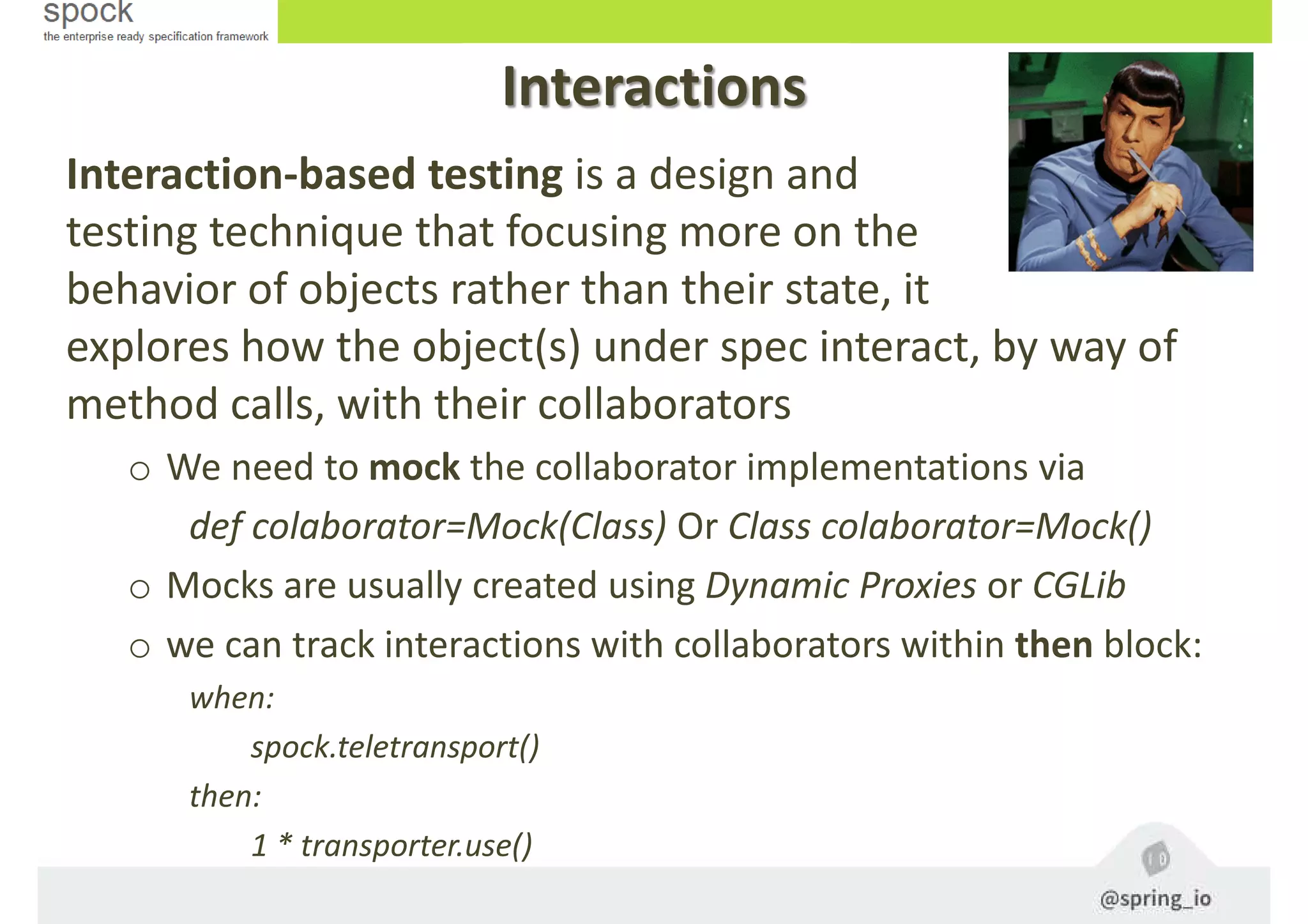
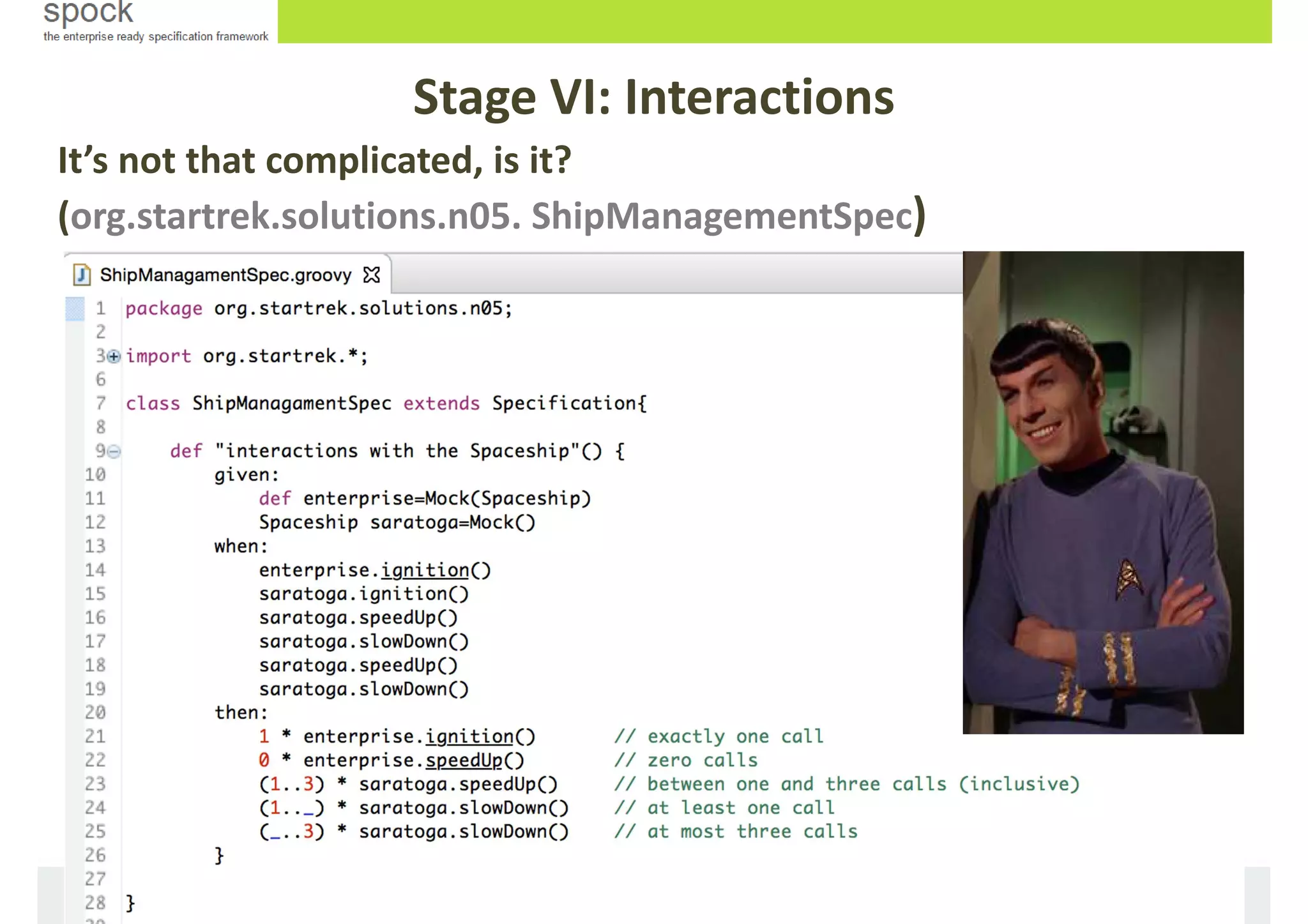
Interaction-based testing is a design and
testing technique that focusing more on the
behavior of objects rather than their state, it
explores how the object(s) under spec interact, by way of
method calls, with their collaborators
o We need to mock the collaborator implementations via
def colaborator=Mock(Class) Or Class colaborator=Mock()
o Mocks are usually created using Dynamic Proxies or CGLib
o we can track interactions with collaborators within then block:
when:
spock.teletransport()
then:
1 * transporter.use()
Interactions
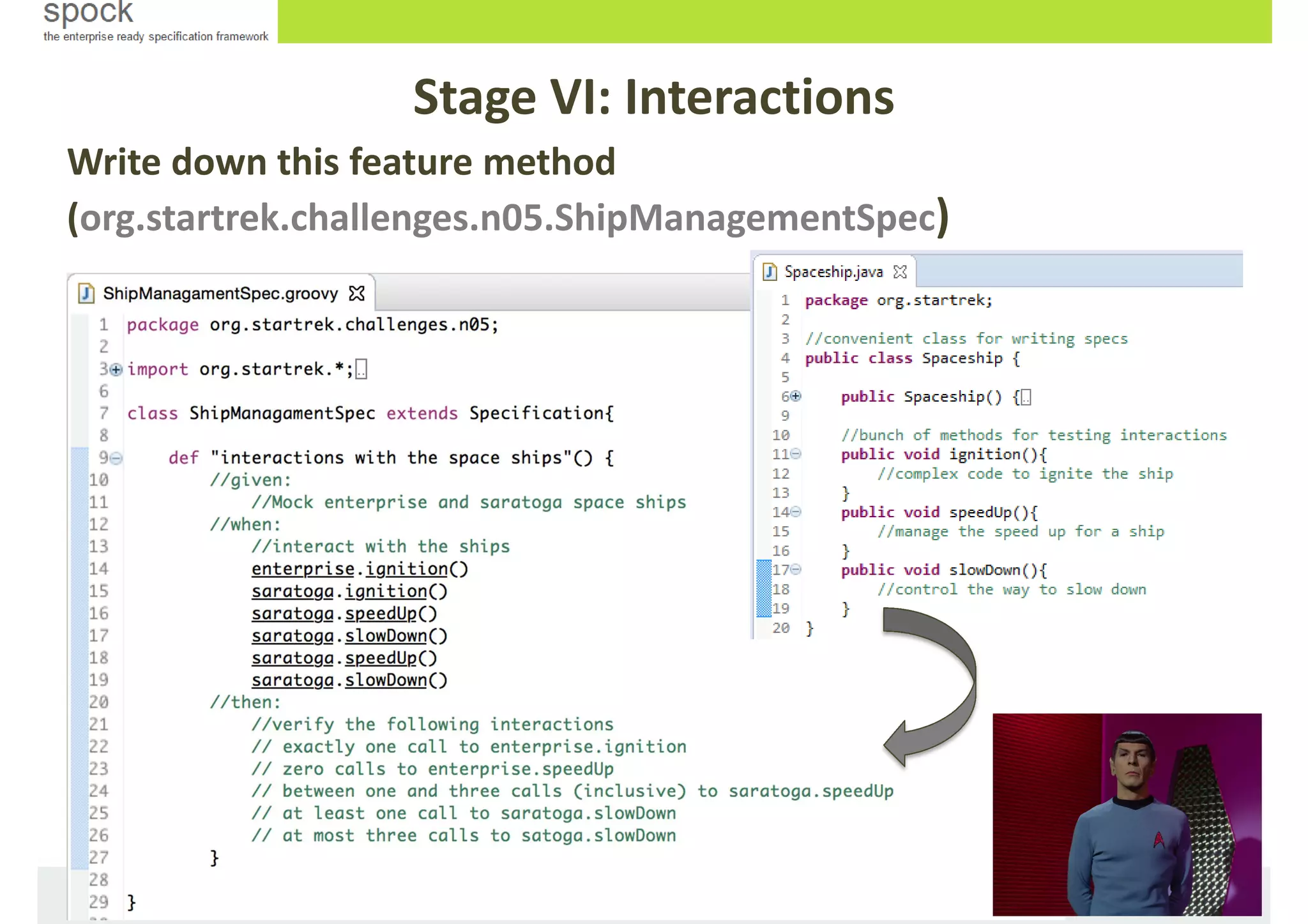
Stage VI: Interactions
Write down this feature method
(org.startrek.challenges.n05.ShipManagementSpec)
It’s not that complicated, is it?
(org.startrek.solutions.n05. ShipManagementSpec)
Stage VI: Interactions
Useful stuff
In our daily life with Spock, we´ll usually
make use of:
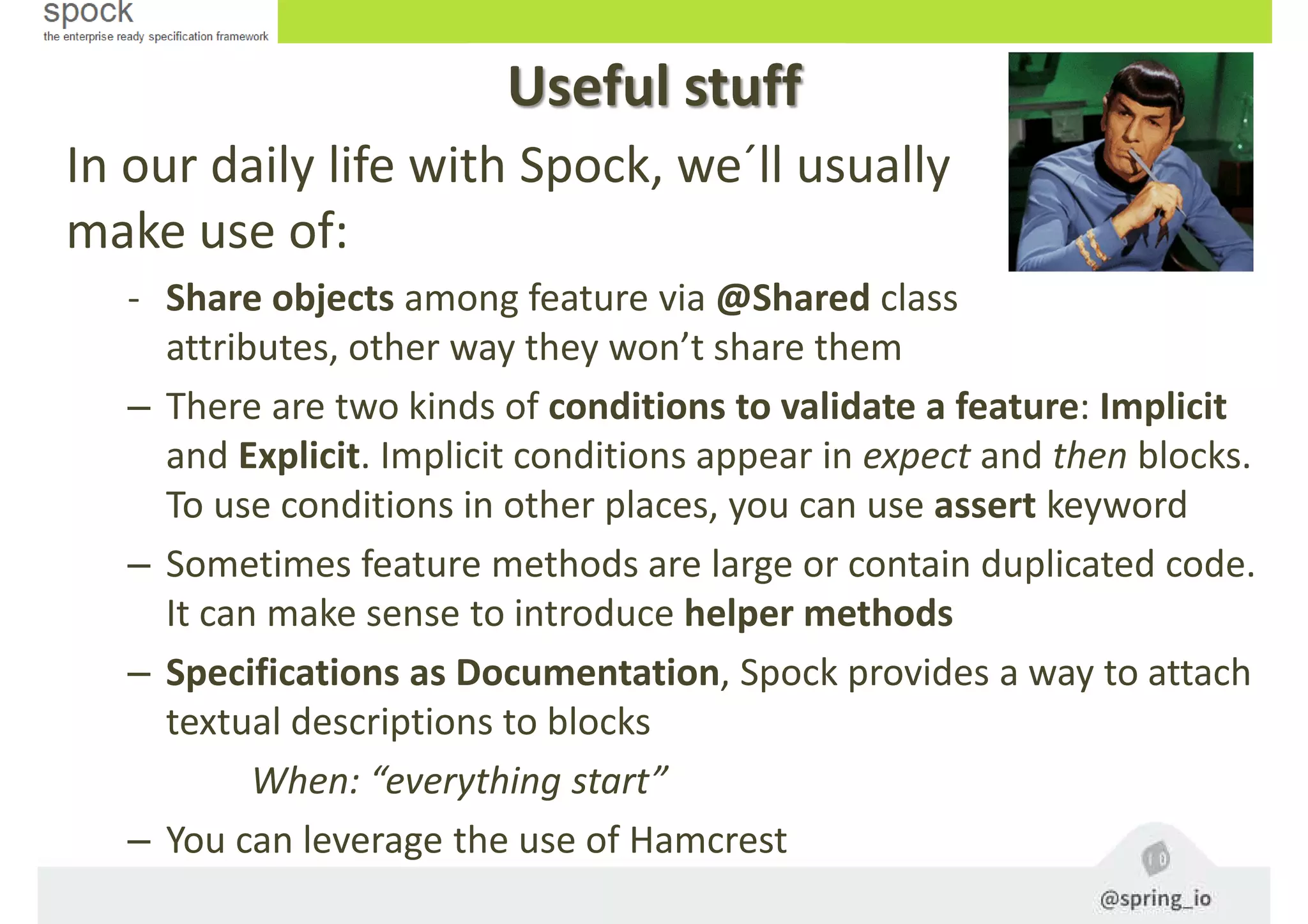
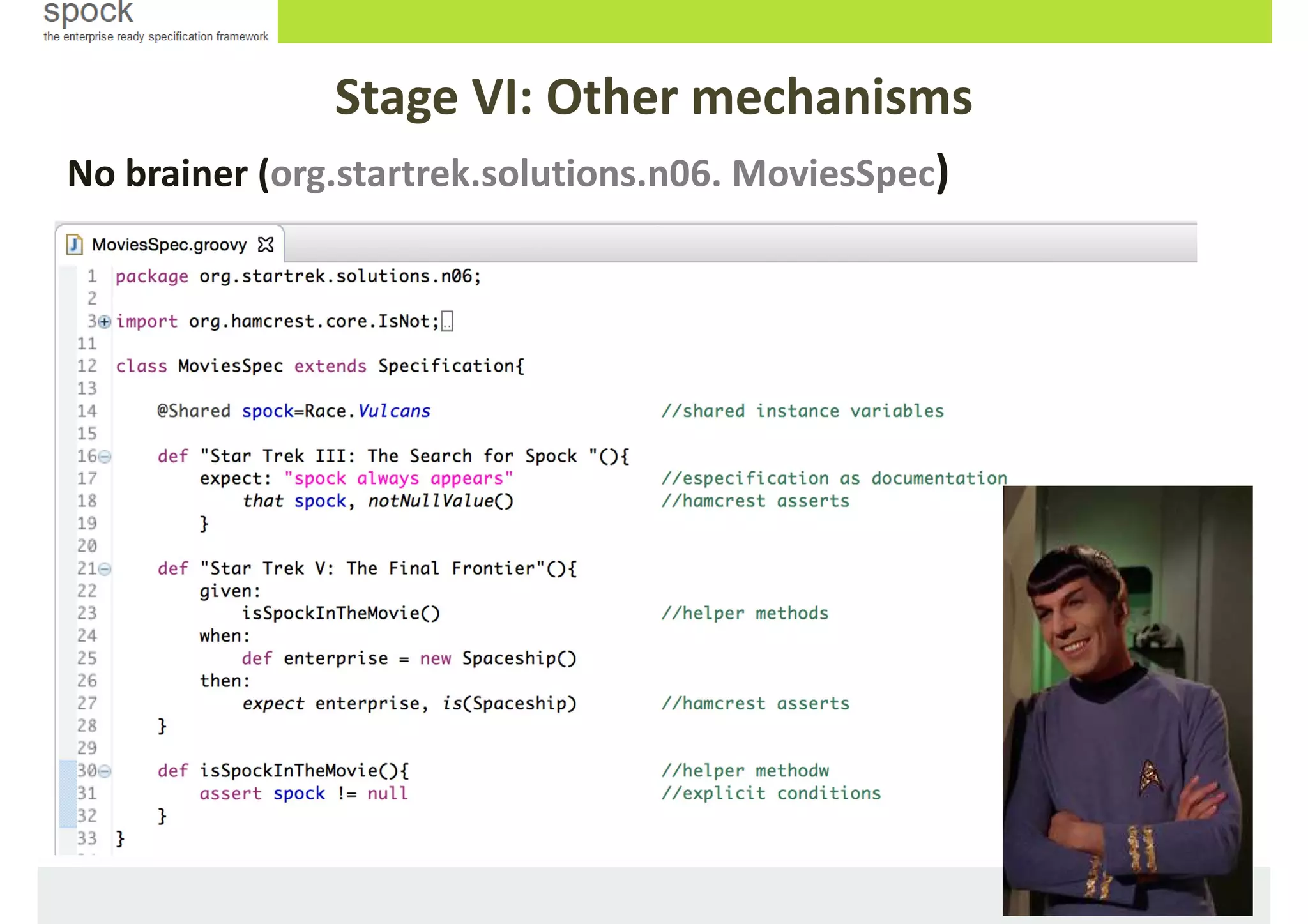
- Share objects among feature via @Shared class
attributes, other way they won’t share them
– There are two kinds of conditions to validate a feature: Implicit
and Explicit. Implicit conditions appear in expect and then blocks.
To use conditions in other places, you can use assert keyword
– Sometimes feature methods are large or contain duplicated code.
It can make sense to introduce helper methods
– Specifications as Documentation, Spock provides a way to attach
textual descriptions to blocks
When: “everything start”
– You can leverage the use of Hamcrest
Stage VI: Other mechanisms
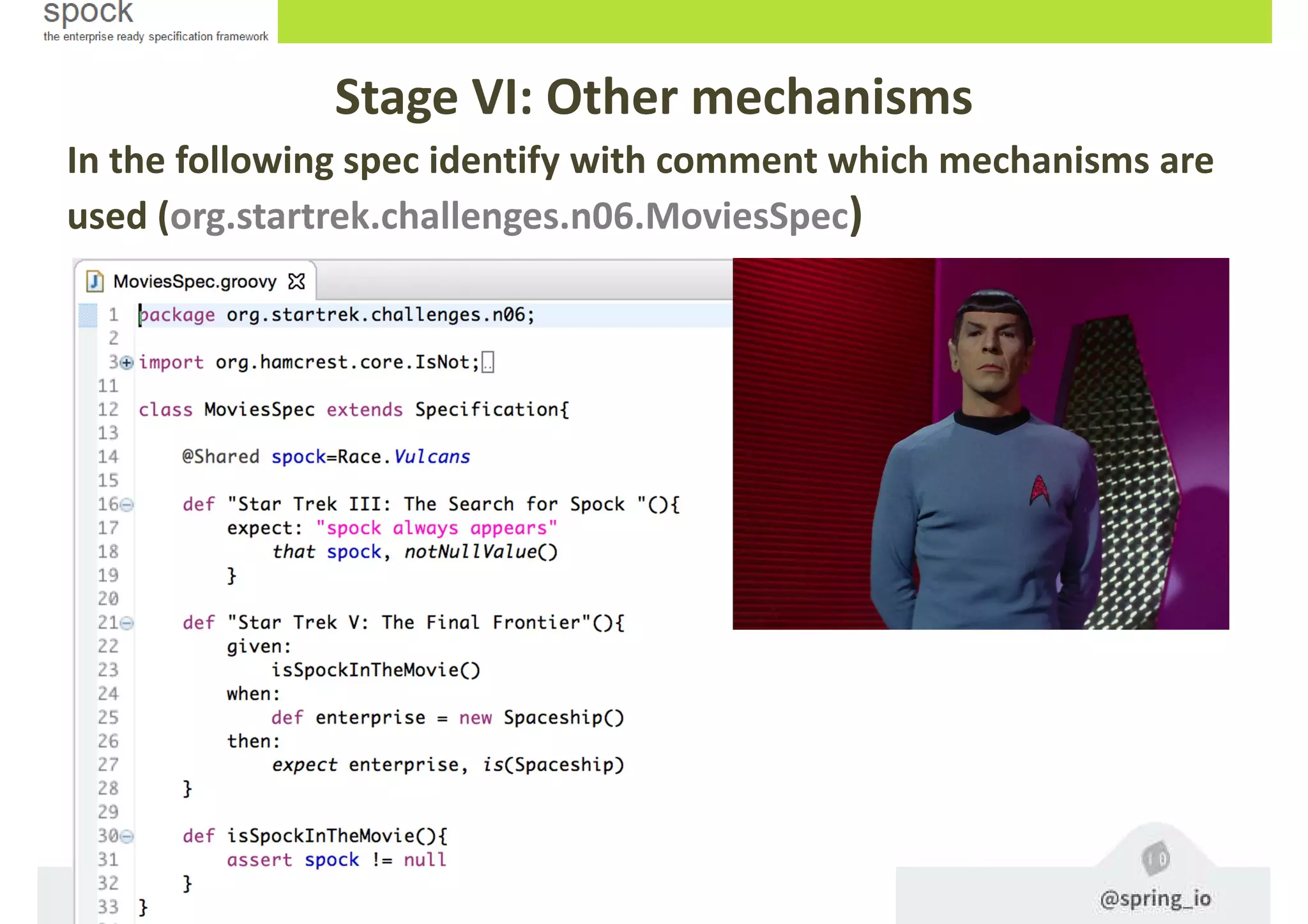
In the following spec identify with comment which mechanisms are
used (org.startrek.challenges.n06.MoviesSpec)
No brainer (org.startrek.solutions.n06. MoviesSpec)
Stage VI: Other mechanisms
Extensions
Spock offers lots of functionality for specs. But, there is
always a time when something else is needed. Spock
provides an interception-based extension mechanism.
Extensions are activated by annotations called directives. These are
some directives:
- @Timeout Sets a timeout for execution of a feature or fixture
- @Ignore Ignores a feature method
- @IgnoreRest Ignores all feature methods not carrying this annotation
- @IgnoreIf To ignore a feature method under certain conditions
- @FailsWith Expects a feature method to complete abruptly
- @Requires To execute a feature method under certain conditions
- @Stepwise executes features in the order that they are declared
- @Title and @Narrative To attach a natural-language name to a spec
- @Issue indicates that a feature/spec relates to one/more issues in an external
tracking system
- @Subject To indicate one or more subjects of a spec
- Many more and you can also create your own ones.
Extensions
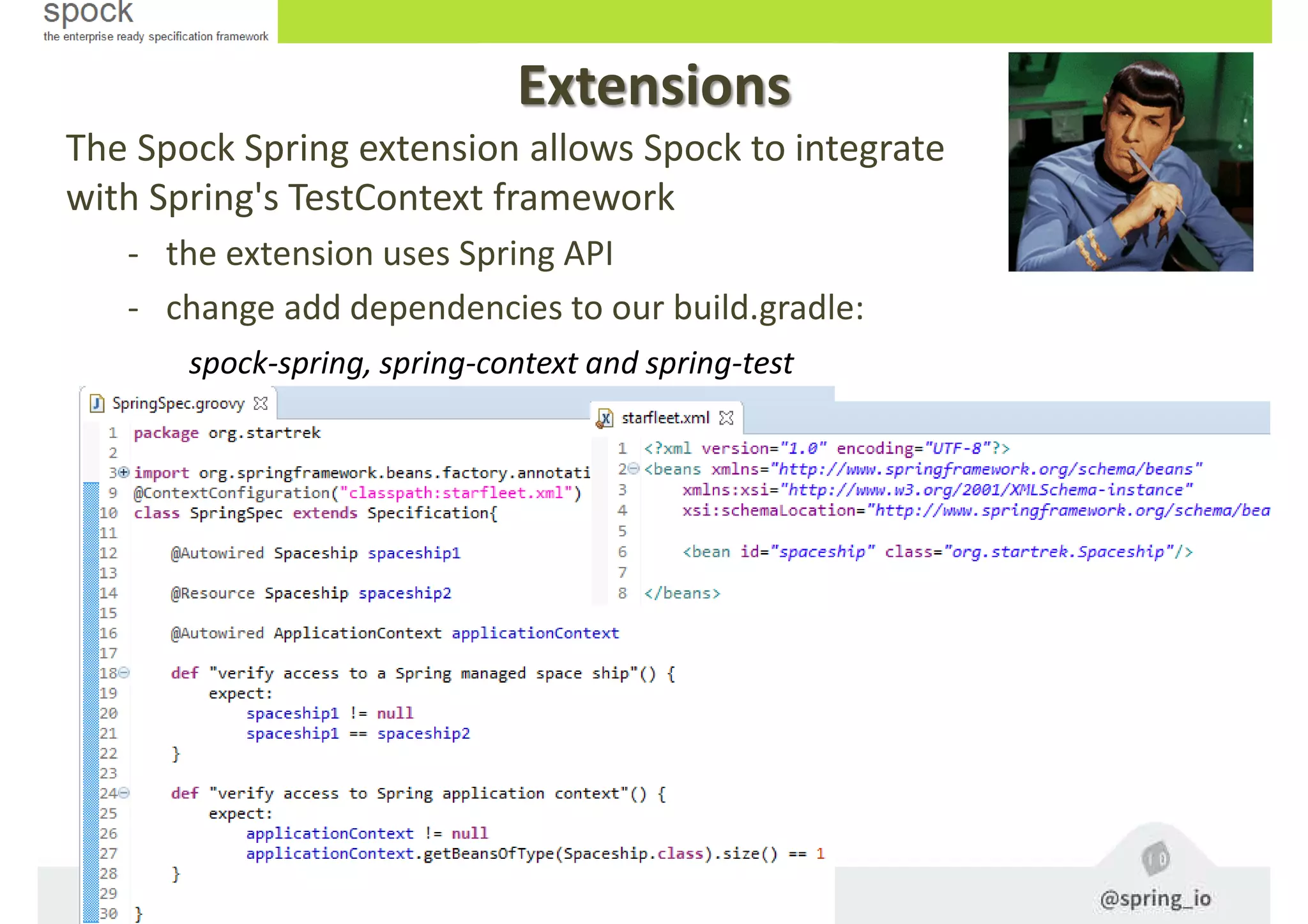
The Spock Spring extension allows Spock to integrate
with Spring's TestContext framework
- the extension uses Spring API
- change add dependencies to our build.gradle:
spock-spring, spring-context and spring-test
Stage VI: Extensions
Let’s leave that for another time… ;)
Extra ball: Geb!
Geb is a framework for automatization of
functional web testing. It is based on the
following technologies:
o Groovy Language (and it’s incredible with Spock)
o Selenium WebDriver
o JQuery CSS Content Selector
o Page Object Model
• To leveage it, we have to
• change add dependencies to our build.gradle:
testCompile 'org.gebish:geb-spock:0.10.0'
testCompile "org.seleniumhq.selenium:selenium-chrome-driver:2.43.1”
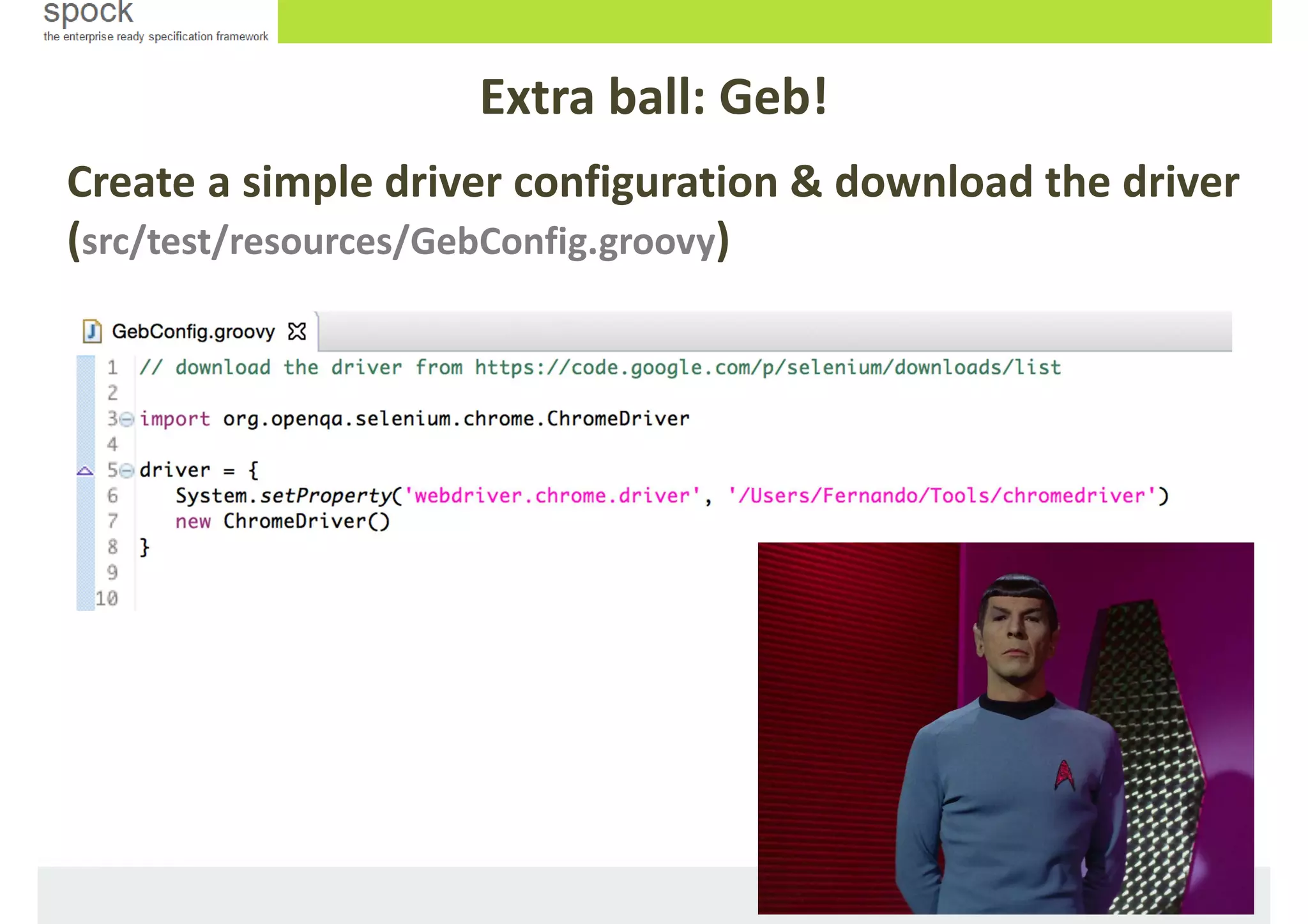
• Download and configure our driver (automated browser) in
src/test/resources/GebConfig.groovy
Create a simple driver configuration & download the driver
(src/test/resources/GebConfig.groovy)
Extra ball: Geb!
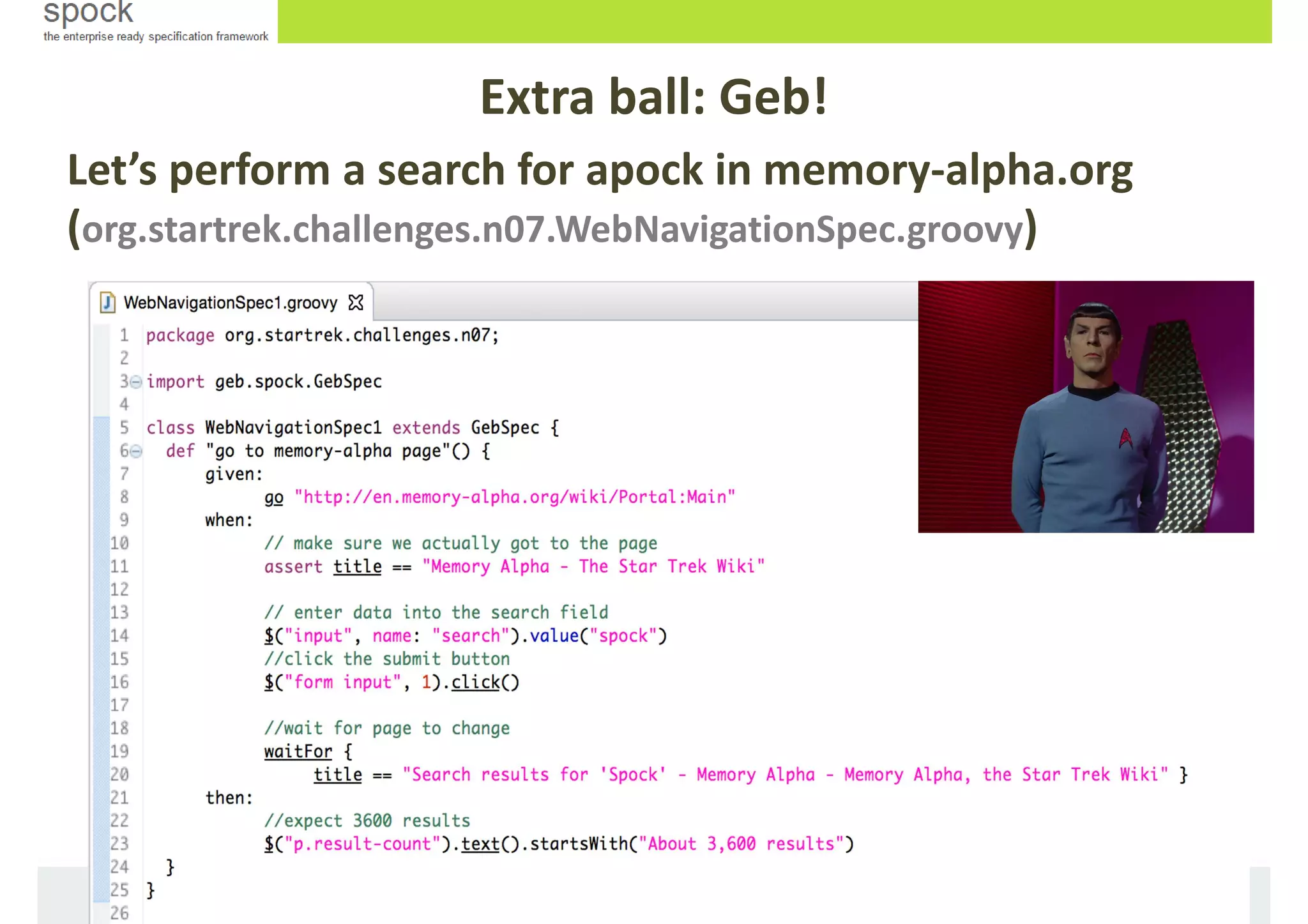
Let’s perform a search for apock in memory-alpha.org
(org.startrek.challenges.n07.WebNavigationSpec.groovy)
Extra ball: Geb!
That was great! But, Can YOU do it in a better way?
Extra ball: Geb!
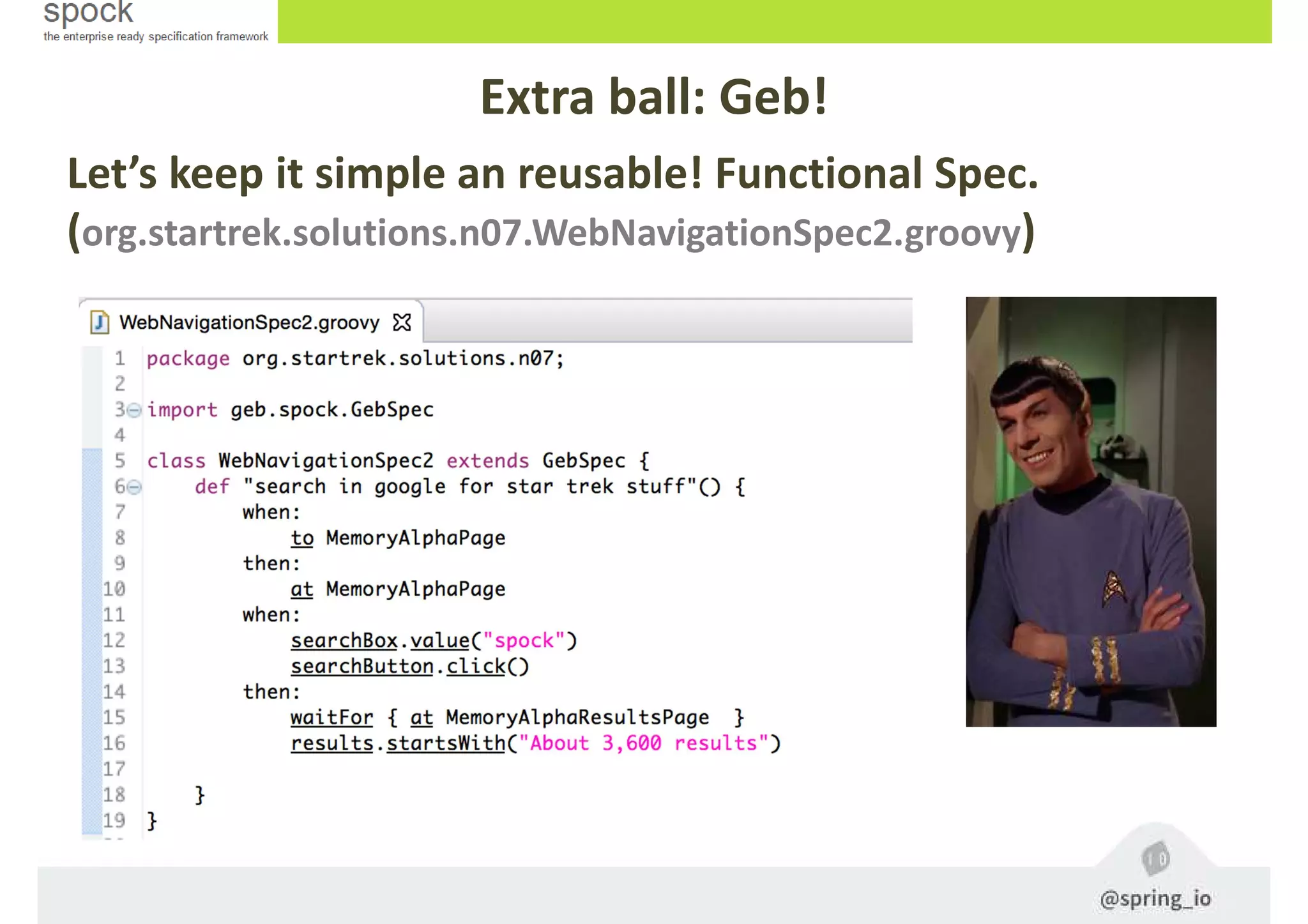
Let’s keep it simple an reusable! Functional Spec.
(org.startrek.solutions.n07.WebNavigationSpec2.groovy)
Extra ball: Geb!
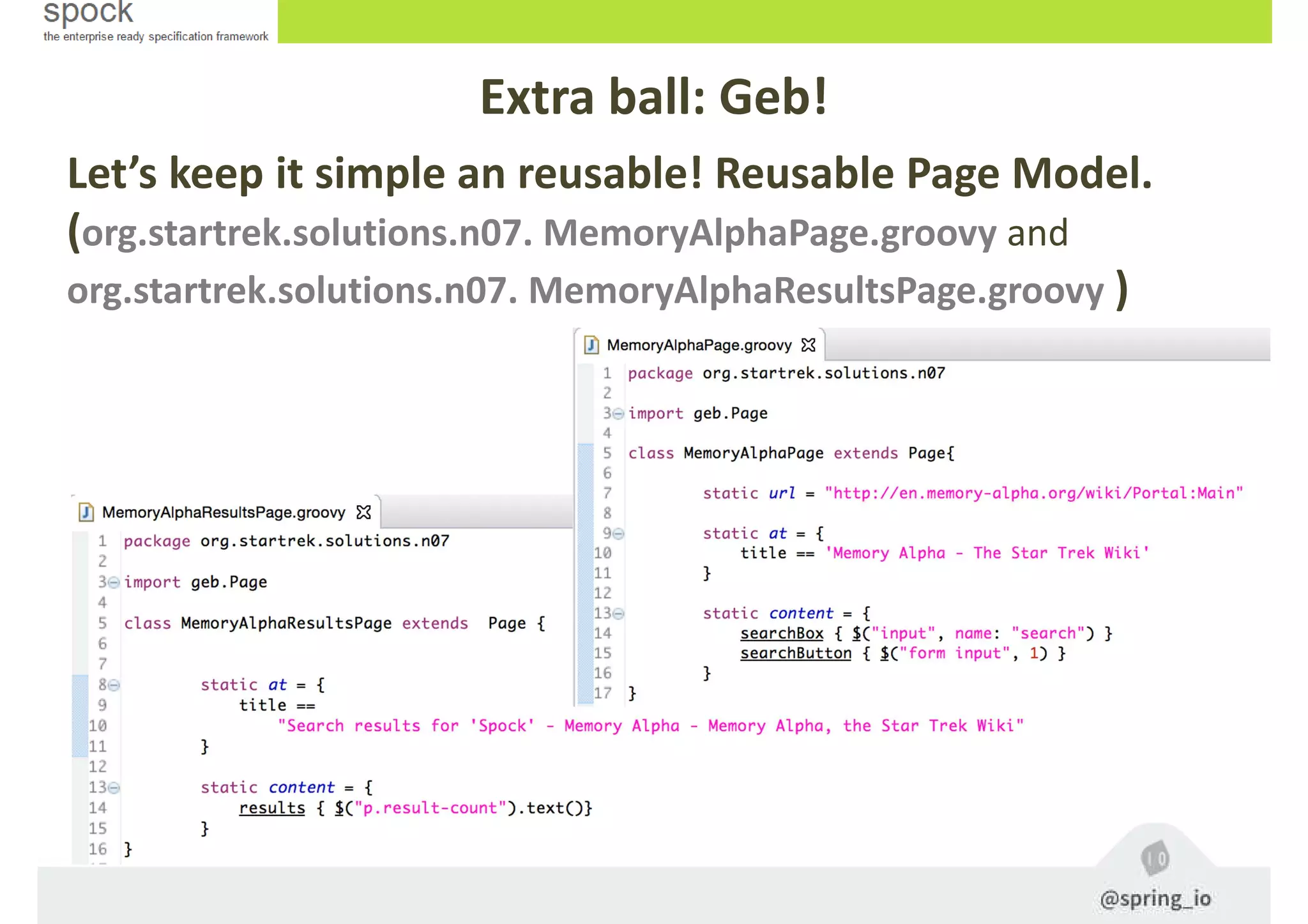
Let’s keep it simple an reusable! Reusable Page Model.
(org.startrek.solutions.n07. MemoryAlphaPage.groovy and
org.startrek.solutions.n07. MemoryAlphaResultsPage.groovy )
Extra ball: Geb!
And that’s it. Thanks!
• @pronoide_fer
• https://github.com/fredondo/
• fredondo@pronoide.com
• http://pronoide.com
• http://blog.pronoide.es

Spring IO 2015 Spock Workshop

  • 1.
    Workshop SPOCK: Testing (inthe) Enterprise! Fernando Redondo Ramírez @pronoide_fer
  • 2.
  • 3.
    Whoami • Entrepreneur andBusiness Manager at Pronoide since 2003 • Currently working for Hybris (SAP) as technical trainer • Java & Friends trainer for last ten years • Doing things with Java from 1999 on • Computer Engineer • Happily married and proud father of two children • Not that Trekky yet (Sure!)
  • 4.
    Brief introduction - Groovybased testing and specification framework - Can test anything that runs inside the JVM (even Java) - Beautiful and highly expressive specification language - Compatible with most IDEs, build tools, and continuous integration servers (JUnit runner)
  • 5.
    Terminology and definitions -Spock lets you write specifications that describe expected features (properties, aspects) exhibited by a system of interest. - The system of interest could be anything between a single class and a whole application, and is also called system under specification (SUS). - The description of a feature starts from a specific snapshot of the SUS and its collaborators; this snapshot is called the feature’s fixture. Brief introduction
  • 6.
    How do Istart with Maven? -
  • 7.
    How do Istart with Gradle?
  • 10.
    Hands on! Before start,you have to… 1. Start Groovy/Grails Tool Suite 3.6 (GGTS) and create a workspace (remember to run it with a JDK and install the gradle extension for eclipse). Groovy 2.4 compiler as well. 2. Download http://pronoide.com/downloads/springio-workshop-2015.zip and unzip it into workspace folder. Or take it from https://github.com/fredondo/springio2015-spock-workshop 3. Hold on! Please wait me right here…
  • 11.
    Stage I: Importthe workshop project i. Import gradle Project (enterprise.mission)
  • 12.
    Specifications Test classes areknown as Specifications - All specifications (Specs) must extend from spock.lang.Specification - Each specification must have at least ONE test method, all of these are called feature methods - The most simple assert within a feature method is the expect block, all its sentences must be evaluated to true so that the feature will be OK
  • 13.
    A very simplespecification Specifications
  • 14.
    Stage II: CreatingSpecs Complete the following specification and acomplish the challenges (org.startrek.challenges.n01.RacesSpec)
  • 15.
    Did you getit right? (org.startrek.solutions.n01.RacesSpec) Stage II: Creating Specs
  • 16.
    Stage II: CreatingSpecs • Run the spec class as JUnit test • Or execute the test gradle task (gradle quick task launcher)
  • 17.
    Specfication methods Within anyspecification we can found: - Feature methods (or test methods) with diferent blocks of code for stating the scenario under spec - Fixture methods that will be called automatically before or after any single feature methods or before and after the specification: - setup, cleanup, setupSpec and cleanupSpeck - Helper methods that can be called at any time from other methods and can be convenient for code clarity and code reuse
  • 18.
    Stage III: Insidethe Specs Complete the following specification and acomplish the challenge (org.startrek.challenges.n02.VoyageSpec)
  • 19.
    Stage III: Insidethe Specs This is not rocket science (org.startrek.solutions.n02.VoyageSpec)
  • 20.
    Feature method blocks Insideany feature method we can come across different kinds of phases or blocks: - setup and/or cleanup, at most once per spec, to inicialise and dispose stuff for that particular feature (don’t mix up with fixtures). The setup block can be omitted or aliased with given for readability purpouses. We can create kind of different given sections with and - An expect block may only contain conditions and variable definitions. It is useful in situations where it is more natural to describe stimulus and expected response in a single expression
  • 21.
    Stage IV: Insidethe feature Complete the following feature methods and probe your courage (org.startrek.challenges.n03.SpaceshipSpec)
  • 22.
  • 23.
    Feature method blocks Theseare the kinds of blocks within a feature method (continuation): - when and then blocks always occur together. They describe a stimulus and the expected response owhen blocks can contain arbitrary code othen blocks are restricted to conditions, exception conditions, interactions, and variable definitions (which mean more options available than for expect blocks) oThere can be multiples pair ocurrencies within a feature
  • 24.
    Stage IV: Insidethe feature Fill in the next feature method if you dare! (org.startrek.challenges.n03.StarfleetSpec)
  • 25.
    It was pieceof cake!! (org.startrek.solutions.n03.SpaceshipSpec) Stage IV: Inside the feature
  • 26.
    Feature method blocks Theseare the kinds of blocks (cont.): - A where block always comes last in a feature method, and cannot be repeated. It is used to write data-driven feature methods. As a matter of convenience it can be written in two different ways: - A row per variable with the << symbol - A column per variable with the | symbol - A data-drive feature method can also be annotated with @unroll - the method will be invoked multiple times with the provider data variables - these can be used in the method description with placeholders (#) - For each iteration the placeholders are replaced with correct values
  • 27.
    Stage IV: Insidethe feature Things get tougher! (org.startrek.challenges.n03.WeaponsDamageSpec)
  • 28.
    As easy aspie!! (org.startrek.solutions.n03.WeaponsDamageSpec) Stage IV: Inside the feature
  • 29.
    Testing exceptions In orderto deal with specification that throw or not exceptions, Spock provides the following exception conditions - thrown(ExceptionClass) and notThrow(ExceptionClass) - It’s also possible to get the exception instance, to access its attributes: def ex=thrown()
  • 30.
    Stage V: ExceptionConditions Complete these features (org.startrek.challenges.n04.DestructionSpec)
  • 31.
    Keep it up!(org.startrek.solutions.n04.DestructionSpec) Stage IV: Inside the feature
  • 32.
    Interaction-based testing isa design and testing technique that focusing more on the behavior of objects rather than their state, it explores how the object(s) under spec interact, by way of method calls, with their collaborators o We need to mock the collaborator implementations via def colaborator=Mock(Class) Or Class colaborator=Mock() o Mocks are usually created using Dynamic Proxies or CGLib o we can track interactions with collaborators within then block: when: spock.teletransport() then: 1 * transporter.use() Interactions
  • 33.
    Stage VI: Interactions Writedown this feature method (org.startrek.challenges.n05.ShipManagementSpec)
  • 34.
    It’s not thatcomplicated, is it? (org.startrek.solutions.n05. ShipManagementSpec) Stage VI: Interactions
  • 35.
    Useful stuff In ourdaily life with Spock, we´ll usually make use of: - Share objects among feature via @Shared class attributes, other way they won’t share them – There are two kinds of conditions to validate a feature: Implicit and Explicit. Implicit conditions appear in expect and then blocks. To use conditions in other places, you can use assert keyword – Sometimes feature methods are large or contain duplicated code. It can make sense to introduce helper methods – Specifications as Documentation, Spock provides a way to attach textual descriptions to blocks When: “everything start” – You can leverage the use of Hamcrest
  • 36.
    Stage VI: Othermechanisms In the following spec identify with comment which mechanisms are used (org.startrek.challenges.n06.MoviesSpec)
  • 37.
    No brainer (org.startrek.solutions.n06.MoviesSpec) Stage VI: Other mechanisms
  • 38.
    Extensions Spock offers lotsof functionality for specs. But, there is always a time when something else is needed. Spock provides an interception-based extension mechanism. Extensions are activated by annotations called directives. These are some directives: - @Timeout Sets a timeout for execution of a feature or fixture - @Ignore Ignores a feature method - @IgnoreRest Ignores all feature methods not carrying this annotation - @IgnoreIf To ignore a feature method under certain conditions - @FailsWith Expects a feature method to complete abruptly - @Requires To execute a feature method under certain conditions - @Stepwise executes features in the order that they are declared - @Title and @Narrative To attach a natural-language name to a spec - @Issue indicates that a feature/spec relates to one/more issues in an external tracking system - @Subject To indicate one or more subjects of a spec - Many more and you can also create your own ones.
  • 39.
    Extensions The Spock Springextension allows Spock to integrate with Spring's TestContext framework - the extension uses Spring API - change add dependencies to our build.gradle: spock-spring, spring-context and spring-test
  • 40.
    Stage VI: Extensions Let’sleave that for another time… ;)
  • 41.
    Extra ball: Geb! Gebis a framework for automatization of functional web testing. It is based on the following technologies: o Groovy Language (and it’s incredible with Spock) o Selenium WebDriver o JQuery CSS Content Selector o Page Object Model • To leveage it, we have to • change add dependencies to our build.gradle: testCompile 'org.gebish:geb-spock:0.10.0' testCompile "org.seleniumhq.selenium:selenium-chrome-driver:2.43.1” • Download and configure our driver (automated browser) in src/test/resources/GebConfig.groovy
  • 42.
    Create a simpledriver configuration & download the driver (src/test/resources/GebConfig.groovy) Extra ball: Geb!
  • 43.
    Let’s perform asearch for apock in memory-alpha.org (org.startrek.challenges.n07.WebNavigationSpec.groovy) Extra ball: Geb!
  • 44.
    That was great!But, Can YOU do it in a better way? Extra ball: Geb!
  • 45.
    Let’s keep itsimple an reusable! Functional Spec. (org.startrek.solutions.n07.WebNavigationSpec2.groovy) Extra ball: Geb!
  • 46.
    Let’s keep itsimple an reusable! Reusable Page Model. (org.startrek.solutions.n07. MemoryAlphaPage.groovy and org.startrek.solutions.n07. MemoryAlphaResultsPage.groovy ) Extra ball: Geb!
  • 47.
    And that’s it.Thanks! • @pronoide_fer • https://github.com/fredondo/ • fredondo@pronoide.com • http://pronoide.com • http://blog.pronoide.es