<SMIL> S ynchronized  M ultimedia I ntegration  L anguage Martin Wolpers & Erik Duval
http://www.multimedia4everyone.com/smil_intro/smil_intro_direct.smil
Introduction S imple authoring Simple text editor Free and open I nteractive audiovisual presentations &quot;rich media&quot;/multimedia presentations streaming audio and video ,  images, text , etc. SMIL 1.0: 15 June 1998 (30 pages) SMIL 2.0:  07 August 2001  (540 pages) SMIL 2.1: 27 September 2005 (386 pages) Parties involved RealNetworks, Intel, Philips,  CWI , Nokia, ...
Introduction (Cont’d) SMIL is XML DTD, Schema Set of modules Integration language Media referred to, not included Profiles SMIL Basic Mobile devices XHTML+SMIL Timing for text
Implementations RealNetworks RealOne  ( SMIL 2.0 ) Oratrix GRiNS player and editor Microsoft Internet Explorer  >  5.5 :  XHMTL+SMIL Apple QuickTime  >  4.1  :  SMIL 1.0 Adobe SVG Viewer :  animation in SVG
A simple SMIL document <?xml version=&quot;1.0&quot;?> <!DOCTYPE smil PUBLIC &quot;-//W3C//DTD SMIL 2.0//EN&quot; &quot;http://www.w3.org/2001/SMIL20/SMIL20.dtd&quot;>   < smil  xmlns=&quot;http://www.w3.org/2001/SMIL20/Language&quot; xml:lang=&quot;en&quot; title=&quot;SMIL example&quot;   > < head > </ head > < body > </ body > </ smil >   example :  http://www. yomiuri .co. jp/stream/hotels/e_smil/torino . smi
Media types <text src=“…” region=“…”> Plain text (txt, ascii, …) <textstream src=“…” region=“…”> stream, with timing (newsticker, subtitles, …) <img src=“…” region=“…”> As in HTML (GIF, JPEG, PNG, …) <audio src=“…”> (MP3, WAV, AU, …) <video src=“…” region=“…”> RealMovie, AVI, MPEG, MOV <animation src=“…” region=“…”> Vector graphics (SVG, SWF, VML, …)
Synchronization: intro http://www.cwi.nl/~media/SMIL/Tutorial/SMILTut.html
Synchronization and clipping Synchronization <img src =“…”   dur=&quot;6s&quot;  />  Last 6 seconds <img src=“…”  begin=“2s” /> After two seconds Clipping <video src=&quot;movie.mpg&quot;  clipBegin=&quot;20s&quot; /> Starting 20 seconds into the video <video src=&quot;movie.mpg&quot;  clipEnd=&quot;26:30&quot; />  Cutting out the last scene <video src=&quot;m.mpg&quot;  clipBegin=&quot;4:55.7&quot; clipEnd=&quot;4:55.7&quot; /> Showing 7th frame after 4:55
Example: finalmove.smil <smil> < body> <video src=&quot;board.rm”   clip-begin=&quot;16s”   clip-end=&quot;27s&quot;/> < /body> </smil> http://smil.ylog.org/download.html
<Seq> Children executed after one another <seq> < img   src = &quot;vim32x32.gif“ alt = &quot;The vim icon“ region = &quot;vim_icon“ dur = &quot;6s&quot;  /> < img   src = &quot;madewithsoja.gif“ alt = &quot;Made with SOJA“ region = &quot;soja_icon“ dur = &quot;4s&quot;   begin = &quot;1s&quot;  /> </seq>
<par> Children are executed in parallel, starting at same time, i.e. start time of <par> <par> < img   src = &quot;vim32x32.gif“ alt = &quot;The vim icon“ region = &quot;vim_icon“ dur = &quot;6s&quot;  /> < img   src = &quot;madewithsoja.gif“ alt = &quot;Made with SOJA“ region = &quot;soja_icon“ dur = &quot;6s&quot;  /> </par>
<par> (2) <par>      <text src=“ x .html&quot; region=&quot;t&quot; dur=&quot;5s&quot; />      <video src=“ y .mpv&quot; region=&quot;main&quot; />      <audio src=“ z .aiff&quot; region=&quot;music&quot; /> </par>
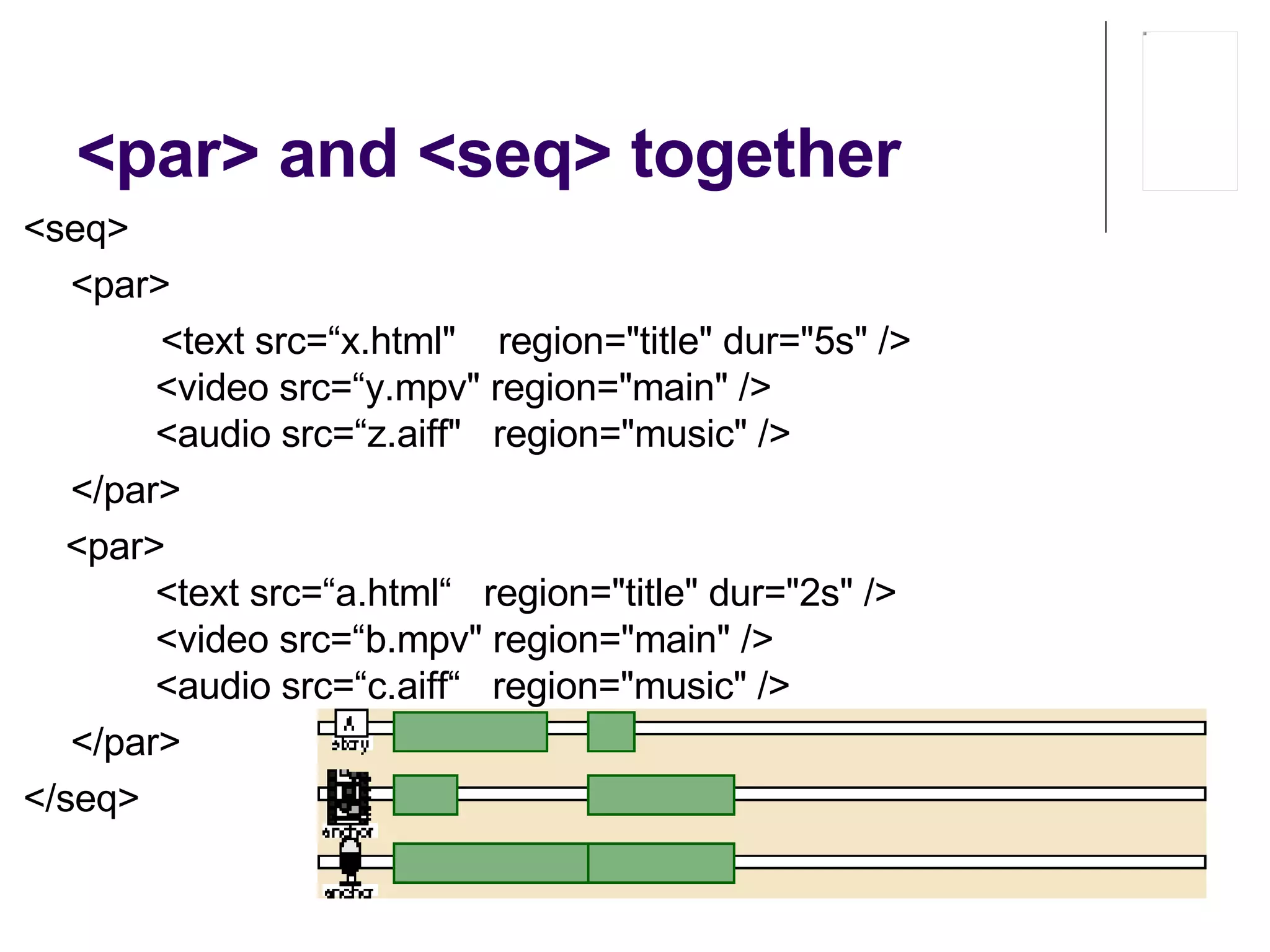
<par> and <seq> together <seq> <par>   <text src=“ x .html&quot;  region=&quot;title&quot; dur=&quot;5s&quot; />          <video src=“ y .mpv&quot; region=&quot;main&quot; />          <audio src=“ z .aiff&quot;  region=&quot;music&quot; /> </par>       <par>          <text src=“ a .html“   region=&quot;title&quot; dur=&quot;2s&quot; />          <video src=“ b .mpv&quot; region=&quot;main&quot; />          <audio src=“ c .aiff“   region=&quot;music&quot; /> </par>  </seq>
Event based synchronization <par> <audio src=&quot;ad_music.mp3&quot; alt=&quot;subliminal advertising enhancer&quot;/> <seq>     <video src=&quot;ad1.mpg&quot;/>     <video src=&quot;ad2.mpg&quot; begin=&quot;00:02&quot;/>     <video src=&quot;ad3.mpg&quot; begin=&quot;00:02&quot;/> </seq> </par>  <par> <audio src=&quot;ad_music.mp3&quot;/>   <video src=&quot;ad1.mpg“/>   <video src=&quot;ad2.mpg&quot; begin=&quot;00:17&quot;/>   <video src=&quot;ad3.mpg&quot; begin=&quot;00:34&quot;/> </par> <par> <audio src=&quot;ad_music.mp3&quot;/>   <video id=&quot; ad1 &quot; src=&quot;ad1.mpg&quot;/>   <video id=&quot; ad2 &quot; src=&quot;ad2.mpg&quot; begin=&quot; ad1 .end+00:02&quot;/>   <video id=&quot;ad3&quot; src=&quot;ad3.mpg&quot; begin=&quot; ad2 .end+00:02&quot;/> </par> ad_music.mp3
Event based synchronization < img   src = “ 1 .gif&quot;  id = “ x &quot;   …  /> < img   src = “ 2 .gif&quot;  begin = &quot; id( x )( 3 s ) &quot;   …  /> 2.gif starts 3 seconds after 1.gif   < img   src = “ 1 .gif&quot;  id = “ x &quot;   …  /> < img   src = “ 2 .gif&quot;  begin = &quot; id( x )( begin ) &quot;   …  /> 2.gif starts at same time as 1.gif   < img   src = “ 1 .gif&quot;  id = “ x &quot;   …  /> < img   src = “ 2 .gif&quot;  begin = &quot; id( x )( end ) &quot;   …  /> 2.gif starts when 1.gif   ends
Repeat <video src=“z.mpv&quot; repeatCount=&quot;3&quot; /> <video src=“z.mpv&quot; repeatDur=&quot;11s&quot; /> <video src=“z.mpv&quot; repeatCount=&quot;3.2&quot; /> <video src=“z.mpv&quot; repeatCount=“indefinite&quot; />
Multiple begin’s <par> <audio id=&quot;ring&quot; src=&quot;ring.wav&quot; repeatCount=&quot;4&quot;/> <img src=&quot;jumping_phone.gif&quot;  begin=&quot;0; ring.repeat&quot; /> </par> 1 st  ring doesn’t count as repeat Audio  repeats , image  restarts
Layout Rectangular areas Process Create regions Place media in regions Region attributes Width, height left, right, top, bottom backgroundColor, showBackground fit regionName z-index Measurements relative values (px, em, or ex) absolute values (cm, mm, in, pt, or pc) percentages.
Layout tags Root screen: < root-layout   width = &quot;300&quot;   height = &quot;200“ background-color = &quot;white&quot;  /> Absolute positioning 75 pixels from left border and 50 pixels from top border Head:  < region   id = &quot; vim_icon “ left = &quot;75&quot;   top = &quot;50“ width = &quot;32&quot;   height = &quot;32&quot;  /> Body:  < img   src = &quot;vim.gif“ alt= &quot;The vim icon“ region = &quot; vim_icon &quot;  />
Layout tags (2) Relative positioning 50% from left border and 40% from top border Head: < region   id = &quot; vim_icon &quot;   left = &quot;50%&quot;   top = &quot;40%&quot;   width = &quot;32&quot;   height = &quot;32&quot;  />
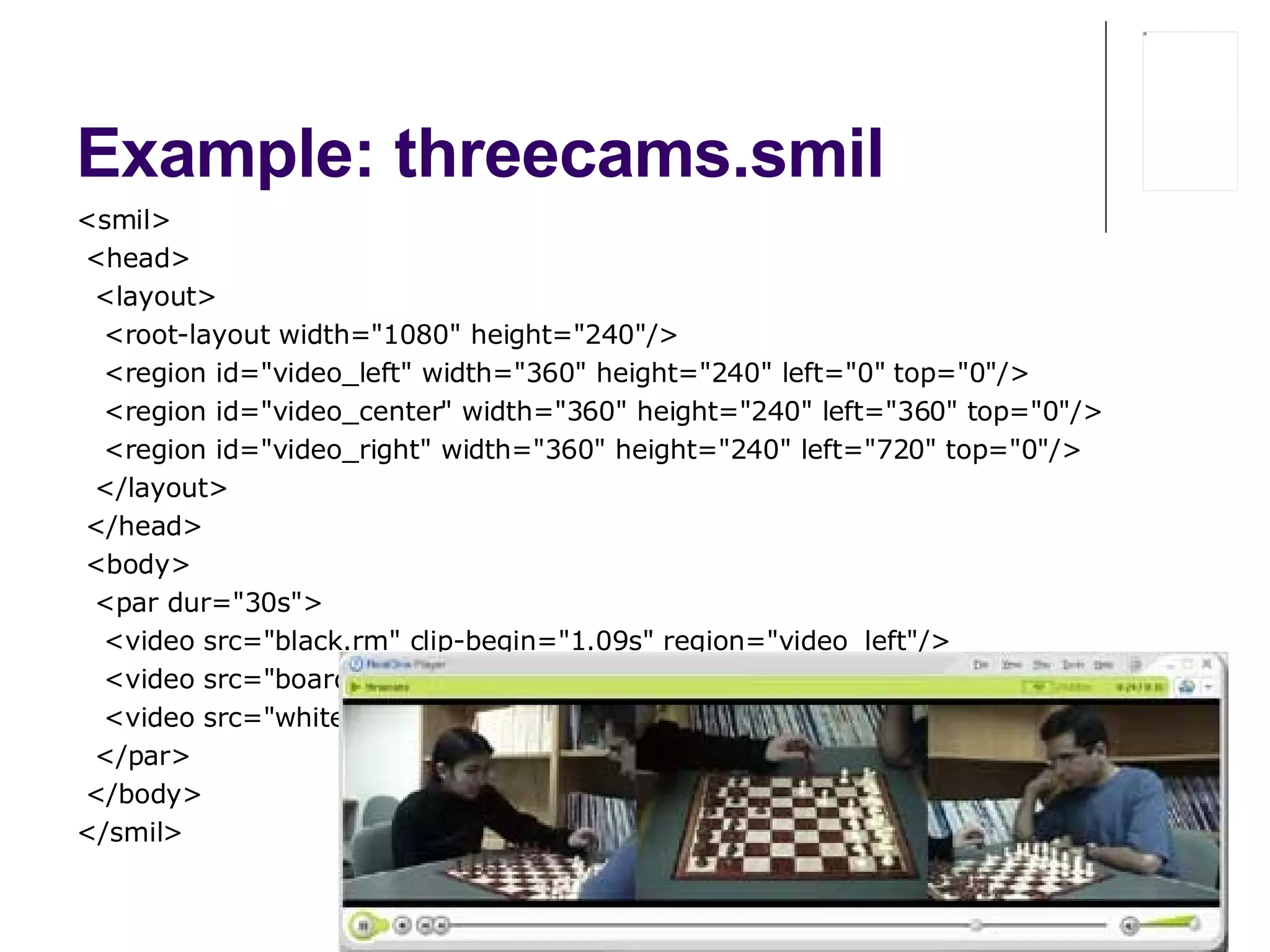
Example: threecams.smil  <smil> < head> <layout> <root-layout width=&quot;1080&quot; height=&quot;240&quot;/> <region id=&quot;video_left&quot; width=&quot;360&quot; height=&quot;240&quot; left=&quot;0&quot; top=&quot;0&quot;/> <region id=&quot;video_center&quot; width=&quot;360&quot; height=&quot;240&quot; left=&quot;360&quot; top=&quot;0&quot;/> <region id=&quot;video_right&quot; width=&quot;360&quot; height=&quot;240&quot; left=&quot;720&quot; top=&quot;0&quot;/> </layout> < /head> < body> <par dur=&quot;30s&quot;> <video src=&quot;black.rm&quot; clip-begin=&quot;1.09s&quot; region=&quot;video_left&quot;/> <video src=&quot;board.rm&quot; clip-begin=&quot;0s&quot; region=&quot;video_center&quot;/> <video src=&quot;white.rm&quot; clip-begin=&quot;1.10s&quot; region=&quot;video_right&quot;/> </par> < /body> </smil>
Layout tags (3) < head >   < layout >   < region   id = &quot;region_1“   left = &quot;50&quot;   top = &quot;50“   width = &quot;150&quot;   height = &quot;125“   z-index=&quot;2&quot; /> < region   id = &quot;region_2“   left = &quot;25&quot;   top = &quot;25“   width = &quot;100“   height = &quot;100“   z-index=&quot;1&quot; /> </ layout >   </ head >   < body >   < par > < text   src = &quot;text1.txt“   region = &quot;region_1&quot;  /> < text   src = &quot;text2.txt“   region = &quot;region_2&quot;  /> </ par >   </ body >   </ smil >
Fit=“Fill” Aspect ratio not preserved <region   id=&quot;region_1&quot;  …   fit=&quot;fill&quot;   />
Fit=“Meet” Aspect ratio preserved <region   id=&quot;region_1&quot;  …   fit=“ meet &quot;   />
Fit=“Slice” Aspect ratio preserved <region   id=&quot;region_1&quot;  …   fit=“ slice &quot;   />
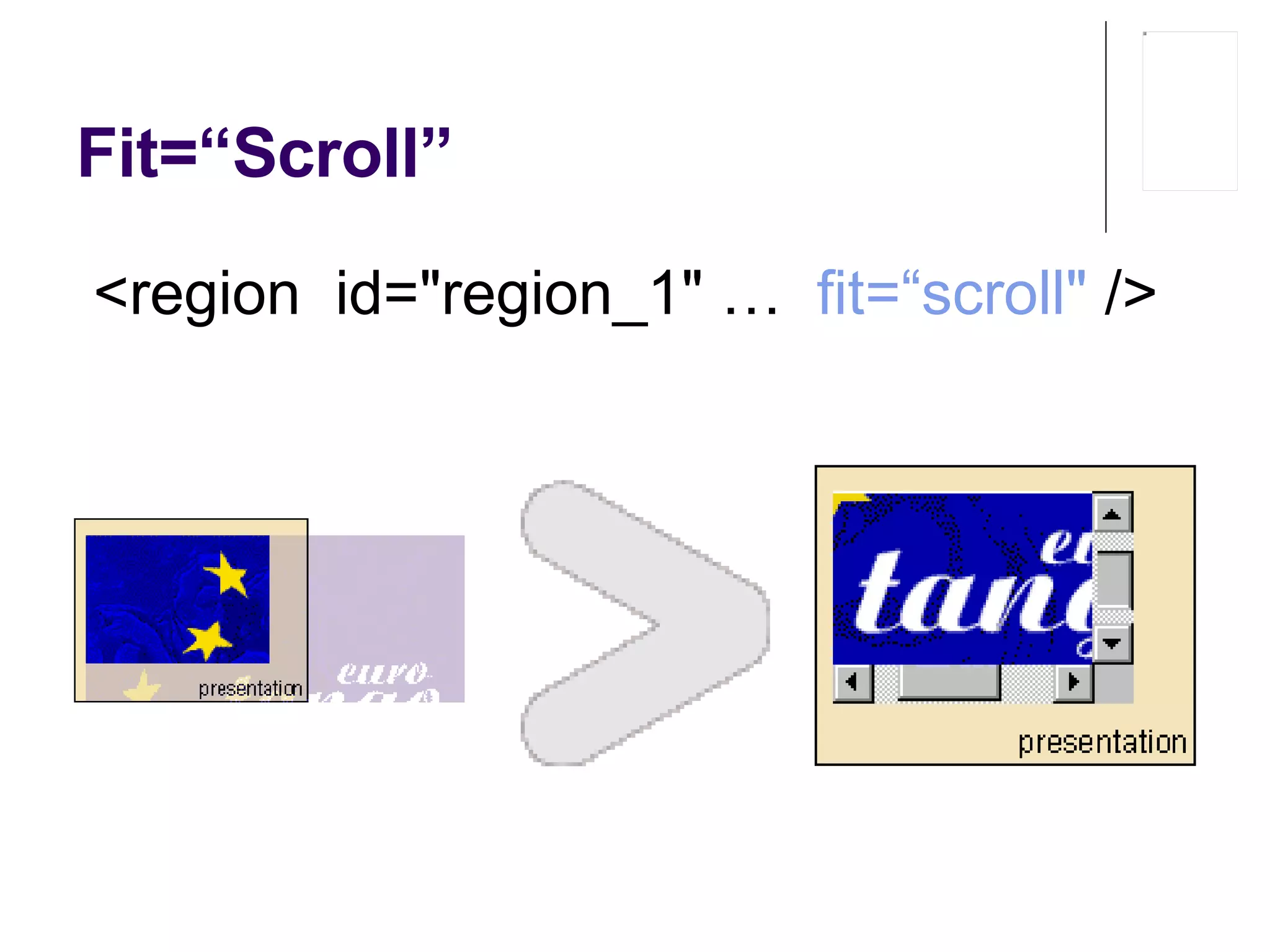
Fit=“Scroll” <region   id=&quot;region_1&quot;  …   fit=“ scroll &quot;   />
Example <?xml version=&quot;1.0&quot;?> <!DOCTYPE smil PUBLIC &quot;-//W3C//DTD SMIL 2.0//EN&quot; &quot;http://www.w3.org/2001/SMIL20/SMIL20.dtd&quot;> <smil xmlns=&quot;http://www.w3.org/2001/SMIL20/Language&quot; xml:lang=&quot;en&quot; title=&quot;Picture-in-Picture Television&quot;> <head> <layout> <topLayout width=&quot;320px&quot; height=&quot;240px&quot;> < region  id=&quot; main &quot; left=&quot;0%&quot; top=&quot;0%&quot; width=&quot;100%&quot; height=&quot;100%&quot; > <region id=&quot; c &quot; left=&quot;67%&quot; top=&quot;67%“   width=&quot;33%&quot; height=&quot;33%&quot; fit=&quot;scale&quot; /> </ region > </topLayout> </layout> </head> <body> <par> <video id=&quot;chameleon&quot; src=&quot;c.mpg&quot; region=&quot; main &quot;/> <video id=&quot;earthquake&quot; src=&quot;e.mpg&quot; region=&quot; c &quot; end=&quot;chameleon.end&quot;/> </par> </body> </smil>
Links in SMIL <a   show =“new”   href=“ … ”> <video src=&quot;zoomin.mpg&quot; region=&quot;V-Main&quot;/> </a> show : New, Replace (default) destinationPlaystate : play (default), pause sourcePlaystate : play, stop, pause target : region
Example <head> <layout> <topLayout width=&quot;320px&quot; height=&quot;272px&quot; backgroundColor=&quot;#FFFFFF&quot;> <region id=&quot;main&quot; left=&quot;0px&quot; top=&quot;0px&quot; width=&quot;320px&quot; height=&quot;240px&quot;/> <region id=&quot;navbar&quot; left=&quot;112px&quot; top=&quot;240px&quot; width=&quot;96px&quot; height=&quot;32px&quot;> <region id=&quot;left&quot; left=&quot;0px&quot; top=&quot;0px&quot; width=&quot;32px&quot; height=&quot;100%&quot;/> <region id=&quot;middle&quot; left=&quot;32px&quot; top=&quot;0px&quot; width=&quot;32px&quot; height=&quot;100%&quot;/> <region id=&quot;right&quot; left=&quot;64px&quot; top=&quot;0px&quot; width=&quot;32px&quot; height=&quot;100%&quot;/> </region> </topLayout> </layout> </head> <body> <par dur=&quot;indefinite&quot;> <par dur=&quot;indefinite&quot;> <a href=&quot;#info&quot;><img src=&quot;info.png&quot; alt=&quot;info button&quot; region=&quot;left&quot;/></a> <a href=&quot;#warning&quot;><img src=&quot;warning.png&quot; alt=&quot;warning button&quot; region=&quot;middle&quot;/></a> <a href=&quot;#feature&quot;><img src=&quot;play.png&quot; alt=&quot;play button&quot; region=&quot;right&quot;/></a> </par> <excl> <text id=&quot;info&quot; src=&quot;info.txt&quot; alt=&quot;information&quot; region=&quot;main&quot; dur=&quot;indefinite&quot;/> <text id=&quot;warning&quot; src=&quot;warning.txt&quot; alt=&quot;FBI warning&quot; region=&quot;main&quot; dur=&quot;indefinite&quot;/> <video id=&quot;feature&quot; src=&quot;chameleon.mpg&quot; alt=&quot;feature presentation&quot; region=&quot;main&quot;> <area href=&quot;http://www.archive.org/&quot; alt=&quot;Archive&quot; begin=&quot;0&quot; dur=&quot;15s&quot;/> <area href=&quot;http://www.siggraph.org/&quot; alt=&quot;Siggraph&quot; begin=&quot;15s&quot; dur=&quot;indefinite&quot;/> </video> </excl> </par> </body>
<switch> < body >< switch > <!-- French *AND* if a bitrate greater than 28000 --> < text   src = “ 1 .txt&quot;   system-language = &quot;fr“   system - bitrate = &quot;28000&quot;  /> <!-- French *AND* if a bitrate greater than  14 000 --> < text   src = “ 2 .txt&quot;   system-language = &quot;fr“   system-bitrate = &quot;14000&quot;  /> <!-- English *AND* if a bitrate greater than 28000 --> < text   src = “ 3 .txt&quot;   system-language = &quot;en“   system-bitrate = &quot;28000&quot;  /> <!-- English *AND* if a bitrate greater than 14000 --> < text   src = “ 4 .txt&quot;   system-language = &quot;en“   system-bitrate = &quot;14000&quot;  /> </ switch ></ body >
<switch> (2) < XXX   system-language = &quot;fr,en,it&quot; >   < XXX   system-bitrate = &quot;14000&quot; >   < XXX   system-screen-size = &quot;800X600&quot; >   < XXX   system-screen-depth = &quot;4&quot; >   < XXX   system-captions = &quot; on , off &quot; >   <  XXX   system-captions = &quot; overdub , caption &quot; > < XXX   type = &quot;audio/x-auz&quot; > MIME type
Also Animations Transition effects Media object portions for link sources and destinations Pre-fetching of media VCR-type controls Etc. etc.
Tools Ambulant http://www.cwi.nl/projects/Ambulant/   Source code Installers RealPlayer http://www.real.com/ http://service.real.com/help/library/guides/production8/htmfiles/smil.htm
References Official home http://www.w3.org/AudioVideo/ Includes “getting help” Tutorials http://www.cwi.nl/~media/SMIL/Tutorial/SMILTut.html   http://www. webtechniques .com/archives/1998/09/bouthillier/

SMIL

  • 1.
    <SMIL> S ynchronized M ultimedia I ntegration L anguage Martin Wolpers & Erik Duval
  • 2.
  • 3.
    Introduction S impleauthoring Simple text editor Free and open I nteractive audiovisual presentations &quot;rich media&quot;/multimedia presentations streaming audio and video , images, text , etc. SMIL 1.0: 15 June 1998 (30 pages) SMIL 2.0: 07 August 2001 (540 pages) SMIL 2.1: 27 September 2005 (386 pages) Parties involved RealNetworks, Intel, Philips, CWI , Nokia, ...
  • 4.
    Introduction (Cont’d) SMILis XML DTD, Schema Set of modules Integration language Media referred to, not included Profiles SMIL Basic Mobile devices XHTML+SMIL Timing for text
  • 5.
    Implementations RealNetworks RealOne ( SMIL 2.0 ) Oratrix GRiNS player and editor Microsoft Internet Explorer > 5.5 : XHMTL+SMIL Apple QuickTime > 4.1 : SMIL 1.0 Adobe SVG Viewer : animation in SVG
  • 6.
    A simple SMILdocument <?xml version=&quot;1.0&quot;?> <!DOCTYPE smil PUBLIC &quot;-//W3C//DTD SMIL 2.0//EN&quot; &quot;http://www.w3.org/2001/SMIL20/SMIL20.dtd&quot;> < smil xmlns=&quot;http://www.w3.org/2001/SMIL20/Language&quot; xml:lang=&quot;en&quot; title=&quot;SMIL example&quot; > < head > </ head > < body > </ body > </ smil > example : http://www. yomiuri .co. jp/stream/hotels/e_smil/torino . smi
  • 7.
    Media types <textsrc=“…” region=“…”> Plain text (txt, ascii, …) <textstream src=“…” region=“…”> stream, with timing (newsticker, subtitles, …) <img src=“…” region=“…”> As in HTML (GIF, JPEG, PNG, …) <audio src=“…”> (MP3, WAV, AU, …) <video src=“…” region=“…”> RealMovie, AVI, MPEG, MOV <animation src=“…” region=“…”> Vector graphics (SVG, SWF, VML, …)
  • 8.
  • 9.
    Synchronization and clippingSynchronization <img src =“…” dur=&quot;6s&quot; /> Last 6 seconds <img src=“…” begin=“2s” /> After two seconds Clipping <video src=&quot;movie.mpg&quot; clipBegin=&quot;20s&quot; /> Starting 20 seconds into the video <video src=&quot;movie.mpg&quot; clipEnd=&quot;26:30&quot; /> Cutting out the last scene <video src=&quot;m.mpg&quot; clipBegin=&quot;4:55.7&quot; clipEnd=&quot;4:55.7&quot; /> Showing 7th frame after 4:55
  • 10.
    Example: finalmove.smil <smil>< body> <video src=&quot;board.rm” clip-begin=&quot;16s” clip-end=&quot;27s&quot;/> < /body> </smil> http://smil.ylog.org/download.html
  • 11.
    <Seq> Children executedafter one another <seq> < img src = &quot;vim32x32.gif“ alt = &quot;The vim icon“ region = &quot;vim_icon“ dur = &quot;6s&quot; /> < img src = &quot;madewithsoja.gif“ alt = &quot;Made with SOJA“ region = &quot;soja_icon“ dur = &quot;4s&quot; begin = &quot;1s&quot; /> </seq>
  • 12.
    <par> Children areexecuted in parallel, starting at same time, i.e. start time of <par> <par> < img src = &quot;vim32x32.gif“ alt = &quot;The vim icon“ region = &quot;vim_icon“ dur = &quot;6s&quot; /> < img src = &quot;madewithsoja.gif“ alt = &quot;Made with SOJA“ region = &quot;soja_icon“ dur = &quot;6s&quot; /> </par>
  • 13.
    <par> (2) <par>     <text src=“ x .html&quot; region=&quot;t&quot; dur=&quot;5s&quot; />     <video src=“ y .mpv&quot; region=&quot;main&quot; />     <audio src=“ z .aiff&quot; region=&quot;music&quot; /> </par>
  • 14.
    <par> and <seq>together <seq> <par> <text src=“ x .html&quot; region=&quot;title&quot; dur=&quot;5s&quot; />         <video src=“ y .mpv&quot; region=&quot;main&quot; />         <audio src=“ z .aiff&quot; region=&quot;music&quot; /> </par>     <par>         <text src=“ a .html“ region=&quot;title&quot; dur=&quot;2s&quot; />         <video src=“ b .mpv&quot; region=&quot;main&quot; />         <audio src=“ c .aiff“ region=&quot;music&quot; /> </par> </seq>
  • 15.
    Event based synchronization<par> <audio src=&quot;ad_music.mp3&quot; alt=&quot;subliminal advertising enhancer&quot;/> <seq>     <video src=&quot;ad1.mpg&quot;/>     <video src=&quot;ad2.mpg&quot; begin=&quot;00:02&quot;/>     <video src=&quot;ad3.mpg&quot; begin=&quot;00:02&quot;/> </seq> </par> <par> <audio src=&quot;ad_music.mp3&quot;/> <video src=&quot;ad1.mpg“/> <video src=&quot;ad2.mpg&quot; begin=&quot;00:17&quot;/> <video src=&quot;ad3.mpg&quot; begin=&quot;00:34&quot;/> </par> <par> <audio src=&quot;ad_music.mp3&quot;/> <video id=&quot; ad1 &quot; src=&quot;ad1.mpg&quot;/> <video id=&quot; ad2 &quot; src=&quot;ad2.mpg&quot; begin=&quot; ad1 .end+00:02&quot;/> <video id=&quot;ad3&quot; src=&quot;ad3.mpg&quot; begin=&quot; ad2 .end+00:02&quot;/> </par> ad_music.mp3
  • 16.
    Event based synchronization< img src = “ 1 .gif&quot; id = “ x &quot; … /> < img src = “ 2 .gif&quot; begin = &quot; id( x )( 3 s ) &quot; … /> 2.gif starts 3 seconds after 1.gif < img src = “ 1 .gif&quot; id = “ x &quot; … /> < img src = “ 2 .gif&quot; begin = &quot; id( x )( begin ) &quot; … /> 2.gif starts at same time as 1.gif < img src = “ 1 .gif&quot; id = “ x &quot; … /> < img src = “ 2 .gif&quot; begin = &quot; id( x )( end ) &quot; … /> 2.gif starts when 1.gif ends
  • 17.
    Repeat <video src=“z.mpv&quot;repeatCount=&quot;3&quot; /> <video src=“z.mpv&quot; repeatDur=&quot;11s&quot; /> <video src=“z.mpv&quot; repeatCount=&quot;3.2&quot; /> <video src=“z.mpv&quot; repeatCount=“indefinite&quot; />
  • 18.
    Multiple begin’s <par><audio id=&quot;ring&quot; src=&quot;ring.wav&quot; repeatCount=&quot;4&quot;/> <img src=&quot;jumping_phone.gif&quot; begin=&quot;0; ring.repeat&quot; /> </par> 1 st ring doesn’t count as repeat Audio repeats , image restarts
  • 19.
    Layout Rectangular areasProcess Create regions Place media in regions Region attributes Width, height left, right, top, bottom backgroundColor, showBackground fit regionName z-index Measurements relative values (px, em, or ex) absolute values (cm, mm, in, pt, or pc) percentages.
  • 20.
    Layout tags Rootscreen: < root-layout width = &quot;300&quot; height = &quot;200“ background-color = &quot;white&quot; /> Absolute positioning 75 pixels from left border and 50 pixels from top border Head: < region id = &quot; vim_icon “ left = &quot;75&quot; top = &quot;50“ width = &quot;32&quot; height = &quot;32&quot; /> Body: < img src = &quot;vim.gif“ alt= &quot;The vim icon“ region = &quot; vim_icon &quot; />
  • 21.
    Layout tags (2)Relative positioning 50% from left border and 40% from top border Head: < region id = &quot; vim_icon &quot; left = &quot;50%&quot; top = &quot;40%&quot; width = &quot;32&quot; height = &quot;32&quot; />
  • 22.
    Example: threecams.smil <smil> < head> <layout> <root-layout width=&quot;1080&quot; height=&quot;240&quot;/> <region id=&quot;video_left&quot; width=&quot;360&quot; height=&quot;240&quot; left=&quot;0&quot; top=&quot;0&quot;/> <region id=&quot;video_center&quot; width=&quot;360&quot; height=&quot;240&quot; left=&quot;360&quot; top=&quot;0&quot;/> <region id=&quot;video_right&quot; width=&quot;360&quot; height=&quot;240&quot; left=&quot;720&quot; top=&quot;0&quot;/> </layout> < /head> < body> <par dur=&quot;30s&quot;> <video src=&quot;black.rm&quot; clip-begin=&quot;1.09s&quot; region=&quot;video_left&quot;/> <video src=&quot;board.rm&quot; clip-begin=&quot;0s&quot; region=&quot;video_center&quot;/> <video src=&quot;white.rm&quot; clip-begin=&quot;1.10s&quot; region=&quot;video_right&quot;/> </par> < /body> </smil>
  • 23.
    Layout tags (3)< head > < layout > < region id = &quot;region_1“ left = &quot;50&quot; top = &quot;50“ width = &quot;150&quot; height = &quot;125“ z-index=&quot;2&quot; /> < region id = &quot;region_2“ left = &quot;25&quot; top = &quot;25“ width = &quot;100“ height = &quot;100“ z-index=&quot;1&quot; /> </ layout > </ head > < body > < par > < text src = &quot;text1.txt“ region = &quot;region_1&quot; /> < text src = &quot;text2.txt“ region = &quot;region_2&quot; /> </ par > </ body > </ smil >
  • 24.
    Fit=“Fill” Aspect rationot preserved <region id=&quot;region_1&quot; … fit=&quot;fill&quot; />
  • 25.
    Fit=“Meet” Aspect ratiopreserved <region id=&quot;region_1&quot; … fit=“ meet &quot; />
  • 26.
    Fit=“Slice” Aspect ratiopreserved <region id=&quot;region_1&quot; … fit=“ slice &quot; />
  • 27.
    Fit=“Scroll” <region id=&quot;region_1&quot; … fit=“ scroll &quot; />
  • 28.
    Example <?xml version=&quot;1.0&quot;?><!DOCTYPE smil PUBLIC &quot;-//W3C//DTD SMIL 2.0//EN&quot; &quot;http://www.w3.org/2001/SMIL20/SMIL20.dtd&quot;> <smil xmlns=&quot;http://www.w3.org/2001/SMIL20/Language&quot; xml:lang=&quot;en&quot; title=&quot;Picture-in-Picture Television&quot;> <head> <layout> <topLayout width=&quot;320px&quot; height=&quot;240px&quot;> < region id=&quot; main &quot; left=&quot;0%&quot; top=&quot;0%&quot; width=&quot;100%&quot; height=&quot;100%&quot; > <region id=&quot; c &quot; left=&quot;67%&quot; top=&quot;67%“ width=&quot;33%&quot; height=&quot;33%&quot; fit=&quot;scale&quot; /> </ region > </topLayout> </layout> </head> <body> <par> <video id=&quot;chameleon&quot; src=&quot;c.mpg&quot; region=&quot; main &quot;/> <video id=&quot;earthquake&quot; src=&quot;e.mpg&quot; region=&quot; c &quot; end=&quot;chameleon.end&quot;/> </par> </body> </smil>
  • 29.
    Links in SMIL<a show =“new” href=“ … ”> <video src=&quot;zoomin.mpg&quot; region=&quot;V-Main&quot;/> </a> show : New, Replace (default) destinationPlaystate : play (default), pause sourcePlaystate : play, stop, pause target : region
  • 30.
    Example <head> <layout><topLayout width=&quot;320px&quot; height=&quot;272px&quot; backgroundColor=&quot;#FFFFFF&quot;> <region id=&quot;main&quot; left=&quot;0px&quot; top=&quot;0px&quot; width=&quot;320px&quot; height=&quot;240px&quot;/> <region id=&quot;navbar&quot; left=&quot;112px&quot; top=&quot;240px&quot; width=&quot;96px&quot; height=&quot;32px&quot;> <region id=&quot;left&quot; left=&quot;0px&quot; top=&quot;0px&quot; width=&quot;32px&quot; height=&quot;100%&quot;/> <region id=&quot;middle&quot; left=&quot;32px&quot; top=&quot;0px&quot; width=&quot;32px&quot; height=&quot;100%&quot;/> <region id=&quot;right&quot; left=&quot;64px&quot; top=&quot;0px&quot; width=&quot;32px&quot; height=&quot;100%&quot;/> </region> </topLayout> </layout> </head> <body> <par dur=&quot;indefinite&quot;> <par dur=&quot;indefinite&quot;> <a href=&quot;#info&quot;><img src=&quot;info.png&quot; alt=&quot;info button&quot; region=&quot;left&quot;/></a> <a href=&quot;#warning&quot;><img src=&quot;warning.png&quot; alt=&quot;warning button&quot; region=&quot;middle&quot;/></a> <a href=&quot;#feature&quot;><img src=&quot;play.png&quot; alt=&quot;play button&quot; region=&quot;right&quot;/></a> </par> <excl> <text id=&quot;info&quot; src=&quot;info.txt&quot; alt=&quot;information&quot; region=&quot;main&quot; dur=&quot;indefinite&quot;/> <text id=&quot;warning&quot; src=&quot;warning.txt&quot; alt=&quot;FBI warning&quot; region=&quot;main&quot; dur=&quot;indefinite&quot;/> <video id=&quot;feature&quot; src=&quot;chameleon.mpg&quot; alt=&quot;feature presentation&quot; region=&quot;main&quot;> <area href=&quot;http://www.archive.org/&quot; alt=&quot;Archive&quot; begin=&quot;0&quot; dur=&quot;15s&quot;/> <area href=&quot;http://www.siggraph.org/&quot; alt=&quot;Siggraph&quot; begin=&quot;15s&quot; dur=&quot;indefinite&quot;/> </video> </excl> </par> </body>
  • 31.
    <switch> < body>< switch > <!-- French *AND* if a bitrate greater than 28000 --> < text src = “ 1 .txt&quot; system-language = &quot;fr“ system - bitrate = &quot;28000&quot; /> <!-- French *AND* if a bitrate greater than 14 000 --> < text src = “ 2 .txt&quot; system-language = &quot;fr“ system-bitrate = &quot;14000&quot; /> <!-- English *AND* if a bitrate greater than 28000 --> < text src = “ 3 .txt&quot; system-language = &quot;en“ system-bitrate = &quot;28000&quot; /> <!-- English *AND* if a bitrate greater than 14000 --> < text src = “ 4 .txt&quot; system-language = &quot;en“ system-bitrate = &quot;14000&quot; /> </ switch ></ body >
  • 32.
    <switch> (2) <XXX system-language = &quot;fr,en,it&quot; > < XXX system-bitrate = &quot;14000&quot; > < XXX system-screen-size = &quot;800X600&quot; > < XXX system-screen-depth = &quot;4&quot; > < XXX system-captions = &quot; on , off &quot; > < XXX system-captions = &quot; overdub , caption &quot; > < XXX type = &quot;audio/x-auz&quot; > MIME type
  • 33.
    Also Animations Transitioneffects Media object portions for link sources and destinations Pre-fetching of media VCR-type controls Etc. etc.
  • 34.
    Tools Ambulant http://www.cwi.nl/projects/Ambulant/ Source code Installers RealPlayer http://www.real.com/ http://service.real.com/help/library/guides/production8/htmfiles/smil.htm
  • 35.
    References Official homehttp://www.w3.org/AudioVideo/ Includes “getting help” Tutorials http://www.cwi.nl/~media/SMIL/Tutorial/SMILTut.html http://www. webtechniques .com/archives/1998/09/bouthillier/