Hack your Business with 
android and beacons 
Tushar Choudhary 
Mobile consultant, Xebia
Agenda 
Beacons- What, Why & How? 
Communication between Android & Beacons 
Android Libraries 
Android code- How to make an app with beacons 
Case Study- Employee Tracker 
Technical Pitfalls
Beacons : What are they? How they 
work? Why are they important ?
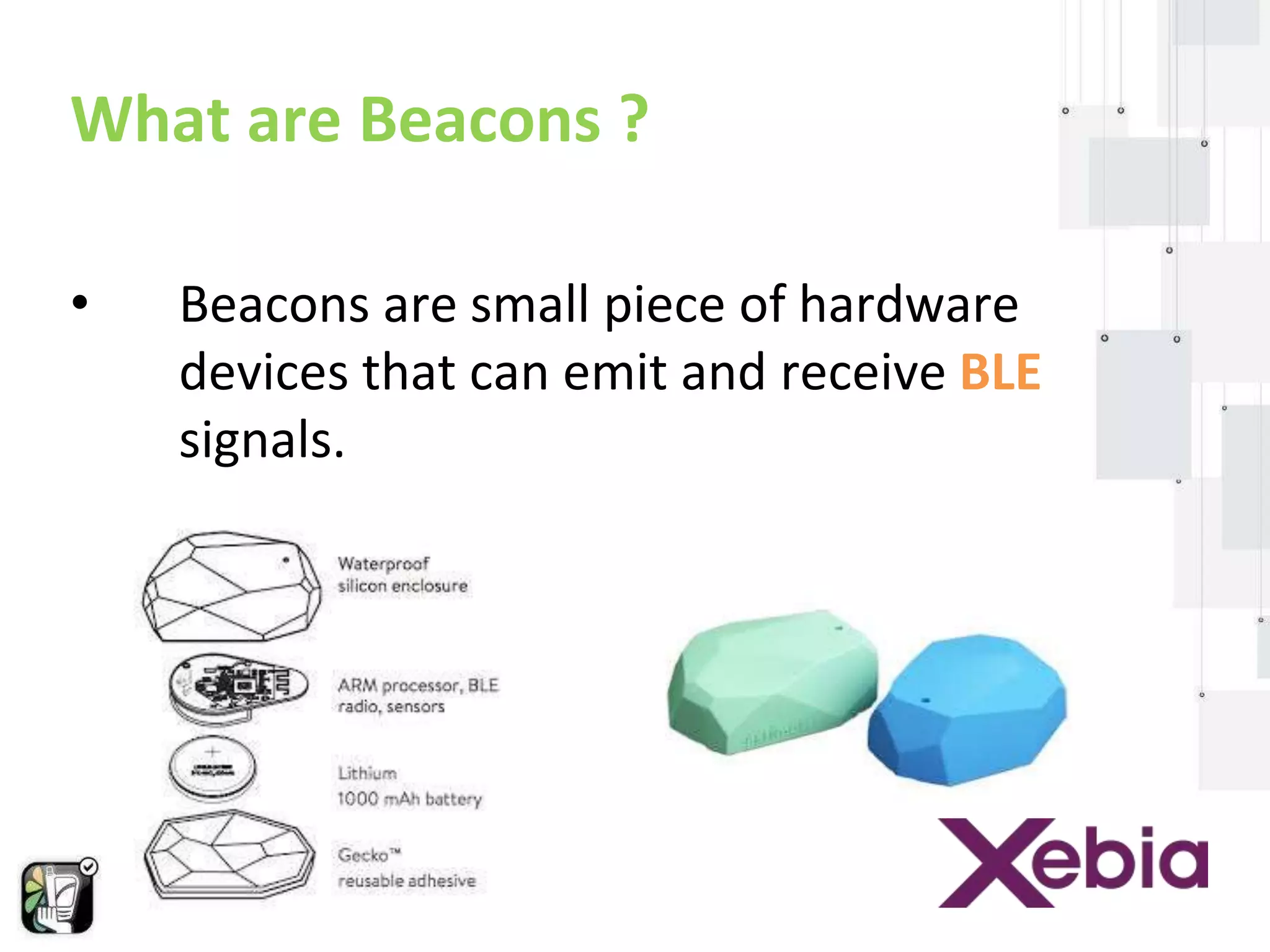
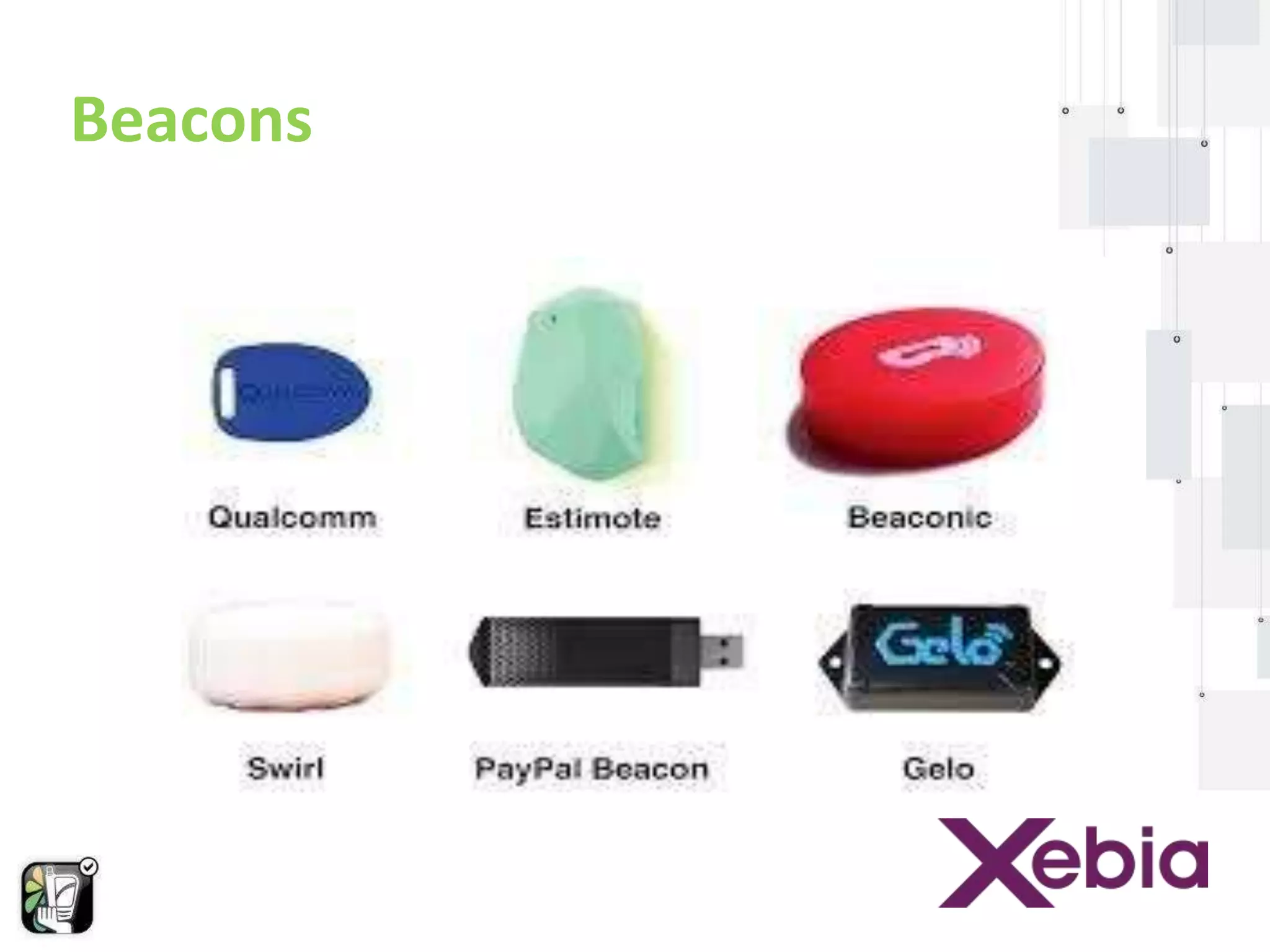
What are Beacons ? 
• Beacons are small piece of hardware 
devices that can emit and receive BLE 
signals.
Beacons
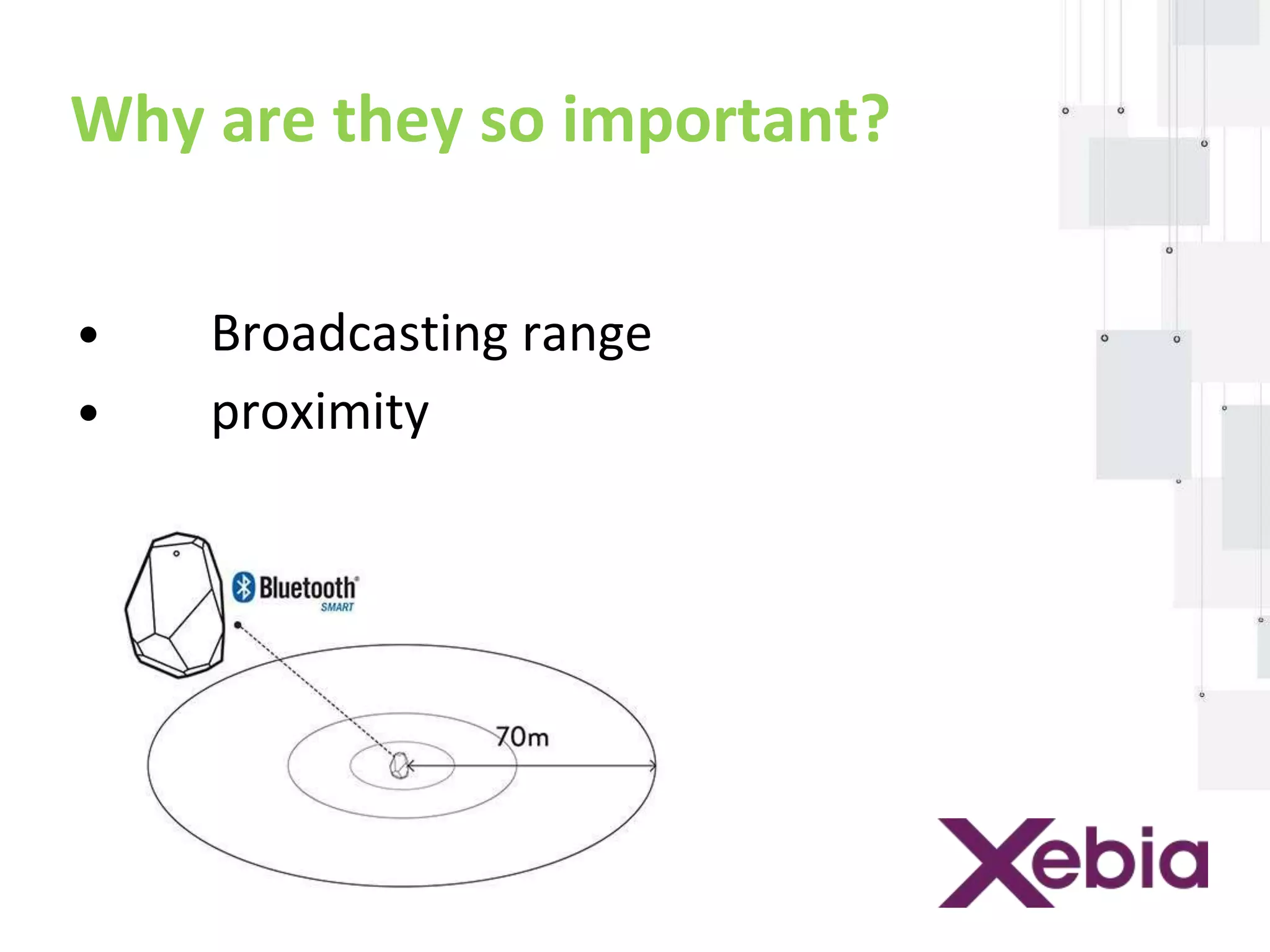
Why are they so important? 
• Broadcasting range 
• proximity
Communication b/w Android & 
Beacons
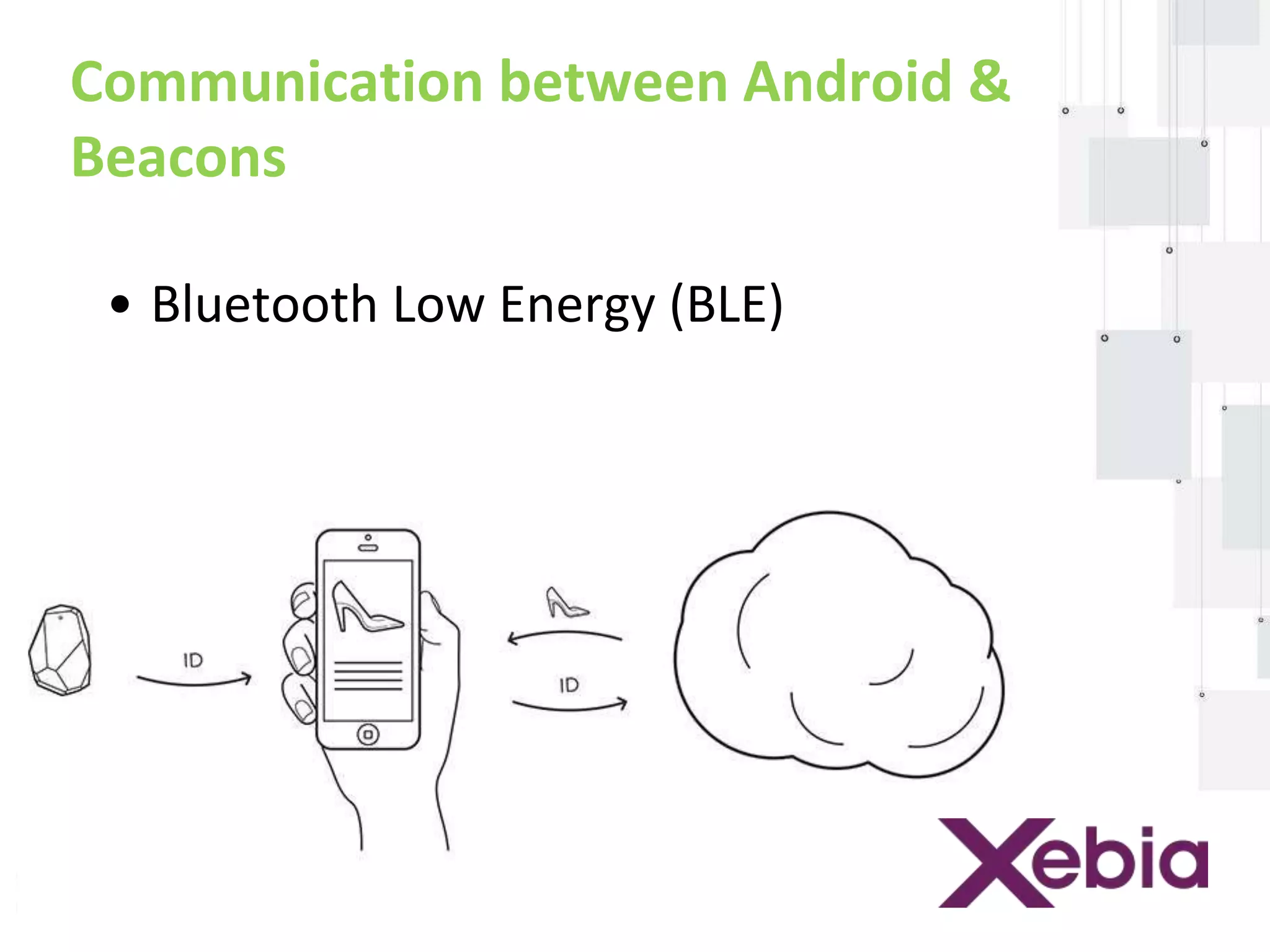
Communication between Android & 
Beacons 
• Bluetooth Low Energy (BLE)
Using BLE in Android 
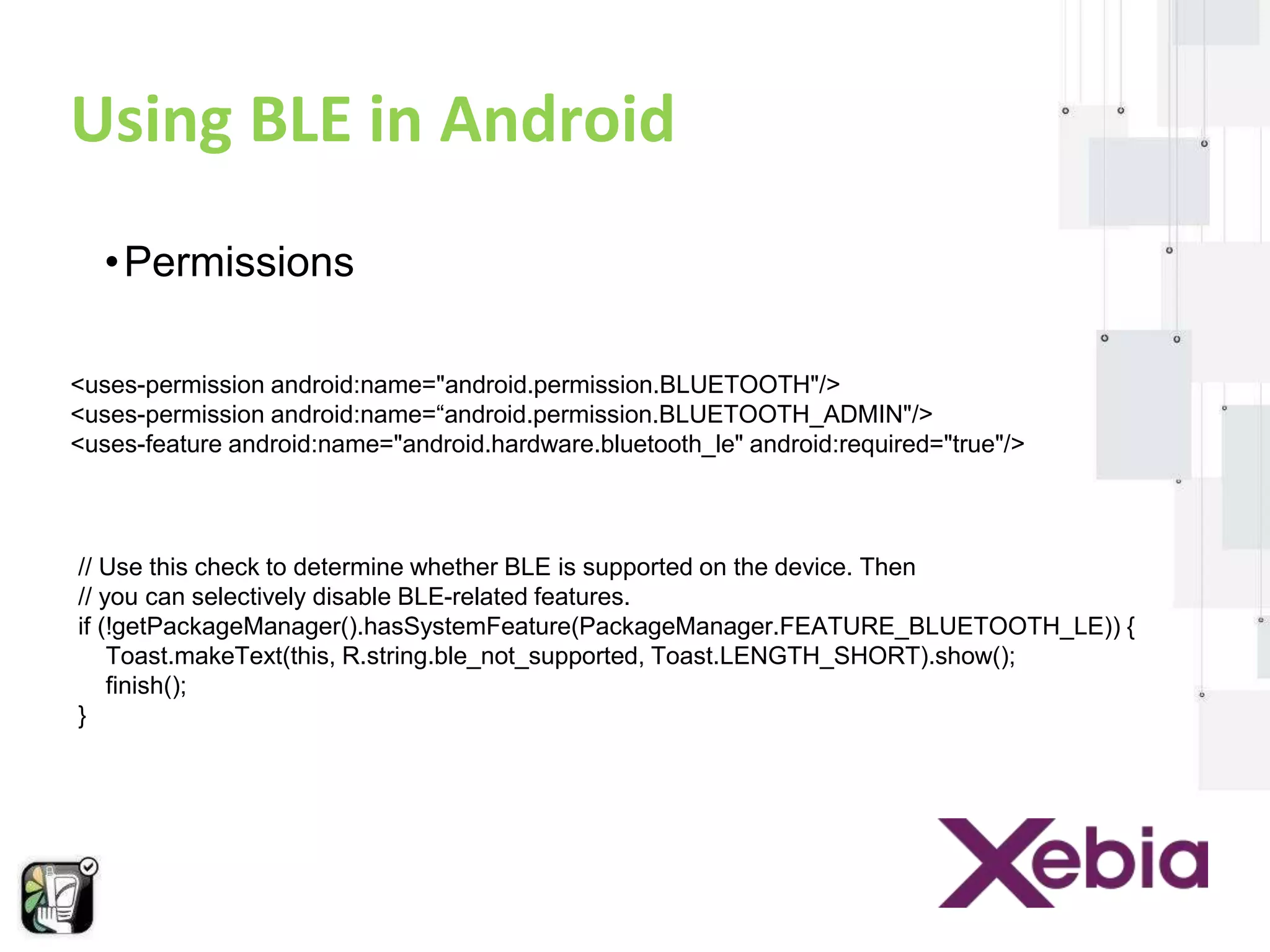
•Permissions 
<uses-permission android:name="android.permission.BLUETOOTH"/> 
<uses-permission android:name=“android.permission.BLUETOOTH_ADMIN"/> 
<uses-feature android:name="android.hardware.bluetooth_le" android:required="true"/> 
// Use this check to determine whether BLE is supported on the device. Then 
// you can selectively disable BLE-related features. 
if (!getPackageManager().hasSystemFeature(PackageManager.FEATURE_BLUETOOTH_LE)) { 
Toast.makeText(this, R.string.ble_not_supported, Toast.LENGTH_SHORT).show(); 
finish(); 
}
Using BLE in Android 
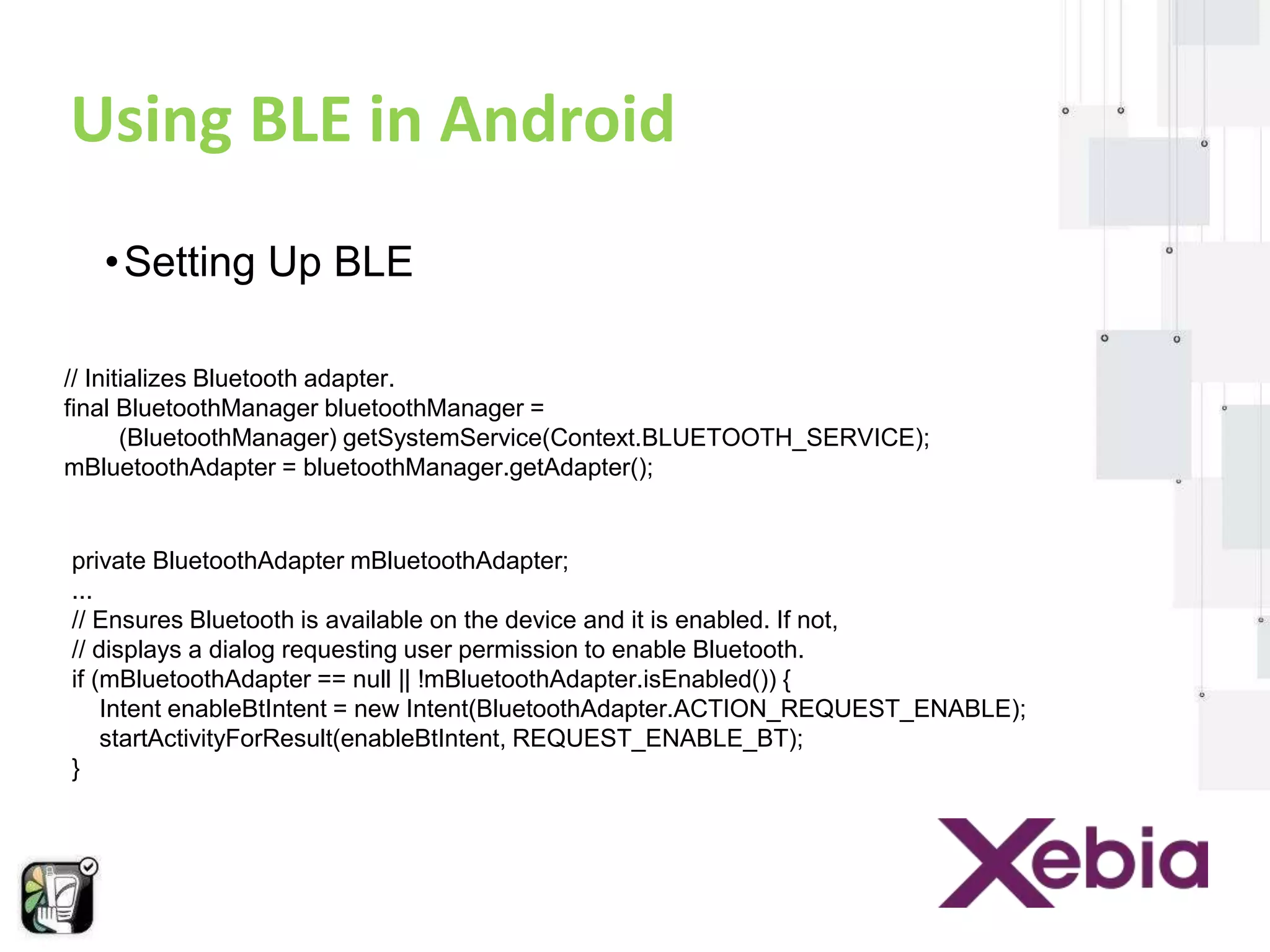
•Setting Up BLE 
// Initializes Bluetooth adapter. 
final BluetoothManager bluetoothManager = 
(BluetoothManager) getSystemService(Context.BLUETOOTH_SERVICE); 
mBluetoothAdapter = bluetoothManager.getAdapter(); 
private BluetoothAdapter mBluetoothAdapter; 
... 
// Ensures Bluetooth is available on the device and it is enabled. If not, 
// displays a dialog requesting user permission to enable Bluetooth. 
if (mBluetoothAdapter == null || !mBluetoothAdapter.isEnabled()) { 
Intent enableBtIntent = new Intent(BluetoothAdapter.ACTION_REQUEST_ENABLE); 
startActivityForResult(enableBtIntent, REQUEST_ENABLE_BT); 
}
Using BLE in Android 
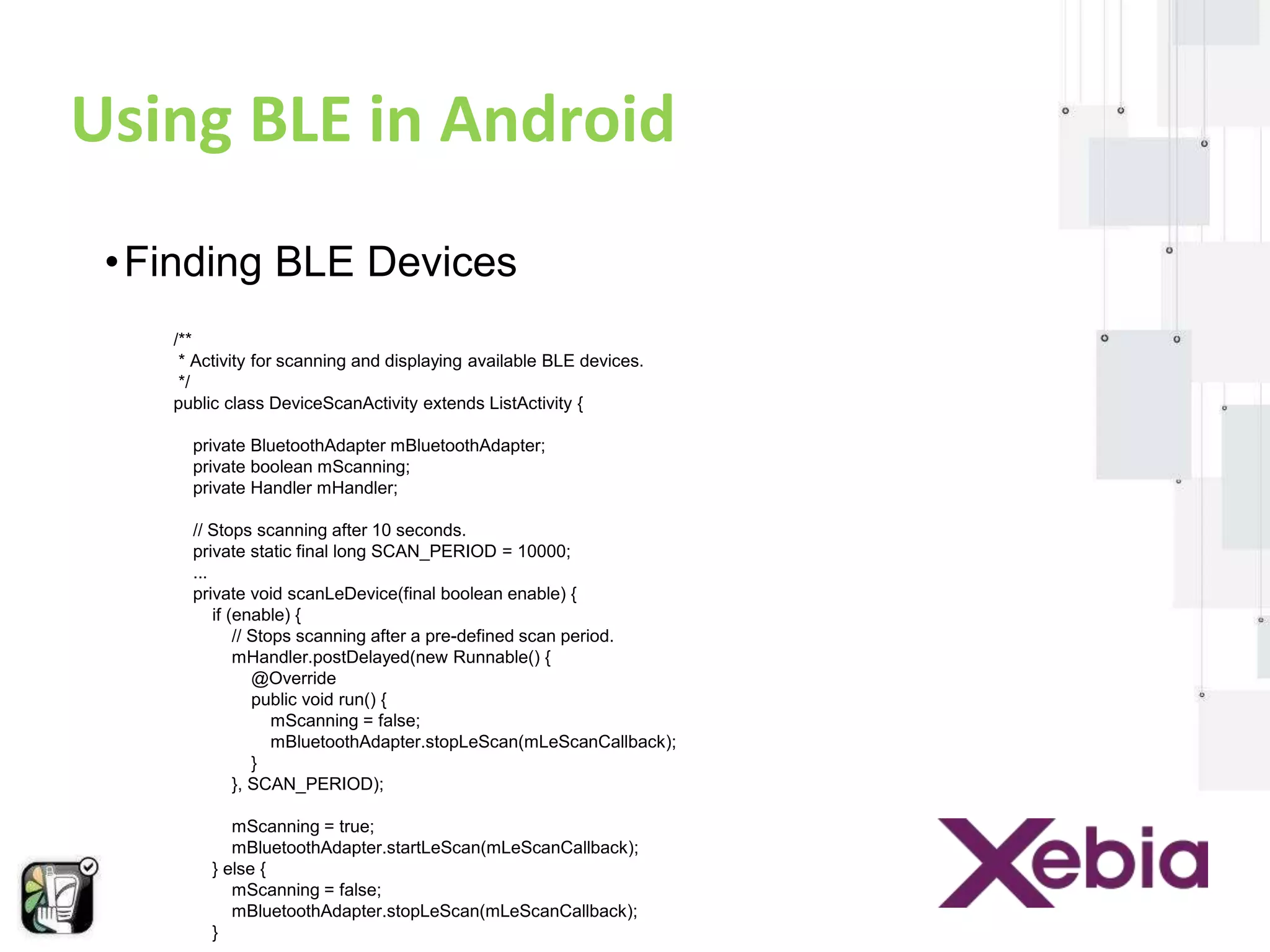
• Finding BLE Devices 
/** 
* Activity for scanning and displaying available BLE devices. 
*/ 
public class DeviceScanActivity extends ListActivity { 
private BluetoothAdapter mBluetoothAdapter; 
private boolean mScanning; 
private Handler mHandler; 
// Stops scanning after 10 seconds. 
private static final long SCAN_PERIOD = 10000; 
... 
private void scanLeDevice(final boolean enable) { 
if (enable) { 
// Stops scanning after a pre-defined scan period. 
mHandler.postDelayed(new Runnable() { 
@Override 
public void run() { 
mScanning = false; 
mBluetoothAdapter.stopLeScan(mLeScanCallback); 
} 
}, SCAN_PERIOD); 
mScanning = true; 
mBluetoothAdapter.startLeScan(mLeScanCallback); 
} else { 
mScanning = false; 
mBluetoothAdapter.stopLeScan(mLeScanCallback); 
} 
...
Using BLE in Android 
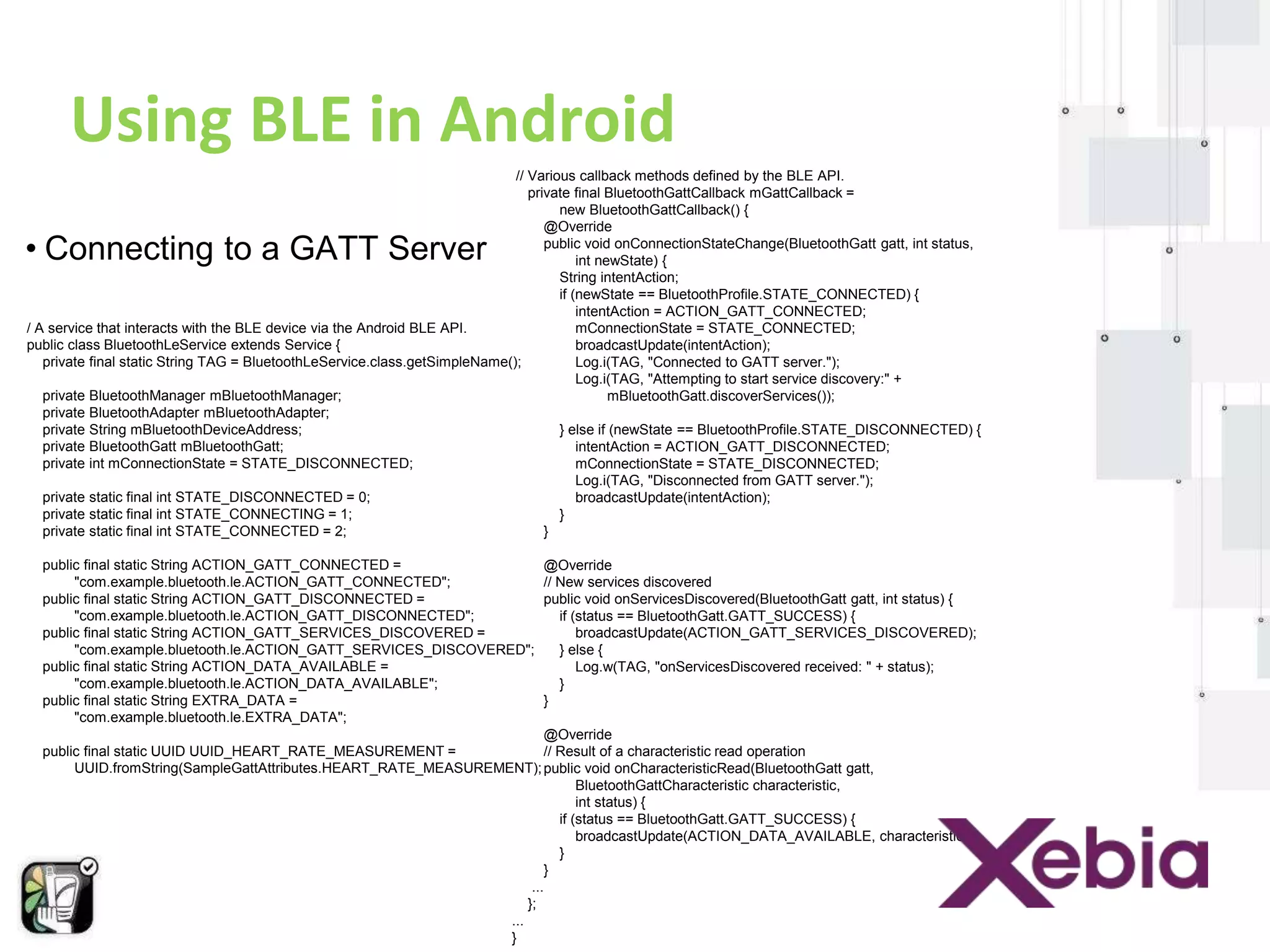
• Connecting to a GATT Server 
/ A service that interacts with the BLE device via the Android BLE API. 
public class BluetoothLeService extends Service { 
// Various callback methods defined by the BLE API. 
private final BluetoothGattCallback mGattCallback = 
private final static String TAG = BluetoothLeService.class.getSimpleName(); 
private BluetoothManager mBluetoothManager; 
private BluetoothAdapter mBluetoothAdapter; 
private String mBluetoothDeviceAddress; 
private BluetoothGatt mBluetoothGatt; 
private int mConnectionState = STATE_DISCONNECTED; 
private static final int STATE_DISCONNECTED = 0; 
private static final int STATE_CONNECTING = 1; 
private static final int STATE_CONNECTED = 2; 
public final static String ACTION_GATT_CONNECTED = 
"com.example.bluetooth.le.ACTION_GATT_CONNECTED"; 
public final static String ACTION_GATT_DISCONNECTED = 
"com.example.bluetooth.le.ACTION_GATT_DISCONNECTED"; 
public final static String ACTION_GATT_SERVICES_DISCOVERED = 
"com.example.bluetooth.le.ACTION_GATT_SERVICES_DISCOVERED"; 
public final static String ACTION_DATA_AVAILABLE = 
"com.example.bluetooth.le.ACTION_DATA_AVAILABLE"; 
public final static String EXTRA_DATA = 
"com.example.bluetooth.le.EXTRA_DATA"; 
public final static UUID UUID_HEART_RATE_MEASUREMENT = 
UUID.fromString(SampleGattAttributes.HEART_RATE_MEASUREMENT); 
new BluetoothGattCallback() { 
@Override 
public void onConnectionStateChange(BluetoothGatt gatt, int status, 
int newState) { 
String intentAction; 
if (newState == BluetoothProfile.STATE_CONNECTED) { 
intentAction = ACTION_GATT_CONNECTED; 
mConnectionState = STATE_CONNECTED; 
broadcastUpdate(intentAction); 
Log.i(TAG, "Connected to GATT server."); 
Log.i(TAG, "Attempting to start service discovery:" + 
mBluetoothGatt.discoverServices()); 
} else if (newState == BluetoothProfile.STATE_DISCONNECTED) { 
intentAction = ACTION_GATT_DISCONNECTED; 
mConnectionState = STATE_DISCONNECTED; 
Log.i(TAG, "Disconnected from GATT server."); 
broadcastUpdate(intentAction); 
} 
} 
@Override 
// New services discovered 
public void onServicesDiscovered(BluetoothGatt gatt, int status) { 
if (status == BluetoothGatt.GATT_SUCCESS) { 
broadcastUpdate(ACTION_GATT_SERVICES_DISCOVERED); 
} else { 
Log.w(TAG, "onServicesDiscovered received: " + status); 
} 
} 
@Override 
// Result of a characteristic read operation 
public void onCharacteristicRead(BluetoothGatt gatt, 
BluetoothGattCharacteristic characteristic, 
int status) { 
if (status == BluetoothGatt.GATT_SUCCESS) { 
broadcastUpdate(ACTION_DATA_AVAILABLE, characteristic); 
} 
} 
... 
}; 
... 
}
Using BLE in Android 
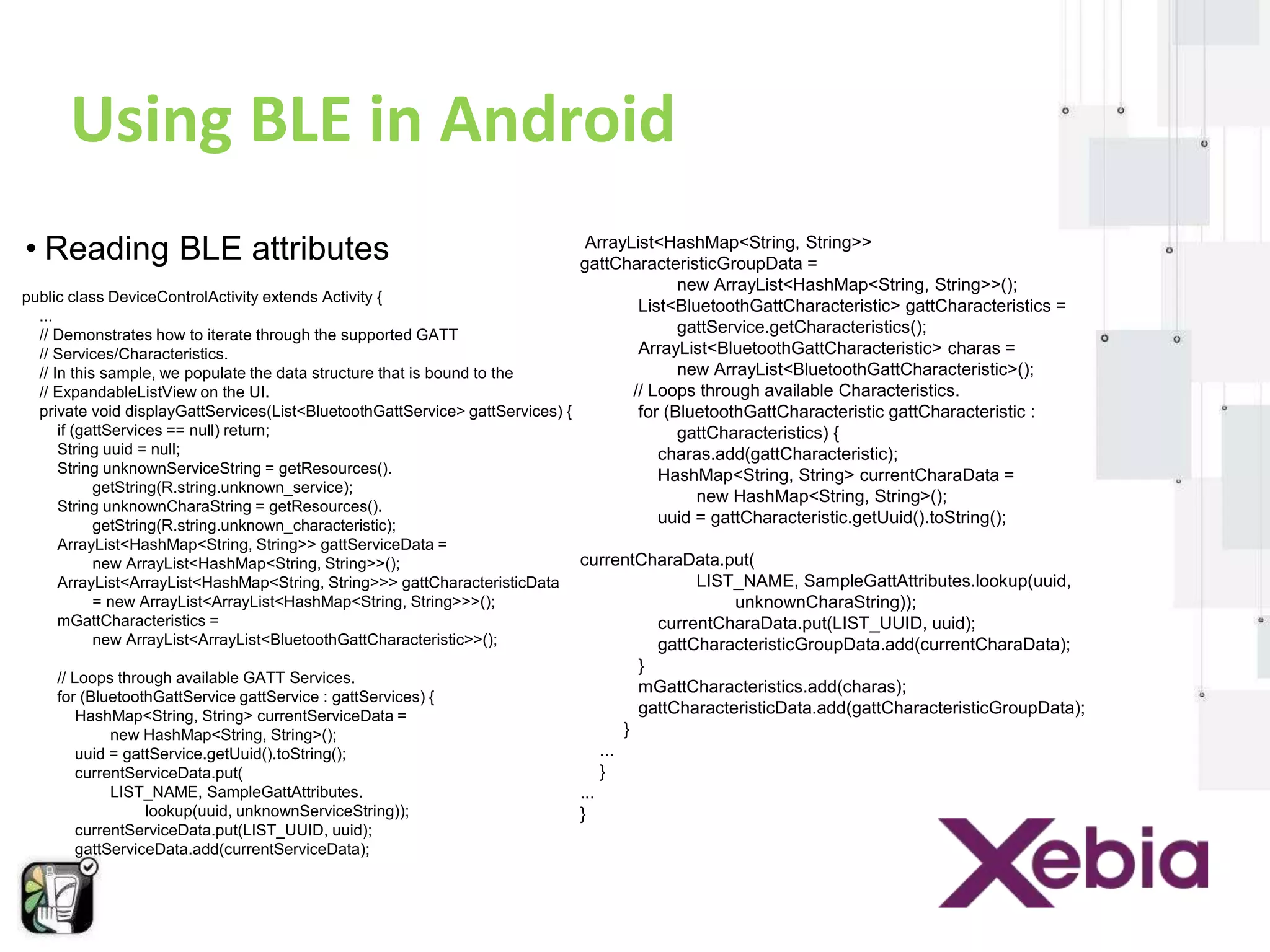
• Reading BLE attributes 
public class DeviceControlActivity extends Activity { 
... 
// Demonstrates how to iterate through the supported GATT 
// Services/Characteristics. 
// In this sample, we populate the data structure that is bound to the 
// ExpandableListView on the UI. 
private void displayGattServices(List<BluetoothGattService> gattServices) { 
if (gattServices == null) return; 
String uuid = null; 
String unknownServiceString = getResources(). 
getString(R.string.unknown_service); 
String unknownCharaString = getResources(). 
getString(R.string.unknown_characteristic); 
ArrayList<HashMap<String, String>> gattServiceData = 
new ArrayList<HashMap<String, String>>(); 
ArrayList<ArrayList<HashMap<String, String>>> gattCharacteristicData 
= new ArrayList<ArrayList<HashMap<String, String>>>(); 
mGattCharacteristics = 
new ArrayList<ArrayList<BluetoothGattCharacteristic>>(); 
// Loops through available GATT Services. 
for (BluetoothGattService gattService : gattServices) { 
HashMap<String, String> currentServiceData = 
new HashMap<String, String>(); 
uuid = gattService.getUuid().toString(); 
currentServiceData.put( 
LIST_NAME, SampleGattAttributes. 
lookup(uuid, unknownServiceString)); 
currentServiceData.put(LIST_UUID, uuid); 
gattServiceData.add(currentServiceData); 
ArrayList<HashMap<String, String>> 
gattCharacteristicGroupData = 
new ArrayList<HashMap<String, String>>(); 
List<BluetoothGattCharacteristic> gattCharacteristics = 
gattService.getCharacteristics(); 
ArrayList<BluetoothGattCharacteristic> charas = 
new ArrayList<BluetoothGattCharacteristic>(); 
// Loops through available Characteristics. 
for (BluetoothGattCharacteristic gattCharacteristic : 
gattCharacteristics) { 
charas.add(gattCharacteristic); 
HashMap<String, String> currentCharaData = 
new HashMap<String, String>(); 
uuid = gattCharacteristic.getUuid().toString(); 
currentCharaData.put( 
LIST_NAME, SampleGattAttributes.lookup(uuid, 
unknownCharaString)); 
currentCharaData.put(LIST_UUID, uuid); 
gattCharacteristicGroupData.add(currentCharaData); 
} 
mGattCharacteristics.add(charas); 
gattCharacteristicData.add(gattCharacteristicGroupData); 
} 
... 
} 
... 
}
Beacons/BLE : How They Work ? 
• BLE enabled devices or Beacons can 
transmits small packets of data. 
• This wakes up a “listener/receiver” to let it 
know that it’s there. 
• Which then lets you calculate the proximity 
to the Beacon and show relevant 
information to visitors.
Android Libraries
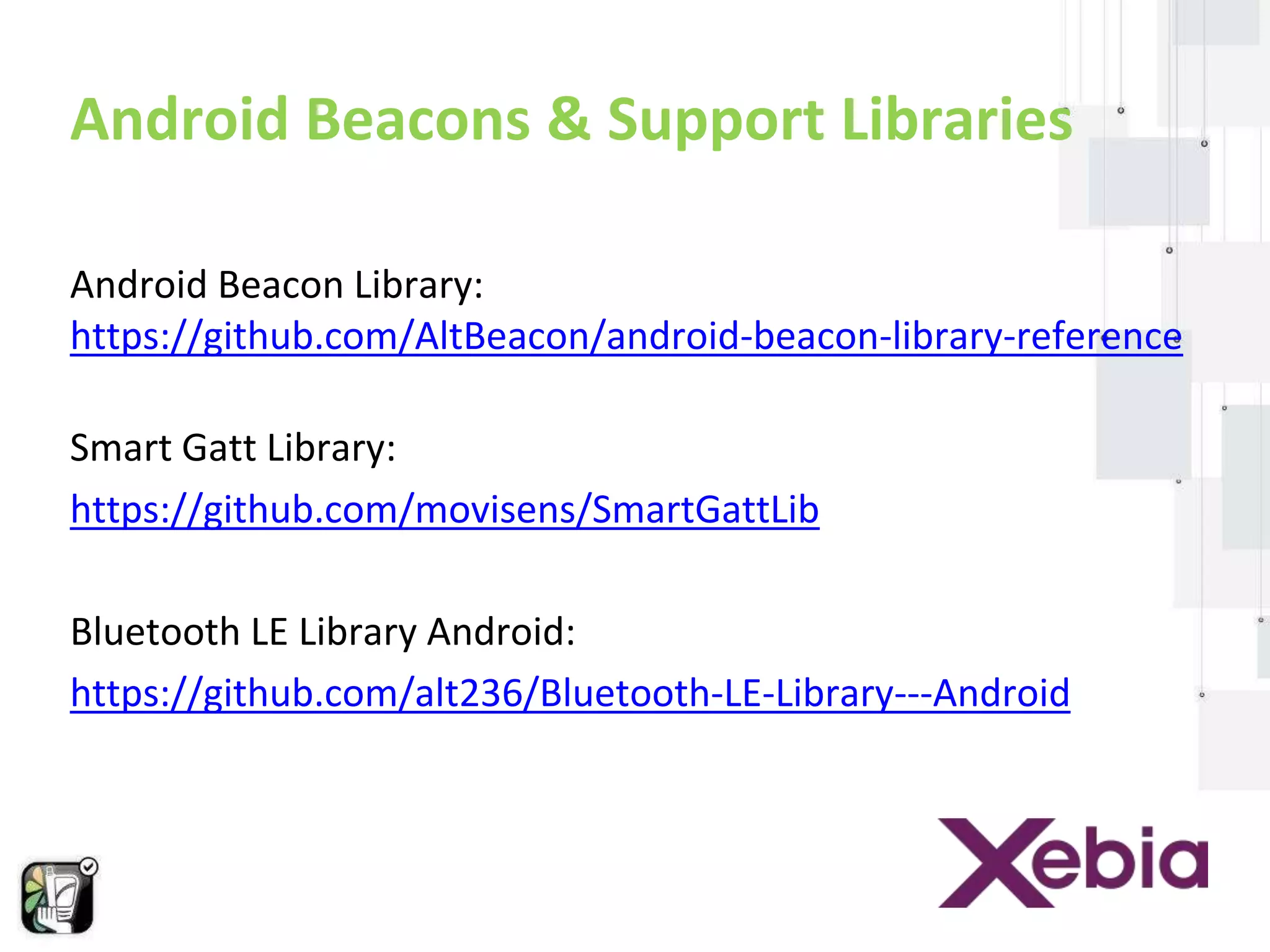
Android Beacons & Support Libraries 
Android Beacon Library: 
https://github.com/AltBeacon/android-beacon-library-reference 
Smart Gatt Library: 
https://github.com/movisens/SmartGattLib 
Bluetooth LE Library Android: 
https://github.com/alt236/Bluetooth-LE-Library---Android
Android code- How to make an 
app with beacons
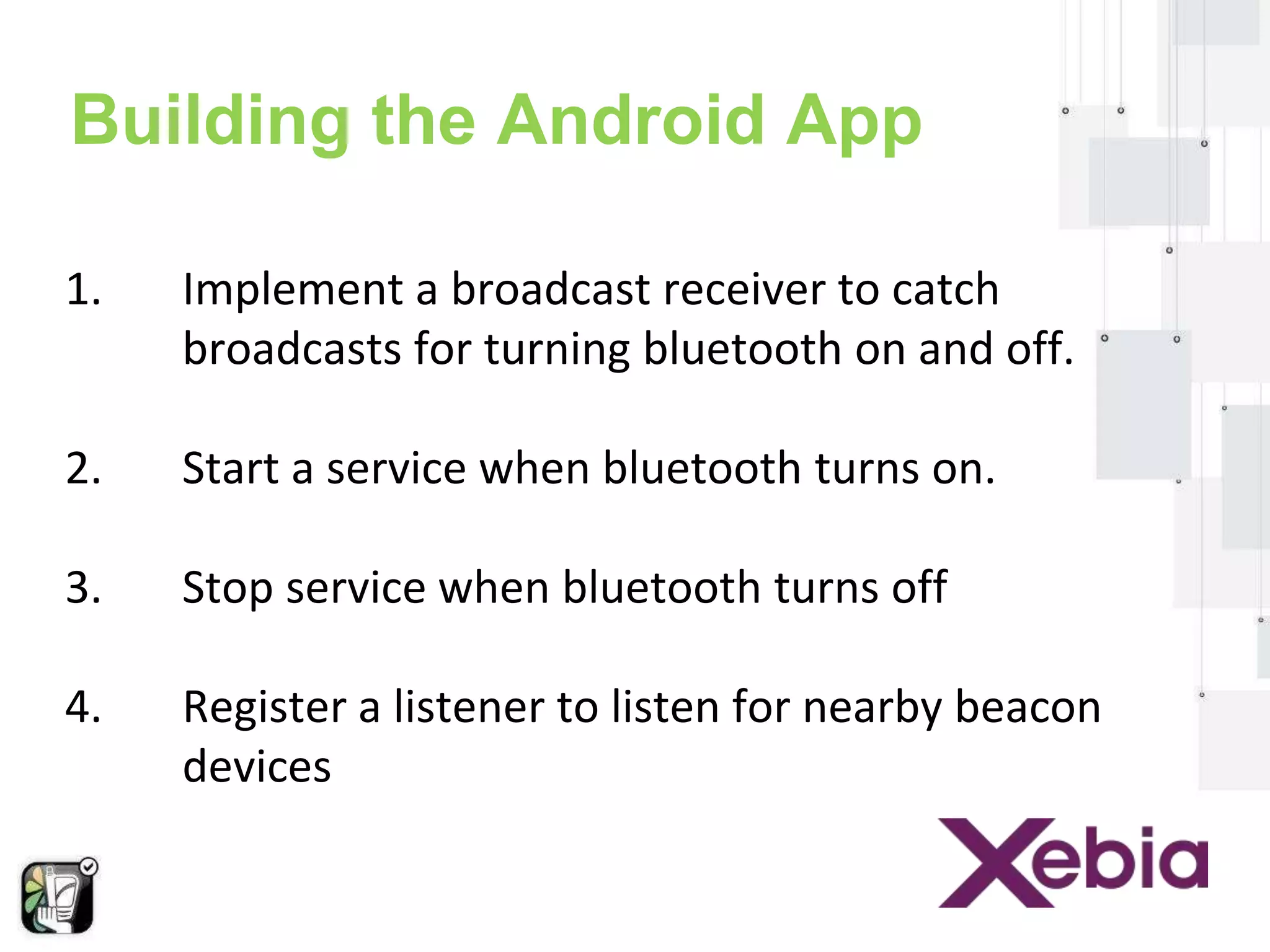
Building the Android App 
1. Implement a broadcast receiver to catch 
broadcasts for turning bluetooth on and off. 
2. Start a service when bluetooth turns on. 
3. Stop service when bluetooth turns off 
4. Register a listener to listen for nearby beacon 
devices
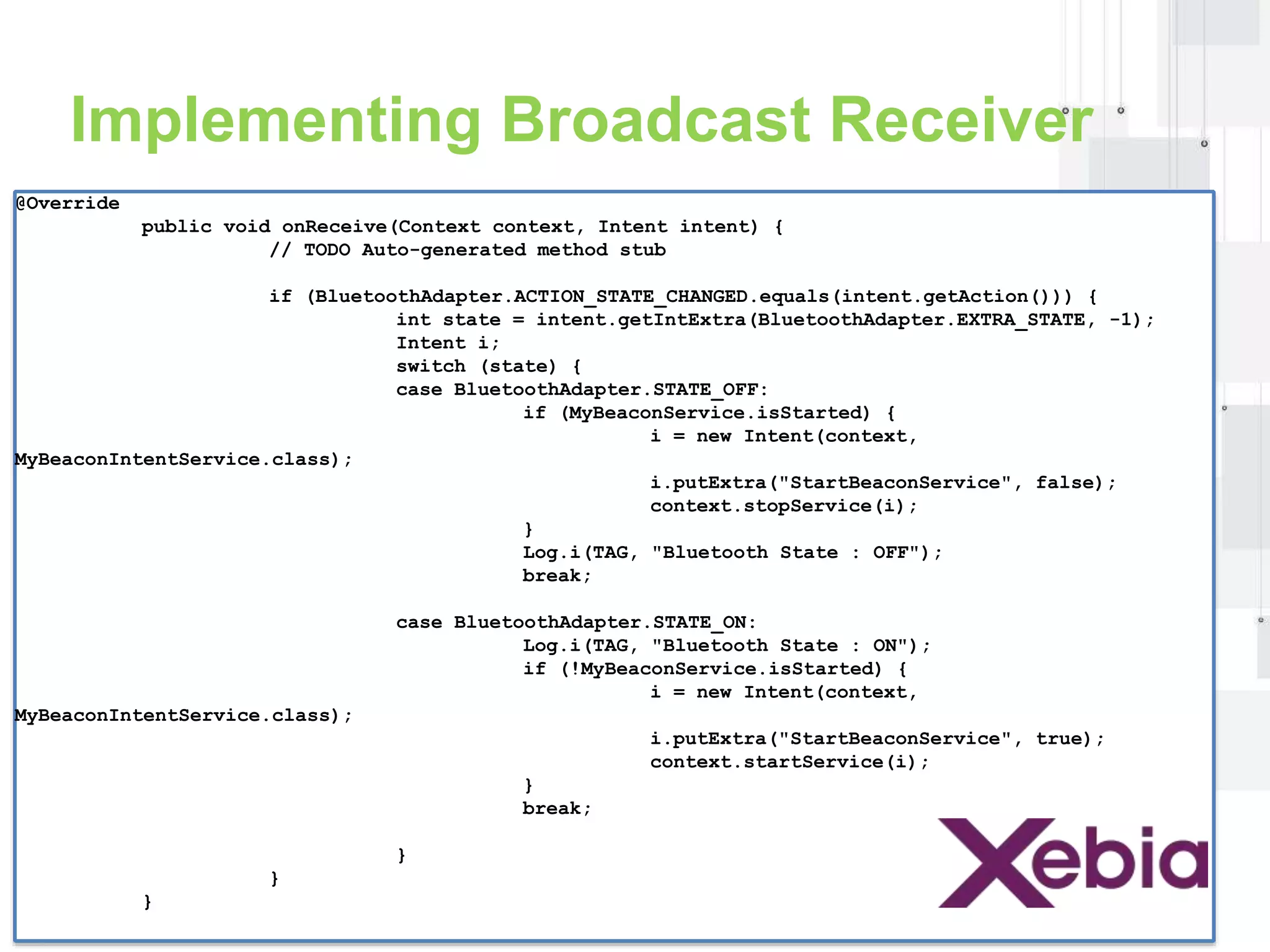
Implementing Broadcast Receiver 
@Override 
public void onReceive(Context context, Intent intent) { 
// TODO Auto-generated method stub 
if (BluetoothAdapter.ACTION_STATE_CHANGED.equals(intent.getAction())) { 
int state = intent.getIntExtra(BluetoothAdapter.EXTRA_STATE, -1); 
Intent i; 
switch (state) { 
case BluetoothAdapter.STATE_OFF: 
if (MyBeaconService.isStarted) { 
i = new Intent(context, 
MyBeaconIntentService.class); 
i.putExtra("StartBeaconService", false); 
context.stopService(i); 
} 
Log.i(TAG, "Bluetooth State : OFF"); 
break; 
case BluetoothAdapter.STATE_ON: 
Log.i(TAG, "Bluetooth State : ON"); 
if (!MyBeaconService.isStarted) { 
i = new Intent(context, 
MyBeaconIntentService.class); 
i.putExtra("StartBeaconService", true); 
context.startService(i); 
} 
break; 
} 
} 
}
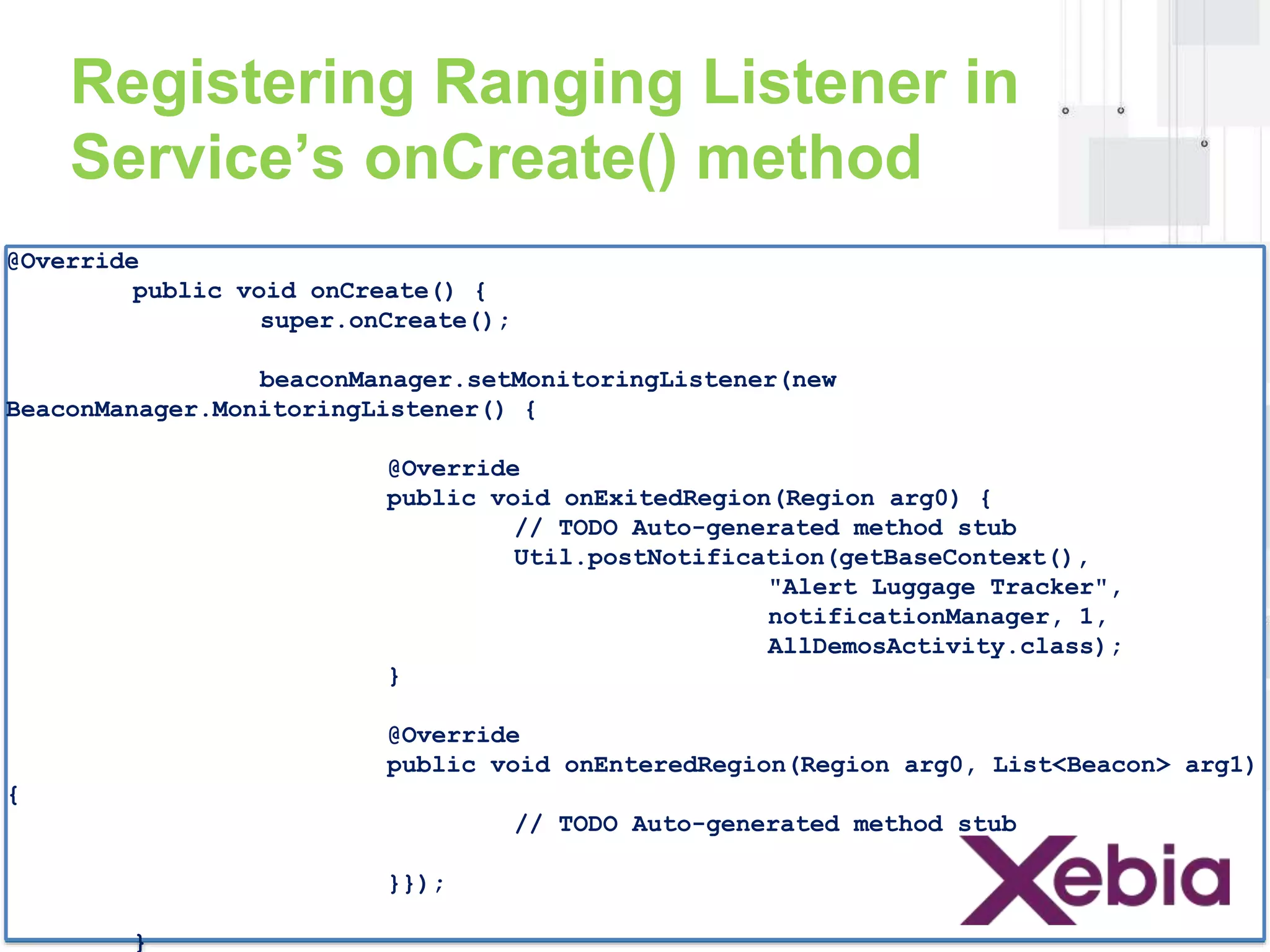
Registering Ranging Listener in 
Service’s onCreate() method 
@Override 
public void onCreate() { 
super.onCreate(); 
beaconManager.setMonitoringListener(new 
BeaconManager.MonitoringListener() { 
@Override 
public void onExitedRegion(Region arg0) { 
// TODO Auto-generated method stub 
Util.postNotification(getBaseContext(), 
"Alert Luggage Tracker", 
notificationManager, 1, 
AllDemosActivity.class); 
} 
@Override 
public void onEnteredRegion(Region arg0, List<Beacon> arg1) 
{ 
// TODO Auto-generated method stub 
}}); 
}
Connecting to BeaconManager’s Service 
in Service’s onStartCommand() 
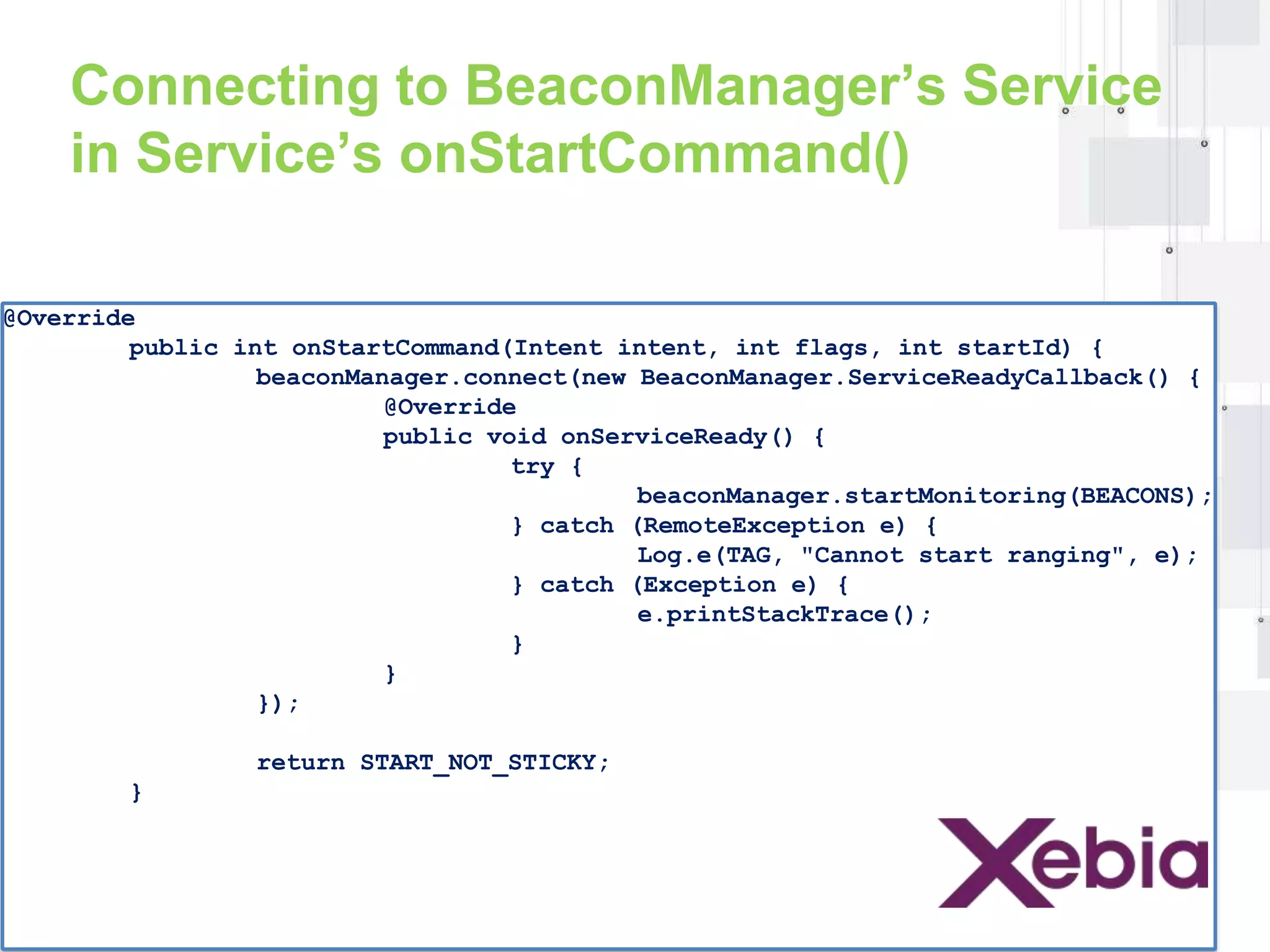
@Override 
public int onStartCommand(Intent intent, int flags, int startId) { 
beaconManager.connect(new BeaconManager.ServiceReadyCallback() { 
@Override 
public void onServiceReady() { 
try { 
beaconManager.startMonitoring(BEACONS); 
} catch (RemoteException e) { 
Log.e(TAG, "Cannot start ranging", e); 
} catch (Exception e) { 
e.printStackTrace(); 
} 
} 
}); 
return START_NOT_STICKY; 
}
Case Study
Xebia Employee Tracker 
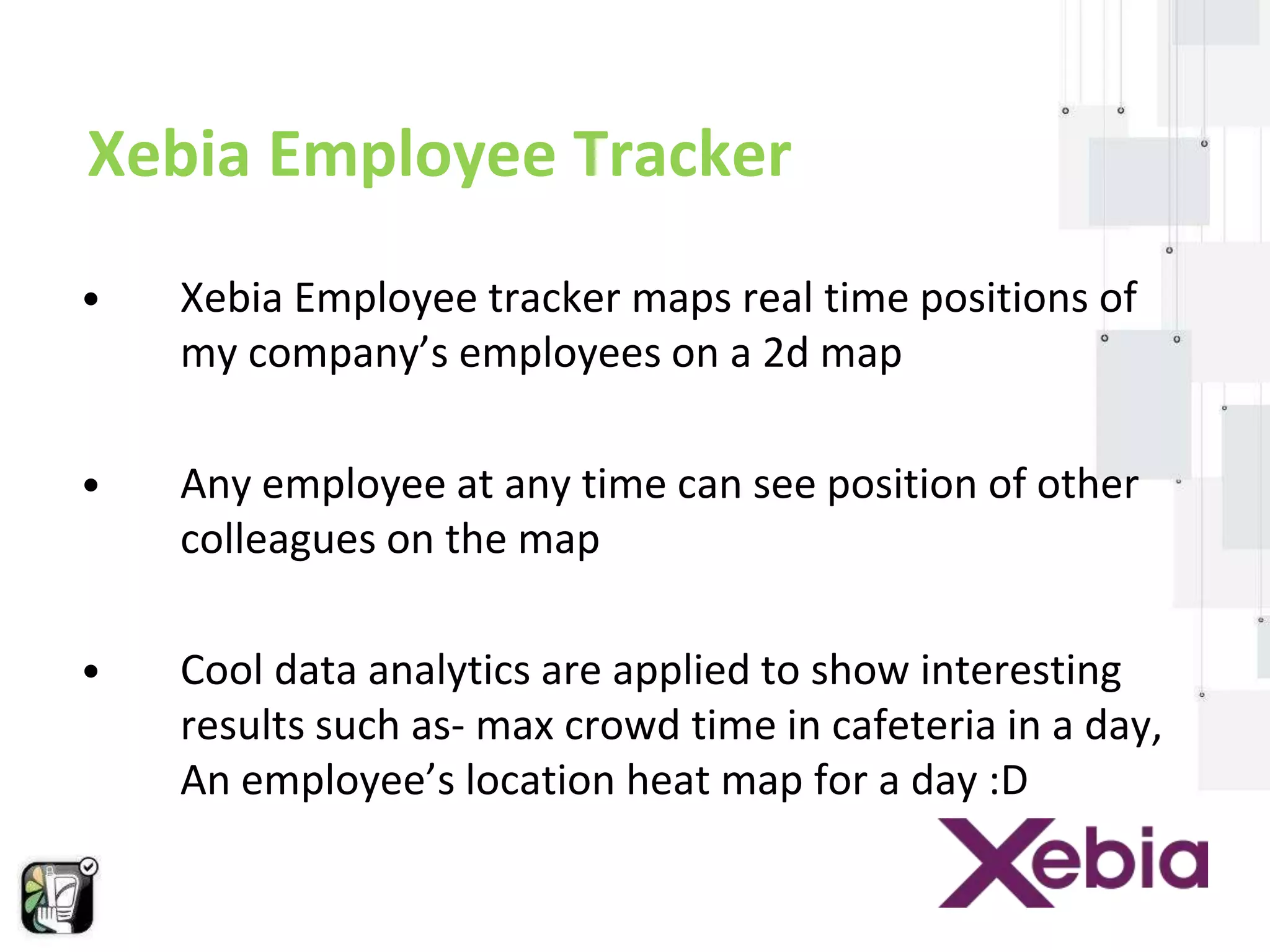
• Xebia Employee tracker maps real time positions of 
my company’s employees on a 2d map 
• Any employee at any time can see position of other 
colleagues on the map 
• Cool data analytics are applied to show interesting 
results such as- max crowd time in cafeteria in a day, 
An employee’s location heat map for a day :D
Xebia Employee Tracker 
{{ Show Case Xebia Employee Tracker }} 
{{ Show Source Code }}
Technical Pitfalls
Technical pitfalls of Android + Beacons ? 
• Bluetooth must be turned on. 
• Your app must be installed on users devices. 
• You can't trigger mobile beacon or iBeacon to trigger 
installation of an app. 
• Location services must be enabled for the specific 
application. 
• To download real data we must have an app 
connected via internet connection.
Thank You!

Android & Beacons

  • 1.
    Hack your Businesswith android and beacons Tushar Choudhary Mobile consultant, Xebia
  • 2.
    Agenda Beacons- What,Why & How? Communication between Android & Beacons Android Libraries Android code- How to make an app with beacons Case Study- Employee Tracker Technical Pitfalls
  • 3.
    Beacons : Whatare they? How they work? Why are they important ?
  • 4.
    What are Beacons? • Beacons are small piece of hardware devices that can emit and receive BLE signals.
  • 5.
  • 6.
    Why are theyso important? • Broadcasting range • proximity
  • 7.
  • 8.
    Communication between Android& Beacons • Bluetooth Low Energy (BLE)
  • 9.
    Using BLE inAndroid •Permissions <uses-permission android:name="android.permission.BLUETOOTH"/> <uses-permission android:name=“android.permission.BLUETOOTH_ADMIN"/> <uses-feature android:name="android.hardware.bluetooth_le" android:required="true"/> // Use this check to determine whether BLE is supported on the device. Then // you can selectively disable BLE-related features. if (!getPackageManager().hasSystemFeature(PackageManager.FEATURE_BLUETOOTH_LE)) { Toast.makeText(this, R.string.ble_not_supported, Toast.LENGTH_SHORT).show(); finish(); }
  • 10.
    Using BLE inAndroid •Setting Up BLE // Initializes Bluetooth adapter. final BluetoothManager bluetoothManager = (BluetoothManager) getSystemService(Context.BLUETOOTH_SERVICE); mBluetoothAdapter = bluetoothManager.getAdapter(); private BluetoothAdapter mBluetoothAdapter; ... // Ensures Bluetooth is available on the device and it is enabled. If not, // displays a dialog requesting user permission to enable Bluetooth. if (mBluetoothAdapter == null || !mBluetoothAdapter.isEnabled()) { Intent enableBtIntent = new Intent(BluetoothAdapter.ACTION_REQUEST_ENABLE); startActivityForResult(enableBtIntent, REQUEST_ENABLE_BT); }
  • 11.
    Using BLE inAndroid • Finding BLE Devices /** * Activity for scanning and displaying available BLE devices. */ public class DeviceScanActivity extends ListActivity { private BluetoothAdapter mBluetoothAdapter; private boolean mScanning; private Handler mHandler; // Stops scanning after 10 seconds. private static final long SCAN_PERIOD = 10000; ... private void scanLeDevice(final boolean enable) { if (enable) { // Stops scanning after a pre-defined scan period. mHandler.postDelayed(new Runnable() { @Override public void run() { mScanning = false; mBluetoothAdapter.stopLeScan(mLeScanCallback); } }, SCAN_PERIOD); mScanning = true; mBluetoothAdapter.startLeScan(mLeScanCallback); } else { mScanning = false; mBluetoothAdapter.stopLeScan(mLeScanCallback); } ...
  • 12.
    Using BLE inAndroid • Connecting to a GATT Server / A service that interacts with the BLE device via the Android BLE API. public class BluetoothLeService extends Service { // Various callback methods defined by the BLE API. private final BluetoothGattCallback mGattCallback = private final static String TAG = BluetoothLeService.class.getSimpleName(); private BluetoothManager mBluetoothManager; private BluetoothAdapter mBluetoothAdapter; private String mBluetoothDeviceAddress; private BluetoothGatt mBluetoothGatt; private int mConnectionState = STATE_DISCONNECTED; private static final int STATE_DISCONNECTED = 0; private static final int STATE_CONNECTING = 1; private static final int STATE_CONNECTED = 2; public final static String ACTION_GATT_CONNECTED = "com.example.bluetooth.le.ACTION_GATT_CONNECTED"; public final static String ACTION_GATT_DISCONNECTED = "com.example.bluetooth.le.ACTION_GATT_DISCONNECTED"; public final static String ACTION_GATT_SERVICES_DISCOVERED = "com.example.bluetooth.le.ACTION_GATT_SERVICES_DISCOVERED"; public final static String ACTION_DATA_AVAILABLE = "com.example.bluetooth.le.ACTION_DATA_AVAILABLE"; public final static String EXTRA_DATA = "com.example.bluetooth.le.EXTRA_DATA"; public final static UUID UUID_HEART_RATE_MEASUREMENT = UUID.fromString(SampleGattAttributes.HEART_RATE_MEASUREMENT); new BluetoothGattCallback() { @Override public void onConnectionStateChange(BluetoothGatt gatt, int status, int newState) { String intentAction; if (newState == BluetoothProfile.STATE_CONNECTED) { intentAction = ACTION_GATT_CONNECTED; mConnectionState = STATE_CONNECTED; broadcastUpdate(intentAction); Log.i(TAG, "Connected to GATT server."); Log.i(TAG, "Attempting to start service discovery:" + mBluetoothGatt.discoverServices()); } else if (newState == BluetoothProfile.STATE_DISCONNECTED) { intentAction = ACTION_GATT_DISCONNECTED; mConnectionState = STATE_DISCONNECTED; Log.i(TAG, "Disconnected from GATT server."); broadcastUpdate(intentAction); } } @Override // New services discovered public void onServicesDiscovered(BluetoothGatt gatt, int status) { if (status == BluetoothGatt.GATT_SUCCESS) { broadcastUpdate(ACTION_GATT_SERVICES_DISCOVERED); } else { Log.w(TAG, "onServicesDiscovered received: " + status); } } @Override // Result of a characteristic read operation public void onCharacteristicRead(BluetoothGatt gatt, BluetoothGattCharacteristic characteristic, int status) { if (status == BluetoothGatt.GATT_SUCCESS) { broadcastUpdate(ACTION_DATA_AVAILABLE, characteristic); } } ... }; ... }
  • 13.
    Using BLE inAndroid • Reading BLE attributes public class DeviceControlActivity extends Activity { ... // Demonstrates how to iterate through the supported GATT // Services/Characteristics. // In this sample, we populate the data structure that is bound to the // ExpandableListView on the UI. private void displayGattServices(List<BluetoothGattService> gattServices) { if (gattServices == null) return; String uuid = null; String unknownServiceString = getResources(). getString(R.string.unknown_service); String unknownCharaString = getResources(). getString(R.string.unknown_characteristic); ArrayList<HashMap<String, String>> gattServiceData = new ArrayList<HashMap<String, String>>(); ArrayList<ArrayList<HashMap<String, String>>> gattCharacteristicData = new ArrayList<ArrayList<HashMap<String, String>>>(); mGattCharacteristics = new ArrayList<ArrayList<BluetoothGattCharacteristic>>(); // Loops through available GATT Services. for (BluetoothGattService gattService : gattServices) { HashMap<String, String> currentServiceData = new HashMap<String, String>(); uuid = gattService.getUuid().toString(); currentServiceData.put( LIST_NAME, SampleGattAttributes. lookup(uuid, unknownServiceString)); currentServiceData.put(LIST_UUID, uuid); gattServiceData.add(currentServiceData); ArrayList<HashMap<String, String>> gattCharacteristicGroupData = new ArrayList<HashMap<String, String>>(); List<BluetoothGattCharacteristic> gattCharacteristics = gattService.getCharacteristics(); ArrayList<BluetoothGattCharacteristic> charas = new ArrayList<BluetoothGattCharacteristic>(); // Loops through available Characteristics. for (BluetoothGattCharacteristic gattCharacteristic : gattCharacteristics) { charas.add(gattCharacteristic); HashMap<String, String> currentCharaData = new HashMap<String, String>(); uuid = gattCharacteristic.getUuid().toString(); currentCharaData.put( LIST_NAME, SampleGattAttributes.lookup(uuid, unknownCharaString)); currentCharaData.put(LIST_UUID, uuid); gattCharacteristicGroupData.add(currentCharaData); } mGattCharacteristics.add(charas); gattCharacteristicData.add(gattCharacteristicGroupData); } ... } ... }
  • 14.
    Beacons/BLE : HowThey Work ? • BLE enabled devices or Beacons can transmits small packets of data. • This wakes up a “listener/receiver” to let it know that it’s there. • Which then lets you calculate the proximity to the Beacon and show relevant information to visitors.
  • 15.
  • 16.
    Android Beacons &Support Libraries Android Beacon Library: https://github.com/AltBeacon/android-beacon-library-reference Smart Gatt Library: https://github.com/movisens/SmartGattLib Bluetooth LE Library Android: https://github.com/alt236/Bluetooth-LE-Library---Android
  • 17.
    Android code- Howto make an app with beacons
  • 18.
    Building the AndroidApp 1. Implement a broadcast receiver to catch broadcasts for turning bluetooth on and off. 2. Start a service when bluetooth turns on. 3. Stop service when bluetooth turns off 4. Register a listener to listen for nearby beacon devices
  • 19.
    Implementing Broadcast Receiver @Override public void onReceive(Context context, Intent intent) { // TODO Auto-generated method stub if (BluetoothAdapter.ACTION_STATE_CHANGED.equals(intent.getAction())) { int state = intent.getIntExtra(BluetoothAdapter.EXTRA_STATE, -1); Intent i; switch (state) { case BluetoothAdapter.STATE_OFF: if (MyBeaconService.isStarted) { i = new Intent(context, MyBeaconIntentService.class); i.putExtra("StartBeaconService", false); context.stopService(i); } Log.i(TAG, "Bluetooth State : OFF"); break; case BluetoothAdapter.STATE_ON: Log.i(TAG, "Bluetooth State : ON"); if (!MyBeaconService.isStarted) { i = new Intent(context, MyBeaconIntentService.class); i.putExtra("StartBeaconService", true); context.startService(i); } break; } } }
  • 20.
    Registering Ranging Listenerin Service’s onCreate() method @Override public void onCreate() { super.onCreate(); beaconManager.setMonitoringListener(new BeaconManager.MonitoringListener() { @Override public void onExitedRegion(Region arg0) { // TODO Auto-generated method stub Util.postNotification(getBaseContext(), "Alert Luggage Tracker", notificationManager, 1, AllDemosActivity.class); } @Override public void onEnteredRegion(Region arg0, List<Beacon> arg1) { // TODO Auto-generated method stub }}); }
  • 21.
    Connecting to BeaconManager’sService in Service’s onStartCommand() @Override public int onStartCommand(Intent intent, int flags, int startId) { beaconManager.connect(new BeaconManager.ServiceReadyCallback() { @Override public void onServiceReady() { try { beaconManager.startMonitoring(BEACONS); } catch (RemoteException e) { Log.e(TAG, "Cannot start ranging", e); } catch (Exception e) { e.printStackTrace(); } } }); return START_NOT_STICKY; }
  • 22.
  • 23.
    Xebia Employee Tracker • Xebia Employee tracker maps real time positions of my company’s employees on a 2d map • Any employee at any time can see position of other colleagues on the map • Cool data analytics are applied to show interesting results such as- max crowd time in cafeteria in a day, An employee’s location heat map for a day :D
  • 24.
    Xebia Employee Tracker {{ Show Case Xebia Employee Tracker }} {{ Show Source Code }}
  • 25.
  • 26.
    Technical pitfalls ofAndroid + Beacons ? • Bluetooth must be turned on. • Your app must be installed on users devices. • You can't trigger mobile beacon or iBeacon to trigger installation of an app. • Location services must be enabled for the specific application. • To download real data we must have an app connected via internet connection.
  • 27.