Ratpack
The story so far
Phill Barber - Team Thor - Team Cirrus - Energized Work
Agenda
● What is Ratpack?
● Why did we decide to use it?
● A look at the code.
● Mistakes you can make.
● Issues we currently face.
● Retrospective.
What is Ratpack?
What is ratpack?
● A high performance Java web framework.
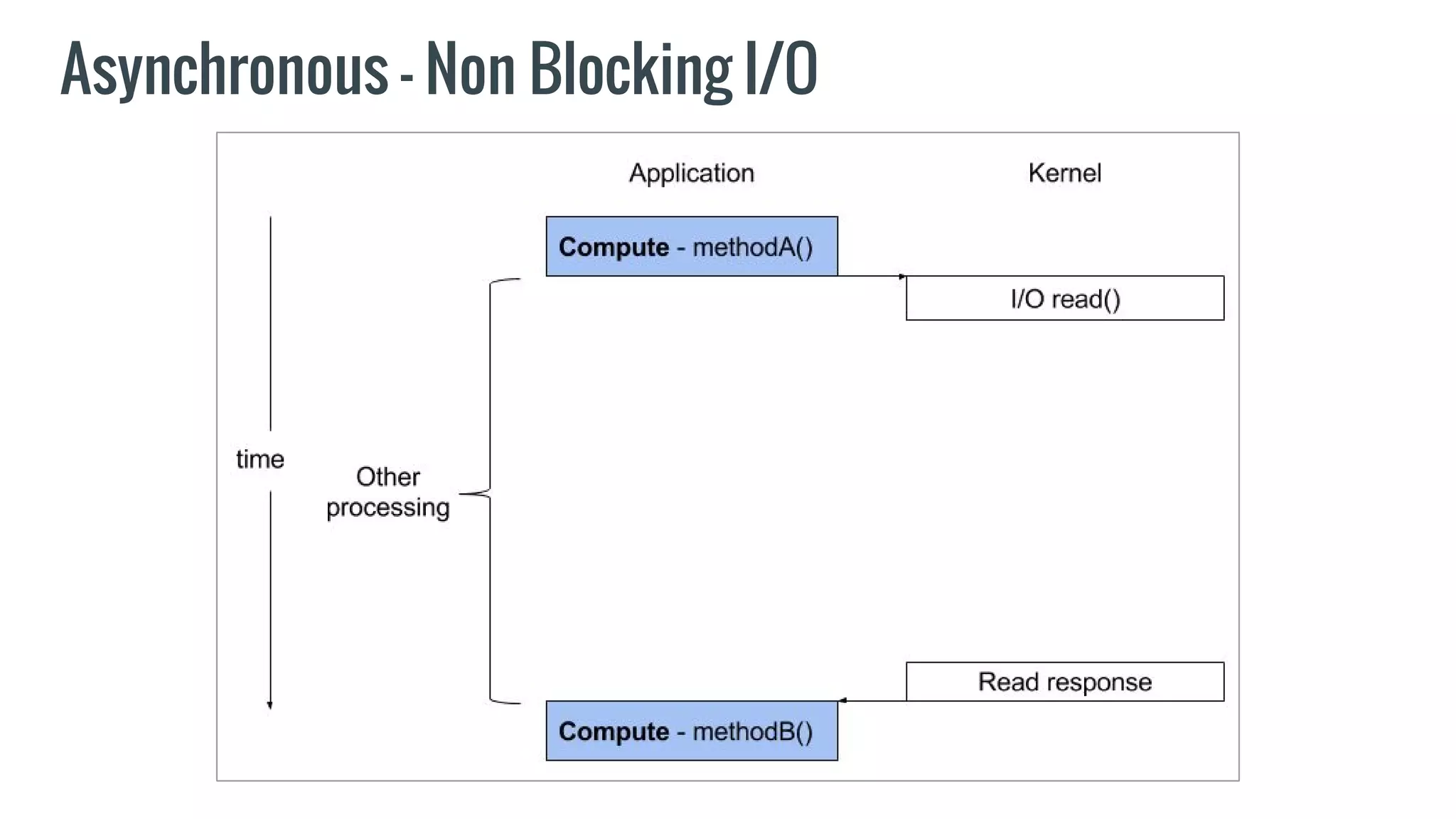
● Asynchronous and non-blocking model.
● Aims to make asynchronous programming on the JVM easier.
● Built on Java 8 and Netty.
● Currently at version 1.1.1
What is ratpack? (continued)
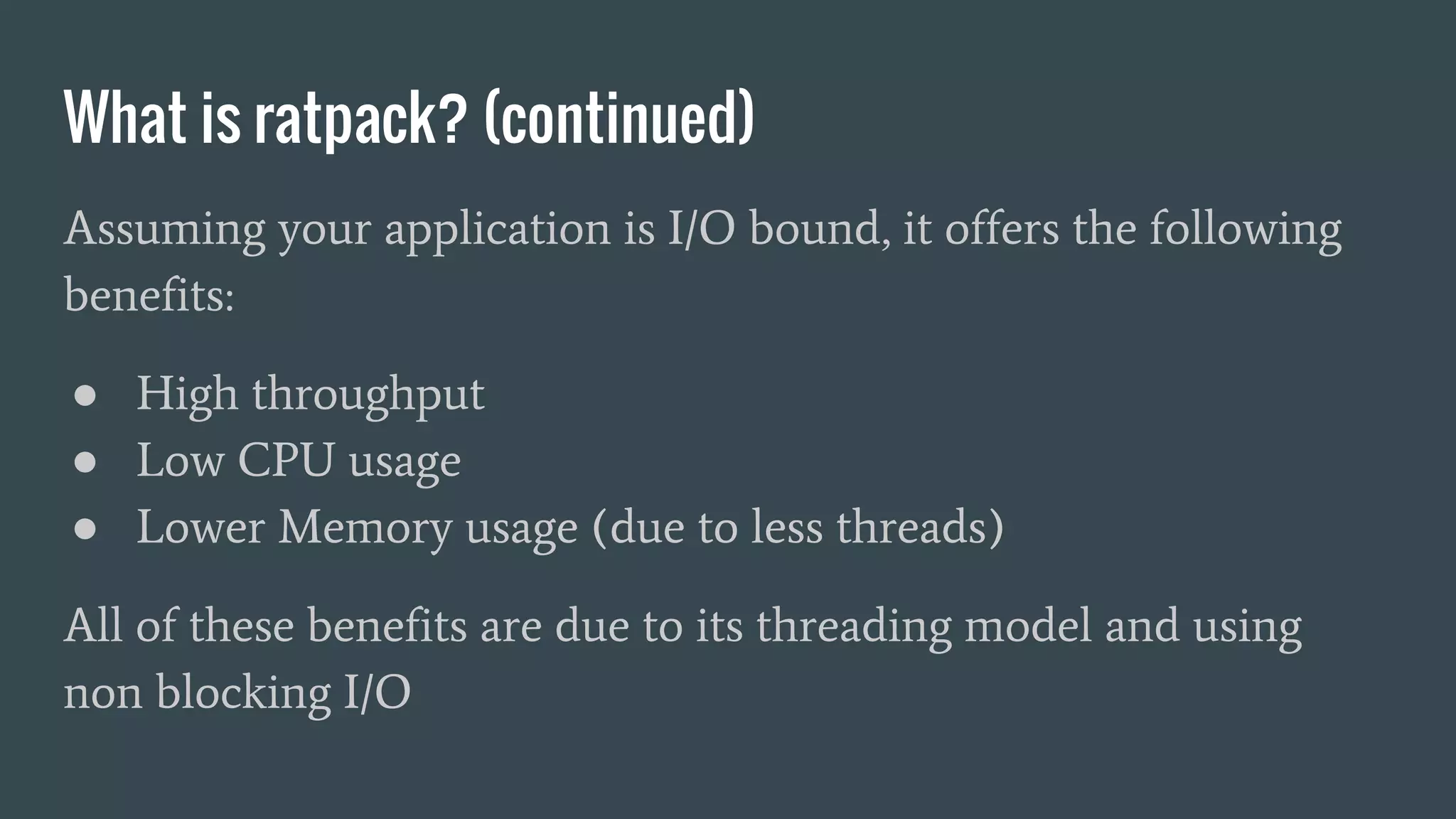
Assuming your application is I/O bound, it offers the following
benefits:
● High throughput
● Low CPU usage
● Lower Memory usage (due to less threads)
All of these benefits are due to its threading model and using
non blocking I/O
Synchronous - Blocking I/O
Asynchronous - Non Blocking I/O
What is ratpack? (continued)
This efficiency comes with the cost of increased complexity.
● Steep learning curve.
● Easy to get wrong.
● Hard to debug.
Ratpack misconceptions
● Asynchronicity is internal only!
○ It’s just a web server.
○ It takes time to respond to http requests.
● Doesn’t improve latency.
○ If a downstream call takes 500ms, ratpack will take > 500ms to respond.
● If you are using Ratpack - it doesn’t mean your system will
necessarily perform any better.
○ You can make it perform worse!
Why did we decide to use
it?
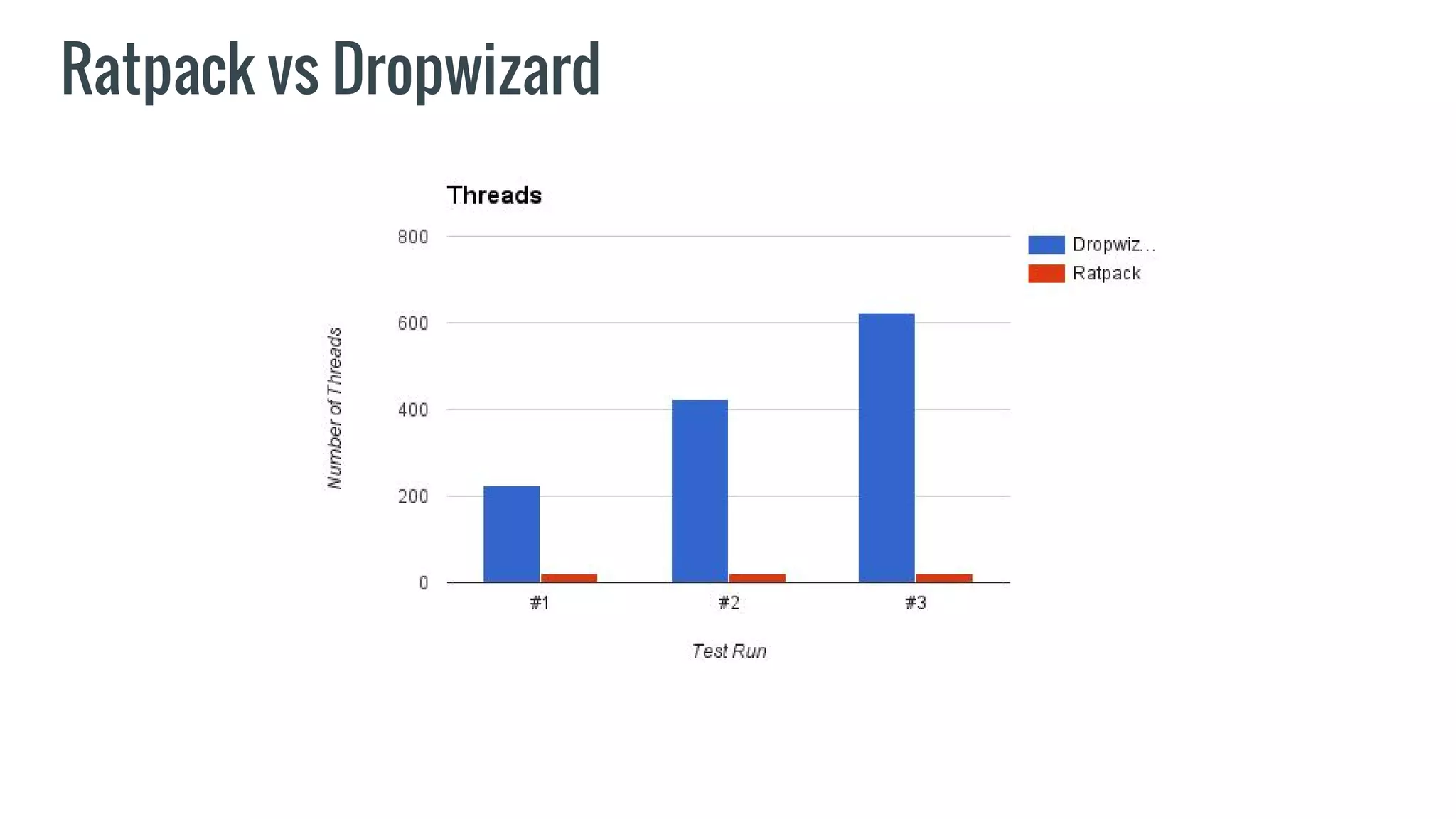
Ratpack vs Dropwizard
Ratpack vs Dropwizard - Load profiles
Three load profiles were given to each application as detailed
below:
1. 5 minute duration, 100 JMeter Threads
2. 5 minute duration, 200 JMeter Threads
3. 5 minute duration, 300 JMeter Threads
Ratpack vs Dropwizard
Why did we decide to use it?
● We will be I/O bound.
● We will be at high load.
● Ratpack vs Dropwizard Performance Test revealed
encouraging stats.
● We had a sense of optimism that we’d pick up the async
challenges.
A look at the code
A look at the code - Overview
● Runnable Jar.
● main() method starts the server.
○ Simple and easy to start for testing.
● URIs mapped to Handlers.
● Execution model deals with Promises.
● We decided to use Rx Java in “service” layer and use
Observables.
A look at the code
● Happy path example.
A look at the code
● Happy path example.
● High throughput example.
A look at the code
● Happy path example.
● High throughput example.
● Deterministic demonstration.
Mistakes you can make
...BIG BIG mistakes!
Mistakes - Two Types
1. Dangerous mistakes.
2. Annoying mistakes.
Dangerous mistakes
● Calling a blocking method.
○ So many ways to do this.
IMPACT: ?
Dangerous mistakes
● Making new Threads
IMPACT: Memory & CPU increase -> Ultimately low
throughput
Annoying mistakes
● Not understanding execution model.
○ Not using Promises when you should.
Annoying mistakes
● Messing up Threads
○ Using Cassandra thread to call Cassandra.
○ Happened to us whilst implementing ListenableFuture
Issues we currently face
Issues (continued)
● Ratpack http client does not use a connection pool.
● AppDynamics integration still ongoing.
Issues
Performance related issue: At load, 1 in 1000 requests would not get a response.
● Hard to debug
● Thread dumps revealed that (big surprise) nothing was blocking. Where do you
go from here?
Now Resolved
● Was actually an issue related to secretly running in Development mode. InteliJ
IDEA
○ Issue #909
Retrospective
Retro / Assorted notes...
● It was harder than we expected.
● It took longer than expected to get up to speed.
● Rx bought us flexibility but introduced an extra learning curve.
● Cost vs Reward analysis is difficult but would have been a benefit.
● Monitoring our CPU and Memory usage is key to realising the benefit.
● Confidence is improving day by day… BUT…
● Still not proven - We’re not live yet!
Thanks!
Questions?
More info: http://phillbarber.blogspot.co.uk/
Code: https://github.com/phillbarber/ratpack-demo

Ratpack the story so far

  • 1.
    Ratpack The story sofar Phill Barber - Team Thor - Team Cirrus - Energized Work
  • 2.
    Agenda ● What isRatpack? ● Why did we decide to use it? ● A look at the code. ● Mistakes you can make. ● Issues we currently face. ● Retrospective.
  • 3.
  • 4.
    What is ratpack? ●A high performance Java web framework. ● Asynchronous and non-blocking model. ● Aims to make asynchronous programming on the JVM easier. ● Built on Java 8 and Netty. ● Currently at version 1.1.1
  • 5.
    What is ratpack?(continued) Assuming your application is I/O bound, it offers the following benefits: ● High throughput ● Low CPU usage ● Lower Memory usage (due to less threads) All of these benefits are due to its threading model and using non blocking I/O
  • 6.
  • 7.
    Asynchronous - NonBlocking I/O
  • 8.
    What is ratpack?(continued) This efficiency comes with the cost of increased complexity. ● Steep learning curve. ● Easy to get wrong. ● Hard to debug.
  • 9.
    Ratpack misconceptions ● Asynchronicityis internal only! ○ It’s just a web server. ○ It takes time to respond to http requests. ● Doesn’t improve latency. ○ If a downstream call takes 500ms, ratpack will take > 500ms to respond. ● If you are using Ratpack - it doesn’t mean your system will necessarily perform any better. ○ You can make it perform worse!
  • 10.
    Why did wedecide to use it?
  • 11.
  • 12.
  • 13.
    Ratpack vs Dropwizard- Load profiles Three load profiles were given to each application as detailed below: 1. 5 minute duration, 100 JMeter Threads 2. 5 minute duration, 200 JMeter Threads 3. 5 minute duration, 300 JMeter Threads
  • 14.
  • 15.
  • 16.
  • 17.
  • 18.
    Why did wedecide to use it? ● We will be I/O bound. ● We will be at high load. ● Ratpack vs Dropwizard Performance Test revealed encouraging stats. ● We had a sense of optimism that we’d pick up the async challenges.
  • 19.
    A look atthe code
  • 20.
    A look atthe code - Overview ● Runnable Jar. ● main() method starts the server. ○ Simple and easy to start for testing. ● URIs mapped to Handlers. ● Execution model deals with Promises. ● We decided to use Rx Java in “service” layer and use Observables.
  • 21.
    A look atthe code ● Happy path example.
  • 22.
    A look atthe code ● Happy path example. ● High throughput example.
  • 23.
    A look atthe code ● Happy path example. ● High throughput example. ● Deterministic demonstration.
  • 24.
    Mistakes you canmake ...BIG BIG mistakes!
  • 25.
    Mistakes - TwoTypes 1. Dangerous mistakes. 2. Annoying mistakes.
  • 26.
    Dangerous mistakes ● Callinga blocking method. ○ So many ways to do this. IMPACT: ?
  • 27.
    Dangerous mistakes ● Makingnew Threads IMPACT: Memory & CPU increase -> Ultimately low throughput
  • 28.
    Annoying mistakes ● Notunderstanding execution model. ○ Not using Promises when you should.
  • 29.
    Annoying mistakes ● Messingup Threads ○ Using Cassandra thread to call Cassandra. ○ Happened to us whilst implementing ListenableFuture
  • 30.
  • 31.
    Issues (continued) ● Ratpackhttp client does not use a connection pool. ● AppDynamics integration still ongoing.
  • 32.
    Issues Performance related issue:At load, 1 in 1000 requests would not get a response. ● Hard to debug ● Thread dumps revealed that (big surprise) nothing was blocking. Where do you go from here? Now Resolved ● Was actually an issue related to secretly running in Development mode. InteliJ IDEA ○ Issue #909
  • 33.
  • 34.
    Retro / Assortednotes... ● It was harder than we expected. ● It took longer than expected to get up to speed. ● Rx bought us flexibility but introduced an extra learning curve. ● Cost vs Reward analysis is difficult but would have been a benefit. ● Monitoring our CPU and Memory usage is key to realising the benefit. ● Confidence is improving day by day… BUT… ● Still not proven - We’re not live yet!
  • 35.