Javascript test automation
demo
Sriram Angajala - 30th June
MAVEN IT SOLUTIONS -
LONDON
What is maven IT
6 years of training institute
Who am I?
Java and javascript guru - 15
years experience
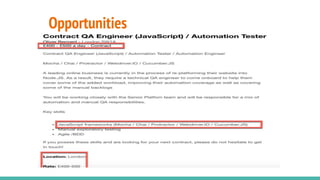
Opportunities
Why is this demand?
● Most companies moving towards digital and MicroServices
● Automation testing is taken highest priority,
● Automation tests are in the lines of UNIT testing
● They are developed in parallel to development code in same
code base
● Developers also getting involved
● JS is fast to run in parallel modes
● JAVASCRIPT IS HARD TO LEARN *****
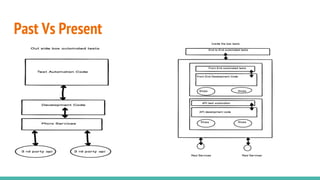
Past Vs Present
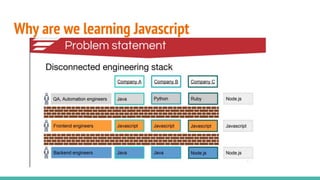
Why are we learning Javascript
How to learn javascript automation(easily)
● Use existing programming skills
● Compare Javascript with them (e.g Java)
● Learn the basics of javascript
● Learn node.js , npm and basic folder structure
● Learn frameworks compare to Selenium
● Learn the challenges of javascript which are not part of
java selenium
○ Call backs
○ Waits
○ Debugging
Similarities
JAVA vs JAVASCRIPT
1. Java
2. JVM
3. Maven
4. POM.xml
5. Junit
6. Cucumber - BDD
7. Webdriver/Selenium
8. Selenium Standalone - Web
9. Appium server - Mobile
2. Javascript
2. NOde
3. NPM
4. Package.json
5. Mocha and Chai (assertions)
6. Cucumberjs
7. Protractor
/Webdriver.io/Nightwatch/Cypress
8. Selenium standalone - web
9. Appium server for mobile - Wd.js
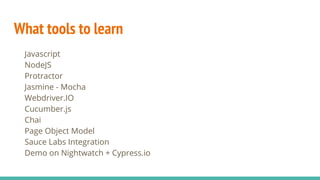
What tools to learn
Javascript
NodeJS
Protractor
Jasmine - Mocha
Webdriver.IO
Cucumber.js
Chai
Page Object Model
Sauce Labs Integration
Demo on Nightwatch + Cypress.io
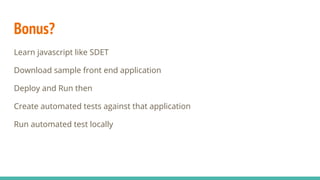
Bonus?
Learn javascript like SDET
Download sample front end application
Deploy and Run then
Create automated tests against that application
Run automated test locally
How the course works
Every Saturday 12-5 - Wed - 8-9 PM - 4-5 Weeks
Basics of JavaScript
Basic framework
Protractor theory
Protractor project
Webdriver.IO theory
Local build installation
Create tests using Cucumber - BDD
Reports + Saucelab Installation
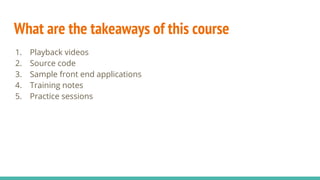
What are the takeaways of this course
1. Playback videos
2. Source code
3. Sample front end applications
4. Training notes
5. Practice sessions

Javascript test automation demo

  • 1.
    Javascript test automation demo SriramAngajala - 30th June MAVEN IT SOLUTIONS - LONDON
  • 2.
    What is mavenIT 6 years of training institute
  • 3.
    Who am I? Javaand javascript guru - 15 years experience
  • 4.
  • 5.
    Why is thisdemand? ● Most companies moving towards digital and MicroServices ● Automation testing is taken highest priority, ● Automation tests are in the lines of UNIT testing ● They are developed in parallel to development code in same code base ● Developers also getting involved ● JS is fast to run in parallel modes ● JAVASCRIPT IS HARD TO LEARN *****
  • 6.
  • 7.
    Why are welearning Javascript
  • 8.
    How to learnjavascript automation(easily) ● Use existing programming skills ● Compare Javascript with them (e.g Java) ● Learn the basics of javascript ● Learn node.js , npm and basic folder structure ● Learn frameworks compare to Selenium ● Learn the challenges of javascript which are not part of java selenium ○ Call backs ○ Waits ○ Debugging
  • 9.
    Similarities JAVA vs JAVASCRIPT 1.Java 2. JVM 3. Maven 4. POM.xml 5. Junit 6. Cucumber - BDD 7. Webdriver/Selenium 8. Selenium Standalone - Web 9. Appium server - Mobile 2. Javascript 2. NOde 3. NPM 4. Package.json 5. Mocha and Chai (assertions) 6. Cucumberjs 7. Protractor /Webdriver.io/Nightwatch/Cypress 8. Selenium standalone - web 9. Appium server for mobile - Wd.js
  • 10.
    What tools tolearn Javascript NodeJS Protractor Jasmine - Mocha Webdriver.IO Cucumber.js Chai Page Object Model Sauce Labs Integration Demo on Nightwatch + Cypress.io
  • 11.
    Bonus? Learn javascript likeSDET Download sample front end application Deploy and Run then Create automated tests against that application Run automated test locally
  • 12.
    How the courseworks Every Saturday 12-5 - Wed - 8-9 PM - 4-5 Weeks Basics of JavaScript Basic framework Protractor theory Protractor project Webdriver.IO theory Local build installation Create tests using Cucumber - BDD Reports + Saucelab Installation
  • 13.
    What are thetakeaways of this course 1. Playback videos 2. Source code 3. Sample front end applications 4. Training notes 5. Practice sessions