Scalable MQ topologies 
across project teams and 
administrative domains 
Peter Broadhurst 
IBM Hursley
Agenda 
• Background and recap on client/server scalable MQ topologies 
• Sizing and scoping MQ hubs 
• Common connectivity scenarios when introducing MQ hubs 
• Active/active multiple data-center environments 
© 2013 International Business Machines Corporation 2
Background to MQ Hubs as a scalable MQ topology pattern 
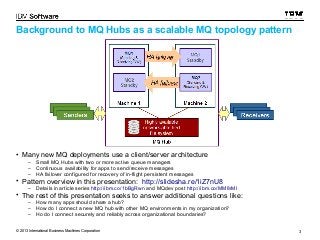
• Many new MQ deployments use a client/server architecture 
– Small MQ Hubs with two or more active queue managers 
– Continuous availability for apps to send/receive messages 
– HA failover configured for recovery of in-flight persistent messages 
• Pattern overview in this presentation: http://slidesha.re/1iZ7nU8 
– Details in article series http://ibm.co/1bBgRwn and MQdev post http://ibm.co/MM8rMl 
• The rest of this presentation seeks to answer additional questions like: 
– How many apps should share a hub? 
– How do I connect a new MQ hub with other MQ environments in my organization? 
– Ho do I connect securely and reliably across organizational boundaries? 
© 2013 International Business Machines Corporation 3
Business 
Partners 
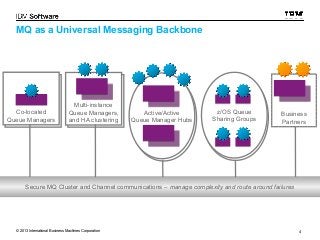
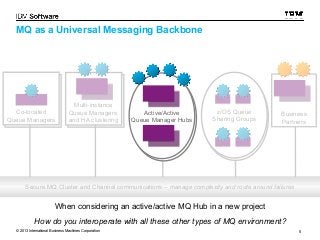
MQ as a Universal Messaging Backbone 
Active/Active 
Queue Manager Hubs 
Multi-instance 
Queue Managers, 
and HA clustering 
Co-located 
Queue Managers 
z/OS Queue 
Sharing Groups 
Secure MQ Cluster and Channel communications – manage complexity and route around failures 
© 2013 International Business Machines Corporation 4
Business 
Partners 
MQ as a Universal Messaging Backbone 
Multi-instance 
Queue Managers, 
and HA clustering 
Co-located 
Queue Managers 
z/OS Queue 
Sharing Groups 
Active/Active 
Queue Manager Hubs 
Secure MQ Cluster and Channel communications – manage complexity and route around failures 
When considering an active/active MQ Hub in a new project 
How do you interoperate with all these other types of MQ environment? 
© 2013 International Business Machines Corporation 5
Sizing and scoping your hubs 
Hub 1 Hub 2 
AApppp11 QQMM11 
MQ Cluster 
AApppp11 QQMM22 
AApppp22 QQMM11 
AApppp22 QQMM22 
AApppp22 QQMM33 
AApppp22 QQMM44 
Workload Balancing 
SShhaarreedd QQMM11 
SShhaarreedd QQMM22 
Hub 3 
AApppp11 IInnsstt11 
AApppp11 IInnsstt22 
AApppp11 IInnsstt33 
AApppp11 IInnsstt44 
AApppp33 IInnsstt11 
AApppp33 IInnsstt22 
AApppp33 IInnsstt33 
AApppp33 IInnsstt44 
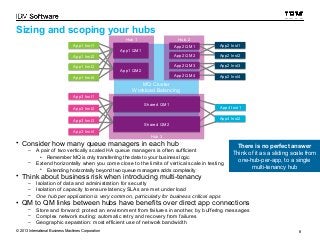
• Consider how many queue managers in each hub 
– A pair of two vertically scaled HA queue managers is often sufficient 
• Remember MQ is only transferring the data to your business logic 
AApppp22 IInnsstt11 
AApppp22 IInnsstt22 
AApppp22 IInnsstt33 
AApppp22 IInnsstt44 
AApppp44 IInnsstt11 
AApppp44 IInnsstt22 
– Extend horizontally when you come close to the limits of vertical scale in testing 
• Extending horizontally beyond two queue managers adds complexity 
• Think about business risk when introducing multi-tenancy 
– Isolation of data and administration for security 
– Isolation of capacity to ensure latency SLAs are met under load 
– One hub per application is very common, particularly for business critical apps 
There is no perfect answer 
Think of it as a sliding scale from 
one-hub-per-app, to a single 
• QM to QM links between hubs have benefits over direct app connections 
– Store and forward: protect an environment from failures in another, by buffering messages 
– Complex network routing: automatic retry and recovery from failures 
– Geographic separation: most efficient use of network bandwidth 
multi-tenancy hub 
© 2013 International Business Machines Corporation 6
Connecting a hub to a single queue manager 
without joining the two in an MQ cluster 
Cluster 
Gateway QM1 SDR/RCVR RReemmoottee QQMM11 
Gateway QM1 
Hub1 
QM1 
Standby 
Hub1 
QM1 
Standby 
Hub1 
QM2 
Hub1 
QM2 
Standby 
Hub1 
QM2 
Standby 
Hub1 AApppp22 IInnsstt22 
QM2 
MMQQ CClluusstteerr 11 
Hub 1 
Hub1 
QM1 
Hub1 
QM1 
AApppp11 IInnsstt11 
AApppp11 IInnsstt22 
AApppp11 IInnsstt33 
AApppp11 IInnsstt44 
Cluster 
Cluster 
Cluster 
Gateway QM1 
Standby 
Gateway QM1 
Standby 
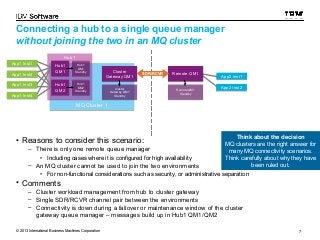
• Reasons to consider this scenario: 
– There is only one remote queue manager 
Remote QM1 
Standby 
Remote QM1 
Standby 
• Including cases where it is configured for high availability 
– An MQ cluster cannot be used to join the two environments 
AApppp22 IInnsstt11 
Think about the decision 
MQ clusters are the right answer for 
many MQ connectivity scenarios. 
Think carefully about why they have 
• For non-functional considerations such as security, or administrative separation 
• Comments 
– Cluster workload management from hub to cluster gateway 
– Single SDR/RCVR channel pair between the environments 
– Connectivity is down during a failover or maintenance window of the cluster 
gateway queue manager – messages build up in Hub1 QM1/QM2 
been ruled out. 
© 2013 International Business Machines Corporation 7
Connecting a hub to a remote cluster via a single link 
without joining the two in an MQ cluster 
Cluster 
Cluster 
Gateway QM1 
Gateway QM1 
Remote Cluster 
Remote Cluster 
Gateway QM1 
SDR/RCVR Gateway QM1 
Hub1 
QM1 
Standby 
Hub1 
QM1 
Standby 
Cluster 
Cluster 
Gateway QM1 
Standby 
Gateway QM1 
Standby 
Remote Cluster 
Gateway QM1 
Remote Cluster 
Gateway QM1 
Standby 
Standby 
Hub1 
QM2 
Standby 
Hub1 
QM2 
Standby 
Remote Hub 
(or other topology) 
Remote 
QM1 
Standby 
Remote 
QM1 
Standby 
Remote 
QM2 
Standby 
Remote 
QM2 
Standby 
MMQQ CClluusstteerr 11 RReemmoottee MMQQ CClluusstteerr 
Hub 1 
Hub1 
QM1 
Hub1 
QM1 
AApppp11 IInnsstt11 
AApppp11 IInnsstt22 
AApppp11 IInnsstt33 
AApppp11 IInnsstt44 
Hub1 
QM2 
Hub1 
QM2 
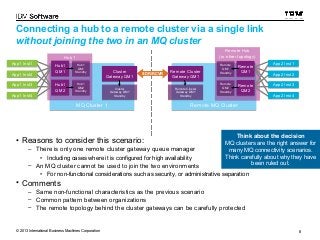
• Reasons to consider this scenario: 
– There is only one remote cluster gateway queue manager 
• Including cases where it is configured for high availability 
– An MQ cluster cannot be used to join the two environments 
AApppp22 IInnsstt11 
AApppp22 IInnsstt22 
AApppp22 IInnsstt33 
AApppp22 IInnsstt44 
Remote 
QM1 
Remote 
QM1 
Remote 
QM2 
Remote 
QM2 
Think about the decision 
MQ clusters are the right answer for 
many MQ connectivity scenarios. 
Think carefully about why they have 
• For non-functional considerations such as security, or administrative separation 
• Comments 
– Same non-functional characteristics as the previous scenario 
– Common pattern between organizations 
– The remote topology behind the cluster gateways can be carefully protected 
been ruled out. 
© 2013 International Business Machines Corporation 8
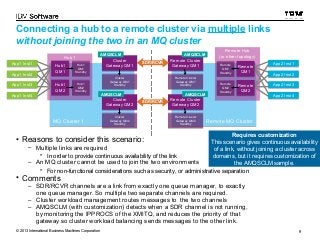
Connecting a hub to a remote cluster via multiple links 
without joining the two in an MQ cluster 
Hub 1 
Hub1 
QM1 
Hub1 
QM1 
AMQSCLM 
AMQSCLM 
Cluster 
Cluster 
Remote Remote Cluster 
Cluster 
Hub1 
Hub1 
Gateway Gateway QM1 
SDR/RCVR Gateway QM1 QM1 
QM1 
Gateway QM1 
QM1 
Standby 
Standby 
Cluster 
Cluster 
Gateway QM1 
Standby 
Gateway QM1 
Standby 
Remote Cluster 
Gateway QM1 
Remote Cluster 
Gateway QM1 
Hub1 
QM2 
Hub1 
QM2 
Standby 
Hub1 
QM2 
Standby 
Hub1 Standby 
Standby 
QM2 
Remote Hub 
(or other topology) 
Remote 
QM1 
Remote 
QM1 
Remote 
QM1 
Standby 
Remote 
QM1 
Standby 
Remote 
QM2 
Remote 
QM2 
Remote 
QM2 
Standby 
Remote 
QM2 
Standby 
AMQSCLM 
Cluster 
Cluster 
Gateway QM2 
Gateway QM2 
AMQSCLM 
Remote Cluster 
Remote Cluster 
Gateway QM2 
SDR/RCVR Gateway QM2 
Cluster 
Cluster 
Remote Cluster 
Gateway QM2 
Remote Cluster 
Gateway QM2 
MMQQ CClluusstteerr 11 RReemmoottee MMQQ CClluusstteerr 
AApppp11 IInnsstt11 
AApppp11 IInnsstt22 
AApppp11 IInnsstt33 
AApppp11 IInnsstt44 
Gateway QM2 
Standby 
Gateway QM2 
Standby 
• Reasons to consider this scenario: 
– Multiple links are required 
• In order to provide continuous availability of the link 
Standby 
Standby 
– An MQ cluster cannot be used to join the two environments 
Requires customization 
This scenario gives continuous availability 
of a link, without joining a cluster across 
domains, but it requires customization of 
the AMQSCLM sample. 
• For non-functional considerations such as security, or administrative separation 
• Comments 
– SDR/RCVR channels are a link from exactly one queue manager, to exactly 
one queue manager. So multiple two separate channels are required. 
– Cluster workload management routes messages to the two channels 
– AMQSCLM (with customization) detects when a SDR channel is not running, 
by monitoring the IPPROCS of the XMITQ, and reduces the priority of that 
gateway so cluster workload balancing sends messages to the other link. 
AApppp22 IInnsstt11 
AApppp22 IInnsstt22 
AApppp22 IInnsstt33 
AApppp22 IInnsstt44 
© 2013 International Business Machines Corporation 9
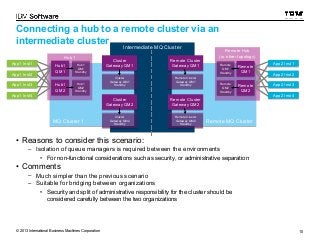
Connecting a hub to a remote cluster via an 
intermediate cluster 
Intermediate MMQQ CClluusstteerr 
Hub 1 
Hub1 
QM1 
Hub1 
QM1 
Cluster 
Cluster 
Hub1 
QM1 
Standby 
Hub1 Gateway Gateway QM1 
QM1 
Gateway QM1 
QM1 
Standby 
Remote Cluster 
Remote Cluster 
Gateway QM1 
Cluster 
Cluster 
Gateway QM1 
Standby 
Gateway QM1 
Standby 
Remote Cluster 
Gateway QM1 
Remote Cluster 
Gateway QM1 
Hub1 
QM2 
Hub1 
QM2 
Standby 
Hub1 
QM2 
Standby 
Hub1 Standby 
Standby 
QM2 
Remote Hub 
(or other topology) 
Remote 
QM1 
Remote 
QM1 
Remote 
QM1 
Standby 
Remote 
QM1 
Standby 
Remote 
QM2 
Remote 
QM2 
Remote 
QM2 
Standby 
Remote 
QM2 
Standby 
Cluster 
Cluster 
Gateway QM2 
Gateway QM2 
Remote Cluster 
Gateway QM2 
Remote Cluster 
Gateway QM2 
Cluster 
Cluster 
Remote Cluster 
Gateway QM2 
Remote Cluster 
Gateway QM2 
MMQQ CClluusstteerr 11 RReemmoottee MMQQ CClluusstteerr 
AApppp11 IInnsstt11 
AApppp11 IInnsstt22 
AApppp11 IInnsstt33 
AApppp11 IInnsstt44 
Gateway QM2 
Standby 
Gateway QM2 
Standby 
• Reasons to consider this scenario: 
Standby 
Standby 
– Isolation of queue managers is required between the environments 
• For non-functional considerations such as security, or administrative separation 
• Comments 
– Much simpler than the previous scenario 
– Suitable for bridging between organizations 
• Security and split of administrative responsibility for the cluster should be 
considered carefully between the two organizations 
AApppp22 IInnsstt11 
AApppp22 IInnsstt22 
AApppp22 IInnsstt33 
AApppp22 IInnsstt44 
© 2013 International Business Machines Corporation 10
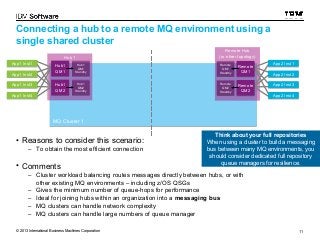
Connecting a hub to a remote MQ environment using a 
single shared cluster 
Hub 1 
Hub1 
QM1 
Hub1 
QM1 
Hub1 
QM1 
Standby 
Hub1 
QM1 
Standby 
Hub1 
QM2 
Hub1 
QM2 
Hub1 
QM2 
Standby 
Hub1 
QM2 
Standby 
MMQQ CClluusstteerr 11 
AApppp11 IInnsstt11 
AApppp11 IInnsstt22 
AApppp11 IInnsstt33 
AApppp11 IInnsstt44 
• Reasons to consider this scenario: 
– To obtain the most efficient connection 
• Comments 
Remote Hub 
(or other topology) 
Remote 
QM1 
Remote 
QM1 
Remote 
QM1 
Standby 
Remote 
QM1 
Standby 
Remote 
QM2 
Remote 
QM2 
Remote 
QM2 
Standby 
Remote 
QM2 
Standby 
Think about your full repositories 
When using a cluster to build a messaging 
bus between many MQ environments, you 
should consider dedicated full repository 
queue managers for resilience. 
– Cluster workload balancing routes messages directly between hubs, or with 
other existing MQ environments – including z/OS QSGs 
– Gives the minimum number of queue-hops for performance 
– Ideal for joining hubs within an organization into a messaging bus 
– MQ clusters can handle network complexity 
– MQ clusters can handle large numbers of queue manager 
AApppp22 IInnsstt11 
AApppp22 IInnsstt22 
AApppp22 IInnsstt33 
AApppp22 IInnsstt44 
© 2013 International Business Machines Corporation 11
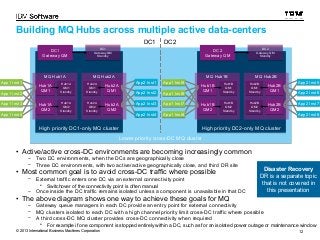
Building MQ Hubs across multiple active data-centers 
DC2 
DC2 
Gateway QM 
Gateway QM 
MQ Hub1B 
Hub1B 
Hub1B 
QM1 
QM1 
Hub1B 
QM1 
Standby 
Hub1B 
QM1 
Standby 
Hub1B 
QM2 
Hub1B 
QM2 
Hub1B 
QM2 
Standby 
Hub1B 
QM2 
Standby 
DC2 
DC2 
Gateway QM 
Standby 
Gateway QM 
Standby 
MQ Hub2B 
Hub2B 
QM1 
Hub2B 
QM1 
Hub2B 
QM1 
Standby 
Hub2B 
QM1 
Standby 
Hub2B 
QM2 
Hub2B 
QM2 
Hub2B 
QM2 
Standby 
Hub2B 
QM2 
Standby 
DC1 DC2 
AApppp11 IInnsstt55 
AApppp11 IInnsstt66 
AApppp11 IInnsstt77 
AApppp11 IInnsstt88 
DC1 
DC1 
Gateway QM 
Gateway QM 
MQ Hub1A 
Hub1A 
Hub1A 
QM1 
QM1 
Hub1A 
QM1 
Standby 
Hub1A 
QM1 
Standby 
Hub1A 
QM2 
Hub1A 
QM2 
Hub1A 
QM2 
Standby 
Hub1A 
QM2 
Standby 
DC1 
DC1 
Gateway QM 
Standby 
Gateway QM 
Standby 
MQ Hub2A 
AApppp22 IInnsstt11 
AApppp22 IInnsstt22 
AApppp22 IInnsstt33 
AApppp22 IInnsstt44 
Hub2A 
QM1 
Hub2A 
QM1 
Hub2A 
QM1 
Standby 
Hub2A 
QM1 
Standby 
Hub2A 
QM2 
Hub2A 
QM2 
Hub2A 
QM2 
Standby 
Hub2A 
QM2 
Standby 
HHiigghh pprriioorriittyy DDCC11--oonnllyy MMQQ cclluusstteerr HHiigghh pprriioorriittyy DDCC22--oonnllyy MMQQ cclluusstteerr 
Lower priority ccrroossss--DDCC MMQQ cclluusstteerr 
AApppp11 IInnsstt11 
AApppp11 IInnsstt22 
AApppp11 IInnsstt33 
AApppp11 IInnsstt44 
• Active/active cross-DC environments are becoming increasingly common 
– Two DC environments, when the DCs are geographically close 
– Three DC environments, with two active/active geographically close, and third DR site 
• Most common goal is to avoid cross-DC traffic where possible 
– External traffic enters one DC via an external connectivity point 
• Switchover of the connectivity point is often manual 
– Once inside the DC traffic remains isolated unless a component is unavailable in that DC 
• The above diagram shows one way to achieve these goals for MQ 
Disaster Recovery 
DR is a separate topic 
that is not covered in 
this presentation 
– Gateway queue managers in each DC provide an entry point for external connectivity 
– MQ clusters isolated to each DC with a high channel priority limit cross-DC traffic where possible 
– A third cross-DC MQ cluster provides cross-DC connectivity when required 
AApppp22 IInnsstt55 
AApppp22 IInnsstt66 
AApppp22 IInnsstt77 
AApppp22 IInnsstt88 
• For example if one component is stopped entirely within a DC, such as for an isolated power outage or maintenance window 
© 2013 International Business Machines Corporation 12
Thank You 
Feedback? Please comment via the MQdev blog 
MQdev blog: https://ibm.biz/BdE2ST 
Twitter: @pbmumbles @IBM_WMQ 
© 2013 International Business Machines Corporation 13

Scalable mq topologies across project teams and admin domains

  • 1.
    Scalable MQ topologies across project teams and administrative domains Peter Broadhurst IBM Hursley
  • 2.
    Agenda • Backgroundand recap on client/server scalable MQ topologies • Sizing and scoping MQ hubs • Common connectivity scenarios when introducing MQ hubs • Active/active multiple data-center environments © 2013 International Business Machines Corporation 2
  • 3.
    Background to MQHubs as a scalable MQ topology pattern • Many new MQ deployments use a client/server architecture – Small MQ Hubs with two or more active queue managers – Continuous availability for apps to send/receive messages – HA failover configured for recovery of in-flight persistent messages • Pattern overview in this presentation: http://slidesha.re/1iZ7nU8 – Details in article series http://ibm.co/1bBgRwn and MQdev post http://ibm.co/MM8rMl • The rest of this presentation seeks to answer additional questions like: – How many apps should share a hub? – How do I connect a new MQ hub with other MQ environments in my organization? – Ho do I connect securely and reliably across organizational boundaries? © 2013 International Business Machines Corporation 3
  • 4.
    Business Partners MQas a Universal Messaging Backbone Active/Active Queue Manager Hubs Multi-instance Queue Managers, and HA clustering Co-located Queue Managers z/OS Queue Sharing Groups Secure MQ Cluster and Channel communications – manage complexity and route around failures © 2013 International Business Machines Corporation 4
  • 5.
    Business Partners MQas a Universal Messaging Backbone Multi-instance Queue Managers, and HA clustering Co-located Queue Managers z/OS Queue Sharing Groups Active/Active Queue Manager Hubs Secure MQ Cluster and Channel communications – manage complexity and route around failures When considering an active/active MQ Hub in a new project How do you interoperate with all these other types of MQ environment? © 2013 International Business Machines Corporation 5
  • 6.
    Sizing and scopingyour hubs Hub 1 Hub 2 AApppp11 QQMM11 MQ Cluster AApppp11 QQMM22 AApppp22 QQMM11 AApppp22 QQMM22 AApppp22 QQMM33 AApppp22 QQMM44 Workload Balancing SShhaarreedd QQMM11 SShhaarreedd QQMM22 Hub 3 AApppp11 IInnsstt11 AApppp11 IInnsstt22 AApppp11 IInnsstt33 AApppp11 IInnsstt44 AApppp33 IInnsstt11 AApppp33 IInnsstt22 AApppp33 IInnsstt33 AApppp33 IInnsstt44 • Consider how many queue managers in each hub – A pair of two vertically scaled HA queue managers is often sufficient • Remember MQ is only transferring the data to your business logic AApppp22 IInnsstt11 AApppp22 IInnsstt22 AApppp22 IInnsstt33 AApppp22 IInnsstt44 AApppp44 IInnsstt11 AApppp44 IInnsstt22 – Extend horizontally when you come close to the limits of vertical scale in testing • Extending horizontally beyond two queue managers adds complexity • Think about business risk when introducing multi-tenancy – Isolation of data and administration for security – Isolation of capacity to ensure latency SLAs are met under load – One hub per application is very common, particularly for business critical apps There is no perfect answer Think of it as a sliding scale from one-hub-per-app, to a single • QM to QM links between hubs have benefits over direct app connections – Store and forward: protect an environment from failures in another, by buffering messages – Complex network routing: automatic retry and recovery from failures – Geographic separation: most efficient use of network bandwidth multi-tenancy hub © 2013 International Business Machines Corporation 6
  • 7.
    Connecting a hubto a single queue manager without joining the two in an MQ cluster Cluster Gateway QM1 SDR/RCVR RReemmoottee QQMM11 Gateway QM1 Hub1 QM1 Standby Hub1 QM1 Standby Hub1 QM2 Hub1 QM2 Standby Hub1 QM2 Standby Hub1 AApppp22 IInnsstt22 QM2 MMQQ CClluusstteerr 11 Hub 1 Hub1 QM1 Hub1 QM1 AApppp11 IInnsstt11 AApppp11 IInnsstt22 AApppp11 IInnsstt33 AApppp11 IInnsstt44 Cluster Cluster Cluster Gateway QM1 Standby Gateway QM1 Standby • Reasons to consider this scenario: – There is only one remote queue manager Remote QM1 Standby Remote QM1 Standby • Including cases where it is configured for high availability – An MQ cluster cannot be used to join the two environments AApppp22 IInnsstt11 Think about the decision MQ clusters are the right answer for many MQ connectivity scenarios. Think carefully about why they have • For non-functional considerations such as security, or administrative separation • Comments – Cluster workload management from hub to cluster gateway – Single SDR/RCVR channel pair between the environments – Connectivity is down during a failover or maintenance window of the cluster gateway queue manager – messages build up in Hub1 QM1/QM2 been ruled out. © 2013 International Business Machines Corporation 7
  • 8.
    Connecting a hubto a remote cluster via a single link without joining the two in an MQ cluster Cluster Cluster Gateway QM1 Gateway QM1 Remote Cluster Remote Cluster Gateway QM1 SDR/RCVR Gateway QM1 Hub1 QM1 Standby Hub1 QM1 Standby Cluster Cluster Gateway QM1 Standby Gateway QM1 Standby Remote Cluster Gateway QM1 Remote Cluster Gateway QM1 Standby Standby Hub1 QM2 Standby Hub1 QM2 Standby Remote Hub (or other topology) Remote QM1 Standby Remote QM1 Standby Remote QM2 Standby Remote QM2 Standby MMQQ CClluusstteerr 11 RReemmoottee MMQQ CClluusstteerr Hub 1 Hub1 QM1 Hub1 QM1 AApppp11 IInnsstt11 AApppp11 IInnsstt22 AApppp11 IInnsstt33 AApppp11 IInnsstt44 Hub1 QM2 Hub1 QM2 • Reasons to consider this scenario: – There is only one remote cluster gateway queue manager • Including cases where it is configured for high availability – An MQ cluster cannot be used to join the two environments AApppp22 IInnsstt11 AApppp22 IInnsstt22 AApppp22 IInnsstt33 AApppp22 IInnsstt44 Remote QM1 Remote QM1 Remote QM2 Remote QM2 Think about the decision MQ clusters are the right answer for many MQ connectivity scenarios. Think carefully about why they have • For non-functional considerations such as security, or administrative separation • Comments – Same non-functional characteristics as the previous scenario – Common pattern between organizations – The remote topology behind the cluster gateways can be carefully protected been ruled out. © 2013 International Business Machines Corporation 8
  • 9.
    Connecting a hubto a remote cluster via multiple links without joining the two in an MQ cluster Hub 1 Hub1 QM1 Hub1 QM1 AMQSCLM AMQSCLM Cluster Cluster Remote Remote Cluster Cluster Hub1 Hub1 Gateway Gateway QM1 SDR/RCVR Gateway QM1 QM1 QM1 Gateway QM1 QM1 Standby Standby Cluster Cluster Gateway QM1 Standby Gateway QM1 Standby Remote Cluster Gateway QM1 Remote Cluster Gateway QM1 Hub1 QM2 Hub1 QM2 Standby Hub1 QM2 Standby Hub1 Standby Standby QM2 Remote Hub (or other topology) Remote QM1 Remote QM1 Remote QM1 Standby Remote QM1 Standby Remote QM2 Remote QM2 Remote QM2 Standby Remote QM2 Standby AMQSCLM Cluster Cluster Gateway QM2 Gateway QM2 AMQSCLM Remote Cluster Remote Cluster Gateway QM2 SDR/RCVR Gateway QM2 Cluster Cluster Remote Cluster Gateway QM2 Remote Cluster Gateway QM2 MMQQ CClluusstteerr 11 RReemmoottee MMQQ CClluusstteerr AApppp11 IInnsstt11 AApppp11 IInnsstt22 AApppp11 IInnsstt33 AApppp11 IInnsstt44 Gateway QM2 Standby Gateway QM2 Standby • Reasons to consider this scenario: – Multiple links are required • In order to provide continuous availability of the link Standby Standby – An MQ cluster cannot be used to join the two environments Requires customization This scenario gives continuous availability of a link, without joining a cluster across domains, but it requires customization of the AMQSCLM sample. • For non-functional considerations such as security, or administrative separation • Comments – SDR/RCVR channels are a link from exactly one queue manager, to exactly one queue manager. So multiple two separate channels are required. – Cluster workload management routes messages to the two channels – AMQSCLM (with customization) detects when a SDR channel is not running, by monitoring the IPPROCS of the XMITQ, and reduces the priority of that gateway so cluster workload balancing sends messages to the other link. AApppp22 IInnsstt11 AApppp22 IInnsstt22 AApppp22 IInnsstt33 AApppp22 IInnsstt44 © 2013 International Business Machines Corporation 9
  • 10.
    Connecting a hubto a remote cluster via an intermediate cluster Intermediate MMQQ CClluusstteerr Hub 1 Hub1 QM1 Hub1 QM1 Cluster Cluster Hub1 QM1 Standby Hub1 Gateway Gateway QM1 QM1 Gateway QM1 QM1 Standby Remote Cluster Remote Cluster Gateway QM1 Cluster Cluster Gateway QM1 Standby Gateway QM1 Standby Remote Cluster Gateway QM1 Remote Cluster Gateway QM1 Hub1 QM2 Hub1 QM2 Standby Hub1 QM2 Standby Hub1 Standby Standby QM2 Remote Hub (or other topology) Remote QM1 Remote QM1 Remote QM1 Standby Remote QM1 Standby Remote QM2 Remote QM2 Remote QM2 Standby Remote QM2 Standby Cluster Cluster Gateway QM2 Gateway QM2 Remote Cluster Gateway QM2 Remote Cluster Gateway QM2 Cluster Cluster Remote Cluster Gateway QM2 Remote Cluster Gateway QM2 MMQQ CClluusstteerr 11 RReemmoottee MMQQ CClluusstteerr AApppp11 IInnsstt11 AApppp11 IInnsstt22 AApppp11 IInnsstt33 AApppp11 IInnsstt44 Gateway QM2 Standby Gateway QM2 Standby • Reasons to consider this scenario: Standby Standby – Isolation of queue managers is required between the environments • For non-functional considerations such as security, or administrative separation • Comments – Much simpler than the previous scenario – Suitable for bridging between organizations • Security and split of administrative responsibility for the cluster should be considered carefully between the two organizations AApppp22 IInnsstt11 AApppp22 IInnsstt22 AApppp22 IInnsstt33 AApppp22 IInnsstt44 © 2013 International Business Machines Corporation 10
  • 11.
    Connecting a hubto a remote MQ environment using a single shared cluster Hub 1 Hub1 QM1 Hub1 QM1 Hub1 QM1 Standby Hub1 QM1 Standby Hub1 QM2 Hub1 QM2 Hub1 QM2 Standby Hub1 QM2 Standby MMQQ CClluusstteerr 11 AApppp11 IInnsstt11 AApppp11 IInnsstt22 AApppp11 IInnsstt33 AApppp11 IInnsstt44 • Reasons to consider this scenario: – To obtain the most efficient connection • Comments Remote Hub (or other topology) Remote QM1 Remote QM1 Remote QM1 Standby Remote QM1 Standby Remote QM2 Remote QM2 Remote QM2 Standby Remote QM2 Standby Think about your full repositories When using a cluster to build a messaging bus between many MQ environments, you should consider dedicated full repository queue managers for resilience. – Cluster workload balancing routes messages directly between hubs, or with other existing MQ environments – including z/OS QSGs – Gives the minimum number of queue-hops for performance – Ideal for joining hubs within an organization into a messaging bus – MQ clusters can handle network complexity – MQ clusters can handle large numbers of queue manager AApppp22 IInnsstt11 AApppp22 IInnsstt22 AApppp22 IInnsstt33 AApppp22 IInnsstt44 © 2013 International Business Machines Corporation 11
  • 12.
    Building MQ Hubsacross multiple active data-centers DC2 DC2 Gateway QM Gateway QM MQ Hub1B Hub1B Hub1B QM1 QM1 Hub1B QM1 Standby Hub1B QM1 Standby Hub1B QM2 Hub1B QM2 Hub1B QM2 Standby Hub1B QM2 Standby DC2 DC2 Gateway QM Standby Gateway QM Standby MQ Hub2B Hub2B QM1 Hub2B QM1 Hub2B QM1 Standby Hub2B QM1 Standby Hub2B QM2 Hub2B QM2 Hub2B QM2 Standby Hub2B QM2 Standby DC1 DC2 AApppp11 IInnsstt55 AApppp11 IInnsstt66 AApppp11 IInnsstt77 AApppp11 IInnsstt88 DC1 DC1 Gateway QM Gateway QM MQ Hub1A Hub1A Hub1A QM1 QM1 Hub1A QM1 Standby Hub1A QM1 Standby Hub1A QM2 Hub1A QM2 Hub1A QM2 Standby Hub1A QM2 Standby DC1 DC1 Gateway QM Standby Gateway QM Standby MQ Hub2A AApppp22 IInnsstt11 AApppp22 IInnsstt22 AApppp22 IInnsstt33 AApppp22 IInnsstt44 Hub2A QM1 Hub2A QM1 Hub2A QM1 Standby Hub2A QM1 Standby Hub2A QM2 Hub2A QM2 Hub2A QM2 Standby Hub2A QM2 Standby HHiigghh pprriioorriittyy DDCC11--oonnllyy MMQQ cclluusstteerr HHiigghh pprriioorriittyy DDCC22--oonnllyy MMQQ cclluusstteerr Lower priority ccrroossss--DDCC MMQQ cclluusstteerr AApppp11 IInnsstt11 AApppp11 IInnsstt22 AApppp11 IInnsstt33 AApppp11 IInnsstt44 • Active/active cross-DC environments are becoming increasingly common – Two DC environments, when the DCs are geographically close – Three DC environments, with two active/active geographically close, and third DR site • Most common goal is to avoid cross-DC traffic where possible – External traffic enters one DC via an external connectivity point • Switchover of the connectivity point is often manual – Once inside the DC traffic remains isolated unless a component is unavailable in that DC • The above diagram shows one way to achieve these goals for MQ Disaster Recovery DR is a separate topic that is not covered in this presentation – Gateway queue managers in each DC provide an entry point for external connectivity – MQ clusters isolated to each DC with a high channel priority limit cross-DC traffic where possible – A third cross-DC MQ cluster provides cross-DC connectivity when required AApppp22 IInnsstt55 AApppp22 IInnsstt66 AApppp22 IInnsstt77 AApppp22 IInnsstt88 • For example if one component is stopped entirely within a DC, such as for an isolated power outage or maintenance window © 2013 International Business Machines Corporation 12
  • 13.
    Thank You Feedback?Please comment via the MQdev blog MQdev blog: https://ibm.biz/BdE2ST Twitter: @pbmumbles @IBM_WMQ © 2013 International Business Machines Corporation 13