
How To Manage The Clicklearn License
•Download as DOC, PDF•
0 likes•315 views

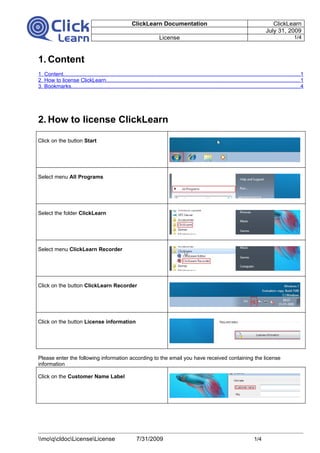
This documentation was auto-generated with ClickLearn. Watch the related video and documentation on http://www.clicklearn.dk This document shows how to manage the ClickLearn Licence

Recommended
Recommended
More Related Content
Recently uploaded
Recently uploaded (20)
Featured
Featured (20)
How To Manage The Clicklearn License
- 1. ClickLearn Documentation ClickLearn July 31, 2009 License 1/4 1. Content 1. Content.............................................................................................................................................................1 2. How to license ClickLearn.................................................................................................................................1 3. Bookmarks........................................................................................................................................................4 2. How to license ClickLearn Click on the button Start Select menu All Programs Select the folder ClickLearn Select menu ClickLearn Recorder Click on the button ClickLearn Recorder Click on the button License information Please enter the following information according to the email you have received containing the license information Click on the Customer Name Label moqcldocLicenseLicense 7/31/2009 1/4
- 2. ClickLearn Documentation ClickLearn July 31, 2009 License 2/4 Enter the provided customer name. Click on the Key Label Enter the provided license key. The license dialog will only allow you to click OK once the entered information is correct Click on the button OK You have now licensed ClickLearn moqcldocLicenseLicense 7/31/2009 2/4
- 3. ClickLearn Documentation ClickLearn July 31, 2009 License 3/4 moqcldocLicenseLicense 7/31/2009 3/4
- 4. ClickLearn Documentation ClickLearn July 31, 2009 License 4/4 3. Bookmarks Content.................................................................................................................................................................1 How to license ClickLearn.....................................................................................................................................1 Bookmarks............................................................................................................................................................4 moqcldocLicenseLicense 7/31/2009 4/4