




Mastering JDA
Space Automation Professional
Presented by Cantactix Solutions
Category and Space Management Consultants
Decrease planogram build times by 700%?
Cantactix Disclaimer
Statements in this presentation are the opinions of
Cantactix Solutions Inc. and Cantactix Solutions USA
Inc., not those of JDA Software. This presentation is a
production of Cantactix Solutions solely. JDA has not
endorsed or evaluated the opinions herein.
THIS IS NOT A JDA PRESENTATION.
Full Disclosure: Cantactix is a JDA Alliance Partner and
Authorized JDA Software Reseller.
Thank You Scott Adams!
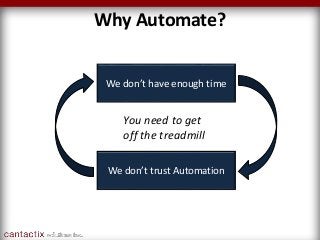
Why Automate?
We don’t have enough time
We don’t trust Automation
You need to get
off the treadmill
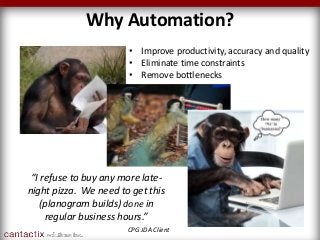
Why Automation?
“I refuse to buy any more late-
night pizza. We need to get this
(planogram builds) done in
regular business hours.”
CPG JDA Client
• Improve productivity, accuracy and quality
• Eliminate time constraints
• Remove bottlenecks
Why Automation?
• Limited resources
• Time constraints
• Quality control issues
• Stability concerns
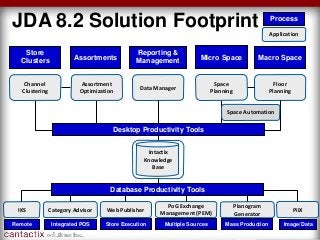
JDA 8.2 Solution Footprint Application
Process
Floor
Planning
Channel
Clustering
Data Manager
Reporting &
Management
Category Advisor
Planogram
Generator
Space Automation
Mass Production
Macro Space
Store
Clusters Assortments Micro Space
Desktop Productivity Tools
Web Publisher
Store ExecutionIntegrated POS
PoG Exchange
Management (PEM)
Multiple Sources
Assortment
Optimization
Space
Planning
IKS
Remote
PiiX
Image/Data
Database Productivity Tools
Intactix
Knowledge
Base
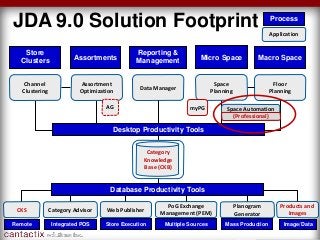
JDA 9.0 Solution Footprint
Floor
Planning
Channel
Clustering
Data Manager
Reporting &
Management
Category Advisor
Planogram
Generator
Space Automation
Mass Production
Macro Space
Store
Clusters Assortments Micro Space
Desktop Productivity Tools
Web Publisher
Store ExecutionIntegrated POS
PoG Exchange
Management (PEM)
Multiple Sources
Assortment
Optimization
Space
Planning
CKS
Remote
Products and
Images
Image/Data
Database Productivity Tools
Category
Knowledge
Base (CKB)
myPGAG
(Professional)
Application
Process
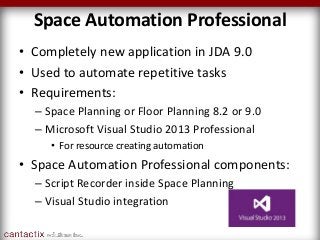
Space Automation Professional
• Completely new application in JDA 9.0
• Used to automate repetitive tasks
• Requirements:
– Space Planning or Floor Planning 8.2 or 9.0
– Microsoft Visual Studio 2013 Professional
• For resource creating automation
• Space Automation Professional components:
– Script Recorder inside Space Planning
– Visual Studio integration
Why is this Better?
• Improved Performance
• Non-proprietary
• Increased Flexibility
• Ease of Maintenance
• Simplified Distribution
What Do I Need To Know?
What Else?
• Installation is straightforward
• No special system requirements
• Licensing uses the new methodology
• Not a standalone application
– It functions INSIDE Visual Studio
• Visual Studio skill-set required
• Script developers must have Visual Studio
– users receive compiled script
We’re here to help
If this is you…
Speed Tests
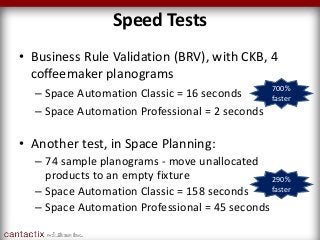
• Another test, in Space Planning:
– 74 sample planograms - move unallocated
products to an empty fixture
– Space Automation Classic = 158 seconds
– Space Automation Professional = 45 seconds
• Business Rule Validation (BRV), with CKB, 4
coffeemaker planograms
– Space Automation Classic = 16 seconds
– Space Automation Professional = 2 seconds
700%
faster
290%
faster
info@cantactix.com
1 (844) 226-8228
For help with Space Automation Professional migration,
Space Automation (Classic) script conversions, employee
training, upgrading your JDA CatMan suite, or for any
questions at all, please get in touch. We’re here to help.
info@cantactix.com
1 (844) 226-8228
Thanks for reading. For more content like this, sign up for
our newsletter at www.cantactix.com.

Discover JDA Space Automation Professional

  • 1.
    Mastering JDA Space AutomationProfessional Presented by Cantactix Solutions Category and Space Management Consultants Decrease planogram build times by 700%?
  • 2.
    Cantactix Disclaimer Statements inthis presentation are the opinions of Cantactix Solutions Inc. and Cantactix Solutions USA Inc., not those of JDA Software. This presentation is a production of Cantactix Solutions solely. JDA has not endorsed or evaluated the opinions herein. THIS IS NOT A JDA PRESENTATION. Full Disclosure: Cantactix is a JDA Alliance Partner and Authorized JDA Software Reseller.
  • 3.
  • 4.
    Why Automate? We don’thave enough time We don’t trust Automation You need to get off the treadmill
  • 5.
    Why Automation? “I refuseto buy any more late- night pizza. We need to get this (planogram builds) done in regular business hours.” CPG JDA Client • Improve productivity, accuracy and quality • Eliminate time constraints • Remove bottlenecks
  • 6.
    Why Automation? • Limitedresources • Time constraints • Quality control issues • Stability concerns
  • 7.
    JDA 8.2 SolutionFootprint Application Process Floor Planning Channel Clustering Data Manager Reporting & Management Category Advisor Planogram Generator Space Automation Mass Production Macro Space Store Clusters Assortments Micro Space Desktop Productivity Tools Web Publisher Store ExecutionIntegrated POS PoG Exchange Management (PEM) Multiple Sources Assortment Optimization Space Planning IKS Remote PiiX Image/Data Database Productivity Tools Intactix Knowledge Base
  • 8.
    JDA 9.0 SolutionFootprint Floor Planning Channel Clustering Data Manager Reporting & Management Category Advisor Planogram Generator Space Automation Mass Production Macro Space Store Clusters Assortments Micro Space Desktop Productivity Tools Web Publisher Store ExecutionIntegrated POS PoG Exchange Management (PEM) Multiple Sources Assortment Optimization Space Planning CKS Remote Products and Images Image/Data Database Productivity Tools Category Knowledge Base (CKB) myPGAG (Professional) Application Process
  • 9.
    Space Automation Professional •Completely new application in JDA 9.0 • Used to automate repetitive tasks • Requirements: – Space Planning or Floor Planning 8.2 or 9.0 – Microsoft Visual Studio 2013 Professional • For resource creating automation • Space Automation Professional components: – Script Recorder inside Space Planning – Visual Studio integration
  • 10.
    Why is thisBetter? • Improved Performance • Non-proprietary • Increased Flexibility • Ease of Maintenance • Simplified Distribution
  • 11.
    What Do INeed To Know?
  • 12.
    What Else? • Installationis straightforward • No special system requirements • Licensing uses the new methodology • Not a standalone application – It functions INSIDE Visual Studio • Visual Studio skill-set required • Script developers must have Visual Studio – users receive compiled script
  • 13.
    We’re here tohelp If this is you…
  • 14.
    Speed Tests • Anothertest, in Space Planning: – 74 sample planograms - move unallocated products to an empty fixture – Space Automation Classic = 158 seconds – Space Automation Professional = 45 seconds • Business Rule Validation (BRV), with CKB, 4 coffeemaker planograms – Space Automation Classic = 16 seconds – Space Automation Professional = 2 seconds 700% faster 290% faster
  • 15.
    info@cantactix.com 1 (844) 226-8228 Forhelp with Space Automation Professional migration, Space Automation (Classic) script conversions, employee training, upgrading your JDA CatMan suite, or for any questions at all, please get in touch. We’re here to help.
  • 16.
    info@cantactix.com 1 (844) 226-8228 Thanksfor reading. For more content like this, sign up for our newsletter at www.cantactix.com.