Mongoose: MongoDB object
modelling for Node.js

Speaker: Yuriy Bogomolov
Solution Engineer at Sitecore Ukraine
@YuriyBogomolov | fb.me/yuriy.bogomolov
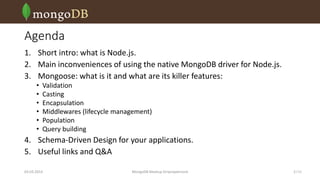
Agenda
1. Short intro: what is Node.js.
2. Main inconveniences of using the native MongoDB driver for Node.js.
3. Mongoose: what is it and what are its killer features:
•
•
•
•
•
•

Validation
Casting
Encapsulation
Middlewares (lifecycle management)
Population
Query building

4. Schema-Driven Design for your applications.
5. Useful links and Q&A
03.03.2014

MongoDB Meetup Dnipropetrovsk

2 /16
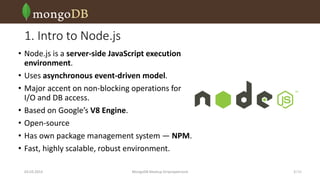
1. Intro to Node.js
• Node.js is a server-side JavaScript execution
environment.
• Uses asynchronous event-driven model.
• Major accent on non-blocking operations for
I/O and DB access.
• Based on Google’s V8 Engine.
• Open-source
• Has own package management system — NPM.
• Fast, highly scalable, robust environment.
03.03.2014

MongoDB Meetup Dnipropetrovsk

3 /16
2. Main inconveniences of native MongoDB driver
• No data validation
• No casting during inserts
• No encapsulation
• No references (joins)

03.03.2014

MongoDB Meetup Dnipropetrovsk

4 /16
3. What is Mongoose
• Object Data Modelling (ODM) for Node.js
• Officially supported by 10gen, Inc.
• Features:
•
•
•
•
•

Async and sync validation of models
Model casting
Object lifecycle management (middlewares)
Pseudo-joins!
Query builder

npm install mongoose

03.03.2014

MongoDB Meetup Dnipropetrovsk

5 /16
3. Mongoose setup
var mongoose = require('mongoose');
mongoose.connect('mongodb://localhost:27017/mycollection');
var Schema = mongoose.Schema;
var PostSchema = new Schema({
title: { type: String, required: true },
body: { type: String, required: true },
author: { type: ObjectId, required: true, ref: 'User' },
tags: [String],
date: { type: Date, default: Date.now }
});

Reference
Simplified declaration
Default value

mongoose.model('Post', PostSchema);

03.03.2014

Validation of presence

MongoDB Meetup Dnipropetrovsk

6 /16
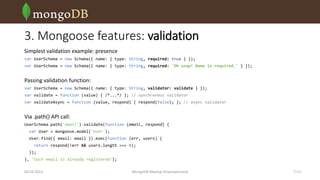
3. Mongoose features: validation
Simplest validation example: presence
var UserSchema = new Schema({ name: { type: String, required: true } });
var UserSchema = new Schema({ name: { type: String, required: 'Oh snap! Name is required.' } });

Passing validation function:
var UserSchema = new Schema({ name: { type: String, validator: validate } });
var validate = function (value) { /*...*/ }; // synchronous validator
var validateAsync = function (value, respond) { respond(false); }; // async validator

Via .path() API call:
UserSchema.path('email').validate(function (email, respond) {
var User = mongoose.model('User');
User.find({ email: email }).exec(function (err, users) {
return respond(!err && users.length === 0);
});
}, 'Such email is already registered');
03.03.2014

MongoDB Meetup Dnipropetrovsk

7 /16
3. Mongoose features: casting
• Each property is cast to its
mapped SchemaType in the
document, obtained by the query.
• Valid SchemaTypes are:
•
•
•
•
•
•
•
•

String
Number
Date
Buffer
Boolean
Mixed
ObjectId
Array

03.03.2014

var PostSchema = new Schema({
_id: ObjectId, // implicitly exists
title: { type: String, required: true },
body: { type: String, required: true },
author: { type: ObjectId, required: true, ref: 'User' },
tags: [String],
date: { type: Date, default: Date.now },
is_featured: { type: Boolean, default: false }
});

MongoDB Meetup Dnipropetrovsk

8 /16
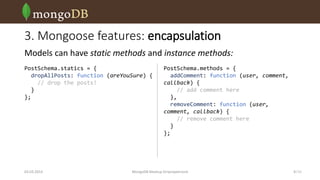
3. Mongoose features: encapsulation
Models can have static methods and instance methods:
PostSchema.statics = {
dropAllPosts: function (areYouSure) {
// drop the posts!
}
};

03.03.2014

PostSchema.methods = {
addComment: function (user, comment,
callback) {
// add comment here
},
removeComment: function (user,
comment, callback) {
// remove comment here
}
};

MongoDB Meetup Dnipropetrovsk

9 /16
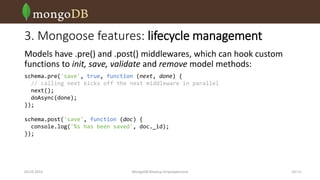
3. Mongoose features: lifecycle management
Models have .pre() and .post() middlewares, which can hook custom
functions to init, save, validate and remove model methods:
schema.pre('save', true, function (next, done) {
// calling next kicks off the next middleware in parallel
next();
doAsync(done);
});

schema.post('save', function (doc) {
console.log('%s has been saved', doc._id);
});

03.03.2014

MongoDB Meetup Dnipropetrovsk

10 /16
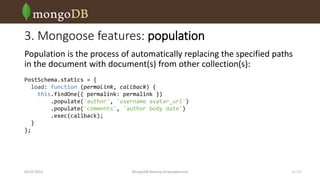
3. Mongoose features: population
Population is the process of automatically replacing the specified paths
in the document with document(s) from other collection(s):
PostSchema.statics = {
load: function (permalink, callback) {
this.findOne({ permalink: permalink })
.populate('author', 'username avatar_url')
.populate('comments', 'author body date')
.exec(callback);
}
};

03.03.2014

MongoDB Meetup Dnipropetrovsk

11 /16
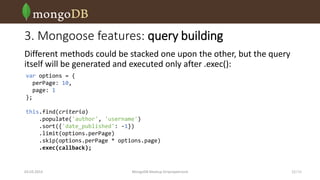
3. Mongoose features: query building
Different methods could be stacked one upon the other, but the query
itself will be generated and executed only after .exec():
var options = {
perPage: 10,
page: 1
};
this.find(criteria)
.populate('author', 'username')
.sort({'date_published': -1})
.limit(options.perPage)
.skip(options.perPage * options.page)
.exec(callback);

03.03.2014

MongoDB Meetup Dnipropetrovsk

12 /16
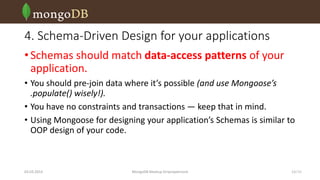
4. Schema-Driven Design for your applications
• Schemas should match data-access patterns of your
application.
• You should pre-join data where it’s possible (and use Mongoose’s
.populate() wisely!).
• You have no constraints and transactions — keep that in mind.
• Using Mongoose for designing your application’s Schemas is similar to
OOP design of your code.

03.03.2014

MongoDB Meetup Dnipropetrovsk

13 /16
Useful links
• Node.js GitHub repo: https://github.com/joyent/node
• Mongoose GitHub repo: https://github.com/learnboost/mongoose
• Mongoose API docs and tutorials: http://mongoosejs.com/
• MongoDB native Node.js driver docs:
http://mongodb.github.io/node-mongodb-native/

03.03.2014

MongoDB Meetup Dnipropetrovsk

14 /16
Any questions?

03.03.2014

MongoDB Meetup Dnipropetrovsk

15 /16
MongoDB Meetup Dnipropetrovsk

Mongoose: MongoDB object modelling for Node.js

  • 1.
    Mongoose: MongoDB object modellingfor Node.js Speaker: Yuriy Bogomolov Solution Engineer at Sitecore Ukraine @YuriyBogomolov | fb.me/yuriy.bogomolov
  • 2.
    Agenda 1. Short intro:what is Node.js. 2. Main inconveniences of using the native MongoDB driver for Node.js. 3. Mongoose: what is it and what are its killer features: • • • • • • Validation Casting Encapsulation Middlewares (lifecycle management) Population Query building 4. Schema-Driven Design for your applications. 5. Useful links and Q&A 03.03.2014 MongoDB Meetup Dnipropetrovsk 2 /16
  • 3.
    1. Intro toNode.js • Node.js is a server-side JavaScript execution environment. • Uses asynchronous event-driven model. • Major accent on non-blocking operations for I/O and DB access. • Based on Google’s V8 Engine. • Open-source • Has own package management system — NPM. • Fast, highly scalable, robust environment. 03.03.2014 MongoDB Meetup Dnipropetrovsk 3 /16
  • 4.
    2. Main inconveniencesof native MongoDB driver • No data validation • No casting during inserts • No encapsulation • No references (joins) 03.03.2014 MongoDB Meetup Dnipropetrovsk 4 /16
  • 5.
    3. What isMongoose • Object Data Modelling (ODM) for Node.js • Officially supported by 10gen, Inc. • Features: • • • • • Async and sync validation of models Model casting Object lifecycle management (middlewares) Pseudo-joins! Query builder npm install mongoose 03.03.2014 MongoDB Meetup Dnipropetrovsk 5 /16
  • 6.
    3. Mongoose setup varmongoose = require('mongoose'); mongoose.connect('mongodb://localhost:27017/mycollection'); var Schema = mongoose.Schema; var PostSchema = new Schema({ title: { type: String, required: true }, body: { type: String, required: true }, author: { type: ObjectId, required: true, ref: 'User' }, tags: [String], date: { type: Date, default: Date.now } }); Reference Simplified declaration Default value mongoose.model('Post', PostSchema); 03.03.2014 Validation of presence MongoDB Meetup Dnipropetrovsk 6 /16
  • 7.
    3. Mongoose features:validation Simplest validation example: presence var UserSchema = new Schema({ name: { type: String, required: true } }); var UserSchema = new Schema({ name: { type: String, required: 'Oh snap! Name is required.' } }); Passing validation function: var UserSchema = new Schema({ name: { type: String, validator: validate } }); var validate = function (value) { /*...*/ }; // synchronous validator var validateAsync = function (value, respond) { respond(false); }; // async validator Via .path() API call: UserSchema.path('email').validate(function (email, respond) { var User = mongoose.model('User'); User.find({ email: email }).exec(function (err, users) { return respond(!err && users.length === 0); }); }, 'Such email is already registered'); 03.03.2014 MongoDB Meetup Dnipropetrovsk 7 /16
  • 8.
    3. Mongoose features:casting • Each property is cast to its mapped SchemaType in the document, obtained by the query. • Valid SchemaTypes are: • • • • • • • • String Number Date Buffer Boolean Mixed ObjectId Array 03.03.2014 var PostSchema = new Schema({ _id: ObjectId, // implicitly exists title: { type: String, required: true }, body: { type: String, required: true }, author: { type: ObjectId, required: true, ref: 'User' }, tags: [String], date: { type: Date, default: Date.now }, is_featured: { type: Boolean, default: false } }); MongoDB Meetup Dnipropetrovsk 8 /16
  • 9.
    3. Mongoose features:encapsulation Models can have static methods and instance methods: PostSchema.statics = { dropAllPosts: function (areYouSure) { // drop the posts! } }; 03.03.2014 PostSchema.methods = { addComment: function (user, comment, callback) { // add comment here }, removeComment: function (user, comment, callback) { // remove comment here } }; MongoDB Meetup Dnipropetrovsk 9 /16
  • 10.
    3. Mongoose features:lifecycle management Models have .pre() and .post() middlewares, which can hook custom functions to init, save, validate and remove model methods: schema.pre('save', true, function (next, done) { // calling next kicks off the next middleware in parallel next(); doAsync(done); }); schema.post('save', function (doc) { console.log('%s has been saved', doc._id); }); 03.03.2014 MongoDB Meetup Dnipropetrovsk 10 /16
  • 11.
    3. Mongoose features:population Population is the process of automatically replacing the specified paths in the document with document(s) from other collection(s): PostSchema.statics = { load: function (permalink, callback) { this.findOne({ permalink: permalink }) .populate('author', 'username avatar_url') .populate('comments', 'author body date') .exec(callback); } }; 03.03.2014 MongoDB Meetup Dnipropetrovsk 11 /16
  • 12.
    3. Mongoose features:query building Different methods could be stacked one upon the other, but the query itself will be generated and executed only after .exec(): var options = { perPage: 10, page: 1 }; this.find(criteria) .populate('author', 'username') .sort({'date_published': -1}) .limit(options.perPage) .skip(options.perPage * options.page) .exec(callback); 03.03.2014 MongoDB Meetup Dnipropetrovsk 12 /16
  • 13.
    4. Schema-Driven Designfor your applications • Schemas should match data-access patterns of your application. • You should pre-join data where it’s possible (and use Mongoose’s .populate() wisely!). • You have no constraints and transactions — keep that in mind. • Using Mongoose for designing your application’s Schemas is similar to OOP design of your code. 03.03.2014 MongoDB Meetup Dnipropetrovsk 13 /16
  • 14.
    Useful links • Node.jsGitHub repo: https://github.com/joyent/node • Mongoose GitHub repo: https://github.com/learnboost/mongoose • Mongoose API docs and tutorials: http://mongoosejs.com/ • MongoDB native Node.js driver docs: http://mongodb.github.io/node-mongodb-native/ 03.03.2014 MongoDB Meetup Dnipropetrovsk 14 /16
  • 15.
  • 16.