Download free for 30 days
Sign in
Upload
Language (EN)
Support
Business
Mobile
Social Media
Marketing
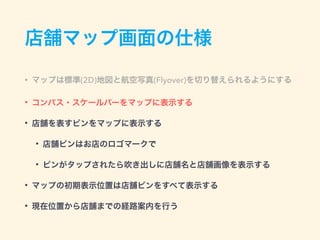
Technology
Art & Photos
Career
Design
Education
Presentations & Public Speaking
Government & Nonprofit
Healthcare
Internet
Law
Leadership & Management
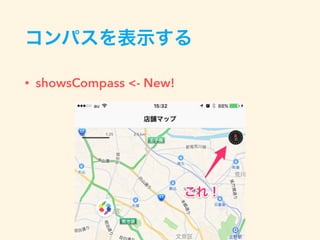
Automotive
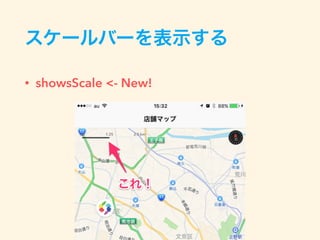
Engineering
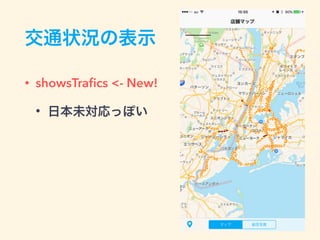
Software
Recruiting & HR
Retail
Sales
Services
Science
Small Business & Entrepreneurship
Food
Environment
Economy & Finance
Data & Analytics
Investor Relations
Sports
Spiritual
News & Politics
Travel
Self Improvement
Real Estate
Entertainment & Humor
Health & Medicine
Devices & Hardware
Lifestyle
Change Language
Language
English
Español
Português
Français
Deutsche
Cancel
Save
EN
Uploaded by
Yuki Hirai
3,476 views
Mapkitframework io9week
iOS 9 週連続 Boot Camp 5週目で発表した資料です。
Mobile
◦
Read more
2
Save
Share
Embed
Embed presentation
Download
Download to read offline
1
/ 48
2
/ 48
3
/ 48
4
/ 48
5
/ 48
6
/ 48
7
/ 48
8
/ 48
9
/ 48
10
/ 48
11
/ 48
12
/ 48
13
/ 48
14
/ 48
15
/ 48
16
/ 48
17
/ 48
18
/ 48
19
/ 48
20
/ 48
21
/ 48
22
/ 48
23
/ 48
24
/ 48
25
/ 48
26
/ 48
27
/ 48
28
/ 48
29
/ 48
30
/ 48
31
/ 48
32
/ 48
33
/ 48
34
/ 48
35
/ 48
36
/ 48
37
/ 48
38
/ 48
39
/ 48
40
/ 48
41
/ 48
42
/ 48
43
/ 48
44
/ 48
45
/ 48
46
/ 48
47
/ 48
48
/ 48
More Related Content
PDF
GTMF 2015: Autodesk Maya;大人気!カスタム・グラフエディタと便利ツールをPythonで!! | ダイキン工業株式会社
by
Game Tools & Middleware Forum
PDF
Xcodeショートカット
by
Keita Otsuka
PDF
watchOS 2でゲーム作ってみた話
by
Kohki Miki
KEY
初めての単体テスト
by
Basuke Suzuki
PDF
Xcodeを便利に使って爆速開発する #yxcm
by
Hiramatsu Ryosuke
ODP
Unity ネイティブプラグインの作成について
by
Tatsuhiko Yamamura
PDF
Movable Type Data API連携!店舗情報を地図に表示させよう!
by
Kanako Kobayashi
PDF
20120125 titanium study
by
Hiroshi Oyamada
GTMF 2015: Autodesk Maya;大人気!カスタム・グラフエディタと便利ツールをPythonで!! | ダイキン工業株式会社
by
Game Tools & Middleware Forum
Xcodeショートカット
by
Keita Otsuka
watchOS 2でゲーム作ってみた話
by
Kohki Miki
初めての単体テスト
by
Basuke Suzuki
Xcodeを便利に使って爆速開発する #yxcm
by
Hiramatsu Ryosuke
Unity ネイティブプラグインの作成について
by
Tatsuhiko Yamamura
Movable Type Data API連携!店舗情報を地図に表示させよう!
by
Kanako Kobayashi
20120125 titanium study
by
Hiroshi Oyamada
Featured
PDF
2024 Trend Updates: What Really Works In SEO & Content Marketing
by
Search Engine Journal
PDF
Storytelling For The Web: Integrate Storytelling in your Design Process
by
Chiara Aliotta
PDF
Artificial Intelligence, Data and Competition – SCHREPEL – June 2024 OECD dis...
by
OECD Directorate for Financial and Enterprise Affairs
PDF
How to Leverage AI to Boost Employee Wellness - Lydia Di Francesco - SocialHR...
by
SocialHRCamp
PDF
2024 State of Marketing Report – by Hubspot
by
Marius Sescu
PDF
Everything You Need To Know About ChatGPT
by
Expeed Software
PDF
Product Design Trends in 2024 | Teenage Engineerings
by
Pixeldarts
PDF
How Race, Age and Gender Shape Attitudes Towards Mental Health
by
ThinkNow
PDF
AI Trends in Creative Operations 2024 by Artwork Flow.pdf
by
marketingartwork
PDF
Skeleton Culture Code
by
Skeleton Technologies
PDF
PEPSICO Presentation to CAGNY Conference Feb 2024
by
Neil Kimberley
PDF
Content Methodology: A Best Practices Report (Webinar)
by
contently
PPTX
How to Prepare For a Successful Job Search for 2024
by
Albert Qian
PDF
Social Media Marketing Trends 2024 // The Global Indie Insights
by
Kurio // The Social Media Age(ncy)
PDF
Trends In Paid Search: Navigating The Digital Landscape In 2024
by
Search Engine Journal
PDF
5 Public speaking tips from TED - Visualized summary
by
SpeakerHub
PDF
ChatGPT and the Future of Work - Clark Boyd
by
Clark Boyd
PDF
Getting into the tech field. what next
by
Tessa Mero
PDF
Google's Just Not That Into You: Understanding Core Updates & Search Intent
by
Lily Ray
PDF
How to have difficult conversations
by
Rajiv Jayarajah, MAppComm, ACC
2024 Trend Updates: What Really Works In SEO & Content Marketing
by
Search Engine Journal
Storytelling For The Web: Integrate Storytelling in your Design Process
by
Chiara Aliotta
Artificial Intelligence, Data and Competition – SCHREPEL – June 2024 OECD dis...
by
OECD Directorate for Financial and Enterprise Affairs
How to Leverage AI to Boost Employee Wellness - Lydia Di Francesco - SocialHR...
by
SocialHRCamp
2024 State of Marketing Report – by Hubspot
by
Marius Sescu
Everything You Need To Know About ChatGPT
by
Expeed Software
Product Design Trends in 2024 | Teenage Engineerings
by
Pixeldarts
How Race, Age and Gender Shape Attitudes Towards Mental Health
by
ThinkNow
AI Trends in Creative Operations 2024 by Artwork Flow.pdf
by
marketingartwork
Skeleton Culture Code
by
Skeleton Technologies
PEPSICO Presentation to CAGNY Conference Feb 2024
by
Neil Kimberley
Content Methodology: A Best Practices Report (Webinar)
by
contently
How to Prepare For a Successful Job Search for 2024
by
Albert Qian
Social Media Marketing Trends 2024 // The Global Indie Insights
by
Kurio // The Social Media Age(ncy)
Trends In Paid Search: Navigating The Digital Landscape In 2024
by
Search Engine Journal
5 Public speaking tips from TED - Visualized summary
by
SpeakerHub
ChatGPT and the Future of Work - Clark Boyd
by
Clark Boyd
Getting into the tech field. what next
by
Tessa Mero
Google's Just Not That Into You: Understanding Core Updates & Search Intent
by
Lily Ray
How to have difficult conversations
by
Rajiv Jayarajah, MAppComm, ACC
Mapkitframework io9week
1.
MapKit Framework!! iOS 9
週連続 Bootcamp 5週目 Hirai Yuki @ Classmethod, Inc.
2.
自己紹介 • 平井 祐樹
@ クラスメソッド株式会社 • iOSアプリエンジニア • 最近はRuby on Rails • http://dev.classmethod.jp/author/hirai-yuki/ • https://github.com/hirai-yuki
3.
iOS 9 で追加された MapKit
の新機能
4.
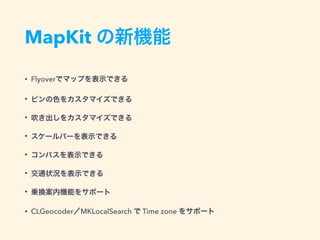
MapKit の新機能 • Flyoverでマップを表示できる •
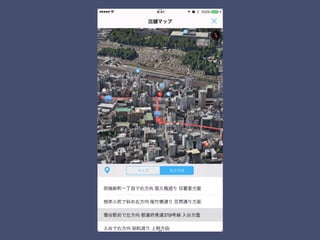
ピンの色をカスタマイズできる • 吹き出しをカスタマイズできる • スケールバーを表示できる • コンパスを表示できる • 交通状況を表示できる • 乗換案内機能をサポート • CLGeocoder/MKLocalSearch で Time zone をサポート
5.
地味だー
6.
MapKit Framework の 使い方について
iOS 9 での 変更点を(少し)踏まえて 解説します!
7.
受託あるある
8.
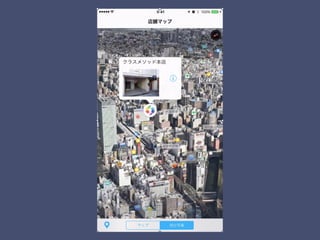
店舗マップ画面が欲しい!
9.
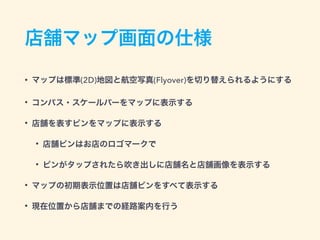
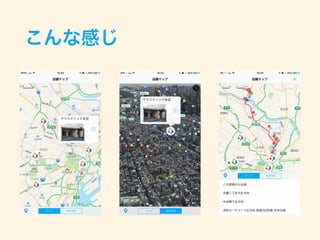
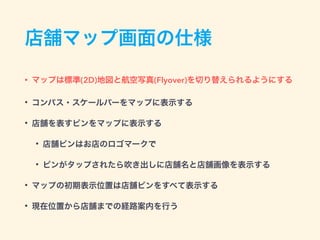
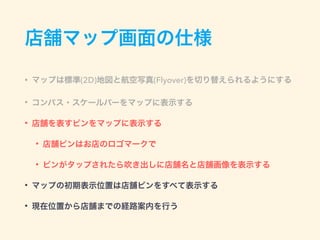
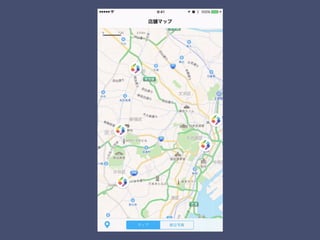
店舗マップ画面の仕様 • マップは標準(2D)地図と航空写真(Flyover)を切り替えられるようにする • コンパス・スケールバーをマップに表示する •
店舗を表すピンをマップに表示する • 店舗ピンはお店のロゴマークで • ピンがタップされたら吹き出しに店舗名と店舗画像を表示する • マップの初期表示位置は店舗ピンをすべて表示する • 現在位置から店舗までの経路案内を行う
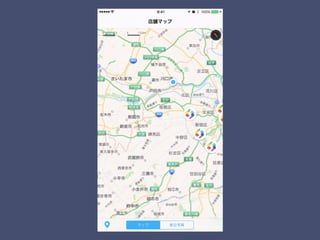
10.
こんな感じ
11.
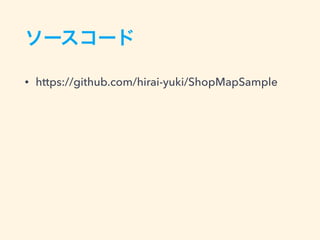
ソースコード • https://github.com/hirai-yuki/ShopMapSample
12.
店舗マップ画面の仕様 • マップは標準(2D)地図と航空写真(Flyover)を切り替えられるようにする • コンパス・スケールバーをマップに表示する •
店舗を表すピンをマップに表示する • 店舗ピンはお店のロゴマークで • ピンがタップされたら吹き出しに店舗名と店舗画像を表示する • マップの初期表示位置は店舗ピンをすべて表示する • 現在位置から店舗までの経路案内を行う
13.
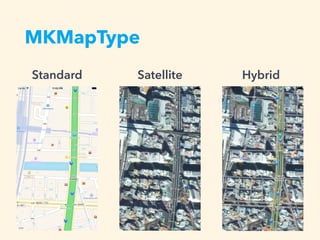
MKMapType Satellite HybridStandard
14.
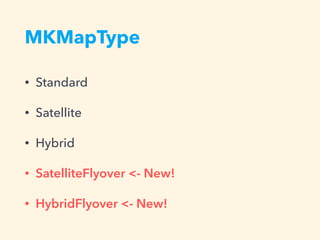
MKMapType • Standard • Satellite •
Hybrid • SatelliteFlyover <- New! • HybridFlyover <- New!
15.
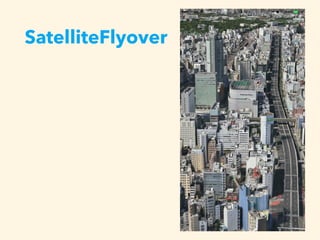
SatelliteFlyover
16.
HybridFlyover • ラベルも表記
17.
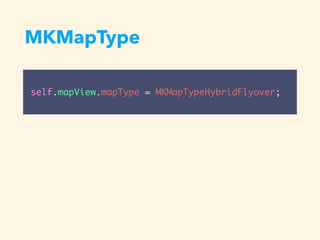
MKMapType self.mapView.mapType = MKMapTypeHybridFlyover;
19.
店舗マップ画面の仕様 • マップは標準(2D)地図と航空写真(Flyover)を切り替えられるようにする • コンパス・スケールバーをマップに表示する •
店舗を表すピンをマップに表示する • 店舗ピンはお店のロゴマークで • ピンがタップされたら吹き出しに店舗名と店舗画像を表示する • マップの初期表示位置は店舗ピンをすべて表示する • 現在位置から店舗までの経路案内を行う
20.
コンパスを表示する • showsCompass <-
New!
21.
スケールバーを表示する • showsScale <-
New!
22.
交通状況の表示 • showsTrafics <-
New! • 日本未対応っぽい
23.
店舗マップ画面の仕様 • マップは標準(2D)地図と航空写真(Flyover)を切り替えられるようにする • コンパス・スケールバーをマップに表示する •
店舗を表すピンをマップに表示する • 店舗ピンはお店のロゴマークで • ピンがタップされたら吹き出しに店舗名と店舗画像を表示する • マップの初期表示位置は店舗ピンをすべて表示する • 現在位置から店舗までの経路案内を行う
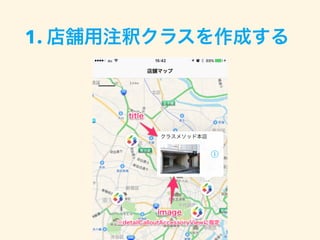
25.
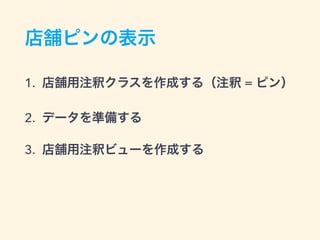
店舗ピンの表示 1. 店舗用注釈クラスを作成する(注釈 =
ピン) 2. データを準備する 3. 店舗用注釈ビューを作成する
26.
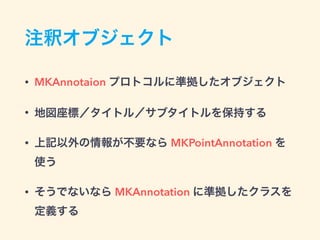
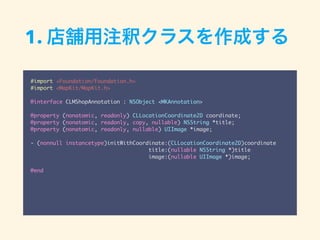
注釈オブジェクト • MKAnnotaion プロトコルに準拠したオブジェクト •
地図座標/タイトル/サブタイトルを保持する • 上記以外の情報が不要なら MKPointAnnotation を 使う • そうでないなら MKAnnotation に準拠したクラスを 定義する
27.
#import <Foundation/Foundation.h> #import <MapKit/MapKit.h> @interface
CLMShopAnnotation : NSObject <MKAnnotation> @property (nonatomic, readonly) CLLocationCoordinate2D coordinate; @property (nonatomic, readonly, copy, nullable) NSString *title; @property (nonatomic, readonly, nullable) UIImage *image; - (nonnull instancetype)initWithCoordinate:(CLLocationCoordinate2D)coordinate title:(nullable NSString *)title image:(nullable UIImage *)image; @end 1. 店舗用注釈クラスを作成する
28.
1. 店舗用注釈クラスを作成する
29.
2. データを準備する // MKShopAnnotationインスタンスの配列を生成 NSArray
*shops = @[ [[CLMShopAnnotation alloc] initWithCoordinate:CLLocationCoordinate2DMake(<緯度>, <経度>) title:@"クラスメソッド本店" image:[UIImage imageNamed:@"cm"]], ・・・ ]; // MKShopAnnotationインスタンスの配列をマップビューに追加 [self.mapView addAnnotations:shops];
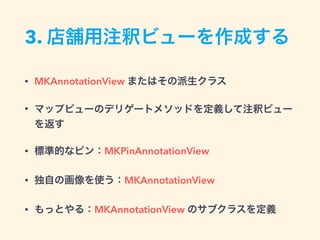
30.
3. 店舗用注釈ビューを作成する • MKAnnotationView
またはその派生クラス • マップビューのデリゲートメソッドを定義して注釈ビュー を返す • 標準的なピン:MKPinAnnotationView • 独自の画像を使う:MKAnnotationView • もっとやる:MKAnnotationView のサブクラスを定義
31.
- (MKAnnotationView *)mapView:(MKMapView
*)mapView viewForAnnotation:(id <MKAnnotation>)annotation { if ([annotation isKindOfClass:[MKUserLocation class]]) { return nil; } else if ([annotation isKindOfClass:[CLMShopAnnotation class]]) { CLMShopAnnotation *shopAnnotation = (CLMShopAnnotation *)annotation; MKAnnotationView *annotationView = [mapView dequeueReusableAnnotationViewWithIdentifier:@"ShopAnnotation"]; if (annotationView) { annotationView.annotation = shopAnnotation; } else { annotationView = [[MKAnnotationView alloc] initWithAnnotation:shopAnnotation reuseIdentifier:@"ShopAnnotation"]; } annotationView.canShowCallout = YES; annotationView.image = [UIImage imageNamed:@"shop_pin"]; UIButton *rightButton = [UIButton buttonWithType:UIButtonTypeDetailDisclosure]; annotationView.rightCalloutAccessoryView = rightButton; annotationView.detailCalloutAccessoryView = [[UIImageView alloc] initWithImage:shopAnnotation.image]; return annotationView; } return nil; } 3. 店舗用注釈ビューを作成する detailCalloutAccessoryView <- New!
32.
店舗マップ画面の仕様 • マップは標準(2D)地図と航空写真(Flyover)を切り替えられるようにする • コンパス・スケールバーをマップに表示する店舗を表すピンをマップに 表示する •
店舗ピンはお店のロゴマークで • ピンがタップされたら吹き出しに店舗名と店舗画像を表示する • マップの初期表示位置は店舗ピンをすべて表示する • 現在位置から店舗までの経路案内を行う
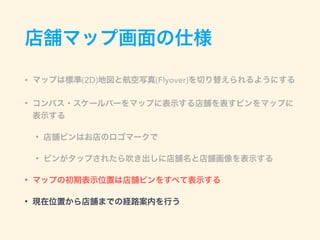
33.
初期表示位置を指定する • - showAnnotations:animate:
を使用 • 引数で指定したピンがすべて表示されるよ う表示位置と縮尺を設定してくれる [self.mapView showAnnotations:self.shops animated:YES];
35.
regionを指定する場合 • MKCoordinateRegion構造体で表される • 縮尺の指定に慣れが必要
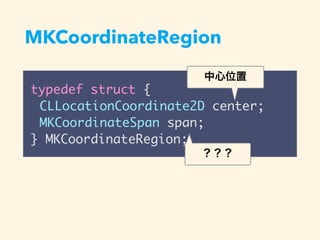
36.
MKCoordinateRegion typedef struct { CLLocationCoordinate2D
center; MKCoordinateSpan span; } MKCoordinateRegion; 中心位置 ???
37.
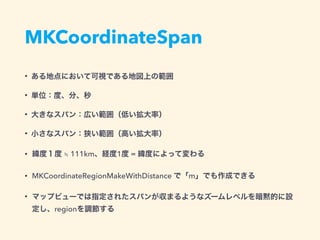
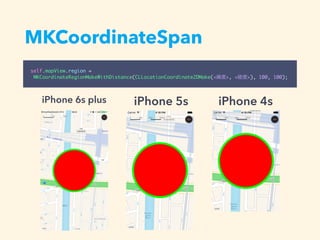
MKCoordinateSpan • ある地点において可視である地図上の範囲 • 単位:度、分、秒 •
大きなスパン:広い範囲(低い拡大率) • 小さなスパン:狭い範囲(高い拡大率) • 緯度1度 ≒ 111km、経度1度 = 緯度によって変わる • MKCoordinateRegionMakeWithDistance で「m」でも作成できる • マップビューでは指定されたスパンが収まるようなズームレベルを暗黙的に設 定し、regionを調節する
38.
MKCoordinateSpan self.mapView.region = MKCoordinateRegionMakeWithDistance(CLLocationCoordinate2DMake(<緯度>, <経度>),
100, 100); iPhone 6s plus iPhone 5s iPhone 4s
39.
店舗マップ画面の仕様 • マップは標準(2D)地図と航空写真(Flyover)を切り替えられるようにする • コンパス・スケールバーをマップに表示する •
店舗を表すピンをマップに表示する • 店舗ピンはお店のロゴマークで • ピンがタップされたら吹き出しに店舗名と店舗画像を表示する • マップの初期表示位置は店舗ピンをすべて表示する • 現在位置から店舗までの経路案内を行う
40.
経路案内 • 2地点間の経路探索にMKDirectionsを使用 • 得られた経路をマップに描画
41.
MKDirectionsによる経路探索 • 出発地(現在地)と目的地のMKMapItemイン スタンスを生成 MKMapItem *source
= [MKMapItem mapItemForCurrentLocation]; MKPlacemark *placemark = [[MKPlacemark alloc] initWithCoordinate:annotation.coordinate addressDictionary:nil]; MKMapItem *destination = [[MKMapItem alloc] initWithPlacemark:placemark];
42.
MKDirectionsによる経路探索 • 出発地と目的地のMKMapItemインスタンスを用 いてMKDirectionsRequestインスタンスを生成 MKDirectionsRequest *request
= [MKDirectionsRequest new]; request.transportType = MKDirectionsTransportTypeAutomobile; request.source = source; request.destination = destination;
43.
MKDirectionsによる経路探索 • 作成したMKDirectionsRequestインスタンスを引数にセットして MKDirectionsインスタンスを生成 • -
calculateDirectionsWithCompletionHandler:メソッドを実行 MKDirections *directions = [[MKDirections alloc] initWithRequest:request]; [directions calculateDirectionsWithCompletionHandler:^(MKDirectionsResponse *response, NSError *error) { ・・・ }];
44.
経路の描画 • MKRouteのpolylineプロパティ MKDirections *directions
= [[MKDirections alloc] initWithRequest:request]; [directions calculateDirectionsWithCompletionHandler:^(MKDirectionsResponse *response, NSError *error) { ・・・ [self.mapView addOverlay:route.polyline level:MKOverlayLevelAboveRoads]; ・・・ }]; - (MKOverlayRenderer *)mapView:(MKMapView *)mapView rendererForOverlay:(id <MKOverlay>)overlay { if ([overlay isKindOfClass:[MKPolyline class]]) { MKPolyline *polyline = overlay; MKPolylineRenderer *renderer = [[MKPolylineRenderer alloc] initWithPolyline:polyline]; renderer.lineWidth = 3.0; renderer.strokeColor = [UIColor colorWithRed:255/255.0 green:81/255.0 blue:81/255.0 alpha:1.0]; return renderer; } return nil; }
46.
まとめ • Flyoverはおもしろそう! • 早く日本も乗換案内と交通状況を対応してほしい
47.
References • 位置情報とマッププログラミングガイド • https://developer.apple.com/jp/documentation/ LocationAwarenessPG.pdf •
AlohaYos/LocalSearch • https://github.com/AlohaYos/LocalSearch • 地図ライブラリ • http://www.asahi-net.or.jp/~YY8A-IMI/20040913/ipad/ map.htm
48.
ご清聴ありがとうございました
Download








![2. データを準備する
// MKShopAnnotationインスタンスの配列を生成
NSArray *shops = @[
[[CLMShopAnnotation alloc] initWithCoordinate:CLLocationCoordinate2DMake(<緯度>, <経度>)
title:@"クラスメソッド本店"
image:[UIImage imageNamed:@"cm"]],
・・・
];
// MKShopAnnotationインスタンスの配列をマップビューに追加
[self.mapView addAnnotations:shops];](https://image.slidesharecdn.com/mapkitframeworkio9week-151029062703-lva1-app6891/85/Mapkitframework-io9week-29-320.jpg)
![- (MKAnnotationView *)mapView:(MKMapView *)mapView
viewForAnnotation:(id <MKAnnotation>)annotation {
if ([annotation isKindOfClass:[MKUserLocation class]]) {
return nil;
} else if ([annotation isKindOfClass:[CLMShopAnnotation class]]) {
CLMShopAnnotation *shopAnnotation = (CLMShopAnnotation *)annotation;
MKAnnotationView *annotationView =
[mapView dequeueReusableAnnotationViewWithIdentifier:@"ShopAnnotation"];
if (annotationView) {
annotationView.annotation = shopAnnotation;
} else {
annotationView = [[MKAnnotationView alloc] initWithAnnotation:shopAnnotation
reuseIdentifier:@"ShopAnnotation"];
}
annotationView.canShowCallout = YES;
annotationView.image = [UIImage imageNamed:@"shop_pin"];
UIButton *rightButton = [UIButton buttonWithType:UIButtonTypeDetailDisclosure];
annotationView.rightCalloutAccessoryView = rightButton;
annotationView.detailCalloutAccessoryView =
[[UIImageView alloc] initWithImage:shopAnnotation.image];
return annotationView;
}
return nil;
}
3. 店舗用注釈ビューを作成する
detailCalloutAccessoryView <- New!](https://image.slidesharecdn.com/mapkitframeworkio9week-151029062703-lva1-app6891/85/Mapkitframework-io9week-31-320.jpg)
![初期表示位置を指定する
• - showAnnotations:animate: を使用
• 引数で指定したピンがすべて表示されるよ
う表示位置と縮尺を設定してくれる
[self.mapView showAnnotations:self.shops animated:YES];](https://image.slidesharecdn.com/mapkitframeworkio9week-151029062703-lva1-app6891/85/Mapkitframework-io9week-33-320.jpg)
![MKDirectionsによる経路探索
• 出発地(現在地)と目的地のMKMapItemイン
スタンスを生成
MKMapItem *source = [MKMapItem mapItemForCurrentLocation];
MKPlacemark *placemark = [[MKPlacemark alloc]
initWithCoordinate:annotation.coordinate
addressDictionary:nil];
MKMapItem *destination = [[MKMapItem alloc] initWithPlacemark:placemark];](https://image.slidesharecdn.com/mapkitframeworkio9week-151029062703-lva1-app6891/85/Mapkitframework-io9week-41-320.jpg)
![MKDirectionsによる経路探索
• 出発地と目的地のMKMapItemインスタンスを用
いてMKDirectionsRequestインスタンスを生成
MKDirectionsRequest *request = [MKDirectionsRequest new];
request.transportType = MKDirectionsTransportTypeAutomobile;
request.source = source;
request.destination = destination;](https://image.slidesharecdn.com/mapkitframeworkio9week-151029062703-lva1-app6891/85/Mapkitframework-io9week-42-320.jpg)
![MKDirectionsによる経路探索
• 作成したMKDirectionsRequestインスタンスを引数にセットして
MKDirectionsインスタンスを生成
• - calculateDirectionsWithCompletionHandler:メソッドを実行
MKDirections *directions = [[MKDirections alloc] initWithRequest:request];
[directions calculateDirectionsWithCompletionHandler:^(MKDirectionsResponse
*response, NSError *error) {
・・・
}];](https://image.slidesharecdn.com/mapkitframeworkio9week-151029062703-lva1-app6891/85/Mapkitframework-io9week-43-320.jpg)
![経路の描画
• MKRouteのpolylineプロパティ
MKDirections *directions = [[MKDirections alloc] initWithRequest:request];
[directions calculateDirectionsWithCompletionHandler:^(MKDirectionsResponse *response, NSError
*error) {
・・・
[self.mapView addOverlay:route.polyline level:MKOverlayLevelAboveRoads];
・・・
}];
- (MKOverlayRenderer *)mapView:(MKMapView *)mapView rendererForOverlay:(id <MKOverlay>)overlay {
if ([overlay isKindOfClass:[MKPolyline class]]) {
MKPolyline *polyline = overlay;
MKPolylineRenderer *renderer = [[MKPolylineRenderer alloc] initWithPolyline:polyline];
renderer.lineWidth = 3.0;
renderer.strokeColor = [UIColor colorWithRed:255/255.0 green:81/255.0 blue:81/255.0
alpha:1.0];
return renderer;
}
return nil;
}](https://image.slidesharecdn.com/mapkitframeworkio9week-151029062703-lva1-app6891/85/Mapkitframework-io9week-44-320.jpg)