Make Porting Custom SwiftUI
Elements Easy With Swift Packages
by: Vui Nguyen
@sun
fi
shgurl
linktr.ee/sun
fi
shgurl
Our Problem / Challenge
I want all my mobile apps to have the same branding / theme -
they currently do not!
Reuse design elements easily and e
ffi
ciently
Sun
fi
sh Empire is named after an actual
fi
sh, called the sun
fi
sh!
linktr.ee/sun
fi
shgurl
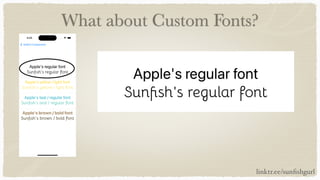
What about Custom Fonts?
linktr.ee/sun
fi
shgurl
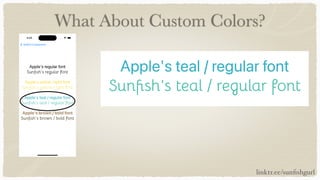
What About Custom Colors?
linktr.ee/sun
fi
shgurl
What’s One Possible Solution?
My talk!
Are you excited yet? Okay, let’s dive in 🤿
linktr.ee/sun
fi
shgurl
Overview
Introduce problem
Introduce myself
Demo solution
Swift Package and Project Setup
Custom Fonts: Applied to Text
Custom Colors: Applied to Text
Custom Colors: Applied to Shapes
Resources
linktr.ee/sun
fi
shgurl
Overview
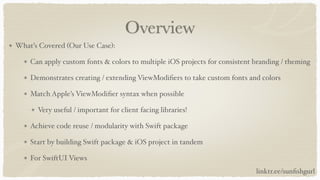
What’s Covered (Our Use Case):
Can apply custom fonts & colors to multiple iOS projects for consistent branding / theming
Demonstrates creating / extending ViewModi
fi
ers to take custom fonts and colors
Match Apple’s ViewModi
fi
er syntax when possible
Very useful / important for client facing libraries!
Achieve code reuse / modularity with Swift package
Start by building Swift package & iOS project in tandem
For SwiftUI Views
linktr.ee/sun
fi
shgurl
Overview
What’s Not Covered:
Solution for UIKit
Deep dive into creating view modi
fi
ers
Building custom components (buttons, controls, etc)
Accessibility in design - links to resources later
Best design practices
Pulling local Swift package into standalone repo
linktr.ee/sun
fi
shgurl
Hello! 👋
I’m Vui Nguyen
Long time software engineer (20+ years) 🤯
10+ years as mobile developer, cross platform & native iOS
Like to share solutions to problems I’ve solved in the past
Two truths and a lie (answer revealed at end of talk!):
I’ve caught a Northern Pike (
fi
sh)
I’ve caught a Kokanee Salmon (
fi
sh)
I’ve traveled to Beijing, China for an IoT Hackathon
linktr.ee/sun
fi
shgurl
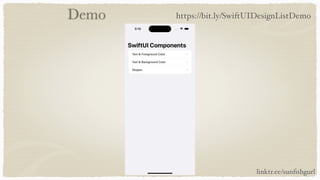
Demo
linktr.ee/sun
fi
shgurl
https://bit.ly/SwiftUIDesignListDemo
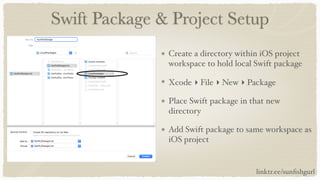
Swift Package & Project Setup
Create a directory within iOS project
workspace to hold local Swift package
Xcode ▸ File ▸ New ▸ Package
Place Swift package in that new
directory
Add Swift package to same workspace as
iOS project
linktr.ee/sun
fi
shgurl
Swift Package & Project Setup
linktr.ee/sun
fi
shgurl
Add Swift package to frameworks
Swift Package & Project Setup
linktr.ee/sun
fi
shgurl
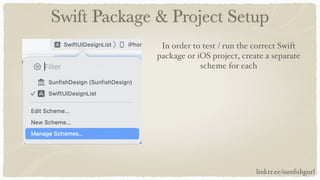
In order to test / run the correct Swift
package or iOS project, create a separate
scheme for each
Swift Package & Project Setup
linktr.ee/sun
fi
shgurl
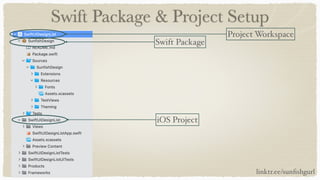
Project Workspace
Swift Package
iOS Project
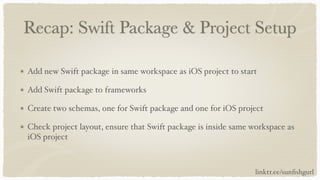
Recap: Swift Package & Project Setup
Add new Swift package in same workspace as iOS project to start
Add Swift package to frameworks
Create two schemas, one for Swift package and one for iOS project
Check project layout, ensure that Swift package is inside same workspace as
iOS project
linktr.ee/sun
fi
shgurl
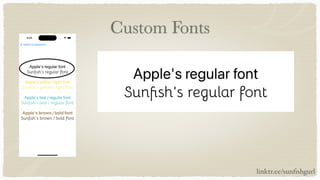
Custom Fonts: Applied to Text
Custom Fonts
linktr.ee/sun
fi
shgurl
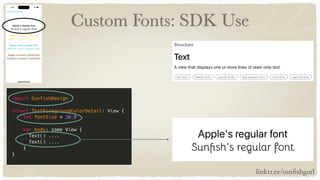
Custom Fonts: SDK Use
linktr.ee/sun
fi
shgurl
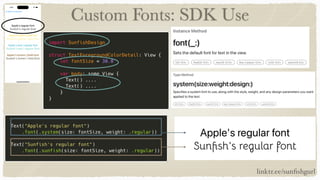
Custom Fonts: SDK Use
linktr.ee/sun
fi
shgurl
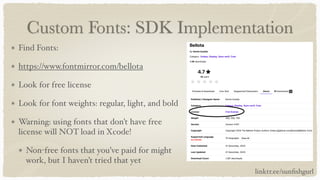
Custom Fonts: SDK Implementation
Find Fonts:
https://www.fontmirror.com/bellota
Look for free license
Look for font weights: regular, light, and bold
Warning: using fonts that don’t have free
license will NOT load in Xcode!
Non-free fonts that you’ve paid for might
work, but I haven’t tried that yet
linktr.ee/sun
fi
shgurl
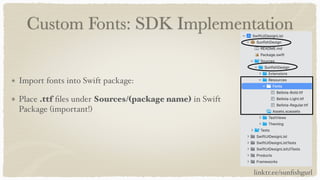
Custom Fonts: SDK Implementation
Import fonts into Swift package:
Place .ttf
fi
les under Sources/(package name) in Swift
Package (important!)
linktr.ee/sun
fi
shgurl
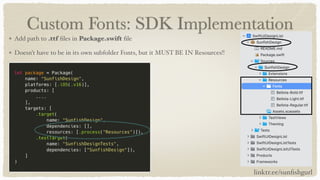
Custom Fonts: SDK Implementation
Add path to .ttf
fi
les in Package.swift
fi
le
Doesn’t have to be in its own subfolder Fonts, but it MUST BE IN Resources!!
linktr.ee/sun
fi
shgurl
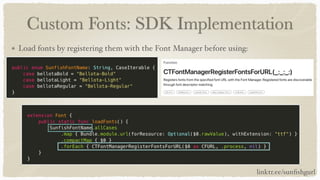
Custom Fonts: SDK Implementation
Load fonts by registering them with the Font Manager before using:
linktr.ee/sun
fi
shgurl
Custom Fonts: SDK Implementation
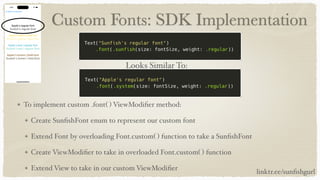
To implement custom .font( ) ViewModi
fi
er method:
Create Sun
fi
shFont enum to represent our custom font
Extend Font by overloading Font.custom( ) function to take a Sun
fi
shFont
Create ViewModi
fi
er to take in overloaded Font.custom( ) function
Extend View to take in our custom ViewModi
fi
er
Looks Similar To:
linktr.ee/sun
fi
shgurl
Custom Fonts: SDK Implementation
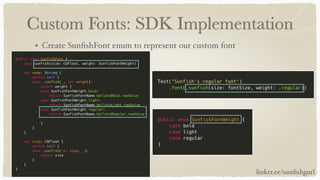
Create Sun
fi
shFont enum to represent our custom font
linktr.ee/sun
fi
shgurl
Custom Fonts: SDK Implementation
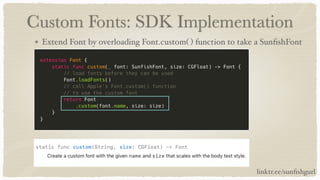
Extend Font by overloading Font.custom( ) function to take a Sun
fi
shFont
linktr.ee/sun
fi
shgurl
Custom Fonts: SDK Implementation
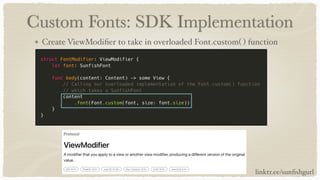
Create ViewModi
fi
er to take in overloaded Font.custom( ) function
linktr.ee/sun
fi
shgurl
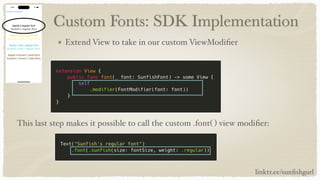
Custom Fonts: SDK Implementation
Extend View to take in our custom ViewModi
fi
er
This last step makes it possible to call the custom .font( ) view modi
fi
er:
linktr.ee/sun
fi
shgurl
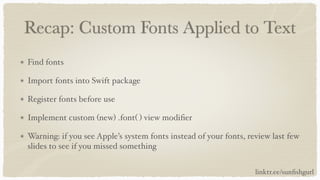
Recap: Custom Fonts Applied to Text
Find fonts
Import fonts into Swift package
Register fonts before use
Implement custom (new) .font( ) view modi
fi
er
Warning: if you see Apple’s system fonts instead of your fonts, review last few
slides to see if you missed something
linktr.ee/sun
fi
shgurl
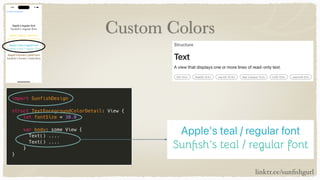
Custom Colors: Applied to Text
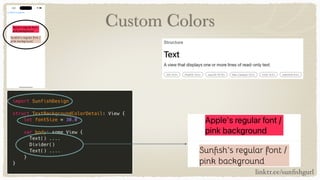
Custom Colors
linktr.ee/sun
fi
shgurl
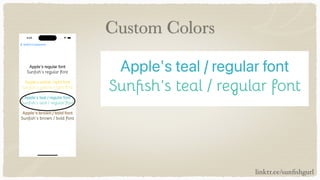
Custom Colors
linktr.ee/sun
fi
shgurl
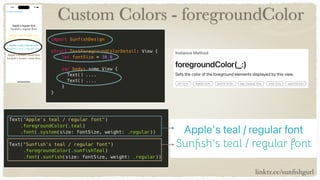
Custom Colors - foregroundColor
linktr.ee/sun
fi
shgurl
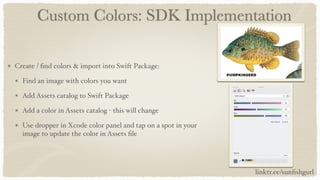
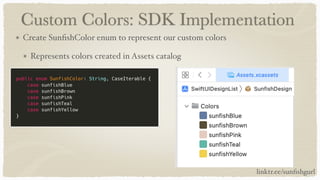
Custom Colors: SDK Implementation
Create /
fi
nd colors & import into Swift Package:
Find an image with colors you want
Add Assets catalog to Swift Package
Add a color in Assets catalog - this will change
Use dropper in Xcode color panel and tap on a spot in your
image to update the color in Assets
fi
le
linktr.ee/sun
fi
shgurl
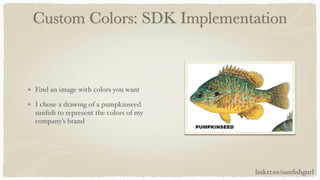
Custom Colors: SDK Implementation
Find an image with colors you want
I chose a drawing of a pumpkinseed
sun
fi
sh to represent the colors of my
company’s brand
linktr.ee/sun
fi
shgurl
Custom Colors: SDK Implementation
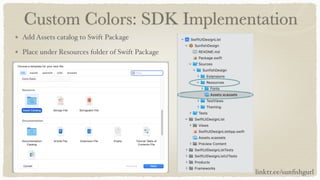
Add Assets catalog to Swift Package
Place under Resources folder of Swift Package
linktr.ee/sun
fi
shgurl
Custom Colors: SDK Implementation
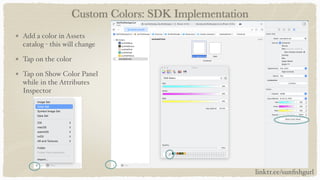
Add a color in Assets
catalog - this will change
Tap on the color
Tap on Show Color Panel
while in the Attributes
Inspector
linktr.ee/sun
fi
shgurl
Custom Colors: SDK Implementation
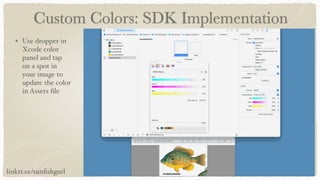
Use dropper in
Xcode color
panel and tap
on a spot in
your image to
update the color
in Assets
fi
le
linktr.ee/sun
fi
shgurl
Custom Colors: SDK Implementation
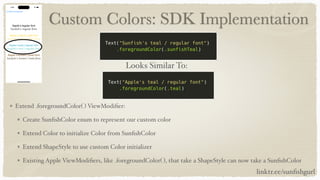
Extend .foregroundColor( ) ViewModi
fi
er:
Create Sun
fi
shColor enum to represent our custom color
Extend Color to initialize Color from Sun
fi
shColor
Extend ShapeStyle to use custom Color initializer
Existing Apple ViewModi
fi
ers, like .foregroundColor( ), that take a ShapeStyle can now take a Sun
fi
shColor
Looks Similar To:
linktr.ee/sun
fi
shgurl
Custom Colors: SDK Implementation
Create Sun
fi
shColor enum to represent our custom colors
Represents colors created in Assets catalog
linktr.ee/sun
fi
shgurl
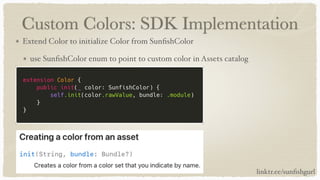
Custom Colors: SDK Implementation
Extend Color to initialize Color from Sun
fi
shColor
use Sun
fi
shColor enum to point to custom color in Assets catalog
linktr.ee/sun
fi
shgurl
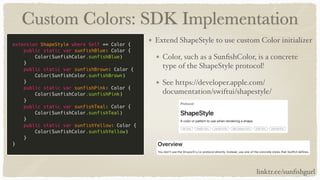
Custom Colors: SDK Implementation
Extend ShapeStyle to use custom Color initializer
Color, such as a Sun
fi
shColor, is a concrete
type of the ShapeStyle protocol!
See https://developer.apple.com/
documentation/swiftui/shapestyle/
linktr.ee/sun
fi
shgurl
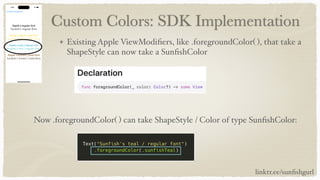
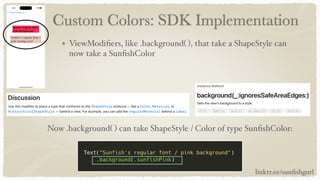
Custom Colors: SDK Implementation
Existing Apple ViewModi
fi
ers, like .foregroundColor( ), that take a
ShapeStyle can now take a Sun
fi
shColor
Now .foregroundColor( ) can take ShapeStyle / Color of type Sun
fi
shColor:
linktr.ee/sun
fi
shgurl
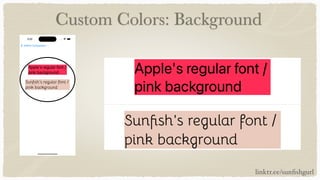
Custom Colors: Background
linktr.ee/sun
fi
shgurl
Custom Colors
linktr.ee/sun
fi
shgurl
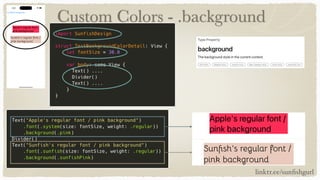
Custom Colors - .background
linktr.ee/sun
fi
shgurl
Guess what? The code’s already been done!
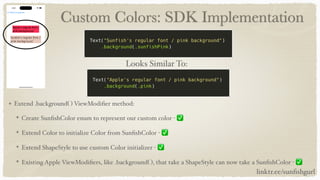
Custom Colors: SDK Implementation
Extend .background( ) ViewModi
fi
er method:
Create Sun
fi
shColor enum to represent our custom color - ✅
Extend Color to initialize Color from Sun
fi
shColor - ✅
Extend ShapeStyle to use custom Color initializer - ✅
Existing Apple ViewModi
fi
ers, like .background( ), that take a ShapeStyle can now take a Sun
fi
shColor - ✅
Looks Similar To:
linktr.ee/sun
fi
shgurl
Custom Colors: SDK Implementation
ViewModi
fi
ers, like .background( ), that take a ShapeStyle can
now take a Sun
fi
shColor
Now .background( ) can take ShapeStyle / Color of type Sun
fi
shColor:
linktr.ee/sun
fi
shgurl
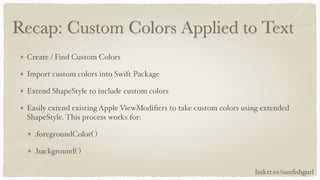
Recap: Custom Colors Applied to Text
Create / Find Custom Colors
Import custom colors into Swift Package
Extend ShapeStyle to include custom colors
Easily extend existing Apple ViewModi
fi
ers to take custom colors using extended
ShapeStyle. This process works for:
.foregroundColor( )
.background( )
linktr.ee/sun
fi
shgurl
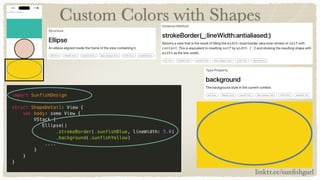
Custom Colors: Applied to Shapes
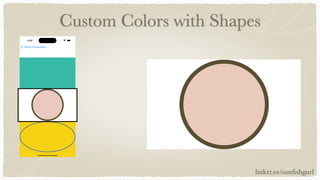
Custom Colors with Shapes
linktr.ee/sun
fi
shgurl
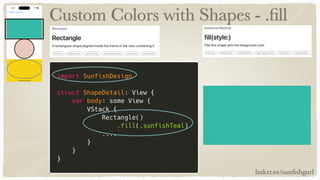
Custom Colors with Shapes - .
fi
ll
linktr.ee/sun
fi
shgurl
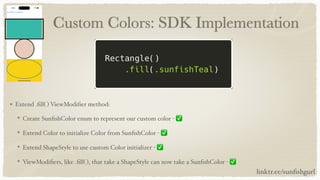
Custom Colors: SDK Implementation
Extend .
fi
ll( ) ViewModi
fi
er method:
Create Sun
fi
shColor enum to represent our custom color - ✅
Extend Color to initialize Color from Sun
fi
shColor - ✅
Extend ShapeStyle to use custom Color initializer - ✅
ViewModi
fi
ers, like .
fi
ll( ), that take a ShapeStyle can now take a Sun
fi
shColor - ✅
linktr.ee/sun
fi
shgurl
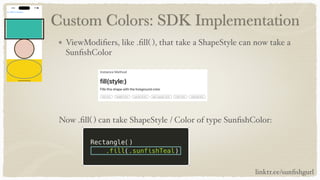
Custom Colors: SDK Implementation
ViewModi
fi
ers, like .
fi
ll( ), that take a ShapeStyle can now take a
Sun
fi
shColor
Now .
fi
ll( ) can take ShapeStyle / Color of type Sun
fi
shColor:
linktr.ee/sun
fi
shgurl
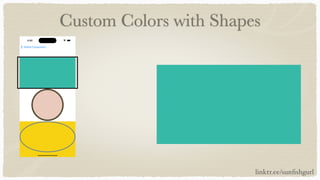
Custom Colors with Shapes
linktr.ee/sun
fi
shgurl
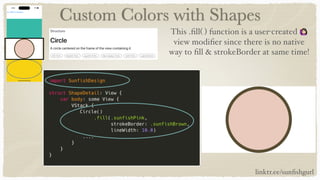
Custom Colors with Shapes
This .
fi
ll( ) function is a user-created 🙋
view modi
fi
er since there is no native
way to
fi
ll & strokeBorder at same time!
linktr.ee/sun
fi
shgurl
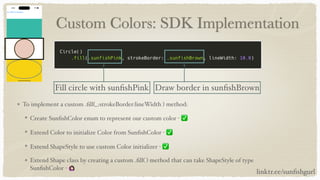
Custom Colors: SDK Implementation
To implement a custom .
fi
ll(_:strokeBorder:lineWidth ) method:
Create Sun
fi
shColor enum to represent our custom color - ✅
Extend Color to initialize Color from Sun
fi
shColor - ✅
Extend ShapeStyle to use custom Color initializer - ✅
Extend Shape class by creating a custom .
fi
ll( ) method that can take ShapeStyle of type
Sun
fi
shColor - 🙋
linktr.ee/sun
fi
shgurl
Fill circle with sun
fi
shPink Draw border in sun
fi
shBrown
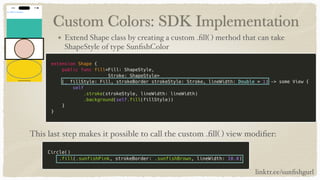
Custom Colors: SDK Implementation
Extend Shape class by creating a custom .
fi
ll( ) method that can take
ShapeStyle of type Sun
fi
shColor
This last step makes it possible to call the custom .
fi
ll( ) view modi
fi
er:
linktr.ee/sun
fi
shgurl
Custom Colors with Shapes
linktr.ee/sun
fi
shgurl
Custom Colors with Shapes
linktr.ee/sun
fi
shgurl
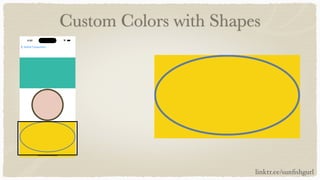
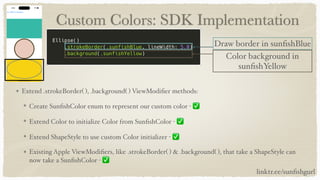
Custom Colors: SDK Implementation
Extend .strokeBorder( ), .background( ) ViewModi
fi
er methods:
Create Sun
fi
shColor enum to represent our custom color - ✅
Extend Color to initialize Color from Sun
fi
shColor - ✅
Extend ShapeStyle to use custom Color initializer - ✅
Existing Apple ViewModi
fi
ers, like .strokeBorder( ) & .background( ), that take a ShapeStyle can
now take a Sun
fi
shColor - ✅
linktr.ee/sun
fi
shgurl
Draw border in sun
fi
shBlue
Color background in
sun
fi
shYellow
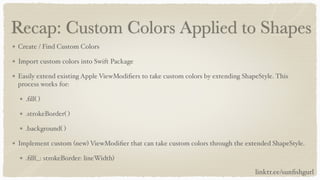
Recap: Custom Colors Applied to Shapes
linktr.ee/sun
fi
shgurl
Create / Find Custom Colors
Import custom colors into Swift Package
Easily extend existing Apple ViewModi
fi
ers to take custom colors by extending ShapeStyle. This
process works for:
.
fi
ll( )
.strokeBorder( )
.background( )
Implement custom (new) ViewModi
fi
er that can take custom colors through the extended ShapeStyle.
.
fi
ll(_: strokeBorder: lineWidth)
Resources: Swift Packages
https://developer.apple.com/documentation/xcode/organizing-your-code-with-
local-packages
https://developer.apple.com/documentation/xcode/creating-a-standalone-swift-
package-with-xcode
linktr.ee/sun
fi
shgurl
Resources: ViewModi
fi
ers
Kodeco (written by Danijela! @dvrzan): https://www.kodeco.com/34699757-swiftui-
view-modi
fi
ers-tutorial-for-ios
Hacking With Swift:
https://www.hackingwithswift.com/quick-start/swiftui/how-to-
fi
ll-and-stroke-
shapes-at-the-same-time
Apple’s guides on view modi
fi
ers:
https://developer.apple.com/documentation/swiftui/reducing-view-modi
fi
er-
maintenance
https://developer.apple.com/documentation/swiftui/con
fi
guring-views
linktr.ee/sun
fi
shgurl
Resources: Design
Design best practices and accessibility:
https://developer.apple.com/design/human-interface-guidelines/foundations/color
https://accessiblepalette.com/
https://developer.apple.com/design/human-interface-guidelines/foundations/typography/
https://fonts.google.com/knowledge/readability_and_accessibility/
introducing_accessibility_in_typography
https://www.hackingwithswift.com/quick-start/swiftui/how-to-use-dynamic-type-with-a-
custom-font
Thanks to @SuzGupta for helping me
fi
nd these design resources! 👏
linktr.ee/sun
fi
shgurl
Resources: Sample Project
https://github.com/vuinguyen/SwiftUIDesignList
linktr.ee/sun
fi
shgurl
Two Truths and a Lie
(Answer Reveal! Drumroll Please!)
Two truths and a lie:
I’ve caught a Northern Pike (
fi
sh) - 👍
I’ve caught a Kokanee Salmon (
fi
sh) - 👎
I’ve traveled to Beijing, China for an IoT Hackathon - 👍
linktr.ee/sun
fi
shgurl
Questions?
I’m Vui Nguyen
Project Github: https://github.com/vuinguyen/
SwiftUIDesignList
Twitter: @sun
fi
shgurl
linktr.ee/sun
fi
shgurl
Email me with questions: info@sun
fi
shempire.com
linktr.ee/sun
fi
shgurl

Make Porting Custom SwiftUI Elements Easy With Swift Packages

  • 1.
    Make Porting CustomSwiftUI Elements Easy With Swift Packages by: Vui Nguyen @sun fi shgurl linktr.ee/sun fi shgurl
  • 2.
    Our Problem /Challenge I want all my mobile apps to have the same branding / theme - they currently do not! Reuse design elements easily and e ffi ciently Sun fi sh Empire is named after an actual fi sh, called the sun fi sh! linktr.ee/sun fi shgurl
  • 3.
    What about CustomFonts? linktr.ee/sun fi shgurl
  • 4.
    What About CustomColors? linktr.ee/sun fi shgurl
  • 5.
    What’s One PossibleSolution? My talk! Are you excited yet? Okay, let’s dive in 🤿 linktr.ee/sun fi shgurl
  • 6.
    Overview Introduce problem Introduce myself Demosolution Swift Package and Project Setup Custom Fonts: Applied to Text Custom Colors: Applied to Text Custom Colors: Applied to Shapes Resources linktr.ee/sun fi shgurl
  • 7.
    Overview What’s Covered (OurUse Case): Can apply custom fonts & colors to multiple iOS projects for consistent branding / theming Demonstrates creating / extending ViewModi fi ers to take custom fonts and colors Match Apple’s ViewModi fi er syntax when possible Very useful / important for client facing libraries! Achieve code reuse / modularity with Swift package Start by building Swift package & iOS project in tandem For SwiftUI Views linktr.ee/sun fi shgurl
  • 8.
    Overview What’s Not Covered: Solutionfor UIKit Deep dive into creating view modi fi ers Building custom components (buttons, controls, etc) Accessibility in design - links to resources later Best design practices Pulling local Swift package into standalone repo linktr.ee/sun fi shgurl
  • 9.
    Hello! 👋 I’m VuiNguyen Long time software engineer (20+ years) 🤯 10+ years as mobile developer, cross platform & native iOS Like to share solutions to problems I’ve solved in the past Two truths and a lie (answer revealed at end of talk!): I’ve caught a Northern Pike ( fi sh) I’ve caught a Kokanee Salmon ( fi sh) I’ve traveled to Beijing, China for an IoT Hackathon linktr.ee/sun fi shgurl
  • 10.
  • 11.
    Swift Package &Project Setup
  • 12.
    Swift Package &Project Setup Create a directory within iOS project workspace to hold local Swift package Xcode ▸ File ▸ New ▸ Package Place Swift package in that new directory Add Swift package to same workspace as iOS project linktr.ee/sun fi shgurl
  • 13.
    Swift Package &Project Setup linktr.ee/sun fi shgurl Add Swift package to frameworks
  • 14.
    Swift Package &Project Setup linktr.ee/sun fi shgurl In order to test / run the correct Swift package or iOS project, create a separate scheme for each
  • 15.
    Swift Package &Project Setup linktr.ee/sun fi shgurl Project Workspace Swift Package iOS Project
  • 16.
    Recap: Swift Package& Project Setup Add new Swift package in same workspace as iOS project to start Add Swift package to frameworks Create two schemas, one for Swift package and one for iOS project Check project layout, ensure that Swift package is inside same workspace as iOS project linktr.ee/sun fi shgurl
  • 17.
  • 18.
  • 19.
    Custom Fonts: SDKUse linktr.ee/sun fi shgurl
  • 20.
    Custom Fonts: SDKUse linktr.ee/sun fi shgurl
  • 21.
    Custom Fonts: SDKImplementation Find Fonts: https://www.fontmirror.com/bellota Look for free license Look for font weights: regular, light, and bold Warning: using fonts that don’t have free license will NOT load in Xcode! Non-free fonts that you’ve paid for might work, but I haven’t tried that yet linktr.ee/sun fi shgurl
  • 22.
    Custom Fonts: SDKImplementation Import fonts into Swift package: Place .ttf fi les under Sources/(package name) in Swift Package (important!) linktr.ee/sun fi shgurl
  • 23.
    Custom Fonts: SDKImplementation Add path to .ttf fi les in Package.swift fi le Doesn’t have to be in its own subfolder Fonts, but it MUST BE IN Resources!! linktr.ee/sun fi shgurl
  • 24.
    Custom Fonts: SDKImplementation Load fonts by registering them with the Font Manager before using: linktr.ee/sun fi shgurl
  • 25.
    Custom Fonts: SDKImplementation To implement custom .font( ) ViewModi fi er method: Create Sun fi shFont enum to represent our custom font Extend Font by overloading Font.custom( ) function to take a Sun fi shFont Create ViewModi fi er to take in overloaded Font.custom( ) function Extend View to take in our custom ViewModi fi er Looks Similar To: linktr.ee/sun fi shgurl
  • 26.
    Custom Fonts: SDKImplementation Create Sun fi shFont enum to represent our custom font linktr.ee/sun fi shgurl
  • 27.
    Custom Fonts: SDKImplementation Extend Font by overloading Font.custom( ) function to take a Sun fi shFont linktr.ee/sun fi shgurl
  • 28.
    Custom Fonts: SDKImplementation Create ViewModi fi er to take in overloaded Font.custom( ) function linktr.ee/sun fi shgurl
  • 29.
    Custom Fonts: SDKImplementation Extend View to take in our custom ViewModi fi er This last step makes it possible to call the custom .font( ) view modi fi er: linktr.ee/sun fi shgurl
  • 30.
    Recap: Custom FontsApplied to Text Find fonts Import fonts into Swift package Register fonts before use Implement custom (new) .font( ) view modi fi er Warning: if you see Apple’s system fonts instead of your fonts, review last few slides to see if you missed something linktr.ee/sun fi shgurl
  • 31.
  • 32.
  • 33.
  • 34.
    Custom Colors -foregroundColor linktr.ee/sun fi shgurl
  • 35.
    Custom Colors: SDKImplementation Create / fi nd colors & import into Swift Package: Find an image with colors you want Add Assets catalog to Swift Package Add a color in Assets catalog - this will change Use dropper in Xcode color panel and tap on a spot in your image to update the color in Assets fi le linktr.ee/sun fi shgurl
  • 36.
    Custom Colors: SDKImplementation Find an image with colors you want I chose a drawing of a pumpkinseed sun fi sh to represent the colors of my company’s brand linktr.ee/sun fi shgurl
  • 37.
    Custom Colors: SDKImplementation Add Assets catalog to Swift Package Place under Resources folder of Swift Package linktr.ee/sun fi shgurl
  • 38.
    Custom Colors: SDKImplementation Add a color in Assets catalog - this will change Tap on the color Tap on Show Color Panel while in the Attributes Inspector linktr.ee/sun fi shgurl
  • 39.
    Custom Colors: SDKImplementation Use dropper in Xcode color panel and tap on a spot in your image to update the color in Assets fi le linktr.ee/sun fi shgurl
  • 40.
    Custom Colors: SDKImplementation Extend .foregroundColor( ) ViewModi fi er: Create Sun fi shColor enum to represent our custom color Extend Color to initialize Color from Sun fi shColor Extend ShapeStyle to use custom Color initializer Existing Apple ViewModi fi ers, like .foregroundColor( ), that take a ShapeStyle can now take a Sun fi shColor Looks Similar To: linktr.ee/sun fi shgurl
  • 41.
    Custom Colors: SDKImplementation Create Sun fi shColor enum to represent our custom colors Represents colors created in Assets catalog linktr.ee/sun fi shgurl
  • 42.
    Custom Colors: SDKImplementation Extend Color to initialize Color from Sun fi shColor use Sun fi shColor enum to point to custom color in Assets catalog linktr.ee/sun fi shgurl
  • 43.
    Custom Colors: SDKImplementation Extend ShapeStyle to use custom Color initializer Color, such as a Sun fi shColor, is a concrete type of the ShapeStyle protocol! See https://developer.apple.com/ documentation/swiftui/shapestyle/ linktr.ee/sun fi shgurl
  • 44.
    Custom Colors: SDKImplementation Existing Apple ViewModi fi ers, like .foregroundColor( ), that take a ShapeStyle can now take a Sun fi shColor Now .foregroundColor( ) can take ShapeStyle / Color of type Sun fi shColor: linktr.ee/sun fi shgurl
  • 45.
  • 46.
  • 47.
    Custom Colors -.background linktr.ee/sun fi shgurl
  • 48.
    Guess what? Thecode’s already been done!
  • 49.
    Custom Colors: SDKImplementation Extend .background( ) ViewModi fi er method: Create Sun fi shColor enum to represent our custom color - ✅ Extend Color to initialize Color from Sun fi shColor - ✅ Extend ShapeStyle to use custom Color initializer - ✅ Existing Apple ViewModi fi ers, like .background( ), that take a ShapeStyle can now take a Sun fi shColor - ✅ Looks Similar To: linktr.ee/sun fi shgurl
  • 50.
    Custom Colors: SDKImplementation ViewModi fi ers, like .background( ), that take a ShapeStyle can now take a Sun fi shColor Now .background( ) can take ShapeStyle / Color of type Sun fi shColor: linktr.ee/sun fi shgurl
  • 51.
    Recap: Custom ColorsApplied to Text Create / Find Custom Colors Import custom colors into Swift Package Extend ShapeStyle to include custom colors Easily extend existing Apple ViewModi fi ers to take custom colors using extended ShapeStyle. This process works for: .foregroundColor( ) .background( ) linktr.ee/sun fi shgurl
  • 52.
  • 53.
    Custom Colors withShapes linktr.ee/sun fi shgurl
  • 54.
    Custom Colors withShapes - . fi ll linktr.ee/sun fi shgurl
  • 55.
    Custom Colors: SDKImplementation Extend . fi ll( ) ViewModi fi er method: Create Sun fi shColor enum to represent our custom color - ✅ Extend Color to initialize Color from Sun fi shColor - ✅ Extend ShapeStyle to use custom Color initializer - ✅ ViewModi fi ers, like . fi ll( ), that take a ShapeStyle can now take a Sun fi shColor - ✅ linktr.ee/sun fi shgurl
  • 56.
    Custom Colors: SDKImplementation ViewModi fi ers, like . fi ll( ), that take a ShapeStyle can now take a Sun fi shColor Now . fi ll( ) can take ShapeStyle / Color of type Sun fi shColor: linktr.ee/sun fi shgurl
  • 57.
    Custom Colors withShapes linktr.ee/sun fi shgurl
  • 58.
    Custom Colors withShapes This . fi ll( ) function is a user-created 🙋 view modi fi er since there is no native way to fi ll & strokeBorder at same time! linktr.ee/sun fi shgurl
  • 59.
    Custom Colors: SDKImplementation To implement a custom . fi ll(_:strokeBorder:lineWidth ) method: Create Sun fi shColor enum to represent our custom color - ✅ Extend Color to initialize Color from Sun fi shColor - ✅ Extend ShapeStyle to use custom Color initializer - ✅ Extend Shape class by creating a custom . fi ll( ) method that can take ShapeStyle of type Sun fi shColor - 🙋 linktr.ee/sun fi shgurl Fill circle with sun fi shPink Draw border in sun fi shBrown
  • 60.
    Custom Colors: SDKImplementation Extend Shape class by creating a custom . fi ll( ) method that can take ShapeStyle of type Sun fi shColor This last step makes it possible to call the custom . fi ll( ) view modi fi er: linktr.ee/sun fi shgurl
  • 61.
    Custom Colors withShapes linktr.ee/sun fi shgurl
  • 62.
    Custom Colors withShapes linktr.ee/sun fi shgurl
  • 63.
    Custom Colors: SDKImplementation Extend .strokeBorder( ), .background( ) ViewModi fi er methods: Create Sun fi shColor enum to represent our custom color - ✅ Extend Color to initialize Color from Sun fi shColor - ✅ Extend ShapeStyle to use custom Color initializer - ✅ Existing Apple ViewModi fi ers, like .strokeBorder( ) & .background( ), that take a ShapeStyle can now take a Sun fi shColor - ✅ linktr.ee/sun fi shgurl Draw border in sun fi shBlue Color background in sun fi shYellow
  • 64.
    Recap: Custom ColorsApplied to Shapes linktr.ee/sun fi shgurl Create / Find Custom Colors Import custom colors into Swift Package Easily extend existing Apple ViewModi fi ers to take custom colors by extending ShapeStyle. This process works for: . fi ll( ) .strokeBorder( ) .background( ) Implement custom (new) ViewModi fi er that can take custom colors through the extended ShapeStyle. . fi ll(_: strokeBorder: lineWidth)
  • 65.
  • 66.
    Resources: ViewModi fi ers Kodeco (writtenby Danijela! @dvrzan): https://www.kodeco.com/34699757-swiftui- view-modi fi ers-tutorial-for-ios Hacking With Swift: https://www.hackingwithswift.com/quick-start/swiftui/how-to- fi ll-and-stroke- shapes-at-the-same-time Apple’s guides on view modi fi ers: https://developer.apple.com/documentation/swiftui/reducing-view-modi fi er- maintenance https://developer.apple.com/documentation/swiftui/con fi guring-views linktr.ee/sun fi shgurl
  • 67.
    Resources: Design Design bestpractices and accessibility: https://developer.apple.com/design/human-interface-guidelines/foundations/color https://accessiblepalette.com/ https://developer.apple.com/design/human-interface-guidelines/foundations/typography/ https://fonts.google.com/knowledge/readability_and_accessibility/ introducing_accessibility_in_typography https://www.hackingwithswift.com/quick-start/swiftui/how-to-use-dynamic-type-with-a- custom-font Thanks to @SuzGupta for helping me fi nd these design resources! 👏 linktr.ee/sun fi shgurl
  • 68.
  • 69.
    Two Truths anda Lie (Answer Reveal! Drumroll Please!) Two truths and a lie: I’ve caught a Northern Pike ( fi sh) - 👍 I’ve caught a Kokanee Salmon ( fi sh) - 👎 I’ve traveled to Beijing, China for an IoT Hackathon - 👍 linktr.ee/sun fi shgurl
  • 70.
    Questions? I’m Vui Nguyen ProjectGithub: https://github.com/vuinguyen/ SwiftUIDesignList Twitter: @sun fi shgurl linktr.ee/sun fi shgurl Email me with questions: info@sun fi shempire.com linktr.ee/sun fi shgurl