XNA Game Studio 2.0
Game Programming Made Easy(ier)
Reuben Ahmed
[February 12, 2008]
About Me
• 7 years of .NET/C#
• Minimal game programming
experience
• Avid video game player
– *Not reflected in my XBOX Live gamer score
• rahmed@bennettadelson.com
WARNING
• Disclaimer: Code shown during
this presentation is not meant to
be the “right” or “best” way of
creating a game.
• Purpose: Give you a basic
toolset to start off with XNA.
Agenda
• What is XNA?
• System Requirements
• Out of the box architecture
• Graphics/Textures
• Input
• Collision Detection
• Text Writing
• Audio
• XBOX 360 Deployment (!)
• Distribution model
• Q & A
What is XNA?
• X-Platform Next Generation Architecture
• C# Game Framework
– Windows/XBOX 360
– Reduced learning curve
– Compiles to .NET Compact Framework
– Available, Approachable, and nearly Free
• Sony Playstation 3 Dev. Kit = ~$10,500
• XNA is free on Windows.
• $49/4 months or $99/year on XBOX 360.
System Requirements
• What is XNA?
• System Requirements
• Out of the box architecture
• Graphics/Textures
• Input
• Collision Detection
• Text Writing
• Audio
• XBOX 360 Deployment
• Distribution model
• Q & A
System Requirements
• Visual C# 2005 Express Edition, Standard Edition,
Professional Edition , Team Edition for Software
Architects, Team Edition for Software Developers, Team
Edition for Software Testers, Team Edition for Database
Professionals , Team Suite
• No Visual Studio 2008 support currently!
• DirectX 9.0c, Pixel Shader 1.1+
XNA Studio 2.0 and C# Express URL:
• http://creators.xna.com/Education/newtoxna.aspx
Out of the box architecture
• What is XNA?
• System Requirements
• Out of the box architecture
• Graphics/Textures
• Input
• Collision Detection
• Audio
• XBOX 360 Deployment
• Distribution model
• Q & A
Out of the box architecture
• Graphics Device Manager
– Automatically sets up interaction with your
graphics card
• Optimized Game Loop
– Update, Draw methods
• Content Pipeline
– Game Assets (Graphics, Audio, etc.)
• DEMO: Our First XNA Game!
– Change background color
Graphics/Textures
• What is XNA?
• System Requirements
• Out of the box architecture
• Graphics/Textures
• Input
• Collision Detection
• Text Writing
• Audio
• XBOX 360 Deployment
• Distribution model
• Q & A
Graphics/Textures – Drawing
1) Add Asset to your project
– Drag and drop graphic
2) Load Graphic into variable
– Texture2D class
– Content Pipeline method
• Content.Load <Texture2D> (“AssetName”);
3) Draw it
– SpriteBatch class
• SpriteBatch.Draw (Texture2D, Position, Color);
• DEMO: Adding a spaceship graphic!
• DEMO: Tint graphic with Draw
parameter.
Graphics/Textures - Demo
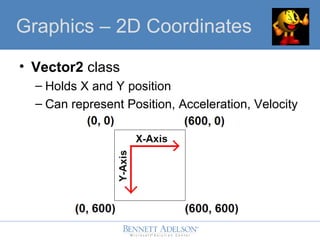
• Vector2 class
– Holds X and Y position
– Can represent Position, Acceleration, Velocity
Graphics – 2D Coordinates
• GraphicsDevice.Viewport
– Window size properties
• DEMO: Centering graphic with Vector2!
• Tip: Texture is drawn with upper left as
starting point…
GraphicsGraphics – Window Size
• DEMO: Scale image with Rectangles.
• Tip: Draw order matters!
GraphicsGraphics – Scale
Input
• What is XNA?
• System Requirements
• Out of the box architecture
• Graphics/Textures
• Input
• Collision Detection
• Text Writing
• Audio
• XBOX 360 Deployment
• Distribution model
• Q & A
• Keyboard
– Static class
• Current state of keyboard
• Which keys are pressed
• Keys
– Enumerator
– Represents almost any key!
• DEMO: Read input to exit game.
Input – Read Keys
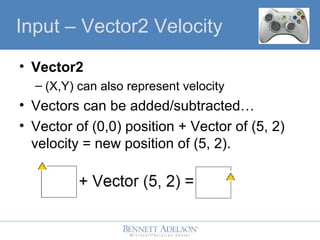
• Vector2
– (X,Y) can also represent velocity
• Vectors can be added/subtracted…
• Vector of (0,0) position + Vector of (5, 2)
velocity = new position of (5, 2).
Input – Vector2 Velocity
• DEMO: Move ship to right.
• DEMO: Use Keyboard to move ship
left/right.
Input – Vector2 Velocity
Collision Detection
• What is XNA?
• System Requirements
• Out of the box architecture
• Graphics/Textures
• Input
• Collision Detection
• Text Writing
• Audio
• XBOX 360 Deployment
• Distribution model
• Q & A
• My ship is going off the screen!
• First level of collision detection:
– Window boundaries
– MathHelper class to the rescue…
• Clamp() method.
• DEMO: MathHelper.Clamp() to
boundaries.
Collision Detection
• Let’s add an “enemy”…remember:
– Texture2D
– Vector2 (position)
– Vector2 (velocity)
– MathHelper.Clamp (Window Boundaries)
• DEMO: Add a non-hostile Alien that
eerily resembles a Space Invader™!
Collision Detection
• Can we shoot a bullet?
– Bullet spawns from spaceship position.
– Moves vertically up (negative Y direction)
• DEMO: Kill it, KILL IT!
Collision Detection
• My bullets are too weak!
– Rectangles encompass every Texture.
– Rectangle.Intersects will help!
• DEMO: Encompass the alien and bullet
in rectangles, and figure out if they
collided…
Collision Detection
• 2D Per-Pixel Collision
– More expensive, but accurate
• Color Key Collision
– Detects collision based on color map!
Collision Detection, etc.
Text Writing
• What is XNA?
• System Requirements
• Out of the box architecture
• Graphics/Textures
• Input
• Collision Detection
• Text Writing
• Audio
• XBOX 360 Deployment
• Distribution model
• Q & A
Text Writing
• SpriteFont asset
• SpriteBatch.DrawString()
• DEMO: Keep a bullet hit count label…
Audio
• What is XNA?
• System Requirements
• Out of the box architecture
• Graphics/Textures
• Input
• Collision Detection
• Text Writing
• Audio
• XBOX 360 Deployment
• Distribution model
• Q & A
Audio
• Microsoft Cross Platform Audio Creation
Tool
– Creates a .XAP “Game Asset”
– .WAV files
• Classes
– audioEngine = new AudioEngine ("ContentAudioPROJECTNAME.xgs");
– waveBank = new WaveBank (audioEngine, "ContentAudioWave Bank.xwb");
– soundBank = new SoundBank (audioEngine, "ContentAudioSound Bank.xsb");
– soundBank.PlayCue (“CUENAME");
• DEMO: Background music. Loop it.
• Change volume level
• 3D Spatial audio!
Audio, etc.
XBOX 360 Deployment
• What is XNA?
• System Requirements
• Out of the box architecture
• Graphics/Textures
• Input
• Collision Detection
• Text Writing
• Audio
• XBOX 360 Deployment
• Distribution model
• Q & A
XBOX 360 Deployment
• This costs money!
• Download XNA Creator’s License ($49 or
$99) from the Games Blade.
• Download/Launch XNA Game Studio
Connect (Free) from the Games Blade.
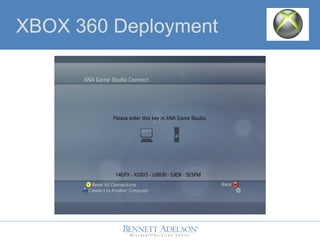
• Generate a key that your PC can use to
connect to your XBOX360…this only has
to be done once.
XBOX 360 Deployment
XBOX 360 Deployment
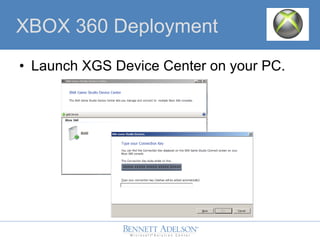
• Launch XGS Device Center on your PC.
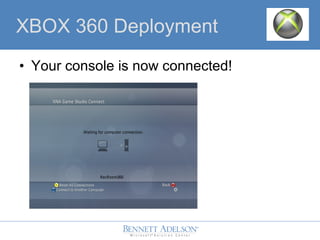
• Your console is now connected!
XBOX 360 Deployment
• Either an XBOX 360 Project Type, OR a
Windows XNA Project Type can be
deployed!
• DEMO: Demonstrate “Copy Windows
Project to XBOX360 Project”
• Projects stay in sync.
• DEMO: Add GamePad input handling.
Add rumble!
XBOX 360 Deployment
• DEMO: …Deploy this thing.
– Incremental deployment support!
– No wireless deployment.
– Your game is now available on the Games
Blade!
• DEMO: Debugging on XBOX 360…
XBOX 360 Deployment
Distribution Model
• What is XNA?
• System Requirements
• Out of the box functionality
• Graphics/Textures
• Input
• Collision Detection
• Text Writing
• Audio
• XBOX 360 Deployment
• Distribution model
• Q & A
Distribution Model
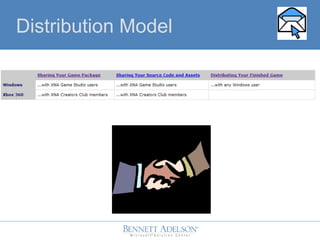
• XBL currently a managed portfolio
• Game Developer’s Conference 2008
– Microsoft prepared to announce XBL
Community Blade for XNA.
Distribution Model
Tip of the iceberg…
• Plethora of XNA Tutorials/Starter Kits
• Network Architecture
– Client/Server, Peer to Peer, Prediction Code
– XBOX Live Profile information
• Artificial Intelligence
– State Management samples
• Speech Recognition/Synthesis
– System.Speech .NET 3.0
Tip of the iceberg…
• XNA Racing Game: YouTube
• 1 week of code (professional game
development company)
• Jitted on the fly, 1080p, 30 FPS, running
on C# (Managed code!), with 2X Anti
aliasing!
• Graphics power is equated to a $350 PC
video card. Anti aliasing…one line of
code via XNA.
References
• MSDN XNA Game Studio 2.0
– Overview of framework
• http://creators.xna.com/
– Active community site
• http://www.xnadevelopment.com/
– Beginner tutorials
• http://www.phstudios.com/
– Introadvanced tutorials
Q & A
• What is XNA?
• System Requirements
• Out of the box architecture
• Graphics/Textures
• Input
• Collision Detection
• Text Writing
• Audio
• XBOX 360 Deployment
• Distribution model
• Q & A

XNAPresentation

  • 1.
    XNA Game Studio2.0 Game Programming Made Easy(ier) Reuben Ahmed [February 12, 2008]
  • 2.
    About Me • 7years of .NET/C# • Minimal game programming experience • Avid video game player – *Not reflected in my XBOX Live gamer score • rahmed@bennettadelson.com
  • 3.
    WARNING • Disclaimer: Codeshown during this presentation is not meant to be the “right” or “best” way of creating a game. • Purpose: Give you a basic toolset to start off with XNA.
  • 4.
    Agenda • What isXNA? • System Requirements • Out of the box architecture • Graphics/Textures • Input • Collision Detection • Text Writing • Audio • XBOX 360 Deployment (!) • Distribution model • Q & A
  • 5.
    What is XNA? •X-Platform Next Generation Architecture • C# Game Framework – Windows/XBOX 360 – Reduced learning curve – Compiles to .NET Compact Framework – Available, Approachable, and nearly Free • Sony Playstation 3 Dev. Kit = ~$10,500 • XNA is free on Windows. • $49/4 months or $99/year on XBOX 360.
  • 6.
    System Requirements • Whatis XNA? • System Requirements • Out of the box architecture • Graphics/Textures • Input • Collision Detection • Text Writing • Audio • XBOX 360 Deployment • Distribution model • Q & A
  • 7.
    System Requirements • VisualC# 2005 Express Edition, Standard Edition, Professional Edition , Team Edition for Software Architects, Team Edition for Software Developers, Team Edition for Software Testers, Team Edition for Database Professionals , Team Suite • No Visual Studio 2008 support currently! • DirectX 9.0c, Pixel Shader 1.1+ XNA Studio 2.0 and C# Express URL: • http://creators.xna.com/Education/newtoxna.aspx
  • 8.
    Out of thebox architecture • What is XNA? • System Requirements • Out of the box architecture • Graphics/Textures • Input • Collision Detection • Audio • XBOX 360 Deployment • Distribution model • Q & A
  • 9.
    Out of thebox architecture • Graphics Device Manager – Automatically sets up interaction with your graphics card • Optimized Game Loop – Update, Draw methods • Content Pipeline – Game Assets (Graphics, Audio, etc.) • DEMO: Our First XNA Game! – Change background color
  • 10.
    Graphics/Textures • What isXNA? • System Requirements • Out of the box architecture • Graphics/Textures • Input • Collision Detection • Text Writing • Audio • XBOX 360 Deployment • Distribution model • Q & A
  • 11.
    Graphics/Textures – Drawing 1)Add Asset to your project – Drag and drop graphic 2) Load Graphic into variable – Texture2D class – Content Pipeline method • Content.Load <Texture2D> (“AssetName”); 3) Draw it – SpriteBatch class • SpriteBatch.Draw (Texture2D, Position, Color);
  • 12.
    • DEMO: Addinga spaceship graphic! • DEMO: Tint graphic with Draw parameter. Graphics/Textures - Demo
  • 13.
    • Vector2 class –Holds X and Y position – Can represent Position, Acceleration, Velocity Graphics – 2D Coordinates
  • 14.
    • GraphicsDevice.Viewport – Windowsize properties • DEMO: Centering graphic with Vector2! • Tip: Texture is drawn with upper left as starting point… GraphicsGraphics – Window Size
  • 15.
    • DEMO: Scaleimage with Rectangles. • Tip: Draw order matters! GraphicsGraphics – Scale
  • 16.
    Input • What isXNA? • System Requirements • Out of the box architecture • Graphics/Textures • Input • Collision Detection • Text Writing • Audio • XBOX 360 Deployment • Distribution model • Q & A
  • 17.
    • Keyboard – Staticclass • Current state of keyboard • Which keys are pressed • Keys – Enumerator – Represents almost any key! • DEMO: Read input to exit game. Input – Read Keys
  • 18.
    • Vector2 – (X,Y)can also represent velocity • Vectors can be added/subtracted… • Vector of (0,0) position + Vector of (5, 2) velocity = new position of (5, 2). Input – Vector2 Velocity
  • 19.
    • DEMO: Moveship to right. • DEMO: Use Keyboard to move ship left/right. Input – Vector2 Velocity
  • 20.
    Collision Detection • Whatis XNA? • System Requirements • Out of the box architecture • Graphics/Textures • Input • Collision Detection • Text Writing • Audio • XBOX 360 Deployment • Distribution model • Q & A
  • 21.
    • My shipis going off the screen! • First level of collision detection: – Window boundaries – MathHelper class to the rescue… • Clamp() method. • DEMO: MathHelper.Clamp() to boundaries. Collision Detection
  • 22.
    • Let’s addan “enemy”…remember: – Texture2D – Vector2 (position) – Vector2 (velocity) – MathHelper.Clamp (Window Boundaries) • DEMO: Add a non-hostile Alien that eerily resembles a Space Invader™! Collision Detection
  • 23.
    • Can weshoot a bullet? – Bullet spawns from spaceship position. – Moves vertically up (negative Y direction) • DEMO: Kill it, KILL IT! Collision Detection
  • 24.
    • My bulletsare too weak! – Rectangles encompass every Texture. – Rectangle.Intersects will help! • DEMO: Encompass the alien and bullet in rectangles, and figure out if they collided… Collision Detection
  • 25.
    • 2D Per-PixelCollision – More expensive, but accurate • Color Key Collision – Detects collision based on color map! Collision Detection, etc.
  • 26.
    Text Writing • Whatis XNA? • System Requirements • Out of the box architecture • Graphics/Textures • Input • Collision Detection • Text Writing • Audio • XBOX 360 Deployment • Distribution model • Q & A
  • 27.
    Text Writing • SpriteFontasset • SpriteBatch.DrawString() • DEMO: Keep a bullet hit count label…
  • 28.
    Audio • What isXNA? • System Requirements • Out of the box architecture • Graphics/Textures • Input • Collision Detection • Text Writing • Audio • XBOX 360 Deployment • Distribution model • Q & A
  • 29.
    Audio • Microsoft CrossPlatform Audio Creation Tool – Creates a .XAP “Game Asset” – .WAV files • Classes – audioEngine = new AudioEngine ("ContentAudioPROJECTNAME.xgs"); – waveBank = new WaveBank (audioEngine, "ContentAudioWave Bank.xwb"); – soundBank = new SoundBank (audioEngine, "ContentAudioSound Bank.xsb"); – soundBank.PlayCue (“CUENAME"); • DEMO: Background music. Loop it.
  • 30.
    • Change volumelevel • 3D Spatial audio! Audio, etc.
  • 31.
    XBOX 360 Deployment •What is XNA? • System Requirements • Out of the box architecture • Graphics/Textures • Input • Collision Detection • Text Writing • Audio • XBOX 360 Deployment • Distribution model • Q & A
  • 32.
    XBOX 360 Deployment •This costs money! • Download XNA Creator’s License ($49 or $99) from the Games Blade. • Download/Launch XNA Game Studio Connect (Free) from the Games Blade. • Generate a key that your PC can use to connect to your XBOX360…this only has to be done once.
  • 33.
  • 34.
    XBOX 360 Deployment •Launch XGS Device Center on your PC.
  • 35.
    • Your consoleis now connected! XBOX 360 Deployment
  • 36.
    • Either anXBOX 360 Project Type, OR a Windows XNA Project Type can be deployed! • DEMO: Demonstrate “Copy Windows Project to XBOX360 Project” • Projects stay in sync. • DEMO: Add GamePad input handling. Add rumble! XBOX 360 Deployment
  • 37.
    • DEMO: …Deploythis thing. – Incremental deployment support! – No wireless deployment. – Your game is now available on the Games Blade! • DEMO: Debugging on XBOX 360… XBOX 360 Deployment
  • 38.
    Distribution Model • Whatis XNA? • System Requirements • Out of the box functionality • Graphics/Textures • Input • Collision Detection • Text Writing • Audio • XBOX 360 Deployment • Distribution model • Q & A
  • 39.
  • 40.
    • XBL currentlya managed portfolio • Game Developer’s Conference 2008 – Microsoft prepared to announce XBL Community Blade for XNA. Distribution Model
  • 41.
    Tip of theiceberg… • Plethora of XNA Tutorials/Starter Kits • Network Architecture – Client/Server, Peer to Peer, Prediction Code – XBOX Live Profile information • Artificial Intelligence – State Management samples • Speech Recognition/Synthesis – System.Speech .NET 3.0
  • 42.
    Tip of theiceberg… • XNA Racing Game: YouTube • 1 week of code (professional game development company) • Jitted on the fly, 1080p, 30 FPS, running on C# (Managed code!), with 2X Anti aliasing! • Graphics power is equated to a $350 PC video card. Anti aliasing…one line of code via XNA.
  • 43.
    References • MSDN XNAGame Studio 2.0 – Overview of framework • http://creators.xna.com/ – Active community site • http://www.xnadevelopment.com/ – Beginner tutorials • http://www.phstudios.com/ – Introadvanced tutorials
  • 44.
    Q & A •What is XNA? • System Requirements • Out of the box architecture • Graphics/Textures • Input • Collision Detection • Text Writing • Audio • XBOX 360 Deployment • Distribution model • Q & A

Editor's Notes

  • #46 Who owns or has played an XBOX 360? Who has done any directX/openGL or graphics development? Performance characteristics of an XBOX 1 can be done XBOX Symbol for development: ms-help://MS.VSCC.v80/MS.VSIPCC.v80/MS.XNAGS.1033/XNA/UsingXNA_XboxProgramming.htm Dream Build Play (2008) http://www.dreambuildplay.com/main/default.aspx Prizes: An invitation to show your entry at GDC 2008. An interview for an internship at Microsoft Research, Lionhead Studios or Rare Ltd in the UK.