

Working With TextPart IIAdding Text to Shapes
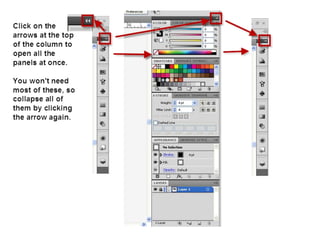
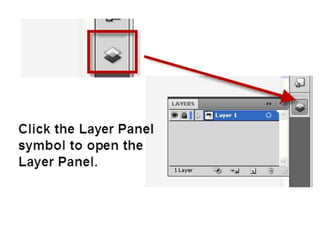
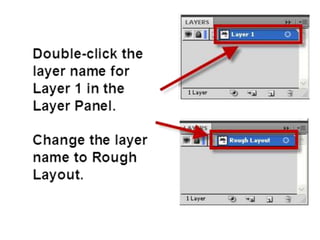
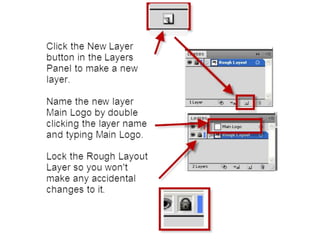
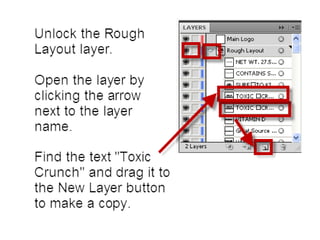
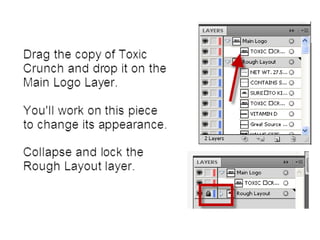
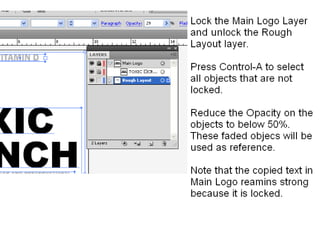
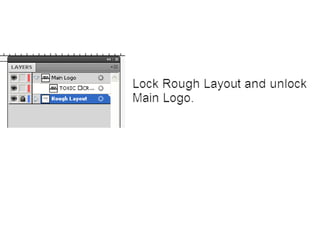
IntroductionIn this part of the tutorial you’ll use:Area Type tool to fill a shape with textType on PathYou will learn how to work with Layers to organize and manage your work.You will also learn how to work with panels in the Illustrator user interface.
Open the Adobe Illustrator file you started your text layout in Part I of this tutorial.
Save and exportSave your workUse File>Save for Web & Devices to export a .pngdocument at 600 pixels wide.  Create a blog post with your document. Explaining what you learned and how you can use it on your cereal box design later.
Working with text2

Working with text2

  • 1.
    Working With TextPartIIAdding Text to Shapes
  • 2.
    IntroductionIn this partof the tutorial you’ll use:Area Type tool to fill a shape with textType on PathYou will learn how to work with Layers to organize and manage your work.You will also learn how to work with panels in the Illustrator user interface.
  • 3.
    Open the AdobeIllustrator file you started your text layout in Part I of this tutorial.
  • 31.
    Save and exportSaveyour workUse File>Save for Web & Devices to export a .pngdocument at 600 pixels wide. Create a blog post with your document. Explaining what you learned and how you can use it on your cereal box design later.