
Week 4 – Discussion 2:
Worked Examples

Suzanne Sannwald
Ashford University
Technology Solutions for JIT Training & Learning
EDU 656
Dr. Kris Jamsa
July 18, 2013
Zip Codes with Leading Zeroes
By default, Excel automatically removes leading 0s.
What is a “leading zero”?
• A zero that is at the beginning of a number, but not if
the zero is after a decimal point.
Examples:

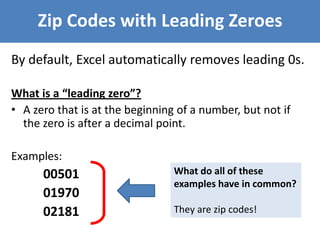
00501
01970
02181

What do all of these
examples have in common?
They are zip codes!
Example: Step 1
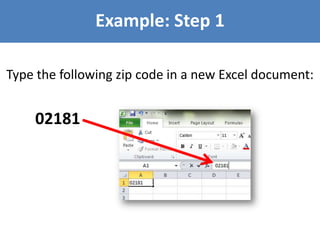
Type the following zip code in a new Excel document:

02181
Example: Step 2
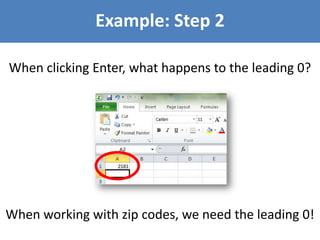
When clicking Enter, what happens to the leading 0?

When working with zip codes, we need the leading 0!
Example: Step 3
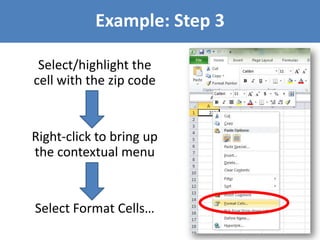
Select/highlight the
cell with the zip code

Right-click to bring up
the contextual menu

Select Format Cells…
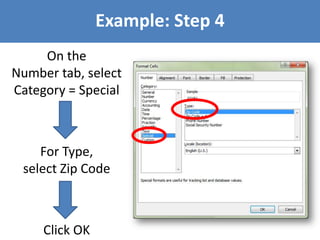
Example: Step 4
On the
Number tab, select
Category = Special

For Type,
select Zip Code

Click OK
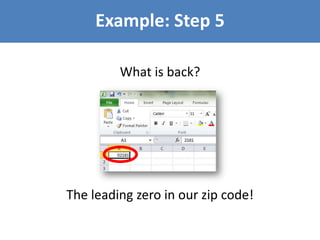
Example: Step 5
What is back?

The leading zero in our zip code!

Zip Codes with Leading Zeroes in Excel

  • 1.
    Week 4 –Discussion 2: Worked Examples Suzanne Sannwald Ashford University Technology Solutions for JIT Training & Learning EDU 656 Dr. Kris Jamsa July 18, 2013
  • 2.
    Zip Codes withLeading Zeroes By default, Excel automatically removes leading 0s. What is a “leading zero”? • A zero that is at the beginning of a number, but not if the zero is after a decimal point. Examples: 00501 01970 02181 What do all of these examples have in common? They are zip codes!
  • 3.
    Example: Step 1 Typethe following zip code in a new Excel document: 02181
  • 4.
    Example: Step 2 Whenclicking Enter, what happens to the leading 0? When working with zip codes, we need the leading 0!
  • 5.
    Example: Step 3 Select/highlightthe cell with the zip code Right-click to bring up the contextual menu Select Format Cells…
  • 6.
    Example: Step 4 Onthe Number tab, select Category = Special For Type, select Zip Code Click OK
  • 7.
    Example: Step 5 Whatis back? The leading zero in our zip code!