FORGET HDMI CABLES
IT’S ALL ABOUT WIRELESS
A quick-and-dirty guide to
wireless HDMI
Before there was Wireless HDMI,
there was HDMI
DUH, CAPTAIN OBVIOUS
So what is HDMI, then?
Created by Okan Benn
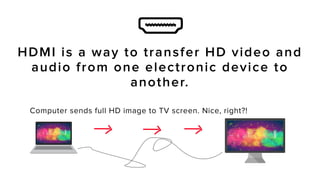
Computer sends full HD image to TV screen. Nice, right?!
HDMI is a way to transfer HD video and
audio from one electronic device to
another.
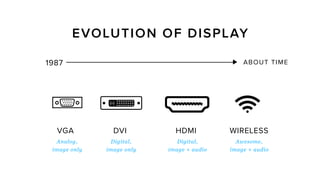
It has beaten out other
technologies as the new
standard
VGA
1987 ABOUT TIME
Analog,
image only
Digital,
image only
Digital,
image + audio
Awesome,
image + audio
Created by Okan Benn
from the Noun Project
Created by Okan Benn
DVI HDMI WIRELESS
EVOLUTION OF DISPLAY
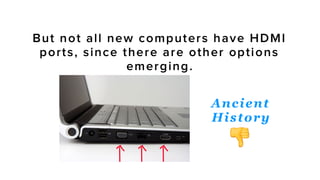
HDMI is probably in any TV you
bought in the last decade.
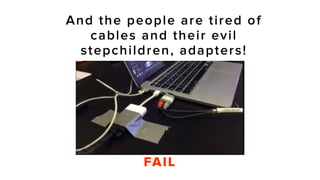
And the people are tired of
cables and their evil
stepchildren, adapters!
FAIL
That’s where wireless HDMI comes in…
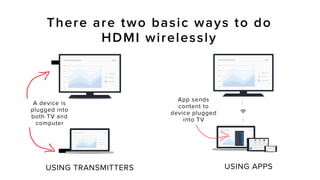
There are two basic ways to do
HDMI wirelessly
App sends
content to
device plugged
into TV
A device is
plugged into
both TV and
computer
USING APPSUSING TRANSMITTERS
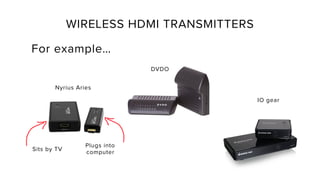
WIRELESS HDMI TRANSMITTERS
For example…
Plugs into
computer
Sits by TV
Nyrius Aries
DVDO
IO gear
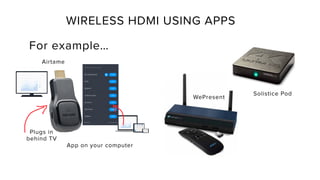
WIRELESS HDMI USING APPS
For example…
Plugs in
behind TV
Solistice Pod
App on your computer
WePresent
Airtame
Nothing plugged
into computer, so
it’s hands-free and
flexible
Relies on WiFi,
which can be
unstable
!
Pros and ConsOF WIRELESS HDMI USING APPS
Wireless HDMI not to be
c o n f u s e d w i t h m e d i a
s t r e a m i n g , l i k e R o k u &
Chromecast
https://airtame.com/screen-mirroring
Learn more here:
SIDENOTE
TO WRAP THINGS UP…
• Wireless HDMI is the future of screen mirroring.
• Schools and offices will benefit most from it,
since they deal with the everyday struggles of
cable.
• But to succeed, we need wireless HDMI that
is….
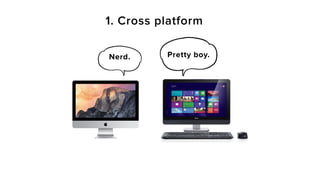
1. Cross platform
Nerd. Pretty boy.
Why cross platform?
Wireless HDMI has to work with all the
people who use their own PCs and
tablets, like at a university or office.
You should be able to use it from any
computer without converters or pricey
software.
2. Compact
Why compact?
If it doesn’t hide away nicely, then you
might as well use bulky cables.
Ideally, wireless HDMI products shouldn’t be
mounted on a wall or sit on a table taking
up space.
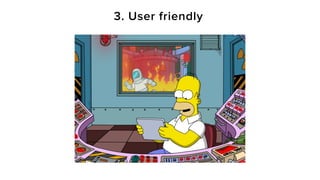
3. User friendly
Why user friendly?
Wireless technology is kind of complicated
from a development point of view. That
doesn’t mean it should be hard to use.
To succeed in replacing cables, wireless HDMI
has to be easy enough for anyone to use.
These are the quick n dirty things to know
about wireless HDMI.
Want to learn more about wireless HDMI?
Check it out on:
https://airtame.com/wireless-hdmi
https://airtame.com
https://twitter.com/airtame
LONG LIVE
THE WIRELESS REVOLUTION!
Tell us what you think!
@airtame

Wireless HDMI: a quick-and-dirty guide

  • 1.
    FORGET HDMI CABLES IT’SALL ABOUT WIRELESS A quick-and-dirty guide to wireless HDMI
  • 2.
    Before there wasWireless HDMI, there was HDMI
  • 3.
  • 4.
    So what isHDMI, then?
  • 5.
    Created by OkanBenn Computer sends full HD image to TV screen. Nice, right?! HDMI is a way to transfer HD video and audio from one electronic device to another.
  • 6.
    It has beatenout other technologies as the new standard
  • 7.
    VGA 1987 ABOUT TIME Analog, imageonly Digital, image only Digital, image + audio Awesome, image + audio Created by Okan Benn from the Noun Project Created by Okan Benn DVI HDMI WIRELESS EVOLUTION OF DISPLAY
  • 8.
    HDMI is probablyin any TV you bought in the last decade.
  • 10.
    And the peopleare tired of cables and their evil stepchildren, adapters! FAIL
  • 11.
    That’s where wirelessHDMI comes in…
  • 12.
    There are twobasic ways to do HDMI wirelessly App sends content to device plugged into TV A device is plugged into both TV and computer USING APPSUSING TRANSMITTERS
  • 13.
    WIRELESS HDMI TRANSMITTERS Forexample… Plugs into computer Sits by TV Nyrius Aries DVDO IO gear
  • 15.
    WIRELESS HDMI USINGAPPS For example… Plugs in behind TV Solistice Pod App on your computer WePresent Airtame
  • 16.
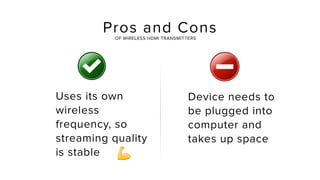
    Nothing plugged into computer,so it’s hands-free and flexible Relies on WiFi, which can be unstable ! Pros and ConsOF WIRELESS HDMI USING APPS
  • 17.
    Wireless HDMI notto be c o n f u s e d w i t h m e d i a s t r e a m i n g , l i k e R o k u & Chromecast https://airtame.com/screen-mirroring Learn more here: SIDENOTE
  • 18.
    TO WRAP THINGSUP… • Wireless HDMI is the future of screen mirroring. • Schools and offices will benefit most from it, since they deal with the everyday struggles of cable. • But to succeed, we need wireless HDMI that is….
  • 19.
  • 20.
    Why cross platform? WirelessHDMI has to work with all the people who use their own PCs and tablets, like at a university or office. You should be able to use it from any computer without converters or pricey software.
  • 21.
  • 22.
    Why compact? If itdoesn’t hide away nicely, then you might as well use bulky cables. Ideally, wireless HDMI products shouldn’t be mounted on a wall or sit on a table taking up space.
  • 23.
  • 24.
    Why user friendly? Wirelesstechnology is kind of complicated from a development point of view. That doesn’t mean it should be hard to use. To succeed in replacing cables, wireless HDMI has to be easy enough for anyone to use.
  • 25.
    These are thequick n dirty things to know about wireless HDMI. Want to learn more about wireless HDMI? Check it out on: https://airtame.com/wireless-hdmi
  • 26.