Clickshare
ISE 2015
An enterprise collaboration platform
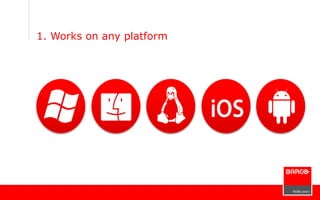
1. Works on any platform
2. Guest-friendly: zero-installation
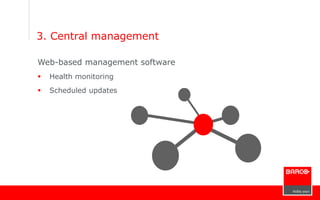
3. Central management
Web-based management software
 Health monitoring
 Scheduled updates
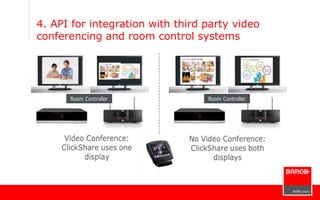
4. API for integration with third party video
conferencing and room control systems
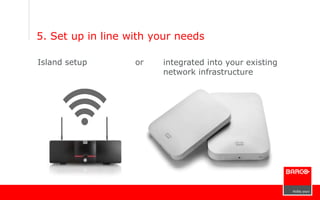
5. Set up in line with your needs
Island setup or integrated into your existing
network infrastructure
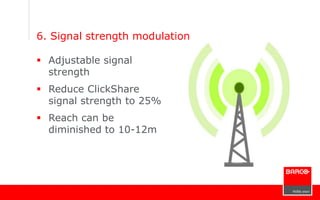
6. Signal strength modulation
 Adjustable signal
strength
 Reduce ClickShare
signal strength to 25%
 Reach can be
diminished to 10-12m
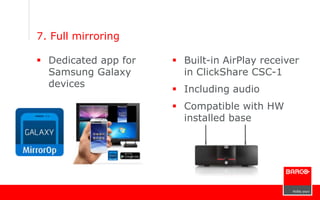
7. Full mirroring
 Dedicated app for
Samsung Galaxy
devices
 Built-in AirPlay receiver
in ClickShare CSC-1
 Including audio
 Compatible with HW
installed base
P
o
r
t
f
o
l
i
o
MSRP € 1,750/USD 1,750 € 3,950/USD 3,950
Set 1 Base Unit; 2 Buttons 1 Base Unit; 1 Tray; 4 Buttons
Output resolution 1920*1080 1920*1200 (DVI) 2560*1600 (DP)
ClickShare Buttons and apps
MirrorOp Sender for Galaxy
Linux client
AirPlay
2,4GHz and 5GHz band
Button update over Wi-Fi
Network Integration
# simultaneous connections 8 64
# simultaneously on-screen 2 4
CMGS compatible
Dual display
Smooth transitions, auto lay-out
Standard warranty 3 years 3 years

ClickShare, an enterprise forum

  • 1.
    Clickshare ISE 2015 An enterprisecollaboration platform
  • 2.
    1. Works onany platform
  • 3.
  • 4.
    3. Central management Web-basedmanagement software  Health monitoring  Scheduled updates
  • 5.
    4. API forintegration with third party video conferencing and room control systems
  • 6.
    5. Set upin line with your needs Island setup or integrated into your existing network infrastructure
  • 7.
    6. Signal strengthmodulation  Adjustable signal strength  Reduce ClickShare signal strength to 25%  Reach can be diminished to 10-12m
  • 8.
    7. Full mirroring Dedicated app for Samsung Galaxy devices  Built-in AirPlay receiver in ClickShare CSC-1  Including audio  Compatible with HW installed base
  • 9.
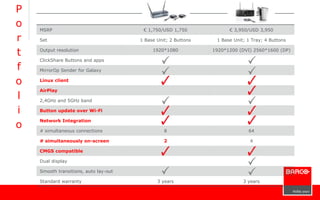
    P o r t f o l i o MSRP € 1,750/USD1,750 € 3,950/USD 3,950 Set 1 Base Unit; 2 Buttons 1 Base Unit; 1 Tray; 4 Buttons Output resolution 1920*1080 1920*1200 (DVI) 2560*1600 (DP) ClickShare Buttons and apps MirrorOp Sender for Galaxy Linux client AirPlay 2,4GHz and 5GHz band Button update over Wi-Fi Network Integration # simultaneous connections 8 64 # simultaneously on-screen 2 4 CMGS compatible Dual display Smooth transitions, auto lay-out Standard warranty 3 years 3 years

Editor's Notes

  • #2 ClickShare, the one click wonder, brings ultimate ease of use to the meeting room; But there’s plenty more why ClickShare is a perfect match if you are looking for enterprise collaboration. Let me share five reasons why
  • #3 First of all ClickShare works on virtually any platform. The button can be used on Windows PCs, Macbooks and Linux computers, whereas the ClickShare app works on iPad, iPhone and Android devices. This means that your employees can use any platform they want in the meeting
  • #4 What’s more, CLickSHare is extremely guest-friendly, Visitors don’t have to install any files on their pc or mac to start sharing. All they have to do is plug in the button and activate; and in less than 15 seconds they can be on screen.
  • #5 Barco has quite some customers with 100 or more CLickShares installed, French telecom giant SFR is one of our references in this respect. To support enterprise-wide roll outs, there’s the ClickShare management suite, a web-based asset management tool that allows to check the system’s status in real-time and to schedule updates. Gone are the days you had to wait until everybody had left the meeting room to put a new firmware on a ClickShare. Simply schedule the update to run at midnight and relax.
  • #6 In many meeting rooms ClickShare is not the only device. That’s why ClickShare features an API, an application programming interface, that allows for integration with video conferencing and room control systems. Take this scenario as an example. You have a dual screen meeting room featuring video conferencing; When you are having a video conference ClickShare knows it can only show on one screen. But when there’s no video conference ongoing, ClickSHare knows it can use the two screens.
  • #7 And last but not least you can also integrate ClickShare in your existing wireless infrastructure. In this scenario the base unit is hooked up to the enterprise LAN with a network cable and no longer creates a dedicated wifi. Instead the ClickShare buttons use your existing access point. A perfect match when company policy does not permit other wireless devices to be brought into the building.