Windows Server 2016 First Look (Part 1)
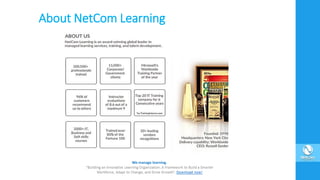
About NetCom Learning
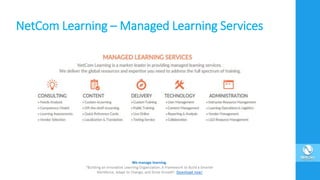
NetCom Learning – Managed Learning Services
Agenda
• Windows Server 2016 as the 4th Era of Windows Server
• Editions.
• Hardware requirements
• Features:
Nano server.
Hyper-V Hot-Add Virtual Hardware.
Containers.
Nested Virtualization.
Q&A
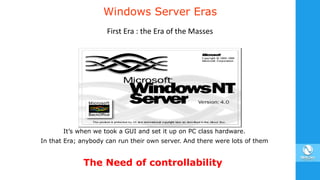
Windows Server Eras
It’s when we took a GUI and set it up on PC class hardware.
In that Era; anybody can run their own server. And there were lots of them
First Era : the Era of the Masses
The Need of controllability
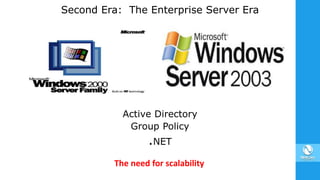
Second Era: The Enterprise Server Era
Active Directory
Group Policy
.NET
The need for scalability
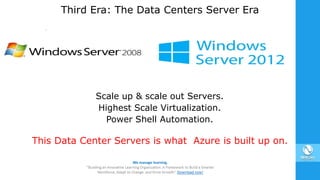
Third Era: The Data Centers Server Era
Scale up & scale out Servers.
Highest Scale Virtualization.
Power Shell Automation.
This Data Center Servers is what Azure is built up on.
Fourth Era: The Cloud Era
Taking Technology from Azure.
Updating Windows Server.
•Each one of these Eras has been additive.
•Each Era does not replace the previous Era but it adds to it.
Windows Server 2016 Editions
Windows Server 2016 Datacenter Edition
Highly virtualized private and hybrid cloud environments.
Windows Server 2016 Standard Edition
Non-virtualized or lightly virtualized environments.
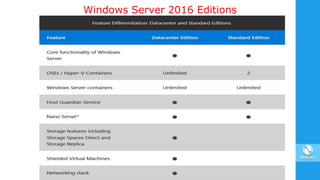
Windows Server 2016 Editions
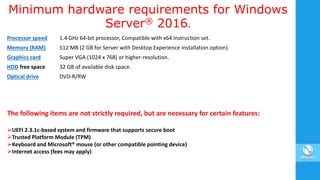
Minimum hardware requirements for Windows
Server® 2016.
Processor speed 1.4 GHz 64-bit processor, Compatible with x64 instruction set.
Memory (RAM) 512 MB (2 GB for Server with Desktop Experience installation option).
Graphics card Super VGA (1024 x 768) or higher-resolution.
HDD free space 32 GB of available disk space.
Optical drive DVD-R/RW
The following items are not strictly required, but are necessary for certain features:
UEFI 2.3.1c-based system and firmware that supports secure boot
Trusted Platform Module (TPM)
Keyboard and Microsoft® mouse (or other compatible pointing device)
Internet access (fees may apply)
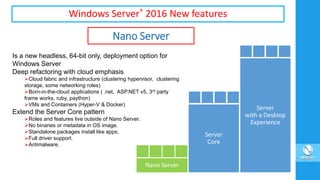
Windows Server® 2016 New features
Nano Server
Is a new headless, 64-bit only, deployment option for
Windows Server
Deep refactoring with cloud emphasis
Cloud fabric and infrastructure (clustering hypervisor, clustering
storage, some networking roles)
Born-in-the-cloud applications ( .net, ASP.NET v5, 3rd party
frame works, ruby, paython)
VMs and Containers (Hyper-V & Docker)
Extend the Server Core pattern
Roles and features live outside of Nano Server.
No binaries or metadata in OS image.
Standalone packages install like apps.
Full driver support.
Antimalware.
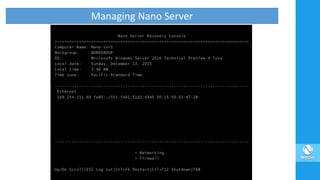
Managing Nano Server
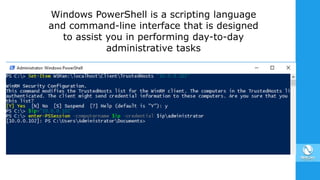
Windows PowerShell is a scripting language
and command-line interface that is designed
to assist you in performing day-to-day
administrative tasks
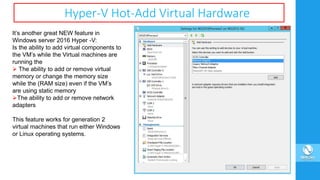
Hyper-V Hot-Add Virtual Hardware
It’s another great NEW feature in
Windows server 2016 Hyper -V:
Is the ability to add virtual components to
the VM’s while the Virtual machines are
running the
 The ability to add or remove virtual
memory or change the memory size
while the (RAM size) even if the VM’s
are using static memory
The ability to add or remove network
adapters
This feature works for generation 2
virtual machines that run either Windows
or Linux operating systems.
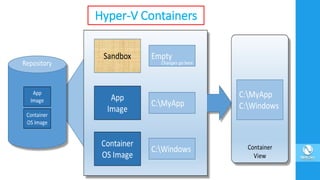
Hyper-V Containers
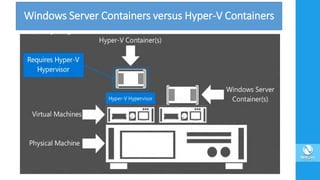
Windows Server Containers versus Hyper-V Containers
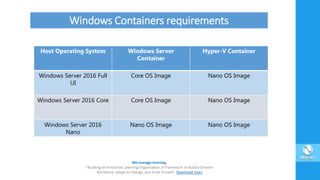
Host Operating System Windows Server
Container
Hyper-V Container
Windows Server 2016 Full
UI
Core OS Image Nano OS Image
Windows Server 2016 Core Core OS Image Nano OS Image
Windows Server 2016
Nano
Nano OS Image Nano OS Image
Windows Containers requirements
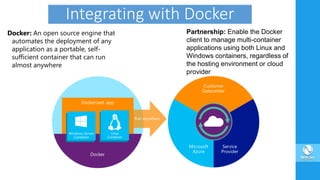
Integrating with Docker
Docker: An open source engine that
automates the deployment of any
application as a portable, self-
sufficient container that can run
almost anywhere
Partnership: Enable the Docker
client to manage multi-container
applications using both Linux and
Windows containers, regardless of
the hosting environment or cloud
provider
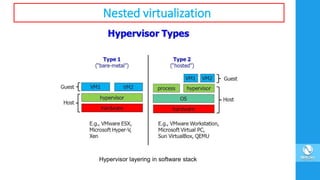
Nested virtualization
Hypervisor layering in software stack
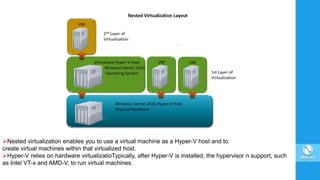
Nested virtualization enables you to use a virtual machine as a Hyper-V host and to
create virtual machines within that virtualized host.
Hyper-V relies on hardware virtualizatioTypically, after Hyper-V is installed, the hypervisor n support, such
as Intel VT-x and AMD-V, to run virtual machines.
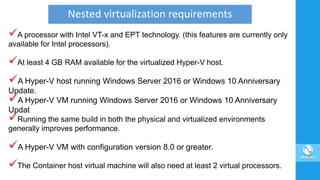
A processor with Intel VT-x and EPT technology. (this features are currently only
available for Intel processors).
At least 4 GB RAM available for the virtualized Hyper-V host.
A Hyper-V host running Windows Server 2016 or Windows 10 Anniversary
Update.
A Hyper-V VM running Windows Server 2016 or Windows 10 Anniversary
Updat
Running the same build in both the physical and virtualized environments
generally improves performance.
A Hyper-V VM with configuration version 8.0 or greater.
The Container host virtual machine will also need at least 2 virtual processors.
Nested virtualization requirements
XOther Hypervisors will not work.
XDynamic memory must be OFF.
XA VM which hosts other VMs cannot be live migrated.
XNo save and restore capabilities.
XHosts with Device Guard enabled cannot expose virtualization extensions to
guests.
XHosts with Virtualization Based Security (VBS) enabled cannot expose
virtualization extensions to guests. IT Administrators must first disable VBS in
order to preview nested virtualization.
Nested virtualization limitations
Recommended Courses
NetCom Learning offers a comprehensive portfolio for Microsoft Windows
Server 2016 training options. Please see below the list of recommended
courses with upcoming schedules:
20740: Installation, Storage, and Compute with Windows Server 2016
20741: Networking with Windows Server 2016
20742: Identity with Windows Server 2016
20743: Upgrading Your Skills to MCSA: Windows Server 2016
Check out more Windows Server 2016 training options - CLICK HERE
Our live webinars will help you to touch base a wide variety of IT, soft skills and business
productivity topics; and keep you up to date on the latest IT industry trends. Register now for our
upcoming webinars:
Build Effective Presentation – February 23
Cybersecurity Trends – February 28
Managing tech projects with Office 365 Planner– March 02
Cisco Security - Her name is Sarah_12 – March 07
Windows Server 2016 First Look (Part-2) – March 09
Special Promotion
Get ready for the Cloud opportunity with our
certification enabled training offer on
Microsoft Azure.
Learn more»
Special Promotion
Protect your organization against cyber threats by joining our
Cybersecurity training courses and add $500 to your savings.
Learn more»
To get latest technology updates, please follow our social media pages!
SarderTV is a B2B Media Platform headquartered in New York. The platform publishes
exclusive video based media content from Top Corporate Leaders of Fortune 1000, Best
Selling Global Authors & Ivy League Professors. Learn more - http://sardertv.com
THANK YOU !!!
We manage learning.
“Building an Innovative Learning Organization. A Framework to Build a Smarter
Workforce, Adapt to Change, and Drive Growth”. Download now!

Windows Server 2016 First Look (Part 1)

  • 1.
    Windows Server 2016First Look (Part 1)
  • 2.
  • 3.
    NetCom Learning –Managed Learning Services
  • 5.
    Agenda • Windows Server2016 as the 4th Era of Windows Server • Editions. • Hardware requirements • Features: Nano server. Hyper-V Hot-Add Virtual Hardware. Containers. Nested Virtualization. Q&A
  • 6.
    Windows Server Eras It’swhen we took a GUI and set it up on PC class hardware. In that Era; anybody can run their own server. And there were lots of them First Era : the Era of the Masses The Need of controllability
  • 7.
    Second Era: TheEnterprise Server Era Active Directory Group Policy .NET The need for scalability
  • 8.
    Third Era: TheData Centers Server Era Scale up & scale out Servers. Highest Scale Virtualization. Power Shell Automation. This Data Center Servers is what Azure is built up on.
  • 9.
    Fourth Era: TheCloud Era Taking Technology from Azure. Updating Windows Server. •Each one of these Eras has been additive. •Each Era does not replace the previous Era but it adds to it.
  • 10.
    Windows Server 2016Editions Windows Server 2016 Datacenter Edition Highly virtualized private and hybrid cloud environments. Windows Server 2016 Standard Edition Non-virtualized or lightly virtualized environments.
  • 11.
  • 12.
    Minimum hardware requirementsfor Windows Server® 2016. Processor speed 1.4 GHz 64-bit processor, Compatible with x64 instruction set. Memory (RAM) 512 MB (2 GB for Server with Desktop Experience installation option). Graphics card Super VGA (1024 x 768) or higher-resolution. HDD free space 32 GB of available disk space. Optical drive DVD-R/RW The following items are not strictly required, but are necessary for certain features: UEFI 2.3.1c-based system and firmware that supports secure boot Trusted Platform Module (TPM) Keyboard and Microsoft® mouse (or other compatible pointing device) Internet access (fees may apply)
  • 13.
    Windows Server® 2016New features Nano Server Is a new headless, 64-bit only, deployment option for Windows Server Deep refactoring with cloud emphasis Cloud fabric and infrastructure (clustering hypervisor, clustering storage, some networking roles) Born-in-the-cloud applications ( .net, ASP.NET v5, 3rd party frame works, ruby, paython) VMs and Containers (Hyper-V & Docker) Extend the Server Core pattern Roles and features live outside of Nano Server. No binaries or metadata in OS image. Standalone packages install like apps. Full driver support. Antimalware.
  • 14.
  • 15.
    Windows PowerShell isa scripting language and command-line interface that is designed to assist you in performing day-to-day administrative tasks
  • 16.
    Hyper-V Hot-Add VirtualHardware It’s another great NEW feature in Windows server 2016 Hyper -V: Is the ability to add virtual components to the VM’s while the Virtual machines are running the  The ability to add or remove virtual memory or change the memory size while the (RAM size) even if the VM’s are using static memory The ability to add or remove network adapters This feature works for generation 2 virtual machines that run either Windows or Linux operating systems.
  • 17.
  • 18.
    Windows Server Containersversus Hyper-V Containers
  • 19.
    Host Operating SystemWindows Server Container Hyper-V Container Windows Server 2016 Full UI Core OS Image Nano OS Image Windows Server 2016 Core Core OS Image Nano OS Image Windows Server 2016 Nano Nano OS Image Nano OS Image Windows Containers requirements
  • 20.
    Integrating with Docker Docker:An open source engine that automates the deployment of any application as a portable, self- sufficient container that can run almost anywhere Partnership: Enable the Docker client to manage multi-container applications using both Linux and Windows containers, regardless of the hosting environment or cloud provider
  • 21.
  • 22.
    Nested virtualization enablesyou to use a virtual machine as a Hyper-V host and to create virtual machines within that virtualized host. Hyper-V relies on hardware virtualizatioTypically, after Hyper-V is installed, the hypervisor n support, such as Intel VT-x and AMD-V, to run virtual machines.
  • 23.
    A processor withIntel VT-x and EPT technology. (this features are currently only available for Intel processors). At least 4 GB RAM available for the virtualized Hyper-V host. A Hyper-V host running Windows Server 2016 or Windows 10 Anniversary Update. A Hyper-V VM running Windows Server 2016 or Windows 10 Anniversary Updat Running the same build in both the physical and virtualized environments generally improves performance. A Hyper-V VM with configuration version 8.0 or greater. The Container host virtual machine will also need at least 2 virtual processors. Nested virtualization requirements
  • 24.
    XOther Hypervisors willnot work. XDynamic memory must be OFF. XA VM which hosts other VMs cannot be live migrated. XNo save and restore capabilities. XHosts with Device Guard enabled cannot expose virtualization extensions to guests. XHosts with Virtualization Based Security (VBS) enabled cannot expose virtualization extensions to guests. IT Administrators must first disable VBS in order to preview nested virtualization. Nested virtualization limitations
  • 25.
    Recommended Courses NetCom Learningoffers a comprehensive portfolio for Microsoft Windows Server 2016 training options. Please see below the list of recommended courses with upcoming schedules: 20740: Installation, Storage, and Compute with Windows Server 2016 20741: Networking with Windows Server 2016 20742: Identity with Windows Server 2016 20743: Upgrading Your Skills to MCSA: Windows Server 2016 Check out more Windows Server 2016 training options - CLICK HERE
  • 26.
    Our live webinarswill help you to touch base a wide variety of IT, soft skills and business productivity topics; and keep you up to date on the latest IT industry trends. Register now for our upcoming webinars: Build Effective Presentation – February 23 Cybersecurity Trends – February 28 Managing tech projects with Office 365 Planner– March 02 Cisco Security - Her name is Sarah_12 – March 07 Windows Server 2016 First Look (Part-2) – March 09
  • 27.
    Special Promotion Get readyfor the Cloud opportunity with our certification enabled training offer on Microsoft Azure. Learn more»
  • 28.
    Special Promotion Protect yourorganization against cyber threats by joining our Cybersecurity training courses and add $500 to your savings. Learn more»
  • 29.
    To get latesttechnology updates, please follow our social media pages!
  • 30.
    SarderTV is aB2B Media Platform headquartered in New York. The platform publishes exclusive video based media content from Top Corporate Leaders of Fortune 1000, Best Selling Global Authors & Ivy League Professors. Learn more - http://sardertv.com
  • 32.
    THANK YOU !!! Wemanage learning. “Building an Innovative Learning Organization. A Framework to Build a Smarter Workforce, Adapt to Change, and Drive Growth”. Download now!