Introduction to Microsoft Active
Directory
Grade Level / Audience - post-secondary students enrolled in a computer related college or university program.
 Microsoft and Active Directory are trademarks of the Microsoft Corporation
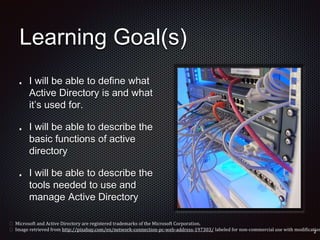
Learning Goal(s)
I will be able to define what
Active Directory is and what
it’s used for.
I will be able to describe the
basic functions of active
directory
I will be able to describe the
tools needed to use and
manage Active Directory
 Microsoft and Active Directory are registered trademarks of the Microsoft Corporation.
 Image retrieved from http://pixabay.com/en/network-connection-pc-web-address-197303/ labeled for non-commercial use with modification
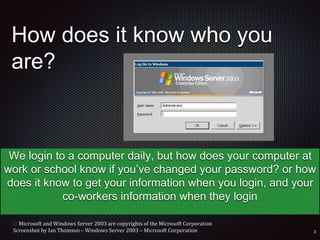
How does it know who you
are?
We login to a computer daily, but how does your computer at
work or school know if you’ve changed your password? or how
does it know to get your information when you login, and your
co-workers information when they login
 Microsoft and Windows Server 2003 are copyrights of the Microsoft Corporation
Screenshot by Ian Thomson – Windows Server 2003 – Microsoft Corporation
Active
Directory
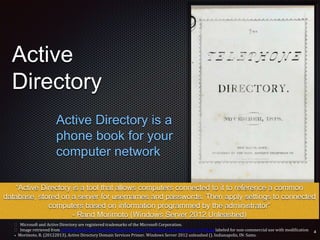
Active Directory is a
phone book for your
computer network
 Microsoft and Active Directory are registered trademarks of the Microsoft Corporation.
 Image retrieved from upload.wikimedia.org/wikipedia/commons/7/76/New_haven_directory_1878.jpg labeled for non-commercial use with modification
• Morimoto, R. (20122013). Active Directory Domain Services Primer. Windows Server 2012 unleashed (). Indianapolis, IN: Sams.
“Active Directory is a tool that allows computers connected to it to reference a common
database, stored on a server for usernames and passwords. Then apply settings to connected
computers based on information programmed by the administrator”
- Rand Morimoto (Windows Server 2012 Unleashed)
Active Directory
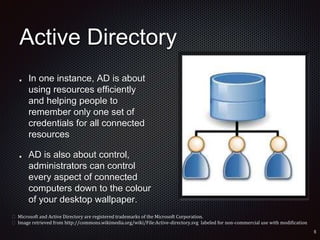
In one instance, AD is about
using resources efficiently
and helping people to
remember only one set of
credentials for all connected
resources
AD is also about control,
administrators can control
every aspect of connected
computers down to the colour
of your desktop wallpaper.
 Microsoft and Active Directory are registered trademarks of the Microsoft Corporation.
 Image retrieved from http://commons.wikimedia.org/wiki/File:Active-directory.svg labeled for non-commercial use with modification
Why would
you want to
do this?
• Helps technical support
• One set of permissions for
the whole company
• Task automation
• Single Sign On
• Better security
 Microsoft and Active Directory are registered trademarks of the Microsoft Corporation.
 Image retrieved from http://pixabay.com/en/computer-user-angry-danger-42657/ labeled for non-commercial use with modification
What’s the
down side
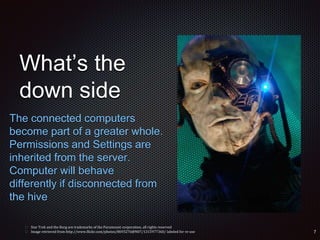
The connected computers
become part of a greater whole.
Permissions and Settings are
inherited from the server.
Computer will behave
differently if disconnected from
the hive
 Star Trek and the Borg are trademarks of the Paramount corporation, all rights reserved
 Image retrieved from http://www.flickr.com/photos/8693276@N07/1315977360/ labeled for re-use
Active Directory History
Built on the Microsoft Exchange directory platform first
introduced for Windows NT 4.0
First introduced as a standard in Windows 2000
Compatible with LDAP (Lightweight Directory Access
Protocol) which allows it to share usernames and
passwords across third party systems.
 Microsoft and Active Directory are trademarks of the Microsoft Corporation
 Windows 2000, Windows NT 4.0 and Microsoft Exchange are copyright terms - copyright held by the Microsoft Corporation
 Zacker, C. (2009). Planning Active Directory Enviornments . Microsoft Certified IT Professional - Windows Server 2008 Administrator (). Hoboken, NJ: Microsoft Press.
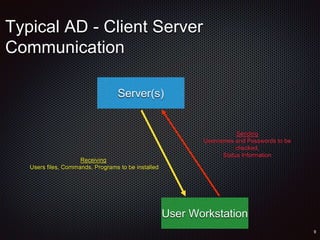
Typical AD - Client Server
Communication
Server(s)
User Workstation
Sending
Usernames and Passwords to be
checked,
Status Information
Receiving
Users files, Commands, Programs to be installed
Considerations
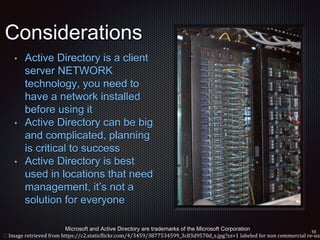
• Active Directory is a client
server NETWORK
technology, you need to
have a network installed
before using it
• Active Directory can be big
and complicated, planning
is critical to success
• Active Directory is best
used in locations that need
management, it’s not a
solution for everyone
Microsoft and Active Directory are trademarks of the Microsoft Corporation
 Image retrieved from https://c2.staticflickr.com/4/3459/3877534599_3c83d9570d_z.jpg?zz=1 labeled for non commercial re-use
How to get it
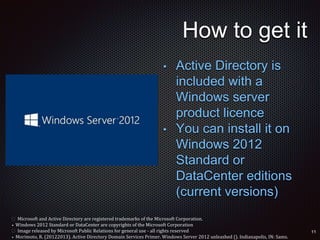
• Active Directory is
included with a
Windows server
product licence
• You can install it on
Windows 2012
Standard or
DataCenter editions
(current versions)
 Microsoft and Active Directory are registered trademarks of the Microsoft Corporation.
• Windows 2012 Standard or DataCenter are copyrights of the Microsoft Corporation
 Image released by Microsoft Public Relations for general use - all rights reserved
• Morimoto, R. (20122013). Active Directory Domain Services Primer. Windows Server 2012 unleashed (). Indianapolis, IN: Sams.
Resources to get started
Microsoft provides training courses for Active
Directory Administration
Printed books with Lab exercises are a great way to
get started
www.microsoft.com/education
 Microsoft and Active Directory are registered trademarks of the Microsoft Corporation.
Installing Active Directory
Microsoft TechNET provides a step by step overview
of the process
TechNET is a freely accessible online resource to
help you configure Microsoft Products
Access the directions for installing Active Directory at
http://technet.microsoft.com/en-
us/library/jj574166.aspx
 Microsoft and Active Directory are registered trademarks of the Microsoft Corporation.
• TechNET is a registered Trademark of the Microsoft Corporation
Connecting Computers
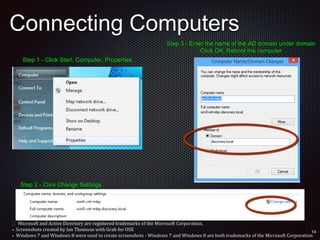
Step 1 - Click Start, Computer, Properties
Step 2 - Click Change Settings
Step 3 - Enter the name of the AD domain under domain
Click OK, Reboot the computer
 Microsoft and Active Directory are registered trademarks of the Microsoft Corporation.
• Screenshots created by Ian Thomson with Grab for OSX
• Windows 7 and Windows 8 were used to create screenshots - Windows 7 and Windows 8 are both trademarks of the Microsoft Corporation
Types of AD Objects
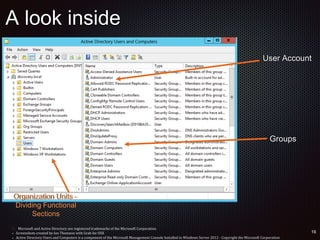
Users - Individual User Accounts
Groups - Used for Security - Users can be added to
groups and groups can be given permissions
Organizational Units - Used to logically organize
Active Directory databases
Computers - Individual computers connected to the
Active Directory
Objects are “things” Active Directory can
manage
 Microsoft and Active Directory are registered trademarks of the Microsoft Corporation.
• Morimoto, R. (20122013). Active Directory Domain Services Primer. Windows Server 2012 unleashed (). Indianapolis, IN: Sams.
A look inside
Organization Units -
Dividing Functional
Sections
Groups
User Account
 Microsoft and Active Directory are registered trademarks of the Microsoft Corporation.
• Screenshots created by Ian Thomson with Grab for OSX
• Active Directory Users and Computers is a component of the Microsoft Management Console Installed in Windows Server 2012 - Copyright the Microsoft Corporation
Tools Used
MMC - Microsoft Management Console - A flexible
tool that contains many modules for managing Active
Directory and Windows components - Installed in
Windows 2012 Automatically
RSAT - Remote Management Tools - Allows
Administrators to install the MMC components of the
server onto their workstations for remote management
 Microsoft and Active Directory are registered trademarks of the Microsoft Corporation.
• MMC, Microsoft Management Console and Windows 2012 are all software programs created by the Microsoft Corporation
• RSAT is a software program created and licensed by the Microsoft Corporation
• Windows 2012 is copyright of the Microsoft Corporation
• Morimoto, R. (20122013). Active Directory Domain Services Primer. Windows Server 2012 unleashed (). Indianapolis, IN: Sams.
Final
Thoughts
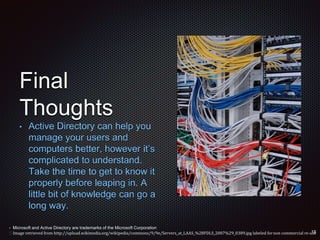
• Active Directory can help you
manage your users and
computers better, however it’s
complicated to understand.
Take the time to get to know it
properly before leaping in. A
little bit of knowledge can go a
long way.
• Microsoft and Active Directory are trademarks of the Microsoft Corporation
 Image retrieved from http://upload.wikimedia.org/wikipedia/commons/9/9e/Servers_at_LAAS_%28FDLS_2007%29_0389.jpg labeled fornon commercial re-use
Bibliography and Credits
Primary Source - Morimoto, R. (20122013). Active Directory Domain Services
Primer. Windows Server 2012 unleashed (). Indianapolis, IN: Sams.
Primary Source - Zacker, C. (2009). Planning Active Directory Environments .
Microsoft Certified IT Professional - Windows Server 2008 Administrator ().
Hoboken, NJ: Microsoft Press.
Secondary Source - Thomson, I (2013). Compiled Lecture Notes. Sir Sandford
Fleming College . Peterborough, Ontario
Secondary Source - Microsoft TechNET Knowledge Base (2014). The Microsoft
Corporation
Active Directory, Windows, Windows 2012, Windows 7, Windows 8, Windows
2003, MMC, and RSAT are copyright works and trademarks of the Microsoft
Corporation

Introduction to Active Directory

  • 1.
    Introduction to MicrosoftActive Directory Grade Level / Audience - post-secondary students enrolled in a computer related college or university program.  Microsoft and Active Directory are trademarks of the Microsoft Corporation
  • 2.
    Learning Goal(s) I willbe able to define what Active Directory is and what it’s used for. I will be able to describe the basic functions of active directory I will be able to describe the tools needed to use and manage Active Directory  Microsoft and Active Directory are registered trademarks of the Microsoft Corporation.  Image retrieved from http://pixabay.com/en/network-connection-pc-web-address-197303/ labeled for non-commercial use with modification
  • 3.
    How does itknow who you are? We login to a computer daily, but how does your computer at work or school know if you’ve changed your password? or how does it know to get your information when you login, and your co-workers information when they login  Microsoft and Windows Server 2003 are copyrights of the Microsoft Corporation Screenshot by Ian Thomson – Windows Server 2003 – Microsoft Corporation
  • 4.
    Active Directory Active Directory isa phone book for your computer network  Microsoft and Active Directory are registered trademarks of the Microsoft Corporation.  Image retrieved from upload.wikimedia.org/wikipedia/commons/7/76/New_haven_directory_1878.jpg labeled for non-commercial use with modification • Morimoto, R. (20122013). Active Directory Domain Services Primer. Windows Server 2012 unleashed (). Indianapolis, IN: Sams. “Active Directory is a tool that allows computers connected to it to reference a common database, stored on a server for usernames and passwords. Then apply settings to connected computers based on information programmed by the administrator” - Rand Morimoto (Windows Server 2012 Unleashed)
  • 5.
    Active Directory In oneinstance, AD is about using resources efficiently and helping people to remember only one set of credentials for all connected resources AD is also about control, administrators can control every aspect of connected computers down to the colour of your desktop wallpaper.  Microsoft and Active Directory are registered trademarks of the Microsoft Corporation.  Image retrieved from http://commons.wikimedia.org/wiki/File:Active-directory.svg labeled for non-commercial use with modification
  • 6.
    Why would you wantto do this? • Helps technical support • One set of permissions for the whole company • Task automation • Single Sign On • Better security  Microsoft and Active Directory are registered trademarks of the Microsoft Corporation.  Image retrieved from http://pixabay.com/en/computer-user-angry-danger-42657/ labeled for non-commercial use with modification
  • 7.
    What’s the down side Theconnected computers become part of a greater whole. Permissions and Settings are inherited from the server. Computer will behave differently if disconnected from the hive  Star Trek and the Borg are trademarks of the Paramount corporation, all rights reserved  Image retrieved from http://www.flickr.com/photos/8693276@N07/1315977360/ labeled for re-use
  • 8.
    Active Directory History Builton the Microsoft Exchange directory platform first introduced for Windows NT 4.0 First introduced as a standard in Windows 2000 Compatible with LDAP (Lightweight Directory Access Protocol) which allows it to share usernames and passwords across third party systems.  Microsoft and Active Directory are trademarks of the Microsoft Corporation  Windows 2000, Windows NT 4.0 and Microsoft Exchange are copyright terms - copyright held by the Microsoft Corporation  Zacker, C. (2009). Planning Active Directory Enviornments . Microsoft Certified IT Professional - Windows Server 2008 Administrator (). Hoboken, NJ: Microsoft Press.
  • 9.
    Typical AD -Client Server Communication Server(s) User Workstation Sending Usernames and Passwords to be checked, Status Information Receiving Users files, Commands, Programs to be installed
  • 10.
    Considerations • Active Directoryis a client server NETWORK technology, you need to have a network installed before using it • Active Directory can be big and complicated, planning is critical to success • Active Directory is best used in locations that need management, it’s not a solution for everyone Microsoft and Active Directory are trademarks of the Microsoft Corporation  Image retrieved from https://c2.staticflickr.com/4/3459/3877534599_3c83d9570d_z.jpg?zz=1 labeled for non commercial re-use
  • 11.
    How to getit • Active Directory is included with a Windows server product licence • You can install it on Windows 2012 Standard or DataCenter editions (current versions)  Microsoft and Active Directory are registered trademarks of the Microsoft Corporation. • Windows 2012 Standard or DataCenter are copyrights of the Microsoft Corporation  Image released by Microsoft Public Relations for general use - all rights reserved • Morimoto, R. (20122013). Active Directory Domain Services Primer. Windows Server 2012 unleashed (). Indianapolis, IN: Sams.
  • 12.
    Resources to getstarted Microsoft provides training courses for Active Directory Administration Printed books with Lab exercises are a great way to get started www.microsoft.com/education  Microsoft and Active Directory are registered trademarks of the Microsoft Corporation.
  • 13.
    Installing Active Directory MicrosoftTechNET provides a step by step overview of the process TechNET is a freely accessible online resource to help you configure Microsoft Products Access the directions for installing Active Directory at http://technet.microsoft.com/en- us/library/jj574166.aspx  Microsoft and Active Directory are registered trademarks of the Microsoft Corporation. • TechNET is a registered Trademark of the Microsoft Corporation
  • 14.
    Connecting Computers Step 1- Click Start, Computer, Properties Step 2 - Click Change Settings Step 3 - Enter the name of the AD domain under domain Click OK, Reboot the computer  Microsoft and Active Directory are registered trademarks of the Microsoft Corporation. • Screenshots created by Ian Thomson with Grab for OSX • Windows 7 and Windows 8 were used to create screenshots - Windows 7 and Windows 8 are both trademarks of the Microsoft Corporation
  • 15.
    Types of ADObjects Users - Individual User Accounts Groups - Used for Security - Users can be added to groups and groups can be given permissions Organizational Units - Used to logically organize Active Directory databases Computers - Individual computers connected to the Active Directory Objects are “things” Active Directory can manage  Microsoft and Active Directory are registered trademarks of the Microsoft Corporation. • Morimoto, R. (20122013). Active Directory Domain Services Primer. Windows Server 2012 unleashed (). Indianapolis, IN: Sams.
  • 16.
    A look inside OrganizationUnits - Dividing Functional Sections Groups User Account  Microsoft and Active Directory are registered trademarks of the Microsoft Corporation. • Screenshots created by Ian Thomson with Grab for OSX • Active Directory Users and Computers is a component of the Microsoft Management Console Installed in Windows Server 2012 - Copyright the Microsoft Corporation
  • 17.
    Tools Used MMC -Microsoft Management Console - A flexible tool that contains many modules for managing Active Directory and Windows components - Installed in Windows 2012 Automatically RSAT - Remote Management Tools - Allows Administrators to install the MMC components of the server onto their workstations for remote management  Microsoft and Active Directory are registered trademarks of the Microsoft Corporation. • MMC, Microsoft Management Console and Windows 2012 are all software programs created by the Microsoft Corporation • RSAT is a software program created and licensed by the Microsoft Corporation • Windows 2012 is copyright of the Microsoft Corporation • Morimoto, R. (20122013). Active Directory Domain Services Primer. Windows Server 2012 unleashed (). Indianapolis, IN: Sams.
  • 18.
    Final Thoughts • Active Directorycan help you manage your users and computers better, however it’s complicated to understand. Take the time to get to know it properly before leaping in. A little bit of knowledge can go a long way. • Microsoft and Active Directory are trademarks of the Microsoft Corporation  Image retrieved from http://upload.wikimedia.org/wikipedia/commons/9/9e/Servers_at_LAAS_%28FDLS_2007%29_0389.jpg labeled fornon commercial re-use
  • 19.
    Bibliography and Credits PrimarySource - Morimoto, R. (20122013). Active Directory Domain Services Primer. Windows Server 2012 unleashed (). Indianapolis, IN: Sams. Primary Source - Zacker, C. (2009). Planning Active Directory Environments . Microsoft Certified IT Professional - Windows Server 2008 Administrator (). Hoboken, NJ: Microsoft Press. Secondary Source - Thomson, I (2013). Compiled Lecture Notes. Sir Sandford Fleming College . Peterborough, Ontario Secondary Source - Microsoft TechNET Knowledge Base (2014). The Microsoft Corporation Active Directory, Windows, Windows 2012, Windows 7, Windows 8, Windows 2003, MMC, and RSAT are copyright works and trademarks of the Microsoft Corporation