What’s new at QAD?
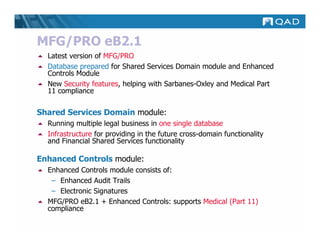
MFG/PRO eB2.1
  Latest version of MFG/PRO
  Database prepared for Shared Services Domain module and Enhanced
  Controls Module
  New Security features, helping with Sarbanes-Oxley and Medical Part
  11 compliance

Shared Services Domain module:
  Running multiple legal business in one single database
  Infrastructure for providing in the future cross-domain functionality
  and Financial Shared Services functionality

Enhanced Controls module:
  Enhanced Controls module consists of:
   – Enhanced Audit Trails
   – Electronic Signatures
  MFG/PRO eB2.1 + Enhanced Controls: supports Medical (Part 11)
  compliance
Security Enhancements in
MFG/PRO eB2.1
 Enhanced Password Complexity & Ageing

 Enhanced User Administration

 Enhanced Intrusion Detection
Define maximum access
       failures and admin
       groups that receive
         automatic email
     notifications of security
             violations


  Define password
complexity and aging
    parameters
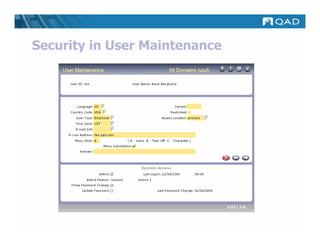
Security in User Maintenance
Shared Services Domain Module
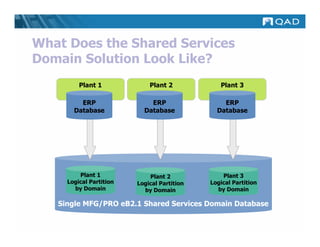
 Functionality to run multiple Domains in a
 single database
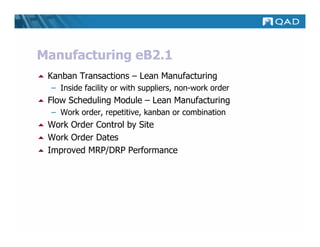
 GL Consolidation for domains without import/export
 Includes DataSync functionality to share Master Data
 Includes EDI Ecommerce for EMT to support
 EMT transactions between sites in MFG/PRO
 eB2.1 databases
 Single instance of EDI ECommerce and Q/Linq
 serving all domains
 Batch processing improvements across domain
What Does the Shared Services
Domain Solution Look Like?
         Plant 1             Plant 2            Plant 3

         ERP                 ERP                 ERP
       Database            Database            Database


         Plant 1             Plant 2             Plant 3
     Logical Partition   Logical Partition   Logical Partition
       by Domain           by Domain           by Domain

   Single MFG/PRO eB2.1 Shared Services Domain Database
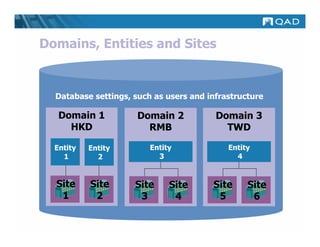
Domains, Entities and Sites


  Database settings, such as users and infrastructure

   Domain 1           Domain 2           Domain 3
     HKD                RMB                TWD

  Entity   Entity        Entity             Entity
    1        2             3                  4


  Site     Site      Site     Site      Site     Site
   1        2         3        4         5        6
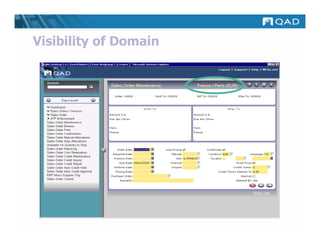
Visibility of Domain
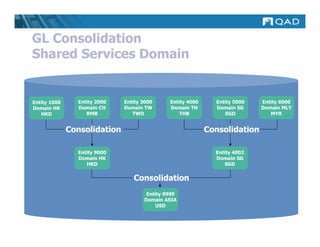
GL Consolidation
Shared Services Domain


Entity 1000     Entity 2000   Entity 3000     Entity 4000     Entity 5000   Entity 6000
Domain HK       Domain CH     Domain TW       Domain TH       Domain SG     Domain MLY
   HKD             RMB           TWD              THB            SGD           MYR


              Consolidation                                 Consolidation

                Entity 9000                                   Entity 4002
                Domain HK                                     Domain SG
                   HKD                                           SGD


                                 Consolidation
                                      Entity 9999
                                     Domain ASIA
                                         USD
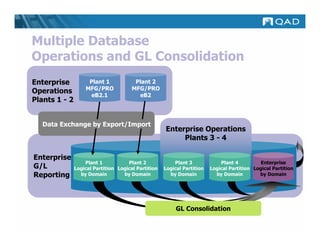
Multiple Database
Operations and GL Consolidation
Enterprise          Plant 1             Plant 2
                   MFG/PRO             MFG/PRO
Operations
                     eB2.1                eB2
Plants 1 - 2


  Data Exchange by Export/Import
  Data Exchange by Export/Import
                                                     Enterprise Operations
                                                          Plants 3 - 4

Enterprise
                   Plant 1           Plant 2             Plant 3             Plant 4          Enterprise
G/L            Logical Partition Logical Partition   Logical Partition   Logical Partition Logical Partition
Reporting        by Domain         by Domain           by Domain           by Domain         by Domain


                                                          GL Consolidation
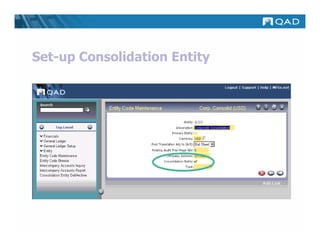
Set-up Consolidation Entity
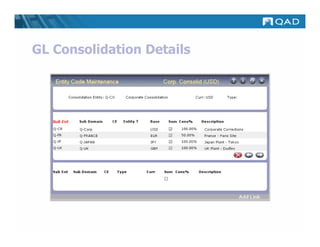
GL Consolidation Details
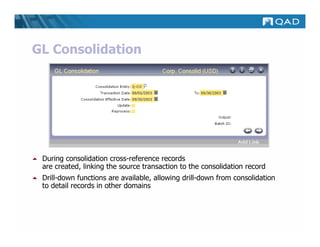
GL Consolidation


 During consolidation cross-reference records
 are created, linking the source transaction to the consolidation record
 Drill-down functions are available, allowing drill-down from consolidation
 to detail records in other domains
Enhanced Audit Trail Functionality
 Available for all QADDB tables
 Designed to accommodate QADDB database changes
 Supports multi-language capabilities with no
 impact on language storage requirements
 Supports single and double-byte languages
 Supports the Progress and Oracle database
 Can be incrementally configured as needs require
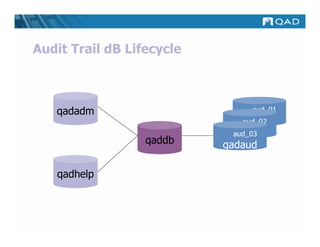
Audit Trail dB Lifecycle


   qadadm                       aud_01
                               qadaud
                               aud_02
                               aud_01
                             qadaud
                             aud_03
                             aud_02
                             aud_01
                  qaddb    qadaud

   qadhelp
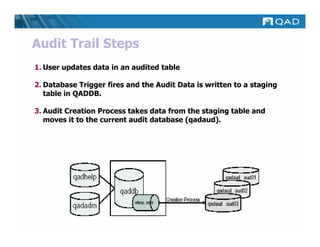
Audit Trail Steps
1. User updates data in an audited table

2. Database Trigger fires and the Audit Data is written to a staging
   table in QADDB.

3. Audit Creation Process takes data from the staging table and
   moves it to the current audit database (qadaud).
Assign tables to audit
          groups for easy
           administration


Select any QADDB table
   you wish to audit
atexrp.p b+                          36.12.1 Audit Trail Report – Existing E-Records                                Date:
02/25/03
Page:    1                                            <company name>                                                Time:
15:06:01

Table Name: pt_mstr   Item Master
,,,,,,,,,,,,,,,,,,,,,,,,,,,,,,,,,,,,,,,,,,,,,,,,,,,,,,,,,,,,,,,,,,,,,,,,,,,,,,,,,,,,,,,,,,,,,,,,,,,,,,,,,,,,,,,,,,,,,,,,
EXISTING ELECTRONIC RECORD
    P Field Label- Name               Field Value
    , ,,,,,,,,,,,,,,,,,,,,,,,,,,,,,,, ,,,,,,,,,,,,,,,,,,,,,,,,,,,,,,,,,,,,,,,,,,,,,,,,,,,,,,,,,,,,,,,,,,,,,,,,,,,,,,,,,
    p Item Number- pt_part            10-10000
    i BOM/Formula- pt_bom_code
    i Description- pt_desc1
    i Group- pt_group
                                      OASIS(TM) COOLING SYSTEM
                                      DISCRETE                             Current
    i Item Type- pt_part_type         CONFIG
    i Model- pt_model
    i MRP Required- pt_mrp            yes                                  Values
    i Need PM MRP- pt_pm_mrp          no
    i oid_pt_mstr- oid_pt_mstr        200302250000000012.1234
    i Prod Line- pt_prod_line         1000
    n Status- pt_status               AC
,,,,,,,,,,,,,,,,,,,,,,,,,,,,,,,,,,,,,,,,,,,,,,,,,,,,,,,,,,,,,,,,,,,,,,,,,,,,,,,,,,,,,,,,,,,,,,,,,,,,,,,,,,,,,,,,,,,,,,,
    Event ID: 200302240000000005.1234567890             Date: 02/24/03 Time: 23:02:40 PST/PDT        Event Type: MODIFY
    User Name: Sally Smith                           User ID: ssm

    P Field Label- Name               Before Value                             After Value
                                                                                                             Modify
    i Description- pt_desc1
    n Status- pt_status
                                      OASIS(TM) COOLING SYSTEM - INACTIVE
                                      IC
                                                                               OASIS(TM) COOLING SYSTEM
                                                                               AC
                                                                                                             Event
    , ,,,,,,,,,,,,,,,,,,,,,,,,,,,,,,, ,,,,,,,,,,,,,,,,,,,,,,,,,,,,,,,,,,,,,,,, ,,,,,,,,,,,,,,,,,,,,,,,,,,,,,,,,,,,,,,,,


    ,,,,,,,,,,,,,,,,,,,,,,,,,,,,,,,,,,,,,,,,,,,,,,,,,,,,,,,,,,,,,,,,,,,,,,,,,,,,,,,,,,,,,,,,,,,,,,,,,,,,,,,,,,,,,,,,,,,
    Event ID: 200301240000000001.1234567890             Date: 01/24/03 Time: 13:02:59 PST/PDT        Event Type: CREATE
    User Name: John Doe                              User ID: jdd

    P Field Label- Name               Before Value                             After Value
    , ,,,,,,,,,,,,,,,,,,,,,,,,,,,,,,, ,,,,,,,,,,,,,,,,,,,,,,,,,,,,,,,,,,,,,,,, ,,,,,,,,,,,,,,,,,,,,,,,,,,,,,,,,,,,,,,,,
    p Item Number- pt_part                                                     10-10001
    i BOM/Formula- pt_bom_code
    i Description- pt_desc1
                                                                                                              Create
                                                                               OASIS(TM) COOLING SYSTEM - INACTIVE
    i Group- pt_group                                                          DISCRETE
    i Item Type- pt_part_type
    i Model- pt_model
                                                                               CONFIG                         Event
    i MRP Required- pt_mrp                                                     yes
    i Need PM MRP- pt_pm_mrp                                                   no
    i oid_pt_mstr- oid_pt_mstr                                                 200302250000000012.1234
    i Prod Line- pt_prod_line                                                  1000
    n Status- pt_status                                                        IC
    ,,,,,,,,,,,,,,,,,,,,,,,,,,,,,,,,,,,,,,,,,,,,,,,,,,,,,,,,,,,,,,,,,,,,,,,,,,,,,,,,,,,,,,,,,,,,,,,,,,,,,,,,,,,,,,,,,,,
Electronic Signatures
 When an electronic record that requires a signature is
 created or modified, a signature block is presented at the end
 of the transaction
 To apply an electronic signature, the user must successfully
 enter an identification code and password
 In addition to processing the transaction, MFG/PRO
 establishes a signature event ID, captures “snapshots” of the
 electronic record data, and stores this information in a
 protected state together with name, date & time of execution
 and the meaning of the signature
 Medical: 21 CFR Part 11.1(c):
  – “…the agency will consider the electronic signatures to be
    equivalent to full handwritten signatures, initials, and other
    general signings as required by agency regulations…”
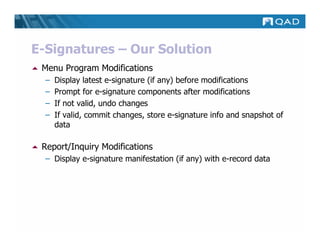
E-Signatures – Our Solution
 Menu Program Modifications
  –   Display latest e-signature (if any) before modifications
  –   Prompt for e-signature components after modifications
  –   If not valid, undo changes
  –   If valid, commit changes, store e-signature info and snapshot of
      data

 Report/Inquiry Modifications
  – Display e-signature manifestation (if any) with e-record data
E-Signature manifestation includes
name, password, signature meaning
  and optional comment. Linked to
      corresponding e-record.
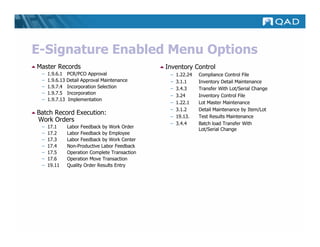
E-Signature Enabled Menu Options
Master Records                                   Inventory Control
 –   1.9.6.1    PCR/PCO Approval                  –   1.22.24   Compliance Control File
 –   1.9.6.13   Detail Approval Maintenance       –   3.1.1     Inventory Detail Maintenance
 –   1.9.7.4    Incorporation Selection           –   3.4.3     Transfer With Lot/Serial Change
 –   1.9.7.5    Incorporation
                                                  –   3.24      Inventory Control File
 –   1.9.7.13    Implementation
                                                  –   1.22.1    Lot Master Maintenance
                                                  –   3.1.2     Detail Maintenance by Item/Lot
Batch Record Execution:
                                                  –   19.13.    Test Results Maintenance
Work Orders
                                                  –   3.4.4     Batch load Transfer With
 –   17.1       Labor Feedback by Work Order
                                                                Lot/Serial Change
 –   17.2       Labor Feedback by Employee
 –   17.3       Labor Feedback by Work Center
 –   17.4       Non-Productive Labor Feedback
 –   17.5       Operation Complete Transaction
 –   17.6       Operation Move Transaction
 –   19.11      Quality Order Results Entry
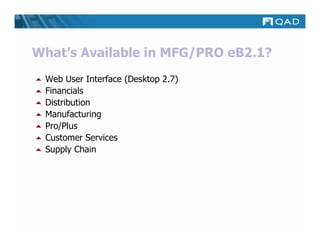
What’s Available in MFG/PRO eB2.1?
 Web User Interface (Desktop 2.7)
 Financials
 Distribution
 Manufacturing
 Pro/Plus
 Customer Services
 Supply Chain
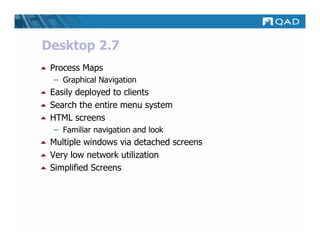
Desktop 2.7
 Process Maps
 – Graphical Navigation
 Easily deployed to clients
 Search the entire menu system
 HTML screens
 – Familiar navigation and look
 Multiple windows via detached screens
 Very low network utilization
 Simplified Screens
MFG/PRO eB2
     High Level Demo
Financials eB2.1
 A/R Dunning Level

 General Ledger Daybook

 Debit and Credit Separation

 Correcting Posted GL Transactions: COA
  – Adds “Correction of Accounting” transaction (negative
    debits) capability
Financials eB2.1
 Expanded account structure

 Support one tax system (GTM)

 General financial enhancements
 – Create and report year-end adjustments
 – Additional options for detail/summarization levels in AP and
   AR - affects “summarized journal” option
 – Maintain an audit trail of updates and deletions to unposted
   GL transactions

 Enhanced fixed assets
Financials eB2.1
 Logistics Accounting
  – Link cost of purchased items to logistic charges
  – Match freight invoices from carriers to PO
 Purchasing and Work Order Accounting
  – Allocate purchasing variances and accruals by site, product
    line and supplier type
 Linked-Site Costing
 Inter-company Accounting
 Improved Financial Reporting
Improved Financial Reporting
 Stock Journal
 Unvouchered PO Receipts as of Date
 GL Account Sheet Report
 GL Statement of Account
 Suppress Reopening a Closed Period
 Invoice Numbering Report
 Voucher Numbering Report
 Apply AR payment distribution-line detail automatically
Distribution eB2.1
 Global Shipping

 Enterprise Material Transfer

 Cumulative Ship Reset

 Global Requisition System (GRS)
 – Multiple line items per requisition
 – Flexible approval process
 – Build Purchase Order from Requisitions
Distribution eB2.1
 Customer and Supplier Consignment Inventory
  – Postpone invoicing/purchasing cycle until usage
 ATP Enforcement
  – Warning or error if due date conflicts with master schedule
 Customer Reserved Locations
 Multiple Customer Items on Customer Schedules
 Purchase Order Enhancements
Manufacturing eB2.1
 Product Change Control

 Component Yield Calculation

 Repetitive Schedule Approval

 Work Order Enhancements
Work Order Enhancements
 Work Order operation backflush
 – Similar to repetitive manufacturing backflush
 – Combines component issue, labor feedback and WO receipts in
   one transaction
 Operation scrap transaction
 – Scrap material at operation
 – Value scrap at operation cost
Manufacturing eB2.1
 Kanban Transactions – Lean Manufacturing
  – Inside facility or with suppliers, non-work order
 Flow Scheduling Module – Lean Manufacturing
  – Work order, repetitive, kanban or combination
 Work Order Control by Site
 Work Order Dates
 Improved MRP/DRP Performance
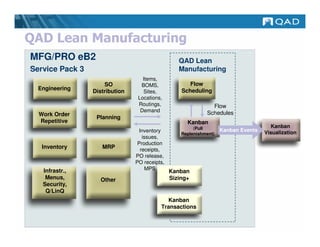
QAD Lean Manufacturing
MFG/PRO eB2                                       QAD Lean
Service Pack 3                                    Manufacturing
                                   Items,
                     SO           BOMS,               Flow
  Engineering    Distribution                      Scheduling
                                   Sites,
                                 Locations,
                                 Routings,                     Flow
                                  Demand                     Schedules
  Work Order
                  Planning
  Repetitive                                         Kanban
                                                        (Pull                          Kanban
                                 Inventory                          Kanban Events   Visualization
                                                   Replenishment)
                                   issues,
                                 Production
   Inventory        MRP           receipts,
                                PO release,
                                PO receipts,
   Infrastr.,                        MPS
                                               Kanban
    Menus,         Other                       Sizing+
   Security,
    Q/LinQ
                                            Kanban
                                          Transactions
Kanban Features (1 of 2)
 Model complex value streams
  – Supermarkets: Inventory and WIP
  – Multiple sources of supply: Supplier, Supermarket, Process
  – FIFO processes

 Card management: Create, Print, Re-Print

 Kanban transactions
  – Integrate with inventory transactions
  – Time/quantity accumulators
  – One-card/two-card systems
Kanban Features (2 of 2)
 Lean Planning
 –   Takt time calculations
 –   Average demand and safety stock calculations
 –   EPEI calculations for each process
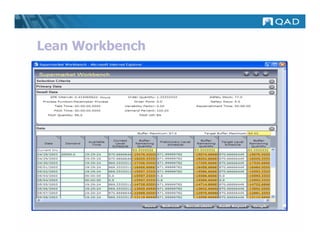
 –   Kanban workbench for supermarket,
     kanban loop sizing

 Level Loading and Flow Scheduling Support
 – Based on Takt time
 – Integrated schedules with flow schedules
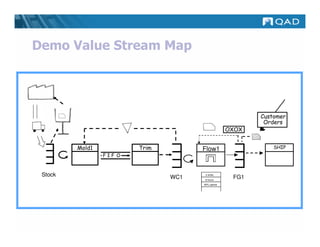
Demo Value Stream Map


                                                          Customer
                                                           Orders
                                                   OXOX


         Mold1           Trim         Flow1                   SHIP
                 FIF O


 Stock                          WC1
                                       2 shifts
                                                    FG1
                                       8 hours
                                      95% uptime
Lean Workbench
Pro/Plus eB2.1
 Supplier Performance
 A/R Self Billing
 Supplier Shipping Schedule
 WIP Lot Trace
 Customer Sequence Schedules
 Container and Line Charges
  – Manage container and other charges by line item
 Shipment Performance Reporting
Supplier Performance
• Flexible data collection methods-both automatic and manual.
• Optionally record any non-routine events or modify or add to
  an existing event with the maintenance functions.
• Produce a supplier performance report card that rates your
  suppliers based upon your rating criteria and the data
  collected. The report card can be run for any selected time
  period.
• Use your E-mail system to send your suppliers their
  performance report card.
A/R Self Billing
• Automatically enter customer remittance information using
  EDI Document Import (35.13).
• Automatically enter remittance information based on hard-
  copy customer remittance advice.
• Manually enter remittance information into MFG/PRO using
  Self-Bill Maintenance.
• Apply under or over-payment credit to accounts receivable
  based on self-bill documents.
• Apply batch payments to invoices and memos referenced on
  self-bills.
Supplier Shipping Schedule

 Generate separate supplier planning and shipping schedule
 Define shipment delivery time
WIP Lot Trace
 Expands lot/serial tracing to work-in-process
 Significantly improves full lot/serial traceability
 Assign and track work-in-process lots throughout
 manufacturing process including subcontractors
 Supports Advanced Repetitive, Repetitive and Work
 Order environments
 Complete composition and where used traceability
Customer Sequence Schedules
 Receive and load a sequence delivery schedule
 Supported by EDI ECommerce and standard EDI
 Sequence schedule may update required ship schedule
 or be used for shipping only
 Produce shipper/pack lists
 – Sequence order, sequences per container
 – Dock and Line Feed, break on max sequences
 Maintain detailed picking records for all sequence
 requirements
Customer Services eB2.1
 Service Contract Enhancements
  –   Support complex contracts
  –   Expanded billing options
  –   Contract revenue can be posted accrued, cash or deferred
  –   Support for EMT in Material order
 Project Realization Management (PRM)
Project Realization Management
 Offered as a new module
 Manage implementation projects at customer sites
 Define project structure by various activities
 Create budgets based on planned costs
 Order project items from internal and external sources
 Record items, labor, and expenses used and compare
 actual costs to planned costs
 Schedule customer invoicing over the life of the project
 Monitor project progress, costs, revenue and margin
Supply Chain eB2.1
 Enhanced Distribution Orders
  – Optional PUSH inventory model
 EDI Ecommerce
EDI Ecommerce
 Simplified EDI implementation

 Table-based design

 Supports multiple trading partners and document types

 Reduced need for ongoing EDI consultant support

 EDI translator independence

 Global solution

 Supports EMT EDI functionality
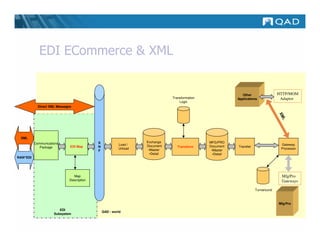
EDI ECommerce & XML


                                                                                                             Other                HTTP/MOM
                                                                             Transformation               Applications             Adaptor
                                                                                 Logic
            Direct XML Messages


                                                                                                                                  XM
                                                                                                                                     L
 XML
          Communications                   S                     Exchange                     MFG/PRO
                                                        Load /   Document                     Document                             Gateway
             Package          EDI Map      N                                    Transform                 Transfer
                                                        Unload    •Master                                                          Processor
                                           F                                                   •Master
                                                                   •Detail                      •Detail
RAW*EDI


                               Map                                                                                                  Mfg/Pro
                             Description                                                                                            Gateways

                                                                                                                     Turnaround


                                                                                                                                  Mfg/Pro
                        EDI
                                               QAD - world
                     Subsystem
thank you!

Whats New At Qad(8.6toe B2.1)

  • 1.
  • 2.
    MFG/PRO eB2.1 Latest version of MFG/PRO Database prepared for Shared Services Domain module and Enhanced Controls Module New Security features, helping with Sarbanes-Oxley and Medical Part 11 compliance Shared Services Domain module: Running multiple legal business in one single database Infrastructure for providing in the future cross-domain functionality and Financial Shared Services functionality Enhanced Controls module: Enhanced Controls module consists of: – Enhanced Audit Trails – Electronic Signatures MFG/PRO eB2.1 + Enhanced Controls: supports Medical (Part 11) compliance
  • 3.
    Security Enhancements in MFG/PROeB2.1 Enhanced Password Complexity & Ageing Enhanced User Administration Enhanced Intrusion Detection
  • 4.
    Define maximum access failures and admin groups that receive automatic email notifications of security violations Define password complexity and aging parameters
  • 5.
    Security in UserMaintenance
  • 6.
    Shared Services DomainModule Functionality to run multiple Domains in a single database GL Consolidation for domains without import/export Includes DataSync functionality to share Master Data Includes EDI Ecommerce for EMT to support EMT transactions between sites in MFG/PRO eB2.1 databases Single instance of EDI ECommerce and Q/Linq serving all domains Batch processing improvements across domain
  • 7.
    What Does theShared Services Domain Solution Look Like? Plant 1 Plant 2 Plant 3 ERP ERP ERP Database Database Database Plant 1 Plant 2 Plant 3 Logical Partition Logical Partition Logical Partition by Domain by Domain by Domain Single MFG/PRO eB2.1 Shared Services Domain Database
  • 8.
    Domains, Entities andSites Database settings, such as users and infrastructure Domain 1 Domain 2 Domain 3 HKD RMB TWD Entity Entity Entity Entity 1 2 3 4 Site Site Site Site Site Site 1 2 3 4 5 6
  • 9.
  • 10.
    GL Consolidation Shared ServicesDomain Entity 1000 Entity 2000 Entity 3000 Entity 4000 Entity 5000 Entity 6000 Domain HK Domain CH Domain TW Domain TH Domain SG Domain MLY HKD RMB TWD THB SGD MYR Consolidation Consolidation Entity 9000 Entity 4002 Domain HK Domain SG HKD SGD Consolidation Entity 9999 Domain ASIA USD
  • 11.
    Multiple Database Operations andGL Consolidation Enterprise Plant 1 Plant 2 MFG/PRO MFG/PRO Operations eB2.1 eB2 Plants 1 - 2 Data Exchange by Export/Import Data Exchange by Export/Import Enterprise Operations Plants 3 - 4 Enterprise Plant 1 Plant 2 Plant 3 Plant 4 Enterprise G/L Logical Partition Logical Partition Logical Partition Logical Partition Logical Partition Reporting by Domain by Domain by Domain by Domain by Domain GL Consolidation
  • 12.
  • 13.
  • 14.
    GL Consolidation Duringconsolidation cross-reference records are created, linking the source transaction to the consolidation record Drill-down functions are available, allowing drill-down from consolidation to detail records in other domains
  • 15.
    Enhanced Audit TrailFunctionality Available for all QADDB tables Designed to accommodate QADDB database changes Supports multi-language capabilities with no impact on language storage requirements Supports single and double-byte languages Supports the Progress and Oracle database Can be incrementally configured as needs require
  • 16.
    Audit Trail dBLifecycle qadadm aud_01 qadaud aud_02 aud_01 qadaud aud_03 aud_02 aud_01 qaddb qadaud qadhelp
  • 17.
    Audit Trail Steps 1.User updates data in an audited table 2. Database Trigger fires and the Audit Data is written to a staging table in QADDB. 3. Audit Creation Process takes data from the staging table and moves it to the current audit database (qadaud).
  • 18.
    Assign tables toaudit groups for easy administration Select any QADDB table you wish to audit
  • 19.
    atexrp.p b+ 36.12.1 Audit Trail Report – Existing E-Records Date: 02/25/03 Page: 1 <company name> Time: 15:06:01 Table Name: pt_mstr Item Master ,,,,,,,,,,,,,,,,,,,,,,,,,,,,,,,,,,,,,,,,,,,,,,,,,,,,,,,,,,,,,,,,,,,,,,,,,,,,,,,,,,,,,,,,,,,,,,,,,,,,,,,,,,,,,,,,,,,,,,,, EXISTING ELECTRONIC RECORD P Field Label- Name Field Value , ,,,,,,,,,,,,,,,,,,,,,,,,,,,,,,, ,,,,,,,,,,,,,,,,,,,,,,,,,,,,,,,,,,,,,,,,,,,,,,,,,,,,,,,,,,,,,,,,,,,,,,,,,,,,,,,,, p Item Number- pt_part 10-10000 i BOM/Formula- pt_bom_code i Description- pt_desc1 i Group- pt_group OASIS(TM) COOLING SYSTEM DISCRETE Current i Item Type- pt_part_type CONFIG i Model- pt_model i MRP Required- pt_mrp yes Values i Need PM MRP- pt_pm_mrp no i oid_pt_mstr- oid_pt_mstr 200302250000000012.1234 i Prod Line- pt_prod_line 1000 n Status- pt_status AC ,,,,,,,,,,,,,,,,,,,,,,,,,,,,,,,,,,,,,,,,,,,,,,,,,,,,,,,,,,,,,,,,,,,,,,,,,,,,,,,,,,,,,,,,,,,,,,,,,,,,,,,,,,,,,,,,,,,,,,, Event ID: 200302240000000005.1234567890 Date: 02/24/03 Time: 23:02:40 PST/PDT Event Type: MODIFY User Name: Sally Smith User ID: ssm P Field Label- Name Before Value After Value Modify i Description- pt_desc1 n Status- pt_status OASIS(TM) COOLING SYSTEM - INACTIVE IC OASIS(TM) COOLING SYSTEM AC Event , ,,,,,,,,,,,,,,,,,,,,,,,,,,,,,,, ,,,,,,,,,,,,,,,,,,,,,,,,,,,,,,,,,,,,,,,, ,,,,,,,,,,,,,,,,,,,,,,,,,,,,,,,,,,,,,,,, ,,,,,,,,,,,,,,,,,,,,,,,,,,,,,,,,,,,,,,,,,,,,,,,,,,,,,,,,,,,,,,,,,,,,,,,,,,,,,,,,,,,,,,,,,,,,,,,,,,,,,,,,,,,,,,,,,,, Event ID: 200301240000000001.1234567890 Date: 01/24/03 Time: 13:02:59 PST/PDT Event Type: CREATE User Name: John Doe User ID: jdd P Field Label- Name Before Value After Value , ,,,,,,,,,,,,,,,,,,,,,,,,,,,,,,, ,,,,,,,,,,,,,,,,,,,,,,,,,,,,,,,,,,,,,,,, ,,,,,,,,,,,,,,,,,,,,,,,,,,,,,,,,,,,,,,,, p Item Number- pt_part 10-10001 i BOM/Formula- pt_bom_code i Description- pt_desc1 Create OASIS(TM) COOLING SYSTEM - INACTIVE i Group- pt_group DISCRETE i Item Type- pt_part_type i Model- pt_model CONFIG Event i MRP Required- pt_mrp yes i Need PM MRP- pt_pm_mrp no i oid_pt_mstr- oid_pt_mstr 200302250000000012.1234 i Prod Line- pt_prod_line 1000 n Status- pt_status IC ,,,,,,,,,,,,,,,,,,,,,,,,,,,,,,,,,,,,,,,,,,,,,,,,,,,,,,,,,,,,,,,,,,,,,,,,,,,,,,,,,,,,,,,,,,,,,,,,,,,,,,,,,,,,,,,,,,,
  • 20.
    Electronic Signatures Whenan electronic record that requires a signature is created or modified, a signature block is presented at the end of the transaction To apply an electronic signature, the user must successfully enter an identification code and password In addition to processing the transaction, MFG/PRO establishes a signature event ID, captures “snapshots” of the electronic record data, and stores this information in a protected state together with name, date & time of execution and the meaning of the signature Medical: 21 CFR Part 11.1(c): – “…the agency will consider the electronic signatures to be equivalent to full handwritten signatures, initials, and other general signings as required by agency regulations…”
  • 21.
    E-Signatures – OurSolution Menu Program Modifications – Display latest e-signature (if any) before modifications – Prompt for e-signature components after modifications – If not valid, undo changes – If valid, commit changes, store e-signature info and snapshot of data Report/Inquiry Modifications – Display e-signature manifestation (if any) with e-record data
  • 22.
    E-Signature manifestation includes name,password, signature meaning and optional comment. Linked to corresponding e-record.
  • 23.
    E-Signature Enabled MenuOptions Master Records Inventory Control – 1.9.6.1 PCR/PCO Approval – 1.22.24 Compliance Control File – 1.9.6.13 Detail Approval Maintenance – 3.1.1 Inventory Detail Maintenance – 1.9.7.4 Incorporation Selection – 3.4.3 Transfer With Lot/Serial Change – 1.9.7.5 Incorporation – 3.24 Inventory Control File – 1.9.7.13 Implementation – 1.22.1 Lot Master Maintenance – 3.1.2 Detail Maintenance by Item/Lot Batch Record Execution: – 19.13. Test Results Maintenance Work Orders – 3.4.4 Batch load Transfer With – 17.1 Labor Feedback by Work Order Lot/Serial Change – 17.2 Labor Feedback by Employee – 17.3 Labor Feedback by Work Center – 17.4 Non-Productive Labor Feedback – 17.5 Operation Complete Transaction – 17.6 Operation Move Transaction – 19.11 Quality Order Results Entry
  • 24.
    What’s Available inMFG/PRO eB2.1? Web User Interface (Desktop 2.7) Financials Distribution Manufacturing Pro/Plus Customer Services Supply Chain
  • 25.
    Desktop 2.7 ProcessMaps – Graphical Navigation Easily deployed to clients Search the entire menu system HTML screens – Familiar navigation and look Multiple windows via detached screens Very low network utilization Simplified Screens
  • 26.
    MFG/PRO eB2 High Level Demo
  • 27.
    Financials eB2.1 A/RDunning Level General Ledger Daybook Debit and Credit Separation Correcting Posted GL Transactions: COA – Adds “Correction of Accounting” transaction (negative debits) capability
  • 28.
    Financials eB2.1 Expandedaccount structure Support one tax system (GTM) General financial enhancements – Create and report year-end adjustments – Additional options for detail/summarization levels in AP and AR - affects “summarized journal” option – Maintain an audit trail of updates and deletions to unposted GL transactions Enhanced fixed assets
  • 29.
    Financials eB2.1 LogisticsAccounting – Link cost of purchased items to logistic charges – Match freight invoices from carriers to PO Purchasing and Work Order Accounting – Allocate purchasing variances and accruals by site, product line and supplier type Linked-Site Costing Inter-company Accounting Improved Financial Reporting
  • 30.
    Improved Financial Reporting Stock Journal Unvouchered PO Receipts as of Date GL Account Sheet Report GL Statement of Account Suppress Reopening a Closed Period Invoice Numbering Report Voucher Numbering Report Apply AR payment distribution-line detail automatically
  • 31.
    Distribution eB2.1 GlobalShipping Enterprise Material Transfer Cumulative Ship Reset Global Requisition System (GRS) – Multiple line items per requisition – Flexible approval process – Build Purchase Order from Requisitions
  • 32.
    Distribution eB2.1 Customerand Supplier Consignment Inventory – Postpone invoicing/purchasing cycle until usage ATP Enforcement – Warning or error if due date conflicts with master schedule Customer Reserved Locations Multiple Customer Items on Customer Schedules Purchase Order Enhancements
  • 33.
    Manufacturing eB2.1 ProductChange Control Component Yield Calculation Repetitive Schedule Approval Work Order Enhancements
  • 34.
    Work Order Enhancements Work Order operation backflush – Similar to repetitive manufacturing backflush – Combines component issue, labor feedback and WO receipts in one transaction Operation scrap transaction – Scrap material at operation – Value scrap at operation cost
  • 35.
    Manufacturing eB2.1 KanbanTransactions – Lean Manufacturing – Inside facility or with suppliers, non-work order Flow Scheduling Module – Lean Manufacturing – Work order, repetitive, kanban or combination Work Order Control by Site Work Order Dates Improved MRP/DRP Performance
  • 36.
    QAD Lean Manufacturing MFG/PROeB2 QAD Lean Service Pack 3 Manufacturing Items, SO BOMS, Flow Engineering Distribution Scheduling Sites, Locations, Routings, Flow Demand Schedules Work Order Planning Repetitive Kanban (Pull Kanban Inventory Kanban Events Visualization Replenishment) issues, Production Inventory MRP receipts, PO release, PO receipts, Infrastr., MPS Kanban Menus, Other Sizing+ Security, Q/LinQ Kanban Transactions
  • 37.
    Kanban Features (1of 2) Model complex value streams – Supermarkets: Inventory and WIP – Multiple sources of supply: Supplier, Supermarket, Process – FIFO processes Card management: Create, Print, Re-Print Kanban transactions – Integrate with inventory transactions – Time/quantity accumulators – One-card/two-card systems
  • 38.
    Kanban Features (2of 2) Lean Planning – Takt time calculations – Average demand and safety stock calculations – EPEI calculations for each process – Kanban workbench for supermarket, kanban loop sizing Level Loading and Flow Scheduling Support – Based on Takt time – Integrated schedules with flow schedules
  • 39.
    Demo Value StreamMap Customer Orders OXOX Mold1 Trim Flow1 SHIP FIF O Stock WC1 2 shifts FG1 8 hours 95% uptime
  • 40.
  • 42.
    Pro/Plus eB2.1 SupplierPerformance A/R Self Billing Supplier Shipping Schedule WIP Lot Trace Customer Sequence Schedules Container and Line Charges – Manage container and other charges by line item Shipment Performance Reporting
  • 43.
    Supplier Performance • Flexibledata collection methods-both automatic and manual. • Optionally record any non-routine events or modify or add to an existing event with the maintenance functions. • Produce a supplier performance report card that rates your suppliers based upon your rating criteria and the data collected. The report card can be run for any selected time period. • Use your E-mail system to send your suppliers their performance report card.
  • 44.
    A/R Self Billing •Automatically enter customer remittance information using EDI Document Import (35.13). • Automatically enter remittance information based on hard- copy customer remittance advice. • Manually enter remittance information into MFG/PRO using Self-Bill Maintenance. • Apply under or over-payment credit to accounts receivable based on self-bill documents. • Apply batch payments to invoices and memos referenced on self-bills.
  • 45.
    Supplier Shipping Schedule Generate separate supplier planning and shipping schedule Define shipment delivery time
  • 46.
    WIP Lot Trace Expands lot/serial tracing to work-in-process Significantly improves full lot/serial traceability Assign and track work-in-process lots throughout manufacturing process including subcontractors Supports Advanced Repetitive, Repetitive and Work Order environments Complete composition and where used traceability
  • 47.
    Customer Sequence Schedules Receive and load a sequence delivery schedule Supported by EDI ECommerce and standard EDI Sequence schedule may update required ship schedule or be used for shipping only Produce shipper/pack lists – Sequence order, sequences per container – Dock and Line Feed, break on max sequences Maintain detailed picking records for all sequence requirements
  • 48.
    Customer Services eB2.1 Service Contract Enhancements – Support complex contracts – Expanded billing options – Contract revenue can be posted accrued, cash or deferred – Support for EMT in Material order Project Realization Management (PRM)
  • 49.
    Project Realization Management Offered as a new module Manage implementation projects at customer sites Define project structure by various activities Create budgets based on planned costs Order project items from internal and external sources Record items, labor, and expenses used and compare actual costs to planned costs Schedule customer invoicing over the life of the project Monitor project progress, costs, revenue and margin
  • 50.
    Supply Chain eB2.1 Enhanced Distribution Orders – Optional PUSH inventory model EDI Ecommerce
  • 51.
    EDI Ecommerce SimplifiedEDI implementation Table-based design Supports multiple trading partners and document types Reduced need for ongoing EDI consultant support EDI translator independence Global solution Supports EMT EDI functionality
  • 52.
    EDI ECommerce &XML Other HTTP/MOM Transformation Applications Adaptor Logic Direct XML Messages XM L XML Communications S Exchange MFG/PRO Load / Document Document Gateway Package EDI Map N Transform Transfer Unload •Master Processor F •Master •Detail •Detail RAW*EDI Map Mfg/Pro Description Gateways Turnaround Mfg/Pro EDI QAD - world Subsystem
  • 53.