What is Performance Testing? - A Comprehensive Guide
1.
What is PerformanceTesting? - A
Comprehensive Guide
In an increasingly digitized world where software applications shape our daily routines, the
importance of their performance cannot be overstated. From browsing a website, and streaming
content, to using an app for online shopping or banking - seamless, fast, and efficient operation
is expected by end-users. Performance can be a make-or-break factor for the success of a
software application, and therein lies the significance of performance testing.
This performance testing guide aims to provide an in-depth exploration of performance testing.
Software performance testing refers to the testing that is used to analyze the speed, scalability,
and stability of a system. In order to do this, testers often leverage different performance testing
tools and techniques, depending on the type of system they are testing. Performance testing
evaluates the system's ability to handle high volumes of requests and data or its ability to handle
peak loads. It helps identify any bottlenecks or performance issues in the system. The primary
goal of performance tests is to ensure the system meets the performance requirements of the
end users. It helps to identify any issues that could cause the system to crash or become slow
under certain conditions. Additionally, performance testing helps to determine the capacity of the
system and its ability to handle different levels of workloads. It is a crucial step for a software
development project as it helps ensure that the system is reliable and efficient.
Common application performance issues faced by
enterprises
There are numerous potential issues that affect an application's performance, which can be
detrimental to the overall user experience. Here are some common issues:
● Lack of scalability: If an application hasn't been designed with scalability in mind, it
may not be able to handle the increased load as the user base grows, leading to
significant performance problems.
2.
● Slow responsetime: This is the most common performance issue. If an application
takes too long to respond, it can frustrate users and lead to decreased usage or even
user attrition.
● Network issues: If the server's network is slow or unstable, it might lead to poor
performance for users.
● Poorly optimized databases: Inefficient queries, lack of indexing, or a poorly structured
database can significantly slow down an application.
● Inefficient code: Poorly written code can cause numerous performance issues, such as
memory leaks and slow processing times.
● Concurrency issues: Performance can severely degrade during peak usage if an
application can't handle multiple simultaneous users or operations.
● Server overload: If the server is unable to handle the load, the application's
performance will degrade. This can happen if there is inadequate server capacity or the
application needs to be designed to distribute load effectively.
● Lack of scalability: If an application hasn't been designed with scalability in mind, it
may not be able to handle the increased load as the user base grows, leading to
significant performance problems.
● Unoptimized UI: Heavy or unoptimized UI can lead to slow rendering times, negatively
affecting the user experience.
● High memory utilization: Applications that aren't optimized for efficient memory use
can consume excessive system resources, leading to slow performance and potentially
causing system instability.
These are just a few examples of the types of issues that can affect an application's
performance. Identifying and addressing these issues is a crucial part of performance testing.
Significance of performance testing
Performance testing is critical in ensuring an application is ready for real-world deployment. By
simulating different scenarios, it allows developers to understand how the system performs
under varying levels of load and stress. Performance testing also validates system reliability,
capacity, and scalability, ultimately improving user experience.
This performance testing guide addresses a few reasons why performance testing is important:
● Prevent revenue loss: Poor performance can directly impact revenue for businesses
that rely heavily on their applications. If an e-commerce site loads slowly or crashes
during a peak shopping period, it can result in lost sales.
● Identify bottlenecks: Performance testing can help identify the bottlenecks that are
slowing down an application, such as inefficient database queries, slow network
connections, or memory leaks.
● Ensure smooth user experience: A slow or unresponsive application can frustrate
users and lead to decreased usage or abandonment. Performance testing helps identify
and rectify any issues that could negatively impact the user experience.
3.
● Optimize systemresources: Through performance testing, teams can identify and fix
inefficient code or processes that consume excessive system resources. This not only
improves the application's performance but can also result in cost savings by optimizing
resource usage.
● Increase SEO ranking: Website speed is a factor in search engine rankings. Websites
that load quickly often rank higher in search engine results, leading to greater traffic and
potential revenue.
● Prevent future performance issues: Performance testing allows issues to be caught
and fixed before the application goes live. This not only prevents potential user
frustration but also saves time and money in troubleshooting and fixing issues after
release.
● Validate system reliability: Performance testing helps ensure that the system is able to
handle the expected user load without crashing or slowing down. This is especially
important for business-critical applications where downtime or slow performance can
have a significant financial impact.
In essence, performance testing is necessary to ensure that applications function optimally and
provide the best user experience possible. It can also help prevent costly problems down the
line by catching potential issues early in the development process.
Difference between performance engineering and
performance testing
Aspect Performance testing Performance engineering
Definition A process focused on validating
an application’s performance by
executing various tests like load,
stress, and endurance tests.
A broader discipline that focuses on building
systems designed for optimal performance
from the start, integrating performance
considerations into every stage of
development.
Primary
Goal
To identify performance issues
(bottlenecks, slow response times,
etc.) after the application is
developed and before release.
Prevent performance issues by optimizing
the application architecture, code, and
infrastructure during the development
lifecycle.
Timing Typically occurs after development
is complete or during the later
stages of the software
development lifecycle.
Embedded throughout the software
development process, starting from the
design phase and continuing through
development, testing, and post-production.
4.
Approach Reactive -identifies issues
post-development and suggests
fixes to address them before
deployment.
Proactive - addresses performance at the
design level to ensure fewer performance
issues arise in the first place, emphasizing
prevention of overcorrection.
Focus
Area
Testing various performance
parameters such as load handling,
response times, and resource
utilization under different
conditions.
A holistic focus on optimizing performance
by analyzing the system architecture, server
configurations, code efficiency, database
queries, and network interactions.
Scope Narrow - Focuses on the end
product's ability to perform under
different conditions.
Broad - Involves continuous monitoring,
tuning, and architectural improvements
across the development lifecycle.
What makes performance testing for UI critical in modern
apps?
The user interface (UI) is an important part of any application, as it's the primary way users
interact with it. To ensure that the UI performs optimally, it's important to undertake performance
testing. Performance testing is a process that evaluates the speed and responsiveness of the
UI, as well as verifies that the UI can handle large volumes of data.
UI performance testing for modern apps is crucial due to heightened user expectations for
speed and responsiveness, diversity in device types and platforms, and complex UI designs
with rich features. It ensures consistent, optimal experiences across platforms, identifies
elements causing slowdowns, and aids in the smooth operation of real-time applications.
Moreover, it ensures scalability during user spikes and helps trace any UI performance issues to
underlying services in an environment where microservices and APIs are prevalent. To cater to
this requirement, the market offers a myriad of UI performance testing tools that enable
enterprises to streamline their testing efforts and deliver seamless, positive customer
experiences.
Challenges of performance testing
A software's performance testing is critical for the entire SDLC, yet it has its challenges.
Defining realistic user scenarios, setting up the test environment, and analyzing the results can
be complex and time-consuming. Other challenges could include understanding the system's
architecture, deciding the performance testing type, selecting the right tools, and interpreting the
test results.
5.
This performance testingguide highlights the primary complexities faced by organizations while
executing performance tests:
● Establishing a baseline for performance: Determining an acceptable level of
performance can be subjective and depends on several factors, such as user
expectations, industry standards, and business objectives. This makes establishing a
baseline for performance a challenging task.
● Simulating real-world scenarios: Creating a test environment that accurately simulates
real-world conditions, such as varying network speeds, different user loads, or diverse
device and browser types, is complex and requires careful planning and resources.
● Resource intensive: Performance testing can be time-consuming and
resource-intensive, especially when testing large applications or systems. This can often
lead to delays in the development cycle.
● Continuously changing technology: The frequent release of new technologies, tools,
and practices makes it challenging to keep performance testing processes up-to-date
and relevant.
● Involvement of multiple stakeholders: Performance testing often involves multiple
stakeholders, including developers, testers, system administrators, and business teams.
Coordinating between these groups and managing their expectations can be difficult.
● Deciphering test results: Interpreting the results of performance tests can be tricky,
especially when dealing with large amounts of data or complex application structures. It
requires specialized knowledge and experience to understand and take suitable actions
based on the results.
● Identifying the right performance metrics: Performance testing is not just about
measuring the speed of an application; it also involves other metrics such as throughput,
response time, load time, and scalability. Identifying the most relevant metrics for a
specific application can be challenging.
Types of performance testing
● Spike testing: Spike testing is performed to measure the system's performance when
subjected to sudden and unpredictable spikes in usage. It helps to identify any
performance issues that arise when the system is subject to sudden changes in usage
patterns.
● Volume testing: Volume testing helps evaluate the system's performance under a large
volume of data. It helps to identify any bottlenecks in the system's performance when
handling large amounts of data.
● Stress testing: This is a type of testing conducted to find out the stability of a system by
pushing the system beyond its normal working conditions. It helps to identify the
system's breaking point and determine how it responds when pushed to its limits.
● Load testing: Load testing refers to a type of performance testing that involves testing a
system's ability to handle a large number of simultaneous users or transactions. It
measures the system's performance under heavy loads and helps identify the maximum
operating capacity of the system and any bottlenecks in its performance.
6.
● Endurance testing:Endurance testing is conducted to measure the system's
performance over an extended period of time. It helps to identify any performance issues
that may arise over time and ensure that the system helps handle prolonged usage.
Performance Testing Examples
Listed below are some key examples:
1. Response time must be less than 3 seconds when many users access the application
simultaneously.
2. Verify that the application maintains a consistent response time when accessed over a
3G network or slower.
3. Check the maximum number of concurrent users the application can handle without
performance degradation.
4. Verify memory usage remains optimal under heavy load conditions
5. Determine the load at which the application crashes, identifying potential breaking
points.
These examples highlight common performance test scenarios that help ensure the app can
handle real-world conditions efficiently.
Best practices for performance testing
1. Simulate realistic scenarios: Performance testing should closely mirror real-world
scenarios to provide accurate insights. This involves replicating expected user behavior,
various network conditions (like slow or unstable connections), and hardware setups that
users might have. For instance, mobile app testing should consider different device
models, operating systems, and network speeds (e.g., 3G, 4G, 5G, Wi-Fi). Incorporating
data variability, such as different query patterns or user workflows, also helps to ensure
comprehensive coverage and meaningful test results.
2. Use automation: Automation can greatly improve the efficiency of performance testing
by enabling repeatable, consistent tests at scale. Automated testing tools allow for
frequent, large-scale tests that would be difficult to manage manually. These tools can
simulate thousands of concurrent users or extensive data loads, accurately showing how
the application will behave under real conditions. Additionally, automated tests can be
scheduled to run overnight or during off-peak hours, ensuring that teams have actionable
reports ready by the next development cycle.
3. Test early and continuously: One of the biggest mistakes in performance testing is
leaving it until the final stages of development. Testing early helps to catch performance
issues when they are easier and cheaper to fix. Integrating performance testing into the
CI/CD pipeline ensures that every new feature or update is vetted for performance
impacts. This continuous testing strategy reduces the likelihood of discovering critical
7.
performance problems latein development and allows teams to make proactive
improvements.
4. Monitor system resources: Along with application performance, tracking how system
resources are utilized is key to diagnosing performance bottlenecks. During performance
tests, tools that monitor CPU usage, memory consumption, disk I/O, and network
bandwidth provide valuable insights. For example, if response times are slow but CPU
usage is low, the issue may lie elsewhere, such as in database performance or network
latency. This practice helps pinpoint the root cause of slowdowns and prevents
over-provisioning hardware unnecessarily.
5. Define clear performance Metrics: Before running any performance test, it's crucial to
establish what success looks like. Metrics like response time, throughput, latency, and
resource utilization must be well-defined. These benchmarks should reflect real-world
expectations and user requirements. Setting both minimum acceptable and optimal
performance goals helps measure how close your application is to achieving the desired
results. For example, a web app might require a response time of under 2 seconds
during peak traffic but aim for under 1 second in optimal conditions.
Performance testing strategy
Performance testing is an important part of any software development process. It helps ensure
that applications are built with the right level of performance, reliability, scalability, and security.
A performance testing strategy is the plan of action for conducting performance tests. It includes
defining the testing requirements, identifying performance metrics, planning and designing
performance tests, configuring the test environment, executing the test, and then analyzing,
tuning, and retesting.
A well-planned performance testing strategy is key to ensuring the success of an application. It
helps to identify areas for improvement, assess the scalability of the application, and ensure it
meets user demands. A comprehensive performance testing strategy should include a variety of
tests, such as load, stress, and endurance tests, to ensure the application is stable and reliable.
By investing in a well-crafted performance testing strategy, organizations can ensure the
success of their applications and maximize their return on investment.
What does an effective performance testing strategy look
like?
An effective performance testing strategy includes the following components:
● Goal definition: Testing and QA teams need to define what you aim to achieve with
performance testing clearly. This might include identifying bottlenecks, assessing system
behavior under peak load, measuring response times, or validating system stability.
8.
● Identification ofkey performance indicators (KPIs): Enterprises need to identify the
specific metrics they'll use to gauge system performance. These may include response
time, throughput, CPU utilization, memory usage, and error rates.
● Load profile determination: It is critical to understand and document the typical usage
patterns of your system. This includes peak hours, number of concurrent users,
transaction frequencies, data volumes, and user geography.
● Test environment setup: Teams need to create a test environment that clones their
production environment as closely as possible. This includes hardware, software,
network configurations, databases, and even the data itself.
● Test data preparation: Generating or acquiring representative data for testing is vital for
effective performance testing. Consider all relevant variations in the data that could
impact performance.
● Test scenario development: Defining the actions that virtual users will take during
testing. This might involve logging in, navigating the system, executing transactions, or
running background tasks.
● Performance test execution: After developing the test scenario, teams must prioritize
choosing and using appropriate tools, such as load generators and performance
monitors.
● Results analysis: Analyzing the results of each test and identifying bottlenecks and
performance issues enables enterprises to boost the performance test outcomes. This
can involve evaluating how the system behaves under different loads and identifying the
points at which performance degrades.
● Tuning and optimization: Based on your analysis, QA and testing teams make
necessary adjustments to the system, such as modifying configurations, adding
resources, or rewriting inefficient code.
● Repeat testing: After making changes, it is necessary to repeat the tests to verify that
the changes had the desired effect.
● Reporting: Finally, creating a detailed report for your findings, including any identified
issues and the steps taken to resolve them, helps summarize the testing efforts. This
report should be understandable to both technical and non-technical stakeholders.
Remember that performance testing is not a one-time event but a continuous process that
should occur regularly throughout the development life cycle. This strategy allows you to identify
and address performance issues as early as possible, reducing the risk of production problems.
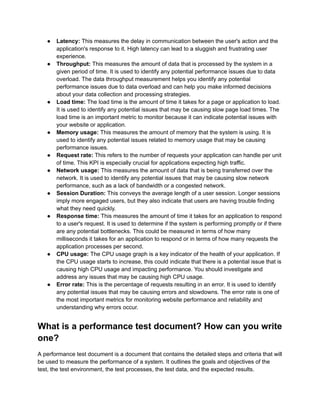
What are the critical KPIs (Key Performance Indicators)
gauged in performance tests?
KPIs are metrics utilized to measure the performance of an organization or specific activities
within an organization. They provide a quantitative measure of how well an organization or
activity is performing, and these can be leveraged to set goals, track progress, and identify
areas for improvement.
9.
● Latency: Thismeasures the delay in communication between the user's action and the
application's response to it. High latency can lead to a sluggish and frustrating user
experience.
● Throughput: This measures the amount of data that is processed by the system in a
given period of time. It is used to identify any potential performance issues due to data
overload. The data throughput measurement helps you identify any potential
performance issues due to data overload and can help you make informed decisions
about your data collection and processing strategies.
● Load time: The load time is the amount of time it takes for a page or application to load.
It is used to identify any potential issues that may be causing slow page load times. The
load time is an important metric to monitor because it can indicate potential issues with
your website or application.
● Memory usage: This measures the amount of memory that the system is using. It is
used to identify any potential issues related to memory usage that may be causing
performance issues.
● Request rate: This refers to the number of requests your application can handle per unit
of time. This KPI is especially crucial for applications expecting high traffic.
● Network usage: This measures the amount of data that is being transferred over the
network. It is used to identify any potential issues that may be causing slow network
performance, such as a lack of bandwidth or a congested network.
● Session Duration: This conveys the average length of a user session. Longer sessions
imply more engaged users, but they also indicate that users are having trouble finding
what they need quickly.
● Response time: This measures the amount of time it takes for an application to respond
to a user's request. It is used to determine if the system is performing promptly or if there
are any potential bottlenecks. This could be measured in terms of how many
milliseconds it takes for an application to respond or in terms of how many requests the
application processes per second.
● CPU usage: The CPU usage graph is a key indicator of the health of your application. If
the CPU usage starts to increase, this could indicate that there is a potential issue that is
causing high CPU usage and impacting performance. You should investigate and
address any issues that may be causing high CPU usage.
● Error rate: This is the percentage of requests resulting in an error. It is used to identify
any potential issues that may be causing errors and slowdowns. The error rate is one of
the most important metrics for monitoring website performance and reliability and
understanding why errors occur.
What is a performance test document? How can you write
one?
A performance test document is a document that contains the detailed steps and criteria that will
be used to measure the performance of a system. It outlines the goals and objectives of the
test, the test environment, the test processes, the test data, and the expected results.
10.
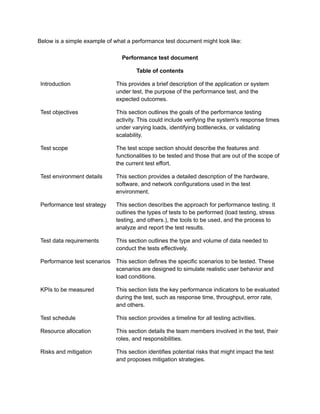
Below is asimple example of what a performance test document might look like:
Performance test document
Table of contents
Introduction This provides a brief description of the application or system
under test, the purpose of the performance test, and the
expected outcomes.
Test objectives This section outlines the goals of the performance testing
activity. This could include verifying the system's response times
under varying loads, identifying bottlenecks, or validating
scalability.
Test scope The test scope section should describe the features and
functionalities to be tested and those that are out of the scope of
the current test effort.
Test environment details This section provides a detailed description of the hardware,
software, and network configurations used in the test
environment.
Performance test strategy This section describes the approach for performance testing. It
outlines the types of tests to be performed (load testing, stress
testing, and others.), the tools to be used, and the process to
analyze and report the test results.
Test data requirements This section outlines the type and volume of data needed to
conduct the tests effectively.
Performance test scenarios This section defines the specific scenarios to be tested. These
scenarios are designed to simulate realistic user behavior and
load conditions.
KPIs to be measured This section lists the key performance indicators to be evaluated
during the test, such as response time, throughput, error rate,
and others.
Test schedule This section provides a timeline for all testing activities.
Resource allocation This section details the team members involved in the test, their
roles, and responsibilities.
Risks and mitigation This section identifies potential risks that might impact the test
and proposes mitigation strategies.
11.
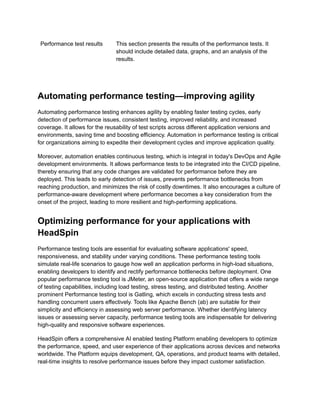
Performance test resultsThis section presents the results of the performance tests. It
should include detailed data, graphs, and an analysis of the
results.
Automating performance testing—improving agility
Automating performance testing enhances agility by enabling faster testing cycles, early
detection of performance issues, consistent testing, improved reliability, and increased
coverage. It allows for the reusability of test scripts across different application versions and
environments, saving time and boosting efficiency. Automation in performance testing is critical
for organizations aiming to expedite their development cycles and improve application quality.
Moreover, automation enables continuous testing, which is integral in today's DevOps and Agile
development environments. It allows performance tests to be integrated into the CI/CD pipeline,
thereby ensuring that any code changes are validated for performance before they are
deployed. This leads to early detection of issues, prevents performance bottlenecks from
reaching production, and minimizes the risk of costly downtimes. It also encourages a culture of
performance-aware development where performance becomes a key consideration from the
onset of the project, leading to more resilient and high-performing applications.
Optimizing performance for your applications with
HeadSpin
Performance testing tools are essential for evaluating software applications' speed,
responsiveness, and stability under varying conditions. These performance testing tools
simulate real-life scenarios to gauge how well an application performs in high-load situations,
enabling developers to identify and rectify performance bottlenecks before deployment. One
popular performance testing tool is JMeter, an open-source application that offers a wide range
of testing capabilities, including load testing, stress testing, and distributed testing. Another
prominent Performance testing tool is Gatling, which excels in conducting stress tests and
handling concurrent users effectively. Tools like Apache Bench (ab) are suitable for their
simplicity and efficiency in assessing web server performance. Whether identifying latency
issues or assessing server capacity, performance testing tools are indispensable for delivering
high-quality and responsive software experiences.
HeadSpin offers a comprehensive AI enabled testing Platform enabling developers to optimize
the performance, speed, and user experience of their applications across devices and networks
worldwide. The Platform equips development, QA, operations, and product teams with detailed,
real-time insights to resolve performance issues before they impact customer satisfaction.
12.
HeadSpin leverages deepML models to capture real-time performance data and identify the
performance bottlenecks that impact end-user experience. HeadSpin's capabilities help capture
a plethora of custom business-specific KPIs to enable enterprises to deliver perfect digital
experiences.
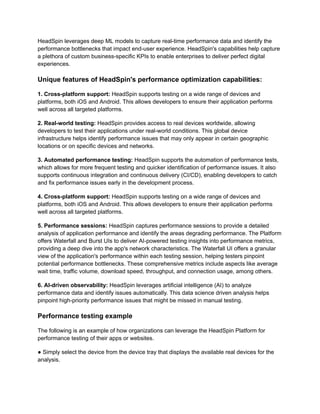
Unique features of HeadSpin's performance optimization capabilities:
1. Cross-platform support: HeadSpin supports testing on a wide range of devices and
platforms, both iOS and Android. This allows developers to ensure their application performs
well across all targeted platforms.
2. Real-world testing: HeadSpin provides access to real devices worldwide, allowing
developers to test their applications under real-world conditions. This global device
infrastructure helps identify performance issues that may only appear in certain geographic
locations or on specific devices and networks.
3. Automated performance testing: HeadSpin supports the automation of performance tests,
which allows for more frequent testing and quicker identification of performance issues. It also
supports continuous integration and continuous delivery (CI/CD), enabling developers to catch
and fix performance issues early in the development process.
4. Cross-platform support: HeadSpin supports testing on a wide range of devices and
platforms, both iOS and Android. This allows developers to ensure their application performs
well across all targeted platforms.
5. Performance sessions: HeadSpin captures performance sessions to provide a detailed
analysis of application performance and identify the areas degrading performance. The Platform
offers Waterfall and Burst UIs to deliver AI-powered testing insights into performance metrics,
providing a deep dive into the app's network characteristics. The Waterfall UI offers a granular
view of the application's performance within each testing session, helping testers pinpoint
potential performance bottlenecks. These comprehensive metrics include aspects like average
wait time, traffic volume, download speed, throughput, and connection usage, among others.
6. AI-driven observability: HeadSpin leverages artificial intelligence (AI) to analyze
performance data and identify issues automatically. This data science driven analysis helps
pinpoint high-priority performance issues that might be missed in manual testing.
Performance testing example
The following is an example of how organizations can leverage the HeadSpin Platform for
performance testing of their apps or websites.
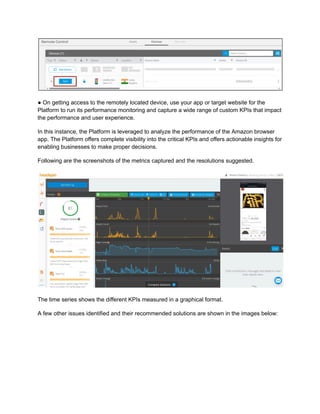
● Simply select the device from the device tray that displays the available real devices for the
analysis.
13.
● On gettingaccess to the remotely located device, use your app or target website for the
Platform to run its performance monitoring and capture a wide range of custom KPIs that impact
the performance and user experience.
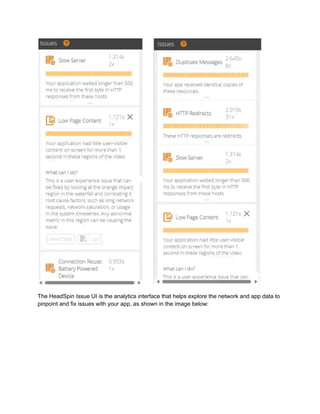
In this instance, the Platform is leveraged to analyze the performance of the Amazon browser
app. The Platform offers complete visibility into the critical KPIs and offers actionable insights for
enabling businesses to make proper decisions.
Following are the screenshots of the metrics captured and the resolutions suggested.
The time series shows the different KPIs measured in a graphical format.
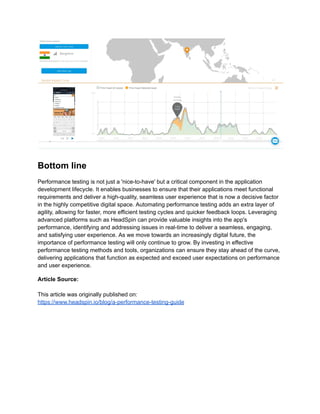
A few other issues identified and their recommended solutions are shown in the images below:
14.
The HeadSpin IssueUI is the analytics interface that helps explore the network and app data to
pinpoint and fix issues with your app, as shown in the image below:
15.
Bottom line
Performance testingis not just a 'nice-to-have' but a critical component in the application
development lifecycle. It enables businesses to ensure that their applications meet functional
requirements and deliver a high-quality, seamless user experience that is now a decisive factor
in the highly competitive digital space. Automating performance testing adds an extra layer of
agility, allowing for faster, more efficient testing cycles and quicker feedback loops. Leveraging
advanced platforms such as HeadSpin can provide valuable insights into the app's
performance, identifying and addressing issues in real-time to deliver a seamless, engaging,
and satisfying user experience. As we move towards an increasingly digital future, the
importance of performance testing will only continue to grow. By investing in effective
performance testing methods and tools, organizations can ensure they stay ahead of the curve,
delivering applications that function as expected and exceed user expectations on performance
and user experience.
Article Source:
This article was originally published on:
https://www.headspin.io/blog/a-performance-testing-guide