Webを飾る技術 第 6 回 変 ゼミ 2008/07/23 id:inajob http://d.hatena.ne.jp/inajob/
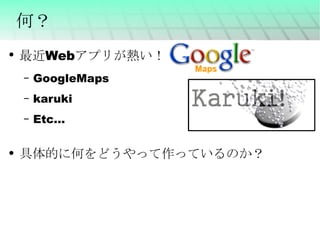
何? 最近Webアプリが熱い! GoogleMaps karuki Etc... 具体的に何をどうやって作っているのか?
要素技術 HTML(XHTML) CSS XML XSLT JavaScript (Flash) (Java) ( サーバサイドの技術 )
HTML J科は授業でやる? HyperTextMarkupLanguage タグで文章を装飾する <なんとか>~</なんとか> という形式 「見た目」ではなく「意味」を付加するのが本来の目的 意味に対する見た目はブラウザに依存する TeXもそんな感じ <HTML>
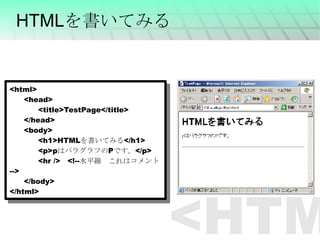
HTMLを書いてみる <html> <head> <title>TestPage</title> </head> <body> <h1>HTML を書いてみる </h1> <p>p はパラグラフの P です。 </p> <hr />   <!-- 水平線 これはコメント --> </body> </html> <HTML>
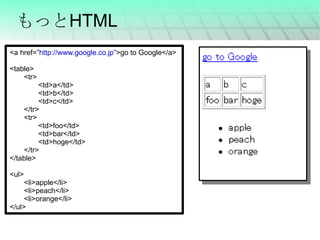
もっとHTML <a href=” http://www.google.co.jp ”>go to Google</a> <table> <tr> <td>a</td> <td>b</td> <td>c</td> </tr> <tr> <td>foo</td> <td>bar</td> <td>hoge</td> </tr> </table> <ul> <li>apple</li> <li>peach</li> <li>orange</li> </ul>
CSS (Cascading Style Sheets) HTML 「見た目」ではなく「意味」を付加するのが本来の目的 ⇒見た目は CSS で記述 各タグの見た目を定義する 色 大きさ 背景 枠 etc... {CSS}
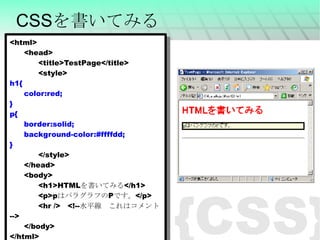
CSSを書いてみる <html> <head> <title>TestPage</title> <style> h1{ color:red; } p{ border:solid; background-color:#ffffdd; } </style> </head> <body> <h1>HTML を書いてみる </h1> <p>p はパラグラフの P です。 </p> <hr />   <!-- 水平線 これはコメント --> </body> </html> {CSS}
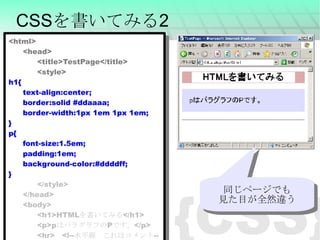
{CSS} CSSを書いてみる2 <html> <head> <title>TestPage</title> <style> h1{ text-align:center; border:solid #ddaaaa; border-width:1px 1em 1px 1em; } p{ font-size:1.5em; padding:1em; background-color:#ddddff; } </style> </head> <body> <h1>HTML を書いてみる </h1> <p>p はパラグラフの P です。 </p> <hr>   <!-- 水平線 これはコメント --> </body> </html> 同じページでも 見た目が全然違う
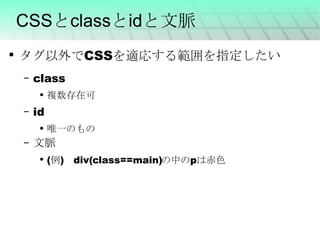
CSSとclassとidと文脈 タグ以外でCSSを適応する範囲を指定したい class 複数存在可 id 唯一のもの 文脈 (例) div(class==main)の中のpは赤色
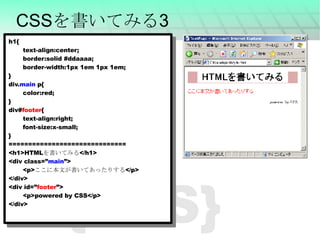
{CSS} CSSを書いてみる3 h1{ text-align:center; border:solid #ddaaaa; border-width:1px 1em 1px 1em; } div. main  p{ color:red; } div# footer { text-align:right; font-size:x-small; } ============================== <h1>HTML を書いてみる </h1> <div class=” main ”> <p> ここに本文が書いてあったりする </p> </div> <div id=” footer ”> <p>powered by CSS</p> </div>
XML Extensible Markup Language 個別の目的に応じたマークアップ言語群を創るために汎用的に使うことができる仕様である (Wikipedia) 気分としては HTMLのような書き方でもっといろんなものを記述する <XML>
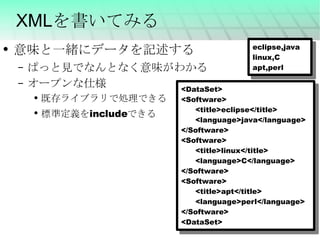
XMLを書いてみる 意味と一緒にデータを記述する ぱっと見でなんとなく意味がわかる オープンな仕様 既存ライブラリで処理できる 標準定義をincludeできる <DataSet> <Software> <title>eclipse</title> <language>java</language> </Software> <Software> <title>linux</title> <language>C</language> </Software> <Software> <title>apt</title> <language>perl</language> </Software> <DataSet> eclipse,java linux,C apt,perl
XSLT(XSL Transformations) W3Cにより標準化されたXML文書の変換用言語 XMLを変換する方法を定義するXML文書 Webブラウザで処理できる <XML>
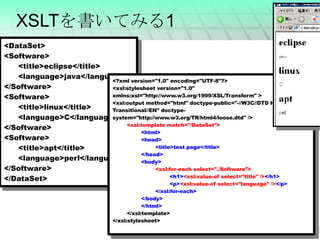
<XML> XSLTを書いてみる1 <DataSet> <Software> <title>eclipse</title> <language>java</language> </Software> <Software> <title>linux</title> <language>C</language> </Software> <Software> <title>apt</title> <language>perl</language> </Software> </DataSet> <?xml version=&quot;1.0&quot; encoding=&quot;UTF-8&quot;?> <xsl:stylesheet version=&quot;1.0&quot; xmlns:xsl=&quot;http://www.w3.org/1999/XSL/Transform&quot; > <xsl:output method=&quot;html&quot; doctype-public=&quot;-//W3C//DTD HTML 4.01 Transitional//EN&quot; doctype-system=&quot;http://www.w3.org/TR/html4/loose.dtd&quot; /> <xsl:template match=&quot;/DataSet&quot;> <html> <head> <title>test page</title> </head> <body> <xsl:for-each select=&quot;./Software&quot;> <h1> <xsl:value-of select=&quot;title&quot; /> </h1> <p> <xsl:value-of select=&quot;language&quot; /> </p> </xsl:for-each> </body> </html> </xsl:template> </xsl:stylesheet>
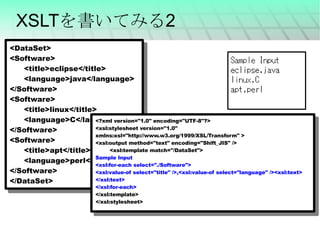
XSLTを書いてみる2 <DataSet> <Software> <title>eclipse</title> <language>java</language> </Software> <Software> <title>linux</title> <language>C</language> </Software> <Software> <title>apt</title> <language>perl</language> </Software> </DataSet> <?xml version=&quot;1.0&quot; encoding=&quot;UTF-8&quot;?> <xsl:stylesheet version=&quot;1.0&quot; xmlns:xsl=&quot;http://www.w3.org/1999/XSL/Transform&quot; > <xsl:output method=&quot;text&quot; encoding=&quot;Shift_JIS&quot; />  <xsl:template match=&quot;/DataSet&quot;> Sample Input <xsl:for-each select=&quot;./Software&quot;> <xsl:value-of select=&quot;title&quot; />,<xsl:value-of select=&quot;language&quot; /><xsl:text> </xsl:text> </xsl:for-each> </xsl:template> </xsl:stylesheet>
JavaScript 本日の本題 HTML文書に「動き」を与える ブラウザ上で動作する 唯一 の言語 見た目はJavaと似ていて名前にも含まれるが まったく別の言語 です キモいらしい オブジェクト指向っぽくもかけるらしい FlashとかJava プラグインが必要,単純な処理でもそれなりにメモリを食う
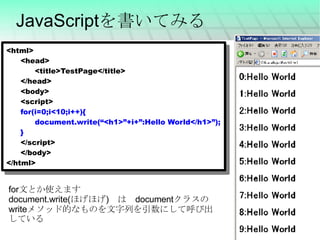
JavaScriptを書いてみる <html> <head> <title>TestPage</title> </head> <body> <script> for(i=0;i<10;i++){ document.write(“<h1>”+i+”:Hello World</h1>”); } </script> </body> </html> for 文とか使えます document.write( ほげほげ )  は  document クラスの write メソッド的なものを文字列を引数にして呼び出している
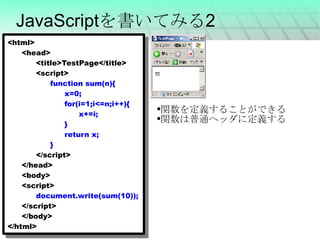
JavaScriptを書いてみる2 <html> <head> <title>TestPage</title> <script> function sum(n){ x=0; for(i=1;i<=n;i++){ x+=i; } return x; } </script> </head> <body> <script> document.write(sum(10)); </script> </body> </html> 関数を定義することができる 関数は普通ヘッダに定義する
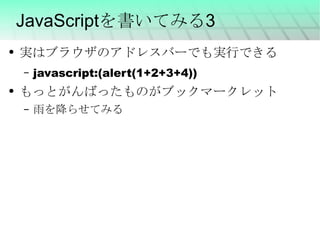
JavaScriptを書いてみる3 実はブラウザのアドレスバーでも実行できる javascript:(alert(1+2+3+4)) もっとがんばったものがブックマークレット 雨を降らせてみる
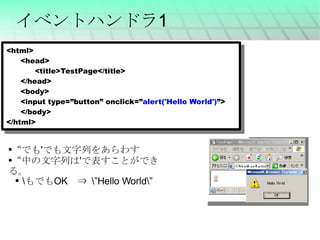
イベントハンドラ1 <html> <head> <title>TestPage</title> </head> <body> <input type=”button” onclick=” alert('Hello World') ”> </body> </html> “ でも ' でも文字列をあらわす “ 中の文字列は ' で表すことができる。 \ もでも OK  ⇒  \”Hello World\”
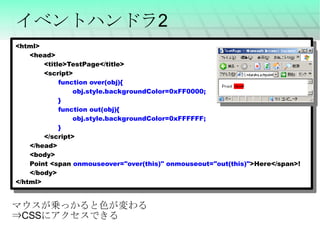
イベントハンドラ2 <html> <head> <title>TestPage</title> <script> function over(obj){ obj.style.backgroundColor=0xFF0000; } function out(obj){ obj.style.backgroundColor=0xFFFFFF; } </script> </head> <body> Point <span  onmouseover=&quot;over(this)&quot; onmouseout=&quot;out(this)&quot; >Here</span>! </body> </html> マウスが乗っかると色が変わる ⇒ CSS にアクセスできる
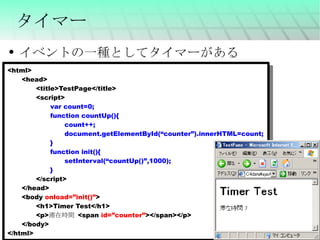
タイマー イベントの一種としてタイマーがある <html> <head> <title>TestPage</title> <script> var count=0; function countUp(){ count++; document.getElementById(“counter”).innerHTML=count; } function init(){ setInterval(“countUp()”,1000); } </script> </head> <body  onload=”init()” > <h1>Timer Test</h1> <p> 滞在時間  <span  id=”counter” ></span></p> </body> </html>
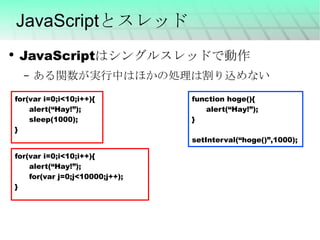
JavaScriptとスレッド JavaScriptはシングルスレッドで動作 ある関数が実行中はほかの処理は割り込めない for(var i=0;i<10;i++){ alert(“Hay!”); sleep(1000); } function hoge(){ alert(“Hay!”); } setInterval(“hoge()”,1000); for(var i=0;i<10;i++){ alert(“Hay!”); for(var j=0;j<10000;j++); }
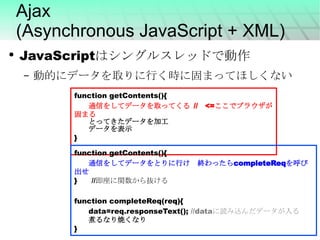
Ajax (Asynchronous JavaScript + XML) JavaScriptはシングルスレッドで動作 動的にデータを取りに行く時に固まってほしくない function getContents(){ 通信をしてデータを取ってくる  //   <= ここでブラウザが固まる とってきたデータを加工 データを表示 } function getContents(){ 通信をしてデータをとりに行け 終わったら completeReq を呼び出せ }    // 即座に関数から抜ける function completeReq(req){ data=req.responseText();  //data に読み込んだデータが入る 煮るなり焼くなり }
JavaScriptの型 数字   --小数も同じ扱い 文字列 オブジェクト(連想配列的なもの) 配列 関数 Etc... 数字や文字列は自動変換される “your score is”+ 20 “1”+1  => “11” 1+1=> 2 a=[1,2,3,4]  // 配列 alert(a[0]);  // => 1 a[10]=10;  // 要素数無視 // オブジェクト b={one:10,two:20}  alert(b[“one”]);  // =>10 alert(b.one);  // =>10 b.three=30; // 要素の追加
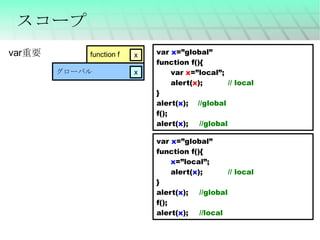
スコープ var  x =”global” function f(){ var  x =”local”; alert( x ); // local } alert( x );  //global f(); alert( x ); //global var 重要 var  x =”global” function f(){ x =”local”; alert( x ); // local } alert( x ); //global f(); alert( x ); //local グローバル function f
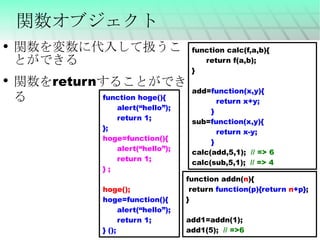
関数オブジェクト function calc(f,a,b){ return f(a,b); } add= function(x,y){ return x+y; } sub= function(x,y){ return x-y; } calc(add,5,1);  // => 6 calc(sub,5,1);  // => 4 関数を変数に代入して扱うことができる 関数をreturnすることができる function addn( n ){ return  function(p){return  n +p} ; } add1=addn(1); add1(5);  // =>6 function hoge(){ alert(“hello”); return 1; }; hoge=function(){ alert(“hello”); return 1; } ; hoge(); hoge=function(){ alert(“hello”); return 1; } ();
JavaScriptとオブジェクト指向 オブジェクト指向 クラスとかインスタンスとか そういうやつ Java,C++ JavaScriptのそれは少し趣が違うので紹介 正直使わなくても書ける ライブラリなどを 作る/使う ときは知っておくと良い
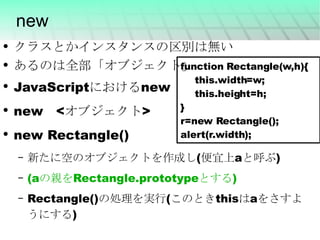
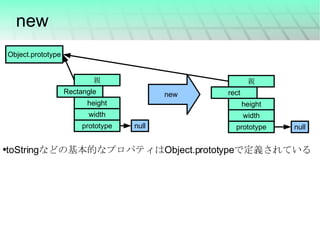
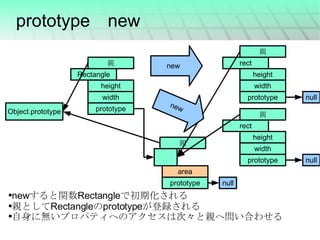
new クラスとかインスタンスの区別は無い あるのは全部「オブジェクト」 JavaScript における n ew new <オブジェクト> new Rectangle() 新たに空のオブジェクトを作成し(便宜上aと呼ぶ) (a の親を Rectangle.prototype とする ) Rectangle()の処理を実行(このときthisはaをさすようにする) function Rectangle(w,h){ this.width=w; this.height=h; } r=new Rectangle(); alert(r.width);
new toString などの基本的なプロパティは Object.prototype で定義されている null new null
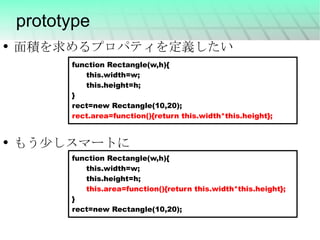
prototype function Rectangle(w,h){ this.width=w; this.height=h; } rect=new Rectangle(10,20); rect.area=function(){return this.width*this.height}; function Rectangle(w,h){ this.width=w; this.height=h; this.area=function(){return this.width*this.height}; } rect=new Rectangle(10,20); 面積を求めるプロパティを定義したい もう少しスマートに
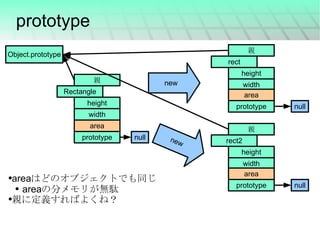
prototype area はどのオブジェクトでも同じ area の分メモリが無駄 親に定義すればよくね? null new null new null
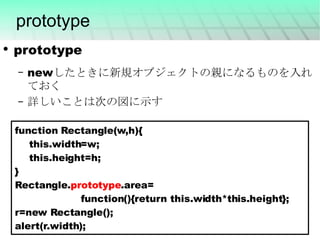
prototype prototype newしたときに新規オブジェクトの親になるものを入れておく 詳しいことは次の図に示す function Rectangle(w,h){ this.width=w; this.height=h; } Rectangle. prototype .area= function(){return this.width*this.height}; r=new Rectangle(); alert(r.width);
prototype new new すると関数 Rectangle で初期化される 親として Rectangle の prototype が登録される 自身に無いプロパティへのアクセスは次々と親へ問い合わせる new null null null new
すでにあるオブジェクトを変更 prototypeをいじれば既存のオブジェクトの挙動を変更することができる prototype.jsではArray.prototypeの上書きをしている eachとかfilterとか
Object.prototype汚染 だれでもHelloWorldを実行できる! Object.prototype.hello=function(){ alert(“Hello world”); } a=[1,2,3]; a.hello(); b={a:10,b:20}; b.hello();
配列のtoStringを変更してみる 配列の標準のtoString [a,b,c] 改造してみる Array.prototype.toString=function(){ var s=&quot;&quot;; for(var i=0;i<this.length;i++){ s+=i+&quot;:&quot;+this[i]+&quot;\n&quot;; } return s; } a=[“a”,”b”,”c”] alert(a); 0:a 1:b 2:c
お疲れ様でした まとめ HTML(XHTML) CSS XML XSLT JavaScript

webを飾る技術

  • 1.
    Webを飾る技術 第 6回 変 ゼミ 2008/07/23 id:inajob http://d.hatena.ne.jp/inajob/
  • 2.
    何? 最近Webアプリが熱い! GoogleMapskaruki Etc... 具体的に何をどうやって作っているのか?
  • 3.
    要素技術 HTML(XHTML) CSSXML XSLT JavaScript (Flash) (Java) ( サーバサイドの技術 )
  • 4.
    HTML J科は授業でやる? HyperTextMarkupLanguageタグで文章を装飾する <なんとか>~</なんとか> という形式 「見た目」ではなく「意味」を付加するのが本来の目的 意味に対する見た目はブラウザに依存する TeXもそんな感じ <HTML>
  • 5.
    HTMLを書いてみる <html> <head><title>TestPage</title> </head> <body> <h1>HTML を書いてみる </h1> <p>p はパラグラフの P です。 </p> <hr />   <!-- 水平線 これはコメント --> </body> </html> <HTML>
  • 6.
    もっとHTML <a href=”http://www.google.co.jp ”>go to Google</a> <table> <tr> <td>a</td> <td>b</td> <td>c</td> </tr> <tr> <td>foo</td> <td>bar</td> <td>hoge</td> </tr> </table> <ul> <li>apple</li> <li>peach</li> <li>orange</li> </ul>
  • 7.
    CSS (Cascading Style Sheets)HTML 「見た目」ではなく「意味」を付加するのが本来の目的 ⇒見た目は CSS で記述 各タグの見た目を定義する 色 大きさ 背景 枠 etc... {CSS}
  • 8.
    CSSを書いてみる <html> <head><title>TestPage</title> <style> h1{ color:red; } p{ border:solid; background-color:#ffffdd; } </style> </head> <body> <h1>HTML を書いてみる </h1> <p>p はパラグラフの P です。 </p> <hr />   <!-- 水平線 これはコメント --> </body> </html> {CSS}
  • 9.
    {CSS} CSSを書いてみる2 <html><head> <title>TestPage</title> <style> h1{ text-align:center; border:solid #ddaaaa; border-width:1px 1em 1px 1em; } p{ font-size:1.5em; padding:1em; background-color:#ddddff; } </style> </head> <body> <h1>HTML を書いてみる </h1> <p>p はパラグラフの P です。 </p> <hr>   <!-- 水平線 これはコメント --> </body> </html> 同じページでも 見た目が全然違う
  • 10.
    CSSとclassとidと文脈 タグ以外でCSSを適応する範囲を指定したい class複数存在可 id 唯一のもの 文脈 (例) div(class==main)の中のpは赤色
  • 11.
    {CSS} CSSを書いてみる3 h1{text-align:center; border:solid #ddaaaa; border-width:1px 1em 1px 1em; } div. main p{ color:red; } div# footer { text-align:right; font-size:x-small; } ============================== <h1>HTML を書いてみる </h1> <div class=” main ”> <p> ここに本文が書いてあったりする </p> </div> <div id=” footer ”> <p>powered by CSS</p> </div>
  • 12.
    XML Extensible MarkupLanguage 個別の目的に応じたマークアップ言語群を創るために汎用的に使うことができる仕様である (Wikipedia) 気分としては HTMLのような書き方でもっといろんなものを記述する <XML>
  • 13.
    XMLを書いてみる 意味と一緒にデータを記述する ぱっと見でなんとなく意味がわかるオープンな仕様 既存ライブラリで処理できる 標準定義をincludeできる <DataSet> <Software> <title>eclipse</title> <language>java</language> </Software> <Software> <title>linux</title> <language>C</language> </Software> <Software> <title>apt</title> <language>perl</language> </Software> <DataSet> eclipse,java linux,C apt,perl
  • 14.
    XSLT(XSL Transformations) W3Cにより標準化されたXML文書の変換用言語XMLを変換する方法を定義するXML文書 Webブラウザで処理できる <XML>
  • 15.
    <XML> XSLTを書いてみる1 <DataSet><Software> <title>eclipse</title> <language>java</language> </Software> <Software> <title>linux</title> <language>C</language> </Software> <Software> <title>apt</title> <language>perl</language> </Software> </DataSet> <?xml version=&quot;1.0&quot; encoding=&quot;UTF-8&quot;?> <xsl:stylesheet version=&quot;1.0&quot; xmlns:xsl=&quot;http://www.w3.org/1999/XSL/Transform&quot; > <xsl:output method=&quot;html&quot; doctype-public=&quot;-//W3C//DTD HTML 4.01 Transitional//EN&quot; doctype-system=&quot;http://www.w3.org/TR/html4/loose.dtd&quot; /> <xsl:template match=&quot;/DataSet&quot;> <html> <head> <title>test page</title> </head> <body> <xsl:for-each select=&quot;./Software&quot;> <h1> <xsl:value-of select=&quot;title&quot; /> </h1> <p> <xsl:value-of select=&quot;language&quot; /> </p> </xsl:for-each> </body> </html> </xsl:template> </xsl:stylesheet>
  • 16.
    XSLTを書いてみる2 <DataSet> <Software><title>eclipse</title> <language>java</language> </Software> <Software> <title>linux</title> <language>C</language> </Software> <Software> <title>apt</title> <language>perl</language> </Software> </DataSet> <?xml version=&quot;1.0&quot; encoding=&quot;UTF-8&quot;?> <xsl:stylesheet version=&quot;1.0&quot; xmlns:xsl=&quot;http://www.w3.org/1999/XSL/Transform&quot; > <xsl:output method=&quot;text&quot; encoding=&quot;Shift_JIS&quot; /> <xsl:template match=&quot;/DataSet&quot;> Sample Input <xsl:for-each select=&quot;./Software&quot;> <xsl:value-of select=&quot;title&quot; />,<xsl:value-of select=&quot;language&quot; /><xsl:text> </xsl:text> </xsl:for-each> </xsl:template> </xsl:stylesheet>
  • 17.
    JavaScript 本日の本題 HTML文書に「動き」を与えるブラウザ上で動作する 唯一 の言語 見た目はJavaと似ていて名前にも含まれるが まったく別の言語 です キモいらしい オブジェクト指向っぽくもかけるらしい FlashとかJava プラグインが必要,単純な処理でもそれなりにメモリを食う
  • 18.
    JavaScriptを書いてみる <html> <head><title>TestPage</title> </head> <body> <script> for(i=0;i<10;i++){ document.write(“<h1>”+i+”:Hello World</h1>”); } </script> </body> </html> for 文とか使えます document.write( ほげほげ )  は  document クラスの write メソッド的なものを文字列を引数にして呼び出している
  • 19.
    JavaScriptを書いてみる2 <html> <head><title>TestPage</title> <script> function sum(n){ x=0; for(i=1;i<=n;i++){ x+=i; } return x; } </script> </head> <body> <script> document.write(sum(10)); </script> </body> </html> 関数を定義することができる 関数は普通ヘッダに定義する
  • 20.
    JavaScriptを書いてみる3 実はブラウザのアドレスバーでも実行できる javascript:(alert(1+2+3+4))もっとがんばったものがブックマークレット 雨を降らせてみる
  • 21.
    イベントハンドラ1 <html> <head><title>TestPage</title> </head> <body> <input type=”button” onclick=” alert('Hello World') ”> </body> </html> “ でも ' でも文字列をあらわす “ 中の文字列は ' で表すことができる。 \ もでも OK  ⇒ \”Hello World\”
  • 22.
    イベントハンドラ2 <html> <head><title>TestPage</title> <script> function over(obj){ obj.style.backgroundColor=0xFF0000; } function out(obj){ obj.style.backgroundColor=0xFFFFFF; } </script> </head> <body> Point <span onmouseover=&quot;over(this)&quot; onmouseout=&quot;out(this)&quot; >Here</span>! </body> </html> マウスが乗っかると色が変わる ⇒ CSS にアクセスできる
  • 23.
    タイマー イベントの一種としてタイマーがある <html><head> <title>TestPage</title> <script> var count=0; function countUp(){ count++; document.getElementById(“counter”).innerHTML=count; } function init(){ setInterval(“countUp()”,1000); } </script> </head> <body onload=”init()” > <h1>Timer Test</h1> <p> 滞在時間 <span id=”counter” ></span></p> </body> </html>
  • 24.
    JavaScriptとスレッド JavaScriptはシングルスレッドで動作 ある関数が実行中はほかの処理は割り込めないfor(var i=0;i<10;i++){ alert(“Hay!”); sleep(1000); } function hoge(){ alert(“Hay!”); } setInterval(“hoge()”,1000); for(var i=0;i<10;i++){ alert(“Hay!”); for(var j=0;j<10000;j++); }
  • 25.
    Ajax (Asynchronous JavaScript+ XML) JavaScriptはシングルスレッドで動作 動的にデータを取りに行く時に固まってほしくない function getContents(){ 通信をしてデータを取ってくる //   <= ここでブラウザが固まる とってきたデータを加工 データを表示 } function getContents(){ 通信をしてデータをとりに行け 終わったら completeReq を呼び出せ }    // 即座に関数から抜ける function completeReq(req){ data=req.responseText(); //data に読み込んだデータが入る 煮るなり焼くなり }
  • 26.
    JavaScriptの型 数字   --小数も同じ扱い 文字列オブジェクト(連想配列的なもの) 配列 関数 Etc... 数字や文字列は自動変換される “your score is”+ 20 “1”+1 => “11” 1+1=> 2 a=[1,2,3,4] // 配列 alert(a[0]); // => 1 a[10]=10; // 要素数無視 // オブジェクト b={one:10,two:20} alert(b[“one”]); // =>10 alert(b.one); // =>10 b.three=30; // 要素の追加
  • 27.
    スコープ var x =”global” function f(){ var x =”local”; alert( x ); // local } alert( x ); //global f(); alert( x ); //global var 重要 var x =”global” function f(){ x =”local”; alert( x ); // local } alert( x ); //global f(); alert( x ); //local グローバル function f
  • 28.
    関数オブジェクト function calc(f,a,b){return f(a,b); } add= function(x,y){ return x+y; } sub= function(x,y){ return x-y; } calc(add,5,1); // => 6 calc(sub,5,1); // => 4 関数を変数に代入して扱うことができる 関数をreturnすることができる function addn( n ){ return function(p){return n +p} ; } add1=addn(1); add1(5); // =>6 function hoge(){ alert(“hello”); return 1; }; hoge=function(){ alert(“hello”); return 1; } ; hoge(); hoge=function(){ alert(“hello”); return 1; } ();
  • 29.
    JavaScriptとオブジェクト指向 オブジェクト指向 クラスとかインスタンスとか そういうやつ Java,C++JavaScriptのそれは少し趣が違うので紹介 正直使わなくても書ける ライブラリなどを 作る/使う ときは知っておくと良い
  • 30.
    new クラスとかインスタンスの区別は無い あるのは全部「オブジェクト」JavaScript における n ew new <オブジェクト> new Rectangle() 新たに空のオブジェクトを作成し(便宜上aと呼ぶ) (a の親を Rectangle.prototype とする ) Rectangle()の処理を実行(このときthisはaをさすようにする) function Rectangle(w,h){ this.width=w; this.height=h; } r=new Rectangle(); alert(r.width);
  • 31.
    new toString などの基本的なプロパティはObject.prototype で定義されている null new null
  • 32.
    prototype function Rectangle(w,h){this.width=w; this.height=h; } rect=new Rectangle(10,20); rect.area=function(){return this.width*this.height}; function Rectangle(w,h){ this.width=w; this.height=h; this.area=function(){return this.width*this.height}; } rect=new Rectangle(10,20); 面積を求めるプロパティを定義したい もう少しスマートに
  • 33.
    prototype area はどのオブジェクトでも同じarea の分メモリが無駄 親に定義すればよくね? null new null new null
  • 34.
    prototype prototype newしたときに新規オブジェクトの親になるものを入れておく詳しいことは次の図に示す function Rectangle(w,h){ this.width=w; this.height=h; } Rectangle. prototype .area= function(){return this.width*this.height}; r=new Rectangle(); alert(r.width);
  • 35.
    prototype new new すると関数Rectangle で初期化される 親として Rectangle の prototype が登録される 自身に無いプロパティへのアクセスは次々と親へ問い合わせる new null null null new
  • 36.
  • 37.
    Object.prototype汚染 だれでもHelloWorldを実行できる! Object.prototype.hello=function(){alert(“Hello world”); } a=[1,2,3]; a.hello(); b={a:10,b:20}; b.hello();
  • 38.
    配列のtoStringを変更してみる 配列の標準のtoString [a,b,c]改造してみる Array.prototype.toString=function(){ var s=&quot;&quot;; for(var i=0;i<this.length;i++){ s+=i+&quot;:&quot;+this[i]+&quot;\n&quot;; } return s; } a=[“a”,”b”,”c”] alert(a); 0:a 1:b 2:c
  • 39.