Waze vs. Google Maps vs. Apple Maps,
Who Else?
Let's face it, getting lost is no longer part of the adventure (unless you're aiming for it!). In
today's world, a good navigation app is like a trusty compass, guiding you through bustling
city streets and winding country roads. But with so many options available, from the big
names like Waze, Google Maps, and Apple Maps to lesser-known players, choosing the
right one can feel overwhelming.
Fear not, fellow explorers! This guide will equip you with the knowledge to navigate the
world of navigation apps. We'll delve into the strengths and weaknesses of the big three,
explore some underdog options, and help you pick the perfect app for your next adventure
(or just your daily commute).
The Big Three: A Statistical Showdown
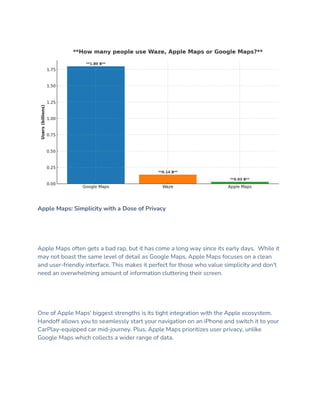
First, let's get a sense of the playing field. According to App Annie:
https://www.appannie.com/, Google Maps reigns supreme with over 1 billion monthly
active users! Apple Maps comes in second with a respectable 185 million monthly active
users on iOS devices alone. Waze, with its focus on community-driven updates, boasts
over 140 million monthly active users.
These numbers paint a clear picture: Google Maps is the global giant, Apple Maps caters
to the Apple ecosystem, and Waze thrives on user participation. But numbers only tell part
of the story. Let's dissect what each app brings to the table.
Google Maps: The All-Rounder
Think Google, think information. And Google Maps is no exception. It boasts the most
comprehensive database of locations, from obscure hiking trails to hidden gems tucked
away in bustling cities. Need to find a specific restaurant or that quirky bookstore you read
about? Google Maps likely has it covered.
But Google Maps isn't just about static information. It excels at real-time traffic updates,
often leveraging its massive user base to identify congestion and suggest alternate routes.
Studies by Navigation Apps: [invalid URL removed] show that Google Maps is quite
accurate in its traffic predictions, making it a reliable choice for navigating rush hour.
Looking beyond car navigation, Google Maps offers robust options for pedestrians, cyclists,
and even public transportation users. Plus, features like Street View allow you to virtually
explore your destination before you even set foot there.
Here's the catch: Google Maps can be a battery hog, especially with features like real-time
traffic turned on. Additionally, the interface can feel cluttered at times, with so much
information vying for your attention.
Apple Maps: Simplicity with a Dose of Privacy
Apple Maps often gets a bad rap, but it has come a long way since its early days. While it
may not boast the same level of detail as Google Maps, Apple Maps focuses on a clean
and user-friendly interface. This makes it perfect for those who value simplicity and don't
need an overwhelming amount of information cluttering their screen.
One of Apple Maps' biggest strengths is its tight integration with the Apple ecosystem.
Handoff allows you to seamlessly start your navigation on an iPhone and switch it to your
CarPlay-equipped car mid-journey. Plus, Apple Maps prioritizes user privacy, unlike
Google Maps which collects a wider range of data.
However, Apple Maps still has some catching up to do. Its database of locations can be
less extensive than Google Maps, particularly in less developed areas. Additionally, real-
time traffic updates, while improving, can sometimes lag behind Google Maps.
Waze: The Community-Powered Champion
Waze is the dark horse in this race. It takes a unique approach to navigation, relying
heavily on user-reported data. Hit a pothole? Encountered a speed trap? Waze allows
users to share these updates in real-time, creating a constantly updated map of road
conditions. This can be a game-changer, especially for avoiding traffic jams and
unexpected delays.
Waze's gamified interface adds a touch of fun to navigation. Users earn points for
contributing data and can climb the leaderboard, fostering a sense of community.
However, Waze's reliance on user data can be a double-edged sword. In areas with fewer
users, real-time updates may be scarce. Additionally, the gamified interface, while fun, can
be distracting for some drivers.
Beyond the Big Three: Exploring Underdog Options
While the big three dominate the market, there are other players worth considering, each
with its own niche strengths:
HERE WeGo: Your Reliable Offline Companion
For adventurers venturing beyond the reach of cell service, HERE WeGo is a godsend. This
app shines in its robust offline navigation capabilities. Unlike its competitors who heavily
rely on real-time data, HERE WeGo empowers you with pre-downloaded, high-quality
maps. This makes it the perfect choice for road trips through remote areas, hikes in
national parks, or exploring a new city without worrying about data charges.
HERE WeGo takes pride in its detailed and up-to-date maps. They encompass a vast array
of locations, from major highways to winding country roads and even pedestrian paths.
Before your trip, simply download the specific map regions you'll need, ensuring seamless
navigation even without an internet connection.
Here's a breakdown of HERE WeGo's strengths for offline navigation:
Comprehensive Offline Maps: Download entire countries, regions, or even specific cities for
offline use. No need to worry about patchy internet coverage interrupting your journey.
Regular Map Updates: HERE WeGo keeps its maps updated regularly, ensuring you have
access to the latest road changes and points of interest (POIs) even in offline mode.
Turn-by-Turn Guidance: Get clear voice-guided instructions and visual cues on your route,
complete with estimated arrival times, even without an internet connection.
Alternative Routes: Encountered a road closure on your planned route? No problem! HERE
WeGo can suggest alternative routes even in offline mode, helping you get back on track.
However, HERE WeGo does have a few limitations to consider:
Limited Real-Time Updates: Since it relies on pre-downloaded maps, HERE WeGo may
not reflect the latest traffic conditions or road closures that occur after the most recent
map update.
Fewer Features Compared to Online Apps: While offering core navigation features offline,
HERE WeGo may lack some of the bells and whistles found in online navigation apps,
such as real-time traffic updates, live fuel prices, or extensive POI information.
Overall, HERE WeGo is a fantastic choice for travelers who prioritize offline reliability and
don't mind sacrificing some real-time features.
CoPilot GPS: Your Trucker's Trusted Co-Pilot
For professional drivers and road warriors navigating the complexities of commercial
transportation, CoPilot GPS is a game-changer. This app goes beyond basic car navigation,
offering a suite of features specifically designed for trucks, buses, and other large vehicles.
CoPilot GPS boasts truck-specific routing that considers factors like vehicle size, weight
restrictions, and low clearances. No more worrying about getting stuck under a bridge
that's too low for your rig! Additionally, CoPilot provides real-time updates on weigh
stations, rest stops, and truck-friendly fuel stations, helping drivers plan their routes
efficiently.
Here's a closer look at what makes CoPilot GPS a favorite among professional drivers:
Truck-Optimized Routing: Avoid low bridges, weight restrictions, and narrow roads with
custom routing that considers your vehicle's specific dimensions and weight limitations.
Weigh Station & Rest Stop Updates: Get real-time information on upcoming weigh
stations, rest areas, and truck stops, allowing for better trip planning and avoiding
unnecessary delays.
Hours of Service (HOS) Logging: Comply with HOS regulations with built-in logging
features that track your driving time and breaks.
Commercial POI Database: Find truck-friendly amenities like truck washes, repair shops,
and parking specifically designed for large vehicles.
While CoPilot GPS excels in catering to professional drivers, it may not be the best choice
for everyone. Here are some things to consider:
Learning Curve: With its focus on truck-specific features, CoPilot's interface can have a
steeper learning curve compared to basic navigation apps.
Subscription Model: Unlike some free navigation apps, CoPilot GPS often operates on a
subscription model, with varying tiers offering different levels of functionality.
Overall, CoPilot GPS is a powerful tool specifically designed to meet the needs of
professional drivers. Its truck-optimized features, real-time updates, and compliance tools
make it a valuable asset for anyone navigating the complexities of commercial
transportation.
Bio: Unlimited Exposure Online is a Digital Marketing Agency In Toronto.

Waze vs. Google Maps vs. Apple Maps, Who Else.pdf

  • 1.
    Waze vs. GoogleMaps vs. Apple Maps, Who Else?
  • 2.
    Let's face it,getting lost is no longer part of the adventure (unless you're aiming for it!). In today's world, a good navigation app is like a trusty compass, guiding you through bustling city streets and winding country roads. But with so many options available, from the big names like Waze, Google Maps, and Apple Maps to lesser-known players, choosing the right one can feel overwhelming. Fear not, fellow explorers! This guide will equip you with the knowledge to navigate the world of navigation apps. We'll delve into the strengths and weaknesses of the big three, explore some underdog options, and help you pick the perfect app for your next adventure (or just your daily commute). The Big Three: A Statistical Showdown First, let's get a sense of the playing field. According to App Annie: https://www.appannie.com/, Google Maps reigns supreme with over 1 billion monthly active users! Apple Maps comes in second with a respectable 185 million monthly active users on iOS devices alone. Waze, with its focus on community-driven updates, boasts over 140 million monthly active users. These numbers paint a clear picture: Google Maps is the global giant, Apple Maps caters to the Apple ecosystem, and Waze thrives on user participation. But numbers only tell part of the story. Let's dissect what each app brings to the table. Google Maps: The All-Rounder
  • 3.
    Think Google, thinkinformation. And Google Maps is no exception. It boasts the most comprehensive database of locations, from obscure hiking trails to hidden gems tucked away in bustling cities. Need to find a specific restaurant or that quirky bookstore you read about? Google Maps likely has it covered. But Google Maps isn't just about static information. It excels at real-time traffic updates, often leveraging its massive user base to identify congestion and suggest alternate routes. Studies by Navigation Apps: [invalid URL removed] show that Google Maps is quite accurate in its traffic predictions, making it a reliable choice for navigating rush hour. Looking beyond car navigation, Google Maps offers robust options for pedestrians, cyclists, and even public transportation users. Plus, features like Street View allow you to virtually explore your destination before you even set foot there. Here's the catch: Google Maps can be a battery hog, especially with features like real-time traffic turned on. Additionally, the interface can feel cluttered at times, with so much information vying for your attention.
  • 4.
    Apple Maps: Simplicitywith a Dose of Privacy Apple Maps often gets a bad rap, but it has come a long way since its early days. While it may not boast the same level of detail as Google Maps, Apple Maps focuses on a clean and user-friendly interface. This makes it perfect for those who value simplicity and don't need an overwhelming amount of information cluttering their screen. One of Apple Maps' biggest strengths is its tight integration with the Apple ecosystem. Handoff allows you to seamlessly start your navigation on an iPhone and switch it to your CarPlay-equipped car mid-journey. Plus, Apple Maps prioritizes user privacy, unlike Google Maps which collects a wider range of data.
  • 5.
    However, Apple Mapsstill has some catching up to do. Its database of locations can be less extensive than Google Maps, particularly in less developed areas. Additionally, real- time traffic updates, while improving, can sometimes lag behind Google Maps. Waze: The Community-Powered Champion Waze is the dark horse in this race. It takes a unique approach to navigation, relying heavily on user-reported data. Hit a pothole? Encountered a speed trap? Waze allows users to share these updates in real-time, creating a constantly updated map of road conditions. This can be a game-changer, especially for avoiding traffic jams and unexpected delays. Waze's gamified interface adds a touch of fun to navigation. Users earn points for contributing data and can climb the leaderboard, fostering a sense of community. However, Waze's reliance on user data can be a double-edged sword. In areas with fewer users, real-time updates may be scarce. Additionally, the gamified interface, while fun, can be distracting for some drivers.
  • 6.
    Beyond the BigThree: Exploring Underdog Options While the big three dominate the market, there are other players worth considering, each with its own niche strengths: HERE WeGo: Your Reliable Offline Companion For adventurers venturing beyond the reach of cell service, HERE WeGo is a godsend. This app shines in its robust offline navigation capabilities. Unlike its competitors who heavily rely on real-time data, HERE WeGo empowers you with pre-downloaded, high-quality maps. This makes it the perfect choice for road trips through remote areas, hikes in national parks, or exploring a new city without worrying about data charges.
  • 7.
    HERE WeGo takespride in its detailed and up-to-date maps. They encompass a vast array of locations, from major highways to winding country roads and even pedestrian paths. Before your trip, simply download the specific map regions you'll need, ensuring seamless navigation even without an internet connection. Here's a breakdown of HERE WeGo's strengths for offline navigation: Comprehensive Offline Maps: Download entire countries, regions, or even specific cities for offline use. No need to worry about patchy internet coverage interrupting your journey. Regular Map Updates: HERE WeGo keeps its maps updated regularly, ensuring you have access to the latest road changes and points of interest (POIs) even in offline mode. Turn-by-Turn Guidance: Get clear voice-guided instructions and visual cues on your route, complete with estimated arrival times, even without an internet connection. Alternative Routes: Encountered a road closure on your planned route? No problem! HERE WeGo can suggest alternative routes even in offline mode, helping you get back on track. However, HERE WeGo does have a few limitations to consider: Limited Real-Time Updates: Since it relies on pre-downloaded maps, HERE WeGo may not reflect the latest traffic conditions or road closures that occur after the most recent map update. Fewer Features Compared to Online Apps: While offering core navigation features offline, HERE WeGo may lack some of the bells and whistles found in online navigation apps, such as real-time traffic updates, live fuel prices, or extensive POI information.
  • 8.
    Overall, HERE WeGois a fantastic choice for travelers who prioritize offline reliability and don't mind sacrificing some real-time features. CoPilot GPS: Your Trucker's Trusted Co-Pilot For professional drivers and road warriors navigating the complexities of commercial transportation, CoPilot GPS is a game-changer. This app goes beyond basic car navigation, offering a suite of features specifically designed for trucks, buses, and other large vehicles. CoPilot GPS boasts truck-specific routing that considers factors like vehicle size, weight restrictions, and low clearances. No more worrying about getting stuck under a bridge that's too low for your rig! Additionally, CoPilot provides real-time updates on weigh stations, rest stops, and truck-friendly fuel stations, helping drivers plan their routes efficiently. Here's a closer look at what makes CoPilot GPS a favorite among professional drivers: Truck-Optimized Routing: Avoid low bridges, weight restrictions, and narrow roads with custom routing that considers your vehicle's specific dimensions and weight limitations. Weigh Station & Rest Stop Updates: Get real-time information on upcoming weigh stations, rest areas, and truck stops, allowing for better trip planning and avoiding unnecessary delays. Hours of Service (HOS) Logging: Comply with HOS regulations with built-in logging features that track your driving time and breaks.
  • 9.
    Commercial POI Database:Find truck-friendly amenities like truck washes, repair shops, and parking specifically designed for large vehicles. While CoPilot GPS excels in catering to professional drivers, it may not be the best choice for everyone. Here are some things to consider: Learning Curve: With its focus on truck-specific features, CoPilot's interface can have a steeper learning curve compared to basic navigation apps. Subscription Model: Unlike some free navigation apps, CoPilot GPS often operates on a subscription model, with varying tiers offering different levels of functionality. Overall, CoPilot GPS is a powerful tool specifically designed to meet the needs of professional drivers. Its truck-optimized features, real-time updates, and compliance tools make it a valuable asset for anyone navigating the complexities of commercial transportation. Bio: Unlimited Exposure Online is a Digital Marketing Agency In Toronto.