Silberschatz, Galvin and Gagne ©2013
Operating System Concepts – 9th Edit9on
Chapter 9: Virtual
Memory
9.2 Modified By Dr. Khaled Wassif
Operating System Concepts – 9th Edition
Silberschatz, Galvin and Gagne ©2013
Chapter 9: Virtual Memory
 Background
 Demand Paging
 Copy-on-Write
 Page Replacement
 Allocation of Frames
 Thrashing
 Memory-Mapped Files
 Allocating Kernel Memory
 Other Considerations
 Operating-System Examples
9.3 Modified By Dr. Khaled Wassif
Operating System Concepts – 9th Edition
Silberschatz, Galvin and Gagne ©2013
Objectives
 To describe the benefits of a virtual memory
system
 To explain the concepts of demand paging,
page-replacement algorithms, and allocation
of page frames
 To discuss the principle of the working-set
model
 To examine the relationship between shared
memory and memory-mapped files
 To explore how kernel memory is managed
9.4 Modified By Dr. Khaled Wassif
Operating System Concepts – 9th Edition
Silberschatz, Galvin and Gagne ©2013
Background
 Code needs to be in memory to execute, but
entire program rarely used
 Error code, unusual routines, large data structures
 Entire program code not needed at same time
 Consider ability to execute partially-loaded program
 Program no longer constrained by limits of physical
memory
 Each program takes less memory while running
=> more programs run at the same time
 Increased CPU utilization and throughput with no increase in
response time or turnaround time
 Less I/O needed to load or swap programs into memory
=> each user program runs faster
9.5 Modified By Dr. Khaled Wassif
Operating System Concepts – 9th Edition
Silberschatz, Galvin and Gagne ©2013
Background
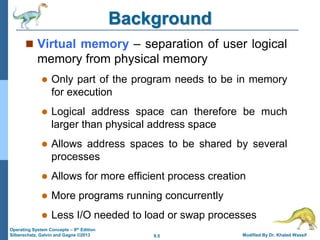
 Virtual memory – separation of user logical
memory from physical memory
 Only part of the program needs to be in memory
for execution
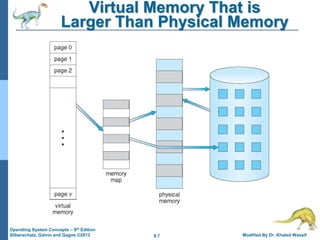
 Logical address space can therefore be much
larger than physical address space
 Allows address spaces to be shared by several
processes
 Allows for more efficient process creation
 More programs running concurrently
 Less I/O needed to load or swap processes
9.6 Modified By Dr. Khaled Wassif
Operating System Concepts – 9th Edition
Silberschatz, Galvin and Gagne ©2013
Background
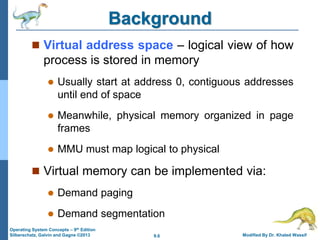
 Virtual address space – logical view of how
process is stored in memory
 Usually start at address 0, contiguous addresses
until end of space
 Meanwhile, physical memory organized in page
frames
 MMU must map logical to physical
 Virtual memory can be implemented via:
 Demand paging
 Demand segmentation
9.7 Modified By Dr. Khaled Wassif
Operating System Concepts – 9th Edition
Silberschatz, Galvin and Gagne ©2013
Virtual Memory That is
Larger Than Physical Memory
9.10 Modified By Dr. Khaled Wassif
Operating System Concepts – 9th Edition
Silberschatz, Galvin and Gagne ©2013
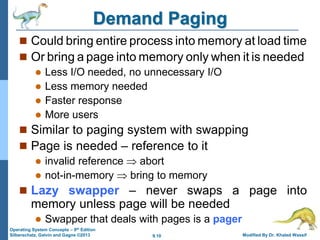
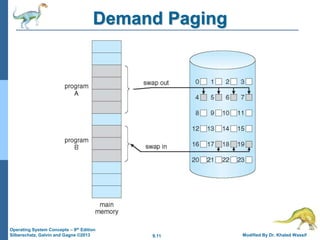
Demand Paging
 Could bring entire process into memory at load time
 Or bring a page into memory only when it is needed
 Less I/O needed, no unnecessary I/O
 Less memory needed
 Faster response
 More users
 Similar to paging system with swapping
 Page is needed – reference to it
 invalid reference  abort
 not-in-memory  bring to memory
 Lazy swapper – never swaps a page into
memory unless page will be needed
 Swapper that deals with pages is a pager
9.11 Modified By Dr. Khaled Wassif
Operating System Concepts – 9th Edition
Silberschatz, Galvin and Gagne ©2013
Demand Paging
9.12 Modified By Dr. Khaled Wassif
Operating System Concepts – 9th Edition
Silberschatz, Galvin and Gagne ©2013
Basic Concepts
 With swapping, pager guesses which pages will
be used before swapping out again
 Instead, pager brings in only those pages into
memory
 How to determine that set of pages?
 Need new MMU functionality to implement demand
paging
 If pages needed are already memory resident
 No difference from non demand-paging
 If page needed and not memory resident
 Need to detect and load the page into memory from
storage
 Without changing program behavior
 Without programmer needing to change code
9.13 Modified By Dr. Khaled Wassif
Operating System Concepts – 9th Edition
Silberschatz, Galvin and Gagne ©2013
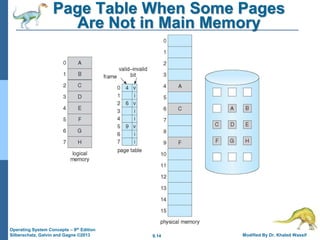
Valid-Invalid Bit
 v  in-memory – memory resident
 i  not-in-memory
 Initially valid–invalid bit is set to i
on all entries
 Example of a page table snapshot:
 During MMU address translation, if
valid–invalid bit in page table entry
is i  page fault
v
v
v
v
i
i
i
….
Frame #
valid-
invalid
bit
page table
 With each page table entry a valid–invalid bit is
associated
9.14 Modified By Dr. Khaled Wassif
Operating System Concepts – 9th Edition
Silberschatz, Galvin and Gagne ©2013
Page Table When Some Pages
Are Not in Main Memory
9.15 Modified By Dr. Khaled Wassif
Operating System Concepts – 9th Edition
Silberschatz, Galvin and Gagne ©2013
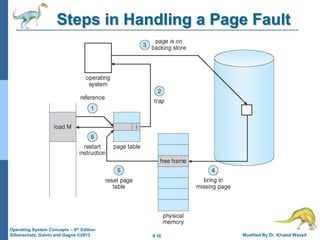
Page Fault
 If there is a reference to a page, first reference
to that page will trap to operating system:
page fault
1.Operating system looks at the process’s internal table
to decide:
 Invalid reference  abort
 Just not in memory
2.Find free frame
3.Swap page into frame via scheduled disk operation
4.Reset tables to indicate page now in memory
(Set validation bit = v )
5.Restart the instruction that caused the page fault
9.16 Modified By Dr. Khaled Wassif
Operating System Concepts – 9th Edition
Silberschatz, Galvin and Gagne ©2013
Steps in Handling a Page Fault
9.17 Modified By Dr. Khaled Wassif
Operating System Concepts – 9th Edition
Silberschatz, Galvin and Gagne ©2013
Aspects of Demand Paging
 Extreme case – start process with no pages in memory
 OS sets instruction pointer to first instruction of process,
non-memory-resident => page fault
 And for every other process pages on first access
 Pure demand paging
 Actually, some instructions could access multiple new
pages => multiple page faults per instruction
 Consider fetch and decode of instruction which adds 2
numbers from memory and stores result back to memory
 Pain can be decreased using locality of reference
 Hardware support needed for demand paging
 Page table with valid / invalid bit
 Secondary memory (swap device with swap space)
 Ability to restart any instruction after a page fault
9.18 Modified By Dr. Khaled Wassif
Operating System Concepts – 9th Edition
Silberschatz, Galvin and Gagne ©2013
Instruction Restart
 Must be able to restart the instruction in exactly
the same place and state
 Except that the desired page is now in memory and is
accessible
 Consider an instruction that could access several
different locations
 block move
 auto increment/decrement location
 Restart the whole operation
 What if source and destination overlap?
9.19 Modified By Dr. Khaled Wassif
Operating System Concepts – 9th Edition
Silberschatz, Galvin and Gagne ©2013
Performance of Demand Paging
 Stages in Demand Paging (worse case)
1. Trap to the operating system
2. Save the user registers and process state
3. Determine that the interrupt was a page fault
4. Check that the page reference was legal and determine the location of
the page on the disk
5. Issue a read from the disk to a free frame:
a.Wait in a queue for this device until the read request is serviced
b.Wait for the device seek and/or latency time
c.Begin the transfer of the page to a free frame
6. While waiting, allocate the CPU to some other user (process)
7. Receive an interrupt from the disk I/O subsystem (I/O completed)
8. Save the registers and process state for the other process
9. Determine that the interrupt was from the disk
10. Correct the page table and other tables to show page is now in memory
11. Wait for the CPU to be allocated to this process again
12. Restore the user registers, process state, and new page table, and then
resume the interrupted instruction
9.20 Modified By Dr. Khaled Wassif
Operating System Concepts – 9th Edition
Silberschatz, Galvin and Gagne ©2013
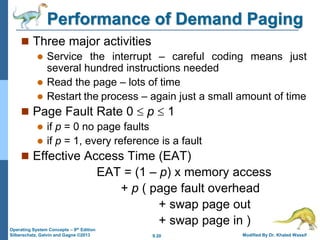
Performance of Demand Paging
 Three major activities
 Service the interrupt – careful coding means just
several hundred instructions needed
 Read the page – lots of time
 Restart the process – again just a small amount of time
 Page Fault Rate 0  p  1
 if p = 0 no page faults
 if p = 1, every reference is a fault
 Effective Access Time (EAT)
EAT = (1 – p) x memory access
+ p ( page fault overhead
+ swap page out
+ swap page in )
9.21 Modified By Dr. Khaled Wassif
Operating System Concepts – 9th Edition
Silberschatz, Galvin and Gagne ©2013
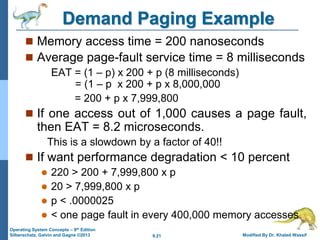
Demand Paging Example
 Memory access time = 200 nanoseconds
 Average page-fault service time = 8 milliseconds
EAT = (1 – p) x 200 + p (8 milliseconds)
= (1 – p x 200 + p x 8,000,000
= 200 + p x 7,999,800
 If one access out of 1,000 causes a page fault,
then EAT = 8.2 microseconds.
This is a slowdown by a factor of 40!!
 If want performance degradation < 10 percent
 220 > 200 + 7,999,800 x p
 20 > 7,999,800 x p
 p < .0000025
 < one page fault in every 400,000 memory accesses
9.22 Modified By Dr. Khaled Wassif
Operating System Concepts – 9th Edition
Silberschatz, Galvin and Gagne ©2013
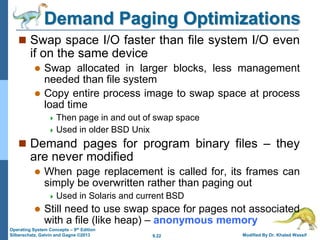
Demand Paging Optimizations
 Swap space I/O faster than file system I/O even
if on the same device
 Swap allocated in larger blocks, less management
needed than file system
 Copy entire process image to swap space at process
load time
 Then page in and out of swap space
 Used in older BSD Unix
 Demand pages for program binary files – they
are never modified
 When page replacement is called for, its frames can
simply be overwritten rather than paging out
 Used in Solaris and current BSD
 Still need to use swap space for pages not associated
with a file (like heap) – anonymous memory
9.23 Modified By Dr. Khaled Wassif
Operating System Concepts – 9th Edition
Silberschatz, Galvin and Gagne ©2013
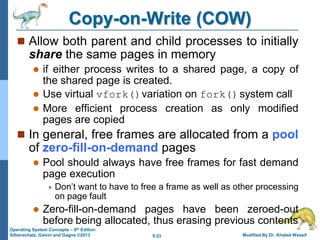
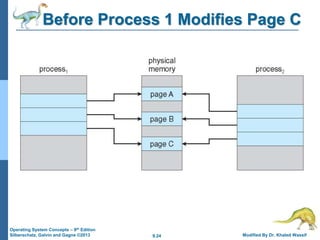
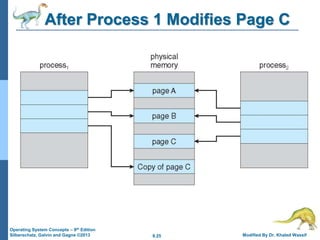
Copy-on-Write (COW)
 Allow both parent and child processes to initially
share the same pages in memory
 if either process writes to a shared page, a copy of
the shared page is created.
 Use virtual vfork()variation on fork()system call
 More efficient process creation as only modified
pages are copied
 In general, free frames are allocated from a pool
of zero-fill-on-demand pages
 Pool should always have free frames for fast demand
page execution
 Don’t want to have to free a frame as well as other processing
on page fault
 Zero-fill-on-demand pages have been zeroed-out
before being allocated, thus erasing previous contents
9.24 Modified By Dr. Khaled Wassif
Operating System Concepts – 9th Edition
Silberschatz, Galvin and Gagne ©2013
Before Process 1 Modifies Page C
9.25 Modified By Dr. Khaled Wassif
Operating System Concepts – 9th Edition
Silberschatz, Galvin and Gagne ©2013
After Process 1 Modifies Page C
9.26 Modified By Dr. Khaled Wassif
Operating System Concepts – 9th Edition
Silberschatz, Galvin and Gagne ©2013
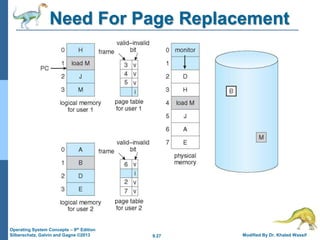
What Happens if
There is no Free Frame?
 Free frames used up by user processes pages
 Also in demand from the kernel, I/O buffers, etc.
 How much to allocate to each?
 Page replacement – find some page in memory,
but not really in use, page it out
 Algorithm – terminate? swap out? replace the page?
 Performance – want an algorithm which will result in
minimum number of page faults
 Same page may be brought into memory
several times
9.27 Modified By Dr. Khaled Wassif
Operating System Concepts – 9th Edition
Silberschatz, Galvin and Gagne ©2013
Need For Page Replacement
9.28 Modified By Dr. Khaled Wassif
Operating System Concepts – 9th Edition
Silberschatz, Galvin and Gagne ©2013
Page Replacement
 Prevent over-allocation of memory by
modifying page-fault service routine to include
page replacement
 Use modify (dirty) bit to reduce overhead of
page transfers
 Only modified pages are written to disk
 Page replacement completes separation
between logical memory and physical memory
 Large virtual memory can be provided on a smaller
physical memory
9.29 Modified By Dr. Khaled Wassif
Operating System Concepts – 9th Edition
Silberschatz, Galvin and Gagne ©2013
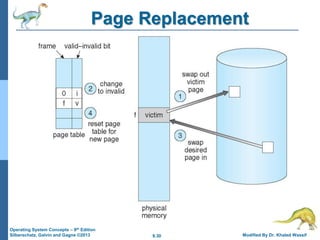
Basic Page Replacement
1. Find the location of the desired page on disk
2. Find a free frame:
 If there is a free frame, use it
 If there is no free frame, use a page replacement
algorithm to select a victim frame
 Write victim frame to disk if dirty
3. Bring the desired page into the (newly) free
frame; update the page and frame tables
4. Continue the process by restarting the
instruction that caused the trap
(Note: if no frames are free, two page transfers
are required for page fault – increasing EAT)
9.30 Modified By Dr. Khaled Wassif
Operating System Concepts – 9th Edition
Silberschatz, Galvin and Gagne ©2013
Page Replacement
9.31 Modified By Dr. Khaled Wassif
Operating System Concepts – 9th Edition
Silberschatz, Galvin and Gagne ©2013
Page and Frame Replacement
Algorithms
 Frame-allocation algorithm determines
 How many frames to give each process
 Page-replacement algorithm
 Which frames to replace
 Want lowest page-fault rate on both first access and
re-access
 Designing appropriate algorithms to solve these
problems is an important task, because disk I/O
is so expensive.
 Even slight improvements in demand-paging methods
yield large gains in system performance
9.32 Modified By Dr. Khaled Wassif
Operating System Concepts – 9th Edition
Silberschatz, Galvin and Gagne ©2013
Page and Frame Replacement
Algorithms
 Evaluate each algorithm by running it on a
particular string of memory references
(reference string) and computing the number
of page faults on that string
 String is just page numbers, not full addresses
 Repeated access to the same page does not
cause a page fault
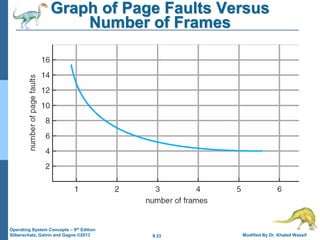
 Results depend on number of frames available
 In all our examples, the reference string of
referenced page numbers is:
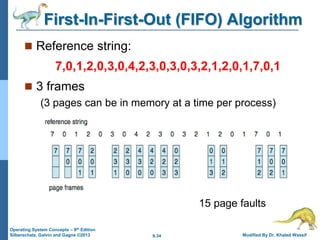
7,0,1,2,0,3,0,4,2,3,0,3,0,3,2,1,2,0,1,7,0,1
9.33 Modified By Dr. Khaled Wassif
Operating System Concepts – 9th Edition
Silberschatz, Galvin and Gagne ©2013
Graph of Page Faults Versus
Number of Frames
9.34 Modified By Dr. Khaled Wassif
Operating System Concepts – 9th Edition
Silberschatz, Galvin and Gagne ©2013
First-In-First-Out (FIFO) Algorithm
 Reference string:
7,0,1,2,0,3,0,4,2,3,0,3,0,3,2,1,2,0,1,7,0,1
 3 frames
(3 pages can be in memory at a time per process)
15 page faults
9.35 Modified By Dr. Khaled Wassif
Operating System Concepts – 9th Edition
Silberschatz, Galvin and Gagne ©2013
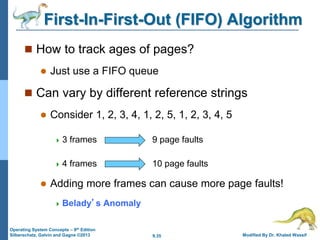
First-In-First-Out (FIFO) Algorithm
 How to track ages of pages?
 Just use a FIFO queue
 Can vary by different reference strings
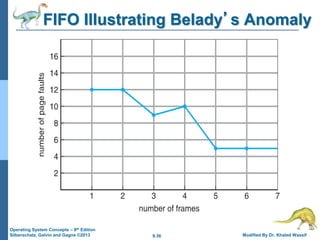
 Consider 1, 2, 3, 4, 1, 2, 5, 1, 2, 3, 4, 5
 3 frames 9 page faults
 4 frames 10 page faults
 Adding more frames can cause more page faults!
 Belady’s Anomaly
9.36 Modified By Dr. Khaled Wassif
Operating System Concepts – 9th Edition
Silberschatz, Galvin and Gagne ©2013
FIFO Illustrating Belady’s Anomaly
9.37 Modified By Dr. Khaled Wassif
Operating System Concepts – 9th Edition
Silberschatz, Galvin and Gagne ©2013
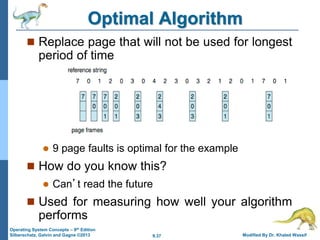
Optimal Algorithm
 Replace page that will not be used for longest
period of time
 9 page faults is optimal for the example
 How do you know this?
 Can’t read the future
 Used for measuring how well your algorithm
performs
9.38 Modified By Dr. Khaled Wassif
Operating System Concepts – 9th Edition
Silberschatz, Galvin and Gagne ©2013
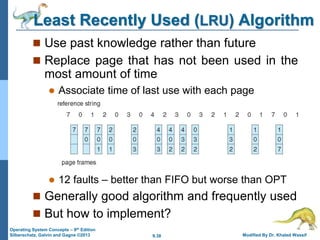
Least Recently Used (LRU) Algorithm
 Use past knowledge rather than future
 Replace page that has not been used in the
most amount of time
 Associate time of last use with each page
 12 faults – better than FIFO but worse than OPT
 Generally good algorithm and frequently used
 But how to implement?
9.39 Modified By Dr. Khaled Wassif
Operating System Concepts – 9th Edition
Silberschatz, Galvin and Gagne ©2013
LRU Algorithm (Cont.)
 Counter implementation
 Every page-table entry has a time-of-use field;
whenever a reference to a page is made, the contents
of the clock are copied to this field its entry
 Replace the page with the smallest time value
 Require a search of the entire page table
 Stack implementation
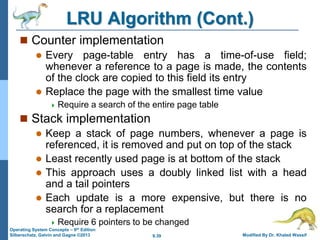
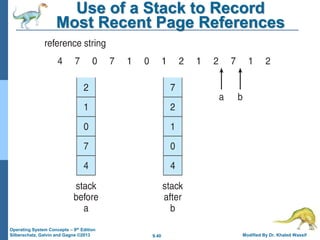
 Keep a stack of page numbers, whenever a page is
referenced, it is removed and put on top of the stack
 Least recently used page is at bottom of the stack
 This approach uses a doubly linked list with a head
and a tail pointers
 Each update is a more expensive, but there is no
search for a replacement
 Require 6 pointers to be changed
9.40 Modified By Dr. Khaled Wassif
Operating System Concepts – 9th Edition
Silberschatz, Galvin and Gagne ©2013
Use of a Stack to Record
Most Recent Page References
9.41 Modified By Dr. Khaled Wassif
Operating System Concepts – 9th Edition
Silberschatz, Galvin and Gagne ©2013
LRU Approximation Algorithms
 LRU needs special hardware and still slow
 Reference bit
 With each page associate a bit, initially = 0
 When page is referenced bit set to 1
 Replace any with reference bit = 0 (if one exists)
 However, we do not know the order
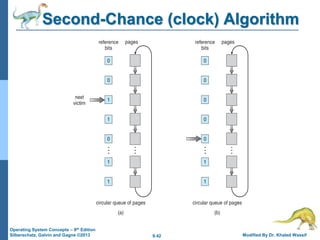
 Second-chance algorithm
 Generally FIFO plus hardware-provided reference bit
 Clock replacement
 If page to be replaced has
 Reference bit = 0 => replace it
 Reference bit = 1 then:
– set reference bit 0, leave page in memory
– replace next page, subject to same rules
9.42 Modified By Dr. Khaled Wassif
Operating System Concepts – 9th Edition
Silberschatz, Galvin and Gagne ©2013
Second-Chance (clock) Algorithm
9.43 Modified By Dr. Khaled Wassif
Operating System Concepts – 9th Edition
Silberschatz, Galvin and Gagne ©2013
Enhanced Second-Chance Algorithm
 Improve algorithm by using reference bit and
modify bit (if available) in concert
 Take ordered pair (reference, modify)
1. (0, 0) neither recently used not modified – best page to
replace
2. (0, 1) not recently used but modified – not quite as good,
must write out before replacement
3. (1, 0) recently used but clean – probably will be used again
soon
4. (1, 1) recently used and modified – probably will be used
again soon and need to write out before replacement
 When page replacement called for, use the
clock scheme but use the four classes replace
page in lowest non-empty class
 Might need to search circular queue several times
9.44 Modified By Dr. Khaled Wassif
Operating System Concepts – 9th Edition
Silberschatz, Galvin and Gagne ©2013
Counting Algorithms
 Keep a counter of the number of references
that have been made to each page
 Not common
 Lease Frequently Used (LFU) Algorithm:
replaces the page with smallest count
 Based on an actively used page should have a
large reference count
 A problem when a page is used heavily during initial
phase of a process but then is never used again
 Most Frequently Used (MFU) Algorithm:
replaces the page with largest count
 Based on the argument that a page with the
smallest count was probably just brought in and has
yet to be used
9.45 Modified By Dr. Khaled Wassif
Operating System Concepts – 9th Edition
Silberschatz, Galvin and Gagne ©2013
Page-Buffering Algorithms
 Used in addition to a specific replacement algorithm
 Keep a pool of free frames, always
 Frame available when needed, not found at fault time
 Read page into free frame and then select new victim
to remove and add it to free pool
 When convenient, remove this victim
 Possibly, keep a list of modified pages
 When backing store otherwise idle, write pages there
and set to non-dirty
 Possibly, keep free frame contents undamaged
and note what is in them
 If referenced again before reused, no need to load
contents again from disk
 Useful to reduce penalty if wrong victim frame selected
9.47 Modified By Dr. Khaled Wassif
Operating System Concepts – 9th Edition
Silberschatz, Galvin and Gagne ©2013
Allocation of Frames
 Each process needs minimum number of frames
 Example: IBM 370 – 6 pages to handle SS MOVE
instruction:
 instruction is 6 bytes, might span 2 pages
 2 pages to handle from
 2 pages to handle to
 Maximum of course is total frames in the system
 Two major allocation schemes
 fixed allocation
 priority allocation
 Many variations
9.48 Modified By Dr. Khaled Wassif
Operating System Concepts – 9th Edition
Silberschatz, Galvin and Gagne ©2013
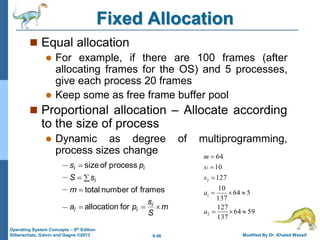
Fixed Allocation
 Equal allocation
 For example, if there are 100 frames (after
allocating frames for the OS) and 5 processes,
give each process 20 frames
 Keep some as free frame buffer pool
 Proportional allocation – Allocate according
to the size of process
 Dynamic as degree of multiprogramming,
process sizes change
m
S
s
p
a
m
s
S
p
s
i
i
i
i
i
i







for
allocation
frames
of
number
total
process
of
size
59
64
137
127
5
64
137
10
127
10
64
2
1
2
1









a
a
s
s
m
9.49 Modified By Dr. Khaled Wassif
Operating System Concepts – 9th Edition
Silberschatz, Galvin and Gagne ©2013
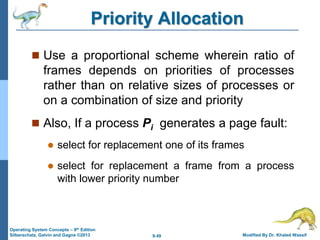
Priority Allocation
 Use a proportional scheme wherein ratio of
frames depends on priorities of processes
rather than on relative sizes of processes or
on a combination of size and priority
 Also, If a process Pi generates a page fault:
 select for replacement one of its frames
 select for replacement a frame from a process
with lower priority number
9.50 Modified By Dr. Khaled Wassif
Operating System Concepts – 9th Edition
Silberschatz, Galvin and Gagne ©2013
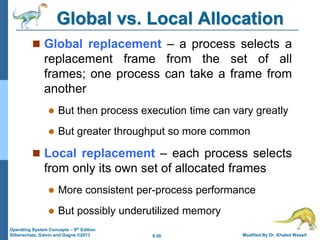
Global vs. Local Allocation
 Global replacement – a process selects a
replacement frame from the set of all
frames; one process can take a frame from
another
 But then process execution time can vary greatly
 But greater throughput so more common
 Local replacement – each process selects
from only its own set of allocated frames
 More consistent per-process performance
 But possibly underutilized memory
9.52 Modified By Dr. Khaled Wassif
Operating System Concepts – 9th Edition
Silberschatz, Galvin and Gagne ©2013
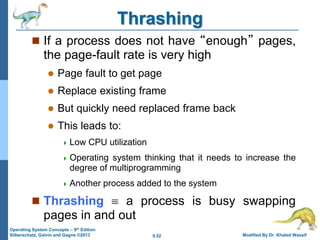
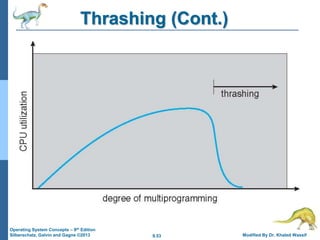
Thrashing
 If a process does not have “enough” pages,
the page-fault rate is very high
 Page fault to get page
 Replace existing frame
 But quickly need replaced frame back
 This leads to:
 Low CPU utilization
 Operating system thinking that it needs to increase the
degree of multiprogramming
 Another process added to the system
 Thrashing  a process is busy swapping
pages in and out
9.53 Modified By Dr. Khaled Wassif
Operating System Concepts – 9th Edition
Silberschatz, Galvin and Gagne ©2013
Thrashing (Cont.)
9.54 Modified By Dr. Khaled Wassif
Operating System Concepts – 9th Edition
Silberschatz, Galvin and Gagne ©2013
Demand Paging and Thrashing
 To prevent thrashing, we must provide a process
with as many frames as it needs.
 But how do we know how many frames it “needs”?
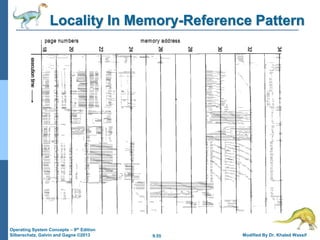
 Locality model of process execution looks at how
many frames a process is actually using
 Locality is a set of pages that are actively used together
 A program is composed of several different localities,
which may overlap
 As a process executes, it moves from locality to another
 Why does thrashing occur?
 Do not allocate enough frames to accommodate the
size of current locality of each process
  sizes of processes locality > total memory size
 Limit effects by using local or priority page replacement
9.55 Modified By Dr. Khaled Wassif
Operating System Concepts – 9th Edition
Silberschatz, Galvin and Gagne ©2013
Locality In Memory-Reference Pattern
9.56 Modified By Dr. Khaled Wassif
Operating System Concepts – 9th Edition
Silberschatz, Galvin and Gagne ©2013
Working-Set Model
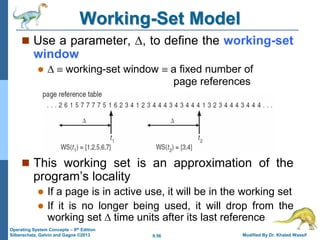
 Use a parameter, , to define the working-set
window
   working-set window  a fixed number of
page references
 This working set is an approximation of the
program’s locality
 If a page is in active use, it will be in the working set
 If it is no longer being used, it will drop from the
working set  time units after its last reference
9.57 Modified By Dr. Khaled Wassif
Operating System Concepts – 9th Edition
Silberschatz, Galvin and Gagne ©2013
Working-Set Model
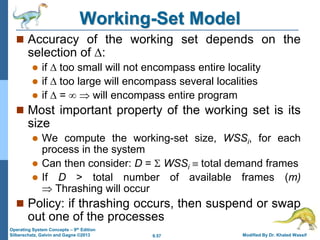
 Accuracy of the working set depends on the
selection of :
 if  too small will not encompass entire locality
 if  too large will encompass several localities
 if  =   will encompass entire program
 Most important property of the working set is its
size
 We compute the working-set size, WSSi, for each
process in the system
 Can then consider: D =  WSSi  total demand frames
 If D > total number of available frames (m)
 Thrashing will occur
 Policy: if thrashing occurs, then suspend or swap
out one of the processes
9.58 Modified By Dr. Khaled Wassif
Operating System Concepts – 9th Edition
Silberschatz, Galvin and Gagne ©2013
Keeping Track of Working Set
 Can approximate the working-set model with a
fixed-interval timer interrupt and a reference bit
 Example:
  = 10,000 references
 Timer interrupts after every 5000 references
 Keep in memory 2 bits for each page
 Whenever a timer interrupts copy and sets the values
of all reference bits to 0
 If one of the bits in memory = 1  page in working set
 Why is this arrangement not entirely accurate?
 Because we cannot tell where a reference occurred
 Improvement: 10 bits and interrupt every 1000
references
9.59 Modified By Dr. Khaled Wassif
Operating System Concepts – 9th Edition
Silberschatz, Galvin and Gagne ©2013
Page-Fault Frequency
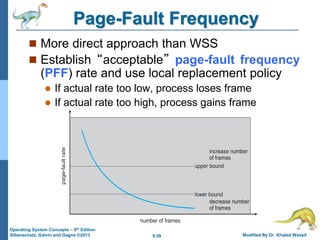
 More direct approach than WSS
 Establish “acceptable” page-fault frequency
(PFF) rate and use local replacement policy
 If actual rate too low, process loses frame
 If actual rate too high, process gains frame
9.60 Modified By Dr. Khaled Wassif
Operating System Concepts – 9th Edition
Silberschatz, Galvin and Gagne ©2013
Working Sets and Page Fault Rates
 There is a direct relationship between working
set of a process and its page-fault rate
 Working set changes over time as references to data
and code sections move from one locality to another
 Page-fault rate of the process will transition between
peaks and valleys over time
Silberschatz, Galvin and Gagne ©2013
Operating System Concepts – 9th Edit9on
End of Chapter 9

W-ch09.pdfklkdldkdkidodonslnsic;;;;;;xkkid

  • 1.
    Silberschatz, Galvin andGagne ©2013 Operating System Concepts – 9th Edit9on Chapter 9: Virtual Memory
  • 2.
    9.2 Modified ByDr. Khaled Wassif Operating System Concepts – 9th Edition Silberschatz, Galvin and Gagne ©2013 Chapter 9: Virtual Memory  Background  Demand Paging  Copy-on-Write  Page Replacement  Allocation of Frames  Thrashing  Memory-Mapped Files  Allocating Kernel Memory  Other Considerations  Operating-System Examples
  • 3.
    9.3 Modified ByDr. Khaled Wassif Operating System Concepts – 9th Edition Silberschatz, Galvin and Gagne ©2013 Objectives  To describe the benefits of a virtual memory system  To explain the concepts of demand paging, page-replacement algorithms, and allocation of page frames  To discuss the principle of the working-set model  To examine the relationship between shared memory and memory-mapped files  To explore how kernel memory is managed
  • 4.
    9.4 Modified ByDr. Khaled Wassif Operating System Concepts – 9th Edition Silberschatz, Galvin and Gagne ©2013 Background  Code needs to be in memory to execute, but entire program rarely used  Error code, unusual routines, large data structures  Entire program code not needed at same time  Consider ability to execute partially-loaded program  Program no longer constrained by limits of physical memory  Each program takes less memory while running => more programs run at the same time  Increased CPU utilization and throughput with no increase in response time or turnaround time  Less I/O needed to load or swap programs into memory => each user program runs faster
  • 5.
    9.5 Modified ByDr. Khaled Wassif Operating System Concepts – 9th Edition Silberschatz, Galvin and Gagne ©2013 Background  Virtual memory – separation of user logical memory from physical memory  Only part of the program needs to be in memory for execution  Logical address space can therefore be much larger than physical address space  Allows address spaces to be shared by several processes  Allows for more efficient process creation  More programs running concurrently  Less I/O needed to load or swap processes
  • 6.
    9.6 Modified ByDr. Khaled Wassif Operating System Concepts – 9th Edition Silberschatz, Galvin and Gagne ©2013 Background  Virtual address space – logical view of how process is stored in memory  Usually start at address 0, contiguous addresses until end of space  Meanwhile, physical memory organized in page frames  MMU must map logical to physical  Virtual memory can be implemented via:  Demand paging  Demand segmentation
  • 7.
    9.7 Modified ByDr. Khaled Wassif Operating System Concepts – 9th Edition Silberschatz, Galvin and Gagne ©2013 Virtual Memory That is Larger Than Physical Memory
  • 8.
    9.10 Modified ByDr. Khaled Wassif Operating System Concepts – 9th Edition Silberschatz, Galvin and Gagne ©2013 Demand Paging  Could bring entire process into memory at load time  Or bring a page into memory only when it is needed  Less I/O needed, no unnecessary I/O  Less memory needed  Faster response  More users  Similar to paging system with swapping  Page is needed – reference to it  invalid reference  abort  not-in-memory  bring to memory  Lazy swapper – never swaps a page into memory unless page will be needed  Swapper that deals with pages is a pager
  • 9.
    9.11 Modified ByDr. Khaled Wassif Operating System Concepts – 9th Edition Silberschatz, Galvin and Gagne ©2013 Demand Paging
  • 10.
    9.12 Modified ByDr. Khaled Wassif Operating System Concepts – 9th Edition Silberschatz, Galvin and Gagne ©2013 Basic Concepts  With swapping, pager guesses which pages will be used before swapping out again  Instead, pager brings in only those pages into memory  How to determine that set of pages?  Need new MMU functionality to implement demand paging  If pages needed are already memory resident  No difference from non demand-paging  If page needed and not memory resident  Need to detect and load the page into memory from storage  Without changing program behavior  Without programmer needing to change code
  • 11.
    9.13 Modified ByDr. Khaled Wassif Operating System Concepts – 9th Edition Silberschatz, Galvin and Gagne ©2013 Valid-Invalid Bit  v  in-memory – memory resident  i  not-in-memory  Initially valid–invalid bit is set to i on all entries  Example of a page table snapshot:  During MMU address translation, if valid–invalid bit in page table entry is i  page fault v v v v i i i …. Frame # valid- invalid bit page table  With each page table entry a valid–invalid bit is associated
  • 12.
    9.14 Modified ByDr. Khaled Wassif Operating System Concepts – 9th Edition Silberschatz, Galvin and Gagne ©2013 Page Table When Some Pages Are Not in Main Memory
  • 13.
    9.15 Modified ByDr. Khaled Wassif Operating System Concepts – 9th Edition Silberschatz, Galvin and Gagne ©2013 Page Fault  If there is a reference to a page, first reference to that page will trap to operating system: page fault 1.Operating system looks at the process’s internal table to decide:  Invalid reference  abort  Just not in memory 2.Find free frame 3.Swap page into frame via scheduled disk operation 4.Reset tables to indicate page now in memory (Set validation bit = v ) 5.Restart the instruction that caused the page fault
  • 14.
    9.16 Modified ByDr. Khaled Wassif Operating System Concepts – 9th Edition Silberschatz, Galvin and Gagne ©2013 Steps in Handling a Page Fault
  • 15.
    9.17 Modified ByDr. Khaled Wassif Operating System Concepts – 9th Edition Silberschatz, Galvin and Gagne ©2013 Aspects of Demand Paging  Extreme case – start process with no pages in memory  OS sets instruction pointer to first instruction of process, non-memory-resident => page fault  And for every other process pages on first access  Pure demand paging  Actually, some instructions could access multiple new pages => multiple page faults per instruction  Consider fetch and decode of instruction which adds 2 numbers from memory and stores result back to memory  Pain can be decreased using locality of reference  Hardware support needed for demand paging  Page table with valid / invalid bit  Secondary memory (swap device with swap space)  Ability to restart any instruction after a page fault
  • 16.
    9.18 Modified ByDr. Khaled Wassif Operating System Concepts – 9th Edition Silberschatz, Galvin and Gagne ©2013 Instruction Restart  Must be able to restart the instruction in exactly the same place and state  Except that the desired page is now in memory and is accessible  Consider an instruction that could access several different locations  block move  auto increment/decrement location  Restart the whole operation  What if source and destination overlap?
  • 17.
    9.19 Modified ByDr. Khaled Wassif Operating System Concepts – 9th Edition Silberschatz, Galvin and Gagne ©2013 Performance of Demand Paging  Stages in Demand Paging (worse case) 1. Trap to the operating system 2. Save the user registers and process state 3. Determine that the interrupt was a page fault 4. Check that the page reference was legal and determine the location of the page on the disk 5. Issue a read from the disk to a free frame: a.Wait in a queue for this device until the read request is serviced b.Wait for the device seek and/or latency time c.Begin the transfer of the page to a free frame 6. While waiting, allocate the CPU to some other user (process) 7. Receive an interrupt from the disk I/O subsystem (I/O completed) 8. Save the registers and process state for the other process 9. Determine that the interrupt was from the disk 10. Correct the page table and other tables to show page is now in memory 11. Wait for the CPU to be allocated to this process again 12. Restore the user registers, process state, and new page table, and then resume the interrupted instruction
  • 18.
    9.20 Modified ByDr. Khaled Wassif Operating System Concepts – 9th Edition Silberschatz, Galvin and Gagne ©2013 Performance of Demand Paging  Three major activities  Service the interrupt – careful coding means just several hundred instructions needed  Read the page – lots of time  Restart the process – again just a small amount of time  Page Fault Rate 0  p  1  if p = 0 no page faults  if p = 1, every reference is a fault  Effective Access Time (EAT) EAT = (1 – p) x memory access + p ( page fault overhead + swap page out + swap page in )
  • 19.
    9.21 Modified ByDr. Khaled Wassif Operating System Concepts – 9th Edition Silberschatz, Galvin and Gagne ©2013 Demand Paging Example  Memory access time = 200 nanoseconds  Average page-fault service time = 8 milliseconds EAT = (1 – p) x 200 + p (8 milliseconds) = (1 – p x 200 + p x 8,000,000 = 200 + p x 7,999,800  If one access out of 1,000 causes a page fault, then EAT = 8.2 microseconds. This is a slowdown by a factor of 40!!  If want performance degradation < 10 percent  220 > 200 + 7,999,800 x p  20 > 7,999,800 x p  p < .0000025  < one page fault in every 400,000 memory accesses
  • 20.
    9.22 Modified ByDr. Khaled Wassif Operating System Concepts – 9th Edition Silberschatz, Galvin and Gagne ©2013 Demand Paging Optimizations  Swap space I/O faster than file system I/O even if on the same device  Swap allocated in larger blocks, less management needed than file system  Copy entire process image to swap space at process load time  Then page in and out of swap space  Used in older BSD Unix  Demand pages for program binary files – they are never modified  When page replacement is called for, its frames can simply be overwritten rather than paging out  Used in Solaris and current BSD  Still need to use swap space for pages not associated with a file (like heap) – anonymous memory
  • 21.
    9.23 Modified ByDr. Khaled Wassif Operating System Concepts – 9th Edition Silberschatz, Galvin and Gagne ©2013 Copy-on-Write (COW)  Allow both parent and child processes to initially share the same pages in memory  if either process writes to a shared page, a copy of the shared page is created.  Use virtual vfork()variation on fork()system call  More efficient process creation as only modified pages are copied  In general, free frames are allocated from a pool of zero-fill-on-demand pages  Pool should always have free frames for fast demand page execution  Don’t want to have to free a frame as well as other processing on page fault  Zero-fill-on-demand pages have been zeroed-out before being allocated, thus erasing previous contents
  • 22.
    9.24 Modified ByDr. Khaled Wassif Operating System Concepts – 9th Edition Silberschatz, Galvin and Gagne ©2013 Before Process 1 Modifies Page C
  • 23.
    9.25 Modified ByDr. Khaled Wassif Operating System Concepts – 9th Edition Silberschatz, Galvin and Gagne ©2013 After Process 1 Modifies Page C
  • 24.
    9.26 Modified ByDr. Khaled Wassif Operating System Concepts – 9th Edition Silberschatz, Galvin and Gagne ©2013 What Happens if There is no Free Frame?  Free frames used up by user processes pages  Also in demand from the kernel, I/O buffers, etc.  How much to allocate to each?  Page replacement – find some page in memory, but not really in use, page it out  Algorithm – terminate? swap out? replace the page?  Performance – want an algorithm which will result in minimum number of page faults  Same page may be brought into memory several times
  • 25.
    9.27 Modified ByDr. Khaled Wassif Operating System Concepts – 9th Edition Silberschatz, Galvin and Gagne ©2013 Need For Page Replacement
  • 26.
    9.28 Modified ByDr. Khaled Wassif Operating System Concepts – 9th Edition Silberschatz, Galvin and Gagne ©2013 Page Replacement  Prevent over-allocation of memory by modifying page-fault service routine to include page replacement  Use modify (dirty) bit to reduce overhead of page transfers  Only modified pages are written to disk  Page replacement completes separation between logical memory and physical memory  Large virtual memory can be provided on a smaller physical memory
  • 27.
    9.29 Modified ByDr. Khaled Wassif Operating System Concepts – 9th Edition Silberschatz, Galvin and Gagne ©2013 Basic Page Replacement 1. Find the location of the desired page on disk 2. Find a free frame:  If there is a free frame, use it  If there is no free frame, use a page replacement algorithm to select a victim frame  Write victim frame to disk if dirty 3. Bring the desired page into the (newly) free frame; update the page and frame tables 4. Continue the process by restarting the instruction that caused the trap (Note: if no frames are free, two page transfers are required for page fault – increasing EAT)
  • 28.
    9.30 Modified ByDr. Khaled Wassif Operating System Concepts – 9th Edition Silberschatz, Galvin and Gagne ©2013 Page Replacement
  • 29.
    9.31 Modified ByDr. Khaled Wassif Operating System Concepts – 9th Edition Silberschatz, Galvin and Gagne ©2013 Page and Frame Replacement Algorithms  Frame-allocation algorithm determines  How many frames to give each process  Page-replacement algorithm  Which frames to replace  Want lowest page-fault rate on both first access and re-access  Designing appropriate algorithms to solve these problems is an important task, because disk I/O is so expensive.  Even slight improvements in demand-paging methods yield large gains in system performance
  • 30.
    9.32 Modified ByDr. Khaled Wassif Operating System Concepts – 9th Edition Silberschatz, Galvin and Gagne ©2013 Page and Frame Replacement Algorithms  Evaluate each algorithm by running it on a particular string of memory references (reference string) and computing the number of page faults on that string  String is just page numbers, not full addresses  Repeated access to the same page does not cause a page fault  Results depend on number of frames available  In all our examples, the reference string of referenced page numbers is: 7,0,1,2,0,3,0,4,2,3,0,3,0,3,2,1,2,0,1,7,0,1
  • 31.
    9.33 Modified ByDr. Khaled Wassif Operating System Concepts – 9th Edition Silberschatz, Galvin and Gagne ©2013 Graph of Page Faults Versus Number of Frames
  • 32.
    9.34 Modified ByDr. Khaled Wassif Operating System Concepts – 9th Edition Silberschatz, Galvin and Gagne ©2013 First-In-First-Out (FIFO) Algorithm  Reference string: 7,0,1,2,0,3,0,4,2,3,0,3,0,3,2,1,2,0,1,7,0,1  3 frames (3 pages can be in memory at a time per process) 15 page faults
  • 33.
    9.35 Modified ByDr. Khaled Wassif Operating System Concepts – 9th Edition Silberschatz, Galvin and Gagne ©2013 First-In-First-Out (FIFO) Algorithm  How to track ages of pages?  Just use a FIFO queue  Can vary by different reference strings  Consider 1, 2, 3, 4, 1, 2, 5, 1, 2, 3, 4, 5  3 frames 9 page faults  4 frames 10 page faults  Adding more frames can cause more page faults!  Belady’s Anomaly
  • 34.
    9.36 Modified ByDr. Khaled Wassif Operating System Concepts – 9th Edition Silberschatz, Galvin and Gagne ©2013 FIFO Illustrating Belady’s Anomaly
  • 35.
    9.37 Modified ByDr. Khaled Wassif Operating System Concepts – 9th Edition Silberschatz, Galvin and Gagne ©2013 Optimal Algorithm  Replace page that will not be used for longest period of time  9 page faults is optimal for the example  How do you know this?  Can’t read the future  Used for measuring how well your algorithm performs
  • 36.
    9.38 Modified ByDr. Khaled Wassif Operating System Concepts – 9th Edition Silberschatz, Galvin and Gagne ©2013 Least Recently Used (LRU) Algorithm  Use past knowledge rather than future  Replace page that has not been used in the most amount of time  Associate time of last use with each page  12 faults – better than FIFO but worse than OPT  Generally good algorithm and frequently used  But how to implement?
  • 37.
    9.39 Modified ByDr. Khaled Wassif Operating System Concepts – 9th Edition Silberschatz, Galvin and Gagne ©2013 LRU Algorithm (Cont.)  Counter implementation  Every page-table entry has a time-of-use field; whenever a reference to a page is made, the contents of the clock are copied to this field its entry  Replace the page with the smallest time value  Require a search of the entire page table  Stack implementation  Keep a stack of page numbers, whenever a page is referenced, it is removed and put on top of the stack  Least recently used page is at bottom of the stack  This approach uses a doubly linked list with a head and a tail pointers  Each update is a more expensive, but there is no search for a replacement  Require 6 pointers to be changed
  • 38.
    9.40 Modified ByDr. Khaled Wassif Operating System Concepts – 9th Edition Silberschatz, Galvin and Gagne ©2013 Use of a Stack to Record Most Recent Page References
  • 39.
    9.41 Modified ByDr. Khaled Wassif Operating System Concepts – 9th Edition Silberschatz, Galvin and Gagne ©2013 LRU Approximation Algorithms  LRU needs special hardware and still slow  Reference bit  With each page associate a bit, initially = 0  When page is referenced bit set to 1  Replace any with reference bit = 0 (if one exists)  However, we do not know the order  Second-chance algorithm  Generally FIFO plus hardware-provided reference bit  Clock replacement  If page to be replaced has  Reference bit = 0 => replace it  Reference bit = 1 then: – set reference bit 0, leave page in memory – replace next page, subject to same rules
  • 40.
    9.42 Modified ByDr. Khaled Wassif Operating System Concepts – 9th Edition Silberschatz, Galvin and Gagne ©2013 Second-Chance (clock) Algorithm
  • 41.
    9.43 Modified ByDr. Khaled Wassif Operating System Concepts – 9th Edition Silberschatz, Galvin and Gagne ©2013 Enhanced Second-Chance Algorithm  Improve algorithm by using reference bit and modify bit (if available) in concert  Take ordered pair (reference, modify) 1. (0, 0) neither recently used not modified – best page to replace 2. (0, 1) not recently used but modified – not quite as good, must write out before replacement 3. (1, 0) recently used but clean – probably will be used again soon 4. (1, 1) recently used and modified – probably will be used again soon and need to write out before replacement  When page replacement called for, use the clock scheme but use the four classes replace page in lowest non-empty class  Might need to search circular queue several times
  • 42.
    9.44 Modified ByDr. Khaled Wassif Operating System Concepts – 9th Edition Silberschatz, Galvin and Gagne ©2013 Counting Algorithms  Keep a counter of the number of references that have been made to each page  Not common  Lease Frequently Used (LFU) Algorithm: replaces the page with smallest count  Based on an actively used page should have a large reference count  A problem when a page is used heavily during initial phase of a process but then is never used again  Most Frequently Used (MFU) Algorithm: replaces the page with largest count  Based on the argument that a page with the smallest count was probably just brought in and has yet to be used
  • 43.
    9.45 Modified ByDr. Khaled Wassif Operating System Concepts – 9th Edition Silberschatz, Galvin and Gagne ©2013 Page-Buffering Algorithms  Used in addition to a specific replacement algorithm  Keep a pool of free frames, always  Frame available when needed, not found at fault time  Read page into free frame and then select new victim to remove and add it to free pool  When convenient, remove this victim  Possibly, keep a list of modified pages  When backing store otherwise idle, write pages there and set to non-dirty  Possibly, keep free frame contents undamaged and note what is in them  If referenced again before reused, no need to load contents again from disk  Useful to reduce penalty if wrong victim frame selected
  • 44.
    9.47 Modified ByDr. Khaled Wassif Operating System Concepts – 9th Edition Silberschatz, Galvin and Gagne ©2013 Allocation of Frames  Each process needs minimum number of frames  Example: IBM 370 – 6 pages to handle SS MOVE instruction:  instruction is 6 bytes, might span 2 pages  2 pages to handle from  2 pages to handle to  Maximum of course is total frames in the system  Two major allocation schemes  fixed allocation  priority allocation  Many variations
  • 45.
    9.48 Modified ByDr. Khaled Wassif Operating System Concepts – 9th Edition Silberschatz, Galvin and Gagne ©2013 Fixed Allocation  Equal allocation  For example, if there are 100 frames (after allocating frames for the OS) and 5 processes, give each process 20 frames  Keep some as free frame buffer pool  Proportional allocation – Allocate according to the size of process  Dynamic as degree of multiprogramming, process sizes change m S s p a m s S p s i i i i i i        for allocation frames of number total process of size 59 64 137 127 5 64 137 10 127 10 64 2 1 2 1          a a s s m
  • 46.
    9.49 Modified ByDr. Khaled Wassif Operating System Concepts – 9th Edition Silberschatz, Galvin and Gagne ©2013 Priority Allocation  Use a proportional scheme wherein ratio of frames depends on priorities of processes rather than on relative sizes of processes or on a combination of size and priority  Also, If a process Pi generates a page fault:  select for replacement one of its frames  select for replacement a frame from a process with lower priority number
  • 47.
    9.50 Modified ByDr. Khaled Wassif Operating System Concepts – 9th Edition Silberschatz, Galvin and Gagne ©2013 Global vs. Local Allocation  Global replacement – a process selects a replacement frame from the set of all frames; one process can take a frame from another  But then process execution time can vary greatly  But greater throughput so more common  Local replacement – each process selects from only its own set of allocated frames  More consistent per-process performance  But possibly underutilized memory
  • 48.
    9.52 Modified ByDr. Khaled Wassif Operating System Concepts – 9th Edition Silberschatz, Galvin and Gagne ©2013 Thrashing  If a process does not have “enough” pages, the page-fault rate is very high  Page fault to get page  Replace existing frame  But quickly need replaced frame back  This leads to:  Low CPU utilization  Operating system thinking that it needs to increase the degree of multiprogramming  Another process added to the system  Thrashing  a process is busy swapping pages in and out
  • 49.
    9.53 Modified ByDr. Khaled Wassif Operating System Concepts – 9th Edition Silberschatz, Galvin and Gagne ©2013 Thrashing (Cont.)
  • 50.
    9.54 Modified ByDr. Khaled Wassif Operating System Concepts – 9th Edition Silberschatz, Galvin and Gagne ©2013 Demand Paging and Thrashing  To prevent thrashing, we must provide a process with as many frames as it needs.  But how do we know how many frames it “needs”?  Locality model of process execution looks at how many frames a process is actually using  Locality is a set of pages that are actively used together  A program is composed of several different localities, which may overlap  As a process executes, it moves from locality to another  Why does thrashing occur?  Do not allocate enough frames to accommodate the size of current locality of each process   sizes of processes locality > total memory size  Limit effects by using local or priority page replacement
  • 51.
    9.55 Modified ByDr. Khaled Wassif Operating System Concepts – 9th Edition Silberschatz, Galvin and Gagne ©2013 Locality In Memory-Reference Pattern
  • 52.
    9.56 Modified ByDr. Khaled Wassif Operating System Concepts – 9th Edition Silberschatz, Galvin and Gagne ©2013 Working-Set Model  Use a parameter, , to define the working-set window    working-set window  a fixed number of page references  This working set is an approximation of the program’s locality  If a page is in active use, it will be in the working set  If it is no longer being used, it will drop from the working set  time units after its last reference
  • 53.
    9.57 Modified ByDr. Khaled Wassif Operating System Concepts – 9th Edition Silberschatz, Galvin and Gagne ©2013 Working-Set Model  Accuracy of the working set depends on the selection of :  if  too small will not encompass entire locality  if  too large will encompass several localities  if  =   will encompass entire program  Most important property of the working set is its size  We compute the working-set size, WSSi, for each process in the system  Can then consider: D =  WSSi  total demand frames  If D > total number of available frames (m)  Thrashing will occur  Policy: if thrashing occurs, then suspend or swap out one of the processes
  • 54.
    9.58 Modified ByDr. Khaled Wassif Operating System Concepts – 9th Edition Silberschatz, Galvin and Gagne ©2013 Keeping Track of Working Set  Can approximate the working-set model with a fixed-interval timer interrupt and a reference bit  Example:   = 10,000 references  Timer interrupts after every 5000 references  Keep in memory 2 bits for each page  Whenever a timer interrupts copy and sets the values of all reference bits to 0  If one of the bits in memory = 1  page in working set  Why is this arrangement not entirely accurate?  Because we cannot tell where a reference occurred  Improvement: 10 bits and interrupt every 1000 references
  • 55.
    9.59 Modified ByDr. Khaled Wassif Operating System Concepts – 9th Edition Silberschatz, Galvin and Gagne ©2013 Page-Fault Frequency  More direct approach than WSS  Establish “acceptable” page-fault frequency (PFF) rate and use local replacement policy  If actual rate too low, process loses frame  If actual rate too high, process gains frame
  • 56.
    9.60 Modified ByDr. Khaled Wassif Operating System Concepts – 9th Edition Silberschatz, Galvin and Gagne ©2013 Working Sets and Page Fault Rates  There is a direct relationship between working set of a process and its page-fault rate  Working set changes over time as references to data and code sections move from one locality to another  Page-fault rate of the process will transition between peaks and valleys over time
  • 57.
    Silberschatz, Galvin andGagne ©2013 Operating System Concepts – 9th Edit9on End of Chapter 9