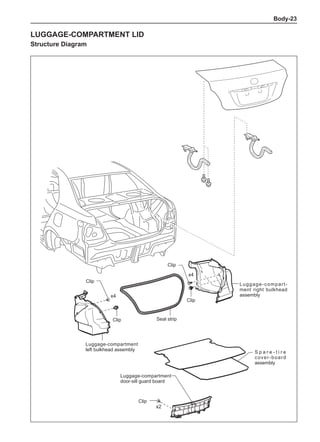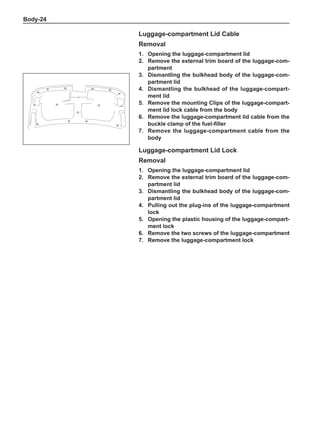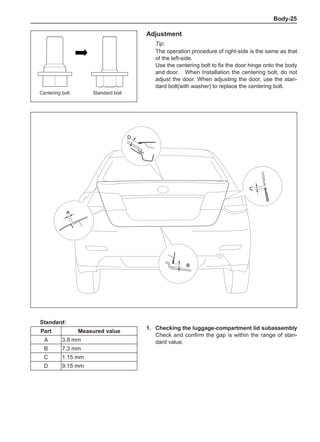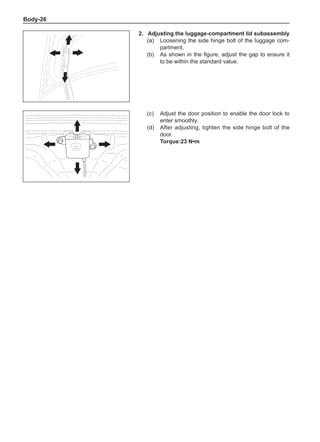



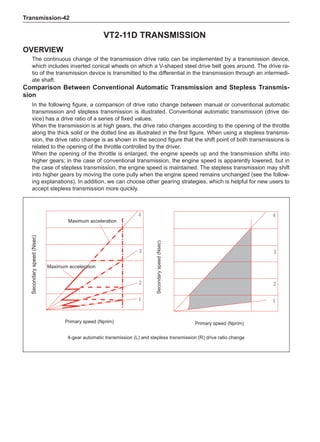
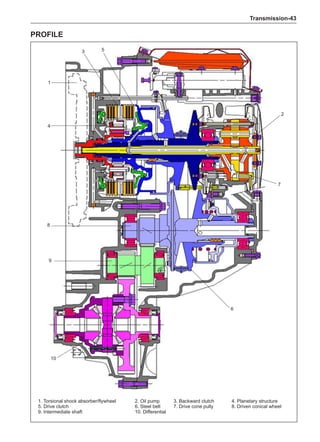
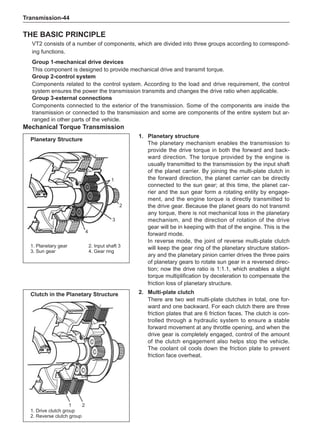
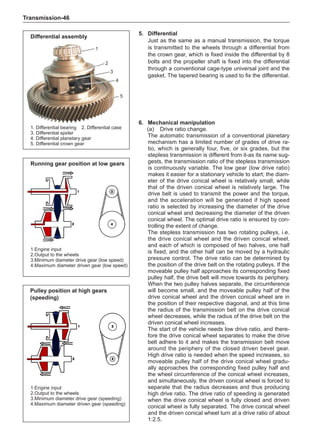
FOREWORD
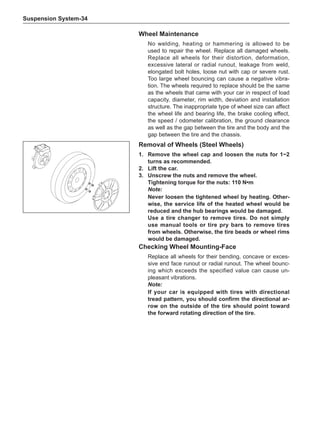
Warning: Following instructions must be strictly observed to avoid personal injury and/or property
damage:
This maintenance manual is provided by Great Wall Motor Company Limited and prepared for quali-
fied specialized technical personnel. The repair or maintenance by the person without proper training
or without proper tools and devices may lead to the injury the maintenance personnel or other person
and damage of vehicle or disability of vehicle.
The correct vehicle maintenance and repair is critical to the personal safety of maintenance personnel
and the safe and reliable operation of all motor vehicles. When replacing the parts, please use same
part number or the part number appointed by Great Wall Motor Company Limited. It is not allowable to
use the replacement parts not approved by Great Wall Motor Company Limited.
The maintenance procedures recommended or described in this manual are of effective repair and
maintenance methods, among which some procedures require to use specially designed tools.
Therefore, it is necessary to confirm that they will do harm to personal safety or safe operation of ve-
hicle before using the replacement parts, maintenance procedures or tools not recommended or ap-
proved by Great Wall Motor Company Limited.
The “Warning” and “Precautions” in this manual must be strictly observed so as to minimize the risk
of injury during repair or maintenance. Improper maintenance and repair may damage the vehicle or
lead to potential safety hazard of vehicle. These “Warning” and “Precautions” are not exhaustive. It is
impossible for Great Wall Motor Company Limited to provide warnings for all potential risk results from
infringement to these instructions.
This manual includes the maintenance procedures for the vehicle equipped with air bags. According
the precautions, refer to the airbag component and circuit position figure before maintenance for air
bag components or circuit or surroundings. The infringement to these requirements may lead to ex-
pansion of air bag, personal injury or unnecessary maintenance of air bag.
To avoid the accident expansion of air bag and personal injury, if the air bag and other vehicle system
require to be repaired, it is commended to firstly repair the airbag and then other system.
Although we took great effort to prepare this manual, it can not be guaranteed that all contents in this
manual are quite correct. Due to continuous updating of models, we can not guarantee timely deliv-
ering you the latest information. The user must not bring forward any unreasonable requirements to
Great Wall Motor Company Limited for this manual. For the loss resulted from usage of this manual,
we will not assume any liability. Due to the limit ability of editor, there are unavoidable defects and er-
rors in this manual and we are sincerely appreciate the comments and advices from the reader.
Great Wall Motor Company Limited reserves the final interpretation right of this manual.
Editor
May in 2010
Content
General
Maintenance Specification
Engine accessories
Transmission
Drive system
Suspension system
Steering system
Brake system
Air conditioning system
Auxiliary safety system
Vehicle body
Interior
Exterior
Electric circuit diagram
General-
General
INTRODUCTION	
2
INTRODUCTION....................................................................2
Identification information.........................................3
Service Instructions	 4
ATTENTIONS.........................................................................4
Vehicle Lifting and Supporting POSITIONS...........14
Circuit Inspection..........................................................16
General-
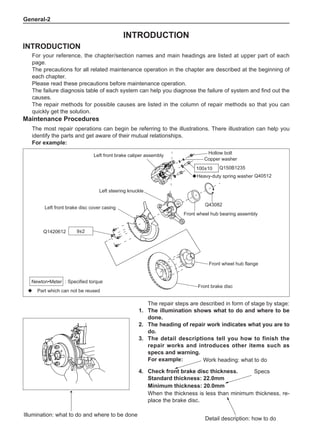
4.	 Check front brake disc thickness.
Standard thickness: 22.0mm
Minimum thickness: 20.0mm
When the thickness is less than minimum thickness, re-
place the brake disc.
The repair steps are described in form of stage by stage:
1.	The illumination shows what to do and where to be
done.
2.	The heading of repair work indicates what you are to
do.
3.	The detail descriptions tell you how to finish the
repair works and introduces other items such as
specs and warning.
For example:
Illumination: what to do and where to be done
INTRODUCTION
INTRODUCTION
For your reference, the chapter/section names and main headings are listed at upper part of each
page.
The precautions for all related maintenance operation in the chapter are described at the beginning of
each chapter.
Please read these precautions before maintenance operation.
The failure diagnosis table of each system can help you diagnose the failure of system and find out the
causes.
The repair methods for possible causes are listed in the column of repair methods so that you can
quickly get the solution.
Maintenance Procedures
The most repair operations can begin be referring to the illustrations. There illustration can help you
identify the parts and get aware of their mutual relationships.
For example:
Specs
Work heading: what to do
Detail description: how to do
◆ Part which can not be reused
: Specified torque
Newton•Meter
Hollow bolt
Copper washer
Q150B1235
Q40512
◆Heavy-duty spring washer
Q43082
Front wheel hub bearing assembly
Left steering knuckle
Left front brake disc cover casing
Q1420612
Front wheel hub flange
Front brake disc
Left front brake caliper assembly
9±2
100±10
General-
Specs
The related specs for each repair step is indicated with bold face in the whole manual so that it is not
needed to pause the repair work to find the specs.
This format can help skilled technical personnel quickly find out the cause of failure. The inspection/re-
pair personnel can browse the work headings and refer to the detailed instruction below only if neces-
sary. The important specs and warnings are indicated with black face.
Warning The warning is in black face, indicating the injury potentiality to people.
Notice The notice is in black face, indicating the rick of damaging the part under repaired.
Remark
The remark is independent from the description, but not in black face. It is mainly used for
some additional description to enhance the operation efficiency.
Terms Definition
Identification information
Vehicle Identification Mark (VIN Number)
The VIN number is the unique 17-digital code to identify
the vehicle. This code is located at three different posi-
tions: left upper part of instrument panel, front passenger
seat seat cross beam and vehicle nameplate.
Engine Production Number
The engine production number is inscribed at left side of
engine cylinder block.
Vehicle Nameplate
The vehicle nameplate is at the bottom of right side B
post.
General-
Service Instructions
ATTENTIONS
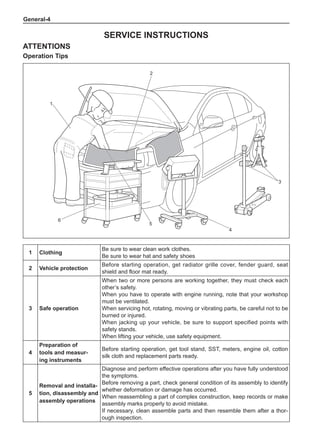
Operation Tips
3
1
2
5
4
6
1 Clothing
Be sure to wear clean work clothes.
Be sure to wear hat and safety shoes
2 Vehicle protection
Before starting operation, get radiator grille cover, fender guard, seat
shield and floor mat ready.
3 Safe operation
When two or more persons are working together, they must check each
other’s safety.
When you have to operate with engine running, note that your workshop
must be ventilated.
When servicing hot, rotating, moving or vibrating parts, be careful not to be
burned or injured.
When jacking up your vehicle, be sure to support specified points with
safety stands.
When lifting your vehicle, use safety equipment.
4
Preparation of
tools and measur-
ing instruments
Before starting operation, get tool stand, SST, meters, engine oil, cotton
silk cloth and replacement parts ready.
5
Removal and installa-
tion, disassembly and
assembly operations
Diagnose and perform effective operations after you have fully understood
the symptoms.
Before removing a part, check general condition of its assembly to identify
whether deformation or damage has occurred.
When reassembling a part of complex construction, keep records or make
assembly marks properly to avoid mistake.
If necessary, clean assemble parts and then resemble them after a thor-
ough inspection.
General-
Basic Operations:
1.	 Jacking up and supporting your vehicle
When jacking up and supporting your vehicle, ensure the
work is done at correct positions.
2.	Precoated parts
(a)	 Precoated parts refer to the parts coated with lock-
ing sealant in the factory (e.g. bolts and nuts).
(b)	 If a precoated part has been retightened, loosened
or moved in any way, it must be recoated with the
specified locking sealant.
(c)	 When a precoated part is to be reused, be sure to
remove old locking sealant and blow dry the part
with compressed air. Then apply corresponding
new locking sealant to the bolt, nut, etc.
Note:
Tighten within the torque tolerance lower limit.
(d)	 After locking sealant application, you may need to
settle the sealant for a specified time until it cures.
4.	 Gaskets
When necessary, coat gaskets with locking sealant to
prevent leakage.
5.	 Bolts, nuts and screws
Strictly observe all tightening torque related maintenance
specifications. Be sure to use torque wrenches.
6.	 Fuses
When replacing a fuse, ensure correct amperage rating
of the new fuse as replacement. It is forbidden to use a
fuse of higher or lower amperage rating.
·
30A
30A 30A
30A
A medium current fuse and a high current
fuse have the same amperage rating.
Locking sealant
FUSE
M-FUSE
H-FUSE
Fuse
Medium current fuse
High current fuse
Figure Symbol Part name Abbreviation
6 Removed parts
Place removed parts in the correct order to prevent them from being confused
or fouled.
As for non-reusable parts such as gaskets, O-rings and self-locking nuts, re-
place them with new ones in accordance with the instructions in this manual.
If necessary, sort out replaced parts and keep them for customer inspection.
General-
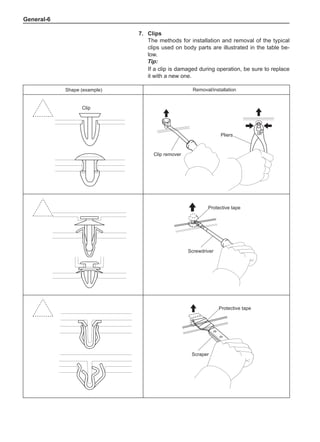
Shape (example) Removal/installation
Clip remover
Pliers
Clip
Protective tape
Screwdriver
Protective tape
Scraper
7.	 Clips
The methods for installation and removal of the typical
clips used on body parts are illustrated in the table be-
low.
Tip:
If a clip is damaged during operation, be sure to replace
it with a new one.
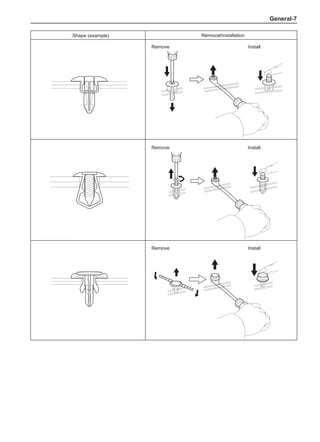
General-
Shape (example) Removal/installation
Remove
Remove Install
Remove Install
Install
General-
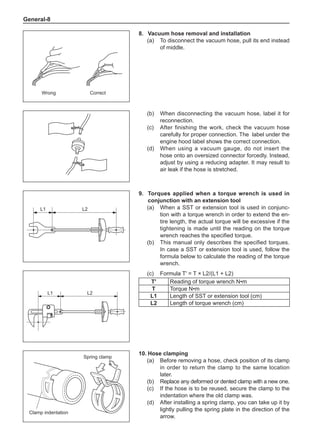
8.	Vacuum hose removal and installation
(a)	 To disconnect the vacuum hose, pull its end instead
of middle.
L1 L2
L1 L2
Wrong Correct
(b)	 When disconnecting the vacuum hose, label it for
reconnection.
(c)	 After finishing the work, check the vacuum hose
carefully for proper connection. The label under the
engine hood label shows the correct connection.
(d)	 When using a vacuum gauge, do not insert the
hose onto an oversized connector forcedly. Instead,
adjust by using a reducing adapter. It may result to
air leak if the hose is stretched.
9.	Torques applied when a torque wrench is used in
conjunction with an extension tool
(a)	 When a SST or extension tool is used in conjunc-
tion with a torque wrench in order to extend the en-
tire length, the actual torque will be excessive if the
tightening is made until the reading on the torque
wrench reaches the specified torque.
(b)	 This manual only describes the specified torques.
In case a SST or extension tool is used, follow the
formula below to calculate the reading of the torque
wrench.
(c)	 Formula T' = T × L2/(L1 + L2)
T' Reading of torque wrench N•m
T Torque N•m
L1 Length of SST or extension tool (cm)
L2 Length of torque wrench (cm)
10.	Hose clamping
(a)	 Before removing a hose, check position of its clamp
in order to return the clamp to the same location
later.
(b)	 Replace any deformed or dented clamp with a new one.
(c)	 If the hose is to be reused, secure the clamp to the
indentation where the old clamp was.
(d)	 After installing a spring clamp, you can take up it by
lightly pulling the spring plate in the direction of the
arrow.
Spring clamp
Clamp indentation
General-
For Vehicles Equipped with “Air Bag”(SRS) and “Seat Belt Pre-Tensioner”
Remark:
This vehicle is equipped with “air bag” (SRS) and “seat belt pre-tensioner”.
The incorrect order of maintenance operation may cause SRS air bag to deploy accidentally during
maintenance, which resulting in serious accident.
In addition, SRS malfunction may result from mistakes made during maintenance of the unit.
Before starting maintenance (including removal or installation and inspection or replacement of parts),
please read the following precautions carefully and then follow the correct procedures described in this
manual to conduct maintenance.
1.	 General attentions
(a)	 When the safety system indicator light indicates a malfunction, you can diagnose using the diag-
nostic tester (X431). Keep the battery connected during diagnosis; otherwise the diagnostic tester
can not work. When removing and installing the air bag, clock spring, air bag ECU and front pas-
senger side air bag, be sure to take out the key or disconnect the battery.
(b)	 To avoid serious injury, you can not start to service the SRS until 90 seconds have passed after
the following conditions had been met:
•	 The ignition switch is shifted to “LOCK” position.
•	 The battery negative (-) terminal cable is disconnected.
•	 (The SRS is equipped with a reserve power supply, so it may deploy if you start to work in 90
seconds after the battery negative (-) terminal cable is disconnected.) Disconnecting the bat-
tery negative (-) terminal cable will clear clock memory and audio system presetting.
•	 Before disconnecting the cable, if necessary, you can record data as needed. To avoid clear-
ing memory setting, never use the reserve power supply.
(c)	 In the case of a minor collision which does not deploy the SRS, you should check the driver side
air bag assembly, front passenger side air bag assembly and seat belt pre-tensioner before reus-
ing your vehicle.
(d)	 Never use the SRS parts on other vehicles. When replacing SRS parts, use new ones.
(e)	 If you may touch the air bag ECU assembly during maintenance, remove it before starting any
maintenance job.
(f)	 Never disassemble and service the air bag ECU assembly, driver side air bag assembly, and front
passenger side air bag assembly or seat belt pre-tensioner.
(g)	 If either of the following situations occurs, replace the air bag ECU assembly, driver side air bag
assembly or front passenger side air bag assembly: 1) damage caused by dropping; 2) fracture,
dent or other defects on any shell, bracket or connector.
(h)	 It is strictly forbidden to expose the air bag ECU assembly, driver side air bag assembly, front pas-
senger side air bag assembly or seat belt pre-tensioner directly to hot air or flame.
(i)	 It is strictly forbidden to measure the driver side air bag assembly and front passenger side air bag
assembly with a multimeter; otherwise air bag may deploy to result in injury.
(j)	 An information label is affixed to each SRS component. You should follow the instructions in the
precautions.
(k)	 After finishing working on the SRS, check the SRS warning light.
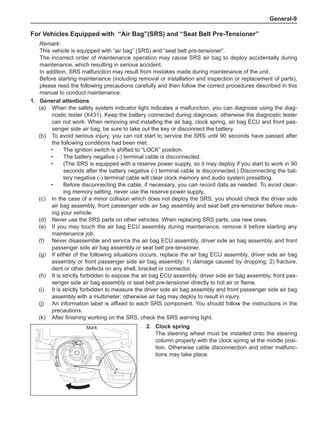
2.	 Clock spring
The steering wheel must be installed onto the steering
column properly with the clock spring at the middle posi-
tion. Otherwise cable disconnection and other malfunc-
tions may take place.
Mark
General-10
3.	 Driver side air bag assembly (with air bag)
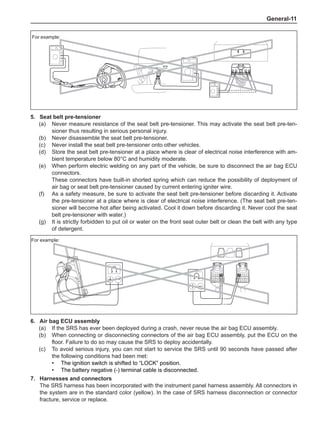
(a)	 When removing the driver side air bag assembly or handling a new electric horn button, place it
with the upper surface of its cover up (refer to the figure below).
Serious accident may result from accidental inflation of the air bag if it is placed with its cover sur-
face down. In addition, do not put any thing on the top of the electric horn button.
(b)	 Never measure the resistance of the air bag igniter; otherwise the air bag may inflate and result in
serious injury.
(c)	 It is strictly forbidden to apply any type of grease or detergent to the steering wheel cover.
(d)	 Store the driver side air bag assembly at a place where is clear of electrical noise interference with
ambient temperature below 93°C and humidity moderate.
(e)	 When perform electric welding on any part of the vehicle, be sure to disconnect the air bag ECU
connectors. These connectors have built-in shorted spring which can reduce the possibility of de-
ployment of air bag or seat belt pre-tensioner caused by current entering igniter wire.
(f)	 When discarding the vehicle or only discarding the driver side air bag assembly, inflate the air bag
using the SST before such disposal. Please perform this operation at a safe place where is clear
of electrical noise interference.
For example:
Correct Wrong
For example:
4.	 Front passenger side air bag assembly
(a)	 When placing a removed or new front passenger side air bag assembly, be sure to keep its de-
ployment direction up. If the deployment direction is left down when you place the air bag assem-
bly, serious accident may result once the air bag is inflated.
(b)	 Never measure the resistance of the air bag igniter; otherwise the air bag may inflate thus result-
ing in serious injury.
(c)	 It is strictly forbidden to apply any type of grease or detergent to the front passenger side air bag
assembly.
(e)	 Store the air bag assembly at a place where is clear of electrical noise interference with ambient
temperature below 93°C and humidity moderate.
(f)	 When perform electric welding on any part of the vehicle, be sure to disconnect the air bag ECU connectors.
These connectors have built-in shorted spring which can reduce the possibility of deployment of air
bag or seat belt pre-tensioner caused by current entering igniter wire.
(g)	 When discarding the vehicle or only discarding the air bag assembly, deploy the air bag using the SST
before such disposal. Activate the air bag at a place where is clear of electrical noise interference.
General-11
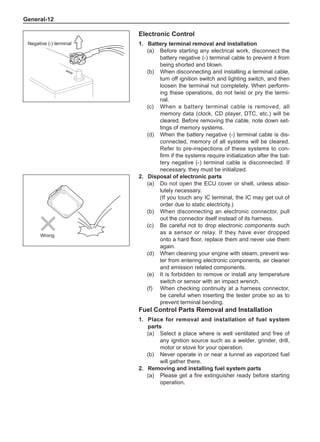
For example:
5.	 Seat belt pre-tensioner
(a)	 Never measure resistance of the seat belt pre-tensioner. This may activate the seat belt pre-ten-
sioner thus resulting in serious personal injury.
(b)	 Never disassemble the seat belt pre-tensioner.
(c)	 Never install the seat belt pre-tensioner onto other vehicles.
(d)	 Store the seat belt pre-tensioner at a place where is clear of electrical noise interference with am-
bient temperature below 80°C and humidity moderate.
(e)	 When perform electric welding on any part of the vehicle, be sure to disconnect the air bag ECU
connectors.
These connectors have built-in shorted spring which can reduce the possibility of deployment of
air bag or seat belt pre-tensioner caused by current entering igniter wire.
(f)	 As a safety measure, be sure to activate the seat belt pre-tensioner before discarding it. Activate
the pre-tensioner at a place where is clear of electrical noise interference. (The seat belt pre-ten-
sioner will become hot after being activated. Cool it down before discarding it. Never cool the seat
belt pre-tensioner with water.)
(g)	 It is strictly forbidden to put oil or water on the front seat outer belt or clean the belt with any type
of detergent.
For example:
6.	Air bag ECU assembly
(a)	 If the SRS has ever been deployed during a crash, never reuse the air bag ECU assembly.
(b)	 When connecting or disconnecting connectors of the air bag ECU assembly, put the ECU on the
floor. Failure to do so may cause the SRS to deploy accidentally.
(c)	 To avoid serious injury, you can not start to service the SRS until 90 seconds have passed after
the following conditions had been met:
•	 The ignition switch is shifted to “LOCK” position.
•	 The battery negative (-) terminal cable is disconnected.
7.	Harnesses and connectors
The SRS harness has been incorporated with the instrument panel harness assembly. All connectors in
the system are in the standard color (yellow). In the case of SRS harness disconnection or connector
fracture, service or replace.
General-12
Electronic Control
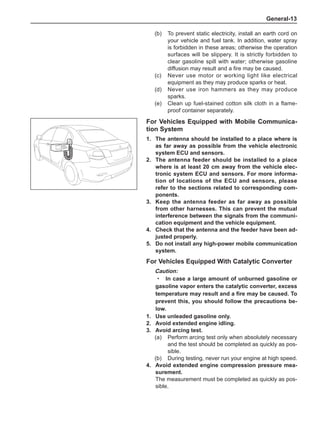
1.	 Battery terminal removal and installation
(a)	 Before starting any electrical work, disconnect the
battery negative (-) terminal cable to prevent it from
being shorted and blown.
(b)	 When disconnecting and installing a terminal cable,
turn off ignition switch and lighting switch, and then
loosen the terminal nut completely. When perform-
ing these operations, do not twist or pry the termi-
nal.
(c)	 When a battery terminal cable is removed, all
memory data (clock, CD player, DTC, etc.) will be
cleared. Before removing the cable, note down set-
tings of memory systems.
(d)	 When the battery negative (-) terminal cable is dis-
connected, memory of all systems will be cleared.
Refer to pre-inspections of these systems to con-
firm if the systems require initialization after the bat-
tery negative (-) terminal cable is disconnected. If
necessary, they must be initialized.
2.	 Disposal of electronic parts
(a)	 Do not open the ECU cover or shell, unless abso-
lutely necessary.
(If you touch any IC terminal, the IC may get out of
order due to static electricity.)
(b)	 When disconnecting an electronic connector, pull
out the connector itself instead of its harness.
(c)	 Be careful not to drop electronic components such
as a sensor or relay. If they have ever dropped
onto a hard floor, replace them and never use them
again.
(d)	 When cleaning your engine with steam, prevent wa-
ter from entering electronic components, air cleaner
and emission related components.
(e)	 It is forbidden to remove or install any temperature
switch or sensor with an impact wrench.
(f)	 When checking continuity at a harness connector,
be careful when inserting the tester probe so as to
prevent terminal bending.
Fuel Control Parts Removal and Installation
1.	Place for removal and installation of fuel system
parts
(a)	 Select a place where is well ventilated and free of
any ignition source such as a welder, grinder, drill,
motor or stove for your operation.
(b)	 Never operate in or near a tunnel as vaporized fuel
will gather there.
2.	 Removing and installing fuel system parts
(a)	 Please get a fire extinguisher ready before starting
operation.
Negative (-) terminal
Wrong
General-13
For Vehicles Equipped with Mobile Communica-
tion System
1.	The antenna should be installed to a place where is
as far away as possible from the vehicle electronic
system ECU and sensors.
2.	The antenna feeder should be installed to a place
where is at least 20 cm away from the vehicle elec-
tronic system ECU and sensors. For more informa-
tion of locations of the ECU and sensors, please
refer to the sections related to corresponding com-
ponents.
3.	Keep the antenna feeder as far away as possible
from other harnesses. This can prevent the mutual
interference between the signals from the communi-
cation equipment and the vehicle equipment.
4.	 Check that the antenna and the feeder have been ad-
justed properly.
5.	 Do not install any high-power mobile communication
system.
For Vehicles Equipped With Catalytic Converter
Caution:
In case a large amount of unburned gasoline or
gasoline vapor enters the catalytic converter, excess
temperature may result and a fire may be caused. To
prevent this, you should follow the precautions be-
low.
1.	Use unleaded gasoline only.
2.	Avoid extended engine idling.
3.	Avoid arcing test.
(a)	 Perform arcing test only when absolutely necessary
and the test should be completed as quickly as pos-
sible.
(b)	 During testing, never run your engine at high speed.
4.	Avoid extended engine compression pressure mea-
surement.
The measurement must be completed as quickly as pos-
sible.
·
(b)	 To prevent static electricity, install an earth cord on
your vehicle and fuel tank. In addition, water spray
is forbidden in these areas; otherwise the operation
surfaces will be slippery. It is strictly forbidden to
clear gasoline spill with water; otherwise gasoline
diffusion may result and a fire may be caused.
(c)	 Never use motor or working light like electrical
equipment as they may produce sparks or heat.
(d)	 Never use iron hammers as they may produce
sparks.
(e)	 Clean up fuel-stained cotton silk cloth in a flame-
proof container separately.
General-14
Vehicle Lifting and Supporting PO-
SITIONS
ATTENTIONS
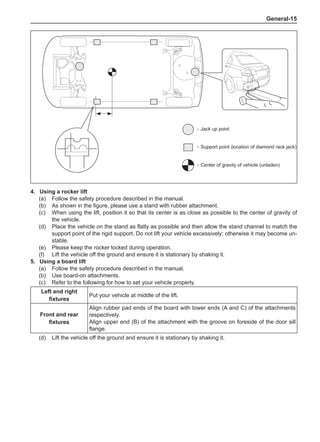
1.	 Jacking up condition of vehicle
(a)	 Before jacking up your vehicle, be sure to keep
it unladen. Never jack up/lift a vehicle with heavy
load.
(b)	 When you remove a heavy facility such as the en-
gine or transmission, the center of gravity of the ve-
hicle may transfer. To stabilize the vehicle, you can
either place a balance weight at the place where
rolling and moving will not take place or use a trans-
mission jack to fix the lift stand.
2.	Using a 4-pole lift
(a)	 Follow the safety procedure described in the manu-
al to operate.
(b)	 Take preventive actions to prevent free wheel
beams from damaging tires or wheels.
(c)	 Please use wheel chocks to fix your vehicle.
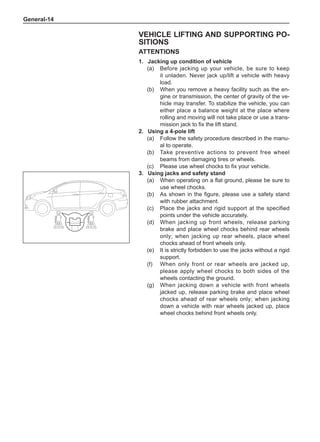
3.	Using jacks and safety stand
(a)	 When operating on a flat ground, please be sure to
use wheel chocks.
(b)	 As shown in the figure, please use a safety stand
with rubber attachment.
(c)	 Place the jacks and rigid support at the specified
points under the vehicle accurately.
(d)	 When jacking up front wheels, release parking
brake and place wheel chocks behind rear wheels
only; when jacking up rear wheels, place wheel
chocks ahead of front wheels only.
(e)	 It is strictly forbidden to use the jacks without a rigid
support.
(f)	 When only front or rear wheels are jacked up,
please apply wheel chocks to both sides of the
wheels contacting the ground.
(g)	 When jacking down a vehicle with front wheels
jacked up, release parking brake and place wheel
chocks ahead of rear wheels only; when jacking
down a vehicle with rear wheels jacked up, place
wheel chocks behind front wheels only.
General-15
4.	Using a rocker lift
(a)	 Follow the safety procedure described in the manual.
(b)	 As shown in the figure, please use a stand with rubber attachment.
(c)	 When using the lift, position it so that its center is as close as possible to the center of gravity of
the vehicle.
(d)	 Place the vehicle on the stand as flatly as possible and then allow the stand channel to match the
support point of the rigid support. Do not lift your vehicle excessively; otherwise it may become un-
stable.
(e)	 Please keep the rocker locked during operation.
(f)	 Lift the vehicle off the ground and ensure it is stationary by shaking it.
5.	Using a board lift
(a)	 Follow the safety procedure described in the manual.
(b)	 Use board-on attachments.
(c)	 Refer to the following for how to set your vehicle properly.
Left and right
fixtures
Put your vehicle at middle of the lift.
Front and rear
fixtures
Align rubber pad ends of the board with lower ends (A and C) of the attachments
respectively.
Align upper end (B) of the attachment with the groove on foreside of the door sill
flange.
(d)	 Lift the vehicle off the ground and ensure it is stationary by shaking it.
:
:
:
Jack up point
Support point (location of diamond rack jack)
Center of gravity of vehicle (unladen)
General-16
Circuit Inspection
Basic Checks
1.	 All the resistance should be measured at ambient
temperature of20°C,otherwise mention.
In case of high temperature, for instance,when the ve-
hicle is just starting up, the measured resistance may fail
to meet the requirement. The measurement should be
performed after the engine is complete cooling down.
Wrong
Correct
2.	 Connector handling
(a)	 When disconnecting a connector, press mating
parts of its two halves together first to unlock them,
then depress the locking claw to separate the con-
nector.
(b)	 When disconnecting the connector, it is strictly for-
bidden to pull its harness hard. Instead, hold on the
connector directly to separate it.
(c)	 Before connecting the connector, check its termi-
nals for deformation, damage, looseness or miss-
ing.
(d)	 When connecting the connector, press it hard until
the lock “clicks” to indicate lockup.
85 mm
100 mm
200 mm
70 mm
:
L
B
A C
Rocker lift
Board lift
Center of gravity of
vehicle (unladen)
Center of lift
Rubber attach-
ment
Dimensions of attachment
Attachment
General-17
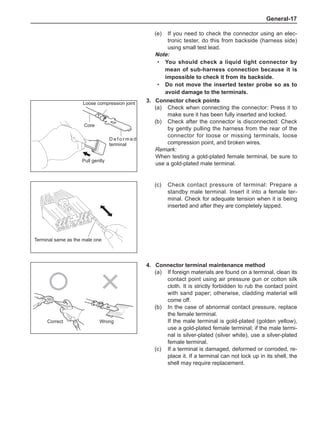
4.	 Connector terminal maintenance method
(a)	 If foreign materials are found on a terminal, clean its
contact point using air pressure gun or cotton silk
cloth. It is strictly forbidden to rub the contact point
with sand paper; otherwise, cladding material will
come off.
(b)	 In the case of abnormal contact pressure, replace
the female terminal.
If the male terminal is gold-plated (golden yellow),
use a gold-plated female terminal; if the male termi-
nal is silver-plated (silver white), use a silver-plated
female terminal.
(c)	 If a terminal is damaged, deformed or corroded, re-
place it. If a terminal can not lock up in its shell, the
shell may require replacement.
Correct Wrong
3.	 Connector check points
(a)	 Check when connecting the connector: Press it to
make sure it has been fully inserted and locked.
(b)	 Check after the connector is disconnected: Check
by gently pulling the harness from the rear of the
connector for loose or missing terminals, loose
compression point, and broken wires.
Remark:
When testing a gold-plated female terminal, be sure to
use a gold-plated male terminal.
(c)	 Check contact pressure of terminal: Prepare a
standby male terminal. Insert it into a female ter-
minal. Check for adequate tension when it is being
inserted and after they are completely lapped.
Loose compression joint
Pull gently
Core
D e f o r m e d
terminal
Terminal same as the male one
(e)	 If you need to check the connector using an elec-
tronic tester, do this from backside (harness side)
using small test lead.
Note:
You should check a liquid tight connector by
mean of sub-harness connection because it is
impossible to check it from its backside.
Do not move the inserted tester probe so as to
avoid damage to the terminals.
·
·
General-18
1
2
1
2
1
2
1
2
ECU
C B2 B1 A
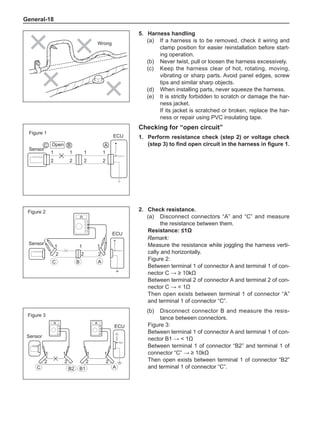
Figure 3
Sensor
(b)	 Disconnect connector B and measure the resis-
tance between connectors.
Figure 3:
Between terminal 1 of connector A and terminal 1 of con-
nector B1 →  1Ω
Between terminal 1 of connector “B2” and terminal 1 of
connector “C” → ≥ 10kΩ
Then open exists between terminal 1 of connector “B2”
and terminal 1 of connector “C”.
C B
1
2 2
1
1
2 2
1
A
ECU
1
2
1
2
1
ECU
2
C B A
Checking for “open circuit”
1.	Perform resistance check (step 2) or voltage check
(step 3) to find open circuit in the harness in figure 1.
2.	 Check resistance.
(a)	 Disconnect connectors “A” and “C” and measure
the resistance between them.
Resistance: ≤1Ω
Remark:
Measure the resistance while joggling the harness verti-
cally and horizontally.
Figure 2:
Between terminal 1 of connector A and terminal 1 of con-
nector C → ≥ 10kΩ
Between terminal 2 of connector A and terminal 2 of con-
nector C →  1Ω
Then open exists between terminal 1 of connector “A”
and terminal 1 of connector “C”.
Sensor
Figure 2
Open
Figure 1
Sensor
5.	Harness handling
(a)	 If a harness is to be removed, check it wiring and
clamp position for easier reinstallation before start-
ing operation.
(b)	 Never twist, pull or loosen the harness excessively.
(c)	 Keep the harness clear of hot, rotating, moving,
vibrating or sharp parts. Avoid panel edges, screw
tips and similar sharp objects.
(d)	 When installing parts, never squeeze the harness.
(e)	 It is strictly forbidden to scratch or damage the har-
ness jacket.
If its jacket is scratched or broken, replace the har-
ness or repair using PVC insulating tape.
Wrong
General-19
A
ECU
1 1 1
2
1
2
2
C B2 B1
2
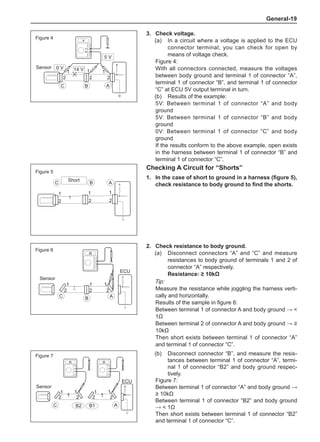
Figure 7
Sensor
(b)	 Disconnect connector “B”, and measure the resis-
tances between terminal 1 of connector “A”, termi-
nal 1 of connector “B2” and body ground respec-
tively.
Figure 7:
Between terminal 1 of connector “A” and body ground →
≥ 10kΩ
Between terminal 1 of connector “B2” and body ground
→  1Ω
Then short exists between terminal 1 of connector “B2”
and terminal 1 of connector “C”.
1 1 1
5 V
2
C
2 2
14 V
0 V
B A
Figure 4
Sensor
3.	 Check voltage.
(a)	 In a circuit where a voltage is applied to the ECU
connector terminal, you can check for open by
means of voltage check.
Figure 4:
With all connectors connected, measure the voltages
between body ground and terminal 1 of connector “A”,
terminal 1 of connector “B”, and terminal 1 of connector
“C” at ECU 5V output terminal in turn.
(b)	 Results of the example:
5V: Between terminal 1 of connector “A” and body
ground
5V: Between terminal 1 of connector “B” and body
ground
0V: Between terminal 1 of connector “C” and body
ground
If the results conform to the above example, open exists
in the harness between terminal 1 of connector “B” and
terminal 1 of connector “C”.
C
1
2
1
2
1
2
B A
A
ECU
B
1 1
2
1
2
2
C
Figure 6
Short
Figure 5
Sensor
2.	 Check resistance to body ground.
(a)	 Disconnect connectors “A” and “C” and measure
resistances to body ground of terminals 1 and 2 of
connector “A” respectively.
Resistance: ≥ 10kΩ
Tip:
Measure the resistance while joggling the harness verti-
cally and horizontally.
Results of the sample in figure 6:
Between terminal 1 of connector A and body ground → 
1Ω
Between terminal 2 of connector A and body ground → ≥
10kΩ
Then short exists between terminal 1 of connector “A”
and terminal 1 of connector “C”.
Checking A Circuit for “Shorts”
1.	 In the case of short to ground in a harness (figure 5),
check resistance to body ground to find the shorts.
General-20
ECU side
Ground
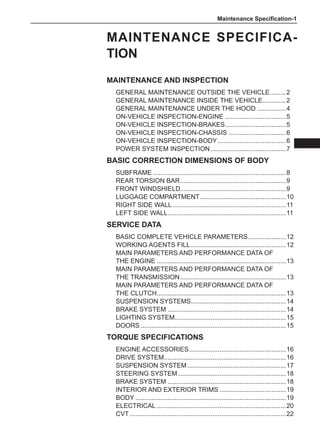
(b)	 Disconnect ECU connectors. Check ground termi-
nals (ECU side and harness side) for bending, cor-
rosion or evidence of foreign material accumulation.
Finally check contact pressure of female terminal.
Harness side
Ground
Ground
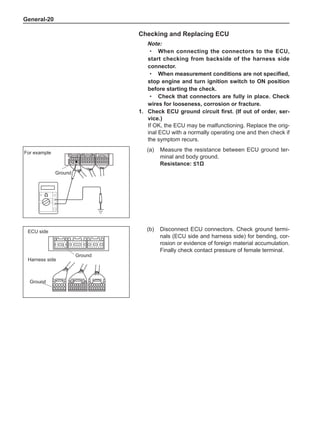
For example
(a)	 Measure the resistance between ECU ground ter-
minal and body ground.
Resistance: ≤1Ω
Checking and Replacing ECU
Note:
When connecting the connectors to the ECU,
start checking from backside of the harness side
connector.
When measurement conditions are not specified,
stop engine and turn ignition switch to ON position
before starting the check.
Check that connectors are fully in place. Check
wires for looseness, corrosion or fracture.
1.	 Check ECU ground circuit first. (If out of order, ser-
vice.)
If OK, the ECU may be malfunctioning. Replace the orig-
inal ECU with a normally operating one and then check if
the symptom recurs.
·
·
·
Maintenance Specification-
Maintenance Specifica-
tion
Maintenance and Inspection
General Maintenance outside the Vehicle.
.........2
General Maintenance inside the Vehicle.
.............2
General Maintenance under the Hood.................4
On-Vehicle Inspection-Engine...................................5
On-Vehicle Inspection-Brakes.
..................................5
On-Vehicle Inspection-Chassis.................................6
On-Vehicle Inspection-Body.......................................6
Power System Inspection...........................................7
Basic Correction Dimensions of Body
Subframe...........................................................................8
Rear torsion bar.
...........................................................9
Front windshield...........................................................9
Luggage compartment.................................................10
Right side wall................................................................11
Left side wall.
..................................................................11
Service Data
Basic COMPLETE VEHICLE Parameters......................12
Working Agents Fill......................................................12
Main Parameters and Performance Data of
the Engine.........................................................................13
Main Parameters and Performance Data of
the Transmission............................................................13
Main Parameters and Performance Data of
the Clutch.
........................................................................13
Suspension Systems.
.....................................................14
Brake System...................................................................14
Lighting System.
..............................................................15
Doors..................................................................................15
Torque Specifications
Engine Accessories.......................................................16
Drive System.
....................................................................16
Suspension System........................................................17
Steering System.............................................................18
Brake System...................................................................18
Interior and Exterior Trims......................................19
Body.....................................................................................19
Electrical.........................................................................20
CVT........................................................................................22
Maintenance Specification-
Maintenance and Inspection
General Maintenance outside the Vehicle
Owners have the responsibility to service and check their vehicles. They can either perform DIY ve-
hicle maintenance or send their vehicles to maintenance centers.
Routine inspection should be made for the following vehicle parts. In most cases, no special tools are
required.
The general maintenance procedure is as follows:
1.	 General precautions
•	 Maintenance requirements vary with countries.
•	 The appropriate time for vehicle maintenance is determined according to vehicle kilometers trav-
eled or elapsed travel time (months), whichever comes first.
•	 Perform periodic maintenance as far as possible, unless otherwise specified.
•	 Failure to check vehicle parts may result in poor engine performance and increase in exhaust emis-
sions.
2.	Tires
(a)	 Check tire pressure with an air pressure gauge. If necessary, adjust.
(b)	 Check treads for cuts, damage or excessive wear.
3.	 Wheel nuts
(a)	 Check for loose or missing nuts. If necessary, tighten the nuts or replace.
4.	Tire rotation
(a)	 Check tire wear.
5.	 Windshield wiper blades
(a)	 Check wiper blades for wear or cracks if they can not clean the windshield properly. If necessary,
replace them.
6.	 Fluid leaks
(a)	 Check under the vehicle for fuel, engine oil, water or other fluid leaks.
(b)	 If you should smell gasoline fumes or notice any leaks, check for the cause and repair it.
7.	 Doors and engine hood
(a)	 Check that all doors and the tailgate operate smoothly and that all latches lock securely.
(b)	 Make sure that the secondary latch keeps the hood from opening when the primary latch is re-
leased.
General Maintenance inside the Vehicle
Owners have the responsibility to service and check their vehicles. They can either perform DIY ve-
hicle maintenance or send their vehicles to maintenance centers.
Routine inspection should be made for the following vehicle parts. In most cases, no special tools are
required.
The general maintenance procedure is as follows:
1.	 General attentions
•	 Maintenance requirements vary with countries.
•	 The appropriate time for vehicle maintenance is determined according to vehicle kilometers trav-
eled or elapsed travel time (months), whichever comes first.
•	 Perform periodic maintenance as far as possible, unless otherwise specified.
•	 Failure to check vehicle parts may result in poor engine performance and increase in exhaust emis-
sions.
2.	Lights
(a)	 Check if the combination headlights, brake lights, combination taillights, turn signal lights and other
lights light up or flash. In addition, check the lights for adequate illumination.
(b)	 Check headlights for accurate aiming.
Maintenance Specification-
3.	 Warning lights and buzzers
(a)	 Check that all warning lights and buzzers are operating properly.
4.	 Electric horns
(a)	 Check that all electric horns operate properly.
5.	 Windshield
(a)	 Check for scratches, dents or wear.
6.	 Windshield wiper and washer
(a)	 Check if the windshield washer operates within its appropriate range. In addition, check if washer
fluid spray is just located at center of working range of each wiper on the windshield.
(b) Check if the wiper streaks the glass after wiping.
7.	 Windshield defroster
(a)	 Check that the air comes out of the defroster outlets properly when the heater or air conditioner is
in DEFROST mode.
8.	 Rear-view mirror
(a)	 Check that the rear-view mirror is installed securely.
9.	 Sun visor
(a)	 Check that the sun visor can move freely and is installed securely.
10.	Steering wheel
(a)	 Check that it has an appropriate free play. In addition, check it for hard steering and abnormal
noises.
11.	Seats
(a)	 Check seat adjusters, seat back recliners and other front seat controls for smooth operation.
(b)	 Check that the locks hold securely in all latched positions.
(c)	 Check that the headrests move up and down smoothly and that the locks hold securely in all
latched positions.
(d)	 Check that the latches lock securely when you fold down the rear seat backs.
12.	Safety belts
(a)	 Check that the seat belt system (e.g. buckles, retractors and locking devices) operate properly and
smoothly.
(b)	 Check that the belt webbing is free of cuts, wear or damage.
13.	Accelerator pedal
(a)	 Check the pedal for smooth operation and make sure the pedal does not catch or require uneven
effort.
14.	Clutch pedal
(a)	 Check the pedal for smooth operation.
(b)	 Check that it has an appropriate free play.
15.	Brake pedal
(a)	 Check the pedal for smooth operation.
(b)	 Check that it has an appropriate reserve and an appropriate free play.
(c)	 Start the engine and check the vacuum booster function.
16.	Brakes
(a)	 At a safe place, check that the brake does not pull the vehicle to one side when applied.
17.	Parking brake
(a)	 Check that the lever can move within an appropriate range.
(b)	 On a low slope, check that the vehicle is held securely with the selector lever in the P (Park) posi-
tion without applying any brakes.
Maintenance Specification-
General Maintenance under the Hood
1.	 General attentions
•	 Maintenance items may vary with countries. Please lock up the maintenance schedule given in the
Supplement of the Owner's Manual.
•	 All maintenance items in the periodic maintenance schedule must be performed.
•	 Be sure to perform periodic maintenance according to the odometer readings (km) or intervals
(months) (whichever comes first) in the periodic maintenance schedule.
•	 After previous maintenance is completed, continue the maintenance at the same intervals as previ-
ous ones, unless otherwise specified.
•	 Poor engine running and increase in exhaust emissions may result even if only one of the items is
missed.
2.	 Windshield washer fluid
(a)	 Check that there is adequate fluid in the reservoir.
3.	 Engine coolant level
(a)	 Check that the coolant level is between scales “F” and “L” on the transparent reservoir tank.
4.	 Radiator and hoses
(a)	 Check that the front of the radiator is clean and free of clogging caused by leaves, dust or insects.
(b)	 Check the hoses for cracks, twist, deterioration or loose connections.
5.	 Brake fluid level
(a)	 Check that the brake fluid level is near the upper scale line on the transparent reservoir tank.
Tip:
Brake fluid and clutch fluid share the same reservoir tank.
6.	 Engine drive belts
(a)	 Check the drive belts for frayed, broken, worn or oily cords.
7.	 Engine oil level
(a)	 Check the level on the dipstick with the engine off.
8.	 Power steering fluid level
(a)	 Check the level mark on the steering fluid reservoir body.
(b)	 Depending on power steering fluid temperature, the level should be within the “HOT” or “COLD”
range.
9.	 Manual transmission fluid level
(a)	 Park your vehicle on a level ground.
(b)	 Set the shift lever to neutral position and set parking brake with the engine idling.
(c)	 Loosen the transmission fluid filler plug with a wrench.
(d)	 Check that the fluid level is 10-15 mm below lower edge of the filler. If below this level, fill trans-
mission fluid; on the contrary, drain fluid.
10.	Exhaust system
(a)	 If you should notice any change in sound of the exhaust or smell of exhaust fumes, locate the
trouble and correct it.
Maintenance Specification-
3.	 Check air cleaner.
(a)	 Remove the air cleaner.
(b)	 Visually check that the air cleaner is free of exces-
sive damage, dirt or oil stains. If necessary, replace
the air cleaner element.
(c)	 Clean the filter element using compressed air. Blow
clean thoroughly from inside of the filter element
first, and then blow clean from outside.
(d)	 Reinstall the air cleaner element.
4.	 Replace air cleaner element.
(a)	 Replace with a new air cleaner element.
5.	 Change engine oil and replace oil filter.
6.	 Change engine coolant.
7.	 Check fuel tank cap gasket.
8.	 Check fuel lines and connections, fuel tank vapor
ventilation system hoses and fuel tank.
(a)	 Visually check fuel lines for fracture, leaks, loose
joints, deformation or loose fuel tank bolts.
9.	 Check exhaust pipe and its fittings.
(a)	 Visually check lines, suspensions, and joints for
serious corrosion, leakage or damage.
On-Vehicle Inspection-Engine
Tip:
Check these items when the engine is cold.
1.	 Check drive belts.
2.	 Replace spark plugs.
Outside
Inside
On-Vehicle Inspection-Brakes
1.	 Check brake lines.
Tip:
Operate in a luminous area. Before starting inspection,
turn front wheels to the rightmost or leftmost position.
(a)	 Check all brake lines and hoses for the following
situations:
•	 Damage
•	 wear
•	 Deformation
•	 Fracture
•	 Corrosion
•	 Leakage
•	 Bending
•	 Distortion
(b)	 Check all clamps for proper tightening and connec-
tions for leakage.
(c)	 Check that the hoses and lines are kept far away
from sharp parts, moving parts and the exhaust
system.
(d)	 Check that the lines are installed so that they pass
centers of gaskets.
2.	 Check front brake pads and discs.
3.	 Check rear brake linings and drums.
4.	 Check or change brake fluid.
Brake fluid: DOT4 synthetic brake fluid
Glass block
Maintenance Specification-
On-Vehicle Inspection-Chassis
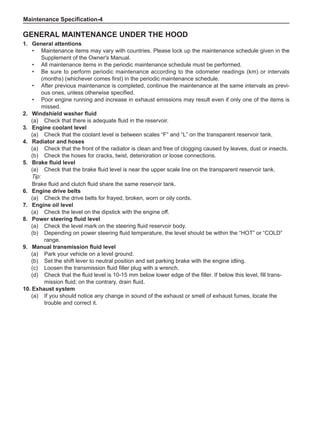
1.	 Check steering linkage.
(a)	 Check free play of steering wheel.
(b)	 Check steering linkage for looseness or damage.
(1)	 Check that tie rod end gap is moderate.
(2)	 Check that dustproof gasket and dust cover are free of damage.
(3)	 Check that dust cover clamp does not loosen.
2.	 Check oil in steering gear housing.
(a)	 Check steering gear for leakage.
If oil leakage is found, check for the cause and service the unit.
3.	 Check ball joint and dust cover.
(a)	 Check ball joint for excessive looseness.
(1)	 Jack up the front of the vehicle and put 180-200 mm height wood blocks under front tires.
(2)	 Lower the vehicle until its front helical spring receives half of normal load. For safety purpos-
es, you should put a bench under the vehicle.
(3)	 Check that front wheels of the vehicle are in straight ahead position. In addition, use wheel
chocks.
(4)	 Pry up end of lower arm with a crow bar to check the gap.
Maximum vertical clearance of ball joint: 0 mm
If any clearance exists, replace the ball joint.
(b)	 Check dust cover for damage.
4.	 Check dust boot of propeller shaft.
(a)	 Check dust boot of propeller shaft for clamping, looseness, grease leak, distortion or damage.
5.	 Check transaxle oil (liquid).
(a)	 Visually check for oil (liquid) leaks.
If oil leakage is found, check for the cause and service the unit.
6.	Tire rotation
On-Vehicle Inspection-Body
1.	Tighten bolts and nuts on chassis and body.
(a)	 If necessary, tighten bolts and nuts of the following chassis parts.
•	 Front axle and suspension
•	 Drive system
•	 Rear axle and suspension
•	 Brake system
•	Engine mounting
•	 Other chassis parts
(b)	 If necessary, tighten bolts and nuts of the following body parts.
•	 Seat belt system
•	 Seats
•	 Doors and engine hood
•	 Body support
•	 Fuel tank
•	Exhaust pipe system
•	 Other body parts
Maintenance Specification-
Power System Inspection
1.	 Generator
(a)	 Check generator for proper cooling.
(b)	 Check generator belt tension and pulley installation.
(c)	 Check brush pressure and commutator surface.
(d)	 Check battery line connections.
(e)	 Check for damaged connectors.
(f)	 Check rectifier for scaling.
(g)	 Check degree of bearing wear.
2.	 Battery
(a)	 Check battery container for cracks, fracture or damage.
(b)	 Check battery ground wire.
(c)	 Check battery level according to working condition of headlights.
3.	 Charge indicator light
(a)	 Check charge indicator light circuit.
(b)	 Check for burned filament.
(c)	 Check generator for proper power generation.
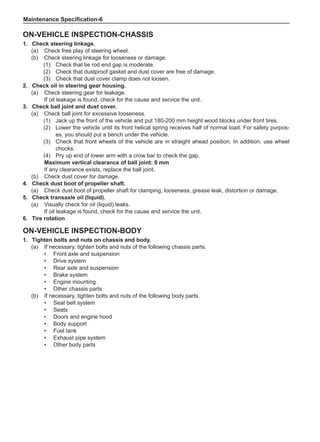
2.	 Check and replace A/C filter.
(a)	 Remove glove box assembly.
(b)	 Remove filter case from filter outlet.
(c)	 Remove element from filter case.
(d)	 Check that A/C filter is free of excessive damage, dirt or oil stains. If necessary, replace A/C filter
element.
(e)	 Install in the reverse order of removal.
Maintenance Specification-
Basic Correction Dimensions of Body
This section gives basic vehicle dimensions for your comparison and reference during servicing.
•	 All numerical dimensions are actual dimensions.
•	 Center of mounting hole is selected as measuring point.
•	 When a gauge is used, adjust its two measuring probes to equal length, and then test the probes
and the gauge themselves to ensure no use gap exists.
•	 When a measuring tape is used, ensure it is free of stretch, twist and bending.
•	 The asterisk (*) following a measuring point value means that the same value is obtained from the
measuring point at the symmetrical position on the other side.
•	 Coordinates of a measuring point refer to the distances measured between the point and the nor-
mal lines “X”, “Y” and “Z” respectively.
•	 The bilaterally symmetrical points of coordinates of a measuring point indicate the point coordinates
on the left side. The point coordinates on the right side are symmetric to those on the left side.
872±1.5
689.3±1
164.5
65
5.5
834±1.5
219±0.8
271.5±1
122.5±0.8
Subframe
Maintenance Specification-
215
137.4
332
97
61±1.5
1195±1
119±1.5
261±1.5
321±1.5
340
33±1
50.5±1
56.5±1
978±2
1133±2
1408±1
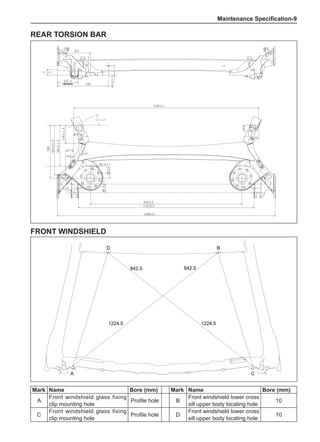
Rear torsion bar
1224.5 1224.5
842.5 842.5
A C
D B
Mark Name Bore (mm) Mark Name Bore (mm)
A
Front windshield glass fixing
clip mounting hole
Profile hole B
Front windshield lower cross
sill upper body locating hole
10
C
Front windshield glass fixing
clip mounting hole
Profile hole D
Front windshield lower cross
sill upper body locating hole
10
Front windshield
Maintenance Specification-10
Luggage compartment
Mark Name Bore (mm) Mark Name Bore (mm)
A
Luggage compartment hinge
mounting via hole
Square hole
10×10
C
Rear bumper mounting hole
(locating hole)
7
B
Luggage compartment hinge
mounting via hole
Square hole
10×10
D
Rear bumper mounting hole
(locating hole)
7
1104.9 1104.9
574 574
A
C D
B
Maintenance Specification-11
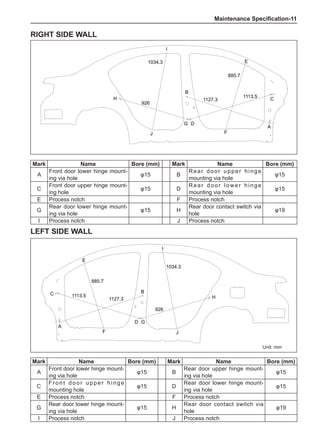
Right side wall
Left side wall
Mark Name Bore (mm) Mark Name Bore (mm)
A
Front door lower hinge mount-
ing via hole
φ15 B
Rear door upper hinge mount-
ing via hole
φ15
C
Front door upper hinge
mounting hole
φ15 D
Rear door lower hinge mount-
ing via hole
φ15
E Process notch F Process notch
G
Rear door lower hinge mount-
ing via hole
φ15 H
Rear door contact switch via
hole
φ19
I Process notch J Process notch
Unit: mm
926
885.7
1127.3
1113.5
1034.3
A
C
D
B
E
H
I
J
G
F
926
885.7
1127.3
1113.5
1034.3
A
C
D
B
E
H
I
J
G
F
Mark Name Bore (mm) Mark Name Bore (mm)
A
Front door lower hinge mount-
ing via hole
φ15 B
Rear door upper hinge
mounting via hole
φ15
C
Front door upper hinge mount-
ing hole
φ15 D
Rear door lower hinge
mounting via hole
φ15
E Process notch F Process notch
G
Rear door lower hinge mount-
ing via hole
φ15 H
Rear door contact switch via
hole
φ19
I Process notch J Process notch
Maintenance Specification-12
Working part Quantity Specification
Engine fuel 40L 93# above premium unleaded gasoline (GB17930-2006)
Engine oil
3.5±0.1L(dry)
3.2±0.1L(wet)
SJ 10W-40
Domestic models, exported
models for tropical areas
SM 5W-30
Type for exported models for
alpine areas
Coolant 5±0.5L
Ethylene-ethylene glycol base
-35°C antifreeze
Type for domestic models
Ethylene-ethylene glycol base
-45°C antifreeze
Type for exported models for
alpine areas
Brake fluid 0.56L DOT4 synthetic brake fluid
Transmission oil
(CVT)
4.35±0.05Kg ESSO EZL799A
Transmission oil
(MT)
1.9±0.15Kg
For domestic models, fill GL-4 80W-90 oil all year round.
For exported models for alpine areas, fill GL-4 75W-90 oil.
For exported models for tropical areas, fill GL-5 140 oil.
Power steering fluid 0.75±0.02L ATF DEXRON III hydraulic transmission oil
Battery terminals 1.0±0.03g Industrial Vaseline
Windshield washer
fluid
3.0±0.1L
Normal temperature: Use clean water with hardness less than
205g/1000 kg.
Low temperature (-18°C±3°C): Use methanol aqueous solution
with concentration of 50%.
A/C refrigerant 420±10g R134a
Other kinetic friction
pairs
--- 3# general purpose lithium base grease for automobile
Tires --- Inflation pressure 220±10kPa
Spare tire --- Inflation pressure 420±10kPa
Item Unit Parameter
Overall length mm 4452
Overall width mm 1705
Overall height (unladen) mm 1488
Wheelbase mm 2608
Front overhang mm 868
Rear overhang mm 976
Front tread mm 1471
Rear tread mm 1457
Approach angle (laden) (°) 18.5
Departure angle (laden) (°) 15.4
Minimum ground clearance (lad-
en)
mm 113.4
Minimum turning diameter m 10.8
Luggage compartment capacity L 330
Service Data
Basic COMPLETE VEHICLE Parameters
Working Agents Fill
Maintenance Specification-13
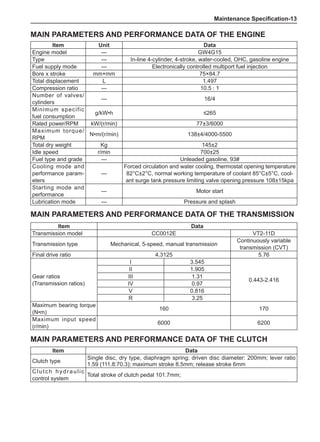
Item Unit Data
Engine model --- GW4G15
Type --- In-line 4-cylinder, 4-stroke, water-cooled, OHC, gasoline engine
Fuel supply mode --- Electronically controlled multiport fuel injection
Bore x stroke mm×mm 75×84.7
Total displacement L 1.497
Compression ratio --- 10.5 : 1
Number of valves/
cylinders
--- 16/4
Minimum specific
fuel consumption
g/kW•h ≤265
Rated power/RPM kW/(r/min) 77±3/6000
Maximum torque/
RPM
N•m/(r/min) 138±4/4000-5500
Total dry weight Kg 145±2
Idle speed r/min 700±25
Fuel type and grade --- Unleaded gasoline, 93#
Cooling mode and
performance param-
eters
---
Forced circulation and water cooling, thermostat opening temperature
82°C±2°C, normal working temperature of coolant 85°C±5°C, cool-
ant surge tank pressure limiting valve opening pressure 108±15kpa
Starting mode and
performance
--- Motor start
Lubrication mode --- Pressure and splash
Main Parameters and Performance Data of the Engine
Item Data
Clutch type
Single disc, dry type, diaphragm spring; driven disc diameter: 200mm; lever ratio
1.59 (111.8:70.3); maximum stroke 8.5mm; release stroke 6mm
Clutch hydraulic
control system
Total stroke of clutch pedal 101.7mm;
Item Data
Transmission model CC0012E VT2-11D
Transmission type Mechanical, 5-speed, manual transmission
Continuously variable
transmission (CVT)
Final drive ratio 4.3125 5.76
Gear ratios
(Transmission ratios)
I 3.545
0.443-2.416
II 1.905
III 1.31
IV 0.97
V 0.816
R 3.25
Maximum bearing torque
(N•m)
160 170
Maximum input speed
(r/min)
6000 6200
Main Parameters and Performance Data of the Clutch
Main Parameters and Performance Data of the Transmission
Maintenance Specification-14
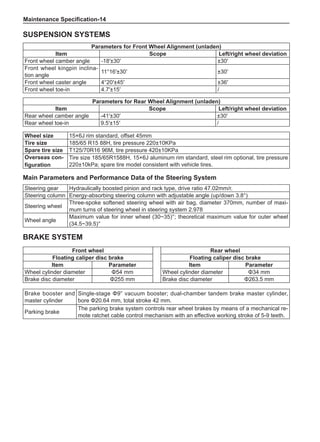
Steering gear Hydraulically boosted pinion and rack type, drive ratio 47.02mm/r.
Steering column Energy-absorbing steering column with adjustable angle (up/down 3.8°)
Steering wheel
Three-spoke softened steering wheel with air bag, diameter 370mm, number of maxi-
mum turns of steering wheel in steering system 2.978
Wheel angle
Maximum value for inner wheel (30~35)°; theoretical maximum value for outer wheel
(34.5~39.5)°
Main Parameters and Performance Data of the Steering System
Parameters for Front Wheel Alignment (unladen)
Item Scope Left/right wheel deviation
Front wheel camber angle -18′±30′ ±30′
Front wheel kingpin inclina-
tion angle
11°16′±30′ ±30′
Front wheel caster angle 4°20′±45′ ±36′
Front wheel toe-in 4.7′±15′ /
Parameters for Rear Wheel Alignment (unladen)
Item Scope Left/right wheel deviation
Rear wheel camber angle -41′±30′ ±30′
Rear wheel toe-in 9.5′±15′ /
Front wheel Rear wheel
Floating caliper disc brake Floating caliper disc brake
Item Parameter Item Parameter
Wheel cylinder diameter Φ54 mm Wheel cylinder diameter Φ34 mm
Brake disc diameter Φ255 mm Brake disc diameter Φ263.5 mm
Brake booster and
master cylinder
Single-stage Φ9” vacuum booster; dual-chamber tandem brake master cylinder,
bore Φ20.64 mm, total stroke 42 mm.
Parking brake
The parking brake system controls rear wheel brakes by means of a mechanical re-
mote ratchet cable control mechanism with an effective working stroke of 5-9 teeth.
Suspension Systems
Wheel size 15×6J rim standard, offset 45mm
Tire size 185/65 R15 88H, tire pressure 220±10KPa
Spare tire size T125/70R16 96M, tire pressure 420±10KPa
Overseas con-
figuration
Tire size 185/65R1588H, 15×6J aluminum rim standard, steel rim optional, tire pressure
220±10kPa; spare tire model consistent with vehicle tires.
Brake System
Maintenance Specification-15
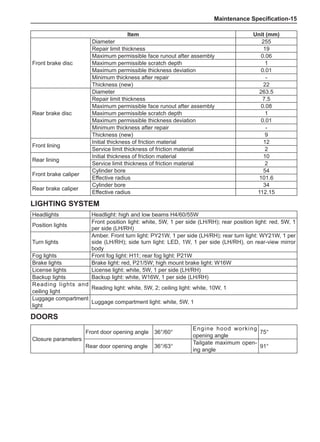
Closure parameters
Front door opening angle 36°/60°
Engine hood working
opening angle
75°
Rear door opening angle 36°/63°
Tailgate maximum open-
ing angle
91°
Headlights Headlight: high and low beams H4/60/55W
Position lights
Front position light: white, 5W, 1 per side (LH/RH); rear position light: red, 5W, 1
per side (LH/RH)
Turn lights
Amber. Front turn light: PY21W, 1 per side (LH/RH); rear turn light: WY21W, 1 per
side (LH/RH); side turn light: LED, 1W, 1 per side (LH/RH), on rear-view mirror
body
Fog lights Front fog light: H11; rear fog light: P21W
Brake lights Brake light: red, P21/5W; high mount brake light: W16W
License lights License light: white, 5W, 1 per side (LH/RH)
Backup lights Backup light: white, W16W, 1 per side (LH/RH)
Reading lights and
ceiling light
Reading light: white, 5W, 2; ceiling light: white, 10W, 1
Luggage compartment
light
Luggage compartment light: white, 5W, 1
Item Unit (mm)
Front brake disc
Diameter 255
Repair limit thickness 19
Maximum permissible face runout after assembly 0.06
Maximum permissible scratch depth 1
Maximum permissible thickness deviation 0.01
Minimum thickness after repair -
Thickness (new) 22
Rear brake disc
Diameter 263.5
Repair limit thickness 7.5
Maximum permissible face runout after assembly 0.08
Maximum permissible scratch depth 1
Maximum permissible thickness deviation 0.01
Minimum thickness after repair -
Thickness (new) 9
Front lining
Initial thickness of friction material 12
Service limit thickness of friction material 2
Rear lining
Initial thickness of friction material 10
Service limit thickness of friction material 2
Front brake caliper
Cylinder bore 54
Effective radius 101.6
Rear brake caliper
Cylinder bore 34
Effective radius 112.15
Lighting System
Doors
Maintenance Specification-16
Position
Tightening
torque (N•m)
Quantity (pcs)
Surface
coating
Remark
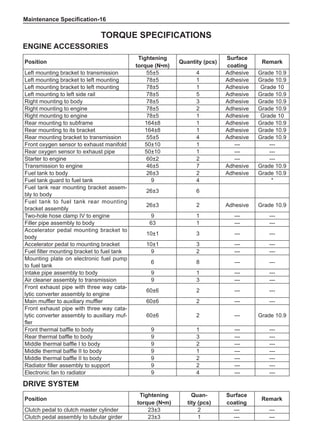
Left mounting bracket to transmission 55±5 4 Adhesive Grade 10.9
Left mounting bracket to left mounting 78±5 1 Adhesive Grade 10.9
Left mounting bracket to left mounting 78±5 1 Adhesive Grade 10
Left mounting to left side rail 78±5 5 Adhesive Grade 10.9
Right mounting to body 78±5 3 Adhesive Grade 10.9
Right mounting to engine 78±5 2 Adhesive Grade 10.9
Right mounting to engine 78±5 1 Adhesive Grade 10
Rear mounting to subframe 164±8 1 Adhesive Grade 10.9
Rear mounting to its bracket 164±8 1 Adhesive Grade 10.9
Rear mounting bracket to transmission 55±5 4 Adhesive Grade 10.9
Front oxygen sensor to exhaust manifold 50±10 1 --- ---
Rear oxygen sensor to exhaust pipe 50±10 1 --- ---
Starter to engine 60±2 2 --- ---
Transmission to engine 46±5 7 Adhesive Grade 10.9
Fuel tank to body 26±3 2 Adhesive Grade 10.9
Fuel tank guard to fuel tank 9 4 *
Fuel tank rear mounting bracket assem-
bly to body
26±3 6
Fuel tank to fuel tank rear mounting
bracket assembly
26±3 2 Adhesive Grade 10.9
Two-hole hose clamp IV to engine 9 1 --- ---
Filler pipe assembly to body 63 1 --- ---
Accelerator pedal mounting bracket to
body
10±1 3 --- ---
Accelerator pedal to mounting bracket 10±1 3 --- ---
Fuel filter mounting bracket to fuel tank 9 2 --- ---
Mounting plate on electronic fuel pump
to fuel tank
6 8 --- ---
Intake pipe assembly to body 9 1 --- ---
Air cleaner assembly to transmission 9 3 --- ---
Front exhaust pipe with three way cata-
lytic converter assembly to engine
60±6 2 --- ---
Main muffler to auxiliary muffler 60±6 2 --- ---
Front exhaust pipe with three way cata-
lytic converter assembly to auxiliary muf-
fler
60±6 2 --- Grade 10.9
Front thermal baffle to body 9 1 --- ---
Rear thermal baffle to body 9 3 --- ---
Middle thermal baffle I to body 9 2 --- ---
Middle thermal baffle II to body 9 1 --- ---
Middle thermal baffle II to body 9 2 --- ---
Radiator filler assembly to support 9 2 --- ---
Electronic fan to radiator 9 4 --- ---
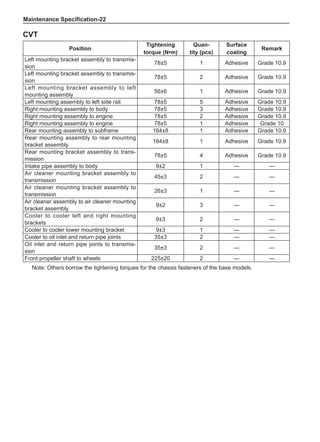
Torque Specifications
Engine Accessories
Position
Tightening
torque (N•m)
Quan-
tity (pcs)
Surface
coating
Remark
Clutch pedal to clutch master cylinder 23±3 2 --- ---
Clutch pedal assembly to tubular girder 23±3 1 --- ---
Drive System
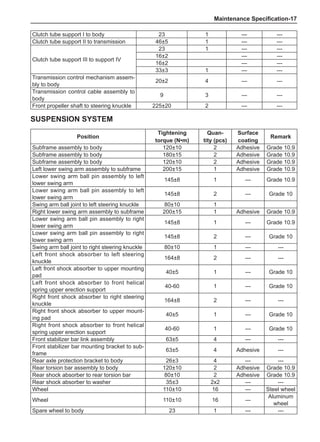
Maintenance Specification-17
Position
Tightening
torque (N•m)
Quan-
tity (pcs)
Surface
coating
Remark
Subframe assembly to body 120±10 2 Adhesive Grade 10.9
Subframe assembly to body 180±15 2 Adhesive Grade 10.9
Subframe assembly to body 120±10 2 Adhesive Grade 10.9
Left lower swing arm assembly to subframe 200±15 1 Adhesive Grade 10.9
Lower swing arm ball pin assembly to left
lower swing arm
145±8 1 --- Grade 10.9
Lower swing arm ball pin assembly to left
lower swing arm
145±8 2 --- Grade 10
Swing arm ball joint to left steering knuckle 80±10 1
Right lower swing arm assembly to subframe 200±15 1 Adhesive Grade 10.9
Lower swing arm ball pin assembly to right
lower swing arm
145±8 1 --- Grade 10.9
Lower swing arm ball pin assembly to right
lower swing arm
145±8 2 --- Grade 10
Swing arm ball joint to right steering knuckle 80±10 1 --- ---
Left front shock absorber to left steering
knuckle
164±8 2 --- ---
Left front shock absorber to upper mounting
pad
40±5 1 --- Grade 10
Left front shock absorber to front helical
spring upper erection support
40-60 1 --- Grade 10
Right front shock absorber to right steering
knuckle
164±8 2 --- ---
Right front shock absorber to upper mount-
ing pad
40±5 1 --- Grade 10
Right front shock absorber to front helical
spring upper erection support
40-60 1 --- Grade 10
Front stabilizer bar link assembly 63±5 4 --- ---
Front stabilizer bar mounting bracket to sub-
frame
63±5 4 Adhesive ---
Rear axle protection bracket to body 26±3 4 --- ---
Rear torsion bar assembly to body 120±10 2 Adhesive Grade 10.9
Rear shock absorber to rear torsion bar 80±10 2 Adhesive Grade 10.9
Rear shock absorber to washer 35±3 2x2 --- ---
Wheel 110±10 16 --- Steel wheel
Wheel 110±10 16 ---
Aluminum
wheel
Spare wheel to body 23 1 --- ---
Suspension System
Clutch tube support I to body 23 1 --- ---
Clutch tube support II to transmission 46±5 1 --- ---
Clutch tube support III to support IV
23 1 --- ---
16±2 --- ---
16±2 --- ---
33±3 1 --- ---
Transmission control mechanism assem-
bly to body
20±2 4 --- ---
Transmission control cable assembly to
body
9 3 --- ---
Front propeller shaft to steering knuckle 225±20 2 --- ---
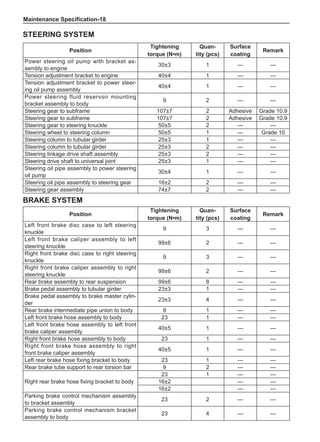
Maintenance Specification-18
Position
Tightening
torque (N•m)
Quan-
tity (pcs)
Surface
coating
Remark
Left front brake disc case to left steering
knuckle
9 3 --- ---
Left front brake caliper assembly to left
steering knuckle
99±6 2 --- ---
Right front brake disc case to right steering
knuckle
9 3 --- ---
Right front brake caliper assembly to right
steering knuckle
99±6 2 --- ---
Rear brake assembly to rear suspension 99±6 8 --- ---
Brake pedal assembly to tubular girder 23±3 1 --- ---
Brake pedal assembly to brake master cylin-
der
23±3 4 --- ---
Rear brake intermediate pipe union to body 9 1 --- ---
Left front brake hose assembly to body 23 1 --- ---
Left front brake hose assembly to left front
brake caliper assembly
40±5 1 --- ---
Right front brake hose assembly to body 23 1 --- ---
Right front brake hose assembly to right
front brake caliper assembly
40±5 1 --- ---
Left rear brake hose fixing bracket to body 23 1 --- ---
Rear brake tube support to rear torsion bar 9 2 --- ---
Right rear brake hose fixing bracket to body
23 1 --- ---
16±2 --- ---
16±2 --- ---
Parking brake control mechanism assembly
to bracket assembly
23 2 --- ---
Parking brake control mechanism bracket
assembly to body
23 4 --- ---
Brake System
Position
Tightening
torque (N•m)
Quan-
tity (pcs)
Surface
coating
Remark
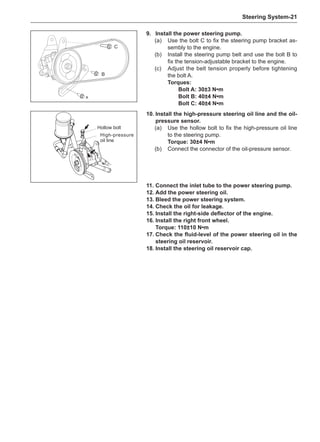
Power steering oil pump with bracket as-
sembly to engine
30±3 1 --- ---
Tension adjustment bracket to engine 40±4 1 --- ---
Tension adjustment bracket to power steer-
ing oil pump assembly
40±4 1 --- ---
Power steering fluid reservoir mounting
bracket assembly to body
9 2 --- ---
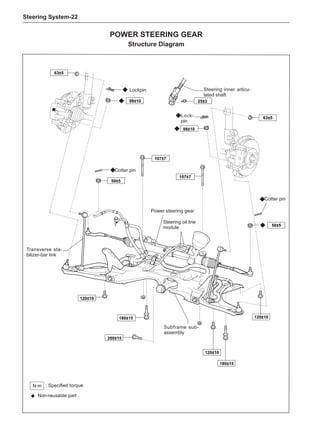
Steering gear to subframe 107±7 2 Adhesive Grade 10.9
Steering gear to steering knuckle 50±5 2 --- ---
Steering wheel to steering column 50±5 1 --- Grade 10
Steering column to tubular girder 25±3 1 --- ---
Steering column to tubular girder 25±3 2 --- ---
Steering linkage drive shaft assembly 25±3 2 --- ---
Steering drive shaft to universal joint 25±3 1 --- ---
Steering oil pipe assembly to power steering
oil pump
30±4 1 --- ---
Steering oil pipe assembly to steering gear 16±2 2 --- ---
Steering gear assembly 74±7 2 --- ---
Steering System
Maintenance Specification-19
Position
Tightening
torque (N•m)
Quantity (pcs) Surface coating Remark
Instrument panel stiffening
beam assembly
20±2 9 Adhesive ---
Driver’s seat assembly 45±5 4 Adhesive ---
Front seat assembly 45±5 4 Adhesive ---
Rear twin seat assembly 15±2 1 Adhesive ---
Rear twin seat assembly 45±5 7 Adhesive ---
Rear single seat assembly 15±2 1 Adhesive ---
Rear single seat assembly 45±5 6 Adhesive ---
Interior and Exterior Trims
Position
Tightening
torque (N•m)
Quantity (pcs)
Surface
coating
Remark
Side wall assembly 9±2 4 --- ---
Roof stiffening beam I fixing brack-
et
9±2 6 --- ---
Wiper motor bracket 9 2 --- ---
Vent panel mounting plate 9 8 --- ---
Rear crash bar assembly 23±3 6 --- ---
Door hinge 23±3 8 --- ---
Door hinge 23±3 16 --- ---
Tailgate hinge 50±5 2 --- ---
Tailgate hinge 23±3 4 --- ---
Body
Left parking brake cable assembly to body
(For drum brakes only. N/A on disc brakes.)
9 1 --- ---
Left parking brake cable assembly to body 9 4 --- ---
Right parking brake cable assembly to body
(For drum brakes only. N/A on disc brakes.)
9 1 --- ---
Right parking brake cable assembly to body 9 4 --- ---
Brake vacuum hose support to body 9 1 --- ---
ABS mounting bracket assembly to body 23 3 --- ---
Left front wheel speed sensor with bracket
assembly to left steering knuckle
9 1 --- ---
Left front wheel speed sensor with bracket
assembly to body
9 1 --- ---
Right front wheel speed sensor with bracket
assembly to right steering knuckle
9 1 --- ---
Right front wheel speed sensor with bracket
assembly to body
9 1 --- ---
Left rear wheel speed sensor with bracket
assembly to rear wheel hub
9 1 --- ---
Left rear wheel speed sensor with bracket
assembly to body
9 1 --- ---
Left rear wheel speed sensor with bracket
assembly to rear torsion bar
9 1 --- ---
Right rear wheel speed sensor with bracket
assembly to rear wheel hub
9 1 --- ---
Right rear wheel speed sensor with bracket
assembly to body
9 1 --- ---
Right rear wheel speed sensor with bracket
assembly to rear torsion bar
9 1 --- ---
Rear brake caliper to rear wheel hub support 63±5 4 --- ---
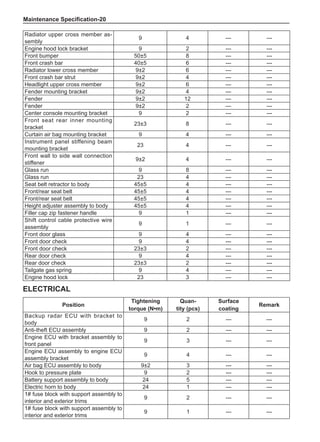
Maintenance Specification-20
Position
Tightening
torque (N•m)
Quan-
tity (pcs)
Surface
coating
Remark
Backup radar ECU with bracket to
body
9 2 --- ---
Anti-theft ECU assembly 9 2 --- ---
Engine ECU with bracket assembly to
front panel
9 3 --- ---
Engine ECU assembly to engine ECU
assembly bracket
9 4 --- ---
Air bag ECU assembly to body 9±2 3 --- ---
Hook to pressure plate 9 2 --- ---
Battery support assembly to body 24 5 --- ---
Electric horn to body 24 1 --- ---
1# fuse block with support assembly to
interior and exterior trims
9 2 --- ---
1# fuse block with support assembly to
interior and exterior trims
9 1 --- ---
Electrical
Radiator upper cross member as-
sembly
9 4 --- ---
Engine hood lock bracket 9 2 --- ---
Front bumper 50±5 8 --- ---
Front crash bar 40±5 6 --- ---
Radiator lower cross member 9±2 6 --- ---
Front crash bar strut 9±2 4 --- ---
Headlight upper cross member 9±2 6 --- ---
Fender mounting bracket 9±2 4 --- ---
Fender 9±2 12 --- ---
Fender 9±2 2 --- ---
Center console mounting bracket 9 2 --- ---
Front seat rear inner mounting
bracket
23±3 8 --- ---
Curtain air bag mounting bracket 9 4 --- ---
Instrument panel stiffening beam
mounting bracket
23 4 --- ---
Front wall to side wall connection
stiffener
9±2 4 --- ---
Glass run 9 8 --- ---
Glass run 23 4 --- ---
Seat belt retractor to body 45±5 4 --- ---
Front/rear seat belt 45±5 4 --- ---
Height adjuster assembly to body 45±5 4 --- ---
Filler cap zip fastener handle 9 1 --- ---
Shift control cable protective wire
assembly
9 1 --- ---
Front door glass 9 4 --- ---
Front door check 9 4 --- ---
Front door check 23±3 2 --- ---
Rear door check 9 4 --- ---
Rear door check 23±3 2 --- ---
Tailgate gas spring 9 4 --- ---
Engine hood lock 23 3 --- ---
Maintenance Specification-21
2# fuse block with support assembly to
body
9 1 --- ---
Clutch switch assembly to chassis 20 1 --- ---
Central door lock controller with brack-
et assembly to interior and exterior
trims
9 2 --- ---
Vehicle speed sensor assembly 24 1 --- ---
Battery ground harness assembly 10±2 1 --- ---
Battery ground harness assembly 22±3 1 --- ---
Left A-pillar harness clamp to body 9 1 --- ---
Right A-pillar harness clamp to body 9 1 --- ---
Windshield harness clamp 9 2 --- ---
Engine harness bracket to chassis 9 1 --- ---
Rear oxygen sensor bracket to body 9 1 --- ---
Left combination headlight assembly to
body
9 4 --- ---
Right combination headlight assembly
to body
9 4 --- ---
Left combination taillight assembly to
body
9 3 --- ---
Right combination taillight assembly to
body
9 3 --- ---
Parking brake switch assembly to
chassis
5 1 --- ---
Front wiper linkage motor assembly to
body
9 2 --- ---
Left front wiper arm assembly to wiper
motor output shaft
24 1 --- ---
Washer fluid reservoir assembly to
body
9 3 --- ---
Front passenger side air bag assembly
to interior and exterior trims
9 2 --- ---
Left front door window regulator as-
sembly to body
9 6 --- ---
Right front door window regulator as-
sembly to body
9 6 --- ---
Left rear door window regulator as-
sembly to body
9 4 --- ---
Right rear door window regulator as-
sembly to body
9 4 --- ---
Rear door latch to body 24 2 --- ---
Tailgate latch to body 24 2 --- ---
Tailgate lock to body 9 2 --- ---
Tailgate handle to body 9 1 --- ---
Antenna harness assembly to body 9 1 --- ---
Maintenance Specification-22
Note: Others borrow the tightening torques for the chassis fasteners of the base models.
Position
Tightening
torque (N•m)
Quan-
tity (pcs)
Surface
coating
Remark
Left mounting bracket assembly to transmis-
sion
78±5 1 Adhesive Grade 10.9
Left mounting bracket assembly to transmis-
sion
78±5 2 Adhesive Grade 10.9
Left mounting bracket assembly to left
mounting assembly
56±6 1 Adhesive Grade 10.9
Left mounting assembly to left side rail 78±5 5 Adhesive Grade 10.9
Right mounting assembly to body 78±5 3 Adhesive Grade 10.9
Right mounting assembly to engine 78±5 2 Adhesive Grade 10.9
Right mounting assembly to engine 78±5 1 Adhesive Grade 10
Rear mounting assembly to subframe 164±8 1 Adhesive Grade 10.9
Rear mounting assembly to rear mounting
bracket assembly
164±8 1 Adhesive Grade 10.9
Rear mounting bracket assembly to trans-
mission
78±5 4 Adhesive Grade 10.9
Intake pipe assembly to body 9±2 1 --- ---
Air cleaner mounting bracket assembly to
transmission
45±3 2 --- ---
Air cleaner mounting bracket assembly to
transmission
26±3 1 --- ---
Air cleaner assembly to air cleaner mounting
bracket assembly
9±2 3 --- ---
Cooler to cooler left and right mounting
brackets
9±3 2 --- ---
Cooler to cooler lower mounting bracket 9±3 1 --- ---
Cooler to oil inlet and return pipe joints 35±3 2 --- ---
Oil inlet and return pipe joints to transmis-
sion
35±3 2 --- ---
Front propeller shaft to wheels 225±20 2 --- ---
CVT
Engine Accessories-
Engine Accessories
Mounting Unit
Brief Description...........................................................2
Engine Mountings.
..........................................................2
Fuel Supply System
Brief Description...........................................................5
Fuel Tank............................................................................6
Fuel Pump and Charcoal Canister.
..........................7
Fuel Filter Assembly.....................................................8
Filler Pipe Assembly......................................................9
Fuel Lines...........................................................................10
Intake System
Brief Description...........................................................12
Air Cleaner.......................................................................13
Exhaust System
Brief Description...........................................................14
Exhaust Pipe Assembly.................................................15
Cooling System
Brief Description...........................................................17
Failure Diagnosis...........................................................18
On-Vehicle Inspection..................................................20
Cooling Fan.......................................................................21
Engine Coolant...............................................................23
Radiator Assembly.........................................................24
Engine Accessories-
Mounting Unit
Brief Description
The powertrain is secured to the body and subframe by means of three-point mounting. The left and
rear mountings are of compression rubber type while the right mounting is of hydraulic type.
Structure Diagram
Engine Mountings
Removal
1.	 Separate engine.
(a)	Hoist the engine with a crane.
(b)	 Using socket, ratchet wrench and extension bar, re-
move the 2 bolts and the nut from the right mount-
ing.
Engine left mounting
assembly
Engine left mounting bracket
Engine rear mounting bracket welding assembly
Engine rear mounting assembly	
Engine right mounting assembly
Engine Accessories-
(c)	 Using socket, ratchet wrench and extension bar, re-
move the bolt from the rear mounting assembly.
(d)	 Using socket, ratchet wrench and extension bar,
remove the left mounting assembly bolts, and then
remove the engine.
2.	 Remove engine right mounting.
Using socket and ratchet wrench, remove the 3 bolts
and the right mounting on the body.
3.	 Remove engine rear mounting.
Using socket and ratchet wrench, remove the bolt and
the rear mounting on the subframe.
4.	 Remove engine left mounting.
Using socket wrench, remove the 6 bolts and the left
mounting on the left mounting bracket.
Engine Accessories-
5.	 Remove left mounting bracket.
Using socket wrench, remove the 4 bolts and the left
mounting bracket on the transmission.
6.	 Remove rear mounting bracket.
Using socket wrench, remove the 4 bolts and the rear
mounting bracket on the transmission.
Installation
Install in the reverse order of removal.
Engine Accessories-
Fuel Supply System
Brief Description
The fuel supply system mainly consists of such components as fuel tank, fuel pump, fuel filter, fuel lines
and rails, fuel pressure regulator, and fuel injection nozzles.
With built-in electronic fuel pump and canister, the fuel tank is a metal one having a capacity of 40L; the
evaporative emission control system features a solenoid-operated charcoal canister; fuel supply control
is enabled through the electronic accelerator pedal.
Structure Diagram
Fuel tank assembly
Fuel pump assembly
Filler hose
Filler pipe jacket
Fuel filter assembly
Fuel inlet tube
Fuel tank guard
Fuel tank lock assembly
Filler pipe shield
Air return hose
Filler pipe assembly
Canister breather pipe
Fuel tank rear mounting
bracket assembly
Electronic fuel pump upper
mounting plate
Desorption tube
Engine Accessories-
Attentions
Warning: Be sure to observe the following before
performing any fuel system maintenance item:
•	 Disconnect battery negative cable.
•	 Do not smoke in the workplace. In addition, set a “No
Smoking” warning sign.
•	 Be sure to get dry chemical fire extinguishers ready
in the vicinity of the workplace.
•	 Maintenance must be made at a workplace where
is well ventilated and is kept away from open flames
(e.g. natural gas heater).
•	 Remember to wear safety goggles.
•	 Before disconnecting any fuel feed line, be sure to
release pressure in fuel system. Otherwise fire and/
or personal injury may be caused. The fuel injection
system is under pressure, even after engine shut-
down.
•	 After fuel feed pipe is disconnected, a small amount
of fuel may spill out. To reduce incidence of personal
injury, you should block disconnected pipe fittings us-
ing wiping cloth. After finishing work, put wiping cloth
in a designated container.
Fuel Tank
Removal
1.	Lift rear seat.
2.	 Remove body cover.
3.	Unplug electrical plug of fuel pump from top of fuel
tank.
4.	Pull out quick connectors connecting integrated fuel
inlet and return pipe with fuel inlet tube and desorp-
tion hose I with desorption tube, and then block
joints with cotton cloth to avoid high-pressure fuel
jet.
Engine Accessories-
5.	 Remove hoops and clips from filler hose, canister
breather pipe and air return hose at rear of fuel tank.
6.	 Remove the 4 bolts and 4 stiffener plates securing
the fuel tank using the specified torque.
Torque specification: 26±3 N•m
Inspection
1.	 If exterior is deformed.
2.	 Check fuel tank for fuel leakage and damage.
3.	 Check fuel pump and fuel level sensor gasket for oil
leakage.
4.	 Check hoses and fuel pipes connected with fuel tank
for oil leakage, loose connections, aging or damage.
5.	 If charcoal canister in ventilation circuit is in good
condition.
6.	 If fuel tank cap is in good condition.
7.	 If filler pipe and restriction orifice are in good condi-
tion.
Installation
Install in the reverse order of removal.
Fuel Pump and Charcoal Canister
Removal
1.	Lift rear seat.
2.	 Remove body cover.
3.	Unplug electrical plug of fuel pump from top of fuel
tank.
Engine Accessories-
Installation
1.	Install fuel pump and charcoal canister assembly as
well as fuel level sensor carefully to protect them
from damage.
2.	 Ensure that the line joints connected with fuel pump
and charcoal canister are correct.
3.	Install seal and mounting plate, and tighten bolts.
Note:
Error-proofing identifications of mounting plate, fuel
pump assembly and fuel tank must be uniform.
Specified torque: 6±2 N•m
Fuel Filter Assembly
Removal
1.	 Release pressure in fuel system.
2.	 Disconnect battery negative cable.
3.	Lift and securely support your vehicle.
4.	Unplug the quick couplings of the 2 nylon tubes
connected with fuel filter assembly.
Note:
After fuel feed pipe is disconnected, a small amount
of fuel may spill out. To reduce incidence of personal
injury, you should block disconnected pipe fittings
using wiping cloth. After finishing work, put wiping
cloth in a designated container.
5.	 Loosen the bolts on fuel filter bracket.
6.	 Remove fuel filter assembly.
4.	 Remove fuel pump.
(a)	 Clear all dirt buildup around fuel pump flange.
(b)	 Remove lines connected with fuel pump.
(c)	 Remove the 8 small bolts on the fuel pump mount-
ing plate diagonally in turn with a wrench.
(d)	 Take out fuel pump assembly from inside of fuel
tank.
Note:
Do not damage the fuel level sensor.
The fuel chamber in the fuel pump unit can not be
drained. When this unit is removed, the fuel in the
fuel chamber may spill.
(e)	 Remove the seal ring and discard it.
Engine Accessories-
Filler Pipe Assembly
Removal
1.	 Remove fuel tank lock assembly and filler pipe
jacket.
3.	 Remove the bolts securing filler pipe assembly
bracket to body.
4.	 Remove hoops and clips from filler hose, air return
hose and canister breather pipe.
5.	 Remove filler pipe assembly.
2.	 Remove the 2 mounting clips of filler pipe shield,
and dismount the shield from filler pipe assembly.
Engine Accessories-10
Fuel Lines
Warning:
Fuel feed lines are under high pressure, so you
should use extra care when servicing them.
Inspection:
Visually check fuel lines for oil leak and hoses for cracks,
aging or damage. Check all pipe clips for proper tighten-
ing. When needed, replace parts.
Structure Diagram
Fuel tank lock assembly
Filler pipe jacket
Filler pipe shield
mounting clip
Filler pipe shield
Canister breather pipe
Filler hose
Air return hose
Desorption hose I
Four-hole pipe clamp II
Two-hole hose
clamp I Desorption tube Desorption
hose II
Canister
solenoid
valve
mouning
jacket
Two-hole
pipe clamp II
Canister
solenoid
valve
Single-
hole pipe
clamp II
Desorption
hose III
Fuel inlet and re-
turn pipe clamp
Fuel inlet hose II
Fuel inlet tube
Four-hole pipe
clamp
Two-hole hose
clamp IV
Two-hole pipe
clamp III
Three-hole pipe
clamp II
Three-hole hose
clamp I
Absorption hose
Integrated fuel inlet
and return pipe
Single-hole
hose clamp I
Fuel inlet
hose I
Single-hole
pipe clamp II
Filler pipe
assembly
Engine Accessories-11
Removal
1.	 Release pressure in fuel system.
2.	 Disconnect battery negative cable.
3.	 Disconnect fuel hoses from front and rear ends of
fuel pipes.
Warning:
After a fuel hose is disconnected, a small amount
of fuel may spill out. To prevent personal injury, you
should block disconnected hoses and fuel pipes us-
ing wiping cloth. After finishing pipe removal work,
put wiping cloth in a designated container.
4.	 Remove fuel pipe cover from bodywork.
5.	 Make position marks on bodywork and fuel pipes so
that pipe clips can be reinstalled to their original po-
sitions.
6.	 Remove fuel pipes and pipe clips from bodywork.
7.	 Remove pipe clips from fuel pipes.
Installation
1.	Install pipe clips to mark positions on fuel pipes.
If any pipe clip is deformed or its claw is bended or dam-
aged, replace with a new one.
2.	 Secure fuel pipes to the vehicle using pipe clips.
3.	Install fuel pipe cover onto bodywork. Be sure to use
new nuts.
4.	Install fuel hoses onto fuel pipes.
5.	 Check for oil leak with engine stopped and ignition
switch ON.
Engine Accessories-12
Intake System
Brief Description
The intake system consists of intake pipe assembly, intake hose, crankcase bleed pipe, air cleaner, etc.
It is used to provide the engine with sufficient dry and clean air with smallest possible intake air tem-
perature rise.
Structure Diagram
Air cleaner case upper
half
Air cleaner case lower half
Air cleaner element
Intake hose
Intake pipe assembly
Crankcase bleed pipe
Engine Accessories-13
Air Cleaner
Filter Element Replacement
Replace air cleaner element every 10,000km. In severe
environments, do the job as appropriate.
The air cleaner element must be cleaned on a regular
basis. Remove dust by using pressurized air flow to
blow the front of the air cleaner element so as to ensure
intake flow and reduce intake resistance thus reducing
fuel consumption.
ATTENTISONS
Any metal particles entering inlet passage may dam-
age the engine.
When removing and installing intake system parts,
seal openings of the parts removed and the engine
openings with cotton silk cloth, tape or other appro-
priate materials.
When installing intake system parts, check that no
metal particles enter the engine or the parts to be in-
stalled.
1.
2.
3.
2.	 Screw off the type B worm drive hose hoop connect-
ing throttle body with air cleaner case upper half,
and remove intake hose.
3.	 Open the dog to remove air cleaner case upper half,
then simply take out air cleaner element and replace
it.
4.	 Remove the 3 bolts connected with air cleaner
bracket, and remove the bolts connecting intake
pipe assembly with body.
Removal
1.	 Open the steel strip elastic hoop using pliers, and
remove the crankcase bleed pipe.
Engine Accessories-14
Exhaust System
Brief Description
The exhaust system consists of two-stage muffler (with two-stage three way catalytic converter) and
front and rear oxygen sensors.
Structure Diagram
Front thermal baffle
Rear ther-
mal baffle
Hexagon flange bolt
Seal ring
Spring
Bolt
Oxygen sensor assembly
Front exhaust pipe TWC assembly
Gasket II
Suspension Auxiliary muffler
assembly
Main muffler assembly
Three-hole
rubber block
Middle ther-
mal baffle II
Middle ther-
mal baffle I
Engine Accessories-15
Exhaust Pipe Assembly
Removal
Note:
It is required that removal of any part of the exhaust
system be made 30 minutes after shutdown so as to
avoid personal injury caused by hot components.
1.	 Remove main muffler assembly.
(a)	 Remove the spring bolts connecting front flange of
main muffler assembly with rear flange of auxiliary
muffler assembly, and take out the seal ring be-
tween the flanges.
2.	 Remove auxiliary muffler assembly.
(a)	 Remove the bolts connecting front flange of auxilia-
ry muffler assembly with rear flange of rear catalytic
converter assembly.
(b)	 Remove the 3 rubber suspensions on main muffler.
(c)	 Dismount main muffler assembly.
Note:
The seal ring between front flange of main muffler
and rear flange of auxiliary muffler mainly plays the
role of sealing. It may deform significantly after hav-
ing ever been installed so that its sealing effect will
degrade. It is suggested that you should not reuse
the seal ring. If necessary, reuse it once only.
Warning:
When performing this operation, you must have
some one hold main muffler to prevent it from drop-
ping which will cause injury to the operator.
Engine Accessories-16
3.	 Remove rear-stage catalytic converter assembly.
(a)	 Remove the spring bolts connecting front flange
face of rear-stage catalytic converter assembly with
rear flange of exhaust manifold assembly, and take
out the seal ring between the flanges.
(b)	 Remove rear-stage catalytic converter assembly.
Installation
1.	 Clearances between parts on each side of exhaust
pipe assembly should not be less than 15mm.
2.	 Before installation, apply just enough silicone oil
to inside of mounting holes of rubber suspensions.
After installation, rubber suspensions should be
weighted evenly.
3.	After rear-stage catalytic converter has been in-
stalled, ensure oxygen sensor plugs are connected
properly.
(b)	 Remove the 2 two-hole rubber suspensions con-
necting auxiliary muffler with frame.
(c)	 Remove auxiliary muffler assembly.
Note:
The seal ring between front flange of auxiliary muf-
fler and rear flange of rear catalytic converter as-
sembly plays the role of sealing. It may deform sig-
nificantly after having ever been installed so that its
sealing effect will degrade. It is suggested that you
should not reuse the seal ring. If necessary, reuse it
once only.
Warning:
When performing this operation, you must have
some one hold auxiliary muffler to prevent it from
dropping which will cause injury to the operator.
Engine Accessories-17
Cooling System
Brief Description
The closed type forced recirculating water cooling system features a two-stage electronically governed
fan which is integrated with the overflow tank and an aluminum ribbon-tubular radiator with upper and
lower water chambers. The opening pressure of the pressure limiting valve in the cooling system is (108
±15) kPa while the operating temperature of the valve is (85±5) °C.
The cooling system is used to allow comfort cooling of hot parts on the engine under any conditions so
that the engine can always operate within the optimum temperature range. At the same time, the cool-
ing system also provides heat source for the heating system.
The common cooling system faults include engine overheating, engine overcooling, coolant leak, and
noise from working chamber, etc.
Overflow pipe
Radiator outlet pipe
Steel strip elastic hoop
Radiator inlet
pipe
Radiator filter assembly
Radiator upper mounting
R a d i a t o r
assembly
Radiator lower
mounting
Steel strip elastic hoop
Electric fan with overflow
tank assembly
Structure Diagram
Engine Accessories-18
Failure Diagnosis
Coolant temperature too high (engine overheating)
Symptoms
When the engine is running, the coolant temperature gauge pointer always points to the position of the
red scale line or the coolant temperature alarm indicator light comes on, and the actual coolant temper-
ature read using a test is consistent with the gauge reading. This symptom is accompanied by coolant
boiling and the engine is prone to knocking, premature combustion, etc.
Sources of failure
The major causes of engine coolant temperature too high mainly include: firstly, heat-sinking capability
drop of the cooling system and, secondly, increase in heat produced by the engine.
The causes in the cooling system itself include:
Coolant level too low, circulating water shortage, or coolant leak;
Cooling system filled with non-antifreeze coolant or antifreeze coolant of improper grade;
Heat-sinking capability drop resulted from excessive clogging, rust or scaling in radiator, cooling jacket,
water distributor tube, etc.;
Coolant major cycle malfunction caused by the inoperative thermostat’s failure to open normally;
Electronic fan out of work resulted from line failure or malfunction in the motor itself;
Water shortage in water pump, water pump belt too slack or slipping due to oil stains, water pump im-
peller broken, poor sealing of water seal, etc.
Causes outside of coolant:
Delayed engine ignition;
Combustible mixture too rich or too lean;
Knocking or unsmooth engine exhaust caused by increased compression ratio due to excessive com-
bustion chamber deposit;
Poor engine lubrication;
High-temperature gases entering cooling system due to cylinder head gasket being washed away.
Failure Diagnosis
Check pipe joints of cooling system and connections of radiator upper and lower water chambers for
evidence of antifreeze leak.
Check radiator surface for clogging. If any, clean or replace; if OK, go to the next step.
Check water pump drive belt for slipping. If any, adjust tension of the belt to an appropriate level ac-
cording to the technical requirements; if OK, go to the next step.
Check high and low speed electronic fans for normal operation and observe if corresponding electronic
fan rotates when engine coolant temperature reaches its ON/OFF level. If no fans rotate, check their
related lines and the motor itself for malfunction; if the fans operate properly, go to the next step.
Feel temperatures of radiator inlet and outlet pipes when coolant temperature gauge reading reaches
above the opening temperature of the thermostat valve after the engine has been started and run for
a period of time. If the inlet pipe is hot while the outlet pipe is warm, you can judge that the thermostat
can not open so that the engine is always in minor cycle mode; if the coolant surface in the radiator
filler remains calm when engine coolant temperature reaches the full opening temperature of the main
valve of the thermostat, you can judge that the thermostat is still closed; if then you feel that the tem-
perature of the radiator is significantly lower than that of the engine body, you can judge that thermostat
failure occurs. If result of above check is OK, go to the next step.
Perform on-vehicle inspection for pumping capacity of the water pump after engine coolant temperature
reaches the opening temperature of the main valve of the thermostat. When checking, handhold the ra-
diator inlet pipe and then rev up the engine abruptly from idle speed. If you feel that the flow rate in the
radiator inlet pipe increases as the engine revs up, it shows that the water pump operates properly; on
the contrary, it shows that the water pump operates improperly, and then you should overhaul it.
If result of above check is OK but significant engine power drop accompanied by too high cool-
ant temperature is noticed and high-temperature gases gush from the filler while rolling bubbles
appear after the radiator cap is opened or water vapor is discharged from the exhaust pipe, you
should check if the cylinder head gasket has been washed away.
If result of above check is OK and no symptoms such as cylinder head gasket wash away are
found while high engine coolant temperature occurs, you should check for the related causes
outside of the cooling system.
Engine Accessories-19
Excessive Coolant Consumption
Symptoms
Water leakage is found on the engine; coolant level in the overflow tank drops quickly; coolant adding
is frequently required.
Sources of failure
Antifreeze leakage caused by poor sealing of upper and lower water chambers due to radiator damage;
Poor sealing caused by loose pipe fittings of overflow tank, water pump junction surface and cooling
system lines;
High-temperature high-pressure gases in cylinders entering cooling system resulted from cylinder head
gasket damage, flatness out of tolerance and warpage on junction surface between cylinder head and
cylinder block, and loose cylinder head fastening bolts, etc.
Failure Diagnosis
Check pipe joints of the cooling system for evidence of external coolant leakage. Antifreeze is often dye
colored, so the external leakage area is noticeable. You should mainly check such areas as pipe joints,
overflow tank, water pump junction surface, radiator, and radiator cap for sign of antifreeze leakage.
Check the cooling system for internal leakage. Internal leakage is generally accompanied by such
symptoms as weak engine acceleration, white smoke from exhaust pipe, bubbles in radiator, oil level
rise, and ivory oil. Then you should overhaul cylinder head and cylinder head gasket.
Engine Accessories-20
On-Vehicle Inspection
1.	 Check cooling system for leakage.
Note:
To avoid being scalded, do not remove radiator filler
cap when engine and radiator are still hot. Heat ex-
pansion will result in hot engine coolant and steam
spilling out of radiator.
(a)	 Fill radiator with coolant, and connect a radiator
filler cap tester.
(b)	 Warm up engine.
(c)	 Pump in the system to 137kPa and Check that the
pressure does not drop.
In the case of pressure drop, check pipes, radiator
and water pump for leakage. If no external evidence
of liquid leakage is found, check heater core, cylin-
der block, and cylinder head.
2.	 Check engine coolant level in reservoir tank.
The engine coolant level should be between lines “L”
and “F” when engine is cold. If too low, check for leakage
and fill ethylene glycol antifreeze (-35°C) up to “F” line.
3.	 Check quality of engine coolant.
(a)	 Remove radiator filler cap.
Note:
To avoid being scalded, do not remove radiator filler
cap when engine and radiator are still hot. Heat ex-
pansion will result in hot engine coolant and steam
spilling out of radiator.
(b)	 Check radiator filler cap and radiator filler for rust
and stains. There should be no oil stains in the
coolant.
If too dirty, change coolant.
(c)	 Reinstall radiator filler cap.
4.	 Check radiator fins for blocking.
(a)	 If any radiator fin is blocked, clean it with water or
steam cleaner and dry it with compressed air.
Note:
If the steam cleaner is too close to the radiator core,
radiator fins may be damaged. Therefore, keep the
following spraying distance.
Jet pressure (kpa) Spraying distance mm
2,942 ~ 4,903 300
4,903 ~ 7,845 500
•	 If any radiator fin is bended, straighten it with a
screwdriver or pliers.
•	 Do not expose any electronic component to wa-
ter.
Engine Accessories-21
Cooling Fan
On-Vehicle Inspection
1.	 Check low-temperature operation of cooling fan (below 88°C).
(a)	 Set ignition switch to ON position.
(b)	 Check that the cooling fan stops.
If it does not stop, check cooling fan relay and engine coolant temperature sensor. Check between
them for break or open.
(c)	 Disconnect engine coolant temperature sensor connector.
(d)	 Check that the cooling fan rotates.
If it does not rotate, check fuse, cooling fan relay, ECM, and cooling fan. Check between cooling
fan relay and engine coolant temperature sensor for short.
(e)	 Reconnect engine coolant temperature sensor connector.
2.	 Check high-temperature operation of cooling fan (above 93°C).
(a)	 Start the engine and raise coolant temperature to above 93°C.
Remark:
The engine coolant temperature sensor detects coolant temperature at the water outlet.
(b)	 Check that the cooling fan rotates.
If it does not rotate, replace the engine coolant temperature sensor.
(a)	 Using the radiator filler cap tester, pump out the tes-
ter slowly to check that air enters from the vacuum
valve.
Pumping speed: 1 pulling out motion takes 3
seconds or longer.
Caution: Pump out at a constant speed.
If air does not enter from the vacuum valve, replace
the radiator filler cap.
(b)	 Pump in the tester and measure opening pressure
of pressure relief valve.
Pumping speed: 1 motion in 1 second
Caution: The above pumping speed applies to
the first pumping in only (to close the vacuum
valve). After the first pumping in, the pumping
speed may decrease.
Standard opening pressure: 93~123kPa
Minimum opening pressure: 78kPa
If the opening pressure is less than the minimum
value, replace the radiator filler cap.
Remark:
Use the maximum reading of the tester as the opening
pressure.
Radiator filler cap tester
Radiator filler
cap
30°
5.	 Check radiator filler cap subassembly.
Note:
If the radiator filler cap is dirty, flush it with wa-
ter.
Before using the radiator filler cap tester, wet
pressure relief valve and vacuum valve with en-
gine coolant or water.
When performing the following steps (a) ~ (b),
maintain the tester at a place 30° from the hori-
zontal axis.
·
·
·
Engine Accessories-22
Note: Cooling fan operation
Direction of rotation
(View from radiator direction)
Low speed
(r/min)
High speed
(r/min)
Counterclockwise 1850 ± 150 2500 ± 150
3.	 Check cooling fan.
(a)	 Disconnect cooling fan connector.
(b)	 Connect the battery and ammeter to the cooling fan.
(c)	 Check that the cooling fan rotates smoothly. At the same time, check reading of the ammeter.
Standard amperage: 11.7 ~ 14.7 A
(d)	 Reconnect cooling fan connector.
5 5
3
3
1
1
2
2
4.	 Check 1# cooling fan relay.
Check continuity between terminals with an ohm meter.
Specified status:
Terminal number Specified status
1 - 2 Continuity
3 - 5
No continuity
Continuity
(When battery voltage is ap-
plied to terminals 1 and 2)
3
3
1
1
2
2
5 5
5.	 Check 2# cooling fan relay.
Check continuity between terminals with an ohm meter.
Specified status:
Terminal number Specified status
1 - 2 Continuity
3 - 5
No continuity
Continuity
(When battery voltage is ap-
plied to terminals 1 and 2)
6.	 Check cooling fan resistor.
Measure resistances between terminals with an ohm
meter.
Resistance: 1.17~1.43 Ω at 20°C
Engine Accessories-23
Engine Coolant
Change
1.	 Drain engine coolant.
Note:
To avoid being scalded, do not remove radiator filler
cap when engine and radiator are still hot. Heat ex-
pansion will result in hot engine coolant and steam
spilling out of radiator.
(a)	 Move COLD/WARM switch to warm position, and
open heat control valve fully.
(b)	 Remove radiator filler cap.
(c)	 Loosen radiator drain cock and drain engine coolant.
Drain cock subassembly
Radiator filler cap sub-
assembly
Radiator drain cock subassembly
2.	 Fill engine coolant.
(a)	 Tighten radiator drain cock, and fill radiator with
coolant until coolant spills.
Capacity: 5L
Tip:
Press radiator inlet and outlet pipes several times by
hand.
If coolant level drops, fill coolant.
(b)	 Tighten radiator filler cap.
(c)	 Fill reservoir tank with engine coolant until the liquid
level reaches the full level line.
(d)	 Warm up the engine until thermostat valve is fully
opened.
Tip:
During warmup, press radiator inlet and outlet pipes sev-
eral times by hand.
(e)	 Shut down the engine and wait until coolant cools
down.
Engine Accessories-24
(f)	 Then remove radiator filler cap and check coolant
level.
(g)	 If the level drops, perform steps (a) through (f)
again.
(h)	 If the level does not drop, fill engine coolant to ad-
just the coolant level in the reservoir tank.
3.	 Check for engine coolant leak.
(a)	 Fill radiator with engine coolant, and connect a ra-
diator filler cap tester.
(b)	 Pump in to 137kPa and check for leakage.
Radiator Assembly
Cleaning
Note:
1.	 Fins of radiator are necessary for good heat con-
duction. Do not brush the fins; otherwise, they
may be damaged and heat conduction may be
reduced.
2.	You can use compressed air or water to clean ra-
diator fins. Keep compressed air pressure below
150Kp. Pressure above 150Kp will damage the
radiator. Clean the front of the radiator yearly.
3.	 Clean front of condenser.
4.	Purge through radiator using compressed air to
blow off bugs and leaves, etc.
5.	 Blow from back to front. If compressed air is not
available, you can introduce water in through ra-
diator using a water pipe.
6.	 Flush with water only when the engine does not
Failure Diagnosis
Too high coolant temperature
Symptoms: Coolant temperature gauge reading above
115°, radiator boiling, engine overheating, and liability to
detonation.
Cause:
1.	 Coolant shortage caused by water leaks at such
parts as joints, hoses, water seals and water plugs
2.	 Major cycle disabled due to thermostat failure
3.	 Radiator scaling too thick or clogging, or radiator fins
too dirty, deformation or damage
4.	Electric cooling fan motor damage, temperature con-
trol switch damage
5.	 Water pump malfunction, driving belt slipping
6.	 Cooling water passage clogging or scaling too thick
7.	 Poor radiator cap sealing or valve malfunction
Replacement
1.	 Disconnect battery negative terminal.
2.	 Drain engine coolant.
3.	 Disconnect radiator inlet pipe.
4.	 Disconnect radiator outlet pipe.
5.	 Remove front bumper.
Engine Accessories-25
6.	 Remove radiator upper cross member.
(a)	 Remove the 4 bolts on upside of radiator upper
cross member.
(b)	 Remove the 4 bolts at front and rear of radiator up-
per cross member.
7.	 Remove hood lock assembly.
Remove the 3 bolts securing hood lock.
8.	 Remove hood lock bracket.
9.	 Remove radiator assembly.
(a)	 Remove the 2 bolts and the radiator filler upper
cross member.
Engine Accessories-26
(c)	 Remove the 2 radiator upper mountings and the 2
radiator lower mountings.
(d)	 Remove the 4 bolts and separate the electronic fan
with overflow tank assembly.
(b)	 Disconnect the attachment plug from the cooling
fan motor, and then remove the radiator assembly
from the engine room.
10.	Install radiator assembly.
(a)	 Install electric fan with overflow tank assembly us-
ing the 4 bolts.
(b)	 Install the 2 radiator upper mountings and the 2 ra-
diator lower mountings onto the radiator.
(c)	 Install the radiator assembly and connect its con-
nector to the cooling fan motor.
12.	Install hood lock bracket.
(d)	 Secure the coolant filler using the 2 bolts.
11.	Install radiator upper cross member.
(a)	 Install the 4 anchorages at front and rear of the ra-
diator upper cross member using the 4 bolts.
Engine Accessories-27
(b)	 Install the 4 anchorages on upside of the radiator
upper cross member using the 4 bolts.
13.	Install hood lock assembly.
(a)	 Install the hood lock assembly using the 3 bolts.
14.	Install front bumper.
15.	Fill engine coolant.
16.	Check for engine coolant leak.
17.	Connect battery negative terminal.
Transmission-
0012E Transmission
Brief introduction........................................................2
Technical parameters.
.................................................4
TIGHTENING TORQUE TABLE.............................................5
FAILURE DIAGNOSIS TABLE...............................................6
ATTENTISONS......................................................................7
Transmission assembly................................................8
Differential assembly..................................................16
Input shaft assembly....................................................20
Output shaft assembly................................................25
Clutch housing assembly...........................................31
Transmission clutch assembly.
................................34
Other common wearing parts..................................37
VT2-11D transmission
Overview............................................................................42
profile................................................................................43
The Basic Principle........................................................44
Driving Mode.
....................................................................51
general description.
....................................................53
Service instructions.
...................................................57
Component list and torque requirement...........59
SST........................................................................................68
parts replacement instructions............................70
Electronics Inspection...............................................83
Oil leakage diagnosis...................................................84
Trouble Codes and Troubleshooting...................84
Cooling System
Components.
.....................................................................94
Inlet and outlet pipe assemblies.............................95
Transmission
Transmission-
0012E Transmission
Brief introduction
This transmission is of front-driving two-axle staged mechanical transmission with differential. Its for-
ward gears employ inertial synchronizer gearshift mechanism which features smooth and easy gear-
shift, much lower noise, extended gear life and high economical efficiency. Besides the locating steel
balls and springs to enable flexible, correct and clear gearshift, its operation mechanism of five-gear
transmission is also equipped with interlock mechanism to avoid mistaken engagement of revere gear
so as to enhance the driving comfort and reliability.
Overall Outside View
Transmission-
Structure Diagram
Transmission-
Technical parameters
Basic Parameters
Maximum input torque 150N·m/4200rpm
Speed ratio of each gear
I II III IV V R
3.545 1.905 1.310 0.970 0.816 3.250
Main reduction ratio 4.3125
Speed ratio of odometer 31/35
Central distance (mm) 70
Lubrication oil capacity (L) 1.9±0.15
Lubrication oil category SAE80W-90 GL-4
Net weight(kg) 36.2
Axial Clearance Between Synchronizer Annulus Ring and Gear (δ)
Gear I (δ1) II (δ2) III (δ3) IV (δ4) V (δ5)
Standard clear-
ance (mm)(mm)
1.0~1.6 1.0~1.6 0.8~1.6 0.8~1.6 0.8~1.6
Axial Clearance of Gear Shaft of Each Gear (δ)
Gear I (δ1) II (δ2) III (δ3) IV (δ4) V (δ5)
Axial clear-
ance (mm)
0.1~0.3 0.205~0.455 0.125~0.275 0.075~0.325 0.175~0.445
Transmission-
TIGHTENING TORQUE TABLE
Position Quan. (pcs) Tightening torque (N•m)
Clutch housing x guy cable support assembly 3 11.3±3.4
Clutch housing x release fork screw 1 36.8±7.4
Clutch housing x oil guide plate/output shaft cylindrical roller
bearing pressing plate
2 11.3±3.4
Clutch housing x lock ball screw plug 2 24.5±3.4
Fork shaft x shifting fork (shifting block) 4 15.7±3.1
Clutch housing x lock ball screw plug 1 24.5±3.4
Clutch housing x reverse gear rocker arm support subas-
sembly
2 17.2±3.4
Transmission housing x neutral position locating seat 1 29.4±5.9
Transmission housing x reverse gear lock screw plug 1 12.7±3.4
Transmission housing x input (output) shaft oil guide plate 2 17.2±3.4
Transmission housing x reverse gear locating seat combi-
nation
1 39.2±11.7
Transmission housing x reverse lamp switch 1 40.2±12
Transmission housing x oil filling/discharge screw plug 2 39.2±11.7
Transmission housing x clutch housing 13 29.4±5.9
Transmission housing x clutch housing 3 29.4±5.9
Transmission housing x rear body 9 18.1±3.4
Transmission housing x gear selector rocker arm support 1 24.5±3.4
Transmission housing x control cover subassembly 1 19.6±3.4
Transmission housing x bearing pressing plate 5 27.4±5.9
Transmission housing x reverse gear idler shaft 1 29.4±8.8
Output shaft x output shaft lock nut 1 118±7.4
Gear selector rocker arm support x Gear selector rocker
arm combination
1 11.8±2.4
Differential housing x differential annulus ring 8 77.4±7.4
Clutch housing x release pump assembly 2 11.8±2.4
Clutch housing x harness support 1 11.3±3.1
Clutch housing x air cleaner support assembly 2 11.3±3.1
Transmission housing x gearshift rocker arm locating bolt 1 24.5±3.4
Transmission housing x left suspension support 4 24.5±3.4
Transmission housing x rear suspension support 4 24.5±3.4
Transmission-
FAILURE DIAGNOSIS TABLE
Common failure Possible cause Elimination method
Difficult for gear engagement
Not use the clutch Use correct driving method
Incomplete release of clutch Check and adjust
Severe wearing of synchronizer
annular ring
Replace part and component
Excessive hard of self-lock spring Replace part and component
Too large or abnormal noise
Too low oil level Refill the oil to specified position
Poor quality of lubrication oil Replace with specified oil
Not timely for oil replacement Replace the oil and damaged part
Improper gear shaft position and
clearance
Check and adjust
Damage of bearing Replace part and component
Blur or knocking of gear Repair or replace the gear
Oil leakage or seepage
Too oil or too high level
Adjust the level to specified posi-
tion
Loose or installation omission of
bolt
Re-install and tighten according to
specification
Failure of vent plug Replace
Damage of seal Replace
Damage of synchronizer
Overexerting for gearshift Replace
Not use clutch Use correct driving method
Damage of synchronizer spring
sealing ring
Replace
Out of shift
Failure of operation mechanism Check and adjust
Installation omission of spring or
steel ball
Install
Failure of self lock spring Replace
Small sleeve back taper angle Replace
Excess wearing of gear sleeve
fork shaft
Replace
Excess wearing of shifting fork Replace
Burning of bearing and gear
Too low oil level Replace the part and refill the oil
Poor quality of lubrication oil
Replace the part and lubrication
oil
Not timely oil replacement; too
dirty
Replace the part and lubrication
oil
Mixing of different oil products or
use of additive
Replace the part and lubrication
oil
Difficult for gear disengagement
Failure of synchronizer spring Replace
Wearing of internal groove of syn-
chronizer annular ring
Replace
Synchronizer seized on the taper
face
Replace
Deformation of shifting fork or fork
shaft
Replace
Excessive wearing of shifting fork Replace
Transmission-
ATTENTISONS
Removal
1.	 Open the oil drain plug to drain out the oil before removal.
2.	 Clean the outside of transmission with cleaning agent before removal so as to prevent the for-
eign materials on gearbox from getting into the gearbox during removal.
3.	Prepare a clean container to place the parts removed so as to avoid part loss or confusion, and
check the part omission during assembly.
4.	It is necessary to carefully check the working conditions, damage, deformation and other failure
of each component during removal.
Assembly
1.	 Clean all parts (except the rubber part and bearing) before assembly. The parts and components
shall be completely cleaned with proper methods.
2.	 When blowing dry the parts with compressed air, notice that the compressed air may lead to fly-
ing dust or other dirt, and therefore harm to the eyes.
3.	The oil seals, retaining ring for shaft, elastic pin and circlip must not be used again.
4.	 All the bolts shall be tightened with specified torque.
5.	All friction faces shall be applied with lubrication oil; all oil seal lips shall be applied with
grease; fully press the oil seal into the transmission housing with special tools; ensure the cor-
rect assembly without inclination. Be careful during installation to avoid the oil seal scoring and
therefore oil leakage.
6.	 During installation of bearings, do not pass the pressure with rolling element; do not incline.
7.	 During assembly of synchronizer subassembly, the openings of spring sealing ring at both
sides shall stagger.
8.	 Special attentions shall be paid to the components with assembly direction requirement.
9.	 Apply specified sealant onto specified positions; it is necessary to clear the glue on joint face
before applying sealant and assemble the parts within 10 minutes after applied the sealant.
Transmission-
Transmission assembly
Removal
1.	Place the transmission with oil drained out onto the
working bench.
Remove the peripheral parts with tools and screw off the
reverse lamp switch and neutral position locating seat.
2.	 Remove the control cap assembly
Screw out the control cap bolt and pull out the control
cap assembly.
1.	 Control cap assembly
2.	 Control cap bolt and spring washer subas-
sembly
3.	 Remove the rear cover and related inside parts with
tools.
1
2
3
4
5
6
1.	 Rear cover bolt and spring washer
subassembly	
2.	 Rear body subassembly
3.	 5th gear hub retaining ring
4.	 5th gear synchronizer assembly
5.	 5th gear fork
6.	 Fork set bolt
1
2
3
4
5
6
7
1
2
1.	 Gear selection rocker arm assembly
2.	 Left suspension support
3.	 Neutral position locating seat
4.	 Reverse lamp switch
5.	 Air cleaner support assembly
6.	Harness support 6
7.	 Guy wire support assembly
8.	 Rear suspension support
8
Transmission-
5.	 Remove the reverse gear idler set bolt and plain
washer, lock ball screw plug, lock ball spring seat,
lock ball spring, lock ball, reverse gear locating seat,
fork shaft limit circlip, pressing plate bolt and plain
washer subassembly, bearing pressing plate, input
shaft, output shaft rear ball bearing stop ring and 13
hexagon flanged bolts.
1
2
3
4
5
6
7
1.	 Reverse gear idler shaft set bolt and
plain washer
2.	 Pressing plate bolt and plain washer
subassembly
3.	 Bearing pressing plate
4.	 Output shaft rear ball bearing stop ring
5.	 Lock ball screw plug, lock ball spring
seat, lock ball spring, lock ball
6.	Hexagon flanged bolt
7.	 Reverse gear locating seat
8.	 Input shaft rear ball bearing stop ring
1
2
3
4
5
6
1.	 Fork shaft limit circlip
2.	 5th gear driven gear
3.	 Output shaft lock nut
4.	 5th gear subassembly
5.	 5th gear needle roller bearing
6.	 5th gear needle roller bear-
ing shock insulator
8
4.	 Remove following parts with tools as shown in the
figure.
Transmission-10
8.	 Remove the set bolt of reverse gear rocker arm sup-
port with tools, and take down the reverse gear idler
shaft, reverse gear idler subassembly and reverse
gear rocker arm support subassembly.
1
2
3
4
1.	 Reverse gear idler shaft
2.	 Reverse gear idler subassembly
3.	 Reverse gear rocker arm support set bolt
4.	 Reverse gear rocker arm sup-
port subassembly
7.	 Remove the transmission housing assembly.
1.	 Transmission housing assembly
1
6.	Turn over the transmission for 90° and screw out the
three bolts at one side of the transmission housing.
1
1.	Hexagon flanged bolt
Transmission-11
9.	Vertically pull out the input shaft assembly, output
shaft assembly, 1st and 2nd gear fork shaft assem-
bly, 3rd and 4th, 5th and reverse gear fork shaft as-
sembly, and take out the differential assembly.
1.	 Clutch housing assembly
2.	 Differential assembly
3.	 Output shaft assembly
4.	 Input shaft assembly
5.	 Fork shaft assembly of each gear
1
2
3
4
5
Cleaning Description
After disassembly of transmission, clean the input shaft assembly, output shaft assembly, control cap
assembly, reverse gear idler subassembly, clutch housing assembly, transmission housing assembly,
differential assembly, fork shaft assembly of each gear and the magnets with solvent. Blow dry with
compressed air after cleaning.
Inspection Description
1.	 Check whether there is tooth crack, abnormal wearing or tooth knocking of the gears and replace
the gear if any.
2.	 Check whether there is damage of input/output shaft front/rear bearing and inner ring, destruction
of self sealing of bearing, abnormal noise of bearing when rotating; replace the bearing if any.
3.	 Check whether there is abnormal wearing of 1st and 2nd gear fork, 3rd and 4th, 5th and reverse
gear fork, and replace the fork if any.
4.	 Check whether there is abnormal wearing, crack or deformation on the retaining ring of each fork
shaft, and replace the part if any.
1
2
4
3
1.	 Output shaft assembly
2.	 3rd and 4th, 5th and reverse
gear fork shaft assembly
3.	 1st and 2nd gear fork shaft assembly
4.	 Input shaft assembly
Installation
1.	After assembled the 1st and 2nd gear fork shift as-
sembly, 3rd and 4th, 5th and reverse gear fork shaft
assembly, place them onto the corresponding syn-
chronizer sleeve.
Note:
The two interlock steel ball shall not be omitted.
Transmission-12
2.	 With the release bearing face of clutch housing as-
sembly facing downward, put into the differential
assembly, and then put in the input shaft assembly,
output shaft assembly, 1st and 2nd gear fork shaft
assembly, 3rd and 4th, 5th and reverse gear fork
shaft assembly.
3.	Put into the reverse gear rocker arm support subas-
sembly and tighten the set bolt of reverse gear rock-
er arm support with the torque of 17.2Nm; put into
the reverse gear idler subassembly, reverse gear
idler thrust washer and reverse gear idler shaft.
1.	 Clutch housing assembly
2.	 Differential assembly
3.	 Output shaft assembly
4.	 Input shaft assembly
5.	 Fork shaft assembly of each gear
1
2
3
4
1.	 Reverse gear idler shaft
2.	 Reverse gear idler shaft thrust washer
3.	 Reverse gear idler shaft subassembly
4.	 Reverse gear rocker arm support set bolt
5.	 Reverse gear rocker arm support subas-
sembly
5
1
2
3
4
5
Note:
The direction of mark line at end of reverse gear
idler shaft shall align with the bolt hole A on clutch.
A
Transmission-13
4.	Apply sealant on the surface of transmission clutch
assembly as shown in the figure.
Pasting
position
5.	 Combine the transmission housing assembly and
clutch housing assembly.
1.	 Transmission housing assembly
1
6.	 Mount 13 box-jointing bolts, set bolt and plain
washer of reverse gear idler shaft, lock ball screw
plug, lock ball spring seat, lock ball spring, lock ball,
reverse gear locating seat, shifting fork shaft limit-
ing circlip, rear ball bearing check ring of input shaft
and output shaft, bearing pressing plate, pressing
plate bolt and plain washer assembly. Tighten with
specified torque.
1.	 Set bolt and plain washer (rubber
coating) of idler shaft of reverse gear
2.	Hexagon flange bolt
3.	 Rear ball bearing check ring of
input shaft and output shaft
4.	 Pressing plate bolt and plain washer
assembly, bearing pressing plate
5.	 Shifting fork shaft limiting circlip
6.	 Lock ball screw plug, lock ball spring
seat, lock ball spring, lock ball
7.	 Reverse gear locating seat
1
2
3
5
6
4
7
Transmission-14
1
2
3 4
5
6
1.	 Fork shaft limit circlip
2.	 V gear driven gear
3.	 Output shaft lock nut
4.	 V gear subassembly
5.	 V gear needle roller bearing
6.	 V gear needle roller being shock insulator
7.	Install the gears of V gear and other parts
1
2
3
4
5
6
1.	 Rear cover bolt and spring
washer subassembly
2.	 Rear body subassembly
3.	 V gear hub shaft retaining ring
4.	 V gear synchronizer assembly
5.	 V gear fork
6.	 Fork set bolt
8.	Install the rear cover, V gear synchronizer and other
parts
9.	Turn over the transmission for 90°, and screw in
three bolts at one side of clutch housing and tighten
with specified torque.
1
1.	Hexagon flanged bolt
Transmission-15
10.	Mount the control cover assembly.
Note:
The two control cover set bolt at lower part shall be
applied with adhesive.
11.	Install the release bearing subassembly, release fork
subassembly, air cleaner support assembly, left sus-
pension support, right suspension support, neutral
position locating seat, reverse lamp switch, gear
selection rocker arm assembly, steering support and
other gearshift mechanism subassembly, and con-
trol cover bolt; then tighten with specified torques.
Complete the assembly.
Selection of Bearing Washer of Each Shaft
If the input shaft, output shaft or the gear, hub and bear-
ing on them is replaced during maintenance, it is neces-
sary to measure the axial clearance during assembly
and select proper washers and shaft retaining rings to
meet the axial clearance requirements. If the transmis-
sion housing, clutch housing, differential housing or any
part of different front and rear bearing is replaced, the
starting torque of differential shall be measured during
assembly.
Standard value for starting torque:
New bearing: (0.78 - 1.57)N•m
Bearing after running-in: (0.49 - 0.98)N•m
1.	 Control cover assembly
2.	 Control cover bolt and spring
washer subassembly
1
2
Transmission-16
Removal
1.	 Remove the front/rear tapered roller bearing of dif-
ferential with special tools, and take down the drive
gear of odometer.
Differential assembly
Structure Diagram
1
2
1.	 Front tapered roller bearing
2.	 Rear tapered roller bearing
2
1
3
11
10
9
8
7
6
5
4
1.	 Rear tapered roller bearing
2.	 Flanged bolt (8)
3.	 Differential gear ring
4.	 Differential housing
5.	 Front tapered roller bearing
6.	 Cylindrical pin Q5220635
7.	 Axle shaft gear spacer
8.	 Axle shaft gear
9.	 Planet gear shaft
10.	Planet gear spherical washer
11.	Planet gear
Transmission-17
2.	 Remove 8 flanged bolts and the differential gear
ring.
2
1
1.	 Flanged bolt
2.	 Differential gear ring
3.	 Remove the cylindrical pin fixing the planet gear
shaft with special tools.
Tooling set
Cylindrical
pin
4.	 Remove the planet gear shaft.
5.	 Remove the planet gear and axle shaft gear.
1
2 3
4
5
1.	 Planet gear spherical washer
2.	 Axle shaft gear
3.	 Axle shaft gear spacer
4.	 Planet gear
5.	 Differential housing
Transmission-18
2.	Install the planet gear.
Install the spherical washer onto the planet gear and
then put it between two axle shaft gears; simultaneously
rotate two planet wheels and align their holes with two
holes on differential housing for the installation of planet
gear shaft.
1.	 Planet gear spherical washer
2.	 Planet gear
1 2
3.	Install the planet gear shaft.
Pass the axle gear shaft through two axle shaft gears
with the pin hole on shaft aligning with the position of pin
hole on differential housing.
Installation
Note:
1.	 It shall be replaced with new parts after disassembly
of differential front and rear bearing.
2.	 The bearing outside must be cleaned before assem-
bly, and check and confirm the parts have no abnor-
mal wearing and damage.
3.	 It must be ensured that there is no knocking on all
parts during disassembly.
1.	Install the axle shaft gear
Install two axle shaft gear spacers into the axle shaft
gear, and then install into the differential housing.
1.	 Axle shaft gear spacer
2.	 Axle shaft gear
3.	 Differential housing
1
2
3
Transmission-19
Cylindrical pin
4.	Knock in the cylindrical pin with tooling set.
Rivet the differential housing with tooling set to prevent
the pin backingout.
5.	 Install the differential gear ring and 8 flanged bolt
Mount the differential gear ring onto the differential hous-
ing and then assemble in place after aligning all hole
positions. Tighten the flanged bolt with the torque of
77.4N•m.
6.	Pressing install the front and rear tapered roller
bearing with tooling set; put the tapered roller bear-
ing into the odometer drive gear before pressing in-
stallation
7.	 Finish the differential assembly.
2
1
1.	 Front tapered roller bearing
2.	 Rear tapered roller bearing
2
1
1.	 Flanged bolt
2.	 Differential gear ring
3.	 Differential housing
3
Transmission-20
Input shaft assembly
Structure Diagram
1.	 Input shaft
2.	 III gear subassembly
3.	 III gear needle roller bearing
4.	 III and IV gear synchronizer assembly
5.	 III and IV gear hub shaft circlip
6.	 IV gear needle roller bearing
Removal
1.	 Remove the shaft retaining ring of input shaft rear
ball bearing; press out the IV gear subassembly and
input shaft rear ball bearing with special tooling set
and take out IV gear needle roller bearing.
1.	 Shaft retaining ring for input shaft rear ball
bearing
2.	 Input shaft rear ball bearing
3.	 IV gear subassembly
4.	 IV gear needle roller bearing
1
2
3
4
5
6
7
8
9
7.	 IV gear subassembly
8.	 Input shaft rear ball bearing
9.	 Input shaft rear ball bearing shaft retaining
ring
1
2
3
4
Transmission-21
2.	 Remove the shaft retaining ring of III and 4th gear
hub and take out the IV gear synchronizer ring;
press out the III gear subassembly and III and IV
gear synchronizer assembly with special tooling set
and take out III gear needle roller bearing.
1
2
3
4
5
1.	 III and 4th gear hub shaft retaining ring
3.	 III and 4th gear synchronizer assembly
5.	 III gear needle roller bearing
2.	 IV gear synchronizer ring
4.	 III gear subassembly
Measure The Axial Clearance Of III And IV Gears
1.	 Control of gear axial clearance
Item Date (mm)
Reserved amount of synchro-
nizer gear ring
0.8~1.6
Axial clearance of III gear 0.125~0.275
Axial clearance of IV gear 0.075~0.325
Note:
The metering of following dimensions of all gears
and shafts shall be measured only after completely
cleaned and blown dry.
2.	 Control of gear radial clearance
After cleaning and blowing dry, measure the radial clear-
ance of each gear. Compare the measurement results
with following tables; if beyond the range, replace with
new input shaft gear and needle roller bearing.
Item Date (mm)
Radial clearance of III gear 0.015~0.058
Radial clearance of IV gear 0.015~0.058
3.	 Check of reserved amount of III and IV synchronizer
ring
Press the synchronizer ring of each gear onto the gear
with hand and then measure the reserved amount be-
tween gear and synchronizer ring with feeler.
If the reserved amount is less than 0.8mm or more than
1.6mm, replace the synchronizer ring and re-measure; if
the amount of new one is still less than 0.8mm or more
than 1.6mm, replace with new gear.
Synchro-
nizer ring
Re-
served
amount
Gear subassembly
Transmission-22
Installation
Note:
1.	 During disassembly, the gear, needle roller bearing and synchronizer ring of each gear shall
be placed separately, for example, the main gear, synchronizer ring and needle roller bear-
ing of III gear shall be placed together, and same to the IV and V gears; they can not be con-
fused during assembly.
2.	 Check whether there is damage or crack on gear tapered face of each gear after cleaning,
and replace the gear if any.
3.	After cleaning, check the wearing conditions of synchronizer sleeve and gear lock angle of
each gear, and replace the synchronizer and gear in case of severe wearing.
4.	If the synchronizer falls apart during disassembly (drop-out of slide block and spring or dis-
engagement of sleeve), please refer to “maintenance of synchronizers”.
5.	It is recommended to replace all snap rings used during assembly, and select the ones of
proper thickness for assembly.
6.	 During assembly, it is necessary to notice the installation of synchronizer not to damage the
boss of synchronizer. And keep in mind the installation direction of gear hub and sleeve.
7.	The synchronizer gear rings of III and IV gears are different (with figure mark) and not inter-
changeable; please carefully distinguish.
8.	The parts removed shall be cleaned before assembly.
1.	 Input shaft
2.	 III gear needle roller
bearing
1.	 Input shaft
2.	 III drive gear subas-
sembly
Oiling position
1.	 Mount the III gear needle roller bearing
2.	Install the III gear drive gear subassembly.
Note:
Apply oil on the III gear needle roller bearing before
assembly.
2
1
2
1
Transmission-23
4.	Install the III and IV synchronizer assembly
Press in the synchronizer with tooling set and press.
Note:
Align the synchronizer notch with the slide block
during assembly with the face of sleeve outer ring
with notch mark downward (III gear direction).
5.	 Mount the retaining ring for III and IV gear hub with
snap ring pliers and put in the shock insulator of IV
gear needle roller bearing. Install the synchronizer
ring (with figure “4” mark) and IV needle roller bear-
ing.
The retaining ring thickness has 6 specs. The installation
clearance shall be less than 0.1mm.
Notch mark
1.	 Synchronizer assembly of III and 4th gear
2.	 Tooling set for pressing installation
of III and IV gear synchronizers
3.	 Tooling set for input shaft seat
1
2
3
1
2
3
4
1.	 IV gear needle roller bearing
2.	 IV gear needle roller bear-
ing shock insulator
3.	 Retaining rings for III and IV gear hub
4.	 IV gear synchronizer ring
3.	 Install the III gear synchronizer ring (with figure “3”
mark)
Note:
Apply oil on the tapered face of III gear subassembly
before assembly.
1.	 Input shaft
2.	 III gear synchronizer ring
Oiling position
2
1
Transmission-24
6.	Install the IV gear subassembly
Note:
Oil the tapered face and needle roller bearing of IV
gear subassembly.
Oiling position
IV gear subas-
sembly
7.	Install the input shaft rear bearing and its retaining
ring
Pressing install the input shaft rear bearing with special
tooling set and then its retaining ring. The retaining ring
thickness has 6 specs. The installation clearance shall
be less than 0.1mm.
1.	 Retaining ring for input shaft rear ball
bearing
2.	 Input shaft rear ball bearing
8.	 Finish the installation of input shaft
Note:
After assembly of input shaft assembly, set the syn-
chronizer sleeve of each gear at neutral position;
and then rotate the drive gears of III and IV gear with
hand and observe whether it can smoothly rotate. If
not, check and re-assemble according to the require-
1
2
Transmission-25
Output shaft assembly
Structure Diagram
1.	 Output shaft
2.	 Output shaft rear ball bearing
3.	 4 gear driven gear
4.	 3 and 4 gear spacer
5.	 3 gear driven gear
6.	 2 gear
7.	 2 gear needle roller bearing
8.	 2 gear needle roller bearing shock insulator
9.	 1 and 2 gear hub retaining ring
10.	2 gear synchronizer inner ring
2
3
4
5
6
8
9
10
11
12
14
15
1
7
13
20
11.	2 gear synchronizer middle ring
12.	2 gear synchronizer outer ring
13.	1 and 2 gear synchronizer assembly
14.	1 gear synchronizer outer ring
15.	1 gear synchronizer middle ring
16.	1 gear synchronizer inner ring
17.	1 gear needle roller bearing
18.	1 gear
19.	1 gear thrust washer
20.	Steel ball ��������
Sφ4.7625
19
16
17
18
Transmission-26
Disassembly
1.	Press out the 4 gear driven gear and output shaft
rear ball bearing with special tooling set and press.
Remark:
The two parts shall be pressed out together.
2.	Take out the 3 and 4 spacer and press out 2 gear and
3 driven gear with special tooling set and press.
Remark:
The two parts shall be pressed out together.
3.	Take out the 2 gear needle roller bearing and its
shock insulator, 2 gear synchronizer annulus ring,
and remove the retaining ring for 1 and 2 gear hub
with snap ring pliers.
4 gear driven
gear
1
2
3
1.	 3 and 4 gear spacer
2.	 3 gear driven gear
3.	 2 gear
1
2
3
4
1.	 2 gear needle roller bearing
2.	 2 gear needle roller bear-
ing shock insulator
3.	 2 gear synchronizer inner ring
4.	 1 and 2 gear hub retaining ring
Output shaft rear
ball bearing
Transmission-27
4.	Press out the 1 gear subassembly, 1 synchronizer
annulus ring assembly and 1 and 2 gear synchro-
nizer assembly.
Remark:
The three parts shall be pressed out together.
1
2
3
1.	 1 and 2 synchronizer assembly
2.	 1 synchronizer annulus ring assembly
3. 	 1 gear subassembly
Measurement For Clearances Between 1 And 2nd
Gear Shaft
1.	 Control of gear shaft axial clearance
Gear I (mm) II (mm)
Reserved amount for
synchronizer annulus
ring
0.8~1.6 0.8~1.6
Axial clearance of
gear
0.1~0.3 0.205~0.455
2.	 Control of gear shaft radial clearance
After cleaning and drying out the part, measure the ra-
dial clearance of each gear. Compare the measurement
results with following table, and replace with new input
shaft gear and needle roller bearing if beyond the range.
Gear Data
Radial clearance of 1st gear 0.015~0.056
Radial clearance of 2nd gear 0.015~0.056
1.	 1 gear needle roller bearing
2.	 1 gear thrust washer
3.	 Steel ball����������
Sφ4.7625
5.	Take out the 1 gear needle roller bearing, 1 gear
thrust washer and steel ball Sφ4.7625.
1
2
3
Transmission-28
1.	 Install the steel ball Sφ4.7625 and 1 gear thrust
washer.
1.	 Steel ball Sφ4.7625
2.	 1 gear thrust
washer
Installation
Note:
1.	 During disassembly, the gear, needle roller bearing and synchronizer ring of each gear shall
be placed separately, for example, the gear subassembly, synchronizer ring and needle
roller bearing of 1st gear shall be placed together, and same to the 2nd gear; they can not be
confused during assembly.
2.	 Check whether there is damage or crack on gear tapered face of each gear after cleaning,
and replace the gear if any.
3.	After cleaning, check the wearing conditions of synchronizer sleeve and gear lock angle of
each gear, and replace the synchronizer and gear in case of severe wearing.
4.	If the synchronizer falls apart during disassembly, please refer to “maintenance of synchro-
nizers”.
5.	It is recommended to replace all snap rings used during assembly, and select the ones of
proper thickness for assembly.
6.	 During assembly, it is necessary to notice the installation of synchronizer not to damage the
boss of synchronizer. And keep in mind the installation direction of gear hub and sleeve.
7.	The synchronizer gear rings of 1st and 2nd gears are different (with figure mark) and not in-
terchangeable; please carefully distinguish.
8.	The parts removed shall be cleaned before assembly.
3.	 Reserved amount check of 1 and 2 gear synchronizer
Press the synchronizer ring flatly onto each gear with
hand and measure the reserved amount between gear
and synchronizer ring with feeler.
If the mount is less than 0.8mm or more than 1.6mm,
it is necessary to replace the synchronizer ring and re-
measure; then if the reserved amount of new synchro-
nizer ring is still less than 0.8mm or more than 1.6mm,
the new gear shall be replaced at same time.
Synchro-
nizer ring
Reserved
amount
Gear
subas-
sembly
1
2
Transmission-29
2.	Install the 1 gear needle roller bearing and 1 gear.
Note:
Apply oil on the 1 needle roller bearing before as-
sembly of 1 gear subassembly.
1.	 1 gear
2.	 1 gear needle roller
bearing
1
2
3.	Install the 1 gear synchronizer assembly and press
in the 1 and 2 gear synchronizer assembly with tool-
ing set and press.
Note:
The three jaws of 1 gear synchronizer annulus ring
assembly middle ring shall be inserted into three
grooves of gear end face, and the three jaws of an-
nulus inner ring into three grooves of outer ring. for
the direction of synchronizer, the boss of annulus
ring outer ring shall align with the groove of gear
hub during pressing installation.
4.	Install the 1 and 2 gear hub retaining ring with snap
ring pliers; install the 2 gear needle roller bearing
shock insulator. The retaining ring thickness has 6
optional specs. The installation clearance shall be
less than 0.1mm.
1.	 1 and 2 synchro-
nizer assembly
2.	 1 synchronizer an-
nulus ring assembly
1.	 2 gear needle roller
bearing washer
2.	 1 and 2 gear hub
retaining ring
5.	Install the 2 gear synchronizer annulus ring assem-
bly and 2 gear needle roller bearing.
Note:
Firstly install the 2 gear synchronizer ring assembly;
the inner ring three jaws shall be inserted into the
three grooves of outer ring; the boss of outer ring
shall be inserted into three grooves of gear hub; the
2 gear needle roller bearing position shall be applied
with lubrication oil in advance.
1.	 2 gear needle
roller bearing
2.	 2 gear synchronizer
annulus ring
assembly
Oiling position
1
2
1
2
1
2
Transmission-30
9.	 Finish the assembly of output shaft assembly.
Note:
After assembly of output shaft assembly, set
the 1 and 2 synchronizer assembly at neu-
tral position; separately rotate the 1 and 2
gear subassemblies and observe whether
they are able to smoothly rotate; if it is not the
case, check and re-assemble according to the
equipments.
7.	Pressing install the 3 driven gear with special tool-
ing set.
Note:
Apply oil on the spline surface before assembly.
1
1.	 Apply oil on the
spline surface be-
fore assembly.
1.	 4 gear driven gear
2.	 3 and 4 gear spacer
8.	Put in the 3 and 4 gear spacer and pressing install
the 4 gear driven gear with tooling set.
Note:
Apply oil on the spline surface before assembly.
1
2
6.	Install the 2 gear
Note:
Firstly install the 2 gear synchronizer ring assembly;
the inner ring three jaws shall be inserted into the
three grooves of outer ring; the boss of outer ring
shall be inserted into three grooves of gear hub; the
2 gear needle roller bearing position shall be applied
with lubrication oil in advance.
1
Oiling position
1.	 2 gear
Transmission-31
Clutch housing assembly
Disassembly
1.	 Remove the clutch release pump subassembly, re-
lease bearing subassembly and release fork subas-
sembly.
2.	 Remove the input shaft cylindrical roller bearing and
input shaft oil seal with special tools.
Note:
The bearing and oil seal shall be replaced with new
ones.
3.	 Remove the bearing pressing plate, pressing plate
bolt and plain washer subassembly, output shaft cy-
lindrical roller bearing, and take out the output shaft
end nozzle.
4.	 Remove the oil seal at front end of differential with
special tools.
Note:
It shall be replaced with new oil seal.
1.	 Input shaft cylindrical roller bearing
2.	 Input shaft oil seal
1
2
3
1.	 Bearing pressing plate, pressing plate bolt
and plain washer subassembly
2.	 Output shaft cylindrical roller bearing
3.	 Output shaft end nozzle
1.	 Release fork subassembly
2.	 Release bearing subassembly
3.	 Clutch release pump subassembly
1
2
3
1
2
1
1.	 Differential front end oil seal
Transmission-32
5.	 Remove the front tapered roller bearing outer ring of
differential and differential front end washer.
6.	Take out and clean the magnet and remove the oil
deflector, bolt and spring washer combination.
Installation
1.	 Separately press the input shaft oil seal and input
shaft cylindrical roller bearing in place with tooling
set.
Note:
No skew during pressing installation.
2.	Put in the oil guiding nozzle and press the output
shaft cylindrical roller bearing in place with tooling
set; install the bearing pressing plate, pressing plate
bolt and plain washer subassembly; install the oil
deflector, bolt and spring washer combination.
1.	 Oil deflector, bolt and spring
washer combination
2.	 Magnet
1.	 Bearing press-
ing plate, pressing
plate bolt and plain
washer subassembly
2.	 Output shaft cylindri-
cal roller bearing
1
2
3
4
1.	 Front tapered roller bearing outer
ring of differentia
2.	 Differential front end washer
1
2
1.	 Input shaft cylindrical
roller bearing
1
2
1
2
2.	 Input shaft oil
seal
3.	 Oil deflec-
tor, bolt and
spring washer
combination
4.	 Oil guiding
nozzle
Transmission-33
3.	Put into the differential front end washer and press
the differential front tapered roller bearing outer ring
in place with tooling set.
4.	Press the differential front oil seal in place with tool-
ing set.
5.	 Knock in 4 fixed pins and install the clutch release
pump subassembly, release bearing subassembly
and release fork subassembly. Complete the assem-
bly.
1.	 Front tapered roller bearing outer ring
2.	 Differential front end washer
1
2
1.	 Differential front end oil seal
1
1.	 Release fork subassembly
2.	 Release bearing subassembly
3.	 Clutch release pump subassembly
1
2
3
Transmission-34
Transmission clutch assembly
Removal
1.	 Screw out the filling screw plug, drain screw plug
and plain washer.
2.	 Remove the differential rear end oil seal with special
tools.
3.	 Remove the outer ring of differential rear tapered
roller bearing and take down the differential rear end
spacer.
4.	 Remove the rear linear bearing with special tooling
set.
1.	 Filling screw plug
1.	 Rear tapered roller bearing outer ring
2.	 Differential rear end spacer
1 2
1.	 Differential rear end oil seal
1
1
2
1.	 Rear linear bearing
1
2.	 Drain screw plug
Transmission-35
5.	 Remove the reverse gear lock mechanism subas-
sembly.
Installation
1.	Install the reverse gear lock mechanism subassem-
bly; tighten the reverse gear lock screw plug with
specified torque after knocked in the elastic pin.
1.	 Reverse gear
lock mechanism
subassembly
2.	Press in the linear bearing with tooling set.
3.	Put in the differential rear end adjusting washer and
press in the outer ring of differential rear tapered
roller bearing.
Note:
Correct adjusting washer shall be selected in ad-
1
1. Reverse gear lock mechanism subassembly
1.	 Outer ring of differential rear tapered roller
bearing
2.	 Differential rear end adjusting washer
1
2
1
2
3
1
1.	 Rear linear bearing
3.	 Reverse gear
lock screw plug
2.	Elastic pin
Transmission-36
4.	Press in the differential rear end oil seal with tooling
set.
1 2
5.	 Tighten the filling screw plug, drain screw plug and
plain washer with specified torque.
1.	 Filling screw plug
1. Differential rear end oil seal
1
2.	 Drain screw plug
Transmission-37
Other common wearing parts
Fork and Fork Shaft of Each Gear
1.	 Removal
The maintenance of fork and fork shaft of each gear is simple: remove the limit snap ring of each fork
shaft with snap ring pliers and remove the fork set bolt and then the fork.
Note:
The snap ring removed can not be used again and it must be replaced with new one; during dis-
assembly, pay attention to protect the working faces of fork and fork shaft from being damaged.
2.	Installation
The maintenance and assembly of fork and fork shaft of each gear is also simple: put the parts
at proper position; tighten the fork set bolt and install the fork shaft limit snap ring. Notice that
the two interlock steel balls shall not be omitted when installing the reverse gear shifter lever.
Note:
1.	Pay attention to protect the working faces of fork and fork shaft from being damaged.
2.	The fork set bolt shall be applied with threadlocker before installation.
3.	 Check after assembly and notice the interlock steel ball and other parts shall not be omitted.
Transmission-38
Manipulation Lid Assembly
Removal
1.	 Remove the locating bolt of gearshift rocker arm and
take down the gearshift mechanism subassembly.
2.	 Remove 3 elastic pins with tooling set; remove the
circlip for shaft, 5 reverse gear return spring and its
seat.
1.	 Circlip for shaft
2.	 5 reverse gear return spring seat
3.	 5 reverse gear return spring
4.	Elastic pin
1.	 Interlock block
2.	 Gearshift block and gear-
shift interlock plate
3.	 Reverse gear force sensitive block
4.	 1 and 2 return spring and its seat
5.	 Circlip for 1 and 2 gear return spring seat
3.	 Remove the interlock block, gearshift block and
gearshift interlock plate, reverse gear force sensitive
block, 1 and 2 gear return spring seat, 1 and 2 gear
return spring and the circlip for 1 and 2 gear return
spring seat.
1.	 Gearshift mechanism subassembly
2.	 locating bolt of gearshift rocker arm
2
1
1
4
2
3
1
2
3
4
5
Transmission-39
4.	 Draw out the gearshift shaft and dust cap.
Installation
Install the gearshift shaft assembly, gearshift interlock
plate and other parts in reverse sequence to that of dis-
assembly process.
Note:
During installation, pay attention to protect the lip
of oil seal from damage; the shaft shall be cleanly
wiped when installed.
5.	 Remove front linear bearing and mainpulation lid
oil seal from the mainpulation lid subassembly with
tools.
1
2
1.	 Mainpulation lid seal
2.	 Front linear bearing
3
2
1
1.	 Gearshift shaft subassembly
2.	 Gearshift shaft dust cap
3.	 Mainpulation lid subassembly
Synchronizer for Each Gear
There are three synchronizer assemblies in transmis-
sion: 1 and 2 gear synchronizer assembly, 3 and 4 gear
synchronizer assembly, and 5 gear synchronizer as-
sembly. Each synchronizer consists of gear sleeve, gear
hub, slide block and spring sealing ring.
Note:
1.	The opening position of spring sealing ring shall
stagger.
2.	 During assembly of the 1st and 2 gear synchro-
nizer, the gear hub tapered end shall face upward
(2 gear direction) and the gear sleeve end with
gear faces upward (2 gear direction).
3.	 During assembly of 3 and 4 gear synchronizer,
the gear sleeve end with notch mark faces down-
ward (3 gear direction)
4.	 During assembly of 5 gear, the large end of gear
hub inner ring faces downward (5 gear direction)
and the gear sleeve end with notch mark faces
downward (5 gear direction). The slide block
sloped end faces upward.
Transmission-40
2.	Assembly features of 5 gear synchronizer.
Note:
During assembly, the large end of gear hub inner
ring faces downward (5 gear direction) and the gear
sleeve end with notch mark faces downward (5 gear
direction). The slide block sloped end faces upward.
3.	Assembly features of 3 and 4 gear synchronizer.
Note:
During assembly of 3 and 4 gear synchronizer, the
gear sleeve end with notch mark faces downward (3
gear direction).
Assembly description
The assembly processes of three synchronizers are
similar. Here only the assembly process of 5 gear syn-
chronizer is exemplified in this manual.
1.	The assembly process of 5 gear synchronizer.
As shown in the figure: put the slide block into the
groove of gear hub; cover the gear sleeve and put on
the spring expander
Note:
1.	The tooth absence position of sleeve shall align
with three grooves of gear hub.
2.	The opening position of spring sealing ring shall
be staggering for 120°.
1
2
3
4
1.	 Gear sleeve
3.	 Gear hub
2.	 Slide block
4.	 Spring sealing ring
4.	Installation process of 1st and 2 gear synchronizer
As shown in the figure, install the spring into the round
groove of gear hub; install the slide block into the three
groove of hub pushed by the spring, and finally install
the gear sleeve onto the gear hub with special guiding
tooling set.
Note:
The tooth absence position of sleeve shall align with
three grooves of gear hub.
Transmission-41
5.	Assembly features of 1 and 2 gear synchronizers
Note:
During assembly of 1 and 2 gear synchronizer, the
gear hub end with tapered surface faces upward (2
gear direction) and the sleeve end with gear faces
upward (2 gear direction).
Reverse Lamp Switch
The reverse lamp switch is of integral type. It is only
needed to screw down the reverse lamp switch for main-
tenance, and then replace with new one and tighten it
with specified torque.
Transmission-42
1
4
3
2
1
4
3
2
Overview
The continuous change of the transmission drive ratio can be implemented by a transmission device,
which includes inverted conical wheels on which a V-shaped steel drive belt goes around. The drive ra-
tio of the transmission device is transmitted to the differential in the transmission through an intermedi-
ate shaft.
Comparison Between Conventional Automatic Transmission and Stepless Transmis-
sion
In the following figure, a comparison of drive ratio change between manual or conventional automatic
transmission and stepless transmission is illustrated. Conventional automatic transmission (drive de-
vice) has a drive ratio of a series of fixed values.
When the transmission is at high gears, the drive ratio changes according to the opening of the throttle
along the thick solid or the dotted line as illustrated in the first figure. When using a stepless transmis-
sion, the drive ratio change is as shown in the second figure that the shift point of both transmissions is
related to the opening of the throttle controlled by the driver.
When the opening of the throttle is enlarged, the engine speeds up and the transmission shifts into
higher gears; in the case of conventional transmission, the engine speed is apparently lowered, but in
the case of stepless transmission, the engine speed is maintained. The stepless transmission may shift
into higher gears by moving the cone pully when the engine speed remains unchanged (see the follow-
ing explanations). In addition, we can choose other gearing strategies, which is helpful for new users to
accept stepless transmission more quickly.
4-gear automatic transmission (L) and stepless transmission (R) drive ratio change
VT2-11D transmission
Maximum acceleration
Secondary
speed
(Nsec)
Primary speed (Nprim)
Secondary
speed
(Nsec)
Primary speed (Nprim)
Transmission-43
profile
1. Torsional shock absorber/flywheel	 2. Oil pump	 3. Backward clutch	 4. Planetary structure
5. Drive clutch				 6. Steel belt 	 7. Drive cone pully	 8. Driven conical wheel
9. Intermediate shaft			 10. Differential
2
7
6
5
3
1
4
8
9
10
Transmission-44
The Basic Principle
VT2 consists of a number of components, which are divided into three groups according to correspond-
ing functions.
Group 1-mechanical drive devices
This component is designed to provide mechanical drive and transmit torque.
Group 2-control system
Components related to the control system. According to the load and drive requirement, the control
system ensures the power the transmission transmits and changes the drive ratio when applicable.
Group 3-external connections
Components connected to the exterior of the transmission. Some of the components are inside the
transmission or connected to the transmission and some are components of the entire system but ar-
ranged in other parts of the vehicle.
Mechanical Torque Transmission
1
2
3
4
1. Planetary gear		 2. Input shaft 3
3. Sun gear		 4. Gear ring
2.	 Multi-plate clutch
There are two wet multi-plate clutches in total, one for-
ward and one backward. For each clutch there are three
friction plates that are 6 friction faces. The clutch is con-
trolled through a hydraulic system to ensure a stable
forward movement at any throttle opening, and when the
drive gear is completely engaged, control of the amount
of the clutch engagement also helps stop the vehicle.
The coolant oil cools down the friction plate to prevent
friction face overheat.
1. Drive clutch group
2. Reverse clutch group
1 2
Clutch in the Planetary Structure
Planetary Structure
1.	Planetary structure
The planetary mechanism enables the transmission to
provide the drive torque in both the forward and back-
ward direction. The torque provided by the engine is
usually transmitted to the transmission by the input shaft
of the planet carrier. By joining the multi-plate clutch in
the forward direction, the planet carrier can be directly
connected to the sun gear; at this time, the planet car-
rier and the sun gear form a rotating entity by engage-
ment, and the engine torque is directly transmitted to
the drive gear. Because the planet gears do not transmit
any torque, there is not mechanical loss in the planetary
mechanism, and the direction of rotation of the drive
gear will be in keeping with that of the engine. This is the
forward mode.
In reverse mode, the joint of reverse multi-plate clutch
will keep the gear ring of the planetary structure station-
ary and the planetary pinion carrier drives the three pairs
of planetary gears to rotate sun gear in a reversed direc-
tion; now the drive ratio is 1:1.1, which enables a slight
torque multiplification by deceleration to compensate the
friction loss of planetary structure.
Transmission-45
3.	 Conical wheel and steel belt
The major design characteristic of CVT is that a pair of
“V”-shaped conical wheels is connected by a steel drive
belt. The center distance between the drive wheel and
the driven wheel is 155mm. Each conical wheel is di-
vided into two halves: one is fixed, the other slides along
the axial direction, both of which have the inclination of
11°. 24 mm-wide “Van Doorne” pushing-type drive belt is
used to transmit the torque between pulleys (If you want
a larger torque value, 30 mm-wide transmission belt
can be used). The transmission belt is lubricated and
cooled by oil jet from the nozzle. In order to reduce the
angular error of the drive belt when the gear is shifted,
put the two moveable pulley halves in the position of the
diagonal of both, and then connect each moveable pul-
ley halves to the hydraulic cylinder/piston. The hydraulic
pressure is controlled by the control system; see “hy-
draulic system” section. The spherical spline prevents
the moveable pulley hallves from turning relatively to
their fixed pulley halves.
Since the sun gear is connected to the drive conical
wheel through a spline, the torque is transmitted directly
from the planetary gear structure to the drive conical
wheel. The steel drive belt transmits the power from
the drive conical wheel to the driven cone pully, and the
power is then transmitted from the driven conical wheel
to the middle gear shaft.
The torque and speed of the driven conical wheel is de-
termined by the position of the drive belt. The sizes of
the two pulleys are designed to provide drive ratios of
2.416:1-0.443:1, where the maximum is 5.45 times of
the minimum. Fuel consumption is the lowest at speed-
ing drive ratio.
The steel drive belt includes 450 steel plates and 24
steel strips that are 12 on each side fixed together.
1
2
1. Steel strip 	 2. Steel plate
Drive belt
4.	Intermediate shaft
The intermediate shaft (the small gear shaft) decelerates
the gear structure of two engaged helical gears between
the driven conical wheel and the differential between the
two helical gears so that the correct rotation direction
of the propeller shaft is ensured. The speed reduction
between the driven conical wheel and the drive shaft
improves the vehicle performance to a great extent. The
intermediate shaft is fixed by the two tapered bearings in
the clutch case and the independent bearing seat.
Gear ring and planets
1
4
2
3
5
1. Drive conical wheel shaft drive gear
2. Differential crown gear
3. Small drive gear
4. Intermediate transmission gear
5. Driven conical wheel shaft gear
Transmission-46
5.	 Differential
Just as the same as a manual transmission, the torque
is transmitted to the wheels through a differential from
the crown gear, which is fixed inside the differential by 8
bolts and the propeller shaft is fixed into the differential
through a conventional cage-type universal joint and the
gasket. The tapered bearing is used to fix the differential.
1
2
3
4
5
1. Differential bearing	 2. Differential case
3. Differential spider	
4. 
Differential planetary gear
5. Differential crown gear
Differential assembly
6.	 Mechanical manipulation
(a)	 Drive ratio change.
The automatic transmission of a conventional planetary
mechanism has a limited number of grades of drive ra-
tio, which is generally four, five, or six grades, but the
stepless transmission is different from it-as its name sug-
gests, the transmission ratio of the stepless transmission
is continuously variable. The low gear (low drive ratio)
makes it easier for a stationary vehicle to start; the diam-
eter of the drive conical wheel is relatively small, while
that of the driven conical wheel is relatively large. The
drive belt is used to transmit the power and the torque,
and the acceleration will be generated if high speed
ratio is selected by increasing the diameter of the drive
conical wheel and decreasing the diameter of the driven
conical wheel. The optimal drive ratio is ensured by con-
trolling the extent of change.
The stepless transmission has two rotating pulleys, i.e.
the drive conical wheel and the driven conical wheel,
and each of which is composed of two halves, one half
is fixed, and the other half can be moved by a hydraulic
pressure control. The drive ratio can be determined by
the position of the drive belt on the rotating pulleys. If the
moveable pulley half approaches its corresponding fixed
pulley half, the drive belt will move towards its periphery.
When the two pulley halves separate, the circumference
will become small, and the moveable pulley half of the
drive conical wheel and the driven conical wheel are in
the position of their respective diagonal, and at this time
the radius of the transmission belt on the drive conical
wheel decreases, while the radius of the drive belt on the
driven conical wheel increases.
The start of the vehicle needs low drive ratio, and there-
fore the drive conical wheel separates to make the drive
belt adhere to it and makes the transmission belt move
around the periphery of the closed driven bevel gear.
High drive ratio is needed when the speed increases, so
moveable pulley half of the drive conical wheel gradu-
ally approaches the corresponding fixed pulley half and
the wheel circumference of the conical wheel increases,
and simultaneously, the driven conical wheel is forced to
separate that the radius decreases and thus producing
high drive ratio. The drive ratio of speeding is generated
when the drive conical wheel is fully closed and driven
conical wheel is fully separated. The drive conical wheel
and the driven conical wheel turn at a drive ratio of about
1:2.5.
Pulley position at high gears
(speeding)
Running gear position at low gears
1.Engine input
2.Output to the wheels
3.Minimum diameter drive gear (low speed)
4.Maximum diameter driven gear (low speed)
1.Engine input
2.Output to the wheels
3.Minimum diameter drive gear (speeding)
4.Maximum diameter driven gear (speeding)
Transmission-47
(b)	 The lever is at the neutral or the parking gear
In this status, reverse clutch (2) and drive clutch (4) sep-
arate and the wheels are not able to be driven.
• 
Transmission input shaft (1) speed is identical to the
engine speed.
• Backward clutch (2) separates.
• Drive clutch (4) separates.
• Planets (3) rotate around the sun gear in idle.
• 
If the sun gear remains stationary, the drive gear (5),
driven gear (7), and the vehicle are also stationary.
For any automatic transmission, the engine can only
be started at the neutral or the parking gear, and at the
parking gear, the mechanical prevents any movement of
the vehicle. In order to avoid any damage to the trans-
mission, parking gear can only be shifted when the ve-
hicle is stationary.
1. Input shaft		 2. Backward clutch
3. Planetary gear		 4. Drive clutch
5. Drive conical wheel	 6. Steel drive belt
7. Driven cone pully
Transmission Torque Drive Mechanism
1. Input shaft		 2. Reverse clutch
3. Planetary gear		 4. Drive clutch
5. Drive conical wheel	 6. Steel drive belt
7. Driven conical wheel	
8. Driven conical wheel
9. Input shaft
(c)	 The lever is at drive gear
In this status, the joint of drive clutch (4) send the vehicle
into movement.
• 
Transmission input shaft (1) speed is identical to the
engine speed.
• Reverse clutch (2) separates.
• Drive clutch (4) joins.
• 
The planet gears (3), the sun gear, and the gear ring
rotate together.
• 
Drive gear (5) keeps the same speed with the engine
at drive direction.
• 
The driven gear (7) is at drive direction, and the speed
is determined by the drive ratio at running.
Transmission-48
(d)	 The lever is at the reverse gear
In this status, the reverse clutch (2) joins and the gear
ring (9) is locked in the transmission case. The planet
gears (3) reverse the direction of the sun gear (10), the
drive gear (5), and the driven gear (7) as against the di-
rection of the transmission input shaft (1).
Now reverse gear is shifted
• Transmission input shaft (1) speed is identical to the
engine speed.
• Reverse clutch (2) joins.
• Drive clutch (4) separates.
• 
The gear ring (9) is connected to the transmission case
through the reverse clutch (2)
• 
The planet gears (3) directly driven by the transmission
input gear (1) enable it rotate around the gear ring, and
then drive the sun gear (10), pulley (5), and the driven
conical wheel (7) in a reversed direction.
1. Input shaft		 2. Backward clutch
3. Planetary gear		 4. Drive clutch
5. Drive conical wheel	 6. Steel drive belt
7. Driven conical wheel	
8. Driven conical wheel
9. Gear ring		 10. Sun gear
Control System
Functions of the control system are as follows:
(a)	 The clamping force of the tension of the steel drive
belt is made adapted to the torque of the engine to
prevent slipping.
(b)	 Control the drive and reverse clutch while driving.
(c)	 Optimal drive ratio is provided for driving.
(d)	 Provide necessary lubricant and coolant oil for the
transmission.
1.	 Oil pump
The pump within the transmission is an external engage-
ment gear pump, the shaft of which is driven by the en-
gine oil pump shaft and reaches the inside of the pump
through the hollow shaft of the drive conical wheel. The
pump shaft is connected to the planetary gear rack
through a spline, and the pump runs at engine speed
at an efficiency of 10cm³/rotation. System pressure de-
pends on the input torque, which is up to 40-50 bar.
Remark:
the oil pressure is used for both hydraulic transmission
control and lubrication
1. Oil pump drive shaft 2. Oil pump assembly
1. Oil pump inlet	 2. Oil pump seal
Transmission-49
2.	Transmission control unit
The transmission control unit ensures the drive belt and the pulleys free of slipping at the least tension,
and provides drive ratio in accordance with the target set by the driving strategy (calculated by the input
(drive) and output (driven) speed). Within the service life, the decline of the control unit will be main-
tained in a certain range that it does not affect driving comfort and drive belt tension.
3.	Tension control unit
(a)	 The tension control unit can acquire the least tension that ensures the drive belt free of slipping,
which brings little affect onto the drive efficiency of the transmission and thus saves fuel consump-
tion.
(b)	 In addition to normal driving, special circumstances of maximum input and output torque of the
transmission are also considered for the tension control device to have the transmission protected
to the maximum. The brake of Anti-lock Braking System (ABS), tire locking (without ABS), and
other propulsion control systems (such as ESP, and anti-skid control device, etc.) are taken into
consideration for the control device. Moreover, special road surfaces and circumstance are also
considered for the device, for example, passing the potholed road, road shoulders, transition be-
tween high and low adhesion coefficients, and tire slips (e.g. on a low adhesion coefficient road).
(c)	 The software is able to compare the transmission torque drive performance and estimated input
torque of the transmission. When the tension control unit detects insufficient tension, ECU will
receive a torque reduction signal and thus adjust the engine torque to an applicable range. This
function is also a protection to the transmission.
(d)	 If the vehicle is not equipped with an electronic drive circuit system, the ECU passes torque sig-
nals through CAN bus; if there is no CAN bus, the transmission control unit (TCU) will generate a
default torque signal.
4.	 Speed ratio control unit
(a)	 The transmission balances the pressure of the drive conical wheel and the driven conical wheel
by controlling the input and output pressure, thus controlling the drive ratio. The drive ratio can be
calculated according to the speed sensor signal of the drive conical wheel and the driven conical
wheel, and the drive ratio needed can be got by changing the output pressure. The minimum pres-
sure can be determined by the tension method. Physical model of the transmission contributes to
the rapid adjustment of pressure liquid level to the variable working point. The interference from
other components of the transmission is also considered in the control software, so the purpose
of developing the software is to reduce delay errors and target speed ratio errors as much as pos-
sible (in order to improve the economical efficiency of the fuel).
(b)	 In order to guarantee that the mechanical requirements and requirements of durability limit state
of the transmission, we've made some strategies of driving under the limit state. In addition to the
vehicle speed limit, it controls the change rate of the drive ratio (set point) within the allowed range
as well. Moreover, the software also avoids the engine speed exceeding certain limit because of
the change of the vehicle speed and of the position of shift (POS). In order to realize the limiting
condition, the software will require the reduction of the engine torque or make the moving vehicle
gear up.
5.	Transmission control unit
The transmission controlling software is integrated in the TCU (transmission control unit). TCU is in-
stalled in the engine compartment.
Remark: for the ports, interfaces, circuit, and interface schematic, please see Circuit and Interface.
Transmission-50
2.	 Gearing lever
(a)	 The gears of VT2 may include Parking (P), Reverse
(R), Neutral (N), Drive (D), and Sport (S) or Low (L).
These gears are neatly arranged on the transmis-
sion shift device.
(b)	 The vehicle is equipped with electronic gearing lock
controlled by TCU (transmission control unit).
(c)	 The new application may also be related to prompt
function, that is, to acquire the prompt signals, TCU
needs to be equipped with other ports. In addition,
the calibration of maximum rate of engine must be
within certain limits.
1. Main connector
3.	 Main connector
The main connector is on the case of the transmission
with 16 pins. Lines are connected through a round con-
nector.
4.	Torsion damper
Most of conventional automatic transmissions are con-
nected to the engine and input shaft through a hydraulic
torque convertor, but this transmission adopts torsion
damper, which is not an integral part of the transmission.
Bunge strongly recommends torsion damper, also known
as dual-mass fly wheel.
External connector
1.	 Oil cooler port
Two oil cooler ports are located on the front of the transmission case. An oil cooler inlet is arranged be-
side the engine radiator to keep the temperature of lubricating oil at below 120°C.
The oil in the transmission flows out of the port on the right, which is connected to the lower port of the
oil cooler. The oil in the cooler flows into the transmission through the port on the left of the transmis-
sion, so it is connected to the upper port of the oil cooler.
Oil cooler
Inlet
Outlet
The oil flows out of the transmission
The oil flows into
the transmission
Transmission-51
Driving Mode
Status under special condition
The context below will explain the status under special
condition for vehicles with stepless transmission.
1. 	Parking and neutral gear funtion feature
The engine can only be started when the shift lever is
in parking or neutral position regardless of the transmis-
sion type. The mechanical lock in the parking position
will prevent the vehicle from moving. Engage the parking
gear when the vehicle is stationary, as to prevent dam-
aging to the transmission. If the parking gear is engaged
carelessly when the vehicle is driving in high speed, the
parking device will not work untill the speed is deceler-
ated to 5 km/h.
TCU will control the starter lock relay when the vehicle
starts. This relay can start the engine. The vehicle gear
is controlled by internal driving mode sensor which is
connected to shift lever directly.
It is necessary to depress the brake pedal when move
the shift lever from parking (p) or neutral (N) position to
driving (D) or reverse (R) position. If the brake pedal is
not depressed, the shift lever will be locked in the start-
ing position.
1. Parking lock claw 2. Driven conical wheel
2.	 Functions of D and R gear
• Routine operation
The operation of the transmission is totally different from that of the traditional automatic transmission
when driving the vehicle, so you should adapt yourself to it. For example: If you step on the accelerator
pedal too hard, the engine speed will increase obviously, while the vehicle speed will not change much.
This function is normal for stepless transmission; however, it is possible that a driver erroneously thinks
there is a transmission failure if he does not understand this transmission. There also might be other
circumstances similar to the conventional automatic transmission.
• Adaptive update
Either for drive or reverse, the corresponding clutches are to be re-calibrated to achieve best results in
the period of its use. In the following text self-adaptive update will be discussed.
• Crawling
From the performance of the automatic transmission, it can be known that when the shift lever is in
Drive (D) or Reverse (R), if the driver releases the brake pedal, the vehicle will begin to crawl (level
road). If the road gradient does not exceed 8°, the vehicle can also crawl; if the road gradient is greater
than 8°, the vehicle will back up slightly, as in the case with the vehicle equipped with the hydraulic
torque converting transmission, the vehicle will not back up if the gradient is not heavy. Whether the
road gradient is heavy or not, the maximum vehicle speed will be less than a limit (e.g. 8kph) when the
vehicle crawls. Especially when the vehicle goes down a slope, the control system will make the clutch
change from separation to “joint” mode, and in this way the engine can be used to brake during sliding.
• Idle stop (drive status only)
VT2 transmission can realize idle stop.Idle stop can occur when both the vehicle (battery status, air
conditioner on/off) and the transmission side (without prejudice to the durability of the transmission)
meet certain conditions. If all conditions are met, the internal combustion engine is turned off under the
stationary state. Only if the brake pedal is released, the engine is restarted, and the transmission works
rapidly, can the vehicle move back and forth.
Idle stop function applies in particular to a hybrid drive unit, but for a standard power drive device with-
out any special starter or starting motor, transmission idle stop is of no use.
Transmission-52
• Acceleration and Deceleration
In a speed-up process, acceleration is mainly provided based on a driver's requirement and driving
conditions, so at this time, the trends of engine speed changes correspond to the initial speed and thus
the best driving comfort is achieved.
Clutch controller also provides some methods to compensate for clutch differences (differences among
different vehicles) caused by wear and tear so as to ensure driving comfort.
• Acceleration support
To achieve the best driving comfort, most suitable engine speed is to be determined, which is between
the minimum traction engine speed and constant cruising speed (economic speed).
The transmission control system provides the functionality satisfying these requirements by using the
combination control mode between the speed change device (speed ratio control) and the starting clutch.
Therefore, when the vehicle starts, the control target is focusing on controlling the driving performance of
higher engine speed related to the vehicle acceleration, whereas when the vehicle cruises or slides, the
control target transfers to the economical efficiency of the fuel of the drive system.
• Deceleration
If the driver steps on the accelerator pedal while stepping on the brake pedal, the engine speed will be
limited to a certain range (similar to hydraulic torque converting transmission). To this end, the trans-
mission needs to join the engine control system to block torque, so the transmission will be able to re-
spond quickly to control the clutch when the driver suddenly releases the brake pedal.
After long-term use, the clutch high-temperature loss will be caused, and transmission will have the risk
of damage, so we use monitoring functions to detect these dangerous situations. Activating internal
diagnostic system of transmission can separate the clutch. At this time if the driver has the accelerator
pedal being stepped, the engine will accelerate to maximum speed.
But in other cases, the clutch controller can also follow the maximum control objectives to ensure the
original degree of safety and improve the driving degree of comfort.
• Driving and braking
When the vehicle decelerates to be stationary, the clutch separates again to prevent the engine from
stopping, and as the clutch is gradually separated with a steady decline of pressure under control,
torque fluctuations will not be caused.Therefore, the controller provides different patterns according to
the speed changes to separate the clutch. The clutch pressure control device also controls the hydrau-
lic control system power in accordance with transmission oil temperature. After the clutch is separated,
the vehicle can be quickly prepared to start.
In order to bring optimal driving comfort of the vehicle in braking and starting, the synergism of the
transmission software and other drive control devices makes the torque transmission temporarily inter-
rupted, and idling increased.
• The joint/separation of the clutch when driving
If the clutch is not used when driving, transmission controller will impact little on driving comfort be-
cause it has nothing to do with the characteristics of the hydraulic system. In this case (low load, park-
ing, low engine speed), in comparison with using the clutch in a static state, using the clutch once again
may decline driving comfort.
The default mode of failure
When the software detects a system error, the default rule will be applied; and this will be transferred
to the driver through the malfunction display of the instrument cluster. The driver will take a differ-
ent default-driven state in accordance with the severity of the error. In some cases, main relay will be
switched on. All the failure codes will appear on the OBD.
Transmission-53
general description
Vehicle towing
The vehicle equipped with VT2 transmission cannot be towed directly. Fluid pressure can only be gen-
erated in the conical wheel and drives the belt when the engine rotates. Therefore, be sure to raise the
front wheels before towing (Hung in the air).
Periodic maintenance
Change the transmission fluid and replace the oil filter every 60,000 km. Therefore, the drain plug and
refill plug are fitted on the case.
Lubricant specification
Please use ESSO EZL799(A).
The application of non-specified lubricants maybe damage the transmission, and that may not be cov-
ered under warranty.
TCU wire connection diagram

D


WINTER
B6

/J

A10
11
R-G
0.5

%


%

13
W-V
0.5
8E
W
0.5
7
Br
2.0


*URXQG./
*URXQG./
('6
('6
('6
3B6
1BDE
1BSULP
*1'6HQVRU
*1'6HQVRU
*1'6HQVRU
WHPSHUDWXUH
'06B
'06B%
'06B$
'06B'
'069
'069
*1''06
9
9
9+6'
'069
Back
Light
relay
Start
Lock
1BPRW
Shift
Lock
Dig.Lnp.1
CAN-Low
1
CAN-High
1
./
./
./
Error
Lamp
8E
W
0.5
907
B
0.5 603
Y-W
0.5

%

CAN-H CAN-L
419
P
0.5

%


5


2U

)
$

*U%O


5:


5

)
$
DIAGNOSTIC
K

%U:


:


:%O


%O*


%U*


%U%O


*%U


*


%U


2U


3


*U


*


*:


%O5


%%O


%O


39


93


:

TCU
D
E
E
D


:


5


%O


%

'LJ/QS
'LJ/QS
'LJ/QS

%


%


%


*%

3OXWFK

%


%*


*U%O

7
Br
0.5


H
G E
J M
K

D
Q
P


I

L

F

Gear shift control
mechanism
Transmission Actuator mechanism
Gear shift con-
trol mechanism
Connected
back-up lamp
Connected di-
agnostic port
Back-up
lamp
relay
Starter
relay
Ⅱ
Connected
engine
ECU
Gear
shift
solenoid
valve
relay
Gear
shift
solenoid
valve
Connected
brake
lamp
switch
Ignition
switch
solenoid
valve
Snow
mode
indicator
Transmission
case
error
lamp
Connected meter
brightness switch
Transmission-54
TCU main connector pin
VT2 – signal Pin
NC power supply Kl.30 1; 2
Ignition power supply Kl.15 6
Ground Kl.31 3; 4
VHSD1 (actuator power supply) 5
Speed and position sensor power supply (8,4 V) 30; 77; 78
Pressure sensor power supply (5 V) 32; 74
GND Driving mode sensor 33
GND: Sensor grounded 41; 64; 86;
Transmission case oil temperature 38
N_Prim (drive conical wheel speed) 61
N_ab (driven conical wheel speed) 63
N_MOT (engine speed signal) 87
DMS_A (driving mode sensor signal) 57
DMS_B (driving mode sensor signal) 58
DMS_C (driving mode sensor signal) 79
DMS_D (driving mode sensor signal) 35
Brake signal 34
Manual mode signal 59
Shift up signal 81
Shift down signal 80
P_S2 (driven conical wheel pressure) 75
Snow mode 76
Gear shifting lock 48
K-Line 85
CAN-high speed 9
CAN-low speed 8
Starter lock 92
EDS1 (driven bevel gear pressure regulator) 91
EDS1 (drive bevel gear pressure regulator) 90
EDS3 (Clutch pressure regulator) 89
Back-up lamp relay 71
Malfunction indicator 49
TCU pin configuration
Transmission-55
Transmission case main connector pin
Adaptive update
When the TCU refreshes software or replace transmission case or TCU, the clutch need to finish adap-
tive update to compensate the tolerance generated in factory.
The process of adaptive update could be completed via Gear shifting operation with the engine idling. If
this process isn't over, the transmission case control system warning lamp will blink 1 time at 2 seconds
intervals.
You'd better shift gears more times to finish adaptive update process.
Rigid shock will not happen when the adaptive value is 4 or more. So the transmission case control
system warning lamp will be off when the adaptive value raises to 4, and the adaptive process keeps
updating continously during driving operation.
Read the value of adaptive update using Punch INCA and MLT software, or other testers.The process
of adaptive update could be completed successfully though there is no tester to read the value. If the
adaptive value cannot be detected for testers lacking, the TCU will make the warning lamp stopped
blinking when the adaptive value is 4 or more in D or R position.
For the transmission case at critical (the tolerance generated in factory above the average), an addi-
tional function is available in the adaptive update program.That is called swift adaptive update applica-
tion.Each transmission case has a special value of adaptive update under specified oil temperature,
such as -20℃, 0℃, 10℃, 20℃, 40℃, 60℃, 80℃, 100℃, and 120℃. But it's not mean that the process
of adaptive update should be done at above temperatures.
When the process of adaptive update is applied under specified oil temperature, the current value will
be replicated and changed in accordance with a special temperature automatically. For the difference
of clutch tolerances, some clutches of transmission cases may replicate relative data but some may not
do. this process is completed automatically when the transmission case warning lamp no longer blinks.
1.	 Condition:
The main conditions to apply adaptive update is described below.
The vehicle is stationary.
Accelerator pedal isn't be depressed.
steady engine idling
steady engine torque
The brake pedal is depressed.
Transmission-56
2.	Procedure
Perform the adaptive update of clutch under a special temperature according to the following proce-
dures.
1	 Start the engine
2	 Depress the brake pedal firmly
	 (Remember to Keep this operation through the process of adaptive update)
3	 Engage in the N position
4	 Wait for 5 seconds
5	 Engage in the D position
6	 Wait for 5 seconds
7	 Engage in the N position
8	 Wait for 5 seconds
9	 Engage in the R position
10	 Wait for 5 seconds
11	 Engage in the N position
12	 Wait for 5 seconds
13	 Engage in the Forward position
14	 Wait for 5 seconds
15	 Engage in the N position
16	 Wait for 5 seconds
17	 Engage in the R position
18	 Wait for 5 seconds
19	 Back to the 3rd step and repeat the above operations untill the warning lamp stops
blinking
When the shift lever is in the forward position or reverse position, the warning lamp should be off if the
respective adaptive value is over 4. If the warning lamp still remains illuminating, which means that
the adaptive value is not up to 4. To solve this problem, you need to operate shift lever to the forward
position and drive the vehicle at 50 km/h, then stop the vehicle. Make sure that the gear shift control
mechanism would have been raised to high gear position, and the pressure in the drive conical wheel
returns to 0 bar.
Trouble code P0810 will be deactivated after self-learning. TCU will clear the trouble code automatically
after 3 driving cycles.
***Note that the engine idling update will influence the transmission case adaptive update directly. The
engine idling update will be cleared out automatically after power off.
***The adaptive update process will be performed during the whole transmission case temperature
range. However, the fast update only need the transmission case temperature at +20 ℃ to +60 ℃.
***Note that the TCU warning lamp will not flash if only replace the transmission case. The reason is
the transmission case clutch self-learning value is stored in the controller unit. Then, it is necessary
to perform the self-learn according to the study process mentioned above. However, the malfunc-
tion indicator cannot warn the learning process completion, please repeat the proecess above for
10 times.
Transmission-57
Service instructions
Oil level inspection
Since the transmission is empty as a service part, it is necessary to add about 4L ESSO EZL799(A) af-
ter installing to the vehicle.
Fill oil according to this procedure whenever drain the transmission oil or replace the transmission
case. Check the oil level after filling according to the following method:
• 
Start the engine and idle for at least 10 seconds (Caution: It is normal for hearing the cycling sound of
the airflow when starting the engine).
• 
Shift to different position (Parking-Reverse-Neutral-Drive). Wait for 5 seconds before shifting to the
next position.
• Shift to D (Drive).
• Release the brake pedal.
• Accelerate over 60 km/h (engine speed is less than 2,500 rpm).
• 
Release the accelerator gently and stop the vehicle (the noise created by airflow will disappear).
• 
Drive for 5 minutes carefully or wait untill the transmission reaches 60ºc, as to raise the oil tempera-
ture.
• Part the vehicle on a flat surface.
• Depress the brake pedal.
• Wait for 2 seconds.
• Shift to R (Reverse).
• Wait for 10 seconds.
• Shift to P (Parking).
• The engine is idling.
• Loosen the oil level plug.
• 
Make sure there will be at least 0.2 L oil discharged from the pipe after loosening the oil lev-
el plug (If not, it means that the original oil amount is insufficient). If the result is less than
0.2 L, add 0.5 L and repeat above steps again.
• Add untill there is oil dripping from the oil level plug.
• Re-tighten the oil level plug.
• Stop the engine.
Drain plug (1)
Oil level plug (2)
Oil filling plug (3)
Transmission-58
4
6
5
41
39 37
38
40
42
6
5
44
43
45
46
49
46
48
1
2
3
8
7
47
11
10
9
6
5
12
13
28
34
35
24
33
32
31
30
29
24
36
15
16
17
3
4
14
27
26
25
25
24
18
19
24
23
22
50
20
18
Components
Transmission-59
Component list and torque requirement
482871
No.4
Differential oil seal
481274
No.2
Input shaft oil seal
482584
No.48
Shift lever nut gasket
481329
No.46
Shift lever nut
14.5±1.5 N·m
482099
No.49
Oil seal (gear shifting)
482751
No.47
Shift lever
Transmission-60
481173
No.22
Drive conical wheel shaft end cover
481189
No.23
Drive conical wheel shaft end
cover buckle
481253
No.50
Drive conical wheel shaft end
cover O-ring
177.47×2.62
481283
No.24
Drive conical wheel shaft end
cover bolt M6×16
9.5±2.5 N·m
481259
No.18
Oil pump O-ring
481284
No.20
Oil pump bolt
10±1 N·m
Transmission-61
481293
No.15
Drive conical wheel shaft nut
197.5±17.5 N·m
481826
No.17
Oil pump sealing ring
481856
No.16
Conical spring gasket
482773
No.19
Fuel pump
482294
No.14
Drive conical wheel shaft
ball bearing
481247
No.5
Oil filling plug gasket M14
Transmission-62
481248
No.6
Oil filling plug M14
21±3 N·m
481249
No.41
Oil level plug gasket M10
481250
No.42
Oil level plug M10
15±2.25 N·m
482982
No.12
Driven conical wheel shaft
end cover
481254
No.9
Driven conical wheel shaft
end cover O-ring
17.12×2.62
481255
No.11
Driven conical wheel shaft
end cover O-ring
72.63×3.53
Transmission-63
481877
No.10
Driven conical wheel shaft end
cover sealing ring
482208
No.13
Driven conical wheel shaft end
cover countersunk screw
9.5±0.95 N·m
482456
No.33
Oil filter assembly
481283
No.24
Oil pan bolt M6×16
9±1 N·m
482504
No.29
Oil pan gasket
481870
No.34
Oil pan magnet
Transmission-64
482442
No.2
Oil drain plug
11±1 N•m
482489
No.35
Oil pan assembly
482945
483036
TCU (Daisy)
TCU (Dahlia)
482589
No.30
Valve body assembly
481311
No.31
Valve bolt
11±1 N·m
482493
No.38
Driving mode sensor
Transmission-65
481090
No.37
Driving mode sensor mounting
screw
9.5±0.95 N·m
482468
No.27
Differential speed sensor bracket
481289
No.26
Differential speed sensor bracket
mounting screw
9.5±0.95 N·m
482410
No.25
Speed sensor
481283
No.24
Speed sensor mounting bolt
8.5±2 N·m
481258
No.39
Oil cooler plug O-ring
Transmission-66
482121
No.40
Oil cooler plug
482235
No.1
Input shaft rubber sheath
481296
No.3
Differential oil seal cover
482105
No.44
Main connector buckle
482475
No.45
Main connector and internal wire
482031
No.8
Case breather valve
Transmission-67
482032
No.7
Breather valve cover
482104
No.43
Main connector sealing cover
482642
No.32
Oil filter O-ring
Transmission-68
SST
Drive conical wheel bearing plug (Figure T00222) Gear shifting oil seal punch (Figure 480125)
Drive conical wheel bearing punch
(Figure 480137 + 480126)
Drive conical wheel bearing remover
(Figure 480136)
Input shaft oil seal punch (Figure 480130) Input shaft oil seal lock bushing (Figure 480129)
Transmission-69
Gear shifting oil seal remover
(Figure 480127)
Hydraulic pressure control unit lock pin
(Figure 23K002-099-84312)
Differential oil seal punch
(Figure 23K002-099-84336)
SST for oil pump removal
(Figure 23K002-099-84295)
Caution: The figure maybe different from the actual tool or drawings!
Transmission-70
parts replacement instructions
1.	 Replace the differential oil seal.
Malfunction: perform when the oil seal damage or leak-
age occurs, or the axle shaft damage or leakage occurs.
Maintenance method:
(a)	 Drain the transmission oil (see the oil filter replace-
ment procedure).
(b)	 Remove the axle shaft.
(c)	 Pry out the oil seal with a big slotted screwdriver.
Do not put the slotted screwdriver deeply in order to
prevent the case.
(d)	 Discard the removed oil seal.
Remove the oil seal.
(e)	 Put a new oil seal on the case.
(f)	 Put SST (23K002-099-84336) on the oil seal and
tap it into the case with a rubber hammer. Make
sure to install into the correct position.
(g)	 Install the axle shaft.
(h)	 Refill the transmission case according to the in-
structions.
Install a new oil seal with SST.
2. 	 Replace the input shaft oil seal.
Malfunction: perform when the input shaft oil seal dam-
age or leakage occurs.
Maintenance method:
(a)	 Drain the transmission oil (see the oil filter replace-
ment procedure).
(b)	 Take it off from the vehicle.
(c)	 Pry out the oil seal from the case with a big slotted
screwdriver along its hollow part. Make sure to be
extremely careful. Otherwise, the transmission case
input shaft may be damaged.
(d)	 Take out and discard the removed oil seal.
Remove the input shaft oil seal
Transmission-71
(e)	 Put the oil seal lock bushing (480129) on the input
shaft.
(f)	 Put a new oil seal on the lock bushing.
Mount the SST on the input shaft (480129).
Press down the oil seal.
(g)	 Mount the SST (48013) on the input shaft.
(h)	 Tap the SST with a rubber hammer and pay atten-
tion to install into the correct position.
(i)	 Remove the SST and install the transmission case
back.
(j)	 Refill the transmission case according to the in-
structions.
Install the oil seal with SST (480130).
3. 	 Replace the gear shifting oil seal.
Malfunction: perform when the gear shifting oil seal
leakage occurs.
Maintenance method:
(a)	 Drain the transmission oil (see the oil filter re-
placement procedure).
(b)	 Take it off from the vehicle.
(c)	 Remove the shift lever.
(d)	 Mount the SST (480127) on the gear shifting.
Mount the SST (480127) on the gear shifting.
Transmission-72
(e)	 Screw SST into the oil seal with wrench. Press the
end of the wrench for the convenience of screwing
in the oil seal.
Press and rotate the SST.
(f)	 Turn the bolt on the SST with a tool and pull out the
gear shifting oil seal from the case.
Rotate the small bolt and pull out the oil seal.
Take out the oil seal.
(g)	 Discard the oil seal.
(h)	 Put a new oil seal on the gear shifting.
(i)	 Put the special punch (480125) on the shaft and tap
it with a rubber hammer. Pay attention to install into
the correct position.
(j)	 Install the shift lever and mount the transmission
case back.
(k)	 Refill the transmission case according to the in-
structions.
Install the oil seal with SST (480125).
Transmission-73
4.	 Replace the drive conical wheel shaft end cover.
Malfunction: perform when the drive conical wheel shaft
end cover leakage occurs.
Maintenance method:
(a)	 Discharge about 1L transmission oil (see the oil fil-
ter replacement).
(b)	 The transmission case doesn't have to be removed
from the vehicle. The replacement will become easy
to lower the engine together with the transmission
case.
(c)	 Remove 3 bolts and take off the buckle. Remove
the end cover with a big slotted screwdriver. Put a
piece of cloth under the cover to prevent transmis-
sion case damage.
(d)	 Remove the end cover with a big slotted screw-
driver. Put a piece of cloth under the cover to pre-
vent transmission case damage.
(e)	 Remove the bigger O-ring and discard it together
with the end cover.
(f)	 Install a new O-ring.
(g)	 Replace a new end cover and tighten the bolt and
buckle.
Torque: 9.5±2.5 N•m
(h)	 Refill 1L transmission oil.
5.	 Replace the oil pump.
Malfunction: If the transmission case pressure is too low
or shocking, abnormal condition occurs during driving,
there are two key parts — soil pump and hydraulic pres-
sure control unit,which may cause the above mentioned
problems. Then, we need to find the damaged part by
trouble codes. In most cases, it is difficult to judge the
damaged part, please change one by one to trouble-
shoot.
Maintenance method:
(a)	 Remove the end cover following the replacement pro-
cedure of the drive conical wheel shaft end cover.
(b)	 Remove the 6 bolts on the oil pump and put the
SST on the oil pump shaft.
Remove the drive conical wheel shaft end cover.
Remove the 6 bolts and install the SST.
(c)	 Pull out the oil pump with SST (23K002-099-84295).
Pull out the oil pump.
Transmission-74
(d)	 Replace a new oil pump and make sure to put 2
new O-ring on the new oil pump. Pay attetion not to
take out the conical return spring. Confirm the end
with longer diameter faces the oil pump.
(e)	 Reinstall the 6 bolts and tighten with 10+1 N•m
torque.
(f)	 Install the end cover according to the procedures. It
is unnecessary to replace the O-ring and end cover.
Conical spring gasket
6.	 Replace the drive conical wheel shaft ball bearing.
Malfunction: Replace the drive conical wheel shaft bear-
ing if it is worn. A worn drive conical wheel shaft bearing
will sound large noise, which will change according to
the engine speed. Then, this bearing may be damaged
when there is more and louder noise suddenly under the
condition to switch from D gear to manual mode under
the constant vehicle speed. For the engine rotation will
increase but not the vehicle speed when change to man-
ual mode.
Maintenance method:
(a)	 Remove the oil pump according to the procedures.
(b)	 Take out the conical return spring.
(c)	 Mark on the shaft and nut.
(d)	 Remove the nut with pneumatic wrench using the
torque about 300 N•m.
Mark on the shaft and bolt.
(e)	 Remove the dust cover from the bearing with a
small slotted screwdriver.
Take out the dust cover on the drive conical
wheel shaft bearing.
Put the SST on the shaft (Drive conical
wheel plug T00222).
(f)	 Put the special plug on the shaft.
Transmission-75
Assemble the bearing remover (480136).
Tighten the central bolt to pull out the bearing.
Remove the drive conical wheel shaft bearing.
Install a new bearing.
(g)	 Assemble the bearing remover (480136) and hook
the bearing outer ring with it.
(h)	 Tighten the bolt in the centre to pull out the bearing.
(i)	 Discard the used bearing, clean the sealant on the
drive conical wheel shaft and oil pump drive shaft
and clean the oil pump champer.
(j)	 Put the new bearing in the correct location and in-
stall it with special punch (480137+480126). Tap the
punch with a rubber hammer and pay attention to
install into the correct location.
(k)	 Tighten the bolt with pneumatic tool untill the marks
on the shaft and bolt overlapped ±5°.
(l)	 Install the conical return spring and make sure the
end with longer diameter faces the oil pump.
(m)	 Install the oil pump into the transmission case ac-
cording to the procedures.
Transmission-76
7.	 Replace the driven conical wheel shaft end cover
Malfunction: perform when the driven conical wheel shaft
end cover damage or leakage occurs.
Maintenance method:
(a)	 The transmission case doesn't have to be removed
from the vehicle. The replacement will become easy
to lower the engine together with the transmission
case.
(b)	 Remove 4 countersunk screws.
(c)	 Remove the 2 O-rings and one gasket on the end
cover.
(d)	 If the end cover is damaged, replace with a new
one I.
(e)	 Reinstall the 2 O-rings and a gasket on the end
cover.
(f)	 Remove the thread adhesive in the 4 screw holes
on the case.
(g)	 Tighten the 4 screws.
Torque: 9.5±0.95N•m
8.	 Replace the oil pan
Malfunction: perform when the oil pan damage or leak-
age occurs.
Maintenance method:
(a)	 Remove the drain plug and drain the oil.
(b)	 Discard the drain plug when there is no oil dripping.
(c)	 Remove all of the 13 bolts on the oil pan.
Remove the drain plug
Bolt sequence
(d)	 Discard the used oil pan and gasket.
(e)	 Take a new oil pan and gasket.
(f)	 Install the oil pan with new gasket.
Torque: (9.5±1) N•m
(g)	 Refill the transmission case according to the in-
structions.
Remove the oil pan
Transmission-77
9.	 Replace the oil filter
Malfunction: replace the oil filter every 60,000 km, it de-
pends specific conditions.
Maintenance method:
(a)	 Open the drain plug and drain the oil.
(b)	 Discard the drain plug when there is no oil dripping.
(c)	 Tighten a new drain plug.
Torque: (11±1) N•m
Remove the drain plug
Remove the oil pan
(d)	 Remove all of the 13 bolts on the oil pan.
(e)	 Discard the oil pan gasket.
(f)	 Take out the oil filter gently and discard it.
(g)	 Take a oil filter with O-ring and lubricate it with
ESSO EZL799(A).
(h)	 Gently press the oil filter into position (match the
oil filter central hole with the hydraulic pressure
control unit central bolt).
(i)	 Clean the magnet and oil pan.
(j)	 Install the new gasket and oil pan and tighten the
13 bolts.
Torque: (9.5±1) N•m
(k)	 Refill the transmission case according to the in-
structions.
Lubricate the O-ring.
Install the oil filter into position.
Transmission-78
10.	Change the driving mode sensor.
Malfunction: perform when the driving mode sensor is
at fault. Please change the driving mode sensor, if the
trouble code indicates that the driving mode sensor oc-
curs malfunction.
Maintenance method:
(a)	 Remove the oil filter according to the procedures.
(b)	 Remove the 2 screws on the driving mode sensor.
Remove the driving mode sensor bolt.
Press down the sensor and take it out.
Remove the driving mode sensor.
Install the pin on the correct location of the
metal slide.
(c)	 Since the sensor is fixed with the hydraulic pressure
control unit metal slide via a small pin at the back of
the sensor, please be careful to remove the driving
mode sensor from hydraulic pressure control unit.
Press down the sensor to separate the pin from the
slide.
(d)	 Open the lock on sensor connector with a small
slotted screwdriver, press the white buckle and sep-
arate the connector.
(e)	 Connect the new sensor with the connector and
press in the white buckle and lock it.
(f)	 Put the pin which is on the back of the sensor on
the metal slide, install in the correct location.
(g)	 Move the sensor to show up the bolt hole.
(h)	 Tighten the 2 screws with the torque of
(9.5 ± 0.95) N•m.
(i)	 Install the oil filter according to the procedures.
Transmission-79
11.	Replace the hydraulic pressure control unit
Malfunction: If the transmission case pressure is too low
or shocking, abnormal conditions occur during driving,
there are two key parts — soil pump and hydraulic pres-
sure control unit,which may cause the above mentioned
problems.Then, we need to find the damaged part by
trouble codes. In most cases, it is difficult to judge the
damaged part, please change one by one to trouble-
shoot.
Maintenance method:
(a)	 Remove the driving mode sensor according to the
procedures.
(b)	 Remove the bolts following the sequence of 20-
19-18-17-16-15-14-13-12-11-10-9-8-7-6-5-4-3-2-1
as shown in the figure.
(c)	 Take out the hydraulic pressure control unit and
separate the 4 connectors carefully with a small
slotted screwdriver.
(d)	 Take a new hydraulic pressure control unit and 4
connectors. Install the 4 connectors on the basis of
wire length.
(e)	 Install the hydraulic pressure control unit into the
correct location. There is a pin on the back of hy-
draulic pressure control unit and be sure to put it to
the correct location.
Bolt sequence
Remove the 4 connectors with a small slotted
screwdriver.
Remove the 4 connectors with a small slotted
screwdriver.
Restrict pin on the back of hydraulic pressure
control unit
Transmission-80
(f)	 Make sure to align the metal slide with the shifting
camshaft pin.
(g)	 Install and tighten the central bolt.
(h)	 Install the SST (23K002-099-84312) on the upper
left bolt hole.
(i)	 Press down the wire of drive conical wheel speed
sensor on the hydraulic pressure control unit upper
left corner.
Fix the clutch control valve rod with the
shifting camshaft restrict pin.
Secure the hydraulic pressure control unit
with SST (23K002-099-84312).
(j)	 Install all of the hydraulic pressure control unit
bolts.Tighten the bolts with the torque of 11 N•m
and following the sequence of 1-2-3-4-5-6-7-8-9-
10-11-12-13-14-15-16-17-18-19-20 as shown in
the figure.
(k)	 Install the driving mode sensor according to the
procedures.
Bolt sequence
12.	Replace the driven conical wheel speed sensor and
bracket.
Malfunction: Determine the damaged part via trouble
code.
Maintenance method:
(a)	 Remove the hydraulic pressure control unit accord-
ing to the procedures.
(b)	 Loosen and discard the sensor bracket bolt.
Remove the bolt on the speed sensor bracket
Transmission-81
(c)	Extract the bracket from the gear shift shaft.
(d)	 Remove the sensor and connector with needle
nose pliers.
(e)	 Loosen the bolt on the bracket and remove the sen-
sor.
(f)	 Discard the sensor and bracket.
(g)	 Secure the new sensor and bracket with bolts.
Torque: (8.5±2)N•m
(h)	 Connect the wire and seize the bracket on the gear
shift shaft, pay attention to install into position.
(i)	 Fix the bracket with a new bolt.
Torque(9.5±0.95)N•m
(j)	 Install the hydraulic pressure control unit according
to the procedures.
13.	Replace the drive conical wheel speed sensor.
Malfunction: Determine the damaged part via trouble
code.
Maintenance method:
(a)	 Remove the drive conical wheel end cover accord-
ing to the procedures.
(b)	 Loosen the bolt and remove the sensor.
(c)	 Separate the wires and discard the sensor.
(d)	 Secure the new sensor with bolt.
Torque: (8.5±2)N•m
(e)	 Connect wire with the sensor.
(f)	 Install the drive conical wheel end cover according
to the procedures.
Drive conical wheel speed sensor
Speed sensor bracket
Separate the connector with needle nose pliers.
14.	Replace the main connector and internal wire
Malfunction: Determine the damaged part via trouble
code.
Maintenance method:
(a)	 Remove the hydraulic pressure control unit accord-
ing to the procedures.
(b)	 Separate the 2 speed sensor connectors.
(c)	 Remove the cable connected the main connector
with the vehicle.
(d)	 Remove the main connector buckle and press the
main connector into transmission case.
Remove buckle from the main connector
Transmission-82
(e)	 Since the driving mode sensor connector is
clamped in the case, please remove it at first.
(f)	 Take out and discard the whole main connector.
(g)	 Put a new main connector into the transmission
case.
Press the main connector into the transmis-
sion case.
Remove the driving mode sensor connector
from the transmission case.
Restrict pin
Restrict pin
(h)	 Connect the main connector to the case with a
spline.
Transmission-83
Electronics Inspection
Transmission case electroics check list:
1. 	 Driving mode sensor
Check the resistances among different pins and determine if the driving mode sensor is normal.
DMS_GND = 6 pins 		 DMS_A = 13 pins 		 DMS_B = 14 pins
DMS_C = 15 pins 			 DMS_D = 16 pins 		 DMS_Supply = 9 pins
DMS_Supply DMS_A DMS_B DMS_C DMS_D
DMS_Supply X 17.2 MΩ 17.2 MΩ 17.2 MΩ 17.2 MΩ
DMS_A 17.2 MΩ X 9 KΩ 9 KΩ 9 KΩ
DMS_B 17.2 MΩ 9 KΩ X 9 KΩ 9 KΩ
DMS_C 17.2 MΩ 9 KΩ 9 KΩ X 9 KΩ
DMS_D 17.2 MΩ 9 KΩ 9 KΩ 9 KΩ X
DMS_GND 4.5 KΩ 4.5 KΩ 4.5 KΩ 4.5 KΩ
2. 	 Oil temerature sensor
Measure the internal resistance of oil temerature sensor.
Measure the resistance between the pin 5 and pin 7.
The resistance should be 942 KΩ to 1121 KΩ at 20℃ to 40℃.
3. 	 Speed sensor
This is a complicated two-wire component, so there is no simple method to measure its operating con-
dition.
The resistance between pin 9 and pin 11 is about 24.3 MΩ.
The resistance between pin 9 and pin 12 is about 24.3 MΩ.
Caution:
It cannot guarantee the speed sensor in good condition via this method.
4. 	 Oil pressure sensor
The resistance between pin 7 and pin 10 is about 44.3 KΩ.
5. 	 Clutch pressure regulator
The resistance between pin 1 and pin 4 is about 5.2 Ω.
6. 	 Drive conical wheel pressure regulator
The resistance between pin 1 and pin 3 is about 5.2 Ω.
7. 	 Driven conical wheel pressure regulator
The resistance between pin 1 and pin 2 is about 5.2 Ω.
8. 	TCU cannot be detected
Note:
The measured resistance range will be different depending on the instrument accuracy.
Press and fit the driving mode sensor connec-
tor into the case.
(i)	 It is easier to overdraught with the needle nose pli-
ers at the angle of 45 degree.
(j)	 Install the buckle back.
(k)	 Press and fit the driving mode sensor connector
into the case.
(l)	 Connect the speed sensor with connector.
(m)	 Install the hydraulic pressure control unit into the
transmission case according to the procedures.
Transmission-84
Oil leakage diagnosis
Malfunction Troubleshooting
Transmission oil pan washer leakage
Check that the oil pan bolt is tightened.
Replace the oil pan washer.
Replace the drain hole.
Replace the oil pan assembly.
Transmission drain plug leakage
Check that the plug is tightened.
Replace the drain plug.
Replace the oil pan assembly.
Drive conical wheel shaft end cover
leakage
Check that the sealing cover is tightened firmly.
Replace the O-ring.
Replace the drive conical wheel shaft end cover.
Driven conical wheel shaft end cover
leakage
Check that the sealing cover is tightened firmly.
Replace the sealing cover O-ring.
Replace the driven conical wheel shaft end cover assembly.
Shift lever leakage Replace the shift lever grommet.
Input shaft leakage Replace the input shaft grommet.
Differential oil seal leakage Replace the oil seal
Cooling pipe connector leakage
Check that the pipe is secured.
Replace the cooling pipe connector sealing ring.
Replace the pipeline.
Trouble Codes and Troubleshooting
General instructions:
When the transmission case control system is detected at fault, the malfunction indicator on the dash-
board will light or flash. Please check if the trouble code is a history malfunction whenever detected
with scanner. Make sure that the malfunction did not occur during the latest driving (it means history
malfunction when H displayed on the scanner). If that happens, delete the trouble code and check if
it will occur again. If it is a current malfunction (the current malfunction occurs when C is displayed on
the scanner), troubleshoot according to the following trouble codes:
P0710 Oil Temperature Sensor Malfunction
TCU Troubleshooting: Malfunction indicator illuminates and the system sets the transmission oil tem-
perature automatically.
Maintenance Guide:
1. 	 Measure the transmission oil temperature by scanner. If the signal data is appropriate, clear the
trouble code and check if it will occur again.
2. 	 Check the wire (open, short or ground).
3. 	 Measure the resistance between the two pins of transmission case main connector (it should be
980Ω to 1,000Ω at 20ºC) to check if the oil temperature sensor is damaged. If it is damaged, go
to the next step and replace the main connector.
4. 	 Replace a normal TCU.
5. 	 Replace the transmission case.
P2765 Drive Conical Wheel Speed Sensor Malfunction
TCU Troubleshooting: The 3 pressure regulators are all powered down and the malfunction indicator il-
luminates.
Maintenance Guide:
1. 	 Measure the transmission oil temperature by scanner. If the signal data is appropriate, clear the
trouble code and check if it will occur again.
2. 	 Check the wire (open, short or ground).
3. 	 Replace a normal TCU.
4. 	 Replace the speed sensor.
Transmission-85
P0720 Driven Conical Wheel Speed Sensor Malfunction
TCU Troubleshooting: Malfunction indicator illuminates and the system sets the driven conical wheel
speed automatically.
Maintenance Guide:
1.	 Measure the transmission oil temperature by scanner. If the signal data is appropriate, clear the
trouble code and check if it will occur again.
2. 	 Check the wire (open, short or ground).
3. 	 Replace a normal TCU.
4. 	 Replace the speed sensor.
P0840 Driven Conical Wheel Pressure Sensor TCU Troubleshooting:
The 3 pressure regulators are all powered down and the malfunction indicator illuminates.
Maintenance Guide:
1.	 Measure the driven conical wheel actual oil pressure by scanner and compare it with the target
value. If the signal data is appropriate, clear the trouble code and check if it will occur again.
2. 	 Check the circuit according to the value measured in the first step (ground: 0 bar (actual pres-
sure), short: 60 bar, open: 60 bar).
3. 	 Replace a normal TCU.
4. 	 Replace the valve.
P0641 Pressure Sensor Power Supply Malfunction
TCU Troubleshooting: The 3 pressure regulators are all powered down and the malfunction indicator il-
luminates.
Maintenance Guide:
1. 	 Measure the input voltage by the scanner to see if the value is 8.4 V. If the signal data is appro-
priate, clear the trouble code and check if it will occur again.
2. 	 Measure the voltage between pressure sensor power cord and ground cable according to the
results in the first step.
3. 	 Check the wire (open, short or ground).
4. 	 Replace a normal TCU.
P0651 Driving Mode Sensor and Speed Sensor Power Supply Malfunction
TCU Troubleshooting: The 3 pressure regulators are all powered down and the malfunction indicator il-
luminates.
Maintenance Guide:
1. 	 Measure the input voltage by the scanner to see if the value is 5 V. If the signal data is appropri-
ate, clear the trouble code and check if it will occur again.
2. 	 Measure the voltage between pressure sensor power cord and ground cable according to the
results in the first step.
3. 	 Check the wire (open, short or ground).
4. 	 Replace a normal TCU.
P0659 Pressure Regulator Short
TCU Troubleshooting: The 3 pressure regulators are all powered down and the malfunction indicator il-
luminates.
Maintenance Guide:
Measure the HS voltage: Compare with the battery voltage. If the result is the same, check the
circuit (if there is short between the battery positive and VHS  transmission case connection)
and repair the wire. If not, replace the TCU.
P0658 Pressure Regulator Open or Grounded
TCU Troubleshooting: The 3 pressure regulators are all powered down and the malfunction indicator il-
luminates.
Maintenance Guide:
Measure the HS voltage: Compare with the battery voltage. If the result is normal, the high-end
voltage is lower than 3.4 V. That means the wire is grounded. If the result is normal, the high-
end voltage is higher than 3.4 V. That means there is open. Check the pin wires under those
Transmission-86
conditions mentioned above. After the inspection, if the wire is normal, please replace the TCU.
If the battery voltage is abnormal, check the battery.
P0702 TCU Internal Detection System Malfunction (During the Ignition)
TCU Troubleshooting: The 3 pressure regulators are all powered down and the malfunction indicator il-
luminates.
Maintenance Guide:
Replace the TCU.
P0962 EDS1 Drive Conical Wheel Pressure Regulator Grounded
TCU Troubleshooting:
The 3 pressure regulators are all powered down and the malfunction indicator illuminates.
Maintenance Guide:
1. 	 Measure the drive conical wheel pressure regulator resistance, which should be 5.05±6% Ω.
2. 	 Check the wire (ground).
3. 	 Replace the hydraulic pressure control unit.
P0963 EDS1 Drive Conical Wheel Pressure Regulator Short
TCU Troubleshooting: The 3 pressure regulators are all powered down and the malfunction indicator il-
luminates.
Maintenance Guide:
1. 	 Measure the drive conical wheel pressure regulator resistance.
2. 	 Check the wire (open, short or ground).
3. 	 Replace the hydraulic pressure control unit.
P0960 EDS1 Drive Conical Wheel Pressure Regulator Open
TCU Troubleshooting: The 3 pressure regulators are all powered down and the malfunction indicator il-
luminates.
Maintenance Guide:
1. 	 Measure the drive conical wheel pressure regulator resistance.
2. 	 Check the wire (open).
3. 	 Replace the hydraulic pressure control unit.
P0966 EDS2 Driven Conical Wheel Pressure Regulator Grounded
TCU Troubleshooting: The 3 pressure regulators are all powered down and the malfunction indicator il-
luminates.
Maintenance Guide:
1. 	 Measure the driven conical wheel pressure regulator resistance.
2. 	 Check the wire (ground).
3. 	 Replace the hydraulic pressure control unit.
P0967 EDS2 Driven Conical Wheel Pressure Regulator Short
TCU Troubleshooting: The 3 pressure regulators are all powered down and the malfunction indicator il-
luminates.
Maintenance Guide:
1. 	 Measure the driven conical wheel pressure regulator resistance.
2. 	 Check the wire (short).
3. 	 Replace the hydraulic pressure control unit.
P0964 EDS2 Driven Conical Wheel Pressure Regulator Open
TCU Troubleshooting: The 3 pressure regulators are all powered down and the malfunction indicator il-
luminates.
Maintenance Guide:
1. 	 Measure the driven conical wheel pressure regulator resistance.
2. 	 Check the wire (open).
3. 	 Replace the hydraulic pressure control unit.
P0902 EDS3 Clutch Pressure Regulator Grounded
TCU Troubleshooting: The 3 pressure regulators are all powered down and the malfunction indicator il-
luminates.
Transmission-87
Maintenance Guide:
1. 	 Measure the clutch pressure regulator resistance.
2. 	 Check the wire (ground).
3. 	 Replace the hydraulic pressure control unit.
P0903 EDS3 Clutch Pressure Regulator Short
TCU Troubleshooting: The 3 pressure regulators are all powered down and the malfunction indicator il-
luminates.
Maintenance Guide:
1.	 Measure the clutch pressure regulator resistance.
2.	 Check the wire (short).
3.	 Replace the hydraulic pressure control unit.
P0900 EDS3 Clutch Pressure Regulator Open
TCU Troubleshooting: The 3 pressure regulators are all powered down and the malfunction indicator il-
luminates.
Maintenance Guide:
1.	 Measure the clutch pressure regulator resistance.
2.	 Check the wire (open).
3.	 Replace the hydraulic pressure control unit.
P1763 Actuator Short or Grounded
TCU Troubleshooting: The 3 pressure regulators are all powered down and the malfunction indicator il-
luminates.
Maintenance Guide: Check the wire.
P1764 Actuator Grounded
TCU Troubleshooting: The 3 pressure regulators are all powered down and the malfunction indicator il-
luminates.
Maintenance Guide: Check the wire.
P0930 Gear Shifting Lock Grounded
TCU Troubleshooting: The 3 pressure regulators are all powered down and the malfunction indicator il-
luminates.
Maintenance Guide: Check the wire.
P0931 Gear Shifting Lock Short or Open
TCU Troubleshooting: The 3 pressure regulators are all powered down and the malfunction indicator il-
luminates.
Maintenance Guide: Check the wire.
P1768 Back-up Lamp Grounded
TCU Troubleshooting: The 3 pressure regulators are all powered down and the malfunction indicator il-
luminates.
Maintenance Guide: Check the wire.
P1769 Back-up Lamp Short or Open
TCU Troubleshooting: The 3 pressure regulators are all powered down and the malfunction indicator il-
luminates.
Maintenance Guide: Check the wire.
PXXXX Malfunction Indicator Grounded
TCU Troubleshooting: The 3 pressure regulators are all powered down and the malfunction indicator il-
luminates.
Maintenance Guide: Check the wire.
PXXXX Malfunction Indicator Short or Open
TCU Troubleshooting: The 3 pressure regulators are all powered down and the malfunction indicator il-
luminates.
Maintenance Guide: Check the wire.
Transmission-88
P0868 Pressure Preload Adjustment Malfunction
TCU Troubleshooting: The 3 pressure regulators are all powered down and the malfunction indicator il-
luminates.
Maintenance Guide:
1.	 Check the oil level and quality.
2.	 Replace the oil pump.
3.	 Replace the hydraulic pressure control unit.
4.	 Replace the transmission case.
P0811 Clutch Slip (Ahead or Backward)
TCU Troubleshooting: Malfunction indicator illuminates and the clutch released
Maintenance Guide:
1.	 Measure the clutch pressure and engine  drive conical wheel speed by scanner. If the result is
appropriate, clear the trouble code and check if it will occur again.
2.	If the data is abnormal (for example, the drive conical wheel speed and engine speed is different
when the clutch pressure is 10 bar), go to the next step.
3.	 Check the oil level and type.
4.	 Replace the hydraulic pressure control unit.
5.	 Replace the transmission case.
P0730 Drive Ratio Control Malfunction
TCU Troubleshooting: The 3 pressure regulators are all powered down and the malfunction indicator illuminates.
Maintenance Guide:
1.	 Check the speed sensor signals and the input and feedback current of drive conical wheel pres-
sure regulator by scanner.
2.	Take measurements according to the malfunctions. For example, check the speed sensor or the
pressure sensor based on relative malfunction symptoms.
3.	 Check the oil level and type as well.
4.	 Replace the speed sensor or hydraulic pressure control unit.
5.	 Replace the oil pump.
6.	 Replace the transmission case.
P1765 Driven Conical Wheel Low Pressure
TCU Troubleshooting: The 3 pressure regulators are all powered down and the malfunction indicator il-
luminates.
Maintenance Guide:
1.	 Measure the actual pressure during driving (eg. manual shift mode) and compare it with the tar-
get value.
2.	 Check the oil level and type.
3.	 Replace the hydraulic pressure control unit.
4.	 Replace the oil pump.
5.	 Replace the transmission case.
P1766 Driven Conical Wheel High Pressure
TCU Troubleshooting: Malfunction indicator illuminates.
Maintenance Guide:
1.	 Measure the actual pressure during driving (eg. manual shift mode) and compare it with the tar-
get value.
2.	 Check the oil level and type.
3.	 Replace the hydraulic pressure control unit.
4.	 Replace the oil pump.
5.	 Replace the transmission case.
P0701 Two Malfunctions Occur Which Needs to Power down the Pressure Regulator
TCU Troubleshooting: The 3 pressure regulators are all powered down and the malfunction indicator il-
luminates.
Maintenance Guide: Check the other trouble codes.
Transmission-89
P0218 Transmission Case Oil High Temperature
TCU Troubleshooting: Malfunction indicator illuminates
Maintenance Guide:
1.	 Check the oil cooler
2.	Try to have the malfunction to occur again under normal driving conditions. If not happens,
consult customer to make sure the malfunction happen condition.
3.	 Measure the transmission case oil temperature by scanner under the driving condition in sec-
ond step. If the value is higher than 120
O
C (it is abnormal if the trouble code time is shorter than
filter), take measurement to prevent the transmission case temperature is overheated.
P1767 Transmission Case Oil Temperature out of Range
TCU Troubleshooting: The 3 pressure regulators are all powered down and the malfunction indicator il-
luminates.
Maintenance Guide:
1.	Try to have the malfunction to occur again under normal driving conditions. If not happens,
consult customer to make sure the malfunction happen condition (driving uphill or high speed).
2.	 Check the oil cooler.
3.	 Check the oil level.
4.	Transmission case oil temperature is higher than 140
O
C: pressure regulator is powered down
and the clutch is released.
5.	Please be sure to check out the malfunction causes. For the clutch will be released when the
malfunctions occur!
P0219 Power System Speed out of Range
TCU Troubleshooting: The 3 pressure regulators are all powered down and the malfunction indicator il-
luminates.
Maintenance Guide:
1.	It will not happen in principle.
2.	 Check if the engine speed is limited within 6,000 rpm.
P2766 Indicated Drive Conical Wheel Speed Abnormal with Actual Speed Value
TCU Troubleshooting: The 3 pressure regulators are all powered down and the malfunction indicator il-
luminates.
Maintenance Guide:
1.	 Detect if the other speed information (engine speed, output shaft speed or vehicle speed) is lost
by scanner. If so, troubleshoot these troubles and check if this malfunction occurs again.
2.	 Detect the drive conical wheel speed signal by scanner. Compare it with the engine speed when
the clutch is applied and the difference should be within 200 rpm. The comparison should be
taken from the low speed to high speed of the engine(up to 6,000 rpm).
3.	 Check the circuit and replace a normal TCU.
4.	 Check the sensor position, angle and trigger wheels. Check if there are objects (steel band frag-
ments) on the front of sensor.
Note: This is a mechanical fault. There is other trouble codes for the electrical failure
5.	 Replace the drive conical wheel speed sensor.
6.	 Replace a new TCU to determine if TCU is at fault.
7.	 Replace the transmission case.
P0721 Indicated Driven Conical Wheel Speed Abnormal with Actual Speed Value
TCU Troubleshooting: Malfunction indicator illuminates, enhance the clamp force to 0, the system sets
the driven conical wheel speed automatically.
Maintenance Guide:
1.	 Detect if the other speed information (engine speed, output shaft speed or vehicle speed) is lost
by scanner. If so, troubleshoot these troubles and check if this malfunction occurs again.
2.	 Check the wire.
3.	 Replace a normal TCU, and then there will be another electrical trouble code (other trouble
codes).
Transmission-90
4.	 Check the sensor position, angle and trigger wheels. Check if there are objects (steel band frag-
ments) on the front of sensor.
Note: This is a mechanical fault. There is other trouble codes for the electrical failure.
5.	 Replace the driven conical wheel speed sensor.
6.	 Replace a new TCU to determine if TCU is at fault.
7.	 Replace the transmission case.
P0944 Insufficient Clamp Force (VSM)
TCU Troubleshooting: Malfunction indicator illuminates and the clutch released.
Maintenance Guide: If that happens for several times, then the driven conical wheel pressure is
too low (longer than 6 seconds). Check the oil level firstly. If it is still malfunctioning, please re-
place the transmission case because this malfunction maybe caused by other components (oil
pump, hydraulic pressure control unit ect.)
P0810 Linear Adaptive Update not Completed
TCU Troubleshooting: Malfunction indicator flashes.
Maintenance Guide:
1.	Install a new TCU on the vehicle or renew the softwares in the TCU.
2.	 Make the adaptive update again according to the descriptions in the section 2.5. If the operation
is correct, malfunction indicator will go out and the trouble code will be cleared automatically
after three driving cycles (ignition for 3 times).
P1762 Current Value is frozen, not Changed
TCU Troubleshooting: The 3 pressure regulators are all powered down and the malfunction indicator il-
luminates.
Maintenance Guide:
1.	After checking and repairing the trouble codes P0962 P0963 P0960 P0966 P0967 P0964 P0902
P0903 P0900 P1763 P1764, it is possible that there will be no trouble code any more.
2.	 Replace a normal TCU.
P0882 Battery or High-end Low Voltage
TCU Troubleshooting: The 3 pressure regulators are all powered down and the malfunction indicator il-
luminates.
Maintenance Guide:
1. 	There will be a battery voltage record when the malfunction happens (then you can determine
whether it is caused by battery or high-end voltage). If it is not a historic record, go to the next
step directly.
2.	 Measure the high-en or battery voltage by scanner - temperature is more influential to the value.
3.	If the problem lies in battery: Check the circuit between battery and TCU (fuses and main relay),
or replace/check the battery.
4.	If the problem lies in pressure regulator: Check the circuit between transmission case and TCU.
5.	 Replace the TCU.
P0883 Battery or High-end High Voltage
TCU Troubleshooting: The 3 pressure regulators are all powered down and the malfunction indicator il-
luminates.
Maintenance Guide:
1.	There will be a battery voltage record when the malfunction happens (then you can determine
whether it is caused by battery or high-end voltage). If it is not a historic record, go to the next
step directly.
2.	 Measure the high-en or battery voltage by scanner - temperature is more influential to the value.
3.	 Confirm with the customer if he/she uses other battery if the problem lies in battery (at this time
the power supply is 24 V). If it is, check the circuit between battery and TCU (fuses and main re-
lay).
4.	 Check and replace the battery.
5.	If the problem lies in high-end voltage: Check the circuit between transmission case and TCU.
6.	If the problem lies in high-end voltage but not for the circuit, replace the TCU or check/replace
alternator.
Transmission-91
P2787 Clutch High Temperature
TCU Troubleshooting: Malfunction indicator illuminates and the clutch released.
Maintenance Guide:
1.	 Check how many times the malfunction happened. If there is only once or a few times, check
the TCU internal data and negotiate with the customer for the special driving conditions (for ex-
ample uphill driving) at that time. Then delete the trouble code.
2.	It happens only when depress the accelerator pedal and brake pedal at the same time. Delete
the trouble code to see if it occurs again.
3.	 Replace the TCU.
4.	It maybe that the throttle is clogged. Replace the throttle.
P0727 Indicated Engine Speed Singal Transmission from ECU to TCU Wire Abnormal
with Actual Speed Value
TCU Troubleshooting: Malfunction indicator illuminates.
Maintenance Guide:
1.	 Check the engine test report to see if the engine is at fault. If it is, repair the engine.
2.	 Check the TCU input signal. It is a frequency signal (the signal will be 30 Hz at the engine speed
of 900 rpm, 100 Hz at 3,000 rpm).
3.	 Replace a normal transmission case.
P1761 Pressure Regulator Current Malfunction
TCU Troubleshooting: The 3 pressure regulators are all powered down and the malfunction indicator il-
luminates.
Maintenance Guide:
1.	 Measure the pressure regulator internal voltage drop by scanner and compare the value with
specified current.
2. 	 Measure the pressure regulator internal current by scanner and compare the value with speci-
fied current. If it is different with the specified current, check the pressure regulator wire (check
the transmission case interior as well).
3. 	 Replace a normal transmission case.
4. 	 Replace the hydraulic pressure control unit.
U0301 Vehicle Configuration Incorrect (eg. Inappropriate ECU is equipped)
TCU Troubleshooting: The 3 pressure regulators are all powered down and the malfunction indicator il-
luminates.
Maintenance Guide:
1.	 Check if the configuration of TCU hardware and sofeware is correct or available.
2. 	If the software is updated by EMS or TCU: The software in the new controller is incorrect (the
transmission case controller is incompatible with the engine controller).
P0706 Driving Mode Sensor Single Wire Malfunction
TCU Troubleshooting: Malfunction indicator illuminates and the system sets the sensor position auto-
matically.
Maintenance Guide:
1. 	 Check which wire is at fault and the type of fault by scanner. For example, the B wire is short (this
malfunction means there is one wire failed) ect.
2. 	 Check the wire connected transmission case with TCU.
3. 	 Replace a normal TCU.
4. 	 Change the driving mode sensor.
P0705 Driving Mode Sensor Multiple Wires Malfunction
TCU Troubleshooting: The 3 pressure regulators are all powered down and the malfunction indicator il-
luminates.
Maintenance Guide:
1. 	 Check which wire is at fault and the type of fault by scanner. For example, the B wire is short (this
malfunction means there is one wire failed). Check the wire connected transmission case with
TCU.
Transmission-92
2. 	 Replace a normal TCU.
3. 	 Change the driving mode sensor.
P0571 Brake Signal Malfunction
TCU Troubleshooting: Malfunction indicator illuminates and the brake signal is high level.
Maintenance Guide:
1. 	 Check the brake signal.
2. 	 Check the brake signal wire.
3. 	 Replace the TCU.
PO955 Manual Shift Up and Down Signal Malfunction
TCU Troubleshooting: Malfunction indicator illuminates and there is no manual mode.
Maintenance Guide:
1. 	 Check the circuit between gear shift mechanism and TCU.
2. 	 Replace a normal TCU.
3. 	 Replace the gear shift mechanism.
U0415 ABS Function Malfunction
TCU Troubleshooting: Enhance the clamp force to 0, the system sets anti-brake and rotation automati-
cally.
Maintenance Guide: Check the ABS system.
U0001 CAN Bus Malfunction
TCU Troubleshooting: Malfunction indicator illuminates, emergency mode is activated and there is no
manual mode.
Enhance the clamp force to 1 (maximum), the system will set anti-brake and rotation automatically. The
internal driving mode will be activated, then the system will set the engine speed, torque, coolant tem-
perature, brake signal connecting, accelerator pedal stable data, left front  right front  left rear  right
rear wheel speed automatically.
Maintenance Guide:
1.	If the malfunction occurs in the other controllers, the wire is at fault (CAN high speed line and
low speed line short). Check the vehicle wires.
2.	If the malfunction lies in TCU itself, replace a normal TCU.
U0121 ABS CAN Communication Malfunction
TCU Troubleshooting: Enhance the clamp force to 0, the system sets anti-brake and rotation automati-
cally. Then the system will set the left front  right front  left rear  right rear wheel speed automati-
cally.
Maintenance Guide: Check the ABS controller and the communication interface in it (The mal-
function maybe occur on other controllers).
U0100 ECU CAN Communication Malfunction
TCU Troubleshooting: Malfunction indicator illuminates, emergency mode is activated and there is no
manual mode.
Enhance the clamp force to 0. The internal driving mode will be activated, then the system will set the
engine torque, cooling water temperature, accelerator pedal stable data, and stop the CAN data com-
munication.
Maintenance Guide: Check the engine controller and the communication interface in it (The mal-
function maybe occur on other controllers).
U1012 Engine Speed Signal on CAN Bus Malfunction
TCU Troubleshooting: Malfunction indicator and warning lamp illuminate.
Maintenance Guide: Check the MCU controller (engine speed sensor and its wires).
U1013 Accelerator Pedal Signal on CAN Bus Malfunction
TCU Troubleshooting: Malfunction indicator illuminates and the accelerator pedal data is frozen.
Maintenance Guide: Check the EMS controller (accelerator pedal sensor and its wires).
U1014 Engine Torque Signal on CAN Bus Incorrect
TCU Troubleshooting: Malfunction indicator illuminates, emergency mode is activated and there is no
manual mode. The internal driving mode will be activated, then the system will set the engine torque
automatically.
Transmission-93
Remarks:
The 3 pressure regulators are all powered down:
When there is trouble code and the pressure regulator is powered down, the clutch is released and
the vehicle cannot move whatever the gear is engaged or not. In that case, you have to stop the
engine,make the ignition key return to its original position and restart the engine, then you could drive
the vehicle continously.
Enhance the clamp force to 0: The driven conical wheel pressure is maitained to stable value,
which is higher than the normal condition and lower than the highest level.
Enhance the clamp force to 1: The driven conical wheel pressure is kept at the highest level.
EDS1: Drive conical wheel pressure regulator.
EDS2: Driven conical wheel pressure regulator.
EDS3: Clutch pressure regulator.
Emergency mode* : which is called limp home mode, and it will be activated under the condi-
tions below:
•	 CAN bus disconnected
•	 CAN ECU communication malfunction
•	 CAN engine torque signal incorrect
All of the signals related to engine and ABS will be substituted (troubleshooting):
•	 Throttle opening angle is fixed.
•	 The engine torque is substituted by engine map drawing.
•	Engine coolant temperature is fixed.
•	 Wheel speed is substituted by transmission case output shaft speed.
•	 The speed signal from wire is used for engine speed.
•	 The clutch is released or engaged solidly. It seems not be calibrated according to specified data.
•	 The highest engine speed is limited within 3,200 rpm.
•	 The highest vehicle speed is limited within 98 km/h.
•	 The transmission case gear shift will be done only in a driving mode.
CVT will activate under the most elementary condition and provide enough power for driving to
the nearest vehicle service station:
2 seconds later,the manual gear and sport gear will be deactivated and the malfunction indicator will il-
luminate.
Maintenance Guide: Check the EMS controller.
U1016 Left Front Wheel Speed Signal on CAN Bus Incorrect
TCU Troubleshooting: Enhance the clamp force to 0, the system sets anti-brake, rotation and left rear
wheel speed automatically.
Maintenance Guide: Check the ABS controller (wheel speed sensor and its wires).
U1017 Right Front Wheel Speed Signal on CAN Bus Incorrect
TCU Troubleshooting: Enhance the clamp force to 0, the system sets anti-brake, rotation and left front
wheel speed automatically.
Maintenance Guide: Check the ABS controller (wheel speed sensor and its wires).
U1018 Left Rear Wheel Speed Signal on CAN Bus Incorrect
TCU Troubleshooting: Enhance the clamp force to 0, the system sets anti-brake, rotation and left rear
wheel speed automatically.
Maintenance Guide: Check the ABS controller (wheel speed sensor and its wires).
U1019 Right Rear Wheel Speed Signal on CAN Bus Incorrect
TCU Troubleshooting: Enhance the clamp force to 0, the system sets anti-brake, rotation and left rear
wheel speed automatically.
Maintenance Guide: Check the ABS controller (wheel speed sensor and its wires).
Transmission-94
Cooling System
Components
Gasket
Gasket
Oil-pass bolt
Oil-pass bolt
Gasket
Double-hole clamp
Outlet pipe
assembly
Q1400625
Inlet pipe assembly
Transmission-95
1.	 Removal and installation of inlet  outlet pipe as-
semblies and CVT
Caution:
There are two gaskets on each side of the oil pipe,
and keep the removed parts clean.
(a)	 Remove the oil-pass bolt with ratchet and socket.
(b)	 Take out the oil pipe from the double-hole tube
clamp.
(c)	 Install the oil-pass bolt, oil pipe and gasket.
(d)	 Install the oil-pass bolt onto CVT.
Torque: (30±3) N•m
2.	 Removal and installation for inlet  outlet pipe as-
semblies and cooler assembly
Caution:
There are two gaskets on each side of the oil pipe,
and keep the removed parts clean.
(a)	 Remove the oil-pass bolt with ratchet and socket.
(b)	 Remove the inlet  oulet pipe from the cooler as-
sembly.
(c)	 Install the oil-pass bolt, oil pipe and gasket.
(d)	 Install the oil-pass bolt on cooler assembly.
Torque: (30±3) N•m
Inlet and outlet pipe assemblies
emoval and installation
Gasket
Double-hole
clamp
Oil-pass bolt
Oil-pass bolt
Gasket
Outlet
pipe as-
sembly
Oil-pass bolt
Inlet pipe assembly
Drive System-
Drive shaft/axle
FAILURE SYMPTOM TABLE.................................................2
On-vehicle inspection..................................................2
Front AXLE shaft............................................................4
Left Front Axle Hub Sub-assembly..........................14
BOLTS OF THE LEFT FRONT AXLE WHEEL HUB..............18
Left Rear Axle Wheel Hub and Bearing Assembly	
19
Bolts of the Left Rear Axle Wheel Hub.
................21
Clutch
AttentionS.........................................................................22
FAILURE SYMPTOM TABLE.................................................22
Clutch FAILURE SYMPTOM TABLE.
.................................23
Clutch Master Cylinder and Slave cylinder.
.....28
Clutch Assembly.............................................................35
Clutch Starting Switch Assembly...........................39
Discharging Gas in the Clutch
Hydraulic System...........................................................40
Transmission Shift Control Device (MT)
STRUCTURE DIAGRAM.......................................................41
Transmission DIAGRAM Mechanism Assembly.......43
Transmission DIAGRAM Cable Assembly.
.................44
Transmission Shift Control Device (CVT)	
STRUCTURE DIAGRAM.......................................................45
Transmission DIAGRAM Mechanism Assembly.......45
Transmission DIAGRAM Cable Assembly.
.................46
Drive SYSTEM
Drive System-
Drive shaft/axle
FAILURE SYMPTOM TABLE
The possible positions are arranged with the coding sequence in following table to determine the failure
cause. Check, repair or replace the part according to the steps listed in the sheets below if necessary.
Symptom Possible positions
Wandering during running
1.	 Wheel
2.	 Front wheel alignment
3.	 Rear wheel alignment
4.	 Front wheel hub bearing (wearing)
5.	 Rear wheel hub bearing (wearing)
6.	 Front absorber and helical spring assembly
7.	 Steering driving gear (loose or wearing)
8.	 Stabilizer bar
Front wheel shimmy
1.	 Wheel balance
2.	 wheel hub bearing (wearing)
3.	 Front absorber and helical spring assembly
Noise (drive shaft)
1.	 Outside universal joint (wearing)
2.	 Inside universal joint (wearing)
On-vehicle inspection
1.	 Check the front axle runout and clearance
(a)	 Remove the front wheel.
(b)	 Remove the front brake caliper assembly
(c)	 Remove the front brake disc.
(d)	 Check the bearing clearance.
Check whether there is clearance near the axle
wheel hub center with dial gauge.
Maximum value: 0.05mm.
If the clearance is larger than the maximum value,
replace the front axle wheel hub and bearing as-
sembly.
(e)	 Check the axle wheel hub runout.
Check whether there is runout of axle wheel hub
surface out of the hub bolt with dial gauge.
Maximum value: 0.07mm.
If the runout is larger than the maximum value, re-
place the front axle wheel hub subassembly.
(f)	 Install the front brake disc.
(g)	 Install the front brake caliper.
(h)	 Install the front wheel.
Torque: 110±10 N•m
Drive System-
2.	 Check the rear axle runout and clearance
(a)	 Remove the rear wheel.
(b)	 Remove the rear brake caliper.
(c)	 Remove the rear brake disk.
(d)	 Check the bearing clearance.
Check whether there is clearance near the axle
wheel hub center with dial gauge.
Maximum value: 0.05mm.
If the clearance is larger than the maximum value,
replace the rear axle wheel hub and bearing as-
sembly.
(e)	 Check the axle wheel hub runout.
Check whether there is runout of axle wheel hub
surface in hub bolt with dial gauge.
Maximum value: 0.07mm.
If the runout is larger than the maximum value, re-
place the rear axle wheel hub and bearing assem-
bly.
(f)	 Install the rear brake disc.
(g)	 Install the rear brake caliper.
(h)	 Install the rear wheel.
Torque: 110±10 N•m
Drive System-
N·m
63±5
80±10
23±3
9.0
50±5
225±20
Front AXLE shaft
Structure Diagram
Front axle right drive
axle assembly
◆Front axle right axle hole snap ring
◆Front axle left axle hole snap ring
Front axle left drive axle assembly
Left front wheel speed
sensor
Brake hose
◆Cotter pin
Left tie bar end assembly
Left front axle drive shaft nut
◆Lock pin
◆ Part which can not be reused.
: Specified torque
Lateral stabilized
connecting bar
Left front suspension lower swing arm
Drive System-
Structure Diagram
Front axle left drive shaft outside univer-
sal joint shaft assembly
◆Outside universal joint dust cap
large clamp
◆Outside universal joint dust cap
◆Outside universal joint
dust cap small clamp
◆Inside universal joint
dust cap
Tripod type universal
joint assembly
Front axle left drive
axle inside univer-
sal joint assembly
◆Front axle left
drive shaft oil seal
◆Inside universal joint dust cap
large clamp
◆Small clamp for inside universal joint dust cap
◆Inside snap ring of front axle
left drive axle inner shaft
◆ Part which can not be reused.
Drive System-
Overhaul
Tip:
Maintain the right side maintenance process of the left
side.
1.	 Discharge all the drive axle oil
Torque: 39 N•m
2.	 Remove the front wheels
3.	 Remove the left bottom hood of the engine
4.	 Remove the nuts of the left front axle drive shaft
(a)	 Prize out the concave part of the left front axle drive
shaft nut with SST and hammer.
Note:
Completely loosen the locking part of the nut, or the
thread of the drive shaft will be damaged.
(b)	 Remove the nut of the left front axle drive shaft
when applies braking.
SST
5.	 Separate the speed sensor of the left front wheel
(a)	 Remove the bolts and clips, and separate the speed
sensor and brake hose of the left front wheel from
the left front shock absorber.
(b)	 Remove the bolts and take apart the speed sensor
of the left front wheel.
Note:
•	 Do not damage the speed sensor.
•	Avoid the foreign matter from attaching to the
speed sensor.
SST
6.	 Remove the front axle left drive shaft assembly
(a)	 Remove the front axle left drive shaft assembly with
SST.
Note:
•	 Do not damage the oil seal and boot.
•	 Do not drop the drive shaft assembly.
7.	 Remove the front axle right drive shaft assembly
(a)	 The removal method is the same with the left drive
shaft; remove the front axle right drive shaft assem-
bly with SST.
Note:
•	 Do not damage the oil seal and boot.
•	 Do not drop the drive shaft assembly.
Drive System-
8.	 Fix the left front axle hub assembly
Note:
If the hub bears the whole weight of the vehicle, then
it may be damaged, for example moving the vehicle
under such conditions that the drive shaft has been
removed.
As a result, if it is necessary to stress the weight of
the vehicle to the hub bearing, support it with SST
9.	Inspect the front axle left drive shaft assembly
Note:
Position the drive shaft assembly horizontally during
the inspection.
(a)	 Inspect and make sure the outer universal joint has
no obvious allowance in radical direction.
(b)	 Inspect and make sure the inner universal joint
slides smoothly in axial direction.
(c)	 Inspect and make sure the inner universal joint has
no obvious allowance in radical direction.
(d)	 Inspect whether the boot is damaged.
SST
10.	Remove the large clip of the left front axle inner uni-
versal joint boot
(a)	 As shown in the figure, remove the large clip of the
left front axle inner universal joint boot with sharp-
nose pliers.
11.	Remove the small clip of the left front axle inner uni-
versal joint boot
(a)	 As shown in the figure, remove the clip under the
boot of the inner universal joint of the left front axle
with sharp-nose pliers.
12.	Separate the boot of inner universal joint of the front
axle
(a)	 Separate the inner universal joint boot from the left
front axle inner universal joint assembly.
Drive System-
13.	Remove the left front axle inner universal joint as-
sembly
(a)	 Remove the grease on the left front axle inner uni-
versal joint assembly.
(b)	 Make mark on the left front axle inner universal joint
assembly and outer universal joint shaft assembly.
Note:
It is not allowed to make mark with punching head.
(c)	 Remove the left front axle inner universal joint as-
sembly from the outer universal shaft assembly.
(d)	 Remove the left drive shaft inner snap ring with
snap ring dilator.
(e)	 Make mark on the outer universal joint shaft assem-
bly and the tripod universal joint assembly.
Note:
It is not allowed to make mark with punching head.
(f)	 Remove the tripod universal joint assembly from the
outer universal joint assembly with brass bar and
hammer.
Note:
Please do not knock the roller.
(g)	 Remove the large clip of the left front axle inner uni-
versal joint boot, inner universal joint boot and the
small clip of the left front axle inner universal joint
boot.
Assembly mark
Assembly mark
Brass bar
14.	Remove the large clip of the left front axle inner uni-
versal joint boot
(a)	 Take apart the large clip of the left outer universal
joint boot with screw driver.
Drive System-
15.	Remove the small clip of the left front axle outer uni-
versal joint boot
(a)	 Take apart the small clip of the left front axle inner
universal joint boot with screw driver.
16.	Remove the outer universal joint boot of the front
axle
(a)	 Remove the outer universal joint boot from the out-
er universal joint boot shaft assembly.
(b)	 Remove the grease on the outer universal joint.
17.	Remove the snap ring of the front axle left drive
shaft hole
(a)	 Take apart the left drive shaft snap ring with screw
driver.
18.	Remove the oil seal of the left drive shaft of the front
axle
(a)	 Remove the oil seal of the left drive shaft with SST
and press machine.
Note:
Do not drop the inner universal joint assembly.
SST
19.	Install the oil seal of the left drive shaft of the front axle
(a)	 Install the oil seal of the left drive shaft with SST
and press machine.
Note:
•	 Do not damage the oil seal.
•	The oil seal should be set at position.
20.	Install the snap ring of the front axle left drive shaft hole
(a)	 Install a new left drive shaft hole snap ring.
21.	Install the front axle outer universal joint boot
(a)	 Wrap the spline of the outer universal joint with PVC
insulated tape to avoid damaging the boot.
(b)	 Install the new parts onto the inner universal joint
shaft assembly according to the following order.
(1)	The small clip of the left front axle outer univer-
sal joint boot.
(2)	The outer universal joint boot.
(3)	The large clip of the left front axle outer univer-
sal joint boot.
(c)	 Seal the outer universal joint assembly of the left
front axle with grease.
The grease volume: 155 to 170g
(d)	 Install the outer universal joint boot on the outer
universal joint assembly.
SST
Drive System-10
Fixing
SST
Turning
(d)	 Measure the clearance of the large clip of the left
front axle outer universal joint boot with SST.
Clearance: 0.8 mm or less
Note:
Retighten the clip if the measuring value exceeds
the specified value.
SST
23.	Install the small clip of the left front axle outer uni-
versal joint boot
(a)	Hold the drive shaft in the vise.
(b)	 Install the outer universal joint boot of the left front
axle on the outer universal joint boot.
(c)	 Place the SST on the mall clip of the left front axle
outer universal joint boot left front axle.
(d)	 Tighten the SST to make the clip of the left front
axle outer universal joint boot clamp together.
Note:
Never over tighten the SST.
Fixing
SST
22.	Install the large clip of the left front axle outer uni-
versal joint boot
(a)	 Install the large clip of the left front axle outer uni-
versal joint boot on the outer universal joint boot.
(b)	 Place the SST on the large clip of the left front axle
outer universal joint boot.
(c)	 Tighten the SST to make the large clip of the left
front axle outer universal joint boot clamp together.
Note:
Never over tighten the SST.
(e)	 Measure the clearance of the mall clip of the left
front axle outer universal joint boot left front axle
with SST.
Clearance: 0.8 mm or less
Note:
Retighten the clip if the measuring value exceeds
the specified value.
SST
24.	Install the inner universal joint assembly of the front
axle left drive shaft
Tip:
Before install the boot, wrap the drive shaft spline with
PVC insulated tape to avoid damaging the boot.
(a)	 Install the new parts on the outer universal joint
shaft assembly according to the following order.
(1)	Small clip of left front axle inner universal joint.
(2)	Inner universal joint boot.
(3)	Large clip of the left front axle inner universal
joint.
Drive System-11
Assembly mark
(d)	 Install a new inner snap ring of the left drive shaft
inner shaft with snap ring dilator.
(e)	 Apply grease to the left front axle inner universal
joint assembly.
The grease volume: 125 to 135g
Assembly mark
(f)	 Align to the assembly mark, and install the left front
axle inner universal joint assembly on the outer uni-
versal joint shaft assembly.
(b)	 Align to the assembly mark, and install the tripod
universal joint assembly on the outer universal joint
assembly.
(c)	 Install the tripod universal joint assembly with brass
bar and hammer.
Note:
•	Please do not knock the roller.
•	 Make sure to install the tripod universal joint in
the correct way.
26.	Install the large clip of the left front axle inner uni-
versal joint boot
(a)	 As shown in the figure, install the large clip of the
front axle inner universal joint boot with sharp-nose
pliers.
27.	Install the small clip of the left front axle inner uni-
versal joint boot
(a)	 As shown in the figure, install the small clip of the
left front axle inner universal joint boot with sharp-
nose pliers.
25.	Install the inner universal joint boot of the front axle
(a)	 Install the universal joint boot on the inner universal
joint assembly and the outer universal joint shaft
assembly.
Drive System-12
29.	Install left drive shaft assembly of the front axle
(a)	 Apply gear oil to the spline of the inner universal
joint shaft assembly.
(b)	 Align to the spline of the shaft, and install the left
drive shaft assembly of the front axle with brass bar
and hammer.
Note:
•	Install the snap ring with its open end facing
downward.
•	 Do not damage the dust boot and oil seal.
Tip:
It can be determined whether the inner universal joint
shaft contacts the small gear through the sounds when
push the inner universal joint shaft in.
30.	Install the front axle drive shaft assembly
Tip:
Carry out the same process to the right side.
Note:
•	Install the snap ring with its open end facing
downward.
•	 Do not damage the boot and oil seal.
28. Inspect the front axle drive shaft
Note:
Position the drive shaft assembly horizontally during
the inspection.
(a)	 Inspect whether the universal joint has obvious
clearance.
(b)	 Inspect and make sure the inner universal joint
slides smoothly in axial direction.
(c)	 Inspect and make sure the inner universal joint has
no obvious allowance in radical direction.
(d) 	 Inspect whether the boot is damaged.
32.	Install the left front wheel speed sensor
(a)	 Install the left front wheel speed sensor and the
brake hose on the left front wheel shock absorber
assembly with bolts and clips.
Torque: 23±3 N•m
31.	Install the left front axle hub assembly
(a)	 Install the left drive shaft assembly on the left front
axle hub assembly.
Note:	
•	 Do not damage the outer universal joint boot.
•	 Do not damage the speed sensor.
•	 Do not over push the left front axle assembly.
Drive System-13
(b)	 Install the speed sensor of the left front wheel on
the steering knuckle with bolts.
Torque: 9.0 N•m
Note:
•	 Do not damage the speed sensor.
•	Keep the speed sensor clean.
•	 When install the sensor, do not twist the its har-
33.	Install the left front axle drive shaft nut
(a)	 Install a new left drive shaft nut.
Torque: 225±20 N•m
(b)	 Tighten the left drive shaft nut with punch and ham-
mer.
34.	Install the left bottom hood of the engine
35.	Install the front wheel
Torque: 110±10 N•m
36.	Fill in drive shaft oil
37.	Inspect and adjust the drive shaft oil
38.	Inspect and adjust the front wheel alignment
39.	Inspect the signal of the ABS speed sensor
Drive System-14
No reusable parts
: Specified torque
N•m
50±5
164±8
23±3
63±5
225±20
9.0
80±10
99±6
ƹ
ƹ ƹ
ƹ
ƹ
ƹ
ƹ
ƹ

Left Front Axle Hub Sub-assembly
Structure Diagram
Left front speed sensor
Left front axle hub
assembly
Front brake disc
Left front axle drive shaft nut
Lock pin
Left front wheel brake
caliper assembly
Front axle left drive shaft assembly
Left front suspension lower arm
Snap ring of left
front axle hub hole
Left front axle hub
bearing
Left steering knuckle
Left front brake disc house
Left front axle hub sub-assembly
Split
pin
Left front brake line
Left steering rod
ball assembly
Transverse stabilizer link
Drive System-15
Replacement
1.	 Remove the left front wheel
2.	 Remove the nut of the left front axle hub
3.	 Separate the speed sensor of the left front wheel
4.	 Remove the left front wheel brake caliper assembly
(a)	 Remove 2 bolts, and remove the left front wheel
brake caliper assembly from the steering knuckle.
Note:
Use string or other tool to avoid the brake caliper
from overhanging.
11.	Remove the snap ring of the left front axle hub hole
(a)	 Remove the snap ring of the left front axle hub hole
with snap ring caliper.
SST
12.	Remove the left front axle hub sub-assembly
(a)	 Remove the left front axle hub sub-assembly with
SST.
5.	 Remove the front brake disc
6.	 Separate the front transverse stabilizer
7.	 Separate the lower arm of the left front suspension
8.	 Separate the left steering rod ball assembly
9.	 Remove the left front axle hub assembly
10.	Separate the left front shock absorber assembly
(a)	 Remove 2 bolts and 2 nuts, and separate the left
front shock absorber assembly from the left steering
knuckle assembly.
Drive System-16
SST
(b)	 Remove the inner race of the left hub bearing from
the left front axle hub sub-assembly with SST.
13.	Remove the left front brake disc hood
(a)	 Remove 3 bolts and the left front boot.
SST
SST
14.	Remove the left front axle hub bearing
(a)	 Place the inner race of the left hub bearing on the
outer race of the left hub bearing.
(b)	 Remove the outer race of the left hub bearing from
the steering knuckle with SST and press machine.
Note:
Do not position the steering knuckle horizontally.
SST
15.	Install the left front axle hub bearing
(a)	 Install the new left front axle hub bearing on the
steering knuckle with SST and press machine.
16.	Install the left front brake disc hood
(a)	 Install the left front brake disc hood with 3 bolts.
Torque: 9 N•m
SST
SST
17.	Install the left front axle hub sub-assembly
(a)	 Install the left front axle hub sub-assembly with SST
and presses.
Drive System-17
18.	Install the snap ring for the left front axle hub hole
(a)	 Install a new snap ring for the left front axle hub
hole with snap ring caliper.
19.	Install the left front shock absorber assembly
(a)	 Install 2 bolts, nuts and left front shock absorber as-
sembly on the left steering knuckle assembly.
Torque: 164±8 N•m
Note:
Apply a small quantity of engine oil to the thread of
the nuts when use the bolts and nuts again.
20.	Install the left front axle hub
21.	Install the left steering rod ball assembly
22.	Install the left front suspension lower swing arm
23.	Install the front transverse stabilizer
24.	Install the front brake disc
25.	Install the left front wheel brake caliper assembly
(a)	 Install the brake caliper assembly on the steering
knuckle with 2 bolts.
Torque: 99±6 N•m
26.	Install the left front axle drive shaft nut
(a)	 Install a new left drive shaft nut.
27.	Remove the left front wheel brake caliper assembly
Note:
Use string or other tools to avoid the brake caliper
from overhanging.
28.	Remove the front brake disc
29.	Inspect whether the front axle has runout and
clearance
30.	Install the front brake disc
31.	Install the left front wheel brake caliper assembly
32.	Install the left front wheel speed sensor
33.	Tighten the left front axle drive shaft nut
(a)	 Tighten the left front drive shaft nut with punch and
hammer.
Torque: 225±20 N•m
34.	Install the front wheel
Torque: 110±10 N•m
35. Inspect and adjust the front wheel alignment
36. Inspect the ABS speed sensor signal
Drive System-18
BOLTS OF THE LEFT FRONT AXLE WHEEL
HUB
Replacement
1.	 Remove the front wheel
2.	 Remove the left front wheel brake caliper assembly
3.	 Remove the front brake disc
4.	 Remove the left front axle hub bolt
(a)	 Fix the left front axle hub sub-assembly with SST
and screw driver or other equivalent tools, and re-
move the bolts of the left front axle hub.
SST
5.	Install the bolts of the left front axle hub
(a)	 As shown in the figure, install the gasket and nut
onto the new bolts of the left wheel hub.
(b)	 Fix the left front axle hub sub-assembly with screw
driver or the equivalent tools, and tighten the nut to
install the bolts of the left wheel hub.
6.	Install the front brake disc
7.	Install the left front wheel brake caliper assembly
8.	Install the front wheel
Torque: 110±10 N•m
Gasket
Nut
Drive System-19
Left Rear Axle Wheel Hub and Bearing Assembly
Structure Diagram
Bolt of the left rear axle hub
Left rear axle hub and bearing assembly
Rear wheel brake drum
: Specified torque
N·m
Rear brake disc hood
99±6
Drive System-20
Replacement
1.	 Remove the rear wheel
2.	Take apart the parking brake cable
3.	 Remove the speed sensor
(a)	 Take mounting bolts of the apart the speed sensor.
4.	 Remove the rear brake caliper assembly
5.	 Remove the rear brake disc
7.	Install the left rear axle hub and bearing assembly
(a)	 Install the left rear axle hub and bearing assembly
with 4 bolts.
Torque: 99±6 N•m
8.	 Remove the rear brake disc
9.	 Remove the rear brake caliper assembly
6.	 Remove the left rear axle hub and bearing assembly
(a)	 Remove 4 bolts and the left rear axle hub and bear-
ing assembly.
10.	Connect the speed sensor
(a)	 Install the speed sensor with bolts.
Note:
Never twist the harness of sensor when connecting.
11.	Inspect whether the rear axle has runout or
clearance.
12.	Install the parking brake cable
13.	Install the rear wheel
Torque: 110±10 N•m
14.	Inspect the signal of ABS speed sensor
Drive System-21
Bolts of the Left Rear Axle Wheel
Hub
Replacement
1.	 Remove the rear wheel
2.	 Remove the rear brake caliper assembly
3.	 Remove the rear brake disc
4.	 Remove the bolts of the left rear axle hub
(a)	 Remove the left hub bolts with SST and screw driv-
er or equivalent tools.
SST
5.	Install the left rear axle hub bolts
(a)	 As shown in the figure, install the gaskets and nuts
on the new left rear hub bolts.
(b)	 Fix the hub and bearing assembly with screw driver
or equivalent tools, and tighten the nuts to install
the left rear hub bolts.
5.	Install the rear brake disc
6.	Install the rear brake caliper assembly
7.	Install the rear wheel
Torque: 110±10 N•m
Drive System-22
Clutch
AttentionS
1.	Apply grease to the clutch pedal and the clutch master cylinder push rod U-shape clip.
2.	 For the pipe connection, it should be tightened in strict accordance with the specified torque.
(a)	Hard tube and master hylinder: M10 16 ± 2 N•m
(b)	 Clutch hard tube and hose: M10 16 ± 2 N•m
3.	 Make sure all the air bubbles in the pipe have been exhausted during the exhaustion process.
Inspect the level of the brake fluid in the fluid reservoir at this moment, and it should be within
MIN and MAX.
FAILURE SYMPTOM TABLE
The suspected parts in the following table are ranged in numerical order to determine the fault causes.
Inspect, maintain or change parts according to the procedures listed in the following pages when nec-
essary.
Symptom Suspected Parts
Clutch shaking
1.	Engine suspension (looseness)
2.	 Clutch driven disc assembly (over bouncing)
3.	 Clutch driven disc assembly (oil strain)
4.	 Clutch driven disc assembly (wear)
5.	 Clutch driven disc torsional damper (damage)
6.	 Clutch driven disc assembly (polishing)
7.	 Diaphragm spring (incorrect-justified top end)
Loose clutch pedal
1.	 Clutch pipe (gas in the pipe)
2.	 Clutch master cylinder rubber cup (damage)
3.	 Clutch slave cylinder rubber cup (damage)
Abnormal sounds of the clutch
1.	 Clutch throw-out bearing assembly (wear, dirt or damage)
2.	 Clutch driven disc torsional damper (damage)
Clutch slipping
1.	 Clutch pedal (maladjustment of free stroke)
2.	 Clutch driven disc assembly (oil strain)
3.	 Clutch driven disc assembly (wear)
4.	 Diaphragm spring (damage)
5.	 Pressure plate (deformation)
6.	 Flywheel sub-assembly (deformation)
Incomplete disengagement of the
clutch
1.	 Clutch pedal (maladjustment of free stroke)
2.	 Clutch pipe (gas in the pipe)
3.	 Clutch master cylinder rubber cup (damage)
4.	 Clutch slave cylinder rubber cup (damage)
5.	 Clutch driven disc assembly (incorrect installation)
6.	 Clutch driven disc assembly (over bouncing)
7.	 Clutch driven disc assembly (fracture)
8.	 Clutch driven disc assembly (dirt or burn out)
9.	 Clutch driven disc assembly (oil strain)
10.	Clutch driven disc assembly (insufficient grease in the spline
part)
Drive System-23
23±3
: Specified torque
N•m
ƹ Nonreusable parts
23±3
27±3
Structure Diagram
Clutch master cylinder
push rod
U-shape clip pin with
hole
Clutch pedal
shaft
Clutch pedal spring
◆Clutch pedal bushing
◆U-shape clip bushing of
clutch master cylinder push
rod
Lock pin Lock pin clutch pedal bracket
sub-assembly
Clutch pedal sub-assembly
Clutch pedal pad
◆Clutch pedal bushing
Clutch switch
Clutch FAILURE SYMPTOM TABLE
Universal grease
Drive System-24
1.	Inspect and adjust the clutch pedal sub-assembly
(a)	 Turn over the carpet.
(b)	 Inspect and make sure the height of the clutch ped-
al is correct.
The height of the clutch pedal from the front
hoarding: 126 to 132 mm
(c)	 Adjust the height of the clutch pedal.
Loosen the clutch switch nut until the height of the
clutch pedal is correct. Tighten the lock nut.
Torque: 12 N•m
(d)	 Inspect and make sure the clutch pedal free stroke
and the push rod stroke are correct. Press down the
clutch pedal until feel the resistance of the clutch.
The free stroke of the clutch pedal: 14 mm
Press down the clutch pedal lightly until the resis-
tance starts to increase gradually.
The push rod stroke at the top end of the clutch
pedal: 1.0~5.0 mm
(e)	 Adjust the clutch pedal free stroke and the push rod
stroke.
(1)	Loosen the lock nut and turn the push rod until
the free stroke and the push rod stroke are cor-
rect.
(2)	Tighten the lock nut.
Torque: 12 N•m
(3)	After adjust the free stroke of the clutch pedal
properly, inspect the height of the clutch pedal.
(f)	 Inspect the clutch release point.
(1)	Pull the parking brake handle and install the
wheel block.
(2)	Start the engine and let it run at idle.
(3)	Move the gear shift lever slowly to the reverse
position until the gears engage.
(4)	Gradually press down the clutch pedal and
measure the stroke distance from the where the
gear sound stops (release point) to the final po-
sition of the clutch pedal stroke.
Standard distance: 25mm or longer
(from the final position of the clutch pedal
stroke to the release point)
If the distance does not meet the requirement, carry
out the following operations:
•	 Inspect the height of the clutch pedal.
•	 Inspect the push rod stroke and the free stroke
of the clutch pedal.
•	 Discharge the gas in the clutch pipe.
•	 Inspect the clutch cover assembly and disc as-
sembly.
•	 Inspect the clutch pedal stroke.
Clutch pedal stroke: 110 mm
Clutch switch
Regulating point of
the push rod stroke
and free stroke
Push rod stroke
Height of the
clutch pedal
Free stroke of the clutch pedal
Final position of the
clutch pedal stroke
Release point of
25mm or longer
Adjustment
Drive System-25
1.	 Remove the clutch pedal spring
2.	 Remove the clutch master cylinder push rod U-shape
clip pin with hole
(a)	 Remove the lock pin and pin with hole.
Replacement
3.	 Remove the clutch pedal bracket sub-assembly
(a)	 Remove 3 nuts, bolts and clutch pedal bracket sub-
assembly.
5.	 Remove the clutch switch
(a)	 Loosen the lock nut and remove the clutch switch.
(b)	 Remove the lock nut from the clutch switch.
6.	 Remove the clutch pedal pad
4.	 Remove the clutch pedal sub-assembly
(a)	 Remove the clutch pedal shaft and nut.
(b)	 Remove the clutch spring.
(c)	 Remove the clutch pedal from the clutch pedal
bracket.
Drive System-26
7.	 Remove the clutch pedal bushing
(a)	 Remove 2 bushings from the clutch pedal.
9.	Install the clutch master cylinder push rod U-shape
clip bushing
(a)	 Apply universal grease to the internal surface of the
new U-shape clip bushing.
(b)	 Install the U-shape clip bushing on the clutch pedal.
Tip:
Install the U-shape clip bushing from the left side of the
vehicle.
8.	 Remove the clutch master cylinder push rod U-shape
clip bushing
(a)	 Remove the U-shape clip bushing from the clutch
pedal with 8mm hexagon spanner and hammer.
10.	Install the clutch pedal bushing
(a)	 Apply universal grease to both sides of 2 new bush-
ings.
(b)	 Install 2 bushings on the clutch pedal.
11.	Install the clutch pedal pad
12.	Install the clutch pedal sub-assembly
(a)	 Install the clutch pedal spring.
(b) Install the clutch pedal on the clutch pedal bracket
with clutch pedal shaft and nuts.
Torque: 27±3 N•m
Tip:
Install the clutch pedal shaft from the left side of the ve-
hicle.
Universal grease
Universal grease
Universal grease
Drive System-27
13.	Install the clutch switch
(a)	 Install the lock nut on the clutch switch but do not
tighten it.
(b)	 Install the clutch switch bolt, and contact its end to
the clutch pedal pad.
Tip:
Tighten the nut for the moment.
15.	Install the pin with hole of the clutch master cylinder
push rod U-shape clip
(a)	 Apply universal grease on the interface between the
pin with hole and the U-shape clip bushing.
(b)	 Connect the U-shape clip bushing to the clutch
pedal using pin with hole.
Tip:
Install the pin with hole from the left side of the vehicle.
16.	Inspect and adjust the clutch pedal sub-assembly
17.	Connect the cable of the battery negative electrode
14.	Install the clutch pedal bracket sub-assembly
(a)	 Install the clutch pedal bracket onto the vehicle with
2 nuts and bolts.
Torque: 23±3 N•m
Universal grease
Drive System-28
Clutch Master Cylinder and Slave cylinder
Structure Diagram
The clutch
fluid storage
tube
Clutch master
cylinder assembly
Transmission assembly
Clutch master
cylinder push rod
clevis pin
Lock pin
Clutch slave cyl-
inder assembly
Vacuum booster
and fluid reservoir
assembly
Clutch master
cylinder oil tube
Clutch oil tube bracket
Drive System-29
1.	 Remove the vacuum booster assembly
2.	 Remove the clutch pedal spring
3.	 Remove the U- shape clip pin with hole of clutch
master cylinder
(a)	 Remove the lock pin and pin with hole
4.	 Discharge all the brake fluid
Overhaul of Clutch Master Cylinder
5.	 Remove the clutch fluid storage tube
(a)	 Loosen the clip and remove the clutch fluid storage
tube from the clutch master cylinder assembly.
8.	 Remove the clutch master cylinder component
(a)	 Remove the lock nut from the push rod.
(b)	 Remove the dust boot from the cylinder body.
6.	 Disconnect the oil pipe connecting the clutch master
cylinder
(a)	 Disconnect the oil tube of the clutch master cylin-
der.
Tip:
Collect the brake fluid with container.
7.	 Remove the clutch master cylinder assembly
(a)	 Remove 2 bolts and clutch master cylinder assem-
bly.
Drive System-30
(c)	 Remove the snap ring with snap ring caliper when
pushing the push rod.
(d)	 Remove the push rod from the pump.
Note:
The piston may bounce out the cylinder, so remove
the push rod from the pump slowly.
(e)	 Remove the stop plate from the push rod.
(f)	 Remove the piston with spring from the pump.
Note:
Do not damage the inner side of the pump.
(e)	 Install the snap ring with snap ring caliper when
pushing the push rod.
(f)	 Install the dust boot onto the pump.
(g)	 Install the lock nut onto the push rod.
(h)	 Install the inlet fitting and new gasket.
9.	Install the clutch master cylinder component
(a)	 As shown in the figure, coat the component with lu-
bricating grease.
(b)	 Install the piston with spring into the master cylin-
der.
Note:
Do not damage the inner side of the pump.
(c)	 Install the stop plate to the push rod.
(d)	 Install the pusher bat to the pump.
10.	Install the clutch master cylinder assembly
(a)	 Install the clutch master cylinder assembly with 2
bolts.
Torque: 23±3 N•m
11.	Connect the clutch master cylinder oil pipe to the
clutch master cylinder
Torque: 16±2 N•m
12.	Install the clutch fluid storage tube
(a)	 Install the clutch fluid storage tube onto the clutch
master cylinder assembly with clips.
Note:
Be careful not to bend the clutch fluid storage tube
when connecting it.
Drive System-31
13.	Install the U-shape clip pin with hole of the clutch
master cylinder push rod
(a)	 Coat universal lubricating grease on the interface
between the pin with hole and the U-shape clip
bushing.
(b)	 Connect the U-shape clip to the clutch pedal as-
sembly with pin with hole.
Tip:
Install the pin with hole from the right side of the vehicle.
(c)	 Install the lock pin to the pin with hole.
14.	Install the clutch pedal spring
15.	Install the vacuum booster assembly
16.	Discharge the gas in the clutch pipe
(a)	 Fill brake fluid into the fluid tank and discharge the
gas in the clutch system.
Torque: 8.4 N•m
17.	Inspect the fluid level in the fluid reservoir
18.	Inspect and adjust the clutch pedal sub assembly
Universal grease
Drive System-32
Clutch Slave Cylinder Assembly
Structure Diagram
ƹ No reusable parts
: Specified torque
N•m
8.4
16
25
12
Cap of bleed screw
Clutch slave cylinder body
Clutch release joint
Piston
Push rod
◆Spring
Dust boot
◆Gasket
Bleed screw of the
slave cylinder
Joint bolt
◆Gasket
Drive System-33
1.	 Disconnect the clutch oil tube from the clutch slave
cylinder
(a)	 Remove the clutch oil tube with tools.
Tip:
Collect the brake fluid with container.
Removal
2.	 Remove the clutch slave cylinder assembly
(a)	 Remove 2 bolts and clutch slave cylinder assembly.
7.	Install the clutch slave cylinder component
(a)	 Install the cap of bleed screw onto the bleed screw.
(b)	 Install a new spring onto the cylinder body.
(c)	 As shown in the figure, apply lubricating grease to
the new piston.
(d)	 Install the piston to the cylinder body.
Note:
Do not damage the inner side of the cylinder.
(e)	 Install the push rod to the cylinder.
(f)	 Install the dust boot to the cylinder.
Gasket Joint bolt
Release joint
3.	 Remove the clutch release joint
(a)	 Remove the joint bolt.
(b)	 Remove the clutch release joint and 2 gaskets.
4.	 Remove the clutch slave cylinder component
(a)	 Remove the dust boot from the cylinder body.
(b)	 Remove the push rod from the cylinder body.
(c)	 Remove the piston from the cylinder body. Note: Do
not damage the inner side of the cylinder.
Note:
Do not damage the inner side of the cylinder.
(d)	 Remove the spring from the cylinder body.
(e)	 Remove the cap of bleed screw.
5.	 Remove the clutch slave cylinder bleed screw.
6.	Install the clutch slave cylinder bleed screw
Drive System-34
9.	Install the clutch slave cylinder assembly
(a)	 Install the clutch slave cylinder assembly with 2
bolts.
Torque: 12 N•m
10.	Connect the clutch oil tube to the clutch slave cylin-
der
(a)	 Connect the clutch oil tube.
Torque: 16 N•m
0o
± 3o
8.	Install the clutch slave cylinder joint
(a)	 As shown in the figure, install the clutch release
joint with joint bolts and 2 new gaskets.
Torque: 25 N•m
Note:
The setting angle of the clutch release joint should be
0°± 3° from the main body.
11.	Discharge the gas in the clutch pipe
(a)	 Fill the brake fluid into the brake fluid reservoir and
discharge the gas in the clutch system.
Torque: 8.4 N•m
12.	Inspect whether the clutch leaks fluid
Drive System-35
Clutch Assembly
Structure Diagram
: Specified torque
N•m
×6
37
19
Flywheel sub-assembly
Clutch driven disk assembly
Clutch spline grease
Throw-out bearing
hub clamp spring
Clutch throw-out fork dust boot
Clutch cover assembly
Clutch throw-out fork sub-assembly
Clutch throw-out bearing
assembly
Throw-out fork bracket
Throw-out hub grease
Drive System-36
1.	 Remove the drive shaft assembly
2.	 Remove the clutch throw-out fork sub-assembly
(a)	 Remove the clutch throw-out fork from the drive
axle assembly.
3.	 Remove the clutch throw-out fork boot
4.	 Remove the clutch throw-out bearing assembly
(a)	 Remove the clutch throw-out bearing assembly
from the clutch throw-out fork.
5.	 Remove the throw-out bearing hub clamp spring
6.	 Remove the throw-out fork bracket
(a)	 Remove the bracket and throw-out fork from the
drive axle.
Overhaul
7.	 Remove the clutch cover assembly
(a)	 Direct the assembly mark on the clutch cover as-
sembly to the assembly mark on the flywheel sub-
assembly.
(b)	 Unscrew the fixing bolts for a cycle every time, until
the spring tension is fully released.
(c)	 Remove the fixing bolts and pull down the clutch
cover assembly.
Note:
Don not let the clutch drop from the driven disk as-
sembly.
8.	 Remove the clutch driven disk assembly
9.	Inspect the clutch driven disk assembly
(a)	 Measure the depth of the rivet head with sliding cal-
lipers.
The minimum rivet head depth: 0.3 mm
Change the clutch driven disk assembly if neces-
sary.
(b)	 Install the clutch driven disk assembly onto the
drive shaft assembly.
Note:
Do not install the clutch driven disk assembly in the
wrong direction.
(c)	 Inspect the jouncing of clutch driven disk assembly
with dial gauge.
The maximum jouncing: 0.8 mm
Change the clutch driven disk assembly if neces-
sary.
Assembly mark
Drive axle
side
Drive System-37
A
B
10.	Inspect the clutch cover assembly
(a)	 Inspect the worn depth and width of the diaphragm
spring with sliding callipers.
Maximum value:
A (Depth): 0.5 mm
B (Width): 6.0 mm
Change the clutch cover assembly if necessary.
11.	Inspect the flywheel sub assembly
(a)	 Inspect whether the flywheel sub assembly jounces
with dial gauge.
The maximum jouncing: 0.1mm
Change the flywheel if necessary.
SST
12.	Inspect the clutch throw-out bearing assembly
(a)	 Turn the throw-out bearing with hand when apply
axial force.
Tip:
•	 This bearing has permanent lubrication and does not
need cleaning or lubricating.
•	 Change the throw-out bearing assembly if necessary.
13.	Install the clutch driven disk assembly
(a)	 Insert the SST into the clutch driven disk assembly,
and then insert them into the flywheel sub-assem-
bly.
Note:
Do not install the clutch driven disk assembly in the
wrong direction.
The fly-
wheel side
Drive System-38
SST
15.	Inspect an adjust the clutch cover assembly
(a)	 Measure the height deviation of the top of dia-
phragm spring using dial gauge witch roller instru-
ment.
The maximum deviation: 0.5mm
(b)	 If the deviation is out of the specified range, then
adjust it with SST.
16.	Install the throw-out fork bracket
(a)	 Install the throw-out fork bracket onto the drive axle
assembly.
Torque: 37 N•m
17.	Install the clutch throw-out dust boot
18.	Install the throw-out bearing hub clamp spring
19.	Install the clutch throw-out fork sub-assembly
(a)	 Apply throw-out hub lubricating grease on the con-
tact surface between the throw-out fork and throw-
out bearing assembly, the contact surface between
the throw-out fork and push rod and the throw-out
fork supporting point.
(b)	 Install the throw-out fork to the throw-out bearing
assembly.
20.	Install the clutch throw-out bearing assembly
(a)	 Apply clutch spline grease to the input shaft spline.
(b)	 Install the bearing to the throw-out fork, and then
install them to the drive axle assembly.
Note:
Move the throw-out fork to and from after installation
to inspect and make sure whether the clutch throw-
out bearing slides smoothly.
21.	Install the drive axle assembly
2
6
3
SST
5
1 (᱖ᯊ)
4
14.	Install the clutch cover assembly
(a)	 Direct the assembly mark on the clutch assembly to
the assembly mark on the flywheel sub-assembly.
(b)	 As shown in the figure, start from the bolt which is
located near the top aligning pin, tighten the 6 bolts
one by one.
Torque: 19N•m
Tip:
Following the order shown in the figure, tighten the bolt a
bit every time.
After inspect and insure the driven disk is located in the
center, move the SST slightly in all direction to tighten
the bolt.
Assembly mark
Throw-out hub grease
Temporary
Drive System-39
Clutch Starting Switch Assembly
Vehicle Inspection
1.	Inspect the clutch starting system
(a)	 Inspect and make sure the engine can not start
when the clutch pedal is released.
(b)	 Inspect and make sure the engine starts when the
clutch pedal is fully engaged.
Change the clutch starting switch assembly if nec-
essary.
8.0 ± 0.5 mm
1.	Inspect the clutch starting switch assembly
(a)	 Inspect whether the terminals are conducting when
the switch is in the ON and OFF position.
Position of the Switch Condition
ON (Press) Conducting
OFF (Release) Non- Conducting
Inspection
1.	 Remove the clutch starting switch assembly
(a)	 Disconnect the connector of the clutch starting
switch assembly.
(b)	 Unscrew the lock nuts, and remove the clutch start-
ing switch.
(c)	 Remove lock nuts from the clutch starting switch.
2.	Install the clutch starting switch assembly
(a)	 Install the clutch starting switch assembly with nuts.
Torque: 6.2 N•m
(b)	 Connect the connector of the clutch starting switch
assembly.
3.	Inspect the clutch starting switch assembly
Replacement
Drive System-40
Discharging Gas in the Clutch Hy-
draulic System
Tip:
After overhaul, there may be air in the pipe of clutch
hydraulic control system; and air may come into the
hydraulic system when adding brake fluid. Entrance of
the air will shorten the master cylinder push rod stroke,
namely pedal working stroke, thus make the clutch sepa-
rate incompletely.
1.	 Fill brake fluid to the fluid reservoir.
Brake fluid: DOT4 synthetic brake fluid
Tip:
The level of the brake fluid in the fluid reservoir should
be between MIN and MAX.
2.	Lift the vehicle.
(a)	 Lift the vehicle up to the proper height with lifter.
C
3.	 Discharge the gas in the clutch hydraulic system.
(a)	 Connect the plastic tube to the bleed screw.
(b)	 Press the clutch pedal several times, and unscrew
the bleed screw when pressing down the clutch
pedal.
(c)	 When the brake fluid stops emitting, tighten the
bleed screw and then release the clutch pedal.
(d)	 Repeat (b) and (c) until all the air in the brake fluid
has been exhausted.
Tip:
It takes two people to cooperate when discharging the
air.
4.	After the air has been fully discharged, re-inspect
and adjust the free stroke of the clutch pedal and
add brake fluid.
Drive System-41
Transmission Shift Control Device (MT)
STRUCTURE DIAGRAM
Auxiliary instrument panel body
Handbrake decorating plate body
Gear shift handle hood assembly
Auxiliary instrument panel cup
supporter bracket assembly
Auxiliary instrument
panel cup sup-
porter assembly
Auxiliary instrument panel
glove box cover assembly
Gear shift deco-
rating plate body
Drive System-42
Transmission control mechanism assembly
Transmission control cable assembly
Clip
Clamp spring I
Clamp spring
II
Gear shift hand ball
Clip
Clamp spring I
Clamp spring II
Plastic ring
Drive System-43
Transmission DIAGRAM Mechanism
Assembly
Removal
1.Remove the gear shift hand ball, hand ball hood and
plastic ring
2.	 Remove the auxiliary instrument panel assembly
3.	 Remove the transmission control mechanism as-
sembly
(a)	 Remove the clamp spring I and clamp spring II, and
disconnect the joint between the transmission con-
trol mechanism and the gear shift cable.
4.	 Remove the transmission control mechanism
Remove 4 fastening bolts.
(b)	 Disconnect the gear shift cable and the transmis-
sion control mechanism “U” shape groove coordi-
nately with straight screwdriver.
Installation
The installation order is contrary to the removal order.
Drive System-44
Transmission DIAGRAM Cable As-
sembly
Removal
1.	 Remove the gear shift hand ball, hand ball hood and
plastic ring
2.	 Remove the auxiliary instrument panel assembly
3.	 Remove the air cleaner assembly
4.	 Remove the exhaust gas catalyst and insulation
board
5.	 Remove the transmission control cable assembly
(a)	 Remove the clamp spring I and clip at the joint
where the control cable meets the transmission,
and remove the transmission control cable from the
transmission mounting bracket.
(d)	 Remove 3 nuts.
(b)	 Remove clamp spring I and clamp spring II, and
disconnect the joint between the transmission con-
trol mechanism and the gear shift cable.
(c)	 Disconnect the gear shift cable and the transmis-
sion control mechanism “U” shape groove coordi-
nately with straight screwdriver.
Drive System-45
Transmission Shift Control Device (CVT)
STRUCTURE DIAGRAM
Transmission DIAGRAM Mechanism
Assembly
Removal
1.	 Remove the auxiliary instrument panel assembly
2.	 Remove the transmission control mechanism as-
sembly
(a)	 Pull out the electrical appliance connector
(b)	 Remove the automatic hydrodynamic transmission
wire drawing from the shifter.
(c)	 Remove 4 bolts.
Automatic hydrodynamic trans-
mission control mechanism
Automatic hydrodynamic
transmission cable
Electrical appliance connector
Gear shift clip
Automatic hydrodynamic trans-
mission wire drawing assembly
mounting bracket
Drive System-46
Transmission DIAGRAM Cable As-
sembly
Removal
1.	 Remove the auxiliary instrument panel assembly
2.	 Separate the cable and the shifter
3.	 Remove the air cleaner assembly
4.	 Remove the exhaust gas catalyst and insulation
board
5.	 Remove the transmission control cable assembly
(a)	 Loosen the gear shift rocker nuts.
(b)	 Change the gear shift clip.
(c)	 Remove the fastening nuts which fix the automatic
hydrodynamic transmission wire drawing to the ve-
hicle body.
(d)	 Remove the rubber plug of the automatic
hydrodynamic transmission wire drawing.
(e)	 Remove the gear shift wire drawing from the
complete vehicle.
Suspension System-
Suspension system
Suspension System
Fault Diagnosis Table...................................................2
Wheel Alignment
Brief Introduction........................................................3
Parameter DESCRIPTION.
...............................................3
Preliminary Inspection................................................5
Front Wheel Alignment.
...............................................5
Rear Wheel Alignment..................................................7
Front Suspension
Structure Drawing.......................................................8
Front Shock Absorber................................................11
Auxiliary Frame...............................................................13
the lower swing arm Assembly................................16
Front Transverse Stabilizer Assembly.
................19
Rear Suspension
Structure Diagram.......................................................20
Rear Shock Absorber...................................................21
Rear Coil Spring.............................................................23
Rear Torsion Beam Assembly.....................................24
Tires and Wheels
Tires.....................................................................................27
Wheels................................................................................32
Suspension System-
Suspension System
Fault Diagnosis Table
Front Suspension
Fault Symptom Fault Causes Troubleshooting
Front suspension
noise
The connecting bolts of the front shock absorber,
steering knuckle and lower arm (tie rod arm) are
loose.
Retighten each loose bolt
The front shock absorber leaks oil seriously or the
piston rod and cylinder tube of the front shock ab-
sorber are badly worn.
Change the front shock ab-
sorber
The front or rear bushing of lower swing arm (tie rod
arm) is worn, aged or damaged
Change the bushing
The coil spring is invalid or snapped. Change the coil spring
Front wheel devia-
tion
The pressure of two front wheels is inconsistent.
Charge air into both front
wheels to the normal pressure
The tires of two front wheels are worn, which makes
the adhesive power with the road smaller.
Change the tire
The left or right coil spring is damaged or has per-
manent deformation.
Change the coil spring
The left or right front absorber is damaged or de-
formed.
Change the front shock ab-
sorber
The front wheel alignment angle is incorrect.
Re-inspect and adjust the
front wheel alignment angle
The bushing of the transverse stabilizer is damaged
or the fixing bolts are loose.
Change the rubber boots and
retighten the bolts
Front wheel wobble
The steel ring bolts of the wheel rim is loose.
Tighten the steel ring bolts ac-
cording to specified moment
The bolts (nuts) of the front suspension are loose.
Tighten the bolts (nuts) of
steering knuckle, front shock
absorber and lower swing arm
The front hub bearing is worn, which makes the
clearance larger.
Change the bearing
The wheel hub wobbles. Change the wheel hub
The wheel is unbalanced. Balance the wheel
The ball stud (ball joint)of lower swing arm (tie rod
arm) is worn or loose.
Change the ball stud (ball
joint)
The ball stud of steering tie rod is worn or loose. Change the ball stud
The alignment angle of front wheel is incorrect.
Correct the toe-in and camber
of the front wheel
Abnormal wear of
front wheel tire
The pressure of front wheel is abnormal.
Charge air correctly, neither
too high or too low pressure
The alignment angle of front wheel is incorrect.
Correct the toe-in and cam-
ber of the front wheel
Front wheel wobble.
Overcome various front wheel
wobble faults
Suspension System-
Fault Phenomenon Fault Causes Troubleshooting
Rear wheel wobble
The rim of rear wheel wobbles. Change the rear wheel rim
The rear wheel is unbalanced. Balance the rear wheel
The clearance of the rear wheel hub is too large. Adjustment
The rear hub bearing is damaged. Change the bearing
The air pressure of the rear wheel tire is
abnormal.
Charge air correctly
The rear axle has deformation. Change the rear axle
The shock absorber is invalid. Change the rear shock absorber
The needle bearing between the trailing arm and
the rear stern tube bracket assembly is damaged.
Change the needle bearing
Rear suspension
noise
The rear shock absorber leaks oil or is damaged. Change the rear shock absorber
The cushion collar at the rear shock absorber side
is damaged.
Change the cushion collar
The rear hub bearing is damaged. Change the bearing
The bolts (nuts) of rear suspension are loose. Retighten the bolts (nuts)
The rubber supporter of the rear axle is damaged.
Change the rubber supporter of
the rear axle
The spline between the torsion bar and trailing
arm, rear stern tube bracket assembly is worn or
loose.
Change the torsion bar
The needle bearing between the trailing arm and
the rear stern tube bracket assembly is damaged.
Change the needle bearing
Rear Suspension
Wheel Alignment
Brief Introduction
The wheel alignment means the installation of each wheel, steering knuckle and axle to the vehicle
frame should keep a certain relative position. Generally, wheel alignment means the front wheel align-
ment, and there are 4 parameters of front wheel alignment: king pin caster, king pin inclination, camber
of front wheel and toe-in of front wheel. The major function of wheel alignment is to keep the stability of
vehicle during straight running, ensure the smooth steering of vehicle when turning and make the steer-
ing wheel return automatically to reduce tire wearing.
D
C
A B
Front
Parameter DESCRIPTION
Toe-in
Toe-in means the measured value of inclination or cam-
ber amount when the front wheel and/or rear wheel are
in the direct forward position. The function of toe-in is to
make sure the wheel of both sides roll in parallel. The
toe-in can also compensate the small deviation of the
wheel supporting system when the wheel rolling forward.
In other words, if change the wheel to toe-in mode when
the vehicle is at rest, the wheels will roll in parallel when
the vehicle is in motion.
Improper toe-in adjustment will lead to early tire wearing
and unsteady steering.
When the wheel inclines inward, the toe-in is positive (+).
When the wheel inclines outward, the toe-in is negative (-).
Suspension System-
King pin inclination
King pin inclination means the front and back inclination
of the highest point of the steering wheel in the vertical
direction when the vehicle is seen from the longitudinal.
The function of king pin inclination is to make the wheel
return automatically after steering, and make the steer-
ing operation convenient. The larger the king pin inclina-
tion or the steering wheel deflection angle is, the higher
the front of vehicle will be lifted, and the larger the return
function of steering wheel is.
King Pin Caster
The king pin caster means the front and back inclination
of the highest point of the steering wheel in the vertical
direction when viewing from the side of the vehicle. The
king pin caster affects the direction control of the steer-
ing mechanism but not wear of the tire. If the positive
king pin longitudinal inclination of a wheel is larger than
those of other wheels, it will lead to the wheel declining
to the vehicle center. When the positive king pin longi-
tudinal inclination is too small, it is hard for the wheel to
turn, and the return performance of the vehicle will de-
crease when the turning is finished.
Backward inclination of the top is positive (+) and front-
ward inclination is negative (-).
0
+
Camber
Camber means the angle of wheel inclination away from
the vertical when observed directly ahead of the vehicle.
Amount of inclination is the degree of inclination away
from the vertical. The set value of camber affects the di-
rection control and wearing of tire.
When the top of the wheel inclines outward, the camber
is positive (+).
When the top of the wheel inclines inward, the camber is
negative (-).
Overlarge positive camber will lead to early wear of tire
and excessive wear of the suspension part. Overlarge
negative camber will lead to early wear of the inner tire
and excessive wear of the suspension part.
If the difference between camber of both sides is 1°or
more, it will lead to the deviation of the vehicle to the
side with larger camber.
The adjustment of camber can be used on front and rear
wheel of the vehicle.
0
+
Suspension System-
Inspection Operation
Inspect whether the gas pressure is proper, and
whether the wear of tire tread is normal.
Charge air into the tire to proper pressure. Change
the tire if necessary.
Inspect runout of the wheel and tire. Measure and correct the tire runout.
Inspect the vehicle head raising height.
Correct the head raising height. Make correction be-
fore adjusting the toe-in.
Inspect whether the wheel bearing is loose, and
whether the play or clearance is too large.
Tighten the axle nuts to the proper specification.
Change the wheel bearing if necessary.
Check whether the end of the ball joint and steering
tie rod are loose
Tighten the connecting bolts of ball joint and steering
tie rod.
Inspect whether the steering engine of the auxiliary
frame is loose.
Tighten the steering engine fixing bolts.
Inspect whether the shock absorber has wear, leak-
age or any obvious noise.
Chang the pillar assembly.
Inspect whether the control arm and transverse sta-
bilizer is loose or worn.
Tighten the connecting bolts. Change the bushing if
necessary.
Attentions
Shake the vehicle for 3 times before inspecting the wheel alignment to keep the vehicle height stable,
thus avoid incorrect reading.
The toe-in must be inspected after the camber is changed.
Carry out adjustment of four wheel alignment according to the following order:
1.	 Rear wheel camber
2.	 Toe-out
3.	 Front wheel camber
4.	 Toe-in and steering wheel turn angle
Preliminary Inspection
When any operation which has influence to the wheel alignment is carried out, the following inspection
and adjustment should be carried out to make sure the alignment indication is correct:
Front Wheel Alignment
Adjustment
The rear wheel alignment should be adjusted well before
adjusting the front wheel alignment.
1.	 Measure the height of the vehicle
Measuring point:
A:	 Distance between the center of front wheel and the
ground
B:	 Distance between the center of front bolt of the front
suspension lower swing arm and the ground
C:	 Distance between the center of fixing bolt of rear tor-
sion beam and the ground
D:	 Distance between the center of rear wheel and the
ground
B A
C D
Suspension System-
D
C
A B
Front
(d)	 Install 2 nuts for the moment.
(e)	 Pull and push the bottom side of the shock absorber
along the direction needed for adjusting the camber
to adjust the camber.
(f)	 Tighten the nuts.
Torque: 164±20 N•m
(g)	 Install the front wheel.
Torque: 110 N•m
(h)	 Inspect the camber.
(+)
(-) 1
2
: Regulating bolts are used
5.	Inspect the toe-in
The toe-in need adjustment if it is out of the specified
range.
3.	Inspect the front wheel camber, front wheel king pin
caster angle and front wheel king pin inclination:
If the king pin caster and inclination of the front wheel is
out of the specified range, first correct the camber, and
then re-inspect whether the suspension parts are dam-
aged and/or worn.
Alignment tester
Instrument
4.	Adjust the camber
(a)	 Remove the front wheel.
(b)	 Remove the 2 nuts under the shock absorber.
(c)	 Clean the shock absorber mounting surface and the
steering knuckle.
2.	Inspect the wheel turn angle
Turn the steering wheel to the end, and measure the
turn angle. If the inner turn angle of left or right wheel is
inconsistent with the specified value, then inspect the left
and right length.
Remark: First adjust the distance between the chassis
and the ground to the specified value before inspect the
center alignment of the wheel.
A - B A B
A: Inner side
B: Outer side
Front
Suspension System-
(d)	 Make sure the length of the left and right gear rack
joint is the same.
(e)	 Tighten the lock nuts on the tie rod joint.
Torque: 37 N•m
(f)	 Put the boot on the base and install clips.
Remark:
Make sure the boot does not distort.
6.	Adjust the toe-in
Remark:
The camber should be adjusted well before inspect the
toe-in.
(a)	 Remove the retaining clip of the gear rack dust
boot.
(b)	 Loosen the lock nuts on the tie rod joint.
(c)	 Turn the left and right gear rack with equal quantity
to adjust the toe-in.
Rear Wheel Alignment
Inspection
1.	Inspect the tire
2.	 Measure the height of the vehicle
Note:
Adjust the vehicle height to the specified value be-
fore inspecting the wheel alignment.
3.	Inspect the camber
(a)	 Install front wheel alignment tester or put the ve-
hicle on the wheel alignment tester.
(b)	 Inspect the camber.
Camber:
If the measuring value is out of the specified range, then
inspect whether the suspension parts are damaged and/
or worn. Since the camber can not be adjusted, change
the parts if necessary.
4.	Inspect the rear wheel toe-in
If the toe-in is out of the specified range, then inspect the
suspension parts and change them if necessary.
D
C
A B
Front
Suspension System-
Front Suspension
Structure Drawing
Stabilizer link
Steering device
Suspension System-
Steering device
Transverse stabilizer
Lower swing arm
Auxiliary frame
Suspension System-10
Lower swing arm
Front shock absorber
Suspension System-11
Front Shock Absorber
Removal
1.	 Open the engine hood
2.	Take down the dust boot of nuts
3.	Lift the whole vehicle with a lifter
4.	 Remove the tire assembly
5.	 Remove the braking hose
6.	 Remove the stabilizer link
7.	 Remove the shock absorber and steering knuckle
mounting bolts
8.	 Remove the upper mounting point of the shock ab-
sorber
Suspension System-12
Disassemble
1.	 Fix the coil spring assembly of the shock absorber
with special tool
SST
Front shock absorber pillar assembly
Front coil spring
Front shock absorber bumper block
The dust boot of front shock
absorber
Upper mounting base of
the front coil spring
Upper mounting base of
the front shock absorber
Upper mounting pad of
the front shock absorber
Upper fixing nuts of the
front shock absorber
Front shock absorber pro-
tection rubber boot
2.	 Remove the upper fixing nuts of the front shock ab-
sorber
3.	 Remove the upper mounting pad of the front shock
absorber
4.	 Remove the upper mounting base of the front shock
absorber
5.	 Remove the upper mounting base of the front coil
spring
6.	 Remove the front coil spring
7.	 Remove the front shock absorber boot
8.	 Remove the front shock absorber bumper block
Suspension System-13
Auxiliary Frame
Removal
1.	Lift the vehicle with lifter, and remove wheels of both
sides
4.	 Remove the drive shaft
(a)	 Remove the drive shaft nuts.
2.	 Remove the braking hose
(a)	 Remove the eye bolts of the left and right braking
hose.
(b)	 Pull out the braking hose
Note:
Fill the brake fluid in a special container.
3.	 Remove the speed sensors of the left and right front
wheels
(b)	 Remove the fixing bolts connecting the front shock
absorber and steering knuckle, and pull out the
drive shaft.
Suspension System-14
(c)	 Remove the lower swing arm ball split pin and the
lower swing arm ball nuts.
(d)	 Take out the arm ball from the steering knuckle hole
in the same knocking method.
6.	 Disconnect the steering oil inlet and outlet tube, and
let out the steering fluid
7.	Take apart the stabilizer link assembly
Remove the nuts connecting the stabilize link and shock
absorber, and remove the link assembly from the shock
absorber.
5.	 Remove the steering knuckle
(a)	 Remove the steering tie rod ball split pin and steer-
ing ball nuts.
(b)	 Knock the male cone of the steering device with
hammer, and take out the steering device ball mak-
ing use of vibration.
8.	Take apart the steering drive shaft
Unscrew the bolts connecting the steering engine and
the steering drive shaft assembly, and unplug the steer-
ing drive shaft.
Suspension System-15
9.	Take apart the engine rear suspension and engine
bracket
Unscrew the fixing bolts of the engine rear suspension
and engine bracket.
10.	For CVT model, remove the shift stay wire from the
shifter, and pull it out from the central hole of the
auxiliary frame.
11.	Remove the auxiliary frame assembly
(a)	 Support the auxiliary frame with tool vehicle.
(b)	 Remove the 6 fixed bolts on the vehicle body.
(c)	 Remove the auxiliary frame assembly.
12.	Remove the steering engine
(a)	 Remove the fixing bolts connecting the steering oil
tube and auxiliary frame.
(b)	 Remove the fixing bolts connecting the steering en-
gine and the auxiliary frame.
(c)	 Remove the steering engine.
Suspension System-16
13.	Remove the link
Remove the fixing nuts connecting the stabilizer and the
link, and remove the link.
15.	Remove the the lower swing arm assembly
Remove the bolts connecting the auxiliary frame and the
arm.
14.	Remove the stabilizer
(a)	 Remove the bolts at the place where the stabilizer
and the auxiliary frame are fixed.
(b)	 Take down the stabilizer bracket and bushing.
(c)	 Remove the stabilizer.
Installation
Remark:
The installation order is contrary to the removal order.
1.	 Let out the air in the braking pipe.
2.	 Inspect the rear wheel alignment.
3.	 Inspect the signal of the ABS wheel speed sensor.
the lower swing arm Assembly
The Lower Swing Arm Ball Pin
1.	Inspect the ball pin of the lower arm
(a)	 Inspect whether it can turn flexibly.
(b)	 Inspect whether it is damaged.
(c)	 Inspect whether the ball pin boot is damaged, and
change it if so.
Note:
Do not disconnect the lower arm welding assembly
and the lower arm ball pin, if it cannot turn flexibly
or the ball pin is damaged, the whole lower arm and
ball pin assembly should be changed.
Suspension System-17
2. Change the ball pin boot
Remove the snap ring which fixing the ball pin boot by
turning it with special tool, change the ball pin boot, and
the snap ring can be installed with the same special tool.
(b)	 Press the large shaft sleeve of the lower swing arm
on the pressing machine with special tools, and
change new large shaft sleeve of the lower swing
arm.
(c)	 Test the dimension of the lower swing arm large
shaft sleeve mounting hole Φ60-0.1 mm, and if the
measured dimension exceeds the allowance error,
the lower swing arm welding assembly should be
changed.
Shaft Sleeve of the Lower Swing Arm
1.	Inspect the wear condition of the large and small
shaft sleeve of the lower swing arm
Clean the surface of the large and small shaft sleeve
of the lower swing arm with water, and inspect whether
there are defects such as damage, wear and crack, and
change it if there are any.
2.	 Change the large shaft sleeve of the the lower swing
arm
(a)	 Before removal, make two marks on the lower
swing arm according to the positon of the shaft
sleeve so that it can be used as reference pisition
during press assembling.
0
Suspension System-18
(d)	 Corresponding mark before press mounting.
Make a mark on the new large shaft sleeve of the
lower swing arm at the same position so that it can
correspond with the mark on the lower swing arm
when press mounted, which ensures the relative
angle.
3.	 Change the small shaft sleeve of the lower beam
(a)	 Cut and wear flat the flange of rubber on the small
shaft sleeve of lower swing arm with burnish ma-
chine.
Note:
When use burnish machine, be sure not to damage
the lower swing arm.
(e)	 Press-mount the new large shaft sleeve of the lower
swing arm to the location on the pressing machine
with special tools.
(b)	 Press out the small shaft sleeve of the lower beam
on the pressing machine with special tools, and
change new lower beam small shaft sleeve.
(c)	 Press-mount the new lower beam small shaft
sleeve to the location on the pressing machine with
special tools.
Suspension System-19
4.	 Stabilizer joint
(a)	 Inspect whether it turns flexibly
(b)	 Inspect whether the ball joint is damaged
(c)	 Inspect whether the rubber is damaged
Note:
It is not allowed to remove the link assembly. Wher-
ever there are any damages, it is necessary to
change the front transverse stabilizer link assembly.
Inspection
1.	 Front transverse stabilizer assembly
Inspect whether there are defects such as damage and
deformation. If there are, please change it.
2.	 Front transverse stabilizer rubber bushing
Inspect whether there are defects such as damage,
wearing or aging. If there are, please change it.
3.	 Front transverse stabilizer link assembly
Front Transverse Stabilizer As-
sembly
Removal
1.	Lift the vehicle up with lifter, and remove the wheels
of both sides
2.	 Remove the auxiliary frame assembly
3.	 Remove the link
4.	 Remove the stabilizer
(a)	 Take apart the bolts at the place where stabilizer
bracket and auxiliary frame are fixed.
(b)	 Take down the stabilizer bracket and bushing.
(c)	 Take apart the stabilizer.
Installation
Remark:
The installation order is contrary to the Removal order.
Note:
1.	 Inspect and adjust the wheel alignment.
2.	 Let out the braking fluid and fill in new braking fluid.
Suspension System-20
Rear Suspension
Structure Diagram
Rear torsion beam
assembly
Rear axle protective bracket
Upper mounting rubber gasket of the rear coil spring
Lower mounting rubber gas-
ket of the rear coil spring
Rear shock absorber assembly
Rear coil spring
Suspension System-21
Rear Shock Absorber
Removal
1.	 Remove the rear doorsill guard plate
2.	 Remove the sealed strip of the rear door
3.	 Remove the back seats
4.	 Remove the bolts at the fixed points under the back
row seat belts
5.	 Remove the guard plate under pillar C
6.	 Support shield of back row seats
7.	 Remove the rear wheel house
8.	 Remove the rear shock absorber assembly
(a)	 Jack the rear torsion beam up with lifting jack.
(b)	 Remove the upper mount point of the shock
absorber.
(c)	 Remove the lower mount point of the shock
absorber.
9.	Inspect the left rear shock absorber assembly
Compress and stretch the shock absorber rod, inspect
and confirm that there are no abnormal resistance and
abnormal sounds during the operation.
If there is any abnormal sound, change the shock
absorber with a new one.
Note:
When the shock absorber is abandoned, see the
“abandon” part.
Suspension System-22
Installation
1.	The upper mount point of the shock absorber
After the first nut is installed, make the distance between
its top surface to the top of the pusher bar within the
range of 14~16mm
2.	Install the lower mount point of the shock absorber
Abandon
1.	Abandon the left rear shock absorber assembly
(a)	 Fully stretch the shock absorber lever.
(b)	 As shown in the figure, drill holes on the air cylinder
with drilling machine to let out the gas in it.
Note:
Be careful when drill holes, since the metal fragment
may splash, so be sure to use proper safety equip-
ment.
The gas has no color, no taste and no poison.
40 mm 70 mm
Drill hole
Suspension System-23
Rear Coil Spring
Removal
1.	Lift the whole vehicle up with double-post lifter
2.	 Remove the lower mount point of the shock absorb-
er
3.	 Remove the coil spring
Use force upward to remove the bolts, put down slowly,
and take out the coil spring.
Installation
1.	Install the rear coil spring
(a)	 Install the vibration isolator on the rear coil spring
and make its clearance to conform to the end of the
rear coil spring.
(b)	 Install the vibration isolator under the rear coil
spring and the left rear coil spring on the rear tor-
sion beam.
Note:
Make sure the paint mark face downward when in-
stall the coil spring.
Paint mark
2.	Install the lower mount point of the shock absorber
3.	Install the rear wheel
Torque: 110 N•m
4.	Inspect the rear wheel alignment
Suspension System-24
Rear Torsion Beam Assembly
Removal
1.	 Remove the rear wheels
2.	Take apart the wheel speed sensor harness
(a)	 Draw out the harness on the torsion beam wheel
speed sensor bracket.
3.	Take apart the brake hose
Note:
Hold the brake fluid with specified container.
(b)	 Remove the fixing bolts of the wheel speed sensor
on the brake.
4.	Take apart the brake cable assembly
(a)	 Remove the fixing clip of the torsion beam.
(b)	 Remove the fixing bolts on the torsion beam.
Suspension System-25
(c)	 Remove the fixing bolts on the brake.
5.	 Remove the rear axle protective bracket
Remove the bolts of the rear axle protective bracket, and
remove the rear axle protective bracket.
6.	 Remove the rear shock absorber
7.	 Remove the rear coil spring
Note:
The speed should be slow when put the rear torsion
beam downward, and hold the spring with hand to
prevent the coil spring from bouncing out.
8.	 Remove the rear wheel brake drum sub assembly
9.	 Remove the left rear axle hub and bearing assembly
(a)	 Remove 4 bolts and left rear axle hub and bearing
assembly.
(b)	 Take apart the rear wheel brake assembly from the
rear torsion beam.
10.	Remove the rear torsion beam
Suspension System-26
2.	 Remove the longitudinal arm shaft sleeve
(a)	 Make a mark with white paint marker, and remem-
ber the direction of the longitudinal arm shaft sleeve
assembly.
(b)	 The longitudinal arm shaft sleeve is disposable
part and if it is damaged, first prize the outer tube
edge of the longitudinal arm shaft sleeve outward
with steel shod lever so that special tools can be in-
stalled.
Longitudinal Arm Shaft Sleeve Assembly
1.	Inspect the longitudinal arm shaft sleeve
(a)	 Inspect whether there are deformation, dislocation,
offset or serious cracks, and whether the seal is
loose.
(b)	 If it’s hard to recognize whether the longitudinal arm
shaft sleeve is damaged, the following measures
should be taken: clean the rubber part of the lon-
gitudinal arm shaft sleeve with clean water, and at
the same time wipe it clean with cotton waste, and
inspect whether there are the above defects on the
rubber surface.
(c)	 If there are above defects, the longitudinal arm
shaft sleeve should be changed for a new one.
SST
(c)	 Stick the bush mounting tube with special tool, tight-
en 2 bolts, turn the bolts with spanner, and push off
the bush, express it out with pressing machine if
necessary.
Note:
Make sure to press out the longitudinal arm shaft
sleeve vertically during the pressing process.
Orientation
SST
3.	Install new longitudinal arm shaft sleeve assembly
(a)	 Before the press mounting of new longitudinal arm
shaft sleeve assembly, first recognize its assembly
direction, and the direction mark on the longitudinal
arm shaft sleeve assembly points to the underside
of the torsion beam welding assembly.
Note:
Do not install the longitudinal arm shaft sleeve as-
sembly backward.
(b)	 Fix the longitudinal arm shaft sleeve assembly with
special tools, and it should be pressed in slowly on
the pressing machine.
Note:
Make sure to press the longitudinal arm shaft sleeve
in vertically during the pressing process.
Suspension System-27
Tires and Wheels
Tires
This type of tire adopts tubeless type tire. When the air pressure in the tires reaches the recommended
pressure and the load of the tires is in a full-load state, this means the tires have been in an optimal-
design state. Proper tire pressure and correct driving habits have an important impact on the tire life,
and can not only achieve the vehicle comfort, stability and handleability but also reduce the tread wear,
prolong the tire life and avoid the tire damage. Any overloading, speeding and unnecessary emergency
braking would increase the tire wear.
Measure the tire pressure at a normal temperature. The tire pressure will increase by reason of the
heat caused by movement in driving. After cooling off, the tire pressure will be restored to its original
pressure. Therefore, don’t reduce the tire pressure when the tire pressure increases. Check the air
pressure at least once a month for the air pressure will gradually decrease naturally even if the tires are
used in normal driving conditions. The spare tire should be available at any time. The recommended in-
flation pressure of this model of car has been carefully calculated and specified. Check the pressure in
the tires when they are cold. Adjust the tire pressure to match the specified cold pressure. It is recom-
mended to check the air pressure at least once a month or before any long-distance travel. Remember
to check the spare tire at the same time you check all the other tires.
Overinflated, middle tread wear Normal Underinflated, shoulder wear
Some Potential Troubles Resulting From the Tire Pressure
Higher than recommend-
ed cold tire pressure
Less than recommend-
ed cold tire pressure
Different tire pres-
sures on one car
1.	 Bumpy driving 1.	 Tires make noises when steering. 1.	 Braking imbalance
2.	 Tire scratched or car-
cass broken
2.	 Difficult steering 2.	 Deviating when steering
3.	High –wear center tread 3.	High-wear and uneven-wear tread edge 3.	 Control failure
4.	 Tire rim bruised and broken 4.	 Deviating when accelerating
5.	 Tire cord rupture
6.	High tire temperature
7.	High fuel consumption
8.	 Control failure
Tire Inflating
New tires’ size will increase for heat from movement
at the initial stage of use, decreasing the relative lower
pressure. Therefore, inflate the tires if you use them for
24 h and drive 2000~3000 km.
(a)	 Check the tires for normal tire pressure.
Cold tire pressure: 220±10 KPa
(b)	 Check the tire for radial run-out with a dial indicator.
Tire radi al runout: 1.4 mm or less
Warning:
Do not stand on the tire when inflating so as to avoid
serious personal injury.
Suspension System-28
Notice for Tire Inflating:
1.	 Pay attention to safety when inflating a tire. Look at the tire gauge at any moment until the tire pres-
sure matches the specified cold pressure to prevent the tire from blowing out for being overinflated.
2.	 Do not inflate the tire until the tire is cold by stopping driving. The tire temperature will ramp up
when the car is running, and this has some influence on the tire pressure.
3.	 Check the tire valve and the valve core. If the valve did not fit the core evenly with convex or con-
cave phenomenon and other defects, it would be inconvenient to inflate the tire and be difficult to
measure the tire pressure.
4.	 Be careful of cleanliness. The inflated air should not mix with any moisture or oil fluid to prevent the
layer of rubber sealing from deteriorating and being damaged.
5.	 In the course of tire inflating, do not deflate the tire upon the tire pressure much higher than the
specified pressure, and nor overinflate the tire for worrying about there would be no possibility to
inflate the tire for long-term outgoing. If the tire pressure is much higher than the specified pressure,
the cord would be overextended, and this should reduce the tire strength and influence the tire life.
6.	 Wipe off the dust on the tire valve. Do not loosen the valve core. Coat some soap solution onto the
valve core after inflating. Check the valve core for leakage (if any, there would be some little bub-
ble.) Match the valve core cap evenly and install it securely to prevent mud and sand from entering
into the inside of the valve core.
7.	 Periodically calibrate the pressure gauge which comes with the car or is used in a tire workshop so
as to guarantee the accuracy of the pressure to be checked.
Description of Tire and Wheel (Steel Wheel) Assembly
When assembling the tire and the wheel, align the hard radial part (also called the high point) of the
tire with the minimum radius (also called the low point). The high point of the tire is marked with the
paint point on the external side of the tire initially. The painting point will be washed off. The low point
of the wheel is marked with the paint point on the wheel rim originally. If you can not find the position of
the paint point on the tire, draw a line on the tire and the wheel in order to ensure the tire and the wheel
to be re-assembled in the same position before disassembling. Whenever you install the tire, perform a
dynamic balance for the tire and the wheel over again to ensure the smooth running of the car.
Notice for common tire assembly:
1.	 Be careful to match the specifications of the tire to the specifications of the wheel rim. No deforma-
tion, rust, crack, chip or other on the rim is permitted. Otherwise, this can cause damage to the tire.
2.	 Keep the rim clean when re-installing it. If hard granular objects, such as sand and scrap iron, goes
into the inside of the tire, this can cause local heat-generating of the tire.
3.	 Do not install the tires with different specifications or patterns to the same car. Otherwise, this can
cause uneven wear of the tires.
4.	 Be careful to protect the valve core when disassembling and assembling the tire. Be sure to keep
the valve core perfect and clean.
5.	 Promptly remove the stone inclusion, hard objects, or other sharp objects on the tire tread to reduce
the tire damage.
6.	 Renovate and repair any rupture and cut on the tire crown, shoulder and sidewall. Otherwise, the
tire would be more seriously damaged.
Abnormal Tire Wear
Abnormal tire wear includes irregular tire wear and quick tire wear. This can be caused by many rea-
sons, such as, abnormal tire pressure, lack of regular tire rotation, bad driving habits and incorrect
wheel alignment, etc.
Replace the Tire When One of the Following Traces Occurs.
1.	 Different degrees of wear between the front tires and the rear tires.
2.	 Uneven wear of any tire tread.
3.	 Different degree of wear between the left front tire and the right front tire.
4.	 Different degree of wear between the left rear tire and the right rear tire.
5.	 Abnormal tread wear and flat tire ground contact point.
Suspension System-29
A
Wear Indicators
Your car’s tires have some wear indicators molded into
the tire groove (as shown in A of the left figure). When
the tread wears down to that point, replace the tire.
The service limit of tire refers to the residual tire pattern
depth up to 1.6 mm (ie. The bottom bugles of the main
pattern groove are even). For your safety, please replace
the tires before you can see such indicators.
Serious one-side wear can cause local plies exposed,
or if the damage depth of goes down to the tire plies or
bead rings, stop using the tire.
Radial Tire Swing
This swing means that the front, the rear or both the
front and rear of the car sway towards both sides at
the same time. The tire swing is caused by the non-
straight tire bead. When the car is running at a speed of
8~48 km/h, the tire swing is the most obvious. You can
identify the defective tires through road test. If the failed
tire is located in the rear of the car, the rear of the car
will produce right to left side sway. This is also called
swing. At this moment, you would feel as if someone
was pushing the car on one side of the car. If the failed
tire is located in the front of the car, the swing will be
more obvious.
Method for Vehicle Road Test
1.	 Drive the car to determine the swing occurs at the
front wheel or the rear wheel. Then, replace the
swinging wheel with the standard wheel which has
been verified on another car of the same model.
2.	 If you cannot identify which wheel is swinging, re-
place the rear wheel. Repeat the road test. If the
situation has been improved obviously, re-install
the original wheel. Replace one each time until the
swinging wheel has been determined.
3.	 Otherwise, replace the tires with four standard tires,
and then replace with the original tires one by one
and check with the said method.
A
B
Check the Front Wheel Alignment When One of
the Following Traces Occurs.
1.	 Different degree of wear between the left front tire
and the right front tire.
2.	 Uneven wear of any tire tread.
3.	 Serious wear of one-sided tire strips or tire lugs of
the front tires.
A:	 Difficult steering, low air pressure or lack of regular
tire rotation.
B:	 Abnormal front wheel alignment, disuniform tire or
wheel structure.
Suspension System-30
Tire Rotation
To ensure even tire wear, rotate the tires in accordance
with the required period. The rotation principle is shown
as the left figure. Periodically rotate the radial tires, and
inflate the tires as required.	
Note:
For the structural causes, the radial tires often wear
quickly at the shoulder, especially the front tires. If
you have your tires rotated every 8000~12000 km
once, your tire life can increase by 20%. This makes
the regular tire rotation is particularly necessary.
Front
Replacing Tires
Use the same size originally supplied with the car when
it is necessary to replace tires. You should replace the
tires that came with your car with the tires of the same
size, load range and construction. If you use other sizes
or types of tires, this can affect your car’s ride comfort,
handling, speed odometer calibration, ground clearance
and so on. It is best to install a pair of new tires on the
same axle. If you need to replace one tire only, be sure
to match a tire which is the most similar to the original
tire tread to balance its braking ability and traction.
Warning:
Unless an emergency, mixing radial, bias-ply and bias-
belted tires on your car is not allowed. Mixing radial,
bias-ply and bias-belted tires on your car can seriously
reduce its handleability and stability and might cause its
loss of control.
Adjust the tire pressure to its
recommended pressure.
Perform the car road test on a horizon-
tal straight surface back and forth.
Rotate the right front tire and the left
front tire before the said road test.
Deviate towards
the same direction.
Install the tire to its origi-
nal position and check the
front wheel alignment.
Be corrected, if effective, replace the tire. Deviate towards
the other direction
Replace the tire with a “good tire
” on the other side of the front.
Not be corrected, replace
the tire with a “good tire ” on
the other side of the front.
Not be corrected, this means
that the “good tire ” is not good.
Be corrected, replace the tire.
Suspension System-31
Use of Spare Tires
•	 The standard spare tire pressure is 420±10 kPa.
•	 Measure the spare tire pressure at the room temper-
ature.
•	 After inflating the spare tire, use soap solution to
measure the valve core for leakage and lock the
valve core cap securely.
•	 Keep the spare tire available at any moment. Check
its pressure at least once a month.
•	 The service limit of spare tire refers to the residual
tire pattern depth up to 1.6 mm (ie. The bottom bu-
gles of the main pattern groove are even). For your
safety, do not continue to use such spare tire.
Reasons for Deviation
•	 Incorrect tire and front wheel alignment.
•	 Uneven braking force.
•	 Tire construction problems.
Tire manufacturing method can also cause the car deviation. For example, the steel belt arrangement
within the tire. The steel belts which deviate from the tire center line within a radial tire can produce a
lateral force when the tire is rolling along a straight line. If the tire diameter of one side is larger than
that of the other side, the tire will roll to deviate towards one side, and this can also generate a lateral
force (i.e. the conicity) to cause the car deviation. In the case of correct front wheel alignment, the
above procedure can also apply to determine the deviation of tires, and the rear tires cannot cause de-
viation.
Tire Installation and Disassembly
1.	 Use a tire changer to install or disassemble tires. Operate the machine following the instruction
book of its manufacturer. Do not simply use manual tools or tire pry bars to replace tires. Using a
manual tool or tire iron to replace tires can damage tire beads or wheel rims.
2.	 Use a steel brush or coarse steel cotton to clean the bead seat to wipe off the grease, old rubber
and mild rust. Before installing or removing the tire, fully lubricate the bead area thoroughly with
specified tire lubricant first.
3.	 After installation, inflate the tire to match the specified pressure and check whether the bead is fully
seated or not.
Note:
Do not overinflate tires. When the bead expansion is beyond the safety limit of the wheel rim,
the bead may rupture and cause serious personal injury. Do not exceed the specified pressure
when inflating. If the specified pressure can not get the bead properly seated, then deflate the
tire and re-lubricate and re-inflate it.
Note:
•	You car’s spare tire has wear indicators which
are shown with △ patterns on the tire side (as
shown in the figure).
•	The spare tire’s maximum speed is 80 km/h with
a maximum traveling distance of 200 km once.
•	 Each car can only use one spare tire.
Suspension System-32
Wheels
General Balance Steps
Clean the accumulated soil and other objects on the in-
side of the wheel rims.
Note:
Remove the stone on the tread to prevent it from
flying off and injuring the operator in the course of
rotary balance. This can achieve a good balance.
Check the tire for damage in details. And then, per-
form balance operations as recommended by the
manufacturer of the balance device.
Off-Board Balance
Most off-board balancers are more accurate than on-
board rotary balancers, providing a convenience of use
and dynamic (double) balances. Unlike the on-board bal-
ance, they cannot correct the brake drum or brake disc
for imbalance, but they can overcome this shortcoming
through their accuracy.
On-Board Balance
The on-board balance depends on the equipment and
tool manufacturer. Therefore, be sure to follow the in-
structions of various manufacturers to perform balance
operations.
Note:
Control the wheel rotative speed within 55 km /h
as shown in the speedometer. This restriction is
necessary because when a drive wheel is slipping
and the other drive wheel is static, the speedometer
only shows half of the actual wheel speed. Be care-
ful when the wheel is slipping because the slipping
wheel can reach a very high speed. This can cause
tire peeling off or damage to differentials, and cause
serious personal injuries or serious damage to cars.
1
3
2
[A] [B]
Chart 1
Dynamic Balance and Static Balance
There are two types of wheel balance: static and dy-
namic. Chart 1 represents the static balance and Chart
2 represents the dynamic balance. The static balance
refers to the weight distribution around the wheel are
equal. The wheel imbalance in respect of the static bal-
ance can cause intense bouncing up and down. This is
called the bouncing vibration. This eventually can cause
uneven tire wear, as shown in Chart 1.
1. Wheel bouncing points [A]: without balance blocks
2. Points with balance blocks [B]: With balance blocks
3. Axle center
Suspension System-33
The Test Methods for Wheel Dynamic Balance
Are As Follows:
1.	 Clean the wheel to be tested, removing the dirt, sand
and stone and remove the old balance block.
2.	 Inflate the tire to match the specified pressure.
3.	 Install the wheel to the dynamic balancer and lock it
securely.
4.	 Turn on the power supply switch and check the indi-
cating device for correct indication.
5.	 Key in the rim diameter and the rim width, measure
the distance from the rim flange to the machine box
and key it in.
6.	 Put down the shield, press down the starting key and
start to measure.
7.	 After the wheel stopping rotating automatically, read
the dynamic imbalance masses and positions inside
and outside the wheel from the indicating device.
8.	 Rotate the wheel manually at a slow speed. When
the indicating device of the dynamic balancer sends
signals, stop rotating the wheel.
9.	 Place the dynamic imbalance masses shown by the
dynamic balancer onto the upper of the rim flange
according to the inside and outside positions and
clamp them securely.
10.	Re-start the dynamic balancer to perform the dynam-
ic balance test until the dynamic imbalance weight is
less than 5g and the machine shows it is qualified.
11.	Remove the wheel and turn off the power supply, and
this means the completion of the test. The operating
methods for using various dynamic balancer models
and brands are different so it is necessary to read
the relevant manuals before using.
[C] [D]
1
3
2
The dynamic balance refers to the weight distribution on
both sides of the wheel center plane are equal so that
the assembly will not tend to move from one side of the
center plane to the other side in the process of the tire
rotation. The wheel imbalance in respect of the dynamic
balance can cause oscillating, as shown in Chart 2.
1.	 Wheel oscillating points [C]: without balance blocks
2.	 Points with balance blocks [D]: With balance blocks
3.	 Axle center
Chart 2
Suspension System-34
Removal of Wheels (Steel Wheels)
1.	 Remove the wheel cap and loosen the nuts for 1~2
turns as recommended.
2.	Lift the car.
3.	Unscrew the nuts and remove the wheel.
Tightening torque for the nuts: 110 N•m
Note:
Never loosen the tightened wheel by heating. Other-
wise, the service life of the heated wheel would be
reduced and the hub bearings would be damaged.
Use a tire changer to remove tires. Do not simply
use manual tools or tire pry bars to remove tires
from wheels. Otherwise, the tire beads or wheel rims
would be damaged.
Checking Wheel Mounting-Face
Replace all wheels for their bending, concave or exces-
sive end face runout or radial runout. The wheel bounc-
ing which exceeds the specified value can cause un-
pleasant vibrations.
Note:
If your car is equipped with tires with directional
tread pattern, you should confirm the directional ar-
row on the outside of the tire should point toward
the forward rotating direction of the tire.
Wheel Maintenance
No welding, heating or hammering is allowed to be
used to repair the wheel. Replace all damaged wheels.
Replace all wheels for their distortion, deformation,
excessive lateral or radial runout, leakage from weld,
elongated bolt holes, loose nut with cap or severe rust.
Too large wheel bouncing can cause a negative vibra-
tion. The wheels required to replace should be the same
as the wheels that came with your car in respect of load
capacity, diameter, rim width, deviation and installation
structure. The inappropriate type of wheel size can affect
the wheel life and bearing life, the brake cooling effect,
the speed / odometer calibration, the ground clearance
as well as the gap between the tire and the body and the
gap between the tire and the chassis.
Suspension System-35
A
B
C D
Wheel (Steel Wheel) Installation
Install wheels in accordance with the steps opposite to
the removal and perform installation as follows:
Tighten the wheel nuts orderly to match the specified
torque to prevent the wheel or the brake disc from de-
forming. When installing the wheel cap, align the wheel
cap gap with the valve core.
Tightening sequence: A-C-B-D
Note:
Before installing the wheel, first of all, use a steel
brush to scratch off and clean cut the corrosion on
the wheel mounting- surface and the brake drum or
disc mounting-surface in order to get a good metal-
to- metal contact on the mounting-surface when in-
stalling the wheel. Otherwise, such bad contact can
cause the wheel nut loose, resulting in the wheel fall-
off in the course of the car driving, and can cause
loss of control and potential injuries.
Suspension System-36
Steering System-
STEERING SYSTEM
Steering system
Overview.............................................................................2
Fault Symptom Table......................................................3
Steering control mechanism
STRUCTURE DIAGRAM........................................................6
On-board check...............................................................7
Replacing...........................................................................9
Power steering system
STRUCTURE DIAGRAM........................................................14
On-board check...............................................................15
Power steering oil reservoir..................................18
Power steering pump....................................................20
Power steering gear....................................................22
Steering System-
Steering system
Overview
Steering Mechanism Parameters
Steering gear:Hydraulic power rack and pinion type, gear ratio 47.02mm/r.
Steering column: Safety energy-absorbing type variable-angle steering column, with a upwards or
downwards adjustable angle of 3.8°.
Steering wheel:Three-spoke leather steering wheel with air bag, with a diameter of 370mm, maximum
number of steering turns of steering wheel in the steering system are 2.978 turns.
Wheel steer angle:Maximum inner steered angle (30~35)°,Maximum outer steered angle (34.5~39.5)°
(in theory).
Steering wheel and Steering column
Note:
To ensure the energy-absorbing function of the steering column, be sure to use the specified
screws, bolts and nuts to tighten to match the required torques.
In addition to the steering function, the steering column also provides the safety protection function.
When you have ever a severe frontal collision, the energy-absorbing column will shrink so as to reduce
the possibility to make you injured.
The ignition switch and lock is mounted onto the steering column, and this can lock the ignition and
steering operation to prevent the car from being stolen.
The control lever on the steering column is used to trigger steering signals, the headlight beam and the
front windscreen washer and wiper.
The tilt steering column provides the telescopic function, and this can ascend and descend the steering wheel
and tilt it inward and outward. Therefore, you can adjust the steering wheel to your comfort position.
ATTENTIONS
1.	 For the steering system operation
(a)	 Be careful to replace any part. Misproper replacement can affect the performance of the steering
system and can cause dangerous driving.
2.	 For the airbag system operation
(a)	 This car is equipped with a SRS (Supplemental Restraint System), such as the driver’s airbag
and the passenger’s airbag. If you do not have your SRS repaired in correct order, there is some
possibility to deploy your SRS accidentally in the process of the maintenance, and that can cause
serious accidents. Before maintenance (including removal or installation, check or replacement of
parts), read the notice about the SRS.
3.	 In the following case, replace the power steering fluid:
After replacing any one of such components as the power steering gear, the power steering pump and
the steering pipeline.
Note:
1.	 Do not re-use the power steering oil fluid discharged for replacing the power steering compo-
nents.
2.	 Only the power steering oil fluid ATF DEXRON III can be used.
3.	 Whenever you see the fluid level of the steering oilcan falling, check such components as the
steering oilcan, the steering pump, the power steering gear and the steering pipeline as well as
the reliability of seals of all connection positions.
4.	 Refilling the steering oil fluid
When refilling the steering fluid, both people should operate simultaneously. With the turnoff of the en-
gine, one should fill the steering oilcan with the steering fluid, the other should turn the steering wheel
(to the limit positions) right and left repeatedly for more than 10 turns until the steering fluid appears be-
tween the mark MAX and the mark MIN. And then, start the engine and turn the steering wheel (to the
limit positions, staying at the limit position within 5 seconds is permitted.) right and left. At this moment,
the fluid level of the steering oilcan may fall, supply the steering fluid to get the fluid level between the
mark MAX and the mark MIN.
Steering System-
Fault Symptom Table
Failure
Symptom
Fault Causes Troubleshooting
T h e s t e e r -
i n g w h e e l ’
s free play
is too large/
the steering
wheel noises
abnormally.
1.	 The clearance between steering pinion and
steering rack is too large.
2.	 The internal-external ball pins of the steering
tie rod are worn.
3.	 The steering universal joint is worn.
4.	 The connection between the steering inner
articulated shaft and the steering gear is
loose.
5.	 The connection between the steering wheel
and the steering column is loose.
6.	 The installation bolts of the steering gear are
loose.
7.	 The slide spline of the inner articulated shaft
is worn and loose.
1.	Have the clearance adjusted by profes-
sionals. Replace the steering gear if no
adjustment can be made.
2.	 Replace the ball pin as required upon
check and confirmation.
3.	 Replace the lower segment of the
steering column.
4.	 Re-tighten the connecting bolts accord-
ing to the specified torques.
5.	 Tighten the steering wheel locknuts. If
the spline has been damaged, replace
the steering wheel or the steering col-
umn.
6.	 Tighten the installing bolts of the steer-
ing gear.
7.	 Replace the lower segment of the
steering column.
Heavy-duty
steering
1.	 The tire pressure is underinflated.
2.	 The front wheel alignment is incorrect.
3.	 The backlash of steering gear is small.
4.	 The cross bearings of the steering universal
joint is damaged.
5.	 The ball pin of the steering tie rod is in oil
shortage or damaged.
6.	 The upper pedestal bearings of the front ab-
sorber are damaged.
7.	 The ball end of the lower pitman arm is dam-
aged.
8.	 The steering oil pump is damaged so that
the output flow and the output pressure are
insufficient.
9.	 The belt of the power steering oil pump is
sliding.
10.	The power steering gear leaks oil seriously.
11.	The power steering fluid mixes with air bub-
ble and accompanies abnormal noises.
12.	The power steering fluid is insufficient.
1.	 Inflate the tire according to the speci-
fied pressure.
2.	 Check and adjust the front wheel align-
ment.
3.	 Replace the steering gear or adjust the
backlash by professionals.
4.	 Replace the steering universal joint.
5.	 Replace the ball end of the steering tie
rod.
6.	 Replace the upper pedestal connecting
elements of the front absorber.
7.	 Replace the lower pitman arm.
8.	 Replace the power steering oil pump.
9.	 Adjust the belt tension.
10.	Replace the power steering gear.
11.	Rotate the steering wheel repeatedly
for spot turn to discharge any bubble.
12.	Keep static for an hour, and then refill
the specified power steering fluid to the
specified mark of the steering oil reser-
voir.
Steering System-
Failure
Symptom
Fault Causes Troubleshooting
Poor align-
ability/poor
stability of
straight driv-
ing
1.	 The tire pressure is underinflated.
2.	 Poor wheel dynamic balance results from
such factor as wheel balance blocks falling
off.
3.	 The rubber bushing of the lower pitman arm
is aging, and the right-to left stiffness dis-
crepancy is large.
4.	 The upper pedestal bearings of the front ab-
sorber and the ball end of the lower pitman
arm lack lubrication.
5.	 The four-wheel alignment parameters are
incorrect.
6.	 The meshing condition between the steering
pinion and the steering rack is weakening,
and the converse resistance is large.
7.	 The steering column bearing and the cross
bearing are damaged.
8.	 The oil supply of the power steering pump is
insufficient.
9.	 The performance of the interior control valve
of the steering gear reduces.
1.	 Inflate the tire according to the speci-
fied pressure.
2.	 Re-correct the wheel dynamic balance.
3.	 Replace the lower pitman arm.
4.	 Refill the grease of the specified model.
5.	 Re-measure and adjust the four-wheel
alignment parameters.
6.	 Replace the steering gear.
7.	 Replace the steering column assembly.
8.	 Replace the power steering oil pump.
9.	 Replace the power steering gear.
The power
steering
gear clucks
1.	 Check whether the power steering tube col-
lides with the body.
2.	 Check the power steering gear for insuffi-
cient lubrication.
3.	 Check the power steering gear seat for im-
proper installation.
4.	 Check the outer steering tie rod for improper
installation.
1.	Ensure the power steering tube’s prop-
er installation.
2.	 Lubricate the steering gear.
3.	 Tighten the bolts of the mounting brack-
et of the power steering gear.
4.	 Tighten the ball joint of the outer steer-
ing tie rod.
Replace the outer steering tie rod.
The steering
wheel can-
not return to
the center.
1.	 Check whether the steering wheel collides
with the combination switch housing.
2.	 Check the intermediate joint for seizing-up or
loose.
3.	 Check the flow-limiting valve of the power
steering pump for seizing-up or disalignment.
4.	 Check the wheel alignment.
5.	 Check the wheel bearings for wear or dam-
age.
6.	 Check the steering tie rod for seizing-up or
loose.
7.	 Check the adjustment of the power steering
gear.
8.	 Check whether the steering column seal
rubs the steering shaft.
1.	 Adjust the combination switch housing.
2.	 Replace the countershaft.
3.	 Replace the power steering pump.
4.	 Align the wheel.
5.	 Replace the wheel bearings.
6.	 Tighten the steering tie rod and ball
joint. Replace the steering tie rod and
ball joint.
7.	 Perform the check for straight driving.
8.	 Replace the seal of the front-wall panel.
Steering System-
Failure
Symptom
Fault Causes Troubleshooting
Quickly-
rotating the
steering
wheel feels
heavy all of
a sudden.
1.	 Check the power steering pump for inside
leakage.
2.	 Check the tube for damage or blocking the
oil flow.
3.	 Check the oil fluid level of the power steering
fluid.
4.	 Check the flow-limiting valve of the power
steering pump for seizing-up or improper op-
eration.
1.	 Replace the power steering pump.
2.	 Replace the power steering tube and/or
connecting pipe.
3.	 Add the steering fluid to the power
steering oil reservoir.
4.	 Replace the power steering pump.
The chatter-
ing occurs
when turning
during the en-
gine running.
1.	 Check the power steering pump for insuffi-
cient pressure.
2.	 Check the flow-limiting valve of the power
steering pump for seizing-up or improper op-
eration.
3.	 Check the belt of the power steering pump
for sliding.
4.	 Check the power steering system for air pol-
lution.
1.	 Replace the power steering pump.
2.	 Replace the power steering pump.
3.	 Tension the belt of the power steering
pump.
4.	 Let the air in the power steering system
out.
There is
steering
shock when
low-speed
or static
steering.
1.	 Check the power steering system for air pol-
lution.
2.	 Check whether the belt of the power steering
pump is too loose.
1.	 Let the air in the power steering system
out.
2.	 Tension the belt of the power steering
pump.
The steer-
ing wheel’
s kick-back
is too large
or loose.
1.	 Check the power steering system for air pol-
lution
2.	 Check the wheel bearings for wear or dam-
age.
3.	 Check the power steering gear seat for im-
proper installation.
4.	 Check the joint of the countershaft for im-
proper installation.
5.	 Check the outer steering tie rod and ball joint
for loose.
1.	 Let the air in the power steering system
out.
2.	 Replace the wheel bearings.
3.	 Tighten the mounting bolts of the power
steering gear.
4.	 Adjust the joint between the power
steering gear and the steering column.
5.	 Tighten the steering tie rod and ball
joint.
Replace the steering tie
rod and ball joint.
Difficult steer-
ing or poor
booster (es-
pecially when
parking)
1.	 Check the inner articulated shaft and the uni-
versal joint between the power steering gear
and the steering column.
2.	 Check the flow-limiting valve for the power
steering pump for seizing-up or improper in-
stallation.
3.	 Check the power steering pump for insuffi-
cient pressure.
4.	 Check the power steering pump for inside
leakage.
5.	 Check the inner articulated shaft for loose or
wear.
6.	 Check the power steering pump belt for de-
gree of tension.
1.	 Adjust the inner articulated shaft and
the universal joint between the power
steering gear and the steering column.	
Replace the universal joint if necessary.
2.	 Replace the power steering pump.
3.	 Replace the power steering pump.
4.	 Replace the power steering pump.
5.	 Tighten the inner articulated shaft. If
necessary, replace the inner articulated
shaft.
6.	 Tension the power steering pump belt.
Steering System-
Steering control mechanism
STRUCTURE DIAGRAM
25
25
25±3
25±3
N·m
50
8.8
8.8
Upper combina-
tion switch cover
Steering
wheel
Driver's safety air bag
Combination switch
assembly
Lower combina-
tion switch cover
Steering column
Steering inner ar-
ticulated shaft
Steering dust
cover
: Specified torque
Bayonet
Ignition switch
Clamp
Steering universal
joint
Steering System-
30 mm
On-board check
1.	 Check the free play of steering wheel
(a)	 Park the car and get its tires to front toward straight.
(b)	 Rotate the steering wheel clockwise and counter-
clockwise until the resistance increases, and check
the free play of the steering wheel.
Maximum free play: 30 mm
2.	 Check and maintenance procedures for steering ec-
centricity
(a)	 Check the eccentricity of the steering wheel.
(1)	 Post the paste paper tape onto the center of
the upper steering wheel and the upper combi-
nation switch cover.
(2)	 Drive the car forward for a straight distance
of 100 m at a constant speed of 56 km/h,
and grasp the steering wheel to maintain this
course.
Maximum
Free play
Upper combina-
tion switch
cover
Steering wheel
Paster paper
tape
(3)	 As shown in the figures, mark the paste paper
tape(drawing a line).
Upper combina-
tion switch cover
Steering wheel
Mark line
Paster paper
tap
(4)	 Rotate the steering wheel to its middle position.
Tip:
As for the middle position, please refer to the upper
steering wheel surface, the steering wheel stroke and
the SRS airbag line.
(5)	 As shown in the figures, draw a new line on the
paste paper tape on the steering wheel.
(6)	 Measure the distance between two lines of the
paste paper tape on the steering wheel.
(7)	 Convert the measured distance into the steer-
ing angle.
The measured distance is 1 mm (about 1°steering
angle).
Tip:
Record the steering angle.
(b)	 Adjust the steering angle.
Upper combina-
tion switch cover
Steering wheel
Mark line
Steering System-
(c)	 Perform the following steps on the right side and
the left side respectively.
(1)	 Mark at the obvious location on the tie rod and
the rack end.
(2)	 Use a gauge to measure the distance between
the tie rod and the rack end screw thread.
Tie rod Rack end
Mark line
(3)	 Loosen the right locknuts and left locknuts.
(4)	 Rotate the right rack end and the left rack
end at the same angle of rotation (but differ-
ent direction of rotation). Rotate the rack end
for 360° (level movement for 1.5 mm) - 12° of
steering angle.
(5)	 Tighten the right locknuts and left locknuts.
Torque: 74±7 N•m
Note:
Make sure the length difference between the right
tie rod end or the left tie rod end and the rack end
screw thread should be within 1.5 mm.
(6)	 Install the clamps of the right dust cover and
the left dust cover.
Steering System-
Replacing
1.	ATTENTIONS
2.	 Disconnect the negative terminal of the battery.
3.	Locate the front wheel to front forward straight.
4.	 Removing the driver's safety air bag.
(a)	 Remove two bolts and the driver's safety air bag.
5.	 Removing the steering wheel
(a)	 Use a M18 socket wrench to screw off the steering
wheel locknuts counter-clockwise.
(b)	Hold the steering wheel shake for a few times right
and left, back and forth, and pull the steering wheel
out upward.
6.	 Removing the combination switch covers
(a)	 Remove three screws.
(b)	 Remove the upper combination switch cover.
(c)	 Remove the lower combination switch cover.
7.	 Removing the clock spring sub-assembly
(a)	 Release three clamps.
Locknut
Steering System-10
8.	 Removing the right combination switch, the left
combination switch and the ignition switch
(a)	 Disconnect the wiring harness on the combination
switch and the ignition switch.
(b)	 Remove the combination switches. (Both the right
combination switch and the left combination switch
are integral.)
(c)	 Remove two mounting-bolts of the ignition switch,
and take it off.
9.	 Disengaging the steering column and the steering
inner articulated shaft
(a)	 Make assembly marks on the steering inner articu-
lated shaft and the steering column.
(b)	 Use a M13 socket wrench to remove the bolts and
Release the steering inner articulated shaft.
10.	Removing the steering column
(a)	 Use a M10 socket wrench to remove two connect-
ing nuts to the instrument reinforced beam.
(b)	 Use a M10 socket wrench to remove the bolts con-
nected to the instrument reinforced beam.
(c)	 Pull the steering column out upward along the up-
per column axial line.
Bolt
Nut
Bolt Nut
Steering System-11
Buckle
A
B
A
B
13.	Connecting the steering inner articulated shaft and
power steering assembly
(a)	 Connect the steering inner articulated shaft with the
steering universal joint.
(b)	 Connect the steering inner articulated shaft to the
power steering gear assembly.
11.	Removing the dust cover of the steering column
(a)	 Rotate the plastic buckle by hand counter-clock-
wise.
(b)	 Remove the dust cover of the steering column from
the steering inner articulated shaft.
Buckle
12.	Removing the steering inner articulated shaft
(a)	 Make assembly marks on the steering inner articu-
lated shaft and the steering universal joint.
(b)	 Use a M13 socket wrench to remove the bolt A from
the steering inner articulated shaft.
(c)	 Use a M13 socket wrench to remove the lock-bolt B.
(d)	 Remove the steering inner articulated shaft.
14.	Installing the dust cover of the steering column
(a)	 Install the dust cover of the steering column to the
steering inner articulated shaft.
(b)	 Rotate two plastic buckles clockwise by and hand
and install them.
Steering System-12
Bolt
Nut
Bolt
15.	Installing the steering column
(a) 	 Insert the steering column assembly downward
along the upper column axial line.
(b)	 Install two nuts connected with the instrument rein-
forced beam.
(c)	 Install one bolt connected with the instrument rein-
forced beam.
16.	Connecting the steering column and the steering in-
ner articulated shaft
(a)	 Connect the steering inner articulated shaft to the
steering column and tighten the bolt.
17.	Installing the right combination switch, the left com-
bination switch and the ignition switch
(a)	 Install two bolts of the ignition switch.
Nut
(b)	 Install the combination switches. (Both the right
combination switch and the left combination switch
are integral.)
(c)	 Connect the wiring harness on the combination
switches and the ignition switch.
18.	Installing the clock spring sub-assembly
Steering System-13
21.	Install ing the driver's safety air bag
(a)	 Install the driver's safety air bag and two bolts.
22.	Connect ing the negative terminal of the battery
19.	Installing the combination switch covers
(a)	 Install the lower combination switch cover.
(b)	 Install the upper combination switch cover.
(c)	 Install three screws.
20.	Installing the steering wheel
(a)	 Install the steering wheel along the axial line direc-
tion.
(b)	 Use a M18 socket wrench to rotate the steering
wheel locknut inward clockwise.
Locknut
Steering System-14
107±7
Power steering system
STRUCTURE DIAGRAM
Steering oil reservoir
assembly
Steering oil res-
ervoir mounting-
bracket assembly
Steering
pump drive
belt
Hollow bolt
Steering high-pressure
oil tube assembly
Steering combi-
nation oil tube
Steering
pump
assembly
Steering oil reservoir
connecting tube
Steering return
line assembly
Sealing shim
: Specified torque
N•m
Steering System-15
On-board check
1.	 Checking the steering pump belt
Check visually the steering pump belt for over-wear or
the cord for damage. If you find any defect, replace the
steering pump belt.
Tip:
It is acceptable that there are some cracks on the side of
the belt ridge of the steering pump belt.	However, if
the belt ridge has any defect, replace the belt.
2.	 Deflating the power steering system
(a)	 Check the fluid-level.
(b)	 Jack the front car side and hold the car with a
bracket.
(c)	 Rotate the steering wheel.
In the case of the engine stopping running, rotate
slowly the steering wheel to the left to the end and
then to the right to the end, and repeat several
times.
(d)	 Lower the car.
(e)	 Start the engine.
Let the engine idle-running for several minutes.
(f)	 Rotate the steering wheel.
(1)	 In the case of the engine idle-running, turn the
steering wheel to the left to the end or to the
right to the end and staying for 2-3 seconds,
and then turn the steering wheel in reverse to
the end and staying for 2-3 seconds.
(2)	 Repeat (1) several times.
(g)	 Turn off the engine.
(h)	 Check the bubble or emulsification phenomenon.
If the bubble or emulsification results in bleeding
the system twice, be sure to check the system for
oil leakage.
(i)	 Check the fluid-level.
3.	 Checking the fluid-level
(a)	 Keep the car level.
(b)	 At the moment when the engine stop, check the
fluid-level of the steering oil reservoir.	If necessary,
add the oil fluid.
Oil fluid:ATF DEXRON III
Tip:
Check and confirm the fluid-level between the mark MAX
and the mark MIN.
(c)	 Start the engine and keep it idle-running.
(d)	 Turn the steering wheel to the left and then to the
right to the end, repeat several times to ramp up the
oil fluid.
Oil temperature: 80°C
MAX
MIN
Normal Abnormal
Steering System-16
(e)	 Check the bubble or emulsification phenomenon.
If it is confirmed that there is bubble or emulsifica-
tion phenomenon, bleed the power steering system.
(f)	 When the engine idle-running, measure the fluid-
level of the steering oil reservoir.
(g)	 Turn off the engine.
(h)	 Wait for several minutes, re-measure the fluid-level
of the steering oil reservoir.
Maximum fluid-level increase: 5 mm
If there is any problem, bleed the power steering
system.
(i)	 Check the fluid-level.
4.	 Checking the steering oil fluid pressure
(a)	 Disconnect the pressure supply line from the power
steering pump.
(b)	 Connect the SST as shown in the following charts.
Tip:
Check and verify the valve of the SST has been
opened.
(c)	 Bleed the power steering system.
(d)	 Start the engine and keep it idle-running.
(e)	 Turn the steering wheel to the left and then to the
right to the end, repeat several times to ramp up the
oil fluid.
Oil temperature: 75°C to 80°C
Normal Abnormal
Engine idle-
running
Engine stopping
running
5 mm or less
SST
Connecting element
Connecting
element
Pressure supply line
Power steering pump
Inlet Outlet
Steering System-17
SST
(f)	 When the engine idle-running, close the valve of the
SST and look at the readings on the SST.
Minimum oil fluid pressure: 5,900 kPa
Caution:
The time for the closure of the valve should not more
than 10 seconds.
Too high oil-fluid temperature is not permitted.
(g)	 Open the valve fully when the engine idle-running.
(h)	 When the engine revolves at 1000 rpm and
3000rpm, measure the oil fluid pressure.
Oil pressure difference: 490 kPa or less
Note:
Do not rotate the steering wheel.
SST
SST
(i)	 When the engine idle-running and the valve being
opened fully, turn the steering wheel to the left and
then to the right to the end.
Minimum oil pressure difference: 5,900 kPa
Note:
Do not stay for more than 10 seconds when turning
the steering wheel to the end.
Too high oil-fluid temperature is not permitted.
(j)	 Disconnect the SST.
(k)	 Connect the pressure supply line to the power
steering pump.
(l)	 Bleed the power steering system.
5.	 Checking the steering torque
(a)	 Locate the steering wheel assembly at the center
position.
(b)	 Remove the driver's safety air bag.
(c)	 Start the engine and keep it running .
(d)	 Measure the steering torque in the left direction and
in the right direction.
Steering torque (for reference): 6 N•m orless
Tip:
Before diagnosis, consider such factors as tire type,
pressure and contact area.
(e)	 Tighten the locknut of the steering wheel assembly.
Torque: 50 N•m
(f)	 Install the driver’s airbag.
Power
steering
gear
Close
Steering
oil reser-
voir
Power
steering
pump
Open
Open
Turn the steering
wheel to the end
Power
steering
gear
Steering
oil reser-
voir
Power
steering
pump
Power
steering
gear
Steering
oil reser-
voir
Power
steering
pump
Steering System-18
Power steering oil reservoir
1.	Lift the engine hood.
2.	 Remove the connecting tube of the steering oil res-
ervoir and the steering return line
(a)	 Use a plier to expand the two steel-band ring
clamps on the connecting tube of the steering res-
ervoir and the steering return line and push them
back to the positions as shown in the left figures.
(b)	 Disconnect the connecting tube of the steering res-
ervoir and the steering return line according to the
directions as shown in the figures, and use a con-
tainer to receive the power steering oil discharged.
3.	 Remove the steering oil reservoir
(a)	 Use a flat-tip screwdriver to press down the spring
clip until the spring clip retreats from the locking po-
sition, and use the other hand to push it out of the
steering oil reservoir upward.
4.	 Remove the steering oil reservoir bracket
(a)	 Use a wrench to remove the two bolts, and take off
the steering oil reservoir bracket.
5.	Install the steering oil reservoir bracket
(a)	 Use the two bolts to install the steering oil bracket.
6.	Install the steering oil reservoir
(a)	 Install the steering oil reservoir downward to the
bracket of the steering oil reservoir.
Steering System-19
7.	Install the connecting tube of the steering oil reser-
voir and the steering return line
(a)	 Install the connecting tube of the steering oil reser-
voir and the steering return line to the steering oil
reservoir according to the direction as shown in the
figure.
(b)	 Use a plier to expand the two steel-band ring
clamps on the connecting tube of the steering res-
ervoir and the steering return line and clamp the
tube connector.
8.	Add the power steering oil
9.	 Bleeding the power steering system
10.	Check the oil fluid for leakage
11.	Check the fluid-level of the power steering oil in the
power steering oil reservoir
12.	Install the steering reservoir cap
13.	Close the engine hood
Steering System-20
Power steering pump
Replacing
1.	 Remove the steering oil reservoir cap.
2.	 Drain the power steering oil.
(a)	 Disconnect the inlet tube on the power steering
pump and use a container to receive the power
steering oil discharged.
3.	 Remove the right front wheel.
4.	 Remove the deflecting plate on the right side.
5.	 Release the high-pressure steering line and the oil-
pressure sensor.
(a)	 Remove the hollow bolt from the power steering
pump, and disconnect the high-pressure line.
(b)	 Disconnect the connector of the oil-pressure sen-
sor.
6.	 Remove the power steering pump.
(a)	 Remove the tension-adjustable bolt A and the pow-
er steering pump belt.
(b)	 Remove the bolt B, and take off the tension-adjust-
able bracket.
(c)	 Remove the fixing bolt C from the steering pump,
and take off the steering pump.
A
B
C
Hollow bolt
High-pressure oil
line
A
B
7.	 Remove the power steering pump bracket.
(a)	 Unscrew off the three bolts A and two bolts B, and
take off the power steering pump bracket.
A
B
8.	Install the power steering pump bracket.
(a)	 Install the front bolts A and the rear bolts B of the
steering pump bracket.
Torque: 18±2 N•m
Steering System-21
11.	Connect the inlet tube to the power steering pump.
12.	Add the power steering oil.
13.	Bleed the power steering system.
14.	Check the oil for leakage.
15.	Install the right-side deflector of the engine.
16.	Install the right front wheel.
Torque: 110±10 N•m
17.	Check the fluid-level of the power steering oil in the
steering oil reservoir.
18.	Install the steering oil reservoir cap.
9.	Install the power steering pump.
(a)	 Use the bolt C to fix the steering pump bracket as-
sembly to the engine.
(b)	 Install the steering pump belt and use the bolt B to
fix the tension-adjustable bracket to the engine.
(c)	 Adjust the belt tension properly before tightening
the bolt A.
Torques:
Bolt A: 30±3 N•m
Bolt B: 40±4 N•m
Bolt C: 40±4 N•m
A
B
C
10.	Install the high-pressure steering oil line and the oil-
pressure sensor.
(a)	 Use the hollow bolt to fix the high-pressure oil line
to the steering pump.
Torque: 30±4 N•m
(b)	 Connect the connector of the oil-pressure sensor.
Hollow bolt
High-pressure
oil line
Steering System-22
◆ 不可重复使用零件
:规定扭矩
N·m
50±5
98±10
98±10
50±5
200±15
180±15
180±15
120±10
120±10
63±5
63±5
107±7
107±7
25±3
120±10
◆
◆
◆
◆
◆
◆
◆
Power steering gear
Structure Diagram
Cotter pin
Steering oil line
module
Steering inner articu-
lated shaft
Power steering gear
Subframe sub-
assembly
Lock-
pin
Lockpin
Cotter pin
Transverse sta-
bilizer-bar link
: Specified torque
Non-reusable part
Steering System-23
Replacing The Power Steering Gear
1.	 Make the front wheels just front forward.
2.	 Remove the dust cover of the steering column.
3.	 Release the steering drive universal.
(a)	 Use the seat belt to fix the steering wheel to prevent
rotating.
Tip:
This operation can also help prevent damaging the clock
spring.
A
B
(b)	 Make assembly marks on the steering drive univer-
sal joint and the steering inner articulated shaft.
(c)	 Remove the bolt, and then Release the steering
drive universal joint from the steering inner articu-
lated shaft.
4.	Lift the engine hood.
5.	 Drain the power steering oil.
6.	 Remove the steering line module of the oil pump.
7.	 Remove the front wheels.
Assembly
mar
8.	 Release the ball joint assembly of the left-side steer-
ing tie rod.
(a)	 Remove the cotter pin and the nut.
(b)	 Release the ball joint assembly of the left-side
steering tie rod from the steering knuckle.
9.	 Release the ball joint assembly of the right-side
steering tie rod.
Tip:
Do the same operation on the other side.
10.	Remove the front transverse stabilizer-rod link.
Tip:
Perform the same operation on the right side.
Steering System-24
11.	Release the left suspension lower swing arm.
Tip:
Perform the same operation on the right side.
12.	Suspend the engine assembly.
(a)	 Use the bolts to install the two No.1 engine hangers
according to the proper direction.
Torque: 40 N•m
(b)	 Hang the chain of the engine hoist to the engine
hanger.
Note:
Do not hang the chain to any other part to suspend
the engine.
13.	Remove the subframe subassembly.
(a)	 Remove the rear suspension bolts and nuts of the
engine.
No.1 engine hanger
(b)	 Use a jack to support the subframe subassembly.
(c)	 Remove the six connecting bolts between the sub-
frame and the body.
(d)	 Remove the subframe subassembly.
A
B
14.	Release the steering shaft jacket assembly.
(a)	 Release the clip A and the clip B of the steering
shaft jacket.
Note:
Do not damage the clips.
Steering System-25
steering return line
H i g h - p r e s s u r e
steering line
17.	Remove the ball end assembly of the left-side steer-
ing tie rod.
(a)	 Draw assembly marks on the ball end assembly of
the left-side steering tie rod and the rack end sub-
assembly.
(b)	 Loosen the locknut and remove the ball end assem-
bly of the left-side steering tie rod and the locknut.
18.	Remove the ball end assembly of the right-side
steering tie rod.
Tip:
Perform the same operation on the other side.
Assembly mark
19.	Check the ball end assembly of the left-side steering
tie rod.
(a)	 Fix the ball end assembly of the left-side steering
tie rod to the vice.
(b)	 Install the nut to the ball spin.
(c)	 Move the ball spin back and forth for 5 times.
(d)	 Use a box wrench to rotate the nut continuously at
a rate of 2-4 turns per second, and read the torque
at the fifth turn.
Torque: 0.8 - 3.4 N•m
20.	Check the ball end assembly of the right-side steer-
ing tie rod.
Tip :
Perform the same operation on the other side.
16.	Remove the power steering gear.
(a)	 Remove the two bolts and nuts and the power
steering gear.
Note:
Fix the nut in order to remove the bolt.
15.	Remove the steering line module.
(a)	 Use a fork wrench to loosen the joint nut of the
steering return line and the steering gear, and dis-
connect the steering return line.
(b)	 Use a fork wrench to loosen the joint nut of the
high-pressure steering line and the steering gear,
and disconnect the high-pressure steering line.
(c)	 Remove the bolt and release the line clamp.
Steering System-26
21.	Install the ball end assembly of the left-side steering
tie rod.
(a)	 Fix the locknut and the ball end assembly of the
left-side steering tie rod to the rack end assembly,
be sure to align the assembly marks.
Torque: 74 N•m
Tip:
Adjust the toe-in before tightening the locknut.
22.	Install the ball end assembly of the right-side steer-
ing tie rod.
Tip :
Perform the same operation on the other side.
23.	Install the power steering gear
(a)	 Use two bolts and nuts to assemble the power
steering gear and the subframe together.
Torque: 107±7 N•m
Note:
Fix the nut in order to tighten the bolt.
ࠡ
A
B
C
A
C
B
Assembly mark
25.	Install the subframe subassembly.
(a)	 Use a jack to support the subframe subassembly.
(b)	 Install the six connecting bolts between the sub-
frame and the body.
(c)	 Install the rear suspension bolts and nuts of the en-
gine.
Torque: 164±8 N•m
Note:
Fix the nut in order to tighten the bolt.
24.	Install the steering line module.
(a)	 Install the steering return line and the high-pressure
steering line.
Torque: 16±2 N•m
(b)	 Install the clamps of the lines.
Steering return line
High-pressure
steering line
Front
Steering System-27
26.	Install the left front suspension lower swing arm.
27.	Install the right front suspension lower swing arm.
31.	Install the front wheels.
Torque: 110±10N•m
32.	Install the engine assembly.
33.	Install the steering line module connected to the
pump.
A
B
35.	Install the steering dive shaft universal joint.
(a)	 Align the assembly marks on the steering drive
shaft universal joint and the steering drive connect-
ing shaft.
(b)	 Tighten the bolt(s).
Torque: 25±3 N•m
Assembly
mark
28.	Install the front transverse stabilizer-bar link.
29.	Install the ball end assembly of the left-side steering
tie rod.
(a)	 Install the nut and the cotter pin.
Torque: 50±5 N•m
30.	Install the ball end assembly of the right-side steer-
ing tie rod.
A
B
34.	Install the steering drive jacket assembly.
(a)	 Put the clip A and the clip B of the steering drive
jacket assembly in place.
Note:
Do not damage any clip.
Steering System-28
36.	Make the front wheels just front forward
37.	Install the steering column jacket assembly.
38.	Release the seat belt from the steering wheel.
39.	Add the power steering oil.
40.	Bleed the power steering system.
41.	Check the fluid-level of the power steering oil in the
steering oil reservoir.	
42.	Check the oil fluid for leakage.
43.	Check and adjust the front wheel alignment.
Brake System-
BRAKE SYSTEM
Brake system
STRUCTURE DIAGRAM........................................................2
Fault Symptom Table......................................................3
Brake system testing.
...................................................5
Hydraulic brake
Brake fluid.
........................................................................6
Brake pedal.......................................................................10
Vacuum booster with master brake cylinder.
...14
Brake Hose.........................................................................22
Front caliper assembly
STRUCTURE DIAGRAM........................................................24
Inner and outer brake pads.......................................24
Front caliper piston.....................................................26
Rear wheel brake
Rear axle assembly........................................................29
Rear caliper assembly..................................................33
Brake pad assembly........................................................34
Rear caliper piston.
.......................................................35
ABS BRAKE SYSTEM (Antilock Brake System)
Short description on ABS/EBD...................................37
Common trouble and maintenance..........................38
ABS controller assembly.
...........................................40
Front wheel velocity sensor...................................42
Rear wheel velocity sensor.
.....................................43
Parking brake
Structure diagram........................................................44
Trouble list.
......................................................................46
Parking brake handler.................................................47
Parking brake cable......................................................48
Brake System-
Left front wheel brake assembly
ABS controller assembly
Left front wheel veloc-
ity sensor assembly
Brake pedal
subassembly
Vacuum boost-
er assembly
Brake piping
assembly
Right front wheel
brake assembly
Right front wheel ve-
locity sensor assembly
Parking brake
handler
Left parking brake
cable assembly
Right parking brake
cable assembly
Left rear wheel
brake assembly
Right rear wheel
brake assembly
Rear wheel velocity
sensor assembly
Rear brake
hose assembly
Rear brake tube
assembly (2)
Brake system
STRUCTURE DIAGRAM
Brake System-
Fault Symptom Table
Referring to the following list can help to determine the cause of trouble. The serial number represents
the possibility of the cause of trouble. Check every part in order. f necessary, replace such parts.
Symptom Potential trouble location
The brake pedal position is too
low or the pedal is soft.
1.	 Brake fluid leakage in the brake system.
2.	 There should be some air in the brake system.
3.	 Piston seal (worn or damaged)
4.	 Serious fluid shortage of the brake fluid reservoir.
5.	 Actuating brake cylinder (fault)
6.	 Booster pushrod (maladjustment)
7.	 The brake pedal’s free travel might be too large.
Brake drag
1.	 The brake pedal’s free travel might be too small.
2.	 Parking brake lever stroke (maladjustment)
3.	 Parking brake cable (broken)
4.	 Brake lining (rupture or deformation)
5.	 Disc brake piston (seizing-up)
6.	 Retaining spring or return spring (damage)
7.	 Booster pushrod (maladjustment)
8.	 Vacuum leakage in the booster system
9.	 Actuating brake cylinder (fault)
Braking deviation
1.	 Disc brake piston (seizing-up)
2.	 Brake lining (oil dirt)
3.	 Incorrect front wheel alignment
4.	 Brake disc (scratch)
5.	 Brake lining (rupture or deformation)
Braking failure
1.	 Brake fluid leakage in the brake system.
2.	 There is air in the brake system.
3.	 Brake lining (wear)
4.	 Brake lining (rupture or deformation)
5.	 Brake lining (oil dirt)
6.	 Brake lining (grinding)
7.	 Brake disc (scratch)
8.	 Booster pushrod (maladjustment)
9.	 Vacuum leakage in the booster system
Brake noise
1.	 Brake lining (rupture or deformation)
2.	 Mounting bolt (loose)
3.	 Brake disc (scratch)
4.	 Brake lining spreader spring (loose)
5.	 Brake guide pin (wear)
6.	 Brake lining (dirt)
7.	 Brake lining (grinding)
8.	 Brake guide pin, return spring or retaining spring (damage)
9.	 Silent pad (damage)
Brake System-
Symptom Potential trouble location
Brake ineffectiveness
1.	 There should be some oil leakage from the master cylinder, the wheel-
brake cylinder, the pipe line or the pipe joints.
2.	 The master cylinder reservoir might be in shortage of oil or have no
oil.
3.	 The brake fluid might have deteriorated (become thinner or thicker) or
the pipe inner wall might have been begrimed too much.
4.	 There should be any air in the brake fluid.
5.	 The rubber cup, piston or cylinder of the master cylinder should have
been worn too much.
6.	 The rubber cup, piston or cylinder of the wheel-brake cylinder should
have been worn too much.
7.	 The inlet port and the compensating hole of the master cylinder or the
venthole of the oil reservoir should have been blocked.
8.	 The outlet valve and the return valve of the master cylinder should not
be sealed well or the piston return spring’s pretightening force might
be too small.
9.	 The through pinhole on the front-end of the master cylinder piston
should have been blocked or the rubber cup of the master cylinder
might adhere or swell.
10.	The rubber cup of the wheel-brake cylinder might adhere or swell.
11.	The efficiency of the turbo or booster is poor or ineffective.
12.	The pipe line might be concave or the hose inner hole might be
blocked.
13.	The free travel of the brake pedal might be too large.
Brake System-
Brake system testing
Test the brake on the dry, clean and level road. If the road is wet and slippery or unclean, each tire’
s adhesive capacity will be different, so that the tested braking performance will be untrue. The cen-
tral raised road surface is not suitable for bake testing because the wheels are prone to bouncing due
to the uneven gravity distribution. It is necessary to test the brake at various speeds and by stepping
down the brake pedal lightly and heavily. However, never lock the brake to make the tires slide on the
road surface. Locking the brake and sliding the tires on the road surface cannot indicate a high braking
efficiency. Stepping down the brake pedal heavily but keeping the wheels turning can achieve a stop-
ping distance which is shorter than that of locking the brake. Stepping down the brake pedal heavily but
keeping the wheels turning can also achieve a larger friction force of tire to road than that of tire sliding.
The external factors affecting the braking performance are as follows:
•	 The tires with different contact areas and adhesive capacities of tire to road can cause uneven
braking. All tires have to share an equal air pressure. The left tire’s tread pattern depth should ap-
proximate that of the right tire.
•	 Uneven vehicle load can also affect braking performance. A heavy-duty wheel needs a larger brake
force than any other wheel.
•	 Wheel misplacement, especially when the camber and kingpin caster are overlarge, can cause
brake deviation.
Brake disc
Use the mechanical output force which the disc brake lining exerts upon the brake disc frictional face to
slow down the rotating-speed of the tire and wheel assembly.
Brake caliper bracket
This brake caliper bracket is designed for installing the hydraulic caliper and fixing the caliper in place
so as to keep a correct position relative to the brake disc. When there is any mechanical output force
exerting on the bracket, this will enable the caliper to slide relative to the brake linings so as to pull the
outside brake lining to withstand the brake disc through the counter force of the brake caliper bracket.
Make sure the acting forces on the brake linings on the two sides of the brake disc are equal.
Brake caliper
The brake caliper is equipped with two hydraulic pistons (front) or a single hydraulic piston (rear), and
is equipped with oil seal as well. When applying the hydraulic pressure, the mechanical output force on
the piston will exert upon the inner brake lining which will withstand the brake disc. When releasing the
hydraulic pressure, the piston oil seal will enable the piston to retract a little, and this can release the
moving parts sufficiently and enable the brake lining to press close to the brake disc without seizing-up.
Automatic wear adjustment will be performed.
Brake System-
Hydraulic brake
Brake fluid
Check
The brake fluid can affect directly the braking performance and the brake system elements’ working
conditions and service life. The brake fluid provides stronger hygroscopicity. Therefore, the brake fluid
is prone to water absorption, causing metal elements to be corroded and rubber elements to be dete-
riorated. The polluted and deteriorated brake fluid or the mixed brake fluid can always cause the brake
fluid boiling and gasifying as well as the brake efficiency declining. As a result, when adding or replac-
ing the brake fluid, pay more attention to the following:
(a)	 Cover and seal the container with brake fluid securely.
(b)	 The brake fluid is poisonous and can damage paint surfaces. Therefore, if you spray the brake
fluid onto the body surface, you should wipe it off promptly.
(c)	 If you find that there is water or other contamination mixed with the brake fluid and the seal of the
piston of the actuating brake cylinder has been damaged, you should replace the brake fluid inside
the brake system and all rubber elements, including the brake hose.
(d)	 The correct brake fluid-level in the fluid reservoir should be maintained between the upper level
(MAX) and the lower level (MIN).If you drive the car more than 1000Km, you should check the
brake fluid-level in the fluid reservoir. If the brake fluid-level does not match the specified level,
add the brake fluid to the fluid reservoir up to the upper level.
Check and Repair of Hydraulic Elements
(a)	 If the oily solvent enters into the hydraulic system, rinse the whole system and replace all rubber
elements.
(b)	 Wash your hands clean before installing new rubber elements or other elements.
(c)	 When examining and repairing or rinsing the hydraulic elements, do not use common solvent (such
as kerosene or gasoline), but use degreasing alcohol or the brake fluid.
(d)	 After examining and repairing the elements, drain the brake fluid in the system. Use new brake flu-
id to rinse the system before adding new brake fluid and performing the hydraulic system exhaust.
(e)	 Do not stop rinsing until the brake fluid from the unloading valve is limpid without any dirt.
Hydraulic System Drain
If you want to drain the brake fluid in the whole hydraulic system completely, unscrew all air bleed
screws. Plug each screw in a hose to drain the brake fluid into the container, stepping down the brake
pedal slowly until all air bleeding off. Be sure to ensure all valves open during this period.
Hydraulic sy stem bleed
The hydraulic brake system can only operate under no air. The air entering into the hydraulic system
can cause the brake softening or the brake failure.	If you want to make the brake system operate or
doubt that there is some air in the brake system, it is necessary for you to bleed the system.
Note:
If you perform any maintenance of the brake system or doubt that there is some air in the brake
system, bleed the brake system.
Warning:
If the brake fluid adheres to any paint surface, please wash it clean promptly.
1.	 Add the brake fluid to the oil reservoir
Brake fluid: DOT4 synthetic brake fluid
Tip:
The fluid-level of the brake fluid in the reservoir should
be between the MIN and the MAX.
Brake System-
2.	 Bleed the actuating brake cylinder.
Tip:
If the actuating brake cylinder has been dismantled or
the oil reservoir has been empty, bleed the actuating
brake cylinder. When bleeding, it is necessary for two
people to cooperate.
(a)	 Disconnect the brake piping from the actuating
brake cylinder.
(b)	 Step down the brake pedal slowly.
(c)	 Use your fingers to plug up the external hole, and
release the brake pedal.
(d)	 Repeat (b) and (c) for three or four times.
(e)	 Connect the brake piping to the actuating brake cyl-
inder.
Torque: 16 N•m
3.	 Bleed the brake piping.
(a)	 Connect the plastic hose to the air bleed screw.
(b)	 Step down the brake pedal for several times, and
then release the air bleed screw when stepping
down the brake pedal.
(c)	 When the brake fluid stopping flowing out, tighten
the air bleed screw, and then release the brake
pedal.
Torque: 11.N•m
(d)	 Repeat (b) and (c) until bleed off all air in the brake
fluid.
(e)	 Repeat above steps to bleed the air in all wheel
brake piping.
4.	 Bleed ABS hydraulic control elements.
Warning:
After the normal air bleeding of the brake system, if
you cannot achieve the proper height or touch per-
ception of the brake pedal, use a hand-held tester to
bleed the ABS controller assembly according to the
following steps.
(a)	 When the engine turning off, press down the brake
pedal for more than 20 times.
(b)	 Connect the hand-held tester to the DLC3, and then
turn on the ignition switch.
Note:
Do not start the engine.
Brake System-
(1)	 Connect the plastic hose to the air bleed screw.
(2)	 Step down the brake pedal several times, and
then release the air bleed screw when stepping
down the brake pedal.
(3)	 When the brake fluid stopping flowing out,
tighten the air bleed screw, and then release
the brake pedal.
(4)	 Repeat (2) and (3) until bleeding off all air in
the brake fluid.
(5)	 Repeat the above steps to discharge the air in
each wheel brake piping.
(e)	 Let the air in the inhalation piping out when the hand-held tester indicating “Step 2: Inhalation”.
Warning!
•	Perform the air bleeding according to the steps indicated by the hand-held tester.
•	 Be sure not to drain the brake fluid in the reservoir of the actuating brake cylinder.
(1)	 Connect the plastic hose to the air bleed screw on the right front wheel or the right rear wheel,
and then release the air bleed screw.
(2)	 Use a hand-held tester to operate the ABS controller assembly to let air out.
Warning!
•	This operation should be terminated within 4 seconds.
•	 Make sure to release the brake pedal at this moment.
(3)	 Check and verify the termination of the operation through the screen of the hand-held tester.
(4)	 Repeat (2) and (3) until bleeding off all air in the brake fluid.
(5)	 Perform the air bleed of the other wheels according to the above procedures.
(f)	 Let the air in the relief line out when the hand-held tester indicating “Step 3: Decrease.”
Warning!
•	Perform the air bleeding according to the steps indicated by the hand-held tester.
•	 Be sure not to drain the brake fluid in the reservoir of the actuating brake cylinder.
(1)	 Connect the plastic hose to either air bleed screw.
(2)	 Release the air bleed screw.
(3)	 Use a hand-held tester to operate the ABS controller assembly to keep stepping down the
brake pedal fully.
Warning!
•	This operation should be terminated within 4 seconds. When implementing this procedure
continuously, keep an interval of 20 seconds at least.
•	After the completion of this operation, the brake pedal will descend a little, and this is nor-
mal when opening the solenoid valve.
•	 During this period, the brake pedal may appear heavy, however, it is still necessary to step
down the brake pedal fully to enable the brake fluid to flow out from the air bleed screw.
•	 Ensure to step on the brake pedal. Be sure not to step down and release the brake pedal re-
peatedly.
(c)	 Select the “AIR BLEEDING” of the hand-held tester.
Tip:
For details, refer to the operation manual of the hand-
held tester.
(d)	 When the hand-held tester indicates “Step 1: In-
crease”, bleed the air in the brake piping.
Warning!
•	Perform the air bleeding according to the steps
indicated by the hand-held tester.
•	 Be sure not to drain the brake fluid in the reser-
voir of the actuating brake cylinder.
DLC3
Hand-held tester
DLC3
Hand-held tester
Brake System-
(4)	 Tighten the air bleed screw, and then release
the brake pedal.
(5)	 Repeat (2) and (4) until bleeding off all air in
the brake fluid.
(6)	 Repeat the above steps to discharge the air in
each wheel brake piping.
(g)	 When the hand-held tester indicating “Step 4: In-
crease”, let the air in the brake line out again.
Warning!
•	Perform the air bleeding according to the steps
indicated by the hand-held tester.
•	 Be sure not to drain the brake fluid in the reser-
voir of the actuating brake cylinder.
(1)	 Connect the plastic hose to either air bleed
screw.
(2)	 Step down the brake pedal several times, and
then release the air bleed screw on either
wheel.
(3)	 When no brake fluid flowing out, tighten the air
bleed screw, and then release the brake pedal.
(4)	 Repeat (2) and (3) until bleeding off all air in
the brake fluid.
(5)	 Repeat the above steps to discharge the air in
each wheel brake piping.
5.	 Check the fluid-level of the oil reservoir.
(a)	 Check the fluid-level, if necessary, add the brake
fluid to the reservoir.
Brake fluid: DOT4 synthetic brake fluid
Note:
In the course of the air bleed, be careful to check the
fluid-level of the oil reservoir. If the fluid-level is too
low, add the brake fluid promptly.
The tightening torque for the air bleed screw: 11N•m
Brake System-10
Brake pedal
Structure Diagram
: Specified torque
N • M
Grease
Brake pedal bracket
subassembly
Brake lamp switch
assembly
Brake lamp switch
locknut
Brake pedal return
spring
Brake
pedal shaft
Axis pin
Lockpin
Brake pedal
subassembly
Brake lamp switch locknut
◆ Non-reusable parts
◆ Brake pedal lining
Brake System-11
Adjusting
1.	 Check the brake pedal height.
(a)	 Check the brake pedal height.
Pedal height from the front-wall panel:
123 to 130 mm
2.	Adjust the brake pedal height.
(a)	 Remove the protection cover from the panel.
(b)	 Disconnect the connector from the brake lamp
switch assembly.
(c)	 Loosen the brake lamp switch locknut, and remove
the brake lamp switch assembly.
(d)	 Loosen the U type locknut of the actuating brake
cylinder pushrod.
(e)	 Adjust the pedal height by rotating the pedal push-
rod.
(f)	 Tighten the pushrod locknut.
Torque: 18 N•m
(g)	 Install the brake lamp switch assembly.
(h)	 Connect the connector to the brake lamp switch as-
sembly.
(i)	 Push the brake pedal for 6 to 9 mm and turn the
brake lamp switch assembly to the position of the
brake lamp off so as to tighten the nut.
(j)	 After installation, push the brake pedal for 6 to 9
mm, and check and verify the brake lamp on.
3.	 Check the pedal free travel.
(a)	 Turn off the engine and step down the brake pedal
several times until no vacuum in the vacuum
booster.
(b)	 Step down the brake pedal until sensing the resis-
tance, and then measure the distance as shown in
the figure.
Pedal free travel: 6-9mm.
If the play does not match the specified value,
check the brake lamp switch play.
If the play is normal, perform troubleshooting to the
brake system.
Brake lamp switch play: 0.5-2.4mm
Pedal free
travel
Pedal free
travel
4.	 Check the pedal travel redundancy.
(a)	 Release the parking brake handler.
When the engine running, step down the pedal and
measure the pedal travel redundancy as shown in
the figure.
Pedal travel redundancy from the front-wall
penal (for 490N): more than 55mm.
If the travel redundancy does not match the speci-
fied value, perform troubleshooting to the brake
system.
Pedal travel
redundancy
Pedal travel
redundancy
Pushrod
Brake pedal
height
Brake System-12
Replacing
Remarks:
After the completion of installation, check and adjust the
brake pedal height, free travel and the brake pedal travel
redundancy.
1.	 Disconnect the negative terminal of the battery.
2.	 Remove the penal body.
3.	 Release the U type clamp of the actuating brake cyl-
inder pushrod.
(a)	 Disconnect the connector of the brake lamp switch.
(b)	 Remove the return spring of the brake pedal.
(c)	 Remove the lockpin and the axis pin and release
the U type clamp of the actuating brake cylinder
pushrod from the brake pedal subassembly.
Return
spring
Axis pin
Lockpin
4.	 Remove the brake pedal bracket assembly.
(a)	 Remove the bolts from the brake pedal bracket as-
sembly.
Instrument panel
reinforced
beam
Instrument panel
reinforced
beam
(b)	 Remove the four nuts and the brake pedal bracket
assembly.
5.	 Remove the brake pedal subassembly.
(a)	 Remove the brake pedal shaft and nuts from the
brake pedal bracket subassembly.
(b)	 Remove the brake pedal subassembly and the two
linings.
6.	 Remove the brake lamp switch assembly.
(a)	 Loosen the brake lamp switch locknut.
(b)	 Remove the brake lamp switch assembly from the
brake pedal bracket subassembly.
7.	Install the brake lamp switch assembly.
(a)	 Use the nuts to install the brake lamp switch as-
sembly.
Torque: 27.5±2.5 N•m
8.	Install the brake pedal subassembly.
(a)	 Coat the grease onto the ends and sides of the two
new brake pedal linings.
(b)	 Use the brake pedal shaft and nuts to fix the brake
pedal subassembly and the two brake pedal linings
to the brake pedal bracket.
Torque: 30 N•m
Grease
Grease
Brake System-13
9.	Install the brake pedal bracket assembly.
(a)	 Use the four nuts to install the brake pedal bracket
assembly.
Torque:23 N•m
(b)	 Install the bolts to the brake pedal bracket assem-
bly.
Torque:23 N•m
Instrument panel
reinforced
beam
Instrument panel
reinforced
beam
10.	Connect the U type clamp of the actuating brake cyl-
inder pushrod.
(a)	 Coat grease onto the axis pin.
(b)	 Install the axis pins and the lockpins.
Note:
Install the lockpins according to the direction shown
in the figure.
(c)	 Install the brake pedal return spring.
(d)	 Connect the connector of the brake lamp switch to
the brake lamp switch assembly.
Return
spring
Lockpin
Axis pin
Brake System-14
Vacuum booster with master brake cylinder
Structure Diagram
Brake reservoir
Seal
Vacuum one-way valve
Actuating
brake cylinder
Vacuum
booster
Adjustment
fork
ABS controller
assembly
ABS mounting-
bracket assembly
Con-
nector
Brake System-15
On-board check
1.	 Check the vacuum booster.
(a)	 Check its air tightness.
(1)	 Start the engine and keep it running for 1-2
minutes before stopping. Step down the brake
pedal slowly several times.
Tip:
Although you step down the pedal to the end for the first
time, raise the pedal gradually for the second time or the
third time, this means the booster has good air tightness.
(2)	 When the engine running, you step down the
brake pedal, and when stepping down the
brake pedal, turn off the engine.
Tip:
After stepping on the pedal for 30 seconds, if there is no
change in the pedal travel redundancy, this means the
booster has good air tightness.
(b)	 Check operation.
(1)	 When the engine misfires, step down the brake
pedal several times to eliminate the booster
vacuum.
(2)	 Step down the brake pedal and keep this posi-
tion. Check and verify that there is no change
in the pedal travel redundancy.
(3)	 Start the engine.
Tip:
If the pedal moves downward gently, this means that the
pedal is in a normal working condition.
If the brake pedal cannot descend, there might be some
faults in the vacuum system (such as vacuum hose,
vacuum vale and other), it is necessary to check.
If there is no failure in the vacuum system after inspec-
tion, there might be some troubles in the booster itself.
Good Poor
First
Second
Third
Good Poor
First
Second
Third
L
O
C
K
ACC ON
S
T
A
R
T
L
O
C
K
ACC ON
S
T
A
R
T
L
O
C
K
ACC ON
S
T
A
R
T
L
O
C
K
ACC ON
S
T
A
R
T
2.	 Check the vacuum one-way valve.
(a)	 Slide the clamp and disconnect the vacuum booster
hose.
(b)	 Remove the vacuum one-way valve.
(c)	 Check and verify there is ventilation from the boost-
er to the engine, and there is no ventilation from the
engine to the booster.
(d)	 If there is any trouble, replace the vacuum one-way
valve.
Ventilation No ventilation
Brake System-16
Replacing the Actuating Brake Cylinder
1.	 Drain the brake fluid.
Note:
If the brake fluid adheres to any paint surface, wash
it clean promptly.
2.	 Remove the air filter cover subassembly.
3.	 Disconnect the fluid-storage hose of the clutch.
Slide the clamp and disconnect the fluid-storage hose of
the clutch.
4.	 Remove the actuating brake cylinder.
(a)	 Disconnect the switch connector of the fluid-level
alarm light.
(b)	 Use tools to disconnect the two brake lines from the
actuating brake cylinder.
(c)	 Remove the two nuts and pull the actuating brake
cylinder out.
5.	 Remove the actuating brake cylinder subassembly
without oil reservoir.
(a)	 Draw out the axis pin of the brake oil reservoir.
(b)	 Remove the brake oil reservoir and the two seals.
Brake System-17
6.	Install the actuating brake cylinder subassembly
without oil reservoir.
(a)	 Coat grease onto the two seals and fix them to the
actuating brake cylinder subassembly without oil
reservoir.
(b)	 Use the axis pin of the brake oil reservoir to install
the brake oil reservoir assembly.
7.	 Check and adjust the vacuum booster pushrod.
Note:
Perform this adjustment under no vacuum of the
vacuum booster assembly.(When the engine stops,
step down the brake pedal several times.)
Tip:
When using a new actuating brake cylinder subassembly
to replace, it is necessary to adjust the vacuum booster
pushrod.
Re-install the actuating brake cylinder subassembly and
it is needless to adjust when using a new vacuum boost-
er assembly to replace.
(a)	 Coat chalk powder onto the head of the accessory
tool.
Tip:
Encapsulate the accessory tool and the new actuating
brake cylinder subassembly together.
(b)	 Place the accessory tool into the vacuum booster
assembly.
(c)	 Measure the clearance between the vacuum boost-
er pushrod and the accessory tool.
Clearance: 0 mm
Adjust the clearance in the following cases:
•	Even if there is a clearance between the
accessory tool and the vacuum booster
housing(floating the accessory tool), but the
clearance is too small.
•	Even if the chalk powder dose not adhere to
the head of the vacuum booster pushrod, and
the clearance is too large.
Accessory tool
Accessory tool
(d)	 If the clearance exceeds the required range, use
the special tool to fix the pushrod and adjust the
length of the protruding bolt.
Tip:
When adjusting the pushrod, step down the brake pedal
sufficiently in order to protrude the pushrod.
Special tool
Brake System-18
8.	Install the actuating brake cylinder.
(a)	 Use the two nuts to install the actuating brake cylin-
der to the booster.
Torque:13 N•m
(b)	 Use tools to connect the two brake lines to the actu-
ating brake cylinder.
Torque:16 N•m
(c)	 Connect the switch connector of the fluid-level
alarm light.
9.	 Connect the oil reservoir of the clutch.
Slide the clamp and connect the oil reservoir of the
clutch.
10.	Install the air filter cover subassembly.
11.	Add the brake fluid to the oil reservoir.
12.	Bleed the actuating brake cylinder.
13.	Bleed the clutch line.
14.	Check the fluid-level of the oil reservoir.
15.	Check the brake fluid for leakage.
Brake System-19
Replacing the Vacuum Booster
Note:
If the brake fluid adheres to any paint surface, wash
it clean promptly.
1.	 Drain the brake fluid.
2.	 Remove the air filter subassembly.
3.	 Disconnect the oil-storage hose of the clutch.
Slide the clamp and disconnect the oil-storage hose of
the clutch.
4.	 Remove the actuating brake cylinder.
5.	 Remove the battery.
6.	 Remove the ABS controller with bracket.
7.	 Remove the vacuum booster assembly.
(a)	 Slide the clamp and disconnect the vacuum hose
from the vacuum booster assembly.
Clamp
Vacuum
hose
Vacuum
booster
(b)	 Remove the brake pedal’s return spring, lockpins
and axis pins.
(c)	 Loosen the locknut of the pushrod U type clamp.
(d)	 Remove the four nuts and the pushrod U type
clamp.
(e)	 Pull the vacuum booster assembly and the gaskets.
Pushrod U
type clamp
Locknut
Axis pin
Lockpin
Brake pedal
Return spring
Brake System-20
Pushrod U
type clamp
Locknut
Axis pin
Lockpin
Brake pedal
Return spring
(c)	 Coat grease onto the axis pin.
(d)	 Install the lockpin and the axis pin.
Note:
Install the lockpin according to the direction shown
in the figure.
(e)	 Install the brake pedal return spring.
(f)	 Connect the vacuum hose to the vacuum booster
assembly and slide the clamp.
9.	 Check and adjust the vacuum booster pushrod.
Note:
Perform this adjustment under no vacuum of the
vacuum booster assembly.(When the engine stops,
step down the brake pedal several times.)
Tip:
When using a new actuating brake cylinder subassembly
to replace, it is necessary to adjust the vacuum booster
pushrod.
Re-install the actuating brake cylinder subassembly and
it is needless to adjust when using a new vacuum boost-
er assembly to replace.
(a)	 Coat chalk powder onto the head of the accessory
tool.
Tip:
Encapsulate the accessory tool and the new actuating
brake cylinder subassembly together.
(b)	 Place the accessory tool into the vacuum booster
assembly.
(c)	 Measure the clearance between the vacuum boost-
er pushrod and the accessory tool.
Clearance: 0 mm
Adjust the clearance in the following cases:
•	Even if there is a clearance between the
accessory tool and the vacuum booster
housing(floating the accessory tool), but the
clearance is too small.
•	Even if the chalk powder dose not adhere to
the head of the vacuum booster pushrod, and
the clearance is too large.
Accessory tool
Accessory tool
Clamp
Vacuum
hose
Vacuum
booster
8.	Install the vacuum booster assembly.
(a)	 Install the vacuum booster assembly and new gas-
kets.
(b)	 Use the four nuts and the pushrod U type clamp to
install the vacuum booster assembly.
Brake System-21
(d)	 If the clearance exceeds the required range, use
the special tool to fix the pushrod and adjust the
length of the protruding bolt.
Tip:
When adjusting the pushrod, step down the brake pedal
sufficiently in order to protrude the pushrod.
10.	Install the ABS controller with bracket.
11.	Install the actuating brake cylinder.
12.	Connect the oil reservoir of the clutch.
Slide the clamp and connect the oil reservoir of the
clutch.
13.	Install the air filter cover subassembly.
14.	Install the battery.
15.	Add the brake fluid to the oil reservoir.
16.	Bleed the actuating brake cylinder.
17.	Bleed the brake line.
18.	Bleed the clutch line.
19.	Check and adjust the brake pedal height.
20.	Check the brake pedal free travel.
21.	Check the brake pedal travel reduandancy.
22.	Check the fluid-level of the oil reservoir.
23.	Check the brake fluid for leakage.
24.	Use the hand-held tester to check the ABS
controller.
Special tool
Brake System-22
Brake Hose
Check
Check the hydraulic brake hose at least twice a year.
Check the brake hose cover for road breakdown, crack,
wear as well as leakage or bulge.
Check the hose laying and installation for correctness. f
the brake hose rubs any suspension component, it will
be worn soon and be failed.
Whenever you find the above conditions, adjust or re-
place the hose if necessary.
Note:
Of all times, you should discharge all or partial brake
fluid from the brake system as long as you remove
or disconnect any hydraulic element.
Front Brake Hose
1.	 Support the car properly to lift it.
2.	 Remove the clamp of the brake hose.
3.	 Disconnect the oil line.
Note:
Use a container to receive the discharged brake fluid.
4.	 Remove the brake hose from the front shock ab-
sorber.
5.	 Remove the bolts from the caliper.
6.	 Remove the seal and the brake hose.
7.	The installation sequence is just reverse to the re-
moval sequence.
8.	 Add the brake fluid to the oil reservoir.
9.	 Bleed the actuating brake cylinder.
10.	Bleed the brake line.
11.	Bleed the clutch line.
12.	Check and adjust the brake pedal height.
13.	Check the brake pedal free travel.
14.	Check the brake pedal travel redundancy.
15.	Check the fluid-level of the oil reservoir.
16.	Check the brake fluid for leakage.
Brake System-23
Rear Brake Hose
1.	 Support the car properly to lift it.
2.	 Remove the clamp of the brake hose.
3.	 Disconnect the oil line.
Note:
Use a container to receive the discharged brake fluid.
4.	 Remove the brake hose from the twist beam.
5.	 Remove the bolts from the brake hub.
6.	 Remove the seal and the brake hose.
7.	The installation sequence is just reverse to the re-
moval sequence.
8.	 Add the brake fluid to the oil reservoir.
9.	 Bleed the actuating brake cylinder.
10.	Bleed the brake line.
11.	Bleed the clutch line.
12.	Check and adjust the brake pedal height.
13.	Check the brake pedal free travel.
14.	Check the brake pedal travel redundancy.
15.	Check the fluid-level of the oil reservoir.
16.	Check the brake fluid for leakage.
Brake System-24
Front caliper assembly
STRUCTURE DIAGRAM
Inner and outer brake pads
Check
Tip:
When braking in the course of driving, if the front wheels
utter continuous scream, check the alarm chip for the
wear limit of the inner and outer brake pads. If there is
any friction trace of alarm chip to brake disc, replace the
inner brake pad assembly and the outer brake pad as-
sembly.
1.	 Remove the front wheels.
2.	 Check the thickness of the frictional materials of the
inner brake pad and the outer brake pad.
Check the thickness through the inspection hole on
the caliper body. If the thickness exceeds the specified
range, replace the friction pad.
Minimum thickness: 2.0 mm
◆ Non-reusable part
: Specified torque
N·m
Rubber grease
Caliper
bracket
Guide pin dust boot
Guide pin
Brake pad
clip
Brake pad clip
Outer brake pad assembly
Inner brake
pad assembly ◆ Piston dust cover
Piston
◆ Rectangular
seal
Caliper
body
7-12 Air bleed screw
22-33
Air bleed
screw cover
Alarm
chip
Brake System-25
Replacing
1.	 Remove the front wheels.
2.	 Remove the caliper body assembly.
(a)	 Remove a hexagon flange bolt which connects the
caliper body with the lower caliper bracket.
(b)	 Lift the caliper body assembly, and use a cable to
hang it so as to protect the brake line.
Note:
Do not loosen the brake line and the air bleed screw.
3.	 Remove the following parts.
Remove the inner brake pad and the outer brake pad.
Remove the clip of the brake pad.
4.	 Measure the thickness of the brake disc.
Standard thickness: 22.0 mm
Minimum thickness: 20.0 mm
5.	 Measure the axial runout of the brake disc.
Maximum axial runout:0.1mm
6.	Install the yoke spring.
Fix the brake pad clip to the caliper bracket.
7.	Install the inner brake pad assembly and the outer
brake pad assembly to the caliper bracket.
Note:
No grease or paint contamination on the working
surfaces of the inner brake pad assembly, the outer
brake pad assembly and the brake disc is permitted.
Brake System-26
8.	Install the caliper body assembly.
(a)	 Suck a little brake fluid out of the reservoir to pre-
vent the brake fluid from overflowing.
(b)	 Use the SST tool to press the piston into the caliper.
SST
Brake pad clip
Inner
brake pad
Outer brake pad
(c)	 Release the cable, lay the caliper body assembly
down and tighten the hexagon flange bolt.
Tightening torque:22-30 N•m
Remarks:
Only replace the brake pad on one wheel every time to
prevent the piston of the other wheel from going out.
9.	Install the front wheels
Tightening torque for wheel fixed bolts: 110±10 N•m
Front caliper piston
Removing
1.	 Remove the brake line.
(a)	 Remove the brake line. Use a clean container to re-
ceive the brake fluid.
2.	 Remove the caliper body assembly.
(a)	 Remove the two hexagon flange bolts which con-
nect the caliper body with the caliper bracket.
(b)	 Remove the caliper body assembly from the caliper
bracket.
3.	 Remove the following part.
Remove the brake pad clips.
Brake System-27
4.	 Remove the piston and the piston dust boot from the
caliper body.
(a)	 Place the wooden block in the middle of the caliper
body.
(b)	 Use an air gun or a windpipe to align the hole of the
brake line, and remove the piston from the caliper
body and remove the piston dust boot as well.
(c)	 Take out the piston with clean cloth or other soft
cloth.
Warning!
When using compressed air, do not put your fingers
in the front of the piston.
5.	 Remove the rectangular seal from the caliper body.
Use a paper clip to remove the rectangular seal.
Note:
Do not use a sharp tool, avoiding scratching the
rectangular seal.
6.	 Measure the thickness of the inner brake pad assem-
bly and the outer brake pad assembly.
Standard thickness: 8.5 mm
Minimum thickness: 2.0 mm
If the measured thickness is less than the minimum
thickness or there is any uneven wear trace, replace the
brake pad.
Installation
1.	Preparation
Ensure all parts clean and pure before assembly. When
assembling, coat a proper amount of rubber grease onto
the working surfaces of the guide pin and the piston, and
of the rectangular seal and the piston dust boot.
2.	Install the rectangular seal into the caliper body.
(a)	 Screw the air bleed screw into the air-bleeding
hole of the caliper body with a tightening torque of
7~12N•m.
(b)	 Coat a proper amount of rubber grease onto the
working surface of the rectangular seal before in-
stalling it into the seal groove of the caliper body.
Brake System-28
Brake pad clip
Brake pad clip
Guide pin
Guide pin dust boot
Caliper bracket
3.	Install the piston with piston dust boot into the cali-
per body.
(a)	 Cover the piston dust boot onto the piston.
(b)	Elongate the piston dust boot to make its retaining
edge exposed to the bottom of the piston. Use a
tool (for example, an iron wire of Ф2mm) to assist
in slipping the dust boot’s retaining edge into the
groove of the retaining edge of the cylinder hole.
Note:
Do not use a sharp tool, avoiding scratching the
dust boot.
(c)	 And then, press the piston to the bottom of the cyl-
inder hole by hand.
4.	Install the guide pin and the guide pin dust boot on
the caliper bracket.
(a)	 Install the guide pin dust boot to the guide pin.
(b)	 Screw the guide pin into the caliper bracket.
Note:
Do not damage the guide pin dust boot.
5.	Install the inner brake pad assembly, the outer brake
pad assembly and the inner and outer silent pad
module.
6.	Install the brake pad clip and the inner brake pad as-
sembly, the outer brake pad assembly and the inner
and outer silent pad module to the caliper bracket.
7.	Install the caliper body assembly.
(a)	 Install the caliper body assembly.
(b)	 Install and tighten the hexagon flange bolt.
Tightening torque:22-33 N•m.
8.	 Connect the brake line.
Connect the brake line with the caliper body.
9.	 Fill the brake oil reservoir with the brake fluid and let
the air in the brake system out.
10.	Check the brake fluid for leakage.
Not e:
After the completion of replacement, perform the air-
bleeding.
Brake System-29
Rear wheel brake
Rear axle assembly
Structure Diagram
Left parking brake
cable assembly
Right parking brake
cable assembly
Longitudinal
arm sleeve
assembly
Rear
brake
disc
★ Precoated part
★ 99±6
Right rear
wheel hub
assembly
Right rear
brake disc
cover casing
Right rear cali-
per assembly
◆ Heavy-duty spring washer
◆ Non-reusable part
◆ 63±5
: Specified torque
N•m
Brake System-30
2.	 Removing the rear brake caliper assembly
(a)	 Use a M10 fork wrench to unscrew the two fastened
bolts for the rear brake disc before removing the
rear brake caliper assembly.
Note:
Remove the rear caliper and use a steel cable or
other to suspend the brake caliper securely, avoid-
ing the failure of the brake line due to being over-
distorted, bent or pulled out.
0-15 mm
(b)	 If you hear any friction noise from the steel plate in
the process of braking, replace the old ones with
new friction linings.
If the thickness of the friction material is ≤2m m,
replace the old ones with new friction linings.
(For the method for measuring shown in the fig-
ure, it is necessary to add the thickness of the
steel plate of 5mm.)
Check and removal
1.	 Check and repair of rear brake disc
(a)	 Use a jack to lift the car.
(b)	 Diagonally unscrew the fastening bolts of the wheel
and remove the wheel.
(c)	 Check the disc face runout of the rear brake disc.
When measuring, tighten the two wheel nuts at
the symmetry positions. It is necessary to measure
within the range of Φ186mm-Φ262mm of the circle
of the rear brake disc. The disk runout should be
less than 0.11mm. If the measured runout exceeds
such value, repair or replace the rear brake disc.
(d)	 Check the thickness of the rear brake disc.
Use a micrometer to measure the thickness of the
rear brake disc.
Minimum thickness: 7.5 mm
Maximum thickness: 9 mm
When the thickness of the rear brake disc is less
than the minimum thickness, replace it with a new
one.
Brake System-31
3.	 Removing rear brake disc
It is not easy to remove the brake disc after driving for
some time. Screw two M8 bolts into the brake disc to re-
move the screw thread hole. Use a wrench to screw the
two bolts alternatively so as to push the brake disc out.
Note:
Check the rear brake disc for wear. If the rear brake
disc has any obvious scratch, replace the rear brake
disc.
4.	 Checking the starting torque of the rear wheel hub
assembly
(a)	 Rotate the rear wheel hub by hand to determine ab-
normal noise and looseness. If there is any abnor-
mal noise or looseness, replace the rear wheel hub
assembly.
(b)	 Use a spring strain-gauge to check the pre-load.
Pre-load(starting): 1.5 N•m
Note:
If the pre-load is more than 1.5 N•m, it is necessary
to replace the rear wheel hub assembly.
Assembly
1.	Installing the rear brake disc cover casing and the
rear wheel hub assembly
(a)	 Put the rear brake disc cover casing on the rear
wheel hub assembly to align the four holes respec-
tively.
(b)	 Fix the rear wheel hub assembly with cover casing
to the installation position on the rear wheel hub
bracket, and align the four holes on the rear wheel
hub assembly with the four installation holes on the
rear wheel hub bracket. And then, use a M12 torque
wrench to screw the four brake installation bolts.
Tightening torque: 99±6 N•m
2.	Installing the rear brake disc
Brake System-32
4.	Installing the rear brake caliper assembly
Use a M10 torque wrench to screw the two fastened
bolts for the rear brake disc.
Tightening torque: 63±5 N•m
3.	 Checking the disc face runout of the rear brake dics
When measuring, tighten the two wheel nuts at the sym-
metry positions. It is necessary to measure within the
range of Φ186mm-Φ262mm of the circle of the rear
brake disc. The disk runout should be less than 0.11mm.
Brake System-33
Rear caliper assembly
Structure Diagram
Left rear brake
caliper assembly
Branch rod nut 14-15
Branch rod
Transmission shaft
12-16
Guide seat
Return spring
29-40
Air bleed cap
Air bleed screw 7-9
Cylinder body
Assistant pin
Assistant pin
Piston combination
◆ Dust cover
◆ Non-reusable part
Lining
Dust boot
Inner brake pad
Outer brake pad
Yoke spring
Fixed frame
Rubber grease
: Specified torque
N•m
Brake System-34
Brake pad assembly
Check
Tip:
This method is applied to the rear brake caliper on the
left side and the one on the right side.
If you hear a continuous metallic “screeching” sound
when you apply the brakes in the process of driving,
you should have the right/left brake pad wear indicators
checked. If the thickness of the friction material of the
brake pad is less than 2.0mm, that is, there is some fric-
tion traces of alarm chip-to-brake disc, you should have
the right/left brake pad assembly replaced.
1.	 Removing the rear wheels
Alarm
chip
2.	 Checking the thickness of the friction material of the
brake pad
Use the inspection hole on the caliper body to check the
thickness of the friction material of the brake pad. If the
thickness exceeds the specified range, replace the brake
pad.
Minimum thickness: 2 mm
Replacing
1.	 Removing the rear wheels
2.	 Removing the rear brake caliper assembly
Refer to the “Check and repair of the rear brake caliper
assembly” of this chapter.
3.	 Removing the following parts
(a)	 Remove the right/left brake pad assembly(Use the
right /left thumb to push down the brake pads on
both sides).
(b)	 Remove the brake pad clips.
4.	Installing new right/left brake pad assembly and
brake pad clips
Install the right/left brake pad assembly and the brake
pad clips onto the caliper bracket(Reverse to Step 3).
Note:
1.	 When having the brake pads replaced with new
ones, use a needle nose pliers to clamp two of the
four pits on the bottom of the piston, and screw the
piston into the caliper body clockwise.
2.	 No grease or paint pollutant on the working surfaces
of the right/left brake pad assembly, the brake pad
clips and the brake discs is permitted.
5.	Installing the caliper body assembly
Release the cable to lay down the caliper body assembly
and tighten the hexagon flange bolts.
Tightening torque: 63±5 N•m
6.	Installing the wheels
Brake System-35
Rear caliper piston
Disassembling
Tip:
This method for disassembling is applied to the right/left
rear brake calipers.
1.	 Removing the brake line
When removing the brake caliper line, use a clean con-
tainer to gather the brake fluid.
2.	 Removing the rear brake caliper assembly
Refer to the “Check and repair of the rear brake caliper
assembly” of this chapter.
3.	 Removing the two brake pads and the two brake pad
clips
Refer to the “Replacement of right/left brake pad assem-
bly” of this chapter.
4.	 Removing the caliper body assembly
(a)	 Remove the two hexagon flange bolts which con-
nect the caliper body with the caliper bracket.
(b)	 Release the caliper bracket and the caliper body
assembly.
5.	 Removing the piston and the piston dust boot from
the caliper body
(a)	 Use a needle nose pliers to clamp two of the four
pits on the bottom of the piston, and rotate the
piston counterclockwise to move out of the caliper
body.
(b)	 Remove the dust boot from the piston.
(c)	 Take the piston out with clean cloth or other soft
cloth.
(d)	 Remove the piston dust boot from the caliper body
lightly by hand.
Warning!
When removing the piston, be sure to be gentle,
avoiding damage to the piston due to excessive
force.
6.	 Removing the rectangular seal from the caliper body
Use a screwdriver to remove the rectangular seal from
the brake cylinder.
Warning!
Do not make any damage to the inner cylinder and
the brake cylinder groove.
7.	 Checking the brake cylinder and the piston
Check the brake cylinder holes and the piston for rust or
scratch.
Fixing by left hand
Brake System-36
Assembling the Rear Brake Caliper Assembly
1.	Preparation
Ensure all parts clean and pure before assembly.	 When
assembling, coat a proper amount of rubber grease onto
the working surfaces of the guide pin and the piston, and
of the rectangular seal and the piston dust boot.
Note:
The arrow in the figure represents the coating position.
2.	Installing the rectangular seal into the caliper body
(a)	 Screw the air bleed screw into the air-bleeding hole
of the caliper body.
(b)	 Coat a proper amount of rubber grease onto the
working surface of the rectangular seal before in-
stalling it into the seal groove of the caliper body.
3.	Installing the piston with piston dust boot into the
caliper body
(a)	 Cover the piston dust boot onto the piston.
(b)	 And then, use a needle nose pliers to screw the pi-
ton to the bottom of the cylinder hole.
(c)	 Use a tool (for example, an iron wire of Ф2mm) to
assist in slipping the retaining edge into the groove
of the retaining edge of the cylinder hole.
Note:
Do not use a sharp tool, avoiding scratching the
dust boot.
4.	Installing the guide pin and the guide pin dust boot
onto the caliper bracket
(a)	 Install the guide pin dust boot to the guide pin.
(b)	 Screw the guide pin into the caliper bracket.
Note:
Do not make any damage to the guide pin dust boot.
5.	Installing the brake pad assembly and the brake pad
clips
6.	Installing the caliper body assembly
(a)	 Install the caliper body assembly.
(b)	 Install and tighten the hexagon flange bolt.
Tightening torque: 35±5 N•m
7.	 Connecting the brake line
Connect the brake line with the caliper body.
8.	 Filling the brake oil reservoir with the brake fluid
9.	 Bleeding the brake system
10.	Checking the brake fluid for leakage
Brake System-37
ABS BRAKE SYSTEM (Antilock Brake System)
Short description on ABS/EBD
This ABS brake system adopts wheel-speed sensors to detect wheel velocities. After signal process-
ing, the wheel speed signals are sent to the ECU which will control the operating states of the solenoid
valves based on the wheel speed signals and control the hydraulic pressure in the wheel-cylinders to
prevent the wheels from locking up and skidding
The electronic brake-force distribution (EBD) control unit uses the ABS components to adjust the hy-
draulic pressure to the rear wheel’s brake caliper when braking but the ABS not working, and this can
balance the braking pressure to the front/rear wheels and achieve the best braking efficiency.
System Diagram
ABS control unit (ECU)
wheel-speed signal Work order
Vacuum booster and actuating
brake cylinder
Wheel-speed sensor
Hydraulic pressure
adjustor
Rear wheel brake cylinder
Attentions
1.	 Sometimes, in order to determine a problem results from whether the conventional brake sys-
tem or the ABS brake system, it is necessary to shut down the ABS, that is, to unplug the ABS
ECU connector or fuse, and this means the anti-lock function of the ABS / EBD of the braking
system has shut down. It is possible to see such phenomenon as tail whip and side slip on
mud, snow and ice road surfaces. As a result, it is necessary to avoid emergency braking when-
ever possible.
2.	The ABS system provides a very low failure rate. When the brake system is in trouble (alarm
light is off), it is necessary to eliminate any fault of the conventional brake system first, and
then take the ABS system failure into consideration.
3.	The ABS may require more time to adjust on rainy or sand-gravel surfaces than on normal sur-
faces. A car with ABS may require a longer distance to stop because unstable adhesion coef-
ficients on such surfaces can cause different measurement and calculation on slip rates. It is
necessary to remind the drivers to exercise greater cautious when driving on such surfaces.
4.	ABS ECU Attentions:
(a)	 Any collision and striking can easily cause damage to ABS ECU, therefore, be sure to avoid any
collision and striking to the ECU.
Brake System-38
Common trouble and maintenance
1.	 When braking, the ABS hydraulic adjustor sending much more noise
(a)	 When the ABS activates, the motor in the hydraulic adjustor keeps rotating, and you will feel a pulsation
in the brake pedal. Moreover, such pulsation varies with the wheel speed and the surface conditions.
(b)	 When performing the activation testing, you can also hear the sound of the motor operating. When driv-
ing a car, you do not apply the brakes, but can hear the sound of the motor operating once in a while.
This is the ABS checking elements, and nothing goes wrong.
(c)	 If you feel an abnormal sound of the ABS hydraulic adjustor, you can carry out activation testing, com-
paring to the normal car, so as to determine whether the sound of the ABS hydraulic adjustor is normal
or not.
2.	 Oil inlet/return solenoid valve failure
After switching on the ignition switch every time, the ABS control unit will be self-checking automati-
cally. If anything goes wrong, such as open or short circuit of oil inlet/return solenoid valve, the ABS
control unit will record this fault and the fault indicator light will come on. The anti-lock function of the
brake system will shut down. If using a diagnostic tester to display the corresponding malfunction code
and determining the solenoid valve failure through activation testing, replace the hydraulic adjustor as-
sembly directly.
3.	 Wheel-speed sensor failure
Under the state of engine ignition, use an oscillograph to detect the voltage between the sensor signal
line and the grounding. When the wheel at rest, the output signals as follows:
V
t
0
V
t
0
或
When rotating wheels, the output signal is: the signal form is 0.44 V and 1.26 V square wave signal,
duty cycle: 50:50.
V
t
0
The X431 diagnostic tester provides a function of displaying data stream in a form of waveform. For
intermittent faults, such as wheel speed signal error only at a higher speed (wheel-speed sensor fail-
ure), occasional wheel-speed signal error in the course of operating, you can observe the waveform in
a successive way to determine whether it is abnormal or not. When driving a car straight on level road
surfaces, the waves of the four wheel-speed sensors are very similar, so that you can simultaneously
contrast the signal waves of the two front wheels or the two rear wheels.
Mechanical causes: The deformed signal gears or the loosened wheel hub bearings, the stained sen-
sor surfaces and other are likely to cause wheel speed signal interruption and deviation.
Failure instance:
(b)	High temperature conditions can easily cause damage to ECU, therefore, when performing stov-
ing operation, remove the ECU from the car.
(c)	 When the power switch is in the ON position, do not dismantle and install the electric elements
and the wiring harness plugs of the system so as not to make damage to the ECU. If you need to
dismantle, you should turn off the ignition switch first. When welding the system components or
lines, disconnect the connector from the ECU.
(d)	 Do not let the oil contamination to pollute the ECU, in particular, the ECU terminals. Otherwise, the
connector’s terminals will contact poor.
Or
Brake System-39
V (km/h)
60
30
t
Signal interruption
As shown above, the ABS control unit will record the sensor fault and lighten the alarm lamp once de-
tecting an intermittent fault of the wheel-speed sensor signal.
4.	 Wheel-speed sensor rate failure
If the ECU detects a wheel-speed sensor signal is significantly different from the other wheel-speed
sensor signal, it is possible that the gap of the gear ring speed sensors exceeds the difference or the
speed sensor signal is interfered.	 Therefore, first of all, it is necessary to determine the sensor with
signal deviation, and then eliminate the fault by referring to the list of trouble.
List of ABS malfunction codes:
Malfunction code Fault description
C0035 Faulty left front wheel-speed sensor line, speed error
C0040 Faulty right front wheel-speed sensor line, speed error
C0045 Faulty left rear wheel-speed sensor line, speed error
C0050 Faulty right rear wheel-speed sensor line, speed error
C0060 Faulty left front ABS outlet solenoid vale
C0065 Faulty left front ABS inlet solenoid vale
C0070 Faulty right front ABS outlet solenoid vale
C0075 Faulty right front ABS inlet solenoid vale
C0080 Faulty left rear ABS outlet solenoid vale
C0085 Faulty left rear ABS inlet solenoid vale
C0090 Faulty right rear ABS outlet solenoid vale
C0095 Faulty right rear ABS inlet solenoid vale
C0110 Faulty pump motor line, run-time error
C0121 Faulty solenoid valve relay line
C0161 Faulty brake switch circuit
C0245 Incorrect wheel-speed sensor frequency, faulty wheel-speed signal
C0287 Faulty accelerating sensor
C0550 Faulty ECU
C0800 Faulty voltage, lower or higher voltage
C0232
Short-circuited positive pole by alarm lamp, Short-circuited grounding wire
by alarm light
Brake System-40
ABS controller assembly
On-board Check
1.	 Connecting the hand-held tester:
(a)	 Connect the hand-held tester to the DLC3.
(b)	 Start the engine and keep it idle-running.
(c)	 Select the ACTIVE TEST mode of the hand-held
tester.
Tip:
For details, please refer to the Operation Manual of
Hand-held Tester.
2.	 Checking the working conditions of the actuator motor
(a)	 When switch on the motor relay, check the working
sound of the actuator motor.
(b)	 Switch off the motor relay.
Hand-held tester
DLC3
Hand-held tester
DLC3
3.	 Checking the working conditions of the right front wheel
(a)	 Step down the brake pedal for about 15 seconds. Verify that it is unlikely to press down the brake
pedal further.
(b)	 When switching on the motor relay, verify the brake pedal vibrating.
Note:
Do not switch on the motor relay successively for more than 5 seconds. When the relay con-
tinuously working, set an interval of more than 20 seconds for it.
(c)	 Switch off the motor relay and release the brake pedal.
Note:
When switching on the solenoid valve, be sure to follow the following procedures.
(d)	 When stepping down the brake pedal, perform the following operations.
(e)	 Switch on the EVFR and AVFR solenoid valves at the same time, and confirm that it is unlikely to
press down the brake pedal further.
Note:
Do not switch on the solenoid valves successively for more than 5 seconds. When the solenoid
valves continuously working, set an interval of more than 20 seconds for them.
(f)	 Switch off the EVFR and AVFR solenoid valves at the same time, and confirm that it is unlikely to
press down the brake pedal.
(g)	 Switch on the motor relay and confirm the brake pedal return.
Note:
Do not switch on the motor relay successively for more than 5 seconds. When the relay con-
tinuously working, set an interval of more than 20 seconds for it.
(h)	 Switch off the motor relay and release the brake pedal.
4.	 Checking the working conditions of the other wheel
Use the same procedures to check the solenoid valves of the other wheels.
Note:
Do not press down the brake pedal under the condition of only switching on the relief solenoid
vale.
Tip:
	 Right front wheel: EVFL, AVFL
	 Right rear wheel:EVRR, AVRR
	 Left rear wheel:EVRR, AVRR
Brake System-41
Replacing
1.	 Draining the brake fluid.
Note:
If the brake fluid adheres to any paint surface, wash
it clean promptly.
2.	 Removing the battery
3.	 Removing the ABS controller with bracket
(a)	 Loosen the bolts of the connector of the ABS con-
troller to disconnect the connector.
(b)	 Draw marks on the six brake lines and then discon-
nect the connection between the brake line and the
ABS controller.
(c)	 Remove the three bolts and the ABS controller with
bracket.
4.	 Removing the ABS controller assembly
(a)	 Unscrew the two nuts on the ABS controller.
(b)	 Pull out the installation pin of the ABS controller as-
sembly from the shock pad.
5.	Installing the ABS controller assembly
(a)	 Press the installation pin of the ABS controller as-
sembly into the shock pad.
(b)	 Tighten the ABS installation nuts.
6.	Installing the ABS controller with bracket
(a)	 Use the three bolts to install the ABS controller with
bracket.
Brake System-42
(b)	 According to the labels or ready-made records, use
a tool to connect the six brake lines to the correct
positions of the ABS controller.
Torque: 16 N•m
(c)	 Connect the connector of the ABS controller.
7.	Installing the battery
8.	 Adding the brake fluid to the reservoir
9.	 Bleeding the actuating brake cylinder
10.	Bleeding the brake line
11.	Checking the fluid-level of the reservoir
12.	Checking the brake fluid for leakage
13.	Using a hand-held tester to check the ABS controller
Front wheel velocity sensor
Removing
1.	 Jacking the car properly to lift it
2.	 Removing the wheels
3.	 Removing the wheel-speed sensors
(a)	 Disconnect the connector between the sensor and
the harness inside the body fender.
(b)	 Pull out the harness on the body bracket and the
shock absorber bracket.
(c)	 Pull out the two clamps on the body.
(d)	 Remove the bolts and the front wheel speed
sensor.
Brake System-43
Rear wheel velocity sensor
Removing
1.	 Removing the guard board of the rear doorsill
2.	 Removing the seal strip of the rear door
3.	 Disassembling the rear seat row
4.	 Removing the bolts at the fixed points under the
rear-row belts
5.	 Removing the lower guard board of the C pillar
6.	 Removing the rear wheel speed sensor
(a)	 Disconnect the joint of the rear wheel speed sensor.
(b)	 Pull out the harness on the body bracket and the
twist beam bracket.
(c)	 Remove the clamps.
(d)	 Removes the bolts and the rear wheel speed
sensor.
Brake System-44
Parking brake
Structure diagram
Parking brake
handler
Right parking brake
cable assembly
Left parking brake
cable assembly
Brake System-45
Auxiliary control
instrument panel
body
Hand-brake fin-
ish panel body
Gearshift control le-
ver cover assembly
Parking brake
switch assembly
No 1 adjust-
able nut Parking brake
drag rod
Parking brake
Parking brake
handler balanc-
ing stand
No 2 adjust-
able nut
: Specified torque
N•m
5.4
13
13
Cup-holder assembly
of auxiliary control
instrument panel
Cup-holder assembly of
auxiliary control instru-
ment panel
Glove compartment cover assembly
of auxiliary control instrument panel
Gearshift finish
panel body
Brake System-46
Trouble list
Trouble Potential Trouble position
Poor parking brake 1.	 Parking brake drag-rod travel(maladjustment )
2.	 Parking brake cable(rupture)
3.	 Parking brake shoe clearance (maladjustment)
4.	 Friction linings of parking brake shoe(rupture or deformation)
5.	 Retaining spring or return spring(damage)
6.	 Parking brake drum(wear or ovality )
7.	 Too small contact area of parking brake shoe friction lining to brake
drum
Clearance adjustment
1.	 Removing the rear wheels
2.	Adjusting the clearance of the rear drum brake shoe
3.	Installing the rear wheels
Torque:110 N•m
4.	 Checking the travel of the parking brake lever
(a)	 Undraw the parking brake lever fully and compute
the number of times of “chuckle” sound.
Parking brake lever travel: 5-9 teeth
5.	Adjusting the parking brake lever travel
(a)	 Remove the cover board of the parking brake lever.
(b)	 Remove the finish carpet of the auxiliary instrument
panel.
(c)	 Remove the auxiliary instrument panel assembly
(d)	 Rotate the No 1 adjustable nut to ensure the lever
travel correct.
(e)	 Tighten the locknut.
Torque:5.4 N•m
No 1 adjustable nut
No 1 adjustable nut
Brake System-47
Parking brake handler
Replacing
1.	 Removing gearshift lever subassembly
2.	 Removing the cover board of the auxiliary instru-
ment panel
3.	 Removing the finish carpet of the auxiliary instru-
ment panel
4.	 Removing the auxiliary instrument panel assembly
5.	 Removing the No 1 adjustable nut
(a)	 Remove the locknut and the No1 adjustable nut.
6.	 Removing the parking brake handler
(a)	 Disconnect the parking brake switch connector.
(b)	 Remove the two bolts and the parking brake
handler.
7.	 Removing the parking brake switch assembly
(a)	 Remove the screws and the parking brake switch.
8.	Installing the parking brake switch assembly
(a)	 Use the screws to install the parking brake switch.
9.	Installing the parking brake handler
(a)	 Connect the parking brake drag-rod to the handler
and install the locknut and the no 1 adjustable nut.
(b)	 Use the two bolts to install the parking brake han-
dler.
Torque: 13 N•m
(c)	 Connect the parking brake switch connector.
10.	Checking the parking brake lever travel
11.	Adjusting the parking brake lever travel
Brake System-48
Parking brake cable
1.	 Removing the gearshift lever subassembly
2.	 Removing the cover board of the parking brake lever
3.	 Removing the finish carpet of the auxiliary instru-
ment panel
4.	 Removing the auxiliary instrument panel assembly
5.	 Removing the No 1 adjustable nut
Remove the No 1 adjustable nut.
6.	 Removing the heat insulation plate of the front floor
Remove the three bolts and the heat insulation plate of
the front floor.
7.	 Removing the cable bracket and the body connect-
ing bolts and the double-hole tube clamps
8.	 Disassembling the parking brake cable assembly
(a)	 Remove the fixed clamps of the twist beam.
(b)	 Remove the fixed bolts of the twist beam.
(c)	 Remove the fixed clamps of the brake.
(d)	 Disassemble the cable connector from the brake.
Air-conditioning System-
Air-conditioning system
Structure diagram.......................................................2
Structure and parameter.
.........................................3
Torque specifications.................................................3
ATTENTIONS.........................................................................4
FAULT DIAGNOSIS TABLE...................................................5
On-board check..............................................................8
Regular check................................................................11
Refrigerant.
.....................................................................20
Air-conditioning pipeline............................................26
Compressor assembly.
.................................................28
Super-cooling condenser.........................................30
A/C controller with panel assembly.....................32
Interior A/C assembly.
...................................................33
AIR-CONDITIONING SYSTEM
Air-conditioning System-
Super-cooling con-
denser assembly
Air-conditioning controller
with panel assembly
Centre defrost air
passage
Centre blowing
air passage Left-side air pas-
sage
Left-side defrost air
passage
Right-side air pas-
sageair passage
Right-side defrost
air passage
Interior air-condi-
tioner assembly
Air-conditioning system
Structure diagram
C o m p r e s s o r
assembly
Air-conditioning System-
Torque specifications
Fastened part
Tightening
torque(N•m)
Connecting nuts between the HVAC and the front panel 15
Connecting bolts between the HVAC and the front panel 15
Connecting bolts between the HVAC and the instrument panel 15
Connecting self-drilling screws between the HVAC and the instrument panel center
passage connecting bracket assembly
Tap into
Connecting bolts between the compressor and the engine 32±2
Connecting bolts between the condenser and the body 23
Mounting bolts of the suspension assembly on condenser 10
Mounting bolts of the fluid outlet duct bracket assembly 10
Connecting bolts between the compressor air outlet duct and the compressor 10±2
Connecting bolts between the compressor air intake duct and the compressor 10±2
Connecting bolts between the HVAC inlet/outlet cooling tube with pressure switch
assembly and the expansion valve
10±2
Connecting bolts between the condenser fluid outlet duct assembly and the condenser 10±2
Connecting bolts between the compressor air intake duct fixing bracket assembly and the body 10
Connecting bolts between the compressor air intake duct fixing bracket assembly and
the HVAC inlet/outlet cooling tube with pressure switch assembly
10±2
Connecting screws between the left-side air passage and the instrument panel body Tap into
Connecting screws between the right-side air passage and the instrument panel body Tap into
Structure and parameter
Serial
number
Item Structure and parameter
1 Structure type Vapor compression cooling, hot water heating
2
Performance
parameter
Refrigerating output: 4.6KW; Blower capacity: 500m3/h;
Heating output: 4.9KW
3 Manipulation
Air-conditioner controller assembly operated by knob control and button control,
location door and temperature door driven by micromotor or pull-lock, fresh air
damper driven by micro-motor, and it is possible to select and regulate air outlet
position mode, heating/cooling mode, air inside/outside recirculation pattern and
wind speed, temperature and other. The control unit is located in the console
panel of the dashboard and the HVAC.
4 Refrigerant R134a Refrigerant
5 Compressor Model:JIANSHE96 /SANDEN BX13
6 Condenser
Parallel flow super-cooling type close-packed structure, flat tube thickness:
16mm, receiver and dryer: Φ35mm
7
Interior air-
conditioner
Interior air conditioners (HVAC): 2 box type structure, of which, the outlet box
consists of the stack-up type evaporator, the parallel flow type heater, the H-type
expansion valve and the air distribution box, and the inlet box consists of the
centrifugal blower, the dust filter, the inlet air passage and other, providing refrig-
eration, heating, defrosting and ventilation functions.
8
Cooling hose
and heating
hose
Cooling tube: compressor intake and exhaust tube assembly is a composite
structure of rubber hose and aluminum tube, the other pipe is hard aluminum
tube.
Hot water tube: molding rubber hose
9 Sensor
Outside temperature sensor (automatically), interior temperature sensor (auto-
matically), evaporator temperature sensor (manual, automatic)
10
Pressure
switch
Pressure switch (High, Medium, Low)
Air-conditioning System-
ATTENTIONS
1.	 Do not dispose the refrigerant in enclosed places or
near the open flame.
2.	 Be sure to wear goggles
3.	 Be careful not to allow liquid refrigerant to splash
into your eyes or spray on your skin
(a)	 If liquid refrigerant splashes into your eyes or spray
on your skin, wash such areas with a plenty of cold
water.
Note:
Do not rub your eyes or skin.
(b)	 Coat Vaseline on the skin.
(c)	 Immediately go to the hospital for specialized treat-
ment.
4.	Never heat the refrigerant or let it close to open
flame.
5.	 Be careful not to fall off the refrigerant reservoir or
subject it to physical collision.
LO HI LO HI
6.	If the cooling system has not enough refrigerant,
there should be no enough oil lubrication, causing
the compressor to be burnt out. To avoid such phe-
nomenon, exercise greater caution.
If the cooling system has not enough refrigerant, there
should be no enough oil lubrication, causing the com-
pressor to be burnt out. To avoid such phenomenon, ex-
ercise greater caution.
7.	 When the compressor working, do not open the high
pressure manifold valve.
If the high-pressure valve is opened, the refrigerant will
flow in the opposite direction, causing the filling cylinder
to rupture. Therefore, only the low pressure valve can be
opened and closed.
8.	 Be careful not to over-filling the system with refriger-
ant.
If you add excessive refrigerant, this can result in inad-
equate cooling, poor fuel economy, engine overheating
and so on.
Wrong Correct
Air-conditioning System-
Trouble Phenomenon Cause analysis
T h e a i r -
conditioning
system can-
not refriger-
ate.
Compressor can-
not pull-in
Fuse burnt out, compressor relay damaged
Pressure switch contact disconnected, short-circuited or open-circuited
Compressor electromagnetic clutch coil open-circuited
Switch burned out
Main relay burned out and clutch slipping
Compressor belt broken or loosened
Compressor fault
Refrigerant insufficient, and system pressure less than 0.196MPa
System pressure exceeds 3.14MPa
Engine water temperature is too high
Clutch voltage is less than 7V
Compressor can
pull-in
Compressor relay normally-opened contact bonds, and the system
refrigerant leaks seriously, the system has no refrigerant so that the
blower does not work.
No blower wind
Fuse burnt out
Blower motor brush damaged
Blower switch damaged
Wiring plugs disengaged or circuit open-circuited
Speed-control module damaged
Blower has no wind at high speed, high-speed relay damaged
Note: In the process of blower not working, the resistance is approxi-
mately 0, when open-circuited, the resistance is up to ∝
Sometimes
t h e a i r -
conditioning
system can
refrigerate,
sometimes
not.
Compressor is op-
erating normally
Air-conditioning system ice-blocked
Thermistor or temperature-sensing package failure
Poor A/C switch contact.
Condensing blower damaged
Compressor is not
operating normally
Clutch slipping, clutch coil loosened, poor clutch coil grounding
Insufficient
refrigeration
Small air volume
Blower fan is normal: Air supply pipe damaged
Cooling fan is not working properly:
(1)	Blower switch is not normal.
(2)	Low power-supply power
(3)	Speed-control module damaged
Normal air volume
Compressor operating normally.
(1)	Both low-side pressure and high-side pressure are low.
(a)	Expansion valve blocked
(b)	Expansion valve opening is too small
(2)	Both low-side pressure and high-side pressure are high.
(a)	high-pressure pipeline failure, there is no smooth flow.
(b)	Thermistor failure
(c)	Expansion valve opening is too large.
(d)	Excessive freezing oil
(e)	Excessive refrigerant
(f)	 Bad heat dissipation of condenser
Note: When the rotating-speed is of 2000r/min, the cold air blower is at
its High position and the temperature is at 30 ℃~ 35 ℃, inside the sys-
tem, the low-side pressure should be 147KPa~ 192KPa and the high-
side pressure should be 1373KPa ~1668KPa.
	
FAULT DIAGNOSIS TABLE
Air-conditioning System-
Trouble Phenomenon Cause analysis
Insufficient
refrigeration
Normal air volume
Compressor operating normally
(3)	High-side pressure is too low
(a)	Low-pressure pipeline damaged
(b)	Low-pressure pipeline blocked
(4)	Low-side pressure is too low
(a)	Evaporator frosting
(b)	Expansion valve blocked
(c)	 Low-pressure pipeline is not smooth.
(d)	Speed-control thermistor failure
(5)	Sometimes, low-side pressure is normal, sometimes low-side pres-
sure is negative, there is moisture, or ice-blocking in the air-condi-
tioning system.
(6)	Low-side pressure is negative, and high-side pressure is too low.
The air-conditioning system is blocked
(7)	Low-side pressure is too low, but high-side pressure is too high.
(a)	Condenser interior blocked
(b)	High-pressure pipeline blocked
(8)	Low-side pressure is too high, but high-side pressure is too low.
(a)	Compressor leaking
(b)	Compressor valve damaged
(9)	The condensing blower has a small air volume, causing the con-
denser’s poor heat dissipation.
Compressor operating abnormally
(1)	Compressor internal failure
(2)	Compressor belt loosened, slippery
(3)	Faulty electromagnetic clutch
(a)	Low voltage the power-supply
(b)	Interference of stator to rotor
(c)	 Faulty stabilized idle-speed amplifier
(d)	Line disconnected, the connection part disengaged
(e)	Poor switch and relay working
(f)	 Line short-circuited/open-circuited
(g)	Poor grounding
Other causes
Bad compartment seal
Excessive
noise from
the cold-air
system
Excessive noise
Excessive belt loose or wear
Compressor mounting-bracket screws loosened
Compressor mounting bracket damaged
Compressor internal parts damaged
Little or no refrigeration oil volume
Slipping clutch noise
Clutch bearings is in shortage of oil or damaged.
Blower motor bearings damaged
Blower bracket broken or loosened
Blower blades broken or loosened
Blower blades rubbing other components
Air-conditioning System-
Trouble Phenomenon Cause analysis
H e a t i n g
system
No heating or in-
adequate heating
Air-conditioning blower failure
Blower relay damaged
Hot air pipe blocked
Cooling water pipe blocked
Hot air and cold air door actuator damaged
Insufficient coolant
Blower does not
turn
Fuse burnt out or poor switch contact
Blower motor burnt out
Blower high-speed relay open-circuited
Speed-control resistance damaged
Line open-circuited
Water leakage Hot air water duct aging, joint loosened
Overheating
Fan speed-control resistance damaged
Hot air and cold air door actuator damaged
Inadequate hot air
for defrosting
Mode guy wire damaged
Air damper position is not in place.
Air outlet blocked
Inadequate heating
Unfit air passage mounting
Line open-circuited
Air-conditioning System-
On-board check
1.	Air-conditioning function check
(a)	 Install high-pressure measurement meter.
(b)	 Set the car to be in the following states.
Item Condition
Car Car parking in shade
Door Fully open
Air conditioning switch Switch on
Engine rotating-speed 2,000 rpm
Damper position of intake mode selector Outer recirculation
Outlet damper position Face
Set temperature Coldest
Blower speed HI
Air inlet temperature * 2 25 to 30ºC
Condenser pressure (high-pressure measurement meter) * 3 1.5 MPa
Tip:
*2 	 Make a correct determination as long as the air inlet temperature is maintained between 25 ℃ and
35 ℃. If the temperature is below 25 ℃, defer this test.
*3	 When the condenser pressure (high-side measurement meter) is higher than 1.5 MPa, it is neces-
sary to spray or pour the condenser with water to reduce the pressure. When the condenser pres-
sure is too low, it is necessary to cover the front side of the condenser to increase the pressure.
(c)	 Place the dry/wet bulb thermometer at the air inlet and insert the bulb of the dry-bulb thermometer
into the center position of the air outlet.
(d)	 Operate the air-conditioning after the step [* 1], and keep the air outlet temperature stable (for
about 5-6 minutes).
(e)	 Measure the wet-bulb temperature at the air inlet and measure the dry-bulb temperature at the air outlet.
(f)	 Using the following humidity table, determine the value of relative humidity according to the mea-
sured value by the dry/wet bulb thermometer at the air inlet.
0
-5 -4 -3 -2 -1 0 1 2 3 4 5 6 7 8 9 10 11 12 13 14 15 16 17 1819 20 21 22 23 24 25 26 27 28 29 30 31 32 33 34 35 36 37 38 39 40
5
100
100%
90
9
0
80
8
0
70
7
0
60
60
50
50
40
40
30
30
20
20
10
10
10
15
20
25
30
Relative humidity
Dry bulb temperature (℃)
Wet bulb temperature
Relative humidity
Air-conditioning System-
20
22 23 24 25 26 27
15
60
For example, when the dry-bulb temperature is 25℃ and
the wet-bulb temperature is 19.5℃, the value of relative
humidity is 60%, that is the value at the intersection of
the two broken lines as shown in the humidity table.
(g)	 Use the following standard performance chart, finding the temperature difference measured at the
air inlet and the air outlet and the intersection of relative humidity. Standards: the intersection is
within the diagonal range as shown in the chart.
26
24
22
20
18
16
14
12
10
8
30 40 50 60 70
10
50 60 70
12
14
16
18
20
22
For example, when the temperature difference measured
at the air inlet and the air outlet is 17℃, the relative hu-
midity is 60%, and the intersection is within the diagonal
range. Therefore, this air-conditioning is operating nor-
mally.
Dry-bulb temperature (°C)
Wet-bulb tem-
perature
Inlet and outlet tempera-
ture difference
(℃)
Relative humidity%
Demonstration
Relative humidity%
Inlet and outlet tempera-
ture difference
(℃)
Intersection
Air-conditioning System-10
1
2 3
196 kPa 3,140 kPa
4
2.	 Checking the pressure switch
(a)	 Electromagnetic clutch control:
Check the working conditions of the pressure
switch.
(1)	 Fixing the manifold pressure gauge.
(2)	 Connect the two leads of the ohmmeter to the
terminal 4 and terminal 1.
(3)	 As shown in the figure, check the conduction
between the two terminals when the refrigerant
pressure changing.
If the working conditions do not meet the require-
ments, replace the HVAC inlet/outlet refrigerating
tubes with pressure switch assembly.
1
2 3
1,370 kPa
1,770 kPa
4
(b)	 Cooling fan control:
Check the working conditions of the pressure
switch.
(1)	 Connect the two leads of the ohmmeter to the
terminal 2 and terminal 3.
(2)	 As shown in the figure, check the conduction
between the two terminals when the refrigerant
pressure changing.
If the working conditions do not meet the require-
ments, replace the HVAC inlet/outlet refrigerating
tubes with pressure switch assembly.
Low-side High-side
OFF (No conductive) OFF (No conductive)
O F F
(No con-
ductive)
ON (Conductive)
3.	 Checking Compressor assembly
(a)	 Check the working conditions.
(1)	 Start the engine.
(2)	 Check the compressor pulley.
Standards: The compressor can pull-in/ disconnect
in a normal way.
8103200-S16 8103100-M18
Two compressor models are
parallel and optional
(b)	 Check the compressor assembly.
(1)	 Disconnect the connector.
(2)	 Measure the resistance according to the values shown in the following table.
Standard:
Detector connecting Specified state
Terminal - compressor housing 4.5 ± 0.5 Ω
Tip:
When there is no means to determine the volume of the refrigerant through the inspection hole, you
can connect the pressure gauge to examine whether the system pressure is normal or not when the
compressor working, using the method for the compressor relay short-circuited or the pressure switch
short-circuited to see whether the air conditioning vent can blow cold air or not.
Air-conditioning System-11
1
2
Regular check
Evaporator Thermistor
1.	 Checking the evaporator thermistor for conduction
As shown in the figure, measure the resistance between
the terminal 1 and the terminal 2 when the evaporator
thermistor is at various temperatures.
Standard:
Temperature
(℃)
Upper limit
(kΩ)
Standard value
(kΩ)
Lower limit
(kΩ)
Temperature tolerance (℃)
-20 15.8152 15.2972 14.7903 -0.50 0.50
-19 14.8545 14.3769 13.9091 -0.50 0.50
-18 13.9601 13.5196 13.0877 -0.50 0.50
-17 13.1268 12.7203 12.3215 -0.50 0.50
-16 12.3499 11.9747 11.6063 -0.50 0.50
-15 11.6252 11.2788 10.9383 -0.50 0.50
-14 10.9489 10.6289 10.3142 -0.50 0.50
-13 10.3173 10.0217 9.7307 -0.50 0.50
-12 9.7272 9.4540 9.1848 -0.50 0.50
-11 9.1755 8.9230 8.6739 -0.50 0.50
-10 8.6595 8.4260 8.1955 -0.50 0.50
-9 8.1766 7.9606 7.7472 -0.50 0.50
-8 7.7244 7.5246 7.3271 -0.50 0.50
-7 7.3008 7.1159 6.933 -0.50 0.50
-6 6.9036 6.7325 6.563 -0.50 0.50
-5 6.5311 6.3728 6.2158 -0.40 0.50
-4 6.1817 6.0351 5.8896 -0.40 0.50
-3 5.8536 5.7179 5.5831 -0.40 0.40
-2 5.5456 5.4199 5.295 -0.40 0.40
-1 5.2560 5.1396 5.0238 -0.40 0.40
0 4.9838 4.8760 4.7686 -0.40 0.40
1 4.7277 4.6279 4.5284 -0.40 0.40
2 4.4868 4.3943 4.302 -0.40 0.40
3 4.2600 4.1743 4.0887 -0.40 0.40
4 4.0463 3.9670 3.8877 -0.40 0.40
5 3.8489 3.7715 3.6942 -0.40 0.40
6 3.6625 3.5871 3.5118 -0.40 0.40
7 3.4867 3.4132 3.3399 -0.40 0.40
8 3.3205 3.2488 3.1776 -0.40 0.50
(c)	 Compressor Specifications
Item Parameter
Compressor
Theoretical displacement(ml/r) Jianshe 96, Sanden Banden Behr 130
Weight (kg) 5.48 (with clutch)
Allowable continuous speed (r / min) 800-7800
Allowable maximum mounting angle (°) ±35
Refrigerant R134a
Compressor oil
See the compressor oil model on the compres-
sor label.
Oil (ml) 130±10
Air-conditioning System-12
Temperature
(℃)
Upper limit
(kΩ)
Standard value
(kΩ)
Lower limit
(kΩ)
Temperature tolerance (℃)
9 3.1635 3.0938 3.0244 -0.50 0.50
10 3.0151 2.9472 2.8797 -0.50 0.50
11 2.8748 2.8087 2.743 -0.50 0.50
12 2.7420 2.6777 2.6139 -0.50 0.50
13 2.6163 2.5537 2.4916 -0.50 0.50
14 2.4973 2.4364 2.3761 -0.50 0.50
15 2.3846 2.3254 2.2668 -0.50 0.60
16 2.2778 2.2202 2.1632 -0.60 0.60
17 2.1765 2.1205 2.0651 -0.60 0.60
18 2.0806 2.0261 1.9723 -0.60 0.60
19 1.9894 1.9365 1.8842 -0.60 0.60
20 1.9030 1.8515 1.8007 -0.60 0.60
21 1.8209 1.7709 1.7215 -0.60 0.60
22 1.7430 1.6943 1.6463 -0.60 0.70
23 1.6689 1.6213 1.575 -0.70 0.70
24 1.5985 1.5525 1.5072 -0.70 0.70
25 1.5316 1.4869 1.4429 -0.70 0.70
26 1.4679 1.4245 1.3818 -0.70 0.70
27 1.4074 1.3652 1.3237 -0.70 0.70
28 1.3498 1.3087 1.2684 -0.70 0.70
29 1.2949 1.255 1.2158 -0.70 0.80
30 1.2426 1.2038 1.1657 -0.80 0.80
31 1.1928 1.1551 1.1181 -0.80 0.80
32 1.1454 1.1087 1.0728 -0.80 0.80
33 1.1002 1.0645 1.0296 -0.80 0.80
34 1.057 1.0223 0.9884 -0.80 0.80
35 1.0158 0.9821 0.9491 -0.80 0.90
36 0.9766 0.9438 0.9117 -0.90 0.90
37 0.9391 0.9072 0.876 -0.90 0.90
38 0.9033 0.8723 0.842 -0.90 0.90
39 0.8691 0.8389 0.8094 -0.90 0.90
40 0.8365 0.8071 0.7785 -0.90 0.90
41 0.8053 0.7767 0.7489 -0.90 1.00
42 0.7754 0.7476 0.7205 -1.00 1.00
43 0.7468 0.7198 0.6935 -1.00 1.00
44 0.7196 0.6933 0.6677 -1.00 1.00
45 0.6935 0.6679 0.643 -1.00 1.00
46 0.6685 0.6436 0.6194 -1.00 1.00
47 0.6446 0.6203 0.5967 -1.00 1.00
48 0.6216 0.598 0.5751 -1.10 1.00
49 0.5997 0.5767 0.5544 -1.10 1.00
50 0.5787 0.5563 0.5346 -1.10 1.00
51 0.5585 0.5367 0.5155 -1.10 1.00
52 0.5392 0.518 0.4974 -1.10 1.00
53 0.5207 0.5 0.48 -1.10 1.20
54 0.5029 0.4828 0.4633 -1.20 1.20
55 0.4859 0.4663 0.4473 -1.20 1.20
56 0.4695 0.4504 0.4319 -1.20 1.20
57 0.4538 0.4352 0.4172 -1.20 1.20
58 0.4387 0.4206 0.403 -1.20 1.30
59 0.4243 0.4066 0.3895 -1.30 0.70
60 0.4103 0.3931 0.3764 -1.30 0.70
Air-conditioning System-13
Checking air conditioning controller
1.	 Manual air conditioning controller testing
(a)	 Control function check
Switch function state Detecting terminal Detecting qualified state
A i r v o l u m e
switch
Grade 0 B1-B2-B3-B4-B5-B6-
B7-B8 10 k���������
Ω or more
Grade 1 B3-B6-B7 Less than 1 Ω
Grade 2 B3-B5-B7 Less than 1 Ω
Grade 3 B2-B3-B7 Less than 1 Ω
Grade 4 B1-B3-B7 Less than 1 Ω
A/C switch
/ Later
defrosting
switch
A/C
OFF 1-2 10 k���������
Ω or more
ON 1-2 Less than 1 Ω
Later
defrosting
switch
OFF 3-4 10 k���������
Ω or more
ON 3-4 Less than 1 Ω
Internal and
external
recirculation
switch
Internal recirculation A3 - A4,A5 - A6 Less than 1 Ω
External recirculation A2 - A3,A4 - A5 Less than 1 Ω
Checking night lighting indicator lamps
Switch Detecting state Detecting qualified state
Air volume switch control
module
Battery positive pole- B4, Battery nega-
tive pole- B8
on
A/C, later defrosting con-
trol module
Battery positive pole- 7, Battery negative
pole- B8
on
Internal and external recir-
culation control module
Battery positive pole- A1, Battery negative
pole- A7
on
A/C, defrosting lead definition Internal and external
recirculation lead definition
Blower switch lead definition
Air-conditioning System-14
2 1 (2)	 Check the blower assembly.
Connect the lead of the battery positive pole(+) to
the terminal 2, and connecting the lead of the nega-
tive pole(-) to the terminal 1, and then check and
confirm the motor for smooth working.
If the blower motor’s working conditions do not
meet the requirements, replace it.
85
30
86
87
86
87
85
30
(3)	 Check the relay for conduction.
Measure the resistance based on the values shown
in the following table.
Standard:
Condition
Detector con-
necting
Specified state
Normal 87 - 30 10 kW or more
Apply B+ between the
terminal 85 and the
terminal 86
87 - 30 Less than 1 W
If the measured resistances do not match the specified
values,then replace the relay.
2 1
3
4
(b)	 Blower speed-control resistance check
(1)	 Check the blower speed-control resistance for
conduction.
Measure the resistance based on the values shown
in the following table.
Standard:
Detector connecting Specified state
1 - 2 1.09 ± 10% W
1 - 3 0.39 ± 10% W
1 - 4 1.27 ± 10% W
If the measured resistance does not match the specified
values, replace the blower speed-control resistance.
Air-conditioning System-15
2.	Automatic air conditioning controller detecting
When the ignition key is at ON grade, the automatic air-
conditioning controller can perform the self-diagnostic
function. The specific operation is as follows:
Press the OFF button, then press the defrosting but-
ton, the system is self-checking fault diagnosis. Then
set the temperature to the nearest whole number.
After entering diagnosis, and if no fault occurs, dis-
play the code 00 for 4 seconds before automatically
returning to the shutdown state.
Fault Code: Each fault code displays for 4 seconds,
displaying in turn according to the order of 1 to 9. Af-
ter display, exit automatically and return to the shut-
down state.
01: Interior temp. sensor short-circuited or open-
circuited
02: Ambient temp. sensor short-circuited or open-
circuited
03: Circulating motor drive module overheating or
over-current
04: Mode motor drive module overheating or over-
current
05: Temperature-control motor drive module over-
heating or over-current
06: Mode motor feedback potential device failure
07: Temperature-control motor feedback potential
device fault
08: Mode motor fault
09: Temperature-control motor fault
•
•
•
Air-conditioning System-16
Outside sensor-
Interior sensor-
Interior sensor+
Ignition Voltage
A / C request
Later defrosting
relay
Switch voltage
from dimmer
Switch voltage
from dimmer
Control signal
of A/C to ECU
Later defrosting
relay drive signal
Automotive
grounding wire
Outside sensor+
Ignition Voltage
F1 System Fuse
Ignition Voltage
Car battery
Blower
Blower amplifier
Ignition
Voltage
F2 blower fuse
Battery voltage
Blower starting signal
Blower voltage feedback signal
Blower speed control signal
Blower high-speed relay
Circulating damper motor 1#
Mixing damper motor 1#
Circulating motor
Hybrid Motor
Model Motor
Mixing damper motor 2#
Mode damper motor 1#
Mode damper motor 2#
Potential device’s positive
power supply
Mode damper potential
device position
Signal grounding
Signal grounding
Potential device positive
power supply
Mixing damper potential
device position
Circulating damper motor 3#
Circulating damper motor 2#
(a)	 System electrical connection diagrm
Air-conditioning System-17
(b)	 Connector’s terminal distribution
Connector terminal definiton
Terminal
No.
Terminal
No.code
Terminal function Direction
Voltage range
(V)
Current Remarks
A1 BATT+ Battery voltage positive 12 100mA
A2 IG2 Ignition Voltage 12 1500mA
A3 NC
A4 BLOWER_ON Blower motor startng signal Input 0/12 10mA
Effective high
electric level
A5 FET-G Blower motor drive (G polar) Output 0~8 50mA
A6 FET-D Blower motor feedback voltage Input 0~12 5mA
A7 HI-DRIVER Blower high-speed drive Output 0/12 100mA
A8 IGN_REC Circulating motor 3# Output 0/12 800mA
A9 A/C SIGNAL A/C signal Output 12/0 30mA
Effective high
electric level
A10 MODE-F/B Model motor position feedback Input 0.1~4.9 Input
A11 TEMP-FB
Temperature control motor feed-
back
Input 0.1~4.9 Input
A12 VREF(5V)
Potential device’s positive power
supply
5
A13 AMBIENT- Ambient temperature sensor -
A14 IN_CAR- Room temperature sensor -
A15 IN-SENSOR Room temperature sensor Input 0.1~4.9 5mA
A16
AMBIENT SEN-
SOR
Ambient temperature sensor Input 0.1~4.9 5mA
B1 GND Power supply grounding
B2 S-GND signal grounding 5mA
B3 PRDEF-DRIVER Later defrosting relay drive Output 12/0 100mA
Effective low
electric level
B4 REVERSE-SW Reversing switch signal Input 12/0
Effective high
electric level
B5 VENT Mode motor 2 # lead Output 12/0 800mA
B6 HEAT Mode motor 1 # lead Output 12/0 800mA
B7 ILL- Lighting Power Supply - 12/0 500mA
B8 ILL+ Lighting Power Supply + 12/0 500mA
B9 HOT Hybrid motor 1 # lead Output 12/0 800mA
B10 COOL Hybrid motor2 # lead Output 12/0 800mA
B11 REC Circulating motor1 # lead Output 12/0 800mA
B12 FRE Circulating motor2 # lead Output 12/0 800mA
Air-conditioning System-18
Terminal function Rotation
direction
Position
Feedback
voltage
1(B5) 2(B6) 3(A10) 4(A12) 5(B2)
0V 12V F 5V GND CW
Face blow-
ing
0.13
12V 0V F 5V GND CCW Defrosting 4.73
Terminal function Rotation
direction
Position
Feedback
voltage
1(B9) 2(B10) 3(A11) 4(A12) 5(B2)
12V 0V F 5V GND CW All cold 4.6
0V 12V F 5V GND CCW All hot 0.33
Terminal function Indicator
light
Indicator
light
Rotation
direction
Position
1(A8) 4(B12) 5(B11)
12V 0V Off On CW
Internal circu-
lating
0V 12V On Off CCW
Internal circu-
lating
(c)	 Mode drive
(d)	 Temp.control motor drive
(e)	 Circulating motor control
Air-conditioning System-19
State Indicator light Relay output
ON On Switch on (0V)
OFF Off Switch off(12V)
State High-speed relay output
Blower speed Grade 8 Switch on (0V)
Blower speed non-Grade 8 Switch off(12V)
(f)	 Defrosting drive
(g)	 Blower high-speed relay drive
Air-conditioning System-20
Refrigerant
On-board Check
1.	 Checking refrigerant volume
Check the inspection hole on the liquid outlet tube of the
condenser.
Test conditions:
•	 The engine runs at a speed of 1,500 rpm.
•	 The blower speed control switch is set to HI.
•	 The air conditioning switch is on.
•	 The temperature control knob is set to “coldest”.
•	 Open the doors fully.
Item Phenomenon Refrigerant vol-
ume
Correction measure
1 Bubble Insufficient*
1.	 Check air leakage, repair if neces-
sary.
2.	 Add refrigerant until bubbles dis-
appear.
2 No bubble
Empty, insufficient
or excessive
Refer to 3 and 4.
3
No temperature difference between
the inlet and the outlet of the com-
pressor
Empty or a little
1.	 Use a detector to check air leak-
age, repair if necessary.
2.	 Add refrigerant until bubbles dis-
appear.
4
Too large temperature difference
between the inlet and the outlet of
the compressor
Proper or excessive Refer to 5 and 6
5
After turning off the air Condition-
ing, the refrigerant becomes clear
immediately.
Excessive
1.	 Recover Refrigerant.
2.	 Bleed and add a proper amount of
pure refrigerant.
6
After turning off the air Condition-
ing, the refrigerant bubbles imme-
diately, and then becomes clear.
Proper -
*: ����������������������������������������������������������������������������������������������������
If the refrigerant is enough and the ambient temperature is higher than the normal temperature, the
bubbles in the inspection hole can be considered normal.
Inspection hole
0
0
01
02
03
04
05
05
0
0
35
MPa
MPa
{cmHg kgf/cm2
}
{cmHg kgf/cm2
}
5
3
30
25
25
20
10
1
15
2
15
35
-01
-01
-76
-76
-50
06
07
08
R134a
085
8.5
8
7
5
6
4
3
2
1
15
•	 The blower speed control switch is set at the top
grade position.
•	 The temperature adjustment knob is set at the
“coldest”.
•	 Switch on the air-conditioning switch.
•	 Open the doors fully.
(a)	 The cooling system in a normal working condition.
Meter readings:
Low-side: 0.15 to 0.25 MPa
High-side: 1.37 to 1.57 MPa
2.	Using a manifold pressure gauge unit to check the refrigerant pressure
Using the manifold pressure gauge unit is a method to determine the fault location.
After meeting these conditions, read the pressure on the manifold pressure gauge.
Test conditions:
•	 When setting the switch at the inner circulating position, the air inlet temperature is 30-35 ℃.
•	 The engine runs at a speed of 1,500 rpm.
Air-conditioning System-21
(b)	 There is moisture in the refrigeration system.
0
0
01
02
03
04
05
05
0
0
35
MPa
MPa
{cmHg kgf/cm2
}
{cmHg kgf/cm2
}
5
3
30
25
25
20
10
1
15
2
15
35
-01
-01
-76
-76
-50
06
07
08
085
8.5
8
7
5
6
4
3
2
1
15
Phenomenon Potential causes Diagnostic Correction measure
During operation, low-
side pressure switches
between the normal pres-
sure and vacuum.
Moisture in the refrigera-
tion system freezes at the
throttle hole of the expan-
sion valve, resulting in
temporary circulation stop.
However, when the frozen
moisture melting, return to
normal conditions.
Dryer is oversaturated.
Moisture in the refrigera-
tion system freezes at
the throttle hole of the
expansion valve, result-
ing in temporary circula-
tion stop.
1.	 Replace the dryer.
2.	 let the air out re-
peated to remove the
moisture in the recir-
culation.
3.	 Add a proper amount
of new refrigerant.
Conditions: periodic cooling, loss of cooling finally
(c)	 Insufficient refrigeration.
0
0
01
02
03
04
05
05
0
0
35
MPa
MPa
{cmHg kgf/cm2
}
{cmHg kgf/cm2
}
5
3
30
25
25
20
10
1
15
2
15
35
-01
-01
-76
-76
-50
06
07
08
085
8.5
8
7
5
6
4
3
2
1
15
Phenomenon Potential causes Diagnostic Correction measure
Both high-side pressure
and low-side pressure
are low.
Bubbles can be seen
continually through the
inspection hole.
Insufficient refrigeration
performance.
There should be some
air leakage in the cooling
system.
Insufficient refrigerant.
Refrigerant leakage.
1.	 Check air leakage,
repair if necessary.
2.	 Add a proper amount
of new refrigerant.
3.	 When connecting
the instrument, the
indicated pressure
should approximate
0. Check and repair
the leakage position
before generating
vacuum.
Conditions: The cooling system cannot refrigerate effectively.
Air-conditioning System-22
(d)	 Poor refrigerant circulating
0
0
01
02
03
04
05
05
0
0
35
MPa
MPa
{cmHg kgf/cm2
}
{cmHg kgf/cm2
}
5
3
30
25
25
20
10
1
15
2
15
35
-01
-01
-76
-76
-50
06
07
08
085
8.5
8
7
5
6
4
3
2
1
15
Phenomenon Potential causes Diagnostic Correction measure
Both high-side pressure
and low-side pressure
are low.
The pipeline from the
condenser to the refrig-
eration device is frosted.
The flow of the refriger-
ant is blocked by the dust
in the accumulator.
The accumulator
blocked.
Replace the accumulator.
Conditions: The cooling system cannot refrigerate effectively.
(e)	 No refrigerant circulating.
0
0
01
02
03
04
05
05
0
0
35
MPa
MPa
{cmHg kgf/cm2
}
{cmHg kgf/cm2
}
5
3
30
25
25
20
10
1
15
2
15
35
-01
-01
-76
-76
-50
06
07
08
085
8.5
8
7
5
6
4
3
2
1
15
Phenomenon Potential causes Diagnostic Correction measure
Low-side shows a vacu-
um, and high-side shows
a terribly low pressure.
The pipelines on both
sides of the receiver/drier
or the expansion valve
can see frost or conden-
sation.
The flow of the refriger-
ant is blocked by the
moisture or dust in the
cooling system.
The air leakage from the
expansion valve blocks
the flow of the refriger-
ant.
No refrigerant circulating
1.	 Check the expansion
valve.
2.	 Blow air to remove
the dust in the expan-
sion valve.
3.	 Replace the con-
denser.
4.	 Bleed and add a
proper amount of new
refrigerant.
5.	 The expansion valve
has some air leak-
age. Replace the
expansion valve.
Conditions: The cooling system cannot refrigerate (but sometimes it can).
Air-conditioning System-23
(f)	 Excessive refrigerant or poor cooling effect of the condenser
0
0
01
02
03
04
05
05
0
0
35
MPa
MPa
{cmHg kgf/cm2
}
{cmHg kgf/cm2
}
5
3
30
25
25
20
10
1
15
2
15
35
-01
-01
-76
-76
-50
06
07
08
085
8.5
8
7
5
6
4
3
2
1
15
Phenomenon Potential causes Diagnostic Correction measure
Both low-side pressure
and high-side pressure
are too high.
Even if the engine slows
down, bubbles stall can
be seen through the in-
spection hole.
Excessive use of the
cooling system can
cause poor performance.
Poor cooling effect of the
condenser.
Excessive refrigerant in
the circulating��������
→�������
exces-
sive refrigerant has been
added.
Poor cooling effect of
the condenser�����
→����
the
condenser radiating fins
of the cooling fan are
blocked
1.	 Clean the condenser.
2.	 Check the cooling fan
when the cooling fan
motor running.
3.	 If the 1 and 2 are
normal, check the
refrigerant volume
and supply a proper
amount of refrigerant.
Conditions: The cooling system cannot refrigerate.
(g)	 There is some air in the cooling system.
0
0
01
02
03
04
05
05
0
0
35
MPa
MPa
{cmHg kgf/cm2
}
{cmHg kgf/cm2
}
5
3
30
25
25
20
10
1
15
2
15
35
-01
-01
-76
-76
-50
06
07
08
085
8.5
8
7
5
6
4
3
2
1
15
Phenomenon Potential causes Diagnostic Correction measure
Both low-side pressure
and high-side pressure
are too high.
Low pressure piping is
too hot to touch.
Bubbles can be seen
through the inspection
hole.
There is some air in the
system.
There is some air in the
cooling system.
Poor purifying.
1.	 Check the compres-
sor oil for dirt or
shortage.
2.	 Vacuumize and add
new refrigerant.
Conditions: The cooling system cannot refrigerate.
Remarks: Turn on the cool-
ing system, adding the
refrigerant without vacu-
umizing. The measure-
ment gauge will indicate as
shown in the figure.
Air-conditioning System-24
(h)	 Faulty expansion valve
0
0
01
02
03
04
05
05
0
0
35
MPa
MPa
{cmHg kgf/cm2
}
{cmHg kgf/cm2
}
5
3
30
25
25
20
10
1
15
2
15
35
-01
-01
-76
-76
-50
06
07
08
085
8.5
8
7
5
6
4
3
2
1
15
Phenomenon Potential causes Diagnostic Correction measure
Both low-side pressure
and high-side pressure
are too high.
The low-side pipeline can
see frost or large con-
densation.
Faulty expansion valve
Excessive refrigerant in
the low-pressure pipel-
ing.
The opening of the ex-
pansion valve is too
large.
Check the expansion
valve.
Conditions: Insufficient refrigeration.
(i)	 Compressor does not compress wel.
0
0
01
02
03
04
05
05
0
0
35
MPa
MPa
{cmHg kgf/cm2
}
{cmHg kgf/cm2
}
5
3
30
25
25
20
10
1
15
2
15
35
- 01
-01
-76
-76
-50
06
07
08
085
8.5
8
7
5
6
4
3
2
1
15
Phenomenon Potential causes Diagnostic Correction measure
Both low-side pressure
and high-side pressure
are too high.
The high-side pressure is
too low.
Compressor internal
leakage.
Compressor fault
The damaged valves
or broken sliding parts
cause leakage.
Repair or replace the
compressor.
Conditions: Insufficient refrigeration.
Air-conditioning System-25
Gauge Readings (for Reference)
MPa (kgf/cm2
)
0.5 (5.0)
0.4 (4.0)
1.0 (10.0) 1.5 (15.0) 2.0 (20.0)
0.3 (3.0)
0.2 (2.0)
0.5 (5.0)
0.14 (1.5)
1.32 (13.5)
1.25 (12.8)
1.2 (12.3)
1.06 (10.9)
0.2 (2.1)
0.22 (2.25)
0.27 (2.85)
MPa (kgf/cm2
)
High-side pressure
Blower LO area
Blower HI area
L o w - s i d e
pressure
Replacing
1.	 Recovering the refrigerant in the cooling system
(a)	 Turn on the air-conditioning switch.
(b)	 When the engine’s rotating-speed is about 1,000 rpm, operate the compressor for 5-6minutes to
circulate the refrigerant and gather the residual compressor oil in various parts back to the com-
pressor.
(c)	 Stop the engine.
(d)	 Use the special tool to recover the refrigerant.
2.	Adding the refrigerant
(a)	 Use the vacuum pump to purify the refrigerant system.
(b)	 Add the refrigerant, HFC-134a (R134a).
Standard: 420 ± 10 g
3.	 Warming-up the engine
4.	 Checking the refrigerant for leakage
Air-conditioning System-26
Double line clips
A/C Heater water
inlet hose
Steel-banded
spring hoop
B-type worm drive hose
hoop
A/C Heater water
outlet hose
double-hole
line clips
Compressor dis-
charge pipe as-
sembly
Compressor suc-
tion pipe assembly
HVAC inlet/outlet cooling pipe with
pressure switch assembly
Condenser drain
pipe assembly
Low-pressure pipe fix-
ing bracket assembly
Air-conditioning pipeline
Removal of A/C Heater Water Inlet/outlet Hose
1.	 Draining the coolant
2.	 Removing the air cleaner.
3.	 removing the A/C heater water inlet/outlet hose
(a)	 Remove the double-hole line clips used to fix the
A/C heater water inlet/outlet hose.
(b)	 Disconnect the two spring hoop between the A/C
heater water inlet/outlet hose and the interior air
conditioner assembly.
(c)	 Remove the two hose hoops used to connect the
A/C heater water inlet/outlet hose with the engine.
Air-conditioning System-27
Removal of the HVAC Inlet/outlet Cooling Pipe
With Pressure Switch Assembly
1.	 Recovering the refrigerant in the cooling system
2.	 Removing the HVAC inlet/outlet cooling pipe with
pressure switch assembly
(a)	 Remove one bolt connecting the HVAC inlet/outlet
cooling pipe with pressure switch assembly with the
interior air conditioner assembly.
(b)	 Remove one fixing nut from the low-pressure pipe-
line fixed bracket assembly of the right pillar body of
the front collision avoidance beam.
(c)	 Disconnect the condenser drain pipe assembly and
the HVAC inlet/outlet cooling pipe with pressure
switch assembly.
(d)	 Disconnect the two double line clips from the en-
gine right suspension bracket.
(e)	 Take off the HVAC inlet/outlet cooling pipe with
pressure switch assembly.
Air-conditioning System-28
Compressor assembly
Replacing
1.	 Recovering the refrigerant in the cooling system
2.	 Removing the right/left lower deflecting plate assem-
bly from the engine
3.	 Removing the fan and the generator drive belt.
4.	 Disconnecting the compressor discharge pipe as-
sembly
(a)	 Remove the bolts and disconnect the compressor
discharge pipe assembly from the compressor as-
sembly.
(b)	 Remove the O-ring from the compressor discharge
pipe assembly.
Note:
Use PVC insulating tapes to seal the openings
of disconnected parts to prevent moisture and
5.	 Disconnecting the compressor suction pipe assembly
(a)	 Remove the bolts and disconnect the compressor
suction pipe assembly from the compressor assem-
bly.
(b)	 Remove the O-ring from the compressor suction
pipe assembly.
Note:
Use PVC insulating tapes to seal the openings
of disconnected parts to prevent moisture and
6.	 Removing the compressor assembly
(a)	 Disconnect the connector.
(b)	 Remove the 4 bolts and the compressor assembly.
7.	 Checking the compressor oil
(a)	 When replacing the old compressor assembly with
a new one, after discharging the refrigerant gas
gradually from the service valve, discharge the fol-
lowing oil capacity from the new compressor as-
sembly before installing.
Note:
When checking the oil level of the compressor oil, follow
the notice of the removal/installation process of the com-
pressor.
As there is still residual compressor oil in the car pipe-
lines, if installing the new compressor without discharg-
ing the residual oil, this can cause the excessive com-
pressor oil, and this can prevent the heat exchange in
the process of refrigeration cycle and cause the failure of
refrigerant.
If the residual oil in the removed compressor is insuffi-
cient, then check for leakage.
Ensure to use the same model of compressor oil as that
labeled on the compressor body.
Air-conditioning System-29
9.	Installing the compressor suction pipe assembly
(a)	 Remove the PVC insulating tapes from the hose.
(b)	 Coat the compressor oil sufficiently onto the assem-
bly surfaces of the new O-ring and the compressor
assembly.
For the compressor oil, see the label on
the compressor body.
(c)	 Install the new O-ring onto the compressor suction
pipe assembly.
(d)	 Use the bolts to install the compressor suction pipe
assembly onto the compressor assembly.
Torque:10±2 N•m
10.	Installing the compressor discharge pipe assembly
(a)	 Remove the PVC insulating tapes from the hose.
(b)	 Coat the compressor oil sufficiently onto the assem-
bly surfaces of the new O-ring and the compressor
assembly.
For the compressor oil, see the label on
the compressor body.
(c)	 Install the new O-ring onto the compressor dis-
charge pipe assembly, and then use the bolts to in-
stall the compressor discharge pipe assembly onto
the compressor assembly.
Torque:10±2 N•m
11.	Installing the connecting belt of the generator and
steering pump
12.	Adjusting the generator position to regulate the de-
gree of tension of the belt
13.	Adding the refrigerant
Specified mass: 420 ± 10 g
14.	Warming-up the engine
15.	Checking the refrigerant for leakage
8.	Installing the compressor assembly
(a)	 Use the 4 bolts to install the compressor assembly.
Torque:25±5 N•m
Note:
As the sequence shown in the figures, tighten
the bolts to install the compressor assembly.
(b)	 Connecting the connector.
Air-conditioning System-30
Super-cooling condenser
Structure Diagram
Inspection Carried Out On The Vehicle
1.	 Checking super-cooling condenser assembly
(a)	 If the radiating fins of the super-cooling condenser
assembly are dirty, use water to clean them and
use compressed air to blow them dry.
Note:
Do not make any damage to the radiating fins
of the super-cooling condenser assembly.
(b)	 If any radiating fin of the super-cooling condenser
assembly is bent, use a screwdriver or plier to draw
it straight.
2.	 Checking the condenser for refrigerant leakage
(a)	 Use a halogen leak detector to check the pipe joints
for leakage.
(b)	 If any joint leakage is detected, then check the
torque of the joint.
Bolts (2)
Condenser lower
suspension
Condenser lower seal strip
Condenser side seal strip (2)
Condenser upper seal strip
Super-cooling condenser assembly
Condenser upper sus-
pension assembly(2)
Air-conditioning System-31
Removing
1.	 Recovering the refrigerant in the cooling system
2.	 Removing the grille body from the front bumper
3.	 Removing the front bumper body
4.	 Removing the left lower deflecting plate of the radia-
tor
5.	 Removing the right lower deflecting plate of the ra-
diator
6.	 Removing the left-side deflecting plate body of the
radiator
7.	 Removing the right-side deflecting plate body of the
radiator
8.	 Removing the electrical horn
9.	 Removing the lock bracket of the engine hood
10.	Disconnecting the compressor discharge pipe as-
sembly and the condenser drain pipe
(a)	 Remove the bolts and disconnect the compressor
discharge pipe assembly from the super-cooling
condenser assembly and remove the O-ring from
the compressor discharge pipe assembly.
(b)	 Remove the condenser drain pipe from the super-
cooling condenser assembly and remove the O-ring
from the condenser drain pipe.
Note:
Use PVC insulating tapes to seal the openings
of disconnected parts to prevent moisture and
foreign objects.
(c)	 Disconnect the drain pipe from the condenser drain
11.	Removing the super-cooling condenser assembly
Remove the two bolts and the super-cooling condenser
assembly.
12.	Removing the condenser upper suspension assem-
blies
Remove the two bolts and the two condenser upper sus-
pension assemblies.
Air-conditioning System-32
A/C controller with panel
assembly
Removing
1.	 Removing the auxiliary instrument panel
2.	 Removing the left trim strip of the instrument panel
3.	 Removing the right trim strip of the instrument pan-
el
4.	 Removing the upper panel of the console
5.	 Removing the A/C controller with panel assembly
(a)	 Remove the ashtray assembly.
(b)	 Pull out the three plugs of the manual A/C.
(c)	 Pull out the one plugs of the automatic A/C.
(d)	 Remove the A/C switch.
Air-conditioning System-33
Interior A/C assembly
Removing
1.	 Removing the upper instrument panel body
2.	 Removing the upper instrument panel body
3.	 Removing the room temperature sensor assembly
4.	 Removing the automatic A/C control panel assembly
5.	 Removing the left side vent assembly
6.	 Removing the right side vent assembly
7.	 Removing the center face-blowing air passage as-
sembly
9.	 Removing the interior A/C assembly
(a)	 Remove the fixing bolts from the lower body of the
two window lower crossbeams.
8.	 Removing the center defrosting air passage
assembly
Air-conditioning System-34
(e)	 Remove the fixing bolts from the center passage
connecting bracket assembly of the lower instru-
ment reinforced beam.
(f)	 Remove the fixed bolts from the crossbeam assem-
bly of the three instrument reinforced beams.
(b)	 Remove one fixing bolt and one fixing nut from the
front-wall panel assembly.
(c)	 Disconnect the water inlet/outlet pipe.
(d)	 Disconnect the water drip pipe.
Safety Support Systems-
SAFETY SUPPORT SYSTEMS
Seat belt
Description.
.......................................................................2
Fault Diagnosis Table....................................................2
Front-row seat belts....................................................4
Electronic controlling lock with buckle.
.........6
Rear-row seat belt (both sides)...............................7
Rear-row mortise lock assembly............................10
Airbag
ATTENTIONS.
.........................................................................11
Troubleshooting............................................................12
Diagnosis of collision..................................................17
Airbag ECU..........................................................................18
Driver and passenger side airbag module
(DAB, PAB).
.............................................................................19
Clock Spring.....................................................................21
Airbag module repeal...................................................23
Safety Support Systems-
Seat belt
Description
The front seats have electronic preloaded lap/shoulder belts and the outside positions of the rear seat
have lap/shoulder belts.
Fault Diagnosis Table
Phenomenon Cause
The indicator light does not come on if the
driver has not fastened his/her seat belt.
1.	 Instrument fuse
2.	 Combination instrument
3.	 The driver’s seat mortise lock assembly
4.	 Wiring harness
The indicator light stays on if the driver has
not fastened his/her seat belt.
1.	 Combination instrument
2.	 The driver’s seat mortise lock assembly
3.	 Wiring harness
The indicator light does not come on if the
front passenger has not fastened his/her
seat belt.
1.	 Instrument fuse
2.	 Console panel body
3.	 The front passenger’s seat mortise lock assembly
4.	 Combination instrument
5.	 Wiring harness
The indicator light stays on if the front pas-
senger has not fastened his/her seat belt.
1.	 Console panel body
2.	 The front passenger’s seat mortise lock assembly
3.	 Combination instrument
4.	 Wiring harness
Check
1.	 Checking the front passenger’s seat mortise lock as-
sembly
Check the buckle switch.
(a)	 Fasten the passenger’s seat belt( The buckle switch
is ON ).
(b)	 Check the resistance between the terminals.
Standard:
Detector connecting Specified state
A-1 - A-2 Less than 1 Ω
(c)	 Release the passenger’s seat belt( The buckle
switch is OFF )
(d)	 Check the resistance between the terminals.
Standard:
Detector connecting Specified state
A-1 - A-2 10 kΩ or more
Otherwise, replace the seat mortise lock assembly.
A
1 2
Connector A
Safety Support Systems-
A
1 2
2.	 Checking the driver’s seat mortise lock assembly
Check the buckle switch.
(a)	 Fasten the driver’s seat belt( The buckle switch is
ON ).
(b)	 Check the resistance between the terminals.
Standard:
Detector connecting Specified state
A-1 - A-2 Less than 1 Ω
(c)	 Release the driver’s seat belt ( The buckle switch is
OFF).
(d)	 Check the resistance between the terminals.
Standard:
Detector connecting Specified state
A-1 - A-2 10 kΩ or more
Otherwise, replace the seat mortise lock assembly.
Connector A
Attentions
1.	 Replace the faulty parts of the seat belt
system(such as outer belts, seat mortise
assembly, bolts, nuts, anchor adjusters,
belt anchor fittings, reel shafts and so on ).
2.	 Check the unused seat belt system in a
crash as well, and if you find any damage
or abnormal working condition, replace it.
Trial Run
1.	 Fasten the front-row seat belts.
2.	 Drive the car at a speed of 16 km/h and step down
the brake pedal forcibly.	 Check and verify that the
belts have been securely locked at this moment.
Tip:
Test at the safe areas. If the belts have not been secure-
ly locked, disassemble the seat belt assembly to check.
Moreover, whenever installing a new seat belt assembly,
verify its normal working conditions before installing.
Safety Support Systems-
Front-row seat belts
Location Diagram
H i g h - m o u n t e d
seat belt adjuster
Seal strip
Retractor
Rear door silltor
Pillar B lower
guard board
Pillar B upper guard board
Seat belt
Front door sill
Safety Support Systems-
Removing
1.	 Removing the bolts of the lower fixed points of the
front-row seat belts
2.	 Removing the lower guard board of Pillar B
(a)	 Remove the seal strip.
(b)	 Remove the door sills.
(c)	 Remove the lower guard board of Pillar B
3.	 Removing the covers of the high-mounted adjusters.
4.	 Removing the bolts of the upper fixed points of the
front-row seat belts
5.	 Disconnecting the connectors of the pretensioners.
6.	 Removing the bolts of the fixed points of the retrac-
tors
7.	 Removing the upper guard board of Pillar B
8.	 Removing the high-mounted adjusters
R
Safety Support Systems-
Electronic controlling lock with buckle
Location Diagram
Headrest
Seat
Buckle
Removing
1.	 Removing the front-row seats
2.	 Removing the electronic controlling lock with buckle
Safety Support Systems-
Rear-row seat belt (both sides)
Structure Diagram
Seal strip
C pillar upper guard board
C pillar lower guard board
Rear door sill
Supporting guard
board of rear-row
seat back
Wheel cover guard
board
Safety Support Systems-
Retractor
Seat belt
Rear window
shelf
High-mounted stop
light cover
Safety Support Systems-
Removing
1.	 Removing the rear door sill guard board
2.	 Removing the rear door seal strip
3.	 Removing the rear-row seats
4.	 Removing the bolts of the lower fixed points of the
rear-row seat belts
5.	 Removing the lower guard board of Pillar C
6.	 Removing the upper guard board of Pillar C
7.	 Removing the supporting guard board of the rear-
row seat back
8.	 Removing the rear wheel cover guard board
9.	 Removing the high-mounted stop light assembly
10.	Removing the rear window shelf assembly
11.	Removing the bolts of the retractors of the rear-row
seat belts
Safety Support Systems-10
Rear-row mortise lock assembly
Location Diagram
Mortise lock as-
sembly
Removing
1.	 Removing the seat cushion
2.	 Removing the fixed bolts of the mortise lock
assembly
Safety Support Systems-11
Airbag
ATTENTIONS
For safe operation, please read the following instructions for maintenance before operating.
1.	 When having your airbag maintained, operate in accordance with the orders and instructions
described this chapter.
2.	 Be sure to use the experimental apparatus and special tools described this chapter to operate.
3.	To maintain any following part, be sure to replace it if it has any defect.
•	 Airbag control unit (SRS-ECU)
•	 Clock spring module
•	 Driver-side front air bag module
•	 Passenger-side front air bag module
•	 Driver-side front-row pretensioning seat belt
•	 Passenger-side front-row pretensioning seat belt
•	 Airbag Harness
4.	 When performing the maintenance operation, disconnect the negative connection of the battery
and wait for 90S. Also, wrap the removed negative pole with insulating tapes for insulation.
To deploy the airbag within some time, store a certain electrical energy in the capacitor inside the SRS-
ECU after cutting-off the battery. If you perform the maintenance operation without waiting for a period
of time, you can increase the chance of serious injury in an unexpected airbag deployment.
5.	In the spray-paint operation, take off the SRS-ECU, the airbag modules, the clock springs and
other components to place in place if it is too hot (93 ℃ above).
Be sure to use a diagnostic scanner to eliminate the fault codes to enable the warning light to work
properly after the completion of the maintenance for the air bag system.
Airbag Electronic Control Interface and Lead Definitions
46
50
26
1
11 10 9 8 7 4 3 2 1
30
25
25
No Name Description
1 DRV A/B+ Driver-side front airbag, upper
2 DRV A/B- Driver-side front airbag, lower
3 PSG A/B+ Front passenger-side front airbag, upper
4 PSG A/B- Front passenger-side front airbag, lower
7 PSG PRETENSIONER- Front passenger’s belt pre-tension, lower
8 DRV PRETENSIONER+ Driver safety belt pre-tension, upper
9 DRV PRETENSIONER- Driver safety belt pre-tension, lower
10 WARNING LAMP Fault warning light
11 GND Ground wire
25 BPT Hi Battery voltage
30 PSG PRETENSIONER- Front passenger’s belt pre-tension, upper
46 K-LINE Diagnostic serial data I/O (K line)
Safety Support Systems-12
Troubleshooting
Basic Diagnostic Flow
The SRS-ECU fault type can be classified as the current fault and the historical fault by time, and can
also be classified as the outer fault and inner fault by nature.
The fault codes of the existing faults can co-exist with those of the historical faults. The fault codes of
the outer faults can be eliminated by using a diagnostic detector. However, the fault codes of the inner
faults cannot be removed until the SRS-ECU has been replaced.
Note:
After installing the electronic control module of the new airbag system, the warning
light of the airbag system will glitter for 6~7 seconds before going out with the igni-
tion switch ON, this means that the airbag system is working properly. There is no
need to examine and repair the system only in this condition.
Determine fault
location
Wa r n i n g l i g h t
stays on
Use a diagnostic detector and
K line to connect scan ECU
Remove fault
code
Troubles-
hooting
Checking the airbag warning light
1.	Let the ignition switch ON to check whether the SRS warning light will glitter for 6-7 seconds.
2.	If the SRS warning light goes out after 6-7 seconds, this means the airbag system is working
properly.
3.	Perform other diagnostic inspections in addition the above.	
System Diagnostics
The SRS-ECU will perform a series of cyclic diagnostic
tests to check whether the airbag system can provide
ready-prepared functions. This test can prevent the re-
straint system from exploding by mistake and ensure
the restraint system to explode necessarily in a severe
frontal collision. If detecting any fault, The SRS-ECU will
store a proper fault code and let the warning light come
on to indicate a fault state so as to have the airbag sys-
tem maintained.
Safety Support Systems-13
Trouble Determination
1.	 Fault records (fault code storage)
After the ECU using the cyclic diagnostic test to determine any fault, the SRS-ECU will store the cor-
responding fault code, the first determination time, the last determination time and the number of occur-
rences in the EEPROM.
The SRS-ECU can store up to 16 faults.
Serial number Fault description
1 Leakage of electricity into the positive pole from the right-side pretensioning seat belt
2 Leakage of electricity into the positive pole from the left-side pretensioning seat belt
3 Leakage of electricity into the positive pole from the driver’s airbag module
4 Leakage of electricity into the positive pole from the passenger-side airbag
9
Leakage of electricity into the positive pole from the airbag module on the right side of
the seat
10 Leakage of electricity into the positive pole from the Line 10
11 Leakage of electricity into the positive pole from the Line 11
12
Leakage of electricity into the positive pole from the airbag module on the left side of
the seat
25 Leakage of electricity into the ground from the right-side pretensioning belt.
26 Leakage of electricity into the ground from the left-side pretensioning belt.
27 Leakage of electricity into the ground from the driver’s airbag module
28 Leakage of electricity into the ground from the passenger-side airbag
33
Leakage of electricity into the ground from the airbag module on the right side of the
seat
34 Leakage of electricity into the ground from the Line 10
35 Leakage of electricity into the ground from the Line 11
36
Leakage of electricity into the ground from the airbag module on the left side of the
seat
49 Right side pretensioning belt open-circuited
50 Left side pretensioning belt open-circuited
51 Driver’s airbag module open-circuited
52 Passenger-side airbag open-circuited
57 Right side airbag of the seat open-circuited.
58 Line 10 open-circuited
59 Line 11 open-circuited
60 Left side airbag of the seat open-circuited.
73 Right side pretensioning belt short-circuited
74 Left side pretensioning belt short-circuited
75 Driver’s airbag module short-circuited
76 Passenger-side airbag short-circuited
81 Right side airbag module of the seat short-circuited
82 Line 10 short-circuited
83 Line 11 short-circuited
84 Left side airbag module of the seat short-circuited
97 Inner fault: Capacitor charge error
99 Inner fault: Capacitor error
105 Battery voltage exceeded
106 Toddler seat line open-circuited
108 Toddler seat position undefined
109 Toddler seat configuration mistaken
110 Inner fault: Stack spillover
112 Leakage of electricity into the positive pole from the warning light
113 Leakage of electricity into the positive pole from the limiting light
114 Leakage of electricity into the ground from the warning light
115 Leakage of electricity into the ground from the limiting light
Safety Support Systems-14
117 Line laying mistaken
118 Leakage of electricity into the ground from the toddler seat
119 Leakage of electricity into the positive pole from the toddler seat
120 Inner fault: toddler seat driver out of order
121 Toddler seat fault
129 Low-order transistor 1 error
130 Low-order transistor 2 error
131 Low-order transistor 3error
132 Low-order transistor 4 error
137 Low-order transistor 9 error
138 Low-order transistor 10 error
139 Low-order transistor 11 error
140 Low-order transistor 12 error
153 High-order transistor 1 error
154 High-order transistor 2 error
155 High-order transistor 3 error
156 High-order transistor 4 error
161 High-order transistor 9 error
162 High-order transistor 10 error
163 High-order transistor 11 error
164 High-order transistor 12 error
177 Inner fault: Protective data damaged
178 Inner fault: CPU fault software error
179 Inner fault: EEPROM storage (R/W) failed
180 Inner fault: EEPROM not programmed
181 Inner fault: EEPROM checkout and poor
182 Inner fault: EEPROM executed out of order
183 Inner fault: calibration parameter damaged
184 Inner fault: EEPROM calibration parameter damaged
185 Inner fault: accelerometer offset compensation failure
186 Inner fault: outer watchdog
187 Inner fault: inner watchdog
188 Inspect the lighting
189 Inner fault: modular converter failed
190 Inner fault: allowable ignition line failed
192 Over-long determination time of collision
193 Inner fault: charge out of order
194 Inner fault: X accelerometer error
195 Inner fault: Y accelerometer error
196 Inner fault: X safety sensor error
199 Inner fault: collision detecting data damaged
202 Accelerometer saturation error
205 Airbag module allocation error
206 Left-side airbag sensor error
207 Right-side airbag sensor error
208 Poor left-side airbag sensor communicating
209 Poor right-side airbag sensor communicating
212 Left-side airbag sensor not supplied
213 Right-side airbag sensor not supplied
214 Side airbag saturation error
The fault code transmission should be completed by the SRS-ECU. The SRS-ECU should export the
fault codes to the specified diagnostic detector, such as the X-431 diagnostic detector through the se-
rial data of the maintenance procedure.
Safety Support Systems-15
X-431 Diagnostic Detector
This diagnostic detector is designed to check the system
fault of the airbag system and to the remove the fault
code of the ECU.
2.	Inner fault
This micro-controller can detect the following terms in both the starting test and the cyclic diagnostic
test.
(a)	 Ignition circuit triggering transistors: The high-order transistor can be detected in both the starting
test and the cyclic diagnostic test. However, the low-order transistor can only be detected in the
starting test for it has been switched on in the case of the fault of the power-supply short-circuited.
This can avoid any unexpected explosion.
(b)	 The ignition voltage is applied by the booster converter.
(c)	 The acceleration sensor is self-checking when starting the test.
(d)	 The range of offset of the acceleration sensor is allowed in the cyclic diagnostic test.
(e)	 Micro-controller includes the AD converter, ROM, RAM, etc.
(f)	 The safety sensor state.
Note:
There is a short-circuit rod built in the connector of the electro-explosive tube circuit. The positive termi-
nal (+) and the negative terminal (-) of the electro-explosive tube circuit has been short circuited when
the connector is unconnected, so as to prevent any unexpected deployment caused by static electricity
and other factors.The failure phenomenon can not be eliminated even if the short circuit rod has been
connected but with poor contact connector.
3.	 Removing fault codes
Method:
When the ECU receives the order of “Removing fault codes” coming over through the serial interface
from the X-431 diagnostic detector, the fault codes inside the ECU will be eliminated. However, if one
inner fault code has been recorded or one collision has been recorded, the ECU will refuse this order.
(a) 	 Fault state display
After the working voltage has been supplied to the SRS-ECU through the battery, the SRS-ECU
will switch on the warning light in order to check the bulb. At the initial stage, the warning light will
glitter for 6~7 seconds. To remind you of any existing fault, the warning light stays on after the
working voltage being applied. If there is no fault arising in the system, the warning light will go out
automatically after the ignition on for 6~7 seconds.
(b)	 Fault indicator
When there is any fault arising in the system, the warning light will stay on.
A displaying fault or a historical fault can only be reset by a specially-trained technician. A SRS-
ECU inner fault or “collision record” fault cannot be reset. Under such case, the SRS-ECU has to
be replaced.
(c)	 Microcontroller-Individual warning light on
This controller provides a self-diagnostic test function. If there is any fault arising inside the con-
troller, the warning light will stay on.
Following diagnostic steps are examples to be explained:
If you find that the airbag warning light stays on, check it according to the following steps. In terms
of any fault, first of all, use a scanner to check its fault location, and then perform the check follow-
ing the methods and steps applied to the corresponding location.
(1)	 If the scanned result indicates an inner fault or if the airbag has been exploded, it is necessary
to replace the SRS-ECU immediately.
(2)	 Troubleshooting
Safety Support Systems-16
4.	Trouble detection and removal
When the ignition key is at the position ON and the airbag warning indicator light stays on, perform a
simple detection with the following methods.
The principle of trouble detection is to determine the fault location by measuring the loop resistance.
Determine which component has any inner fault by replacing the driver’s air bag assembly, the front
passenger’s air bag assembly, the driver’s seat belt and the front passenger’s seat belt, respectively.
1.	 Airbag detection for double-airbag configuration
(a)	 After pulling out the vehicle key for 90s, remove the driver’s airbag before pulling out the airbag
plug-ins. Use a resistance of 2.5 Ohm around to replace the driver’s airbag, and connect this re-
sistance to the wiring harness ends.
(b)	 Insert the key into the ignition switch and turn it to the position ON, observing the glittering state
of the airbag warning indicator light. If the indicator light comes on and stays on for 6s, and then
goes out, this means that this component has a certain fault, and it is necessary to replace the
component. If the indicator light stays on, this means that this component has no fault. Go on for
next step.
(c)	 Pull out the ignition key, and disconnect the replacement resistance after 90s. Assemble the driver’
s airbag in place and disconnect the wiring harness plug-ins of the front passenger’s airbag. Use
the resistance to replace the front passenger’s airbag as the same method above-mentioned.
(d)	 Repeat step (b).
(e)	 Pull out the ignition key, and disconnect the replacement resistance after 90s. Assemble the front
passenger’s airbag in place and remove the lower guard boar of Pillar B on the driver’s side.	
P u l l
out the belt pretensioning plug-ins. Use the resistance to replace the belt bomb trigger as the
same method above-mentioned.
(f)	 Repeat step (b).
(g)	 Pull out the ignition key, and disconnect the replacement resistance after 90s. Connect the belt
harness on the driver’s side in place. Remove the lower guard board of Pillar B on the front-pas-
senger’s side. Pull out the belt pretensioning plug-ins. Use the resistance to replace the belt bomb
trigger as the same method above-mentioned.
(h)	 Repeat step (b).
(i)	 Until now, if you still cannot find out any faulty component, this means that there may be some
short circuit or open circuit in the wiring harness, please check the wiring harness for fault.
(j)	 If there is no fault in the line, it is necessary to replace the airbag ECU.
This method is relatively simple to detect the airbag system fault. Especially, it is more applicable
if there is no available detector. Be sure to replace the faulty airbag system components. No repair
or maintenance to such components is permitted.
2.	 Airbag detection for single-airbag configuration
The method for detection is the same as the above-mentioned one. For the single-airbag con-
figuration has only two loops of the master airbag, its detection is easier. Ask the technician of the
specialized factory to check the airbag ECU except the airbag module trouble and the harness
trouble.
Safety Support Systems-17
Diagnosis of collision
Whether its airbags have deployed or not, check and maintain the crashed vehicle as follows.
1.	 Checking the SRS-ECU diagnostic signals
(a)	 Connect the diagnostic connector of the X-431 diagnostic detector.
(b)	 Use the X-431 diagnostic detector to read the diagnostic results.
2.	 Repair sequence
(a)	 If the airbags have been deployed, replace the following parts.
•	 Passenger-side airbag module
•	 SRS-ECU
•	 Driver’s airbag module
•	 Driver’s and passenger-side front-row pretensioning belts
(b)	 Check any following part for abnormity, if necessary, replace it.
•	 Clock spring
•	 Steering wheel, steering column and steering lower shaft unit
(c)	 Check the mounting state for the driver-side airbag module relative to the steering wheel.
•	 Check the steering wheel for abnormal noise, good action and normal clearance.
•	 Check the harness connectors for damage and the terminals for deformation.
3.SRS-ECU
(a)	 Check the SRS-ECU housing and bracket for concavity, crack, deformation and other.
(b)	 Check the connectors for damage and the terminals for deformation.
(c)	 Check the SRS-ECU bracket’s mounting state.
(1)	 Check the housing cover for concavity, crack, deformation and other.
(2)	 Check the connectors for damage, the terminals for deformation and the harness for clinching.
(3)	 Check the gas generator housing for concavity, crack and deformation.
(4)	 Check whether the arrow direction represents the vehicle front direction.
(d)	 Check the airbag module’s mounting state.
4.	 Driver-side airbag module
5.	 Clock spring
(a)	 Check the connector and protective tube for damage and the terminals for deformation.
(b)	 Check the housing for deformation.
6.	 Steering wheel, steering column and steering lower shaft unit
(a)	 Check the driver-side airbag module’s mounting state.
(b)	 Check the steering wheel for abnormal noise and the clearance for normality.
7.Checking the harness and connectors(for the instrument harness)
Check the harness for secure installation, the connectors for damage and the terminals for deforma-
tion.
Warning Marks
There are warning labels on the driver’s airbag, the clock springs, the SRS-ECU and the front passen-
ger-side airbag. The notices on such labels are explained with graphic symbols. When using the air-
bags and maintaining them, you should operate in accordance with the conditions as recorded by the
labels. In addition, if you see any damage to any label or dirt on any label, replace it.
Safety Support Systems-18
Airbag ECU
Attentions
•	 No disassembly or repair of the SRS-ECU is permit-
ted. Replace it if you find any fault.
•	 Do not subject the SRS-ECU to impact or vibration.
Be sure to replace it if you can see any concavity,
crack or deformation.
•	 Be sure to replace the SRS-ECU once the airbag
has been deployed.
•	 Be careful not to touch the SRS-ECU when removing
or maintaining the parts surrounding the SRS - ECU.
Removing
1.	 Setting the ignition switch at the position OFF
2.	 Disconnecting the negative pole (-)of the battery,
and putting it at the proper place or wrapping it well
with adhesive tape
Note:
Do either of these jobs after 90s.
3.	 Removing the pedestal of the instrument panel
4.	 Removing the plug-ins connecting with the airbag
ECU
5.	 Removing the SRS-ECU
Checking
1.	 Check the SRS-ECU for concavity, crack or deforma-
tion.
2.	 Check the connectors for damage and deformation.
Note:
Replace the SRS-ECU if you find any concav-
ity, crack or deformation.
Installing
1.	Installing the SRS-ECU
Note:
Only accurate and correct installation of the
SRS-ECU can enable the airbags to act nor-
mally.
2.	Installing the plug-ins connecting with the airbag
ECU
3.	Installing the auxiliary instrument panel
4.	 Connecting the negative pole(-)of the battery
5.	 Checking after installation
•	 Set the ignition switch at the position ON.
•	 The SRS warning light comes on and stays on for
6s, and then goes out.
•	 Perform trouble check and removal if the warning
light stays on.
Safety Support Systems-19
Driver and passenger side airbag module (DAB, PAB)
Attentions
•	 Remove the negative pole(-) of the battery and wait for 90s before operating. Wrap the removed the
negative pole(-) with adhesive tape for insulation.
•	 No disassembly or repair of the airbag module is permitted. Replace it if you find any fault.
•	 Do not drop the airbag module onto ground or into water or oil. Replace it if you find any concavity,
crack or deformation.
•	 When deploying the airbag module, let the deployment surface upward and place it at level site for
storage. Do not put any other object onto it.
•	 Do not store the airbag module at the place with a temperature more than 93ºC.
•	 Replace it if you have deployed the airbag module.
•	 Be sure to wear gloves and goggles when operating the deployed airbag.
•	 To discard the unused airbag, be sure to deploy it before discarding.
•	 When removing, to prevent the static electricity and unexpected explosion, first of all, remove the
plug-ins from the harness of the DAB and PAB module. And then, remove the plug-ins from other
harness. When installing, do in reverse.
Removal of the Master Airbag
1.	Taking out the ignition switch after the steering
wheel and the front wheels being in the straight and
forward direction
2.	 Removing the negative pole (-) of the battery and
putting it at the proper site or using adhesive tape to
wrap it well
Note:
Operate after 90s.
3.	Loosening the screws on both sides
4.	Taking up the airbag module gently
5.	 Disconnecting the harness plug-ins and horn from
the airbag module
6.	 Removing the drive-side front airbag module
Note:
Use an electro-apparatus to diagnose the air-
bag module circuit instead of disassembling
it.
Do not put the underside of the removed driv-
er-side airbag module upward. Place it at the
clean and dry site for storage.
CHECKING
Check the following items. Replace the airbag module
unit if you find any defect. Deploy the old one as required
sequence before discarding.
(a)	 Check the housing cover for concavity, crack or de-
formation.
(b)	 Check the harness connectors for damage and the
terminals for deformation.
(c)	 Check the gas generator housing for concavity,
crack or deformation.
(d)	 Check the airbag module’s mounting state.
Safety Support Systems-20
Installing
1.	Installing the horn harness
2.	Installing the harness of the bomb-trigger (gas gen-
erator) of the airbag module
Note:
Do not seize up the clock spring harness
when installing the steering wheel and the air-
bag module unit.
3.	Laying down the airbag module correctly onto the
mounting position of the steering wheel(Do not
strike it vigorously when placing the airbag module)
4.	 Tightening the fixing bolts of the airbag module
5.	 Connecting the battery’s negative (-) terminal
6.	 Checking after installing
(a)	 Turn the steering wheel right and left gently to verify
there is any abnormity or noise.
(b)	 Set the ignition switch at the position ON.
(c)	 The SRS warning light comes on and stays on for
6s, and then goes out.
(d)	 If the warning light stays on after going out after 6s
(or stays on all the time), perform troubleshooting.
Removal of the Auxiliary Airbag
1.	 Removing the glove compartment
2.	Pulling out the plug-ins from the instrument panel
harness and the auxiliary airbag harness
3.	 Removing the fixing bolts of the airbag
4.	 Removing the upper instrument panel
5.	Pressing down the bayonet fastener and removing
the auxiliary airbag module
Installing
The installation order is reverse to the removal order.
Note:
Be sure not to place any object at the position
of the auxiliary airbag in order to prevent any
accident when the airbag deploying.
Note:
It is impossible for you to determine the cir-
cuit resistance of the airbag module (electro-
explosive tube) even if you use the specified
checking device. If you use an experimental
device to determine the resistance, there will
be some current flowing in the electro-explo-
sive tube. Sometimes, unexpected deploy-
ment caused by static electricity increases
the chance of serious injury in determining
the resistance.
Safety Support Systems-21
Removing
1.	Loosening the screws on both sides of the steering
wheel
2.	Taking up the airbag module gently
3.	 Disconnecting the harness plug-ins from the airbag
module
4.	 Removing the driver-side front airbag module
5.	 Removing the fixing nuts of the steering wheel from
the steering column
6.	 Removing the steering wheel
Note:
It is difficult for the steering wheel to release
from the steering column due to the tight
sticking between the spline and the column.
Be sure not to remove the steering wheel
forcedly. Screw the nut on the column for
several turns downward, and then draw the
steering wheel upward to avoid damage to the
clock spring.
7.	 Opening the upper/lower shield of the combination
switch
8.	 Disconnecting the harness plug-ins of the lower in-
strument
9.	 Removing the clock spring
Note:
Put the removed clock spring at the clean and
dry place for storage.
Clock Spring
Attentions
•	 Remove the negative pole (-) of the battery and wait
for 90s before operating. Wrap the removed the neg-
ative pole (-) with adhesive tape for insulation.
•	 No disassembly or repair of the clock spring is per-
mitted. Replace it if you find any fault.
•	 Do not drop the clock spring onto ground or into wa-
ter or oil. Replace it if you find any concavity, crack
or deformation.
•	 Place the removed clock spring at the clean and dry
site for storage.
Checking
Check the following items. Replace the clock spring if
you find any defect.
•	 Check the connector and protective tube for damage
and the terminals for deformation.
•	 Check the housing body for damage.
•	 Check the clock spring’s upper terminals and lower
corresponding terminals for conduction.
Safety Support Systems-22
Installing
Check whether the front wheels are in the position of
straight forward travel direction before installing. Other-
wise, return the front wheels in place first.
1.	Installing the clock spring onto the steering column
2.	 Seizing the clock spring up the steering column se-
curely
3.	Installing the harness plug-ins of the lower instru-
ment panel of the clock spring
4.	Installing the shield of the combination switch
5.	Pulling out the locating pin of the clock spring
6.	Installing the steering wheel and pulling the upper
wires of the clock spring through the hole on the
steering wheel body
7.	 Tightening the fixing nuts of the steering wheel
Clock spring center alignment:
Turn the clock spring clockwise to the end. And then ro-
tate 3.5 turns reversely to the alignment position of the
locating pin’s limiting ledge and spacing hole. Moreover,
you can see yellow trolleys through the peep hole.
Note:
If you cannot align the clock spring center,
you will not enable the steering wheel to ro-
tate at midway, or this will be adverse to the
clock spring line, impeding the normal work-
Checking After Installing
(a)	 Turn the steering wheel right and left gently and
verify whether there is any abnormity or noise.
(b)	 Set the ignition switch at the position ON.
(c)	 The SRS warning light glitters for 6~7 seconds and
then goes out.
(d)	 After 6~7 seconds, if the warning light stays on or
indicates other states, perform troubleshooting.
(e)	 Check the clock spring airbag line for open circuit.
If the clock spring airbag line is open-circuited, re-
place the clock spring airbag line.
(f)	 Otherwise, check other lines.
Safety Support Systems-23
Airbag module repeal
Attentions
1.	 Deploy the SRS airbag first before repealing the SRS
airbag.
2.	 Deploy the airbag outside when replacing the airbag
module.
3.	 Deploy the airbag with a gas detector nearby to de-
tect the chemical gas emitting.
4.	Ask the people nearby to block their ears when de-
ploying the airbag because deploying the airbag can
generate unbearable sound. Avoid deploying the air-
bag at residential areas whenever possible.
Deployment of Airbag
1.	Park the car at the level place.
2.	 Disconnect the positive terminal and the negative
terminal of the battery. Remove the battery from the
car.
Note:
The operator should avoid wearing clothing subject to
frictional electricity.
After disconnecting the positive terminal and the nega-
tive terminal of the battery, wait for 90s before operating.
3.	 Remove the airbag module according to the correct
flow required by removing the driver-side airbag.
5.	Insert the airbag deployment harness into the airbag
detonating device.
6.	Install the unused bolts in place in respect of the
inside bolts of the driver-side airbag module. Tie the
wheel hub with thick wires used to fix the wheel hub.
7.	 Connect the deployment harness connected with the
driver-side airbag module with the lower of the old
tire with wheel hub. Use the wires connected to the
bolts and other to fix the driver-side airbag module
upward (see the left figure).
More than 6m
4.	 Remove the No. 2 plug-in from the clock spring to
make a deployment harness.
Prepare two deployment harnesses of 6m above and
connect the other end one another(short circuit).
Note:
Keep a distance of more than 6m away from
any barrier or person when deploying the
airbag. Deploy the airbag at a wide and flat
place. Avoid any strong wind when deploying
the airbag module outdoor. Light a fire against
Safety Support Systems-24
9.	Keep the deployment site away from the car as far as
possible. Cut off the connection of the deployment
harness of the driver-side airbag module. Connect
the deployment harness with the both terminals of
the battery removed from the car to make the driver-
side airbag module deploy (see the left figure).
Note:
It is necessary to confirm that there is no one
near the driver-side airbag module before de-
ploying. After deploying the driver-side airbag
module, the gas generator is still in a high
temperature state. It is necessary to leave the
gas generator there for 30min to cool off be-
fore re-using it.
10.	Repeal the deployed driver-side airbag module as
required.
8. 	Place three old tires without wheel hub onto the tire
which is used to fix the driver-side airbag module
(see the left figure).
Body-
BODY
Engine hood
Engine hood.
......................................................................2
Engine hood lock cable...............................................5
Doors
Door hinges.
......................................................................6
Door checks.....................................................................7
Front door........................................................................8
Rear door..........................................................................16
Luggage-compartment lid...........................................23
Bumper
Front bumper.
...................................................................27
Rear bumper......................................................................29
Trim strip
Top-cap trim strip...........................................................31
Fuel tank filler
Fuel tank filler cap cable.
..........................................32
Body-
Engine hood
Removal
Note:
Put a pad on the fender and the front windshield
glass respectively so as to avoid damage to paint,
glass and molded parts during removal and installa-
tion of the engine hood.
1.	Lift and support the engine hood.
2.	 Mark locations of the hinges on the engine hood for
positioning at reinstallation.	
3.	 Remove the bolts securing the engine hood to the 2
hinges.
4.	 With the help of a technician, remove the engine
hood from the hinges
Installation
1.	 With the help of a technician, align the engine hood
with the marks made at removal.
Note:
If different metals contact directly with each other,
corrosion will be aggravated. Be sure to use the
right fasteners so as to avoid early corrosion.
2.	Install the bolts securing the engine hood to the
hinges.
Tightening torque: 27 N•m
3.	 Check the engine hood for accurate positioning.
Engine hood
Body-
Adjustment
Tip:
The centering bolts are used to install the hood hinges
and the hood lock. When Installation centering bolts, you
can not adjust the engine hood and the hood lock. When
adjusting, you can replace the centering bolts with stan-
dard bolts (with washer).
1.	 Checking hood gap
Standard:
Part Measured value mm
A 5.5±1.5 mm
B 0±1 mm
C 4±1.5 mm
A
C
B
Centering
bolt
Standard
bolt
Body-
2.	Vertical/horizontal gap adjustment
(a)	 Loosen the 4 hinge bolts on both sides of the en-
gine hood.
(b)	 Adjust the gap by moving the engine hood until it is
within the standard range.
Standard range (A): 4.0 mm
(c)	 After the adjustment, tighten the engine hood side
hinge bolts.
Torque: 23 N•m
3.	 Front-end height adjustment
(a)	 Turn the adjusting block to align the engine hold
with the fender.
Tip:
Move the adjusting block up and down by turning it.
(b)	 Adjust the hood lock.
(c)	 Remove the clips and the grille.
(d)	 Adjust the position of the hood lock so that the latch
can enter smoothly.
(e)	 After the adjustment, tighten the hood lock bolt.
Torque: 7.0 N•m
Body-
Engine hood lock cable
Removal
1.	 Remove hood lock cable.
(a)	 Open the engine hood.
(b)	 Remove the hood lock lever from the instrument
panel.
(c)	 Remove the cable from the hood lock lever.
(d)	 Remove the bolts and the hood latch mechanism
assembly.
(e)	 Remove the cable from the hood latch mechanism
assembly.
2.	Install hood lock cable.
Tip:
If different metals contact directly with each other, corro-
sion will be aggravated. Be sure to use the right fasten-
ers so as to avoid early corrosion.
(a)	 Install the cable to the hood latch mechanism as-
sembly.
(b)	 Install the hood latch mechanism assembly using
bolts.
(c)	 Install the cable to the hood lock lever.
(d)	 Install the hood lock lever to the instrument panel.
(e)	 Shut down the engine.
Body-
Doors
Door hinges
Removal
With the help of a technician, remove the bolts and hinges from the doors and the body.
: Specified torque
N·m
23
23
23
23
Body-
Door checks
Removal
Tip:
Rear door operations are the same as front door opera-
tions.
1.	 Remove left front door check.
(a)	 Remove the 3 bolts and the door check.
Tip:
Remove the door check through the manhole.
2.	Install left front door check.
(a)	 Apply general-purpose grease to the sliding area of
the door check.
(b)	 Using 2 bolts, install the door check onto the door
panel.
Torque: 5.5 N•m
(c)	 Apply adhesive to threads of each bolt.
(d)	 Using the bolts, install the door check onto the body
panel.
Torque: 23 N•m
Body-
Front door
Structure Diagram
Front passenger side
Screw
Left front door guard
plate assembly
Left front door
armrest assembly
Left front door protective
shielding water cutter
Inside han-
dle
Right front door
armrest assembly
Door window
switch (LH)
D o o r w i n d o w
switch (RH)
Speaker
Left front door trian-
gle protection block
assembly
Snap-on fastener
Body-
x3
x2
x3
x3
x2
◆ Front door waterproof membrane
◆ Front door outside molding
Outside rear-
view mirror
Front door glass
Front door seal
Front door glass run
Window regulator
motor
Window regulator
frame
Front door check
assembly
: Specified torque
N·m
◆ Non-reusable component
Body-10
Front door shield
Tip:
The methods for removal of left front and right front door
shields are the same.
Removal
1.	 Remove the snap-on fastener on the front end of the
door guard board
2.	 Remove the screw from the armrest and that from
the inside handle.
3.	 Insert a flat head screwdriver into the gap between
the door trim and the door to pry the door shield un-
til the 8 clips get loose.
Note:
Before using the screwdriver, be sure to wrap its
head with tape.
4.	 Remove inside handle from front door inner shield.
Loosen the 6 claws and then remove the inside handle.
5.	Unplug the electric switch harness connector, and
dismount the front door shield.
Body-11
Installation
1.	Install the inside handles and plug the electric
switch harness connector.
2.	Install the door shield onto the door.
Note:
Door shield clips must be aligned with their respec-
tive mounting holes.
3.	Installation the armrest screw, the internal handle
screw, the front door snap-on fastener on the front
end of the door guard board
Front door window regulator and glass
Tip:
The methods for removal of the window regulators at LH
and RH sides are the same.
Removal
1.	 Remove the front door shield. (Refer to “Removal”
of “Front door shield” in this section.)
2.	 Remove the outside rear-view mirror assembly.
3.	 Remove the front door waterproof membrane.
4.	 Remove front door speaker.
(a)	 Disconnect the speaker from its harness connector.
(b)	 Remove the 3 screws and then dismount the
speaker.
5.	 Remove the front door outside molding.
(a)	 Protect the area around the front door outside mold-
ing with a protecting band.
Protective tape
Body-12
(b)	 Use a plastic tool to loosen the 5 claws and the clip
and then remove the outside molding.
6.	 Remove front door glass.
(a)	 Temporarily install the door window switches (LH
and RH).
(b)	 Adjust the front door glass to such a height that the
2 fixing bolts can be removed through the manhole.
(c) Remove the 2 bolts.
Note:
When removing the bolts, do not damage the glass.
(d)	 Remove the front door glass in the direction of the
arrow in the figure.
Note:
Do not damage the glass.
(e)	 Remove the door window switches (LH and RH).
7.	 Remove the front door glass run.	
8.	 Remove front door window regulator assembly.
(a)	 Disconnect the window regulator connector.
(b)	 Remove the 6 bolts and then dismount the window
regulator assembly.
Note:
When Removal bolts, you must be careful to pre-
vent the window regulator from dropping which will
cause damage to the unit.
Tip:
Take out the window regulator through the manhole.
Body-13
9.	 Remove window regulator motor.
Using a cross screwdriver, remove the 3 screws and
then dismount the motor.
Installation
Install in the reverse order of removal.
Body-14
Adjustment
Tip:
The operation procedure for RH side is the same as that
for LH side.
The centering bolts are used to install the door hinges
onto the body and the doors. When Installation centering
bolts, you can not adjust any door. When adjusting, you
can replace the centering bolts with standard bolts (with
washer).
1.	 Checking left front door panel subassembly
Check that the clearances are within their respective
standard ranges.
Standard:
Part Measured value mm
A 0.65 mm
B 3.8 mm
C -0.85 mm
D 4.3 mm
Centering bolt Standard bolt
A
B
C
- +
D
Body-15
2.	Adjusting left front door panel subassembly
(a)	 Using the SST, loosen the upper and lower hinge
bolts on the door side in order to adjust the door in
horizontal and vertical directions.
(b)	 After the adjustment, tighten the door side hinge
bolts.
Torque: 23 N•m
(c)	 Slightly loosen the mounting screws of the latch and
then tap on the latter with a plastic hammer in order
to adjust its position.
(d)	 After the adjustment, tighten the mounting screws
of the latch.
Torque: 23 N•m
Body-16
Rear door
Structure Diagram
Water cutter of left
rear door internal
guard board
Left rear door guard board assembly
Internal
handle
Left rear door trian-
gle protection block
assembly
Left rear door armrest assembly
Body-17
x3
x4
◆ Rear door waterproof membrane
◆ Rear door outside molding
Rear door check
assembly
Window regula-
tor motor Window regula-
tor frame
R e a r d o o r
glass
Rear door
seal
Rear door glass run
Rear door quarter
window glass run
Rear door quarter
window glass
Rear door glass
rear guide assembly
◆ Non-reusable component
Body-18
Rear Door Shield
Removal
Tip:
Remove the shields (LH and RH) in the same way.
The method for removal of rear door left shied is de-
scribed below.
1.	 Disconnect the battery negative cable.
2.	 Remove rear door shield.
(a)	 Remove the screw from the armrest and that from
the inside handle.
(b)	 Insert a flat-tip screwdriver into the gap between the
door guard board and the sheet-metal, prying the
door guard board to loosen the 7 Clips.
Note:
Before using the screwdriver, be sure to wrap its
head with tape.
(c)	 Disconnect the connector.
(d)	 Disconnect the inside handles from its cable, and
then dismount the rear door shield.
Body-19
3.	 Remove inside handle.
Disengage the 6 claws, and then remove the inside han-
dle from the rear door shield.
Installation
Install in the reverse order of removal.
Rear door window regulator and glass
Removal
Tip:
Remove the window regulators (LH and RH) in the same
way.
The method for removal of rear door left window regula-
tor is described below.
1.	 Disconnect the battery negative cable.
2.	 Remove the left rear door shield. (Refer to “Removal”
of “Rear door shield” in this section.)
3.	 Remove the rear door waterproof membrane.
4.	 Remove the rear door glass run.
Body-20
5.	 Remove rear door glass rear guide assembly.
Remove the 2 bolts and the screw, and then dismount
the rear door glass rear guide assembly.
6.	 Remove rear door quarter window glass.
(a)	 Draw out the quarter window glass run in the direc-
tion of the arrow in the figure.	
(b)	 Remove the quarter window glass from the quarter
window glass run.
7.	 Remove rear door glass.
Separate the rear door glass from the window regulator,
and then take out the rear door glass.
8.	 Remove rear door window regulator assembly.
(a)	 Disconnect the connector.
(b)	 Loosen the bolt at “A”.
(c)	 Remove the 3 bolts and then dismount the rear
door window regulator assembly.
Note:
When removing bolts, hold the window regulator
with your hands in order to prevent it from dropping
which will cause damage to the unit.
Tip:
Take out the window regulator assembly through the
manhole.
9.	 Remove the window regulator motor.
Installation
Install in the reverse order of removal.
A
Body-21
Adjustment
Tip:
The operation procedure for RH side is the same as that
for LH side.	
Use the centering bolts to secure the door hinges to the
body and the doors. When Installation centering bolts,
you can not adjust any door. When adjusting, you can
replace the centering bolts with standard bolts (with
washer).
1.	 Checking tailgate panel subassembly
Check that the clearances are within their respective
standard ranges.
Standard:
Part Measured value mm
A 3.8 mm
B 3.8 mm
C 3.8 mm
D -0.85 mm
Centering
bolt
Standard
bolt
A
B
D
C
+ -
Body-22
2.	Adjusting left rear door panel subassembly
(a)	 Using the SST, loosen the upper and lower hinge
bolts on the door side in order to adjust the door in
horizontal and vertical directions.
(b)	 After the adjustment, tighten the door side hinge
bolts.
Torque: 23 N•m
(c)	 Slightly loosen the mounting screws of the latch and
then tap on the latter with a plastic hammer in order
to adjust its position.
(d)	 After the adjustment, tighten the mounting screws
of the latch.
Torque: 23 N•m
Body-23
Luggage-compartment lid
Structure Diagram
x4
x4
x2
Luggage-compart-
ment right bulkhead
assembly
Luggage-compartment
left bulkhead assembly
Clip
Clip
Clip
Clip
Seal strip
Clip
Luggage-compartment
door-sill guard board
S p a r e - t i r e
cover-board
assembly
Body-24
Luggage-compartment Lid Cable
Removal
1.	 Opening the luggage-compartment lid
2.	 Remove the external trim board of the luggage-com-
partment
3.	 Dismantling the bulkhead body of the luggage-com-
partment lid
4.	 Dismantling the bulkhead of the luggage-compart-
ment lid
5.	 Remove the mounting Clips of the luggage-compart-
ment lid lock cable from the body
6.	 Remove the luggage-compartment lid cable from the
buckle clamp of the fuel-filler
7.	 Remove the luggage-compartment cable from the
body
Luggage-compartment Lid Lock
Removal
1.	 Opening the luggage-compartment lid
2.	 Remove the external trim board of the luggage-com-
partment lid
3.	 Dismantling the bulkhead body of the luggage-com-
partment lid
4.	Pulling out the plug-ins of the luggage-compartment
lock
5.	 Opening the plastic housing of the luggage-compart-
ment lock
6.	 Remove the two screws of the luggage-compartment
7.	 Remove the luggage-compartment lock
Body-25
Adjustment
Tip:
The operation procedure of right-side is the same as that
of the left-side.
Use the centering bolt to fix the door hinge onto the body
and door.	 When Installation the centering bolt, do not
adjust the door. When adjusting the door, use the stan-
dard bolt(with washer) to replace the centering bolt.
1.	 Checking the luggage-compartment lid subassembly
Check and confirm the gap is within the range of stan-
dard value.
Standard:
Part Measured value
A 3.8 mm
B 7.3 mm
C 1.15 mm
D 9.15 mm
Centering bolt Standard bolt
A
D
B
C
Body-26
2.	Adjusting the luggage-compartment lid subassembly
(a)	 Loosening the side hinge bolt of the luggage com-
partment.
(b)	 As shown in the figure, adjust the gap to ensure it
to be within the standard value.
(c)	 Adjust the door position to enable the door lock to
enter smoothly.
(d)	 After adjusting, tighten the side hinge bolt of the
door.
Torque:23 N•m
Body-27
Bumper
Front bumper
Structure Diagram
Ventilation
grille
Front bum-
per
Right mount-
ing-bracket
Left mount-
ing-bracket
Lower ventila-
tion grille
Left foglight cover board
of front bumper
Right foglight cover
board of front bumper
Body-28
Removal
Tip:
the Installation order is reverse to the removing order.
1.	 Remove the four snap-on fasteners used to fix the
ventilation grille and the body
2.	 Remove the two fixed bolts from the upper bumper
and the body
3.	 Remove the three fixed bolts from the lower bumper
and the body
4.	 Remove the seven fixed screws between the front
bumper and the deflecting plate and the splash-
proof pad.
5.	 Disconnecting the foglight harness
6.	 Remove the front bumper
7.	 Removethe fixed screws between the front bumper
and the left mounting bracket
8.	 Remove the fixed screws between the front bumper
and the right mounting bracket
Body-29
Rear bumper
Structure Diagram
h
h
h
h
Rear bumper body
Left front mounting bracket
Left rear mounting bracket
Right front mounting
bracket
Right rear mount-
ing bracket
Body-30
Removal
Tip: the Installation order is reverse to the removing
order.
1.	 Remove the 2 fixed bolts between the upper rear
bumper and the body
2.	 Remove the 2 fixed snap-on fasteners between the
lower rear bumper and the body, and the 2 fixed
snap-on fasteners between the bumper and rear
fender
3.	 Remove the 2 fixed screws between the rear bumper
side and the bumper bracket
2 screws on left side and 2 screws on right side.
4.	 Remove the rear bumper from the body
5.	 Remove of the rear bumper bracket
(a)	 Remove the fixed snap-on fasteners between the
front mounting bracket of the rear bumper and the
body.
1 screw on left side and 1 screw on right side.
(b)	 Remove the 2 fixing bolts of the front mounting
bracket of the rear bumper.
2 screws on left side and 2 screws on right side.
(c)	 Remove the 3 fixed bolts of the rear mounting
bracket of the rear bumper.
3 screws on left side and 3 screws on right side.
(d)	 Remove the front mounting bracket and the rear
mounting bracket of the rear bumper from the body.
Body-31
Trim strip
Top-cap trim strip
Location Diagram
Top-cap trim strip
Note:
Coat seam glue when Installation.
Body-32
Fuel tank filler cap cable
Removal
1.	 Open the luggage compartment.
2.	 Remove the luggage compartment trim.	
3.	 Disconnect the cable from the filler cap.
4.	 Remove the B-pillar lower seat belt bolt and anchor-
age.
5.	 Remove the clip from the filler cap cable.
6.	 Remove the bolt from the filler cap cable handle.
7.	 Disconnect the cable from the handle.
8.	 Remove the driver’s seat.
9.	 Remove the left front and left rear door shields and
the left B-pillar lower trim panel.
10.	Move the carpet on the LH side away.
11.	Remove the cable.
Fuel tank filler
Installation
1.	 Slip the cable into the passenger compartment from
the luggage compartment first.
2.	Put the carpet on the LH side back.
3.	Install the left front and left rear door shields and the
left B-pillar lower trim panel.
4.	Install the driver’s seat.
5.	 Connect the cable to the handle.
Note:
If different metals contact directly with each other,
corrosion will be aggravated. Be sure to use the
right fasteners so as to avoid early corrosion.
6.	 Install the bolt on the filler cap cable handle.
7.	 Install the clip on the filler cap cable.
8.	Using bolt, install the B-pillar lower seat belt
anchorage.
Tighten the B-pillar lower seat belt anchorage bolt.
Torque: 38 N•m
9.	 Connect the cable to the filler cap.
10.	Install the luggage compartment trim.
11.	Close the luggage compartment.
Interior Trims-
INTERIOR TRIMS
Audio/Video
Left front door speaker assembly.
.......................2
Left tweeter assembly................................................2
Rear window shelf speaker assembly..................3
CD player...........................................................................6
Antenna..............................................................................8
DVD player +GPS navigation.......................................9
Door Lock System
Power door lock...........................................................13
Remote control door lock.......................................14
Front door lock............................................................16
Rear door lock...............................................................19
Seats
Front-row seats.
............................................................22
Rear-row seats...............................................................27
Instrument panel and driver information
Instrument panel...........................................................35
Auxiliary instrument panel........................................37
Combination Meter.
........................................................42
Auxiliary combination instrument..........................45
Antitheft System
Structure Diagram.......................................................46
Brief introduction........................................................47
Fault diagnosis.
...............................................................48
Troubleshooting ..........................................................49
Matching of antitheft system..................................52
Transmitter......................................................................53
Roof
Structure Diagram.......................................................56
Replacement....................................................................59
Interior Trims-
Left front door speaker assem-
bly
Tip:
Service speakers (LH and RH) in the same way.
Removal
1. 	 Remove the left front door inner triangle.
2. 	 Remove the left front door window main switch as-
sembly.
3. 	 Remove the left front door panel assembly.
4. 	 Remove left front door speaker assembly.
(a)	 Remove the 3 screws and the 3 bayonets.
(b)	 Remove the speaker assembly.
(c)	 Disconnect the speaker connector.
Installation
Installation is the reverse order of removal.
Audio/Video
Left tweeter assembly
Tip:
Service speakers (LH and RH) in the same way.
Removal
1.	 Remove the left front door seal.
2.	 Remove the A-pillar panel (LH).
3.	 Remove tweeter assembly (LH).
(a)	 Disconnect the harness plug from the speaker.
(b)	 Remove the tweeter assembly (LH).
Installation
1.	Install tweeter assembly (LH).
(a)	 Connect the plug for connection with the harness.
(b)	 Secure the plug firmly.
(c)	 Install the speaker assembly properly.
2.	Install the A-pillar panel.
3.	Install the seal properly.
Interior Trims-
x4
x3
Rear window shelf speaker assembly
High-mounted brake
light assembly
High-mounted brake
light connector
Rear window shelf
heat-insulating felt
Rear window
shelf assembly
Rear window shelf speaker
Interior Trims-
Removal
1.	 Remove the right rear door-sill guard board
2.	 Remove the left rear door-sill guard board
3.	 Remove the right rear door seal strip
4.	 Remove the left rear door seal strip
5.	 Remove the rear-row seat bolster assembly
6.	 Remove the rear-row seat back assembly
7.	 Remove the lower guard board of the right Pillar C
Refer to the “Canopy” of this chapter
8.	 Remove the lower guard board of the left Pillar C
Refer to the “Canopy” of this chapter.
9.	 Remove the upper guard board of the right Pillar C
Refer to the “Canopy” of this chapter.
10.	Remove the upper guard board of the left Pillar C
Refer to the “Canopy” of this chapter.
11.	Remove the rear window shelf assembly
(a)	 Remove the high-mounted brake light assembly


(b)	 Remove the 4 Clips.
(c)	 Release the 5 Clawes, and then remove the rear
window shelf.
12.	Remove the heat insulting felt of the rear window
shelf
Remove the 3 Clips from the upper heat insulting felt of
the rear window shelf and take off the heat insulting felt
of the rear window shelf.
Interior Trims-
13.	Remove the rear window shelf speaker
(a)	 Remove the rear window shelf speaker
(b)	 Remove the 4 screws used to fix the speaker and
take off the speaker assembly.
Installation
The Installation order is reverse to the Removing order.
Interior Trims-
CD player
Structure Diagram
Center vent assembly
Upper faceplate of console panel
Combination instrument veil assembly
CD player
Glove compartment
Interior Trims-
Lead definition
Connector A	
Lead Definition Lead Definition
1 Keying ground 5
Radio antenna pow-
er control
2 Mute detection 6 Headlight testing
3 Key input A 7 Main power supply
4 Ignition testing 8 Ground wire
Connector B
Lead Definition Lead Definition
1
Rear left au-
dio output(-)
5
Front right au-
dio output(-)
2
Rear left au-
dio output(+)
6
Front right au-
dio output(+)
3
Front left au-
dio output(-)
7
Rear right au-
dio output(-)
4
Front left au-
dio output(+)
8
Rear right au-
dio output(+)
Removal
1.	 Remove the CD player
(a)	 Remove the left trim strip of the instrument panel.
Refer to the “Combination instrument” of this chap-
ter.
(b)	 Remove the right trim strip of the instrument panel.
Refer to the “Combination instrument” of this chap-
ter.
(c)	 Remove the upper faceplate of the console panel.
Refer to the “Combination instrument” of this chap-
ter.
(d)	 Remove the 4 bolts used to fix the CD player.
(e)	 Disconnect the antenna and wiring harness connec-
tor of the CD player.
(f)	 Remove the CD player with bracket assembly.
*:0


$ %
Interior Trims-
Removal
1.	 Remove the upper guard board of right Pillar A, the
upper guard board of right Pillar B and the upper
guard board of right Pillar C.
Refer to the “Canopy” of this chapter.
2.	 Remove the upper instrument assembly
Refer to the “Combination instrument” of this chapter.
3.	 Remove the canopy
Refer to the “Canopy” of this chapter.
4.	 Disconnecting the connecting plug-ins of the anten-
na and power supply, the radio and the glass
5.	 Remove the hex head bolt used to fix the antenna
amplifier
6.	 Remove the antenna
Remove the related clamps.
Installation
The Installation order is reverse to the removing order.
Antenna
Location diagram
Interior Trims-
DVD player +GPS navigation
Structure Diagram
Center vent assembly
Upper faceplate of console panel
Combination instrument veil assembly
DVD player
DVD screen
Interior Trims-10
DVD lead Definition
Connector A
Lead Definition Max.DC
1 Keying ground 0.5A
2 Mute control 0.2A
3 Key input A 0.5A
4 Ignition testing 0.3A
5
Radio antenna power
control
0.5A
6 Panel lighting wire 0.3A
7 Power supply+ 10A
8 Power supply ground wire 10A
Connector B
Lead Definition Lead Definition
1
Rear right audio
output(+)
5
Front left audio
output(+)
2
Rear right audio
output(-)
6
Front left audio
output(-)
3
Front right audio
output(+)
7
Rear left audio
output(+)
4
Front right audio
output(-)
8
Rear left audio
output(-)
Connector C
Lead Definition Lead Definition
1 ---- 11 Reverse testing
2 ---- 12 ----
3 ---- 13 ----
4 ---- 14 ----
5 ---- 15 ----
6
Vehicle veloc-
ity signal line
16 ----
7 ---- 17 ----
8 ---- 18 ----
9 ---- 19 ----
10 ---- 20 ----
32 stitch connector
Lead Definition Line number
1 Main screen GND #20
2 Video TFT-CVBS #26
3 Video GND #26
4 Touch Screen X- #26
5 Touch screen Y- #26
6 Main screen communications-TXD #26
7
Main screen reset DIS-
PLAY-RESET
#22
8 GPS row  field GPS-VSY #26
9 GPS row  field signal GND #26


32 stitch connector
Viewing from lead end
Interior Trims-11
Lead Definition Line number
10 GPS row  field GPS-HSY #26
11 Reserved NC
12 Reserved NC
13 Reserved NC
14 Reserved NC
15 Reverse GND NC
16 MIC IN audio signal MIC- #26
17 MIC IN audio signal MIC+ #26
18
Reverse video power
RADAR-POWER
NC
19 Reverse video signal M-V NC
20 Reverse video ground GND NC
21 Reserved NC
22 Reserved NC
23 GPS-RGB signal GND #26
24 GPS-B signal TFTV-B #26
25 GPS-B signal TFTV-R #26
26 GPS-B signal TFTV-G #26
27 Main screen communication-RXD #26
28 Touch screen Y+ #26
29 Touch screen X+ #26
30 HGND #22
31 Main screen SYS-5V #20
32 Main screen 12V-HG #22


20 stitch connector
Viewing from lead end
DVD display screen definition
20 stitch connector
Lead Definition
Corresponding
relationship
with 32 stitch
connector
1 Main screen GND 1
2 Main screen reset-RESET 7
3 GPS-RGB signal GND 23
4 GPS row  field GPS-VSY 8
5 GPS row  field GPS-HSY 10
6 GPS row  field signal GND 9
7 Main screen communication-TXD 6
8 Touch screen Y + 28
9 Touch screen X + 29
10 HGND 30
11 Main screen 12V-HG 31
12 Touch Screen X- 25
13 Touch screen Y- 26
14 Main screen communication-RXD 24
15 Video GND 2
16 Video TFT-CVBS 3
17 GPS-B signal TFTV-B 27
18 GGPS-B signal TFTV-G 5
19 GPS-B signal TFTV-R 4
20 Main screen SYS-5V 32
Interior Trims-12
Removal
1.	 Remove the DVD player
(a)	 Remove the left trim strip of the instrument panel.
Refer to the “Combination instrument” of this chap-
ter.
(b)	 Remove the right trim strip of the instrument panel.
Refer to the “Combination instrument” of this chap-
ter.
(c)	 Remove the upper faceplate of the console panel.
Refer to the “Combination instrument” of this chap-
ter.
(d)	 Remove the 4 bolts used to fix the CD player.
(e)	 Disconnect the antenna and wiring harness connec-
tor of the CD player.
(f)	 Remove the CD player with bracket assembly.
2.	 Removal the DVD display screen
(a)	 Remove the auxiliary instrument panel and the
warning light of the front-passenger seat belt un-
belted.
Refer to the “Combination instrument” of this chap-
ter.
(b)	 Remove the combination instrument veil.
Refer to the “Combination instrument” of this chap-
ter.
(c)	 Remove the DVD display screen.	
Disconnect the connectors, removethe 4 screws,
and remove the DVD display screen from the com-
bination instrument veil.
Interior Trims-13
Door Lock System
Power door lock
Operation
1.	To unlock, turn the key towards the vehicle front; to lock, turn the key towards the vehicle rear.
2.	 When you lock or unlock the left front door, other doors will be locked or unlocked at the same
time.
3.	Locking without using the key
(a)	 Left front door
You can not lock the left front door outside the vehicle if you have not got the key handy. This is to
prevent locking doors accidentally with the key left inside the vehicle.	
(b)	 Other doors
To lock outside the vehicle without using the key, depress the inside lock pull button to LOCK posi-
tion and then close the door.
4.	Automatic door locking
(a)	 All doors will be locked automatically again by the automatic door locking system if you do not
open any door within the specified time (30S) after unlocking by means of remote control.
5.	 Child safety locks on rear door
The child safety lock can prevent accidental opening of a door, especially when a young child is seated
in the rear seat. There is a lock rod on each of the rear doors.
(a)	 If the lock rod is set to “LOCK” position, the door can not be opened by using the inside handle. If
you need to open the door with the child safety lock employed, please use the outside handle.
(b)	 If the lock rod is set to “RELEASE” position, the child safety lock mechanism will be inoperative.
6.	Luggage compartment
(a)	 Opening the luggage compartment
Press down the luggage release button of the remote control. Press down the switch button of the
luggage release device within 60s and draw the luggage compartment upward. (Note: the switch
button is in the middle of the two license plate lamps.)
(b)	 Closing the luggage compartment
Push the luggage compartment downward to close it fully.
Lighting check
1.	 Checking door unlocking illumination
Tip:
“All doors” refer to left front door, right front door, left rear door, right rear door, and tailgate.
(a)	 Press LOCK key on the remote controller once after doors are closed properly, then the light will
flash once and all doors will be locked.
(b)	 Press UNLOCK key on the remote controller once with doors locked, then the light will flash twice
and all doors will be unlocked.
2.	 Checking on-vehicle illumination
Tip:
“All doors” refer to left front door, right front door, left rear door, right rear door, and tailgate. “Any door”
refers to any of above doors.
(a)	 Set ceiling light switch to DOOR position.
(b)	 If you open a door and then close it again, then the light will light up for 10s. If it is detected that
the vehicle key is reinserted into the ignition switch or the door is closed, the ceiling light will die
down.
(c)	 If the vehicle key is pulled out from the ignition switch, then the ceiling light will come on. If the key
is reinserted into the ignition switch or the door is closed, the ceiling light will go out; if no opera-
tion is performed, the ceiling light will die down after 1 minute.
(d)	 When the vehicle key is in the ignition switch, then the ceiling light will not come on whether a door
is opened or closed.
Interior Trims-14
Remote control door lock
Attentions
1.	Power door locking/unlocking function:
The remote control function can be activated only when all the 3 conditions below are met.
(a)	 No key is inserted into the ignition switch.
(b)	 The power door lock system operates properly.
(c)	 Battery voltage is above 10V.
Tip:
The unlocking function can be activated with a door opened.
2.	 Remote control function
The remote controller can function only when the key is not in the ignition switch.
3.	The working range under the control of the remote control door lock varies with condition.
(a)	 The working range varies with the user and the mode of the handheld transmitter.	
(b)	 In specific areas, the remote control function can be activated only in part of the working range as
the range is reduced due to effects of the body shape and the surrounding environment.	
(c)	 Since the transmitter uses weak radio waves, its working range will be reduced by interference of
the strong radio waves or noises within the frequency range it uses and the remote controller may
not work.	
(d)	 In the case of low battery level, the working range will be reduced or the remote controller may not
work.	
Tip:
If the door control transmitter is put to a place where is exposed to direct sunlight (e.g. on instrument
panel), battery level will drop or other related malfunctions will result.
Functional Description
1.	Locking function
2.	Unlocking function
3.	Vehicle tracing function
Press LOCK key on the remote controller once with doors locked, the light will flash 10 times rapidly. To
exit the vehicle tracing mode, press UNLOCK key.	
4.	Automatic dropback function
When you depress UNLOCK key on the remote controller to unlock with doors locked, automatic lock-
ing function will be activated after 30s if no door is opened.
5.	Automatic window closing function
(a)	 After LOCK key on the remote controller is depressed, a 10s side window closing negative output
is present. (The function is available on anti-pinch window regulators.)
(b)	 After the key is pulled out, a 60s sun roof closing negative output is present (applicable for ve-
hicles with sun roof).	
6.	 Remote control function suspension
When the vehicle key is inserted into the ignition switch, the remote controller will not function, but the
main unit operates properly.
7.	 Remote controller clearing, registering and learning functions
(a)	 Under normal circumstances, open the left front door (please do not close it), insert the original
vehicle key into the ignition switch, turn the vehicle key for 5 cycles (ON-LOCK) within 5s with the
5th cycle ended in ON. Then the buzzer will make a sound and the light will flash once to indicate
that the remote controller has entered learning mode.
(b)	 Press any key on the remote controller within 10s, the buzzer will sound twice and the light will
flash twice to indicate that the first remote controller has learned successfully. Then depress any
key on the second remote controller, the buzzer will sound twice and the light will flash twice to
indicate that the second remote controller has learned successfully. (At last learning of 2 remote
controllers is completed.)
(c)	 After successful learning is completed, turn the key OFF to exit learning mode. If no key on the
remote controller is pressed within 10s, the system will exit learning mode with the original remote
control state unchanged.
Interior Trims-15
Checking lock actuator
1.	 Checking door lock actuator
(a)	 Apply battery voltage to the lock actuator terminals
to check operation of the door lock motor.
Standard:
Measurement conditions Specified mode
Battery positive (+)
→ terminal 1
Battery negative (-)
→ terminal 2
Locking (door locks
on LH side)
Unlocking (door locks
on RH side)
Battery positive (+)
→ terminal 2
Battery negative (-)
→ terminal 1
Unlocking (door
locks on LH side)
Locking (door locks
on RH side)
If you get out-of-specification results, replace the door
lock assembly.
2.	 Pin definitions
(a)	 For left front door, 4 pins: pins 1 and 2 are motor
pins; pins 3 and 4 are door lock status pins.
(b)	 For right front, left rear and right rear door locks,
only pins 1 and 2 are available, without pins 3 and 4.
Tip:
Among all the 4 door locks, only the left front door lock is
detectable. When the left front door is in unlocking posi-
tion, the central control unit will enter all doors unlocking
mode by default and send out unlocking signals simul-
taneously. When the left front door is in locking position,
the central control unit will enter all doors locking mode
by default and send out locking signals simultaneously.
Interior Trims-16
Front door lock
Structure Diagram
Front door outside handle
Front door lock cylinder cover
Left front door lock cylinder assembly
Gasket III
Gasket
Gasket II
Left front door outside handle frame
Front door lock outside handle cable
Left front door
lock cylinder rod
Front door latch
Left front door lock body assembly
Front door lock unlocking cable
Front door lock locking cable
Left front door inside handle assembly
Interior Trims-17
Removal
Tip:
Remove left front and right front door locks in the same
way.
1.	 Disconnect the battery negative cable.	
2.	 Remove the left front door shield. (Refer to “Remov-
al” of “Front door shield” in this section.)
3.	 Remove the window regulator and glass. (Refer to
“Removal” of “Front door window regulator and
glass” in this section.)
4.	 Remove left front door outside handle frame.	
(a)	 Remove the cover from the service port.	
(b)	 Insert a hexagon socket screwdriver into the service
port and remove the set screws, disconnect the lock
cylinder rod from the lock cylinder, and then remove
the left front door lock cylinder.	
(c)	 Disconnect the front door lock outside handle cable
from the front door outside handle frame.	
5.	 Remove left front door lock body assembly.
(a)	 Remove the 3 set screws.
((b)	 Detach the clip securing the front door lock outside
handle cable from the body sheet metal.	
(c)	 Disconnect the connector, and take out the left front
door lock body assembly through the manhole.
Note:
When removing set screws, you should avoid drop-
ping the lock body to result in its damage.
Tip:
Remove the parts through the manhole.
(d)	 Disconnect the locking cable from the left front door
lock body.
(e)	 Disconnect the unlocking cable from the left front
door lock body.
6.	 Remove front door outside handle.	
The front door outside handle can be removed simply
by sliding it first in the direction of the arrow in the figure
and then pulling it outward.
Interior Trims-18
7.	 Remove gasket.
Loosen the 2 claws shown in the figure, and then re-
move the gasket.
8.	 Remove gasket II.
Loosen the 2 claws shown in the figure, and then re-
move the gasket II.
9.	Left front door outside handle frame
As shown in the figure, remove a set screw using screw-
driver and then disengage the claw to simply dismount
the outside handle frame.
Installation
Install in the reverse order of removal.
Interior Trims-19
Rear door outside handle
Rear door lock cover
Gasket III
Gasket
Gasket II
Left rear
door outside
handle frame
Left rear door inside handle
assembly
Rear door latch
Rear door lock outside handle cable
Child safety cover
Left rear door lock body assembly
Rear door lock unlocking cable
Rear door lock locking cable
Rear door lock
Structure Diagram
Interior Trims-20
Removal
Tip:
Remove left rear and right rear door locks in the same
way.
1.	 Disconnect the battery negative cable.
2.	 Remove the left rear door shield. (Refer to “Removal”
of “Rear door shield” in this section.)
3.	 Remove the window regulator and glass. (Refer
to “Removal” of “Rear door window regulator and
glass” in this section.)
4.	 Remove left rear door lock body assembly.
(a)	 Remove the 3 set screws.
(b)	 Detach the clip securing the rear door lock outside
handle cable from the body sheet metal.
(c)	 Disconnect the rear door lock outside handle cable
from the rear door outside handle frame.
(d)	 Disconnect the connector, and take out the left rear
door lock body assembly through the manhole.
Note:
When removing set screws, you should avoid drop-
ping the lock body to result in its damage.
Tip:
Remove the parts through the manhole.
(e)	 Disconnect the locking cable from the left rear door
lock body.	
(f)	 Disconnect the unlocking cable from the left rear
door lock body.
5.	 Remove left rear door lock cover.
As shown in the figure, remove the set screw, and then
remove the door lock cover.
Interior Trims-21
6.	 Remove rear door outside handle.
The rear door outside handle can be removed simply
by sliding it first in the direction of the arrow in the figure
and then pulling it outward.
7.	 Remove gasket.
Loosen the 2 claws shown in the figure, and then re-
move the gasket.
8.	 Remove gasket II.
(a)	 Loosen the screw shown in the figure with a screw-
driver.	
(b)	 Loosen the 2 claws shown in the figure, and then
remove the gasket II.	
9.	 Remove left rear door outside handle frame.
Installation
Install in the reverse order of removal.
Interior Trims-22
Seats
Front-row seats
x3
42
Left side panel
Right side
panel
◆ Non-reusable component
◆
Driver's seat headrest
Driver's seat
headrest holder
Driver's seat back
Driver's seat cushion	
Driver side seat
belt buckle
Height
adjuster
Seat back
adjuster
Driver's Seat
Interior Trims-23
x3
42
Left side panel
Right side panel
Seat back angle adjuster
Front passenger seat headrest
Front passenger seat headrest holder
Front passenger side seat belt buckle
Front passenger
seat cushion
Front passenger seat back
◆ Non-reusable component
◆
Front Passenger Seat
Interior Trims-24
Driver's Seat
Removal
Tip:
Before starting removal operation, please disconnect the
battery negative cable from the battery and wait more
than 90s.
1.	 Disconnect the seat belt connector at the bottom of
the seat.	
2.	 Remove the rear anchor bolts.
3.	 Remove the front anchor bolts.
4.	 Remove the seat from the body.
5.	 Remove the height adjuster and the seat back ad-
juster.
(a)	 Pry up the ornament cover with a flat head screw-
driver (as shown in the figure).
Note:
Before using the screwdriver, please wrap its head
with tape.
(b)	 Simply remove the seat back angle adjuster by
hand. (The angle adjuster and the shaft are riveted.
The former can be taken down directly after the
small cap is removed.) To dismount the height ad-
juster, you should remove the screws securing the
height adjuster with a cross screwdriver.	
1
2
3
4
Interior Trims-25
6.	 Remove side panels.
(a)	 Remove the set screw with a screwdriver (as shown
in the figure).
(b)	 To remove the side panel, pry up the 4 clips con-
necting the side panel with the sheet metal using a
flat head screwdriver.
Note:
Before using the screwdriver, please wrap its head
with tape.
7.	 Remove seat belt buckle.
(a)	 To dismount the seat belt latch, remove the bolt
simply with a 17# wrench or socket.
(b)	 Disconnect the seat bottom harness from the seat
using tool.
Interior Trims-26
Installation
1.	Install the seat belt latch.
2.	Install the seat side panels.
3.	Install the seat back adjuster and the height adjuster.
4.	 Return the seat into the vehicle and align the dowel
pin of the front anchor of the seat with the locating
hole on the floor.
5.	Pull up the control handle under the seat to move
the seat forward to its frontmost/rearmost position,
and then release the handle.
6.	Install the 2 rear anchor bolts of the seat.
7.	Pull up the control handle under the seat to move
the seat backward to its frontmost/rearmost posi-
tion, and then release the handle.
8.	Install the 2 front anchor bolts of the seat.
9.	 Connect the seat belt connector.
Remarks:
Remove/install driver's seat and front passenger
seat in the same way.
1
2
3
4
Interior Trims-27
Rear-row seats
Structure Diagram
h
h
h
h
Rear seat left back assembly
Rear seat right
back assembly
Rear-row seat bolster assembly	
Rear-row seat
bolster pad
Rear seat back adjust-
ing bracket
Rear seat bracket
assembly
Bracket left guard board
Bracket right guard board
Bracket middle guard board
Plastic Clip
Interior Trims-28
x2
Rear seat right back assembly
Rear seat bolster assembly
Seat belt buckle assembly
Rear left seat belt
Interior Trims-29
x2
x2
x6
x8
Rear-row
headrest
assembly
Headrest spile
Pull handle
guide pipe
Belt guide ring
◆ Non-reusable
◆
Back foam assembly
Back frame assembly
Release pull
handle
Rear seat back
lock assembly
Interior Trims-30
x2
Rear-row seat cushion assembly
Rear right seat belt
Rear seat right back assembly
Belt buckle assembly
Interior Trims-31
x2
x7
Rear-row headrest assembly
Pull handle guide pipe
Belt guide ring
Release pull handle
Armrest bracket assembly
Storage box
Armrest
Interior Trims-32
x2
x9
Pull handle guide pipe Headrest spile
◆ Non-reusable
◆
Back foam assembly
Back frame
assembly
Rear seat back
lock assembly
Interior Trims-33
Removal
1.	 Remove seat cushion.
(a)	 Lift up front end of the seat cushion to remove the
cushion from its fixing bracket. (The cushion and its
bracket are connected through clips.)
(b)	 Press the seat cushion hook down to remove the
cushion from the beam hook (as shown in the left
figure).	
2.	 Remove the left back of the rear seat
(a)	 Take out the left belt of the rear-row seat from the
gap of the belt guide ring.
(b)	 Draw the release pull handle upward, and then
topple the rear seat back forward.
(c)	 Use the tool to remove the 2 Clips from the back of
the rear seat backrest.
Interior Trims-34
(d)	 Remove the 2 fixing bolts and take off the rear seat
left backrest.
3.	 Remove the right back of the rear seat
(a)	 Take out the right belt of the rear-row seat from the
gap of the belt guide ring.
(b)	 Draw the release pull handle upward, and then
topple the rear seat back forward.
(c)	 Use the tool to remove the 2 Clips from the back of
the rear seat backrest.
(d)	 Remove the 2 fixing bolts and take off the rear seat
right backrest.
Installation
The Installation order is reverse to the removing order.
Interior Trims-35
Instrument panel and driver information
Instrument panel
Structure Diagram
Upper guard board of left Pillar A
Upper guard board of right Pillar A
Upper instrument panel body
Instrument panel left trim strip
Instrument panel right trim strip
Combination instrument veil assembly
Combination instrument
Glove compartment
Interior Trims-36
Engine room
hood pull-handle
assembly
Lower instru-
ment panel body
Upper veil of combi-
nation switch
Lower veil of combination switch
Glove compartment
Combination switch
Left lower baffle of lower
instrument panel
Steering wheel
Driver’s airbag
A/C controller with panel(manual)
A/C controller with panel(automatic)
Upper faceplate of console
panel
CD player
Glove compart-
ment
Interior Trims-37
Auxiliary instrument panel
Structure Diagram
Glove compartment lid
of auxiliary instrument
panel
Glove compartment lid
folding lever of auxil-
iary instrument panel
Glove compartment lid switch
of auxiliary instrument panel
Trim cover
Gearshift lever cover
Gearshift trim
plate body Trim plate body of pull-
out hand brake
Auxiliary instrument
panel body
Auxiliary instrument
panel cup holder Auxiliary instru-
ment panel cup-
holder
Glove compartment of
auxiliary instrument panel
Glove compartment shim
Mounting bracket of auxil-
iary instrument panel
Mounting bracket of glove compartment
Interior Trims-38
Removal
Tip: Disconnect the negative terminal of the battery.
1.	 Remove the right trim strip and the left trim strip of
the instrument panel
Refer to the “Combination instrument” of this chapter.
2.	 Remove the upper faceplate of the console panel
Refer to the “Combination instrument” of this chapter.
3.	 Remove the A/C control panel
Refer to the “A/C controller with panel assembly” of the
chapter of “Air-conditioning system”.
4.	 Remove the auxiliary instrument panel
(a)	 Take off the glove compartment shim.
(b)	 Remove the two bolts.
(c)	 Remove the gearshift handball and remove the
gearshift trim plate body and the gearshift lever
cover.
(d)	 Remove the trim plate body of the pull-out hand
brake.
Disconnect the connector of the stand-by power
supply. Disconnect the connector of the seat heat-
ing switch, remove the trim plate of the pull-out
hand brake.
(e)	 Remove the auxiliary instrument panel.
: Claw
: Claw
Interior Trims-39
5.	 Remove the steering wheel
6.	 Remove the upper veil and the lower veil of the com-
bination switch
(a)	 Remove the 3 screws as shown in the figure.
(b)	 Remove the upper veil of the combination switch.
(c)	 Remove the lower veil of the combination switch.
7.	 Remove the combination switch
8.	 Remove the combination instrument veil and the
combination instrument
Refer to the “Combination instrument” of this chapter.
9.	 Remove the upper guard board of left Pillar A and
the upper guard board of right Pillar A
Remove the 2 Clawes and the 2 Clips from the body,
taking off the guard board of Pillar A.
10.	Remove the CD player
Refer to the “CD machine” of this chapter.
11.	Remove the ashtray assembly
(a)	 Remove the ashtray assembly.
(b)	 Remove the connecting harness of the cigarette
lighter.
(c)	 Take off the ashtray.
: Clip
12.	Remove the right larger glove compartment assem-
bly of the instrument panel
13.	Remove the left smaller glove compartment assem-
bly of the instrument panel
14.	Remove the left lower baffle of the lower instrument
panel
Interior Trims-40
15.	Remove the upper body of the instrument panel
(a)	 Remove the connecting screws between the upper
body and the lower body of the instrument panel.
(b)	 Disconnect the Claw used to connect the upper
body and the lower body of the instrument panel.
(c)	 Take off the upper body of the instrument panel.
16.	Disconnect the connection between the engine room
lid cable and the pull-out hand
Interior Trims-41
17.	Remove the adjusting button of the external rear
mirrors
Disconnect the connector of the adjusting switch of the
external rear mirror, releasing the connection between
the Claw and the instrument panel.
18.	Remove the headlight adjusting switch
Disconnect the connector of the adjusting switch of the
headlight, releasing the connection between the Claw
and the instrument panel.
19.	Remove the lower body of the instrument panel
(a)	 Remove the connecting bolts and screws between
the lower body of the instrument panel and the rein-
forced beam of the instrument panel.
(b)	 Remove the lower body of the instrument panel.
Installation
The Installation order of the instrument panel is reverse
to the Removal order.
Interior Trims-42
Combination Meter
Structure Diagram
Front
Back
12-pin connector
40-pin connector
Removal
1.	 Remove the left trim strip from the instrument panel
: Claw
: Claw
2.	 Remove the right trim strip from the instrument
panel
Interior Trims-43
3.	 Remove the upper faceplate of the console panel
4.	 Remove the auxiliary instrument panel and the warn-
ing lamp of the front-passenger belt un-belted
(a)	 Push out the auxiliary instrument panel from back.
(b)	 Use your fingers to push out the warning lamp of
the front-passenger belt un-belted.
: Claw
5.	 Remove the combination instrument panel veil
Use the three self-drilling screws and the two hexagon
head bolts to fix the veil and then pull out the plug-ins of
the combination instrument.
6.	 Remove the combination instrument from the veil
Use the six self-drilling screws to fix.
Interior Trims-44
Lead Pin Definition
12-Lead Connector
Pin Definition Pin Definition
1 Anti-theft 7 Braking fault
2 Auxiliary airbag lock 8
Signal input of engine
fault indicator light
concerning exhaust
3 Charging indicator 9
Signal input of oil
pressure alarm in-
dicator light
4 Left turning 10 CAN low
5 Battery supply 11 CAN high
6 Sensor ground input 12 Body floor
40-Lead Connector
1
2
3
4
5
6
7
8
9
10
11
12
Pin Definition Pin Definition
Pin 1 Signal input of gearbox fault indicator light Pin 2 Signal input of right-turning indicator light
Pin 3 Signal input of rear foglight indicator light Pin 4 N/C
Pin 5
Signal input of assistant driv-
er’s gravity sensor
Pin 6 Signal input of front foglight indicator light
Pin 7 N/C Pin 8 Signal input of high beam indicator light
Pin 9
Signal input of indicator light
of driver’s belt un-belted
Pin 10 Signal input of main switch indicator light
Pin 11 N/C Pin 12 N/C
Pin 13 N/C Pin 14 Instrument internal communication
Pin 15 N/C Pin 16 N/C
Pin 17 ESP Pin 18 N/C
Pin 19 Signal input of O/D indicator light Pin 20 Ignition
Pin 21 Signal input of coolant temperature Pin 22 Signal input of fuel
Pin 23 Signal input of lighting Pin 24 Signal input of rotating-speed
Pin 25 Signal input of vehicle velocity Pin 26 N/C
Pin 27 N/C Pin 28 Signal output of vehicle velocity
Pin 29 Signal output of central door locking Pin 30 N/C
Pin 31 Alarm output of passenger belt un-belted Pin 32 Input of passenger belt un-belted
Pin 33
Signal input of engine sys-
tem fault indicator light
Pin 34 Signal input of un-closed door indicator light
Pin 35 Signal input of braking indicator light Pin 36 Signal input of airbag indicator light
Pin 37 N/C Pin 38 N/C
Pin 39 Signal input of ABS alarm indicator light Pin 40 Signal input of EBD alarm indicator light
1
2
3
4
5
6
7
8
9
10
11
12
13
14
15
16
17
18
19
20
40 39 38 37 36 35 34 33 32 31 30 29 28 26
27 25 24 23 22 21
Interior Trims-45
Auxiliary combination instrument
Structure Diagram
Removal
Tip: The Installation order is reverse to the Removing
order.
1.	 Remove the upper faceplate of the console panel
and push it out from back
2.	Pull out the plug-ins, Remove the auxiliary instru-
ment
Pin Definition
Pin Definition Pin Definition
1 ACC+ 5 Battery +
2 Ignition+ 6 Reserved
3
Later
defrosting(positive
control)
7 4WD(negative control)
4
Tire pressure
testing(positive
control)
8 Battery ground-
Interior Trims-46
Antitheft System
Structure Diagram
Antitheft coil assembly
Antitheft
converter
(inside of key)
Antitheft
controller
Interior Trims-47
Brief introduction
Composition of Antitheft System
One set of electronic antitheft system is composed of one antitheft controller, one piece of coil and two
converters. The coil covers on the head of ignition lock cylinder, and another side of it is inserted and
connected with antitheft conctroller; the converter is assembled inside of the plastic handle of the key.
1.	Antitheft controller
Antitheft controller is composed of microprocessor and peripheral elements and it is used to realize
the communication between converter and engine management system. Through W wire, the antitheft
controller communicates with engine management system, but communicate with converter wirelessly.
When the ignition key is turned to ON, if the converter is certified successfully with specified time, the
engine will be released by the engine management system, so the vehicle will be started. The K wire of
antitheft controller can be connected with diagnosis meter, and through diagnosis meter, the antitheft
system can be matched, monitored and diagnosed.
2.	 Coil
The coil is assembled on the ignition lock cylinder, and the connector is connected with antitheft con-
troller. The coil generates inductive electromagnetic field making the communication happen between
controller and converter.
3.	 Converter
Converter is assembled inside of key handle. It is not with power supply and it is small with long service
lift. It should be excited inside of electromagnetic field to get power and transmit the signal to realize
the communication between antitheft controller.
Wiring Diagram
+
Antitheft controller
Diagnosis meter
Engine management
system
Coil
Battery
A4
A3
B1
B2
A1
A2
A8
A5
A7
Battery
anode
Ground
W wire
R wire
K wire
ON
LED
ANTA
ANTB
-
B3
GND
LED
620Ω
Ignition switch
Interior Trims-48
Definition of Lead Pin on Anti-Theft Controller
Connector A
Lead pin
number
Definition
of lead pin
Rated opera-
tional voltage
Operating
current
A1
Connect with
accumulator (+)
12V 200mA
A2 Grounded 0V 200mA
A3 Not connected --- ---
A4
Connect with
ON end
12V 50mA
A5
Connect
with R line
12V 50mA
A6 Not connected --- ---
A7
Connect
with k line
12V 100mA
A8
Connect with
W line
12V 100mA
Note: A1 means the No.1 lead pin of connector A, the rest
can be deduce accordingly
Connector B
Lead pin
number
Definition of lead pin Standard
B1 A end of coil terminal Resistance between
No.1 end and No.2
end is from 5 to 20Ω;
and the resistances
between No.1 end,
No.2 end and 3
end are infinite.
B2 B end of coil terminal
B3 GND
Note: B1 means the No.1 lead pin of
connector B, the rest can be deduce
accordingly
7 5
8
3
4 2
6
1
1
2
3
Connector A
Connector B
Fault diagnosis
The fault of antitheft system will cause the engine management system is locked and the engine can
not be started, but we can not say that the engine can not be started is the problem of antitheft system;
the reasons that the engine can not be started are a lot, including fuel, air, fire, electric and wire factors.
When the engine can not be started, first to check whether the antitheft system works properly or not,
and check the other related parts if it works properly; remove the fault of antitheft system if it does not
work properly. The diagnosis meter can be used to check whether the antitheft system works properly
but the precondition is that the diagnosis meter must not communicate with antitheft controller.
If the Communication Can Not Be Set
The following factors can be considered:
1.	 Check if the voltage of battery is bigger than 9V;
2.	 If the plug of diagnosis meter is connected with vehicle socket properly;
3.	 Use multimeter to check if the No. 7 pin of OBD - II plug (diagnosis plug) is connected with No. 7
pin of antitheft controller;
4.	 Check if the power supply of antitheft controller is correct (use multimeter to measure if the power
between pin A1 and A2 of controller socket is bigger than 9V);
5.	 Then use replacement method to replace the antitheft controller by another one to verify if the anti-
theft is failed;
•	 Replace the antitheft controller if it is failed and rematch it;
•	 Take off the electronic controller connected with antitheft K wire, like ABS controller, engine
electronic control injector and air bag controller etc. to find out if the malfunction of the commu-
nication is related with wire connected with antitheft controller K wire.
Interior Trims-49
If the Communication Is Set
Connect the diagnosis meter to the diagnosis interface of the vehicle, insert the key and turn to ON; on
diagnosis meter menue select “antitheft device”→“read system state”→“working state of antitheft de-
vice” to check the working state of antitheft system.
If the following information is displayed:
Get electronic injection request Y
Key verification Y
Electronic injection verification Y
The antitheft verification is passed and the antitheft system works properly; there is other reasons that
the vheicle can not be started;
•	 If only one item “get electronic injection request” is N, “key verification” and “electronic injection
verification” are Y, and there is no malfunction information inside of “electronic injection malfunction
feedback”, it means the antitheft verification is passed and the vehicle should be started if there is
no other failures.
•	 If there is one or two items in “key verification and electronic injection verification” is N, then anti-
theft system can not work properly and the vehicle can not be started.
Troubleshooting
When the antitheft system is doubted to be failed, first to measure the voltage of the battery if it is big-
ger than 9V, then connect the diagnosis meter to vehicle diagnosis interface, insert the key to steering
lock and turn to ON; select the menue of “antitheft device”→“read the fault” to check the fault code; if
one or some of the following fault codes are found, the verification will not pass:
Fault code Defination of fault code
9000 Problem of antitheft coil or antitheft controller
B040 Communication between electronic injector and antitheft device is not realized
B042 W wire is in short circuit to ground
B043 W wire is in short circuit to power supply
B055 Key is not detected
B056 There is no any information about the key in antitheft device
B057 Saftey code is not written into antitheft device
B060 State of front key is not correct
B061 Key can not be verified or the communication is disturbed
Fault Code: 9000
Code meaning: malfunction inside of antitheft device
Fault reasons: antitheft coil is in open circuit or short circuit; inside malfunction of antitheft
controller.
Troubleshooting method:
a)	 Check if the antitheft coil is connected with the plug of antitheft controller correctly;
b)	 Check if the wire of antitheft coil plug is falling off or touched;
c)	 Take off the coil plug of antitheft to check the resistance between pins of B1 and B2, and normally
the value should be between 5Ω~30Ω; if the value reaches to 0 it means the coil is in short circuit;
if the value is infinite it means the coil is in open circuit; check the resistance between pins of B1
and B3, B2 and B3, and normally the value should be infinite; it means the coil is in short circuit or
there is electrictity leak if there is resistance value;
d)	 If there is no problem of the coil, then check antitheft controller: use replacement method to re-
place the antitheft controller by new one or reset one, then insert the key into steering lock and
turn to ON to read the fault code; if the fault code 9000 is not appeared again, it means the re-
placed controller has problem; rematch the new replaced controller.
Interior Trims-50
Fault Code: B042
Code meaning: W wire is in short ciruict to ground
Fault reasons: W wire is in short circuit to ground.
Troubleshooting method:
a) 	 Check if the plug wire of No. 8 core of antitheft controller is touched;
b) 	 Check the wire of No. A8 pin of No. 8 core (W wire) connected with electronic injector if it is in
short circuit to ground;
c) 	 Replace antitheft device and check if the above faults are existed; if there are not, we can say it is
the problem of antitheft device;
d) 	 Replace the electronic injector and check if the above faults are continue existed; if there ar not,
we can say it is the problem of electronic injector.
Fault Code: B043
Code meaning: W wire is in short ciruict to power supply
Fault reasons: W wire (A8 pin) is in short circuit to battery.
Troubleshooting method:
a) 	 Check if the plug wire of No. 8 core of antitheft controller is touched;
b) 	 Check the wire of No. A8 pin of No. 8 core (W wire) connected with electronic injector if it is in
short circuit to battery anode;
c) 	 Replace antitheft device and check if the above faults are existed; if there are not, we can say it is
the problem of antitheft device;
d) 	 Replace the electronic injector and check if the above faults are continue existed; if there ar not,
we can say it is the problem of electronic injector.
Fault Code: B045
(The vehicle without antitheft indicator will display this fault code but it will not influence the verification
of antitheft system)
Code meaning: LED is in short circuit or open circuit to ground
Fault reasons: wire connected with antitheft indicator (LED) (A3 pin) is in short circuit to
ground; wire connected with antitheft indicator (LED) (A3 pin) is in open circuit.
Troubleshooting method:
a) 	 Check if the plug wire of No. 8 core of antitheft controller is touched;
b) 	 Check the wire of No. A3 pin of No. 8 core connected with antitheft indicator if it is in short circuit
to ground;
c) 	 Check the wire of No. A3 pin of No. 8 core connected with antitheft indicator if it is in open circuit
Fault Code: B048
Code meaning: LED is in short circuit to power supply
Fault reasons: wire connected with antitheft indicator (LED) (A3 pin) is in short circuit to battery.
Troubleshooting method:
a) 	 Check if the plug wire of No. 8 core of antitheft controller is touched;
b) 	 Check the wire of No. A3 pin of No. 8 core connected with antitheft indicator if it is in short circuit
to battery anode
Fault Code: B040
Code meaning: W wire problem and there is no response of the electronic injection
Fault reasons: antitheft controller sends out communication request but does not get the re-
sponse from electronic injection controller.
Troubleshooting method:
a)	 First to check if the faults B043 or B042 are existed at the same time; if they are, clear these two
faults first;
b)	 Check the core No. 8 of antitheft controller if it is inserted correctly; check the wire No. A8 pin of
No. 8 core (W wire) if it is connected with electronic injector correctly; check the wire of electronic
injector and connector if they are connected correctly;
c)	 Replace the antitheft device and check if the above faults are existed; if there are not, we can say
it is the problem of antitheft device;
d)	 Replace the electronic injector and check if the above faults are continue existed; if there ar not,
we can say it is the problem of electronic injector.
Interior Trims-51
Fault Code: B056
Code meaning: antitheft device does not store any key
Fault reasons: antitheft device is not matched before or it does not match a key, so there is no
any converter identification code stored inside of antitheft controller.
Troubleshooting method:
Learn the key again.
Fault Code: B057
Code meaning: safety code is not set
Fault reasons: antitheft controller is brand new or it is reset.
Troubleshooting method:
Set the safety code and rematch antitheft controller.
Fault Code: B059
Code meaning: do not get request from electronic injection controller;
Fault reasons: antitheft controller does not get the request for communication from electronic
injection controller.
Troubleshooting method:
a) 	 Check if the plug wire of No. 8 core of antitheft controller is connected correctly;
b) 	 Check the wire of A5 pin of No. 8 core plug (R wire) connected with electronic injector if it is con-
nected properly without open circuit or bad contact;
c) 	 Replace antitheft device and check if the above faults are existed; if there are not, we can say it is
the problem of antitheft device;
d) 	 Replace the electronic injector and check if the above faults are continue existed; if there ar not,
we can say it is the problem of electronic injector.
Fault Code: B060
Code meaning: current key is not stored inside of antitheft device;
Fault reasons: there is no any converter identification code stored inside of antitheft controller.
Troubleshooting method:
Use diagnosis meter to carry out “learn key” function.
Fault Code: B061
Code meaning: key can not be verified or the communication is disturbed
Fault reasons: the communication between converter and antitheft controller can not be set or
the communication is disturbed, the communication data is not correct, or the pin code of elec-
tronic injector and converter is disaccorded.
Troubleshooting method:
a) 	 Check if the antitheft coil is correctly accroding to clause 1;
b) 	 Check if the convert is brand new and not matched; rematch it if it is not matched before;
c) 	 If the converter is matched before, then make sure if the converter is replaced before, if electronic
injector is replaced before or if it is reset before;
If the converter is replaced before, then it can not be used anymore; a new converter must be
used and it should be rematche;
If the converter is not replaced before, and only the electronic injector is reset, then just reset
it;
If the converter is not replaced before and only the electronic injector is replaced, then make
sure the current electronic injector is brand new or reset; if the current electronic injector was
matched before and not reset, a brand new or reset electronic injector must be used and re-
matched.
•
•
•
Fault Code: B055
Code meaning: the key is not found
Fault reasons: there is no converter inside of key or the converter is damaged, antitheft coil is
damaged and result in the antitheft controller can not receive the response signal.
Troubleshooting method:
a) 	 Check if the converter is included in the key;
b) 	 Check if the antitheft coil is correctly accroding to clause 1;
c) 	 Replace the converter.
Interior Trims-52
3.	 Only the antitheft controller is replaced
(a)	 Read VIN code and apply to get PIN code;
(b)	 Turn off the ignition switch to replace the unmatched new or reset antitheft controller;
(c)	 Insert the key into the igntion lock and turn it to ON;
(d)	 Use the selection menue of the diagnosis meter of “antitheft device”→“input the code”→“set the
safety code” to set the safety code;
(e)	 Select the menue of “antitheft device”→“ match of antitheft device”→“read the EMS to antitheft de-
vice” to finish the match between electronic injection and antitheft device;
(f)	 There are no VIN code and original key infornation stored inside of antitheft device because the
antitheft device is new, so the VIN code needs to be input; original keys need to be matched one
by one, otherwise the orignal key can not be used.
Note:
•	It is a must to replace the new or reset antitheft controller, otherwise the match of antitheft
system can not be finished.
•	It is a must to select the menue of “read EMS to antitheft device” but not “read antitheft de-
vice to EMS”, otherwise the converter will be scrapped.
4.	 Only the electronic injection (EMS) controller is replaced
(a)	 Read VIN code and apply to get PIN code;
(b)	 Turn off the ignition switch to replace the unmatched new or reset antitheft controller;
(c)	 Insert the key into the igntion lock and turn it to ON;
(d)	 Select menue of “antitheft device”→“input the code”→“input the safety code” to input the safety
code;
(e)	 Select the menue of “antitheft device”, “ match of antitheft device”, “read antitheft device to EMS”
to finish the match between electronic injection and antitheft device;
Note:
•	It is a must to replace the new or reset EMS controller, otherwise the match of antitheft sys-
tem can not be finished.
•	It is a must to select the menue of “read antitheft device to EMS” but not “read EMS to anti-
theft device”, otherwise the converter will be scrapped.
Matching of antitheft system
System match means to make all the independent parts inside of antitheft system-antitheft contrller,
converter, engine management system to be one organic antitheft control system by corresponding
matching device or diagnosis meter. The antitheft system can work properly only after it is matched,
and the engine can be started.
When one part inside of the antitheft system is failed, the failed part should be replaced, and the sys-
tem needs to be matched again after the replacement.
1.	 Only the coil is replaced
The antitheft system needs not to be rematched.
2.	 Only the key is replaced (converter)
(a)	 Read VIN code and apply to get PIN code;
(b)	 Connect the diagnosis plug;
(c)	 Insert the key to be copied into the igntion lock and turn it to ON;
(d)	 Select the menu “antitheft device”→“read the system state”→“key inspection” to check if the key is
legal or if it is matched before; it needs to change to another key if it is illegal or matched before;
(e)	 Select menue “antitheft device” “match of antitheft device” “input the code” “input the safety code”
by diagnosis meter and input the safety code/PIN code;
(f)	 Select the menue of “wipe the key” order to delete the information of damaged or lost key;
(g)	 Select the menue of “learn the key” order to learn the key;
(h)	 If another key needs to be matched, insert the key and reset the diagnosis meter to carry out the
steps of (c), (d), (e) and (g).
Note:
The key must be legal and unmatched before key learning, otherwise the matching of antitheft
system will not be finished, or even the diagnosis meter indicates the match is finished but it
can not pass the verification of electronic injection.
Interior Trims-53
5.	Antitheft device and EMS controller are replaced at
the same time.
If antitheft device and EMS controller need to be re-
placed at the same time, the matched converter must be
replace together with them, otherwise the match of an-
titheft system can not be finished. The antitheft system
needs to be rematched after the replacement.
Transmitter
Replace Battery of Transmitter
1.	 Remove battery of transmitter
Note:
For all parts are precise electronic units, they shall
be handled with great care.
(a)	 Use the flat tip screwdriver of which the header is
wrapped with the protecting adhesive tape to un-
clench the key cover.
(b)	 Take out the micro module.
(c)	 Remove the battery (lithium cell).
Remove the battery cover of the micro module and take
out the battery.
Note:
Never use finger to push terminal.
The terminal may be distorted if the battery (lithium
cell) was prized by force.
Do not use wet hand to touch the battery.The water
may rust the battery.
Do not touch or move the parts in the transmitter, for
this operation may interfere with the normal opera-
tion.
•
•
•
•
Interior Trims-54
2.	Install battery of transmitter
(a)	 Install new battery as shown in the diagram, the
positive pole (+) is upward (the model number of
the battery is of CR1616).
Note:
•	 Make sure that the positive pole and negative pole
of the battery of transmitter are matched correctly.
•	 Do not bend the battery of the transmitter when in-
serting the battery.
•	 Be careful not to contaminate the housing of the
transmitter with the dust or oil.
(b)	 Install the battery cover of the micro module.
(c)	 Put the micro module into the key housing and in-
stall the key cover.
Interior Trims-55
Inspect Transmitter
1.	Inspect the transmitter for car door control
(a)	 Inspect the operating conditions of the transmitter.
(1)	 Remove the battery (lithium cell) from the transmitter.
(2)	 Install new battery (lithium cell) or the battery (lithium cell) which can operate normally.
(3)	 Align the key of the transmitter to the vehicle on a site from the vehicle for about 1m and
press down the transmitter switch on the housing of the transmitter to inspect the operating
conditions of the transmitter.
Standard:
The door lock can be operated via the remote controller.
Remark:
•	 The minimum operating distance will be different under different circumstance.
•	 For the transmitter only send out the weak electric wave, the noise or the strong electric wave on
the frequency band used will shorten the operation distance.
(4)	 Install the battery of the transmitter (lithium cell).
(b)	 Inspect the electric quantity of the battery.
Remark:
•	 The electric quantity of the battery can only be determined after the battery was installed in the
transmitter. The volt displayed on the inspection instrument is higher than 2.5V if the lithium cell is
used on the transmitter, unless the electric quantity of the battery is exhausted or the battery is not
installed. So the voltage of the battery shall be measured when the battery is installed on the trans-
mitter when measuring the surplus energy of the battery (the resistance applied to the battery is of
1.2kΩ).
•	 The surplus energy of the battery may not be inspected correctly if the transmitter is at fault.
(1)	 Remove the battery of the transmitter (lithium cell).
(2)	 Connect the lead wire with the negative pole (-) terminal of the transmitter and install the bat-
tery.
(3)	 Connect the positive pole (+) probe of the inspection instrument with the positive pole (+) of
the battery and connect the negative pole (-) probe of the inspection instrument with the lead
wire respectively.
(4)	 Press down and hold any transmit switch on the transmitter for about 1 second.
(5)	 Push down the transmit switch on the transmitter again to inspect the voltage.
Standard:
2.2V or higher
Remark:
•	 The inspection may be inaccuracy when the temperature of the battery is too low.
•	 Put the battery in a circumstance of which the temperature is about 18°C for about 30 minutes or
longer and carry out the inspection again when the test script test result is lower than 2.2V.
•	 The automatic power off function may lead to the battery voltage is of 2.5V or higher when press
down the switch for about 0.8 second (the voltage of the battery on which the resistance is not ap-
plied). So make sure that the voltage is read immediately after the switch is pressed down.
•	 One time or two times of high voltage may be displayed after the temperature of the battery was
resumed to the specified temperature, so the inspection shall be carried out after the switch was
pressed down for at least 3 times and the voltage is displayed.
(6)	 Disconnect the lead wire.
(7)	 Install the battery of the transmitter (lithium cell).
Interior Trims-56
Roof
Structure Diagram
x6
x3
x2
Reading light assembly
Ceiling light assembly
Sun visor assembly (LH)
Sun visor
assembly
(RH)
Roof
handle
Roof handle finisher
Roof assembly
Sun visor
pedestal
assembly
Sun visor pedestal
assembly
Interior Trims-57
Upper guard board of right C pillar
Right rear wheel
house guard board
Lower guard board of right C pillar
Right rear doorsill guard board
Right rear door sealing strip
Rear seat backrest
supporting guard board
Interior Trims-58
Right front seat belt height adjuster slide
Right front seat belt height adjuster
Right B-pillar upper panel
Right rear door seal
Right front door seal
Front right seat belt
assembly
Right B-pillar lower panel
Right front door sill
panel
Right rear door sill
panel
Adjuster hood
Decorative cover
Interior Trims-59
Replacement
Removal
Note:
Before starting removal operation, disconnect bat-
tery negative (-) first and wait more than 90 seconds.
1.	 Remove right front door doorsill guard board
Separate 11 claws on doorsill guard board
2.	 Remove left front door doorsill guard board
Removal methods are the same as the right side.
3.	 Remove lower guard board of right A pillar
Separate 2 connecting clips of the lower guard board
of right A pillar on the vehicle body and the lower guard
board can be taken out.
4.	 Remove lower guard board of left A pillar
Removal methods are the same as the right side.
5.	 Remove the right front car door sealing strip
6.	 Remove the left front car door sealing strip.
7.	 Remove the upper guard board of the left A pillar
and the upper guard board of the right A pillar.
Separate 2 claws and 2 clips from the vehicle body and
take off the upper guard board of the A pillar.
Interior Trims-60
8.	 Remove the doorsill guard board of the right rear
door
Separate 8 claws on doorsill guard board.
9.	 Remove the doorsill guard board of the left rear door
Removal methods are the same as the right side.
10.	Remove the right rear car door sealing strip
11.	Remove the left rear car door sealing strip
12.	Remove the regulator cover housing
Tip:
The removal methods of the left and right regulator cover
housing are the same.
Pull the A position shown in the diagram outwards along
the direction vertical to the line of the operator to discon-
nect the clips shown in the diagram and the regulator
cover housing can be taken off.
A
13.	Remove the bolt on the upper fixing point of the
front right safety belt
14.	Remove the bolt on the upper fixing point of the
front left safety belt
Tip:
Removal methods are the same as the right side.
Interior Trims-61
17.	Remove the lower guard board of the right side B
pillar
Remove 3 claws for connecting the lower guard board
and the upper guard board of the B pillar, Remove 2
clips for connecting the lower guard board of the B pillar
and the vehicle body.
18.	Remove the lower guard board of the left side B pil-
lar
Tip:
Removal methods are the same as the right side.
19.	Remove the upper guard board of the right side B
pillar
(a)	 Take off the bolt decorating cover on the upper
guard board of the B pillar.
(b)	 Remove one bolt and one clip for connecting the
upper guard board of the B pillar and the vehicle
body and take off the upper guard board of the B
pillar from the vehicle body.
20.	Remove the upper guard board of the left side B pil-
lar
Tip:
Removal methods are the same as the right side.
21.	Remove the lower guard board of the right side C
pillar.
(a)	 Remove the rear seat.
See Rear seat in this chapter.
(b)	 Remove the rear seat bracket guard board.
(c)	 Remove the rear seat cushion.
(d)	 Remove two clips for connecting the lower guard
board of the C pillar and the upper guard board of
the C pillar.
(e)	 Remove two clips for connecting the lower guard
board of the C pillar and the vehicle body.
(f)	 Take off the lower guard board of the C pillar.
22.	Remove the lower guard board of the left side C pil-
lar
(a)	 Remove two clips for connecting the lower guard
board of the C pillar and the upper guard board of
the C pillar.
(b)	 Remove two clips for connecting the lower guard
board of the C pillar and the vehicle body.
(c)	 Take off the lower guard board of the C pillar.
15.	Remove the bolt on the lower fixing point of the front
right safety belt
16.	Remove the bolt on the lower fixing point of the front
left safety belt
Tip:
Removal methods are the same as the right side.
Interior Trims-62
23.	Remove the upper guard board of the right side C
pillar
(a)	 Remove the upper guard board decorating cover of
the C pillar.
(b)	 Remove one screw for connecting the upper guard
board of the C pillar and the vehicle body and
separate three clips for connecting the upper guard
board of the C pillar and the vehicle body.
(c)	 Take off the upper guard board of the C pillar from
the vehicle body.
24.	Remove the upper guard board of the left side C pil-
lar
Removal methods are the same as the right side.
27.	Remove the roof handle.
Tip:
The removal methods of other roof handles are the
same as herein.
(a)	 Use the flat tip screwdriver of which the header is
wrapped with the protecting adhesive tape to un-
clench the decorating cover on the fixing bolt.
Masking tape
25.	Remove the right rear wheel house
(a)	 Remove the high position brake light cover and dis-
connect the connector.
	 See Guard board loud speaker assembly in this
chapter.
(b)	 Remove the clip for connecting the rear guard
board assembly and the metal sheet.
	 See Guard board loud speaker assembly in this
chapter.
(c)	 Remove the rear seat backrest supporting guard
board.
(d)	 Remove one clip for connecting the right rear wheel
house and the metal sheet and remove one clip
fixed on the clip seat through the lower part of the
wheel house.
(e)	 Take off the right rear wheel house.
26.	Remove the guard board of the left rear wheel
house.
Removal methods are the same as the right side.
(b)	 Use the phillips screwdriver to remove two fixing
screws and the roof handle can be removed.
Interior Trims-63
30.	Remove the right sun visor pedestal assembly
Rotate the sun visor pedestal counter-clockwise within
the range from 60° to 120° to separate two claws and re-
move the sun visor pedestal.
31.	Remove the left sun visor pedestal assembly
Tip:
Removal methods are the same as the right side.
32.	Remove the roof light assembly.
(a)	 Use the flat tip screwdriver of which the header is
wrapped with the protecting adhesive tape to un-
clench four clips to remove the transparent cover of
the roof light.
(b)	 Use the phillips screwdriver to remove two self tap-
ping screws of the roof light body and take off the
roof light body assembly.
(c)	 Disconnect the connector of the roof light harness.
60 – 120°
Masking tape
28.	Remove the right sun visor assembly
(a)	 Separate the sun visor assembly and the sun visor
pedestal assembly.
(b)	 Remove two screws and the sun visor assembly
can be removed.
29.	Remove the left sun visor assembly.
Tip:
Removal method are the same as the right side.
Masking tape
Interior Trims-64
33.	Remove reading light assembly.
(a)	 Use a flat head screwdriver wrapped with tape,
pry up the 4 claws of the lampshade to remove the
transparent cover of the reading light.
b)	 Use a cross screwdriver, remove the 2 tapping
screws from the reading light body and then dis-
mount the reading light body assembly.
(c)	 Disconnect the connector, and remove the reading
light assembly.
Plastic tool
34.	Remove two clips after the roof
35.	Take off the roof
Installation
The installation sequence is the reverse order of the re-
move sequence.
Exterior Trims-
EXTERIOR TRIMS
Wiper and cleaning system3
Part diagram.....................................................................3
Fault Symptom Table......................................................4
Inspection carried out on-line.................................5
Windshield Washer.........................................................12
Windshield/window glass14
On-Vehicle Inspection...................................................14
Front windscreen glass.............................................17
Rear windscreen glass.
...............................................21
Rear view mirror24
Control system of electric rear
view mirror.......................................................................24
Outside rear-view mirror switch............................27
Inside Rear-View Mirror Assembly...........................29
Horns31
Locations of Parts.........................................................31
Fault Symptom Table......................................................32
Inspection..........................................................................32
Sliding Sunroof33
Function Introduction.................................................33
Routine maintenance procedure.............................33
Fault Symptom Table......................................................34
Sunroof assembling drawing....................................34
Parts.
....................................................................................35
Remove the sunroof.
.....................................................36
Install the Sunroof.......................................................38
Lighting System41
Attentions.
.........................................................................41
Fault Symptom Table......................................................41
On-Vehicle Inspection...................................................43
Combination headlight assembly.
.............................48
Front fog light assembly.
...........................................51
Left side turn signal light.
.........................................52
Rear combined light......................................................53
Rear fog light..................................................................54
Exterior Trims-
Rear reflex reflector.
................................................54
High position brake light assembly. .......................55
License light assembly.................................................55
Luggage boot light.
.......................................................55
Roof light assembly......................................................56
Reading light assembly................................................56
Combination switch........................................................57
Courtesy switch.............................................................57
Reversing radar58
General information.....................................................58
Troubleshooting............................................................59
Reversing radar ECU.....................................................60
Reversing radar probe................................................60
Exterior Trims-
x3
Front wiper arm
bolt cover
Front wiper arm
bolt cover
Front wiper
arm bolt
Front wiper arm
bolt
Left front wiper
arm assembly
Right front wiper
arm assembly
Front wiper connecting
rod
Front wiper motor
Brake fluid filler opening cap
Ventilation
coverplate
Left coverplate
Rear sealing strip for
sealing engine compart-
ment cover
Ventilation coverplate
body
Right coverplate
of the ventilation
coverplate Ventilation coverplate
sealing strip
Wiper and cleaning system
Part diagram
Exterior Trims-
Fault Symptom Table
Tip:
The questionable location is listed in the following table according to the number sequence and it is
used to determine the failure cause. Inspect, maintain or replace the parts according to the procedures
listed in each page when necessary.
Symptom Questionable location
The front wiper refuses to work
WIPER fuse
Windshield wiper switch assembly
Windshield wiper motor assembly
Harness
The front wiper refuses to work on LO or HI position
Windshield wiper switch assembly
Windshield wiper motor assembly
Harness
The front wiper refuses to work on INT position
Windshield wiper switch assembly
Windshield wiper motor assembly
Harness
The motor of the front clean-
ing device refuses to work
WIPER fuse
Windshield wiper switch assembly
Motor of cleaning device
Harness
The washing liquid does not flow Hose and injector of the cleaning device
The wiper blade cannot retract or retract to a wrong
position when the Wiper switch is set on OFF
position.
The wiper blade contacts the vehicle body.
Windshield wiper motor assembly (Wiper arm
and the wiper blade component position)
Exterior Trims-
Inspection
1.	 Right combination switch assembly
(a)	 Continuity check
(1)	 Measure resistances according to the values
listed in the following table.
Front wiper switch
Switch position
Detector
connection
Specified status
MIST 7 - 8  1 Ω
OFF 7 - 8 - 9 ≥ 10 kΩ
LO 7 - 8  1 Ω
HI 8 - 9  1 Ω
Front washer switch
Switch position
Detector
connection
Specified status
OFF 4 - 5 ≥ 10 kΩ
ON 4 - 5 小于 1 Ω
Front view of right combination
switch assembly connector:
Inspection carried out on-line
1. 	Inspect the windscreen washing motor and the
washing pump assembly.
(a) 	 Inspect the operating conditions of the front wind-
screen washing motor and the washing pump
(1)	 Fill the washing liquid into the syringe tank until
the syringe tank is full.
Tip:
This operate shall be done via the windscreen washing
motor and the washing pump installed on the syringe
tank.
(2)	 Connect the positive pole (+) lead wire of the
accumulator with the terminal 2 of the wind-
screen washing motor and connect the nega-
tive pole (-) lead wire of accumulator with the
terminal 1. Inspect the washing liquid to see if it
flow out of the syringe tank or not.
Standard: The washing liquid flow out of the sy-
ringe tank.
The windscreen washing motor and the washing
pump shall be replaced if the result is not consistent
to the standard specification.
(b)	 Intermittent operation check
(1)	 Connect positive terminal of a voltmeter to ter-
minal 8 of the connector and negative terminal
to terminal 7.
(2)	 Connect battery positive cable to terminal 8 of
the connector and negative cable to terminal 7.
(3)	 Set wiper switch to INT position.
(4)	 Connect battery positive cable to terminal 8 of
the connector and hold it there for 5 seconds.
(5)	 Connect battery negative cable to terminal 7
of the connector. Operate intermittent replay of
wiper and check the voltage between terminals
8 and 7.
Exterior Trims-
7 = 8
0 V
Voltage between termi-
nals 7 and 8
HI: Connect battery negative
cable to terminal 4.
LO: Connect battery negative
cable to terminal 4.
1.6 ± 1s 10.7 ± 5s
10 - 14 V
(c)	 Operation check (front washer)
(1)	 Turn off wiper switch.
(2)	 Connect battery positive cable to terminal 8 of
the connector and negative cable to terminal 7.
(3)	 Connect positive terminal of a voltmeter to ter-
minal 8 of the connector and negative terminal
to terminal 7
(4)	 Turn on and off washer switch and check the
voltage between terminals 8 and 7.
ON
OFF
0 V
7 = 8
Washer switch
Approx 0.3s Approx 2.2s
Voltage be-
tween termi-
nals 7 and 8
10 - 14V
2.	 Windshield wiper motor assembly
(a) 	 LO operation check
Connect battery positive cable to terminal 1 of the
connector and negative cable to terminal 2, and
check that the motor operates in LO mode.
(b) 	HI operation check
Connect battery positive cable to terminal 3 of the
connector and negative cable to terminal 2, and
check that the motor operates in HI mode.
(c)	 Auto stop operation check
(1)	 Connect terminal 5 with battery positive cable
and terminal 1 with terminal 4 to allow the mo-
tor to operate in LO mode again.
(2)	 Connect battery positive cable to terminal 1 of
the connector and negative cable to terminal 2.
With the motor running in LO mode, disconnect
terminal 1 to allow the motor to stop at any
place other than its auto stop position.
1
2
3
5 4
Front view of windshield wiper motor assem-
bly connector:
Exterior Trims-
Windshield wiper motor assembly
Replacement
1.	 Remove the windshield wiper arm bolt cover
Masking tape
2.	 Remove the right front wiper arm and blade assem-
bly
3.	 Remove the left front wiper arm and blade assembly
Masking tape
4.	 Remove the left coverplate of the ventilation cover-
plate
Use the flathead screwdriver to unclench three clips for
connecting the coverplate and take off the left cover-
plate.
Tip:
The header of the screwdriver shall be wrapped with the
protecting adhesive tape.
5.	 Remove the right coverplate of the ventilation cover-
plate
Tip:
The removal methods are the same as the left side.
6.	 Remove the brake fluid filling cover
Disconnect two claws and take off the brake fluid filling
cover.
Exterior Trims-
7.	 Remove the ventilation coverplate
Use the flathead screwdriver to remove three clips and
disconnect 12 clips, and then take off the ventilation cov-
erplate.
8.	 Remove the washing pipe
Separate the washing pipe and five clips and disconnect
the water pipe and the injector and take off the washing
pipe.
Masking tape
9.	 Remove the wiper connecting rod with the electrical
motor assembly
(a)	 Disconnect the connector.
(b)	Remove two bolts and take off the wiper connecting
rod with the electrical motor assembly.
10.	Remove the wiper electrical motor assembly
(a)	Use the screwdriver to disconnect the wiper motor
and the connecting rod.
Tip:
The header of the screwdriver shall be wrapped with the
protecting adhesive tape.
(b)	 Remove three bolts and take off the wiper motor.
Exterior Trims-
17.	Install the left front wiper arm and the wiper blade
assembly
(a)	 Operate the wiper and stop the windshield wiper
motor assembly on the autostop position.
(b)	 Use the small triangular file or the hacksaw blade to
clean the foreign matter in the triangular spline slot.
(c)	 Use the wire brush to clean the tooth flank of the
wiper pivot.
Triangular spline
slot
Wire brush
Tooth flank of
wiper pivot
11.	Install the wiper electrical motor assembly
Tip:
The installation sequence is the reverse order of the remove sequence.
12.	Install the wiper connecting rod with the electrical motor assembly
Tip:
The installation sequence is the reverse order of the remove sequence.
13.	Install the washing pipe
Tip:
The installation sequence is the reverse order of the remove sequence.
14.	Install the ventilation coverplate
Tip:
The installation sequence is the reverse order of the remove sequence.
15.	Install the brake fluid filling cover
Tip:
The installation sequence is the reverse order of the remove sequence.
16.	Install the left and right coverplates of the ventilation coverplate
Tip:
The installation sequence is the reverse order of the remove sequence.
(d)	 Install the left front wiper arm and the wiper blade
assembly on the position shown in the diagram by
using the nut.
Torque: 20 N•m
Installation position mark: 25 - 40 mm
Tip:
Take hold of the wiper arm by hand to fasten the nut.
(e)	 Operate the wiper while spraying water or the wash-
ing liquid on the door window to inspect the wiping
conditions and make sure that the wiper does not
contact the vehicle body.
Installation
position mark
25 - 40 mm
18.	Install the right front wiper arm and the wiper blade
assembly
(a)	 Use the small triangular file or the hacksaw blade to
clean the foreign matter in the triangular spline slot.
(b)	 Use the wire brush to clean the tooth flank of the
wiper pivot.
Triangular spline slot
Wire brush
Tooth flank of
wiper pivot
Exterior Trims-10
(c)	 Install the right front wiper arm and the wiper blade
assembly on the position shown in the diagram by
using the nut.	
Torque: 20 N•m
Installation position mark: 29 - 44 mm
Tip:
Take hold of the arm hinge by hand to fasten the nut.
19.	Install the bolt cover on the windshield wiper arm.
Installation position
mark
29 - 44 mm
Exterior Trims-11
Rubber strip of left wiper
Replacement
1.	 Remove the left front wiper blade
(a)	 Remove the left front wiper blade from the left front
wiper arm.
Note:
Do not fold the front wiper arm downwards when
removing the front wiper blade from the front wiper
arm.
2.	 Remove the rubber strip of the left wiper
(a)	 Remove the rubber strip of the wiper from the left
front wiper blade.
(b)	 Remove two pieces of rubber strip backboard of
the wiper backboard from the rubber strip of the left
wiper.
Bending
3.	Install the rubber strip of the left wiper
(a)	 Install two pieces of rubber strip backboard of the
wiper backboard on the rubber strip of the left wiper.
Caution:
Make sure that the rubber strip backboard of the
wiper backboard is installed along the correct direc-
tion.
(b)	 Install the rubber strip of the left wiper so that the
header of the rubber strip of the wiper (longer side)
is faced towards the arm shaft side.
Caution:
Push the front wiper blade into the slot on the rub-
ber strip of the wiper to engage them completely.
Return the vice driver side wiper arm at first, and
then return the driver side wiper arm.
Bending
Exterior Trims-12
Windshield Washer
Part Diagram
Washer fluid reservoir
Front washer
hose
Pipe clamp
I
Two way
elbow joint
Tee joint
Front windshield
washer nozzle
Washer motor
Exterior Trims-13
Injector of the Cleaning Device
Inspection
Switch on the injector switch of the cleaning device when the engine is running, inspect and confirm
that the washing liquid is sprayed within the range on the windshield shown in the diagram.
Replacement
1. 	 Remove front wiper arm head cap
2. 	 Remove left front wiper arm and blade assembly
3. 	 Remove right front wiper arm and blade assembly
4. 	 Remove cowl top seal cover
5. 	 Remove cowl top ventilation louvre assembly
6. 	 Remove left cowl top ventilation louvre
7. 	 Remove washer nozzle
(a) 	 Disconnect the washer hose.
(b) 	 Detach the 2 claws and the front washer nozzle.
Note:
Do not reuse the washer nozzle.
8. 	Install a new washer nozzle
(a) 	 Install the front washer nozzle and the 2 claws.
(b) 	 Connect the washer hose.
9. 	Install left cowl top ventilation louvre
10.	Install cowl top ventilation louvre assembly
11.	Remove cowl top seal cover
12.	Install left front wiper arm and blade assembly
13.	Install right front wiper arm and blade assembly
14.	Install front wiper arm head cap
Position range of spray made by washer fluid nozzle
Exterior Trims-14
On-Vehicle Inspection
1. Checking window lock switch
(a)	 Check that the window switches of left rear, right
front and right rear doors are inoperative when the
window lock switch is depressed.
(b)	 Check that the window switches of left front, left
rear, right front and right rear doors are operative
when the window lock switch is depressed again.
2.	 Checking manual lift/fall function
(a)	 As shown below, check that window switches can operate corresponding power windows:
Standard:
Condition Switch Switch operation Power window
Ignition switch is set to ON po-
sition.
Window lock switch is set to
OFF position.
Left front
Pull up Lift
Push down Fall
Right front
Pull up Lift
Push down Fall
Left rear
Pull up Lift
Push down Fall
Right rear
Pull up Lift
Push down Fall
3.	 Checking lift/fall function by main switch
(a)	 As shown below, check that the main switch of left front door window can operate other power
windows in addition to the left front one:
Standard:
Condition Switch Switch operation Power window
Ignition switch is set to ON
position.
Window lock switch is
set to OFF position.
Right front
Pull up Lift
Push down Fall
Left rear
Pull up Lift
Push down Fall
Right rear
Pull up Lift
Push down Fall
Fault Symptom Table
Symptom Suspected area
None of power windows operates
1. Instrument fuse
2. Power relay
3. Ignition switch
4. Harness
Only one power window operates.
1. Left front door window main switch assembly
2. Window switch assembly
3. Window regulator motor assembly
4. Harness
Window locking system does not operate 1. Left front door window main switch assembly
Windshield/window glass
Exterior Trims-15
S/B2
30A
85
86
30
87
LOCK
OUT
UL
L DD
DU
UP
RRD
RRU
RLD
RLU
PD
PU
DOW N
UP UP
DOW N DOW N
UP
DOW N
303
Bl/W
2.0
a
73F
G/B
0.5
b
909R
B
0.5
284A
Br/W
0.5
283A
G/W
0.5
305
G
2.0
306
R
2.0
2
1
909B
B
2.0
12 9
d
302
Bl
2.0
6 5
309
G
2.0
310
R
2.0
7
307
G
2.0
8
308
R
2.0
14
311
G
2.0
13
312
R
2.0
313
Bl/Y
2.0
314
Bl/B
2.0
315
R/Y
2.0
317
R/B
2.0
316
G/Y
2.0
318
Lg
2.0
1
2
2 1
1
2
1
2
11
903
B
0.5
F28
10A
Battery
Window
lock
switch
Driver
side
right
front
door
motor
switch
Left
front
door
switch
Left
rear
door
switch
Right
rear
door
switch
Driver
side
left
rear
door
motor
switch
Driver
side
right
rear
door
motor
switch
Backlight
Window
relay
IG1
relay
General-purpose
motor of left front door
General-purpose
motor of right front
door
General-purpose
motor of left rear
door
General-purpose
motor of right
rear door
Logic
circuit
Left front door master switch
Connected to headlight
regulating switch
OFF
Fall
Lift
OFF
Fall
Lift
OFF
Fall
Lift
Circuit Diagram of a Window Regulator System without Anti-Pinch Function
Inspection
1.	 Checking left front door window main switch assem-
bly
(a)	 Operate the switch to check resistance between
terminals of the connector.
Window lock switch
Right front window switch
Right rear window
switch
Left front
window switch
Left rear window switch
Exterior Trims-16
Standard:
Left front door motor switch
Status of
window lock switch
Status of
window switch Detector connection Specified status
OFF/ON
UP 1 - 11
 1 W
OFF
1 - 11
2 - 11
DOWN 2 - 11
Right front door motor switch
Status of
window lock switch
Status of
window switch Detector connection Specified status
OFF/ON
UP
11 - 6
 1 W
10 - 5
OFF
10 - 5
10 - 6
DOWN
11 - 5
10 - 6
Left rear door motor switch
Status of
window lock switch
Status of
window switch Detector connection Specified status
OFF/ON
UP
11 - 7
 1 W
10 - 8
OFF
10 - 8
10 - 7
DOWN
11 - 8
10 - 7
Right rear door motor switch
Status of
window lock switch
Status of
window switch Detector connection Specified status
OFF/ON
UP
11 - 14
 1 W
10 - 13
OFF
10 - 13
10 - 14
DOWN
11 - 13
10 - 14
If unsatisfactory, replace the main switch assembly.
2.	 Checking left front window regulator motor assem-
bly
(a)	 Apply battery voltage to motor terminals.
(b)	 Check that the motor runs smoothly
Standard
Measurement
condition
Specified status
Battery positive (+) - 2
Battery negative (-) - 1
Motor gear ro-
tates clockwise.
Battery positive (+) - 1
Battery negative (-) - 2
Motor gear rotates
counterclockwise.
If unsatisfactory, replace the main switch assembly.
1 2
Exterior Trims-17
Front windscreen glass
Component
Roof handle
Right front door seal-
ing strip
Right A pillar
Upper guard board
assembly
Sun visor pedestal assembly
Right sun visor
assembly
Roof light assembly
Left sun visor assembly
Inner rear view
mirror assembly
Sun visor pedestal assembly
Right front
wiper arm
Bolt cover on
right wiper arm
Bolt cover on left
wiper arm
Rear sealing strip for sealing
engine compartment cover
Ventilation coverplate body
Left front door
sealing strip
Upper guard board
assembly of the
left A pillar
Front wind-
screen glass
Left front wiper arm
Brake fluid filling
Opening cover assembly
Left coverplate
of the ventila-
tion coverplate
Ventilation coverplate sealing strip
Right coverplate
of the ventila-
tion coverplate
Exterior Trims-18
Replacement
Tip:
The installation sequence is the reverse order of the remove sequence. But only include installation
procedure with additional information.
1.	 Remove the inner protective face of the roof
(a)	 Remove the left front and right front door sealing strip.
(b)	 Remove the left and right guard board assembly of A pillar.
(c)	 Remove the left sun visor assembly and the right sun visor assembly.
(d) 	 Remove the roof handle assembly.
(e) 	 Remove the sun visor pedestal assembly on main driving position and the sun visor pedestal as-
sembly on vice driving position.
(f) 	 Remove the roof light lens cover.
(g) 	 Remove the roof light.
(h) 	 Remove partial inner protective face of the roof to remove the windshield.
2.	 Remove the inner rear view mirror assembly
3.	 Remove the ventilation coverplate body
(a)	 Remove the left and right bolt covers of the wiper arm.
(b)	 Remove the left and right front wiper arm.
(c)	 Remove the front sealing strip of the ventilation coverplate.
(d)	 Remove the left coverplate of the ventilation coverplate and the right coverplate of the ventilation
coverplate, and remove the ventilation coverplate body.
4.	 Remove windshield
(a)	 As shown in the figure, insert the piano wire into the
gap between the body and the glass from inside.
(b)	 Tie an object that can serve as a handle (e.g. wood
block) to each end of the piano wire.
Tip:
To prevent body exterior surface from being scratched, a
layer of protective tape should be applied to the surface.
Warning:
When separating the glass from the vehicle, be care-
ful not to damage body paintwork or interior and ex-
terior trims. When removing the glass, a PVC sheet
must be put between the piano wire and the safety
pad of the instrument panel in order to prevent the
pad from being scratched.
(c)	 Pull the piano wire around the glass to cut the latter.
(d)	 Separate the locating piece.
(e)	 Remove the glass using a suction cup.
Locating
Piano wire
PVC sheet
Protective tape
5.	 Clean windshield
(a)	 Using a scraper, remove damaged stoppers, seals
and adhesive sticking to the glass.
(b)	 Clean periphery of the glass with white gasoline.
Note:
After cleaning, do not touch the glass surface. Be
careful not to damage the glass. Even if a sheet of
new glass is used, it must also be cleaned with white
gasoline.
Exterior Trims-19
6.	Install windshield.
(a)	 Clean and dress the body contact surface.
(1)	 Using a knife, remove residual or unnecessary
adhesive from the contact surface.
(2)	 Use a cleanser dipped shop cloth to clean the
body contact surface.
Tip:
Continue cleaning the body even if all adhesive has
been removed.
(b)	 Position glass.
(1)	 Use a suction cup to place the glass to correct
position.
(2)	 Check that the whole contact surface on edge
of the glass is smooth enough.
(3)	 Mark between the glass and the body.
Note:
Check that the locating piece sticks to the body
properly.
Tip:
When the glass is to be reused, check and correct loca-
tions of the reference marks.
(4)	 Remove the glass.
Adhesive
Adhesive
Mark
:
(c)	 Apply primer M to the body side contact surface
with a brush.
Note:
Dry the primer at least for 3 minutes.
Do not apply primer M to the adhesive.
Discard residual primer M
•
•
•
Correct
Wrong
Primer M
Adhesive
Primer M
B - B
A - A a
b
A
A
A A
B
B
a
(d)	 As shown in the figure, apply primer to edge and
contact surface of the glass with a brush or sponge.
Specification:
Part Specified status
a 7.0 mm
b 23.5 mm
Tip:
If primer is applied to other parts of the vehicle inadver-
tently, wipe it with a clean shop cloth before it dries.
Note:
Dry the primer at least for 3 minutes.
Do not apply primer to the adhesive.
Discard residual primer.
•
•
•
Backside:
Primer
Primer M
Exterior Trims-20
A
A
A A
B
B
a
a
a
b
b
b
B - B
A - A
(e)	 Apply adhesive.
(1)	 As shown in the figure, cut off nozzle end of the
adhesive tube.
Tip:
After the end is cut off, all adhesive should be used up
within the time given in the following table.
Lifetime
Temperature Lifetime
35°C 15 min
20°C 1h 40 min
5°C 8 h
(2)	 Install the adhesive tube onto a glue gun.
(3)	 As shown in the figure, apply adhesive to the
glass.
Specification
Part Measured value
a 8.0 mm
b 12.0 mm
Backside:
(f)	 Install glass
(1)	 Place the glass with a suction cup until the ref-
erence marks are aligned, and then press the
glass gently along its edge.
Note:
· Dry the primer at least for 3 minutes.
· Check that the stopper sticks to the body properly.
· Check the clearance between the body and the
glass.
(2)	 Press front surface of the glass gently to en-
sure close fitting.
(3)	 Using a scraper, clear all redundant or project-
ing adhesive.
Tip:
Apply adhesive to edge of the glass.
Note:
Remember not to drive your vehicle within the time
given in the table below.
Shortest time:
Temperature Shortest time before travel
35 °C 1.5 h
20 °C 5 h
5 °C 24 h
7.	 Check for leakage and service.
(a)	 After the adhesive completely cures, perform a
leakage test
(b)	 Seal leaky parts with automotive glass sealant.
Adhesive
Windshield
Seal
Adhesive
Exterior Trims-21
Rear windscreen glass
Replacement
Tip:
Install in the reverse order of removal. At the same time,
the installation procedure includes only additional infor-
mation.
1.	 Remove rear windscreen glass.
(a)	 As shown in the figure, insert the piano wire into the
gap between the body and the glass from inside.
(b)	 Tie an object that can serve as a handle (e.g. wood
block) to each end of the piano wire.
Tip:
To prevent body exterior surface from being scratched, a
layer of protective tape should be applied to the surface.
Note:
When separating the glass from the vehicle, be care-
ful not to damage paintwork and interior and exterior
trims.
(c)	 Pull the piano wire around the glass to cut the latter.
Note:
If the tailgate glass is to be reused, take care not to
damage the clips mounted to the glass when cutting
adhesive.
(d)	 Remove the glass using a suction cup.
2.	 Clean tailgate glass.
(a)	 Clean periphery of the glass with white gasoline.
Note:
After cleaning, do not touch the glass surface. Be
careful not to damage the glass.
Piano wire
Protective tape
3.	Install rear windscreen glass.
(a)	 Clean and dress the body contact surface.
(1)	 Using a knife, cut off rugged adhesive from the
body contact surface to ensure a good surface
shape.
(2)	 Use a cleanser dipped shop cloth to clean the
body contact surface.
Tip:
Clean the body even if all adhesive has been removed.
Adhesive
Adhesive
Clip Clip
Exterior Trims-22
C
C
B
B
A - A
C - C a
a a
b c
e
d f
B - B
D - D
D D
A
A
(c)	 Apply primer to edge and contact surface of the
glass with a brush or sponge.
Tip:
If primer is applied to other parts of the vehicle inadver-
tently, wipe it with a clean shop cloth before it dries.
Note:
· Dry the primer at least for 3 minutes.
· Discard residual primer.
· Do not apply excessive primer.
Specification:
Part Measured value
a 14.0 mm
b 10.0 mm
c 12.8 mm
d 30.0 mm
e 22.0 mm
f 38.0 mm
C
C
B
B
D D
d
c
a a
b b
b a
a a
b b
A
A - A
C - C
B - B
D - D
A
e f
(d)	 Apply adhesive.
(1)	 As shown in the figure, cut off nozzle end of the
adhesive tube.
Tip:
After the end is cut off, all adhesive should be used up
within the time given in the following table.
Lifetime:
Temperature Lifetime
35 °C 15 min
20 °C 1 h 40 min
5 °C 8 h
(2)	 Install the adhesive tube onto a glue gun.
(3)	 As shown in the figure, apply adhesive to the
glass.
Backside:
Backside:
˖
(b)	 Apply primer M to exposed parts of the body with a
brush.
Note:
· Dry the primer at least for 3 minutes.
· Do not apply primer M to the adhesive.
· Discard residual primer M.
Primer M
Primer M
Adhesive
Wrong
Correct
Primer M
Exterior Trims-23
(3)	 Using a scraper, clear all redundant or project-
ing adhesive.
Tip:
Apply adhesive to outer edge of the glass.
Note:
Do not drive your vehicle within the time given in the
table below.
Shortest time:
Temperature Shortest time before travel
35 °C 1.5 h
20 °C 5 h
5 °C 24 h
7.	 Check for leakage and service.
(a)	 After the adhesive completely cures, perform a
leakage test.
(b)	 Seal leaky parts with automotive glass sealant
Adhesive
Specification:
Part Measured value
a 8.0 mm
b 12.5 mm
c 10.0 mm
d 12.8 mm
e 30.0 mm
f 30.0 mm
(e)	 Install the glass onto the body.
(1)	 Secure the tailgate window glass to the body
with tape or equivalent until the adhesive
cures.
Note:
Dry the primer at least for 3 minutes. Check that
clips have been installed on the body properly.
Check the clearance between the body and the
glass.
(2)	 Press front surface of the glass gently to en-
sure close fitting.
Exterior Trims-24
Rear view mirror
Control system of electric rear view mirror
Structure Diagram
Fault Symptom Table
Tip:
Causes of malfunctions can be identified using the following table. Causes of malfunctions are listed
in the “Suspected area” column of this table by degree of possibility. You can check each symptom by
checking suspected areas in the order listed. If necessary, replace components.
Symptom Suspected area
Rear-view mirror does not operate.
Fuse
Outside rear-view mirror switch assembly
Outside rear-view mirror assembly
Harness
Rear-view mirror is malfunctioning.
Outside rear-view mirror switch assembly
Outside rear-view mirror assembly
Harness
Left outer rear
view mirror
Left front door
Triangular pro-
tective block
assembly on
left front door
Interior trimming
board assembly
on left front door
Left front
door handrail
assembly
Exterior Trims-25
System Circuit
7 8 9 10
R
B F
E HR VL
VR HL
4
3
2 5
MH MV
MV
8 7 6
MH
B E M+
M
M
87
30
85
86
ACC
155
P/Bl
0.5
152
P/Y
0.5
151
P/B
0.5
154
P/Br
0.5
153
P/G
0.5
100
P
0.5
158
Or
0.5
157
Or/G
0.5
909M
B
0.5
F22
15A
157A
Or/G
0.5
158A
Or
0.5
157B
Or/G
0.5
158B
Or
0.5
M
M
M
M
908F
B
3 3
4 4
8
7
9
9
7
8
ALT
120A
F04
15A
5
R
10.0
11
R/G
1.25
6
G
0.5
Ignition
switch
Folding
switch
Battery
Foldable
motor
Luxury
configuration
Terminal
Function
Terminal
Function
Terminal
Function
Up
Left
Left
Close
Close
Right
Right
Right mirror surface
regulating motor
Left mirror surface
regulating motor
Down
Reset
Fold
Relay
Mirror
surface
regulating
switch
Left-right
transfer
switch
Exterior electric rearview mirror regulating switch
Exterior Trims-26
Removal
Tip:
•	 The removal sequence of the right side and left side
are the same.
•	 The removal procedure specified below is for the left
side
1.	 Remove the cable from the negative pole of the ac-
cumulator.
2.	 Remove the inner triangular guard board on the left
front door
3.	 Remove the left front door guard board
4.	 Remove the outer rearview mirror assembly
(a)	 Disconnect the connector.
(b)	 Remove three nuts and the outer rearview mirror.
Inspection
1. 	 Checking outside rear-view mirror assembly (LH)
(a) 	 Check operation.
(1)	 Apply battery voltage to the outside rear-view
mirror and then check its operation.
Standard
Measurement condition Rear-view mir-
ror operation
Battery positive (+)→ 9 Battery negative (-)→ 8 Tilt up
Battery positive (+)→ 8 Battery negative (-)→ 9 Tilt down
Battery positive (+)→ 7 Battery negative (-)→ 8 Turn left
Battery positive (+)→ 8 Battery negative (-)→ 7 Turn right
Battery positive (+)→ 3 Battery negative (-)→ 4 Fold
Battery positive (+)→ 4 Battery negative (-)→ 3 Reset
Battery positive (+)→ 2 Battery negative (-)→ 6 Side turn light ON
Battery positive (+)→ 1 Battery negative (-)→ 5 Lens defrost
If the result is out of standard, be sure to replace the left
outside rear-view mirror.
2. 	 Checking outside rear-view mirror assembly (RH)
(a) 	 Check operation.
(1)	 Apply battery voltage to the outside rear-view
mirror and then check its operation.
Standard
If the result is out of standard, be sure to replace the
right outside rear-view mirror.
1
3
4
5
6
2
8 7
Measurement condition Rear-view mir-
ror operation
Battery positive(+)→ 3 Battery negative(-)→ 2 Tilt up
Battery positive(+)→ 2 Battery negative(-)→ 3 Tilt down
Battery positive(+)→ 1 Battery negative(-)→ 2 Turn left
Battery positive(+)→ 2 Battery negative(-)→ 1 Turn right
Battery positive(+)→ 4 Battery negative(-)→ 5 Fold
Battery positive(+)→ 3 Battery negative(-)→ 4 Reset
Battery positive(+)→ 7 Battery negative(-)→ 8 Side turn light ON
Battery positive(+)→ 6 Battery negative(-)→ 8 Lens defrost
1
3
4
5
6
2
8 7
Exterior Trims-27
Outside rear-view mirror switch
Structure Diagram
R
O
R
R
I
M
Removal
1. 	 Disconnect the cable from the battery negative ter-
minal.
2. 	 Remove the instrument panel cover.
3. 	 Remove outside rear-view mirror switch assembly.
(a) 	 Disconnect the joint.
(b) 	 Detach the 2 claws and the outside rear-view mirror
switch.
Power outside rear-view
mirror switch assembly
Sundries box (LH)
Exterior Trims-28
Inspection
1.	 Checking outside rear-view mirror switch assembly
(a)	 Check resistance.
(1)	 Select the L (left) switch on the left/right regu-
lating switch.
(2)	 Use an ohmmeter, measure resistance and
check if the result conforms to the values listed
in the table below.
Standard resistance
Terminal connection Switch status Specified
status
4 - 8
Tilt up
 1Ω
6 - 7
4 - 7
Tilt down
6 - 8
5 - 8
Turn left
6 - 7
5 - 7
Turn right
6 - 8
8 - 9
Fold
7 - 10
7 - 9
Reset
8 - 10
If the result is out of standard resistance range, be sure
to replace the outside rear-view mirror switch.
(a)	 Check resistance.
(1)	 Select the R (right) switch on the left/right regu-
lating switch.
(2)	 Use an ohmmeter, measure resistance and
check if the result conforms to the values listed
in the table below.
Standard resistance
Terminal con-
nection
Switch status Specified status
3 - 8
Tilt up
 1Ω
6 - 7
3 - 7
Tilt down
6 - 8
2 - 8
Turn left
6 - 7
2 - 7
Turn right
6 - 8
8 - 9
Fold
7 - 10
7 - 9
Reset
8 - 10
If the result is out of standard resistance range, be sure
to replace the outside rear-view mirror switch.
R
O
R
R
I
M
1 9
7
6
5
4
3
2 8
Exterior Trims-29
Installation
1. 	Install outside rear-view mirror switch assembly.
(a) 	 Install the 2 claws and the outside rear-view mirror
switch.
(b) 	 Connect the joint.
2. 	Install the instrument panel cover.
3. 	 Connect the cable with the battery negative terminal.
Inside Rear-View Mirror Assembly
Structure Diagram
Inside rear-view mirror
Removal
1. 	 Remove inside rear-view mirror assembly.
(a) 	 Clamp the mirror cover, and then remove the 2
claws and the cover.
(b) 	 Push the lever, and then slide and remove the in-
side rear-view mirror.
Exterior Trims-30
Installation
1. 	Install inside rear-view mirror assembly.
(a) 	 Slide and install the inside rear-view mirror.
(b) 	Engage the 2 claws, and install the mirror cover.
Exterior Trims-31
Horns
Locations of Parts
Horn
relay
Accumulator
High
tone
electric
horn
Horn
switch
System circuit
Exterior Trims-32
Fault Symptom Table
Tip:
Causes of malfunctions can be identified using the following table. Causes of malfunctions are listed
in the “Suspected area” column of this table by degree of possibility. You can check each symptom by
checking suspected areas in the order listed. If necessary, you can replace components.
Symptom Suspected area
Horn does not sound.
Horn button switch
Tweeter assembly
Fuse
Relay assembly
Harness
Inspection
1.	 Checking electric tweeter assembly
(a)	 Apply battery voltage to the electric horn and check
its operation.
Standard:
Measurement condition Specified status
Battery positive (+) → terminal 1
Battery negative (-) →electric horn body
Electric horn
sounds.
If you get out-of-specification results, replace the electric
horn assembly.
1
1
2
2
3
3
5
5
2.	 Checking electric horn relay assembly
(a)	 Remove the electric horn relay from inside the en-
gine compartment fuse box.
(b)	 Check electric horn relay resistance.
Standard:
Detector
connection
Specified status
3 - 5
≥ 10 Ω
 1 Ω
(When battery voltage is applied to ter-
minals 3 and 5)
If you get out-of-specification results, replace the relay
assembly.
Exterior Trims-33
Sliding Sunroof
Function Introduction
The sunroof can be open or closed by pressing the switch when the ignition switch is turned
on.
1.	 Glass lift – sunroof close
Notes: The come up—come down of the glass backend is closed.
Function: During the drive, it is used to remove the stale air inside the vehicle, which takes
cleaning effect.
2.	 Glass open
Notes: The glass fully opens backward; at the same time, the sun visor open automatically, but it must
be closed manually.
Function: During the drive, besides the air cleaning function, it allows you to enjoy the blue sky
and white clouds, the breath of earth and life, and experience comfortable driving.
3.	 Automatic shut off upon flame extinguish (KEY OFF function)
Notes: When the engine goes out, the sunroof glass will move to state of closing (when the sunroof is
not closed).
Function: In case that the driver and passenger forgot to close the sunroof when leave the car;
ensure safety.
4.	Anti-clip function
Note:
The force is 100N, please do not try.
Routine maintenance procedure
1.	 When the sunroof is in the state of closing, push the sunroof glass plate with both hands inside
the vehicle to check whether the glass plate erection bolts are loose. If the glass plate erection
bolts are loose, then the glass plate may move up and down. If they are loose, tighten the bolts
up and make sure the torque is within the range of 4.5~6 N•m;
2.	 Open the sunroof glass plate fully, and check whether there are foreign matters and dust on the
drain tank inside the left and right tracks. If there are, tightly wipe the foreign matters and dust
on the sunroof tracks;
3.	 Open and close the sunroof, and check whether there are clamping and other phenomenon
during the operation. If this occurs, then it is required to apply proper amount No.00 lubricat-
ing grease or lubricant which is uneasy to absorb dust after cleaning the track and let the glass
plate move again to make it fully lubricated;
4.	 When the sunroof is in the state of closing, push and pull the sun visor inside the vehicle to
check whether there are clamping and other phenomenon. If there are, push the sun visor to the
maximum open position, and apply proper amount No.00 lubricating grease or lubricant which
is uneasy to absorb dust after cleaning the track, then let the sun visor move again to make it
fully lubricated;
5.	 If too much lubricating grease is applied, wipe the surplus lubricating grease with soft cloth to
avoid polluting the interior trim components of the vehicle;
6.	 Close the sunroof again and check the running state;
7.	Let the sunroof run to the half open position, then clean the seals at the front end of the glass
plate with wet sponge to remove dust, sand and other litters;
8.	Let the sunroof run to the half open position, then clean the seals at the rear end, left and right
side of the glass plate with wet sponge to remove dust, sand and other litters;
Exterior Trims-34
Forced Initialization Program
Important condition: The initialization program can be operated only when in the “ON” position
When the sunroof is in FULL TILT position, keep pushing the CLOSE button for 5s.
When the sunroof meets barrier point during running to FULL TILT position, the sunroof will be
corrected immediately; hence ECU can realize full function operation.
Now ECU has all functions and all position of the sunroof
CLOSE、FULL TILT TILT DOWN、OPEN
Fault Phenomenon Possible Reasons Fault Recovery
The sunroof does
not work
(The electric motor
works)
There are foreign matters in the sunroof sliding track Remove the obstruction
There is misplaced part in the sliding track Install the part correctly
The sunroof part location conflicts Repair the conflict part
Cable error Correct installation
The sunroof does
not work
(The electric motor
does not work)
The fuse of the system is damaged Change the fuse
The sunroof operating switch fails
Check the line according to the
sunroof switch instruction
Motor fault
Check the line according to the
sunroof electric motor instruction
Controller error
Check the line according to the
sunroof controller instrument
Fault Symptom Table
Sunroof assembling drawing
OPEN SW
ING SW FUSE 10A
FUSE 20A
10
5
3
1
2
6
ING
GND
GND
BATT
RST
VCC
CLOSE
M
M
M
CLOSE SW
Processor
EEPROM
Parameter
Selection
Power
Regulalor
Relay
Drlve
Circult
Input
Vf
Circult
Hall Effect
Sensing Circult
Exterior Trims-35
Parts
27
28
29
7
5
5
6
17
15
13
12
10
9
8
17
16
14
12
9
11
4
1
2
3
26
18 19
23
21
25
22
19
18
18
20
24
18
1.Motor bolt(locking the motor) 17. Water retaining foam
2.Motor 18.Bolts
3.copper pipe assembly 19.Mechanism catch
4.Windshield assembly 20.Steering mechanism assembly L
5.Hinge screw 21.Steering mechanism assembly R
6.Coppersheath LH 22.Link mechanism assembly L
7.Coppersheath RH 23.Link mechanism assembly R
8.Frame riveting assembly 24.Rear drain pipe assembly L
9.Connecting rod 25.Rear drain pipe assembly R
10.Front sun visor block LH 26.Sun visor assembly
11.Front sun visor block RH 27.Rear drain tank
12.
Bolts (front + aluminium sliding track
+mechanism locating block)
28.Sunroof glass assembly
13.Mechanism locating block L 29.Glass bolt
14.Mechanism locating block R
15.Rocker arm locating block L
16.Rocker arm locating block L  
Exterior Trims-36
Remove the sunroof
1.	 Remove the head cover inner panel
2.	 Remove the air pipe on the rear roof
Depart 2 jack catches and remove the air pipe.
Electric sunroof assembly
Front weeping pipe of the sunroof
Rear weeping pipe
of the sunroof
Rear weeping pipe sheath
Sunroof water pipe buckle Ⅱ
Component Diagram
3.	 Remove the sliding sunroof glass
Remove 4 bolts and the glass with the screw driver.
4.	 Remove the sliding sunroof frame sub assembly
(a)	 Disconnect the sliding sunroof drain pipe.
(b)	 Remove the bolts, nuts and sliding sunroof frame.
Exterior Trims-37
Resolution
1.	 Remove the left sliding sunroof locking fixing plate
2.	 Remove the sliding sunroof electric motor
(a)	 Depart the jack catches the fram and remove the frame.
(b)	 Remove 3 bolts and the sliding sunroof motor.
3.	 Remove the sun visor trim plate assembly
(a)	 Remove 2 bolts.
(b)	 Depart the 4 jack catches and remove the left right
sliding sunroof parts.
(c)	 Slip and remove the trim plate.
Backword
4.	 Remove the sliding sunroof left sun visor block and
detach the block.
5.	 Remove sliding sunroof right sun visor block
Tip:
Remove the right side in accordance with the procedure
dealing with the left side.
6.	 Remove the sliding sunroof drive cable sub assembly
Note:
Do not remove the sliding sunroof drive cable sub
assembly unless replace it.
(a)	 Remove 2 bolts and 2 blocks.
(b)	 Depart the 2 jack catches with screw driver and slip
the sunroof drain tank to remove it.
Tip:
Please bind the screw driver head with tapes before use it.
(c)	 Compress the sunroof air deflector.
Exterior Trims-38
(d)	 Make the assembly mark in the A and B position
of the sliding sunroof drive cable sub assembly, as
shown in the figure.
Assembly mark A
Assembly mark B
(e)	 Slip the drive cable in the direction indicated by the
arrow in the figure with screw driver to remove it.
Tip:
Please bind the screw driver head with tapes before use it.
Protective tape
Install the Sunroof
Reassembly
1.	Install the sliding sunroof drive cable sub assembly
(a)	 Compress the sunroof air deflector
Note:
Make sure the spring in the direction of arrow in the
figure has been firmly installed.
(b)	 Slip the drive cable in the direction indicated by the
arrow in the figure with screw driver to aim at the
assembly mark.
Tip:
Please bind the screw driver head with tapes before use
it.
Protective tape
(c)	 Slip forward the drain tank of the sliding sunroof
and connect 2 jack catches to install it.
Forword
Exterior Trims-39
(d)	 Install 2 blocks with 2 bolts.
2.	Adjust the sliding sunroof drive cable sub assembly
(a)	 Slip the drive cable in the direction indicated by the
arrow in the figure with screw driver to aim at the
assembly mark.
Tip:
Before using the screwdriver, please wrap its head with
tape.
Protective
adhesive tape
Assembly mark A
Assembly mark B
3.	Install the left side sun-shading curtain block of the
sunroof
(a)	 Install the block.
4.	Install the right side sun-shading curtain block of the
sunroof
Tip:
Install the right side sun-shading curtain block in accor-
dance with the same procedure as that of the left side.
5.	Install the sun visor trim plate sub assembly.
(a)	 Insert the sun visor trim plate to the sliding sunroof
frame.
(b)	 Connect the 4 jack catches to install the left side
and right side sliding sunroof parts.
(c)	 Install 2 bolts.
6.	Install the sliding sunroof motor
(a)	 Use bolts to install the sliding sunroof motor.
(b)	 Connect the jack catch of frame to install the frame.
7.	 Install the left side sliding sunroof locking fixing plate
Forward
Exterior Trims-40
1.	 Move the sunroof assembly into the vehicle, the holes of the sunroof assembly frame should be
directed at and draped around the bolts on the vehicle body reinforced frame (note that the da-
tum hole must be directed accurately)
2.	After the holes in the sunroof frame have been directed at the vehicle body bolts, use nuts to pre-
tighten bolt 3, 4,7,8,1 and 2; then use the assembly frame to pre-tighten bolt 5,6,9,10,11and 12.
3.	After the assembly frame has been pre-locked, all the nuts should be tightened up gradually,
and they are not allowed to be tightened up one by one.
4.	After the assembly nuts have been tightened up, adjust the surface difference between the
glass and the vehicle roof to an optimal state, and then tight up the glass screws ;( the glass
screws were pre-locked when delivered, and were not tightened up).
5.	Install 4 drain pipes and pipe clips.
Sunroof adjustment
1.	Unscrew the locked glass lock wire (in 4 positions), micro-adjust the glass assembly in the up
and down direction for 2 to 3 times.
The additional torque of the glass screws is: 4.5-6 N•m
In this way, the sunroof glass can be positioned in the horizontal and vertical direction.
2.	The dimension of the surface position of sunroof glass and the positioning method of the sur-
face dimension of vehicle roof should refer to the following explanation:
The position of the sunroof glass (glass surface and vehicle roof surface)
The radian difference reference value αbetween the water proof strake and the vehicle body
metal plate in the glass assembly should be within(-0.4~+1.6)mm.
1 2
3 4
5 6
7 8
9 10
11 12
Sunroof Installation
Exterior Trims-41
Lighting System
Attentions
If surface of a halogen bulb (e.g. headlight) is coated with oil, the bulb’s life will be shortened during
use because of the heat produced.
Take care during operation because internal pressures of halogen bulbs (e.g. headlight) are very
high. If such a bulb drops, it may cause personal injury.
When replacing a bulb, do not attempt to touch its lens with your fingers; otherwise dirt may be pro-
duced on the lens or the lens may be wetted. Before starting installation, be sure to get the replace-
ment bulb ready.
Replace with the bulb of the same power only.
Keep the lens clear of water mist or water.
To keep a lens clear of water mist or water, reinstall its lamp holder firmly after bulb replacement.
1.
2.
3.
4.
5.
6.
Fault Symptom Table
Tip:
The suspected areas are listed in the following table in numerical order for identifying sources of trouble.
When necessary, follow the procedures listed in the following pages to check, service or replace parts.
1.	Headlights and rear position lights
Symptom Suspected area
“Low beams” do not come on (one side).
1. Bulb
2. Harness
None of “low beams” comes on (all).
1. Low beam fuse
2. Low beam relay
3. Left combination switch assembly
4. Bulb
5. Harness
“High beams” do not come on (one side).
1. Bulb
2. Harness
None of “high beams” comes on (all).
1. High beam fuse
2. High beam relay
3. Left combination switch assembly
4. Bulb
5. Harness
None of “flash lights” comes on (all).
1. Fuse
2. Left combination switch assembly
3. Harness
Headlights are dim.
1. Bulb
2. Harness
Only one rear position light comes on.
1. Bulb
2. Harness
Neither of rear position lights comes on (front posi-
tion light is normal.)
1. Bulb
2. Harness
Neither of rear position lights comes on (front posi-
tion light does not come on.)
1. Position light fuse
2. Position light relay
3. Left combination switch assembly
4. Bulb
5. Harness
Exterior Trims-42
3.	Turn signal light and hazard warning system
Symptom Suspected area
Neither “hazard warning light” nor “turn signal light”
comes on.
1. Hazard warning fuse
2. Turn light fuse
3. Flasher relay
4. Harness
Hazard warning light does not come on (turn light is
normal.)
1. Hazard warning fuse
2. Harness
Turn light does not come on (hazard warning light is
normal.)
1. Turn light switch
2. Harness
Turn light for one direction does not come on.
1. Turn light switch
2. Flasher relay
3. Bulb
4. Harness
Only one bulb comes on.
1. Bulb
2. Harness
4.	 Brake light system
Symptom Suspected area
Neither of brake lights comes on.
1. Brake light fuse
2. Brake light switch assembly
3. Harness
Brake lights always light up.
1. Brake light switch assembly
2. Harness
Brake light does not come on (one side).
1. High mount brake light is LED; brake light is
standard bulb.
2. Harness
2.	 Fog lights
Symptom Suspected area
None of fog lights comes on.
1. Fog light fuse
2. Fog light relay
3. Fog light switch assembly
4. Bulb
5. Harness
Fog lights always light up.
1. Fog light switch assembly
2. Harness
“Fog lights” do not come on (one side).
1. Bulb
2. Harness
5.	 Backup light system
Symptom Suspected area
Backup light does not come on.
1. Bulb
2. Fuse
3. Backup light switch assembly
4. Harness
Backup light always lights up.
1. Backup light switch assembly
2. Harness
Exterior Trims-43
6.	 Ceiling light system
Symptom Suspected area
Ceiling light does not come on.
1. Bulb
2. Fuse
3. Harness
Reading light does not come on.
1. Bulb
2. Fuse
3. Harness
Neither ceiling light nor reading light comes on (all). 1. Fuse
On-Vehicle Inspection
1.	 Checking turn signal flasher assembly
(a)	 Disconnect the connector from the turn signal flash-
er assembly, and check the connector on the har-
ness side shown in the table below.
Standard:
Detector con-
nection
Condition Specified status
1 (IG) - Ground Ignition switch ON Battery voltage
1 (IG) - Ground Ignition switch
LOCK
No voltage
30 (IG) - Ground Always Battery voltage
7 (31) - Ground Always ON
1
4 5 6 7 8
2 3
Harness view:
(b)	 Connect the connector to the turn signal flasher as-
sembly, and check the connector on the harness
side shown in the table below from backside.
Standard:
Detector con-
nection
Condition Specified status
2 (R) - Ground
Hazard warning
switch OFF → ON
0 V → 0n9 V (6
0-1 2 0/min)
6 (15R) - Ground
Turn light switch
(Turn right)
OFF → ON
0 V → 0n9
V (6 0-1 2 0/min)
3 (L) - Ground
Hazard warning
switch OFF → ON
0 V → 0n9
V (6 0-1 2 0/min)
5 (15L) - Ground
Turn light switch
(Turn left)
OFF → ON
0 V → 0n9
V (6 0-1 2 0/min)
5 (15L) - Ground
Turn light switch
(Turn left) ON
→ OFF
Above 9 V → 0 V
6 (15R) - Ground
Turn light switch
(Turn right)
ON → OFF
Above 9 V → 0 V
8 (HWS) - Ground
Hazard warn-
ing switch
ON → OFF
Above 9 V → 0 V
15R
31
L R HWS
15L 30 IG
闪光继电器
1
2
3
4
5
6
7
8
Turn signal flasher assembly
Front view of connector:
Flasher relay
Exterior Trims-44
101112
Turn right
Inspection
1.	Left combination switch assembly
(a)	 Check continuity of the light control switch.
Measure resistances according to the values listed
in the following table.
Standard:
Switch operation Detector con-
nection
Specified status
OFF 4 - 5 - 6 - 7 ≥ 10 kΩ
TAIL 4 - 7  1 Ω
HEAD 4 - 7  1 Ω
HEAD 5 - 6  1 Ω
When necessary, replace the switch.
(b)	 Check continuity of the left combination switch.
Measure resistances according to the values listed
in the following table.
Standard:
Switch operation Detector con-
nection
Specified status
FLASH 5 - 6 - 8  1 Ω
LOW BEAM 5 - 6 - 9  1 Ω
HI BEAM 5 - 6 - 8  1 Ω
Tip:
When checking “LOW BEAM” and “HI BEAM”, set the
left combination switch to HEAD position.
When necessary, replace the switch.
HEAD
HI BEAM
9
4
7
6
5 8
FLASH
TAIL
OFF
Left combination
switch assembly
Front view of
connector:
(c)	 Check continuity of the turn light switch.
Measure resistances according to the values listed
in the following table.
Standard:
Switch operation Detector con-
nection
Specified status
Turn right 10 - 11  1 Ω
Middle 10 - 11 - 12 ≥10 kΩ
Turn left 10 - 12  1 Ω
When necessary, replace the switch.
Turn left
Left combination
switch assembly
Front view of
connector:
2.	 Ceiling light delay function (interior light switch in DOOR position)
(a)	 If you open a door and then close it again, then the light will light up for 10s. If it is detected that the
vehicle key is reinserted into the ignition switch or the door is closed, the ceiling light will die down.
(b)	 If the vehicle key is pulled out from the ignition switch, then the ceiling light will come on.
If the key is reinserted into the ignition switch or the door is closed, the ceiling light will
go out; if no operation is performed, the ceiling light will die down after 1 minute.
(c)	 When the vehicle key is in the ignition switch, then the ceiling light will not come on whether a door
is opened or closed.
Exterior Trims-45
2.	 Backup light switch assembly
(a)	 Check continuity of backup light switch assembly.
Measure resistances according to the values listed
in the following table.
Standard:
Switch operation Detector Specified status
ON 1 - 2  1 Ω
OFF 1 - 2 ≥ 10 kΩ
When necessary, replace the switch.
ON
OFF
3.	 Brake light switch assembly
(a)	 Check continuity of brake light switch assembly.
Measure resistances according to the values listed
in the following table.
Standard:
Switch operation Detector connection Specified status
Push in switch pin.
(Release pedal.)
1 - 2 ≥ 10 kΩ
Release switch pin.
(Depress pedal.)
1 - 2  1 Ω
When necessary, replace the switch.
2 1
Release
4.	Alarm light switch
(a)	 Check continuity of the alarm light switch.
Measure resistances according to the values listed
in the following table.
Standard:
Switch operation Detector con-
nection
Specified status
ON 1 - 4  1 Ω
OFF 1 - 4 ≥10 kΩ
When necessary, replace the switch.
If you get nonconforming results, replace integrated con-
troller and panel assembly.
1 3
6
4
5.	 Front door courtesy light switch assembly
(a)	 Check continuity of front door courtesy light switch
assembly.
Measure resistances according to the values listed
in the following table.
Standard:
Switch operation Detector Specified status
ON 1 – Body  1 Ω
OFF 1 - Body ground ≥10 kΩ
When necessary, replace the switch.
6.	 Rear door courtesy light switch assembly
(a)	 Check continuity of rear door courtesy light switch
assembly.
Follow the same procedure for front door courtesy
light switch assembly check to check rear door
courtesy light switch assembly.
Standard: Same as that for front door.
When necessary, replace the switch.
ON
OFF
Front door courtesy
light switch assembly
Push in
2 1
Exterior Trims-46
  
7.	Luggage boot indicating light switch assembly
(a)	 Inspect conductive conditions of the luggage boot
indicating light switch assembly.
Measure the resistance according to the value list-
ed in the following table.
Standard:
Switching
operation
Connection
of inspection
instrument
Specified state
ON
1- Car body
grounded
Conductive
OFF
1- Car body
grounded
Not conductive
Replace the switch when necessary.
9.	Headlight high beam relay
(a)	 Check continuity of headlight high beam relay.
(b)	 Measure resistances according to the values listed
in the following table.
Standard:
Detector connection Specified status
3 - 5 ≥ 10 kΩ
3 - 5
 1 Ω (When battery volt-
age is applied between
terminals 1 and 2)
When necessary, replace the relay.
10.	Headlight low beam relay
(a)	 Check continuity of headlight low beam relay.
Follow the same procedure for headlight high beam
relay to check headlight low beam relay.
Standard: Same as that for head-
light high beam relay.
When necessary, replace the relay.
2
3
5
1
5
2
3
1
8.	 Ceiling light assembly
(a)	 Check continuity of the ceiling light assembly.
(b)	 Measure resistances according to the values listed
in the following table.
Standard:
Switch operation Detector con-
nection
Specified status
ON 2 - 3  1 Ω
DOOR 1 - 2  1 Ω
OFF 1 - 2,2 - 3 ≥ 10 kΩ
When necessary, replace the light
Exterior Trims-47
11.Front fog light relay
(a)	 Inspect the conductive conditions of the front fog
light relay.
(1)	 Measure the resistance according to the value
listed in the following table.
Standard:
Connection of inspec-
tion instrument
Specified state
1 - 2 10KΩ or higher
3 - 5
Lower than 1Ω
(when apply the voltage of
the accumulator between the
terminal 1 and the terminal 2)
Replace the relay when necessary.
(2)	 Apply the voltage of the accumulator between
the terminal 1 and the terminal 2 and inspect
the conductive conditions of the terminal 3 and
the terminal 5.
Standard: conductive
Replace the relay if it is not conductive.
12.	Rear fog light relay
(a)	 Inspect the conductive conditions of the rear fog
light relay.
Measure the resistance according to the value list-
ed in the following table.
Standard:
Connection of inspec-
tion instrument
Specified state
1 - 2 0KΩ or higher
3 - 5
Lower than 1Ω
(when apply the voltage of
the accumulator between the
terminal 1 and the terminal 2)
Replace the relay when necessary.
(2)	 Apply the voltage of the accumulator between
the terminal 1 and the terminal 2 and inspect
the conductive conditions of the terminal 3 and
the terminal 5.
Standard: conductive
Replace the relay if it is not conductive
2
3
5
1
5
2
3
1
2
3 5
1
5
2
3
1
Exterior Trims-48
Combination headlight assembly
Replacement
Tip:
The replace sequence of the right combined head light is
the same as the left side.
1.	 Separate the inside lining of the left front fender in-
side lining
2.	 Separate the inside lining of the right front fender
3.	 Remove the front bumper and the upper grid body
assembly of the front bumper.
4.	 Remove the left connecting bracket of the front bum-
per
5.	 Remove the right connecting bracket of the front
bumper
6.	 Remove headlight assembly (LH).
(a)	 Remove the 4 screws.
(b)	 Disconnect the connector and remove the headlight
assembly (LH).
7.	 Remove the light holder cover of the high beam and
low beam light
Rotate the light cover body of the high beam and low
beam light counter-clockwise as Shown in the diagram.
Exterior Trims-49
8.	 Remove the high beam and low beam light bulb
(a)	 Unplug the harness plugging piece of the high
beam and low beam light bulb.
(b)	 Loosen the bulb pressing spring and remove the
high beam and low beam light bulb.
9.Remove the turn signal light bulb.
Rotate the light holder of the turn signal light counter-clock-
wise and remove the turn signal light bulb seat and the bulb.
Installation
Tip:
Installation is the reverse order of removal.
Beam focusing adjustment
Tip:
Use the low beam to carry out the beam focusing
adjustment.
For the high beam and low beam light is the integral
type, the light beam of the low beam is taken as the
standard.
1.	 Get your vehicle ready according to the following.
Check that the body parts around the headlight are
free of damage or deformation.
Fuel tank is full.
Tire pressure is within the specified range.
Your vehicle is parked on a level road.
An average person of 68kg weight is seated on the
driver’s seat.
Bounce your vehicle up and down to stabilize its sus-
pensions to normal position.
•
•
•
•
•
•
•
•
2.	 Prepare a sheet of thick white paper (draw a base line).
Tip:
Keep the paper upright against a wall.
“Low beam check” and “high beam check” use differ-
ent base lines.
(a)	 V-line (vehicle center)
Draw a vertical line along center of the paper in or-
der to align with center of the vehicle.
(b)	 H-line (headlight height)
Draw a horizontal line which has the same ground
clearance as that of the high beam center mark on
the paper.
(c)	 Left V-line and right V-line (center mark positions of
headlights at LH and RH sides)
Draw the left and right vertical line on both sides of
the center mark of the low beam and the distance
from the center mark are equal.
Tip:
Carry out the same procedures when adjusting the high
beam.
•
•
Left V line Right V line
V line
H line
Ground
Exterior Trims-50
90°
3 m
3.	 Check headlight high beam aiming.
(a)	 Align positions of the paper and the vehicle.
(1)	 Keep a 3m distance between the headlight and
the paper, and put the paper on the wall with
heights of H-line and the center mark equal.
(2)	 The center of vehicle is aligned with that of the
paper and V-line, which have right angle.
(b)	 Start the engine.
Right V line
Left V line
V line
4.	Adjust aiming in vertical direction:
Turn the aiming screw A with a screwdriver to adjust
headlight high beam aiming to within the specified range.
Caution:
Turn the screw in the tightening direction to adjust
headlight high beam aiming.
If the screw is over tightened, loosen it and then re-
tighten it to adjust headlight high beam aiming.
Tip:
When you turn the screwdriver clockwise, the aiming op-
tical axis will move down; when you turn it counterclock-
wise, the aiming optical axis will move up.
(c)	 Turn on headlight and check that the aim-
ing result is within the specified val-
ue range as shown in the figure.
Caution:
Headlight finisher is made of synthetic resin, so it is
liable to damage.
40 mm
40 mm
40 mm
40 mm
40 mm
40 mm
40 mm
40 mm
Left V line
Right V line
Hline
Low beam
Left V line
Right V line
High beam
Hline
A
Exterior Trims-51
Front fog light assembly
Removal
Tip:
The replacement orders for replacement of front fog
lights on LH and RH sides are the same.
1.	 Remove left front fender lining.
2.	 Remove right front fender lining.
3.	 Remove the front bumper and the upper grid body
assembly of the front bumper.
4.	 Remove front bumper left attachment bracket.
5.	 Remove front bumper right attachment bracket.
6.	 Remove headlight assembly (LH).
(a)	 Remove the 3 bolts securing the left front fog light.
(b)	 Loosen the harness connector and remove the front
fog light.
7.	 Replace front fog light bulb.
Turn the bulb base with bulb assembly counterclockwise.
Installation
Installation is the reverse order of removal.
Adjustment
1.	Adjust the tire pressure
The tire pressure is with the standard range.
2.	Adjust the fog light beam.
Rotate the adjusting screw to adjust the fog light beam in
the vertical direction.
Tip:
The light beam will move upwards when rotate the ad-
justing screw counter-clockwise and the light beam will
move downwards when rotate the adjusting screw clock-
wise.
Exterior Trims-52
Left side turn signal light
Disassembly
Tip:
The replace sequence of the right side turn signal light is
the same as the left side.
Exterior Trims-53
Rear combined light
Disassembly
Tip:
The replace sequence of the left combined rear light is
the same as the right side.
1.	 Remove the luggage boot doorsill.
2.	 Remove the luggage boot protective face.
3.	 Remove the left combined rear light assembly.
(a)	 Remove three installing nuts of the combined rear
light.
(b)	 Loosen the harness connector and remove the
combined rear light.
4.	 Remove the rear combined light bulb
(a)	 Rotate the position light and the stop light bulb seat
counter-clockwise and remove the bulb seat and
bulb.
(b)	 Rotate the rear turn signal light bulb seat counter-
clockwise and remove the bulb seat and bulb.
(c)	 Rotate the reversing light bulb seat counter-clock-
wise and remove the bulb seat and bulb.
Installation
The installation sequence is the reverse order of the re-
move sequence.
Exterior Trims-54
Rear reflex reflector
Disassembly
Tip:
The replace sequence of the left rear reflex reflector is
the same as the right side.
1.	 Remove the rear bumper assembly.
2.	 Remove the left rear reflex reflector assembly
Remove two installing nuts of the reflex reflector and re-
move the reflex reflector assembly.
Installation
The installation sequence is the reverse order of the re-
move sequence.
Rear fog light
Disassembly
Tip:
The replace sequence of the left rear fog light is the
same as the right side.
1.	 Remove the luggage-boot lid protective face
2.	Loosen the rear fog light harness connector.
3.	 Remove the outside trim board of the luggage boot
and the left and right rear fog light assembly.
(a)	 Remove two snap fasteners.
(b)	 Remove six bolts and two nuts.
(c)	 Remove three clip dents.
4.	 Remove the rear fog light assembly.
Remove two mounting screws of the rear fog light and
remove the rear fog light.
5.	 Replace the rear fog light bulb
Rotate it counterclockwise to remove the bulb seat and
bulb.
Installation
The installation sequence is the reverse order of the re-
move sequence.
Bayonet
Exterior Trims-55
High position brake light assembly.
Disassembly
1.	 Remove the high position brake light decorating
cover
2.	 Remove the high position brake light assembly.
Loosen the high position brake light harness connector
and remove the high position brake light
3.	 Replace the brake light bulb.
Rotate the bulb seat counterclockwise to remove the
bulb seat and bulb.
Installation
The installation sequence is the reverse order of the re-
Luggage boot light
Disassembly
1.	 Remove the luggage boot light
2.	 Replace the luggage boot light bulb
Open the luggage boot light bulb protective cap and un-
plug the bulb.
Installation
The installation sequence is the reverse order of the re-
move sequence.
License light assembly
Disassembly
1. Remove the license light assembly.
2. Replace the bulb of the license plate light.
Rotate it counterclockwise to remove the bulb seat and
bulb.
Installation
The installation sequence is the reverse order of the re-
move sequence.
Exterior Trims-56
Roof light assembly
Disassembly
1.	 Remove the roof light face shield
Use the flathead screwdriver to remove the face shield
and take care not to scratch the face shield.
2.	 Remove the roof light assembly.
Loosen two mounting screws of the roof light and re-
move the roof light
Reading light assembly
Disassembly
1.	 Remove the reading light face shield.
Use the flathead screwdriver to remove the face shield
and take care not to scratch the face shield.
2.	 Remove the reading light assembly
Loosen two mounting screws of the roof light and re-
move the reading light.
3.	 Replace the roof light bulb
Unplug the bulb from the bulb seat.
Installation
The installation sequence is the reverse order of the re-
move sequence.
3.	 Replace the roof light bulb
Loosen the card at both sides of the bulb to remove the
bulb.
Installation
The installation sequence is the reverse order of the re-
move sequence.
Exterior Trims-57
1.	 Remove driver air bag.
2.	 Remove steering wheel.
3.	 Remove combination switch finisher upper and low-
er halves.
4.	 Remove combination switch assembly.
(a)	 Disconnect the connector and remove the left com-
bination switch assembly.
Combination switch
Replacement
Tip:
Install in the reverse order of removal.
Courtesy switch
Disassembly
1.	 Remove the car doorsill
2.	 Remove the car door sealing strip
3.	 Remove the lower decorating board of the car door
4.	 Remove the courtesy switch
Exterior Trims-58
Reversing radar
General information
Principle of operation (ultrasonic ranging)
Sound is a kind of wave. The frequency range of sounds that human ears can hear is generally
20HZ~20KHZ. Sounds with frequencies above 20KHZ are called ultrasonic waves. Since an ultra-
sonic wave is also a kind of sound, its travel speed in air equals to sound velocity (340m/s). When an
ultrasonic wave meets an obstruction, part of the former will bounce back. Thus, you can work out the
distance to the obstruction by calculating the time difference between the moment when the sound
wave is transmitted and that when the echo is received in combination with sonic speed.
Components
This system consists of main reversing radar unit (ECU), 4 probes (sensors).
Pin
number
Definition Remarks
1 SEN-LM Left middle sensor
2 SEN-L Left sensor
3 --- ---
4 CLK Clock (reserved)
5 SEN-RM Right middle probe
6 --- ---
7 --- ---
8 R-SHIFT Reverse power supply
9 --- ---
10 --- ---
11 --- ---
12 --- ---
13 DATA Data (reserved)
14 --- ---
15 SEN-R Right sensor
16 GND Earthing wire
Reverse power supply:
Red (+)
Black (-)
Sensor
Sensor
Sensor
Sensor
Controller
Exterior Trims-59
Functional description and display solution
1.	This system will be activated within 1s after a reverse shift is made. If no warning tone is heard,
it means that the system functions properly; if one or more probes are malfunctioning, the
buzzer will make 2 sounds.
2.	After a self-check, the system enters normal detection mode. The relationship between distance
of obstruction and warning sound frequency is given below:
A zone (long call) B zone (8Hz continuous tone) C zone (4Hz intermittent tone)
(40±5)cm (100±5)cm (150±5)cm
A zone: The warning sound is a long call. The distance of obstruction is 0cm~(40±5) cm.
B zone: The warning sound is an 8Hz continuous tone. The distance of obstruction is (40±5)cm~(100±5) cm.
C zone: The warning sound is a 4Hz intermittent tone. The distance of obstruction is (100±5) cm~(150±5) cm.
Attentions
1.	This system may be subjected to interference when it is close to a vehicle equipped with the
same system or a similar system from other supplier (the system has been activated), but nor-
mal operation will not be affected.
2.	If the relative travel speed between the obstruction and the vehicle is less than 1m/s, this sys-
tem should work normally. In the case of high reverse speed, the sensing accuracy of the re-
versing radar system will drop slightly. It is recommended that the reverse speed be 5km/h.
3.	As the sensor is of high precision, opening without permission will render it hard to return to
normal.
4.	 As position, angle, size and reflection of an object vary with material, reflected signals may not
be received. In addition, signals reflected in a complex environment may have errors.
Troubleshooting
1.	 In case the reversing radar system does not respond, the cause may be loss of power or power under-
voltage. Then check battery for normal voltage, ignition switch for proper connection, and connecting
wires for well placement.
2.	 In case the system is malfunctioning after powered, the cause may be incorrect positions of sockets.
Then you need to reconnect all sockets properly.
3.	 In case the buzzer gives out a long call, sensors may be installed improperly or coming off, sensors
may have been damaged, or the system detects the body or ground. Then repair or replace probes.
4.	 In case the system fails to prompt distance of an obstruction correctly, the cause may be abnormal bat-
tery voltage, incorrect socket positions, or sensor connection breakage. Then check battery for normal
voltage, sensor connections for contact with exhaust pipe or muffler, or shut down the system and re-
connect all sockets properly.
System parameters
Rated working voltage DC 12V
Range of working voltage DC 9.6V~16V
Range of working temperature -40℃~80℃
Range of storage temperature -40℃~80℃
Consumed power 1W
Number of sections detected 3 sections: 150cm~100cm~40cm
Maximum detection distance (150±5)cm
Effective distance (10±5)cm~(150±5)cm
Detection mode Ultrasonic
Exterior Trims-60
Reversing radar ECU
Tip:
Install in the reverse order of removal.
1.	 Disconnect battery negative terminal.
2.	 Remove left A-pillar upper panel assembly.
3.	 Remove reversing radar ECU.
(a)	 Disconnect reversing radar ECU connector.
(b)	 Remove the 2 bolts from the left A-pillar, and re-
move the reversing radar ECU.
Reversing radar probe
Tip:
Install in the reverse order of removal.
1.	 Disconnect battery negative terminal.
2.	 Remove rear bumper.
3.	 Remove probe.
(a) Depress the probe clip to simply remove the probe.
(b) Disconnect the probe connector.
Circuit Diagram-
GENERAL INFORMATION
FIGURE ILLUSTRATION........................................................2
CIRCUIT INSPECTION.
..........................................................3
HARNESS DIAGNOSES AND TEST......................................3
DETECTION PROCEDURE OF CIRCUITS...........................4
MODULE LOCATION MAP.....................................................5
FUSE BOX..............................................................................7
HARNESS ARRANGEMENT DIAGRAM
AND GROUND POINT POSITION
COMPLETE VEHICLE HARNESS.
.........................................10
ENGINE COMPARTMENT HARNESS...................................11
INSTRUMENT PANEL WIRE HARNESS.
...............................12
DOOR HARNESS...................................................................13
FLOOR HARNESS.................................................................14
RELATIONSHIP BETWEEN HARNESSES
CONNECTION NUMBER DRAWING OF PLUG-IN PIECE....15
FUNCTIONAL DIAGRAM OF LEAD PIN ON PLUG-IN
PIECE.....................................................................................17
BREAKDOWN DRAWING TO CIR-
CUITS OF THE COMPLETE VEHICLE
POWER SUPPLY, STARTING SYSTEM.
................................23
SAFETY AIR BAG...................................................................24
ABS BRAKE SYSTEM............................................................25
CVT TRANSMISSION AND REVERSE RADAR SYSTEM.
....26
LIGHT ILLUMINATION, ALARM, ILLUMINATION LIGHT
CONTROL SYSTEM...............................................................27
COMBINATION INSTRUMENT CONTROL SYSTEM............28
SEAT HEATING AND AIR CONDITIONING SYSTEM............29
CENTRAL LOCK, GLASS RISER SYSTEM...........................30
COMFORTABLE CONFIGURATION......................................31
UNITED ELECTRICAL ENGINE CONTROL SYSTEM.
..........32
SIEMENS ENGINE CONTROL SYSTEM...............................33
CIRCUIT DIAGRAM
Circuit Diagram-
General Information
Figure Illustration
1.	Illustration of Fuse Box and power
The fuse box set in the left side of the instrument panel is No. 1 fuse box, while the one in the left side
of the engine compartment is No. 2.
•	 30 stands for the general power line coming from the fuse box-60A in the positive pole of the stor-
age battery.
•	 30a stands for the general power line coming from the fuse box-120A in the positive pole of the
storage battery.
•	 30b stands for the general power line coming from the fuse box-120A in the positive pole of the
storage battery.
•	 15 stands for the power line of small-capacity electrical appliances. The IG relay will supply power
as the ignition switch remains in the state of “ON”.
•	 15a stands for the power line of small-capacity electrical appliances. The ignition switch IG1 will di-
rectly supply power as the ignition switch remains in the state of “ON”.
•	 15b stands for the power line of small-capacity electrical appliances. The ignition switch IG2 will di-
rectly supply power as the ignition switch remains in the state of “ON”.
•	 X stands for the power line used to connect small-capacity electrical appliances. The ACC relay will
supply power as the ignition switch remains in the state of “ACC”.
3.	 Colors and Sectional Areas (mm2
) of Wires.
B—Black W—White R— Red Bl—Blue Br—Brown Y— Yellow
G—Green P—Pink Or—Orange V—Violet Lg—Light green Gr—Gray
Letters in the above table are directly used as color codes for single-colored wires. As for the color
codes of double-colored wires, the first letter stands for the main color while the second stands for the
sub one.
For example:
Single-colored wire: Red. The color code is R.
Double-colored wire: The main color is red and the sub color is blue. The color code is RBl.
0.5BrGr stands for Brown wire with gray fine line of which the sectional area is 0.5 mm2
.
2.	 Connectors
(a)	 The pin number of pins connected in the negative
pole is complied from upper left to lower right.
(b)	 The pin number of pins connected in the positive
pole is complied from upper right to lower left.
(c)	 Differences between pins connected in the negative
and positive poles.
	 Pins connected in the negative and positive poles
are distinguished by the shapes of their inside pins.
•	 Demonstrated by open ends, all pins are locked on
the top.
•	 In case of pulling open pins, the pins themselves in-
stead of wiring harnesses should be pulled.
Attention:
you should check the type of pins before pulling
them open.
Pins Connected in
the Positive Pole
Pins Connected in
the Negative Pole
Pins Connected in
the Negative Pole
Example
Example
Circuit Diagram-
Circuit Inspection
Attentions
1. 	 Before operating any electrical appliance and as tools or maintenance equipment is apt to con-
tact naked electrical terminals, please be sure to put the ignition switch on the LOCK (locking),
and then to cut off the wire on the negative pole of storage batteries so that personal injury or
vehicle damage could be avoided. However, as the ignition switch remains in the state of ON
(opening), whether or not the engine runs, you cannot take down the connecting wire of the
storage battery or pull out the power fuse. Otherwise ECU, its relevant sensors and some other
micro-electronic devices will be severely damaged.
2. 	 When you exchange the fuse, please make sure that the new one possesses correct rated cur-
rent, the excess or shortage of which is not allowed.
3. 	 Only stipulated contacts, plugs and wires are allowed to be used as the wiring harnesses of air
bags and warning predictors are being repaired.
4. 	 Factors that cause damages such as sharp edges of body parts, and damages or corrosion of
electrical appliances must be removed before the wiring harnesses being repaired.
5. 	It is not allowed to repair wires of screens and the damaged ones should be wholly replaced.
6. 	Unless otherwise specified in the testing process, the check or examination should be con-
ducted by a digital multi meter with high resistance (internal resistance≥10kΩ) or an auto multi
meter instead of using an analog multi meter.
7. 	 When connectors are examined by a digital multi meter, the water-proof gum cover put on them
should be removed and the pen watch should be fastened along with the connecting end. How-
ever, you can not operate with too much strength so to avoid crackling the connector.
Harness diagnoses and test
Trouble Shooting Tool
Several ordinary tools must be used when determine the malfunction in the diagnostic circuit.
The description of those tools are list as follows:
1.	 Jumping wire-- a testing wire used to connect two points of the circuit, and it can be used to by-
path a circuit.
Warning:
Do not use the jumping wire to bridge joint the load between the power supply electric wire of
the accumulator and the ground, such as the motor.
2.	Voltmeter -- used to inspect the voltage of a circuit. The black conductor must be connected
with the known ground which grounded well, and the red conductor shall be connected with the
positive pole of the circuit.
Attention:
Most of the electricity part used on the up-to-date automotive vehicles are the solid-state.
Use a meter with a impedance of 10 megohm or higher when inspecting the voltage of the cir-
cuit.
3.	 Ohmmeter - - use to inspect the resistance between two points on the circuit. The low resis-
tance or nonresistance of the circuit means the conductive conditions is well.
Attention:
Most of the electricity part used on the up-to-date automotive vehicles are the solid-state. Use
a meter with a impedance of 10 megohm or higher when inspecting the voltage of the circuit.
Furthermore, It shall make sure that the power supply has been switched off. The circuit pow-
ered by the electrical system on the automobile can damage the equipments and provide wrong
reading.
Intermittent and Loose Connection
Most of the intermittent electrical faults are all caused by the electrical joint or electrical wire which are
at fault. And it may be caused by a certain blocked part or relay. Check following items before determin-
ing the malfunction of a part or a wiring component.
Circuit Diagram-
Detection procedure of circuits
Test Voltage and Electrical Potential
1.	 Connect one grounding conductor of the voltmeter
with a known ground which grounded well.
2.	 Connect the other conductor of the voltmeter with
the test point selected. The automobile under test
may be needed to be started to inspect the voltage.
See proper test procedure.
Test conductive conditions
1. 	 Remove the fuse of the circuit to be tested, or dis-
connect the accumulator.
2. 	 Connect one conductor of the ohmmeter with one
side of the circuit under test.
3. 	 Connect the other conductor with the other end of
the circuit under test. The low resistance or nonre-
sistance of the circuit means the conductive condi-
tions is well.
•	 The joint shall be connected firmly and completely.
•	Extend terminal or the terminal protrude.
•	 The terminal in the wiring component are inserted into the joint/part completely and locked on place.
•	 Smudge or corrosion on terminal.
•	 Any corrosion or smudge condition may lead to the intermittent malfunction.
•	 The damaged joint/part enclosures expose the parts to the open air and the parts are contaminated
or damped.
•	 The insulation of the electric wire is worn out and lead to the short circuit with the ground.
•	 Some or all strand wires in the insulating barrier are broken.
•	 Inner wiring of the insulating barrier are broken.
Trouble Shooting of Wiring
Six procedures can be used to carry out the elimination of the wiring malfunction. These procedures
are specified below respectively. The items on the vehicle which not installed by the manufactory must
be inspected at first before carrying out any diagnoses. If there are any, it shall be disconnected to veri-
fy that the malfunction is not caused by those items.
1.	Verify the malfunction
2.	Verify relevant symptom.
Carry out the operational check on the parts in the same circuit to carry out this procedure. See wiring
diagram.
3.	Analysis symptom.
Use the wiring diagram to determine the performance of the circuit and determine the place which may
be at fault easily and where to carry out the diagnoses.
4.	 Find out the location of the malfunction.
5.	 Repair the malfunction area.
6.	Verify suitable operation. With respect to This procedure, inspect the operations of all items on
the circuit repaired. See wiring diagram. See wiring diagram.
Circuit Diagram-
Test Short Circuit with the Ground
1. Remove the fuse and disconnect all items influenced 	
by the fuse.
2. 	 Connect a test lamp or a voltmeter with two termi-
nals of the fuse.
3. 	 Shake the wiring Harness at the fuse box and sepa-
rate the harness for about 15-20cm and observe the
test lamp of the voltage/ohmmeter.
4. 	If the voltmeter display the voltage or the test lamp
is illuminated, there may be the short circuit with the
ground on the area of the wiring harness.
Test The Short Circuit with the Ground of The
Fuse Which Power Several Loads
1. 	 See wiring diagram, disconnect or separate all items
on the circuit with doubtful fuse.
2. 	 Replace the fuse burnt.
3. 	 Switch on the ignition switch or reconnect the accu-
mulator to power the fuse.
4. 	 Connect the load on the circuit with the fuse one by
one or power the fuse. If the fuse blown out, the cir-
cuit short circuit with the ground is found.
Test Voltage Drop
1. 	 connect the positive connector of the voltmeter with
the circuit on the nearest side of the accumulator.
2. 	 Connect the other connector of the voltmeter with
the other side of the switch, the parts or the circuit.
3. 	 Operate this item.
4. 	The voltmeter will display the voltage difference be-
tween two points.
Circuit Diagram-
Module location map
Engine Compartment Position
1. Fuse box of positive pole of accumulator
2. No.2 fuse box of engine compartment
3. ABS ECU
1
2
3
Circuit Diagram-
1. Centre door lock controller
2. Anti-collision radar ECU
3. TCU
4. Engine ECU
Instrument Panel Position
1
2
3
4
5
6
7
5. Safety air bag ECU
6. Anti-theft ECU
7. No.1 fuse box of driver's compartment
Circuit Diagram-
Fuse Box
No.1 Fuse Box in the Driving Cab
Circuit Diagram-
Fuse Relay
Number Name Blowing current Number Name
F01 Reserved
J1
Reserved (MT)
F02 Louver (optional) 25A Gear shifting solenoid valve (CVT)
F03 Small light 10A J2 Small light relay
F04 AM1 15A J3 Flicker relay
F05 Reserved J4 Blower high speed relay (optional)
F06 Hazard warning 15A J5 Reserved
F07 Turn signal light 10A J6 Door window relay
F08
Front fog light (op-
tional)
15A J7 Blower relay
F09 Rear fog light 10A J8 Front fog light relay (optional)
F10 Reserved J9 Rear fog light relay
F11 Reserved
J10
Reserved (MT)
F12 Defrost 25A Starting relay 2 (CVT)
F13
Combination instru-
ment
10A J11 ACC Relay
F14 Internal illumination 10A J12 IG Relay
F15 Central lock 20A
J13
Reserved (MT)
F16 Brake light 10A Reversing light (CVT)
F17 Receiver 15A J14 Defrost relay
F18 Reserved
F19
Reserved (MT)
TCU(CVT) 15A
F20 Reserved
F21 Cigar lighter 25A
F22 ACC 15A
F23 Front wiper 15A
F24 Charge 10A
F25 ABS 10A
F26 Safety air bag 15A
F27
Seat heat-
ing (optional)
15A
F28 Reversing light 10A
F29 Reserved
F30 Reserved
S/B1 Reserved
S/B2 Door window 30A
S/B3 Reserved
S/B4 Blower 40A
S/B5 Reserved
S/B6 Reserved
Circuit Diagram-10
No.2 Fuse Box of Engine Compartment
Fuse Relay
Number Name Blowing current Number Name
F29 Starter 30A J01 Main relay
F30 Main relay 25A J02 Oil pump relay
F31 Oil pump 15A J03 Horn relay
F32 Fan slow speed relay 30A J04 Fan slow speed relay
F33 Compressor 10A J05 Compressor relay
F34 Fan high speed relay 40A J06 Starting relay
F35 Horn 10A J07 High beam relay
F36 High beam 15A J08 Low beam relay
F37 Low beam 15A J09 Reserved
F38 ECU 10A J10 Fan high speed relay
F39 ABS 25A
F40 Reserved
F41 AM2 15A
F42 Reserved
F43 Backup 10A
F44 Backup 15A
F45 Backup 25A
Circuit Diagram-11
Harness arrangement diagram
and ground point position
COMPLETE VEHICLE harness
1.	 Rear bumper harness
2.	 Left rear door harness
3.	 Vehicle body harness
4.	 Left front door harness
5.	Engine compartment harness
1
2
3
4
5
6
7
8
9
10
6.	Engine harness
7.	 Dash board wire harness
8.	 Right front door harness
9.	 Right rear door harness
10.	Roof harness
Circuit Diagram-12
Engine compartment harness
6
1
10
9
4
8
7
5
3
16 15
14 13
12
11
23
22
21
20
19
18
17
28
25
24
29
41
40
39
38
37
36 35
33
31
27
26 2
34
30
43
42
1. Connect with ABS ECU
3. Connect with clutch switch
5. Fuse box of driving cab
7. Connect with instrument harness b
9. Connect with left front wheel speed sensor
11. connect with left front combined light
13. Connect with left front fog light
15. Connect with high tone loudspeaker
17. Connect with right front fog light
19. Connect with right front headlight adjusting motor
21. Connect with right front turn signal light
23. Dash board wire harness A
25. Dash board wire harness B
27. Connect with ignition coil
29. Connect with carbon tank solenoid valve
31. 31.Connect with speed sensor
33. Connect with electrical restrictor
35. Connect with knock sensor
37. Connect with starter
39. Connect with compressor
41. Connect with VVT valve
43. Connect with air conditioning pressure switch
Ground
point
Ground
point
32
Ground point
2. Connect with braking liquid level warning switch
4. Connect with windscreen wiper motor
6. Connect with instrument harness A
8. Connect with vehicle body harness
10. Connect with left front turn signal light
12. connect with left front headlight adjusting motor
14. Connect with radiator fan motor
16. Connect with outside temperature sensor
18. Connect with washing motor
20. Connect with right front combined light
22. Connect with right front wheel speed sensor
24. Connect with engine ECU
26. Connect with injector
28. Connect with front oxygen sensor
30. Connect with phase sensor
32. Connect with reversing light switch
34. Connect with coolant temperature sensor
36. Oil pressure switch
38. Connect with starter excitation
40. Connect with generator
42. Connect with power assisted steering device
Circuit Diagram-13
Instrument panel wire harness
1
2
3
4
8
10
9
7
6
5
15 14
13
12
11
1817
16
19
20
21
22
23
24
25
26
27	
1. Connect with left front high pitch loudspeaker
3. Connect with engine compartment harness
5. Connect with electron clock
7. Connect with vice safety air bag vice
9. Connect with centre door lock controller
11. Connect with engine harness
13. Connect with right front door harness assembly
15. Connect with speed regulating resistance
17. Connect with safety emergency warning lamp switch
19. Connect with air conditioning control panel
21. Connect with electron accelerator pedal
23. Connect with left front door harness assembly
25. Connect with rear view mirror adjusting switch
27. Connect with headlight height adjusting switch
Ground
point
Ground
point
Ground
point
Ground
point
2. Connect with roof wire harness
4. Connect with combination instrument
6. Connect with not buckle up indicating light for vice driver
8. Connect with inner and outer cycling motor
10. Connect with right front high pitch loudspeaker
12. Connect with vehicle body harness assembly
14. Connect with blower
16. Connect with rear oxygen sensor
18. Connect with safety air bag ECU
20. Connect with CD Player
22. Connect with ignition lock
24. Connect with vehicle body harness assembly
26. Connect with instrument brightness adjusting switch
Circuit Diagram-14
1
2
3
4
5
6
7
8
9
10
door harness
2. Connecting regulator motor
4. Connecting rear door speaker
6. Connect with front door lock
8. Connect with riser motor
10. Connect with rear view mirror
1. Connecting window regulator switch
3. Connecting rear door lock
5. Connecting car body wiring harness
7. Connecting window regulator switch
9. Connecting instrument panel wiring harness
Circuit Diagram-15
1. Connect with not buckle up
switch for front passenger
3. Connect with right rear door harness
5. Connect with right rear door lighting switch
7. Connect with right rear combined light
9. Connect with rear luggage boot lock
11. Connect with left rear combined light
13. Connect with high position brake light
15. Connect with left rear door lighting switch
17. Connect with fuel pump
19. Connect with left rear door harness
21. Connect with left front door lighting switch
23. Connect with ceiling lamp
Floor harness
21
20
19
18
17
16
15
14
12
11
10
6
9 8
7
5
4
3
2
1
24
23
22
13
Ground
point
Ground
point
2. Connect with right front door lighting switch
4. Connect with safety belt pre-
tension of front passenger
6. Connect with reverse radar sensor
8. Connect with right rear fog light
10. Connect with left rear fog light
12. Connect with luggage boot light
14. Connect with rear defrost +
16. Connect with loud speaker on separate board
18. Connect with rear defrost -
20. Connect with driver safety belt pre-tension
22. Connect with not buckle up switch of driver
24. Connect with reading lamp
Circuit Diagram-16
Circuit Diagram-17
Relationship between HARNESSES
Connection number drawing of plug-in piece
Connect
with
left
front
combined
light
Ground
point
Connect
with
right
front
turn
signal
light
Radiator
fan
motor
Engine
ground
Connect
with
transmission
case
(CVT)
Accumulator
Left
ground
Connect
with
ABS
ECU
Starter
connect
with
positive
pole
of
accumulator
Connect
with
reverse
switch
(MT)
Generator
connect
with
positive
pole
of
accumulator
Connect
with
braking
liquid
level
warning
Switch
Connect
with
front
wiper
motor
Connect
with
brake
switch
Connect
with
clutch
switch
(MT)
Connect
with
anti-theft
indicating
light
Negative
pole
of
accumulator
Positive
pole
of
accumulator
Connect
with
electric
horn
Connect
with
electrical
restrictor
Connect
with
starter
excitation
Connect
with
starter
Ground
Speed
sensor
Connect
with
ignition
coil
of
cylinder
4
Connect
with
ignition
coil
of
cylinder
3
Connect
with
ignition
coil
of
cylinder
2
Connect
with
power
assisted
steering
device
Connect
with
ignition
coil
of
cylinder
1
Front
oxygen
sensor
Connect
with
phase
sensor
Connect
with
No.3
injector
(fourth
cylinder)
Connect
with
coolant
temperature
sensor 
Connect
with
inlet
air
temperature
pressure
sensor
Connect
with
No.2
injector
(third
cylinder)
Connect
with
No.4
injector
(second
cylinder)
Connect
with
compressor
VVT
valve
Connect
with
right
front
fog
light
Connect
with
washing
liquid
motor
Connect
with
right
front
wheel
speed
sensor
Connect
with
TCU(CVT)
Connect
with
ground
P1#
Connect
with
ground
P2#
Connect
with
recirculated
air
door
actuator
Connect
with
engine
ECU
Ground
connector
3
Left
front
high
pitch
loudspeaker
Right
outer
electric
rear
view
mirror
Right
front
middle
base
tone
loudspeaker
Front
passenger
central
lock
switch
Right
front
door
lock
motor
Right
front
door
lighting
switch
Front
passenger
safety
belt
pre-tension
Right
rear
door
glass
riser
switch
Right
rear
wheel
speed
sensor
Right
rear
door
lighting
switch
Rear
windscreen
defroster
+
Luggage
boot
illumination
Ground
point
B
Right
rear
combined
light
Right
rear
door
lock
motor
Ground
point
A
Right
rear
door
glass
lifting
and
lowering
motor
Right
rear
middle
base
tone
loudspeaker
Right
front
door
glass
riser
switch
Right
front
door
glass
lifting
and
lowering
motor
Front
passenger
safety
air
bag
Connect
with
centre
door
lock
controller
(white)
Connect
with
auxiliary
instrument
Connect
with
danger
warning
lighting
switch
Air
conditioner
speed
adjusting
switch
Connect
with
AC
and
rear
defrost
switch
Ground
connector
4
Connect
with
safety
air
bag
ECU
(yellow)
Connect
with
rear
oxygen
sensor
Connect
with
air
conditioning
temperature
sensor
Connect
with
accelerator
pedal
Right
combined
switch
(windscreen
wiper)
Connect with headlight
height adjusting switch
Connect
with
rear
view
mirror
adjustor
switch
(white)
Left
combined
switch
(Light)
Connect
with
main
safety
air
bag,
horn
switch
Left
switch
on
steering
wheel
Ground
connector
1
Left
front
door
glass
lifting
and
lowering
motor
Glass
lifting
and
lowering
master
switch,
Central
lock
master
switch
Left
front
door
lock
motor
Left
rear
middle
base
tone
loudspeaker
Left
rear
door
glass
riser
switch
Left
rear
wheel
speed
sensor
Left
rear
door
lighting
switch
Rear
windscreen
defroster
+
Loud
speaker
on
left
separate
board
Left
rear
combined
light
Reverse
radar
sensor
Reverse
radar
sensor
Reverse
radar
sensor
Reverse
radar
sensor
fog
light
Left
license
plate
light
Luggage
boot
lid
switch
Luggage-boot
lid
lock
Right
license
plate
light
Reversing
light
Capacitance
Luggage
boot
light
Connect
with
high
position
brake
light
loud
speaker
on
right
separate
board
Ground point A
Left
rear
door
lock
motor
Left
rear
door
glass
lifting
and
lowering
motor
Driver
safety
belt
switch
Driver
heating
seat
Front
passenger
seat
heating
switch
Vice
driver
safety
belt
switch
Reading
lamp
Driver
heating
seat
Connect
with
parking
brake
switch
Ceiling
lamp
Fuel
pump,
fuel
sensor
Driver
seat
heating
switch
Driver safety belt pre-tension
Left
front
door
lighting
switch
Left
front
middle
base
tone
loudspeaker
Left
outer
electric
rear
view
mirror
Left
front
high
pitch
loudspeaker
Key
interposition
detecting
switch
Anti-theft
ECU
1
Ground
connector
2
Connect
with
combination
instrument
A
(white)
Connect
with
combination
instrument
B
Diagnostic
interface
Connect
with
ignition
switch
(white)
Connect
with
cigar
lighter
(white)
Connect
with
inner
and
outer
cycling
switch
Connect
with
not
buckle
up
warning
light
for
front
passenger
Connect
with
danger
warning
lighting
switch
Connect
with
air
conditioning
temperature
sensor
Connect
with
reverse
radar
controller
Connect
with
blower
Connect
with
CD
Player
Connect
with
speed
regulating
resistance
Connect
with
antenna
Connect
with
right
front
combined
light
Connect
with
right
front
turn
signal
light
Connect
with
air
conditioning
pressure
switch
Oil
pressure
switch
Connect
with
No.1
injector
(first
cylinder)
Connect
with
knock
sensor
Connect
with
left
front
fog
light
Vehicle
body
ground
Connect
with
left
front
wheel
speed
sensor
Circuit Diagram-19
Functional diagram of lead pin on plug-in piece
Connecting Plug 1
Connect with engine harness Connect with front engine
compartment harness
Connect with fuse box of
driving cabbox of driving cab
Connect with engine
compartment harness
Circuit Diagram-20
Connecting Plug 2
Connect with Instrument panel
wire harness A
Connect with engine
compartment harness A
Connect with Instrument
panel wire harness B
Connect with engine
compartment harness B
Circuit Diagram-21
Connecting Plug 3
Connect with Instrument
panel wire harness A
Connect with engine
harness A (white)
Connect with Instrument
panel wire harness B
Connect with engine
harness B
Circuit Diagram-22
Connect with Instrument
panel wire harness A
Connect with vehicle body
harness A
Connecting Plug 4
Connect with instrument
harness A
Connect with left front car
door harness A (white)
Connect with instrument
harness B
Connect with left front car
door harness B
Connect with Instrument
panel wire harness B
Connect with vehicle body
harness B
Circuit Diagram-23
Connecting Plug 5
Connect with vehicle
body harness
Connect with engine
compartment harness
Connect with instrument
harness A
Connect with harness of
right front car door A
Connect with instrument
harness B
Connect with harness of
right front car door B
Connect with vehicle
body harness
Connect with left
rear door harness
Circuit Diagram-24
Connect with roof
harness
Connect with Instrument
panel wire harness
Connecting Plug 6
Connect with rear vehicle
body harness
Connect with vehicle
body harness
Connect with vehicle
body harness
Connect with right rear
door harness
Circuit Diagram-25
Connect withABS #1
Connect with TCU
Pin
Anti-theft ECU 6
Gear
ABS
40A
Engine ECU
Ignition switch
Connect with starter excitation Clutch switch MT
Generator regulator
74 pin
motor
Ignition
switch
Starting
relay
Accumulator
Starter
Clutch
switch
Starting
relayⅡ
Connect
with
TCU
Generator
Relay
Relay
ACC IG1
Breakdown drawing to circuits of the COMPLETE VE-
HICLE
Power supply, starting system
Circuit Diagram-26
Diagnosis
instrument
Clock
spring
Vice
airbag
lock
indicating
light
indicating
light
6
Driver airbag
Connect with safety air bag ECU
Driver side collision sensor Connect with vice
driver airbag lock
Vice driver side
collision sensor
Connect with right
side air curtain
Connect with left
side air curtain
Vice driver safety
belt preloader
Driver safety
belt preloader
Connect with vice
driver airbag
Connect with main safety
air bag, horn switch
Vice driver
side air
curtain
Driver side
air curtain
Vice driver
side airbag
Driver side
airbag
Vice driver
safe tybelt
preload
Driver safety
belt preload
Vice driver
airbag
Electric control mould
board of safety air bag
Vice driver
side collision
sensor
Driver side
collision
sensor
Vice airbag
lock
SRS
Safety air bag
Circuit Diagram-27
Four wheel
drive
Two wheel
drive
none none none
Vehicle
speed
output
Connect
with
combination
instrument
vehicle
speed
input
Connect
with
positive
pole
of
fuse
box
power
supply
Braking
light
switch
Connect
with
ECU
Braking
light
switch
Left
brake
light
Right
brake
light
High
position
brake
light
Connect
with
No.34
pin
of
TCU
Diagnosis
instrument
Electric control module of ABS
Connect with diagnostic interface
Connect with braking light switch
Connect with ABS ECU
Right rear wheel
speed sensor
Left rear wheel
speed sensor
Connect with right front
wheel speed sensor
Connect with left front
wheel speed sensor
Acceleration
sensor
Left front
wheel
speed sensor
Right front
wheel
speed sensor
Left rear
wheel
speed sensor
Right rear
wheel
speed sensor
Used on
MT
Four wheel drive:
Two wheel drive:
Used
on CVT
ABS brake system
Circuit Diagram-28
Connect with C11#
pin of DVD player
Reversing
light
switch
Reversing
light
relay
Malfunction
light
for
transmission
case
Left
reversing
light
Right
reversing
light
Connect
with
brake
switch
Diagnostic
interface
7
Ignition
switch
solenoid
valve
Gear
shifting
magnetic
valve
Connect
with
starting
relay
2
Used
on
MT
BackupradarradarECU
Left
probe
Left
probe 1
Right
probe 2
Right
probe
Transmission case
executive mechanism
Transmission case
operating mechanism
Background
light
came
from
position
light
switch
Connect with TCU
Connect with reverse radar controller
Connect with gear shifting mechanism
Connect with
right probe
Connect with
middle right probe
Connect with
middle left probe
Connect with
left probe
Connect with CVT transmission case
CVT transmission and reverse radar system
Circuit Diagram-29
Front fog light relay
Rear fog light relay
High beam relay
Right head light
Left head light
High beam indicating light
Right headlight adjusting motor
Left headlight adjusting motor
Headlight height adjusting switch
Rear fog light indicating light
Right rear fog light
Left rear fog light
Front fog light indicating light
Right front fog light
Left front fog light
Low beam relay
Position light relay
To
centre
door
lock
controller
8#
To
centre
door
lock
controller
2#
Flicker
relay
Connect
with
left
front
fog
light
Connect
with
right
front
fog
light
Left
rear
fog
light
Right
rear
fog
light
Left
front
position
light
Right
front
position
light
Left
rear
position
light
Right
rear
position
light
Left
license
plate
light
Right
license
plate
light
Master
lighting
switch
indicating
light
Left
front
turn
signal
light
Left
rear
turn
signal
light
Left
side
turn
signal
light
Left
turn
in
dicating
light
Right
front
turn
signal
light
Right
rear
turn
s
ignal
light
Right
side
turn
signal
light
Right
turn
indicating
light
Terminal
Function
ON
OFF
Hazard alarm switch
Turn signal light switch
Pin
Left
turn
Right
turn
OFF
Pin
Front
fog
light
Front
rear
fog
ligh
OFF
When
light
ON
When
light
OFF
Low
beam
Overtaking
High
beam
Low
beam
Overtaking
High
beam
Connect
with
left
front
combined
light
Connect
with
left
front
turn
signal
light
Connect
with
right
front
turn
signal
light
Connect
with
left
front
combined
light
adjusting
motor
Connect
with
left
front
combined
light
adjusting
motor
Connect
with
headlight
height
adjusting
switch
Luggage
boot
light
Connect
with
high
position
brake
light
Connect
with
right
front
combined
light
Left
rear
combined
light
Right
rear
combined
light
Connect
with
left
combined
switch
(Light)
Left
license
plate
light
Right
license
plate
light
Connect
with
danger
warning
lighting
switch
Fog light switch
Light
illumination,
alarm,
illumination
light
control
system
Circuit Diagram-30
WheelspeedsignalwhichcomefromABS
Back light which come
from position light switch
Connect
with
cooling
liquid
temperature
sensor
Water
temperature
input
High
water
temperature
warning
Low fuel level alarm
Safety
belt
not
buckle
up
indicating
light
Low
engine
oil
pressure
indicating
light
Braking
failure
indicating
light
Parking
brake
indicating
light
Instruments
illumination
Parking
brake
switch
Braking
liquid
level
switch
Oil
pressure
switch
Driver
safety
belt
switch
Special
for
four
wheel
drive
Fuel
sensor
Gravity
sensor
Fuel
sensor
Configuration
for
oversea
market
Configuration
for
domestic
market
Front
passenger
safety
belt
switch
Front
passenger
safety
belt
switch
Fuel gauge
Waterthermometer
Snowfield
mode
indicating
light
Rotation
speed
input
which
come
from
ABS
Vehicle
speed
output
to
ECU
Not
buckle
up
indicating
light
for
front
passenger
Come
from
defrost
signal
Four
wheel
drive
Rear
defrost
Ignition
Accumulator
Ground
of
power
supply
Auxiliary instrument
LCD display screen
IC module
Speedometer
Tachometer
Connect with combination instrument A
Connect with combination instrument B (white)
Driver safety belt switch Connect with driver not buckle up warning light
Connect with braking liquid level warning Switch Connect with auxiliary instrument
Combination instrument control system
Circuit Diagram-31
-
+
M
Back light which come
from position light switch
Connect
with
engine
ECU
Connect
with
reversing
light
switch
Blower
high
speed
relay
Interior
temperature
sensor
Outside
temperature
sensor
Defrost
relay
To
auxiliary
instrument
defrosting
indication
Connect
with
No.86
pin
of
defrosting
control
relay
Connect
with
engine
ECU
AC
switch
Defrosting
switch
Heating
switch
Front
passenger
Driver
seat
Front
passenger
Heater
Heater
Air
conditioner
panel
lighting
Blower
relay
Rear
windscreen
defroster
Defroster
for
left
outer
rear
view
mirror
Defroster
for
right
outer
rearview
mirror
Connect
with
power
supply
of
defroster
Blower
Blower
relay
Speed adjusting
module
Inner and outer
cycling switch
New air door
micromotor
New air door
micromotor
Air conditioner ECU
Temperature
door micromotor
Position door
micromotor
Air flow switch of air
conditioner
Speed regulating
resistance
Connect with actuator of
temperature air door (electrical air
conditioner)
Interior temperature
sensor (electrical air
conditioner)
Outside temperature
sensor (electrical air
conditioner)
Connect with actuator
of model air door
(electrical air
conditioner)
Connect with speed
regulating resistance
(electrical air
conditioner)
Connect with recircu-
lated air door actuator
Connect with air
conditioner speed
adjusting switch
Front passenger seat
heating switch
Driver seat heating
switch
Driver heating seat Front passenger
heating seat
Connect with speed
regulating resistance
Connect with blower
Connect with inner and
outer cycling switch
Connect with AC and
rear defrost switch
Connect with air
conditioner controller A
Connect with air
conditioner controller B
(electrical air
conditioner)
Connect with air
conditioner controller A
(electrical air
conditioner)
Position
Terminal
State
Terminal
Position
Terminal
Outside
Inner
Seat heating and air conditioning system
Circuit Diagram-32
Interior lighting system
Electric controlled module of central controlled unit
Right front door
lock motor
Left rear door
lock motor
Right rear door
lock motor
Car
door
not
closed
indicating
light
Left
turn
signal
to
left
turn
signal
light
Luggage-boot
lid
lock
motor
Luggage-boot
lid
opening
switch
Key
interposition
detecting
switch`
Interior
roof
light
Reading
lamp
Luxury
reading
lamp
Luggage
boot
light
Left
front
door
lighting
switch
Right
front
door
light
switch
Right
rear
door
lighting
switch
Left
rear
door
lighting
switch
Luggage
boot
light
switch
Right
turn
signal
to
right
turn
signal
light
Light
inspection
Left
front
door
lock
body
Window
relay
Main
switch
of
car
door
electric
controlled
lock
CPU
logical
circuit
Background
light
Right
front
door
switch
Window
locking
switch
Right
rear
door
motor
switch
at
driver
side
Left
rear
door
motor
switch
at
driver
side
Right
front
door
motor
switch
at
driver
side
Centre door lock control system
Back light which come from
position light switch
Light inspection which
come from small light relay
Diode
Door light
switch
Control system of glass riser which cannot prevent clipping circumstance
Left front door glass lifting and lowering master switch
Lift
OFF
Lower
Lift
OFF
Lower
Lift
OFF
Lower
Lift
OFF
Lower
Lift
OFF
Lower
Lift
OFF
Lower
Right rear door motor
Left rear door motor
Right front door motor
Left front door motor
Connect with centre door lock controller Ceiling lamp
Lock motor Lock motor Left rear door lock motor Right rear door lock motor Glass lifting and lowering master switch,
central lock master switch Ⅱ
Right front glass riser switch
Glass lifting and lowering motor Glass lifting and lowering motor Glass lifting and lowering motor Glass lifting and lowering motor
Left rear door glass riser switch Right rear door glass riser switch
Glass lifting and lowering master switch,
Central lock master switch Ⅰ
Reading lamp Luxury reading lamp Luggage boot light
Delay
signal
Central lock, glass riser system
Circuit Diagram-33
Louver
Louver ECU
OPEN
Pin Pin
Up
Left
Left
OFF
OFF
Right
Right
Down
Right motor for
adjusting mirror surface
Left motor for
adjusting mirror surface
Position Position
Pin
Position
Reset
Fold
Louver
switch
Fold
switch
Mirror
surface
adjusting
switch
Right
fold
motor
Left
fold
motor
Left
and
right
changeover
switch
Middle
CLOSE
Back light which come from
position light switch
Outer rearview mirror
switching control system Receiver, DVD, GPS, audio control system
DVD display screen
ReceiverandCDintegralplayer(DVD)
Left front middle base
tone loudspeaker
Connect with reversing light
switch/reversing light relay
Left high pitch
loudspeaker
Luxury reading
lamp
Microphone
Blue tooth model
Wire control mode
Spiral
coil
Vehicle
speed
input
which
come
from
instrument
Audio
signal
Audio
signal
Reverse
inspection
Main
screen
GND
Main
screen
Main
screen
Video
Video
Touch
screen
Touch
screen
Touch
screen
Touch
screen
Main
screen
communication
776-TXD
Main
screen
communication
776-TXD
Main
screen
reset
GPS
line-field
V
GPS
signal
ground
GPS
signal
ground
GPS
line-field
H
GPS
-B
signal
GPS
-R
signal
GPS
-G
signal
Left switch on
steering wheel
Printed antenna
Right high pitch loudspeaker
Loud speaker on left
separate board
Right front middle base
tone loudspeaker
Loud speaker on right
separate board
Antennafier
Spiral
coil
Right switch on
steering wheel
T
F
T
.
C
V
B
S
G
N
D
S
Y
S
.
5V
12
V
.
H
G
GPS
antenna
Connect with DVD player
Left switch on steering wheel Right switch on steering wheel Microphone Connect with DVD MIC
Rear outside electric rear view mirror
Connect with rear view mirror adjusting switch (white)
Left front middle base
tone loudspeaker
Right front middle base
tone loudspeaker
Loud speaker on left
separate board
Loud speaker on right
separate board
Connect with CD/DVD player
Left outer electric rear view mirror
Exterior electric rearview
mirror regulating switch
Comfortable configuration
Circuit Diagram-34
Connect with Instrument
Main
relay
Charcoal
canister
control
valve
Starter
relay
Engine
malfunction
indicating
light
Engine
maintenance
indicating
light
Compressor
relay
Fan
relay,
low
Fan
relay,
high
Diagnostic
interface
Connect
with
brake
switch
Connect
with
brake
switch
Power
assisted
steering
load
Medium
pressure
switch
High
and
low
pressure
switch
of
air
conditioner
Anti-theft
indicating
light
Compressor
clutch
Fuel
pump
relay
Fuel
pump
Injector
Ignition system
Engine speed sensor
Knock sensor
Phase sensor
Electrical restrictor body
Connect with electrical restrictor
Oil pressure switch
Connect with engine ECU
Connect with diagnostic interface Connect with anti-theft ECU 1 Connect with VVT valve
Connect with power
assisted steering device
Front oxygen sensor
Rear oxygen sensor Connect with radiator fan motor
Connect with
knock sensor
Connect with
phase sensor
Coolant temperature sensor
Charcoal canister
control valve
Coolant temperature sensor
Connect with engine speed sensor Connect with inlet air temperature
pressure sensor
Connect with coolant
temperature sensor
Connect with
No.1 injector
Connec2 with
No.1 injector
Connec3 with
No.1 injector
Connec4 with
No.1 injector
Connect with ignition
coil of No.1 cylinder
Connect with ignition
coil of No.2 cylinder
Connect with ignition
coil of No.3 cylinder
Connect with ignition
coil of No.4 cylinder
Front oxygen
sensor
Inlet pressure and
temperature sensor
Air conditioning
temperature sensor
ME 797 ECU
VVT valve
Anti-theftcontroller
Anti-theft coil
Connect with A9 pin of
air conditioner controller
(auto air conditioner)
Connect with 2# pin of AC
switch of air conditioner
(manual air conditioner)
Connect with accelerator
pedal module
Fuel pump, fuel sensor
Radiator
fan
United electrical engine control system
Circuit Diagram-35
Main
relay
Charcoal
canister
control
valve
Alternator
load
input
which
come
from
generator
Injector
Ignition coil
Fuel
pump
relay
Rotation
speed
output
to
instrument
Hydraulic
power
assisted
steering
Engine
malfunction
and
maintenance
indicating
light
Malfunction
indicating
light
related
to
emission
Compressor
relay
Fan
relay,
low
Fan
relay,
high
Radiator
fan
Connect
with
2#
pin
of
AC
switch
of
air
conditioner
(manual
air
conditioner)
Connect
with
A9#
pin
of
air
conditioner
ECU
(auto
air
conditioner)
Air
conditioning
pressure
switch
Connect
with
cruising
indicating
light
Starter
relay
Used
on
MT
Compressor
clutch
Vehicle
speed
input
which
come
from
instrument
Fuel
pump
Non anti-theft (A-C1) Non anti-theft (B-02)
Camshaft sensor
Knock sensor
Electrical restrictor
Accelerator pedal
pattern plate
Water temperature
sensor
Air conditioning
temperature sensor
Inlet pressure
temperature sensor
Crankshaft
sensor
Front oxygen
sensor
Rear oxygen
sensor
VVT valve
Diagnostic
interface
Anti-theft
indicating
light
Anti-theft controller
Anti-theft coil
Connect with
brake switch
Cruising switch
Clutch switch
Medium
pressure
switch
Connect with engine ECU (with anti-theft function)
Connect with anti-theft ECU 1 Connect with VVT valve Connect with coolant
temperature sensor
Connect with engine ECU (without anti-theft function)
Connect with ignition coil
of No.1 cylinder
Connect with ignition coil
of No.2 cylinder
Connect with ignition coil
of No.3 cylinder
Connect with ignition coil
of No.4 cylinder
Connect with
No.1 injector
Connect with
No.2 injector
Connect with
No.3 injector
Connect with
No.4 injector
Connect with diagnostic interface Front oxygen sensor
Connect with
electrical restrictor
Connect with
camshaft sensor
Charcoal canister
control valve
Connect with
knock sensor
Connect with radiator
fan motor
Fuel pump, fuel sensor
Connect with rear
oxygen sensor
Connect with inlet air temperature
and pressure sensor
Connect with
crankshaft sensor
Connect with accelerator
pedal module
Connect
with
Instrument
Siemens engine control system
V
e
r
s
i
o
nn
u
m
b
e
r
:1
-
0
8
.
0
3
-
1

VOLEEX C30 service manual.pdf

  • 2.
    FOREWORD Warning: Following instructionsmust be strictly observed to avoid personal injury and/or property damage: This maintenance manual is provided by Great Wall Motor Company Limited and prepared for quali- fied specialized technical personnel. The repair or maintenance by the person without proper training or without proper tools and devices may lead to the injury the maintenance personnel or other person and damage of vehicle or disability of vehicle. The correct vehicle maintenance and repair is critical to the personal safety of maintenance personnel and the safe and reliable operation of all motor vehicles. When replacing the parts, please use same part number or the part number appointed by Great Wall Motor Company Limited. It is not allowable to use the replacement parts not approved by Great Wall Motor Company Limited. The maintenance procedures recommended or described in this manual are of effective repair and maintenance methods, among which some procedures require to use specially designed tools. Therefore, it is necessary to confirm that they will do harm to personal safety or safe operation of ve- hicle before using the replacement parts, maintenance procedures or tools not recommended or ap- proved by Great Wall Motor Company Limited. The “Warning” and “Precautions” in this manual must be strictly observed so as to minimize the risk of injury during repair or maintenance. Improper maintenance and repair may damage the vehicle or lead to potential safety hazard of vehicle. These “Warning” and “Precautions” are not exhaustive. It is impossible for Great Wall Motor Company Limited to provide warnings for all potential risk results from infringement to these instructions. This manual includes the maintenance procedures for the vehicle equipped with air bags. According the precautions, refer to the airbag component and circuit position figure before maintenance for air bag components or circuit or surroundings. The infringement to these requirements may lead to ex- pansion of air bag, personal injury or unnecessary maintenance of air bag. To avoid the accident expansion of air bag and personal injury, if the air bag and other vehicle system require to be repaired, it is commended to firstly repair the airbag and then other system. Although we took great effort to prepare this manual, it can not be guaranteed that all contents in this manual are quite correct. Due to continuous updating of models, we can not guarantee timely deliv- ering you the latest information. The user must not bring forward any unreasonable requirements to Great Wall Motor Company Limited for this manual. For the loss resulted from usage of this manual, we will not assume any liability. Due to the limit ability of editor, there are unavoidable defects and er- rors in this manual and we are sincerely appreciate the comments and advices from the reader. Great Wall Motor Company Limited reserves the final interpretation right of this manual. Editor May in 2010
  • 4.
    Content General Maintenance Specification Engine accessories Transmission Drivesystem Suspension system Steering system Brake system Air conditioning system Auxiliary safety system Vehicle body Interior Exterior Electric circuit diagram
  • 6.
    General- General INTRODUCTION 2 INTRODUCTION....................................................................2 Identification information.........................................3 Service Instructions 4 ATTENTIONS.........................................................................4 Vehicle Lifting and Supporting POSITIONS...........14 Circuit Inspection..........................................................16
  • 7.
    General- 4. Check frontbrake disc thickness. Standard thickness: 22.0mm Minimum thickness: 20.0mm When the thickness is less than minimum thickness, re- place the brake disc. The repair steps are described in form of stage by stage: 1. The illumination shows what to do and where to be done. 2. The heading of repair work indicates what you are to do. 3. The detail descriptions tell you how to finish the repair works and introduces other items such as specs and warning. For example: Illumination: what to do and where to be done INTRODUCTION INTRODUCTION For your reference, the chapter/section names and main headings are listed at upper part of each page. The precautions for all related maintenance operation in the chapter are described at the beginning of each chapter. Please read these precautions before maintenance operation. The failure diagnosis table of each system can help you diagnose the failure of system and find out the causes. The repair methods for possible causes are listed in the column of repair methods so that you can quickly get the solution. Maintenance Procedures The most repair operations can begin be referring to the illustrations. There illustration can help you identify the parts and get aware of their mutual relationships. For example: Specs Work heading: what to do Detail description: how to do ◆ Part which can not be reused : Specified torque Newton•Meter Hollow bolt Copper washer Q150B1235 Q40512 ◆Heavy-duty spring washer Q43082 Front wheel hub bearing assembly Left steering knuckle Left front brake disc cover casing Q1420612 Front wheel hub flange Front brake disc Left front brake caliper assembly 9±2 100±10
  • 8.
    General- Specs The related specsfor each repair step is indicated with bold face in the whole manual so that it is not needed to pause the repair work to find the specs. This format can help skilled technical personnel quickly find out the cause of failure. The inspection/re- pair personnel can browse the work headings and refer to the detailed instruction below only if neces- sary. The important specs and warnings are indicated with black face. Warning The warning is in black face, indicating the injury potentiality to people. Notice The notice is in black face, indicating the rick of damaging the part under repaired. Remark The remark is independent from the description, but not in black face. It is mainly used for some additional description to enhance the operation efficiency. Terms Definition Identification information Vehicle Identification Mark (VIN Number) The VIN number is the unique 17-digital code to identify the vehicle. This code is located at three different posi- tions: left upper part of instrument panel, front passenger seat seat cross beam and vehicle nameplate. Engine Production Number The engine production number is inscribed at left side of engine cylinder block. Vehicle Nameplate The vehicle nameplate is at the bottom of right side B post.
  • 9.
    General- Service Instructions ATTENTIONS Operation Tips 3 1 2 5 4 6 1Clothing Be sure to wear clean work clothes. Be sure to wear hat and safety shoes 2 Vehicle protection Before starting operation, get radiator grille cover, fender guard, seat shield and floor mat ready. 3 Safe operation When two or more persons are working together, they must check each other’s safety. When you have to operate with engine running, note that your workshop must be ventilated. When servicing hot, rotating, moving or vibrating parts, be careful not to be burned or injured. When jacking up your vehicle, be sure to support specified points with safety stands. When lifting your vehicle, use safety equipment. 4 Preparation of tools and measur- ing instruments Before starting operation, get tool stand, SST, meters, engine oil, cotton silk cloth and replacement parts ready. 5 Removal and installa- tion, disassembly and assembly operations Diagnose and perform effective operations after you have fully understood the symptoms. Before removing a part, check general condition of its assembly to identify whether deformation or damage has occurred. When reassembling a part of complex construction, keep records or make assembly marks properly to avoid mistake. If necessary, clean assemble parts and then resemble them after a thor- ough inspection.
  • 10.
    General- Basic Operations: 1. Jackingup and supporting your vehicle When jacking up and supporting your vehicle, ensure the work is done at correct positions. 2. Precoated parts (a) Precoated parts refer to the parts coated with lock- ing sealant in the factory (e.g. bolts and nuts). (b) If a precoated part has been retightened, loosened or moved in any way, it must be recoated with the specified locking sealant. (c) When a precoated part is to be reused, be sure to remove old locking sealant and blow dry the part with compressed air. Then apply corresponding new locking sealant to the bolt, nut, etc. Note: Tighten within the torque tolerance lower limit. (d) After locking sealant application, you may need to settle the sealant for a specified time until it cures. 4. Gaskets When necessary, coat gaskets with locking sealant to prevent leakage. 5. Bolts, nuts and screws Strictly observe all tightening torque related maintenance specifications. Be sure to use torque wrenches. 6. Fuses When replacing a fuse, ensure correct amperage rating of the new fuse as replacement. It is forbidden to use a fuse of higher or lower amperage rating. · 30A 30A 30A 30A A medium current fuse and a high current fuse have the same amperage rating. Locking sealant FUSE M-FUSE H-FUSE Fuse Medium current fuse High current fuse Figure Symbol Part name Abbreviation 6 Removed parts Place removed parts in the correct order to prevent them from being confused or fouled. As for non-reusable parts such as gaskets, O-rings and self-locking nuts, re- place them with new ones in accordance with the instructions in this manual. If necessary, sort out replaced parts and keep them for customer inspection.
  • 11.
    General- Shape (example) Removal/installation Clipremover Pliers Clip Protective tape Screwdriver Protective tape Scraper 7. Clips The methods for installation and removal of the typical clips used on body parts are illustrated in the table be- low. Tip: If a clip is damaged during operation, be sure to replace it with a new one.
  • 12.
  • 13.
    General- 8. Vacuum hose removaland installation (a) To disconnect the vacuum hose, pull its end instead of middle. L1 L2 L1 L2 Wrong Correct (b) When disconnecting the vacuum hose, label it for reconnection. (c) After finishing the work, check the vacuum hose carefully for proper connection. The label under the engine hood label shows the correct connection. (d) When using a vacuum gauge, do not insert the hose onto an oversized connector forcedly. Instead, adjust by using a reducing adapter. It may result to air leak if the hose is stretched. 9. Torques applied when a torque wrench is used in conjunction with an extension tool (a) When a SST or extension tool is used in conjunc- tion with a torque wrench in order to extend the en- tire length, the actual torque will be excessive if the tightening is made until the reading on the torque wrench reaches the specified torque. (b) This manual only describes the specified torques. In case a SST or extension tool is used, follow the formula below to calculate the reading of the torque wrench. (c) Formula T' = T × L2/(L1 + L2) T' Reading of torque wrench N•m T Torque N•m L1 Length of SST or extension tool (cm) L2 Length of torque wrench (cm) 10. Hose clamping (a) Before removing a hose, check position of its clamp in order to return the clamp to the same location later. (b) Replace any deformed or dented clamp with a new one. (c) If the hose is to be reused, secure the clamp to the indentation where the old clamp was. (d) After installing a spring clamp, you can take up it by lightly pulling the spring plate in the direction of the arrow. Spring clamp Clamp indentation
  • 14.
    General- For Vehicles Equippedwith “Air Bag”(SRS) and “Seat Belt Pre-Tensioner” Remark: This vehicle is equipped with “air bag” (SRS) and “seat belt pre-tensioner”. The incorrect order of maintenance operation may cause SRS air bag to deploy accidentally during maintenance, which resulting in serious accident. In addition, SRS malfunction may result from mistakes made during maintenance of the unit. Before starting maintenance (including removal or installation and inspection or replacement of parts), please read the following precautions carefully and then follow the correct procedures described in this manual to conduct maintenance. 1. General attentions (a) When the safety system indicator light indicates a malfunction, you can diagnose using the diag- nostic tester (X431). Keep the battery connected during diagnosis; otherwise the diagnostic tester can not work. When removing and installing the air bag, clock spring, air bag ECU and front pas- senger side air bag, be sure to take out the key or disconnect the battery. (b) To avoid serious injury, you can not start to service the SRS until 90 seconds have passed after the following conditions had been met: • The ignition switch is shifted to “LOCK” position. • The battery negative (-) terminal cable is disconnected. • (The SRS is equipped with a reserve power supply, so it may deploy if you start to work in 90 seconds after the battery negative (-) terminal cable is disconnected.) Disconnecting the bat- tery negative (-) terminal cable will clear clock memory and audio system presetting. • Before disconnecting the cable, if necessary, you can record data as needed. To avoid clear- ing memory setting, never use the reserve power supply. (c) In the case of a minor collision which does not deploy the SRS, you should check the driver side air bag assembly, front passenger side air bag assembly and seat belt pre-tensioner before reus- ing your vehicle. (d) Never use the SRS parts on other vehicles. When replacing SRS parts, use new ones. (e) If you may touch the air bag ECU assembly during maintenance, remove it before starting any maintenance job. (f) Never disassemble and service the air bag ECU assembly, driver side air bag assembly, and front passenger side air bag assembly or seat belt pre-tensioner. (g) If either of the following situations occurs, replace the air bag ECU assembly, driver side air bag assembly or front passenger side air bag assembly: 1) damage caused by dropping; 2) fracture, dent or other defects on any shell, bracket or connector. (h) It is strictly forbidden to expose the air bag ECU assembly, driver side air bag assembly, front pas- senger side air bag assembly or seat belt pre-tensioner directly to hot air or flame. (i) It is strictly forbidden to measure the driver side air bag assembly and front passenger side air bag assembly with a multimeter; otherwise air bag may deploy to result in injury. (j) An information label is affixed to each SRS component. You should follow the instructions in the precautions. (k) After finishing working on the SRS, check the SRS warning light. 2. Clock spring The steering wheel must be installed onto the steering column properly with the clock spring at the middle posi- tion. Otherwise cable disconnection and other malfunc- tions may take place. Mark
  • 15.
    General-10 3. Driver sideair bag assembly (with air bag) (a) When removing the driver side air bag assembly or handling a new electric horn button, place it with the upper surface of its cover up (refer to the figure below). Serious accident may result from accidental inflation of the air bag if it is placed with its cover sur- face down. In addition, do not put any thing on the top of the electric horn button. (b) Never measure the resistance of the air bag igniter; otherwise the air bag may inflate and result in serious injury. (c) It is strictly forbidden to apply any type of grease or detergent to the steering wheel cover. (d) Store the driver side air bag assembly at a place where is clear of electrical noise interference with ambient temperature below 93°C and humidity moderate. (e) When perform electric welding on any part of the vehicle, be sure to disconnect the air bag ECU connectors. These connectors have built-in shorted spring which can reduce the possibility of de- ployment of air bag or seat belt pre-tensioner caused by current entering igniter wire. (f) When discarding the vehicle or only discarding the driver side air bag assembly, inflate the air bag using the SST before such disposal. Please perform this operation at a safe place where is clear of electrical noise interference. For example: Correct Wrong For example: 4. Front passenger side air bag assembly (a) When placing a removed or new front passenger side air bag assembly, be sure to keep its de- ployment direction up. If the deployment direction is left down when you place the air bag assem- bly, serious accident may result once the air bag is inflated. (b) Never measure the resistance of the air bag igniter; otherwise the air bag may inflate thus result- ing in serious injury. (c) It is strictly forbidden to apply any type of grease or detergent to the front passenger side air bag assembly. (e) Store the air bag assembly at a place where is clear of electrical noise interference with ambient temperature below 93°C and humidity moderate. (f) When perform electric welding on any part of the vehicle, be sure to disconnect the air bag ECU connectors. These connectors have built-in shorted spring which can reduce the possibility of deployment of air bag or seat belt pre-tensioner caused by current entering igniter wire. (g) When discarding the vehicle or only discarding the air bag assembly, deploy the air bag using the SST before such disposal. Activate the air bag at a place where is clear of electrical noise interference.
  • 16.
    General-11 For example: 5. Seatbelt pre-tensioner (a) Never measure resistance of the seat belt pre-tensioner. This may activate the seat belt pre-ten- sioner thus resulting in serious personal injury. (b) Never disassemble the seat belt pre-tensioner. (c) Never install the seat belt pre-tensioner onto other vehicles. (d) Store the seat belt pre-tensioner at a place where is clear of electrical noise interference with am- bient temperature below 80°C and humidity moderate. (e) When perform electric welding on any part of the vehicle, be sure to disconnect the air bag ECU connectors. These connectors have built-in shorted spring which can reduce the possibility of deployment of air bag or seat belt pre-tensioner caused by current entering igniter wire. (f) As a safety measure, be sure to activate the seat belt pre-tensioner before discarding it. Activate the pre-tensioner at a place where is clear of electrical noise interference. (The seat belt pre-ten- sioner will become hot after being activated. Cool it down before discarding it. Never cool the seat belt pre-tensioner with water.) (g) It is strictly forbidden to put oil or water on the front seat outer belt or clean the belt with any type of detergent. For example: 6. Air bag ECU assembly (a) If the SRS has ever been deployed during a crash, never reuse the air bag ECU assembly. (b) When connecting or disconnecting connectors of the air bag ECU assembly, put the ECU on the floor. Failure to do so may cause the SRS to deploy accidentally. (c) To avoid serious injury, you can not start to service the SRS until 90 seconds have passed after the following conditions had been met: • The ignition switch is shifted to “LOCK” position. • The battery negative (-) terminal cable is disconnected. 7. Harnesses and connectors The SRS harness has been incorporated with the instrument panel harness assembly. All connectors in the system are in the standard color (yellow). In the case of SRS harness disconnection or connector fracture, service or replace.
  • 17.
    General-12 Electronic Control 1. Batteryterminal removal and installation (a) Before starting any electrical work, disconnect the battery negative (-) terminal cable to prevent it from being shorted and blown. (b) When disconnecting and installing a terminal cable, turn off ignition switch and lighting switch, and then loosen the terminal nut completely. When perform- ing these operations, do not twist or pry the termi- nal. (c) When a battery terminal cable is removed, all memory data (clock, CD player, DTC, etc.) will be cleared. Before removing the cable, note down set- tings of memory systems. (d) When the battery negative (-) terminal cable is dis- connected, memory of all systems will be cleared. Refer to pre-inspections of these systems to con- firm if the systems require initialization after the bat- tery negative (-) terminal cable is disconnected. If necessary, they must be initialized. 2. Disposal of electronic parts (a) Do not open the ECU cover or shell, unless abso- lutely necessary. (If you touch any IC terminal, the IC may get out of order due to static electricity.) (b) When disconnecting an electronic connector, pull out the connector itself instead of its harness. (c) Be careful not to drop electronic components such as a sensor or relay. If they have ever dropped onto a hard floor, replace them and never use them again. (d) When cleaning your engine with steam, prevent wa- ter from entering electronic components, air cleaner and emission related components. (e) It is forbidden to remove or install any temperature switch or sensor with an impact wrench. (f) When checking continuity at a harness connector, be careful when inserting the tester probe so as to prevent terminal bending. Fuel Control Parts Removal and Installation 1. Place for removal and installation of fuel system parts (a) Select a place where is well ventilated and free of any ignition source such as a welder, grinder, drill, motor or stove for your operation. (b) Never operate in or near a tunnel as vaporized fuel will gather there. 2. Removing and installing fuel system parts (a) Please get a fire extinguisher ready before starting operation. Negative (-) terminal Wrong
  • 18.
    General-13 For Vehicles Equippedwith Mobile Communica- tion System 1. The antenna should be installed to a place where is as far away as possible from the vehicle electronic system ECU and sensors. 2. The antenna feeder should be installed to a place where is at least 20 cm away from the vehicle elec- tronic system ECU and sensors. For more informa- tion of locations of the ECU and sensors, please refer to the sections related to corresponding com- ponents. 3. Keep the antenna feeder as far away as possible from other harnesses. This can prevent the mutual interference between the signals from the communi- cation equipment and the vehicle equipment. 4. Check that the antenna and the feeder have been ad- justed properly. 5. Do not install any high-power mobile communication system. For Vehicles Equipped With Catalytic Converter Caution: In case a large amount of unburned gasoline or gasoline vapor enters the catalytic converter, excess temperature may result and a fire may be caused. To prevent this, you should follow the precautions be- low. 1. Use unleaded gasoline only. 2. Avoid extended engine idling. 3. Avoid arcing test. (a) Perform arcing test only when absolutely necessary and the test should be completed as quickly as pos- sible. (b) During testing, never run your engine at high speed. 4. Avoid extended engine compression pressure mea- surement. The measurement must be completed as quickly as pos- sible. · (b) To prevent static electricity, install an earth cord on your vehicle and fuel tank. In addition, water spray is forbidden in these areas; otherwise the operation surfaces will be slippery. It is strictly forbidden to clear gasoline spill with water; otherwise gasoline diffusion may result and a fire may be caused. (c) Never use motor or working light like electrical equipment as they may produce sparks or heat. (d) Never use iron hammers as they may produce sparks. (e) Clean up fuel-stained cotton silk cloth in a flame- proof container separately.
  • 19.
    General-14 Vehicle Lifting andSupporting PO- SITIONS ATTENTIONS 1. Jacking up condition of vehicle (a) Before jacking up your vehicle, be sure to keep it unladen. Never jack up/lift a vehicle with heavy load. (b) When you remove a heavy facility such as the en- gine or transmission, the center of gravity of the ve- hicle may transfer. To stabilize the vehicle, you can either place a balance weight at the place where rolling and moving will not take place or use a trans- mission jack to fix the lift stand. 2. Using a 4-pole lift (a) Follow the safety procedure described in the manu- al to operate. (b) Take preventive actions to prevent free wheel beams from damaging tires or wheels. (c) Please use wheel chocks to fix your vehicle. 3. Using jacks and safety stand (a) When operating on a flat ground, please be sure to use wheel chocks. (b) As shown in the figure, please use a safety stand with rubber attachment. (c) Place the jacks and rigid support at the specified points under the vehicle accurately. (d) When jacking up front wheels, release parking brake and place wheel chocks behind rear wheels only; when jacking up rear wheels, place wheel chocks ahead of front wheels only. (e) It is strictly forbidden to use the jacks without a rigid support. (f) When only front or rear wheels are jacked up, please apply wheel chocks to both sides of the wheels contacting the ground. (g) When jacking down a vehicle with front wheels jacked up, release parking brake and place wheel chocks ahead of rear wheels only; when jacking down a vehicle with rear wheels jacked up, place wheel chocks behind front wheels only.
  • 20.
    General-15 4. Using a rockerlift (a) Follow the safety procedure described in the manual. (b) As shown in the figure, please use a stand with rubber attachment. (c) When using the lift, position it so that its center is as close as possible to the center of gravity of the vehicle. (d) Place the vehicle on the stand as flatly as possible and then allow the stand channel to match the support point of the rigid support. Do not lift your vehicle excessively; otherwise it may become un- stable. (e) Please keep the rocker locked during operation. (f) Lift the vehicle off the ground and ensure it is stationary by shaking it. 5. Using a board lift (a) Follow the safety procedure described in the manual. (b) Use board-on attachments. (c) Refer to the following for how to set your vehicle properly. Left and right fixtures Put your vehicle at middle of the lift. Front and rear fixtures Align rubber pad ends of the board with lower ends (A and C) of the attachments respectively. Align upper end (B) of the attachment with the groove on foreside of the door sill flange. (d) Lift the vehicle off the ground and ensure it is stationary by shaking it. : : : Jack up point Support point (location of diamond rack jack) Center of gravity of vehicle (unladen)
  • 21.
    General-16 Circuit Inspection Basic Checks 1. All the resistance should be measured at ambient temperature of20°C,otherwise mention. In case of high temperature, for instance,when the ve- hicle is just starting up, the measured resistance may fail to meet the requirement. The measurement should be performed after the engine is complete cooling down. Wrong Correct 2. Connector handling (a) When disconnecting a connector, press mating parts of its two halves together first to unlock them, then depress the locking claw to separate the con- nector. (b) When disconnecting the connector, it is strictly for- bidden to pull its harness hard. Instead, hold on the connector directly to separate it. (c) Before connecting the connector, check its termi- nals for deformation, damage, looseness or miss- ing. (d) When connecting the connector, press it hard until the lock “clicks” to indicate lockup. 85 mm 100 mm 200 mm 70 mm : L B A C Rocker lift Board lift Center of gravity of vehicle (unladen) Center of lift Rubber attach- ment Dimensions of attachment Attachment
  • 22.
    General-17 4. Connector terminalmaintenance method (a) If foreign materials are found on a terminal, clean its contact point using air pressure gun or cotton silk cloth. It is strictly forbidden to rub the contact point with sand paper; otherwise, cladding material will come off. (b) In the case of abnormal contact pressure, replace the female terminal. If the male terminal is gold-plated (golden yellow), use a gold-plated female terminal; if the male termi- nal is silver-plated (silver white), use a silver-plated female terminal. (c) If a terminal is damaged, deformed or corroded, re- place it. If a terminal can not lock up in its shell, the shell may require replacement. Correct Wrong 3. Connector check points (a) Check when connecting the connector: Press it to make sure it has been fully inserted and locked. (b) Check after the connector is disconnected: Check by gently pulling the harness from the rear of the connector for loose or missing terminals, loose compression point, and broken wires. Remark: When testing a gold-plated female terminal, be sure to use a gold-plated male terminal. (c) Check contact pressure of terminal: Prepare a standby male terminal. Insert it into a female ter- minal. Check for adequate tension when it is being inserted and after they are completely lapped. Loose compression joint Pull gently Core D e f o r m e d terminal Terminal same as the male one (e) If you need to check the connector using an elec- tronic tester, do this from backside (harness side) using small test lead. Note: You should check a liquid tight connector by mean of sub-harness connection because it is impossible to check it from its backside. Do not move the inserted tester probe so as to avoid damage to the terminals. · ·
  • 23.
    General-18 1 2 1 2 1 2 1 2 ECU C B2 B1A Figure 3 Sensor (b) Disconnect connector B and measure the resis- tance between connectors. Figure 3: Between terminal 1 of connector A and terminal 1 of con- nector B1 → 1Ω Between terminal 1 of connector “B2” and terminal 1 of connector “C” → ≥ 10kΩ Then open exists between terminal 1 of connector “B2” and terminal 1 of connector “C”. C B 1 2 2 1 1 2 2 1 A ECU 1 2 1 2 1 ECU 2 C B A Checking for “open circuit” 1. Perform resistance check (step 2) or voltage check (step 3) to find open circuit in the harness in figure 1. 2. Check resistance. (a) Disconnect connectors “A” and “C” and measure the resistance between them. Resistance: ≤1Ω Remark: Measure the resistance while joggling the harness verti- cally and horizontally. Figure 2: Between terminal 1 of connector A and terminal 1 of con- nector C → ≥ 10kΩ Between terminal 2 of connector A and terminal 2 of con- nector C → 1Ω Then open exists between terminal 1 of connector “A” and terminal 1 of connector “C”. Sensor Figure 2 Open Figure 1 Sensor 5. Harness handling (a) If a harness is to be removed, check it wiring and clamp position for easier reinstallation before start- ing operation. (b) Never twist, pull or loosen the harness excessively. (c) Keep the harness clear of hot, rotating, moving, vibrating or sharp parts. Avoid panel edges, screw tips and similar sharp objects. (d) When installing parts, never squeeze the harness. (e) It is strictly forbidden to scratch or damage the har- ness jacket. If its jacket is scratched or broken, replace the har- ness or repair using PVC insulating tape. Wrong
  • 24.
    General-19 A ECU 1 1 1 2 1 2 2 CB2 B1 2 Figure 7 Sensor (b) Disconnect connector “B”, and measure the resis- tances between terminal 1 of connector “A”, termi- nal 1 of connector “B2” and body ground respec- tively. Figure 7: Between terminal 1 of connector “A” and body ground → ≥ 10kΩ Between terminal 1 of connector “B2” and body ground → 1Ω Then short exists between terminal 1 of connector “B2” and terminal 1 of connector “C”. 1 1 1 5 V 2 C 2 2 14 V 0 V B A Figure 4 Sensor 3. Check voltage. (a) In a circuit where a voltage is applied to the ECU connector terminal, you can check for open by means of voltage check. Figure 4: With all connectors connected, measure the voltages between body ground and terminal 1 of connector “A”, terminal 1 of connector “B”, and terminal 1 of connector “C” at ECU 5V output terminal in turn. (b) Results of the example: 5V: Between terminal 1 of connector “A” and body ground 5V: Between terminal 1 of connector “B” and body ground 0V: Between terminal 1 of connector “C” and body ground If the results conform to the above example, open exists in the harness between terminal 1 of connector “B” and terminal 1 of connector “C”. C 1 2 1 2 1 2 B A A ECU B 1 1 2 1 2 2 C Figure 6 Short Figure 5 Sensor 2. Check resistance to body ground. (a) Disconnect connectors “A” and “C” and measure resistances to body ground of terminals 1 and 2 of connector “A” respectively. Resistance: ≥ 10kΩ Tip: Measure the resistance while joggling the harness verti- cally and horizontally. Results of the sample in figure 6: Between terminal 1 of connector A and body ground → 1Ω Between terminal 2 of connector A and body ground → ≥ 10kΩ Then short exists between terminal 1 of connector “A” and terminal 1 of connector “C”. Checking A Circuit for “Shorts” 1. In the case of short to ground in a harness (figure 5), check resistance to body ground to find the shorts.
  • 25.
    General-20 ECU side Ground (b) DisconnectECU connectors. Check ground termi- nals (ECU side and harness side) for bending, cor- rosion or evidence of foreign material accumulation. Finally check contact pressure of female terminal. Harness side Ground Ground For example (a) Measure the resistance between ECU ground ter- minal and body ground. Resistance: ≤1Ω Checking and Replacing ECU Note: When connecting the connectors to the ECU, start checking from backside of the harness side connector. When measurement conditions are not specified, stop engine and turn ignition switch to ON position before starting the check. Check that connectors are fully in place. Check wires for looseness, corrosion or fracture. 1. Check ECU ground circuit first. (If out of order, ser- vice.) If OK, the ECU may be malfunctioning. Replace the orig- inal ECU with a normally operating one and then check if the symptom recurs. · · ·
  • 26.
    Maintenance Specification- Maintenance Specifica- tion Maintenanceand Inspection General Maintenance outside the Vehicle. .........2 General Maintenance inside the Vehicle. .............2 General Maintenance under the Hood.................4 On-Vehicle Inspection-Engine...................................5 On-Vehicle Inspection-Brakes. ..................................5 On-Vehicle Inspection-Chassis.................................6 On-Vehicle Inspection-Body.......................................6 Power System Inspection...........................................7 Basic Correction Dimensions of Body Subframe...........................................................................8 Rear torsion bar. ...........................................................9 Front windshield...........................................................9 Luggage compartment.................................................10 Right side wall................................................................11 Left side wall. ..................................................................11 Service Data Basic COMPLETE VEHICLE Parameters......................12 Working Agents Fill......................................................12 Main Parameters and Performance Data of the Engine.........................................................................13 Main Parameters and Performance Data of the Transmission............................................................13 Main Parameters and Performance Data of the Clutch. ........................................................................13 Suspension Systems. .....................................................14 Brake System...................................................................14 Lighting System. ..............................................................15 Doors..................................................................................15 Torque Specifications Engine Accessories.......................................................16 Drive System. ....................................................................16 Suspension System........................................................17 Steering System.............................................................18 Brake System...................................................................18 Interior and Exterior Trims......................................19 Body.....................................................................................19 Electrical.........................................................................20 CVT........................................................................................22
  • 27.
    Maintenance Specification- Maintenance andInspection General Maintenance outside the Vehicle Owners have the responsibility to service and check their vehicles. They can either perform DIY ve- hicle maintenance or send their vehicles to maintenance centers. Routine inspection should be made for the following vehicle parts. In most cases, no special tools are required. The general maintenance procedure is as follows: 1. General precautions • Maintenance requirements vary with countries. • The appropriate time for vehicle maintenance is determined according to vehicle kilometers trav- eled or elapsed travel time (months), whichever comes first. • Perform periodic maintenance as far as possible, unless otherwise specified. • Failure to check vehicle parts may result in poor engine performance and increase in exhaust emis- sions. 2. Tires (a) Check tire pressure with an air pressure gauge. If necessary, adjust. (b) Check treads for cuts, damage or excessive wear. 3. Wheel nuts (a) Check for loose or missing nuts. If necessary, tighten the nuts or replace. 4. Tire rotation (a) Check tire wear. 5. Windshield wiper blades (a) Check wiper blades for wear or cracks if they can not clean the windshield properly. If necessary, replace them. 6. Fluid leaks (a) Check under the vehicle for fuel, engine oil, water or other fluid leaks. (b) If you should smell gasoline fumes or notice any leaks, check for the cause and repair it. 7. Doors and engine hood (a) Check that all doors and the tailgate operate smoothly and that all latches lock securely. (b) Make sure that the secondary latch keeps the hood from opening when the primary latch is re- leased. General Maintenance inside the Vehicle Owners have the responsibility to service and check their vehicles. They can either perform DIY ve- hicle maintenance or send their vehicles to maintenance centers. Routine inspection should be made for the following vehicle parts. In most cases, no special tools are required. The general maintenance procedure is as follows: 1. General attentions • Maintenance requirements vary with countries. • The appropriate time for vehicle maintenance is determined according to vehicle kilometers trav- eled or elapsed travel time (months), whichever comes first. • Perform periodic maintenance as far as possible, unless otherwise specified. • Failure to check vehicle parts may result in poor engine performance and increase in exhaust emis- sions. 2. Lights (a) Check if the combination headlights, brake lights, combination taillights, turn signal lights and other lights light up or flash. In addition, check the lights for adequate illumination. (b) Check headlights for accurate aiming.
  • 28.
    Maintenance Specification- 3. Warninglights and buzzers (a) Check that all warning lights and buzzers are operating properly. 4. Electric horns (a) Check that all electric horns operate properly. 5. Windshield (a) Check for scratches, dents or wear. 6. Windshield wiper and washer (a) Check if the windshield washer operates within its appropriate range. In addition, check if washer fluid spray is just located at center of working range of each wiper on the windshield. (b) Check if the wiper streaks the glass after wiping. 7. Windshield defroster (a) Check that the air comes out of the defroster outlets properly when the heater or air conditioner is in DEFROST mode. 8. Rear-view mirror (a) Check that the rear-view mirror is installed securely. 9. Sun visor (a) Check that the sun visor can move freely and is installed securely. 10. Steering wheel (a) Check that it has an appropriate free play. In addition, check it for hard steering and abnormal noises. 11. Seats (a) Check seat adjusters, seat back recliners and other front seat controls for smooth operation. (b) Check that the locks hold securely in all latched positions. (c) Check that the headrests move up and down smoothly and that the locks hold securely in all latched positions. (d) Check that the latches lock securely when you fold down the rear seat backs. 12. Safety belts (a) Check that the seat belt system (e.g. buckles, retractors and locking devices) operate properly and smoothly. (b) Check that the belt webbing is free of cuts, wear or damage. 13. Accelerator pedal (a) Check the pedal for smooth operation and make sure the pedal does not catch or require uneven effort. 14. Clutch pedal (a) Check the pedal for smooth operation. (b) Check that it has an appropriate free play. 15. Brake pedal (a) Check the pedal for smooth operation. (b) Check that it has an appropriate reserve and an appropriate free play. (c) Start the engine and check the vacuum booster function. 16. Brakes (a) At a safe place, check that the brake does not pull the vehicle to one side when applied. 17. Parking brake (a) Check that the lever can move within an appropriate range. (b) On a low slope, check that the vehicle is held securely with the selector lever in the P (Park) posi- tion without applying any brakes.
  • 29.
    Maintenance Specification- General Maintenanceunder the Hood 1. General attentions • Maintenance items may vary with countries. Please lock up the maintenance schedule given in the Supplement of the Owner's Manual. • All maintenance items in the periodic maintenance schedule must be performed. • Be sure to perform periodic maintenance according to the odometer readings (km) or intervals (months) (whichever comes first) in the periodic maintenance schedule. • After previous maintenance is completed, continue the maintenance at the same intervals as previ- ous ones, unless otherwise specified. • Poor engine running and increase in exhaust emissions may result even if only one of the items is missed. 2. Windshield washer fluid (a) Check that there is adequate fluid in the reservoir. 3. Engine coolant level (a) Check that the coolant level is between scales “F” and “L” on the transparent reservoir tank. 4. Radiator and hoses (a) Check that the front of the radiator is clean and free of clogging caused by leaves, dust or insects. (b) Check the hoses for cracks, twist, deterioration or loose connections. 5. Brake fluid level (a) Check that the brake fluid level is near the upper scale line on the transparent reservoir tank. Tip: Brake fluid and clutch fluid share the same reservoir tank. 6. Engine drive belts (a) Check the drive belts for frayed, broken, worn or oily cords. 7. Engine oil level (a) Check the level on the dipstick with the engine off. 8. Power steering fluid level (a) Check the level mark on the steering fluid reservoir body. (b) Depending on power steering fluid temperature, the level should be within the “HOT” or “COLD” range. 9. Manual transmission fluid level (a) Park your vehicle on a level ground. (b) Set the shift lever to neutral position and set parking brake with the engine idling. (c) Loosen the transmission fluid filler plug with a wrench. (d) Check that the fluid level is 10-15 mm below lower edge of the filler. If below this level, fill trans- mission fluid; on the contrary, drain fluid. 10. Exhaust system (a) If you should notice any change in sound of the exhaust or smell of exhaust fumes, locate the trouble and correct it.
  • 30.
    Maintenance Specification- 3. Checkair cleaner. (a) Remove the air cleaner. (b) Visually check that the air cleaner is free of exces- sive damage, dirt or oil stains. If necessary, replace the air cleaner element. (c) Clean the filter element using compressed air. Blow clean thoroughly from inside of the filter element first, and then blow clean from outside. (d) Reinstall the air cleaner element. 4. Replace air cleaner element. (a) Replace with a new air cleaner element. 5. Change engine oil and replace oil filter. 6. Change engine coolant. 7. Check fuel tank cap gasket. 8. Check fuel lines and connections, fuel tank vapor ventilation system hoses and fuel tank. (a) Visually check fuel lines for fracture, leaks, loose joints, deformation or loose fuel tank bolts. 9. Check exhaust pipe and its fittings. (a) Visually check lines, suspensions, and joints for serious corrosion, leakage or damage. On-Vehicle Inspection-Engine Tip: Check these items when the engine is cold. 1. Check drive belts. 2. Replace spark plugs. Outside Inside On-Vehicle Inspection-Brakes 1. Check brake lines. Tip: Operate in a luminous area. Before starting inspection, turn front wheels to the rightmost or leftmost position. (a) Check all brake lines and hoses for the following situations: • Damage • wear • Deformation • Fracture • Corrosion • Leakage • Bending • Distortion (b) Check all clamps for proper tightening and connec- tions for leakage. (c) Check that the hoses and lines are kept far away from sharp parts, moving parts and the exhaust system. (d) Check that the lines are installed so that they pass centers of gaskets. 2. Check front brake pads and discs. 3. Check rear brake linings and drums. 4. Check or change brake fluid. Brake fluid: DOT4 synthetic brake fluid Glass block
  • 31.
    Maintenance Specification- On-Vehicle Inspection-Chassis 1. Check steering linkage. (a) Check free play of steering wheel. (b) Check steering linkage for looseness or damage. (1) Check that tie rod end gap is moderate. (2) Check that dustproof gasket and dust cover are free of damage. (3) Check that dust cover clamp does not loosen. 2. Check oil in steering gear housing. (a) Check steering gear for leakage. If oil leakage is found, check for the cause and service the unit. 3. Check ball joint and dust cover. (a) Check ball joint for excessive looseness. (1) Jack up the front of the vehicle and put 180-200 mm height wood blocks under front tires. (2) Lower the vehicle until its front helical spring receives half of normal load. For safety purpos- es, you should put a bench under the vehicle. (3) Check that front wheels of the vehicle are in straight ahead position. In addition, use wheel chocks. (4) Pry up end of lower arm with a crow bar to check the gap. Maximum vertical clearance of ball joint: 0 mm If any clearance exists, replace the ball joint. (b) Check dust cover for damage. 4. Check dust boot of propeller shaft. (a) Check dust boot of propeller shaft for clamping, looseness, grease leak, distortion or damage. 5. Check transaxle oil (liquid). (a) Visually check for oil (liquid) leaks. If oil leakage is found, check for the cause and service the unit. 6. Tire rotation On-Vehicle Inspection-Body 1. Tighten bolts and nuts on chassis and body. (a) If necessary, tighten bolts and nuts of the following chassis parts. • Front axle and suspension • Drive system • Rear axle and suspension • Brake system • Engine mounting • Other chassis parts (b) If necessary, tighten bolts and nuts of the following body parts. • Seat belt system • Seats • Doors and engine hood • Body support • Fuel tank • Exhaust pipe system • Other body parts
  • 32.
    Maintenance Specification- Power SystemInspection 1. Generator (a) Check generator for proper cooling. (b) Check generator belt tension and pulley installation. (c) Check brush pressure and commutator surface. (d) Check battery line connections. (e) Check for damaged connectors. (f) Check rectifier for scaling. (g) Check degree of bearing wear. 2. Battery (a) Check battery container for cracks, fracture or damage. (b) Check battery ground wire. (c) Check battery level according to working condition of headlights. 3. Charge indicator light (a) Check charge indicator light circuit. (b) Check for burned filament. (c) Check generator for proper power generation. 2. Check and replace A/C filter. (a) Remove glove box assembly. (b) Remove filter case from filter outlet. (c) Remove element from filter case. (d) Check that A/C filter is free of excessive damage, dirt or oil stains. If necessary, replace A/C filter element. (e) Install in the reverse order of removal.
  • 33.
    Maintenance Specification- Basic CorrectionDimensions of Body This section gives basic vehicle dimensions for your comparison and reference during servicing. • All numerical dimensions are actual dimensions. • Center of mounting hole is selected as measuring point. • When a gauge is used, adjust its two measuring probes to equal length, and then test the probes and the gauge themselves to ensure no use gap exists. • When a measuring tape is used, ensure it is free of stretch, twist and bending. • The asterisk (*) following a measuring point value means that the same value is obtained from the measuring point at the symmetrical position on the other side. • Coordinates of a measuring point refer to the distances measured between the point and the nor- mal lines “X”, “Y” and “Z” respectively. • The bilaterally symmetrical points of coordinates of a measuring point indicate the point coordinates on the left side. The point coordinates on the right side are symmetric to those on the left side. 872±1.5 689.3±1 164.5 65 5.5 834±1.5 219±0.8 271.5±1 122.5±0.8 Subframe
  • 34.
    Maintenance Specification- 215 137.4 332 97 61±1.5 1195±1 119±1.5 261±1.5 321±1.5 340 33±1 50.5±1 56.5±1 978±2 1133±2 1408±1 Rear torsionbar 1224.5 1224.5 842.5 842.5 A C D B Mark Name Bore (mm) Mark Name Bore (mm) A Front windshield glass fixing clip mounting hole Profile hole B Front windshield lower cross sill upper body locating hole 10 C Front windshield glass fixing clip mounting hole Profile hole D Front windshield lower cross sill upper body locating hole 10 Front windshield
  • 35.
    Maintenance Specification-10 Luggage compartment MarkName Bore (mm) Mark Name Bore (mm) A Luggage compartment hinge mounting via hole Square hole 10×10 C Rear bumper mounting hole (locating hole) 7 B Luggage compartment hinge mounting via hole Square hole 10×10 D Rear bumper mounting hole (locating hole) 7 1104.9 1104.9 574 574 A C D B
  • 36.
    Maintenance Specification-11 Right sidewall Left side wall Mark Name Bore (mm) Mark Name Bore (mm) A Front door lower hinge mount- ing via hole φ15 B Rear door upper hinge mount- ing via hole φ15 C Front door upper hinge mounting hole φ15 D Rear door lower hinge mount- ing via hole φ15 E Process notch F Process notch G Rear door lower hinge mount- ing via hole φ15 H Rear door contact switch via hole φ19 I Process notch J Process notch Unit: mm 926 885.7 1127.3 1113.5 1034.3 A C D B E H I J G F 926 885.7 1127.3 1113.5 1034.3 A C D B E H I J G F Mark Name Bore (mm) Mark Name Bore (mm) A Front door lower hinge mount- ing via hole φ15 B Rear door upper hinge mounting via hole φ15 C Front door upper hinge mount- ing hole φ15 D Rear door lower hinge mounting via hole φ15 E Process notch F Process notch G Rear door lower hinge mount- ing via hole φ15 H Rear door contact switch via hole φ19 I Process notch J Process notch
  • 37.
    Maintenance Specification-12 Working partQuantity Specification Engine fuel 40L 93# above premium unleaded gasoline (GB17930-2006) Engine oil 3.5±0.1L(dry) 3.2±0.1L(wet) SJ 10W-40 Domestic models, exported models for tropical areas SM 5W-30 Type for exported models for alpine areas Coolant 5±0.5L Ethylene-ethylene glycol base -35°C antifreeze Type for domestic models Ethylene-ethylene glycol base -45°C antifreeze Type for exported models for alpine areas Brake fluid 0.56L DOT4 synthetic brake fluid Transmission oil (CVT) 4.35±0.05Kg ESSO EZL799A Transmission oil (MT) 1.9±0.15Kg For domestic models, fill GL-4 80W-90 oil all year round. For exported models for alpine areas, fill GL-4 75W-90 oil. For exported models for tropical areas, fill GL-5 140 oil. Power steering fluid 0.75±0.02L ATF DEXRON III hydraulic transmission oil Battery terminals 1.0±0.03g Industrial Vaseline Windshield washer fluid 3.0±0.1L Normal temperature: Use clean water with hardness less than 205g/1000 kg. Low temperature (-18°C±3°C): Use methanol aqueous solution with concentration of 50%. A/C refrigerant 420±10g R134a Other kinetic friction pairs --- 3# general purpose lithium base grease for automobile Tires --- Inflation pressure 220±10kPa Spare tire --- Inflation pressure 420±10kPa Item Unit Parameter Overall length mm 4452 Overall width mm 1705 Overall height (unladen) mm 1488 Wheelbase mm 2608 Front overhang mm 868 Rear overhang mm 976 Front tread mm 1471 Rear tread mm 1457 Approach angle (laden) (°) 18.5 Departure angle (laden) (°) 15.4 Minimum ground clearance (lad- en) mm 113.4 Minimum turning diameter m 10.8 Luggage compartment capacity L 330 Service Data Basic COMPLETE VEHICLE Parameters Working Agents Fill
  • 38.
    Maintenance Specification-13 Item UnitData Engine model --- GW4G15 Type --- In-line 4-cylinder, 4-stroke, water-cooled, OHC, gasoline engine Fuel supply mode --- Electronically controlled multiport fuel injection Bore x stroke mm×mm 75×84.7 Total displacement L 1.497 Compression ratio --- 10.5 : 1 Number of valves/ cylinders --- 16/4 Minimum specific fuel consumption g/kW•h ≤265 Rated power/RPM kW/(r/min) 77±3/6000 Maximum torque/ RPM N•m/(r/min) 138±4/4000-5500 Total dry weight Kg 145±2 Idle speed r/min 700±25 Fuel type and grade --- Unleaded gasoline, 93# Cooling mode and performance param- eters --- Forced circulation and water cooling, thermostat opening temperature 82°C±2°C, normal working temperature of coolant 85°C±5°C, cool- ant surge tank pressure limiting valve opening pressure 108±15kpa Starting mode and performance --- Motor start Lubrication mode --- Pressure and splash Main Parameters and Performance Data of the Engine Item Data Clutch type Single disc, dry type, diaphragm spring; driven disc diameter: 200mm; lever ratio 1.59 (111.8:70.3); maximum stroke 8.5mm; release stroke 6mm Clutch hydraulic control system Total stroke of clutch pedal 101.7mm; Item Data Transmission model CC0012E VT2-11D Transmission type Mechanical, 5-speed, manual transmission Continuously variable transmission (CVT) Final drive ratio 4.3125 5.76 Gear ratios (Transmission ratios) I 3.545 0.443-2.416 II 1.905 III 1.31 IV 0.97 V 0.816 R 3.25 Maximum bearing torque (N•m) 160 170 Maximum input speed (r/min) 6000 6200 Main Parameters and Performance Data of the Clutch Main Parameters and Performance Data of the Transmission
  • 39.
    Maintenance Specification-14 Steering gearHydraulically boosted pinion and rack type, drive ratio 47.02mm/r. Steering column Energy-absorbing steering column with adjustable angle (up/down 3.8°) Steering wheel Three-spoke softened steering wheel with air bag, diameter 370mm, number of maxi- mum turns of steering wheel in steering system 2.978 Wheel angle Maximum value for inner wheel (30~35)°; theoretical maximum value for outer wheel (34.5~39.5)° Main Parameters and Performance Data of the Steering System Parameters for Front Wheel Alignment (unladen) Item Scope Left/right wheel deviation Front wheel camber angle -18′±30′ ±30′ Front wheel kingpin inclina- tion angle 11°16′±30′ ±30′ Front wheel caster angle 4°20′±45′ ±36′ Front wheel toe-in 4.7′±15′ / Parameters for Rear Wheel Alignment (unladen) Item Scope Left/right wheel deviation Rear wheel camber angle -41′±30′ ±30′ Rear wheel toe-in 9.5′±15′ / Front wheel Rear wheel Floating caliper disc brake Floating caliper disc brake Item Parameter Item Parameter Wheel cylinder diameter Φ54 mm Wheel cylinder diameter Φ34 mm Brake disc diameter Φ255 mm Brake disc diameter Φ263.5 mm Brake booster and master cylinder Single-stage Φ9” vacuum booster; dual-chamber tandem brake master cylinder, bore Φ20.64 mm, total stroke 42 mm. Parking brake The parking brake system controls rear wheel brakes by means of a mechanical re- mote ratchet cable control mechanism with an effective working stroke of 5-9 teeth. Suspension Systems Wheel size 15×6J rim standard, offset 45mm Tire size 185/65 R15 88H, tire pressure 220±10KPa Spare tire size T125/70R16 96M, tire pressure 420±10KPa Overseas con- figuration Tire size 185/65R1588H, 15×6J aluminum rim standard, steel rim optional, tire pressure 220±10kPa; spare tire model consistent with vehicle tires. Brake System
  • 40.
    Maintenance Specification-15 Closure parameters Frontdoor opening angle 36°/60° Engine hood working opening angle 75° Rear door opening angle 36°/63° Tailgate maximum open- ing angle 91° Headlights Headlight: high and low beams H4/60/55W Position lights Front position light: white, 5W, 1 per side (LH/RH); rear position light: red, 5W, 1 per side (LH/RH) Turn lights Amber. Front turn light: PY21W, 1 per side (LH/RH); rear turn light: WY21W, 1 per side (LH/RH); side turn light: LED, 1W, 1 per side (LH/RH), on rear-view mirror body Fog lights Front fog light: H11; rear fog light: P21W Brake lights Brake light: red, P21/5W; high mount brake light: W16W License lights License light: white, 5W, 1 per side (LH/RH) Backup lights Backup light: white, W16W, 1 per side (LH/RH) Reading lights and ceiling light Reading light: white, 5W, 2; ceiling light: white, 10W, 1 Luggage compartment light Luggage compartment light: white, 5W, 1 Item Unit (mm) Front brake disc Diameter 255 Repair limit thickness 19 Maximum permissible face runout after assembly 0.06 Maximum permissible scratch depth 1 Maximum permissible thickness deviation 0.01 Minimum thickness after repair - Thickness (new) 22 Rear brake disc Diameter 263.5 Repair limit thickness 7.5 Maximum permissible face runout after assembly 0.08 Maximum permissible scratch depth 1 Maximum permissible thickness deviation 0.01 Minimum thickness after repair - Thickness (new) 9 Front lining Initial thickness of friction material 12 Service limit thickness of friction material 2 Rear lining Initial thickness of friction material 10 Service limit thickness of friction material 2 Front brake caliper Cylinder bore 54 Effective radius 101.6 Rear brake caliper Cylinder bore 34 Effective radius 112.15 Lighting System Doors
  • 41.
    Maintenance Specification-16 Position Tightening torque (N•m) Quantity(pcs) Surface coating Remark Left mounting bracket to transmission 55±5 4 Adhesive Grade 10.9 Left mounting bracket to left mounting 78±5 1 Adhesive Grade 10.9 Left mounting bracket to left mounting 78±5 1 Adhesive Grade 10 Left mounting to left side rail 78±5 5 Adhesive Grade 10.9 Right mounting to body 78±5 3 Adhesive Grade 10.9 Right mounting to engine 78±5 2 Adhesive Grade 10.9 Right mounting to engine 78±5 1 Adhesive Grade 10 Rear mounting to subframe 164±8 1 Adhesive Grade 10.9 Rear mounting to its bracket 164±8 1 Adhesive Grade 10.9 Rear mounting bracket to transmission 55±5 4 Adhesive Grade 10.9 Front oxygen sensor to exhaust manifold 50±10 1 --- --- Rear oxygen sensor to exhaust pipe 50±10 1 --- --- Starter to engine 60±2 2 --- --- Transmission to engine 46±5 7 Adhesive Grade 10.9 Fuel tank to body 26±3 2 Adhesive Grade 10.9 Fuel tank guard to fuel tank 9 4 * Fuel tank rear mounting bracket assem- bly to body 26±3 6 Fuel tank to fuel tank rear mounting bracket assembly 26±3 2 Adhesive Grade 10.9 Two-hole hose clamp IV to engine 9 1 --- --- Filler pipe assembly to body 63 1 --- --- Accelerator pedal mounting bracket to body 10±1 3 --- --- Accelerator pedal to mounting bracket 10±1 3 --- --- Fuel filter mounting bracket to fuel tank 9 2 --- --- Mounting plate on electronic fuel pump to fuel tank 6 8 --- --- Intake pipe assembly to body 9 1 --- --- Air cleaner assembly to transmission 9 3 --- --- Front exhaust pipe with three way cata- lytic converter assembly to engine 60±6 2 --- --- Main muffler to auxiliary muffler 60±6 2 --- --- Front exhaust pipe with three way cata- lytic converter assembly to auxiliary muf- fler 60±6 2 --- Grade 10.9 Front thermal baffle to body 9 1 --- --- Rear thermal baffle to body 9 3 --- --- Middle thermal baffle I to body 9 2 --- --- Middle thermal baffle II to body 9 1 --- --- Middle thermal baffle II to body 9 2 --- --- Radiator filler assembly to support 9 2 --- --- Electronic fan to radiator 9 4 --- --- Torque Specifications Engine Accessories Position Tightening torque (N•m) Quan- tity (pcs) Surface coating Remark Clutch pedal to clutch master cylinder 23±3 2 --- --- Clutch pedal assembly to tubular girder 23±3 1 --- --- Drive System
  • 42.
    Maintenance Specification-17 Position Tightening torque (N•m) Quan- tity(pcs) Surface coating Remark Subframe assembly to body 120±10 2 Adhesive Grade 10.9 Subframe assembly to body 180±15 2 Adhesive Grade 10.9 Subframe assembly to body 120±10 2 Adhesive Grade 10.9 Left lower swing arm assembly to subframe 200±15 1 Adhesive Grade 10.9 Lower swing arm ball pin assembly to left lower swing arm 145±8 1 --- Grade 10.9 Lower swing arm ball pin assembly to left lower swing arm 145±8 2 --- Grade 10 Swing arm ball joint to left steering knuckle 80±10 1 Right lower swing arm assembly to subframe 200±15 1 Adhesive Grade 10.9 Lower swing arm ball pin assembly to right lower swing arm 145±8 1 --- Grade 10.9 Lower swing arm ball pin assembly to right lower swing arm 145±8 2 --- Grade 10 Swing arm ball joint to right steering knuckle 80±10 1 --- --- Left front shock absorber to left steering knuckle 164±8 2 --- --- Left front shock absorber to upper mounting pad 40±5 1 --- Grade 10 Left front shock absorber to front helical spring upper erection support 40-60 1 --- Grade 10 Right front shock absorber to right steering knuckle 164±8 2 --- --- Right front shock absorber to upper mount- ing pad 40±5 1 --- Grade 10 Right front shock absorber to front helical spring upper erection support 40-60 1 --- Grade 10 Front stabilizer bar link assembly 63±5 4 --- --- Front stabilizer bar mounting bracket to sub- frame 63±5 4 Adhesive --- Rear axle protection bracket to body 26±3 4 --- --- Rear torsion bar assembly to body 120±10 2 Adhesive Grade 10.9 Rear shock absorber to rear torsion bar 80±10 2 Adhesive Grade 10.9 Rear shock absorber to washer 35±3 2x2 --- --- Wheel 110±10 16 --- Steel wheel Wheel 110±10 16 --- Aluminum wheel Spare wheel to body 23 1 --- --- Suspension System Clutch tube support I to body 23 1 --- --- Clutch tube support II to transmission 46±5 1 --- --- Clutch tube support III to support IV 23 1 --- --- 16±2 --- --- 16±2 --- --- 33±3 1 --- --- Transmission control mechanism assem- bly to body 20±2 4 --- --- Transmission control cable assembly to body 9 3 --- --- Front propeller shaft to steering knuckle 225±20 2 --- ---
  • 43.
    Maintenance Specification-18 Position Tightening torque (N•m) Quan- tity(pcs) Surface coating Remark Left front brake disc case to left steering knuckle 9 3 --- --- Left front brake caliper assembly to left steering knuckle 99±6 2 --- --- Right front brake disc case to right steering knuckle 9 3 --- --- Right front brake caliper assembly to right steering knuckle 99±6 2 --- --- Rear brake assembly to rear suspension 99±6 8 --- --- Brake pedal assembly to tubular girder 23±3 1 --- --- Brake pedal assembly to brake master cylin- der 23±3 4 --- --- Rear brake intermediate pipe union to body 9 1 --- --- Left front brake hose assembly to body 23 1 --- --- Left front brake hose assembly to left front brake caliper assembly 40±5 1 --- --- Right front brake hose assembly to body 23 1 --- --- Right front brake hose assembly to right front brake caliper assembly 40±5 1 --- --- Left rear brake hose fixing bracket to body 23 1 --- --- Rear brake tube support to rear torsion bar 9 2 --- --- Right rear brake hose fixing bracket to body 23 1 --- --- 16±2 --- --- 16±2 --- --- Parking brake control mechanism assembly to bracket assembly 23 2 --- --- Parking brake control mechanism bracket assembly to body 23 4 --- --- Brake System Position Tightening torque (N•m) Quan- tity (pcs) Surface coating Remark Power steering oil pump with bracket as- sembly to engine 30±3 1 --- --- Tension adjustment bracket to engine 40±4 1 --- --- Tension adjustment bracket to power steer- ing oil pump assembly 40±4 1 --- --- Power steering fluid reservoir mounting bracket assembly to body 9 2 --- --- Steering gear to subframe 107±7 2 Adhesive Grade 10.9 Steering gear to subframe 107±7 2 Adhesive Grade 10.9 Steering gear to steering knuckle 50±5 2 --- --- Steering wheel to steering column 50±5 1 --- Grade 10 Steering column to tubular girder 25±3 1 --- --- Steering column to tubular girder 25±3 2 --- --- Steering linkage drive shaft assembly 25±3 2 --- --- Steering drive shaft to universal joint 25±3 1 --- --- Steering oil pipe assembly to power steering oil pump 30±4 1 --- --- Steering oil pipe assembly to steering gear 16±2 2 --- --- Steering gear assembly 74±7 2 --- --- Steering System
  • 44.
    Maintenance Specification-19 Position Tightening torque (N•m) Quantity(pcs) Surface coating Remark Instrument panel stiffening beam assembly 20±2 9 Adhesive --- Driver’s seat assembly 45±5 4 Adhesive --- Front seat assembly 45±5 4 Adhesive --- Rear twin seat assembly 15±2 1 Adhesive --- Rear twin seat assembly 45±5 7 Adhesive --- Rear single seat assembly 15±2 1 Adhesive --- Rear single seat assembly 45±5 6 Adhesive --- Interior and Exterior Trims Position Tightening torque (N•m) Quantity (pcs) Surface coating Remark Side wall assembly 9±2 4 --- --- Roof stiffening beam I fixing brack- et 9±2 6 --- --- Wiper motor bracket 9 2 --- --- Vent panel mounting plate 9 8 --- --- Rear crash bar assembly 23±3 6 --- --- Door hinge 23±3 8 --- --- Door hinge 23±3 16 --- --- Tailgate hinge 50±5 2 --- --- Tailgate hinge 23±3 4 --- --- Body Left parking brake cable assembly to body (For drum brakes only. N/A on disc brakes.) 9 1 --- --- Left parking brake cable assembly to body 9 4 --- --- Right parking brake cable assembly to body (For drum brakes only. N/A on disc brakes.) 9 1 --- --- Right parking brake cable assembly to body 9 4 --- --- Brake vacuum hose support to body 9 1 --- --- ABS mounting bracket assembly to body 23 3 --- --- Left front wheel speed sensor with bracket assembly to left steering knuckle 9 1 --- --- Left front wheel speed sensor with bracket assembly to body 9 1 --- --- Right front wheel speed sensor with bracket assembly to right steering knuckle 9 1 --- --- Right front wheel speed sensor with bracket assembly to body 9 1 --- --- Left rear wheel speed sensor with bracket assembly to rear wheel hub 9 1 --- --- Left rear wheel speed sensor with bracket assembly to body 9 1 --- --- Left rear wheel speed sensor with bracket assembly to rear torsion bar 9 1 --- --- Right rear wheel speed sensor with bracket assembly to rear wheel hub 9 1 --- --- Right rear wheel speed sensor with bracket assembly to body 9 1 --- --- Right rear wheel speed sensor with bracket assembly to rear torsion bar 9 1 --- --- Rear brake caliper to rear wheel hub support 63±5 4 --- ---
  • 45.
    Maintenance Specification-20 Position Tightening torque (N•m) Quan- tity(pcs) Surface coating Remark Backup radar ECU with bracket to body 9 2 --- --- Anti-theft ECU assembly 9 2 --- --- Engine ECU with bracket assembly to front panel 9 3 --- --- Engine ECU assembly to engine ECU assembly bracket 9 4 --- --- Air bag ECU assembly to body 9±2 3 --- --- Hook to pressure plate 9 2 --- --- Battery support assembly to body 24 5 --- --- Electric horn to body 24 1 --- --- 1# fuse block with support assembly to interior and exterior trims 9 2 --- --- 1# fuse block with support assembly to interior and exterior trims 9 1 --- --- Electrical Radiator upper cross member as- sembly 9 4 --- --- Engine hood lock bracket 9 2 --- --- Front bumper 50±5 8 --- --- Front crash bar 40±5 6 --- --- Radiator lower cross member 9±2 6 --- --- Front crash bar strut 9±2 4 --- --- Headlight upper cross member 9±2 6 --- --- Fender mounting bracket 9±2 4 --- --- Fender 9±2 12 --- --- Fender 9±2 2 --- --- Center console mounting bracket 9 2 --- --- Front seat rear inner mounting bracket 23±3 8 --- --- Curtain air bag mounting bracket 9 4 --- --- Instrument panel stiffening beam mounting bracket 23 4 --- --- Front wall to side wall connection stiffener 9±2 4 --- --- Glass run 9 8 --- --- Glass run 23 4 --- --- Seat belt retractor to body 45±5 4 --- --- Front/rear seat belt 45±5 4 --- --- Front/rear seat belt 45±5 4 --- --- Height adjuster assembly to body 45±5 4 --- --- Filler cap zip fastener handle 9 1 --- --- Shift control cable protective wire assembly 9 1 --- --- Front door glass 9 4 --- --- Front door check 9 4 --- --- Front door check 23±3 2 --- --- Rear door check 9 4 --- --- Rear door check 23±3 2 --- --- Tailgate gas spring 9 4 --- --- Engine hood lock 23 3 --- ---
  • 46.
    Maintenance Specification-21 2# fuseblock with support assembly to body 9 1 --- --- Clutch switch assembly to chassis 20 1 --- --- Central door lock controller with brack- et assembly to interior and exterior trims 9 2 --- --- Vehicle speed sensor assembly 24 1 --- --- Battery ground harness assembly 10±2 1 --- --- Battery ground harness assembly 22±3 1 --- --- Left A-pillar harness clamp to body 9 1 --- --- Right A-pillar harness clamp to body 9 1 --- --- Windshield harness clamp 9 2 --- --- Engine harness bracket to chassis 9 1 --- --- Rear oxygen sensor bracket to body 9 1 --- --- Left combination headlight assembly to body 9 4 --- --- Right combination headlight assembly to body 9 4 --- --- Left combination taillight assembly to body 9 3 --- --- Right combination taillight assembly to body 9 3 --- --- Parking brake switch assembly to chassis 5 1 --- --- Front wiper linkage motor assembly to body 9 2 --- --- Left front wiper arm assembly to wiper motor output shaft 24 1 --- --- Washer fluid reservoir assembly to body 9 3 --- --- Front passenger side air bag assembly to interior and exterior trims 9 2 --- --- Left front door window regulator as- sembly to body 9 6 --- --- Right front door window regulator as- sembly to body 9 6 --- --- Left rear door window regulator as- sembly to body 9 4 --- --- Right rear door window regulator as- sembly to body 9 4 --- --- Rear door latch to body 24 2 --- --- Tailgate latch to body 24 2 --- --- Tailgate lock to body 9 2 --- --- Tailgate handle to body 9 1 --- --- Antenna harness assembly to body 9 1 --- ---
  • 47.
    Maintenance Specification-22 Note: Othersborrow the tightening torques for the chassis fasteners of the base models. Position Tightening torque (N•m) Quan- tity (pcs) Surface coating Remark Left mounting bracket assembly to transmis- sion 78±5 1 Adhesive Grade 10.9 Left mounting bracket assembly to transmis- sion 78±5 2 Adhesive Grade 10.9 Left mounting bracket assembly to left mounting assembly 56±6 1 Adhesive Grade 10.9 Left mounting assembly to left side rail 78±5 5 Adhesive Grade 10.9 Right mounting assembly to body 78±5 3 Adhesive Grade 10.9 Right mounting assembly to engine 78±5 2 Adhesive Grade 10.9 Right mounting assembly to engine 78±5 1 Adhesive Grade 10 Rear mounting assembly to subframe 164±8 1 Adhesive Grade 10.9 Rear mounting assembly to rear mounting bracket assembly 164±8 1 Adhesive Grade 10.9 Rear mounting bracket assembly to trans- mission 78±5 4 Adhesive Grade 10.9 Intake pipe assembly to body 9±2 1 --- --- Air cleaner mounting bracket assembly to transmission 45±3 2 --- --- Air cleaner mounting bracket assembly to transmission 26±3 1 --- --- Air cleaner assembly to air cleaner mounting bracket assembly 9±2 3 --- --- Cooler to cooler left and right mounting brackets 9±3 2 --- --- Cooler to cooler lower mounting bracket 9±3 1 --- --- Cooler to oil inlet and return pipe joints 35±3 2 --- --- Oil inlet and return pipe joints to transmis- sion 35±3 2 --- --- Front propeller shaft to wheels 225±20 2 --- --- CVT
  • 48.
    Engine Accessories- Engine Accessories MountingUnit Brief Description...........................................................2 Engine Mountings. ..........................................................2 Fuel Supply System Brief Description...........................................................5 Fuel Tank............................................................................6 Fuel Pump and Charcoal Canister. ..........................7 Fuel Filter Assembly.....................................................8 Filler Pipe Assembly......................................................9 Fuel Lines...........................................................................10 Intake System Brief Description...........................................................12 Air Cleaner.......................................................................13 Exhaust System Brief Description...........................................................14 Exhaust Pipe Assembly.................................................15 Cooling System Brief Description...........................................................17 Failure Diagnosis...........................................................18 On-Vehicle Inspection..................................................20 Cooling Fan.......................................................................21 Engine Coolant...............................................................23 Radiator Assembly.........................................................24
  • 49.
    Engine Accessories- Mounting Unit BriefDescription The powertrain is secured to the body and subframe by means of three-point mounting. The left and rear mountings are of compression rubber type while the right mounting is of hydraulic type. Structure Diagram Engine Mountings Removal 1. Separate engine. (a) Hoist the engine with a crane. (b) Using socket, ratchet wrench and extension bar, re- move the 2 bolts and the nut from the right mount- ing. Engine left mounting assembly Engine left mounting bracket Engine rear mounting bracket welding assembly Engine rear mounting assembly Engine right mounting assembly
  • 50.
    Engine Accessories- (c) Usingsocket, ratchet wrench and extension bar, re- move the bolt from the rear mounting assembly. (d) Using socket, ratchet wrench and extension bar, remove the left mounting assembly bolts, and then remove the engine. 2. Remove engine right mounting. Using socket and ratchet wrench, remove the 3 bolts and the right mounting on the body. 3. Remove engine rear mounting. Using socket and ratchet wrench, remove the bolt and the rear mounting on the subframe. 4. Remove engine left mounting. Using socket wrench, remove the 6 bolts and the left mounting on the left mounting bracket.
  • 51.
    Engine Accessories- 5. Removeleft mounting bracket. Using socket wrench, remove the 4 bolts and the left mounting bracket on the transmission. 6. Remove rear mounting bracket. Using socket wrench, remove the 4 bolts and the rear mounting bracket on the transmission. Installation Install in the reverse order of removal.
  • 52.
    Engine Accessories- Fuel SupplySystem Brief Description The fuel supply system mainly consists of such components as fuel tank, fuel pump, fuel filter, fuel lines and rails, fuel pressure regulator, and fuel injection nozzles. With built-in electronic fuel pump and canister, the fuel tank is a metal one having a capacity of 40L; the evaporative emission control system features a solenoid-operated charcoal canister; fuel supply control is enabled through the electronic accelerator pedal. Structure Diagram Fuel tank assembly Fuel pump assembly Filler hose Filler pipe jacket Fuel filter assembly Fuel inlet tube Fuel tank guard Fuel tank lock assembly Filler pipe shield Air return hose Filler pipe assembly Canister breather pipe Fuel tank rear mounting bracket assembly Electronic fuel pump upper mounting plate Desorption tube
  • 53.
    Engine Accessories- Attentions Warning: Besure to observe the following before performing any fuel system maintenance item: • Disconnect battery negative cable. • Do not smoke in the workplace. In addition, set a “No Smoking” warning sign. • Be sure to get dry chemical fire extinguishers ready in the vicinity of the workplace. • Maintenance must be made at a workplace where is well ventilated and is kept away from open flames (e.g. natural gas heater). • Remember to wear safety goggles. • Before disconnecting any fuel feed line, be sure to release pressure in fuel system. Otherwise fire and/ or personal injury may be caused. The fuel injection system is under pressure, even after engine shut- down. • After fuel feed pipe is disconnected, a small amount of fuel may spill out. To reduce incidence of personal injury, you should block disconnected pipe fittings us- ing wiping cloth. After finishing work, put wiping cloth in a designated container. Fuel Tank Removal 1. Lift rear seat. 2. Remove body cover. 3. Unplug electrical plug of fuel pump from top of fuel tank. 4. Pull out quick connectors connecting integrated fuel inlet and return pipe with fuel inlet tube and desorp- tion hose I with desorption tube, and then block joints with cotton cloth to avoid high-pressure fuel jet.
  • 54.
    Engine Accessories- 5. Removehoops and clips from filler hose, canister breather pipe and air return hose at rear of fuel tank. 6. Remove the 4 bolts and 4 stiffener plates securing the fuel tank using the specified torque. Torque specification: 26±3 N•m Inspection 1. If exterior is deformed. 2. Check fuel tank for fuel leakage and damage. 3. Check fuel pump and fuel level sensor gasket for oil leakage. 4. Check hoses and fuel pipes connected with fuel tank for oil leakage, loose connections, aging or damage. 5. If charcoal canister in ventilation circuit is in good condition. 6. If fuel tank cap is in good condition. 7. If filler pipe and restriction orifice are in good condi- tion. Installation Install in the reverse order of removal. Fuel Pump and Charcoal Canister Removal 1. Lift rear seat. 2. Remove body cover. 3. Unplug electrical plug of fuel pump from top of fuel tank.
  • 55.
    Engine Accessories- Installation 1. Install fuelpump and charcoal canister assembly as well as fuel level sensor carefully to protect them from damage. 2. Ensure that the line joints connected with fuel pump and charcoal canister are correct. 3. Install seal and mounting plate, and tighten bolts. Note: Error-proofing identifications of mounting plate, fuel pump assembly and fuel tank must be uniform. Specified torque: 6±2 N•m Fuel Filter Assembly Removal 1. Release pressure in fuel system. 2. Disconnect battery negative cable. 3. Lift and securely support your vehicle. 4. Unplug the quick couplings of the 2 nylon tubes connected with fuel filter assembly. Note: After fuel feed pipe is disconnected, a small amount of fuel may spill out. To reduce incidence of personal injury, you should block disconnected pipe fittings using wiping cloth. After finishing work, put wiping cloth in a designated container. 5. Loosen the bolts on fuel filter bracket. 6. Remove fuel filter assembly. 4. Remove fuel pump. (a) Clear all dirt buildup around fuel pump flange. (b) Remove lines connected with fuel pump. (c) Remove the 8 small bolts on the fuel pump mount- ing plate diagonally in turn with a wrench. (d) Take out fuel pump assembly from inside of fuel tank. Note: Do not damage the fuel level sensor. The fuel chamber in the fuel pump unit can not be drained. When this unit is removed, the fuel in the fuel chamber may spill. (e) Remove the seal ring and discard it.
  • 56.
    Engine Accessories- Filler PipeAssembly Removal 1. Remove fuel tank lock assembly and filler pipe jacket. 3. Remove the bolts securing filler pipe assembly bracket to body. 4. Remove hoops and clips from filler hose, air return hose and canister breather pipe. 5. Remove filler pipe assembly. 2. Remove the 2 mounting clips of filler pipe shield, and dismount the shield from filler pipe assembly.
  • 57.
    Engine Accessories-10 Fuel Lines Warning: Fuelfeed lines are under high pressure, so you should use extra care when servicing them. Inspection: Visually check fuel lines for oil leak and hoses for cracks, aging or damage. Check all pipe clips for proper tighten- ing. When needed, replace parts. Structure Diagram Fuel tank lock assembly Filler pipe jacket Filler pipe shield mounting clip Filler pipe shield Canister breather pipe Filler hose Air return hose Desorption hose I Four-hole pipe clamp II Two-hole hose clamp I Desorption tube Desorption hose II Canister solenoid valve mouning jacket Two-hole pipe clamp II Canister solenoid valve Single- hole pipe clamp II Desorption hose III Fuel inlet and re- turn pipe clamp Fuel inlet hose II Fuel inlet tube Four-hole pipe clamp Two-hole hose clamp IV Two-hole pipe clamp III Three-hole pipe clamp II Three-hole hose clamp I Absorption hose Integrated fuel inlet and return pipe Single-hole hose clamp I Fuel inlet hose I Single-hole pipe clamp II Filler pipe assembly
  • 58.
    Engine Accessories-11 Removal 1. Releasepressure in fuel system. 2. Disconnect battery negative cable. 3. Disconnect fuel hoses from front and rear ends of fuel pipes. Warning: After a fuel hose is disconnected, a small amount of fuel may spill out. To prevent personal injury, you should block disconnected hoses and fuel pipes us- ing wiping cloth. After finishing pipe removal work, put wiping cloth in a designated container. 4. Remove fuel pipe cover from bodywork. 5. Make position marks on bodywork and fuel pipes so that pipe clips can be reinstalled to their original po- sitions. 6. Remove fuel pipes and pipe clips from bodywork. 7. Remove pipe clips from fuel pipes. Installation 1. Install pipe clips to mark positions on fuel pipes. If any pipe clip is deformed or its claw is bended or dam- aged, replace with a new one. 2. Secure fuel pipes to the vehicle using pipe clips. 3. Install fuel pipe cover onto bodywork. Be sure to use new nuts. 4. Install fuel hoses onto fuel pipes. 5. Check for oil leak with engine stopped and ignition switch ON.
  • 59.
    Engine Accessories-12 Intake System BriefDescription The intake system consists of intake pipe assembly, intake hose, crankcase bleed pipe, air cleaner, etc. It is used to provide the engine with sufficient dry and clean air with smallest possible intake air tem- perature rise. Structure Diagram Air cleaner case upper half Air cleaner case lower half Air cleaner element Intake hose Intake pipe assembly Crankcase bleed pipe
  • 60.
    Engine Accessories-13 Air Cleaner FilterElement Replacement Replace air cleaner element every 10,000km. In severe environments, do the job as appropriate. The air cleaner element must be cleaned on a regular basis. Remove dust by using pressurized air flow to blow the front of the air cleaner element so as to ensure intake flow and reduce intake resistance thus reducing fuel consumption. ATTENTISONS Any metal particles entering inlet passage may dam- age the engine. When removing and installing intake system parts, seal openings of the parts removed and the engine openings with cotton silk cloth, tape or other appro- priate materials. When installing intake system parts, check that no metal particles enter the engine or the parts to be in- stalled. 1. 2. 3. 2. Screw off the type B worm drive hose hoop connect- ing throttle body with air cleaner case upper half, and remove intake hose. 3. Open the dog to remove air cleaner case upper half, then simply take out air cleaner element and replace it. 4. Remove the 3 bolts connected with air cleaner bracket, and remove the bolts connecting intake pipe assembly with body. Removal 1. Open the steel strip elastic hoop using pliers, and remove the crankcase bleed pipe.
  • 61.
    Engine Accessories-14 Exhaust System BriefDescription The exhaust system consists of two-stage muffler (with two-stage three way catalytic converter) and front and rear oxygen sensors. Structure Diagram Front thermal baffle Rear ther- mal baffle Hexagon flange bolt Seal ring Spring Bolt Oxygen sensor assembly Front exhaust pipe TWC assembly Gasket II Suspension Auxiliary muffler assembly Main muffler assembly Three-hole rubber block Middle ther- mal baffle II Middle ther- mal baffle I
  • 62.
    Engine Accessories-15 Exhaust PipeAssembly Removal Note: It is required that removal of any part of the exhaust system be made 30 minutes after shutdown so as to avoid personal injury caused by hot components. 1. Remove main muffler assembly. (a) Remove the spring bolts connecting front flange of main muffler assembly with rear flange of auxiliary muffler assembly, and take out the seal ring be- tween the flanges. 2. Remove auxiliary muffler assembly. (a) Remove the bolts connecting front flange of auxilia- ry muffler assembly with rear flange of rear catalytic converter assembly. (b) Remove the 3 rubber suspensions on main muffler. (c) Dismount main muffler assembly. Note: The seal ring between front flange of main muffler and rear flange of auxiliary muffler mainly plays the role of sealing. It may deform significantly after hav- ing ever been installed so that its sealing effect will degrade. It is suggested that you should not reuse the seal ring. If necessary, reuse it once only. Warning: When performing this operation, you must have some one hold main muffler to prevent it from drop- ping which will cause injury to the operator.
  • 63.
    Engine Accessories-16 3. Removerear-stage catalytic converter assembly. (a) Remove the spring bolts connecting front flange face of rear-stage catalytic converter assembly with rear flange of exhaust manifold assembly, and take out the seal ring between the flanges. (b) Remove rear-stage catalytic converter assembly. Installation 1. Clearances between parts on each side of exhaust pipe assembly should not be less than 15mm. 2. Before installation, apply just enough silicone oil to inside of mounting holes of rubber suspensions. After installation, rubber suspensions should be weighted evenly. 3. After rear-stage catalytic converter has been in- stalled, ensure oxygen sensor plugs are connected properly. (b) Remove the 2 two-hole rubber suspensions con- necting auxiliary muffler with frame. (c) Remove auxiliary muffler assembly. Note: The seal ring between front flange of auxiliary muf- fler and rear flange of rear catalytic converter as- sembly plays the role of sealing. It may deform sig- nificantly after having ever been installed so that its sealing effect will degrade. It is suggested that you should not reuse the seal ring. If necessary, reuse it once only. Warning: When performing this operation, you must have some one hold auxiliary muffler to prevent it from dropping which will cause injury to the operator.
  • 64.
    Engine Accessories-17 Cooling System BriefDescription The closed type forced recirculating water cooling system features a two-stage electronically governed fan which is integrated with the overflow tank and an aluminum ribbon-tubular radiator with upper and lower water chambers. The opening pressure of the pressure limiting valve in the cooling system is (108 ±15) kPa while the operating temperature of the valve is (85±5) °C. The cooling system is used to allow comfort cooling of hot parts on the engine under any conditions so that the engine can always operate within the optimum temperature range. At the same time, the cool- ing system also provides heat source for the heating system. The common cooling system faults include engine overheating, engine overcooling, coolant leak, and noise from working chamber, etc. Overflow pipe Radiator outlet pipe Steel strip elastic hoop Radiator inlet pipe Radiator filter assembly Radiator upper mounting R a d i a t o r assembly Radiator lower mounting Steel strip elastic hoop Electric fan with overflow tank assembly Structure Diagram
  • 65.
    Engine Accessories-18 Failure Diagnosis Coolanttemperature too high (engine overheating) Symptoms When the engine is running, the coolant temperature gauge pointer always points to the position of the red scale line or the coolant temperature alarm indicator light comes on, and the actual coolant temper- ature read using a test is consistent with the gauge reading. This symptom is accompanied by coolant boiling and the engine is prone to knocking, premature combustion, etc. Sources of failure The major causes of engine coolant temperature too high mainly include: firstly, heat-sinking capability drop of the cooling system and, secondly, increase in heat produced by the engine. The causes in the cooling system itself include: Coolant level too low, circulating water shortage, or coolant leak; Cooling system filled with non-antifreeze coolant or antifreeze coolant of improper grade; Heat-sinking capability drop resulted from excessive clogging, rust or scaling in radiator, cooling jacket, water distributor tube, etc.; Coolant major cycle malfunction caused by the inoperative thermostat’s failure to open normally; Electronic fan out of work resulted from line failure or malfunction in the motor itself; Water shortage in water pump, water pump belt too slack or slipping due to oil stains, water pump im- peller broken, poor sealing of water seal, etc. Causes outside of coolant: Delayed engine ignition; Combustible mixture too rich or too lean; Knocking or unsmooth engine exhaust caused by increased compression ratio due to excessive com- bustion chamber deposit; Poor engine lubrication; High-temperature gases entering cooling system due to cylinder head gasket being washed away. Failure Diagnosis Check pipe joints of cooling system and connections of radiator upper and lower water chambers for evidence of antifreeze leak. Check radiator surface for clogging. If any, clean or replace; if OK, go to the next step. Check water pump drive belt for slipping. If any, adjust tension of the belt to an appropriate level ac- cording to the technical requirements; if OK, go to the next step. Check high and low speed electronic fans for normal operation and observe if corresponding electronic fan rotates when engine coolant temperature reaches its ON/OFF level. If no fans rotate, check their related lines and the motor itself for malfunction; if the fans operate properly, go to the next step. Feel temperatures of radiator inlet and outlet pipes when coolant temperature gauge reading reaches above the opening temperature of the thermostat valve after the engine has been started and run for a period of time. If the inlet pipe is hot while the outlet pipe is warm, you can judge that the thermostat can not open so that the engine is always in minor cycle mode; if the coolant surface in the radiator filler remains calm when engine coolant temperature reaches the full opening temperature of the main valve of the thermostat, you can judge that the thermostat is still closed; if then you feel that the tem- perature of the radiator is significantly lower than that of the engine body, you can judge that thermostat failure occurs. If result of above check is OK, go to the next step. Perform on-vehicle inspection for pumping capacity of the water pump after engine coolant temperature reaches the opening temperature of the main valve of the thermostat. When checking, handhold the ra- diator inlet pipe and then rev up the engine abruptly from idle speed. If you feel that the flow rate in the radiator inlet pipe increases as the engine revs up, it shows that the water pump operates properly; on the contrary, it shows that the water pump operates improperly, and then you should overhaul it. If result of above check is OK but significant engine power drop accompanied by too high cool- ant temperature is noticed and high-temperature gases gush from the filler while rolling bubbles appear after the radiator cap is opened or water vapor is discharged from the exhaust pipe, you should check if the cylinder head gasket has been washed away. If result of above check is OK and no symptoms such as cylinder head gasket wash away are found while high engine coolant temperature occurs, you should check for the related causes outside of the cooling system.
  • 66.
    Engine Accessories-19 Excessive CoolantConsumption Symptoms Water leakage is found on the engine; coolant level in the overflow tank drops quickly; coolant adding is frequently required. Sources of failure Antifreeze leakage caused by poor sealing of upper and lower water chambers due to radiator damage; Poor sealing caused by loose pipe fittings of overflow tank, water pump junction surface and cooling system lines; High-temperature high-pressure gases in cylinders entering cooling system resulted from cylinder head gasket damage, flatness out of tolerance and warpage on junction surface between cylinder head and cylinder block, and loose cylinder head fastening bolts, etc. Failure Diagnosis Check pipe joints of the cooling system for evidence of external coolant leakage. Antifreeze is often dye colored, so the external leakage area is noticeable. You should mainly check such areas as pipe joints, overflow tank, water pump junction surface, radiator, and radiator cap for sign of antifreeze leakage. Check the cooling system for internal leakage. Internal leakage is generally accompanied by such symptoms as weak engine acceleration, white smoke from exhaust pipe, bubbles in radiator, oil level rise, and ivory oil. Then you should overhaul cylinder head and cylinder head gasket.
  • 67.
    Engine Accessories-20 On-Vehicle Inspection 1. Check cooling system for leakage. Note: To avoid being scalded, do not remove radiator filler cap when engine and radiator are still hot. Heat ex- pansion will result in hot engine coolant and steam spilling out of radiator. (a) Fill radiator with coolant, and connect a radiator filler cap tester. (b) Warm up engine. (c) Pump in the system to 137kPa and Check that the pressure does not drop. In the case of pressure drop, check pipes, radiator and water pump for leakage. If no external evidence of liquid leakage is found, check heater core, cylin- der block, and cylinder head. 2. Check engine coolant level in reservoir tank. The engine coolant level should be between lines “L” and “F” when engine is cold. If too low, check for leakage and fill ethylene glycol antifreeze (-35°C) up to “F” line. 3. Check quality of engine coolant. (a) Remove radiator filler cap. Note: To avoid being scalded, do not remove radiator filler cap when engine and radiator are still hot. Heat ex- pansion will result in hot engine coolant and steam spilling out of radiator. (b) Check radiator filler cap and radiator filler for rust and stains. There should be no oil stains in the coolant. If too dirty, change coolant. (c) Reinstall radiator filler cap. 4. Check radiator fins for blocking. (a) If any radiator fin is blocked, clean it with water or steam cleaner and dry it with compressed air. Note: If the steam cleaner is too close to the radiator core, radiator fins may be damaged. Therefore, keep the following spraying distance. Jet pressure (kpa) Spraying distance mm 2,942 ~ 4,903 300 4,903 ~ 7,845 500 • If any radiator fin is bended, straighten it with a screwdriver or pliers. • Do not expose any electronic component to wa- ter.
  • 68.
    Engine Accessories-21 Cooling Fan On-VehicleInspection 1. Check low-temperature operation of cooling fan (below 88°C). (a) Set ignition switch to ON position. (b) Check that the cooling fan stops. If it does not stop, check cooling fan relay and engine coolant temperature sensor. Check between them for break or open. (c) Disconnect engine coolant temperature sensor connector. (d) Check that the cooling fan rotates. If it does not rotate, check fuse, cooling fan relay, ECM, and cooling fan. Check between cooling fan relay and engine coolant temperature sensor for short. (e) Reconnect engine coolant temperature sensor connector. 2. Check high-temperature operation of cooling fan (above 93°C). (a) Start the engine and raise coolant temperature to above 93°C. Remark: The engine coolant temperature sensor detects coolant temperature at the water outlet. (b) Check that the cooling fan rotates. If it does not rotate, replace the engine coolant temperature sensor. (a) Using the radiator filler cap tester, pump out the tes- ter slowly to check that air enters from the vacuum valve. Pumping speed: 1 pulling out motion takes 3 seconds or longer. Caution: Pump out at a constant speed. If air does not enter from the vacuum valve, replace the radiator filler cap. (b) Pump in the tester and measure opening pressure of pressure relief valve. Pumping speed: 1 motion in 1 second Caution: The above pumping speed applies to the first pumping in only (to close the vacuum valve). After the first pumping in, the pumping speed may decrease. Standard opening pressure: 93~123kPa Minimum opening pressure: 78kPa If the opening pressure is less than the minimum value, replace the radiator filler cap. Remark: Use the maximum reading of the tester as the opening pressure. Radiator filler cap tester Radiator filler cap 30° 5. Check radiator filler cap subassembly. Note: If the radiator filler cap is dirty, flush it with wa- ter. Before using the radiator filler cap tester, wet pressure relief valve and vacuum valve with en- gine coolant or water. When performing the following steps (a) ~ (b), maintain the tester at a place 30° from the hori- zontal axis. · · ·
  • 69.
    Engine Accessories-22 Note: Coolingfan operation Direction of rotation (View from radiator direction) Low speed (r/min) High speed (r/min) Counterclockwise 1850 ± 150 2500 ± 150 3. Check cooling fan. (a) Disconnect cooling fan connector. (b) Connect the battery and ammeter to the cooling fan. (c) Check that the cooling fan rotates smoothly. At the same time, check reading of the ammeter. Standard amperage: 11.7 ~ 14.7 A (d) Reconnect cooling fan connector. 5 5 3 3 1 1 2 2 4. Check 1# cooling fan relay. Check continuity between terminals with an ohm meter. Specified status: Terminal number Specified status 1 - 2 Continuity 3 - 5 No continuity Continuity (When battery voltage is ap- plied to terminals 1 and 2) 3 3 1 1 2 2 5 5 5. Check 2# cooling fan relay. Check continuity between terminals with an ohm meter. Specified status: Terminal number Specified status 1 - 2 Continuity 3 - 5 No continuity Continuity (When battery voltage is ap- plied to terminals 1 and 2) 6. Check cooling fan resistor. Measure resistances between terminals with an ohm meter. Resistance: 1.17~1.43 Ω at 20°C
  • 70.
    Engine Accessories-23 Engine Coolant Change 1. Drain engine coolant. Note: To avoid being scalded, do not remove radiator filler cap when engine and radiator are still hot. Heat ex- pansion will result in hot engine coolant and steam spilling out of radiator. (a) Move COLD/WARM switch to warm position, and open heat control valve fully. (b) Remove radiator filler cap. (c) Loosen radiator drain cock and drain engine coolant. Drain cock subassembly Radiator filler cap sub- assembly Radiator drain cock subassembly 2. Fill engine coolant. (a) Tighten radiator drain cock, and fill radiator with coolant until coolant spills. Capacity: 5L Tip: Press radiator inlet and outlet pipes several times by hand. If coolant level drops, fill coolant. (b) Tighten radiator filler cap. (c) Fill reservoir tank with engine coolant until the liquid level reaches the full level line. (d) Warm up the engine until thermostat valve is fully opened. Tip: During warmup, press radiator inlet and outlet pipes sev- eral times by hand. (e) Shut down the engine and wait until coolant cools down.
  • 71.
    Engine Accessories-24 (f) Thenremove radiator filler cap and check coolant level. (g) If the level drops, perform steps (a) through (f) again. (h) If the level does not drop, fill engine coolant to ad- just the coolant level in the reservoir tank. 3. Check for engine coolant leak. (a) Fill radiator with engine coolant, and connect a ra- diator filler cap tester. (b) Pump in to 137kPa and check for leakage. Radiator Assembly Cleaning Note: 1. Fins of radiator are necessary for good heat con- duction. Do not brush the fins; otherwise, they may be damaged and heat conduction may be reduced. 2. You can use compressed air or water to clean ra- diator fins. Keep compressed air pressure below 150Kp. Pressure above 150Kp will damage the radiator. Clean the front of the radiator yearly. 3. Clean front of condenser. 4. Purge through radiator using compressed air to blow off bugs and leaves, etc. 5. Blow from back to front. If compressed air is not available, you can introduce water in through ra- diator using a water pipe. 6. Flush with water only when the engine does not Failure Diagnosis Too high coolant temperature Symptoms: Coolant temperature gauge reading above 115°, radiator boiling, engine overheating, and liability to detonation. Cause: 1. Coolant shortage caused by water leaks at such parts as joints, hoses, water seals and water plugs 2. Major cycle disabled due to thermostat failure 3. Radiator scaling too thick or clogging, or radiator fins too dirty, deformation or damage 4. Electric cooling fan motor damage, temperature con- trol switch damage 5. Water pump malfunction, driving belt slipping 6. Cooling water passage clogging or scaling too thick 7. Poor radiator cap sealing or valve malfunction Replacement 1. Disconnect battery negative terminal. 2. Drain engine coolant. 3. Disconnect radiator inlet pipe. 4. Disconnect radiator outlet pipe. 5. Remove front bumper.
  • 72.
    Engine Accessories-25 6. Removeradiator upper cross member. (a) Remove the 4 bolts on upside of radiator upper cross member. (b) Remove the 4 bolts at front and rear of radiator up- per cross member. 7. Remove hood lock assembly. Remove the 3 bolts securing hood lock. 8. Remove hood lock bracket. 9. Remove radiator assembly. (a) Remove the 2 bolts and the radiator filler upper cross member.
  • 73.
    Engine Accessories-26 (c) Removethe 2 radiator upper mountings and the 2 radiator lower mountings. (d) Remove the 4 bolts and separate the electronic fan with overflow tank assembly. (b) Disconnect the attachment plug from the cooling fan motor, and then remove the radiator assembly from the engine room. 10. Install radiator assembly. (a) Install electric fan with overflow tank assembly us- ing the 4 bolts. (b) Install the 2 radiator upper mountings and the 2 ra- diator lower mountings onto the radiator. (c) Install the radiator assembly and connect its con- nector to the cooling fan motor. 12. Install hood lock bracket. (d) Secure the coolant filler using the 2 bolts. 11. Install radiator upper cross member. (a) Install the 4 anchorages at front and rear of the ra- diator upper cross member using the 4 bolts.
  • 74.
    Engine Accessories-27 (b) Installthe 4 anchorages on upside of the radiator upper cross member using the 4 bolts. 13. Install hood lock assembly. (a) Install the hood lock assembly using the 3 bolts. 14. Install front bumper. 15. Fill engine coolant. 16. Check for engine coolant leak. 17. Connect battery negative terminal.
  • 76.
    Transmission- 0012E Transmission Brief introduction........................................................2 Technicalparameters. .................................................4 TIGHTENING TORQUE TABLE.............................................5 FAILURE DIAGNOSIS TABLE...............................................6 ATTENTISONS......................................................................7 Transmission assembly................................................8 Differential assembly..................................................16 Input shaft assembly....................................................20 Output shaft assembly................................................25 Clutch housing assembly...........................................31 Transmission clutch assembly. ................................34 Other common wearing parts..................................37 VT2-11D transmission Overview............................................................................42 profile................................................................................43 The Basic Principle........................................................44 Driving Mode. ....................................................................51 general description. ....................................................53 Service instructions. ...................................................57 Component list and torque requirement...........59 SST........................................................................................68 parts replacement instructions............................70 Electronics Inspection...............................................83 Oil leakage diagnosis...................................................84 Trouble Codes and Troubleshooting...................84 Cooling System Components. .....................................................................94 Inlet and outlet pipe assemblies.............................95 Transmission
  • 77.
    Transmission- 0012E Transmission Brief introduction Thistransmission is of front-driving two-axle staged mechanical transmission with differential. Its for- ward gears employ inertial synchronizer gearshift mechanism which features smooth and easy gear- shift, much lower noise, extended gear life and high economical efficiency. Besides the locating steel balls and springs to enable flexible, correct and clear gearshift, its operation mechanism of five-gear transmission is also equipped with interlock mechanism to avoid mistaken engagement of revere gear so as to enhance the driving comfort and reliability. Overall Outside View
  • 78.
  • 79.
    Transmission- Technical parameters Basic Parameters Maximuminput torque 150N·m/4200rpm Speed ratio of each gear I II III IV V R 3.545 1.905 1.310 0.970 0.816 3.250 Main reduction ratio 4.3125 Speed ratio of odometer 31/35 Central distance (mm) 70 Lubrication oil capacity (L) 1.9±0.15 Lubrication oil category SAE80W-90 GL-4 Net weight(kg) 36.2 Axial Clearance Between Synchronizer Annulus Ring and Gear (δ) Gear I (δ1) II (δ2) III (δ3) IV (δ4) V (δ5) Standard clear- ance (mm)(mm) 1.0~1.6 1.0~1.6 0.8~1.6 0.8~1.6 0.8~1.6 Axial Clearance of Gear Shaft of Each Gear (δ) Gear I (δ1) II (δ2) III (δ3) IV (δ4) V (δ5) Axial clear- ance (mm) 0.1~0.3 0.205~0.455 0.125~0.275 0.075~0.325 0.175~0.445
  • 80.
    Transmission- TIGHTENING TORQUE TABLE PositionQuan. (pcs) Tightening torque (N•m) Clutch housing x guy cable support assembly 3 11.3±3.4 Clutch housing x release fork screw 1 36.8±7.4 Clutch housing x oil guide plate/output shaft cylindrical roller bearing pressing plate 2 11.3±3.4 Clutch housing x lock ball screw plug 2 24.5±3.4 Fork shaft x shifting fork (shifting block) 4 15.7±3.1 Clutch housing x lock ball screw plug 1 24.5±3.4 Clutch housing x reverse gear rocker arm support subas- sembly 2 17.2±3.4 Transmission housing x neutral position locating seat 1 29.4±5.9 Transmission housing x reverse gear lock screw plug 1 12.7±3.4 Transmission housing x input (output) shaft oil guide plate 2 17.2±3.4 Transmission housing x reverse gear locating seat combi- nation 1 39.2±11.7 Transmission housing x reverse lamp switch 1 40.2±12 Transmission housing x oil filling/discharge screw plug 2 39.2±11.7 Transmission housing x clutch housing 13 29.4±5.9 Transmission housing x clutch housing 3 29.4±5.9 Transmission housing x rear body 9 18.1±3.4 Transmission housing x gear selector rocker arm support 1 24.5±3.4 Transmission housing x control cover subassembly 1 19.6±3.4 Transmission housing x control cover subassembly 1 19.6±3.4 Transmission housing x control cover subassembly 1 19.6±3.4 Transmission housing x control cover subassembly 1 19.6±3.4 Transmission housing x bearing pressing plate 5 27.4±5.9 Transmission housing x reverse gear idler shaft 1 29.4±8.8 Output shaft x output shaft lock nut 1 118±7.4 Gear selector rocker arm support x Gear selector rocker arm combination 1 11.8±2.4 Differential housing x differential annulus ring 8 77.4±7.4 Clutch housing x release pump assembly 2 11.8±2.4 Clutch housing x harness support 1 11.3±3.1 Clutch housing x air cleaner support assembly 2 11.3±3.1 Transmission housing x gearshift rocker arm locating bolt 1 24.5±3.4 Transmission housing x left suspension support 4 24.5±3.4 Transmission housing x rear suspension support 4 24.5±3.4
  • 81.
    Transmission- FAILURE DIAGNOSIS TABLE Commonfailure Possible cause Elimination method Difficult for gear engagement Not use the clutch Use correct driving method Incomplete release of clutch Check and adjust Severe wearing of synchronizer annular ring Replace part and component Excessive hard of self-lock spring Replace part and component Too large or abnormal noise Too low oil level Refill the oil to specified position Poor quality of lubrication oil Replace with specified oil Not timely for oil replacement Replace the oil and damaged part Improper gear shaft position and clearance Check and adjust Damage of bearing Replace part and component Blur or knocking of gear Repair or replace the gear Oil leakage or seepage Too oil or too high level Adjust the level to specified posi- tion Loose or installation omission of bolt Re-install and tighten according to specification Failure of vent plug Replace Damage of seal Replace Damage of synchronizer Overexerting for gearshift Replace Not use clutch Use correct driving method Damage of synchronizer spring sealing ring Replace Out of shift Failure of operation mechanism Check and adjust Installation omission of spring or steel ball Install Failure of self lock spring Replace Small sleeve back taper angle Replace Excess wearing of gear sleeve fork shaft Replace Excess wearing of shifting fork Replace Burning of bearing and gear Too low oil level Replace the part and refill the oil Poor quality of lubrication oil Replace the part and lubrication oil Not timely oil replacement; too dirty Replace the part and lubrication oil Mixing of different oil products or use of additive Replace the part and lubrication oil Difficult for gear disengagement Failure of synchronizer spring Replace Wearing of internal groove of syn- chronizer annular ring Replace Synchronizer seized on the taper face Replace Deformation of shifting fork or fork shaft Replace Excessive wearing of shifting fork Replace
  • 82.
    Transmission- ATTENTISONS Removal 1. Open theoil drain plug to drain out the oil before removal. 2. Clean the outside of transmission with cleaning agent before removal so as to prevent the for- eign materials on gearbox from getting into the gearbox during removal. 3. Prepare a clean container to place the parts removed so as to avoid part loss or confusion, and check the part omission during assembly. 4. It is necessary to carefully check the working conditions, damage, deformation and other failure of each component during removal. Assembly 1. Clean all parts (except the rubber part and bearing) before assembly. The parts and components shall be completely cleaned with proper methods. 2. When blowing dry the parts with compressed air, notice that the compressed air may lead to fly- ing dust or other dirt, and therefore harm to the eyes. 3. The oil seals, retaining ring for shaft, elastic pin and circlip must not be used again. 4. All the bolts shall be tightened with specified torque. 5. All friction faces shall be applied with lubrication oil; all oil seal lips shall be applied with grease; fully press the oil seal into the transmission housing with special tools; ensure the cor- rect assembly without inclination. Be careful during installation to avoid the oil seal scoring and therefore oil leakage. 6. During installation of bearings, do not pass the pressure with rolling element; do not incline. 7. During assembly of synchronizer subassembly, the openings of spring sealing ring at both sides shall stagger. 8. Special attentions shall be paid to the components with assembly direction requirement. 9. Apply specified sealant onto specified positions; it is necessary to clear the glue on joint face before applying sealant and assemble the parts within 10 minutes after applied the sealant.
  • 83.
    Transmission- Transmission assembly Removal 1. Place thetransmission with oil drained out onto the working bench. Remove the peripheral parts with tools and screw off the reverse lamp switch and neutral position locating seat. 2. Remove the control cap assembly Screw out the control cap bolt and pull out the control cap assembly. 1. Control cap assembly 2. Control cap bolt and spring washer subas- sembly 3. Remove the rear cover and related inside parts with tools. 1 2 3 4 5 6 1. Rear cover bolt and spring washer subassembly 2. Rear body subassembly 3. 5th gear hub retaining ring 4. 5th gear synchronizer assembly 5. 5th gear fork 6. Fork set bolt 1 2 3 4 5 6 7 1 2 1. Gear selection rocker arm assembly 2. Left suspension support 3. Neutral position locating seat 4. Reverse lamp switch 5. Air cleaner support assembly 6. Harness support 6 7. Guy wire support assembly 8. Rear suspension support 8
  • 84.
    Transmission- 5. Remove thereverse gear idler set bolt and plain washer, lock ball screw plug, lock ball spring seat, lock ball spring, lock ball, reverse gear locating seat, fork shaft limit circlip, pressing plate bolt and plain washer subassembly, bearing pressing plate, input shaft, output shaft rear ball bearing stop ring and 13 hexagon flanged bolts. 1 2 3 4 5 6 7 1. Reverse gear idler shaft set bolt and plain washer 2. Pressing plate bolt and plain washer subassembly 3. Bearing pressing plate 4. Output shaft rear ball bearing stop ring 5. Lock ball screw plug, lock ball spring seat, lock ball spring, lock ball 6. Hexagon flanged bolt 7. Reverse gear locating seat 8. Input shaft rear ball bearing stop ring 1 2 3 4 5 6 1. Fork shaft limit circlip 2. 5th gear driven gear 3. Output shaft lock nut 4. 5th gear subassembly 5. 5th gear needle roller bearing 6. 5th gear needle roller bear- ing shock insulator 8 4. Remove following parts with tools as shown in the figure.
  • 85.
    Transmission-10 8. Remove theset bolt of reverse gear rocker arm sup- port with tools, and take down the reverse gear idler shaft, reverse gear idler subassembly and reverse gear rocker arm support subassembly. 1 2 3 4 1. Reverse gear idler shaft 2. Reverse gear idler subassembly 3. Reverse gear rocker arm support set bolt 4. Reverse gear rocker arm sup- port subassembly 7. Remove the transmission housing assembly. 1. Transmission housing assembly 1 6. Turn over the transmission for 90° and screw out the three bolts at one side of the transmission housing. 1 1. Hexagon flanged bolt
  • 86.
    Transmission-11 9. Vertically pull outthe input shaft assembly, output shaft assembly, 1st and 2nd gear fork shaft assem- bly, 3rd and 4th, 5th and reverse gear fork shaft as- sembly, and take out the differential assembly. 1. Clutch housing assembly 2. Differential assembly 3. Output shaft assembly 4. Input shaft assembly 5. Fork shaft assembly of each gear 1 2 3 4 5 Cleaning Description After disassembly of transmission, clean the input shaft assembly, output shaft assembly, control cap assembly, reverse gear idler subassembly, clutch housing assembly, transmission housing assembly, differential assembly, fork shaft assembly of each gear and the magnets with solvent. Blow dry with compressed air after cleaning. Inspection Description 1. Check whether there is tooth crack, abnormal wearing or tooth knocking of the gears and replace the gear if any. 2. Check whether there is damage of input/output shaft front/rear bearing and inner ring, destruction of self sealing of bearing, abnormal noise of bearing when rotating; replace the bearing if any. 3. Check whether there is abnormal wearing of 1st and 2nd gear fork, 3rd and 4th, 5th and reverse gear fork, and replace the fork if any. 4. Check whether there is abnormal wearing, crack or deformation on the retaining ring of each fork shaft, and replace the part if any. 1 2 4 3 1. Output shaft assembly 2. 3rd and 4th, 5th and reverse gear fork shaft assembly 3. 1st and 2nd gear fork shaft assembly 4. Input shaft assembly Installation 1. After assembled the 1st and 2nd gear fork shift as- sembly, 3rd and 4th, 5th and reverse gear fork shaft assembly, place them onto the corresponding syn- chronizer sleeve. Note: The two interlock steel ball shall not be omitted.
  • 87.
    Transmission-12 2. With therelease bearing face of clutch housing as- sembly facing downward, put into the differential assembly, and then put in the input shaft assembly, output shaft assembly, 1st and 2nd gear fork shaft assembly, 3rd and 4th, 5th and reverse gear fork shaft assembly. 3. Put into the reverse gear rocker arm support subas- sembly and tighten the set bolt of reverse gear rock- er arm support with the torque of 17.2Nm; put into the reverse gear idler subassembly, reverse gear idler thrust washer and reverse gear idler shaft. 1. Clutch housing assembly 2. Differential assembly 3. Output shaft assembly 4. Input shaft assembly 5. Fork shaft assembly of each gear 1 2 3 4 1. Reverse gear idler shaft 2. Reverse gear idler shaft thrust washer 3. Reverse gear idler shaft subassembly 4. Reverse gear rocker arm support set bolt 5. Reverse gear rocker arm support subas- sembly 5 1 2 3 4 5 Note: The direction of mark line at end of reverse gear idler shaft shall align with the bolt hole A on clutch. A
  • 88.
    Transmission-13 4. Apply sealant onthe surface of transmission clutch assembly as shown in the figure. Pasting position 5. Combine the transmission housing assembly and clutch housing assembly. 1. Transmission housing assembly 1 6. Mount 13 box-jointing bolts, set bolt and plain washer of reverse gear idler shaft, lock ball screw plug, lock ball spring seat, lock ball spring, lock ball, reverse gear locating seat, shifting fork shaft limit- ing circlip, rear ball bearing check ring of input shaft and output shaft, bearing pressing plate, pressing plate bolt and plain washer assembly. Tighten with specified torque. 1. Set bolt and plain washer (rubber coating) of idler shaft of reverse gear 2. Hexagon flange bolt 3. Rear ball bearing check ring of input shaft and output shaft 4. Pressing plate bolt and plain washer assembly, bearing pressing plate 5. Shifting fork shaft limiting circlip 6. Lock ball screw plug, lock ball spring seat, lock ball spring, lock ball 7. Reverse gear locating seat 1 2 3 5 6 4 7
  • 89.
    Transmission-14 1 2 3 4 5 6 1. Forkshaft limit circlip 2. V gear driven gear 3. Output shaft lock nut 4. V gear subassembly 5. V gear needle roller bearing 6. V gear needle roller being shock insulator 7. Install the gears of V gear and other parts 1 2 3 4 5 6 1. Rear cover bolt and spring washer subassembly 2. Rear body subassembly 3. V gear hub shaft retaining ring 4. V gear synchronizer assembly 5. V gear fork 6. Fork set bolt 8. Install the rear cover, V gear synchronizer and other parts 9. Turn over the transmission for 90°, and screw in three bolts at one side of clutch housing and tighten with specified torque. 1 1. Hexagon flanged bolt
  • 90.
    Transmission-15 10. Mount the controlcover assembly. Note: The two control cover set bolt at lower part shall be applied with adhesive. 11. Install the release bearing subassembly, release fork subassembly, air cleaner support assembly, left sus- pension support, right suspension support, neutral position locating seat, reverse lamp switch, gear selection rocker arm assembly, steering support and other gearshift mechanism subassembly, and con- trol cover bolt; then tighten with specified torques. Complete the assembly. Selection of Bearing Washer of Each Shaft If the input shaft, output shaft or the gear, hub and bear- ing on them is replaced during maintenance, it is neces- sary to measure the axial clearance during assembly and select proper washers and shaft retaining rings to meet the axial clearance requirements. If the transmis- sion housing, clutch housing, differential housing or any part of different front and rear bearing is replaced, the starting torque of differential shall be measured during assembly. Standard value for starting torque: New bearing: (0.78 - 1.57)N•m Bearing after running-in: (0.49 - 0.98)N•m 1. Control cover assembly 2. Control cover bolt and spring washer subassembly 1 2
  • 91.
    Transmission-16 Removal 1. Remove thefront/rear tapered roller bearing of dif- ferential with special tools, and take down the drive gear of odometer. Differential assembly Structure Diagram 1 2 1. Front tapered roller bearing 2. Rear tapered roller bearing 2 1 3 11 10 9 8 7 6 5 4 1. Rear tapered roller bearing 2. Flanged bolt (8) 3. Differential gear ring 4. Differential housing 5. Front tapered roller bearing 6. Cylindrical pin Q5220635 7. Axle shaft gear spacer 8. Axle shaft gear 9. Planet gear shaft 10. Planet gear spherical washer 11. Planet gear
  • 92.
    Transmission-17 2. Remove 8flanged bolts and the differential gear ring. 2 1 1. Flanged bolt 2. Differential gear ring 3. Remove the cylindrical pin fixing the planet gear shaft with special tools. Tooling set Cylindrical pin 4. Remove the planet gear shaft. 5. Remove the planet gear and axle shaft gear. 1 2 3 4 5 1. Planet gear spherical washer 2. Axle shaft gear 3. Axle shaft gear spacer 4. Planet gear 5. Differential housing
  • 93.
    Transmission-18 2. Install the planetgear. Install the spherical washer onto the planet gear and then put it between two axle shaft gears; simultaneously rotate two planet wheels and align their holes with two holes on differential housing for the installation of planet gear shaft. 1. Planet gear spherical washer 2. Planet gear 1 2 3. Install the planet gear shaft. Pass the axle gear shaft through two axle shaft gears with the pin hole on shaft aligning with the position of pin hole on differential housing. Installation Note: 1. It shall be replaced with new parts after disassembly of differential front and rear bearing. 2. The bearing outside must be cleaned before assem- bly, and check and confirm the parts have no abnor- mal wearing and damage. 3. It must be ensured that there is no knocking on all parts during disassembly. 1. Install the axle shaft gear Install two axle shaft gear spacers into the axle shaft gear, and then install into the differential housing. 1. Axle shaft gear spacer 2. Axle shaft gear 3. Differential housing 1 2 3
  • 94.
    Transmission-19 Cylindrical pin 4. Knock inthe cylindrical pin with tooling set. Rivet the differential housing with tooling set to prevent the pin backingout. 5. Install the differential gear ring and 8 flanged bolt Mount the differential gear ring onto the differential hous- ing and then assemble in place after aligning all hole positions. Tighten the flanged bolt with the torque of 77.4N•m. 6. Pressing install the front and rear tapered roller bearing with tooling set; put the tapered roller bear- ing into the odometer drive gear before pressing in- stallation 7. Finish the differential assembly. 2 1 1. Front tapered roller bearing 2. Rear tapered roller bearing 2 1 1. Flanged bolt 2. Differential gear ring 3. Differential housing 3
  • 95.
    Transmission-20 Input shaft assembly StructureDiagram 1. Input shaft 2. III gear subassembly 3. III gear needle roller bearing 4. III and IV gear synchronizer assembly 5. III and IV gear hub shaft circlip 6. IV gear needle roller bearing Removal 1. Remove the shaft retaining ring of input shaft rear ball bearing; press out the IV gear subassembly and input shaft rear ball bearing with special tooling set and take out IV gear needle roller bearing. 1. Shaft retaining ring for input shaft rear ball bearing 2. Input shaft rear ball bearing 3. IV gear subassembly 4. IV gear needle roller bearing 1 2 3 4 5 6 7 8 9 7. IV gear subassembly 8. Input shaft rear ball bearing 9. Input shaft rear ball bearing shaft retaining ring 1 2 3 4
  • 96.
    Transmission-21 2. Remove theshaft retaining ring of III and 4th gear hub and take out the IV gear synchronizer ring; press out the III gear subassembly and III and IV gear synchronizer assembly with special tooling set and take out III gear needle roller bearing. 1 2 3 4 5 1. III and 4th gear hub shaft retaining ring 3. III and 4th gear synchronizer assembly 5. III gear needle roller bearing 2. IV gear synchronizer ring 4. III gear subassembly Measure The Axial Clearance Of III And IV Gears 1. Control of gear axial clearance Item Date (mm) Reserved amount of synchro- nizer gear ring 0.8~1.6 Axial clearance of III gear 0.125~0.275 Axial clearance of IV gear 0.075~0.325 Note: The metering of following dimensions of all gears and shafts shall be measured only after completely cleaned and blown dry. 2. Control of gear radial clearance After cleaning and blowing dry, measure the radial clear- ance of each gear. Compare the measurement results with following tables; if beyond the range, replace with new input shaft gear and needle roller bearing. Item Date (mm) Radial clearance of III gear 0.015~0.058 Radial clearance of IV gear 0.015~0.058 3. Check of reserved amount of III and IV synchronizer ring Press the synchronizer ring of each gear onto the gear with hand and then measure the reserved amount be- tween gear and synchronizer ring with feeler. If the reserved amount is less than 0.8mm or more than 1.6mm, replace the synchronizer ring and re-measure; if the amount of new one is still less than 0.8mm or more than 1.6mm, replace with new gear. Synchro- nizer ring Re- served amount Gear subassembly
  • 97.
    Transmission-22 Installation Note: 1. During disassembly,the gear, needle roller bearing and synchronizer ring of each gear shall be placed separately, for example, the main gear, synchronizer ring and needle roller bear- ing of III gear shall be placed together, and same to the IV and V gears; they can not be con- fused during assembly. 2. Check whether there is damage or crack on gear tapered face of each gear after cleaning, and replace the gear if any. 3. After cleaning, check the wearing conditions of synchronizer sleeve and gear lock angle of each gear, and replace the synchronizer and gear in case of severe wearing. 4. If the synchronizer falls apart during disassembly (drop-out of slide block and spring or dis- engagement of sleeve), please refer to “maintenance of synchronizers”. 5. It is recommended to replace all snap rings used during assembly, and select the ones of proper thickness for assembly. 6. During assembly, it is necessary to notice the installation of synchronizer not to damage the boss of synchronizer. And keep in mind the installation direction of gear hub and sleeve. 7. The synchronizer gear rings of III and IV gears are different (with figure mark) and not inter- changeable; please carefully distinguish. 8. The parts removed shall be cleaned before assembly. 1. Input shaft 2. III gear needle roller bearing 1. Input shaft 2. III drive gear subas- sembly Oiling position 1. Mount the III gear needle roller bearing 2. Install the III gear drive gear subassembly. Note: Apply oil on the III gear needle roller bearing before assembly. 2 1 2 1
  • 98.
    Transmission-23 4. Install the IIIand IV synchronizer assembly Press in the synchronizer with tooling set and press. Note: Align the synchronizer notch with the slide block during assembly with the face of sleeve outer ring with notch mark downward (III gear direction). 5. Mount the retaining ring for III and IV gear hub with snap ring pliers and put in the shock insulator of IV gear needle roller bearing. Install the synchronizer ring (with figure “4” mark) and IV needle roller bear- ing. The retaining ring thickness has 6 specs. The installation clearance shall be less than 0.1mm. Notch mark 1. Synchronizer assembly of III and 4th gear 2. Tooling set for pressing installation of III and IV gear synchronizers 3. Tooling set for input shaft seat 1 2 3 1 2 3 4 1. IV gear needle roller bearing 2. IV gear needle roller bear- ing shock insulator 3. Retaining rings for III and IV gear hub 4. IV gear synchronizer ring 3. Install the III gear synchronizer ring (with figure “3” mark) Note: Apply oil on the tapered face of III gear subassembly before assembly. 1. Input shaft 2. III gear synchronizer ring Oiling position 2 1
  • 99.
    Transmission-24 6. Install the IVgear subassembly Note: Oil the tapered face and needle roller bearing of IV gear subassembly. Oiling position IV gear subas- sembly 7. Install the input shaft rear bearing and its retaining ring Pressing install the input shaft rear bearing with special tooling set and then its retaining ring. The retaining ring thickness has 6 specs. The installation clearance shall be less than 0.1mm. 1. Retaining ring for input shaft rear ball bearing 2. Input shaft rear ball bearing 8. Finish the installation of input shaft Note: After assembly of input shaft assembly, set the syn- chronizer sleeve of each gear at neutral position; and then rotate the drive gears of III and IV gear with hand and observe whether it can smoothly rotate. If not, check and re-assemble according to the require- 1 2
  • 100.
    Transmission-25 Output shaft assembly StructureDiagram 1. Output shaft 2. Output shaft rear ball bearing 3. 4 gear driven gear 4. 3 and 4 gear spacer 5. 3 gear driven gear 6. 2 gear 7. 2 gear needle roller bearing 8. 2 gear needle roller bearing shock insulator 9. 1 and 2 gear hub retaining ring 10. 2 gear synchronizer inner ring 2 3 4 5 6 8 9 10 11 12 14 15 1 7 13 20 11. 2 gear synchronizer middle ring 12. 2 gear synchronizer outer ring 13. 1 and 2 gear synchronizer assembly 14. 1 gear synchronizer outer ring 15. 1 gear synchronizer middle ring 16. 1 gear synchronizer inner ring 17. 1 gear needle roller bearing 18. 1 gear 19. 1 gear thrust washer 20. Steel ball �������� Sφ4.7625 19 16 17 18
  • 101.
    Transmission-26 Disassembly 1. Press out the4 gear driven gear and output shaft rear ball bearing with special tooling set and press. Remark: The two parts shall be pressed out together. 2. Take out the 3 and 4 spacer and press out 2 gear and 3 driven gear with special tooling set and press. Remark: The two parts shall be pressed out together. 3. Take out the 2 gear needle roller bearing and its shock insulator, 2 gear synchronizer annulus ring, and remove the retaining ring for 1 and 2 gear hub with snap ring pliers. 4 gear driven gear 1 2 3 1. 3 and 4 gear spacer 2. 3 gear driven gear 3. 2 gear 1 2 3 4 1. 2 gear needle roller bearing 2. 2 gear needle roller bear- ing shock insulator 3. 2 gear synchronizer inner ring 4. 1 and 2 gear hub retaining ring Output shaft rear ball bearing
  • 102.
    Transmission-27 4. Press out the1 gear subassembly, 1 synchronizer annulus ring assembly and 1 and 2 gear synchro- nizer assembly. Remark: The three parts shall be pressed out together. 1 2 3 1. 1 and 2 synchronizer assembly 2. 1 synchronizer annulus ring assembly 3. 1 gear subassembly Measurement For Clearances Between 1 And 2nd Gear Shaft 1. Control of gear shaft axial clearance Gear I (mm) II (mm) Reserved amount for synchronizer annulus ring 0.8~1.6 0.8~1.6 Axial clearance of gear 0.1~0.3 0.205~0.455 2. Control of gear shaft radial clearance After cleaning and drying out the part, measure the ra- dial clearance of each gear. Compare the measurement results with following table, and replace with new input shaft gear and needle roller bearing if beyond the range. Gear Data Radial clearance of 1st gear 0.015~0.056 Radial clearance of 2nd gear 0.015~0.056 1. 1 gear needle roller bearing 2. 1 gear thrust washer 3. Steel ball���������� Sφ4.7625 5. Take out the 1 gear needle roller bearing, 1 gear thrust washer and steel ball Sφ4.7625. 1 2 3
  • 103.
    Transmission-28 1. Install thesteel ball Sφ4.7625 and 1 gear thrust washer. 1. Steel ball Sφ4.7625 2. 1 gear thrust washer Installation Note: 1. During disassembly, the gear, needle roller bearing and synchronizer ring of each gear shall be placed separately, for example, the gear subassembly, synchronizer ring and needle roller bearing of 1st gear shall be placed together, and same to the 2nd gear; they can not be confused during assembly. 2. Check whether there is damage or crack on gear tapered face of each gear after cleaning, and replace the gear if any. 3. After cleaning, check the wearing conditions of synchronizer sleeve and gear lock angle of each gear, and replace the synchronizer and gear in case of severe wearing. 4. If the synchronizer falls apart during disassembly, please refer to “maintenance of synchro- nizers”. 5. It is recommended to replace all snap rings used during assembly, and select the ones of proper thickness for assembly. 6. During assembly, it is necessary to notice the installation of synchronizer not to damage the boss of synchronizer. And keep in mind the installation direction of gear hub and sleeve. 7. The synchronizer gear rings of 1st and 2nd gears are different (with figure mark) and not in- terchangeable; please carefully distinguish. 8. The parts removed shall be cleaned before assembly. 3. Reserved amount check of 1 and 2 gear synchronizer Press the synchronizer ring flatly onto each gear with hand and measure the reserved amount between gear and synchronizer ring with feeler. If the mount is less than 0.8mm or more than 1.6mm, it is necessary to replace the synchronizer ring and re- measure; then if the reserved amount of new synchro- nizer ring is still less than 0.8mm or more than 1.6mm, the new gear shall be replaced at same time. Synchro- nizer ring Reserved amount Gear subas- sembly 1 2
  • 104.
    Transmission-29 2. Install the 1gear needle roller bearing and 1 gear. Note: Apply oil on the 1 needle roller bearing before as- sembly of 1 gear subassembly. 1. 1 gear 2. 1 gear needle roller bearing 1 2 3. Install the 1 gear synchronizer assembly and press in the 1 and 2 gear synchronizer assembly with tool- ing set and press. Note: The three jaws of 1 gear synchronizer annulus ring assembly middle ring shall be inserted into three grooves of gear end face, and the three jaws of an- nulus inner ring into three grooves of outer ring. for the direction of synchronizer, the boss of annulus ring outer ring shall align with the groove of gear hub during pressing installation. 4. Install the 1 and 2 gear hub retaining ring with snap ring pliers; install the 2 gear needle roller bearing shock insulator. The retaining ring thickness has 6 optional specs. The installation clearance shall be less than 0.1mm. 1. 1 and 2 synchro- nizer assembly 2. 1 synchronizer an- nulus ring assembly 1. 2 gear needle roller bearing washer 2. 1 and 2 gear hub retaining ring 5. Install the 2 gear synchronizer annulus ring assem- bly and 2 gear needle roller bearing. Note: Firstly install the 2 gear synchronizer ring assembly; the inner ring three jaws shall be inserted into the three grooves of outer ring; the boss of outer ring shall be inserted into three grooves of gear hub; the 2 gear needle roller bearing position shall be applied with lubrication oil in advance. 1. 2 gear needle roller bearing 2. 2 gear synchronizer annulus ring assembly Oiling position 1 2 1 2 1 2
  • 105.
    Transmission-30 9. Finish theassembly of output shaft assembly. Note: After assembly of output shaft assembly, set the 1 and 2 synchronizer assembly at neu- tral position; separately rotate the 1 and 2 gear subassemblies and observe whether they are able to smoothly rotate; if it is not the case, check and re-assemble according to the equipments. 7. Pressing install the 3 driven gear with special tool- ing set. Note: Apply oil on the spline surface before assembly. 1 1. Apply oil on the spline surface be- fore assembly. 1. 4 gear driven gear 2. 3 and 4 gear spacer 8. Put in the 3 and 4 gear spacer and pressing install the 4 gear driven gear with tooling set. Note: Apply oil on the spline surface before assembly. 1 2 6. Install the 2 gear Note: Firstly install the 2 gear synchronizer ring assembly; the inner ring three jaws shall be inserted into the three grooves of outer ring; the boss of outer ring shall be inserted into three grooves of gear hub; the 2 gear needle roller bearing position shall be applied with lubrication oil in advance. 1 Oiling position 1. 2 gear
  • 106.
    Transmission-31 Clutch housing assembly Disassembly 1. Remove the clutch release pump subassembly, re- lease bearing subassembly and release fork subas- sembly. 2. Remove the input shaft cylindrical roller bearing and input shaft oil seal with special tools. Note: The bearing and oil seal shall be replaced with new ones. 3. Remove the bearing pressing plate, pressing plate bolt and plain washer subassembly, output shaft cy- lindrical roller bearing, and take out the output shaft end nozzle. 4. Remove the oil seal at front end of differential with special tools. Note: It shall be replaced with new oil seal. 1. Input shaft cylindrical roller bearing 2. Input shaft oil seal 1 2 3 1. Bearing pressing plate, pressing plate bolt and plain washer subassembly 2. Output shaft cylindrical roller bearing 3. Output shaft end nozzle 1. Release fork subassembly 2. Release bearing subassembly 3. Clutch release pump subassembly 1 2 3 1 2 1 1. Differential front end oil seal
  • 107.
    Transmission-32 5. Remove thefront tapered roller bearing outer ring of differential and differential front end washer. 6. Take out and clean the magnet and remove the oil deflector, bolt and spring washer combination. Installation 1. Separately press the input shaft oil seal and input shaft cylindrical roller bearing in place with tooling set. Note: No skew during pressing installation. 2. Put in the oil guiding nozzle and press the output shaft cylindrical roller bearing in place with tooling set; install the bearing pressing plate, pressing plate bolt and plain washer subassembly; install the oil deflector, bolt and spring washer combination. 1. Oil deflector, bolt and spring washer combination 2. Magnet 1. Bearing press- ing plate, pressing plate bolt and plain washer subassembly 2. Output shaft cylindri- cal roller bearing 1 2 3 4 1. Front tapered roller bearing outer ring of differentia 2. Differential front end washer 1 2 1. Input shaft cylindrical roller bearing 1 2 1 2 2. Input shaft oil seal 3. Oil deflec- tor, bolt and spring washer combination 4. Oil guiding nozzle
  • 108.
    Transmission-33 3. Put into thedifferential front end washer and press the differential front tapered roller bearing outer ring in place with tooling set. 4. Press the differential front oil seal in place with tool- ing set. 5. Knock in 4 fixed pins and install the clutch release pump subassembly, release bearing subassembly and release fork subassembly. Complete the assem- bly. 1. Front tapered roller bearing outer ring 2. Differential front end washer 1 2 1. Differential front end oil seal 1 1. Release fork subassembly 2. Release bearing subassembly 3. Clutch release pump subassembly 1 2 3
  • 109.
    Transmission-34 Transmission clutch assembly Removal 1. Screw out the filling screw plug, drain screw plug and plain washer. 2. Remove the differential rear end oil seal with special tools. 3. Remove the outer ring of differential rear tapered roller bearing and take down the differential rear end spacer. 4. Remove the rear linear bearing with special tooling set. 1. Filling screw plug 1. Rear tapered roller bearing outer ring 2. Differential rear end spacer 1 2 1. Differential rear end oil seal 1 1 2 1. Rear linear bearing 1 2. Drain screw plug
  • 110.
    Transmission-35 5. Remove thereverse gear lock mechanism subas- sembly. Installation 1. Install the reverse gear lock mechanism subassem- bly; tighten the reverse gear lock screw plug with specified torque after knocked in the elastic pin. 1. Reverse gear lock mechanism subassembly 2. Press in the linear bearing with tooling set. 3. Put in the differential rear end adjusting washer and press in the outer ring of differential rear tapered roller bearing. Note: Correct adjusting washer shall be selected in ad- 1 1. Reverse gear lock mechanism subassembly 1. Outer ring of differential rear tapered roller bearing 2. Differential rear end adjusting washer 1 2 1 2 3 1 1. Rear linear bearing 3. Reverse gear lock screw plug 2. Elastic pin
  • 111.
    Transmission-36 4. Press in thedifferential rear end oil seal with tooling set. 1 2 5. Tighten the filling screw plug, drain screw plug and plain washer with specified torque. 1. Filling screw plug 1. Differential rear end oil seal 1 2. Drain screw plug
  • 112.
    Transmission-37 Other common wearingparts Fork and Fork Shaft of Each Gear 1. Removal The maintenance of fork and fork shaft of each gear is simple: remove the limit snap ring of each fork shaft with snap ring pliers and remove the fork set bolt and then the fork. Note: The snap ring removed can not be used again and it must be replaced with new one; during dis- assembly, pay attention to protect the working faces of fork and fork shaft from being damaged. 2. Installation The maintenance and assembly of fork and fork shaft of each gear is also simple: put the parts at proper position; tighten the fork set bolt and install the fork shaft limit snap ring. Notice that the two interlock steel balls shall not be omitted when installing the reverse gear shifter lever. Note: 1. Pay attention to protect the working faces of fork and fork shaft from being damaged. 2. The fork set bolt shall be applied with threadlocker before installation. 3. Check after assembly and notice the interlock steel ball and other parts shall not be omitted.
  • 113.
    Transmission-38 Manipulation Lid Assembly Removal 1. Remove the locating bolt of gearshift rocker arm and take down the gearshift mechanism subassembly. 2. Remove 3 elastic pins with tooling set; remove the circlip for shaft, 5 reverse gear return spring and its seat. 1. Circlip for shaft 2. 5 reverse gear return spring seat 3. 5 reverse gear return spring 4. Elastic pin 1. Interlock block 2. Gearshift block and gear- shift interlock plate 3. Reverse gear force sensitive block 4. 1 and 2 return spring and its seat 5. Circlip for 1 and 2 gear return spring seat 3. Remove the interlock block, gearshift block and gearshift interlock plate, reverse gear force sensitive block, 1 and 2 gear return spring seat, 1 and 2 gear return spring and the circlip for 1 and 2 gear return spring seat. 1. Gearshift mechanism subassembly 2. locating bolt of gearshift rocker arm 2 1 1 4 2 3 1 2 3 4 5
  • 114.
    Transmission-39 4. Draw outthe gearshift shaft and dust cap. Installation Install the gearshift shaft assembly, gearshift interlock plate and other parts in reverse sequence to that of dis- assembly process. Note: During installation, pay attention to protect the lip of oil seal from damage; the shaft shall be cleanly wiped when installed. 5. Remove front linear bearing and mainpulation lid oil seal from the mainpulation lid subassembly with tools. 1 2 1. Mainpulation lid seal 2. Front linear bearing 3 2 1 1. Gearshift shaft subassembly 2. Gearshift shaft dust cap 3. Mainpulation lid subassembly Synchronizer for Each Gear There are three synchronizer assemblies in transmis- sion: 1 and 2 gear synchronizer assembly, 3 and 4 gear synchronizer assembly, and 5 gear synchronizer as- sembly. Each synchronizer consists of gear sleeve, gear hub, slide block and spring sealing ring. Note: 1. The opening position of spring sealing ring shall stagger. 2. During assembly of the 1st and 2 gear synchro- nizer, the gear hub tapered end shall face upward (2 gear direction) and the gear sleeve end with gear faces upward (2 gear direction). 3. During assembly of 3 and 4 gear synchronizer, the gear sleeve end with notch mark faces down- ward (3 gear direction) 4. During assembly of 5 gear, the large end of gear hub inner ring faces downward (5 gear direction) and the gear sleeve end with notch mark faces downward (5 gear direction). The slide block sloped end faces upward.
  • 115.
    Transmission-40 2. Assembly features of5 gear synchronizer. Note: During assembly, the large end of gear hub inner ring faces downward (5 gear direction) and the gear sleeve end with notch mark faces downward (5 gear direction). The slide block sloped end faces upward. 3. Assembly features of 3 and 4 gear synchronizer. Note: During assembly of 3 and 4 gear synchronizer, the gear sleeve end with notch mark faces downward (3 gear direction). Assembly description The assembly processes of three synchronizers are similar. Here only the assembly process of 5 gear syn- chronizer is exemplified in this manual. 1. The assembly process of 5 gear synchronizer. As shown in the figure: put the slide block into the groove of gear hub; cover the gear sleeve and put on the spring expander Note: 1. The tooth absence position of sleeve shall align with three grooves of gear hub. 2. The opening position of spring sealing ring shall be staggering for 120°. 1 2 3 4 1. Gear sleeve 3. Gear hub 2. Slide block 4. Spring sealing ring 4. Installation process of 1st and 2 gear synchronizer As shown in the figure, install the spring into the round groove of gear hub; install the slide block into the three groove of hub pushed by the spring, and finally install the gear sleeve onto the gear hub with special guiding tooling set. Note: The tooth absence position of sleeve shall align with three grooves of gear hub.
  • 116.
    Transmission-41 5. Assembly features of1 and 2 gear synchronizers Note: During assembly of 1 and 2 gear synchronizer, the gear hub end with tapered surface faces upward (2 gear direction) and the sleeve end with gear faces upward (2 gear direction). Reverse Lamp Switch The reverse lamp switch is of integral type. It is only needed to screw down the reverse lamp switch for main- tenance, and then replace with new one and tighten it with specified torque.
  • 117.
    Transmission-42 1 4 3 2 1 4 3 2 Overview The continuous changeof the transmission drive ratio can be implemented by a transmission device, which includes inverted conical wheels on which a V-shaped steel drive belt goes around. The drive ra- tio of the transmission device is transmitted to the differential in the transmission through an intermedi- ate shaft. Comparison Between Conventional Automatic Transmission and Stepless Transmis- sion In the following figure, a comparison of drive ratio change between manual or conventional automatic transmission and stepless transmission is illustrated. Conventional automatic transmission (drive de- vice) has a drive ratio of a series of fixed values. When the transmission is at high gears, the drive ratio changes according to the opening of the throttle along the thick solid or the dotted line as illustrated in the first figure. When using a stepless transmis- sion, the drive ratio change is as shown in the second figure that the shift point of both transmissions is related to the opening of the throttle controlled by the driver. When the opening of the throttle is enlarged, the engine speeds up and the transmission shifts into higher gears; in the case of conventional transmission, the engine speed is apparently lowered, but in the case of stepless transmission, the engine speed is maintained. The stepless transmission may shift into higher gears by moving the cone pully when the engine speed remains unchanged (see the follow- ing explanations). In addition, we can choose other gearing strategies, which is helpful for new users to accept stepless transmission more quickly. 4-gear automatic transmission (L) and stepless transmission (R) drive ratio change VT2-11D transmission Maximum acceleration Maximum acceleration Secondary speed (Nsec) Primary speed (Nprim) Secondary speed (Nsec) Primary speed (Nprim)
  • 118.
    Transmission-43 profile 1. Torsional shockabsorber/flywheel 2. Oil pump 3. Backward clutch 4. Planetary structure 5. Drive clutch 6. Steel belt 7. Drive cone pully 8. Driven conical wheel 9. Intermediate shaft 10. Differential 2 7 6 5 3 1 4 8 9 10
  • 119.
    Transmission-44 The Basic Principle VT2consists of a number of components, which are divided into three groups according to correspond- ing functions. Group 1-mechanical drive devices This component is designed to provide mechanical drive and transmit torque. Group 2-control system Components related to the control system. According to the load and drive requirement, the control system ensures the power the transmission transmits and changes the drive ratio when applicable. Group 3-external connections Components connected to the exterior of the transmission. Some of the components are inside the transmission or connected to the transmission and some are components of the entire system but ar- ranged in other parts of the vehicle. Mechanical Torque Transmission 1 2 3 4 1. Planetary gear 2. Input shaft 3 3. Sun gear 4. Gear ring 2. Multi-plate clutch There are two wet multi-plate clutches in total, one for- ward and one backward. For each clutch there are three friction plates that are 6 friction faces. The clutch is con- trolled through a hydraulic system to ensure a stable forward movement at any throttle opening, and when the drive gear is completely engaged, control of the amount of the clutch engagement also helps stop the vehicle. The coolant oil cools down the friction plate to prevent friction face overheat. 1. Drive clutch group 2. Reverse clutch group 1 2 Clutch in the Planetary Structure Planetary Structure 1. Planetary structure The planetary mechanism enables the transmission to provide the drive torque in both the forward and back- ward direction. The torque provided by the engine is usually transmitted to the transmission by the input shaft of the planet carrier. By joining the multi-plate clutch in the forward direction, the planet carrier can be directly connected to the sun gear; at this time, the planet car- rier and the sun gear form a rotating entity by engage- ment, and the engine torque is directly transmitted to the drive gear. Because the planet gears do not transmit any torque, there is not mechanical loss in the planetary mechanism, and the direction of rotation of the drive gear will be in keeping with that of the engine. This is the forward mode. In reverse mode, the joint of reverse multi-plate clutch will keep the gear ring of the planetary structure station- ary and the planetary pinion carrier drives the three pairs of planetary gears to rotate sun gear in a reversed direc- tion; now the drive ratio is 1:1.1, which enables a slight torque multiplification by deceleration to compensate the friction loss of planetary structure.
  • 120.
    Transmission-45 3. Conical wheeland steel belt The major design characteristic of CVT is that a pair of “V”-shaped conical wheels is connected by a steel drive belt. The center distance between the drive wheel and the driven wheel is 155mm. Each conical wheel is di- vided into two halves: one is fixed, the other slides along the axial direction, both of which have the inclination of 11°. 24 mm-wide “Van Doorne” pushing-type drive belt is used to transmit the torque between pulleys (If you want a larger torque value, 30 mm-wide transmission belt can be used). The transmission belt is lubricated and cooled by oil jet from the nozzle. In order to reduce the angular error of the drive belt when the gear is shifted, put the two moveable pulley halves in the position of the diagonal of both, and then connect each moveable pul- ley halves to the hydraulic cylinder/piston. The hydraulic pressure is controlled by the control system; see “hy- draulic system” section. The spherical spline prevents the moveable pulley hallves from turning relatively to their fixed pulley halves. Since the sun gear is connected to the drive conical wheel through a spline, the torque is transmitted directly from the planetary gear structure to the drive conical wheel. The steel drive belt transmits the power from the drive conical wheel to the driven cone pully, and the power is then transmitted from the driven conical wheel to the middle gear shaft. The torque and speed of the driven conical wheel is de- termined by the position of the drive belt. The sizes of the two pulleys are designed to provide drive ratios of 2.416:1-0.443:1, where the maximum is 5.45 times of the minimum. Fuel consumption is the lowest at speed- ing drive ratio. The steel drive belt includes 450 steel plates and 24 steel strips that are 12 on each side fixed together. 1 2 1. Steel strip 2. Steel plate Drive belt 4. Intermediate shaft The intermediate shaft (the small gear shaft) decelerates the gear structure of two engaged helical gears between the driven conical wheel and the differential between the two helical gears so that the correct rotation direction of the propeller shaft is ensured. The speed reduction between the driven conical wheel and the drive shaft improves the vehicle performance to a great extent. The intermediate shaft is fixed by the two tapered bearings in the clutch case and the independent bearing seat. Gear ring and planets 1 4 2 3 5 1. Drive conical wheel shaft drive gear 2. Differential crown gear 3. Small drive gear 4. Intermediate transmission gear 5. Driven conical wheel shaft gear
  • 121.
    Transmission-46 5. Differential Just asthe same as a manual transmission, the torque is transmitted to the wheels through a differential from the crown gear, which is fixed inside the differential by 8 bolts and the propeller shaft is fixed into the differential through a conventional cage-type universal joint and the gasket. The tapered bearing is used to fix the differential. 1 2 3 4 5 1. Differential bearing 2. Differential case 3. Differential spider 4. Differential planetary gear 5. Differential crown gear Differential assembly 6. Mechanical manipulation (a) Drive ratio change. The automatic transmission of a conventional planetary mechanism has a limited number of grades of drive ra- tio, which is generally four, five, or six grades, but the stepless transmission is different from it-as its name sug- gests, the transmission ratio of the stepless transmission is continuously variable. The low gear (low drive ratio) makes it easier for a stationary vehicle to start; the diam- eter of the drive conical wheel is relatively small, while that of the driven conical wheel is relatively large. The drive belt is used to transmit the power and the torque, and the acceleration will be generated if high speed ratio is selected by increasing the diameter of the drive conical wheel and decreasing the diameter of the driven conical wheel. The optimal drive ratio is ensured by con- trolling the extent of change. The stepless transmission has two rotating pulleys, i.e. the drive conical wheel and the driven conical wheel, and each of which is composed of two halves, one half is fixed, and the other half can be moved by a hydraulic pressure control. The drive ratio can be determined by the position of the drive belt on the rotating pulleys. If the moveable pulley half approaches its corresponding fixed pulley half, the drive belt will move towards its periphery. When the two pulley halves separate, the circumference will become small, and the moveable pulley half of the drive conical wheel and the driven conical wheel are in the position of their respective diagonal, and at this time the radius of the transmission belt on the drive conical wheel decreases, while the radius of the drive belt on the driven conical wheel increases. The start of the vehicle needs low drive ratio, and there- fore the drive conical wheel separates to make the drive belt adhere to it and makes the transmission belt move around the periphery of the closed driven bevel gear. High drive ratio is needed when the speed increases, so moveable pulley half of the drive conical wheel gradu- ally approaches the corresponding fixed pulley half and the wheel circumference of the conical wheel increases, and simultaneously, the driven conical wheel is forced to separate that the radius decreases and thus producing high drive ratio. The drive ratio of speeding is generated when the drive conical wheel is fully closed and driven conical wheel is fully separated. The drive conical wheel and the driven conical wheel turn at a drive ratio of about 1:2.5. Pulley position at high gears (speeding) Running gear position at low gears 1.Engine input 2.Output to the wheels 3.Minimum diameter drive gear (low speed) 4.Maximum diameter driven gear (low speed) 1.Engine input 2.Output to the wheels 3.Minimum diameter drive gear (speeding) 4.Maximum diameter driven gear (speeding)
  • 122.
    Transmission-47 (b) The leveris at the neutral or the parking gear In this status, reverse clutch (2) and drive clutch (4) sep- arate and the wheels are not able to be driven. • Transmission input shaft (1) speed is identical to the engine speed. • Backward clutch (2) separates. • Drive clutch (4) separates. • Planets (3) rotate around the sun gear in idle. • If the sun gear remains stationary, the drive gear (5), driven gear (7), and the vehicle are also stationary. For any automatic transmission, the engine can only be started at the neutral or the parking gear, and at the parking gear, the mechanical prevents any movement of the vehicle. In order to avoid any damage to the trans- mission, parking gear can only be shifted when the ve- hicle is stationary. 1. Input shaft 2. Backward clutch 3. Planetary gear 4. Drive clutch 5. Drive conical wheel 6. Steel drive belt 7. Driven cone pully Transmission Torque Drive Mechanism 1. Input shaft 2. Reverse clutch 3. Planetary gear 4. Drive clutch 5. Drive conical wheel 6. Steel drive belt 7. Driven conical wheel 8. Driven conical wheel 9. Input shaft (c) The lever is at drive gear In this status, the joint of drive clutch (4) send the vehicle into movement. • Transmission input shaft (1) speed is identical to the engine speed. • Reverse clutch (2) separates. • Drive clutch (4) joins. • The planet gears (3), the sun gear, and the gear ring rotate together. • Drive gear (5) keeps the same speed with the engine at drive direction. • The driven gear (7) is at drive direction, and the speed is determined by the drive ratio at running.
  • 123.
    Transmission-48 (d) The leveris at the reverse gear In this status, the reverse clutch (2) joins and the gear ring (9) is locked in the transmission case. The planet gears (3) reverse the direction of the sun gear (10), the drive gear (5), and the driven gear (7) as against the di- rection of the transmission input shaft (1). Now reverse gear is shifted • Transmission input shaft (1) speed is identical to the engine speed. • Reverse clutch (2) joins. • Drive clutch (4) separates. • The gear ring (9) is connected to the transmission case through the reverse clutch (2) • The planet gears (3) directly driven by the transmission input gear (1) enable it rotate around the gear ring, and then drive the sun gear (10), pulley (5), and the driven conical wheel (7) in a reversed direction. 1. Input shaft 2. Backward clutch 3. Planetary gear 4. Drive clutch 5. Drive conical wheel 6. Steel drive belt 7. Driven conical wheel 8. Driven conical wheel 9. Gear ring 10. Sun gear Control System Functions of the control system are as follows: (a) The clamping force of the tension of the steel drive belt is made adapted to the torque of the engine to prevent slipping. (b) Control the drive and reverse clutch while driving. (c) Optimal drive ratio is provided for driving. (d) Provide necessary lubricant and coolant oil for the transmission. 1. Oil pump The pump within the transmission is an external engage- ment gear pump, the shaft of which is driven by the en- gine oil pump shaft and reaches the inside of the pump through the hollow shaft of the drive conical wheel. The pump shaft is connected to the planetary gear rack through a spline, and the pump runs at engine speed at an efficiency of 10cm³/rotation. System pressure de- pends on the input torque, which is up to 40-50 bar. Remark: the oil pressure is used for both hydraulic transmission control and lubrication 1. Oil pump drive shaft 2. Oil pump assembly 1. Oil pump inlet 2. Oil pump seal
  • 124.
    Transmission-49 2. Transmission control unit Thetransmission control unit ensures the drive belt and the pulleys free of slipping at the least tension, and provides drive ratio in accordance with the target set by the driving strategy (calculated by the input (drive) and output (driven) speed). Within the service life, the decline of the control unit will be main- tained in a certain range that it does not affect driving comfort and drive belt tension. 3. Tension control unit (a) The tension control unit can acquire the least tension that ensures the drive belt free of slipping, which brings little affect onto the drive efficiency of the transmission and thus saves fuel consump- tion. (b) In addition to normal driving, special circumstances of maximum input and output torque of the transmission are also considered for the tension control device to have the transmission protected to the maximum. The brake of Anti-lock Braking System (ABS), tire locking (without ABS), and other propulsion control systems (such as ESP, and anti-skid control device, etc.) are taken into consideration for the control device. Moreover, special road surfaces and circumstance are also considered for the device, for example, passing the potholed road, road shoulders, transition be- tween high and low adhesion coefficients, and tire slips (e.g. on a low adhesion coefficient road). (c) The software is able to compare the transmission torque drive performance and estimated input torque of the transmission. When the tension control unit detects insufficient tension, ECU will receive a torque reduction signal and thus adjust the engine torque to an applicable range. This function is also a protection to the transmission. (d) If the vehicle is not equipped with an electronic drive circuit system, the ECU passes torque sig- nals through CAN bus; if there is no CAN bus, the transmission control unit (TCU) will generate a default torque signal. 4. Speed ratio control unit (a) The transmission balances the pressure of the drive conical wheel and the driven conical wheel by controlling the input and output pressure, thus controlling the drive ratio. The drive ratio can be calculated according to the speed sensor signal of the drive conical wheel and the driven conical wheel, and the drive ratio needed can be got by changing the output pressure. The minimum pres- sure can be determined by the tension method. Physical model of the transmission contributes to the rapid adjustment of pressure liquid level to the variable working point. The interference from other components of the transmission is also considered in the control software, so the purpose of developing the software is to reduce delay errors and target speed ratio errors as much as pos- sible (in order to improve the economical efficiency of the fuel). (b) In order to guarantee that the mechanical requirements and requirements of durability limit state of the transmission, we've made some strategies of driving under the limit state. In addition to the vehicle speed limit, it controls the change rate of the drive ratio (set point) within the allowed range as well. Moreover, the software also avoids the engine speed exceeding certain limit because of the change of the vehicle speed and of the position of shift (POS). In order to realize the limiting condition, the software will require the reduction of the engine torque or make the moving vehicle gear up. 5. Transmission control unit The transmission controlling software is integrated in the TCU (transmission control unit). TCU is in- stalled in the engine compartment. Remark: for the ports, interfaces, circuit, and interface schematic, please see Circuit and Interface.
  • 125.
    Transmission-50 2. Gearing lever (a) The gears of VT2 may include Parking (P), Reverse (R), Neutral (N), Drive (D), and Sport (S) or Low (L). These gears are neatly arranged on the transmis- sion shift device. (b) The vehicle is equipped with electronic gearing lock controlled by TCU (transmission control unit). (c) The new application may also be related to prompt function, that is, to acquire the prompt signals, TCU needs to be equipped with other ports. In addition, the calibration of maximum rate of engine must be within certain limits. 1. Main connector 3. Main connector The main connector is on the case of the transmission with 16 pins. Lines are connected through a round con- nector. 4. Torsion damper Most of conventional automatic transmissions are con- nected to the engine and input shaft through a hydraulic torque convertor, but this transmission adopts torsion damper, which is not an integral part of the transmission. Bunge strongly recommends torsion damper, also known as dual-mass fly wheel. External connector 1. Oil cooler port Two oil cooler ports are located on the front of the transmission case. An oil cooler inlet is arranged be- side the engine radiator to keep the temperature of lubricating oil at below 120°C. The oil in the transmission flows out of the port on the right, which is connected to the lower port of the oil cooler. The oil in the cooler flows into the transmission through the port on the left of the transmis- sion, so it is connected to the upper port of the oil cooler. Oil cooler Inlet Outlet The oil flows out of the transmission The oil flows into the transmission
  • 126.
    Transmission-51 Driving Mode Status underspecial condition The context below will explain the status under special condition for vehicles with stepless transmission. 1. Parking and neutral gear funtion feature The engine can only be started when the shift lever is in parking or neutral position regardless of the transmis- sion type. The mechanical lock in the parking position will prevent the vehicle from moving. Engage the parking gear when the vehicle is stationary, as to prevent dam- aging to the transmission. If the parking gear is engaged carelessly when the vehicle is driving in high speed, the parking device will not work untill the speed is deceler- ated to 5 km/h. TCU will control the starter lock relay when the vehicle starts. This relay can start the engine. The vehicle gear is controlled by internal driving mode sensor which is connected to shift lever directly. It is necessary to depress the brake pedal when move the shift lever from parking (p) or neutral (N) position to driving (D) or reverse (R) position. If the brake pedal is not depressed, the shift lever will be locked in the start- ing position. 1. Parking lock claw 2. Driven conical wheel 2. Functions of D and R gear • Routine operation The operation of the transmission is totally different from that of the traditional automatic transmission when driving the vehicle, so you should adapt yourself to it. For example: If you step on the accelerator pedal too hard, the engine speed will increase obviously, while the vehicle speed will not change much. This function is normal for stepless transmission; however, it is possible that a driver erroneously thinks there is a transmission failure if he does not understand this transmission. There also might be other circumstances similar to the conventional automatic transmission. • Adaptive update Either for drive or reverse, the corresponding clutches are to be re-calibrated to achieve best results in the period of its use. In the following text self-adaptive update will be discussed. • Crawling From the performance of the automatic transmission, it can be known that when the shift lever is in Drive (D) or Reverse (R), if the driver releases the brake pedal, the vehicle will begin to crawl (level road). If the road gradient does not exceed 8°, the vehicle can also crawl; if the road gradient is greater than 8°, the vehicle will back up slightly, as in the case with the vehicle equipped with the hydraulic torque converting transmission, the vehicle will not back up if the gradient is not heavy. Whether the road gradient is heavy or not, the maximum vehicle speed will be less than a limit (e.g. 8kph) when the vehicle crawls. Especially when the vehicle goes down a slope, the control system will make the clutch change from separation to “joint” mode, and in this way the engine can be used to brake during sliding. • Idle stop (drive status only) VT2 transmission can realize idle stop.Idle stop can occur when both the vehicle (battery status, air conditioner on/off) and the transmission side (without prejudice to the durability of the transmission) meet certain conditions. If all conditions are met, the internal combustion engine is turned off under the stationary state. Only if the brake pedal is released, the engine is restarted, and the transmission works rapidly, can the vehicle move back and forth. Idle stop function applies in particular to a hybrid drive unit, but for a standard power drive device with- out any special starter or starting motor, transmission idle stop is of no use.
  • 127.
    Transmission-52 • Acceleration andDeceleration In a speed-up process, acceleration is mainly provided based on a driver's requirement and driving conditions, so at this time, the trends of engine speed changes correspond to the initial speed and thus the best driving comfort is achieved. Clutch controller also provides some methods to compensate for clutch differences (differences among different vehicles) caused by wear and tear so as to ensure driving comfort. • Acceleration support To achieve the best driving comfort, most suitable engine speed is to be determined, which is between the minimum traction engine speed and constant cruising speed (economic speed). The transmission control system provides the functionality satisfying these requirements by using the combination control mode between the speed change device (speed ratio control) and the starting clutch. Therefore, when the vehicle starts, the control target is focusing on controlling the driving performance of higher engine speed related to the vehicle acceleration, whereas when the vehicle cruises or slides, the control target transfers to the economical efficiency of the fuel of the drive system. • Deceleration If the driver steps on the accelerator pedal while stepping on the brake pedal, the engine speed will be limited to a certain range (similar to hydraulic torque converting transmission). To this end, the trans- mission needs to join the engine control system to block torque, so the transmission will be able to re- spond quickly to control the clutch when the driver suddenly releases the brake pedal. After long-term use, the clutch high-temperature loss will be caused, and transmission will have the risk of damage, so we use monitoring functions to detect these dangerous situations. Activating internal diagnostic system of transmission can separate the clutch. At this time if the driver has the accelerator pedal being stepped, the engine will accelerate to maximum speed. But in other cases, the clutch controller can also follow the maximum control objectives to ensure the original degree of safety and improve the driving degree of comfort. • Driving and braking When the vehicle decelerates to be stationary, the clutch separates again to prevent the engine from stopping, and as the clutch is gradually separated with a steady decline of pressure under control, torque fluctuations will not be caused.Therefore, the controller provides different patterns according to the speed changes to separate the clutch. The clutch pressure control device also controls the hydrau- lic control system power in accordance with transmission oil temperature. After the clutch is separated, the vehicle can be quickly prepared to start. In order to bring optimal driving comfort of the vehicle in braking and starting, the synergism of the transmission software and other drive control devices makes the torque transmission temporarily inter- rupted, and idling increased. • The joint/separation of the clutch when driving If the clutch is not used when driving, transmission controller will impact little on driving comfort be- cause it has nothing to do with the characteristics of the hydraulic system. In this case (low load, park- ing, low engine speed), in comparison with using the clutch in a static state, using the clutch once again may decline driving comfort. The default mode of failure When the software detects a system error, the default rule will be applied; and this will be transferred to the driver through the malfunction display of the instrument cluster. The driver will take a differ- ent default-driven state in accordance with the severity of the error. In some cases, main relay will be switched on. All the failure codes will appear on the OBD.
  • 128.
    Transmission-53 general description Vehicle towing Thevehicle equipped with VT2 transmission cannot be towed directly. Fluid pressure can only be gen- erated in the conical wheel and drives the belt when the engine rotates. Therefore, be sure to raise the front wheels before towing (Hung in the air). Periodic maintenance Change the transmission fluid and replace the oil filter every 60,000 km. Therefore, the drain plug and refill plug are fitted on the case. Lubricant specification Please use ESSO EZL799(A). The application of non-specified lubricants maybe damage the transmission, and that may not be cov- ered under warranty. TCU wire connection diagram D WINTER B6 /J A10 11 R-G 0.5 % % 13 W-V 0.5 8E W 0.5 7 Br 2.0 *URXQG./ *URXQG./ ('6 ('6 ('6 3B6 1BDE 1BSULP *1'6HQVRU *1'6HQVRU *1'6HQVRU WHPSHUDWXUH '06B '06B% '06B$ '06B' '069 '069 *1''06 9 9 9+6' '069 Back Light relay Start Lock 1BPRW Shift Lock Dig.Lnp.1 CAN-Low 1 CAN-High 1 ./ ./ ./ Error Lamp 8E W 0.5 907 B 0.5 603 Y-W 0.5 % CAN-H CAN-L 419 P 0.5 % 5 2U ) $ *U%O 5: 5 ) $ DIAGNOSTIC K %U: : :%O %O* %U* %U%O *%U * %U 2U 3 *U * *: %O5 %%O %O 39 93 : TCU D E E D : 5 %O % 'LJ/QS 'LJ/QS 'LJ/QS % % % *% 3OXWFK % %* *U%O 7 Br 0.5 H G E J M K D Q P I L F Gear shift control mechanism Transmission Actuator mechanism Gear shift con- trol mechanism Connected back-up lamp Connected di- agnostic port Back-up lamp relay Starter relay Ⅱ Connected engine ECU Gear shift solenoid valve relay Gear shift solenoid valve Connected brake lamp switch Ignition switch solenoid valve Snow mode indicator Transmission case error lamp Connected meter brightness switch
  • 129.
    Transmission-54 TCU main connectorpin VT2 – signal Pin NC power supply Kl.30 1; 2 Ignition power supply Kl.15 6 Ground Kl.31 3; 4 VHSD1 (actuator power supply) 5 Speed and position sensor power supply (8,4 V) 30; 77; 78 Pressure sensor power supply (5 V) 32; 74 GND Driving mode sensor 33 GND: Sensor grounded 41; 64; 86; Transmission case oil temperature 38 N_Prim (drive conical wheel speed) 61 N_ab (driven conical wheel speed) 63 N_MOT (engine speed signal) 87 DMS_A (driving mode sensor signal) 57 DMS_B (driving mode sensor signal) 58 DMS_C (driving mode sensor signal) 79 DMS_D (driving mode sensor signal) 35 Brake signal 34 Manual mode signal 59 Shift up signal 81 Shift down signal 80 P_S2 (driven conical wheel pressure) 75 Snow mode 76 Gear shifting lock 48 K-Line 85 CAN-high speed 9 CAN-low speed 8 Starter lock 92 EDS1 (driven bevel gear pressure regulator) 91 EDS1 (drive bevel gear pressure regulator) 90 EDS3 (Clutch pressure regulator) 89 Back-up lamp relay 71 Malfunction indicator 49 TCU pin configuration
  • 130.
    Transmission-55 Transmission case mainconnector pin Adaptive update When the TCU refreshes software or replace transmission case or TCU, the clutch need to finish adap- tive update to compensate the tolerance generated in factory. The process of adaptive update could be completed via Gear shifting operation with the engine idling. If this process isn't over, the transmission case control system warning lamp will blink 1 time at 2 seconds intervals. You'd better shift gears more times to finish adaptive update process. Rigid shock will not happen when the adaptive value is 4 or more. So the transmission case control system warning lamp will be off when the adaptive value raises to 4, and the adaptive process keeps updating continously during driving operation. Read the value of adaptive update using Punch INCA and MLT software, or other testers.The process of adaptive update could be completed successfully though there is no tester to read the value. If the adaptive value cannot be detected for testers lacking, the TCU will make the warning lamp stopped blinking when the adaptive value is 4 or more in D or R position. For the transmission case at critical (the tolerance generated in factory above the average), an addi- tional function is available in the adaptive update program.That is called swift adaptive update applica- tion.Each transmission case has a special value of adaptive update under specified oil temperature, such as -20℃, 0℃, 10℃, 20℃, 40℃, 60℃, 80℃, 100℃, and 120℃. But it's not mean that the process of adaptive update should be done at above temperatures. When the process of adaptive update is applied under specified oil temperature, the current value will be replicated and changed in accordance with a special temperature automatically. For the difference of clutch tolerances, some clutches of transmission cases may replicate relative data but some may not do. this process is completed automatically when the transmission case warning lamp no longer blinks. 1. Condition: The main conditions to apply adaptive update is described below. The vehicle is stationary. Accelerator pedal isn't be depressed. steady engine idling steady engine torque The brake pedal is depressed.
  • 131.
    Transmission-56 2. Procedure Perform the adaptiveupdate of clutch under a special temperature according to the following proce- dures. 1 Start the engine 2 Depress the brake pedal firmly (Remember to Keep this operation through the process of adaptive update) 3 Engage in the N position 4 Wait for 5 seconds 5 Engage in the D position 6 Wait for 5 seconds 7 Engage in the N position 8 Wait for 5 seconds 9 Engage in the R position 10 Wait for 5 seconds 11 Engage in the N position 12 Wait for 5 seconds 13 Engage in the Forward position 14 Wait for 5 seconds 15 Engage in the N position 16 Wait for 5 seconds 17 Engage in the R position 18 Wait for 5 seconds 19 Back to the 3rd step and repeat the above operations untill the warning lamp stops blinking When the shift lever is in the forward position or reverse position, the warning lamp should be off if the respective adaptive value is over 4. If the warning lamp still remains illuminating, which means that the adaptive value is not up to 4. To solve this problem, you need to operate shift lever to the forward position and drive the vehicle at 50 km/h, then stop the vehicle. Make sure that the gear shift control mechanism would have been raised to high gear position, and the pressure in the drive conical wheel returns to 0 bar. Trouble code P0810 will be deactivated after self-learning. TCU will clear the trouble code automatically after 3 driving cycles. ***Note that the engine idling update will influence the transmission case adaptive update directly. The engine idling update will be cleared out automatically after power off. ***The adaptive update process will be performed during the whole transmission case temperature range. However, the fast update only need the transmission case temperature at +20 ℃ to +60 ℃. ***Note that the TCU warning lamp will not flash if only replace the transmission case. The reason is the transmission case clutch self-learning value is stored in the controller unit. Then, it is necessary to perform the self-learn according to the study process mentioned above. However, the malfunc- tion indicator cannot warn the learning process completion, please repeat the proecess above for 10 times.
  • 132.
    Transmission-57 Service instructions Oil levelinspection Since the transmission is empty as a service part, it is necessary to add about 4L ESSO EZL799(A) af- ter installing to the vehicle. Fill oil according to this procedure whenever drain the transmission oil or replace the transmission case. Check the oil level after filling according to the following method: • Start the engine and idle for at least 10 seconds (Caution: It is normal for hearing the cycling sound of the airflow when starting the engine). • Shift to different position (Parking-Reverse-Neutral-Drive). Wait for 5 seconds before shifting to the next position. • Shift to D (Drive). • Release the brake pedal. • Accelerate over 60 km/h (engine speed is less than 2,500 rpm). • Release the accelerator gently and stop the vehicle (the noise created by airflow will disappear). • Drive for 5 minutes carefully or wait untill the transmission reaches 60ºc, as to raise the oil tempera- ture. • Part the vehicle on a flat surface. • Depress the brake pedal. • Wait for 2 seconds. • Shift to R (Reverse). • Wait for 10 seconds. • Shift to P (Parking). • The engine is idling. • Loosen the oil level plug. • Make sure there will be at least 0.2 L oil discharged from the pipe after loosening the oil lev- el plug (If not, it means that the original oil amount is insufficient). If the result is less than 0.2 L, add 0.5 L and repeat above steps again. • Add untill there is oil dripping from the oil level plug. • Re-tighten the oil level plug. • Stop the engine. Drain plug (1) Oil level plug (2) Oil filling plug (3)
  • 133.
  • 134.
    Transmission-59 Component list andtorque requirement 482871 No.4 Differential oil seal 481274 No.2 Input shaft oil seal 482584 No.48 Shift lever nut gasket 481329 No.46 Shift lever nut 14.5±1.5 N·m 482099 No.49 Oil seal (gear shifting) 482751 No.47 Shift lever
  • 135.
    Transmission-60 481173 No.22 Drive conical wheelshaft end cover 481189 No.23 Drive conical wheel shaft end cover buckle 481253 No.50 Drive conical wheel shaft end cover O-ring 177.47×2.62 481283 No.24 Drive conical wheel shaft end cover bolt M6×16 9.5±2.5 N·m 481259 No.18 Oil pump O-ring 481284 No.20 Oil pump bolt 10±1 N·m
  • 136.
    Transmission-61 481293 No.15 Drive conical wheelshaft nut 197.5±17.5 N·m 481826 No.17 Oil pump sealing ring 481856 No.16 Conical spring gasket 482773 No.19 Fuel pump 482294 No.14 Drive conical wheel shaft ball bearing 481247 No.5 Oil filling plug gasket M14
  • 137.
    Transmission-62 481248 No.6 Oil filling plugM14 21±3 N·m 481249 No.41 Oil level plug gasket M10 481250 No.42 Oil level plug M10 15±2.25 N·m 482982 No.12 Driven conical wheel shaft end cover 481254 No.9 Driven conical wheel shaft end cover O-ring 17.12×2.62 481255 No.11 Driven conical wheel shaft end cover O-ring 72.63×3.53
  • 138.
    Transmission-63 481877 No.10 Driven conical wheelshaft end cover sealing ring 482208 No.13 Driven conical wheel shaft end cover countersunk screw 9.5±0.95 N·m 482456 No.33 Oil filter assembly 481283 No.24 Oil pan bolt M6×16 9±1 N·m 482504 No.29 Oil pan gasket 481870 No.34 Oil pan magnet
  • 139.
    Transmission-64 482442 No.2 Oil drain plug 11±1N•m 482489 No.35 Oil pan assembly 482945 483036 TCU (Daisy) TCU (Dahlia) 482589 No.30 Valve body assembly 481311 No.31 Valve bolt 11±1 N·m 482493 No.38 Driving mode sensor
  • 140.
    Transmission-65 481090 No.37 Driving mode sensormounting screw 9.5±0.95 N·m 482468 No.27 Differential speed sensor bracket 481289 No.26 Differential speed sensor bracket mounting screw 9.5±0.95 N·m 482410 No.25 Speed sensor 481283 No.24 Speed sensor mounting bolt 8.5±2 N·m 481258 No.39 Oil cooler plug O-ring
  • 141.
    Transmission-66 482121 No.40 Oil cooler plug 482235 No.1 Inputshaft rubber sheath 481296 No.3 Differential oil seal cover 482105 No.44 Main connector buckle 482475 No.45 Main connector and internal wire 482031 No.8 Case breather valve
  • 142.
    Transmission-67 482032 No.7 Breather valve cover 482104 No.43 Mainconnector sealing cover 482642 No.32 Oil filter O-ring
  • 143.
    Transmission-68 SST Drive conical wheelbearing plug (Figure T00222) Gear shifting oil seal punch (Figure 480125) Drive conical wheel bearing punch (Figure 480137 + 480126) Drive conical wheel bearing remover (Figure 480136) Input shaft oil seal punch (Figure 480130) Input shaft oil seal lock bushing (Figure 480129)
  • 144.
    Transmission-69 Gear shifting oilseal remover (Figure 480127) Hydraulic pressure control unit lock pin (Figure 23K002-099-84312) Differential oil seal punch (Figure 23K002-099-84336) SST for oil pump removal (Figure 23K002-099-84295) Caution: The figure maybe different from the actual tool or drawings!
  • 145.
    Transmission-70 parts replacement instructions 1. Replace the differential oil seal. Malfunction: perform when the oil seal damage or leak- age occurs, or the axle shaft damage or leakage occurs. Maintenance method: (a) Drain the transmission oil (see the oil filter replace- ment procedure). (b) Remove the axle shaft. (c) Pry out the oil seal with a big slotted screwdriver. Do not put the slotted screwdriver deeply in order to prevent the case. (d) Discard the removed oil seal. Remove the oil seal. (e) Put a new oil seal on the case. (f) Put SST (23K002-099-84336) on the oil seal and tap it into the case with a rubber hammer. Make sure to install into the correct position. (g) Install the axle shaft. (h) Refill the transmission case according to the in- structions. Install a new oil seal with SST. 2. Replace the input shaft oil seal. Malfunction: perform when the input shaft oil seal dam- age or leakage occurs. Maintenance method: (a) Drain the transmission oil (see the oil filter replace- ment procedure). (b) Take it off from the vehicle. (c) Pry out the oil seal from the case with a big slotted screwdriver along its hollow part. Make sure to be extremely careful. Otherwise, the transmission case input shaft may be damaged. (d) Take out and discard the removed oil seal. Remove the input shaft oil seal
  • 146.
    Transmission-71 (e) Put theoil seal lock bushing (480129) on the input shaft. (f) Put a new oil seal on the lock bushing. Mount the SST on the input shaft (480129). Press down the oil seal. (g) Mount the SST (48013) on the input shaft. (h) Tap the SST with a rubber hammer and pay atten- tion to install into the correct position. (i) Remove the SST and install the transmission case back. (j) Refill the transmission case according to the in- structions. Install the oil seal with SST (480130). 3. Replace the gear shifting oil seal. Malfunction: perform when the gear shifting oil seal leakage occurs. Maintenance method: (a) Drain the transmission oil (see the oil filter re- placement procedure). (b) Take it off from the vehicle. (c) Remove the shift lever. (d) Mount the SST (480127) on the gear shifting. Mount the SST (480127) on the gear shifting.
  • 147.
    Transmission-72 (e) Screw SSTinto the oil seal with wrench. Press the end of the wrench for the convenience of screwing in the oil seal. Press and rotate the SST. (f) Turn the bolt on the SST with a tool and pull out the gear shifting oil seal from the case. Rotate the small bolt and pull out the oil seal. Take out the oil seal. (g) Discard the oil seal. (h) Put a new oil seal on the gear shifting. (i) Put the special punch (480125) on the shaft and tap it with a rubber hammer. Pay attention to install into the correct position. (j) Install the shift lever and mount the transmission case back. (k) Refill the transmission case according to the in- structions. Install the oil seal with SST (480125).
  • 148.
    Transmission-73 4. Replace thedrive conical wheel shaft end cover. Malfunction: perform when the drive conical wheel shaft end cover leakage occurs. Maintenance method: (a) Discharge about 1L transmission oil (see the oil fil- ter replacement). (b) The transmission case doesn't have to be removed from the vehicle. The replacement will become easy to lower the engine together with the transmission case. (c) Remove 3 bolts and take off the buckle. Remove the end cover with a big slotted screwdriver. Put a piece of cloth under the cover to prevent transmis- sion case damage. (d) Remove the end cover with a big slotted screw- driver. Put a piece of cloth under the cover to pre- vent transmission case damage. (e) Remove the bigger O-ring and discard it together with the end cover. (f) Install a new O-ring. (g) Replace a new end cover and tighten the bolt and buckle. Torque: 9.5±2.5 N•m (h) Refill 1L transmission oil. 5. Replace the oil pump. Malfunction: If the transmission case pressure is too low or shocking, abnormal condition occurs during driving, there are two key parts — soil pump and hydraulic pres- sure control unit,which may cause the above mentioned problems. Then, we need to find the damaged part by trouble codes. In most cases, it is difficult to judge the damaged part, please change one by one to trouble- shoot. Maintenance method: (a) Remove the end cover following the replacement pro- cedure of the drive conical wheel shaft end cover. (b) Remove the 6 bolts on the oil pump and put the SST on the oil pump shaft. Remove the drive conical wheel shaft end cover. Remove the 6 bolts and install the SST. (c) Pull out the oil pump with SST (23K002-099-84295). Pull out the oil pump.
  • 149.
    Transmission-74 (d) Replace anew oil pump and make sure to put 2 new O-ring on the new oil pump. Pay attetion not to take out the conical return spring. Confirm the end with longer diameter faces the oil pump. (e) Reinstall the 6 bolts and tighten with 10+1 N•m torque. (f) Install the end cover according to the procedures. It is unnecessary to replace the O-ring and end cover. Conical spring gasket 6. Replace the drive conical wheel shaft ball bearing. Malfunction: Replace the drive conical wheel shaft bear- ing if it is worn. A worn drive conical wheel shaft bearing will sound large noise, which will change according to the engine speed. Then, this bearing may be damaged when there is more and louder noise suddenly under the condition to switch from D gear to manual mode under the constant vehicle speed. For the engine rotation will increase but not the vehicle speed when change to man- ual mode. Maintenance method: (a) Remove the oil pump according to the procedures. (b) Take out the conical return spring. (c) Mark on the shaft and nut. (d) Remove the nut with pneumatic wrench using the torque about 300 N•m. Mark on the shaft and bolt. (e) Remove the dust cover from the bearing with a small slotted screwdriver. Take out the dust cover on the drive conical wheel shaft bearing. Put the SST on the shaft (Drive conical wheel plug T00222). (f) Put the special plug on the shaft.
  • 150.
    Transmission-75 Assemble the bearingremover (480136). Tighten the central bolt to pull out the bearing. Remove the drive conical wheel shaft bearing. Install a new bearing. (g) Assemble the bearing remover (480136) and hook the bearing outer ring with it. (h) Tighten the bolt in the centre to pull out the bearing. (i) Discard the used bearing, clean the sealant on the drive conical wheel shaft and oil pump drive shaft and clean the oil pump champer. (j) Put the new bearing in the correct location and in- stall it with special punch (480137+480126). Tap the punch with a rubber hammer and pay attention to install into the correct location. (k) Tighten the bolt with pneumatic tool untill the marks on the shaft and bolt overlapped ±5°. (l) Install the conical return spring and make sure the end with longer diameter faces the oil pump. (m) Install the oil pump into the transmission case ac- cording to the procedures.
  • 151.
    Transmission-76 7. Replace thedriven conical wheel shaft end cover Malfunction: perform when the driven conical wheel shaft end cover damage or leakage occurs. Maintenance method: (a) The transmission case doesn't have to be removed from the vehicle. The replacement will become easy to lower the engine together with the transmission case. (b) Remove 4 countersunk screws. (c) Remove the 2 O-rings and one gasket on the end cover. (d) If the end cover is damaged, replace with a new one I. (e) Reinstall the 2 O-rings and a gasket on the end cover. (f) Remove the thread adhesive in the 4 screw holes on the case. (g) Tighten the 4 screws. Torque: 9.5±0.95N•m 8. Replace the oil pan Malfunction: perform when the oil pan damage or leak- age occurs. Maintenance method: (a) Remove the drain plug and drain the oil. (b) Discard the drain plug when there is no oil dripping. (c) Remove all of the 13 bolts on the oil pan. Remove the drain plug Bolt sequence (d) Discard the used oil pan and gasket. (e) Take a new oil pan and gasket. (f) Install the oil pan with new gasket. Torque: (9.5±1) N•m (g) Refill the transmission case according to the in- structions. Remove the oil pan
  • 152.
    Transmission-77 9. Replace theoil filter Malfunction: replace the oil filter every 60,000 km, it de- pends specific conditions. Maintenance method: (a) Open the drain plug and drain the oil. (b) Discard the drain plug when there is no oil dripping. (c) Tighten a new drain plug. Torque: (11±1) N•m Remove the drain plug Remove the oil pan (d) Remove all of the 13 bolts on the oil pan. (e) Discard the oil pan gasket. (f) Take out the oil filter gently and discard it. (g) Take a oil filter with O-ring and lubricate it with ESSO EZL799(A). (h) Gently press the oil filter into position (match the oil filter central hole with the hydraulic pressure control unit central bolt). (i) Clean the magnet and oil pan. (j) Install the new gasket and oil pan and tighten the 13 bolts. Torque: (9.5±1) N•m (k) Refill the transmission case according to the in- structions. Lubricate the O-ring. Install the oil filter into position.
  • 153.
    Transmission-78 10. Change the drivingmode sensor. Malfunction: perform when the driving mode sensor is at fault. Please change the driving mode sensor, if the trouble code indicates that the driving mode sensor oc- curs malfunction. Maintenance method: (a) Remove the oil filter according to the procedures. (b) Remove the 2 screws on the driving mode sensor. Remove the driving mode sensor bolt. Press down the sensor and take it out. Remove the driving mode sensor. Install the pin on the correct location of the metal slide. (c) Since the sensor is fixed with the hydraulic pressure control unit metal slide via a small pin at the back of the sensor, please be careful to remove the driving mode sensor from hydraulic pressure control unit. Press down the sensor to separate the pin from the slide. (d) Open the lock on sensor connector with a small slotted screwdriver, press the white buckle and sep- arate the connector. (e) Connect the new sensor with the connector and press in the white buckle and lock it. (f) Put the pin which is on the back of the sensor on the metal slide, install in the correct location. (g) Move the sensor to show up the bolt hole. (h) Tighten the 2 screws with the torque of (9.5 ± 0.95) N•m. (i) Install the oil filter according to the procedures.
  • 154.
    Transmission-79 11. Replace the hydraulicpressure control unit Malfunction: If the transmission case pressure is too low or shocking, abnormal conditions occur during driving, there are two key parts — soil pump and hydraulic pres- sure control unit,which may cause the above mentioned problems.Then, we need to find the damaged part by trouble codes. In most cases, it is difficult to judge the damaged part, please change one by one to trouble- shoot. Maintenance method: (a) Remove the driving mode sensor according to the procedures. (b) Remove the bolts following the sequence of 20- 19-18-17-16-15-14-13-12-11-10-9-8-7-6-5-4-3-2-1 as shown in the figure. (c) Take out the hydraulic pressure control unit and separate the 4 connectors carefully with a small slotted screwdriver. (d) Take a new hydraulic pressure control unit and 4 connectors. Install the 4 connectors on the basis of wire length. (e) Install the hydraulic pressure control unit into the correct location. There is a pin on the back of hy- draulic pressure control unit and be sure to put it to the correct location. Bolt sequence Remove the 4 connectors with a small slotted screwdriver. Remove the 4 connectors with a small slotted screwdriver. Restrict pin on the back of hydraulic pressure control unit
  • 155.
    Transmission-80 (f) Make sureto align the metal slide with the shifting camshaft pin. (g) Install and tighten the central bolt. (h) Install the SST (23K002-099-84312) on the upper left bolt hole. (i) Press down the wire of drive conical wheel speed sensor on the hydraulic pressure control unit upper left corner. Fix the clutch control valve rod with the shifting camshaft restrict pin. Secure the hydraulic pressure control unit with SST (23K002-099-84312). (j) Install all of the hydraulic pressure control unit bolts.Tighten the bolts with the torque of 11 N•m and following the sequence of 1-2-3-4-5-6-7-8-9- 10-11-12-13-14-15-16-17-18-19-20 as shown in the figure. (k) Install the driving mode sensor according to the procedures. Bolt sequence 12. Replace the driven conical wheel speed sensor and bracket. Malfunction: Determine the damaged part via trouble code. Maintenance method: (a) Remove the hydraulic pressure control unit accord- ing to the procedures. (b) Loosen and discard the sensor bracket bolt. Remove the bolt on the speed sensor bracket
  • 156.
    Transmission-81 (c) Extract the bracketfrom the gear shift shaft. (d) Remove the sensor and connector with needle nose pliers. (e) Loosen the bolt on the bracket and remove the sen- sor. (f) Discard the sensor and bracket. (g) Secure the new sensor and bracket with bolts. Torque: (8.5±2)N•m (h) Connect the wire and seize the bracket on the gear shift shaft, pay attention to install into position. (i) Fix the bracket with a new bolt. Torque(9.5±0.95)N•m (j) Install the hydraulic pressure control unit according to the procedures. 13. Replace the drive conical wheel speed sensor. Malfunction: Determine the damaged part via trouble code. Maintenance method: (a) Remove the drive conical wheel end cover accord- ing to the procedures. (b) Loosen the bolt and remove the sensor. (c) Separate the wires and discard the sensor. (d) Secure the new sensor with bolt. Torque: (8.5±2)N•m (e) Connect wire with the sensor. (f) Install the drive conical wheel end cover according to the procedures. Drive conical wheel speed sensor Speed sensor bracket Separate the connector with needle nose pliers. 14. Replace the main connector and internal wire Malfunction: Determine the damaged part via trouble code. Maintenance method: (a) Remove the hydraulic pressure control unit accord- ing to the procedures. (b) Separate the 2 speed sensor connectors. (c) Remove the cable connected the main connector with the vehicle. (d) Remove the main connector buckle and press the main connector into transmission case. Remove buckle from the main connector
  • 157.
    Transmission-82 (e) Since thedriving mode sensor connector is clamped in the case, please remove it at first. (f) Take out and discard the whole main connector. (g) Put a new main connector into the transmission case. Press the main connector into the transmis- sion case. Remove the driving mode sensor connector from the transmission case. Restrict pin Restrict pin (h) Connect the main connector to the case with a spline.
  • 158.
    Transmission-83 Electronics Inspection Transmission caseelectroics check list: 1. Driving mode sensor Check the resistances among different pins and determine if the driving mode sensor is normal. DMS_GND = 6 pins DMS_A = 13 pins DMS_B = 14 pins DMS_C = 15 pins DMS_D = 16 pins DMS_Supply = 9 pins DMS_Supply DMS_A DMS_B DMS_C DMS_D DMS_Supply X 17.2 MΩ 17.2 MΩ 17.2 MΩ 17.2 MΩ DMS_A 17.2 MΩ X 9 KΩ 9 KΩ 9 KΩ DMS_B 17.2 MΩ 9 KΩ X 9 KΩ 9 KΩ DMS_C 17.2 MΩ 9 KΩ 9 KΩ X 9 KΩ DMS_D 17.2 MΩ 9 KΩ 9 KΩ 9 KΩ X DMS_GND 4.5 KΩ 4.5 KΩ 4.5 KΩ 4.5 KΩ 2. Oil temerature sensor Measure the internal resistance of oil temerature sensor. Measure the resistance between the pin 5 and pin 7. The resistance should be 942 KΩ to 1121 KΩ at 20℃ to 40℃. 3. Speed sensor This is a complicated two-wire component, so there is no simple method to measure its operating con- dition. The resistance between pin 9 and pin 11 is about 24.3 MΩ. The resistance between pin 9 and pin 12 is about 24.3 MΩ. Caution: It cannot guarantee the speed sensor in good condition via this method. 4. Oil pressure sensor The resistance between pin 7 and pin 10 is about 44.3 KΩ. 5. Clutch pressure regulator The resistance between pin 1 and pin 4 is about 5.2 Ω. 6. Drive conical wheel pressure regulator The resistance between pin 1 and pin 3 is about 5.2 Ω. 7. Driven conical wheel pressure regulator The resistance between pin 1 and pin 2 is about 5.2 Ω. 8. TCU cannot be detected Note: The measured resistance range will be different depending on the instrument accuracy. Press and fit the driving mode sensor connec- tor into the case. (i) It is easier to overdraught with the needle nose pli- ers at the angle of 45 degree. (j) Install the buckle back. (k) Press and fit the driving mode sensor connector into the case. (l) Connect the speed sensor with connector. (m) Install the hydraulic pressure control unit into the transmission case according to the procedures.
  • 159.
    Transmission-84 Oil leakage diagnosis MalfunctionTroubleshooting Transmission oil pan washer leakage Check that the oil pan bolt is tightened. Replace the oil pan washer. Replace the drain hole. Replace the oil pan assembly. Transmission drain plug leakage Check that the plug is tightened. Replace the drain plug. Replace the oil pan assembly. Drive conical wheel shaft end cover leakage Check that the sealing cover is tightened firmly. Replace the O-ring. Replace the drive conical wheel shaft end cover. Driven conical wheel shaft end cover leakage Check that the sealing cover is tightened firmly. Replace the sealing cover O-ring. Replace the driven conical wheel shaft end cover assembly. Shift lever leakage Replace the shift lever grommet. Input shaft leakage Replace the input shaft grommet. Differential oil seal leakage Replace the oil seal Cooling pipe connector leakage Check that the pipe is secured. Replace the cooling pipe connector sealing ring. Replace the pipeline. Trouble Codes and Troubleshooting General instructions: When the transmission case control system is detected at fault, the malfunction indicator on the dash- board will light or flash. Please check if the trouble code is a history malfunction whenever detected with scanner. Make sure that the malfunction did not occur during the latest driving (it means history malfunction when H displayed on the scanner). If that happens, delete the trouble code and check if it will occur again. If it is a current malfunction (the current malfunction occurs when C is displayed on the scanner), troubleshoot according to the following trouble codes: P0710 Oil Temperature Sensor Malfunction TCU Troubleshooting: Malfunction indicator illuminates and the system sets the transmission oil tem- perature automatically. Maintenance Guide: 1. Measure the transmission oil temperature by scanner. If the signal data is appropriate, clear the trouble code and check if it will occur again. 2. Check the wire (open, short or ground). 3. Measure the resistance between the two pins of transmission case main connector (it should be 980Ω to 1,000Ω at 20ºC) to check if the oil temperature sensor is damaged. If it is damaged, go to the next step and replace the main connector. 4. Replace a normal TCU. 5. Replace the transmission case. P2765 Drive Conical Wheel Speed Sensor Malfunction TCU Troubleshooting: The 3 pressure regulators are all powered down and the malfunction indicator il- luminates. Maintenance Guide: 1. Measure the transmission oil temperature by scanner. If the signal data is appropriate, clear the trouble code and check if it will occur again. 2. Check the wire (open, short or ground). 3. Replace a normal TCU. 4. Replace the speed sensor.
  • 160.
    Transmission-85 P0720 Driven ConicalWheel Speed Sensor Malfunction TCU Troubleshooting: Malfunction indicator illuminates and the system sets the driven conical wheel speed automatically. Maintenance Guide: 1. Measure the transmission oil temperature by scanner. If the signal data is appropriate, clear the trouble code and check if it will occur again. 2. Check the wire (open, short or ground). 3. Replace a normal TCU. 4. Replace the speed sensor. P0840 Driven Conical Wheel Pressure Sensor TCU Troubleshooting: The 3 pressure regulators are all powered down and the malfunction indicator illuminates. Maintenance Guide: 1. Measure the driven conical wheel actual oil pressure by scanner and compare it with the target value. If the signal data is appropriate, clear the trouble code and check if it will occur again. 2. Check the circuit according to the value measured in the first step (ground: 0 bar (actual pres- sure), short: 60 bar, open: 60 bar). 3. Replace a normal TCU. 4. Replace the valve. P0641 Pressure Sensor Power Supply Malfunction TCU Troubleshooting: The 3 pressure regulators are all powered down and the malfunction indicator il- luminates. Maintenance Guide: 1. Measure the input voltage by the scanner to see if the value is 8.4 V. If the signal data is appro- priate, clear the trouble code and check if it will occur again. 2. Measure the voltage between pressure sensor power cord and ground cable according to the results in the first step. 3. Check the wire (open, short or ground). 4. Replace a normal TCU. P0651 Driving Mode Sensor and Speed Sensor Power Supply Malfunction TCU Troubleshooting: The 3 pressure regulators are all powered down and the malfunction indicator il- luminates. Maintenance Guide: 1. Measure the input voltage by the scanner to see if the value is 5 V. If the signal data is appropri- ate, clear the trouble code and check if it will occur again. 2. Measure the voltage between pressure sensor power cord and ground cable according to the results in the first step. 3. Check the wire (open, short or ground). 4. Replace a normal TCU. P0659 Pressure Regulator Short TCU Troubleshooting: The 3 pressure regulators are all powered down and the malfunction indicator il- luminates. Maintenance Guide: Measure the HS voltage: Compare with the battery voltage. If the result is the same, check the circuit (if there is short between the battery positive and VHS transmission case connection) and repair the wire. If not, replace the TCU. P0658 Pressure Regulator Open or Grounded TCU Troubleshooting: The 3 pressure regulators are all powered down and the malfunction indicator il- luminates. Maintenance Guide: Measure the HS voltage: Compare with the battery voltage. If the result is normal, the high-end voltage is lower than 3.4 V. That means the wire is grounded. If the result is normal, the high- end voltage is higher than 3.4 V. That means there is open. Check the pin wires under those
  • 161.
    Transmission-86 conditions mentioned above.After the inspection, if the wire is normal, please replace the TCU. If the battery voltage is abnormal, check the battery. P0702 TCU Internal Detection System Malfunction (During the Ignition) TCU Troubleshooting: The 3 pressure regulators are all powered down and the malfunction indicator il- luminates. Maintenance Guide: Replace the TCU. P0962 EDS1 Drive Conical Wheel Pressure Regulator Grounded TCU Troubleshooting: The 3 pressure regulators are all powered down and the malfunction indicator illuminates. Maintenance Guide: 1. Measure the drive conical wheel pressure regulator resistance, which should be 5.05±6% Ω. 2. Check the wire (ground). 3. Replace the hydraulic pressure control unit. P0963 EDS1 Drive Conical Wheel Pressure Regulator Short TCU Troubleshooting: The 3 pressure regulators are all powered down and the malfunction indicator il- luminates. Maintenance Guide: 1. Measure the drive conical wheel pressure regulator resistance. 2. Check the wire (open, short or ground). 3. Replace the hydraulic pressure control unit. P0960 EDS1 Drive Conical Wheel Pressure Regulator Open TCU Troubleshooting: The 3 pressure regulators are all powered down and the malfunction indicator il- luminates. Maintenance Guide: 1. Measure the drive conical wheel pressure regulator resistance. 2. Check the wire (open). 3. Replace the hydraulic pressure control unit. P0966 EDS2 Driven Conical Wheel Pressure Regulator Grounded TCU Troubleshooting: The 3 pressure regulators are all powered down and the malfunction indicator il- luminates. Maintenance Guide: 1. Measure the driven conical wheel pressure regulator resistance. 2. Check the wire (ground). 3. Replace the hydraulic pressure control unit. P0967 EDS2 Driven Conical Wheel Pressure Regulator Short TCU Troubleshooting: The 3 pressure regulators are all powered down and the malfunction indicator il- luminates. Maintenance Guide: 1. Measure the driven conical wheel pressure regulator resistance. 2. Check the wire (short). 3. Replace the hydraulic pressure control unit. P0964 EDS2 Driven Conical Wheel Pressure Regulator Open TCU Troubleshooting: The 3 pressure regulators are all powered down and the malfunction indicator il- luminates. Maintenance Guide: 1. Measure the driven conical wheel pressure regulator resistance. 2. Check the wire (open). 3. Replace the hydraulic pressure control unit. P0902 EDS3 Clutch Pressure Regulator Grounded TCU Troubleshooting: The 3 pressure regulators are all powered down and the malfunction indicator il- luminates.
  • 162.
    Transmission-87 Maintenance Guide: 1. Measure the clutch pressure regulator resistance. 2. Check the wire (ground). 3. Replace the hydraulic pressure control unit. P0903 EDS3 Clutch Pressure Regulator Short TCU Troubleshooting: The 3 pressure regulators are all powered down and the malfunction indicator il- luminates. Maintenance Guide: 1. Measure the clutch pressure regulator resistance. 2. Check the wire (short). 3. Replace the hydraulic pressure control unit. P0900 EDS3 Clutch Pressure Regulator Open TCU Troubleshooting: The 3 pressure regulators are all powered down and the malfunction indicator il- luminates. Maintenance Guide: 1. Measure the clutch pressure regulator resistance. 2. Check the wire (open). 3. Replace the hydraulic pressure control unit. P1763 Actuator Short or Grounded TCU Troubleshooting: The 3 pressure regulators are all powered down and the malfunction indicator il- luminates. Maintenance Guide: Check the wire. P1764 Actuator Grounded TCU Troubleshooting: The 3 pressure regulators are all powered down and the malfunction indicator il- luminates. Maintenance Guide: Check the wire. P0930 Gear Shifting Lock Grounded TCU Troubleshooting: The 3 pressure regulators are all powered down and the malfunction indicator il- luminates. Maintenance Guide: Check the wire. P0931 Gear Shifting Lock Short or Open TCU Troubleshooting: The 3 pressure regulators are all powered down and the malfunction indicator il- luminates. Maintenance Guide: Check the wire. P1768 Back-up Lamp Grounded TCU Troubleshooting: The 3 pressure regulators are all powered down and the malfunction indicator il- luminates. Maintenance Guide: Check the wire. P1769 Back-up Lamp Short or Open TCU Troubleshooting: The 3 pressure regulators are all powered down and the malfunction indicator il- luminates. Maintenance Guide: Check the wire. PXXXX Malfunction Indicator Grounded TCU Troubleshooting: The 3 pressure regulators are all powered down and the malfunction indicator il- luminates. Maintenance Guide: Check the wire. PXXXX Malfunction Indicator Short or Open TCU Troubleshooting: The 3 pressure regulators are all powered down and the malfunction indicator il- luminates. Maintenance Guide: Check the wire.
  • 163.
    Transmission-88 P0868 Pressure PreloadAdjustment Malfunction TCU Troubleshooting: The 3 pressure regulators are all powered down and the malfunction indicator il- luminates. Maintenance Guide: 1. Check the oil level and quality. 2. Replace the oil pump. 3. Replace the hydraulic pressure control unit. 4. Replace the transmission case. P0811 Clutch Slip (Ahead or Backward) TCU Troubleshooting: Malfunction indicator illuminates and the clutch released Maintenance Guide: 1. Measure the clutch pressure and engine drive conical wheel speed by scanner. If the result is appropriate, clear the trouble code and check if it will occur again. 2. If the data is abnormal (for example, the drive conical wheel speed and engine speed is different when the clutch pressure is 10 bar), go to the next step. 3. Check the oil level and type. 4. Replace the hydraulic pressure control unit. 5. Replace the transmission case. P0730 Drive Ratio Control Malfunction TCU Troubleshooting: The 3 pressure regulators are all powered down and the malfunction indicator illuminates. Maintenance Guide: 1. Check the speed sensor signals and the input and feedback current of drive conical wheel pres- sure regulator by scanner. 2. Take measurements according to the malfunctions. For example, check the speed sensor or the pressure sensor based on relative malfunction symptoms. 3. Check the oil level and type as well. 4. Replace the speed sensor or hydraulic pressure control unit. 5. Replace the oil pump. 6. Replace the transmission case. P1765 Driven Conical Wheel Low Pressure TCU Troubleshooting: The 3 pressure regulators are all powered down and the malfunction indicator il- luminates. Maintenance Guide: 1. Measure the actual pressure during driving (eg. manual shift mode) and compare it with the tar- get value. 2. Check the oil level and type. 3. Replace the hydraulic pressure control unit. 4. Replace the oil pump. 5. Replace the transmission case. P1766 Driven Conical Wheel High Pressure TCU Troubleshooting: Malfunction indicator illuminates. Maintenance Guide: 1. Measure the actual pressure during driving (eg. manual shift mode) and compare it with the tar- get value. 2. Check the oil level and type. 3. Replace the hydraulic pressure control unit. 4. Replace the oil pump. 5. Replace the transmission case. P0701 Two Malfunctions Occur Which Needs to Power down the Pressure Regulator TCU Troubleshooting: The 3 pressure regulators are all powered down and the malfunction indicator il- luminates. Maintenance Guide: Check the other trouble codes.
  • 164.
    Transmission-89 P0218 Transmission CaseOil High Temperature TCU Troubleshooting: Malfunction indicator illuminates Maintenance Guide: 1. Check the oil cooler 2. Try to have the malfunction to occur again under normal driving conditions. If not happens, consult customer to make sure the malfunction happen condition. 3. Measure the transmission case oil temperature by scanner under the driving condition in sec- ond step. If the value is higher than 120 O C (it is abnormal if the trouble code time is shorter than filter), take measurement to prevent the transmission case temperature is overheated. P1767 Transmission Case Oil Temperature out of Range TCU Troubleshooting: The 3 pressure regulators are all powered down and the malfunction indicator il- luminates. Maintenance Guide: 1. Try to have the malfunction to occur again under normal driving conditions. If not happens, consult customer to make sure the malfunction happen condition (driving uphill or high speed). 2. Check the oil cooler. 3. Check the oil level. 4. Transmission case oil temperature is higher than 140 O C: pressure regulator is powered down and the clutch is released. 5. Please be sure to check out the malfunction causes. For the clutch will be released when the malfunctions occur! P0219 Power System Speed out of Range TCU Troubleshooting: The 3 pressure regulators are all powered down and the malfunction indicator il- luminates. Maintenance Guide: 1. It will not happen in principle. 2. Check if the engine speed is limited within 6,000 rpm. P2766 Indicated Drive Conical Wheel Speed Abnormal with Actual Speed Value TCU Troubleshooting: The 3 pressure regulators are all powered down and the malfunction indicator il- luminates. Maintenance Guide: 1. Detect if the other speed information (engine speed, output shaft speed or vehicle speed) is lost by scanner. If so, troubleshoot these troubles and check if this malfunction occurs again. 2. Detect the drive conical wheel speed signal by scanner. Compare it with the engine speed when the clutch is applied and the difference should be within 200 rpm. The comparison should be taken from the low speed to high speed of the engine(up to 6,000 rpm). 3. Check the circuit and replace a normal TCU. 4. Check the sensor position, angle and trigger wheels. Check if there are objects (steel band frag- ments) on the front of sensor. Note: This is a mechanical fault. There is other trouble codes for the electrical failure 5. Replace the drive conical wheel speed sensor. 6. Replace a new TCU to determine if TCU is at fault. 7. Replace the transmission case. P0721 Indicated Driven Conical Wheel Speed Abnormal with Actual Speed Value TCU Troubleshooting: Malfunction indicator illuminates, enhance the clamp force to 0, the system sets the driven conical wheel speed automatically. Maintenance Guide: 1. Detect if the other speed information (engine speed, output shaft speed or vehicle speed) is lost by scanner. If so, troubleshoot these troubles and check if this malfunction occurs again. 2. Check the wire. 3. Replace a normal TCU, and then there will be another electrical trouble code (other trouble codes).
  • 165.
    Transmission-90 4. Check thesensor position, angle and trigger wheels. Check if there are objects (steel band frag- ments) on the front of sensor. Note: This is a mechanical fault. There is other trouble codes for the electrical failure. 5. Replace the driven conical wheel speed sensor. 6. Replace a new TCU to determine if TCU is at fault. 7. Replace the transmission case. P0944 Insufficient Clamp Force (VSM) TCU Troubleshooting: Malfunction indicator illuminates and the clutch released. Maintenance Guide: If that happens for several times, then the driven conical wheel pressure is too low (longer than 6 seconds). Check the oil level firstly. If it is still malfunctioning, please re- place the transmission case because this malfunction maybe caused by other components (oil pump, hydraulic pressure control unit ect.) P0810 Linear Adaptive Update not Completed TCU Troubleshooting: Malfunction indicator flashes. Maintenance Guide: 1. Install a new TCU on the vehicle or renew the softwares in the TCU. 2. Make the adaptive update again according to the descriptions in the section 2.5. If the operation is correct, malfunction indicator will go out and the trouble code will be cleared automatically after three driving cycles (ignition for 3 times). P1762 Current Value is frozen, not Changed TCU Troubleshooting: The 3 pressure regulators are all powered down and the malfunction indicator il- luminates. Maintenance Guide: 1. After checking and repairing the trouble codes P0962 P0963 P0960 P0966 P0967 P0964 P0902 P0903 P0900 P1763 P1764, it is possible that there will be no trouble code any more. 2. Replace a normal TCU. P0882 Battery or High-end Low Voltage TCU Troubleshooting: The 3 pressure regulators are all powered down and the malfunction indicator il- luminates. Maintenance Guide: 1. There will be a battery voltage record when the malfunction happens (then you can determine whether it is caused by battery or high-end voltage). If it is not a historic record, go to the next step directly. 2. Measure the high-en or battery voltage by scanner - temperature is more influential to the value. 3. If the problem lies in battery: Check the circuit between battery and TCU (fuses and main relay), or replace/check the battery. 4. If the problem lies in pressure regulator: Check the circuit between transmission case and TCU. 5. Replace the TCU. P0883 Battery or High-end High Voltage TCU Troubleshooting: The 3 pressure regulators are all powered down and the malfunction indicator il- luminates. Maintenance Guide: 1. There will be a battery voltage record when the malfunction happens (then you can determine whether it is caused by battery or high-end voltage). If it is not a historic record, go to the next step directly. 2. Measure the high-en or battery voltage by scanner - temperature is more influential to the value. 3. Confirm with the customer if he/she uses other battery if the problem lies in battery (at this time the power supply is 24 V). If it is, check the circuit between battery and TCU (fuses and main re- lay). 4. Check and replace the battery. 5. If the problem lies in high-end voltage: Check the circuit between transmission case and TCU. 6. If the problem lies in high-end voltage but not for the circuit, replace the TCU or check/replace alternator.
  • 166.
    Transmission-91 P2787 Clutch HighTemperature TCU Troubleshooting: Malfunction indicator illuminates and the clutch released. Maintenance Guide: 1. Check how many times the malfunction happened. If there is only once or a few times, check the TCU internal data and negotiate with the customer for the special driving conditions (for ex- ample uphill driving) at that time. Then delete the trouble code. 2. It happens only when depress the accelerator pedal and brake pedal at the same time. Delete the trouble code to see if it occurs again. 3. Replace the TCU. 4. It maybe that the throttle is clogged. Replace the throttle. P0727 Indicated Engine Speed Singal Transmission from ECU to TCU Wire Abnormal with Actual Speed Value TCU Troubleshooting: Malfunction indicator illuminates. Maintenance Guide: 1. Check the engine test report to see if the engine is at fault. If it is, repair the engine. 2. Check the TCU input signal. It is a frequency signal (the signal will be 30 Hz at the engine speed of 900 rpm, 100 Hz at 3,000 rpm). 3. Replace a normal transmission case. P1761 Pressure Regulator Current Malfunction TCU Troubleshooting: The 3 pressure regulators are all powered down and the malfunction indicator il- luminates. Maintenance Guide: 1. Measure the pressure regulator internal voltage drop by scanner and compare the value with specified current. 2. Measure the pressure regulator internal current by scanner and compare the value with speci- fied current. If it is different with the specified current, check the pressure regulator wire (check the transmission case interior as well). 3. Replace a normal transmission case. 4. Replace the hydraulic pressure control unit. U0301 Vehicle Configuration Incorrect (eg. Inappropriate ECU is equipped) TCU Troubleshooting: The 3 pressure regulators are all powered down and the malfunction indicator il- luminates. Maintenance Guide: 1. Check if the configuration of TCU hardware and sofeware is correct or available. 2. If the software is updated by EMS or TCU: The software in the new controller is incorrect (the transmission case controller is incompatible with the engine controller). P0706 Driving Mode Sensor Single Wire Malfunction TCU Troubleshooting: Malfunction indicator illuminates and the system sets the sensor position auto- matically. Maintenance Guide: 1. Check which wire is at fault and the type of fault by scanner. For example, the B wire is short (this malfunction means there is one wire failed) ect. 2. Check the wire connected transmission case with TCU. 3. Replace a normal TCU. 4. Change the driving mode sensor. P0705 Driving Mode Sensor Multiple Wires Malfunction TCU Troubleshooting: The 3 pressure regulators are all powered down and the malfunction indicator il- luminates. Maintenance Guide: 1. Check which wire is at fault and the type of fault by scanner. For example, the B wire is short (this malfunction means there is one wire failed). Check the wire connected transmission case with TCU.
  • 167.
    Transmission-92 2. Replacea normal TCU. 3. Change the driving mode sensor. P0571 Brake Signal Malfunction TCU Troubleshooting: Malfunction indicator illuminates and the brake signal is high level. Maintenance Guide: 1. Check the brake signal. 2. Check the brake signal wire. 3. Replace the TCU. PO955 Manual Shift Up and Down Signal Malfunction TCU Troubleshooting: Malfunction indicator illuminates and there is no manual mode. Maintenance Guide: 1. Check the circuit between gear shift mechanism and TCU. 2. Replace a normal TCU. 3. Replace the gear shift mechanism. U0415 ABS Function Malfunction TCU Troubleshooting: Enhance the clamp force to 0, the system sets anti-brake and rotation automati- cally. Maintenance Guide: Check the ABS system. U0001 CAN Bus Malfunction TCU Troubleshooting: Malfunction indicator illuminates, emergency mode is activated and there is no manual mode. Enhance the clamp force to 1 (maximum), the system will set anti-brake and rotation automatically. The internal driving mode will be activated, then the system will set the engine speed, torque, coolant tem- perature, brake signal connecting, accelerator pedal stable data, left front right front left rear right rear wheel speed automatically. Maintenance Guide: 1. If the malfunction occurs in the other controllers, the wire is at fault (CAN high speed line and low speed line short). Check the vehicle wires. 2. If the malfunction lies in TCU itself, replace a normal TCU. U0121 ABS CAN Communication Malfunction TCU Troubleshooting: Enhance the clamp force to 0, the system sets anti-brake and rotation automati- cally. Then the system will set the left front right front left rear right rear wheel speed automati- cally. Maintenance Guide: Check the ABS controller and the communication interface in it (The mal- function maybe occur on other controllers). U0100 ECU CAN Communication Malfunction TCU Troubleshooting: Malfunction indicator illuminates, emergency mode is activated and there is no manual mode. Enhance the clamp force to 0. The internal driving mode will be activated, then the system will set the engine torque, cooling water temperature, accelerator pedal stable data, and stop the CAN data com- munication. Maintenance Guide: Check the engine controller and the communication interface in it (The mal- function maybe occur on other controllers). U1012 Engine Speed Signal on CAN Bus Malfunction TCU Troubleshooting: Malfunction indicator and warning lamp illuminate. Maintenance Guide: Check the MCU controller (engine speed sensor and its wires). U1013 Accelerator Pedal Signal on CAN Bus Malfunction TCU Troubleshooting: Malfunction indicator illuminates and the accelerator pedal data is frozen. Maintenance Guide: Check the EMS controller (accelerator pedal sensor and its wires). U1014 Engine Torque Signal on CAN Bus Incorrect TCU Troubleshooting: Malfunction indicator illuminates, emergency mode is activated and there is no manual mode. The internal driving mode will be activated, then the system will set the engine torque automatically.
  • 168.
    Transmission-93 Remarks: The 3 pressureregulators are all powered down: When there is trouble code and the pressure regulator is powered down, the clutch is released and the vehicle cannot move whatever the gear is engaged or not. In that case, you have to stop the engine,make the ignition key return to its original position and restart the engine, then you could drive the vehicle continously. Enhance the clamp force to 0: The driven conical wheel pressure is maitained to stable value, which is higher than the normal condition and lower than the highest level. Enhance the clamp force to 1: The driven conical wheel pressure is kept at the highest level. EDS1: Drive conical wheel pressure regulator. EDS2: Driven conical wheel pressure regulator. EDS3: Clutch pressure regulator. Emergency mode* : which is called limp home mode, and it will be activated under the condi- tions below: • CAN bus disconnected • CAN ECU communication malfunction • CAN engine torque signal incorrect All of the signals related to engine and ABS will be substituted (troubleshooting): • Throttle opening angle is fixed. • The engine torque is substituted by engine map drawing. • Engine coolant temperature is fixed. • Wheel speed is substituted by transmission case output shaft speed. • The speed signal from wire is used for engine speed. • The clutch is released or engaged solidly. It seems not be calibrated according to specified data. • The highest engine speed is limited within 3,200 rpm. • The highest vehicle speed is limited within 98 km/h. • The transmission case gear shift will be done only in a driving mode. CVT will activate under the most elementary condition and provide enough power for driving to the nearest vehicle service station: 2 seconds later,the manual gear and sport gear will be deactivated and the malfunction indicator will il- luminate. Maintenance Guide: Check the EMS controller. U1016 Left Front Wheel Speed Signal on CAN Bus Incorrect TCU Troubleshooting: Enhance the clamp force to 0, the system sets anti-brake, rotation and left rear wheel speed automatically. Maintenance Guide: Check the ABS controller (wheel speed sensor and its wires). U1017 Right Front Wheel Speed Signal on CAN Bus Incorrect TCU Troubleshooting: Enhance the clamp force to 0, the system sets anti-brake, rotation and left front wheel speed automatically. Maintenance Guide: Check the ABS controller (wheel speed sensor and its wires). U1018 Left Rear Wheel Speed Signal on CAN Bus Incorrect TCU Troubleshooting: Enhance the clamp force to 0, the system sets anti-brake, rotation and left rear wheel speed automatically. Maintenance Guide: Check the ABS controller (wheel speed sensor and its wires). U1019 Right Rear Wheel Speed Signal on CAN Bus Incorrect TCU Troubleshooting: Enhance the clamp force to 0, the system sets anti-brake, rotation and left rear wheel speed automatically. Maintenance Guide: Check the ABS controller (wheel speed sensor and its wires).
  • 169.
    Transmission-94 Cooling System Components Gasket Gasket Oil-pass bolt Oil-passbolt Gasket Double-hole clamp Outlet pipe assembly Q1400625 Inlet pipe assembly
  • 170.
    Transmission-95 1. Removal andinstallation of inlet outlet pipe as- semblies and CVT Caution: There are two gaskets on each side of the oil pipe, and keep the removed parts clean. (a) Remove the oil-pass bolt with ratchet and socket. (b) Take out the oil pipe from the double-hole tube clamp. (c) Install the oil-pass bolt, oil pipe and gasket. (d) Install the oil-pass bolt onto CVT. Torque: (30±3) N•m 2. Removal and installation for inlet outlet pipe as- semblies and cooler assembly Caution: There are two gaskets on each side of the oil pipe, and keep the removed parts clean. (a) Remove the oil-pass bolt with ratchet and socket. (b) Remove the inlet oulet pipe from the cooler as- sembly. (c) Install the oil-pass bolt, oil pipe and gasket. (d) Install the oil-pass bolt on cooler assembly. Torque: (30±3) N•m Inlet and outlet pipe assemblies emoval and installation Gasket Double-hole clamp Oil-pass bolt Oil-pass bolt Gasket Outlet pipe as- sembly Oil-pass bolt Inlet pipe assembly
  • 171.
    Drive System- Drive shaft/axle FAILURESYMPTOM TABLE.................................................2 On-vehicle inspection..................................................2 Front AXLE shaft............................................................4 Left Front Axle Hub Sub-assembly..........................14 BOLTS OF THE LEFT FRONT AXLE WHEEL HUB..............18 Left Rear Axle Wheel Hub and Bearing Assembly 19 Bolts of the Left Rear Axle Wheel Hub. ................21 Clutch AttentionS.........................................................................22 FAILURE SYMPTOM TABLE.................................................22 Clutch FAILURE SYMPTOM TABLE. .................................23 Clutch Master Cylinder and Slave cylinder. .....28 Clutch Assembly.............................................................35 Clutch Starting Switch Assembly...........................39 Discharging Gas in the Clutch Hydraulic System...........................................................40 Transmission Shift Control Device (MT) STRUCTURE DIAGRAM.......................................................41 Transmission DIAGRAM Mechanism Assembly.......43 Transmission DIAGRAM Cable Assembly. .................44 Transmission Shift Control Device (CVT) STRUCTURE DIAGRAM.......................................................45 Transmission DIAGRAM Mechanism Assembly.......45 Transmission DIAGRAM Cable Assembly. .................46 Drive SYSTEM
  • 172.
    Drive System- Drive shaft/axle FAILURESYMPTOM TABLE The possible positions are arranged with the coding sequence in following table to determine the failure cause. Check, repair or replace the part according to the steps listed in the sheets below if necessary. Symptom Possible positions Wandering during running 1. Wheel 2. Front wheel alignment 3. Rear wheel alignment 4. Front wheel hub bearing (wearing) 5. Rear wheel hub bearing (wearing) 6. Front absorber and helical spring assembly 7. Steering driving gear (loose or wearing) 8. Stabilizer bar Front wheel shimmy 1. Wheel balance 2. wheel hub bearing (wearing) 3. Front absorber and helical spring assembly Noise (drive shaft) 1. Outside universal joint (wearing) 2. Inside universal joint (wearing) On-vehicle inspection 1. Check the front axle runout and clearance (a) Remove the front wheel. (b) Remove the front brake caliper assembly (c) Remove the front brake disc. (d) Check the bearing clearance. Check whether there is clearance near the axle wheel hub center with dial gauge. Maximum value: 0.05mm. If the clearance is larger than the maximum value, replace the front axle wheel hub and bearing as- sembly. (e) Check the axle wheel hub runout. Check whether there is runout of axle wheel hub surface out of the hub bolt with dial gauge. Maximum value: 0.07mm. If the runout is larger than the maximum value, re- place the front axle wheel hub subassembly. (f) Install the front brake disc. (g) Install the front brake caliper. (h) Install the front wheel. Torque: 110±10 N•m
  • 173.
    Drive System- 2. Checkthe rear axle runout and clearance (a) Remove the rear wheel. (b) Remove the rear brake caliper. (c) Remove the rear brake disk. (d) Check the bearing clearance. Check whether there is clearance near the axle wheel hub center with dial gauge. Maximum value: 0.05mm. If the clearance is larger than the maximum value, replace the rear axle wheel hub and bearing as- sembly. (e) Check the axle wheel hub runout. Check whether there is runout of axle wheel hub surface in hub bolt with dial gauge. Maximum value: 0.07mm. If the runout is larger than the maximum value, re- place the rear axle wheel hub and bearing assem- bly. (f) Install the rear brake disc. (g) Install the rear brake caliper. (h) Install the rear wheel. Torque: 110±10 N•m
  • 174.
    Drive System- N·m 63±5 80±10 23±3 9.0 50±5 225±20 Front AXLEshaft Structure Diagram Front axle right drive axle assembly ◆Front axle right axle hole snap ring ◆Front axle left axle hole snap ring Front axle left drive axle assembly Left front wheel speed sensor Brake hose ◆Cotter pin Left tie bar end assembly Left front axle drive shaft nut ◆Lock pin ◆ Part which can not be reused. : Specified torque Lateral stabilized connecting bar Left front suspension lower swing arm
  • 175.
    Drive System- Structure Diagram Frontaxle left drive shaft outside univer- sal joint shaft assembly ◆Outside universal joint dust cap large clamp ◆Outside universal joint dust cap ◆Outside universal joint dust cap small clamp ◆Inside universal joint dust cap Tripod type universal joint assembly Front axle left drive axle inside univer- sal joint assembly ◆Front axle left drive shaft oil seal ◆Inside universal joint dust cap large clamp ◆Small clamp for inside universal joint dust cap ◆Inside snap ring of front axle left drive axle inner shaft ◆ Part which can not be reused.
  • 176.
    Drive System- Overhaul Tip: Maintain theright side maintenance process of the left side. 1. Discharge all the drive axle oil Torque: 39 N•m 2. Remove the front wheels 3. Remove the left bottom hood of the engine 4. Remove the nuts of the left front axle drive shaft (a) Prize out the concave part of the left front axle drive shaft nut with SST and hammer. Note: Completely loosen the locking part of the nut, or the thread of the drive shaft will be damaged. (b) Remove the nut of the left front axle drive shaft when applies braking. SST 5. Separate the speed sensor of the left front wheel (a) Remove the bolts and clips, and separate the speed sensor and brake hose of the left front wheel from the left front shock absorber. (b) Remove the bolts and take apart the speed sensor of the left front wheel. Note: • Do not damage the speed sensor. • Avoid the foreign matter from attaching to the speed sensor. SST 6. Remove the front axle left drive shaft assembly (a) Remove the front axle left drive shaft assembly with SST. Note: • Do not damage the oil seal and boot. • Do not drop the drive shaft assembly. 7. Remove the front axle right drive shaft assembly (a) The removal method is the same with the left drive shaft; remove the front axle right drive shaft assem- bly with SST. Note: • Do not damage the oil seal and boot. • Do not drop the drive shaft assembly.
  • 177.
    Drive System- 8. Fixthe left front axle hub assembly Note: If the hub bears the whole weight of the vehicle, then it may be damaged, for example moving the vehicle under such conditions that the drive shaft has been removed. As a result, if it is necessary to stress the weight of the vehicle to the hub bearing, support it with SST 9. Inspect the front axle left drive shaft assembly Note: Position the drive shaft assembly horizontally during the inspection. (a) Inspect and make sure the outer universal joint has no obvious allowance in radical direction. (b) Inspect and make sure the inner universal joint slides smoothly in axial direction. (c) Inspect and make sure the inner universal joint has no obvious allowance in radical direction. (d) Inspect whether the boot is damaged. SST 10. Remove the large clip of the left front axle inner uni- versal joint boot (a) As shown in the figure, remove the large clip of the left front axle inner universal joint boot with sharp- nose pliers. 11. Remove the small clip of the left front axle inner uni- versal joint boot (a) As shown in the figure, remove the clip under the boot of the inner universal joint of the left front axle with sharp-nose pliers. 12. Separate the boot of inner universal joint of the front axle (a) Separate the inner universal joint boot from the left front axle inner universal joint assembly.
  • 178.
    Drive System- 13. Remove theleft front axle inner universal joint as- sembly (a) Remove the grease on the left front axle inner uni- versal joint assembly. (b) Make mark on the left front axle inner universal joint assembly and outer universal joint shaft assembly. Note: It is not allowed to make mark with punching head. (c) Remove the left front axle inner universal joint as- sembly from the outer universal shaft assembly. (d) Remove the left drive shaft inner snap ring with snap ring dilator. (e) Make mark on the outer universal joint shaft assem- bly and the tripod universal joint assembly. Note: It is not allowed to make mark with punching head. (f) Remove the tripod universal joint assembly from the outer universal joint assembly with brass bar and hammer. Note: Please do not knock the roller. (g) Remove the large clip of the left front axle inner uni- versal joint boot, inner universal joint boot and the small clip of the left front axle inner universal joint boot. Assembly mark Assembly mark Brass bar 14. Remove the large clip of the left front axle inner uni- versal joint boot (a) Take apart the large clip of the left outer universal joint boot with screw driver.
  • 179.
    Drive System- 15. Remove thesmall clip of the left front axle outer uni- versal joint boot (a) Take apart the small clip of the left front axle inner universal joint boot with screw driver. 16. Remove the outer universal joint boot of the front axle (a) Remove the outer universal joint boot from the out- er universal joint boot shaft assembly. (b) Remove the grease on the outer universal joint. 17. Remove the snap ring of the front axle left drive shaft hole (a) Take apart the left drive shaft snap ring with screw driver. 18. Remove the oil seal of the left drive shaft of the front axle (a) Remove the oil seal of the left drive shaft with SST and press machine. Note: Do not drop the inner universal joint assembly. SST 19. Install the oil seal of the left drive shaft of the front axle (a) Install the oil seal of the left drive shaft with SST and press machine. Note: • Do not damage the oil seal. • The oil seal should be set at position. 20. Install the snap ring of the front axle left drive shaft hole (a) Install a new left drive shaft hole snap ring. 21. Install the front axle outer universal joint boot (a) Wrap the spline of the outer universal joint with PVC insulated tape to avoid damaging the boot. (b) Install the new parts onto the inner universal joint shaft assembly according to the following order. (1) The small clip of the left front axle outer univer- sal joint boot. (2) The outer universal joint boot. (3) The large clip of the left front axle outer univer- sal joint boot. (c) Seal the outer universal joint assembly of the left front axle with grease. The grease volume: 155 to 170g (d) Install the outer universal joint boot on the outer universal joint assembly. SST
  • 180.
    Drive System-10 Fixing SST Turning (d) Measurethe clearance of the large clip of the left front axle outer universal joint boot with SST. Clearance: 0.8 mm or less Note: Retighten the clip if the measuring value exceeds the specified value. SST 23. Install the small clip of the left front axle outer uni- versal joint boot (a) Hold the drive shaft in the vise. (b) Install the outer universal joint boot of the left front axle on the outer universal joint boot. (c) Place the SST on the mall clip of the left front axle outer universal joint boot left front axle. (d) Tighten the SST to make the clip of the left front axle outer universal joint boot clamp together. Note: Never over tighten the SST. Fixing SST 22. Install the large clip of the left front axle outer uni- versal joint boot (a) Install the large clip of the left front axle outer uni- versal joint boot on the outer universal joint boot. (b) Place the SST on the large clip of the left front axle outer universal joint boot. (c) Tighten the SST to make the large clip of the left front axle outer universal joint boot clamp together. Note: Never over tighten the SST. (e) Measure the clearance of the mall clip of the left front axle outer universal joint boot left front axle with SST. Clearance: 0.8 mm or less Note: Retighten the clip if the measuring value exceeds the specified value. SST 24. Install the inner universal joint assembly of the front axle left drive shaft Tip: Before install the boot, wrap the drive shaft spline with PVC insulated tape to avoid damaging the boot. (a) Install the new parts on the outer universal joint shaft assembly according to the following order. (1) Small clip of left front axle inner universal joint. (2) Inner universal joint boot. (3) Large clip of the left front axle inner universal joint.
  • 181.
    Drive System-11 Assembly mark (d) Install a new inner snap ring of the left drive shaft inner shaft with snap ring dilator. (e) Apply grease to the left front axle inner universal joint assembly. The grease volume: 125 to 135g Assembly mark (f) Align to the assembly mark, and install the left front axle inner universal joint assembly on the outer uni- versal joint shaft assembly. (b) Align to the assembly mark, and install the tripod universal joint assembly on the outer universal joint assembly. (c) Install the tripod universal joint assembly with brass bar and hammer. Note: • Please do not knock the roller. • Make sure to install the tripod universal joint in the correct way. 26. Install the large clip of the left front axle inner uni- versal joint boot (a) As shown in the figure, install the large clip of the front axle inner universal joint boot with sharp-nose pliers. 27. Install the small clip of the left front axle inner uni- versal joint boot (a) As shown in the figure, install the small clip of the left front axle inner universal joint boot with sharp- nose pliers. 25. Install the inner universal joint boot of the front axle (a) Install the universal joint boot on the inner universal joint assembly and the outer universal joint shaft assembly.
  • 182.
    Drive System-12 29. Install leftdrive shaft assembly of the front axle (a) Apply gear oil to the spline of the inner universal joint shaft assembly. (b) Align to the spline of the shaft, and install the left drive shaft assembly of the front axle with brass bar and hammer. Note: • Install the snap ring with its open end facing downward. • Do not damage the dust boot and oil seal. Tip: It can be determined whether the inner universal joint shaft contacts the small gear through the sounds when push the inner universal joint shaft in. 30. Install the front axle drive shaft assembly Tip: Carry out the same process to the right side. Note: • Install the snap ring with its open end facing downward. • Do not damage the boot and oil seal. 28. Inspect the front axle drive shaft Note: Position the drive shaft assembly horizontally during the inspection. (a) Inspect whether the universal joint has obvious clearance. (b) Inspect and make sure the inner universal joint slides smoothly in axial direction. (c) Inspect and make sure the inner universal joint has no obvious allowance in radical direction. (d) Inspect whether the boot is damaged. 32. Install the left front wheel speed sensor (a) Install the left front wheel speed sensor and the brake hose on the left front wheel shock absorber assembly with bolts and clips. Torque: 23±3 N•m 31. Install the left front axle hub assembly (a) Install the left drive shaft assembly on the left front axle hub assembly. Note: • Do not damage the outer universal joint boot. • Do not damage the speed sensor. • Do not over push the left front axle assembly.
  • 183.
    Drive System-13 (b) Installthe speed sensor of the left front wheel on the steering knuckle with bolts. Torque: 9.0 N•m Note: • Do not damage the speed sensor. • Keep the speed sensor clean. • When install the sensor, do not twist the its har- 33. Install the left front axle drive shaft nut (a) Install a new left drive shaft nut. Torque: 225±20 N•m (b) Tighten the left drive shaft nut with punch and ham- mer. 34. Install the left bottom hood of the engine 35. Install the front wheel Torque: 110±10 N•m 36. Fill in drive shaft oil 37. Inspect and adjust the drive shaft oil 38. Inspect and adjust the front wheel alignment 39. Inspect the signal of the ABS speed sensor
  • 184.
    Drive System-14 No reusableparts : Specified torque N•m 50±5 164±8 23±3 63±5 225±20 9.0 80±10 99±6 ƹ ƹ ƹ ƹ ƹ ƹ ƹ ƹ Left Front Axle Hub Sub-assembly Structure Diagram Left front speed sensor Left front axle hub assembly Front brake disc Left front axle drive shaft nut Lock pin Left front wheel brake caliper assembly Front axle left drive shaft assembly Left front suspension lower arm Snap ring of left front axle hub hole Left front axle hub bearing Left steering knuckle Left front brake disc house Left front axle hub sub-assembly Split pin Left front brake line Left steering rod ball assembly Transverse stabilizer link
  • 185.
    Drive System-15 Replacement 1. Removethe left front wheel 2. Remove the nut of the left front axle hub 3. Separate the speed sensor of the left front wheel 4. Remove the left front wheel brake caliper assembly (a) Remove 2 bolts, and remove the left front wheel brake caliper assembly from the steering knuckle. Note: Use string or other tool to avoid the brake caliper from overhanging. 11. Remove the snap ring of the left front axle hub hole (a) Remove the snap ring of the left front axle hub hole with snap ring caliper. SST 12. Remove the left front axle hub sub-assembly (a) Remove the left front axle hub sub-assembly with SST. 5. Remove the front brake disc 6. Separate the front transverse stabilizer 7. Separate the lower arm of the left front suspension 8. Separate the left steering rod ball assembly 9. Remove the left front axle hub assembly 10. Separate the left front shock absorber assembly (a) Remove 2 bolts and 2 nuts, and separate the left front shock absorber assembly from the left steering knuckle assembly.
  • 186.
    Drive System-16 SST (b) Removethe inner race of the left hub bearing from the left front axle hub sub-assembly with SST. 13. Remove the left front brake disc hood (a) Remove 3 bolts and the left front boot. SST SST 14. Remove the left front axle hub bearing (a) Place the inner race of the left hub bearing on the outer race of the left hub bearing. (b) Remove the outer race of the left hub bearing from the steering knuckle with SST and press machine. Note: Do not position the steering knuckle horizontally. SST 15. Install the left front axle hub bearing (a) Install the new left front axle hub bearing on the steering knuckle with SST and press machine. 16. Install the left front brake disc hood (a) Install the left front brake disc hood with 3 bolts. Torque: 9 N•m SST SST 17. Install the left front axle hub sub-assembly (a) Install the left front axle hub sub-assembly with SST and presses.
  • 187.
    Drive System-17 18. Install thesnap ring for the left front axle hub hole (a) Install a new snap ring for the left front axle hub hole with snap ring caliper. 19. Install the left front shock absorber assembly (a) Install 2 bolts, nuts and left front shock absorber as- sembly on the left steering knuckle assembly. Torque: 164±8 N•m Note: Apply a small quantity of engine oil to the thread of the nuts when use the bolts and nuts again. 20. Install the left front axle hub 21. Install the left steering rod ball assembly 22. Install the left front suspension lower swing arm 23. Install the front transverse stabilizer 24. Install the front brake disc 25. Install the left front wheel brake caliper assembly (a) Install the brake caliper assembly on the steering knuckle with 2 bolts. Torque: 99±6 N•m 26. Install the left front axle drive shaft nut (a) Install a new left drive shaft nut. 27. Remove the left front wheel brake caliper assembly Note: Use string or other tools to avoid the brake caliper from overhanging. 28. Remove the front brake disc 29. Inspect whether the front axle has runout and clearance 30. Install the front brake disc 31. Install the left front wheel brake caliper assembly 32. Install the left front wheel speed sensor 33. Tighten the left front axle drive shaft nut (a) Tighten the left front drive shaft nut with punch and hammer. Torque: 225±20 N•m 34. Install the front wheel Torque: 110±10 N•m 35. Inspect and adjust the front wheel alignment 36. Inspect the ABS speed sensor signal
  • 188.
    Drive System-18 BOLTS OFTHE LEFT FRONT AXLE WHEEL HUB Replacement 1. Remove the front wheel 2. Remove the left front wheel brake caliper assembly 3. Remove the front brake disc 4. Remove the left front axle hub bolt (a) Fix the left front axle hub sub-assembly with SST and screw driver or other equivalent tools, and re- move the bolts of the left front axle hub. SST 5. Install the bolts of the left front axle hub (a) As shown in the figure, install the gasket and nut onto the new bolts of the left wheel hub. (b) Fix the left front axle hub sub-assembly with screw driver or the equivalent tools, and tighten the nut to install the bolts of the left wheel hub. 6. Install the front brake disc 7. Install the left front wheel brake caliper assembly 8. Install the front wheel Torque: 110±10 N•m Gasket Nut
  • 189.
    Drive System-19 Left RearAxle Wheel Hub and Bearing Assembly Structure Diagram Bolt of the left rear axle hub Left rear axle hub and bearing assembly Rear wheel brake drum : Specified torque N·m Rear brake disc hood 99±6
  • 190.
    Drive System-20 Replacement 1. Removethe rear wheel 2. Take apart the parking brake cable 3. Remove the speed sensor (a) Take mounting bolts of the apart the speed sensor. 4. Remove the rear brake caliper assembly 5. Remove the rear brake disc 7. Install the left rear axle hub and bearing assembly (a) Install the left rear axle hub and bearing assembly with 4 bolts. Torque: 99±6 N•m 8. Remove the rear brake disc 9. Remove the rear brake caliper assembly 6. Remove the left rear axle hub and bearing assembly (a) Remove 4 bolts and the left rear axle hub and bear- ing assembly. 10. Connect the speed sensor (a) Install the speed sensor with bolts. Note: Never twist the harness of sensor when connecting. 11. Inspect whether the rear axle has runout or clearance. 12. Install the parking brake cable 13. Install the rear wheel Torque: 110±10 N•m 14. Inspect the signal of ABS speed sensor
  • 191.
    Drive System-21 Bolts ofthe Left Rear Axle Wheel Hub Replacement 1. Remove the rear wheel 2. Remove the rear brake caliper assembly 3. Remove the rear brake disc 4. Remove the bolts of the left rear axle hub (a) Remove the left hub bolts with SST and screw driv- er or equivalent tools. SST 5. Install the left rear axle hub bolts (a) As shown in the figure, install the gaskets and nuts on the new left rear hub bolts. (b) Fix the hub and bearing assembly with screw driver or equivalent tools, and tighten the nuts to install the left rear hub bolts. 5. Install the rear brake disc 6. Install the rear brake caliper assembly 7. Install the rear wheel Torque: 110±10 N•m
  • 192.
    Drive System-22 Clutch AttentionS 1. Apply greaseto the clutch pedal and the clutch master cylinder push rod U-shape clip. 2. For the pipe connection, it should be tightened in strict accordance with the specified torque. (a) Hard tube and master hylinder: M10 16 ± 2 N•m (b) Clutch hard tube and hose: M10 16 ± 2 N•m 3. Make sure all the air bubbles in the pipe have been exhausted during the exhaustion process. Inspect the level of the brake fluid in the fluid reservoir at this moment, and it should be within MIN and MAX. FAILURE SYMPTOM TABLE The suspected parts in the following table are ranged in numerical order to determine the fault causes. Inspect, maintain or change parts according to the procedures listed in the following pages when nec- essary. Symptom Suspected Parts Clutch shaking 1. Engine suspension (looseness) 2. Clutch driven disc assembly (over bouncing) 3. Clutch driven disc assembly (oil strain) 4. Clutch driven disc assembly (wear) 5. Clutch driven disc torsional damper (damage) 6. Clutch driven disc assembly (polishing) 7. Diaphragm spring (incorrect-justified top end) Loose clutch pedal 1. Clutch pipe (gas in the pipe) 2. Clutch master cylinder rubber cup (damage) 3. Clutch slave cylinder rubber cup (damage) Abnormal sounds of the clutch 1. Clutch throw-out bearing assembly (wear, dirt or damage) 2. Clutch driven disc torsional damper (damage) Clutch slipping 1. Clutch pedal (maladjustment of free stroke) 2. Clutch driven disc assembly (oil strain) 3. Clutch driven disc assembly (wear) 4. Diaphragm spring (damage) 5. Pressure plate (deformation) 6. Flywheel sub-assembly (deformation) Incomplete disengagement of the clutch 1. Clutch pedal (maladjustment of free stroke) 2. Clutch pipe (gas in the pipe) 3. Clutch master cylinder rubber cup (damage) 4. Clutch slave cylinder rubber cup (damage) 5. Clutch driven disc assembly (incorrect installation) 6. Clutch driven disc assembly (over bouncing) 7. Clutch driven disc assembly (fracture) 8. Clutch driven disc assembly (dirt or burn out) 9. Clutch driven disc assembly (oil strain) 10. Clutch driven disc assembly (insufficient grease in the spline part)
  • 193.
    Drive System-23 23±3 : Specifiedtorque N•m ƹ Nonreusable parts 23±3 27±3 Structure Diagram Clutch master cylinder push rod U-shape clip pin with hole Clutch pedal shaft Clutch pedal spring ◆Clutch pedal bushing ◆U-shape clip bushing of clutch master cylinder push rod Lock pin Lock pin clutch pedal bracket sub-assembly Clutch pedal sub-assembly Clutch pedal pad ◆Clutch pedal bushing Clutch switch Clutch FAILURE SYMPTOM TABLE Universal grease
  • 194.
    Drive System-24 1. Inspect andadjust the clutch pedal sub-assembly (a) Turn over the carpet. (b) Inspect and make sure the height of the clutch ped- al is correct. The height of the clutch pedal from the front hoarding: 126 to 132 mm (c) Adjust the height of the clutch pedal. Loosen the clutch switch nut until the height of the clutch pedal is correct. Tighten the lock nut. Torque: 12 N•m (d) Inspect and make sure the clutch pedal free stroke and the push rod stroke are correct. Press down the clutch pedal until feel the resistance of the clutch. The free stroke of the clutch pedal: 14 mm Press down the clutch pedal lightly until the resis- tance starts to increase gradually. The push rod stroke at the top end of the clutch pedal: 1.0~5.0 mm (e) Adjust the clutch pedal free stroke and the push rod stroke. (1) Loosen the lock nut and turn the push rod until the free stroke and the push rod stroke are cor- rect. (2) Tighten the lock nut. Torque: 12 N•m (3) After adjust the free stroke of the clutch pedal properly, inspect the height of the clutch pedal. (f) Inspect the clutch release point. (1) Pull the parking brake handle and install the wheel block. (2) Start the engine and let it run at idle. (3) Move the gear shift lever slowly to the reverse position until the gears engage. (4) Gradually press down the clutch pedal and measure the stroke distance from the where the gear sound stops (release point) to the final po- sition of the clutch pedal stroke. Standard distance: 25mm or longer (from the final position of the clutch pedal stroke to the release point) If the distance does not meet the requirement, carry out the following operations: • Inspect the height of the clutch pedal. • Inspect the push rod stroke and the free stroke of the clutch pedal. • Discharge the gas in the clutch pipe. • Inspect the clutch cover assembly and disc as- sembly. • Inspect the clutch pedal stroke. Clutch pedal stroke: 110 mm Clutch switch Regulating point of the push rod stroke and free stroke Push rod stroke Height of the clutch pedal Free stroke of the clutch pedal Final position of the clutch pedal stroke Release point of 25mm or longer Adjustment
  • 195.
    Drive System-25 1. Removethe clutch pedal spring 2. Remove the clutch master cylinder push rod U-shape clip pin with hole (a) Remove the lock pin and pin with hole. Replacement 3. Remove the clutch pedal bracket sub-assembly (a) Remove 3 nuts, bolts and clutch pedal bracket sub- assembly. 5. Remove the clutch switch (a) Loosen the lock nut and remove the clutch switch. (b) Remove the lock nut from the clutch switch. 6. Remove the clutch pedal pad 4. Remove the clutch pedal sub-assembly (a) Remove the clutch pedal shaft and nut. (b) Remove the clutch spring. (c) Remove the clutch pedal from the clutch pedal bracket.
  • 196.
    Drive System-26 7. Removethe clutch pedal bushing (a) Remove 2 bushings from the clutch pedal. 9. Install the clutch master cylinder push rod U-shape clip bushing (a) Apply universal grease to the internal surface of the new U-shape clip bushing. (b) Install the U-shape clip bushing on the clutch pedal. Tip: Install the U-shape clip bushing from the left side of the vehicle. 8. Remove the clutch master cylinder push rod U-shape clip bushing (a) Remove the U-shape clip bushing from the clutch pedal with 8mm hexagon spanner and hammer. 10. Install the clutch pedal bushing (a) Apply universal grease to both sides of 2 new bush- ings. (b) Install 2 bushings on the clutch pedal. 11. Install the clutch pedal pad 12. Install the clutch pedal sub-assembly (a) Install the clutch pedal spring. (b) Install the clutch pedal on the clutch pedal bracket with clutch pedal shaft and nuts. Torque: 27±3 N•m Tip: Install the clutch pedal shaft from the left side of the ve- hicle. Universal grease Universal grease Universal grease
  • 197.
    Drive System-27 13. Install theclutch switch (a) Install the lock nut on the clutch switch but do not tighten it. (b) Install the clutch switch bolt, and contact its end to the clutch pedal pad. Tip: Tighten the nut for the moment. 15. Install the pin with hole of the clutch master cylinder push rod U-shape clip (a) Apply universal grease on the interface between the pin with hole and the U-shape clip bushing. (b) Connect the U-shape clip bushing to the clutch pedal using pin with hole. Tip: Install the pin with hole from the left side of the vehicle. 16. Inspect and adjust the clutch pedal sub-assembly 17. Connect the cable of the battery negative electrode 14. Install the clutch pedal bracket sub-assembly (a) Install the clutch pedal bracket onto the vehicle with 2 nuts and bolts. Torque: 23±3 N•m Universal grease
  • 198.
    Drive System-28 Clutch MasterCylinder and Slave cylinder Structure Diagram The clutch fluid storage tube Clutch master cylinder assembly Transmission assembly Clutch master cylinder push rod clevis pin Lock pin Clutch slave cyl- inder assembly Vacuum booster and fluid reservoir assembly Clutch master cylinder oil tube Clutch oil tube bracket
  • 199.
    Drive System-29 1. Removethe vacuum booster assembly 2. Remove the clutch pedal spring 3. Remove the U- shape clip pin with hole of clutch master cylinder (a) Remove the lock pin and pin with hole 4. Discharge all the brake fluid Overhaul of Clutch Master Cylinder 5. Remove the clutch fluid storage tube (a) Loosen the clip and remove the clutch fluid storage tube from the clutch master cylinder assembly. 8. Remove the clutch master cylinder component (a) Remove the lock nut from the push rod. (b) Remove the dust boot from the cylinder body. 6. Disconnect the oil pipe connecting the clutch master cylinder (a) Disconnect the oil tube of the clutch master cylin- der. Tip: Collect the brake fluid with container. 7. Remove the clutch master cylinder assembly (a) Remove 2 bolts and clutch master cylinder assem- bly.
  • 200.
    Drive System-30 (c) Removethe snap ring with snap ring caliper when pushing the push rod. (d) Remove the push rod from the pump. Note: The piston may bounce out the cylinder, so remove the push rod from the pump slowly. (e) Remove the stop plate from the push rod. (f) Remove the piston with spring from the pump. Note: Do not damage the inner side of the pump. (e) Install the snap ring with snap ring caliper when pushing the push rod. (f) Install the dust boot onto the pump. (g) Install the lock nut onto the push rod. (h) Install the inlet fitting and new gasket. 9. Install the clutch master cylinder component (a) As shown in the figure, coat the component with lu- bricating grease. (b) Install the piston with spring into the master cylin- der. Note: Do not damage the inner side of the pump. (c) Install the stop plate to the push rod. (d) Install the pusher bat to the pump. 10. Install the clutch master cylinder assembly (a) Install the clutch master cylinder assembly with 2 bolts. Torque: 23±3 N•m 11. Connect the clutch master cylinder oil pipe to the clutch master cylinder Torque: 16±2 N•m 12. Install the clutch fluid storage tube (a) Install the clutch fluid storage tube onto the clutch master cylinder assembly with clips. Note: Be careful not to bend the clutch fluid storage tube when connecting it.
  • 201.
    Drive System-31 13. Install theU-shape clip pin with hole of the clutch master cylinder push rod (a) Coat universal lubricating grease on the interface between the pin with hole and the U-shape clip bushing. (b) Connect the U-shape clip to the clutch pedal as- sembly with pin with hole. Tip: Install the pin with hole from the right side of the vehicle. (c) Install the lock pin to the pin with hole. 14. Install the clutch pedal spring 15. Install the vacuum booster assembly 16. Discharge the gas in the clutch pipe (a) Fill brake fluid into the fluid tank and discharge the gas in the clutch system. Torque: 8.4 N•m 17. Inspect the fluid level in the fluid reservoir 18. Inspect and adjust the clutch pedal sub assembly Universal grease
  • 202.
    Drive System-32 Clutch SlaveCylinder Assembly Structure Diagram ƹ No reusable parts : Specified torque N•m 8.4 16 25 12 Cap of bleed screw Clutch slave cylinder body Clutch release joint Piston Push rod ◆Spring Dust boot ◆Gasket Bleed screw of the slave cylinder Joint bolt ◆Gasket
  • 203.
    Drive System-33 1. Disconnectthe clutch oil tube from the clutch slave cylinder (a) Remove the clutch oil tube with tools. Tip: Collect the brake fluid with container. Removal 2. Remove the clutch slave cylinder assembly (a) Remove 2 bolts and clutch slave cylinder assembly. 7. Install the clutch slave cylinder component (a) Install the cap of bleed screw onto the bleed screw. (b) Install a new spring onto the cylinder body. (c) As shown in the figure, apply lubricating grease to the new piston. (d) Install the piston to the cylinder body. Note: Do not damage the inner side of the cylinder. (e) Install the push rod to the cylinder. (f) Install the dust boot to the cylinder. Gasket Joint bolt Release joint 3. Remove the clutch release joint (a) Remove the joint bolt. (b) Remove the clutch release joint and 2 gaskets. 4. Remove the clutch slave cylinder component (a) Remove the dust boot from the cylinder body. (b) Remove the push rod from the cylinder body. (c) Remove the piston from the cylinder body. Note: Do not damage the inner side of the cylinder. Note: Do not damage the inner side of the cylinder. (d) Remove the spring from the cylinder body. (e) Remove the cap of bleed screw. 5. Remove the clutch slave cylinder bleed screw. 6. Install the clutch slave cylinder bleed screw
  • 204.
    Drive System-34 9. Install theclutch slave cylinder assembly (a) Install the clutch slave cylinder assembly with 2 bolts. Torque: 12 N•m 10. Connect the clutch oil tube to the clutch slave cylin- der (a) Connect the clutch oil tube. Torque: 16 N•m 0o ± 3o 8. Install the clutch slave cylinder joint (a) As shown in the figure, install the clutch release joint with joint bolts and 2 new gaskets. Torque: 25 N•m Note: The setting angle of the clutch release joint should be 0°± 3° from the main body. 11. Discharge the gas in the clutch pipe (a) Fill the brake fluid into the brake fluid reservoir and discharge the gas in the clutch system. Torque: 8.4 N•m 12. Inspect whether the clutch leaks fluid
  • 205.
    Drive System-35 Clutch Assembly StructureDiagram : Specified torque N•m ×6 37 19 Flywheel sub-assembly Clutch driven disk assembly Clutch spline grease Throw-out bearing hub clamp spring Clutch throw-out fork dust boot Clutch cover assembly Clutch throw-out fork sub-assembly Clutch throw-out bearing assembly Throw-out fork bracket Throw-out hub grease
  • 206.
    Drive System-36 1. Removethe drive shaft assembly 2. Remove the clutch throw-out fork sub-assembly (a) Remove the clutch throw-out fork from the drive axle assembly. 3. Remove the clutch throw-out fork boot 4. Remove the clutch throw-out bearing assembly (a) Remove the clutch throw-out bearing assembly from the clutch throw-out fork. 5. Remove the throw-out bearing hub clamp spring 6. Remove the throw-out fork bracket (a) Remove the bracket and throw-out fork from the drive axle. Overhaul 7. Remove the clutch cover assembly (a) Direct the assembly mark on the clutch cover as- sembly to the assembly mark on the flywheel sub- assembly. (b) Unscrew the fixing bolts for a cycle every time, until the spring tension is fully released. (c) Remove the fixing bolts and pull down the clutch cover assembly. Note: Don not let the clutch drop from the driven disk as- sembly. 8. Remove the clutch driven disk assembly 9. Inspect the clutch driven disk assembly (a) Measure the depth of the rivet head with sliding cal- lipers. The minimum rivet head depth: 0.3 mm Change the clutch driven disk assembly if neces- sary. (b) Install the clutch driven disk assembly onto the drive shaft assembly. Note: Do not install the clutch driven disk assembly in the wrong direction. (c) Inspect the jouncing of clutch driven disk assembly with dial gauge. The maximum jouncing: 0.8 mm Change the clutch driven disk assembly if neces- sary. Assembly mark Drive axle side
  • 207.
    Drive System-37 A B 10. Inspect theclutch cover assembly (a) Inspect the worn depth and width of the diaphragm spring with sliding callipers. Maximum value: A (Depth): 0.5 mm B (Width): 6.0 mm Change the clutch cover assembly if necessary. 11. Inspect the flywheel sub assembly (a) Inspect whether the flywheel sub assembly jounces with dial gauge. The maximum jouncing: 0.1mm Change the flywheel if necessary. SST 12. Inspect the clutch throw-out bearing assembly (a) Turn the throw-out bearing with hand when apply axial force. Tip: • This bearing has permanent lubrication and does not need cleaning or lubricating. • Change the throw-out bearing assembly if necessary. 13. Install the clutch driven disk assembly (a) Insert the SST into the clutch driven disk assembly, and then insert them into the flywheel sub-assem- bly. Note: Do not install the clutch driven disk assembly in the wrong direction. The fly- wheel side
  • 208.
    Drive System-38 SST 15. Inspect anadjust the clutch cover assembly (a) Measure the height deviation of the top of dia- phragm spring using dial gauge witch roller instru- ment. The maximum deviation: 0.5mm (b) If the deviation is out of the specified range, then adjust it with SST. 16. Install the throw-out fork bracket (a) Install the throw-out fork bracket onto the drive axle assembly. Torque: 37 N•m 17. Install the clutch throw-out dust boot 18. Install the throw-out bearing hub clamp spring 19. Install the clutch throw-out fork sub-assembly (a) Apply throw-out hub lubricating grease on the con- tact surface between the throw-out fork and throw- out bearing assembly, the contact surface between the throw-out fork and push rod and the throw-out fork supporting point. (b) Install the throw-out fork to the throw-out bearing assembly. 20. Install the clutch throw-out bearing assembly (a) Apply clutch spline grease to the input shaft spline. (b) Install the bearing to the throw-out fork, and then install them to the drive axle assembly. Note: Move the throw-out fork to and from after installation to inspect and make sure whether the clutch throw- out bearing slides smoothly. 21. Install the drive axle assembly 2 6 3 SST 5 1 (᱖ᯊ) 4 14. Install the clutch cover assembly (a) Direct the assembly mark on the clutch assembly to the assembly mark on the flywheel sub-assembly. (b) As shown in the figure, start from the bolt which is located near the top aligning pin, tighten the 6 bolts one by one. Torque: 19N•m Tip: Following the order shown in the figure, tighten the bolt a bit every time. After inspect and insure the driven disk is located in the center, move the SST slightly in all direction to tighten the bolt. Assembly mark Throw-out hub grease Temporary
  • 209.
    Drive System-39 Clutch StartingSwitch Assembly Vehicle Inspection 1. Inspect the clutch starting system (a) Inspect and make sure the engine can not start when the clutch pedal is released. (b) Inspect and make sure the engine starts when the clutch pedal is fully engaged. Change the clutch starting switch assembly if nec- essary. 8.0 ± 0.5 mm 1. Inspect the clutch starting switch assembly (a) Inspect whether the terminals are conducting when the switch is in the ON and OFF position. Position of the Switch Condition ON (Press) Conducting OFF (Release) Non- Conducting Inspection 1. Remove the clutch starting switch assembly (a) Disconnect the connector of the clutch starting switch assembly. (b) Unscrew the lock nuts, and remove the clutch start- ing switch. (c) Remove lock nuts from the clutch starting switch. 2. Install the clutch starting switch assembly (a) Install the clutch starting switch assembly with nuts. Torque: 6.2 N•m (b) Connect the connector of the clutch starting switch assembly. 3. Inspect the clutch starting switch assembly Replacement
  • 210.
    Drive System-40 Discharging Gasin the Clutch Hy- draulic System Tip: After overhaul, there may be air in the pipe of clutch hydraulic control system; and air may come into the hydraulic system when adding brake fluid. Entrance of the air will shorten the master cylinder push rod stroke, namely pedal working stroke, thus make the clutch sepa- rate incompletely. 1. Fill brake fluid to the fluid reservoir. Brake fluid: DOT4 synthetic brake fluid Tip: The level of the brake fluid in the fluid reservoir should be between MIN and MAX. 2. Lift the vehicle. (a) Lift the vehicle up to the proper height with lifter. C 3. Discharge the gas in the clutch hydraulic system. (a) Connect the plastic tube to the bleed screw. (b) Press the clutch pedal several times, and unscrew the bleed screw when pressing down the clutch pedal. (c) When the brake fluid stops emitting, tighten the bleed screw and then release the clutch pedal. (d) Repeat (b) and (c) until all the air in the brake fluid has been exhausted. Tip: It takes two people to cooperate when discharging the air. 4. After the air has been fully discharged, re-inspect and adjust the free stroke of the clutch pedal and add brake fluid.
  • 211.
    Drive System-41 Transmission ShiftControl Device (MT) STRUCTURE DIAGRAM Auxiliary instrument panel body Handbrake decorating plate body Gear shift handle hood assembly Auxiliary instrument panel cup supporter bracket assembly Auxiliary instrument panel cup sup- porter assembly Auxiliary instrument panel glove box cover assembly Gear shift deco- rating plate body
  • 212.
    Drive System-42 Transmission controlmechanism assembly Transmission control cable assembly Clip Clamp spring I Clamp spring II Gear shift hand ball Clip Clamp spring I Clamp spring II Plastic ring
  • 213.
    Drive System-43 Transmission DIAGRAMMechanism Assembly Removal 1.Remove the gear shift hand ball, hand ball hood and plastic ring 2. Remove the auxiliary instrument panel assembly 3. Remove the transmission control mechanism as- sembly (a) Remove the clamp spring I and clamp spring II, and disconnect the joint between the transmission con- trol mechanism and the gear shift cable. 4. Remove the transmission control mechanism Remove 4 fastening bolts. (b) Disconnect the gear shift cable and the transmis- sion control mechanism “U” shape groove coordi- nately with straight screwdriver. Installation The installation order is contrary to the removal order.
  • 214.
    Drive System-44 Transmission DIAGRAMCable As- sembly Removal 1. Remove the gear shift hand ball, hand ball hood and plastic ring 2. Remove the auxiliary instrument panel assembly 3. Remove the air cleaner assembly 4. Remove the exhaust gas catalyst and insulation board 5. Remove the transmission control cable assembly (a) Remove the clamp spring I and clip at the joint where the control cable meets the transmission, and remove the transmission control cable from the transmission mounting bracket. (d) Remove 3 nuts. (b) Remove clamp spring I and clamp spring II, and disconnect the joint between the transmission con- trol mechanism and the gear shift cable. (c) Disconnect the gear shift cable and the transmis- sion control mechanism “U” shape groove coordi- nately with straight screwdriver.
  • 215.
    Drive System-45 Transmission ShiftControl Device (CVT) STRUCTURE DIAGRAM Transmission DIAGRAM Mechanism Assembly Removal 1. Remove the auxiliary instrument panel assembly 2. Remove the transmission control mechanism as- sembly (a) Pull out the electrical appliance connector (b) Remove the automatic hydrodynamic transmission wire drawing from the shifter. (c) Remove 4 bolts. Automatic hydrodynamic trans- mission control mechanism Automatic hydrodynamic transmission cable Electrical appliance connector Gear shift clip Automatic hydrodynamic trans- mission wire drawing assembly mounting bracket
  • 216.
    Drive System-46 Transmission DIAGRAMCable As- sembly Removal 1. Remove the auxiliary instrument panel assembly 2. Separate the cable and the shifter 3. Remove the air cleaner assembly 4. Remove the exhaust gas catalyst and insulation board 5. Remove the transmission control cable assembly (a) Loosen the gear shift rocker nuts. (b) Change the gear shift clip. (c) Remove the fastening nuts which fix the automatic hydrodynamic transmission wire drawing to the ve- hicle body. (d) Remove the rubber plug of the automatic hydrodynamic transmission wire drawing. (e) Remove the gear shift wire drawing from the complete vehicle.
  • 217.
    Suspension System- Suspension system SuspensionSystem Fault Diagnosis Table...................................................2 Wheel Alignment Brief Introduction........................................................3 Parameter DESCRIPTION. ...............................................3 Preliminary Inspection................................................5 Front Wheel Alignment. ...............................................5 Rear Wheel Alignment..................................................7 Front Suspension Structure Drawing.......................................................8 Front Shock Absorber................................................11 Auxiliary Frame...............................................................13 the lower swing arm Assembly................................16 Front Transverse Stabilizer Assembly. ................19 Rear Suspension Structure Diagram.......................................................20 Rear Shock Absorber...................................................21 Rear Coil Spring.............................................................23 Rear Torsion Beam Assembly.....................................24 Tires and Wheels Tires.....................................................................................27 Wheels................................................................................32
  • 218.
    Suspension System- Suspension System FaultDiagnosis Table Front Suspension Fault Symptom Fault Causes Troubleshooting Front suspension noise The connecting bolts of the front shock absorber, steering knuckle and lower arm (tie rod arm) are loose. Retighten each loose bolt The front shock absorber leaks oil seriously or the piston rod and cylinder tube of the front shock ab- sorber are badly worn. Change the front shock ab- sorber The front or rear bushing of lower swing arm (tie rod arm) is worn, aged or damaged Change the bushing The coil spring is invalid or snapped. Change the coil spring Front wheel devia- tion The pressure of two front wheels is inconsistent. Charge air into both front wheels to the normal pressure The tires of two front wheels are worn, which makes the adhesive power with the road smaller. Change the tire The left or right coil spring is damaged or has per- manent deformation. Change the coil spring The left or right front absorber is damaged or de- formed. Change the front shock ab- sorber The front wheel alignment angle is incorrect. Re-inspect and adjust the front wheel alignment angle The bushing of the transverse stabilizer is damaged or the fixing bolts are loose. Change the rubber boots and retighten the bolts Front wheel wobble The steel ring bolts of the wheel rim is loose. Tighten the steel ring bolts ac- cording to specified moment The bolts (nuts) of the front suspension are loose. Tighten the bolts (nuts) of steering knuckle, front shock absorber and lower swing arm The front hub bearing is worn, which makes the clearance larger. Change the bearing The wheel hub wobbles. Change the wheel hub The wheel is unbalanced. Balance the wheel The ball stud (ball joint)of lower swing arm (tie rod arm) is worn or loose. Change the ball stud (ball joint) The ball stud of steering tie rod is worn or loose. Change the ball stud The alignment angle of front wheel is incorrect. Correct the toe-in and camber of the front wheel Abnormal wear of front wheel tire The pressure of front wheel is abnormal. Charge air correctly, neither too high or too low pressure The alignment angle of front wheel is incorrect. Correct the toe-in and cam- ber of the front wheel Front wheel wobble. Overcome various front wheel wobble faults
  • 219.
    Suspension System- Fault PhenomenonFault Causes Troubleshooting Rear wheel wobble The rim of rear wheel wobbles. Change the rear wheel rim The rear wheel is unbalanced. Balance the rear wheel The clearance of the rear wheel hub is too large. Adjustment The rear hub bearing is damaged. Change the bearing The air pressure of the rear wheel tire is abnormal. Charge air correctly The rear axle has deformation. Change the rear axle The shock absorber is invalid. Change the rear shock absorber The needle bearing between the trailing arm and the rear stern tube bracket assembly is damaged. Change the needle bearing Rear suspension noise The rear shock absorber leaks oil or is damaged. Change the rear shock absorber The cushion collar at the rear shock absorber side is damaged. Change the cushion collar The rear hub bearing is damaged. Change the bearing The bolts (nuts) of rear suspension are loose. Retighten the bolts (nuts) The rubber supporter of the rear axle is damaged. Change the rubber supporter of the rear axle The spline between the torsion bar and trailing arm, rear stern tube bracket assembly is worn or loose. Change the torsion bar The needle bearing between the trailing arm and the rear stern tube bracket assembly is damaged. Change the needle bearing Rear Suspension Wheel Alignment Brief Introduction The wheel alignment means the installation of each wheel, steering knuckle and axle to the vehicle frame should keep a certain relative position. Generally, wheel alignment means the front wheel align- ment, and there are 4 parameters of front wheel alignment: king pin caster, king pin inclination, camber of front wheel and toe-in of front wheel. The major function of wheel alignment is to keep the stability of vehicle during straight running, ensure the smooth steering of vehicle when turning and make the steer- ing wheel return automatically to reduce tire wearing. D C A B Front Parameter DESCRIPTION Toe-in Toe-in means the measured value of inclination or cam- ber amount when the front wheel and/or rear wheel are in the direct forward position. The function of toe-in is to make sure the wheel of both sides roll in parallel. The toe-in can also compensate the small deviation of the wheel supporting system when the wheel rolling forward. In other words, if change the wheel to toe-in mode when the vehicle is at rest, the wheels will roll in parallel when the vehicle is in motion. Improper toe-in adjustment will lead to early tire wearing and unsteady steering. When the wheel inclines inward, the toe-in is positive (+). When the wheel inclines outward, the toe-in is negative (-).
  • 220.
    Suspension System- King pininclination King pin inclination means the front and back inclination of the highest point of the steering wheel in the vertical direction when the vehicle is seen from the longitudinal. The function of king pin inclination is to make the wheel return automatically after steering, and make the steer- ing operation convenient. The larger the king pin inclina- tion or the steering wheel deflection angle is, the higher the front of vehicle will be lifted, and the larger the return function of steering wheel is. King Pin Caster The king pin caster means the front and back inclination of the highest point of the steering wheel in the vertical direction when viewing from the side of the vehicle. The king pin caster affects the direction control of the steer- ing mechanism but not wear of the tire. If the positive king pin longitudinal inclination of a wheel is larger than those of other wheels, it will lead to the wheel declining to the vehicle center. When the positive king pin longi- tudinal inclination is too small, it is hard for the wheel to turn, and the return performance of the vehicle will de- crease when the turning is finished. Backward inclination of the top is positive (+) and front- ward inclination is negative (-). 0 + Camber Camber means the angle of wheel inclination away from the vertical when observed directly ahead of the vehicle. Amount of inclination is the degree of inclination away from the vertical. The set value of camber affects the di- rection control and wearing of tire. When the top of the wheel inclines outward, the camber is positive (+). When the top of the wheel inclines inward, the camber is negative (-). Overlarge positive camber will lead to early wear of tire and excessive wear of the suspension part. Overlarge negative camber will lead to early wear of the inner tire and excessive wear of the suspension part. If the difference between camber of both sides is 1°or more, it will lead to the deviation of the vehicle to the side with larger camber. The adjustment of camber can be used on front and rear wheel of the vehicle. 0 +
  • 221.
    Suspension System- Inspection Operation Inspectwhether the gas pressure is proper, and whether the wear of tire tread is normal. Charge air into the tire to proper pressure. Change the tire if necessary. Inspect runout of the wheel and tire. Measure and correct the tire runout. Inspect the vehicle head raising height. Correct the head raising height. Make correction be- fore adjusting the toe-in. Inspect whether the wheel bearing is loose, and whether the play or clearance is too large. Tighten the axle nuts to the proper specification. Change the wheel bearing if necessary. Check whether the end of the ball joint and steering tie rod are loose Tighten the connecting bolts of ball joint and steering tie rod. Inspect whether the steering engine of the auxiliary frame is loose. Tighten the steering engine fixing bolts. Inspect whether the shock absorber has wear, leak- age or any obvious noise. Chang the pillar assembly. Inspect whether the control arm and transverse sta- bilizer is loose or worn. Tighten the connecting bolts. Change the bushing if necessary. Attentions Shake the vehicle for 3 times before inspecting the wheel alignment to keep the vehicle height stable, thus avoid incorrect reading. The toe-in must be inspected after the camber is changed. Carry out adjustment of four wheel alignment according to the following order: 1. Rear wheel camber 2. Toe-out 3. Front wheel camber 4. Toe-in and steering wheel turn angle Preliminary Inspection When any operation which has influence to the wheel alignment is carried out, the following inspection and adjustment should be carried out to make sure the alignment indication is correct: Front Wheel Alignment Adjustment The rear wheel alignment should be adjusted well before adjusting the front wheel alignment. 1. Measure the height of the vehicle Measuring point: A: Distance between the center of front wheel and the ground B: Distance between the center of front bolt of the front suspension lower swing arm and the ground C: Distance between the center of fixing bolt of rear tor- sion beam and the ground D: Distance between the center of rear wheel and the ground B A C D
  • 222.
    Suspension System- D C A B Front (d) Install 2 nuts for the moment. (e) Pull and push the bottom side of the shock absorber along the direction needed for adjusting the camber to adjust the camber. (f) Tighten the nuts. Torque: 164±20 N•m (g) Install the front wheel. Torque: 110 N•m (h) Inspect the camber. (+) (-) 1 2 : Regulating bolts are used 5. Inspect the toe-in The toe-in need adjustment if it is out of the specified range. 3. Inspect the front wheel camber, front wheel king pin caster angle and front wheel king pin inclination: If the king pin caster and inclination of the front wheel is out of the specified range, first correct the camber, and then re-inspect whether the suspension parts are dam- aged and/or worn. Alignment tester Instrument 4. Adjust the camber (a) Remove the front wheel. (b) Remove the 2 nuts under the shock absorber. (c) Clean the shock absorber mounting surface and the steering knuckle. 2. Inspect the wheel turn angle Turn the steering wheel to the end, and measure the turn angle. If the inner turn angle of left or right wheel is inconsistent with the specified value, then inspect the left and right length. Remark: First adjust the distance between the chassis and the ground to the specified value before inspect the center alignment of the wheel. A - B A B A: Inner side B: Outer side Front
  • 223.
    Suspension System- (d) Makesure the length of the left and right gear rack joint is the same. (e) Tighten the lock nuts on the tie rod joint. Torque: 37 N•m (f) Put the boot on the base and install clips. Remark: Make sure the boot does not distort. 6. Adjust the toe-in Remark: The camber should be adjusted well before inspect the toe-in. (a) Remove the retaining clip of the gear rack dust boot. (b) Loosen the lock nuts on the tie rod joint. (c) Turn the left and right gear rack with equal quantity to adjust the toe-in. Rear Wheel Alignment Inspection 1. Inspect the tire 2. Measure the height of the vehicle Note: Adjust the vehicle height to the specified value be- fore inspecting the wheel alignment. 3. Inspect the camber (a) Install front wheel alignment tester or put the ve- hicle on the wheel alignment tester. (b) Inspect the camber. Camber: If the measuring value is out of the specified range, then inspect whether the suspension parts are damaged and/ or worn. Since the camber can not be adjusted, change the parts if necessary. 4. Inspect the rear wheel toe-in If the toe-in is out of the specified range, then inspect the suspension parts and change them if necessary. D C A B Front
  • 224.
    Suspension System- Front Suspension StructureDrawing Stabilizer link Steering device
  • 225.
    Suspension System- Steering device Transversestabilizer Lower swing arm Auxiliary frame
  • 226.
    Suspension System-10 Lower swingarm Front shock absorber
  • 227.
    Suspension System-11 Front ShockAbsorber Removal 1. Open the engine hood 2. Take down the dust boot of nuts 3. Lift the whole vehicle with a lifter 4. Remove the tire assembly 5. Remove the braking hose 6. Remove the stabilizer link 7. Remove the shock absorber and steering knuckle mounting bolts 8. Remove the upper mounting point of the shock ab- sorber
  • 228.
    Suspension System-12 Disassemble 1. Fixthe coil spring assembly of the shock absorber with special tool SST Front shock absorber pillar assembly Front coil spring Front shock absorber bumper block The dust boot of front shock absorber Upper mounting base of the front coil spring Upper mounting base of the front shock absorber Upper mounting pad of the front shock absorber Upper fixing nuts of the front shock absorber Front shock absorber pro- tection rubber boot 2. Remove the upper fixing nuts of the front shock ab- sorber 3. Remove the upper mounting pad of the front shock absorber 4. Remove the upper mounting base of the front shock absorber 5. Remove the upper mounting base of the front coil spring 6. Remove the front coil spring 7. Remove the front shock absorber boot 8. Remove the front shock absorber bumper block
  • 229.
    Suspension System-13 Auxiliary Frame Removal 1. Liftthe vehicle with lifter, and remove wheels of both sides 4. Remove the drive shaft (a) Remove the drive shaft nuts. 2. Remove the braking hose (a) Remove the eye bolts of the left and right braking hose. (b) Pull out the braking hose Note: Fill the brake fluid in a special container. 3. Remove the speed sensors of the left and right front wheels (b) Remove the fixing bolts connecting the front shock absorber and steering knuckle, and pull out the drive shaft.
  • 230.
    Suspension System-14 (c) Removethe lower swing arm ball split pin and the lower swing arm ball nuts. (d) Take out the arm ball from the steering knuckle hole in the same knocking method. 6. Disconnect the steering oil inlet and outlet tube, and let out the steering fluid 7. Take apart the stabilizer link assembly Remove the nuts connecting the stabilize link and shock absorber, and remove the link assembly from the shock absorber. 5. Remove the steering knuckle (a) Remove the steering tie rod ball split pin and steer- ing ball nuts. (b) Knock the male cone of the steering device with hammer, and take out the steering device ball mak- ing use of vibration. 8. Take apart the steering drive shaft Unscrew the bolts connecting the steering engine and the steering drive shaft assembly, and unplug the steer- ing drive shaft.
  • 231.
    Suspension System-15 9. Take apartthe engine rear suspension and engine bracket Unscrew the fixing bolts of the engine rear suspension and engine bracket. 10. For CVT model, remove the shift stay wire from the shifter, and pull it out from the central hole of the auxiliary frame. 11. Remove the auxiliary frame assembly (a) Support the auxiliary frame with tool vehicle. (b) Remove the 6 fixed bolts on the vehicle body. (c) Remove the auxiliary frame assembly. 12. Remove the steering engine (a) Remove the fixing bolts connecting the steering oil tube and auxiliary frame. (b) Remove the fixing bolts connecting the steering en- gine and the auxiliary frame. (c) Remove the steering engine.
  • 232.
    Suspension System-16 13. Remove thelink Remove the fixing nuts connecting the stabilizer and the link, and remove the link. 15. Remove the the lower swing arm assembly Remove the bolts connecting the auxiliary frame and the arm. 14. Remove the stabilizer (a) Remove the bolts at the place where the stabilizer and the auxiliary frame are fixed. (b) Take down the stabilizer bracket and bushing. (c) Remove the stabilizer. Installation Remark: The installation order is contrary to the removal order. 1. Let out the air in the braking pipe. 2. Inspect the rear wheel alignment. 3. Inspect the signal of the ABS wheel speed sensor. the lower swing arm Assembly The Lower Swing Arm Ball Pin 1. Inspect the ball pin of the lower arm (a) Inspect whether it can turn flexibly. (b) Inspect whether it is damaged. (c) Inspect whether the ball pin boot is damaged, and change it if so. Note: Do not disconnect the lower arm welding assembly and the lower arm ball pin, if it cannot turn flexibly or the ball pin is damaged, the whole lower arm and ball pin assembly should be changed.
  • 233.
    Suspension System-17 2. Changethe ball pin boot Remove the snap ring which fixing the ball pin boot by turning it with special tool, change the ball pin boot, and the snap ring can be installed with the same special tool. (b) Press the large shaft sleeve of the lower swing arm on the pressing machine with special tools, and change new large shaft sleeve of the lower swing arm. (c) Test the dimension of the lower swing arm large shaft sleeve mounting hole Φ60-0.1 mm, and if the measured dimension exceeds the allowance error, the lower swing arm welding assembly should be changed. Shaft Sleeve of the Lower Swing Arm 1. Inspect the wear condition of the large and small shaft sleeve of the lower swing arm Clean the surface of the large and small shaft sleeve of the lower swing arm with water, and inspect whether there are defects such as damage, wear and crack, and change it if there are any. 2. Change the large shaft sleeve of the the lower swing arm (a) Before removal, make two marks on the lower swing arm according to the positon of the shaft sleeve so that it can be used as reference pisition during press assembling. 0
  • 234.
    Suspension System-18 (d) Correspondingmark before press mounting. Make a mark on the new large shaft sleeve of the lower swing arm at the same position so that it can correspond with the mark on the lower swing arm when press mounted, which ensures the relative angle. 3. Change the small shaft sleeve of the lower beam (a) Cut and wear flat the flange of rubber on the small shaft sleeve of lower swing arm with burnish ma- chine. Note: When use burnish machine, be sure not to damage the lower swing arm. (e) Press-mount the new large shaft sleeve of the lower swing arm to the location on the pressing machine with special tools. (b) Press out the small shaft sleeve of the lower beam on the pressing machine with special tools, and change new lower beam small shaft sleeve. (c) Press-mount the new lower beam small shaft sleeve to the location on the pressing machine with special tools.
  • 235.
    Suspension System-19 4. Stabilizerjoint (a) Inspect whether it turns flexibly (b) Inspect whether the ball joint is damaged (c) Inspect whether the rubber is damaged Note: It is not allowed to remove the link assembly. Wher- ever there are any damages, it is necessary to change the front transverse stabilizer link assembly. Inspection 1. Front transverse stabilizer assembly Inspect whether there are defects such as damage and deformation. If there are, please change it. 2. Front transverse stabilizer rubber bushing Inspect whether there are defects such as damage, wearing or aging. If there are, please change it. 3. Front transverse stabilizer link assembly Front Transverse Stabilizer As- sembly Removal 1. Lift the vehicle up with lifter, and remove the wheels of both sides 2. Remove the auxiliary frame assembly 3. Remove the link 4. Remove the stabilizer (a) Take apart the bolts at the place where stabilizer bracket and auxiliary frame are fixed. (b) Take down the stabilizer bracket and bushing. (c) Take apart the stabilizer. Installation Remark: The installation order is contrary to the Removal order. Note: 1. Inspect and adjust the wheel alignment. 2. Let out the braking fluid and fill in new braking fluid.
  • 236.
    Suspension System-20 Rear Suspension StructureDiagram Rear torsion beam assembly Rear axle protective bracket Upper mounting rubber gasket of the rear coil spring Lower mounting rubber gas- ket of the rear coil spring Rear shock absorber assembly Rear coil spring
  • 237.
    Suspension System-21 Rear ShockAbsorber Removal 1. Remove the rear doorsill guard plate 2. Remove the sealed strip of the rear door 3. Remove the back seats 4. Remove the bolts at the fixed points under the back row seat belts 5. Remove the guard plate under pillar C 6. Support shield of back row seats 7. Remove the rear wheel house 8. Remove the rear shock absorber assembly (a) Jack the rear torsion beam up with lifting jack. (b) Remove the upper mount point of the shock absorber. (c) Remove the lower mount point of the shock absorber. 9. Inspect the left rear shock absorber assembly Compress and stretch the shock absorber rod, inspect and confirm that there are no abnormal resistance and abnormal sounds during the operation. If there is any abnormal sound, change the shock absorber with a new one. Note: When the shock absorber is abandoned, see the “abandon” part.
  • 238.
    Suspension System-22 Installation 1. The uppermount point of the shock absorber After the first nut is installed, make the distance between its top surface to the top of the pusher bar within the range of 14~16mm 2. Install the lower mount point of the shock absorber Abandon 1. Abandon the left rear shock absorber assembly (a) Fully stretch the shock absorber lever. (b) As shown in the figure, drill holes on the air cylinder with drilling machine to let out the gas in it. Note: Be careful when drill holes, since the metal fragment may splash, so be sure to use proper safety equip- ment. The gas has no color, no taste and no poison. 40 mm 70 mm Drill hole
  • 239.
    Suspension System-23 Rear CoilSpring Removal 1. Lift the whole vehicle up with double-post lifter 2. Remove the lower mount point of the shock absorb- er 3. Remove the coil spring Use force upward to remove the bolts, put down slowly, and take out the coil spring. Installation 1. Install the rear coil spring (a) Install the vibration isolator on the rear coil spring and make its clearance to conform to the end of the rear coil spring. (b) Install the vibration isolator under the rear coil spring and the left rear coil spring on the rear tor- sion beam. Note: Make sure the paint mark face downward when in- stall the coil spring. Paint mark 2. Install the lower mount point of the shock absorber 3. Install the rear wheel Torque: 110 N•m 4. Inspect the rear wheel alignment
  • 240.
    Suspension System-24 Rear TorsionBeam Assembly Removal 1. Remove the rear wheels 2. Take apart the wheel speed sensor harness (a) Draw out the harness on the torsion beam wheel speed sensor bracket. 3. Take apart the brake hose Note: Hold the brake fluid with specified container. (b) Remove the fixing bolts of the wheel speed sensor on the brake. 4. Take apart the brake cable assembly (a) Remove the fixing clip of the torsion beam. (b) Remove the fixing bolts on the torsion beam.
  • 241.
    Suspension System-25 (c) Removethe fixing bolts on the brake. 5. Remove the rear axle protective bracket Remove the bolts of the rear axle protective bracket, and remove the rear axle protective bracket. 6. Remove the rear shock absorber 7. Remove the rear coil spring Note: The speed should be slow when put the rear torsion beam downward, and hold the spring with hand to prevent the coil spring from bouncing out. 8. Remove the rear wheel brake drum sub assembly 9. Remove the left rear axle hub and bearing assembly (a) Remove 4 bolts and left rear axle hub and bearing assembly. (b) Take apart the rear wheel brake assembly from the rear torsion beam. 10. Remove the rear torsion beam
  • 242.
    Suspension System-26 2. Removethe longitudinal arm shaft sleeve (a) Make a mark with white paint marker, and remem- ber the direction of the longitudinal arm shaft sleeve assembly. (b) The longitudinal arm shaft sleeve is disposable part and if it is damaged, first prize the outer tube edge of the longitudinal arm shaft sleeve outward with steel shod lever so that special tools can be in- stalled. Longitudinal Arm Shaft Sleeve Assembly 1. Inspect the longitudinal arm shaft sleeve (a) Inspect whether there are deformation, dislocation, offset or serious cracks, and whether the seal is loose. (b) If it’s hard to recognize whether the longitudinal arm shaft sleeve is damaged, the following measures should be taken: clean the rubber part of the lon- gitudinal arm shaft sleeve with clean water, and at the same time wipe it clean with cotton waste, and inspect whether there are the above defects on the rubber surface. (c) If there are above defects, the longitudinal arm shaft sleeve should be changed for a new one. SST (c) Stick the bush mounting tube with special tool, tight- en 2 bolts, turn the bolts with spanner, and push off the bush, express it out with pressing machine if necessary. Note: Make sure to press out the longitudinal arm shaft sleeve vertically during the pressing process. Orientation SST 3. Install new longitudinal arm shaft sleeve assembly (a) Before the press mounting of new longitudinal arm shaft sleeve assembly, first recognize its assembly direction, and the direction mark on the longitudinal arm shaft sleeve assembly points to the underside of the torsion beam welding assembly. Note: Do not install the longitudinal arm shaft sleeve as- sembly backward. (b) Fix the longitudinal arm shaft sleeve assembly with special tools, and it should be pressed in slowly on the pressing machine. Note: Make sure to press the longitudinal arm shaft sleeve in vertically during the pressing process.
  • 243.
    Suspension System-27 Tires andWheels Tires This type of tire adopts tubeless type tire. When the air pressure in the tires reaches the recommended pressure and the load of the tires is in a full-load state, this means the tires have been in an optimal- design state. Proper tire pressure and correct driving habits have an important impact on the tire life, and can not only achieve the vehicle comfort, stability and handleability but also reduce the tread wear, prolong the tire life and avoid the tire damage. Any overloading, speeding and unnecessary emergency braking would increase the tire wear. Measure the tire pressure at a normal temperature. The tire pressure will increase by reason of the heat caused by movement in driving. After cooling off, the tire pressure will be restored to its original pressure. Therefore, don’t reduce the tire pressure when the tire pressure increases. Check the air pressure at least once a month for the air pressure will gradually decrease naturally even if the tires are used in normal driving conditions. The spare tire should be available at any time. The recommended in- flation pressure of this model of car has been carefully calculated and specified. Check the pressure in the tires when they are cold. Adjust the tire pressure to match the specified cold pressure. It is recom- mended to check the air pressure at least once a month or before any long-distance travel. Remember to check the spare tire at the same time you check all the other tires. Overinflated, middle tread wear Normal Underinflated, shoulder wear Some Potential Troubles Resulting From the Tire Pressure Higher than recommend- ed cold tire pressure Less than recommend- ed cold tire pressure Different tire pres- sures on one car 1. Bumpy driving 1. Tires make noises when steering. 1. Braking imbalance 2. Tire scratched or car- cass broken 2. Difficult steering 2. Deviating when steering 3. High –wear center tread 3. High-wear and uneven-wear tread edge 3. Control failure 4. Tire rim bruised and broken 4. Deviating when accelerating 5. Tire cord rupture 6. High tire temperature 7. High fuel consumption 8. Control failure Tire Inflating New tires’ size will increase for heat from movement at the initial stage of use, decreasing the relative lower pressure. Therefore, inflate the tires if you use them for 24 h and drive 2000~3000 km. (a) Check the tires for normal tire pressure. Cold tire pressure: 220±10 KPa (b) Check the tire for radial run-out with a dial indicator. Tire radi al runout: 1.4 mm or less Warning: Do not stand on the tire when inflating so as to avoid serious personal injury.
  • 244.
    Suspension System-28 Notice forTire Inflating: 1. Pay attention to safety when inflating a tire. Look at the tire gauge at any moment until the tire pres- sure matches the specified cold pressure to prevent the tire from blowing out for being overinflated. 2. Do not inflate the tire until the tire is cold by stopping driving. The tire temperature will ramp up when the car is running, and this has some influence on the tire pressure. 3. Check the tire valve and the valve core. If the valve did not fit the core evenly with convex or con- cave phenomenon and other defects, it would be inconvenient to inflate the tire and be difficult to measure the tire pressure. 4. Be careful of cleanliness. The inflated air should not mix with any moisture or oil fluid to prevent the layer of rubber sealing from deteriorating and being damaged. 5. In the course of tire inflating, do not deflate the tire upon the tire pressure much higher than the specified pressure, and nor overinflate the tire for worrying about there would be no possibility to inflate the tire for long-term outgoing. If the tire pressure is much higher than the specified pressure, the cord would be overextended, and this should reduce the tire strength and influence the tire life. 6. Wipe off the dust on the tire valve. Do not loosen the valve core. Coat some soap solution onto the valve core after inflating. Check the valve core for leakage (if any, there would be some little bub- ble.) Match the valve core cap evenly and install it securely to prevent mud and sand from entering into the inside of the valve core. 7. Periodically calibrate the pressure gauge which comes with the car or is used in a tire workshop so as to guarantee the accuracy of the pressure to be checked. Description of Tire and Wheel (Steel Wheel) Assembly When assembling the tire and the wheel, align the hard radial part (also called the high point) of the tire with the minimum radius (also called the low point). The high point of the tire is marked with the paint point on the external side of the tire initially. The painting point will be washed off. The low point of the wheel is marked with the paint point on the wheel rim originally. If you can not find the position of the paint point on the tire, draw a line on the tire and the wheel in order to ensure the tire and the wheel to be re-assembled in the same position before disassembling. Whenever you install the tire, perform a dynamic balance for the tire and the wheel over again to ensure the smooth running of the car. Notice for common tire assembly: 1. Be careful to match the specifications of the tire to the specifications of the wheel rim. No deforma- tion, rust, crack, chip or other on the rim is permitted. Otherwise, this can cause damage to the tire. 2. Keep the rim clean when re-installing it. If hard granular objects, such as sand and scrap iron, goes into the inside of the tire, this can cause local heat-generating of the tire. 3. Do not install the tires with different specifications or patterns to the same car. Otherwise, this can cause uneven wear of the tires. 4. Be careful to protect the valve core when disassembling and assembling the tire. Be sure to keep the valve core perfect and clean. 5. Promptly remove the stone inclusion, hard objects, or other sharp objects on the tire tread to reduce the tire damage. 6. Renovate and repair any rupture and cut on the tire crown, shoulder and sidewall. Otherwise, the tire would be more seriously damaged. Abnormal Tire Wear Abnormal tire wear includes irregular tire wear and quick tire wear. This can be caused by many rea- sons, such as, abnormal tire pressure, lack of regular tire rotation, bad driving habits and incorrect wheel alignment, etc. Replace the Tire When One of the Following Traces Occurs. 1. Different degrees of wear between the front tires and the rear tires. 2. Uneven wear of any tire tread. 3. Different degree of wear between the left front tire and the right front tire. 4. Different degree of wear between the left rear tire and the right rear tire. 5. Abnormal tread wear and flat tire ground contact point.
  • 245.
    Suspension System-29 A Wear Indicators Yourcar’s tires have some wear indicators molded into the tire groove (as shown in A of the left figure). When the tread wears down to that point, replace the tire. The service limit of tire refers to the residual tire pattern depth up to 1.6 mm (ie. The bottom bugles of the main pattern groove are even). For your safety, please replace the tires before you can see such indicators. Serious one-side wear can cause local plies exposed, or if the damage depth of goes down to the tire plies or bead rings, stop using the tire. Radial Tire Swing This swing means that the front, the rear or both the front and rear of the car sway towards both sides at the same time. The tire swing is caused by the non- straight tire bead. When the car is running at a speed of 8~48 km/h, the tire swing is the most obvious. You can identify the defective tires through road test. If the failed tire is located in the rear of the car, the rear of the car will produce right to left side sway. This is also called swing. At this moment, you would feel as if someone was pushing the car on one side of the car. If the failed tire is located in the front of the car, the swing will be more obvious. Method for Vehicle Road Test 1. Drive the car to determine the swing occurs at the front wheel or the rear wheel. Then, replace the swinging wheel with the standard wheel which has been verified on another car of the same model. 2. If you cannot identify which wheel is swinging, re- place the rear wheel. Repeat the road test. If the situation has been improved obviously, re-install the original wheel. Replace one each time until the swinging wheel has been determined. 3. Otherwise, replace the tires with four standard tires, and then replace with the original tires one by one and check with the said method. A B Check the Front Wheel Alignment When One of the Following Traces Occurs. 1. Different degree of wear between the left front tire and the right front tire. 2. Uneven wear of any tire tread. 3. Serious wear of one-sided tire strips or tire lugs of the front tires. A: Difficult steering, low air pressure or lack of regular tire rotation. B: Abnormal front wheel alignment, disuniform tire or wheel structure.
  • 246.
    Suspension System-30 Tire Rotation Toensure even tire wear, rotate the tires in accordance with the required period. The rotation principle is shown as the left figure. Periodically rotate the radial tires, and inflate the tires as required. Note: For the structural causes, the radial tires often wear quickly at the shoulder, especially the front tires. If you have your tires rotated every 8000~12000 km once, your tire life can increase by 20%. This makes the regular tire rotation is particularly necessary. Front Replacing Tires Use the same size originally supplied with the car when it is necessary to replace tires. You should replace the tires that came with your car with the tires of the same size, load range and construction. If you use other sizes or types of tires, this can affect your car’s ride comfort, handling, speed odometer calibration, ground clearance and so on. It is best to install a pair of new tires on the same axle. If you need to replace one tire only, be sure to match a tire which is the most similar to the original tire tread to balance its braking ability and traction. Warning: Unless an emergency, mixing radial, bias-ply and bias- belted tires on your car is not allowed. Mixing radial, bias-ply and bias-belted tires on your car can seriously reduce its handleability and stability and might cause its loss of control. Adjust the tire pressure to its recommended pressure. Perform the car road test on a horizon- tal straight surface back and forth. Rotate the right front tire and the left front tire before the said road test. Deviate towards the same direction. Install the tire to its origi- nal position and check the front wheel alignment. Be corrected, if effective, replace the tire. Deviate towards the other direction Replace the tire with a “good tire ” on the other side of the front. Not be corrected, replace the tire with a “good tire ” on the other side of the front. Not be corrected, this means that the “good tire ” is not good. Be corrected, replace the tire. Be corrected, replace the tire.
  • 247.
    Suspension System-31 Use ofSpare Tires • The standard spare tire pressure is 420±10 kPa. • Measure the spare tire pressure at the room temper- ature. • After inflating the spare tire, use soap solution to measure the valve core for leakage and lock the valve core cap securely. • Keep the spare tire available at any moment. Check its pressure at least once a month. • The service limit of spare tire refers to the residual tire pattern depth up to 1.6 mm (ie. The bottom bu- gles of the main pattern groove are even). For your safety, do not continue to use such spare tire. Reasons for Deviation • Incorrect tire and front wheel alignment. • Uneven braking force. • Tire construction problems. Tire manufacturing method can also cause the car deviation. For example, the steel belt arrangement within the tire. The steel belts which deviate from the tire center line within a radial tire can produce a lateral force when the tire is rolling along a straight line. If the tire diameter of one side is larger than that of the other side, the tire will roll to deviate towards one side, and this can also generate a lateral force (i.e. the conicity) to cause the car deviation. In the case of correct front wheel alignment, the above procedure can also apply to determine the deviation of tires, and the rear tires cannot cause de- viation. Tire Installation and Disassembly 1. Use a tire changer to install or disassemble tires. Operate the machine following the instruction book of its manufacturer. Do not simply use manual tools or tire pry bars to replace tires. Using a manual tool or tire iron to replace tires can damage tire beads or wheel rims. 2. Use a steel brush or coarse steel cotton to clean the bead seat to wipe off the grease, old rubber and mild rust. Before installing or removing the tire, fully lubricate the bead area thoroughly with specified tire lubricant first. 3. After installation, inflate the tire to match the specified pressure and check whether the bead is fully seated or not. Note: Do not overinflate tires. When the bead expansion is beyond the safety limit of the wheel rim, the bead may rupture and cause serious personal injury. Do not exceed the specified pressure when inflating. If the specified pressure can not get the bead properly seated, then deflate the tire and re-lubricate and re-inflate it. Note: • You car’s spare tire has wear indicators which are shown with △ patterns on the tire side (as shown in the figure). • The spare tire’s maximum speed is 80 km/h with a maximum traveling distance of 200 km once. • Each car can only use one spare tire.
  • 248.
    Suspension System-32 Wheels General BalanceSteps Clean the accumulated soil and other objects on the in- side of the wheel rims. Note: Remove the stone on the tread to prevent it from flying off and injuring the operator in the course of rotary balance. This can achieve a good balance. Check the tire for damage in details. And then, per- form balance operations as recommended by the manufacturer of the balance device. Off-Board Balance Most off-board balancers are more accurate than on- board rotary balancers, providing a convenience of use and dynamic (double) balances. Unlike the on-board bal- ance, they cannot correct the brake drum or brake disc for imbalance, but they can overcome this shortcoming through their accuracy. On-Board Balance The on-board balance depends on the equipment and tool manufacturer. Therefore, be sure to follow the in- structions of various manufacturers to perform balance operations. Note: Control the wheel rotative speed within 55 km /h as shown in the speedometer. This restriction is necessary because when a drive wheel is slipping and the other drive wheel is static, the speedometer only shows half of the actual wheel speed. Be care- ful when the wheel is slipping because the slipping wheel can reach a very high speed. This can cause tire peeling off or damage to differentials, and cause serious personal injuries or serious damage to cars. 1 3 2 [A] [B] Chart 1 Dynamic Balance and Static Balance There are two types of wheel balance: static and dy- namic. Chart 1 represents the static balance and Chart 2 represents the dynamic balance. The static balance refers to the weight distribution around the wheel are equal. The wheel imbalance in respect of the static bal- ance can cause intense bouncing up and down. This is called the bouncing vibration. This eventually can cause uneven tire wear, as shown in Chart 1. 1. Wheel bouncing points [A]: without balance blocks 2. Points with balance blocks [B]: With balance blocks 3. Axle center
  • 249.
    Suspension System-33 The TestMethods for Wheel Dynamic Balance Are As Follows: 1. Clean the wheel to be tested, removing the dirt, sand and stone and remove the old balance block. 2. Inflate the tire to match the specified pressure. 3. Install the wheel to the dynamic balancer and lock it securely. 4. Turn on the power supply switch and check the indi- cating device for correct indication. 5. Key in the rim diameter and the rim width, measure the distance from the rim flange to the machine box and key it in. 6. Put down the shield, press down the starting key and start to measure. 7. After the wheel stopping rotating automatically, read the dynamic imbalance masses and positions inside and outside the wheel from the indicating device. 8. Rotate the wheel manually at a slow speed. When the indicating device of the dynamic balancer sends signals, stop rotating the wheel. 9. Place the dynamic imbalance masses shown by the dynamic balancer onto the upper of the rim flange according to the inside and outside positions and clamp them securely. 10. Re-start the dynamic balancer to perform the dynam- ic balance test until the dynamic imbalance weight is less than 5g and the machine shows it is qualified. 11. Remove the wheel and turn off the power supply, and this means the completion of the test. The operating methods for using various dynamic balancer models and brands are different so it is necessary to read the relevant manuals before using. [C] [D] 1 3 2 The dynamic balance refers to the weight distribution on both sides of the wheel center plane are equal so that the assembly will not tend to move from one side of the center plane to the other side in the process of the tire rotation. The wheel imbalance in respect of the dynamic balance can cause oscillating, as shown in Chart 2. 1. Wheel oscillating points [C]: without balance blocks 2. Points with balance blocks [D]: With balance blocks 3. Axle center Chart 2
  • 250.
    Suspension System-34 Removal ofWheels (Steel Wheels) 1. Remove the wheel cap and loosen the nuts for 1~2 turns as recommended. 2. Lift the car. 3. Unscrew the nuts and remove the wheel. Tightening torque for the nuts: 110 N•m Note: Never loosen the tightened wheel by heating. Other- wise, the service life of the heated wheel would be reduced and the hub bearings would be damaged. Use a tire changer to remove tires. Do not simply use manual tools or tire pry bars to remove tires from wheels. Otherwise, the tire beads or wheel rims would be damaged. Checking Wheel Mounting-Face Replace all wheels for their bending, concave or exces- sive end face runout or radial runout. The wheel bounc- ing which exceeds the specified value can cause un- pleasant vibrations. Note: If your car is equipped with tires with directional tread pattern, you should confirm the directional ar- row on the outside of the tire should point toward the forward rotating direction of the tire. Wheel Maintenance No welding, heating or hammering is allowed to be used to repair the wheel. Replace all damaged wheels. Replace all wheels for their distortion, deformation, excessive lateral or radial runout, leakage from weld, elongated bolt holes, loose nut with cap or severe rust. Too large wheel bouncing can cause a negative vibra- tion. The wheels required to replace should be the same as the wheels that came with your car in respect of load capacity, diameter, rim width, deviation and installation structure. The inappropriate type of wheel size can affect the wheel life and bearing life, the brake cooling effect, the speed / odometer calibration, the ground clearance as well as the gap between the tire and the body and the gap between the tire and the chassis.
  • 251.
    Suspension System-35 A B C D Wheel(Steel Wheel) Installation Install wheels in accordance with the steps opposite to the removal and perform installation as follows: Tighten the wheel nuts orderly to match the specified torque to prevent the wheel or the brake disc from de- forming. When installing the wheel cap, align the wheel cap gap with the valve core. Tightening sequence: A-C-B-D Note: Before installing the wheel, first of all, use a steel brush to scratch off and clean cut the corrosion on the wheel mounting- surface and the brake drum or disc mounting-surface in order to get a good metal- to- metal contact on the mounting-surface when in- stalling the wheel. Otherwise, such bad contact can cause the wheel nut loose, resulting in the wheel fall- off in the course of the car driving, and can cause loss of control and potential injuries.
  • 252.
  • 253.
    Steering System- STEERING SYSTEM Steeringsystem Overview.............................................................................2 Fault Symptom Table......................................................3 Steering control mechanism STRUCTURE DIAGRAM........................................................6 On-board check...............................................................7 Replacing...........................................................................9 Power steering system STRUCTURE DIAGRAM........................................................14 On-board check...............................................................15 Power steering oil reservoir..................................18 Power steering pump....................................................20 Power steering gear....................................................22
  • 254.
    Steering System- Steering system Overview SteeringMechanism Parameters Steering gear:Hydraulic power rack and pinion type, gear ratio 47.02mm/r. Steering column: Safety energy-absorbing type variable-angle steering column, with a upwards or downwards adjustable angle of 3.8°. Steering wheel:Three-spoke leather steering wheel with air bag, with a diameter of 370mm, maximum number of steering turns of steering wheel in the steering system are 2.978 turns. Wheel steer angle:Maximum inner steered angle (30~35)°,Maximum outer steered angle (34.5~39.5)° (in theory). Steering wheel and Steering column Note: To ensure the energy-absorbing function of the steering column, be sure to use the specified screws, bolts and nuts to tighten to match the required torques. In addition to the steering function, the steering column also provides the safety protection function. When you have ever a severe frontal collision, the energy-absorbing column will shrink so as to reduce the possibility to make you injured. The ignition switch and lock is mounted onto the steering column, and this can lock the ignition and steering operation to prevent the car from being stolen. The control lever on the steering column is used to trigger steering signals, the headlight beam and the front windscreen washer and wiper. The tilt steering column provides the telescopic function, and this can ascend and descend the steering wheel and tilt it inward and outward. Therefore, you can adjust the steering wheel to your comfort position. ATTENTIONS 1. For the steering system operation (a) Be careful to replace any part. Misproper replacement can affect the performance of the steering system and can cause dangerous driving. 2. For the airbag system operation (a) This car is equipped with a SRS (Supplemental Restraint System), such as the driver’s airbag and the passenger’s airbag. If you do not have your SRS repaired in correct order, there is some possibility to deploy your SRS accidentally in the process of the maintenance, and that can cause serious accidents. Before maintenance (including removal or installation, check or replacement of parts), read the notice about the SRS. 3. In the following case, replace the power steering fluid: After replacing any one of such components as the power steering gear, the power steering pump and the steering pipeline. Note: 1. Do not re-use the power steering oil fluid discharged for replacing the power steering compo- nents. 2. Only the power steering oil fluid ATF DEXRON III can be used. 3. Whenever you see the fluid level of the steering oilcan falling, check such components as the steering oilcan, the steering pump, the power steering gear and the steering pipeline as well as the reliability of seals of all connection positions. 4. Refilling the steering oil fluid When refilling the steering fluid, both people should operate simultaneously. With the turnoff of the en- gine, one should fill the steering oilcan with the steering fluid, the other should turn the steering wheel (to the limit positions) right and left repeatedly for more than 10 turns until the steering fluid appears be- tween the mark MAX and the mark MIN. And then, start the engine and turn the steering wheel (to the limit positions, staying at the limit position within 5 seconds is permitted.) right and left. At this moment, the fluid level of the steering oilcan may fall, supply the steering fluid to get the fluid level between the mark MAX and the mark MIN.
  • 255.
    Steering System- Fault SymptomTable Failure Symptom Fault Causes Troubleshooting T h e s t e e r - i n g w h e e l ’ s free play is too large/ the steering wheel noises abnormally. 1. The clearance between steering pinion and steering rack is too large. 2. The internal-external ball pins of the steering tie rod are worn. 3. The steering universal joint is worn. 4. The connection between the steering inner articulated shaft and the steering gear is loose. 5. The connection between the steering wheel and the steering column is loose. 6. The installation bolts of the steering gear are loose. 7. The slide spline of the inner articulated shaft is worn and loose. 1. Have the clearance adjusted by profes- sionals. Replace the steering gear if no adjustment can be made. 2. Replace the ball pin as required upon check and confirmation. 3. Replace the lower segment of the steering column. 4. Re-tighten the connecting bolts accord- ing to the specified torques. 5. Tighten the steering wheel locknuts. If the spline has been damaged, replace the steering wheel or the steering col- umn. 6. Tighten the installing bolts of the steer- ing gear. 7. Replace the lower segment of the steering column. Heavy-duty steering 1. The tire pressure is underinflated. 2. The front wheel alignment is incorrect. 3. The backlash of steering gear is small. 4. The cross bearings of the steering universal joint is damaged. 5. The ball pin of the steering tie rod is in oil shortage or damaged. 6. The upper pedestal bearings of the front ab- sorber are damaged. 7. The ball end of the lower pitman arm is dam- aged. 8. The steering oil pump is damaged so that the output flow and the output pressure are insufficient. 9. The belt of the power steering oil pump is sliding. 10. The power steering gear leaks oil seriously. 11. The power steering fluid mixes with air bub- ble and accompanies abnormal noises. 12. The power steering fluid is insufficient. 1. Inflate the tire according to the speci- fied pressure. 2. Check and adjust the front wheel align- ment. 3. Replace the steering gear or adjust the backlash by professionals. 4. Replace the steering universal joint. 5. Replace the ball end of the steering tie rod. 6. Replace the upper pedestal connecting elements of the front absorber. 7. Replace the lower pitman arm. 8. Replace the power steering oil pump. 9. Adjust the belt tension. 10. Replace the power steering gear. 11. Rotate the steering wheel repeatedly for spot turn to discharge any bubble. 12. Keep static for an hour, and then refill the specified power steering fluid to the specified mark of the steering oil reser- voir.
  • 256.
    Steering System- Failure Symptom Fault CausesTroubleshooting Poor align- ability/poor stability of straight driv- ing 1. The tire pressure is underinflated. 2. Poor wheel dynamic balance results from such factor as wheel balance blocks falling off. 3. The rubber bushing of the lower pitman arm is aging, and the right-to left stiffness dis- crepancy is large. 4. The upper pedestal bearings of the front ab- sorber and the ball end of the lower pitman arm lack lubrication. 5. The four-wheel alignment parameters are incorrect. 6. The meshing condition between the steering pinion and the steering rack is weakening, and the converse resistance is large. 7. The steering column bearing and the cross bearing are damaged. 8. The oil supply of the power steering pump is insufficient. 9. The performance of the interior control valve of the steering gear reduces. 1. Inflate the tire according to the speci- fied pressure. 2. Re-correct the wheel dynamic balance. 3. Replace the lower pitman arm. 4. Refill the grease of the specified model. 5. Re-measure and adjust the four-wheel alignment parameters. 6. Replace the steering gear. 7. Replace the steering column assembly. 8. Replace the power steering oil pump. 9. Replace the power steering gear. The power steering gear clucks 1. Check whether the power steering tube col- lides with the body. 2. Check the power steering gear for insuffi- cient lubrication. 3. Check the power steering gear seat for im- proper installation. 4. Check the outer steering tie rod for improper installation. 1. Ensure the power steering tube’s prop- er installation. 2. Lubricate the steering gear. 3. Tighten the bolts of the mounting brack- et of the power steering gear. 4. Tighten the ball joint of the outer steer- ing tie rod. Replace the outer steering tie rod. The steering wheel can- not return to the center. 1. Check whether the steering wheel collides with the combination switch housing. 2. Check the intermediate joint for seizing-up or loose. 3. Check the flow-limiting valve of the power steering pump for seizing-up or disalignment. 4. Check the wheel alignment. 5. Check the wheel bearings for wear or dam- age. 6. Check the steering tie rod for seizing-up or loose. 7. Check the adjustment of the power steering gear. 8. Check whether the steering column seal rubs the steering shaft. 1. Adjust the combination switch housing. 2. Replace the countershaft. 3. Replace the power steering pump. 4. Align the wheel. 5. Replace the wheel bearings. 6. Tighten the steering tie rod and ball joint. Replace the steering tie rod and ball joint. 7. Perform the check for straight driving. 8. Replace the seal of the front-wall panel.
  • 257.
    Steering System- Failure Symptom Fault CausesTroubleshooting Quickly- rotating the steering wheel feels heavy all of a sudden. 1. Check the power steering pump for inside leakage. 2. Check the tube for damage or blocking the oil flow. 3. Check the oil fluid level of the power steering fluid. 4. Check the flow-limiting valve of the power steering pump for seizing-up or improper op- eration. 1. Replace the power steering pump. 2. Replace the power steering tube and/or connecting pipe. 3. Add the steering fluid to the power steering oil reservoir. 4. Replace the power steering pump. The chatter- ing occurs when turning during the en- gine running. 1. Check the power steering pump for insuffi- cient pressure. 2. Check the flow-limiting valve of the power steering pump for seizing-up or improper op- eration. 3. Check the belt of the power steering pump for sliding. 4. Check the power steering system for air pol- lution. 1. Replace the power steering pump. 2. Replace the power steering pump. 3. Tension the belt of the power steering pump. 4. Let the air in the power steering system out. There is steering shock when low-speed or static steering. 1. Check the power steering system for air pol- lution. 2. Check whether the belt of the power steering pump is too loose. 1. Let the air in the power steering system out. 2. Tension the belt of the power steering pump. The steer- ing wheel’ s kick-back is too large or loose. 1. Check the power steering system for air pol- lution 2. Check the wheel bearings for wear or dam- age. 3. Check the power steering gear seat for im- proper installation. 4. Check the joint of the countershaft for im- proper installation. 5. Check the outer steering tie rod and ball joint for loose. 1. Let the air in the power steering system out. 2. Replace the wheel bearings. 3. Tighten the mounting bolts of the power steering gear. 4. Adjust the joint between the power steering gear and the steering column. 5. Tighten the steering tie rod and ball joint. Replace the steering tie rod and ball joint. Difficult steer- ing or poor booster (es- pecially when parking) 1. Check the inner articulated shaft and the uni- versal joint between the power steering gear and the steering column. 2. Check the flow-limiting valve for the power steering pump for seizing-up or improper in- stallation. 3. Check the power steering pump for insuffi- cient pressure. 4. Check the power steering pump for inside leakage. 5. Check the inner articulated shaft for loose or wear. 6. Check the power steering pump belt for de- gree of tension. 1. Adjust the inner articulated shaft and the universal joint between the power steering gear and the steering column. Replace the universal joint if necessary. 2. Replace the power steering pump. 3. Replace the power steering pump. 4. Replace the power steering pump. 5. Tighten the inner articulated shaft. If necessary, replace the inner articulated shaft. 6. Tension the power steering pump belt.
  • 258.
    Steering System- Steering controlmechanism STRUCTURE DIAGRAM 25 25 25±3 25±3 N·m 50 8.8 8.8 Upper combina- tion switch cover Steering wheel Driver's safety air bag Combination switch assembly Lower combina- tion switch cover Steering column Steering inner ar- ticulated shaft Steering dust cover : Specified torque Bayonet Ignition switch Clamp Steering universal joint
  • 259.
    Steering System- 30 mm On-boardcheck 1. Check the free play of steering wheel (a) Park the car and get its tires to front toward straight. (b) Rotate the steering wheel clockwise and counter- clockwise until the resistance increases, and check the free play of the steering wheel. Maximum free play: 30 mm 2. Check and maintenance procedures for steering ec- centricity (a) Check the eccentricity of the steering wheel. (1) Post the paste paper tape onto the center of the upper steering wheel and the upper combi- nation switch cover. (2) Drive the car forward for a straight distance of 100 m at a constant speed of 56 km/h, and grasp the steering wheel to maintain this course. Maximum Free play Upper combina- tion switch cover Steering wheel Paster paper tape (3) As shown in the figures, mark the paste paper tape(drawing a line). Upper combina- tion switch cover Steering wheel Mark line Paster paper tap (4) Rotate the steering wheel to its middle position. Tip: As for the middle position, please refer to the upper steering wheel surface, the steering wheel stroke and the SRS airbag line. (5) As shown in the figures, draw a new line on the paste paper tape on the steering wheel. (6) Measure the distance between two lines of the paste paper tape on the steering wheel. (7) Convert the measured distance into the steer- ing angle. The measured distance is 1 mm (about 1°steering angle). Tip: Record the steering angle. (b) Adjust the steering angle. Upper combina- tion switch cover Steering wheel Mark line
  • 260.
    Steering System- (c) Performthe following steps on the right side and the left side respectively. (1) Mark at the obvious location on the tie rod and the rack end. (2) Use a gauge to measure the distance between the tie rod and the rack end screw thread. Tie rod Rack end Mark line (3) Loosen the right locknuts and left locknuts. (4) Rotate the right rack end and the left rack end at the same angle of rotation (but differ- ent direction of rotation). Rotate the rack end for 360° (level movement for 1.5 mm) - 12° of steering angle. (5) Tighten the right locknuts and left locknuts. Torque: 74±7 N•m Note: Make sure the length difference between the right tie rod end or the left tie rod end and the rack end screw thread should be within 1.5 mm. (6) Install the clamps of the right dust cover and the left dust cover.
  • 261.
    Steering System- Replacing 1. ATTENTIONS 2. Disconnectthe negative terminal of the battery. 3. Locate the front wheel to front forward straight. 4. Removing the driver's safety air bag. (a) Remove two bolts and the driver's safety air bag. 5. Removing the steering wheel (a) Use a M18 socket wrench to screw off the steering wheel locknuts counter-clockwise. (b) Hold the steering wheel shake for a few times right and left, back and forth, and pull the steering wheel out upward. 6. Removing the combination switch covers (a) Remove three screws. (b) Remove the upper combination switch cover. (c) Remove the lower combination switch cover. 7. Removing the clock spring sub-assembly (a) Release three clamps. Locknut
  • 262.
    Steering System-10 8. Removingthe right combination switch, the left combination switch and the ignition switch (a) Disconnect the wiring harness on the combination switch and the ignition switch. (b) Remove the combination switches. (Both the right combination switch and the left combination switch are integral.) (c) Remove two mounting-bolts of the ignition switch, and take it off. 9. Disengaging the steering column and the steering inner articulated shaft (a) Make assembly marks on the steering inner articu- lated shaft and the steering column. (b) Use a M13 socket wrench to remove the bolts and Release the steering inner articulated shaft. 10. Removing the steering column (a) Use a M10 socket wrench to remove two connect- ing nuts to the instrument reinforced beam. (b) Use a M10 socket wrench to remove the bolts con- nected to the instrument reinforced beam. (c) Pull the steering column out upward along the up- per column axial line. Bolt Nut Bolt Nut
  • 263.
    Steering System-11 Buckle A B A B 13. Connecting thesteering inner articulated shaft and power steering assembly (a) Connect the steering inner articulated shaft with the steering universal joint. (b) Connect the steering inner articulated shaft to the power steering gear assembly. 11. Removing the dust cover of the steering column (a) Rotate the plastic buckle by hand counter-clock- wise. (b) Remove the dust cover of the steering column from the steering inner articulated shaft. Buckle 12. Removing the steering inner articulated shaft (a) Make assembly marks on the steering inner articu- lated shaft and the steering universal joint. (b) Use a M13 socket wrench to remove the bolt A from the steering inner articulated shaft. (c) Use a M13 socket wrench to remove the lock-bolt B. (d) Remove the steering inner articulated shaft. 14. Installing the dust cover of the steering column (a) Install the dust cover of the steering column to the steering inner articulated shaft. (b) Rotate two plastic buckles clockwise by and hand and install them.
  • 264.
    Steering System-12 Bolt Nut Bolt 15. Installing thesteering column (a) Insert the steering column assembly downward along the upper column axial line. (b) Install two nuts connected with the instrument rein- forced beam. (c) Install one bolt connected with the instrument rein- forced beam. 16. Connecting the steering column and the steering in- ner articulated shaft (a) Connect the steering inner articulated shaft to the steering column and tighten the bolt. 17. Installing the right combination switch, the left com- bination switch and the ignition switch (a) Install two bolts of the ignition switch. Nut (b) Install the combination switches. (Both the right combination switch and the left combination switch are integral.) (c) Connect the wiring harness on the combination switches and the ignition switch. 18. Installing the clock spring sub-assembly
  • 265.
    Steering System-13 21. Install ingthe driver's safety air bag (a) Install the driver's safety air bag and two bolts. 22. Connect ing the negative terminal of the battery 19. Installing the combination switch covers (a) Install the lower combination switch cover. (b) Install the upper combination switch cover. (c) Install three screws. 20. Installing the steering wheel (a) Install the steering wheel along the axial line direc- tion. (b) Use a M18 socket wrench to rotate the steering wheel locknut inward clockwise. Locknut
  • 266.
    Steering System-14 107±7 Power steeringsystem STRUCTURE DIAGRAM Steering oil reservoir assembly Steering oil res- ervoir mounting- bracket assembly Steering pump drive belt Hollow bolt Steering high-pressure oil tube assembly Steering combi- nation oil tube Steering pump assembly Steering oil reservoir connecting tube Steering return line assembly Sealing shim : Specified torque N•m
  • 267.
    Steering System-15 On-board check 1. Checking the steering pump belt Check visually the steering pump belt for over-wear or the cord for damage. If you find any defect, replace the steering pump belt. Tip: It is acceptable that there are some cracks on the side of the belt ridge of the steering pump belt. However, if the belt ridge has any defect, replace the belt. 2. Deflating the power steering system (a) Check the fluid-level. (b) Jack the front car side and hold the car with a bracket. (c) Rotate the steering wheel. In the case of the engine stopping running, rotate slowly the steering wheel to the left to the end and then to the right to the end, and repeat several times. (d) Lower the car. (e) Start the engine. Let the engine idle-running for several minutes. (f) Rotate the steering wheel. (1) In the case of the engine idle-running, turn the steering wheel to the left to the end or to the right to the end and staying for 2-3 seconds, and then turn the steering wheel in reverse to the end and staying for 2-3 seconds. (2) Repeat (1) several times. (g) Turn off the engine. (h) Check the bubble or emulsification phenomenon. If the bubble or emulsification results in bleeding the system twice, be sure to check the system for oil leakage. (i) Check the fluid-level. 3. Checking the fluid-level (a) Keep the car level. (b) At the moment when the engine stop, check the fluid-level of the steering oil reservoir. If necessary, add the oil fluid. Oil fluid:ATF DEXRON III Tip: Check and confirm the fluid-level between the mark MAX and the mark MIN. (c) Start the engine and keep it idle-running. (d) Turn the steering wheel to the left and then to the right to the end, repeat several times to ramp up the oil fluid. Oil temperature: 80°C MAX MIN Normal Abnormal
  • 268.
    Steering System-16 (e) Checkthe bubble or emulsification phenomenon. If it is confirmed that there is bubble or emulsifica- tion phenomenon, bleed the power steering system. (f) When the engine idle-running, measure the fluid- level of the steering oil reservoir. (g) Turn off the engine. (h) Wait for several minutes, re-measure the fluid-level of the steering oil reservoir. Maximum fluid-level increase: 5 mm If there is any problem, bleed the power steering system. (i) Check the fluid-level. 4. Checking the steering oil fluid pressure (a) Disconnect the pressure supply line from the power steering pump. (b) Connect the SST as shown in the following charts. Tip: Check and verify the valve of the SST has been opened. (c) Bleed the power steering system. (d) Start the engine and keep it idle-running. (e) Turn the steering wheel to the left and then to the right to the end, repeat several times to ramp up the oil fluid. Oil temperature: 75°C to 80°C Normal Abnormal Engine idle- running Engine stopping running 5 mm or less SST Connecting element Connecting element Pressure supply line Power steering pump Inlet Outlet
  • 269.
    Steering System-17 SST (f) Whenthe engine idle-running, close the valve of the SST and look at the readings on the SST. Minimum oil fluid pressure: 5,900 kPa Caution: The time for the closure of the valve should not more than 10 seconds. Too high oil-fluid temperature is not permitted. (g) Open the valve fully when the engine idle-running. (h) When the engine revolves at 1000 rpm and 3000rpm, measure the oil fluid pressure. Oil pressure difference: 490 kPa or less Note: Do not rotate the steering wheel. SST SST (i) When the engine idle-running and the valve being opened fully, turn the steering wheel to the left and then to the right to the end. Minimum oil pressure difference: 5,900 kPa Note: Do not stay for more than 10 seconds when turning the steering wheel to the end. Too high oil-fluid temperature is not permitted. (j) Disconnect the SST. (k) Connect the pressure supply line to the power steering pump. (l) Bleed the power steering system. 5. Checking the steering torque (a) Locate the steering wheel assembly at the center position. (b) Remove the driver's safety air bag. (c) Start the engine and keep it running . (d) Measure the steering torque in the left direction and in the right direction. Steering torque (for reference): 6 N•m orless Tip: Before diagnosis, consider such factors as tire type, pressure and contact area. (e) Tighten the locknut of the steering wheel assembly. Torque: 50 N•m (f) Install the driver’s airbag. Power steering gear Close Steering oil reser- voir Power steering pump Open Open Turn the steering wheel to the end Power steering gear Steering oil reser- voir Power steering pump Power steering gear Steering oil reser- voir Power steering pump
  • 270.
    Steering System-18 Power steeringoil reservoir 1. Lift the engine hood. 2. Remove the connecting tube of the steering oil res- ervoir and the steering return line (a) Use a plier to expand the two steel-band ring clamps on the connecting tube of the steering res- ervoir and the steering return line and push them back to the positions as shown in the left figures. (b) Disconnect the connecting tube of the steering res- ervoir and the steering return line according to the directions as shown in the figures, and use a con- tainer to receive the power steering oil discharged. 3. Remove the steering oil reservoir (a) Use a flat-tip screwdriver to press down the spring clip until the spring clip retreats from the locking po- sition, and use the other hand to push it out of the steering oil reservoir upward. 4. Remove the steering oil reservoir bracket (a) Use a wrench to remove the two bolts, and take off the steering oil reservoir bracket. 5. Install the steering oil reservoir bracket (a) Use the two bolts to install the steering oil bracket. 6. Install the steering oil reservoir (a) Install the steering oil reservoir downward to the bracket of the steering oil reservoir.
  • 271.
    Steering System-19 7. Install theconnecting tube of the steering oil reser- voir and the steering return line (a) Install the connecting tube of the steering oil reser- voir and the steering return line to the steering oil reservoir according to the direction as shown in the figure. (b) Use a plier to expand the two steel-band ring clamps on the connecting tube of the steering res- ervoir and the steering return line and clamp the tube connector. 8. Add the power steering oil 9. Bleeding the power steering system 10. Check the oil fluid for leakage 11. Check the fluid-level of the power steering oil in the power steering oil reservoir 12. Install the steering reservoir cap 13. Close the engine hood
  • 272.
    Steering System-20 Power steeringpump Replacing 1. Remove the steering oil reservoir cap. 2. Drain the power steering oil. (a) Disconnect the inlet tube on the power steering pump and use a container to receive the power steering oil discharged. 3. Remove the right front wheel. 4. Remove the deflecting plate on the right side. 5. Release the high-pressure steering line and the oil- pressure sensor. (a) Remove the hollow bolt from the power steering pump, and disconnect the high-pressure line. (b) Disconnect the connector of the oil-pressure sen- sor. 6. Remove the power steering pump. (a) Remove the tension-adjustable bolt A and the pow- er steering pump belt. (b) Remove the bolt B, and take off the tension-adjust- able bracket. (c) Remove the fixing bolt C from the steering pump, and take off the steering pump. A B C Hollow bolt High-pressure oil line A B 7. Remove the power steering pump bracket. (a) Unscrew off the three bolts A and two bolts B, and take off the power steering pump bracket. A B 8. Install the power steering pump bracket. (a) Install the front bolts A and the rear bolts B of the steering pump bracket. Torque: 18±2 N•m
  • 273.
    Steering System-21 11. Connect theinlet tube to the power steering pump. 12. Add the power steering oil. 13. Bleed the power steering system. 14. Check the oil for leakage. 15. Install the right-side deflector of the engine. 16. Install the right front wheel. Torque: 110±10 N•m 17. Check the fluid-level of the power steering oil in the steering oil reservoir. 18. Install the steering oil reservoir cap. 9. Install the power steering pump. (a) Use the bolt C to fix the steering pump bracket as- sembly to the engine. (b) Install the steering pump belt and use the bolt B to fix the tension-adjustable bracket to the engine. (c) Adjust the belt tension properly before tightening the bolt A. Torques: Bolt A: 30±3 N•m Bolt B: 40±4 N•m Bolt C: 40±4 N•m A B C 10. Install the high-pressure steering oil line and the oil- pressure sensor. (a) Use the hollow bolt to fix the high-pressure oil line to the steering pump. Torque: 30±4 N•m (b) Connect the connector of the oil-pressure sensor. Hollow bolt High-pressure oil line
  • 274.
    Steering System-22 ◆ 不可重复使用零件 :规定扭矩 N·m 50±5 98±10 98±10 50±5 200±15 180±15 180±15 120±10 120±10 63±5 63±5 107±7 107±7 25±3 120±10 ◆ ◆ ◆ ◆ ◆ ◆ ◆ Powersteering gear Structure Diagram Cotter pin Steering oil line module Steering inner articu- lated shaft Power steering gear Subframe sub- assembly Lock- pin Lockpin Cotter pin Transverse sta- bilizer-bar link : Specified torque Non-reusable part
  • 275.
    Steering System-23 Replacing ThePower Steering Gear 1. Make the front wheels just front forward. 2. Remove the dust cover of the steering column. 3. Release the steering drive universal. (a) Use the seat belt to fix the steering wheel to prevent rotating. Tip: This operation can also help prevent damaging the clock spring. A B (b) Make assembly marks on the steering drive univer- sal joint and the steering inner articulated shaft. (c) Remove the bolt, and then Release the steering drive universal joint from the steering inner articu- lated shaft. 4. Lift the engine hood. 5. Drain the power steering oil. 6. Remove the steering line module of the oil pump. 7. Remove the front wheels. Assembly mar 8. Release the ball joint assembly of the left-side steer- ing tie rod. (a) Remove the cotter pin and the nut. (b) Release the ball joint assembly of the left-side steering tie rod from the steering knuckle. 9. Release the ball joint assembly of the right-side steering tie rod. Tip: Do the same operation on the other side. 10. Remove the front transverse stabilizer-rod link. Tip: Perform the same operation on the right side.
  • 276.
    Steering System-24 11. Release theleft suspension lower swing arm. Tip: Perform the same operation on the right side. 12. Suspend the engine assembly. (a) Use the bolts to install the two No.1 engine hangers according to the proper direction. Torque: 40 N•m (b) Hang the chain of the engine hoist to the engine hanger. Note: Do not hang the chain to any other part to suspend the engine. 13. Remove the subframe subassembly. (a) Remove the rear suspension bolts and nuts of the engine. No.1 engine hanger (b) Use a jack to support the subframe subassembly. (c) Remove the six connecting bolts between the sub- frame and the body. (d) Remove the subframe subassembly. A B 14. Release the steering shaft jacket assembly. (a) Release the clip A and the clip B of the steering shaft jacket. Note: Do not damage the clips.
  • 277.
    Steering System-25 steering returnline H i g h - p r e s s u r e steering line 17. Remove the ball end assembly of the left-side steer- ing tie rod. (a) Draw assembly marks on the ball end assembly of the left-side steering tie rod and the rack end sub- assembly. (b) Loosen the locknut and remove the ball end assem- bly of the left-side steering tie rod and the locknut. 18. Remove the ball end assembly of the right-side steering tie rod. Tip: Perform the same operation on the other side. Assembly mark 19. Check the ball end assembly of the left-side steering tie rod. (a) Fix the ball end assembly of the left-side steering tie rod to the vice. (b) Install the nut to the ball spin. (c) Move the ball spin back and forth for 5 times. (d) Use a box wrench to rotate the nut continuously at a rate of 2-4 turns per second, and read the torque at the fifth turn. Torque: 0.8 - 3.4 N•m 20. Check the ball end assembly of the right-side steer- ing tie rod. Tip : Perform the same operation on the other side. 16. Remove the power steering gear. (a) Remove the two bolts and nuts and the power steering gear. Note: Fix the nut in order to remove the bolt. 15. Remove the steering line module. (a) Use a fork wrench to loosen the joint nut of the steering return line and the steering gear, and dis- connect the steering return line. (b) Use a fork wrench to loosen the joint nut of the high-pressure steering line and the steering gear, and disconnect the high-pressure steering line. (c) Remove the bolt and release the line clamp.
  • 278.
    Steering System-26 21. Install theball end assembly of the left-side steering tie rod. (a) Fix the locknut and the ball end assembly of the left-side steering tie rod to the rack end assembly, be sure to align the assembly marks. Torque: 74 N•m Tip: Adjust the toe-in before tightening the locknut. 22. Install the ball end assembly of the right-side steer- ing tie rod. Tip : Perform the same operation on the other side. 23. Install the power steering gear (a) Use two bolts and nuts to assemble the power steering gear and the subframe together. Torque: 107±7 N•m Note: Fix the nut in order to tighten the bolt. ࠡ A B C A C B Assembly mark 25. Install the subframe subassembly. (a) Use a jack to support the subframe subassembly. (b) Install the six connecting bolts between the sub- frame and the body. (c) Install the rear suspension bolts and nuts of the en- gine. Torque: 164±8 N•m Note: Fix the nut in order to tighten the bolt. 24. Install the steering line module. (a) Install the steering return line and the high-pressure steering line. Torque: 16±2 N•m (b) Install the clamps of the lines. Steering return line High-pressure steering line Front
  • 279.
    Steering System-27 26. Install theleft front suspension lower swing arm. 27. Install the right front suspension lower swing arm. 31. Install the front wheels. Torque: 110±10N•m 32. Install the engine assembly. 33. Install the steering line module connected to the pump. A B 35. Install the steering dive shaft universal joint. (a) Align the assembly marks on the steering drive shaft universal joint and the steering drive connect- ing shaft. (b) Tighten the bolt(s). Torque: 25±3 N•m Assembly mark 28. Install the front transverse stabilizer-bar link. 29. Install the ball end assembly of the left-side steering tie rod. (a) Install the nut and the cotter pin. Torque: 50±5 N•m 30. Install the ball end assembly of the right-side steer- ing tie rod. A B 34. Install the steering drive jacket assembly. (a) Put the clip A and the clip B of the steering drive jacket assembly in place. Note: Do not damage any clip.
  • 280.
    Steering System-28 36. Make thefront wheels just front forward 37. Install the steering column jacket assembly. 38. Release the seat belt from the steering wheel. 39. Add the power steering oil. 40. Bleed the power steering system. 41. Check the fluid-level of the power steering oil in the steering oil reservoir. 42. Check the oil fluid for leakage. 43. Check and adjust the front wheel alignment.
  • 281.
    Brake System- BRAKE SYSTEM Brakesystem STRUCTURE DIAGRAM........................................................2 Fault Symptom Table......................................................3 Brake system testing. ...................................................5 Hydraulic brake Brake fluid. ........................................................................6 Brake pedal.......................................................................10 Vacuum booster with master brake cylinder. ...14 Brake Hose.........................................................................22 Front caliper assembly STRUCTURE DIAGRAM........................................................24 Inner and outer brake pads.......................................24 Front caliper piston.....................................................26 Rear wheel brake Rear axle assembly........................................................29 Rear caliper assembly..................................................33 Brake pad assembly........................................................34 Rear caliper piston. .......................................................35 ABS BRAKE SYSTEM (Antilock Brake System) Short description on ABS/EBD...................................37 Common trouble and maintenance..........................38 ABS controller assembly. ...........................................40 Front wheel velocity sensor...................................42 Rear wheel velocity sensor. .....................................43 Parking brake Structure diagram........................................................44 Trouble list. ......................................................................46 Parking brake handler.................................................47 Parking brake cable......................................................48
  • 282.
    Brake System- Left frontwheel brake assembly ABS controller assembly Left front wheel veloc- ity sensor assembly Brake pedal subassembly Vacuum boost- er assembly Brake piping assembly Right front wheel brake assembly Right front wheel ve- locity sensor assembly Parking brake handler Left parking brake cable assembly Right parking brake cable assembly Left rear wheel brake assembly Right rear wheel brake assembly Rear wheel velocity sensor assembly Rear brake hose assembly Rear brake tube assembly (2) Brake system STRUCTURE DIAGRAM
  • 283.
    Brake System- Fault SymptomTable Referring to the following list can help to determine the cause of trouble. The serial number represents the possibility of the cause of trouble. Check every part in order. f necessary, replace such parts. Symptom Potential trouble location The brake pedal position is too low or the pedal is soft. 1. Brake fluid leakage in the brake system. 2. There should be some air in the brake system. 3. Piston seal (worn or damaged) 4. Serious fluid shortage of the brake fluid reservoir. 5. Actuating brake cylinder (fault) 6. Booster pushrod (maladjustment) 7. The brake pedal’s free travel might be too large. Brake drag 1. The brake pedal’s free travel might be too small. 2. Parking brake lever stroke (maladjustment) 3. Parking brake cable (broken) 4. Brake lining (rupture or deformation) 5. Disc brake piston (seizing-up) 6. Retaining spring or return spring (damage) 7. Booster pushrod (maladjustment) 8. Vacuum leakage in the booster system 9. Actuating brake cylinder (fault) Braking deviation 1. Disc brake piston (seizing-up) 2. Brake lining (oil dirt) 3. Incorrect front wheel alignment 4. Brake disc (scratch) 5. Brake lining (rupture or deformation) Braking failure 1. Brake fluid leakage in the brake system. 2. There is air in the brake system. 3. Brake lining (wear) 4. Brake lining (rupture or deformation) 5. Brake lining (oil dirt) 6. Brake lining (grinding) 7. Brake disc (scratch) 8. Booster pushrod (maladjustment) 9. Vacuum leakage in the booster system Brake noise 1. Brake lining (rupture or deformation) 2. Mounting bolt (loose) 3. Brake disc (scratch) 4. Brake lining spreader spring (loose) 5. Brake guide pin (wear) 6. Brake lining (dirt) 7. Brake lining (grinding) 8. Brake guide pin, return spring or retaining spring (damage) 9. Silent pad (damage)
  • 284.
    Brake System- Symptom Potentialtrouble location Brake ineffectiveness 1. There should be some oil leakage from the master cylinder, the wheel- brake cylinder, the pipe line or the pipe joints. 2. The master cylinder reservoir might be in shortage of oil or have no oil. 3. The brake fluid might have deteriorated (become thinner or thicker) or the pipe inner wall might have been begrimed too much. 4. There should be any air in the brake fluid. 5. The rubber cup, piston or cylinder of the master cylinder should have been worn too much. 6. The rubber cup, piston or cylinder of the wheel-brake cylinder should have been worn too much. 7. The inlet port and the compensating hole of the master cylinder or the venthole of the oil reservoir should have been blocked. 8. The outlet valve and the return valve of the master cylinder should not be sealed well or the piston return spring’s pretightening force might be too small. 9. The through pinhole on the front-end of the master cylinder piston should have been blocked or the rubber cup of the master cylinder might adhere or swell. 10. The rubber cup of the wheel-brake cylinder might adhere or swell. 11. The efficiency of the turbo or booster is poor or ineffective. 12. The pipe line might be concave or the hose inner hole might be blocked. 13. The free travel of the brake pedal might be too large.
  • 285.
    Brake System- Brake systemtesting Test the brake on the dry, clean and level road. If the road is wet and slippery or unclean, each tire’ s adhesive capacity will be different, so that the tested braking performance will be untrue. The cen- tral raised road surface is not suitable for bake testing because the wheels are prone to bouncing due to the uneven gravity distribution. It is necessary to test the brake at various speeds and by stepping down the brake pedal lightly and heavily. However, never lock the brake to make the tires slide on the road surface. Locking the brake and sliding the tires on the road surface cannot indicate a high braking efficiency. Stepping down the brake pedal heavily but keeping the wheels turning can achieve a stop- ping distance which is shorter than that of locking the brake. Stepping down the brake pedal heavily but keeping the wheels turning can also achieve a larger friction force of tire to road than that of tire sliding. The external factors affecting the braking performance are as follows: • The tires with different contact areas and adhesive capacities of tire to road can cause uneven braking. All tires have to share an equal air pressure. The left tire’s tread pattern depth should ap- proximate that of the right tire. • Uneven vehicle load can also affect braking performance. A heavy-duty wheel needs a larger brake force than any other wheel. • Wheel misplacement, especially when the camber and kingpin caster are overlarge, can cause brake deviation. Brake disc Use the mechanical output force which the disc brake lining exerts upon the brake disc frictional face to slow down the rotating-speed of the tire and wheel assembly. Brake caliper bracket This brake caliper bracket is designed for installing the hydraulic caliper and fixing the caliper in place so as to keep a correct position relative to the brake disc. When there is any mechanical output force exerting on the bracket, this will enable the caliper to slide relative to the brake linings so as to pull the outside brake lining to withstand the brake disc through the counter force of the brake caliper bracket. Make sure the acting forces on the brake linings on the two sides of the brake disc are equal. Brake caliper The brake caliper is equipped with two hydraulic pistons (front) or a single hydraulic piston (rear), and is equipped with oil seal as well. When applying the hydraulic pressure, the mechanical output force on the piston will exert upon the inner brake lining which will withstand the brake disc. When releasing the hydraulic pressure, the piston oil seal will enable the piston to retract a little, and this can release the moving parts sufficiently and enable the brake lining to press close to the brake disc without seizing-up. Automatic wear adjustment will be performed.
  • 286.
    Brake System- Hydraulic brake Brakefluid Check The brake fluid can affect directly the braking performance and the brake system elements’ working conditions and service life. The brake fluid provides stronger hygroscopicity. Therefore, the brake fluid is prone to water absorption, causing metal elements to be corroded and rubber elements to be dete- riorated. The polluted and deteriorated brake fluid or the mixed brake fluid can always cause the brake fluid boiling and gasifying as well as the brake efficiency declining. As a result, when adding or replac- ing the brake fluid, pay more attention to the following: (a) Cover and seal the container with brake fluid securely. (b) The brake fluid is poisonous and can damage paint surfaces. Therefore, if you spray the brake fluid onto the body surface, you should wipe it off promptly. (c) If you find that there is water or other contamination mixed with the brake fluid and the seal of the piston of the actuating brake cylinder has been damaged, you should replace the brake fluid inside the brake system and all rubber elements, including the brake hose. (d) The correct brake fluid-level in the fluid reservoir should be maintained between the upper level (MAX) and the lower level (MIN).If you drive the car more than 1000Km, you should check the brake fluid-level in the fluid reservoir. If the brake fluid-level does not match the specified level, add the brake fluid to the fluid reservoir up to the upper level. Check and Repair of Hydraulic Elements (a) If the oily solvent enters into the hydraulic system, rinse the whole system and replace all rubber elements. (b) Wash your hands clean before installing new rubber elements or other elements. (c) When examining and repairing or rinsing the hydraulic elements, do not use common solvent (such as kerosene or gasoline), but use degreasing alcohol or the brake fluid. (d) After examining and repairing the elements, drain the brake fluid in the system. Use new brake flu- id to rinse the system before adding new brake fluid and performing the hydraulic system exhaust. (e) Do not stop rinsing until the brake fluid from the unloading valve is limpid without any dirt. Hydraulic System Drain If you want to drain the brake fluid in the whole hydraulic system completely, unscrew all air bleed screws. Plug each screw in a hose to drain the brake fluid into the container, stepping down the brake pedal slowly until all air bleeding off. Be sure to ensure all valves open during this period. Hydraulic sy stem bleed The hydraulic brake system can only operate under no air. The air entering into the hydraulic system can cause the brake softening or the brake failure. If you want to make the brake system operate or doubt that there is some air in the brake system, it is necessary for you to bleed the system. Note: If you perform any maintenance of the brake system or doubt that there is some air in the brake system, bleed the brake system. Warning: If the brake fluid adheres to any paint surface, please wash it clean promptly. 1. Add the brake fluid to the oil reservoir Brake fluid: DOT4 synthetic brake fluid Tip: The fluid-level of the brake fluid in the reservoir should be between the MIN and the MAX.
  • 287.
    Brake System- 2. Bleedthe actuating brake cylinder. Tip: If the actuating brake cylinder has been dismantled or the oil reservoir has been empty, bleed the actuating brake cylinder. When bleeding, it is necessary for two people to cooperate. (a) Disconnect the brake piping from the actuating brake cylinder. (b) Step down the brake pedal slowly. (c) Use your fingers to plug up the external hole, and release the brake pedal. (d) Repeat (b) and (c) for three or four times. (e) Connect the brake piping to the actuating brake cyl- inder. Torque: 16 N•m 3. Bleed the brake piping. (a) Connect the plastic hose to the air bleed screw. (b) Step down the brake pedal for several times, and then release the air bleed screw when stepping down the brake pedal. (c) When the brake fluid stopping flowing out, tighten the air bleed screw, and then release the brake pedal. Torque: 11.N•m (d) Repeat (b) and (c) until bleed off all air in the brake fluid. (e) Repeat above steps to bleed the air in all wheel brake piping. 4. Bleed ABS hydraulic control elements. Warning: After the normal air bleeding of the brake system, if you cannot achieve the proper height or touch per- ception of the brake pedal, use a hand-held tester to bleed the ABS controller assembly according to the following steps. (a) When the engine turning off, press down the brake pedal for more than 20 times. (b) Connect the hand-held tester to the DLC3, and then turn on the ignition switch. Note: Do not start the engine.
  • 288.
    Brake System- (1) Connectthe plastic hose to the air bleed screw. (2) Step down the brake pedal several times, and then release the air bleed screw when stepping down the brake pedal. (3) When the brake fluid stopping flowing out, tighten the air bleed screw, and then release the brake pedal. (4) Repeat (2) and (3) until bleeding off all air in the brake fluid. (5) Repeat the above steps to discharge the air in each wheel brake piping. (e) Let the air in the inhalation piping out when the hand-held tester indicating “Step 2: Inhalation”. Warning! • Perform the air bleeding according to the steps indicated by the hand-held tester. • Be sure not to drain the brake fluid in the reservoir of the actuating brake cylinder. (1) Connect the plastic hose to the air bleed screw on the right front wheel or the right rear wheel, and then release the air bleed screw. (2) Use a hand-held tester to operate the ABS controller assembly to let air out. Warning! • This operation should be terminated within 4 seconds. • Make sure to release the brake pedal at this moment. (3) Check and verify the termination of the operation through the screen of the hand-held tester. (4) Repeat (2) and (3) until bleeding off all air in the brake fluid. (5) Perform the air bleed of the other wheels according to the above procedures. (f) Let the air in the relief line out when the hand-held tester indicating “Step 3: Decrease.” Warning! • Perform the air bleeding according to the steps indicated by the hand-held tester. • Be sure not to drain the brake fluid in the reservoir of the actuating brake cylinder. (1) Connect the plastic hose to either air bleed screw. (2) Release the air bleed screw. (3) Use a hand-held tester to operate the ABS controller assembly to keep stepping down the brake pedal fully. Warning! • This operation should be terminated within 4 seconds. When implementing this procedure continuously, keep an interval of 20 seconds at least. • After the completion of this operation, the brake pedal will descend a little, and this is nor- mal when opening the solenoid valve. • During this period, the brake pedal may appear heavy, however, it is still necessary to step down the brake pedal fully to enable the brake fluid to flow out from the air bleed screw. • Ensure to step on the brake pedal. Be sure not to step down and release the brake pedal re- peatedly. (c) Select the “AIR BLEEDING” of the hand-held tester. Tip: For details, refer to the operation manual of the hand- held tester. (d) When the hand-held tester indicates “Step 1: In- crease”, bleed the air in the brake piping. Warning! • Perform the air bleeding according to the steps indicated by the hand-held tester. • Be sure not to drain the brake fluid in the reser- voir of the actuating brake cylinder. DLC3 Hand-held tester DLC3 Hand-held tester
  • 289.
    Brake System- (4) Tightenthe air bleed screw, and then release the brake pedal. (5) Repeat (2) and (4) until bleeding off all air in the brake fluid. (6) Repeat the above steps to discharge the air in each wheel brake piping. (g) When the hand-held tester indicating “Step 4: In- crease”, let the air in the brake line out again. Warning! • Perform the air bleeding according to the steps indicated by the hand-held tester. • Be sure not to drain the brake fluid in the reser- voir of the actuating brake cylinder. (1) Connect the plastic hose to either air bleed screw. (2) Step down the brake pedal several times, and then release the air bleed screw on either wheel. (3) When no brake fluid flowing out, tighten the air bleed screw, and then release the brake pedal. (4) Repeat (2) and (3) until bleeding off all air in the brake fluid. (5) Repeat the above steps to discharge the air in each wheel brake piping. 5. Check the fluid-level of the oil reservoir. (a) Check the fluid-level, if necessary, add the brake fluid to the reservoir. Brake fluid: DOT4 synthetic brake fluid Note: In the course of the air bleed, be careful to check the fluid-level of the oil reservoir. If the fluid-level is too low, add the brake fluid promptly. The tightening torque for the air bleed screw: 11N•m
  • 290.
    Brake System-10 Brake pedal StructureDiagram : Specified torque N • M Grease Brake pedal bracket subassembly Brake lamp switch assembly Brake lamp switch locknut Brake pedal return spring Brake pedal shaft Axis pin Lockpin Brake pedal subassembly Brake lamp switch locknut ◆ Non-reusable parts ◆ Brake pedal lining
  • 291.
    Brake System-11 Adjusting 1. Checkthe brake pedal height. (a) Check the brake pedal height. Pedal height from the front-wall panel: 123 to 130 mm 2. Adjust the brake pedal height. (a) Remove the protection cover from the panel. (b) Disconnect the connector from the brake lamp switch assembly. (c) Loosen the brake lamp switch locknut, and remove the brake lamp switch assembly. (d) Loosen the U type locknut of the actuating brake cylinder pushrod. (e) Adjust the pedal height by rotating the pedal push- rod. (f) Tighten the pushrod locknut. Torque: 18 N•m (g) Install the brake lamp switch assembly. (h) Connect the connector to the brake lamp switch as- sembly. (i) Push the brake pedal for 6 to 9 mm and turn the brake lamp switch assembly to the position of the brake lamp off so as to tighten the nut. (j) After installation, push the brake pedal for 6 to 9 mm, and check and verify the brake lamp on. 3. Check the pedal free travel. (a) Turn off the engine and step down the brake pedal several times until no vacuum in the vacuum booster. (b) Step down the brake pedal until sensing the resis- tance, and then measure the distance as shown in the figure. Pedal free travel: 6-9mm. If the play does not match the specified value, check the brake lamp switch play. If the play is normal, perform troubleshooting to the brake system. Brake lamp switch play: 0.5-2.4mm Pedal free travel Pedal free travel 4. Check the pedal travel redundancy. (a) Release the parking brake handler. When the engine running, step down the pedal and measure the pedal travel redundancy as shown in the figure. Pedal travel redundancy from the front-wall penal (for 490N): more than 55mm. If the travel redundancy does not match the speci- fied value, perform troubleshooting to the brake system. Pedal travel redundancy Pedal travel redundancy Pushrod Brake pedal height
  • 292.
    Brake System-12 Replacing Remarks: After thecompletion of installation, check and adjust the brake pedal height, free travel and the brake pedal travel redundancy. 1. Disconnect the negative terminal of the battery. 2. Remove the penal body. 3. Release the U type clamp of the actuating brake cyl- inder pushrod. (a) Disconnect the connector of the brake lamp switch. (b) Remove the return spring of the brake pedal. (c) Remove the lockpin and the axis pin and release the U type clamp of the actuating brake cylinder pushrod from the brake pedal subassembly. Return spring Axis pin Lockpin 4. Remove the brake pedal bracket assembly. (a) Remove the bolts from the brake pedal bracket as- sembly. Instrument panel reinforced beam Instrument panel reinforced beam (b) Remove the four nuts and the brake pedal bracket assembly. 5. Remove the brake pedal subassembly. (a) Remove the brake pedal shaft and nuts from the brake pedal bracket subassembly. (b) Remove the brake pedal subassembly and the two linings. 6. Remove the brake lamp switch assembly. (a) Loosen the brake lamp switch locknut. (b) Remove the brake lamp switch assembly from the brake pedal bracket subassembly. 7. Install the brake lamp switch assembly. (a) Use the nuts to install the brake lamp switch as- sembly. Torque: 27.5±2.5 N•m 8. Install the brake pedal subassembly. (a) Coat the grease onto the ends and sides of the two new brake pedal linings. (b) Use the brake pedal shaft and nuts to fix the brake pedal subassembly and the two brake pedal linings to the brake pedal bracket. Torque: 30 N•m Grease Grease
  • 293.
    Brake System-13 9. Install thebrake pedal bracket assembly. (a) Use the four nuts to install the brake pedal bracket assembly. Torque:23 N•m (b) Install the bolts to the brake pedal bracket assem- bly. Torque:23 N•m Instrument panel reinforced beam Instrument panel reinforced beam 10. Connect the U type clamp of the actuating brake cyl- inder pushrod. (a) Coat grease onto the axis pin. (b) Install the axis pins and the lockpins. Note: Install the lockpins according to the direction shown in the figure. (c) Install the brake pedal return spring. (d) Connect the connector of the brake lamp switch to the brake lamp switch assembly. Return spring Lockpin Axis pin
  • 294.
    Brake System-14 Vacuum boosterwith master brake cylinder Structure Diagram Brake reservoir Seal Vacuum one-way valve Actuating brake cylinder Vacuum booster Adjustment fork ABS controller assembly ABS mounting- bracket assembly Con- nector
  • 295.
    Brake System-15 On-board check 1. Check the vacuum booster. (a) Check its air tightness. (1) Start the engine and keep it running for 1-2 minutes before stopping. Step down the brake pedal slowly several times. Tip: Although you step down the pedal to the end for the first time, raise the pedal gradually for the second time or the third time, this means the booster has good air tightness. (2) When the engine running, you step down the brake pedal, and when stepping down the brake pedal, turn off the engine. Tip: After stepping on the pedal for 30 seconds, if there is no change in the pedal travel redundancy, this means the booster has good air tightness. (b) Check operation. (1) When the engine misfires, step down the brake pedal several times to eliminate the booster vacuum. (2) Step down the brake pedal and keep this posi- tion. Check and verify that there is no change in the pedal travel redundancy. (3) Start the engine. Tip: If the pedal moves downward gently, this means that the pedal is in a normal working condition. If the brake pedal cannot descend, there might be some faults in the vacuum system (such as vacuum hose, vacuum vale and other), it is necessary to check. If there is no failure in the vacuum system after inspec- tion, there might be some troubles in the booster itself. Good Poor First Second Third Good Poor First Second Third L O C K ACC ON S T A R T L O C K ACC ON S T A R T L O C K ACC ON S T A R T L O C K ACC ON S T A R T 2. Check the vacuum one-way valve. (a) Slide the clamp and disconnect the vacuum booster hose. (b) Remove the vacuum one-way valve. (c) Check and verify there is ventilation from the boost- er to the engine, and there is no ventilation from the engine to the booster. (d) If there is any trouble, replace the vacuum one-way valve. Ventilation No ventilation Ventilation No ventilation
  • 296.
    Brake System-16 Replacing theActuating Brake Cylinder 1. Drain the brake fluid. Note: If the brake fluid adheres to any paint surface, wash it clean promptly. 2. Remove the air filter cover subassembly. 3. Disconnect the fluid-storage hose of the clutch. Slide the clamp and disconnect the fluid-storage hose of the clutch. 4. Remove the actuating brake cylinder. (a) Disconnect the switch connector of the fluid-level alarm light. (b) Use tools to disconnect the two brake lines from the actuating brake cylinder. (c) Remove the two nuts and pull the actuating brake cylinder out. 5. Remove the actuating brake cylinder subassembly without oil reservoir. (a) Draw out the axis pin of the brake oil reservoir. (b) Remove the brake oil reservoir and the two seals.
  • 297.
    Brake System-17 6. Install theactuating brake cylinder subassembly without oil reservoir. (a) Coat grease onto the two seals and fix them to the actuating brake cylinder subassembly without oil reservoir. (b) Use the axis pin of the brake oil reservoir to install the brake oil reservoir assembly. 7. Check and adjust the vacuum booster pushrod. Note: Perform this adjustment under no vacuum of the vacuum booster assembly.(When the engine stops, step down the brake pedal several times.) Tip: When using a new actuating brake cylinder subassembly to replace, it is necessary to adjust the vacuum booster pushrod. Re-install the actuating brake cylinder subassembly and it is needless to adjust when using a new vacuum boost- er assembly to replace. (a) Coat chalk powder onto the head of the accessory tool. Tip: Encapsulate the accessory tool and the new actuating brake cylinder subassembly together. (b) Place the accessory tool into the vacuum booster assembly. (c) Measure the clearance between the vacuum boost- er pushrod and the accessory tool. Clearance: 0 mm Adjust the clearance in the following cases: • Even if there is a clearance between the accessory tool and the vacuum booster housing(floating the accessory tool), but the clearance is too small. • Even if the chalk powder dose not adhere to the head of the vacuum booster pushrod, and the clearance is too large. Accessory tool Accessory tool (d) If the clearance exceeds the required range, use the special tool to fix the pushrod and adjust the length of the protruding bolt. Tip: When adjusting the pushrod, step down the brake pedal sufficiently in order to protrude the pushrod. Special tool
  • 298.
    Brake System-18 8. Install theactuating brake cylinder. (a) Use the two nuts to install the actuating brake cylin- der to the booster. Torque:13 N•m (b) Use tools to connect the two brake lines to the actu- ating brake cylinder. Torque:16 N•m (c) Connect the switch connector of the fluid-level alarm light. 9. Connect the oil reservoir of the clutch. Slide the clamp and connect the oil reservoir of the clutch. 10. Install the air filter cover subassembly. 11. Add the brake fluid to the oil reservoir. 12. Bleed the actuating brake cylinder. 13. Bleed the clutch line. 14. Check the fluid-level of the oil reservoir. 15. Check the brake fluid for leakage.
  • 299.
    Brake System-19 Replacing theVacuum Booster Note: If the brake fluid adheres to any paint surface, wash it clean promptly. 1. Drain the brake fluid. 2. Remove the air filter subassembly. 3. Disconnect the oil-storage hose of the clutch. Slide the clamp and disconnect the oil-storage hose of the clutch. 4. Remove the actuating brake cylinder. 5. Remove the battery. 6. Remove the ABS controller with bracket. 7. Remove the vacuum booster assembly. (a) Slide the clamp and disconnect the vacuum hose from the vacuum booster assembly. Clamp Vacuum hose Vacuum booster (b) Remove the brake pedal’s return spring, lockpins and axis pins. (c) Loosen the locknut of the pushrod U type clamp. (d) Remove the four nuts and the pushrod U type clamp. (e) Pull the vacuum booster assembly and the gaskets. Pushrod U type clamp Locknut Axis pin Lockpin Brake pedal Return spring
  • 300.
    Brake System-20 Pushrod U typeclamp Locknut Axis pin Lockpin Brake pedal Return spring (c) Coat grease onto the axis pin. (d) Install the lockpin and the axis pin. Note: Install the lockpin according to the direction shown in the figure. (e) Install the brake pedal return spring. (f) Connect the vacuum hose to the vacuum booster assembly and slide the clamp. 9. Check and adjust the vacuum booster pushrod. Note: Perform this adjustment under no vacuum of the vacuum booster assembly.(When the engine stops, step down the brake pedal several times.) Tip: When using a new actuating brake cylinder subassembly to replace, it is necessary to adjust the vacuum booster pushrod. Re-install the actuating brake cylinder subassembly and it is needless to adjust when using a new vacuum boost- er assembly to replace. (a) Coat chalk powder onto the head of the accessory tool. Tip: Encapsulate the accessory tool and the new actuating brake cylinder subassembly together. (b) Place the accessory tool into the vacuum booster assembly. (c) Measure the clearance between the vacuum boost- er pushrod and the accessory tool. Clearance: 0 mm Adjust the clearance in the following cases: • Even if there is a clearance between the accessory tool and the vacuum booster housing(floating the accessory tool), but the clearance is too small. • Even if the chalk powder dose not adhere to the head of the vacuum booster pushrod, and the clearance is too large. Accessory tool Accessory tool Clamp Vacuum hose Vacuum booster 8. Install the vacuum booster assembly. (a) Install the vacuum booster assembly and new gas- kets. (b) Use the four nuts and the pushrod U type clamp to install the vacuum booster assembly.
  • 301.
    Brake System-21 (d) Ifthe clearance exceeds the required range, use the special tool to fix the pushrod and adjust the length of the protruding bolt. Tip: When adjusting the pushrod, step down the brake pedal sufficiently in order to protrude the pushrod. 10. Install the ABS controller with bracket. 11. Install the actuating brake cylinder. 12. Connect the oil reservoir of the clutch. Slide the clamp and connect the oil reservoir of the clutch. 13. Install the air filter cover subassembly. 14. Install the battery. 15. Add the brake fluid to the oil reservoir. 16. Bleed the actuating brake cylinder. 17. Bleed the brake line. 18. Bleed the clutch line. 19. Check and adjust the brake pedal height. 20. Check the brake pedal free travel. 21. Check the brake pedal travel reduandancy. 22. Check the fluid-level of the oil reservoir. 23. Check the brake fluid for leakage. 24. Use the hand-held tester to check the ABS controller. Special tool
  • 302.
    Brake System-22 Brake Hose Check Checkthe hydraulic brake hose at least twice a year. Check the brake hose cover for road breakdown, crack, wear as well as leakage or bulge. Check the hose laying and installation for correctness. f the brake hose rubs any suspension component, it will be worn soon and be failed. Whenever you find the above conditions, adjust or re- place the hose if necessary. Note: Of all times, you should discharge all or partial brake fluid from the brake system as long as you remove or disconnect any hydraulic element. Front Brake Hose 1. Support the car properly to lift it. 2. Remove the clamp of the brake hose. 3. Disconnect the oil line. Note: Use a container to receive the discharged brake fluid. 4. Remove the brake hose from the front shock ab- sorber. 5. Remove the bolts from the caliper. 6. Remove the seal and the brake hose. 7. The installation sequence is just reverse to the re- moval sequence. 8. Add the brake fluid to the oil reservoir. 9. Bleed the actuating brake cylinder. 10. Bleed the brake line. 11. Bleed the clutch line. 12. Check and adjust the brake pedal height. 13. Check the brake pedal free travel. 14. Check the brake pedal travel redundancy. 15. Check the fluid-level of the oil reservoir. 16. Check the brake fluid for leakage.
  • 303.
    Brake System-23 Rear BrakeHose 1. Support the car properly to lift it. 2. Remove the clamp of the brake hose. 3. Disconnect the oil line. Note: Use a container to receive the discharged brake fluid. 4. Remove the brake hose from the twist beam. 5. Remove the bolts from the brake hub. 6. Remove the seal and the brake hose. 7. The installation sequence is just reverse to the re- moval sequence. 8. Add the brake fluid to the oil reservoir. 9. Bleed the actuating brake cylinder. 10. Bleed the brake line. 11. Bleed the clutch line. 12. Check and adjust the brake pedal height. 13. Check the brake pedal free travel. 14. Check the brake pedal travel redundancy. 15. Check the fluid-level of the oil reservoir. 16. Check the brake fluid for leakage.
  • 304.
    Brake System-24 Front caliperassembly STRUCTURE DIAGRAM Inner and outer brake pads Check Tip: When braking in the course of driving, if the front wheels utter continuous scream, check the alarm chip for the wear limit of the inner and outer brake pads. If there is any friction trace of alarm chip to brake disc, replace the inner brake pad assembly and the outer brake pad as- sembly. 1. Remove the front wheels. 2. Check the thickness of the frictional materials of the inner brake pad and the outer brake pad. Check the thickness through the inspection hole on the caliper body. If the thickness exceeds the specified range, replace the friction pad. Minimum thickness: 2.0 mm ◆ Non-reusable part : Specified torque N·m Rubber grease Caliper bracket Guide pin dust boot Guide pin Brake pad clip Brake pad clip Outer brake pad assembly Inner brake pad assembly ◆ Piston dust cover Piston ◆ Rectangular seal Caliper body 7-12 Air bleed screw 22-33 Air bleed screw cover Alarm chip
  • 305.
    Brake System-25 Replacing 1. Removethe front wheels. 2. Remove the caliper body assembly. (a) Remove a hexagon flange bolt which connects the caliper body with the lower caliper bracket. (b) Lift the caliper body assembly, and use a cable to hang it so as to protect the brake line. Note: Do not loosen the brake line and the air bleed screw. 3. Remove the following parts. Remove the inner brake pad and the outer brake pad. Remove the clip of the brake pad. 4. Measure the thickness of the brake disc. Standard thickness: 22.0 mm Minimum thickness: 20.0 mm 5. Measure the axial runout of the brake disc. Maximum axial runout:0.1mm 6. Install the yoke spring. Fix the brake pad clip to the caliper bracket. 7. Install the inner brake pad assembly and the outer brake pad assembly to the caliper bracket. Note: No grease or paint contamination on the working surfaces of the inner brake pad assembly, the outer brake pad assembly and the brake disc is permitted.
  • 306.
    Brake System-26 8. Install thecaliper body assembly. (a) Suck a little brake fluid out of the reservoir to pre- vent the brake fluid from overflowing. (b) Use the SST tool to press the piston into the caliper. SST Brake pad clip Inner brake pad Outer brake pad (c) Release the cable, lay the caliper body assembly down and tighten the hexagon flange bolt. Tightening torque:22-30 N•m Remarks: Only replace the brake pad on one wheel every time to prevent the piston of the other wheel from going out. 9. Install the front wheels Tightening torque for wheel fixed bolts: 110±10 N•m Front caliper piston Removing 1. Remove the brake line. (a) Remove the brake line. Use a clean container to re- ceive the brake fluid. 2. Remove the caliper body assembly. (a) Remove the two hexagon flange bolts which con- nect the caliper body with the caliper bracket. (b) Remove the caliper body assembly from the caliper bracket. 3. Remove the following part. Remove the brake pad clips.
  • 307.
    Brake System-27 4. Removethe piston and the piston dust boot from the caliper body. (a) Place the wooden block in the middle of the caliper body. (b) Use an air gun or a windpipe to align the hole of the brake line, and remove the piston from the caliper body and remove the piston dust boot as well. (c) Take out the piston with clean cloth or other soft cloth. Warning! When using compressed air, do not put your fingers in the front of the piston. 5. Remove the rectangular seal from the caliper body. Use a paper clip to remove the rectangular seal. Note: Do not use a sharp tool, avoiding scratching the rectangular seal. 6. Measure the thickness of the inner brake pad assem- bly and the outer brake pad assembly. Standard thickness: 8.5 mm Minimum thickness: 2.0 mm If the measured thickness is less than the minimum thickness or there is any uneven wear trace, replace the brake pad. Installation 1. Preparation Ensure all parts clean and pure before assembly. When assembling, coat a proper amount of rubber grease onto the working surfaces of the guide pin and the piston, and of the rectangular seal and the piston dust boot. 2. Install the rectangular seal into the caliper body. (a) Screw the air bleed screw into the air-bleeding hole of the caliper body with a tightening torque of 7~12N•m. (b) Coat a proper amount of rubber grease onto the working surface of the rectangular seal before in- stalling it into the seal groove of the caliper body.
  • 308.
    Brake System-28 Brake padclip Brake pad clip Guide pin Guide pin dust boot Caliper bracket 3. Install the piston with piston dust boot into the cali- per body. (a) Cover the piston dust boot onto the piston. (b) Elongate the piston dust boot to make its retaining edge exposed to the bottom of the piston. Use a tool (for example, an iron wire of Ф2mm) to assist in slipping the dust boot’s retaining edge into the groove of the retaining edge of the cylinder hole. Note: Do not use a sharp tool, avoiding scratching the dust boot. (c) And then, press the piston to the bottom of the cyl- inder hole by hand. 4. Install the guide pin and the guide pin dust boot on the caliper bracket. (a) Install the guide pin dust boot to the guide pin. (b) Screw the guide pin into the caliper bracket. Note: Do not damage the guide pin dust boot. 5. Install the inner brake pad assembly, the outer brake pad assembly and the inner and outer silent pad module. 6. Install the brake pad clip and the inner brake pad as- sembly, the outer brake pad assembly and the inner and outer silent pad module to the caliper bracket. 7. Install the caliper body assembly. (a) Install the caliper body assembly. (b) Install and tighten the hexagon flange bolt. Tightening torque:22-33 N•m. 8. Connect the brake line. Connect the brake line with the caliper body. 9. Fill the brake oil reservoir with the brake fluid and let the air in the brake system out. 10. Check the brake fluid for leakage. Not e: After the completion of replacement, perform the air- bleeding.
  • 309.
    Brake System-29 Rear wheelbrake Rear axle assembly Structure Diagram Left parking brake cable assembly Right parking brake cable assembly Longitudinal arm sleeve assembly Rear brake disc ★ Precoated part ★ 99±6 Right rear wheel hub assembly Right rear brake disc cover casing Right rear cali- per assembly ◆ Heavy-duty spring washer ◆ Non-reusable part ◆ 63±5 : Specified torque N•m
  • 310.
    Brake System-30 2. Removingthe rear brake caliper assembly (a) Use a M10 fork wrench to unscrew the two fastened bolts for the rear brake disc before removing the rear brake caliper assembly. Note: Remove the rear caliper and use a steel cable or other to suspend the brake caliper securely, avoid- ing the failure of the brake line due to being over- distorted, bent or pulled out. 0-15 mm (b) If you hear any friction noise from the steel plate in the process of braking, replace the old ones with new friction linings. If the thickness of the friction material is ≤2m m, replace the old ones with new friction linings. (For the method for measuring shown in the fig- ure, it is necessary to add the thickness of the steel plate of 5mm.) Check and removal 1. Check and repair of rear brake disc (a) Use a jack to lift the car. (b) Diagonally unscrew the fastening bolts of the wheel and remove the wheel. (c) Check the disc face runout of the rear brake disc. When measuring, tighten the two wheel nuts at the symmetry positions. It is necessary to measure within the range of Φ186mm-Φ262mm of the circle of the rear brake disc. The disk runout should be less than 0.11mm. If the measured runout exceeds such value, repair or replace the rear brake disc. (d) Check the thickness of the rear brake disc. Use a micrometer to measure the thickness of the rear brake disc. Minimum thickness: 7.5 mm Maximum thickness: 9 mm When the thickness of the rear brake disc is less than the minimum thickness, replace it with a new one.
  • 311.
    Brake System-31 3. Removingrear brake disc It is not easy to remove the brake disc after driving for some time. Screw two M8 bolts into the brake disc to re- move the screw thread hole. Use a wrench to screw the two bolts alternatively so as to push the brake disc out. Note: Check the rear brake disc for wear. If the rear brake disc has any obvious scratch, replace the rear brake disc. 4. Checking the starting torque of the rear wheel hub assembly (a) Rotate the rear wheel hub by hand to determine ab- normal noise and looseness. If there is any abnor- mal noise or looseness, replace the rear wheel hub assembly. (b) Use a spring strain-gauge to check the pre-load. Pre-load(starting): 1.5 N•m Note: If the pre-load is more than 1.5 N•m, it is necessary to replace the rear wheel hub assembly. Assembly 1. Installing the rear brake disc cover casing and the rear wheel hub assembly (a) Put the rear brake disc cover casing on the rear wheel hub assembly to align the four holes respec- tively. (b) Fix the rear wheel hub assembly with cover casing to the installation position on the rear wheel hub bracket, and align the four holes on the rear wheel hub assembly with the four installation holes on the rear wheel hub bracket. And then, use a M12 torque wrench to screw the four brake installation bolts. Tightening torque: 99±6 N•m 2. Installing the rear brake disc
  • 312.
    Brake System-32 4. Installing therear brake caliper assembly Use a M10 torque wrench to screw the two fastened bolts for the rear brake disc. Tightening torque: 63±5 N•m 3. Checking the disc face runout of the rear brake dics When measuring, tighten the two wheel nuts at the sym- metry positions. It is necessary to measure within the range of Φ186mm-Φ262mm of the circle of the rear brake disc. The disk runout should be less than 0.11mm.
  • 313.
    Brake System-33 Rear caliperassembly Structure Diagram Left rear brake caliper assembly Branch rod nut 14-15 Branch rod Transmission shaft 12-16 Guide seat Return spring 29-40 Air bleed cap Air bleed screw 7-9 Cylinder body Assistant pin Assistant pin Piston combination ◆ Dust cover ◆ Non-reusable part Lining Dust boot Inner brake pad Outer brake pad Yoke spring Fixed frame Rubber grease : Specified torque N•m
  • 314.
    Brake System-34 Brake padassembly Check Tip: This method is applied to the rear brake caliper on the left side and the one on the right side. If you hear a continuous metallic “screeching” sound when you apply the brakes in the process of driving, you should have the right/left brake pad wear indicators checked. If the thickness of the friction material of the brake pad is less than 2.0mm, that is, there is some fric- tion traces of alarm chip-to-brake disc, you should have the right/left brake pad assembly replaced. 1. Removing the rear wheels Alarm chip 2. Checking the thickness of the friction material of the brake pad Use the inspection hole on the caliper body to check the thickness of the friction material of the brake pad. If the thickness exceeds the specified range, replace the brake pad. Minimum thickness: 2 mm Replacing 1. Removing the rear wheels 2. Removing the rear brake caliper assembly Refer to the “Check and repair of the rear brake caliper assembly” of this chapter. 3. Removing the following parts (a) Remove the right/left brake pad assembly(Use the right /left thumb to push down the brake pads on both sides). (b) Remove the brake pad clips. 4. Installing new right/left brake pad assembly and brake pad clips Install the right/left brake pad assembly and the brake pad clips onto the caliper bracket(Reverse to Step 3). Note: 1. When having the brake pads replaced with new ones, use a needle nose pliers to clamp two of the four pits on the bottom of the piston, and screw the piston into the caliper body clockwise. 2. No grease or paint pollutant on the working surfaces of the right/left brake pad assembly, the brake pad clips and the brake discs is permitted. 5. Installing the caliper body assembly Release the cable to lay down the caliper body assembly and tighten the hexagon flange bolts. Tightening torque: 63±5 N•m 6. Installing the wheels
  • 315.
    Brake System-35 Rear caliperpiston Disassembling Tip: This method for disassembling is applied to the right/left rear brake calipers. 1. Removing the brake line When removing the brake caliper line, use a clean con- tainer to gather the brake fluid. 2. Removing the rear brake caliper assembly Refer to the “Check and repair of the rear brake caliper assembly” of this chapter. 3. Removing the two brake pads and the two brake pad clips Refer to the “Replacement of right/left brake pad assem- bly” of this chapter. 4. Removing the caliper body assembly (a) Remove the two hexagon flange bolts which con- nect the caliper body with the caliper bracket. (b) Release the caliper bracket and the caliper body assembly. 5. Removing the piston and the piston dust boot from the caliper body (a) Use a needle nose pliers to clamp two of the four pits on the bottom of the piston, and rotate the piston counterclockwise to move out of the caliper body. (b) Remove the dust boot from the piston. (c) Take the piston out with clean cloth or other soft cloth. (d) Remove the piston dust boot from the caliper body lightly by hand. Warning! When removing the piston, be sure to be gentle, avoiding damage to the piston due to excessive force. 6. Removing the rectangular seal from the caliper body Use a screwdriver to remove the rectangular seal from the brake cylinder. Warning! Do not make any damage to the inner cylinder and the brake cylinder groove. 7. Checking the brake cylinder and the piston Check the brake cylinder holes and the piston for rust or scratch. Fixing by left hand
  • 316.
    Brake System-36 Assembling theRear Brake Caliper Assembly 1. Preparation Ensure all parts clean and pure before assembly. When assembling, coat a proper amount of rubber grease onto the working surfaces of the guide pin and the piston, and of the rectangular seal and the piston dust boot. Note: The arrow in the figure represents the coating position. 2. Installing the rectangular seal into the caliper body (a) Screw the air bleed screw into the air-bleeding hole of the caliper body. (b) Coat a proper amount of rubber grease onto the working surface of the rectangular seal before in- stalling it into the seal groove of the caliper body. 3. Installing the piston with piston dust boot into the caliper body (a) Cover the piston dust boot onto the piston. (b) And then, use a needle nose pliers to screw the pi- ton to the bottom of the cylinder hole. (c) Use a tool (for example, an iron wire of Ф2mm) to assist in slipping the retaining edge into the groove of the retaining edge of the cylinder hole. Note: Do not use a sharp tool, avoiding scratching the dust boot. 4. Installing the guide pin and the guide pin dust boot onto the caliper bracket (a) Install the guide pin dust boot to the guide pin. (b) Screw the guide pin into the caliper bracket. Note: Do not make any damage to the guide pin dust boot. 5. Installing the brake pad assembly and the brake pad clips 6. Installing the caliper body assembly (a) Install the caliper body assembly. (b) Install and tighten the hexagon flange bolt. Tightening torque: 35±5 N•m 7. Connecting the brake line Connect the brake line with the caliper body. 8. Filling the brake oil reservoir with the brake fluid 9. Bleeding the brake system 10. Checking the brake fluid for leakage
  • 317.
    Brake System-37 ABS BRAKESYSTEM (Antilock Brake System) Short description on ABS/EBD This ABS brake system adopts wheel-speed sensors to detect wheel velocities. After signal process- ing, the wheel speed signals are sent to the ECU which will control the operating states of the solenoid valves based on the wheel speed signals and control the hydraulic pressure in the wheel-cylinders to prevent the wheels from locking up and skidding The electronic brake-force distribution (EBD) control unit uses the ABS components to adjust the hy- draulic pressure to the rear wheel’s brake caliper when braking but the ABS not working, and this can balance the braking pressure to the front/rear wheels and achieve the best braking efficiency. System Diagram ABS control unit (ECU) wheel-speed signal Work order Vacuum booster and actuating brake cylinder Wheel-speed sensor Hydraulic pressure adjustor Rear wheel brake cylinder Attentions 1. Sometimes, in order to determine a problem results from whether the conventional brake sys- tem or the ABS brake system, it is necessary to shut down the ABS, that is, to unplug the ABS ECU connector or fuse, and this means the anti-lock function of the ABS / EBD of the braking system has shut down. It is possible to see such phenomenon as tail whip and side slip on mud, snow and ice road surfaces. As a result, it is necessary to avoid emergency braking when- ever possible. 2. The ABS system provides a very low failure rate. When the brake system is in trouble (alarm light is off), it is necessary to eliminate any fault of the conventional brake system first, and then take the ABS system failure into consideration. 3. The ABS may require more time to adjust on rainy or sand-gravel surfaces than on normal sur- faces. A car with ABS may require a longer distance to stop because unstable adhesion coef- ficients on such surfaces can cause different measurement and calculation on slip rates. It is necessary to remind the drivers to exercise greater cautious when driving on such surfaces. 4. ABS ECU Attentions: (a) Any collision and striking can easily cause damage to ABS ECU, therefore, be sure to avoid any collision and striking to the ECU.
  • 318.
    Brake System-38 Common troubleand maintenance 1. When braking, the ABS hydraulic adjustor sending much more noise (a) When the ABS activates, the motor in the hydraulic adjustor keeps rotating, and you will feel a pulsation in the brake pedal. Moreover, such pulsation varies with the wheel speed and the surface conditions. (b) When performing the activation testing, you can also hear the sound of the motor operating. When driv- ing a car, you do not apply the brakes, but can hear the sound of the motor operating once in a while. This is the ABS checking elements, and nothing goes wrong. (c) If you feel an abnormal sound of the ABS hydraulic adjustor, you can carry out activation testing, com- paring to the normal car, so as to determine whether the sound of the ABS hydraulic adjustor is normal or not. 2. Oil inlet/return solenoid valve failure After switching on the ignition switch every time, the ABS control unit will be self-checking automati- cally. If anything goes wrong, such as open or short circuit of oil inlet/return solenoid valve, the ABS control unit will record this fault and the fault indicator light will come on. The anti-lock function of the brake system will shut down. If using a diagnostic tester to display the corresponding malfunction code and determining the solenoid valve failure through activation testing, replace the hydraulic adjustor as- sembly directly. 3. Wheel-speed sensor failure Under the state of engine ignition, use an oscillograph to detect the voltage between the sensor signal line and the grounding. When the wheel at rest, the output signals as follows: V t 0 V t 0 或 When rotating wheels, the output signal is: the signal form is 0.44 V and 1.26 V square wave signal, duty cycle: 50:50. V t 0 The X431 diagnostic tester provides a function of displaying data stream in a form of waveform. For intermittent faults, such as wheel speed signal error only at a higher speed (wheel-speed sensor fail- ure), occasional wheel-speed signal error in the course of operating, you can observe the waveform in a successive way to determine whether it is abnormal or not. When driving a car straight on level road surfaces, the waves of the four wheel-speed sensors are very similar, so that you can simultaneously contrast the signal waves of the two front wheels or the two rear wheels. Mechanical causes: The deformed signal gears or the loosened wheel hub bearings, the stained sen- sor surfaces and other are likely to cause wheel speed signal interruption and deviation. Failure instance: (b) High temperature conditions can easily cause damage to ECU, therefore, when performing stov- ing operation, remove the ECU from the car. (c) When the power switch is in the ON position, do not dismantle and install the electric elements and the wiring harness plugs of the system so as not to make damage to the ECU. If you need to dismantle, you should turn off the ignition switch first. When welding the system components or lines, disconnect the connector from the ECU. (d) Do not let the oil contamination to pollute the ECU, in particular, the ECU terminals. Otherwise, the connector’s terminals will contact poor. Or
  • 319.
    Brake System-39 V (km/h) 60 30 t Signalinterruption As shown above, the ABS control unit will record the sensor fault and lighten the alarm lamp once de- tecting an intermittent fault of the wheel-speed sensor signal. 4. Wheel-speed sensor rate failure If the ECU detects a wheel-speed sensor signal is significantly different from the other wheel-speed sensor signal, it is possible that the gap of the gear ring speed sensors exceeds the difference or the speed sensor signal is interfered. Therefore, first of all, it is necessary to determine the sensor with signal deviation, and then eliminate the fault by referring to the list of trouble. List of ABS malfunction codes: Malfunction code Fault description C0035 Faulty left front wheel-speed sensor line, speed error C0040 Faulty right front wheel-speed sensor line, speed error C0045 Faulty left rear wheel-speed sensor line, speed error C0050 Faulty right rear wheel-speed sensor line, speed error C0060 Faulty left front ABS outlet solenoid vale C0065 Faulty left front ABS inlet solenoid vale C0070 Faulty right front ABS outlet solenoid vale C0075 Faulty right front ABS inlet solenoid vale C0080 Faulty left rear ABS outlet solenoid vale C0085 Faulty left rear ABS inlet solenoid vale C0090 Faulty right rear ABS outlet solenoid vale C0095 Faulty right rear ABS inlet solenoid vale C0110 Faulty pump motor line, run-time error C0121 Faulty solenoid valve relay line C0161 Faulty brake switch circuit C0245 Incorrect wheel-speed sensor frequency, faulty wheel-speed signal C0287 Faulty accelerating sensor C0550 Faulty ECU C0800 Faulty voltage, lower or higher voltage C0232 Short-circuited positive pole by alarm lamp, Short-circuited grounding wire by alarm light
  • 320.
    Brake System-40 ABS controllerassembly On-board Check 1. Connecting the hand-held tester: (a) Connect the hand-held tester to the DLC3. (b) Start the engine and keep it idle-running. (c) Select the ACTIVE TEST mode of the hand-held tester. Tip: For details, please refer to the Operation Manual of Hand-held Tester. 2. Checking the working conditions of the actuator motor (a) When switch on the motor relay, check the working sound of the actuator motor. (b) Switch off the motor relay. Hand-held tester DLC3 Hand-held tester DLC3 3. Checking the working conditions of the right front wheel (a) Step down the brake pedal for about 15 seconds. Verify that it is unlikely to press down the brake pedal further. (b) When switching on the motor relay, verify the brake pedal vibrating. Note: Do not switch on the motor relay successively for more than 5 seconds. When the relay con- tinuously working, set an interval of more than 20 seconds for it. (c) Switch off the motor relay and release the brake pedal. Note: When switching on the solenoid valve, be sure to follow the following procedures. (d) When stepping down the brake pedal, perform the following operations. (e) Switch on the EVFR and AVFR solenoid valves at the same time, and confirm that it is unlikely to press down the brake pedal further. Note: Do not switch on the solenoid valves successively for more than 5 seconds. When the solenoid valves continuously working, set an interval of more than 20 seconds for them. (f) Switch off the EVFR and AVFR solenoid valves at the same time, and confirm that it is unlikely to press down the brake pedal. (g) Switch on the motor relay and confirm the brake pedal return. Note: Do not switch on the motor relay successively for more than 5 seconds. When the relay con- tinuously working, set an interval of more than 20 seconds for it. (h) Switch off the motor relay and release the brake pedal. 4. Checking the working conditions of the other wheel Use the same procedures to check the solenoid valves of the other wheels. Note: Do not press down the brake pedal under the condition of only switching on the relief solenoid vale. Tip: Right front wheel: EVFL, AVFL Right rear wheel:EVRR, AVRR Left rear wheel:EVRR, AVRR
  • 321.
    Brake System-41 Replacing 1. Drainingthe brake fluid. Note: If the brake fluid adheres to any paint surface, wash it clean promptly. 2. Removing the battery 3. Removing the ABS controller with bracket (a) Loosen the bolts of the connector of the ABS con- troller to disconnect the connector. (b) Draw marks on the six brake lines and then discon- nect the connection between the brake line and the ABS controller. (c) Remove the three bolts and the ABS controller with bracket. 4. Removing the ABS controller assembly (a) Unscrew the two nuts on the ABS controller. (b) Pull out the installation pin of the ABS controller as- sembly from the shock pad. 5. Installing the ABS controller assembly (a) Press the installation pin of the ABS controller as- sembly into the shock pad. (b) Tighten the ABS installation nuts. 6. Installing the ABS controller with bracket (a) Use the three bolts to install the ABS controller with bracket.
  • 322.
    Brake System-42 (b) Accordingto the labels or ready-made records, use a tool to connect the six brake lines to the correct positions of the ABS controller. Torque: 16 N•m (c) Connect the connector of the ABS controller. 7. Installing the battery 8. Adding the brake fluid to the reservoir 9. Bleeding the actuating brake cylinder 10. Bleeding the brake line 11. Checking the fluid-level of the reservoir 12. Checking the brake fluid for leakage 13. Using a hand-held tester to check the ABS controller Front wheel velocity sensor Removing 1. Jacking the car properly to lift it 2. Removing the wheels 3. Removing the wheel-speed sensors (a) Disconnect the connector between the sensor and the harness inside the body fender. (b) Pull out the harness on the body bracket and the shock absorber bracket. (c) Pull out the two clamps on the body. (d) Remove the bolts and the front wheel speed sensor.
  • 323.
    Brake System-43 Rear wheelvelocity sensor Removing 1. Removing the guard board of the rear doorsill 2. Removing the seal strip of the rear door 3. Disassembling the rear seat row 4. Removing the bolts at the fixed points under the rear-row belts 5. Removing the lower guard board of the C pillar 6. Removing the rear wheel speed sensor (a) Disconnect the joint of the rear wheel speed sensor. (b) Pull out the harness on the body bracket and the twist beam bracket. (c) Remove the clamps. (d) Removes the bolts and the rear wheel speed sensor.
  • 324.
    Brake System-44 Parking brake Structurediagram Parking brake handler Right parking brake cable assembly Left parking brake cable assembly
  • 325.
    Brake System-45 Auxiliary control instrumentpanel body Hand-brake fin- ish panel body Gearshift control le- ver cover assembly Parking brake switch assembly No 1 adjust- able nut Parking brake drag rod Parking brake Parking brake handler balanc- ing stand No 2 adjust- able nut : Specified torque N•m 5.4 13 13 Cup-holder assembly of auxiliary control instrument panel Cup-holder assembly of auxiliary control instru- ment panel Glove compartment cover assembly of auxiliary control instrument panel Gearshift finish panel body
  • 326.
    Brake System-46 Trouble list TroublePotential Trouble position Poor parking brake 1. Parking brake drag-rod travel(maladjustment ) 2. Parking brake cable(rupture) 3. Parking brake shoe clearance (maladjustment) 4. Friction linings of parking brake shoe(rupture or deformation) 5. Retaining spring or return spring(damage) 6. Parking brake drum(wear or ovality ) 7. Too small contact area of parking brake shoe friction lining to brake drum Clearance adjustment 1. Removing the rear wheels 2. Adjusting the clearance of the rear drum brake shoe 3. Installing the rear wheels Torque:110 N•m 4. Checking the travel of the parking brake lever (a) Undraw the parking brake lever fully and compute the number of times of “chuckle” sound. Parking brake lever travel: 5-9 teeth 5. Adjusting the parking brake lever travel (a) Remove the cover board of the parking brake lever. (b) Remove the finish carpet of the auxiliary instrument panel. (c) Remove the auxiliary instrument panel assembly (d) Rotate the No 1 adjustable nut to ensure the lever travel correct. (e) Tighten the locknut. Torque:5.4 N•m No 1 adjustable nut No 1 adjustable nut
  • 327.
    Brake System-47 Parking brakehandler Replacing 1. Removing gearshift lever subassembly 2. Removing the cover board of the auxiliary instru- ment panel 3. Removing the finish carpet of the auxiliary instru- ment panel 4. Removing the auxiliary instrument panel assembly 5. Removing the No 1 adjustable nut (a) Remove the locknut and the No1 adjustable nut. 6. Removing the parking brake handler (a) Disconnect the parking brake switch connector. (b) Remove the two bolts and the parking brake handler. 7. Removing the parking brake switch assembly (a) Remove the screws and the parking brake switch. 8. Installing the parking brake switch assembly (a) Use the screws to install the parking brake switch. 9. Installing the parking brake handler (a) Connect the parking brake drag-rod to the handler and install the locknut and the no 1 adjustable nut. (b) Use the two bolts to install the parking brake han- dler. Torque: 13 N•m (c) Connect the parking brake switch connector. 10. Checking the parking brake lever travel 11. Adjusting the parking brake lever travel
  • 328.
    Brake System-48 Parking brakecable 1. Removing the gearshift lever subassembly 2. Removing the cover board of the parking brake lever 3. Removing the finish carpet of the auxiliary instru- ment panel 4. Removing the auxiliary instrument panel assembly 5. Removing the No 1 adjustable nut Remove the No 1 adjustable nut. 6. Removing the heat insulation plate of the front floor Remove the three bolts and the heat insulation plate of the front floor. 7. Removing the cable bracket and the body connect- ing bolts and the double-hole tube clamps 8. Disassembling the parking brake cable assembly (a) Remove the fixed clamps of the twist beam. (b) Remove the fixed bolts of the twist beam. (c) Remove the fixed clamps of the brake. (d) Disassemble the cable connector from the brake.
  • 329.
    Air-conditioning System- Air-conditioning system Structurediagram.......................................................2 Structure and parameter. .........................................3 Torque specifications.................................................3 ATTENTIONS.........................................................................4 FAULT DIAGNOSIS TABLE...................................................5 On-board check..............................................................8 Regular check................................................................11 Refrigerant. .....................................................................20 Air-conditioning pipeline............................................26 Compressor assembly. .................................................28 Super-cooling condenser.........................................30 A/C controller with panel assembly.....................32 Interior A/C assembly. ...................................................33 AIR-CONDITIONING SYSTEM
  • 330.
    Air-conditioning System- Super-cooling con- denserassembly Air-conditioning controller with panel assembly Centre defrost air passage Centre blowing air passage Left-side air pas- sage Left-side defrost air passage Right-side air pas- sageair passage Right-side defrost air passage Interior air-condi- tioner assembly Air-conditioning system Structure diagram C o m p r e s s o r assembly
  • 331.
    Air-conditioning System- Torque specifications Fastenedpart Tightening torque(N•m) Connecting nuts between the HVAC and the front panel 15 Connecting bolts between the HVAC and the front panel 15 Connecting bolts between the HVAC and the instrument panel 15 Connecting self-drilling screws between the HVAC and the instrument panel center passage connecting bracket assembly Tap into Connecting bolts between the compressor and the engine 32±2 Connecting bolts between the condenser and the body 23 Mounting bolts of the suspension assembly on condenser 10 Mounting bolts of the fluid outlet duct bracket assembly 10 Connecting bolts between the compressor air outlet duct and the compressor 10±2 Connecting bolts between the compressor air intake duct and the compressor 10±2 Connecting bolts between the HVAC inlet/outlet cooling tube with pressure switch assembly and the expansion valve 10±2 Connecting bolts between the condenser fluid outlet duct assembly and the condenser 10±2 Connecting bolts between the compressor air intake duct fixing bracket assembly and the body 10 Connecting bolts between the compressor air intake duct fixing bracket assembly and the HVAC inlet/outlet cooling tube with pressure switch assembly 10±2 Connecting screws between the left-side air passage and the instrument panel body Tap into Connecting screws between the right-side air passage and the instrument panel body Tap into Structure and parameter Serial number Item Structure and parameter 1 Structure type Vapor compression cooling, hot water heating 2 Performance parameter Refrigerating output: 4.6KW; Blower capacity: 500m3/h; Heating output: 4.9KW 3 Manipulation Air-conditioner controller assembly operated by knob control and button control, location door and temperature door driven by micromotor or pull-lock, fresh air damper driven by micro-motor, and it is possible to select and regulate air outlet position mode, heating/cooling mode, air inside/outside recirculation pattern and wind speed, temperature and other. The control unit is located in the console panel of the dashboard and the HVAC. 4 Refrigerant R134a Refrigerant 5 Compressor Model:JIANSHE96 /SANDEN BX13 6 Condenser Parallel flow super-cooling type close-packed structure, flat tube thickness: 16mm, receiver and dryer: Φ35mm 7 Interior air- conditioner Interior air conditioners (HVAC): 2 box type structure, of which, the outlet box consists of the stack-up type evaporator, the parallel flow type heater, the H-type expansion valve and the air distribution box, and the inlet box consists of the centrifugal blower, the dust filter, the inlet air passage and other, providing refrig- eration, heating, defrosting and ventilation functions. 8 Cooling hose and heating hose Cooling tube: compressor intake and exhaust tube assembly is a composite structure of rubber hose and aluminum tube, the other pipe is hard aluminum tube. Hot water tube: molding rubber hose 9 Sensor Outside temperature sensor (automatically), interior temperature sensor (auto- matically), evaporator temperature sensor (manual, automatic) 10 Pressure switch Pressure switch (High, Medium, Low)
  • 332.
    Air-conditioning System- ATTENTIONS 1. Donot dispose the refrigerant in enclosed places or near the open flame. 2. Be sure to wear goggles 3. Be careful not to allow liquid refrigerant to splash into your eyes or spray on your skin (a) If liquid refrigerant splashes into your eyes or spray on your skin, wash such areas with a plenty of cold water. Note: Do not rub your eyes or skin. (b) Coat Vaseline on the skin. (c) Immediately go to the hospital for specialized treat- ment. 4. Never heat the refrigerant or let it close to open flame. 5. Be careful not to fall off the refrigerant reservoir or subject it to physical collision. LO HI LO HI 6. If the cooling system has not enough refrigerant, there should be no enough oil lubrication, causing the compressor to be burnt out. To avoid such phe- nomenon, exercise greater caution. If the cooling system has not enough refrigerant, there should be no enough oil lubrication, causing the com- pressor to be burnt out. To avoid such phenomenon, ex- ercise greater caution. 7. When the compressor working, do not open the high pressure manifold valve. If the high-pressure valve is opened, the refrigerant will flow in the opposite direction, causing the filling cylinder to rupture. Therefore, only the low pressure valve can be opened and closed. 8. Be careful not to over-filling the system with refriger- ant. If you add excessive refrigerant, this can result in inad- equate cooling, poor fuel economy, engine overheating and so on. Wrong Correct
  • 333.
    Air-conditioning System- Trouble PhenomenonCause analysis T h e a i r - conditioning system can- not refriger- ate. Compressor can- not pull-in Fuse burnt out, compressor relay damaged Pressure switch contact disconnected, short-circuited or open-circuited Compressor electromagnetic clutch coil open-circuited Switch burned out Main relay burned out and clutch slipping Compressor belt broken or loosened Compressor fault Refrigerant insufficient, and system pressure less than 0.196MPa System pressure exceeds 3.14MPa Engine water temperature is too high Clutch voltage is less than 7V Compressor can pull-in Compressor relay normally-opened contact bonds, and the system refrigerant leaks seriously, the system has no refrigerant so that the blower does not work. No blower wind Fuse burnt out Blower motor brush damaged Blower switch damaged Wiring plugs disengaged or circuit open-circuited Speed-control module damaged Blower has no wind at high speed, high-speed relay damaged Note: In the process of blower not working, the resistance is approxi- mately 0, when open-circuited, the resistance is up to ∝ Sometimes t h e a i r - conditioning system can refrigerate, sometimes not. Compressor is op- erating normally Air-conditioning system ice-blocked Thermistor or temperature-sensing package failure Poor A/C switch contact. Condensing blower damaged Compressor is not operating normally Clutch slipping, clutch coil loosened, poor clutch coil grounding Insufficient refrigeration Small air volume Blower fan is normal: Air supply pipe damaged Cooling fan is not working properly: (1) Blower switch is not normal. (2) Low power-supply power (3) Speed-control module damaged Normal air volume Compressor operating normally. (1) Both low-side pressure and high-side pressure are low. (a) Expansion valve blocked (b) Expansion valve opening is too small (2) Both low-side pressure and high-side pressure are high. (a) high-pressure pipeline failure, there is no smooth flow. (b) Thermistor failure (c) Expansion valve opening is too large. (d) Excessive freezing oil (e) Excessive refrigerant (f) Bad heat dissipation of condenser Note: When the rotating-speed is of 2000r/min, the cold air blower is at its High position and the temperature is at 30 ℃~ 35 ℃, inside the sys- tem, the low-side pressure should be 147KPa~ 192KPa and the high- side pressure should be 1373KPa ~1668KPa. FAULT DIAGNOSIS TABLE
  • 334.
    Air-conditioning System- Trouble PhenomenonCause analysis Insufficient refrigeration Normal air volume Compressor operating normally (3) High-side pressure is too low (a) Low-pressure pipeline damaged (b) Low-pressure pipeline blocked (4) Low-side pressure is too low (a) Evaporator frosting (b) Expansion valve blocked (c) Low-pressure pipeline is not smooth. (d) Speed-control thermistor failure (5) Sometimes, low-side pressure is normal, sometimes low-side pres- sure is negative, there is moisture, or ice-blocking in the air-condi- tioning system. (6) Low-side pressure is negative, and high-side pressure is too low. The air-conditioning system is blocked (7) Low-side pressure is too low, but high-side pressure is too high. (a) Condenser interior blocked (b) High-pressure pipeline blocked (8) Low-side pressure is too high, but high-side pressure is too low. (a) Compressor leaking (b) Compressor valve damaged (9) The condensing blower has a small air volume, causing the con- denser’s poor heat dissipation. Compressor operating abnormally (1) Compressor internal failure (2) Compressor belt loosened, slippery (3) Faulty electromagnetic clutch (a) Low voltage the power-supply (b) Interference of stator to rotor (c) Faulty stabilized idle-speed amplifier (d) Line disconnected, the connection part disengaged (e) Poor switch and relay working (f) Line short-circuited/open-circuited (g) Poor grounding Other causes Bad compartment seal Excessive noise from the cold-air system Excessive noise Excessive belt loose or wear Compressor mounting-bracket screws loosened Compressor mounting bracket damaged Compressor internal parts damaged Little or no refrigeration oil volume Slipping clutch noise Clutch bearings is in shortage of oil or damaged. Blower motor bearings damaged Blower bracket broken or loosened Blower blades broken or loosened Blower blades rubbing other components
  • 335.
    Air-conditioning System- Trouble PhenomenonCause analysis H e a t i n g system No heating or in- adequate heating Air-conditioning blower failure Blower relay damaged Hot air pipe blocked Cooling water pipe blocked Hot air and cold air door actuator damaged Insufficient coolant Blower does not turn Fuse burnt out or poor switch contact Blower motor burnt out Blower high-speed relay open-circuited Speed-control resistance damaged Line open-circuited Water leakage Hot air water duct aging, joint loosened Overheating Fan speed-control resistance damaged Hot air and cold air door actuator damaged Inadequate hot air for defrosting Mode guy wire damaged Air damper position is not in place. Air outlet blocked Inadequate heating Unfit air passage mounting Line open-circuited
  • 336.
    Air-conditioning System- On-board check 1. Air-conditioningfunction check (a) Install high-pressure measurement meter. (b) Set the car to be in the following states. Item Condition Car Car parking in shade Door Fully open Air conditioning switch Switch on Engine rotating-speed 2,000 rpm Damper position of intake mode selector Outer recirculation Outlet damper position Face Set temperature Coldest Blower speed HI Air inlet temperature * 2 25 to 30ºC Condenser pressure (high-pressure measurement meter) * 3 1.5 MPa Tip: *2 Make a correct determination as long as the air inlet temperature is maintained between 25 ℃ and 35 ℃. If the temperature is below 25 ℃, defer this test. *3 When the condenser pressure (high-side measurement meter) is higher than 1.5 MPa, it is neces- sary to spray or pour the condenser with water to reduce the pressure. When the condenser pres- sure is too low, it is necessary to cover the front side of the condenser to increase the pressure. (c) Place the dry/wet bulb thermometer at the air inlet and insert the bulb of the dry-bulb thermometer into the center position of the air outlet. (d) Operate the air-conditioning after the step [* 1], and keep the air outlet temperature stable (for about 5-6 minutes). (e) Measure the wet-bulb temperature at the air inlet and measure the dry-bulb temperature at the air outlet. (f) Using the following humidity table, determine the value of relative humidity according to the mea- sured value by the dry/wet bulb thermometer at the air inlet. 0 -5 -4 -3 -2 -1 0 1 2 3 4 5 6 7 8 9 10 11 12 13 14 15 16 17 1819 20 21 22 23 24 25 26 27 28 29 30 31 32 33 34 35 36 37 38 39 40 5 100 100% 90 9 0 80 8 0 70 7 0 60 60 50 50 40 40 30 30 20 20 10 10 10 15 20 25 30 Relative humidity Dry bulb temperature (℃) Wet bulb temperature Relative humidity
  • 337.
    Air-conditioning System- 20 22 2324 25 26 27 15 60 For example, when the dry-bulb temperature is 25℃ and the wet-bulb temperature is 19.5℃, the value of relative humidity is 60%, that is the value at the intersection of the two broken lines as shown in the humidity table. (g) Use the following standard performance chart, finding the temperature difference measured at the air inlet and the air outlet and the intersection of relative humidity. Standards: the intersection is within the diagonal range as shown in the chart. 26 24 22 20 18 16 14 12 10 8 30 40 50 60 70 10 50 60 70 12 14 16 18 20 22 For example, when the temperature difference measured at the air inlet and the air outlet is 17℃, the relative hu- midity is 60%, and the intersection is within the diagonal range. Therefore, this air-conditioning is operating nor- mally. Dry-bulb temperature (°C) Wet-bulb tem- perature Inlet and outlet tempera- ture difference (℃) Relative humidity% Demonstration Relative humidity% Inlet and outlet tempera- ture difference (℃) Intersection
  • 338.
    Air-conditioning System-10 1 2 3 196kPa 3,140 kPa 4 2. Checking the pressure switch (a) Electromagnetic clutch control: Check the working conditions of the pressure switch. (1) Fixing the manifold pressure gauge. (2) Connect the two leads of the ohmmeter to the terminal 4 and terminal 1. (3) As shown in the figure, check the conduction between the two terminals when the refrigerant pressure changing. If the working conditions do not meet the require- ments, replace the HVAC inlet/outlet refrigerating tubes with pressure switch assembly. 1 2 3 1,370 kPa 1,770 kPa 4 (b) Cooling fan control: Check the working conditions of the pressure switch. (1) Connect the two leads of the ohmmeter to the terminal 2 and terminal 3. (2) As shown in the figure, check the conduction between the two terminals when the refrigerant pressure changing. If the working conditions do not meet the require- ments, replace the HVAC inlet/outlet refrigerating tubes with pressure switch assembly. Low-side High-side OFF (No conductive) OFF (No conductive) O F F (No con- ductive) ON (Conductive) 3. Checking Compressor assembly (a) Check the working conditions. (1) Start the engine. (2) Check the compressor pulley. Standards: The compressor can pull-in/ disconnect in a normal way. 8103200-S16 8103100-M18 Two compressor models are parallel and optional (b) Check the compressor assembly. (1) Disconnect the connector. (2) Measure the resistance according to the values shown in the following table. Standard: Detector connecting Specified state Terminal - compressor housing 4.5 ± 0.5 Ω Tip: When there is no means to determine the volume of the refrigerant through the inspection hole, you can connect the pressure gauge to examine whether the system pressure is normal or not when the compressor working, using the method for the compressor relay short-circuited or the pressure switch short-circuited to see whether the air conditioning vent can blow cold air or not.
  • 339.
    Air-conditioning System-11 1 2 Regular check EvaporatorThermistor 1. Checking the evaporator thermistor for conduction As shown in the figure, measure the resistance between the terminal 1 and the terminal 2 when the evaporator thermistor is at various temperatures. Standard: Temperature (℃) Upper limit (kΩ) Standard value (kΩ) Lower limit (kΩ) Temperature tolerance (℃) -20 15.8152 15.2972 14.7903 -0.50 0.50 -19 14.8545 14.3769 13.9091 -0.50 0.50 -18 13.9601 13.5196 13.0877 -0.50 0.50 -17 13.1268 12.7203 12.3215 -0.50 0.50 -16 12.3499 11.9747 11.6063 -0.50 0.50 -15 11.6252 11.2788 10.9383 -0.50 0.50 -14 10.9489 10.6289 10.3142 -0.50 0.50 -13 10.3173 10.0217 9.7307 -0.50 0.50 -12 9.7272 9.4540 9.1848 -0.50 0.50 -11 9.1755 8.9230 8.6739 -0.50 0.50 -10 8.6595 8.4260 8.1955 -0.50 0.50 -9 8.1766 7.9606 7.7472 -0.50 0.50 -8 7.7244 7.5246 7.3271 -0.50 0.50 -7 7.3008 7.1159 6.933 -0.50 0.50 -6 6.9036 6.7325 6.563 -0.50 0.50 -5 6.5311 6.3728 6.2158 -0.40 0.50 -4 6.1817 6.0351 5.8896 -0.40 0.50 -3 5.8536 5.7179 5.5831 -0.40 0.40 -2 5.5456 5.4199 5.295 -0.40 0.40 -1 5.2560 5.1396 5.0238 -0.40 0.40 0 4.9838 4.8760 4.7686 -0.40 0.40 1 4.7277 4.6279 4.5284 -0.40 0.40 2 4.4868 4.3943 4.302 -0.40 0.40 3 4.2600 4.1743 4.0887 -0.40 0.40 4 4.0463 3.9670 3.8877 -0.40 0.40 5 3.8489 3.7715 3.6942 -0.40 0.40 6 3.6625 3.5871 3.5118 -0.40 0.40 7 3.4867 3.4132 3.3399 -0.40 0.40 8 3.3205 3.2488 3.1776 -0.40 0.50 (c) Compressor Specifications Item Parameter Compressor Theoretical displacement(ml/r) Jianshe 96, Sanden Banden Behr 130 Weight (kg) 5.48 (with clutch) Allowable continuous speed (r / min) 800-7800 Allowable maximum mounting angle (°) ±35 Refrigerant R134a Compressor oil See the compressor oil model on the compres- sor label. Oil (ml) 130±10
  • 340.
    Air-conditioning System-12 Temperature (℃) Upper limit (kΩ) Standardvalue (kΩ) Lower limit (kΩ) Temperature tolerance (℃) 9 3.1635 3.0938 3.0244 -0.50 0.50 10 3.0151 2.9472 2.8797 -0.50 0.50 11 2.8748 2.8087 2.743 -0.50 0.50 12 2.7420 2.6777 2.6139 -0.50 0.50 13 2.6163 2.5537 2.4916 -0.50 0.50 14 2.4973 2.4364 2.3761 -0.50 0.50 15 2.3846 2.3254 2.2668 -0.50 0.60 16 2.2778 2.2202 2.1632 -0.60 0.60 17 2.1765 2.1205 2.0651 -0.60 0.60 18 2.0806 2.0261 1.9723 -0.60 0.60 19 1.9894 1.9365 1.8842 -0.60 0.60 20 1.9030 1.8515 1.8007 -0.60 0.60 21 1.8209 1.7709 1.7215 -0.60 0.60 22 1.7430 1.6943 1.6463 -0.60 0.70 23 1.6689 1.6213 1.575 -0.70 0.70 24 1.5985 1.5525 1.5072 -0.70 0.70 25 1.5316 1.4869 1.4429 -0.70 0.70 26 1.4679 1.4245 1.3818 -0.70 0.70 27 1.4074 1.3652 1.3237 -0.70 0.70 28 1.3498 1.3087 1.2684 -0.70 0.70 29 1.2949 1.255 1.2158 -0.70 0.80 30 1.2426 1.2038 1.1657 -0.80 0.80 31 1.1928 1.1551 1.1181 -0.80 0.80 32 1.1454 1.1087 1.0728 -0.80 0.80 33 1.1002 1.0645 1.0296 -0.80 0.80 34 1.057 1.0223 0.9884 -0.80 0.80 35 1.0158 0.9821 0.9491 -0.80 0.90 36 0.9766 0.9438 0.9117 -0.90 0.90 37 0.9391 0.9072 0.876 -0.90 0.90 38 0.9033 0.8723 0.842 -0.90 0.90 39 0.8691 0.8389 0.8094 -0.90 0.90 40 0.8365 0.8071 0.7785 -0.90 0.90 41 0.8053 0.7767 0.7489 -0.90 1.00 42 0.7754 0.7476 0.7205 -1.00 1.00 43 0.7468 0.7198 0.6935 -1.00 1.00 44 0.7196 0.6933 0.6677 -1.00 1.00 45 0.6935 0.6679 0.643 -1.00 1.00 46 0.6685 0.6436 0.6194 -1.00 1.00 47 0.6446 0.6203 0.5967 -1.00 1.00 48 0.6216 0.598 0.5751 -1.10 1.00 49 0.5997 0.5767 0.5544 -1.10 1.00 50 0.5787 0.5563 0.5346 -1.10 1.00 51 0.5585 0.5367 0.5155 -1.10 1.00 52 0.5392 0.518 0.4974 -1.10 1.00 53 0.5207 0.5 0.48 -1.10 1.20 54 0.5029 0.4828 0.4633 -1.20 1.20 55 0.4859 0.4663 0.4473 -1.20 1.20 56 0.4695 0.4504 0.4319 -1.20 1.20 57 0.4538 0.4352 0.4172 -1.20 1.20 58 0.4387 0.4206 0.403 -1.20 1.30 59 0.4243 0.4066 0.3895 -1.30 0.70 60 0.4103 0.3931 0.3764 -1.30 0.70
  • 341.
    Air-conditioning System-13 Checking airconditioning controller 1. Manual air conditioning controller testing (a) Control function check Switch function state Detecting terminal Detecting qualified state A i r v o l u m e switch Grade 0 B1-B2-B3-B4-B5-B6- B7-B8 10 k��������� ٠or more Grade 1 B3-B6-B7 Less than 1 ٠Grade 2 B3-B5-B7 Less than 1 ٠Grade 3 B2-B3-B7 Less than 1 ٠Grade 4 B1-B3-B7 Less than 1 ٠A/C switch / Later defrosting switch A/C OFF 1-2 10 k��������� ٠or more ON 1-2 Less than 1 ٠Later defrosting switch OFF 3-4 10 k��������� ٠or more ON 3-4 Less than 1 ٠Internal and external recirculation switch Internal recirculation A3 - A4,A5 - A6 Less than 1 ٠External recirculation A2 - A3,A4 - A5 Less than 1 ٠Checking night lighting indicator lamps Switch Detecting state Detecting qualified state Air volume switch control module Battery positive pole- B4, Battery nega- tive pole- B8 on A/C, later defrosting con- trol module Battery positive pole- 7, Battery negative pole- B8 on Internal and external recir- culation control module Battery positive pole- A1, Battery negative pole- A7 on A/C, defrosting lead definition Internal and external recirculation lead definition Blower switch lead definition
  • 342.
    Air-conditioning System-14 2 1(2) Check the blower assembly. Connect the lead of the battery positive pole(+) to the terminal 2, and connecting the lead of the nega- tive pole(-) to the terminal 1, and then check and confirm the motor for smooth working. If the blower motor’s working conditions do not meet the requirements, replace it. 85 30 86 87 86 87 85 30 (3) Check the relay for conduction. Measure the resistance based on the values shown in the following table. Standard: Condition Detector con- necting Specified state Normal 87 - 30 10 kW or more Apply B+ between the terminal 85 and the terminal 86 87 - 30 Less than 1 W If the measured resistances do not match the specified values,then replace the relay. 2 1 3 4 (b) Blower speed-control resistance check (1) Check the blower speed-control resistance for conduction. Measure the resistance based on the values shown in the following table. Standard: Detector connecting Specified state 1 - 2 1.09 ± 10% W 1 - 3 0.39 ± 10% W 1 - 4 1.27 ± 10% W If the measured resistance does not match the specified values, replace the blower speed-control resistance.
  • 343.
    Air-conditioning System-15 2. Automatic airconditioning controller detecting When the ignition key is at ON grade, the automatic air- conditioning controller can perform the self-diagnostic function. The specific operation is as follows: Press the OFF button, then press the defrosting but- ton, the system is self-checking fault diagnosis. Then set the temperature to the nearest whole number. After entering diagnosis, and if no fault occurs, dis- play the code 00 for 4 seconds before automatically returning to the shutdown state. Fault Code: Each fault code displays for 4 seconds, displaying in turn according to the order of 1 to 9. Af- ter display, exit automatically and return to the shut- down state. 01: Interior temp. sensor short-circuited or open- circuited 02: Ambient temp. sensor short-circuited or open- circuited 03: Circulating motor drive module overheating or over-current 04: Mode motor drive module overheating or over- current 05: Temperature-control motor drive module over- heating or over-current 06: Mode motor feedback potential device failure 07: Temperature-control motor feedback potential device fault 08: Mode motor fault 09: Temperature-control motor fault • • •
  • 344.
    Air-conditioning System-16 Outside sensor- Interiorsensor- Interior sensor+ Ignition Voltage A / C request Later defrosting relay Switch voltage from dimmer Switch voltage from dimmer Control signal of A/C to ECU Later defrosting relay drive signal Automotive grounding wire Outside sensor+ Ignition Voltage F1 System Fuse Ignition Voltage Car battery Blower Blower amplifier Ignition Voltage F2 blower fuse Battery voltage Blower starting signal Blower voltage feedback signal Blower speed control signal Blower high-speed relay Circulating damper motor 1# Mixing damper motor 1# Circulating motor Hybrid Motor Model Motor Mixing damper motor 2# Mode damper motor 1# Mode damper motor 2# Potential device’s positive power supply Mode damper potential device position Signal grounding Signal grounding Potential device positive power supply Mixing damper potential device position Circulating damper motor 3# Circulating damper motor 2# (a) System electrical connection diagrm
  • 345.
    Air-conditioning System-17 (b) Connector’sterminal distribution Connector terminal definiton Terminal No. Terminal No.code Terminal function Direction Voltage range (V) Current Remarks A1 BATT+ Battery voltage positive 12 100mA A2 IG2 Ignition Voltage 12 1500mA A3 NC A4 BLOWER_ON Blower motor startng signal Input 0/12 10mA Effective high electric level A5 FET-G Blower motor drive (G polar) Output 0~8 50mA A6 FET-D Blower motor feedback voltage Input 0~12 5mA A7 HI-DRIVER Blower high-speed drive Output 0/12 100mA A8 IGN_REC Circulating motor 3# Output 0/12 800mA A9 A/C SIGNAL A/C signal Output 12/0 30mA Effective high electric level A10 MODE-F/B Model motor position feedback Input 0.1~4.9 Input A11 TEMP-FB Temperature control motor feed- back Input 0.1~4.9 Input A12 VREF(5V) Potential device’s positive power supply 5 A13 AMBIENT- Ambient temperature sensor - A14 IN_CAR- Room temperature sensor - A15 IN-SENSOR Room temperature sensor Input 0.1~4.9 5mA A16 AMBIENT SEN- SOR Ambient temperature sensor Input 0.1~4.9 5mA B1 GND Power supply grounding B2 S-GND signal grounding 5mA B3 PRDEF-DRIVER Later defrosting relay drive Output 12/0 100mA Effective low electric level B4 REVERSE-SW Reversing switch signal Input 12/0 Effective high electric level B5 VENT Mode motor 2 # lead Output 12/0 800mA B6 HEAT Mode motor 1 # lead Output 12/0 800mA B7 ILL- Lighting Power Supply - 12/0 500mA B8 ILL+ Lighting Power Supply + 12/0 500mA B9 HOT Hybrid motor 1 # lead Output 12/0 800mA B10 COOL Hybrid motor2 # lead Output 12/0 800mA B11 REC Circulating motor1 # lead Output 12/0 800mA B12 FRE Circulating motor2 # lead Output 12/0 800mA
  • 346.
    Air-conditioning System-18 Terminal functionRotation direction Position Feedback voltage 1(B5) 2(B6) 3(A10) 4(A12) 5(B2) 0V 12V F 5V GND CW Face blow- ing 0.13 12V 0V F 5V GND CCW Defrosting 4.73 Terminal function Rotation direction Position Feedback voltage 1(B9) 2(B10) 3(A11) 4(A12) 5(B2) 12V 0V F 5V GND CW All cold 4.6 0V 12V F 5V GND CCW All hot 0.33 Terminal function Indicator light Indicator light Rotation direction Position 1(A8) 4(B12) 5(B11) 12V 0V Off On CW Internal circu- lating 0V 12V On Off CCW Internal circu- lating (c) Mode drive (d) Temp.control motor drive (e) Circulating motor control
  • 347.
    Air-conditioning System-19 State Indicatorlight Relay output ON On Switch on (0V) OFF Off Switch off(12V) State High-speed relay output Blower speed Grade 8 Switch on (0V) Blower speed non-Grade 8 Switch off(12V) (f) Defrosting drive (g) Blower high-speed relay drive
  • 348.
    Air-conditioning System-20 Refrigerant On-board Check 1. Checking refrigerant volume Check the inspection hole on the liquid outlet tube of the condenser. Test conditions: • The engine runs at a speed of 1,500 rpm. • The blower speed control switch is set to HI. • The air conditioning switch is on. • The temperature control knob is set to “coldest”. • Open the doors fully. Item Phenomenon Refrigerant vol- ume Correction measure 1 Bubble Insufficient* 1. Check air leakage, repair if neces- sary. 2. Add refrigerant until bubbles dis- appear. 2 No bubble Empty, insufficient or excessive Refer to 3 and 4. 3 No temperature difference between the inlet and the outlet of the com- pressor Empty or a little 1. Use a detector to check air leak- age, repair if necessary. 2. Add refrigerant until bubbles dis- appear. 4 Too large temperature difference between the inlet and the outlet of the compressor Proper or excessive Refer to 5 and 6 5 After turning off the air Condition- ing, the refrigerant becomes clear immediately. Excessive 1. Recover Refrigerant. 2. Bleed and add a proper amount of pure refrigerant. 6 After turning off the air Condition- ing, the refrigerant bubbles imme- diately, and then becomes clear. Proper - *: ���������������������������������������������������������������������������������������������������� If the refrigerant is enough and the ambient temperature is higher than the normal temperature, the bubbles in the inspection hole can be considered normal. Inspection hole 0 0 01 02 03 04 05 05 0 0 35 MPa MPa {cmHg kgf/cm2 } {cmHg kgf/cm2 } 5 3 30 25 25 20 10 1 15 2 15 35 -01 -01 -76 -76 -50 06 07 08 R134a 085 8.5 8 7 5 6 4 3 2 1 15 • The blower speed control switch is set at the top grade position. • The temperature adjustment knob is set at the “coldest”. • Switch on the air-conditioning switch. • Open the doors fully. (a) The cooling system in a normal working condition. Meter readings: Low-side: 0.15 to 0.25 MPa High-side: 1.37 to 1.57 MPa 2. Using a manifold pressure gauge unit to check the refrigerant pressure Using the manifold pressure gauge unit is a method to determine the fault location. After meeting these conditions, read the pressure on the manifold pressure gauge. Test conditions: • When setting the switch at the inner circulating position, the air inlet temperature is 30-35 ℃. • The engine runs at a speed of 1,500 rpm.
  • 349.
    Air-conditioning System-21 (b) Thereis moisture in the refrigeration system. 0 0 01 02 03 04 05 05 0 0 35 MPa MPa {cmHg kgf/cm2 } {cmHg kgf/cm2 } 5 3 30 25 25 20 10 1 15 2 15 35 -01 -01 -76 -76 -50 06 07 08 085 8.5 8 7 5 6 4 3 2 1 15 Phenomenon Potential causes Diagnostic Correction measure During operation, low- side pressure switches between the normal pres- sure and vacuum. Moisture in the refrigera- tion system freezes at the throttle hole of the expan- sion valve, resulting in temporary circulation stop. However, when the frozen moisture melting, return to normal conditions. Dryer is oversaturated. Moisture in the refrigera- tion system freezes at the throttle hole of the expansion valve, result- ing in temporary circula- tion stop. 1. Replace the dryer. 2. let the air out re- peated to remove the moisture in the recir- culation. 3. Add a proper amount of new refrigerant. Conditions: periodic cooling, loss of cooling finally (c) Insufficient refrigeration. 0 0 01 02 03 04 05 05 0 0 35 MPa MPa {cmHg kgf/cm2 } {cmHg kgf/cm2 } 5 3 30 25 25 20 10 1 15 2 15 35 -01 -01 -76 -76 -50 06 07 08 085 8.5 8 7 5 6 4 3 2 1 15 Phenomenon Potential causes Diagnostic Correction measure Both high-side pressure and low-side pressure are low. Bubbles can be seen continually through the inspection hole. Insufficient refrigeration performance. There should be some air leakage in the cooling system. Insufficient refrigerant. Refrigerant leakage. 1. Check air leakage, repair if necessary. 2. Add a proper amount of new refrigerant. 3. When connecting the instrument, the indicated pressure should approximate 0. Check and repair the leakage position before generating vacuum. Conditions: The cooling system cannot refrigerate effectively.
  • 350.
    Air-conditioning System-22 (d) Poorrefrigerant circulating 0 0 01 02 03 04 05 05 0 0 35 MPa MPa {cmHg kgf/cm2 } {cmHg kgf/cm2 } 5 3 30 25 25 20 10 1 15 2 15 35 -01 -01 -76 -76 -50 06 07 08 085 8.5 8 7 5 6 4 3 2 1 15 Phenomenon Potential causes Diagnostic Correction measure Both high-side pressure and low-side pressure are low. The pipeline from the condenser to the refrig- eration device is frosted. The flow of the refriger- ant is blocked by the dust in the accumulator. The accumulator blocked. Replace the accumulator. Conditions: The cooling system cannot refrigerate effectively. (e) No refrigerant circulating. 0 0 01 02 03 04 05 05 0 0 35 MPa MPa {cmHg kgf/cm2 } {cmHg kgf/cm2 } 5 3 30 25 25 20 10 1 15 2 15 35 -01 -01 -76 -76 -50 06 07 08 085 8.5 8 7 5 6 4 3 2 1 15 Phenomenon Potential causes Diagnostic Correction measure Low-side shows a vacu- um, and high-side shows a terribly low pressure. The pipelines on both sides of the receiver/drier or the expansion valve can see frost or conden- sation. The flow of the refriger- ant is blocked by the moisture or dust in the cooling system. The air leakage from the expansion valve blocks the flow of the refriger- ant. No refrigerant circulating 1. Check the expansion valve. 2. Blow air to remove the dust in the expan- sion valve. 3. Replace the con- denser. 4. Bleed and add a proper amount of new refrigerant. 5. The expansion valve has some air leak- age. Replace the expansion valve. Conditions: The cooling system cannot refrigerate (but sometimes it can).
  • 351.
    Air-conditioning System-23 (f) Excessiverefrigerant or poor cooling effect of the condenser 0 0 01 02 03 04 05 05 0 0 35 MPa MPa {cmHg kgf/cm2 } {cmHg kgf/cm2 } 5 3 30 25 25 20 10 1 15 2 15 35 -01 -01 -76 -76 -50 06 07 08 085 8.5 8 7 5 6 4 3 2 1 15 Phenomenon Potential causes Diagnostic Correction measure Both low-side pressure and high-side pressure are too high. Even if the engine slows down, bubbles stall can be seen through the in- spection hole. Excessive use of the cooling system can cause poor performance. Poor cooling effect of the condenser. Excessive refrigerant in the circulating�������� →������� exces- sive refrigerant has been added. Poor cooling effect of the condenser����� →���� the condenser radiating fins of the cooling fan are blocked 1. Clean the condenser. 2. Check the cooling fan when the cooling fan motor running. 3. If the 1 and 2 are normal, check the refrigerant volume and supply a proper amount of refrigerant. Conditions: The cooling system cannot refrigerate. (g) There is some air in the cooling system. 0 0 01 02 03 04 05 05 0 0 35 MPa MPa {cmHg kgf/cm2 } {cmHg kgf/cm2 } 5 3 30 25 25 20 10 1 15 2 15 35 -01 -01 -76 -76 -50 06 07 08 085 8.5 8 7 5 6 4 3 2 1 15 Phenomenon Potential causes Diagnostic Correction measure Both low-side pressure and high-side pressure are too high. Low pressure piping is too hot to touch. Bubbles can be seen through the inspection hole. There is some air in the system. There is some air in the cooling system. Poor purifying. 1. Check the compres- sor oil for dirt or shortage. 2. Vacuumize and add new refrigerant. Conditions: The cooling system cannot refrigerate. Remarks: Turn on the cool- ing system, adding the refrigerant without vacu- umizing. The measure- ment gauge will indicate as shown in the figure.
  • 352.
    Air-conditioning System-24 (h) Faultyexpansion valve 0 0 01 02 03 04 05 05 0 0 35 MPa MPa {cmHg kgf/cm2 } {cmHg kgf/cm2 } 5 3 30 25 25 20 10 1 15 2 15 35 -01 -01 -76 -76 -50 06 07 08 085 8.5 8 7 5 6 4 3 2 1 15 Phenomenon Potential causes Diagnostic Correction measure Both low-side pressure and high-side pressure are too high. The low-side pipeline can see frost or large con- densation. Faulty expansion valve Excessive refrigerant in the low-pressure pipel- ing. The opening of the ex- pansion valve is too large. Check the expansion valve. Conditions: Insufficient refrigeration. (i) Compressor does not compress wel. 0 0 01 02 03 04 05 05 0 0 35 MPa MPa {cmHg kgf/cm2 } {cmHg kgf/cm2 } 5 3 30 25 25 20 10 1 15 2 15 35 - 01 -01 -76 -76 -50 06 07 08 085 8.5 8 7 5 6 4 3 2 1 15 Phenomenon Potential causes Diagnostic Correction measure Both low-side pressure and high-side pressure are too high. The high-side pressure is too low. Compressor internal leakage. Compressor fault The damaged valves or broken sliding parts cause leakage. Repair or replace the compressor. Conditions: Insufficient refrigeration.
  • 353.
    Air-conditioning System-25 Gauge Readings(for Reference) MPa (kgf/cm2 ) 0.5 (5.0) 0.4 (4.0) 1.0 (10.0) 1.5 (15.0) 2.0 (20.0) 0.3 (3.0) 0.2 (2.0) 0.5 (5.0) 0.14 (1.5) 1.32 (13.5) 1.25 (12.8) 1.2 (12.3) 1.06 (10.9) 0.2 (2.1) 0.22 (2.25) 0.27 (2.85) MPa (kgf/cm2 ) High-side pressure Blower LO area Blower HI area L o w - s i d e pressure Replacing 1. Recovering the refrigerant in the cooling system (a) Turn on the air-conditioning switch. (b) When the engine’s rotating-speed is about 1,000 rpm, operate the compressor for 5-6minutes to circulate the refrigerant and gather the residual compressor oil in various parts back to the com- pressor. (c) Stop the engine. (d) Use the special tool to recover the refrigerant. 2. Adding the refrigerant (a) Use the vacuum pump to purify the refrigerant system. (b) Add the refrigerant, HFC-134a (R134a). Standard: 420 ± 10 g 3. Warming-up the engine 4. Checking the refrigerant for leakage
  • 354.
    Air-conditioning System-26 Double lineclips A/C Heater water inlet hose Steel-banded spring hoop B-type worm drive hose hoop A/C Heater water outlet hose double-hole line clips Compressor dis- charge pipe as- sembly Compressor suc- tion pipe assembly HVAC inlet/outlet cooling pipe with pressure switch assembly Condenser drain pipe assembly Low-pressure pipe fix- ing bracket assembly Air-conditioning pipeline Removal of A/C Heater Water Inlet/outlet Hose 1. Draining the coolant 2. Removing the air cleaner. 3. removing the A/C heater water inlet/outlet hose (a) Remove the double-hole line clips used to fix the A/C heater water inlet/outlet hose. (b) Disconnect the two spring hoop between the A/C heater water inlet/outlet hose and the interior air conditioner assembly. (c) Remove the two hose hoops used to connect the A/C heater water inlet/outlet hose with the engine.
  • 355.
    Air-conditioning System-27 Removal ofthe HVAC Inlet/outlet Cooling Pipe With Pressure Switch Assembly 1. Recovering the refrigerant in the cooling system 2. Removing the HVAC inlet/outlet cooling pipe with pressure switch assembly (a) Remove one bolt connecting the HVAC inlet/outlet cooling pipe with pressure switch assembly with the interior air conditioner assembly. (b) Remove one fixing nut from the low-pressure pipe- line fixed bracket assembly of the right pillar body of the front collision avoidance beam. (c) Disconnect the condenser drain pipe assembly and the HVAC inlet/outlet cooling pipe with pressure switch assembly. (d) Disconnect the two double line clips from the en- gine right suspension bracket. (e) Take off the HVAC inlet/outlet cooling pipe with pressure switch assembly.
  • 356.
    Air-conditioning System-28 Compressor assembly Replacing 1. Recovering the refrigerant in the cooling system 2. Removing the right/left lower deflecting plate assem- bly from the engine 3. Removing the fan and the generator drive belt. 4. Disconnecting the compressor discharge pipe as- sembly (a) Remove the bolts and disconnect the compressor discharge pipe assembly from the compressor as- sembly. (b) Remove the O-ring from the compressor discharge pipe assembly. Note: Use PVC insulating tapes to seal the openings of disconnected parts to prevent moisture and 5. Disconnecting the compressor suction pipe assembly (a) Remove the bolts and disconnect the compressor suction pipe assembly from the compressor assem- bly. (b) Remove the O-ring from the compressor suction pipe assembly. Note: Use PVC insulating tapes to seal the openings of disconnected parts to prevent moisture and 6. Removing the compressor assembly (a) Disconnect the connector. (b) Remove the 4 bolts and the compressor assembly. 7. Checking the compressor oil (a) When replacing the old compressor assembly with a new one, after discharging the refrigerant gas gradually from the service valve, discharge the fol- lowing oil capacity from the new compressor as- sembly before installing. Note: When checking the oil level of the compressor oil, follow the notice of the removal/installation process of the com- pressor. As there is still residual compressor oil in the car pipe- lines, if installing the new compressor without discharg- ing the residual oil, this can cause the excessive com- pressor oil, and this can prevent the heat exchange in the process of refrigeration cycle and cause the failure of refrigerant. If the residual oil in the removed compressor is insuffi- cient, then check for leakage. Ensure to use the same model of compressor oil as that labeled on the compressor body.
  • 357.
    Air-conditioning System-29 9. Installing thecompressor suction pipe assembly (a) Remove the PVC insulating tapes from the hose. (b) Coat the compressor oil sufficiently onto the assem- bly surfaces of the new O-ring and the compressor assembly. For the compressor oil, see the label on the compressor body. (c) Install the new O-ring onto the compressor suction pipe assembly. (d) Use the bolts to install the compressor suction pipe assembly onto the compressor assembly. Torque:10±2 N•m 10. Installing the compressor discharge pipe assembly (a) Remove the PVC insulating tapes from the hose. (b) Coat the compressor oil sufficiently onto the assem- bly surfaces of the new O-ring and the compressor assembly. For the compressor oil, see the label on the compressor body. (c) Install the new O-ring onto the compressor dis- charge pipe assembly, and then use the bolts to in- stall the compressor discharge pipe assembly onto the compressor assembly. Torque:10±2 N•m 11. Installing the connecting belt of the generator and steering pump 12. Adjusting the generator position to regulate the de- gree of tension of the belt 13. Adding the refrigerant Specified mass: 420 ± 10 g 14. Warming-up the engine 15. Checking the refrigerant for leakage 8. Installing the compressor assembly (a) Use the 4 bolts to install the compressor assembly. Torque:25±5 N•m Note: As the sequence shown in the figures, tighten the bolts to install the compressor assembly. (b) Connecting the connector.
  • 358.
    Air-conditioning System-30 Super-cooling condenser StructureDiagram Inspection Carried Out On The Vehicle 1. Checking super-cooling condenser assembly (a) If the radiating fins of the super-cooling condenser assembly are dirty, use water to clean them and use compressed air to blow them dry. Note: Do not make any damage to the radiating fins of the super-cooling condenser assembly. (b) If any radiating fin of the super-cooling condenser assembly is bent, use a screwdriver or plier to draw it straight. 2. Checking the condenser for refrigerant leakage (a) Use a halogen leak detector to check the pipe joints for leakage. (b) If any joint leakage is detected, then check the torque of the joint. Bolts (2) Condenser lower suspension Condenser lower seal strip Condenser side seal strip (2) Condenser upper seal strip Super-cooling condenser assembly Condenser upper sus- pension assembly(2)
  • 359.
    Air-conditioning System-31 Removing 1. Recoveringthe refrigerant in the cooling system 2. Removing the grille body from the front bumper 3. Removing the front bumper body 4. Removing the left lower deflecting plate of the radia- tor 5. Removing the right lower deflecting plate of the ra- diator 6. Removing the left-side deflecting plate body of the radiator 7. Removing the right-side deflecting plate body of the radiator 8. Removing the electrical horn 9. Removing the lock bracket of the engine hood 10. Disconnecting the compressor discharge pipe as- sembly and the condenser drain pipe (a) Remove the bolts and disconnect the compressor discharge pipe assembly from the super-cooling condenser assembly and remove the O-ring from the compressor discharge pipe assembly. (b) Remove the condenser drain pipe from the super- cooling condenser assembly and remove the O-ring from the condenser drain pipe. Note: Use PVC insulating tapes to seal the openings of disconnected parts to prevent moisture and foreign objects. (c) Disconnect the drain pipe from the condenser drain 11. Removing the super-cooling condenser assembly Remove the two bolts and the super-cooling condenser assembly. 12. Removing the condenser upper suspension assem- blies Remove the two bolts and the two condenser upper sus- pension assemblies.
  • 360.
    Air-conditioning System-32 A/C controllerwith panel assembly Removing 1. Removing the auxiliary instrument panel 2. Removing the left trim strip of the instrument panel 3. Removing the right trim strip of the instrument pan- el 4. Removing the upper panel of the console 5. Removing the A/C controller with panel assembly (a) Remove the ashtray assembly. (b) Pull out the three plugs of the manual A/C. (c) Pull out the one plugs of the automatic A/C. (d) Remove the A/C switch.
  • 361.
    Air-conditioning System-33 Interior A/Cassembly Removing 1. Removing the upper instrument panel body 2. Removing the upper instrument panel body 3. Removing the room temperature sensor assembly 4. Removing the automatic A/C control panel assembly 5. Removing the left side vent assembly 6. Removing the right side vent assembly 7. Removing the center face-blowing air passage as- sembly 9. Removing the interior A/C assembly (a) Remove the fixing bolts from the lower body of the two window lower crossbeams. 8. Removing the center defrosting air passage assembly
  • 362.
    Air-conditioning System-34 (e) Removethe fixing bolts from the center passage connecting bracket assembly of the lower instru- ment reinforced beam. (f) Remove the fixed bolts from the crossbeam assem- bly of the three instrument reinforced beams. (b) Remove one fixing bolt and one fixing nut from the front-wall panel assembly. (c) Disconnect the water inlet/outlet pipe. (d) Disconnect the water drip pipe.
  • 363.
    Safety Support Systems- SAFETYSUPPORT SYSTEMS Seat belt Description. .......................................................................2 Fault Diagnosis Table....................................................2 Front-row seat belts....................................................4 Electronic controlling lock with buckle. .........6 Rear-row seat belt (both sides)...............................7 Rear-row mortise lock assembly............................10 Airbag ATTENTIONS. .........................................................................11 Troubleshooting............................................................12 Diagnosis of collision..................................................17 Airbag ECU..........................................................................18 Driver and passenger side airbag module (DAB, PAB). .............................................................................19 Clock Spring.....................................................................21 Airbag module repeal...................................................23
  • 364.
    Safety Support Systems- Seatbelt Description The front seats have electronic preloaded lap/shoulder belts and the outside positions of the rear seat have lap/shoulder belts. Fault Diagnosis Table Phenomenon Cause The indicator light does not come on if the driver has not fastened his/her seat belt. 1. Instrument fuse 2. Combination instrument 3. The driver’s seat mortise lock assembly 4. Wiring harness The indicator light stays on if the driver has not fastened his/her seat belt. 1. Combination instrument 2. The driver’s seat mortise lock assembly 3. Wiring harness The indicator light does not come on if the front passenger has not fastened his/her seat belt. 1. Instrument fuse 2. Console panel body 3. The front passenger’s seat mortise lock assembly 4. Combination instrument 5. Wiring harness The indicator light stays on if the front pas- senger has not fastened his/her seat belt. 1. Console panel body 2. The front passenger’s seat mortise lock assembly 3. Combination instrument 4. Wiring harness Check 1. Checking the front passenger’s seat mortise lock as- sembly Check the buckle switch. (a) Fasten the passenger’s seat belt( The buckle switch is ON ). (b) Check the resistance between the terminals. Standard: Detector connecting Specified state A-1 - A-2 Less than 1 Ω (c) Release the passenger’s seat belt( The buckle switch is OFF ) (d) Check the resistance between the terminals. Standard: Detector connecting Specified state A-1 - A-2 10 kΩ or more Otherwise, replace the seat mortise lock assembly. A 1 2 Connector A
  • 365.
    Safety Support Systems- A 12 2. Checking the driver’s seat mortise lock assembly Check the buckle switch. (a) Fasten the driver’s seat belt( The buckle switch is ON ). (b) Check the resistance between the terminals. Standard: Detector connecting Specified state A-1 - A-2 Less than 1 Ω (c) Release the driver’s seat belt ( The buckle switch is OFF). (d) Check the resistance between the terminals. Standard: Detector connecting Specified state A-1 - A-2 10 kΩ or more Otherwise, replace the seat mortise lock assembly. Connector A Attentions 1. Replace the faulty parts of the seat belt system(such as outer belts, seat mortise assembly, bolts, nuts, anchor adjusters, belt anchor fittings, reel shafts and so on ). 2. Check the unused seat belt system in a crash as well, and if you find any damage or abnormal working condition, replace it. Trial Run 1. Fasten the front-row seat belts. 2. Drive the car at a speed of 16 km/h and step down the brake pedal forcibly. Check and verify that the belts have been securely locked at this moment. Tip: Test at the safe areas. If the belts have not been secure- ly locked, disassemble the seat belt assembly to check. Moreover, whenever installing a new seat belt assembly, verify its normal working conditions before installing.
  • 366.
    Safety Support Systems- Front-rowseat belts Location Diagram H i g h - m o u n t e d seat belt adjuster Seal strip Retractor Rear door silltor Pillar B lower guard board Pillar B upper guard board Seat belt Front door sill
  • 367.
    Safety Support Systems- Removing 1. Removing the bolts of the lower fixed points of the front-row seat belts 2. Removing the lower guard board of Pillar B (a) Remove the seal strip. (b) Remove the door sills. (c) Remove the lower guard board of Pillar B 3. Removing the covers of the high-mounted adjusters. 4. Removing the bolts of the upper fixed points of the front-row seat belts 5. Disconnecting the connectors of the pretensioners. 6. Removing the bolts of the fixed points of the retrac- tors 7. Removing the upper guard board of Pillar B 8. Removing the high-mounted adjusters R
  • 368.
    Safety Support Systems- Electroniccontrolling lock with buckle Location Diagram Headrest Seat Buckle Removing 1. Removing the front-row seats 2. Removing the electronic controlling lock with buckle
  • 369.
    Safety Support Systems- Rear-rowseat belt (both sides) Structure Diagram Seal strip C pillar upper guard board C pillar lower guard board Rear door sill Supporting guard board of rear-row seat back Wheel cover guard board
  • 370.
    Safety Support Systems- Retractor Seatbelt Rear window shelf High-mounted stop light cover
  • 371.
    Safety Support Systems- Removing 1. Removing the rear door sill guard board 2. Removing the rear door seal strip 3. Removing the rear-row seats 4. Removing the bolts of the lower fixed points of the rear-row seat belts 5. Removing the lower guard board of Pillar C 6. Removing the upper guard board of Pillar C 7. Removing the supporting guard board of the rear- row seat back 8. Removing the rear wheel cover guard board 9. Removing the high-mounted stop light assembly 10. Removing the rear window shelf assembly 11. Removing the bolts of the retractors of the rear-row seat belts
  • 372.
    Safety Support Systems-10 Rear-rowmortise lock assembly Location Diagram Mortise lock as- sembly Removing 1. Removing the seat cushion 2. Removing the fixed bolts of the mortise lock assembly
  • 373.
    Safety Support Systems-11 Airbag ATTENTIONS Forsafe operation, please read the following instructions for maintenance before operating. 1. When having your airbag maintained, operate in accordance with the orders and instructions described this chapter. 2. Be sure to use the experimental apparatus and special tools described this chapter to operate. 3. To maintain any following part, be sure to replace it if it has any defect. • Airbag control unit (SRS-ECU) • Clock spring module • Driver-side front air bag module • Passenger-side front air bag module • Driver-side front-row pretensioning seat belt • Passenger-side front-row pretensioning seat belt • Airbag Harness 4. When performing the maintenance operation, disconnect the negative connection of the battery and wait for 90S. Also, wrap the removed negative pole with insulating tapes for insulation. To deploy the airbag within some time, store a certain electrical energy in the capacitor inside the SRS- ECU after cutting-off the battery. If you perform the maintenance operation without waiting for a period of time, you can increase the chance of serious injury in an unexpected airbag deployment. 5. In the spray-paint operation, take off the SRS-ECU, the airbag modules, the clock springs and other components to place in place if it is too hot (93 ℃ above). Be sure to use a diagnostic scanner to eliminate the fault codes to enable the warning light to work properly after the completion of the maintenance for the air bag system. Airbag Electronic Control Interface and Lead Definitions 46 50 26 1 11 10 9 8 7 4 3 2 1 30 25 25 No Name Description 1 DRV A/B+ Driver-side front airbag, upper 2 DRV A/B- Driver-side front airbag, lower 3 PSG A/B+ Front passenger-side front airbag, upper 4 PSG A/B- Front passenger-side front airbag, lower 7 PSG PRETENSIONER- Front passenger’s belt pre-tension, lower 8 DRV PRETENSIONER+ Driver safety belt pre-tension, upper 9 DRV PRETENSIONER- Driver safety belt pre-tension, lower 10 WARNING LAMP Fault warning light 11 GND Ground wire 25 BPT Hi Battery voltage 30 PSG PRETENSIONER- Front passenger’s belt pre-tension, upper 46 K-LINE Diagnostic serial data I/O (K line)
  • 374.
    Safety Support Systems-12 Troubleshooting BasicDiagnostic Flow The SRS-ECU fault type can be classified as the current fault and the historical fault by time, and can also be classified as the outer fault and inner fault by nature. The fault codes of the existing faults can co-exist with those of the historical faults. The fault codes of the outer faults can be eliminated by using a diagnostic detector. However, the fault codes of the inner faults cannot be removed until the SRS-ECU has been replaced. Note: After installing the electronic control module of the new airbag system, the warning light of the airbag system will glitter for 6~7 seconds before going out with the igni- tion switch ON, this means that the airbag system is working properly. There is no need to examine and repair the system only in this condition. Determine fault location Wa r n i n g l i g h t stays on Use a diagnostic detector and K line to connect scan ECU Remove fault code Troubles- hooting Checking the airbag warning light 1. Let the ignition switch ON to check whether the SRS warning light will glitter for 6-7 seconds. 2. If the SRS warning light goes out after 6-7 seconds, this means the airbag system is working properly. 3. Perform other diagnostic inspections in addition the above. System Diagnostics The SRS-ECU will perform a series of cyclic diagnostic tests to check whether the airbag system can provide ready-prepared functions. This test can prevent the re- straint system from exploding by mistake and ensure the restraint system to explode necessarily in a severe frontal collision. If detecting any fault, The SRS-ECU will store a proper fault code and let the warning light come on to indicate a fault state so as to have the airbag sys- tem maintained.
  • 375.
    Safety Support Systems-13 TroubleDetermination 1. Fault records (fault code storage) After the ECU using the cyclic diagnostic test to determine any fault, the SRS-ECU will store the cor- responding fault code, the first determination time, the last determination time and the number of occur- rences in the EEPROM. The SRS-ECU can store up to 16 faults. Serial number Fault description 1 Leakage of electricity into the positive pole from the right-side pretensioning seat belt 2 Leakage of electricity into the positive pole from the left-side pretensioning seat belt 3 Leakage of electricity into the positive pole from the driver’s airbag module 4 Leakage of electricity into the positive pole from the passenger-side airbag 9 Leakage of electricity into the positive pole from the airbag module on the right side of the seat 10 Leakage of electricity into the positive pole from the Line 10 11 Leakage of electricity into the positive pole from the Line 11 12 Leakage of electricity into the positive pole from the airbag module on the left side of the seat 25 Leakage of electricity into the ground from the right-side pretensioning belt. 26 Leakage of electricity into the ground from the left-side pretensioning belt. 27 Leakage of electricity into the ground from the driver’s airbag module 28 Leakage of electricity into the ground from the passenger-side airbag 33 Leakage of electricity into the ground from the airbag module on the right side of the seat 34 Leakage of electricity into the ground from the Line 10 35 Leakage of electricity into the ground from the Line 11 36 Leakage of electricity into the ground from the airbag module on the left side of the seat 49 Right side pretensioning belt open-circuited 50 Left side pretensioning belt open-circuited 51 Driver’s airbag module open-circuited 52 Passenger-side airbag open-circuited 57 Right side airbag of the seat open-circuited. 58 Line 10 open-circuited 59 Line 11 open-circuited 60 Left side airbag of the seat open-circuited. 73 Right side pretensioning belt short-circuited 74 Left side pretensioning belt short-circuited 75 Driver’s airbag module short-circuited 76 Passenger-side airbag short-circuited 81 Right side airbag module of the seat short-circuited 82 Line 10 short-circuited 83 Line 11 short-circuited 84 Left side airbag module of the seat short-circuited 97 Inner fault: Capacitor charge error 99 Inner fault: Capacitor error 105 Battery voltage exceeded 106 Toddler seat line open-circuited 108 Toddler seat position undefined 109 Toddler seat configuration mistaken 110 Inner fault: Stack spillover 112 Leakage of electricity into the positive pole from the warning light 113 Leakage of electricity into the positive pole from the limiting light 114 Leakage of electricity into the ground from the warning light 115 Leakage of electricity into the ground from the limiting light
  • 376.
    Safety Support Systems-14 117Line laying mistaken 118 Leakage of electricity into the ground from the toddler seat 119 Leakage of electricity into the positive pole from the toddler seat 120 Inner fault: toddler seat driver out of order 121 Toddler seat fault 129 Low-order transistor 1 error 130 Low-order transistor 2 error 131 Low-order transistor 3error 132 Low-order transistor 4 error 137 Low-order transistor 9 error 138 Low-order transistor 10 error 139 Low-order transistor 11 error 140 Low-order transistor 12 error 153 High-order transistor 1 error 154 High-order transistor 2 error 155 High-order transistor 3 error 156 High-order transistor 4 error 161 High-order transistor 9 error 162 High-order transistor 10 error 163 High-order transistor 11 error 164 High-order transistor 12 error 177 Inner fault: Protective data damaged 178 Inner fault: CPU fault software error 179 Inner fault: EEPROM storage (R/W) failed 180 Inner fault: EEPROM not programmed 181 Inner fault: EEPROM checkout and poor 182 Inner fault: EEPROM executed out of order 183 Inner fault: calibration parameter damaged 184 Inner fault: EEPROM calibration parameter damaged 185 Inner fault: accelerometer offset compensation failure 186 Inner fault: outer watchdog 187 Inner fault: inner watchdog 188 Inspect the lighting 189 Inner fault: modular converter failed 190 Inner fault: allowable ignition line failed 192 Over-long determination time of collision 193 Inner fault: charge out of order 194 Inner fault: X accelerometer error 195 Inner fault: Y accelerometer error 196 Inner fault: X safety sensor error 199 Inner fault: collision detecting data damaged 202 Accelerometer saturation error 205 Airbag module allocation error 206 Left-side airbag sensor error 207 Right-side airbag sensor error 208 Poor left-side airbag sensor communicating 209 Poor right-side airbag sensor communicating 212 Left-side airbag sensor not supplied 213 Right-side airbag sensor not supplied 214 Side airbag saturation error The fault code transmission should be completed by the SRS-ECU. The SRS-ECU should export the fault codes to the specified diagnostic detector, such as the X-431 diagnostic detector through the se- rial data of the maintenance procedure.
  • 377.
    Safety Support Systems-15 X-431Diagnostic Detector This diagnostic detector is designed to check the system fault of the airbag system and to the remove the fault code of the ECU. 2. Inner fault This micro-controller can detect the following terms in both the starting test and the cyclic diagnostic test. (a) Ignition circuit triggering transistors: The high-order transistor can be detected in both the starting test and the cyclic diagnostic test. However, the low-order transistor can only be detected in the starting test for it has been switched on in the case of the fault of the power-supply short-circuited. This can avoid any unexpected explosion. (b) The ignition voltage is applied by the booster converter. (c) The acceleration sensor is self-checking when starting the test. (d) The range of offset of the acceleration sensor is allowed in the cyclic diagnostic test. (e) Micro-controller includes the AD converter, ROM, RAM, etc. (f) The safety sensor state. Note: There is a short-circuit rod built in the connector of the electro-explosive tube circuit. The positive termi- nal (+) and the negative terminal (-) of the electro-explosive tube circuit has been short circuited when the connector is unconnected, so as to prevent any unexpected deployment caused by static electricity and other factors.The failure phenomenon can not be eliminated even if the short circuit rod has been connected but with poor contact connector. 3. Removing fault codes Method: When the ECU receives the order of “Removing fault codes” coming over through the serial interface from the X-431 diagnostic detector, the fault codes inside the ECU will be eliminated. However, if one inner fault code has been recorded or one collision has been recorded, the ECU will refuse this order. (a) Fault state display After the working voltage has been supplied to the SRS-ECU through the battery, the SRS-ECU will switch on the warning light in order to check the bulb. At the initial stage, the warning light will glitter for 6~7 seconds. To remind you of any existing fault, the warning light stays on after the working voltage being applied. If there is no fault arising in the system, the warning light will go out automatically after the ignition on for 6~7 seconds. (b) Fault indicator When there is any fault arising in the system, the warning light will stay on. A displaying fault or a historical fault can only be reset by a specially-trained technician. A SRS- ECU inner fault or “collision record” fault cannot be reset. Under such case, the SRS-ECU has to be replaced. (c) Microcontroller-Individual warning light on This controller provides a self-diagnostic test function. If there is any fault arising inside the con- troller, the warning light will stay on. Following diagnostic steps are examples to be explained: If you find that the airbag warning light stays on, check it according to the following steps. In terms of any fault, first of all, use a scanner to check its fault location, and then perform the check follow- ing the methods and steps applied to the corresponding location. (1) If the scanned result indicates an inner fault or if the airbag has been exploded, it is necessary to replace the SRS-ECU immediately. (2) Troubleshooting
  • 378.
    Safety Support Systems-16 4. Troubledetection and removal When the ignition key is at the position ON and the airbag warning indicator light stays on, perform a simple detection with the following methods. The principle of trouble detection is to determine the fault location by measuring the loop resistance. Determine which component has any inner fault by replacing the driver’s air bag assembly, the front passenger’s air bag assembly, the driver’s seat belt and the front passenger’s seat belt, respectively. 1. Airbag detection for double-airbag configuration (a) After pulling out the vehicle key for 90s, remove the driver’s airbag before pulling out the airbag plug-ins. Use a resistance of 2.5 Ohm around to replace the driver’s airbag, and connect this re- sistance to the wiring harness ends. (b) Insert the key into the ignition switch and turn it to the position ON, observing the glittering state of the airbag warning indicator light. If the indicator light comes on and stays on for 6s, and then goes out, this means that this component has a certain fault, and it is necessary to replace the component. If the indicator light stays on, this means that this component has no fault. Go on for next step. (c) Pull out the ignition key, and disconnect the replacement resistance after 90s. Assemble the driver’ s airbag in place and disconnect the wiring harness plug-ins of the front passenger’s airbag. Use the resistance to replace the front passenger’s airbag as the same method above-mentioned. (d) Repeat step (b). (e) Pull out the ignition key, and disconnect the replacement resistance after 90s. Assemble the front passenger’s airbag in place and remove the lower guard boar of Pillar B on the driver’s side. P u l l out the belt pretensioning plug-ins. Use the resistance to replace the belt bomb trigger as the same method above-mentioned. (f) Repeat step (b). (g) Pull out the ignition key, and disconnect the replacement resistance after 90s. Connect the belt harness on the driver’s side in place. Remove the lower guard board of Pillar B on the front-pas- senger’s side. Pull out the belt pretensioning plug-ins. Use the resistance to replace the belt bomb trigger as the same method above-mentioned. (h) Repeat step (b). (i) Until now, if you still cannot find out any faulty component, this means that there may be some short circuit or open circuit in the wiring harness, please check the wiring harness for fault. (j) If there is no fault in the line, it is necessary to replace the airbag ECU. This method is relatively simple to detect the airbag system fault. Especially, it is more applicable if there is no available detector. Be sure to replace the faulty airbag system components. No repair or maintenance to such components is permitted. 2. Airbag detection for single-airbag configuration The method for detection is the same as the above-mentioned one. For the single-airbag con- figuration has only two loops of the master airbag, its detection is easier. Ask the technician of the specialized factory to check the airbag ECU except the airbag module trouble and the harness trouble.
  • 379.
    Safety Support Systems-17 Diagnosisof collision Whether its airbags have deployed or not, check and maintain the crashed vehicle as follows. 1. Checking the SRS-ECU diagnostic signals (a) Connect the diagnostic connector of the X-431 diagnostic detector. (b) Use the X-431 diagnostic detector to read the diagnostic results. 2. Repair sequence (a) If the airbags have been deployed, replace the following parts. • Passenger-side airbag module • SRS-ECU • Driver’s airbag module • Driver’s and passenger-side front-row pretensioning belts (b) Check any following part for abnormity, if necessary, replace it. • Clock spring • Steering wheel, steering column and steering lower shaft unit (c) Check the mounting state for the driver-side airbag module relative to the steering wheel. • Check the steering wheel for abnormal noise, good action and normal clearance. • Check the harness connectors for damage and the terminals for deformation. 3.SRS-ECU (a) Check the SRS-ECU housing and bracket for concavity, crack, deformation and other. (b) Check the connectors for damage and the terminals for deformation. (c) Check the SRS-ECU bracket’s mounting state. (1) Check the housing cover for concavity, crack, deformation and other. (2) Check the connectors for damage, the terminals for deformation and the harness for clinching. (3) Check the gas generator housing for concavity, crack and deformation. (4) Check whether the arrow direction represents the vehicle front direction. (d) Check the airbag module’s mounting state. 4. Driver-side airbag module 5. Clock spring (a) Check the connector and protective tube for damage and the terminals for deformation. (b) Check the housing for deformation. 6. Steering wheel, steering column and steering lower shaft unit (a) Check the driver-side airbag module’s mounting state. (b) Check the steering wheel for abnormal noise and the clearance for normality. 7.Checking the harness and connectors(for the instrument harness) Check the harness for secure installation, the connectors for damage and the terminals for deforma- tion. Warning Marks There are warning labels on the driver’s airbag, the clock springs, the SRS-ECU and the front passen- ger-side airbag. The notices on such labels are explained with graphic symbols. When using the air- bags and maintaining them, you should operate in accordance with the conditions as recorded by the labels. In addition, if you see any damage to any label or dirt on any label, replace it.
  • 380.
    Safety Support Systems-18 AirbagECU Attentions • No disassembly or repair of the SRS-ECU is permit- ted. Replace it if you find any fault. • Do not subject the SRS-ECU to impact or vibration. Be sure to replace it if you can see any concavity, crack or deformation. • Be sure to replace the SRS-ECU once the airbag has been deployed. • Be careful not to touch the SRS-ECU when removing or maintaining the parts surrounding the SRS - ECU. Removing 1. Setting the ignition switch at the position OFF 2. Disconnecting the negative pole (-)of the battery, and putting it at the proper place or wrapping it well with adhesive tape Note: Do either of these jobs after 90s. 3. Removing the pedestal of the instrument panel 4. Removing the plug-ins connecting with the airbag ECU 5. Removing the SRS-ECU Checking 1. Check the SRS-ECU for concavity, crack or deforma- tion. 2. Check the connectors for damage and deformation. Note: Replace the SRS-ECU if you find any concav- ity, crack or deformation. Installing 1. Installing the SRS-ECU Note: Only accurate and correct installation of the SRS-ECU can enable the airbags to act nor- mally. 2. Installing the plug-ins connecting with the airbag ECU 3. Installing the auxiliary instrument panel 4. Connecting the negative pole(-)of the battery 5. Checking after installation • Set the ignition switch at the position ON. • The SRS warning light comes on and stays on for 6s, and then goes out. • Perform trouble check and removal if the warning light stays on.
  • 381.
    Safety Support Systems-19 Driverand passenger side airbag module (DAB, PAB) Attentions • Remove the negative pole(-) of the battery and wait for 90s before operating. Wrap the removed the negative pole(-) with adhesive tape for insulation. • No disassembly or repair of the airbag module is permitted. Replace it if you find any fault. • Do not drop the airbag module onto ground or into water or oil. Replace it if you find any concavity, crack or deformation. • When deploying the airbag module, let the deployment surface upward and place it at level site for storage. Do not put any other object onto it. • Do not store the airbag module at the place with a temperature more than 93ºC. • Replace it if you have deployed the airbag module. • Be sure to wear gloves and goggles when operating the deployed airbag. • To discard the unused airbag, be sure to deploy it before discarding. • When removing, to prevent the static electricity and unexpected explosion, first of all, remove the plug-ins from the harness of the DAB and PAB module. And then, remove the plug-ins from other harness. When installing, do in reverse. Removal of the Master Airbag 1. Taking out the ignition switch after the steering wheel and the front wheels being in the straight and forward direction 2. Removing the negative pole (-) of the battery and putting it at the proper site or using adhesive tape to wrap it well Note: Operate after 90s. 3. Loosening the screws on both sides 4. Taking up the airbag module gently 5. Disconnecting the harness plug-ins and horn from the airbag module 6. Removing the drive-side front airbag module Note: Use an electro-apparatus to diagnose the air- bag module circuit instead of disassembling it. Do not put the underside of the removed driv- er-side airbag module upward. Place it at the clean and dry site for storage. CHECKING Check the following items. Replace the airbag module unit if you find any defect. Deploy the old one as required sequence before discarding. (a) Check the housing cover for concavity, crack or de- formation. (b) Check the harness connectors for damage and the terminals for deformation. (c) Check the gas generator housing for concavity, crack or deformation. (d) Check the airbag module’s mounting state.
  • 382.
    Safety Support Systems-20 Installing 1. Installingthe horn harness 2. Installing the harness of the bomb-trigger (gas gen- erator) of the airbag module Note: Do not seize up the clock spring harness when installing the steering wheel and the air- bag module unit. 3. Laying down the airbag module correctly onto the mounting position of the steering wheel(Do not strike it vigorously when placing the airbag module) 4. Tightening the fixing bolts of the airbag module 5. Connecting the battery’s negative (-) terminal 6. Checking after installing (a) Turn the steering wheel right and left gently to verify there is any abnormity or noise. (b) Set the ignition switch at the position ON. (c) The SRS warning light comes on and stays on for 6s, and then goes out. (d) If the warning light stays on after going out after 6s (or stays on all the time), perform troubleshooting. Removal of the Auxiliary Airbag 1. Removing the glove compartment 2. Pulling out the plug-ins from the instrument panel harness and the auxiliary airbag harness 3. Removing the fixing bolts of the airbag 4. Removing the upper instrument panel 5. Pressing down the bayonet fastener and removing the auxiliary airbag module Installing The installation order is reverse to the removal order. Note: Be sure not to place any object at the position of the auxiliary airbag in order to prevent any accident when the airbag deploying. Note: It is impossible for you to determine the cir- cuit resistance of the airbag module (electro- explosive tube) even if you use the specified checking device. If you use an experimental device to determine the resistance, there will be some current flowing in the electro-explo- sive tube. Sometimes, unexpected deploy- ment caused by static electricity increases the chance of serious injury in determining the resistance.
  • 383.
    Safety Support Systems-21 Removing 1. Looseningthe screws on both sides of the steering wheel 2. Taking up the airbag module gently 3. Disconnecting the harness plug-ins from the airbag module 4. Removing the driver-side front airbag module 5. Removing the fixing nuts of the steering wheel from the steering column 6. Removing the steering wheel Note: It is difficult for the steering wheel to release from the steering column due to the tight sticking between the spline and the column. Be sure not to remove the steering wheel forcedly. Screw the nut on the column for several turns downward, and then draw the steering wheel upward to avoid damage to the clock spring. 7. Opening the upper/lower shield of the combination switch 8. Disconnecting the harness plug-ins of the lower in- strument 9. Removing the clock spring Note: Put the removed clock spring at the clean and dry place for storage. Clock Spring Attentions • Remove the negative pole (-) of the battery and wait for 90s before operating. Wrap the removed the neg- ative pole (-) with adhesive tape for insulation. • No disassembly or repair of the clock spring is per- mitted. Replace it if you find any fault. • Do not drop the clock spring onto ground or into wa- ter or oil. Replace it if you find any concavity, crack or deformation. • Place the removed clock spring at the clean and dry site for storage. Checking Check the following items. Replace the clock spring if you find any defect. • Check the connector and protective tube for damage and the terminals for deformation. • Check the housing body for damage. • Check the clock spring’s upper terminals and lower corresponding terminals for conduction.
  • 384.
    Safety Support Systems-22 Installing Checkwhether the front wheels are in the position of straight forward travel direction before installing. Other- wise, return the front wheels in place first. 1. Installing the clock spring onto the steering column 2. Seizing the clock spring up the steering column se- curely 3. Installing the harness plug-ins of the lower instru- ment panel of the clock spring 4. Installing the shield of the combination switch 5. Pulling out the locating pin of the clock spring 6. Installing the steering wheel and pulling the upper wires of the clock spring through the hole on the steering wheel body 7. Tightening the fixing nuts of the steering wheel Clock spring center alignment: Turn the clock spring clockwise to the end. And then ro- tate 3.5 turns reversely to the alignment position of the locating pin’s limiting ledge and spacing hole. Moreover, you can see yellow trolleys through the peep hole. Note: If you cannot align the clock spring center, you will not enable the steering wheel to ro- tate at midway, or this will be adverse to the clock spring line, impeding the normal work- Checking After Installing (a) Turn the steering wheel right and left gently and verify whether there is any abnormity or noise. (b) Set the ignition switch at the position ON. (c) The SRS warning light glitters for 6~7 seconds and then goes out. (d) After 6~7 seconds, if the warning light stays on or indicates other states, perform troubleshooting. (e) Check the clock spring airbag line for open circuit. If the clock spring airbag line is open-circuited, re- place the clock spring airbag line. (f) Otherwise, check other lines.
  • 385.
    Safety Support Systems-23 Airbagmodule repeal Attentions 1. Deploy the SRS airbag first before repealing the SRS airbag. 2. Deploy the airbag outside when replacing the airbag module. 3. Deploy the airbag with a gas detector nearby to de- tect the chemical gas emitting. 4. Ask the people nearby to block their ears when de- ploying the airbag because deploying the airbag can generate unbearable sound. Avoid deploying the air- bag at residential areas whenever possible. Deployment of Airbag 1. Park the car at the level place. 2. Disconnect the positive terminal and the negative terminal of the battery. Remove the battery from the car. Note: The operator should avoid wearing clothing subject to frictional electricity. After disconnecting the positive terminal and the nega- tive terminal of the battery, wait for 90s before operating. 3. Remove the airbag module according to the correct flow required by removing the driver-side airbag. 5. Insert the airbag deployment harness into the airbag detonating device. 6. Install the unused bolts in place in respect of the inside bolts of the driver-side airbag module. Tie the wheel hub with thick wires used to fix the wheel hub. 7. Connect the deployment harness connected with the driver-side airbag module with the lower of the old tire with wheel hub. Use the wires connected to the bolts and other to fix the driver-side airbag module upward (see the left figure). More than 6m 4. Remove the No. 2 plug-in from the clock spring to make a deployment harness. Prepare two deployment harnesses of 6m above and connect the other end one another(short circuit). Note: Keep a distance of more than 6m away from any barrier or person when deploying the airbag. Deploy the airbag at a wide and flat place. Avoid any strong wind when deploying the airbag module outdoor. Light a fire against
  • 386.
    Safety Support Systems-24 9. Keepthe deployment site away from the car as far as possible. Cut off the connection of the deployment harness of the driver-side airbag module. Connect the deployment harness with the both terminals of the battery removed from the car to make the driver- side airbag module deploy (see the left figure). Note: It is necessary to confirm that there is no one near the driver-side airbag module before de- ploying. After deploying the driver-side airbag module, the gas generator is still in a high temperature state. It is necessary to leave the gas generator there for 30min to cool off be- fore re-using it. 10. Repeal the deployed driver-side airbag module as required. 8. Place three old tires without wheel hub onto the tire which is used to fix the driver-side airbag module (see the left figure).
  • 387.
    Body- BODY Engine hood Engine hood. ......................................................................2 Enginehood lock cable...............................................5 Doors Door hinges. ......................................................................6 Door checks.....................................................................7 Front door........................................................................8 Rear door..........................................................................16 Luggage-compartment lid...........................................23 Bumper Front bumper. ...................................................................27 Rear bumper......................................................................29 Trim strip Top-cap trim strip...........................................................31 Fuel tank filler Fuel tank filler cap cable. ..........................................32
  • 388.
    Body- Engine hood Removal Note: Put apad on the fender and the front windshield glass respectively so as to avoid damage to paint, glass and molded parts during removal and installa- tion of the engine hood. 1. Lift and support the engine hood. 2. Mark locations of the hinges on the engine hood for positioning at reinstallation. 3. Remove the bolts securing the engine hood to the 2 hinges. 4. With the help of a technician, remove the engine hood from the hinges Installation 1. With the help of a technician, align the engine hood with the marks made at removal. Note: If different metals contact directly with each other, corrosion will be aggravated. Be sure to use the right fasteners so as to avoid early corrosion. 2. Install the bolts securing the engine hood to the hinges. Tightening torque: 27 N•m 3. Check the engine hood for accurate positioning. Engine hood
  • 389.
    Body- Adjustment Tip: The centering boltsare used to install the hood hinges and the hood lock. When Installation centering bolts, you can not adjust the engine hood and the hood lock. When adjusting, you can replace the centering bolts with stan- dard bolts (with washer). 1. Checking hood gap Standard: Part Measured value mm A 5.5±1.5 mm B 0±1 mm C 4±1.5 mm A C B Centering bolt Standard bolt
  • 390.
    Body- 2. Vertical/horizontal gap adjustment (a) Loosen the 4 hinge bolts on both sides of the en- gine hood. (b) Adjust the gap by moving the engine hood until it is within the standard range. Standard range (A): 4.0 mm (c) After the adjustment, tighten the engine hood side hinge bolts. Torque: 23 N•m 3. Front-end height adjustment (a) Turn the adjusting block to align the engine hold with the fender. Tip: Move the adjusting block up and down by turning it. (b) Adjust the hood lock. (c) Remove the clips and the grille. (d) Adjust the position of the hood lock so that the latch can enter smoothly. (e) After the adjustment, tighten the hood lock bolt. Torque: 7.0 N•m
  • 391.
    Body- Engine hood lockcable Removal 1. Remove hood lock cable. (a) Open the engine hood. (b) Remove the hood lock lever from the instrument panel. (c) Remove the cable from the hood lock lever. (d) Remove the bolts and the hood latch mechanism assembly. (e) Remove the cable from the hood latch mechanism assembly. 2. Install hood lock cable. Tip: If different metals contact directly with each other, corro- sion will be aggravated. Be sure to use the right fasten- ers so as to avoid early corrosion. (a) Install the cable to the hood latch mechanism as- sembly. (b) Install the hood latch mechanism assembly using bolts. (c) Install the cable to the hood lock lever. (d) Install the hood lock lever to the instrument panel. (e) Shut down the engine.
  • 392.
    Body- Doors Door hinges Removal With thehelp of a technician, remove the bolts and hinges from the doors and the body. : Specified torque N·m 23 23 23 23
  • 393.
    Body- Door checks Removal Tip: Rear dooroperations are the same as front door opera- tions. 1. Remove left front door check. (a) Remove the 3 bolts and the door check. Tip: Remove the door check through the manhole. 2. Install left front door check. (a) Apply general-purpose grease to the sliding area of the door check. (b) Using 2 bolts, install the door check onto the door panel. Torque: 5.5 N•m (c) Apply adhesive to threads of each bolt. (d) Using the bolts, install the door check onto the body panel. Torque: 23 N•m
  • 394.
    Body- Front door Structure Diagram Frontpassenger side Screw Left front door guard plate assembly Left front door armrest assembly Left front door protective shielding water cutter Inside han- dle Right front door armrest assembly Door window switch (LH) D o o r w i n d o w switch (RH) Speaker Left front door trian- gle protection block assembly Snap-on fastener
  • 395.
    Body- x3 x2 x3 x3 x2 ◆ Front doorwaterproof membrane ◆ Front door outside molding Outside rear- view mirror Front door glass Front door seal Front door glass run Window regulator motor Window regulator frame Front door check assembly : Specified torque N·m ◆ Non-reusable component
  • 396.
    Body-10 Front door shield Tip: Themethods for removal of left front and right front door shields are the same. Removal 1. Remove the snap-on fastener on the front end of the door guard board 2. Remove the screw from the armrest and that from the inside handle. 3. Insert a flat head screwdriver into the gap between the door trim and the door to pry the door shield un- til the 8 clips get loose. Note: Before using the screwdriver, be sure to wrap its head with tape. 4. Remove inside handle from front door inner shield. Loosen the 6 claws and then remove the inside handle. 5. Unplug the electric switch harness connector, and dismount the front door shield.
  • 397.
    Body-11 Installation 1. Install the insidehandles and plug the electric switch harness connector. 2. Install the door shield onto the door. Note: Door shield clips must be aligned with their respec- tive mounting holes. 3. Installation the armrest screw, the internal handle screw, the front door snap-on fastener on the front end of the door guard board Front door window regulator and glass Tip: The methods for removal of the window regulators at LH and RH sides are the same. Removal 1. Remove the front door shield. (Refer to “Removal” of “Front door shield” in this section.) 2. Remove the outside rear-view mirror assembly. 3. Remove the front door waterproof membrane. 4. Remove front door speaker. (a) Disconnect the speaker from its harness connector. (b) Remove the 3 screws and then dismount the speaker. 5. Remove the front door outside molding. (a) Protect the area around the front door outside mold- ing with a protecting band. Protective tape
  • 398.
    Body-12 (b) Use aplastic tool to loosen the 5 claws and the clip and then remove the outside molding. 6. Remove front door glass. (a) Temporarily install the door window switches (LH and RH). (b) Adjust the front door glass to such a height that the 2 fixing bolts can be removed through the manhole. (c) Remove the 2 bolts. Note: When removing the bolts, do not damage the glass. (d) Remove the front door glass in the direction of the arrow in the figure. Note: Do not damage the glass. (e) Remove the door window switches (LH and RH). 7. Remove the front door glass run. 8. Remove front door window regulator assembly. (a) Disconnect the window regulator connector. (b) Remove the 6 bolts and then dismount the window regulator assembly. Note: When Removal bolts, you must be careful to pre- vent the window regulator from dropping which will cause damage to the unit. Tip: Take out the window regulator through the manhole.
  • 399.
    Body-13 9. Remove windowregulator motor. Using a cross screwdriver, remove the 3 screws and then dismount the motor. Installation Install in the reverse order of removal.
  • 400.
    Body-14 Adjustment Tip: The operation procedurefor RH side is the same as that for LH side. The centering bolts are used to install the door hinges onto the body and the doors. When Installation centering bolts, you can not adjust any door. When adjusting, you can replace the centering bolts with standard bolts (with washer). 1. Checking left front door panel subassembly Check that the clearances are within their respective standard ranges. Standard: Part Measured value mm A 0.65 mm B 3.8 mm C -0.85 mm D 4.3 mm Centering bolt Standard bolt A B C - + D
  • 401.
    Body-15 2. Adjusting left frontdoor panel subassembly (a) Using the SST, loosen the upper and lower hinge bolts on the door side in order to adjust the door in horizontal and vertical directions. (b) After the adjustment, tighten the door side hinge bolts. Torque: 23 N•m (c) Slightly loosen the mounting screws of the latch and then tap on the latter with a plastic hammer in order to adjust its position. (d) After the adjustment, tighten the mounting screws of the latch. Torque: 23 N•m
  • 402.
    Body-16 Rear door Structure Diagram Watercutter of left rear door internal guard board Left rear door guard board assembly Internal handle Left rear door trian- gle protection block assembly Left rear door armrest assembly
  • 403.
    Body-17 x3 x4 ◆ Rear doorwaterproof membrane ◆ Rear door outside molding Rear door check assembly Window regula- tor motor Window regula- tor frame R e a r d o o r glass Rear door seal Rear door glass run Rear door quarter window glass run Rear door quarter window glass Rear door glass rear guide assembly ◆ Non-reusable component
  • 404.
    Body-18 Rear Door Shield Removal Tip: Removethe shields (LH and RH) in the same way. The method for removal of rear door left shied is de- scribed below. 1. Disconnect the battery negative cable. 2. Remove rear door shield. (a) Remove the screw from the armrest and that from the inside handle. (b) Insert a flat-tip screwdriver into the gap between the door guard board and the sheet-metal, prying the door guard board to loosen the 7 Clips. Note: Before using the screwdriver, be sure to wrap its head with tape. (c) Disconnect the connector. (d) Disconnect the inside handles from its cable, and then dismount the rear door shield.
  • 405.
    Body-19 3. Remove insidehandle. Disengage the 6 claws, and then remove the inside han- dle from the rear door shield. Installation Install in the reverse order of removal. Rear door window regulator and glass Removal Tip: Remove the window regulators (LH and RH) in the same way. The method for removal of rear door left window regula- tor is described below. 1. Disconnect the battery negative cable. 2. Remove the left rear door shield. (Refer to “Removal” of “Rear door shield” in this section.) 3. Remove the rear door waterproof membrane. 4. Remove the rear door glass run.
  • 406.
    Body-20 5. Remove reardoor glass rear guide assembly. Remove the 2 bolts and the screw, and then dismount the rear door glass rear guide assembly. 6. Remove rear door quarter window glass. (a) Draw out the quarter window glass run in the direc- tion of the arrow in the figure. (b) Remove the quarter window glass from the quarter window glass run. 7. Remove rear door glass. Separate the rear door glass from the window regulator, and then take out the rear door glass. 8. Remove rear door window regulator assembly. (a) Disconnect the connector. (b) Loosen the bolt at “A”. (c) Remove the 3 bolts and then dismount the rear door window regulator assembly. Note: When removing bolts, hold the window regulator with your hands in order to prevent it from dropping which will cause damage to the unit. Tip: Take out the window regulator assembly through the manhole. 9. Remove the window regulator motor. Installation Install in the reverse order of removal. A
  • 407.
    Body-21 Adjustment Tip: The operation procedurefor RH side is the same as that for LH side. Use the centering bolts to secure the door hinges to the body and the doors. When Installation centering bolts, you can not adjust any door. When adjusting, you can replace the centering bolts with standard bolts (with washer). 1. Checking tailgate panel subassembly Check that the clearances are within their respective standard ranges. Standard: Part Measured value mm A 3.8 mm B 3.8 mm C 3.8 mm D -0.85 mm Centering bolt Standard bolt A B D C + -
  • 408.
    Body-22 2. Adjusting left reardoor panel subassembly (a) Using the SST, loosen the upper and lower hinge bolts on the door side in order to adjust the door in horizontal and vertical directions. (b) After the adjustment, tighten the door side hinge bolts. Torque: 23 N•m (c) Slightly loosen the mounting screws of the latch and then tap on the latter with a plastic hammer in order to adjust its position. (d) After the adjustment, tighten the mounting screws of the latch. Torque: 23 N•m
  • 409.
    Body-23 Luggage-compartment lid Structure Diagram x4 x4 x2 Luggage-compart- mentright bulkhead assembly Luggage-compartment left bulkhead assembly Clip Clip Clip Clip Seal strip Clip Luggage-compartment door-sill guard board S p a r e - t i r e cover-board assembly
  • 410.
    Body-24 Luggage-compartment Lid Cable Removal 1. Opening the luggage-compartment lid 2. Remove the external trim board of the luggage-com- partment 3. Dismantling the bulkhead body of the luggage-com- partment lid 4. Dismantling the bulkhead of the luggage-compart- ment lid 5. Remove the mounting Clips of the luggage-compart- ment lid lock cable from the body 6. Remove the luggage-compartment lid cable from the buckle clamp of the fuel-filler 7. Remove the luggage-compartment cable from the body Luggage-compartment Lid Lock Removal 1. Opening the luggage-compartment lid 2. Remove the external trim board of the luggage-com- partment lid 3. Dismantling the bulkhead body of the luggage-com- partment lid 4. Pulling out the plug-ins of the luggage-compartment lock 5. Opening the plastic housing of the luggage-compart- ment lock 6. Remove the two screws of the luggage-compartment 7. Remove the luggage-compartment lock
  • 411.
    Body-25 Adjustment Tip: The operation procedureof right-side is the same as that of the left-side. Use the centering bolt to fix the door hinge onto the body and door. When Installation the centering bolt, do not adjust the door. When adjusting the door, use the stan- dard bolt(with washer) to replace the centering bolt. 1. Checking the luggage-compartment lid subassembly Check and confirm the gap is within the range of stan- dard value. Standard: Part Measured value A 3.8 mm B 7.3 mm C 1.15 mm D 9.15 mm Centering bolt Standard bolt A D B C
  • 412.
    Body-26 2. Adjusting the luggage-compartmentlid subassembly (a) Loosening the side hinge bolt of the luggage com- partment. (b) As shown in the figure, adjust the gap to ensure it to be within the standard value. (c) Adjust the door position to enable the door lock to enter smoothly. (d) After adjusting, tighten the side hinge bolt of the door. Torque:23 N•m
  • 413.
    Body-27 Bumper Front bumper Structure Diagram Ventilation grille Frontbum- per Right mount- ing-bracket Left mount- ing-bracket Lower ventila- tion grille Left foglight cover board of front bumper Right foglight cover board of front bumper
  • 414.
    Body-28 Removal Tip: the Installation orderis reverse to the removing order. 1. Remove the four snap-on fasteners used to fix the ventilation grille and the body 2. Remove the two fixed bolts from the upper bumper and the body 3. Remove the three fixed bolts from the lower bumper and the body 4. Remove the seven fixed screws between the front bumper and the deflecting plate and the splash- proof pad. 5. Disconnecting the foglight harness 6. Remove the front bumper 7. Removethe fixed screws between the front bumper and the left mounting bracket 8. Remove the fixed screws between the front bumper and the right mounting bracket
  • 415.
    Body-29 Rear bumper Structure Diagram h h h h Rearbumper body Left front mounting bracket Left rear mounting bracket Right front mounting bracket Right rear mount- ing bracket
  • 416.
    Body-30 Removal Tip: the Installationorder is reverse to the removing order. 1. Remove the 2 fixed bolts between the upper rear bumper and the body 2. Remove the 2 fixed snap-on fasteners between the lower rear bumper and the body, and the 2 fixed snap-on fasteners between the bumper and rear fender 3. Remove the 2 fixed screws between the rear bumper side and the bumper bracket 2 screws on left side and 2 screws on right side. 4. Remove the rear bumper from the body 5. Remove of the rear bumper bracket (a) Remove the fixed snap-on fasteners between the front mounting bracket of the rear bumper and the body. 1 screw on left side and 1 screw on right side. (b) Remove the 2 fixing bolts of the front mounting bracket of the rear bumper. 2 screws on left side and 2 screws on right side. (c) Remove the 3 fixed bolts of the rear mounting bracket of the rear bumper. 3 screws on left side and 3 screws on right side. (d) Remove the front mounting bracket and the rear mounting bracket of the rear bumper from the body.
  • 417.
    Body-31 Trim strip Top-cap trimstrip Location Diagram Top-cap trim strip Note: Coat seam glue when Installation.
  • 418.
    Body-32 Fuel tank fillercap cable Removal 1. Open the luggage compartment. 2. Remove the luggage compartment trim. 3. Disconnect the cable from the filler cap. 4. Remove the B-pillar lower seat belt bolt and anchor- age. 5. Remove the clip from the filler cap cable. 6. Remove the bolt from the filler cap cable handle. 7. Disconnect the cable from the handle. 8. Remove the driver’s seat. 9. Remove the left front and left rear door shields and the left B-pillar lower trim panel. 10. Move the carpet on the LH side away. 11. Remove the cable. Fuel tank filler Installation 1. Slip the cable into the passenger compartment from the luggage compartment first. 2. Put the carpet on the LH side back. 3. Install the left front and left rear door shields and the left B-pillar lower trim panel. 4. Install the driver’s seat. 5. Connect the cable to the handle. Note: If different metals contact directly with each other, corrosion will be aggravated. Be sure to use the right fasteners so as to avoid early corrosion. 6. Install the bolt on the filler cap cable handle. 7. Install the clip on the filler cap cable. 8. Using bolt, install the B-pillar lower seat belt anchorage. Tighten the B-pillar lower seat belt anchorage bolt. Torque: 38 N•m 9. Connect the cable to the filler cap. 10. Install the luggage compartment trim. 11. Close the luggage compartment.
  • 419.
    Interior Trims- INTERIOR TRIMS Audio/Video Leftfront door speaker assembly. .......................2 Left tweeter assembly................................................2 Rear window shelf speaker assembly..................3 CD player...........................................................................6 Antenna..............................................................................8 DVD player +GPS navigation.......................................9 Door Lock System Power door lock...........................................................13 Remote control door lock.......................................14 Front door lock............................................................16 Rear door lock...............................................................19 Seats Front-row seats. ............................................................22 Rear-row seats...............................................................27 Instrument panel and driver information Instrument panel...........................................................35 Auxiliary instrument panel........................................37 Combination Meter. ........................................................42 Auxiliary combination instrument..........................45 Antitheft System Structure Diagram.......................................................46 Brief introduction........................................................47 Fault diagnosis. ...............................................................48 Troubleshooting ..........................................................49 Matching of antitheft system..................................52 Transmitter......................................................................53 Roof Structure Diagram.......................................................56 Replacement....................................................................59
  • 420.
    Interior Trims- Left frontdoor speaker assem- bly Tip: Service speakers (LH and RH) in the same way. Removal 1. Remove the left front door inner triangle. 2. Remove the left front door window main switch as- sembly. 3. Remove the left front door panel assembly. 4. Remove left front door speaker assembly. (a) Remove the 3 screws and the 3 bayonets. (b) Remove the speaker assembly. (c) Disconnect the speaker connector. Installation Installation is the reverse order of removal. Audio/Video Left tweeter assembly Tip: Service speakers (LH and RH) in the same way. Removal 1. Remove the left front door seal. 2. Remove the A-pillar panel (LH). 3. Remove tweeter assembly (LH). (a) Disconnect the harness plug from the speaker. (b) Remove the tweeter assembly (LH). Installation 1. Install tweeter assembly (LH). (a) Connect the plug for connection with the harness. (b) Secure the plug firmly. (c) Install the speaker assembly properly. 2. Install the A-pillar panel. 3. Install the seal properly.
  • 421.
    Interior Trims- x4 x3 Rear windowshelf speaker assembly High-mounted brake light assembly High-mounted brake light connector Rear window shelf heat-insulating felt Rear window shelf assembly Rear window shelf speaker
  • 422.
    Interior Trims- Removal 1. Removethe right rear door-sill guard board 2. Remove the left rear door-sill guard board 3. Remove the right rear door seal strip 4. Remove the left rear door seal strip 5. Remove the rear-row seat bolster assembly 6. Remove the rear-row seat back assembly 7. Remove the lower guard board of the right Pillar C Refer to the “Canopy” of this chapter 8. Remove the lower guard board of the left Pillar C Refer to the “Canopy” of this chapter. 9. Remove the upper guard board of the right Pillar C Refer to the “Canopy” of this chapter. 10. Remove the upper guard board of the left Pillar C Refer to the “Canopy” of this chapter. 11. Remove the rear window shelf assembly (a) Remove the high-mounted brake light assembly (b) Remove the 4 Clips. (c) Release the 5 Clawes, and then remove the rear window shelf. 12. Remove the heat insulting felt of the rear window shelf Remove the 3 Clips from the upper heat insulting felt of the rear window shelf and take off the heat insulting felt of the rear window shelf.
  • 423.
    Interior Trims- 13. Remove therear window shelf speaker (a) Remove the rear window shelf speaker (b) Remove the 4 screws used to fix the speaker and take off the speaker assembly. Installation The Installation order is reverse to the Removing order.
  • 424.
    Interior Trims- CD player StructureDiagram Center vent assembly Upper faceplate of console panel Combination instrument veil assembly CD player Glove compartment
  • 425.
    Interior Trims- Lead definition ConnectorA Lead Definition Lead Definition 1 Keying ground 5 Radio antenna pow- er control 2 Mute detection 6 Headlight testing 3 Key input A 7 Main power supply 4 Ignition testing 8 Ground wire Connector B Lead Definition Lead Definition 1 Rear left au- dio output(-) 5 Front right au- dio output(-) 2 Rear left au- dio output(+) 6 Front right au- dio output(+) 3 Front left au- dio output(-) 7 Rear right au- dio output(-) 4 Front left au- dio output(+) 8 Rear right au- dio output(+) Removal 1. Remove the CD player (a) Remove the left trim strip of the instrument panel. Refer to the “Combination instrument” of this chap- ter. (b) Remove the right trim strip of the instrument panel. Refer to the “Combination instrument” of this chap- ter. (c) Remove the upper faceplate of the console panel. Refer to the “Combination instrument” of this chap- ter. (d) Remove the 4 bolts used to fix the CD player. (e) Disconnect the antenna and wiring harness connec- tor of the CD player. (f) Remove the CD player with bracket assembly. *:0 $ %
  • 426.
    Interior Trims- Removal 1. Removethe upper guard board of right Pillar A, the upper guard board of right Pillar B and the upper guard board of right Pillar C. Refer to the “Canopy” of this chapter. 2. Remove the upper instrument assembly Refer to the “Combination instrument” of this chapter. 3. Remove the canopy Refer to the “Canopy” of this chapter. 4. Disconnecting the connecting plug-ins of the anten- na and power supply, the radio and the glass 5. Remove the hex head bolt used to fix the antenna amplifier 6. Remove the antenna Remove the related clamps. Installation The Installation order is reverse to the removing order. Antenna Location diagram
  • 427.
    Interior Trims- DVD player+GPS navigation Structure Diagram Center vent assembly Upper faceplate of console panel Combination instrument veil assembly DVD player DVD screen
  • 428.
    Interior Trims-10 DVD leadDefinition Connector A Lead Definition Max.DC 1 Keying ground 0.5A 2 Mute control 0.2A 3 Key input A 0.5A 4 Ignition testing 0.3A 5 Radio antenna power control 0.5A 6 Panel lighting wire 0.3A 7 Power supply+ 10A 8 Power supply ground wire 10A Connector B Lead Definition Lead Definition 1 Rear right audio output(+) 5 Front left audio output(+) 2 Rear right audio output(-) 6 Front left audio output(-) 3 Front right audio output(+) 7 Rear left audio output(+) 4 Front right audio output(-) 8 Rear left audio output(-) Connector C Lead Definition Lead Definition 1 ---- 11 Reverse testing 2 ---- 12 ---- 3 ---- 13 ---- 4 ---- 14 ---- 5 ---- 15 ---- 6 Vehicle veloc- ity signal line 16 ---- 7 ---- 17 ---- 8 ---- 18 ---- 9 ---- 19 ---- 10 ---- 20 ---- 32 stitch connector Lead Definition Line number 1 Main screen GND #20 2 Video TFT-CVBS #26 3 Video GND #26 4 Touch Screen X- #26 5 Touch screen Y- #26 6 Main screen communications-TXD #26 7 Main screen reset DIS- PLAY-RESET #22 8 GPS row field GPS-VSY #26 9 GPS row field signal GND #26 32 stitch connector Viewing from lead end
  • 429.
    Interior Trims-11 Lead DefinitionLine number 10 GPS row field GPS-HSY #26 11 Reserved NC 12 Reserved NC 13 Reserved NC 14 Reserved NC 15 Reverse GND NC 16 MIC IN audio signal MIC- #26 17 MIC IN audio signal MIC+ #26 18 Reverse video power RADAR-POWER NC 19 Reverse video signal M-V NC 20 Reverse video ground GND NC 21 Reserved NC 22 Reserved NC 23 GPS-RGB signal GND #26 24 GPS-B signal TFTV-B #26 25 GPS-B signal TFTV-R #26 26 GPS-B signal TFTV-G #26 27 Main screen communication-RXD #26 28 Touch screen Y+ #26 29 Touch screen X+ #26 30 HGND #22 31 Main screen SYS-5V #20 32 Main screen 12V-HG #22 20 stitch connector Viewing from lead end DVD display screen definition 20 stitch connector Lead Definition Corresponding relationship with 32 stitch connector 1 Main screen GND 1 2 Main screen reset-RESET 7 3 GPS-RGB signal GND 23 4 GPS row field GPS-VSY 8 5 GPS row field GPS-HSY 10 6 GPS row field signal GND 9 7 Main screen communication-TXD 6 8 Touch screen Y + 28 9 Touch screen X + 29 10 HGND 30 11 Main screen 12V-HG 31 12 Touch Screen X- 25 13 Touch screen Y- 26 14 Main screen communication-RXD 24 15 Video GND 2 16 Video TFT-CVBS 3 17 GPS-B signal TFTV-B 27 18 GGPS-B signal TFTV-G 5 19 GPS-B signal TFTV-R 4 20 Main screen SYS-5V 32
  • 430.
    Interior Trims-12 Removal 1. Removethe DVD player (a) Remove the left trim strip of the instrument panel. Refer to the “Combination instrument” of this chap- ter. (b) Remove the right trim strip of the instrument panel. Refer to the “Combination instrument” of this chap- ter. (c) Remove the upper faceplate of the console panel. Refer to the “Combination instrument” of this chap- ter. (d) Remove the 4 bolts used to fix the CD player. (e) Disconnect the antenna and wiring harness connec- tor of the CD player. (f) Remove the CD player with bracket assembly. 2. Removal the DVD display screen (a) Remove the auxiliary instrument panel and the warning light of the front-passenger seat belt un- belted. Refer to the “Combination instrument” of this chap- ter. (b) Remove the combination instrument veil. Refer to the “Combination instrument” of this chap- ter. (c) Remove the DVD display screen. Disconnect the connectors, removethe 4 screws, and remove the DVD display screen from the com- bination instrument veil.
  • 431.
    Interior Trims-13 Door LockSystem Power door lock Operation 1. To unlock, turn the key towards the vehicle front; to lock, turn the key towards the vehicle rear. 2. When you lock or unlock the left front door, other doors will be locked or unlocked at the same time. 3. Locking without using the key (a) Left front door You can not lock the left front door outside the vehicle if you have not got the key handy. This is to prevent locking doors accidentally with the key left inside the vehicle. (b) Other doors To lock outside the vehicle without using the key, depress the inside lock pull button to LOCK posi- tion and then close the door. 4. Automatic door locking (a) All doors will be locked automatically again by the automatic door locking system if you do not open any door within the specified time (30S) after unlocking by means of remote control. 5. Child safety locks on rear door The child safety lock can prevent accidental opening of a door, especially when a young child is seated in the rear seat. There is a lock rod on each of the rear doors. (a) If the lock rod is set to “LOCK” position, the door can not be opened by using the inside handle. If you need to open the door with the child safety lock employed, please use the outside handle. (b) If the lock rod is set to “RELEASE” position, the child safety lock mechanism will be inoperative. 6. Luggage compartment (a) Opening the luggage compartment Press down the luggage release button of the remote control. Press down the switch button of the luggage release device within 60s and draw the luggage compartment upward. (Note: the switch button is in the middle of the two license plate lamps.) (b) Closing the luggage compartment Push the luggage compartment downward to close it fully. Lighting check 1. Checking door unlocking illumination Tip: “All doors” refer to left front door, right front door, left rear door, right rear door, and tailgate. (a) Press LOCK key on the remote controller once after doors are closed properly, then the light will flash once and all doors will be locked. (b) Press UNLOCK key on the remote controller once with doors locked, then the light will flash twice and all doors will be unlocked. 2. Checking on-vehicle illumination Tip: “All doors” refer to left front door, right front door, left rear door, right rear door, and tailgate. “Any door” refers to any of above doors. (a) Set ceiling light switch to DOOR position. (b) If you open a door and then close it again, then the light will light up for 10s. If it is detected that the vehicle key is reinserted into the ignition switch or the door is closed, the ceiling light will die down. (c) If the vehicle key is pulled out from the ignition switch, then the ceiling light will come on. If the key is reinserted into the ignition switch or the door is closed, the ceiling light will go out; if no opera- tion is performed, the ceiling light will die down after 1 minute. (d) When the vehicle key is in the ignition switch, then the ceiling light will not come on whether a door is opened or closed.
  • 432.
    Interior Trims-14 Remote controldoor lock Attentions 1. Power door locking/unlocking function: The remote control function can be activated only when all the 3 conditions below are met. (a) No key is inserted into the ignition switch. (b) The power door lock system operates properly. (c) Battery voltage is above 10V. Tip: The unlocking function can be activated with a door opened. 2. Remote control function The remote controller can function only when the key is not in the ignition switch. 3. The working range under the control of the remote control door lock varies with condition. (a) The working range varies with the user and the mode of the handheld transmitter. (b) In specific areas, the remote control function can be activated only in part of the working range as the range is reduced due to effects of the body shape and the surrounding environment. (c) Since the transmitter uses weak radio waves, its working range will be reduced by interference of the strong radio waves or noises within the frequency range it uses and the remote controller may not work. (d) In the case of low battery level, the working range will be reduced or the remote controller may not work. Tip: If the door control transmitter is put to a place where is exposed to direct sunlight (e.g. on instrument panel), battery level will drop or other related malfunctions will result. Functional Description 1. Locking function 2. Unlocking function 3. Vehicle tracing function Press LOCK key on the remote controller once with doors locked, the light will flash 10 times rapidly. To exit the vehicle tracing mode, press UNLOCK key. 4. Automatic dropback function When you depress UNLOCK key on the remote controller to unlock with doors locked, automatic lock- ing function will be activated after 30s if no door is opened. 5. Automatic window closing function (a) After LOCK key on the remote controller is depressed, a 10s side window closing negative output is present. (The function is available on anti-pinch window regulators.) (b) After the key is pulled out, a 60s sun roof closing negative output is present (applicable for ve- hicles with sun roof). 6. Remote control function suspension When the vehicle key is inserted into the ignition switch, the remote controller will not function, but the main unit operates properly. 7. Remote controller clearing, registering and learning functions (a) Under normal circumstances, open the left front door (please do not close it), insert the original vehicle key into the ignition switch, turn the vehicle key for 5 cycles (ON-LOCK) within 5s with the 5th cycle ended in ON. Then the buzzer will make a sound and the light will flash once to indicate that the remote controller has entered learning mode. (b) Press any key on the remote controller within 10s, the buzzer will sound twice and the light will flash twice to indicate that the first remote controller has learned successfully. Then depress any key on the second remote controller, the buzzer will sound twice and the light will flash twice to indicate that the second remote controller has learned successfully. (At last learning of 2 remote controllers is completed.) (c) After successful learning is completed, turn the key OFF to exit learning mode. If no key on the remote controller is pressed within 10s, the system will exit learning mode with the original remote control state unchanged.
  • 433.
    Interior Trims-15 Checking lockactuator 1. Checking door lock actuator (a) Apply battery voltage to the lock actuator terminals to check operation of the door lock motor. Standard: Measurement conditions Specified mode Battery positive (+) → terminal 1 Battery negative (-) → terminal 2 Locking (door locks on LH side) Unlocking (door locks on RH side) Battery positive (+) → terminal 2 Battery negative (-) → terminal 1 Unlocking (door locks on LH side) Locking (door locks on RH side) If you get out-of-specification results, replace the door lock assembly. 2. Pin definitions (a) For left front door, 4 pins: pins 1 and 2 are motor pins; pins 3 and 4 are door lock status pins. (b) For right front, left rear and right rear door locks, only pins 1 and 2 are available, without pins 3 and 4. Tip: Among all the 4 door locks, only the left front door lock is detectable. When the left front door is in unlocking posi- tion, the central control unit will enter all doors unlocking mode by default and send out unlocking signals simul- taneously. When the left front door is in locking position, the central control unit will enter all doors locking mode by default and send out locking signals simultaneously.
  • 434.
    Interior Trims-16 Front doorlock Structure Diagram Front door outside handle Front door lock cylinder cover Left front door lock cylinder assembly Gasket III Gasket Gasket II Left front door outside handle frame Front door lock outside handle cable Left front door lock cylinder rod Front door latch Left front door lock body assembly Front door lock unlocking cable Front door lock locking cable Left front door inside handle assembly
  • 435.
    Interior Trims-17 Removal Tip: Remove leftfront and right front door locks in the same way. 1. Disconnect the battery negative cable. 2. Remove the left front door shield. (Refer to “Remov- al” of “Front door shield” in this section.) 3. Remove the window regulator and glass. (Refer to “Removal” of “Front door window regulator and glass” in this section.) 4. Remove left front door outside handle frame. (a) Remove the cover from the service port. (b) Insert a hexagon socket screwdriver into the service port and remove the set screws, disconnect the lock cylinder rod from the lock cylinder, and then remove the left front door lock cylinder. (c) Disconnect the front door lock outside handle cable from the front door outside handle frame. 5. Remove left front door lock body assembly. (a) Remove the 3 set screws. ((b) Detach the clip securing the front door lock outside handle cable from the body sheet metal. (c) Disconnect the connector, and take out the left front door lock body assembly through the manhole. Note: When removing set screws, you should avoid drop- ping the lock body to result in its damage. Tip: Remove the parts through the manhole. (d) Disconnect the locking cable from the left front door lock body. (e) Disconnect the unlocking cable from the left front door lock body. 6. Remove front door outside handle. The front door outside handle can be removed simply by sliding it first in the direction of the arrow in the figure and then pulling it outward.
  • 436.
    Interior Trims-18 7. Removegasket. Loosen the 2 claws shown in the figure, and then re- move the gasket. 8. Remove gasket II. Loosen the 2 claws shown in the figure, and then re- move the gasket II. 9. Left front door outside handle frame As shown in the figure, remove a set screw using screw- driver and then disengage the claw to simply dismount the outside handle frame. Installation Install in the reverse order of removal.
  • 437.
    Interior Trims-19 Rear dooroutside handle Rear door lock cover Gasket III Gasket Gasket II Left rear door outside handle frame Left rear door inside handle assembly Rear door latch Rear door lock outside handle cable Child safety cover Left rear door lock body assembly Rear door lock unlocking cable Rear door lock locking cable Rear door lock Structure Diagram
  • 438.
    Interior Trims-20 Removal Tip: Remove leftrear and right rear door locks in the same way. 1. Disconnect the battery negative cable. 2. Remove the left rear door shield. (Refer to “Removal” of “Rear door shield” in this section.) 3. Remove the window regulator and glass. (Refer to “Removal” of “Rear door window regulator and glass” in this section.) 4. Remove left rear door lock body assembly. (a) Remove the 3 set screws. (b) Detach the clip securing the rear door lock outside handle cable from the body sheet metal. (c) Disconnect the rear door lock outside handle cable from the rear door outside handle frame. (d) Disconnect the connector, and take out the left rear door lock body assembly through the manhole. Note: When removing set screws, you should avoid drop- ping the lock body to result in its damage. Tip: Remove the parts through the manhole. (e) Disconnect the locking cable from the left rear door lock body. (f) Disconnect the unlocking cable from the left rear door lock body. 5. Remove left rear door lock cover. As shown in the figure, remove the set screw, and then remove the door lock cover.
  • 439.
    Interior Trims-21 6. Removerear door outside handle. The rear door outside handle can be removed simply by sliding it first in the direction of the arrow in the figure and then pulling it outward. 7. Remove gasket. Loosen the 2 claws shown in the figure, and then re- move the gasket. 8. Remove gasket II. (a) Loosen the screw shown in the figure with a screw- driver. (b) Loosen the 2 claws shown in the figure, and then remove the gasket II. 9. Remove left rear door outside handle frame. Installation Install in the reverse order of removal.
  • 440.
    Interior Trims-22 Seats Front-row seats x3 42 Leftside panel Right side panel ◆ Non-reusable component ◆ Driver's seat headrest Driver's seat headrest holder Driver's seat back Driver's seat cushion Driver side seat belt buckle Height adjuster Seat back adjuster Driver's Seat
  • 441.
    Interior Trims-23 x3 42 Left sidepanel Right side panel Seat back angle adjuster Front passenger seat headrest Front passenger seat headrest holder Front passenger side seat belt buckle Front passenger seat cushion Front passenger seat back ◆ Non-reusable component ◆ Front Passenger Seat
  • 442.
    Interior Trims-24 Driver's Seat Removal Tip: Beforestarting removal operation, please disconnect the battery negative cable from the battery and wait more than 90s. 1. Disconnect the seat belt connector at the bottom of the seat. 2. Remove the rear anchor bolts. 3. Remove the front anchor bolts. 4. Remove the seat from the body. 5. Remove the height adjuster and the seat back ad- juster. (a) Pry up the ornament cover with a flat head screw- driver (as shown in the figure). Note: Before using the screwdriver, please wrap its head with tape. (b) Simply remove the seat back angle adjuster by hand. (The angle adjuster and the shaft are riveted. The former can be taken down directly after the small cap is removed.) To dismount the height ad- juster, you should remove the screws securing the height adjuster with a cross screwdriver. 1 2 3 4
  • 443.
    Interior Trims-25 6. Removeside panels. (a) Remove the set screw with a screwdriver (as shown in the figure). (b) To remove the side panel, pry up the 4 clips con- necting the side panel with the sheet metal using a flat head screwdriver. Note: Before using the screwdriver, please wrap its head with tape. 7. Remove seat belt buckle. (a) To dismount the seat belt latch, remove the bolt simply with a 17# wrench or socket. (b) Disconnect the seat bottom harness from the seat using tool.
  • 444.
    Interior Trims-26 Installation 1. Install theseat belt latch. 2. Install the seat side panels. 3. Install the seat back adjuster and the height adjuster. 4. Return the seat into the vehicle and align the dowel pin of the front anchor of the seat with the locating hole on the floor. 5. Pull up the control handle under the seat to move the seat forward to its frontmost/rearmost position, and then release the handle. 6. Install the 2 rear anchor bolts of the seat. 7. Pull up the control handle under the seat to move the seat backward to its frontmost/rearmost posi- tion, and then release the handle. 8. Install the 2 front anchor bolts of the seat. 9. Connect the seat belt connector. Remarks: Remove/install driver's seat and front passenger seat in the same way. 1 2 3 4
  • 445.
    Interior Trims-27 Rear-row seats StructureDiagram h h h h Rear seat left back assembly Rear seat right back assembly Rear-row seat bolster assembly Rear-row seat bolster pad Rear seat back adjust- ing bracket Rear seat bracket assembly Bracket left guard board Bracket right guard board Bracket middle guard board Plastic Clip
  • 446.
    Interior Trims-28 x2 Rear seatright back assembly Rear seat bolster assembly Seat belt buckle assembly Rear left seat belt
  • 447.
    Interior Trims-29 x2 x2 x6 x8 Rear-row headrest assembly Headrest spile Pullhandle guide pipe Belt guide ring ◆ Non-reusable ◆ Back foam assembly Back frame assembly Release pull handle Rear seat back lock assembly
  • 448.
    Interior Trims-30 x2 Rear-row seatcushion assembly Rear right seat belt Rear seat right back assembly Belt buckle assembly
  • 449.
    Interior Trims-31 x2 x7 Rear-row headrestassembly Pull handle guide pipe Belt guide ring Release pull handle Armrest bracket assembly Storage box Armrest
  • 450.
    Interior Trims-32 x2 x9 Pull handleguide pipe Headrest spile ◆ Non-reusable ◆ Back foam assembly Back frame assembly Rear seat back lock assembly
  • 451.
    Interior Trims-33 Removal 1. Removeseat cushion. (a) Lift up front end of the seat cushion to remove the cushion from its fixing bracket. (The cushion and its bracket are connected through clips.) (b) Press the seat cushion hook down to remove the cushion from the beam hook (as shown in the left figure). 2. Remove the left back of the rear seat (a) Take out the left belt of the rear-row seat from the gap of the belt guide ring. (b) Draw the release pull handle upward, and then topple the rear seat back forward. (c) Use the tool to remove the 2 Clips from the back of the rear seat backrest.
  • 452.
    Interior Trims-34 (d) Removethe 2 fixing bolts and take off the rear seat left backrest. 3. Remove the right back of the rear seat (a) Take out the right belt of the rear-row seat from the gap of the belt guide ring. (b) Draw the release pull handle upward, and then topple the rear seat back forward. (c) Use the tool to remove the 2 Clips from the back of the rear seat backrest. (d) Remove the 2 fixing bolts and take off the rear seat right backrest. Installation The Installation order is reverse to the removing order.
  • 453.
    Interior Trims-35 Instrument paneland driver information Instrument panel Structure Diagram Upper guard board of left Pillar A Upper guard board of right Pillar A Upper instrument panel body Instrument panel left trim strip Instrument panel right trim strip Combination instrument veil assembly Combination instrument Glove compartment
  • 454.
    Interior Trims-36 Engine room hoodpull-handle assembly Lower instru- ment panel body Upper veil of combi- nation switch Lower veil of combination switch Glove compartment Combination switch Left lower baffle of lower instrument panel Steering wheel Driver’s airbag A/C controller with panel(manual) A/C controller with panel(automatic) Upper faceplate of console panel CD player Glove compart- ment
  • 455.
    Interior Trims-37 Auxiliary instrumentpanel Structure Diagram Glove compartment lid of auxiliary instrument panel Glove compartment lid folding lever of auxil- iary instrument panel Glove compartment lid switch of auxiliary instrument panel Trim cover Gearshift lever cover Gearshift trim plate body Trim plate body of pull- out hand brake Auxiliary instrument panel body Auxiliary instrument panel cup holder Auxiliary instru- ment panel cup- holder Glove compartment of auxiliary instrument panel Glove compartment shim Mounting bracket of auxil- iary instrument panel Mounting bracket of glove compartment
  • 456.
    Interior Trims-38 Removal Tip: Disconnectthe negative terminal of the battery. 1. Remove the right trim strip and the left trim strip of the instrument panel Refer to the “Combination instrument” of this chapter. 2. Remove the upper faceplate of the console panel Refer to the “Combination instrument” of this chapter. 3. Remove the A/C control panel Refer to the “A/C controller with panel assembly” of the chapter of “Air-conditioning system”. 4. Remove the auxiliary instrument panel (a) Take off the glove compartment shim. (b) Remove the two bolts. (c) Remove the gearshift handball and remove the gearshift trim plate body and the gearshift lever cover. (d) Remove the trim plate body of the pull-out hand brake. Disconnect the connector of the stand-by power supply. Disconnect the connector of the seat heat- ing switch, remove the trim plate of the pull-out hand brake. (e) Remove the auxiliary instrument panel. : Claw : Claw
  • 457.
    Interior Trims-39 5. Removethe steering wheel 6. Remove the upper veil and the lower veil of the com- bination switch (a) Remove the 3 screws as shown in the figure. (b) Remove the upper veil of the combination switch. (c) Remove the lower veil of the combination switch. 7. Remove the combination switch 8. Remove the combination instrument veil and the combination instrument Refer to the “Combination instrument” of this chapter. 9. Remove the upper guard board of left Pillar A and the upper guard board of right Pillar A Remove the 2 Clawes and the 2 Clips from the body, taking off the guard board of Pillar A. 10. Remove the CD player Refer to the “CD machine” of this chapter. 11. Remove the ashtray assembly (a) Remove the ashtray assembly. (b) Remove the connecting harness of the cigarette lighter. (c) Take off the ashtray. : Clip 12. Remove the right larger glove compartment assem- bly of the instrument panel 13. Remove the left smaller glove compartment assem- bly of the instrument panel 14. Remove the left lower baffle of the lower instrument panel
  • 458.
    Interior Trims-40 15. Remove theupper body of the instrument panel (a) Remove the connecting screws between the upper body and the lower body of the instrument panel. (b) Disconnect the Claw used to connect the upper body and the lower body of the instrument panel. (c) Take off the upper body of the instrument panel. 16. Disconnect the connection between the engine room lid cable and the pull-out hand
  • 459.
    Interior Trims-41 17. Remove theadjusting button of the external rear mirrors Disconnect the connector of the adjusting switch of the external rear mirror, releasing the connection between the Claw and the instrument panel. 18. Remove the headlight adjusting switch Disconnect the connector of the adjusting switch of the headlight, releasing the connection between the Claw and the instrument panel. 19. Remove the lower body of the instrument panel (a) Remove the connecting bolts and screws between the lower body of the instrument panel and the rein- forced beam of the instrument panel. (b) Remove the lower body of the instrument panel. Installation The Installation order of the instrument panel is reverse to the Removal order.
  • 460.
    Interior Trims-42 Combination Meter StructureDiagram Front Back 12-pin connector 40-pin connector Removal 1. Remove the left trim strip from the instrument panel : Claw : Claw 2. Remove the right trim strip from the instrument panel
  • 461.
    Interior Trims-43 3. Removethe upper faceplate of the console panel 4. Remove the auxiliary instrument panel and the warn- ing lamp of the front-passenger belt un-belted (a) Push out the auxiliary instrument panel from back. (b) Use your fingers to push out the warning lamp of the front-passenger belt un-belted. : Claw 5. Remove the combination instrument panel veil Use the three self-drilling screws and the two hexagon head bolts to fix the veil and then pull out the plug-ins of the combination instrument. 6. Remove the combination instrument from the veil Use the six self-drilling screws to fix.
  • 462.
    Interior Trims-44 Lead PinDefinition 12-Lead Connector Pin Definition Pin Definition 1 Anti-theft 7 Braking fault 2 Auxiliary airbag lock 8 Signal input of engine fault indicator light concerning exhaust 3 Charging indicator 9 Signal input of oil pressure alarm in- dicator light 4 Left turning 10 CAN low 5 Battery supply 11 CAN high 6 Sensor ground input 12 Body floor 40-Lead Connector 1 2 3 4 5 6 7 8 9 10 11 12 Pin Definition Pin Definition Pin 1 Signal input of gearbox fault indicator light Pin 2 Signal input of right-turning indicator light Pin 3 Signal input of rear foglight indicator light Pin 4 N/C Pin 5 Signal input of assistant driv- er’s gravity sensor Pin 6 Signal input of front foglight indicator light Pin 7 N/C Pin 8 Signal input of high beam indicator light Pin 9 Signal input of indicator light of driver’s belt un-belted Pin 10 Signal input of main switch indicator light Pin 11 N/C Pin 12 N/C Pin 13 N/C Pin 14 Instrument internal communication Pin 15 N/C Pin 16 N/C Pin 17 ESP Pin 18 N/C Pin 19 Signal input of O/D indicator light Pin 20 Ignition Pin 21 Signal input of coolant temperature Pin 22 Signal input of fuel Pin 23 Signal input of lighting Pin 24 Signal input of rotating-speed Pin 25 Signal input of vehicle velocity Pin 26 N/C Pin 27 N/C Pin 28 Signal output of vehicle velocity Pin 29 Signal output of central door locking Pin 30 N/C Pin 31 Alarm output of passenger belt un-belted Pin 32 Input of passenger belt un-belted Pin 33 Signal input of engine sys- tem fault indicator light Pin 34 Signal input of un-closed door indicator light Pin 35 Signal input of braking indicator light Pin 36 Signal input of airbag indicator light Pin 37 N/C Pin 38 N/C Pin 39 Signal input of ABS alarm indicator light Pin 40 Signal input of EBD alarm indicator light 1 2 3 4 5 6 7 8 9 10 11 12 13 14 15 16 17 18 19 20 40 39 38 37 36 35 34 33 32 31 30 29 28 26 27 25 24 23 22 21
  • 463.
    Interior Trims-45 Auxiliary combinationinstrument Structure Diagram Removal Tip: The Installation order is reverse to the Removing order. 1. Remove the upper faceplate of the console panel and push it out from back 2. Pull out the plug-ins, Remove the auxiliary instru- ment Pin Definition Pin Definition Pin Definition 1 ACC+ 5 Battery + 2 Ignition+ 6 Reserved 3 Later defrosting(positive control) 7 4WD(negative control) 4 Tire pressure testing(positive control) 8 Battery ground-
  • 464.
    Interior Trims-46 Antitheft System StructureDiagram Antitheft coil assembly Antitheft converter (inside of key) Antitheft controller
  • 465.
    Interior Trims-47 Brief introduction Compositionof Antitheft System One set of electronic antitheft system is composed of one antitheft controller, one piece of coil and two converters. The coil covers on the head of ignition lock cylinder, and another side of it is inserted and connected with antitheft conctroller; the converter is assembled inside of the plastic handle of the key. 1. Antitheft controller Antitheft controller is composed of microprocessor and peripheral elements and it is used to realize the communication between converter and engine management system. Through W wire, the antitheft controller communicates with engine management system, but communicate with converter wirelessly. When the ignition key is turned to ON, if the converter is certified successfully with specified time, the engine will be released by the engine management system, so the vehicle will be started. The K wire of antitheft controller can be connected with diagnosis meter, and through diagnosis meter, the antitheft system can be matched, monitored and diagnosed. 2. Coil The coil is assembled on the ignition lock cylinder, and the connector is connected with antitheft con- troller. The coil generates inductive electromagnetic field making the communication happen between controller and converter. 3. Converter Converter is assembled inside of key handle. It is not with power supply and it is small with long service lift. It should be excited inside of electromagnetic field to get power and transmit the signal to realize the communication between antitheft controller. Wiring Diagram + Antitheft controller Diagnosis meter Engine management system Coil Battery A4 A3 B1 B2 A1 A2 A8 A5 A7 Battery anode Ground W wire R wire K wire ON LED ANTA ANTB - B3 GND LED 620Ω Ignition switch
  • 466.
    Interior Trims-48 Definition ofLead Pin on Anti-Theft Controller Connector A Lead pin number Definition of lead pin Rated opera- tional voltage Operating current A1 Connect with accumulator (+) 12V 200mA A2 Grounded 0V 200mA A3 Not connected --- --- A4 Connect with ON end 12V 50mA A5 Connect with R line 12V 50mA A6 Not connected --- --- A7 Connect with k line 12V 100mA A8 Connect with W line 12V 100mA Note: A1 means the No.1 lead pin of connector A, the rest can be deduce accordingly Connector B Lead pin number Definition of lead pin Standard B1 A end of coil terminal Resistance between No.1 end and No.2 end is from 5 to 20Ω; and the resistances between No.1 end, No.2 end and 3 end are infinite. B2 B end of coil terminal B3 GND Note: B1 means the No.1 lead pin of connector B, the rest can be deduce accordingly 7 5 8 3 4 2 6 1 1 2 3 Connector A Connector B Fault diagnosis The fault of antitheft system will cause the engine management system is locked and the engine can not be started, but we can not say that the engine can not be started is the problem of antitheft system; the reasons that the engine can not be started are a lot, including fuel, air, fire, electric and wire factors. When the engine can not be started, first to check whether the antitheft system works properly or not, and check the other related parts if it works properly; remove the fault of antitheft system if it does not work properly. The diagnosis meter can be used to check whether the antitheft system works properly but the precondition is that the diagnosis meter must not communicate with antitheft controller. If the Communication Can Not Be Set The following factors can be considered: 1. Check if the voltage of battery is bigger than 9V; 2. If the plug of diagnosis meter is connected with vehicle socket properly; 3. Use multimeter to check if the No. 7 pin of OBD - II plug (diagnosis plug) is connected with No. 7 pin of antitheft controller; 4. Check if the power supply of antitheft controller is correct (use multimeter to measure if the power between pin A1 and A2 of controller socket is bigger than 9V); 5. Then use replacement method to replace the antitheft controller by another one to verify if the anti- theft is failed; • Replace the antitheft controller if it is failed and rematch it; • Take off the electronic controller connected with antitheft K wire, like ABS controller, engine electronic control injector and air bag controller etc. to find out if the malfunction of the commu- nication is related with wire connected with antitheft controller K wire.
  • 467.
    Interior Trims-49 If theCommunication Is Set Connect the diagnosis meter to the diagnosis interface of the vehicle, insert the key and turn to ON; on diagnosis meter menue select “antitheft device”→“read system state”→“working state of antitheft de- vice” to check the working state of antitheft system. If the following information is displayed: Get electronic injection request Y Key verification Y Electronic injection verification Y The antitheft verification is passed and the antitheft system works properly; there is other reasons that the vheicle can not be started; • If only one item “get electronic injection request” is N, “key verification” and “electronic injection verification” are Y, and there is no malfunction information inside of “electronic injection malfunction feedback”, it means the antitheft verification is passed and the vehicle should be started if there is no other failures. • If there is one or two items in “key verification and electronic injection verification” is N, then anti- theft system can not work properly and the vehicle can not be started. Troubleshooting When the antitheft system is doubted to be failed, first to measure the voltage of the battery if it is big- ger than 9V, then connect the diagnosis meter to vehicle diagnosis interface, insert the key to steering lock and turn to ON; select the menue of “antitheft device”→“read the fault” to check the fault code; if one or some of the following fault codes are found, the verification will not pass: Fault code Defination of fault code 9000 Problem of antitheft coil or antitheft controller B040 Communication between electronic injector and antitheft device is not realized B042 W wire is in short circuit to ground B043 W wire is in short circuit to power supply B055 Key is not detected B056 There is no any information about the key in antitheft device B057 Saftey code is not written into antitheft device B060 State of front key is not correct B061 Key can not be verified or the communication is disturbed Fault Code: 9000 Code meaning: malfunction inside of antitheft device Fault reasons: antitheft coil is in open circuit or short circuit; inside malfunction of antitheft controller. Troubleshooting method: a) Check if the antitheft coil is connected with the plug of antitheft controller correctly; b) Check if the wire of antitheft coil plug is falling off or touched; c) Take off the coil plug of antitheft to check the resistance between pins of B1 and B2, and normally the value should be between 5Ω~30Ω; if the value reaches to 0 it means the coil is in short circuit; if the value is infinite it means the coil is in open circuit; check the resistance between pins of B1 and B3, B2 and B3, and normally the value should be infinite; it means the coil is in short circuit or there is electrictity leak if there is resistance value; d) If there is no problem of the coil, then check antitheft controller: use replacement method to re- place the antitheft controller by new one or reset one, then insert the key into steering lock and turn to ON to read the fault code; if the fault code 9000 is not appeared again, it means the re- placed controller has problem; rematch the new replaced controller.
  • 468.
    Interior Trims-50 Fault Code:B042 Code meaning: W wire is in short ciruict to ground Fault reasons: W wire is in short circuit to ground. Troubleshooting method: a) Check if the plug wire of No. 8 core of antitheft controller is touched; b) Check the wire of No. A8 pin of No. 8 core (W wire) connected with electronic injector if it is in short circuit to ground; c) Replace antitheft device and check if the above faults are existed; if there are not, we can say it is the problem of antitheft device; d) Replace the electronic injector and check if the above faults are continue existed; if there ar not, we can say it is the problem of electronic injector. Fault Code: B043 Code meaning: W wire is in short ciruict to power supply Fault reasons: W wire (A8 pin) is in short circuit to battery. Troubleshooting method: a) Check if the plug wire of No. 8 core of antitheft controller is touched; b) Check the wire of No. A8 pin of No. 8 core (W wire) connected with electronic injector if it is in short circuit to battery anode; c) Replace antitheft device and check if the above faults are existed; if there are not, we can say it is the problem of antitheft device; d) Replace the electronic injector and check if the above faults are continue existed; if there ar not, we can say it is the problem of electronic injector. Fault Code: B045 (The vehicle without antitheft indicator will display this fault code but it will not influence the verification of antitheft system) Code meaning: LED is in short circuit or open circuit to ground Fault reasons: wire connected with antitheft indicator (LED) (A3 pin) is in short circuit to ground; wire connected with antitheft indicator (LED) (A3 pin) is in open circuit. Troubleshooting method: a) Check if the plug wire of No. 8 core of antitheft controller is touched; b) Check the wire of No. A3 pin of No. 8 core connected with antitheft indicator if it is in short circuit to ground; c) Check the wire of No. A3 pin of No. 8 core connected with antitheft indicator if it is in open circuit Fault Code: B048 Code meaning: LED is in short circuit to power supply Fault reasons: wire connected with antitheft indicator (LED) (A3 pin) is in short circuit to battery. Troubleshooting method: a) Check if the plug wire of No. 8 core of antitheft controller is touched; b) Check the wire of No. A3 pin of No. 8 core connected with antitheft indicator if it is in short circuit to battery anode Fault Code: B040 Code meaning: W wire problem and there is no response of the electronic injection Fault reasons: antitheft controller sends out communication request but does not get the re- sponse from electronic injection controller. Troubleshooting method: a) First to check if the faults B043 or B042 are existed at the same time; if they are, clear these two faults first; b) Check the core No. 8 of antitheft controller if it is inserted correctly; check the wire No. A8 pin of No. 8 core (W wire) if it is connected with electronic injector correctly; check the wire of electronic injector and connector if they are connected correctly; c) Replace the antitheft device and check if the above faults are existed; if there are not, we can say it is the problem of antitheft device; d) Replace the electronic injector and check if the above faults are continue existed; if there ar not, we can say it is the problem of electronic injector.
  • 469.
    Interior Trims-51 Fault Code:B056 Code meaning: antitheft device does not store any key Fault reasons: antitheft device is not matched before or it does not match a key, so there is no any converter identification code stored inside of antitheft controller. Troubleshooting method: Learn the key again. Fault Code: B057 Code meaning: safety code is not set Fault reasons: antitheft controller is brand new or it is reset. Troubleshooting method: Set the safety code and rematch antitheft controller. Fault Code: B059 Code meaning: do not get request from electronic injection controller; Fault reasons: antitheft controller does not get the request for communication from electronic injection controller. Troubleshooting method: a) Check if the plug wire of No. 8 core of antitheft controller is connected correctly; b) Check the wire of A5 pin of No. 8 core plug (R wire) connected with electronic injector if it is con- nected properly without open circuit or bad contact; c) Replace antitheft device and check if the above faults are existed; if there are not, we can say it is the problem of antitheft device; d) Replace the electronic injector and check if the above faults are continue existed; if there ar not, we can say it is the problem of electronic injector. Fault Code: B060 Code meaning: current key is not stored inside of antitheft device; Fault reasons: there is no any converter identification code stored inside of antitheft controller. Troubleshooting method: Use diagnosis meter to carry out “learn key” function. Fault Code: B061 Code meaning: key can not be verified or the communication is disturbed Fault reasons: the communication between converter and antitheft controller can not be set or the communication is disturbed, the communication data is not correct, or the pin code of elec- tronic injector and converter is disaccorded. Troubleshooting method: a) Check if the antitheft coil is correctly accroding to clause 1; b) Check if the convert is brand new and not matched; rematch it if it is not matched before; c) If the converter is matched before, then make sure if the converter is replaced before, if electronic injector is replaced before or if it is reset before; If the converter is replaced before, then it can not be used anymore; a new converter must be used and it should be rematche; If the converter is not replaced before, and only the electronic injector is reset, then just reset it; If the converter is not replaced before and only the electronic injector is replaced, then make sure the current electronic injector is brand new or reset; if the current electronic injector was matched before and not reset, a brand new or reset electronic injector must be used and re- matched. • • • Fault Code: B055 Code meaning: the key is not found Fault reasons: there is no converter inside of key or the converter is damaged, antitheft coil is damaged and result in the antitheft controller can not receive the response signal. Troubleshooting method: a) Check if the converter is included in the key; b) Check if the antitheft coil is correctly accroding to clause 1; c) Replace the converter.
  • 470.
    Interior Trims-52 3. Onlythe antitheft controller is replaced (a) Read VIN code and apply to get PIN code; (b) Turn off the ignition switch to replace the unmatched new or reset antitheft controller; (c) Insert the key into the igntion lock and turn it to ON; (d) Use the selection menue of the diagnosis meter of “antitheft device”→“input the code”→“set the safety code” to set the safety code; (e) Select the menue of “antitheft device”→“ match of antitheft device”→“read the EMS to antitheft de- vice” to finish the match between electronic injection and antitheft device; (f) There are no VIN code and original key infornation stored inside of antitheft device because the antitheft device is new, so the VIN code needs to be input; original keys need to be matched one by one, otherwise the orignal key can not be used. Note: • It is a must to replace the new or reset antitheft controller, otherwise the match of antitheft system can not be finished. • It is a must to select the menue of “read EMS to antitheft device” but not “read antitheft de- vice to EMS”, otherwise the converter will be scrapped. 4. Only the electronic injection (EMS) controller is replaced (a) Read VIN code and apply to get PIN code; (b) Turn off the ignition switch to replace the unmatched new or reset antitheft controller; (c) Insert the key into the igntion lock and turn it to ON; (d) Select menue of “antitheft device”→“input the code”→“input the safety code” to input the safety code; (e) Select the menue of “antitheft device”, “ match of antitheft device”, “read antitheft device to EMS” to finish the match between electronic injection and antitheft device; Note: • It is a must to replace the new or reset EMS controller, otherwise the match of antitheft sys- tem can not be finished. • It is a must to select the menue of “read antitheft device to EMS” but not “read EMS to anti- theft device”, otherwise the converter will be scrapped. Matching of antitheft system System match means to make all the independent parts inside of antitheft system-antitheft contrller, converter, engine management system to be one organic antitheft control system by corresponding matching device or diagnosis meter. The antitheft system can work properly only after it is matched, and the engine can be started. When one part inside of the antitheft system is failed, the failed part should be replaced, and the sys- tem needs to be matched again after the replacement. 1. Only the coil is replaced The antitheft system needs not to be rematched. 2. Only the key is replaced (converter) (a) Read VIN code and apply to get PIN code; (b) Connect the diagnosis plug; (c) Insert the key to be copied into the igntion lock and turn it to ON; (d) Select the menu “antitheft device”→“read the system state”→“key inspection” to check if the key is legal or if it is matched before; it needs to change to another key if it is illegal or matched before; (e) Select menue “antitheft device” “match of antitheft device” “input the code” “input the safety code” by diagnosis meter and input the safety code/PIN code; (f) Select the menue of “wipe the key” order to delete the information of damaged or lost key; (g) Select the menue of “learn the key” order to learn the key; (h) If another key needs to be matched, insert the key and reset the diagnosis meter to carry out the steps of (c), (d), (e) and (g). Note: The key must be legal and unmatched before key learning, otherwise the matching of antitheft system will not be finished, or even the diagnosis meter indicates the match is finished but it can not pass the verification of electronic injection.
  • 471.
    Interior Trims-53 5. Antitheft deviceand EMS controller are replaced at the same time. If antitheft device and EMS controller need to be re- placed at the same time, the matched converter must be replace together with them, otherwise the match of an- titheft system can not be finished. The antitheft system needs to be rematched after the replacement. Transmitter Replace Battery of Transmitter 1. Remove battery of transmitter Note: For all parts are precise electronic units, they shall be handled with great care. (a) Use the flat tip screwdriver of which the header is wrapped with the protecting adhesive tape to un- clench the key cover. (b) Take out the micro module. (c) Remove the battery (lithium cell). Remove the battery cover of the micro module and take out the battery. Note: Never use finger to push terminal. The terminal may be distorted if the battery (lithium cell) was prized by force. Do not use wet hand to touch the battery.The water may rust the battery. Do not touch or move the parts in the transmitter, for this operation may interfere with the normal opera- tion. • • • •
  • 472.
    Interior Trims-54 2. Install batteryof transmitter (a) Install new battery as shown in the diagram, the positive pole (+) is upward (the model number of the battery is of CR1616). Note: • Make sure that the positive pole and negative pole of the battery of transmitter are matched correctly. • Do not bend the battery of the transmitter when in- serting the battery. • Be careful not to contaminate the housing of the transmitter with the dust or oil. (b) Install the battery cover of the micro module. (c) Put the micro module into the key housing and in- stall the key cover.
  • 473.
    Interior Trims-55 Inspect Transmitter 1. Inspectthe transmitter for car door control (a) Inspect the operating conditions of the transmitter. (1) Remove the battery (lithium cell) from the transmitter. (2) Install new battery (lithium cell) or the battery (lithium cell) which can operate normally. (3) Align the key of the transmitter to the vehicle on a site from the vehicle for about 1m and press down the transmitter switch on the housing of the transmitter to inspect the operating conditions of the transmitter. Standard: The door lock can be operated via the remote controller. Remark: • The minimum operating distance will be different under different circumstance. • For the transmitter only send out the weak electric wave, the noise or the strong electric wave on the frequency band used will shorten the operation distance. (4) Install the battery of the transmitter (lithium cell). (b) Inspect the electric quantity of the battery. Remark: • The electric quantity of the battery can only be determined after the battery was installed in the transmitter. The volt displayed on the inspection instrument is higher than 2.5V if the lithium cell is used on the transmitter, unless the electric quantity of the battery is exhausted or the battery is not installed. So the voltage of the battery shall be measured when the battery is installed on the trans- mitter when measuring the surplus energy of the battery (the resistance applied to the battery is of 1.2kΩ). • The surplus energy of the battery may not be inspected correctly if the transmitter is at fault. (1) Remove the battery of the transmitter (lithium cell). (2) Connect the lead wire with the negative pole (-) terminal of the transmitter and install the bat- tery. (3) Connect the positive pole (+) probe of the inspection instrument with the positive pole (+) of the battery and connect the negative pole (-) probe of the inspection instrument with the lead wire respectively. (4) Press down and hold any transmit switch on the transmitter for about 1 second. (5) Push down the transmit switch on the transmitter again to inspect the voltage. Standard: 2.2V or higher Remark: • The inspection may be inaccuracy when the temperature of the battery is too low. • Put the battery in a circumstance of which the temperature is about 18°C for about 30 minutes or longer and carry out the inspection again when the test script test result is lower than 2.2V. • The automatic power off function may lead to the battery voltage is of 2.5V or higher when press down the switch for about 0.8 second (the voltage of the battery on which the resistance is not ap- plied). So make sure that the voltage is read immediately after the switch is pressed down. • One time or two times of high voltage may be displayed after the temperature of the battery was resumed to the specified temperature, so the inspection shall be carried out after the switch was pressed down for at least 3 times and the voltage is displayed. (6) Disconnect the lead wire. (7) Install the battery of the transmitter (lithium cell).
  • 474.
    Interior Trims-56 Roof Structure Diagram x6 x3 x2 Readinglight assembly Ceiling light assembly Sun visor assembly (LH) Sun visor assembly (RH) Roof handle Roof handle finisher Roof assembly Sun visor pedestal assembly Sun visor pedestal assembly
  • 475.
    Interior Trims-57 Upper guardboard of right C pillar Right rear wheel house guard board Lower guard board of right C pillar Right rear doorsill guard board Right rear door sealing strip Rear seat backrest supporting guard board
  • 476.
    Interior Trims-58 Right frontseat belt height adjuster slide Right front seat belt height adjuster Right B-pillar upper panel Right rear door seal Right front door seal Front right seat belt assembly Right B-pillar lower panel Right front door sill panel Right rear door sill panel Adjuster hood Decorative cover
  • 477.
    Interior Trims-59 Replacement Removal Note: Before startingremoval operation, disconnect bat- tery negative (-) first and wait more than 90 seconds. 1. Remove right front door doorsill guard board Separate 11 claws on doorsill guard board 2. Remove left front door doorsill guard board Removal methods are the same as the right side. 3. Remove lower guard board of right A pillar Separate 2 connecting clips of the lower guard board of right A pillar on the vehicle body and the lower guard board can be taken out. 4. Remove lower guard board of left A pillar Removal methods are the same as the right side. 5. Remove the right front car door sealing strip 6. Remove the left front car door sealing strip. 7. Remove the upper guard board of the left A pillar and the upper guard board of the right A pillar. Separate 2 claws and 2 clips from the vehicle body and take off the upper guard board of the A pillar.
  • 478.
    Interior Trims-60 8. Removethe doorsill guard board of the right rear door Separate 8 claws on doorsill guard board. 9. Remove the doorsill guard board of the left rear door Removal methods are the same as the right side. 10. Remove the right rear car door sealing strip 11. Remove the left rear car door sealing strip 12. Remove the regulator cover housing Tip: The removal methods of the left and right regulator cover housing are the same. Pull the A position shown in the diagram outwards along the direction vertical to the line of the operator to discon- nect the clips shown in the diagram and the regulator cover housing can be taken off. A 13. Remove the bolt on the upper fixing point of the front right safety belt 14. Remove the bolt on the upper fixing point of the front left safety belt Tip: Removal methods are the same as the right side.
  • 479.
    Interior Trims-61 17. Remove thelower guard board of the right side B pillar Remove 3 claws for connecting the lower guard board and the upper guard board of the B pillar, Remove 2 clips for connecting the lower guard board of the B pillar and the vehicle body. 18. Remove the lower guard board of the left side B pil- lar Tip: Removal methods are the same as the right side. 19. Remove the upper guard board of the right side B pillar (a) Take off the bolt decorating cover on the upper guard board of the B pillar. (b) Remove one bolt and one clip for connecting the upper guard board of the B pillar and the vehicle body and take off the upper guard board of the B pillar from the vehicle body. 20. Remove the upper guard board of the left side B pil- lar Tip: Removal methods are the same as the right side. 21. Remove the lower guard board of the right side C pillar. (a) Remove the rear seat. See Rear seat in this chapter. (b) Remove the rear seat bracket guard board. (c) Remove the rear seat cushion. (d) Remove two clips for connecting the lower guard board of the C pillar and the upper guard board of the C pillar. (e) Remove two clips for connecting the lower guard board of the C pillar and the vehicle body. (f) Take off the lower guard board of the C pillar. 22. Remove the lower guard board of the left side C pil- lar (a) Remove two clips for connecting the lower guard board of the C pillar and the upper guard board of the C pillar. (b) Remove two clips for connecting the lower guard board of the C pillar and the vehicle body. (c) Take off the lower guard board of the C pillar. 15. Remove the bolt on the lower fixing point of the front right safety belt 16. Remove the bolt on the lower fixing point of the front left safety belt Tip: Removal methods are the same as the right side.
  • 480.
    Interior Trims-62 23. Remove theupper guard board of the right side C pillar (a) Remove the upper guard board decorating cover of the C pillar. (b) Remove one screw for connecting the upper guard board of the C pillar and the vehicle body and separate three clips for connecting the upper guard board of the C pillar and the vehicle body. (c) Take off the upper guard board of the C pillar from the vehicle body. 24. Remove the upper guard board of the left side C pil- lar Removal methods are the same as the right side. 27. Remove the roof handle. Tip: The removal methods of other roof handles are the same as herein. (a) Use the flat tip screwdriver of which the header is wrapped with the protecting adhesive tape to un- clench the decorating cover on the fixing bolt. Masking tape 25. Remove the right rear wheel house (a) Remove the high position brake light cover and dis- connect the connector. See Guard board loud speaker assembly in this chapter. (b) Remove the clip for connecting the rear guard board assembly and the metal sheet. See Guard board loud speaker assembly in this chapter. (c) Remove the rear seat backrest supporting guard board. (d) Remove one clip for connecting the right rear wheel house and the metal sheet and remove one clip fixed on the clip seat through the lower part of the wheel house. (e) Take off the right rear wheel house. 26. Remove the guard board of the left rear wheel house. Removal methods are the same as the right side. (b) Use the phillips screwdriver to remove two fixing screws and the roof handle can be removed.
  • 481.
    Interior Trims-63 30. Remove theright sun visor pedestal assembly Rotate the sun visor pedestal counter-clockwise within the range from 60° to 120° to separate two claws and re- move the sun visor pedestal. 31. Remove the left sun visor pedestal assembly Tip: Removal methods are the same as the right side. 32. Remove the roof light assembly. (a) Use the flat tip screwdriver of which the header is wrapped with the protecting adhesive tape to un- clench four clips to remove the transparent cover of the roof light. (b) Use the phillips screwdriver to remove two self tap- ping screws of the roof light body and take off the roof light body assembly. (c) Disconnect the connector of the roof light harness. 60 – 120° Masking tape 28. Remove the right sun visor assembly (a) Separate the sun visor assembly and the sun visor pedestal assembly. (b) Remove two screws and the sun visor assembly can be removed. 29. Remove the left sun visor assembly. Tip: Removal method are the same as the right side. Masking tape
  • 482.
    Interior Trims-64 33. Remove readinglight assembly. (a) Use a flat head screwdriver wrapped with tape, pry up the 4 claws of the lampshade to remove the transparent cover of the reading light. b) Use a cross screwdriver, remove the 2 tapping screws from the reading light body and then dis- mount the reading light body assembly. (c) Disconnect the connector, and remove the reading light assembly. Plastic tool 34. Remove two clips after the roof 35. Take off the roof Installation The installation sequence is the reverse order of the re- move sequence.
  • 483.
    Exterior Trims- EXTERIOR TRIMS Wiperand cleaning system3 Part diagram.....................................................................3 Fault Symptom Table......................................................4 Inspection carried out on-line.................................5 Windshield Washer.........................................................12 Windshield/window glass14 On-Vehicle Inspection...................................................14 Front windscreen glass.............................................17 Rear windscreen glass. ...............................................21 Rear view mirror24 Control system of electric rear view mirror.......................................................................24 Outside rear-view mirror switch............................27 Inside Rear-View Mirror Assembly...........................29 Horns31 Locations of Parts.........................................................31 Fault Symptom Table......................................................32 Inspection..........................................................................32 Sliding Sunroof33 Function Introduction.................................................33 Routine maintenance procedure.............................33 Fault Symptom Table......................................................34 Sunroof assembling drawing....................................34 Parts. ....................................................................................35 Remove the sunroof. .....................................................36 Install the Sunroof.......................................................38 Lighting System41 Attentions. .........................................................................41 Fault Symptom Table......................................................41 On-Vehicle Inspection...................................................43 Combination headlight assembly. .............................48 Front fog light assembly. ...........................................51 Left side turn signal light. .........................................52 Rear combined light......................................................53 Rear fog light..................................................................54
  • 484.
    Exterior Trims- Rear reflexreflector. ................................................54 High position brake light assembly. .......................55 License light assembly.................................................55 Luggage boot light. .......................................................55 Roof light assembly......................................................56 Reading light assembly................................................56 Combination switch........................................................57 Courtesy switch.............................................................57 Reversing radar58 General information.....................................................58 Troubleshooting............................................................59 Reversing radar ECU.....................................................60 Reversing radar probe................................................60
  • 485.
    Exterior Trims- x3 Front wiperarm bolt cover Front wiper arm bolt cover Front wiper arm bolt Front wiper arm bolt Left front wiper arm assembly Right front wiper arm assembly Front wiper connecting rod Front wiper motor Brake fluid filler opening cap Ventilation coverplate Left coverplate Rear sealing strip for sealing engine compart- ment cover Ventilation coverplate body Right coverplate of the ventilation coverplate Ventilation coverplate sealing strip Wiper and cleaning system Part diagram
  • 486.
    Exterior Trims- Fault SymptomTable Tip: The questionable location is listed in the following table according to the number sequence and it is used to determine the failure cause. Inspect, maintain or replace the parts according to the procedures listed in each page when necessary. Symptom Questionable location The front wiper refuses to work WIPER fuse Windshield wiper switch assembly Windshield wiper motor assembly Harness The front wiper refuses to work on LO or HI position Windshield wiper switch assembly Windshield wiper motor assembly Harness The front wiper refuses to work on INT position Windshield wiper switch assembly Windshield wiper motor assembly Harness The motor of the front clean- ing device refuses to work WIPER fuse Windshield wiper switch assembly Motor of cleaning device Harness The washing liquid does not flow Hose and injector of the cleaning device The wiper blade cannot retract or retract to a wrong position when the Wiper switch is set on OFF position. The wiper blade contacts the vehicle body. Windshield wiper motor assembly (Wiper arm and the wiper blade component position)
  • 487.
    Exterior Trims- Inspection 1. Rightcombination switch assembly (a) Continuity check (1) Measure resistances according to the values listed in the following table. Front wiper switch Switch position Detector connection Specified status MIST 7 - 8 1 Ω OFF 7 - 8 - 9 ≥ 10 kΩ LO 7 - 8 1 Ω HI 8 - 9 1 Ω Front washer switch Switch position Detector connection Specified status OFF 4 - 5 ≥ 10 kΩ ON 4 - 5 小于 1 Ω Front view of right combination switch assembly connector: Inspection carried out on-line 1. Inspect the windscreen washing motor and the washing pump assembly. (a) Inspect the operating conditions of the front wind- screen washing motor and the washing pump (1) Fill the washing liquid into the syringe tank until the syringe tank is full. Tip: This operate shall be done via the windscreen washing motor and the washing pump installed on the syringe tank. (2) Connect the positive pole (+) lead wire of the accumulator with the terminal 2 of the wind- screen washing motor and connect the nega- tive pole (-) lead wire of accumulator with the terminal 1. Inspect the washing liquid to see if it flow out of the syringe tank or not. Standard: The washing liquid flow out of the sy- ringe tank. The windscreen washing motor and the washing pump shall be replaced if the result is not consistent to the standard specification. (b) Intermittent operation check (1) Connect positive terminal of a voltmeter to ter- minal 8 of the connector and negative terminal to terminal 7. (2) Connect battery positive cable to terminal 8 of the connector and negative cable to terminal 7. (3) Set wiper switch to INT position. (4) Connect battery positive cable to terminal 8 of the connector and hold it there for 5 seconds. (5) Connect battery negative cable to terminal 7 of the connector. Operate intermittent replay of wiper and check the voltage between terminals 8 and 7.
  • 488.
    Exterior Trims- 7 =8 0 V Voltage between termi- nals 7 and 8 HI: Connect battery negative cable to terminal 4. LO: Connect battery negative cable to terminal 4. 1.6 ± 1s 10.7 ± 5s 10 - 14 V (c) Operation check (front washer) (1) Turn off wiper switch. (2) Connect battery positive cable to terminal 8 of the connector and negative cable to terminal 7. (3) Connect positive terminal of a voltmeter to ter- minal 8 of the connector and negative terminal to terminal 7 (4) Turn on and off washer switch and check the voltage between terminals 8 and 7. ON OFF 0 V 7 = 8 Washer switch Approx 0.3s Approx 2.2s Voltage be- tween termi- nals 7 and 8 10 - 14V 2. Windshield wiper motor assembly (a) LO operation check Connect battery positive cable to terminal 1 of the connector and negative cable to terminal 2, and check that the motor operates in LO mode. (b) HI operation check Connect battery positive cable to terminal 3 of the connector and negative cable to terminal 2, and check that the motor operates in HI mode. (c) Auto stop operation check (1) Connect terminal 5 with battery positive cable and terminal 1 with terminal 4 to allow the mo- tor to operate in LO mode again. (2) Connect battery positive cable to terminal 1 of the connector and negative cable to terminal 2. With the motor running in LO mode, disconnect terminal 1 to allow the motor to stop at any place other than its auto stop position. 1 2 3 5 4 Front view of windshield wiper motor assem- bly connector:
  • 489.
    Exterior Trims- Windshield wipermotor assembly Replacement 1. Remove the windshield wiper arm bolt cover Masking tape 2. Remove the right front wiper arm and blade assem- bly 3. Remove the left front wiper arm and blade assembly Masking tape 4. Remove the left coverplate of the ventilation cover- plate Use the flathead screwdriver to unclench three clips for connecting the coverplate and take off the left cover- plate. Tip: The header of the screwdriver shall be wrapped with the protecting adhesive tape. 5. Remove the right coverplate of the ventilation cover- plate Tip: The removal methods are the same as the left side. 6. Remove the brake fluid filling cover Disconnect two claws and take off the brake fluid filling cover.
  • 490.
    Exterior Trims- 7. Removethe ventilation coverplate Use the flathead screwdriver to remove three clips and disconnect 12 clips, and then take off the ventilation cov- erplate. 8. Remove the washing pipe Separate the washing pipe and five clips and disconnect the water pipe and the injector and take off the washing pipe. Masking tape 9. Remove the wiper connecting rod with the electrical motor assembly (a) Disconnect the connector. (b) Remove two bolts and take off the wiper connecting rod with the electrical motor assembly. 10. Remove the wiper electrical motor assembly (a) Use the screwdriver to disconnect the wiper motor and the connecting rod. Tip: The header of the screwdriver shall be wrapped with the protecting adhesive tape. (b) Remove three bolts and take off the wiper motor.
  • 491.
    Exterior Trims- 17. Install theleft front wiper arm and the wiper blade assembly (a) Operate the wiper and stop the windshield wiper motor assembly on the autostop position. (b) Use the small triangular file or the hacksaw blade to clean the foreign matter in the triangular spline slot. (c) Use the wire brush to clean the tooth flank of the wiper pivot. Triangular spline slot Wire brush Tooth flank of wiper pivot 11. Install the wiper electrical motor assembly Tip: The installation sequence is the reverse order of the remove sequence. 12. Install the wiper connecting rod with the electrical motor assembly Tip: The installation sequence is the reverse order of the remove sequence. 13. Install the washing pipe Tip: The installation sequence is the reverse order of the remove sequence. 14. Install the ventilation coverplate Tip: The installation sequence is the reverse order of the remove sequence. 15. Install the brake fluid filling cover Tip: The installation sequence is the reverse order of the remove sequence. 16. Install the left and right coverplates of the ventilation coverplate Tip: The installation sequence is the reverse order of the remove sequence. (d) Install the left front wiper arm and the wiper blade assembly on the position shown in the diagram by using the nut. Torque: 20 N•m Installation position mark: 25 - 40 mm Tip: Take hold of the wiper arm by hand to fasten the nut. (e) Operate the wiper while spraying water or the wash- ing liquid on the door window to inspect the wiping conditions and make sure that the wiper does not contact the vehicle body. Installation position mark 25 - 40 mm 18. Install the right front wiper arm and the wiper blade assembly (a) Use the small triangular file or the hacksaw blade to clean the foreign matter in the triangular spline slot. (b) Use the wire brush to clean the tooth flank of the wiper pivot. Triangular spline slot Wire brush Tooth flank of wiper pivot
  • 492.
    Exterior Trims-10 (c) Installthe right front wiper arm and the wiper blade assembly on the position shown in the diagram by using the nut. Torque: 20 N•m Installation position mark: 29 - 44 mm Tip: Take hold of the arm hinge by hand to fasten the nut. 19. Install the bolt cover on the windshield wiper arm. Installation position mark 29 - 44 mm
  • 493.
    Exterior Trims-11 Rubber stripof left wiper Replacement 1. Remove the left front wiper blade (a) Remove the left front wiper blade from the left front wiper arm. Note: Do not fold the front wiper arm downwards when removing the front wiper blade from the front wiper arm. 2. Remove the rubber strip of the left wiper (a) Remove the rubber strip of the wiper from the left front wiper blade. (b) Remove two pieces of rubber strip backboard of the wiper backboard from the rubber strip of the left wiper. Bending 3. Install the rubber strip of the left wiper (a) Install two pieces of rubber strip backboard of the wiper backboard on the rubber strip of the left wiper. Caution: Make sure that the rubber strip backboard of the wiper backboard is installed along the correct direc- tion. (b) Install the rubber strip of the left wiper so that the header of the rubber strip of the wiper (longer side) is faced towards the arm shaft side. Caution: Push the front wiper blade into the slot on the rub- ber strip of the wiper to engage them completely. Return the vice driver side wiper arm at first, and then return the driver side wiper arm. Bending
  • 494.
    Exterior Trims-12 Windshield Washer PartDiagram Washer fluid reservoir Front washer hose Pipe clamp I Two way elbow joint Tee joint Front windshield washer nozzle Washer motor
  • 495.
    Exterior Trims-13 Injector ofthe Cleaning Device Inspection Switch on the injector switch of the cleaning device when the engine is running, inspect and confirm that the washing liquid is sprayed within the range on the windshield shown in the diagram. Replacement 1. Remove front wiper arm head cap 2. Remove left front wiper arm and blade assembly 3. Remove right front wiper arm and blade assembly 4. Remove cowl top seal cover 5. Remove cowl top ventilation louvre assembly 6. Remove left cowl top ventilation louvre 7. Remove washer nozzle (a) Disconnect the washer hose. (b) Detach the 2 claws and the front washer nozzle. Note: Do not reuse the washer nozzle. 8. Install a new washer nozzle (a) Install the front washer nozzle and the 2 claws. (b) Connect the washer hose. 9. Install left cowl top ventilation louvre 10. Install cowl top ventilation louvre assembly 11. Remove cowl top seal cover 12. Install left front wiper arm and blade assembly 13. Install right front wiper arm and blade assembly 14. Install front wiper arm head cap Position range of spray made by washer fluid nozzle
  • 496.
    Exterior Trims-14 On-Vehicle Inspection 1.Checking window lock switch (a) Check that the window switches of left rear, right front and right rear doors are inoperative when the window lock switch is depressed. (b) Check that the window switches of left front, left rear, right front and right rear doors are operative when the window lock switch is depressed again. 2. Checking manual lift/fall function (a) As shown below, check that window switches can operate corresponding power windows: Standard: Condition Switch Switch operation Power window Ignition switch is set to ON po- sition. Window lock switch is set to OFF position. Left front Pull up Lift Push down Fall Right front Pull up Lift Push down Fall Left rear Pull up Lift Push down Fall Right rear Pull up Lift Push down Fall 3. Checking lift/fall function by main switch (a) As shown below, check that the main switch of left front door window can operate other power windows in addition to the left front one: Standard: Condition Switch Switch operation Power window Ignition switch is set to ON position. Window lock switch is set to OFF position. Right front Pull up Lift Push down Fall Left rear Pull up Lift Push down Fall Right rear Pull up Lift Push down Fall Fault Symptom Table Symptom Suspected area None of power windows operates 1. Instrument fuse 2. Power relay 3. Ignition switch 4. Harness Only one power window operates. 1. Left front door window main switch assembly 2. Window switch assembly 3. Window regulator motor assembly 4. Harness Window locking system does not operate 1. Left front door window main switch assembly Windshield/window glass
  • 497.
    Exterior Trims-15 S/B2 30A 85 86 30 87 LOCK OUT UL L DD DU UP RRD RRU RLD RLU PD PU DOWN UP UP DOW N DOW N UP DOW N 303 Bl/W 2.0 a 73F G/B 0.5 b 909R B 0.5 284A Br/W 0.5 283A G/W 0.5 305 G 2.0 306 R 2.0 2 1 909B B 2.0 12 9 d 302 Bl 2.0 6 5 309 G 2.0 310 R 2.0 7 307 G 2.0 8 308 R 2.0 14 311 G 2.0 13 312 R 2.0 313 Bl/Y 2.0 314 Bl/B 2.0 315 R/Y 2.0 317 R/B 2.0 316 G/Y 2.0 318 Lg 2.0 1 2 2 1 1 2 1 2 11 903 B 0.5 F28 10A Battery Window lock switch Driver side right front door motor switch Left front door switch Left rear door switch Right rear door switch Driver side left rear door motor switch Driver side right rear door motor switch Backlight Window relay IG1 relay General-purpose motor of left front door General-purpose motor of right front door General-purpose motor of left rear door General-purpose motor of right rear door Logic circuit Left front door master switch Connected to headlight regulating switch OFF Fall Lift OFF Fall Lift OFF Fall Lift Circuit Diagram of a Window Regulator System without Anti-Pinch Function Inspection 1. Checking left front door window main switch assem- bly (a) Operate the switch to check resistance between terminals of the connector. Window lock switch Right front window switch Right rear window switch Left front window switch Left rear window switch
  • 498.
    Exterior Trims-16 Standard: Left frontdoor motor switch Status of window lock switch Status of window switch Detector connection Specified status OFF/ON UP 1 - 11 1 W OFF 1 - 11 2 - 11 DOWN 2 - 11 Right front door motor switch Status of window lock switch Status of window switch Detector connection Specified status OFF/ON UP 11 - 6 1 W 10 - 5 OFF 10 - 5 10 - 6 DOWN 11 - 5 10 - 6 Left rear door motor switch Status of window lock switch Status of window switch Detector connection Specified status OFF/ON UP 11 - 7 1 W 10 - 8 OFF 10 - 8 10 - 7 DOWN 11 - 8 10 - 7 Right rear door motor switch Status of window lock switch Status of window switch Detector connection Specified status OFF/ON UP 11 - 14 1 W 10 - 13 OFF 10 - 13 10 - 14 DOWN 11 - 13 10 - 14 If unsatisfactory, replace the main switch assembly. 2. Checking left front window regulator motor assem- bly (a) Apply battery voltage to motor terminals. (b) Check that the motor runs smoothly Standard Measurement condition Specified status Battery positive (+) - 2 Battery negative (-) - 1 Motor gear ro- tates clockwise. Battery positive (+) - 1 Battery negative (-) - 2 Motor gear rotates counterclockwise. If unsatisfactory, replace the main switch assembly. 1 2
  • 499.
    Exterior Trims-17 Front windscreenglass Component Roof handle Right front door seal- ing strip Right A pillar Upper guard board assembly Sun visor pedestal assembly Right sun visor assembly Roof light assembly Left sun visor assembly Inner rear view mirror assembly Sun visor pedestal assembly Right front wiper arm Bolt cover on right wiper arm Bolt cover on left wiper arm Rear sealing strip for sealing engine compartment cover Ventilation coverplate body Left front door sealing strip Upper guard board assembly of the left A pillar Front wind- screen glass Left front wiper arm Brake fluid filling Opening cover assembly Left coverplate of the ventila- tion coverplate Ventilation coverplate sealing strip Right coverplate of the ventila- tion coverplate
  • 500.
    Exterior Trims-18 Replacement Tip: The installationsequence is the reverse order of the remove sequence. But only include installation procedure with additional information. 1. Remove the inner protective face of the roof (a) Remove the left front and right front door sealing strip. (b) Remove the left and right guard board assembly of A pillar. (c) Remove the left sun visor assembly and the right sun visor assembly. (d) Remove the roof handle assembly. (e) Remove the sun visor pedestal assembly on main driving position and the sun visor pedestal as- sembly on vice driving position. (f) Remove the roof light lens cover. (g) Remove the roof light. (h) Remove partial inner protective face of the roof to remove the windshield. 2. Remove the inner rear view mirror assembly 3. Remove the ventilation coverplate body (a) Remove the left and right bolt covers of the wiper arm. (b) Remove the left and right front wiper arm. (c) Remove the front sealing strip of the ventilation coverplate. (d) Remove the left coverplate of the ventilation coverplate and the right coverplate of the ventilation coverplate, and remove the ventilation coverplate body. 4. Remove windshield (a) As shown in the figure, insert the piano wire into the gap between the body and the glass from inside. (b) Tie an object that can serve as a handle (e.g. wood block) to each end of the piano wire. Tip: To prevent body exterior surface from being scratched, a layer of protective tape should be applied to the surface. Warning: When separating the glass from the vehicle, be care- ful not to damage body paintwork or interior and ex- terior trims. When removing the glass, a PVC sheet must be put between the piano wire and the safety pad of the instrument panel in order to prevent the pad from being scratched. (c) Pull the piano wire around the glass to cut the latter. (d) Separate the locating piece. (e) Remove the glass using a suction cup. Locating Piano wire PVC sheet Protective tape 5. Clean windshield (a) Using a scraper, remove damaged stoppers, seals and adhesive sticking to the glass. (b) Clean periphery of the glass with white gasoline. Note: After cleaning, do not touch the glass surface. Be careful not to damage the glass. Even if a sheet of new glass is used, it must also be cleaned with white gasoline.
  • 501.
    Exterior Trims-19 6. Install windshield. (a) Clean and dress the body contact surface. (1) Using a knife, remove residual or unnecessary adhesive from the contact surface. (2) Use a cleanser dipped shop cloth to clean the body contact surface. Tip: Continue cleaning the body even if all adhesive has been removed. (b) Position glass. (1) Use a suction cup to place the glass to correct position. (2) Check that the whole contact surface on edge of the glass is smooth enough. (3) Mark between the glass and the body. Note: Check that the locating piece sticks to the body properly. Tip: When the glass is to be reused, check and correct loca- tions of the reference marks. (4) Remove the glass. Adhesive Adhesive Mark : (c) Apply primer M to the body side contact surface with a brush. Note: Dry the primer at least for 3 minutes. Do not apply primer M to the adhesive. Discard residual primer M • • • Correct Wrong Primer M Adhesive Primer M B - B A - A a b A A A A B B a (d) As shown in the figure, apply primer to edge and contact surface of the glass with a brush or sponge. Specification: Part Specified status a 7.0 mm b 23.5 mm Tip: If primer is applied to other parts of the vehicle inadver- tently, wipe it with a clean shop cloth before it dries. Note: Dry the primer at least for 3 minutes. Do not apply primer to the adhesive. Discard residual primer. • • • Backside: Primer Primer M
  • 502.
    Exterior Trims-20 A A A A B B a a a b b b B- B A - A (e) Apply adhesive. (1) As shown in the figure, cut off nozzle end of the adhesive tube. Tip: After the end is cut off, all adhesive should be used up within the time given in the following table. Lifetime Temperature Lifetime 35°C 15 min 20°C 1h 40 min 5°C 8 h (2) Install the adhesive tube onto a glue gun. (3) As shown in the figure, apply adhesive to the glass. Specification Part Measured value a 8.0 mm b 12.0 mm Backside: (f) Install glass (1) Place the glass with a suction cup until the ref- erence marks are aligned, and then press the glass gently along its edge. Note: · Dry the primer at least for 3 minutes. · Check that the stopper sticks to the body properly. · Check the clearance between the body and the glass. (2) Press front surface of the glass gently to en- sure close fitting. (3) Using a scraper, clear all redundant or project- ing adhesive. Tip: Apply adhesive to edge of the glass. Note: Remember not to drive your vehicle within the time given in the table below. Shortest time: Temperature Shortest time before travel 35 °C 1.5 h 20 °C 5 h 5 °C 24 h 7. Check for leakage and service. (a) After the adhesive completely cures, perform a leakage test (b) Seal leaky parts with automotive glass sealant. Adhesive Windshield Seal Adhesive
  • 503.
    Exterior Trims-21 Rear windscreenglass Replacement Tip: Install in the reverse order of removal. At the same time, the installation procedure includes only additional infor- mation. 1. Remove rear windscreen glass. (a) As shown in the figure, insert the piano wire into the gap between the body and the glass from inside. (b) Tie an object that can serve as a handle (e.g. wood block) to each end of the piano wire. Tip: To prevent body exterior surface from being scratched, a layer of protective tape should be applied to the surface. Note: When separating the glass from the vehicle, be care- ful not to damage paintwork and interior and exterior trims. (c) Pull the piano wire around the glass to cut the latter. Note: If the tailgate glass is to be reused, take care not to damage the clips mounted to the glass when cutting adhesive. (d) Remove the glass using a suction cup. 2. Clean tailgate glass. (a) Clean periphery of the glass with white gasoline. Note: After cleaning, do not touch the glass surface. Be careful not to damage the glass. Piano wire Protective tape 3. Install rear windscreen glass. (a) Clean and dress the body contact surface. (1) Using a knife, cut off rugged adhesive from the body contact surface to ensure a good surface shape. (2) Use a cleanser dipped shop cloth to clean the body contact surface. Tip: Clean the body even if all adhesive has been removed. Adhesive Adhesive Clip Clip
  • 504.
    Exterior Trims-22 C C B B A -A C - C a a a b c e d f B - B D - D D D A A (c) Apply primer to edge and contact surface of the glass with a brush or sponge. Tip: If primer is applied to other parts of the vehicle inadver- tently, wipe it with a clean shop cloth before it dries. Note: · Dry the primer at least for 3 minutes. · Discard residual primer. · Do not apply excessive primer. Specification: Part Measured value a 14.0 mm b 10.0 mm c 12.8 mm d 30.0 mm e 22.0 mm f 38.0 mm C C B B D D d c a a b b b a a a b b A A - A C - C B - B D - D A e f (d) Apply adhesive. (1) As shown in the figure, cut off nozzle end of the adhesive tube. Tip: After the end is cut off, all adhesive should be used up within the time given in the following table. Lifetime: Temperature Lifetime 35 °C 15 min 20 °C 1 h 40 min 5 °C 8 h (2) Install the adhesive tube onto a glue gun. (3) As shown in the figure, apply adhesive to the glass. Backside: Backside: ˖ (b) Apply primer M to exposed parts of the body with a brush. Note: · Dry the primer at least for 3 minutes. · Do not apply primer M to the adhesive. · Discard residual primer M. Primer M Primer M Adhesive Wrong Correct Primer M
  • 505.
    Exterior Trims-23 (3) Usinga scraper, clear all redundant or project- ing adhesive. Tip: Apply adhesive to outer edge of the glass. Note: Do not drive your vehicle within the time given in the table below. Shortest time: Temperature Shortest time before travel 35 °C 1.5 h 20 °C 5 h 5 °C 24 h 7. Check for leakage and service. (a) After the adhesive completely cures, perform a leakage test. (b) Seal leaky parts with automotive glass sealant Adhesive Specification: Part Measured value a 8.0 mm b 12.5 mm c 10.0 mm d 12.8 mm e 30.0 mm f 30.0 mm (e) Install the glass onto the body. (1) Secure the tailgate window glass to the body with tape or equivalent until the adhesive cures. Note: Dry the primer at least for 3 minutes. Check that clips have been installed on the body properly. Check the clearance between the body and the glass. (2) Press front surface of the glass gently to en- sure close fitting.
  • 506.
    Exterior Trims-24 Rear viewmirror Control system of electric rear view mirror Structure Diagram Fault Symptom Table Tip: Causes of malfunctions can be identified using the following table. Causes of malfunctions are listed in the “Suspected area” column of this table by degree of possibility. You can check each symptom by checking suspected areas in the order listed. If necessary, replace components. Symptom Suspected area Rear-view mirror does not operate. Fuse Outside rear-view mirror switch assembly Outside rear-view mirror assembly Harness Rear-view mirror is malfunctioning. Outside rear-view mirror switch assembly Outside rear-view mirror assembly Harness Left outer rear view mirror Left front door Triangular pro- tective block assembly on left front door Interior trimming board assembly on left front door Left front door handrail assembly
  • 507.
    Exterior Trims-25 System Circuit 78 9 10 R B F E HR VL VR HL 4 3 2 5 MH MV MV 8 7 6 MH B E M+ M M 87 30 85 86 ACC 155 P/Bl 0.5 152 P/Y 0.5 151 P/B 0.5 154 P/Br 0.5 153 P/G 0.5 100 P 0.5 158 Or 0.5 157 Or/G 0.5 909M B 0.5 F22 15A 157A Or/G 0.5 158A Or 0.5 157B Or/G 0.5 158B Or 0.5 M M M M 908F B 3 3 4 4 8 7 9 9 7 8 ALT 120A F04 15A 5 R 10.0 11 R/G 1.25 6 G 0.5 Ignition switch Folding switch Battery Foldable motor Luxury configuration Terminal Function Terminal Function Terminal Function Up Left Left Close Close Right Right Right mirror surface regulating motor Left mirror surface regulating motor Down Reset Fold Relay Mirror surface regulating switch Left-right transfer switch Exterior electric rearview mirror regulating switch
  • 508.
    Exterior Trims-26 Removal Tip: • Theremoval sequence of the right side and left side are the same. • The removal procedure specified below is for the left side 1. Remove the cable from the negative pole of the ac- cumulator. 2. Remove the inner triangular guard board on the left front door 3. Remove the left front door guard board 4. Remove the outer rearview mirror assembly (a) Disconnect the connector. (b) Remove three nuts and the outer rearview mirror. Inspection 1. Checking outside rear-view mirror assembly (LH) (a) Check operation. (1) Apply battery voltage to the outside rear-view mirror and then check its operation. Standard Measurement condition Rear-view mir- ror operation Battery positive (+)→ 9 Battery negative (-)→ 8 Tilt up Battery positive (+)→ 8 Battery negative (-)→ 9 Tilt down Battery positive (+)→ 7 Battery negative (-)→ 8 Turn left Battery positive (+)→ 8 Battery negative (-)→ 7 Turn right Battery positive (+)→ 3 Battery negative (-)→ 4 Fold Battery positive (+)→ 4 Battery negative (-)→ 3 Reset Battery positive (+)→ 2 Battery negative (-)→ 6 Side turn light ON Battery positive (+)→ 1 Battery negative (-)→ 5 Lens defrost If the result is out of standard, be sure to replace the left outside rear-view mirror. 2. Checking outside rear-view mirror assembly (RH) (a) Check operation. (1) Apply battery voltage to the outside rear-view mirror and then check its operation. Standard If the result is out of standard, be sure to replace the right outside rear-view mirror. 1 3 4 5 6 2 8 7 Measurement condition Rear-view mir- ror operation Battery positive(+)→ 3 Battery negative(-)→ 2 Tilt up Battery positive(+)→ 2 Battery negative(-)→ 3 Tilt down Battery positive(+)→ 1 Battery negative(-)→ 2 Turn left Battery positive(+)→ 2 Battery negative(-)→ 1 Turn right Battery positive(+)→ 4 Battery negative(-)→ 5 Fold Battery positive(+)→ 3 Battery negative(-)→ 4 Reset Battery positive(+)→ 7 Battery negative(-)→ 8 Side turn light ON Battery positive(+)→ 6 Battery negative(-)→ 8 Lens defrost 1 3 4 5 6 2 8 7
  • 509.
    Exterior Trims-27 Outside rear-viewmirror switch Structure Diagram R O R R I M Removal 1. Disconnect the cable from the battery negative ter- minal. 2. Remove the instrument panel cover. 3. Remove outside rear-view mirror switch assembly. (a) Disconnect the joint. (b) Detach the 2 claws and the outside rear-view mirror switch. Power outside rear-view mirror switch assembly Sundries box (LH)
  • 510.
    Exterior Trims-28 Inspection 1. Checkingoutside rear-view mirror switch assembly (a) Check resistance. (1) Select the L (left) switch on the left/right regu- lating switch. (2) Use an ohmmeter, measure resistance and check if the result conforms to the values listed in the table below. Standard resistance Terminal connection Switch status Specified status 4 - 8 Tilt up 1Ω 6 - 7 4 - 7 Tilt down 6 - 8 5 - 8 Turn left 6 - 7 5 - 7 Turn right 6 - 8 8 - 9 Fold 7 - 10 7 - 9 Reset 8 - 10 If the result is out of standard resistance range, be sure to replace the outside rear-view mirror switch. (a) Check resistance. (1) Select the R (right) switch on the left/right regu- lating switch. (2) Use an ohmmeter, measure resistance and check if the result conforms to the values listed in the table below. Standard resistance Terminal con- nection Switch status Specified status 3 - 8 Tilt up 1Ω 6 - 7 3 - 7 Tilt down 6 - 8 2 - 8 Turn left 6 - 7 2 - 7 Turn right 6 - 8 8 - 9 Fold 7 - 10 7 - 9 Reset 8 - 10 If the result is out of standard resistance range, be sure to replace the outside rear-view mirror switch. R O R R I M 1 9 7 6 5 4 3 2 8
  • 511.
    Exterior Trims-29 Installation 1. Installoutside rear-view mirror switch assembly. (a) Install the 2 claws and the outside rear-view mirror switch. (b) Connect the joint. 2. Install the instrument panel cover. 3. Connect the cable with the battery negative terminal. Inside Rear-View Mirror Assembly Structure Diagram Inside rear-view mirror Removal 1. Remove inside rear-view mirror assembly. (a) Clamp the mirror cover, and then remove the 2 claws and the cover. (b) Push the lever, and then slide and remove the in- side rear-view mirror.
  • 512.
    Exterior Trims-30 Installation 1. Installinside rear-view mirror assembly. (a) Slide and install the inside rear-view mirror. (b) Engage the 2 claws, and install the mirror cover.
  • 513.
    Exterior Trims-31 Horns Locations ofParts Horn relay Accumulator High tone electric horn Horn switch System circuit
  • 514.
    Exterior Trims-32 Fault SymptomTable Tip: Causes of malfunctions can be identified using the following table. Causes of malfunctions are listed in the “Suspected area” column of this table by degree of possibility. You can check each symptom by checking suspected areas in the order listed. If necessary, you can replace components. Symptom Suspected area Horn does not sound. Horn button switch Tweeter assembly Fuse Relay assembly Harness Inspection 1. Checking electric tweeter assembly (a) Apply battery voltage to the electric horn and check its operation. Standard: Measurement condition Specified status Battery positive (+) → terminal 1 Battery negative (-) →electric horn body Electric horn sounds. If you get out-of-specification results, replace the electric horn assembly. 1 1 2 2 3 3 5 5 2. Checking electric horn relay assembly (a) Remove the electric horn relay from inside the en- gine compartment fuse box. (b) Check electric horn relay resistance. Standard: Detector connection Specified status 3 - 5 ≥ 10 Ω 1 Ω (When battery voltage is applied to ter- minals 3 and 5) If you get out-of-specification results, replace the relay assembly.
  • 515.
    Exterior Trims-33 Sliding Sunroof FunctionIntroduction The sunroof can be open or closed by pressing the switch when the ignition switch is turned on. 1. Glass lift – sunroof close Notes: The come up—come down of the glass backend is closed. Function: During the drive, it is used to remove the stale air inside the vehicle, which takes cleaning effect. 2. Glass open Notes: The glass fully opens backward; at the same time, the sun visor open automatically, but it must be closed manually. Function: During the drive, besides the air cleaning function, it allows you to enjoy the blue sky and white clouds, the breath of earth and life, and experience comfortable driving. 3. Automatic shut off upon flame extinguish (KEY OFF function) Notes: When the engine goes out, the sunroof glass will move to state of closing (when the sunroof is not closed). Function: In case that the driver and passenger forgot to close the sunroof when leave the car; ensure safety. 4. Anti-clip function Note: The force is 100N, please do not try. Routine maintenance procedure 1. When the sunroof is in the state of closing, push the sunroof glass plate with both hands inside the vehicle to check whether the glass plate erection bolts are loose. If the glass plate erection bolts are loose, then the glass plate may move up and down. If they are loose, tighten the bolts up and make sure the torque is within the range of 4.5~6 N•m; 2. Open the sunroof glass plate fully, and check whether there are foreign matters and dust on the drain tank inside the left and right tracks. If there are, tightly wipe the foreign matters and dust on the sunroof tracks; 3. Open and close the sunroof, and check whether there are clamping and other phenomenon during the operation. If this occurs, then it is required to apply proper amount No.00 lubricat- ing grease or lubricant which is uneasy to absorb dust after cleaning the track and let the glass plate move again to make it fully lubricated; 4. When the sunroof is in the state of closing, push and pull the sun visor inside the vehicle to check whether there are clamping and other phenomenon. If there are, push the sun visor to the maximum open position, and apply proper amount No.00 lubricating grease or lubricant which is uneasy to absorb dust after cleaning the track, then let the sun visor move again to make it fully lubricated; 5. If too much lubricating grease is applied, wipe the surplus lubricating grease with soft cloth to avoid polluting the interior trim components of the vehicle; 6. Close the sunroof again and check the running state; 7. Let the sunroof run to the half open position, then clean the seals at the front end of the glass plate with wet sponge to remove dust, sand and other litters; 8. Let the sunroof run to the half open position, then clean the seals at the rear end, left and right side of the glass plate with wet sponge to remove dust, sand and other litters;
  • 516.
    Exterior Trims-34 Forced InitializationProgram Important condition: The initialization program can be operated only when in the “ON” position When the sunroof is in FULL TILT position, keep pushing the CLOSE button for 5s. When the sunroof meets barrier point during running to FULL TILT position, the sunroof will be corrected immediately; hence ECU can realize full function operation. Now ECU has all functions and all position of the sunroof CLOSE、FULL TILT TILT DOWN、OPEN Fault Phenomenon Possible Reasons Fault Recovery The sunroof does not work (The electric motor works) There are foreign matters in the sunroof sliding track Remove the obstruction There is misplaced part in the sliding track Install the part correctly The sunroof part location conflicts Repair the conflict part Cable error Correct installation The sunroof does not work (The electric motor does not work) The fuse of the system is damaged Change the fuse The sunroof operating switch fails Check the line according to the sunroof switch instruction Motor fault Check the line according to the sunroof electric motor instruction Controller error Check the line according to the sunroof controller instrument Fault Symptom Table Sunroof assembling drawing OPEN SW ING SW FUSE 10A FUSE 20A 10 5 3 1 2 6 ING GND GND BATT RST VCC CLOSE M M M CLOSE SW Processor EEPROM Parameter Selection Power Regulalor Relay Drlve Circult Input Vf Circult Hall Effect Sensing Circult
  • 517.
    Exterior Trims-35 Parts 27 28 29 7 5 5 6 17 15 13 12 10 9 8 17 16 14 12 9 11 4 1 2 3 26 18 19 23 21 25 22 19 18 18 20 24 18 1.Motorbolt(locking the motor) 17. Water retaining foam 2.Motor 18.Bolts 3.copper pipe assembly 19.Mechanism catch 4.Windshield assembly 20.Steering mechanism assembly L 5.Hinge screw 21.Steering mechanism assembly R 6.Coppersheath LH 22.Link mechanism assembly L 7.Coppersheath RH 23.Link mechanism assembly R 8.Frame riveting assembly 24.Rear drain pipe assembly L 9.Connecting rod 25.Rear drain pipe assembly R 10.Front sun visor block LH 26.Sun visor assembly 11.Front sun visor block RH 27.Rear drain tank 12. Bolts (front + aluminium sliding track +mechanism locating block) 28.Sunroof glass assembly 13.Mechanism locating block L 29.Glass bolt 14.Mechanism locating block R 15.Rocker arm locating block L 16.Rocker arm locating block L  
  • 518.
    Exterior Trims-36 Remove thesunroof 1. Remove the head cover inner panel 2. Remove the air pipe on the rear roof Depart 2 jack catches and remove the air pipe. Electric sunroof assembly Front weeping pipe of the sunroof Rear weeping pipe of the sunroof Rear weeping pipe sheath Sunroof water pipe buckle Ⅱ Component Diagram 3. Remove the sliding sunroof glass Remove 4 bolts and the glass with the screw driver. 4. Remove the sliding sunroof frame sub assembly (a) Disconnect the sliding sunroof drain pipe. (b) Remove the bolts, nuts and sliding sunroof frame.
  • 519.
    Exterior Trims-37 Resolution 1. Removethe left sliding sunroof locking fixing plate 2. Remove the sliding sunroof electric motor (a) Depart the jack catches the fram and remove the frame. (b) Remove 3 bolts and the sliding sunroof motor. 3. Remove the sun visor trim plate assembly (a) Remove 2 bolts. (b) Depart the 4 jack catches and remove the left right sliding sunroof parts. (c) Slip and remove the trim plate. Backword 4. Remove the sliding sunroof left sun visor block and detach the block. 5. Remove sliding sunroof right sun visor block Tip: Remove the right side in accordance with the procedure dealing with the left side. 6. Remove the sliding sunroof drive cable sub assembly Note: Do not remove the sliding sunroof drive cable sub assembly unless replace it. (a) Remove 2 bolts and 2 blocks. (b) Depart the 2 jack catches with screw driver and slip the sunroof drain tank to remove it. Tip: Please bind the screw driver head with tapes before use it. (c) Compress the sunroof air deflector.
  • 520.
    Exterior Trims-38 (d) Makethe assembly mark in the A and B position of the sliding sunroof drive cable sub assembly, as shown in the figure. Assembly mark A Assembly mark B (e) Slip the drive cable in the direction indicated by the arrow in the figure with screw driver to remove it. Tip: Please bind the screw driver head with tapes before use it. Protective tape Install the Sunroof Reassembly 1. Install the sliding sunroof drive cable sub assembly (a) Compress the sunroof air deflector Note: Make sure the spring in the direction of arrow in the figure has been firmly installed. (b) Slip the drive cable in the direction indicated by the arrow in the figure with screw driver to aim at the assembly mark. Tip: Please bind the screw driver head with tapes before use it. Protective tape (c) Slip forward the drain tank of the sliding sunroof and connect 2 jack catches to install it. Forword
  • 521.
    Exterior Trims-39 (d) Install2 blocks with 2 bolts. 2. Adjust the sliding sunroof drive cable sub assembly (a) Slip the drive cable in the direction indicated by the arrow in the figure with screw driver to aim at the assembly mark. Tip: Before using the screwdriver, please wrap its head with tape. Protective adhesive tape Assembly mark A Assembly mark B 3. Install the left side sun-shading curtain block of the sunroof (a) Install the block. 4. Install the right side sun-shading curtain block of the sunroof Tip: Install the right side sun-shading curtain block in accor- dance with the same procedure as that of the left side. 5. Install the sun visor trim plate sub assembly. (a) Insert the sun visor trim plate to the sliding sunroof frame. (b) Connect the 4 jack catches to install the left side and right side sliding sunroof parts. (c) Install 2 bolts. 6. Install the sliding sunroof motor (a) Use bolts to install the sliding sunroof motor. (b) Connect the jack catch of frame to install the frame. 7. Install the left side sliding sunroof locking fixing plate Forward
  • 522.
    Exterior Trims-40 1. Movethe sunroof assembly into the vehicle, the holes of the sunroof assembly frame should be directed at and draped around the bolts on the vehicle body reinforced frame (note that the da- tum hole must be directed accurately) 2. After the holes in the sunroof frame have been directed at the vehicle body bolts, use nuts to pre- tighten bolt 3, 4,7,8,1 and 2; then use the assembly frame to pre-tighten bolt 5,6,9,10,11and 12. 3. After the assembly frame has been pre-locked, all the nuts should be tightened up gradually, and they are not allowed to be tightened up one by one. 4. After the assembly nuts have been tightened up, adjust the surface difference between the glass and the vehicle roof to an optimal state, and then tight up the glass screws ;( the glass screws were pre-locked when delivered, and were not tightened up). 5. Install 4 drain pipes and pipe clips. Sunroof adjustment 1. Unscrew the locked glass lock wire (in 4 positions), micro-adjust the glass assembly in the up and down direction for 2 to 3 times. The additional torque of the glass screws is: 4.5-6 N•m In this way, the sunroof glass can be positioned in the horizontal and vertical direction. 2. The dimension of the surface position of sunroof glass and the positioning method of the sur- face dimension of vehicle roof should refer to the following explanation: The position of the sunroof glass (glass surface and vehicle roof surface) The radian difference reference value αbetween the water proof strake and the vehicle body metal plate in the glass assembly should be within(-0.4~+1.6)mm. 1 2 3 4 5 6 7 8 9 10 11 12 Sunroof Installation
  • 523.
    Exterior Trims-41 Lighting System Attentions Ifsurface of a halogen bulb (e.g. headlight) is coated with oil, the bulb’s life will be shortened during use because of the heat produced. Take care during operation because internal pressures of halogen bulbs (e.g. headlight) are very high. If such a bulb drops, it may cause personal injury. When replacing a bulb, do not attempt to touch its lens with your fingers; otherwise dirt may be pro- duced on the lens or the lens may be wetted. Before starting installation, be sure to get the replace- ment bulb ready. Replace with the bulb of the same power only. Keep the lens clear of water mist or water. To keep a lens clear of water mist or water, reinstall its lamp holder firmly after bulb replacement. 1. 2. 3. 4. 5. 6. Fault Symptom Table Tip: The suspected areas are listed in the following table in numerical order for identifying sources of trouble. When necessary, follow the procedures listed in the following pages to check, service or replace parts. 1. Headlights and rear position lights Symptom Suspected area “Low beams” do not come on (one side). 1. Bulb 2. Harness None of “low beams” comes on (all). 1. Low beam fuse 2. Low beam relay 3. Left combination switch assembly 4. Bulb 5. Harness “High beams” do not come on (one side). 1. Bulb 2. Harness None of “high beams” comes on (all). 1. High beam fuse 2. High beam relay 3. Left combination switch assembly 4. Bulb 5. Harness None of “flash lights” comes on (all). 1. Fuse 2. Left combination switch assembly 3. Harness Headlights are dim. 1. Bulb 2. Harness Only one rear position light comes on. 1. Bulb 2. Harness Neither of rear position lights comes on (front posi- tion light is normal.) 1. Bulb 2. Harness Neither of rear position lights comes on (front posi- tion light does not come on.) 1. Position light fuse 2. Position light relay 3. Left combination switch assembly 4. Bulb 5. Harness
  • 524.
    Exterior Trims-42 3. Turn signallight and hazard warning system Symptom Suspected area Neither “hazard warning light” nor “turn signal light” comes on. 1. Hazard warning fuse 2. Turn light fuse 3. Flasher relay 4. Harness Hazard warning light does not come on (turn light is normal.) 1. Hazard warning fuse 2. Harness Turn light does not come on (hazard warning light is normal.) 1. Turn light switch 2. Harness Turn light for one direction does not come on. 1. Turn light switch 2. Flasher relay 3. Bulb 4. Harness Only one bulb comes on. 1. Bulb 2. Harness 4. Brake light system Symptom Suspected area Neither of brake lights comes on. 1. Brake light fuse 2. Brake light switch assembly 3. Harness Brake lights always light up. 1. Brake light switch assembly 2. Harness Brake light does not come on (one side). 1. High mount brake light is LED; brake light is standard bulb. 2. Harness 2. Fog lights Symptom Suspected area None of fog lights comes on. 1. Fog light fuse 2. Fog light relay 3. Fog light switch assembly 4. Bulb 5. Harness Fog lights always light up. 1. Fog light switch assembly 2. Harness “Fog lights” do not come on (one side). 1. Bulb 2. Harness 5. Backup light system Symptom Suspected area Backup light does not come on. 1. Bulb 2. Fuse 3. Backup light switch assembly 4. Harness Backup light always lights up. 1. Backup light switch assembly 2. Harness
  • 525.
    Exterior Trims-43 6. Ceilinglight system Symptom Suspected area Ceiling light does not come on. 1. Bulb 2. Fuse 3. Harness Reading light does not come on. 1. Bulb 2. Fuse 3. Harness Neither ceiling light nor reading light comes on (all). 1. Fuse On-Vehicle Inspection 1. Checking turn signal flasher assembly (a) Disconnect the connector from the turn signal flash- er assembly, and check the connector on the har- ness side shown in the table below. Standard: Detector con- nection Condition Specified status 1 (IG) - Ground Ignition switch ON Battery voltage 1 (IG) - Ground Ignition switch LOCK No voltage 30 (IG) - Ground Always Battery voltage 7 (31) - Ground Always ON 1 4 5 6 7 8 2 3 Harness view: (b) Connect the connector to the turn signal flasher as- sembly, and check the connector on the harness side shown in the table below from backside. Standard: Detector con- nection Condition Specified status 2 (R) - Ground Hazard warning switch OFF → ON 0 V → 0n9 V (6 0-1 2 0/min) 6 (15R) - Ground Turn light switch (Turn right) OFF → ON 0 V → 0n9 V (6 0-1 2 0/min) 3 (L) - Ground Hazard warning switch OFF → ON 0 V → 0n9 V (6 0-1 2 0/min) 5 (15L) - Ground Turn light switch (Turn left) OFF → ON 0 V → 0n9 V (6 0-1 2 0/min) 5 (15L) - Ground Turn light switch (Turn left) ON → OFF Above 9 V → 0 V 6 (15R) - Ground Turn light switch (Turn right) ON → OFF Above 9 V → 0 V 8 (HWS) - Ground Hazard warn- ing switch ON → OFF Above 9 V → 0 V 15R 31 L R HWS 15L 30 IG 闪光继电器 1 2 3 4 5 6 7 8 Turn signal flasher assembly Front view of connector: Flasher relay
  • 526.
    Exterior Trims-44 101112 Turn right Inspection 1. Leftcombination switch assembly (a) Check continuity of the light control switch. Measure resistances according to the values listed in the following table. Standard: Switch operation Detector con- nection Specified status OFF 4 - 5 - 6 - 7 ≥ 10 kΩ TAIL 4 - 7 1 Ω HEAD 4 - 7 1 Ω HEAD 5 - 6 1 Ω When necessary, replace the switch. (b) Check continuity of the left combination switch. Measure resistances according to the values listed in the following table. Standard: Switch operation Detector con- nection Specified status FLASH 5 - 6 - 8 1 Ω LOW BEAM 5 - 6 - 9 1 Ω HI BEAM 5 - 6 - 8 1 Ω Tip: When checking “LOW BEAM” and “HI BEAM”, set the left combination switch to HEAD position. When necessary, replace the switch. HEAD HI BEAM 9 4 7 6 5 8 FLASH TAIL OFF Left combination switch assembly Front view of connector: (c) Check continuity of the turn light switch. Measure resistances according to the values listed in the following table. Standard: Switch operation Detector con- nection Specified status Turn right 10 - 11 1 Ω Middle 10 - 11 - 12 ≥10 kΩ Turn left 10 - 12 1 Ω When necessary, replace the switch. Turn left Left combination switch assembly Front view of connector: 2. Ceiling light delay function (interior light switch in DOOR position) (a) If you open a door and then close it again, then the light will light up for 10s. If it is detected that the vehicle key is reinserted into the ignition switch or the door is closed, the ceiling light will die down. (b) If the vehicle key is pulled out from the ignition switch, then the ceiling light will come on. If the key is reinserted into the ignition switch or the door is closed, the ceiling light will go out; if no operation is performed, the ceiling light will die down after 1 minute. (c) When the vehicle key is in the ignition switch, then the ceiling light will not come on whether a door is opened or closed.
  • 527.
    Exterior Trims-45 2. Backuplight switch assembly (a) Check continuity of backup light switch assembly. Measure resistances according to the values listed in the following table. Standard: Switch operation Detector Specified status ON 1 - 2 1 Ω OFF 1 - 2 ≥ 10 kΩ When necessary, replace the switch. ON OFF 3. Brake light switch assembly (a) Check continuity of brake light switch assembly. Measure resistances according to the values listed in the following table. Standard: Switch operation Detector connection Specified status Push in switch pin. (Release pedal.) 1 - 2 ≥ 10 kΩ Release switch pin. (Depress pedal.) 1 - 2 1 Ω When necessary, replace the switch. 2 1 Release 4. Alarm light switch (a) Check continuity of the alarm light switch. Measure resistances according to the values listed in the following table. Standard: Switch operation Detector con- nection Specified status ON 1 - 4 1 Ω OFF 1 - 4 ≥10 kΩ When necessary, replace the switch. If you get nonconforming results, replace integrated con- troller and panel assembly. 1 3 6 4 5. Front door courtesy light switch assembly (a) Check continuity of front door courtesy light switch assembly. Measure resistances according to the values listed in the following table. Standard: Switch operation Detector Specified status ON 1 – Body 1 Ω OFF 1 - Body ground ≥10 kΩ When necessary, replace the switch. 6. Rear door courtesy light switch assembly (a) Check continuity of rear door courtesy light switch assembly. Follow the same procedure for front door courtesy light switch assembly check to check rear door courtesy light switch assembly. Standard: Same as that for front door. When necessary, replace the switch. ON OFF Front door courtesy light switch assembly Push in 2 1
  • 528.
    Exterior Trims-46 7. Luggage boot indicating light switch assembly (a) Inspect conductive conditions of the luggage boot indicating light switch assembly. Measure the resistance according to the value list- ed in the following table. Standard: Switching operation Connection of inspection instrument Specified state ON 1- Car body grounded Conductive OFF 1- Car body grounded Not conductive Replace the switch when necessary. 9. Headlight high beam relay (a) Check continuity of headlight high beam relay. (b) Measure resistances according to the values listed in the following table. Standard: Detector connection Specified status 3 - 5 ≥ 10 kΩ 3 - 5 1 Ω (When battery volt- age is applied between terminals 1 and 2) When necessary, replace the relay. 10. Headlight low beam relay (a) Check continuity of headlight low beam relay. Follow the same procedure for headlight high beam relay to check headlight low beam relay. Standard: Same as that for head- light high beam relay. When necessary, replace the relay. 2 3 5 1 5 2 3 1 8. Ceiling light assembly (a) Check continuity of the ceiling light assembly. (b) Measure resistances according to the values listed in the following table. Standard: Switch operation Detector con- nection Specified status ON 2 - 3 1 Ω DOOR 1 - 2 1 Ω OFF 1 - 2,2 - 3 ≥ 10 kΩ When necessary, replace the light
  • 529.
    Exterior Trims-47 11.Front foglight relay (a) Inspect the conductive conditions of the front fog light relay. (1) Measure the resistance according to the value listed in the following table. Standard: Connection of inspec- tion instrument Specified state 1 - 2 10KΩ or higher 3 - 5 Lower than 1Ω (when apply the voltage of the accumulator between the terminal 1 and the terminal 2) Replace the relay when necessary. (2) Apply the voltage of the accumulator between the terminal 1 and the terminal 2 and inspect the conductive conditions of the terminal 3 and the terminal 5. Standard: conductive Replace the relay if it is not conductive. 12. Rear fog light relay (a) Inspect the conductive conditions of the rear fog light relay. Measure the resistance according to the value list- ed in the following table. Standard: Connection of inspec- tion instrument Specified state 1 - 2 0KΩ or higher 3 - 5 Lower than 1Ω (when apply the voltage of the accumulator between the terminal 1 and the terminal 2) Replace the relay when necessary. (2) Apply the voltage of the accumulator between the terminal 1 and the terminal 2 and inspect the conductive conditions of the terminal 3 and the terminal 5. Standard: conductive Replace the relay if it is not conductive 2 3 5 1 5 2 3 1 2 3 5 1 5 2 3 1
  • 530.
    Exterior Trims-48 Combination headlightassembly Replacement Tip: The replace sequence of the right combined head light is the same as the left side. 1. Separate the inside lining of the left front fender in- side lining 2. Separate the inside lining of the right front fender 3. Remove the front bumper and the upper grid body assembly of the front bumper. 4. Remove the left connecting bracket of the front bum- per 5. Remove the right connecting bracket of the front bumper 6. Remove headlight assembly (LH). (a) Remove the 4 screws. (b) Disconnect the connector and remove the headlight assembly (LH). 7. Remove the light holder cover of the high beam and low beam light Rotate the light cover body of the high beam and low beam light counter-clockwise as Shown in the diagram.
  • 531.
    Exterior Trims-49 8. Removethe high beam and low beam light bulb (a) Unplug the harness plugging piece of the high beam and low beam light bulb. (b) Loosen the bulb pressing spring and remove the high beam and low beam light bulb. 9.Remove the turn signal light bulb. Rotate the light holder of the turn signal light counter-clock- wise and remove the turn signal light bulb seat and the bulb. Installation Tip: Installation is the reverse order of removal. Beam focusing adjustment Tip: Use the low beam to carry out the beam focusing adjustment. For the high beam and low beam light is the integral type, the light beam of the low beam is taken as the standard. 1. Get your vehicle ready according to the following. Check that the body parts around the headlight are free of damage or deformation. Fuel tank is full. Tire pressure is within the specified range. Your vehicle is parked on a level road. An average person of 68kg weight is seated on the driver’s seat. Bounce your vehicle up and down to stabilize its sus- pensions to normal position. • • • • • • • • 2. Prepare a sheet of thick white paper (draw a base line). Tip: Keep the paper upright against a wall. “Low beam check” and “high beam check” use differ- ent base lines. (a) V-line (vehicle center) Draw a vertical line along center of the paper in or- der to align with center of the vehicle. (b) H-line (headlight height) Draw a horizontal line which has the same ground clearance as that of the high beam center mark on the paper. (c) Left V-line and right V-line (center mark positions of headlights at LH and RH sides) Draw the left and right vertical line on both sides of the center mark of the low beam and the distance from the center mark are equal. Tip: Carry out the same procedures when adjusting the high beam. • • Left V line Right V line V line H line Ground
  • 532.
    Exterior Trims-50 90° 3 m 3. Check headlight high beam aiming. (a) Align positions of the paper and the vehicle. (1) Keep a 3m distance between the headlight and the paper, and put the paper on the wall with heights of H-line and the center mark equal. (2) The center of vehicle is aligned with that of the paper and V-line, which have right angle. (b) Start the engine. Right V line Left V line V line 4. Adjust aiming in vertical direction: Turn the aiming screw A with a screwdriver to adjust headlight high beam aiming to within the specified range. Caution: Turn the screw in the tightening direction to adjust headlight high beam aiming. If the screw is over tightened, loosen it and then re- tighten it to adjust headlight high beam aiming. Tip: When you turn the screwdriver clockwise, the aiming op- tical axis will move down; when you turn it counterclock- wise, the aiming optical axis will move up. (c) Turn on headlight and check that the aim- ing result is within the specified val- ue range as shown in the figure. Caution: Headlight finisher is made of synthetic resin, so it is liable to damage. 40 mm 40 mm 40 mm 40 mm 40 mm 40 mm 40 mm 40 mm Left V line Right V line Hline Low beam Left V line Right V line High beam Hline A
  • 533.
    Exterior Trims-51 Front foglight assembly Removal Tip: The replacement orders for replacement of front fog lights on LH and RH sides are the same. 1. Remove left front fender lining. 2. Remove right front fender lining. 3. Remove the front bumper and the upper grid body assembly of the front bumper. 4. Remove front bumper left attachment bracket. 5. Remove front bumper right attachment bracket. 6. Remove headlight assembly (LH). (a) Remove the 3 bolts securing the left front fog light. (b) Loosen the harness connector and remove the front fog light. 7. Replace front fog light bulb. Turn the bulb base with bulb assembly counterclockwise. Installation Installation is the reverse order of removal. Adjustment 1. Adjust the tire pressure The tire pressure is with the standard range. 2. Adjust the fog light beam. Rotate the adjusting screw to adjust the fog light beam in the vertical direction. Tip: The light beam will move upwards when rotate the ad- justing screw counter-clockwise and the light beam will move downwards when rotate the adjusting screw clock- wise.
  • 534.
    Exterior Trims-52 Left sideturn signal light Disassembly Tip: The replace sequence of the right side turn signal light is the same as the left side.
  • 535.
    Exterior Trims-53 Rear combinedlight Disassembly Tip: The replace sequence of the left combined rear light is the same as the right side. 1. Remove the luggage boot doorsill. 2. Remove the luggage boot protective face. 3. Remove the left combined rear light assembly. (a) Remove three installing nuts of the combined rear light. (b) Loosen the harness connector and remove the combined rear light. 4. Remove the rear combined light bulb (a) Rotate the position light and the stop light bulb seat counter-clockwise and remove the bulb seat and bulb. (b) Rotate the rear turn signal light bulb seat counter- clockwise and remove the bulb seat and bulb. (c) Rotate the reversing light bulb seat counter-clock- wise and remove the bulb seat and bulb. Installation The installation sequence is the reverse order of the re- move sequence.
  • 536.
    Exterior Trims-54 Rear reflexreflector Disassembly Tip: The replace sequence of the left rear reflex reflector is the same as the right side. 1. Remove the rear bumper assembly. 2. Remove the left rear reflex reflector assembly Remove two installing nuts of the reflex reflector and re- move the reflex reflector assembly. Installation The installation sequence is the reverse order of the re- move sequence. Rear fog light Disassembly Tip: The replace sequence of the left rear fog light is the same as the right side. 1. Remove the luggage-boot lid protective face 2. Loosen the rear fog light harness connector. 3. Remove the outside trim board of the luggage boot and the left and right rear fog light assembly. (a) Remove two snap fasteners. (b) Remove six bolts and two nuts. (c) Remove three clip dents. 4. Remove the rear fog light assembly. Remove two mounting screws of the rear fog light and remove the rear fog light. 5. Replace the rear fog light bulb Rotate it counterclockwise to remove the bulb seat and bulb. Installation The installation sequence is the reverse order of the re- move sequence. Bayonet
  • 537.
    Exterior Trims-55 High positionbrake light assembly. Disassembly 1. Remove the high position brake light decorating cover 2. Remove the high position brake light assembly. Loosen the high position brake light harness connector and remove the high position brake light 3. Replace the brake light bulb. Rotate the bulb seat counterclockwise to remove the bulb seat and bulb. Installation The installation sequence is the reverse order of the re- Luggage boot light Disassembly 1. Remove the luggage boot light 2. Replace the luggage boot light bulb Open the luggage boot light bulb protective cap and un- plug the bulb. Installation The installation sequence is the reverse order of the re- move sequence. License light assembly Disassembly 1. Remove the license light assembly. 2. Replace the bulb of the license plate light. Rotate it counterclockwise to remove the bulb seat and bulb. Installation The installation sequence is the reverse order of the re- move sequence.
  • 538.
    Exterior Trims-56 Roof lightassembly Disassembly 1. Remove the roof light face shield Use the flathead screwdriver to remove the face shield and take care not to scratch the face shield. 2. Remove the roof light assembly. Loosen two mounting screws of the roof light and re- move the roof light Reading light assembly Disassembly 1. Remove the reading light face shield. Use the flathead screwdriver to remove the face shield and take care not to scratch the face shield. 2. Remove the reading light assembly Loosen two mounting screws of the roof light and re- move the reading light. 3. Replace the roof light bulb Unplug the bulb from the bulb seat. Installation The installation sequence is the reverse order of the re- move sequence. 3. Replace the roof light bulb Loosen the card at both sides of the bulb to remove the bulb. Installation The installation sequence is the reverse order of the re- move sequence.
  • 539.
    Exterior Trims-57 1. Removedriver air bag. 2. Remove steering wheel. 3. Remove combination switch finisher upper and low- er halves. 4. Remove combination switch assembly. (a) Disconnect the connector and remove the left com- bination switch assembly. Combination switch Replacement Tip: Install in the reverse order of removal. Courtesy switch Disassembly 1. Remove the car doorsill 2. Remove the car door sealing strip 3. Remove the lower decorating board of the car door 4. Remove the courtesy switch
  • 540.
    Exterior Trims-58 Reversing radar Generalinformation Principle of operation (ultrasonic ranging) Sound is a kind of wave. The frequency range of sounds that human ears can hear is generally 20HZ~20KHZ. Sounds with frequencies above 20KHZ are called ultrasonic waves. Since an ultra- sonic wave is also a kind of sound, its travel speed in air equals to sound velocity (340m/s). When an ultrasonic wave meets an obstruction, part of the former will bounce back. Thus, you can work out the distance to the obstruction by calculating the time difference between the moment when the sound wave is transmitted and that when the echo is received in combination with sonic speed. Components This system consists of main reversing radar unit (ECU), 4 probes (sensors). Pin number Definition Remarks 1 SEN-LM Left middle sensor 2 SEN-L Left sensor 3 --- --- 4 CLK Clock (reserved) 5 SEN-RM Right middle probe 6 --- --- 7 --- --- 8 R-SHIFT Reverse power supply 9 --- --- 10 --- --- 11 --- --- 12 --- --- 13 DATA Data (reserved) 14 --- --- 15 SEN-R Right sensor 16 GND Earthing wire Reverse power supply: Red (+) Black (-) Sensor Sensor Sensor Sensor Controller
  • 541.
    Exterior Trims-59 Functional descriptionand display solution 1. This system will be activated within 1s after a reverse shift is made. If no warning tone is heard, it means that the system functions properly; if one or more probes are malfunctioning, the buzzer will make 2 sounds. 2. After a self-check, the system enters normal detection mode. The relationship between distance of obstruction and warning sound frequency is given below: A zone (long call) B zone (8Hz continuous tone) C zone (4Hz intermittent tone) (40±5)cm (100±5)cm (150±5)cm A zone: The warning sound is a long call. The distance of obstruction is 0cm~(40±5) cm. B zone: The warning sound is an 8Hz continuous tone. The distance of obstruction is (40±5)cm~(100±5) cm. C zone: The warning sound is a 4Hz intermittent tone. The distance of obstruction is (100±5) cm~(150±5) cm. Attentions 1. This system may be subjected to interference when it is close to a vehicle equipped with the same system or a similar system from other supplier (the system has been activated), but nor- mal operation will not be affected. 2. If the relative travel speed between the obstruction and the vehicle is less than 1m/s, this sys- tem should work normally. In the case of high reverse speed, the sensing accuracy of the re- versing radar system will drop slightly. It is recommended that the reverse speed be 5km/h. 3. As the sensor is of high precision, opening without permission will render it hard to return to normal. 4. As position, angle, size and reflection of an object vary with material, reflected signals may not be received. In addition, signals reflected in a complex environment may have errors. Troubleshooting 1. In case the reversing radar system does not respond, the cause may be loss of power or power under- voltage. Then check battery for normal voltage, ignition switch for proper connection, and connecting wires for well placement. 2. In case the system is malfunctioning after powered, the cause may be incorrect positions of sockets. Then you need to reconnect all sockets properly. 3. In case the buzzer gives out a long call, sensors may be installed improperly or coming off, sensors may have been damaged, or the system detects the body or ground. Then repair or replace probes. 4. In case the system fails to prompt distance of an obstruction correctly, the cause may be abnormal bat- tery voltage, incorrect socket positions, or sensor connection breakage. Then check battery for normal voltage, sensor connections for contact with exhaust pipe or muffler, or shut down the system and re- connect all sockets properly. System parameters Rated working voltage DC 12V Range of working voltage DC 9.6V~16V Range of working temperature -40℃~80℃ Range of storage temperature -40℃~80℃ Consumed power 1W Number of sections detected 3 sections: 150cm~100cm~40cm Maximum detection distance (150±5)cm Effective distance (10±5)cm~(150±5)cm Detection mode Ultrasonic
  • 542.
    Exterior Trims-60 Reversing radarECU Tip: Install in the reverse order of removal. 1. Disconnect battery negative terminal. 2. Remove left A-pillar upper panel assembly. 3. Remove reversing radar ECU. (a) Disconnect reversing radar ECU connector. (b) Remove the 2 bolts from the left A-pillar, and re- move the reversing radar ECU. Reversing radar probe Tip: Install in the reverse order of removal. 1. Disconnect battery negative terminal. 2. Remove rear bumper. 3. Remove probe. (a) Depress the probe clip to simply remove the probe. (b) Disconnect the probe connector.
  • 543.
    Circuit Diagram- GENERAL INFORMATION FIGUREILLUSTRATION........................................................2 CIRCUIT INSPECTION. ..........................................................3 HARNESS DIAGNOSES AND TEST......................................3 DETECTION PROCEDURE OF CIRCUITS...........................4 MODULE LOCATION MAP.....................................................5 FUSE BOX..............................................................................7 HARNESS ARRANGEMENT DIAGRAM AND GROUND POINT POSITION COMPLETE VEHICLE HARNESS. .........................................10 ENGINE COMPARTMENT HARNESS...................................11 INSTRUMENT PANEL WIRE HARNESS. ...............................12 DOOR HARNESS...................................................................13 FLOOR HARNESS.................................................................14 RELATIONSHIP BETWEEN HARNESSES CONNECTION NUMBER DRAWING OF PLUG-IN PIECE....15 FUNCTIONAL DIAGRAM OF LEAD PIN ON PLUG-IN PIECE.....................................................................................17 BREAKDOWN DRAWING TO CIR- CUITS OF THE COMPLETE VEHICLE POWER SUPPLY, STARTING SYSTEM. ................................23 SAFETY AIR BAG...................................................................24 ABS BRAKE SYSTEM............................................................25 CVT TRANSMISSION AND REVERSE RADAR SYSTEM. ....26 LIGHT ILLUMINATION, ALARM, ILLUMINATION LIGHT CONTROL SYSTEM...............................................................27 COMBINATION INSTRUMENT CONTROL SYSTEM............28 SEAT HEATING AND AIR CONDITIONING SYSTEM............29 CENTRAL LOCK, GLASS RISER SYSTEM...........................30 COMFORTABLE CONFIGURATION......................................31 UNITED ELECTRICAL ENGINE CONTROL SYSTEM. ..........32 SIEMENS ENGINE CONTROL SYSTEM...............................33 CIRCUIT DIAGRAM
  • 544.
    Circuit Diagram- General Information FigureIllustration 1. Illustration of Fuse Box and power The fuse box set in the left side of the instrument panel is No. 1 fuse box, while the one in the left side of the engine compartment is No. 2. • 30 stands for the general power line coming from the fuse box-60A in the positive pole of the stor- age battery. • 30a stands for the general power line coming from the fuse box-120A in the positive pole of the storage battery. • 30b stands for the general power line coming from the fuse box-120A in the positive pole of the storage battery. • 15 stands for the power line of small-capacity electrical appliances. The IG relay will supply power as the ignition switch remains in the state of “ON”. • 15a stands for the power line of small-capacity electrical appliances. The ignition switch IG1 will di- rectly supply power as the ignition switch remains in the state of “ON”. • 15b stands for the power line of small-capacity electrical appliances. The ignition switch IG2 will di- rectly supply power as the ignition switch remains in the state of “ON”. • X stands for the power line used to connect small-capacity electrical appliances. The ACC relay will supply power as the ignition switch remains in the state of “ACC”. 3. Colors and Sectional Areas (mm2 ) of Wires. B—Black W—White R— Red Bl—Blue Br—Brown Y— Yellow G—Green P—Pink Or—Orange V—Violet Lg—Light green Gr—Gray Letters in the above table are directly used as color codes for single-colored wires. As for the color codes of double-colored wires, the first letter stands for the main color while the second stands for the sub one. For example: Single-colored wire: Red. The color code is R. Double-colored wire: The main color is red and the sub color is blue. The color code is RBl. 0.5BrGr stands for Brown wire with gray fine line of which the sectional area is 0.5 mm2 . 2. Connectors (a) The pin number of pins connected in the negative pole is complied from upper left to lower right. (b) The pin number of pins connected in the positive pole is complied from upper right to lower left. (c) Differences between pins connected in the negative and positive poles. Pins connected in the negative and positive poles are distinguished by the shapes of their inside pins. • Demonstrated by open ends, all pins are locked on the top. • In case of pulling open pins, the pins themselves in- stead of wiring harnesses should be pulled. Attention: you should check the type of pins before pulling them open. Pins Connected in the Positive Pole Pins Connected in the Negative Pole Pins Connected in the Negative Pole Example Example
  • 545.
    Circuit Diagram- Circuit Inspection Attentions 1. Before operating any electrical appliance and as tools or maintenance equipment is apt to con- tact naked electrical terminals, please be sure to put the ignition switch on the LOCK (locking), and then to cut off the wire on the negative pole of storage batteries so that personal injury or vehicle damage could be avoided. However, as the ignition switch remains in the state of ON (opening), whether or not the engine runs, you cannot take down the connecting wire of the storage battery or pull out the power fuse. Otherwise ECU, its relevant sensors and some other micro-electronic devices will be severely damaged. 2. When you exchange the fuse, please make sure that the new one possesses correct rated cur- rent, the excess or shortage of which is not allowed. 3. Only stipulated contacts, plugs and wires are allowed to be used as the wiring harnesses of air bags and warning predictors are being repaired. 4. Factors that cause damages such as sharp edges of body parts, and damages or corrosion of electrical appliances must be removed before the wiring harnesses being repaired. 5. It is not allowed to repair wires of screens and the damaged ones should be wholly replaced. 6. Unless otherwise specified in the testing process, the check or examination should be con- ducted by a digital multi meter with high resistance (internal resistance≥10kΩ) or an auto multi meter instead of using an analog multi meter. 7. When connectors are examined by a digital multi meter, the water-proof gum cover put on them should be removed and the pen watch should be fastened along with the connecting end. How- ever, you can not operate with too much strength so to avoid crackling the connector. Harness diagnoses and test Trouble Shooting Tool Several ordinary tools must be used when determine the malfunction in the diagnostic circuit. The description of those tools are list as follows: 1. Jumping wire-- a testing wire used to connect two points of the circuit, and it can be used to by- path a circuit. Warning: Do not use the jumping wire to bridge joint the load between the power supply electric wire of the accumulator and the ground, such as the motor. 2. Voltmeter -- used to inspect the voltage of a circuit. The black conductor must be connected with the known ground which grounded well, and the red conductor shall be connected with the positive pole of the circuit. Attention: Most of the electricity part used on the up-to-date automotive vehicles are the solid-state. Use a meter with a impedance of 10 megohm or higher when inspecting the voltage of the cir- cuit. 3. Ohmmeter - - use to inspect the resistance between two points on the circuit. The low resis- tance or nonresistance of the circuit means the conductive conditions is well. Attention: Most of the electricity part used on the up-to-date automotive vehicles are the solid-state. Use a meter with a impedance of 10 megohm or higher when inspecting the voltage of the circuit. Furthermore, It shall make sure that the power supply has been switched off. The circuit pow- ered by the electrical system on the automobile can damage the equipments and provide wrong reading. Intermittent and Loose Connection Most of the intermittent electrical faults are all caused by the electrical joint or electrical wire which are at fault. And it may be caused by a certain blocked part or relay. Check following items before determin- ing the malfunction of a part or a wiring component.
  • 546.
    Circuit Diagram- Detection procedureof circuits Test Voltage and Electrical Potential 1. Connect one grounding conductor of the voltmeter with a known ground which grounded well. 2. Connect the other conductor of the voltmeter with the test point selected. The automobile under test may be needed to be started to inspect the voltage. See proper test procedure. Test conductive conditions 1. Remove the fuse of the circuit to be tested, or dis- connect the accumulator. 2. Connect one conductor of the ohmmeter with one side of the circuit under test. 3. Connect the other conductor with the other end of the circuit under test. The low resistance or nonre- sistance of the circuit means the conductive condi- tions is well. • The joint shall be connected firmly and completely. • Extend terminal or the terminal protrude. • The terminal in the wiring component are inserted into the joint/part completely and locked on place. • Smudge or corrosion on terminal. • Any corrosion or smudge condition may lead to the intermittent malfunction. • The damaged joint/part enclosures expose the parts to the open air and the parts are contaminated or damped. • The insulation of the electric wire is worn out and lead to the short circuit with the ground. • Some or all strand wires in the insulating barrier are broken. • Inner wiring of the insulating barrier are broken. Trouble Shooting of Wiring Six procedures can be used to carry out the elimination of the wiring malfunction. These procedures are specified below respectively. The items on the vehicle which not installed by the manufactory must be inspected at first before carrying out any diagnoses. If there are any, it shall be disconnected to veri- fy that the malfunction is not caused by those items. 1. Verify the malfunction 2. Verify relevant symptom. Carry out the operational check on the parts in the same circuit to carry out this procedure. See wiring diagram. 3. Analysis symptom. Use the wiring diagram to determine the performance of the circuit and determine the place which may be at fault easily and where to carry out the diagnoses. 4. Find out the location of the malfunction. 5. Repair the malfunction area. 6. Verify suitable operation. With respect to This procedure, inspect the operations of all items on the circuit repaired. See wiring diagram. See wiring diagram.
  • 547.
    Circuit Diagram- Test ShortCircuit with the Ground 1. Remove the fuse and disconnect all items influenced by the fuse. 2. Connect a test lamp or a voltmeter with two termi- nals of the fuse. 3. Shake the wiring Harness at the fuse box and sepa- rate the harness for about 15-20cm and observe the test lamp of the voltage/ohmmeter. 4. If the voltmeter display the voltage or the test lamp is illuminated, there may be the short circuit with the ground on the area of the wiring harness. Test The Short Circuit with the Ground of The Fuse Which Power Several Loads 1. See wiring diagram, disconnect or separate all items on the circuit with doubtful fuse. 2. Replace the fuse burnt. 3. Switch on the ignition switch or reconnect the accu- mulator to power the fuse. 4. Connect the load on the circuit with the fuse one by one or power the fuse. If the fuse blown out, the cir- cuit short circuit with the ground is found. Test Voltage Drop 1. connect the positive connector of the voltmeter with the circuit on the nearest side of the accumulator. 2. Connect the other connector of the voltmeter with the other side of the switch, the parts or the circuit. 3. Operate this item. 4. The voltmeter will display the voltage difference be- tween two points.
  • 548.
    Circuit Diagram- Module locationmap Engine Compartment Position 1. Fuse box of positive pole of accumulator 2. No.2 fuse box of engine compartment 3. ABS ECU 1 2 3
  • 549.
    Circuit Diagram- 1. Centredoor lock controller 2. Anti-collision radar ECU 3. TCU 4. Engine ECU Instrument Panel Position 1 2 3 4 5 6 7 5. Safety air bag ECU 6. Anti-theft ECU 7. No.1 fuse box of driver's compartment
  • 550.
    Circuit Diagram- Fuse Box No.1Fuse Box in the Driving Cab
  • 551.
    Circuit Diagram- Fuse Relay NumberName Blowing current Number Name F01 Reserved J1 Reserved (MT) F02 Louver (optional) 25A Gear shifting solenoid valve (CVT) F03 Small light 10A J2 Small light relay F04 AM1 15A J3 Flicker relay F05 Reserved J4 Blower high speed relay (optional) F06 Hazard warning 15A J5 Reserved F07 Turn signal light 10A J6 Door window relay F08 Front fog light (op- tional) 15A J7 Blower relay F09 Rear fog light 10A J8 Front fog light relay (optional) F10 Reserved J9 Rear fog light relay F11 Reserved J10 Reserved (MT) F12 Defrost 25A Starting relay 2 (CVT) F13 Combination instru- ment 10A J11 ACC Relay F14 Internal illumination 10A J12 IG Relay F15 Central lock 20A J13 Reserved (MT) F16 Brake light 10A Reversing light (CVT) F17 Receiver 15A J14 Defrost relay F18 Reserved F19 Reserved (MT) TCU(CVT) 15A F20 Reserved F21 Cigar lighter 25A F22 ACC 15A F23 Front wiper 15A F24 Charge 10A F25 ABS 10A F26 Safety air bag 15A F27 Seat heat- ing (optional) 15A F28 Reversing light 10A F29 Reserved F30 Reserved S/B1 Reserved S/B2 Door window 30A S/B3 Reserved S/B4 Blower 40A S/B5 Reserved S/B6 Reserved
  • 552.
    Circuit Diagram-10 No.2 FuseBox of Engine Compartment Fuse Relay Number Name Blowing current Number Name F29 Starter 30A J01 Main relay F30 Main relay 25A J02 Oil pump relay F31 Oil pump 15A J03 Horn relay F32 Fan slow speed relay 30A J04 Fan slow speed relay F33 Compressor 10A J05 Compressor relay F34 Fan high speed relay 40A J06 Starting relay F35 Horn 10A J07 High beam relay F36 High beam 15A J08 Low beam relay F37 Low beam 15A J09 Reserved F38 ECU 10A J10 Fan high speed relay F39 ABS 25A F40 Reserved F41 AM2 15A F42 Reserved F43 Backup 10A F44 Backup 15A F45 Backup 25A
  • 553.
    Circuit Diagram-11 Harness arrangementdiagram and ground point position COMPLETE VEHICLE harness 1. Rear bumper harness 2. Left rear door harness 3. Vehicle body harness 4. Left front door harness 5. Engine compartment harness 1 2 3 4 5 6 7 8 9 10 6. Engine harness 7. Dash board wire harness 8. Right front door harness 9. Right rear door harness 10. Roof harness
  • 554.
    Circuit Diagram-12 Engine compartmentharness 6 1 10 9 4 8 7 5 3 16 15 14 13 12 11 23 22 21 20 19 18 17 28 25 24 29 41 40 39 38 37 36 35 33 31 27 26 2 34 30 43 42 1. Connect with ABS ECU 3. Connect with clutch switch 5. Fuse box of driving cab 7. Connect with instrument harness b 9. Connect with left front wheel speed sensor 11. connect with left front combined light 13. Connect with left front fog light 15. Connect with high tone loudspeaker 17. Connect with right front fog light 19. Connect with right front headlight adjusting motor 21. Connect with right front turn signal light 23. Dash board wire harness A 25. Dash board wire harness B 27. Connect with ignition coil 29. Connect with carbon tank solenoid valve 31. 31.Connect with speed sensor 33. Connect with electrical restrictor 35. Connect with knock sensor 37. Connect with starter 39. Connect with compressor 41. Connect with VVT valve 43. Connect with air conditioning pressure switch Ground point Ground point 32 Ground point 2. Connect with braking liquid level warning switch 4. Connect with windscreen wiper motor 6. Connect with instrument harness A 8. Connect with vehicle body harness 10. Connect with left front turn signal light 12. connect with left front headlight adjusting motor 14. Connect with radiator fan motor 16. Connect with outside temperature sensor 18. Connect with washing motor 20. Connect with right front combined light 22. Connect with right front wheel speed sensor 24. Connect with engine ECU 26. Connect with injector 28. Connect with front oxygen sensor 30. Connect with phase sensor 32. Connect with reversing light switch 34. Connect with coolant temperature sensor 36. Oil pressure switch 38. Connect with starter excitation 40. Connect with generator 42. Connect with power assisted steering device
  • 555.
    Circuit Diagram-13 Instrument panelwire harness 1 2 3 4 8 10 9 7 6 5 15 14 13 12 11 1817 16 19 20 21 22 23 24 25 26 27 1. Connect with left front high pitch loudspeaker 3. Connect with engine compartment harness 5. Connect with electron clock 7. Connect with vice safety air bag vice 9. Connect with centre door lock controller 11. Connect with engine harness 13. Connect with right front door harness assembly 15. Connect with speed regulating resistance 17. Connect with safety emergency warning lamp switch 19. Connect with air conditioning control panel 21. Connect with electron accelerator pedal 23. Connect with left front door harness assembly 25. Connect with rear view mirror adjusting switch 27. Connect with headlight height adjusting switch Ground point Ground point Ground point Ground point 2. Connect with roof wire harness 4. Connect with combination instrument 6. Connect with not buckle up indicating light for vice driver 8. Connect with inner and outer cycling motor 10. Connect with right front high pitch loudspeaker 12. Connect with vehicle body harness assembly 14. Connect with blower 16. Connect with rear oxygen sensor 18. Connect with safety air bag ECU 20. Connect with CD Player 22. Connect with ignition lock 24. Connect with vehicle body harness assembly 26. Connect with instrument brightness adjusting switch
  • 556.
    Circuit Diagram-14 1 2 3 4 5 6 7 8 9 10 door harness 2.Connecting regulator motor 4. Connecting rear door speaker 6. Connect with front door lock 8. Connect with riser motor 10. Connect with rear view mirror 1. Connecting window regulator switch 3. Connecting rear door lock 5. Connecting car body wiring harness 7. Connecting window regulator switch 9. Connecting instrument panel wiring harness
  • 557.
    Circuit Diagram-15 1. Connectwith not buckle up switch for front passenger 3. Connect with right rear door harness 5. Connect with right rear door lighting switch 7. Connect with right rear combined light 9. Connect with rear luggage boot lock 11. Connect with left rear combined light 13. Connect with high position brake light 15. Connect with left rear door lighting switch 17. Connect with fuel pump 19. Connect with left rear door harness 21. Connect with left front door lighting switch 23. Connect with ceiling lamp Floor harness 21 20 19 18 17 16 15 14 12 11 10 6 9 8 7 5 4 3 2 1 24 23 22 13 Ground point Ground point 2. Connect with right front door lighting switch 4. Connect with safety belt pre- tension of front passenger 6. Connect with reverse radar sensor 8. Connect with right rear fog light 10. Connect with left rear fog light 12. Connect with luggage boot light 14. Connect with rear defrost + 16. Connect with loud speaker on separate board 18. Connect with rear defrost - 20. Connect with driver safety belt pre-tension 22. Connect with not buckle up switch of driver 24. Connect with reading lamp
  • 558.
  • 559.
    Circuit Diagram-17 Relationship betweenHARNESSES Connection number drawing of plug-in piece Connect with left front combined light Ground point Connect with right front turn signal light Radiator fan motor Engine ground Connect with transmission case (CVT) Accumulator Left ground Connect with ABS ECU Starter connect with positive pole of accumulator Connect with reverse switch (MT) Generator connect with positive pole of accumulator Connect with braking liquid level warning Switch Connect with front wiper motor Connect with brake switch Connect with clutch switch (MT) Connect with anti-theft indicating light Negative pole of accumulator Positive pole of accumulator Connect with electric horn Connect with electrical restrictor Connect with starter excitation Connect with starter Ground Speed sensor Connect with ignition coil of cylinder 4 Connect with ignition coil of cylinder 3 Connect with ignition coil of cylinder 2 Connect with power assisted steering device Connect with ignition coil of cylinder 1 Front oxygen sensor Connect with phase sensor Connect with No.3 injector (fourth cylinder) Connect with coolant temperature sensor  Connect with inlet air temperature pressure sensor Connect with No.2 injector (third cylinder) Connect with No.4 injector (second cylinder) Connect with compressor VVT valve Connect with right front fog light Connect with washing liquid motor Connect with right front wheel speed sensor Connect with TCU(CVT) Connect with ground P1# Connect with ground P2# Connect with recirculated air door actuator Connect with engine ECU Ground connector 3 Left front high pitch loudspeaker Right outer electric rear view mirror Right front middle base tone loudspeaker Front passenger central lock switch Right front door lock motor Right front door lighting switch Front passenger safety belt pre-tension Right rear door glass riser switch Right rear wheel speed sensor Right rear door lighting switch Rear windscreen defroster + Luggage boot illumination Ground point B Right rear combined light Right rear door lock motor Ground point A Right rear door glass lifting and lowering motor Right rear middle base tone loudspeaker Right front door glass riser switch Right front door glass lifting and lowering motor Front passenger safety air bag Connect with centre door lock controller (white) Connect with auxiliary instrument Connect with danger warning lighting switch Air conditioner speed adjusting switch Connect with AC and rear defrost switch Ground connector 4 Connect with safety air bag ECU (yellow) Connect with rear oxygen sensor Connect with air conditioning temperature sensor Connect with accelerator pedal Right combined switch (windscreen wiper) Connect with headlight height adjusting switch Connect with rear view mirror adjustor switch (white) Left combined switch (Light) Connect with main safety air bag, horn switch Left switch on steering wheel Ground connector 1 Left front door glass lifting and lowering motor Glass lifting and lowering master switch, Central lock master switch Left front door lock motor Left rear middle base tone loudspeaker Left rear door glass riser switch Left rear wheel speed sensor Left rear door lighting switch Rear windscreen defroster + Loud speaker on left separate board Left rear combined light Reverse radar sensor Reverse radar sensor Reverse radar sensor Reverse radar sensor fog light Left license plate light Luggage boot lid switch Luggage-boot lid lock Right license plate light Reversing light Capacitance Luggage boot light Connect with high position brake light loud speaker on right separate board Ground point A Left rear door lock motor Left rear door glass lifting and lowering motor Driver safety belt switch Driver heating seat Front passenger seat heating switch Vice driver safety belt switch Reading lamp Driver heating seat Connect with parking brake switch Ceiling lamp Fuel pump, fuel sensor Driver seat heating switch Driver safety belt pre-tension Left front door lighting switch Left front middle base tone loudspeaker Left outer electric rear view mirror Left front high pitch loudspeaker Key interposition detecting switch Anti-theft ECU 1 Ground connector 2 Connect with combination instrument A (white) Connect with combination instrument B Diagnostic interface Connect with ignition switch (white) Connect with cigar lighter (white) Connect with inner and outer cycling switch Connect with not buckle up warning light for front passenger Connect with danger warning lighting switch Connect with air conditioning temperature sensor Connect with reverse radar controller Connect with blower Connect with CD Player Connect with speed regulating resistance Connect with antenna Connect with right front combined light Connect with right front turn signal light Connect with air conditioning pressure switch Oil pressure switch Connect with No.1 injector (first cylinder) Connect with knock sensor Connect with left front fog light Vehicle body ground Connect with left front wheel speed sensor
  • 561.
    Circuit Diagram-19 Functional diagramof lead pin on plug-in piece Connecting Plug 1 Connect with engine harness Connect with front engine compartment harness Connect with fuse box of driving cabbox of driving cab Connect with engine compartment harness
  • 562.
    Circuit Diagram-20 Connecting Plug2 Connect with Instrument panel wire harness A Connect with engine compartment harness A Connect with Instrument panel wire harness B Connect with engine compartment harness B
  • 563.
    Circuit Diagram-21 Connecting Plug3 Connect with Instrument panel wire harness A Connect with engine harness A (white) Connect with Instrument panel wire harness B Connect with engine harness B
  • 564.
    Circuit Diagram-22 Connect withInstrument panel wire harness A Connect with vehicle body harness A Connecting Plug 4 Connect with instrument harness A Connect with left front car door harness A (white) Connect with instrument harness B Connect with left front car door harness B Connect with Instrument panel wire harness B Connect with vehicle body harness B
  • 565.
    Circuit Diagram-23 Connecting Plug5 Connect with vehicle body harness Connect with engine compartment harness Connect with instrument harness A Connect with harness of right front car door A Connect with instrument harness B Connect with harness of right front car door B Connect with vehicle body harness Connect with left rear door harness
  • 566.
    Circuit Diagram-24 Connect withroof harness Connect with Instrument panel wire harness Connecting Plug 6 Connect with rear vehicle body harness Connect with vehicle body harness Connect with vehicle body harness Connect with right rear door harness
  • 567.
    Circuit Diagram-25 Connect withABS#1 Connect with TCU Pin Anti-theft ECU 6 Gear ABS 40A Engine ECU Ignition switch Connect with starter excitation Clutch switch MT Generator regulator 74 pin motor Ignition switch Starting relay Accumulator Starter Clutch switch Starting relayⅡ Connect with TCU Generator Relay Relay ACC IG1 Breakdown drawing to circuits of the COMPLETE VE- HICLE Power supply, starting system
  • 568.
    Circuit Diagram-26 Diagnosis instrument Clock spring Vice airbag lock indicating light indicating light 6 Driver airbag Connectwith safety air bag ECU Driver side collision sensor Connect with vice driver airbag lock Vice driver side collision sensor Connect with right side air curtain Connect with left side air curtain Vice driver safety belt preloader Driver safety belt preloader Connect with vice driver airbag Connect with main safety air bag, horn switch Vice driver side air curtain Driver side air curtain Vice driver side airbag Driver side airbag Vice driver safe tybelt preload Driver safety belt preload Vice driver airbag Electric control mould board of safety air bag Vice driver side collision sensor Driver side collision sensor Vice airbag lock SRS Safety air bag
  • 569.
    Circuit Diagram-27 Four wheel drive Twowheel drive none none none Vehicle speed output Connect with combination instrument vehicle speed input Connect with positive pole of fuse box power supply Braking light switch Connect with ECU Braking light switch Left brake light Right brake light High position brake light Connect with No.34 pin of TCU Diagnosis instrument Electric control module of ABS Connect with diagnostic interface Connect with braking light switch Connect with ABS ECU Right rear wheel speed sensor Left rear wheel speed sensor Connect with right front wheel speed sensor Connect with left front wheel speed sensor Acceleration sensor Left front wheel speed sensor Right front wheel speed sensor Left rear wheel speed sensor Right rear wheel speed sensor Used on MT Four wheel drive: Two wheel drive: Used on CVT ABS brake system
  • 570.
    Circuit Diagram-28 Connect withC11# pin of DVD player Reversing light switch Reversing light relay Malfunction light for transmission case Left reversing light Right reversing light Connect with brake switch Diagnostic interface 7 Ignition switch solenoid valve Gear shifting magnetic valve Connect with starting relay 2 Used on MT BackupradarradarECU Left probe Left probe 1 Right probe 2 Right probe Transmission case executive mechanism Transmission case operating mechanism Background light came from position light switch Connect with TCU Connect with reverse radar controller Connect with gear shifting mechanism Connect with right probe Connect with middle right probe Connect with middle left probe Connect with left probe Connect with CVT transmission case CVT transmission and reverse radar system
  • 571.
    Circuit Diagram-29 Front foglight relay Rear fog light relay High beam relay Right head light Left head light High beam indicating light Right headlight adjusting motor Left headlight adjusting motor Headlight height adjusting switch Rear fog light indicating light Right rear fog light Left rear fog light Front fog light indicating light Right front fog light Left front fog light Low beam relay Position light relay To centre door lock controller 8# To centre door lock controller 2# Flicker relay Connect with left front fog light Connect with right front fog light Left rear fog light Right rear fog light Left front position light Right front position light Left rear position light Right rear position light Left license plate light Right license plate light Master lighting switch indicating light Left front turn signal light Left rear turn signal light Left side turn signal light Left turn in dicating light Right front turn signal light Right rear turn s ignal light Right side turn signal light Right turn indicating light Terminal Function ON OFF Hazard alarm switch Turn signal light switch Pin Left turn Right turn OFF Pin Front fog light Front rear fog ligh OFF When light ON When light OFF Low beam Overtaking High beam Low beam Overtaking High beam Connect with left front combined light Connect with left front turn signal light Connect with right front turn signal light Connect with left front combined light adjusting motor Connect with left front combined light adjusting motor Connect with headlight height adjusting switch Luggage boot light Connect with high position brake light Connect with right front combined light Left rear combined light Right rear combined light Connect with left combined switch (Light) Left license plate light Right license plate light Connect with danger warning lighting switch Fog light switch Light illumination, alarm, illumination light control system
  • 572.
    Circuit Diagram-30 WheelspeedsignalwhichcomefromABS Back lightwhich come from position light switch Connect with cooling liquid temperature sensor Water temperature input High water temperature warning Low fuel level alarm Safety belt not buckle up indicating light Low engine oil pressure indicating light Braking failure indicating light Parking brake indicating light Instruments illumination Parking brake switch Braking liquid level switch Oil pressure switch Driver safety belt switch Special for four wheel drive Fuel sensor Gravity sensor Fuel sensor Configuration for oversea market Configuration for domestic market Front passenger safety belt switch Front passenger safety belt switch Fuel gauge Waterthermometer Snowfield mode indicating light Rotation speed input which come from ABS Vehicle speed output to ECU Not buckle up indicating light for front passenger Come from defrost signal Four wheel drive Rear defrost Ignition Accumulator Ground of power supply Auxiliary instrument LCD display screen IC module Speedometer Tachometer Connect with combination instrument A Connect with combination instrument B (white) Driver safety belt switch Connect with driver not buckle up warning light Connect with braking liquid level warning Switch Connect with auxiliary instrument Combination instrument control system
  • 573.
    Circuit Diagram-31 - + M Back lightwhich come from position light switch Connect with engine ECU Connect with reversing light switch Blower high speed relay Interior temperature sensor Outside temperature sensor Defrost relay To auxiliary instrument defrosting indication Connect with No.86 pin of defrosting control relay Connect with engine ECU AC switch Defrosting switch Heating switch Front passenger Driver seat Front passenger Heater Heater Air conditioner panel lighting Blower relay Rear windscreen defroster Defroster for left outer rear view mirror Defroster for right outer rearview mirror Connect with power supply of defroster Blower Blower relay Speed adjusting module Inner and outer cycling switch New air door micromotor New air door micromotor Air conditioner ECU Temperature door micromotor Position door micromotor Air flow switch of air conditioner Speed regulating resistance Connect with actuator of temperature air door (electrical air conditioner) Interior temperature sensor (electrical air conditioner) Outside temperature sensor (electrical air conditioner) Connect with actuator of model air door (electrical air conditioner) Connect with speed regulating resistance (electrical air conditioner) Connect with recircu- lated air door actuator Connect with air conditioner speed adjusting switch Front passenger seat heating switch Driver seat heating switch Driver heating seat Front passenger heating seat Connect with speed regulating resistance Connect with blower Connect with inner and outer cycling switch Connect with AC and rear defrost switch Connect with air conditioner controller A Connect with air conditioner controller B (electrical air conditioner) Connect with air conditioner controller A (electrical air conditioner) Position Terminal State Terminal Position Terminal Outside Inner Seat heating and air conditioning system
  • 574.
    Circuit Diagram-32 Interior lightingsystem Electric controlled module of central controlled unit Right front door lock motor Left rear door lock motor Right rear door lock motor Car door not closed indicating light Left turn signal to left turn signal light Luggage-boot lid lock motor Luggage-boot lid opening switch Key interposition detecting switch` Interior roof light Reading lamp Luxury reading lamp Luggage boot light Left front door lighting switch Right front door light switch Right rear door lighting switch Left rear door lighting switch Luggage boot light switch Right turn signal to right turn signal light Light inspection Left front door lock body Window relay Main switch of car door electric controlled lock CPU logical circuit Background light Right front door switch Window locking switch Right rear door motor switch at driver side Left rear door motor switch at driver side Right front door motor switch at driver side Centre door lock control system Back light which come from position light switch Light inspection which come from small light relay Diode Door light switch Control system of glass riser which cannot prevent clipping circumstance Left front door glass lifting and lowering master switch Lift OFF Lower Lift OFF Lower Lift OFF Lower Lift OFF Lower Lift OFF Lower Lift OFF Lower Right rear door motor Left rear door motor Right front door motor Left front door motor Connect with centre door lock controller Ceiling lamp Lock motor Lock motor Left rear door lock motor Right rear door lock motor Glass lifting and lowering master switch, central lock master switch Ⅱ Right front glass riser switch Glass lifting and lowering motor Glass lifting and lowering motor Glass lifting and lowering motor Glass lifting and lowering motor Left rear door glass riser switch Right rear door glass riser switch Glass lifting and lowering master switch, Central lock master switch Ⅰ Reading lamp Luxury reading lamp Luggage boot light Delay signal Central lock, glass riser system
  • 575.
    Circuit Diagram-33 Louver Louver ECU OPEN PinPin Up Left Left OFF OFF Right Right Down Right motor for adjusting mirror surface Left motor for adjusting mirror surface Position Position Pin Position Reset Fold Louver switch Fold switch Mirror surface adjusting switch Right fold motor Left fold motor Left and right changeover switch Middle CLOSE Back light which come from position light switch Outer rearview mirror switching control system Receiver, DVD, GPS, audio control system DVD display screen ReceiverandCDintegralplayer(DVD) Left front middle base tone loudspeaker Connect with reversing light switch/reversing light relay Left high pitch loudspeaker Luxury reading lamp Microphone Blue tooth model Wire control mode Spiral coil Vehicle speed input which come from instrument Audio signal Audio signal Reverse inspection Main screen GND Main screen Main screen Video Video Touch screen Touch screen Touch screen Touch screen Main screen communication 776-TXD Main screen communication 776-TXD Main screen reset GPS line-field V GPS signal ground GPS signal ground GPS line-field H GPS -B signal GPS -R signal GPS -G signal Left switch on steering wheel Printed antenna Right high pitch loudspeaker Loud speaker on left separate board Right front middle base tone loudspeaker Loud speaker on right separate board Antennafier Spiral coil Right switch on steering wheel T F T . C V B S G N D S Y S . 5V 12 V . H G GPS antenna Connect with DVD player Left switch on steering wheel Right switch on steering wheel Microphone Connect with DVD MIC Rear outside electric rear view mirror Connect with rear view mirror adjusting switch (white) Left front middle base tone loudspeaker Right front middle base tone loudspeaker Loud speaker on left separate board Loud speaker on right separate board Connect with CD/DVD player Left outer electric rear view mirror Exterior electric rearview mirror regulating switch Comfortable configuration
  • 576.
    Circuit Diagram-34 Connect withInstrument Main relay Charcoal canister control valve Starter relay Engine malfunction indicating light Engine maintenance indicating light Compressor relay Fan relay, low Fan relay, high Diagnostic interface Connect with brake switch Connect with brake switch Power assisted steering load Medium pressure switch High and low pressure switch of air conditioner Anti-theft indicating light Compressor clutch Fuel pump relay Fuel pump Injector Ignition system Engine speed sensor Knock sensor Phase sensor Electrical restrictor body Connect with electrical restrictor Oil pressure switch Connect with engine ECU Connect with diagnostic interface Connect with anti-theft ECU 1 Connect with VVT valve Connect with power assisted steering device Front oxygen sensor Rear oxygen sensor Connect with radiator fan motor Connect with knock sensor Connect with phase sensor Coolant temperature sensor Charcoal canister control valve Coolant temperature sensor Connect with engine speed sensor Connect with inlet air temperature pressure sensor Connect with coolant temperature sensor Connect with No.1 injector Connec2 with No.1 injector Connec3 with No.1 injector Connec4 with No.1 injector Connect with ignition coil of No.1 cylinder Connect with ignition coil of No.2 cylinder Connect with ignition coil of No.3 cylinder Connect with ignition coil of No.4 cylinder Front oxygen sensor Inlet pressure and temperature sensor Air conditioning temperature sensor ME 797 ECU VVT valve Anti-theftcontroller Anti-theft coil Connect with A9 pin of air conditioner controller (auto air conditioner) Connect with 2# pin of AC switch of air conditioner (manual air conditioner) Connect with accelerator pedal module Fuel pump, fuel sensor Radiator fan United electrical engine control system
  • 577.
    Circuit Diagram-35 Main relay Charcoal canister control valve Alternator load input which come from generator Injector Ignition coil Fuel pump relay Rotation speed output to instrument Hydraulic power assisted steering Engine malfunction and maintenance indicating light Malfunction indicating light related to emission Compressor relay Fan relay, low Fan relay, high Radiator fan Connect with 2# pin of AC switch of air conditioner (manual air conditioner) Connect with A9# pin of air conditioner ECU (auto air conditioner) Air conditioning pressure switch Connect with cruising indicating light Starter relay Used on MT Compressor clutch Vehicle speed input which come from instrument Fuel pump Nonanti-theft (A-C1) Non anti-theft (B-02) Camshaft sensor Knock sensor Electrical restrictor Accelerator pedal pattern plate Water temperature sensor Air conditioning temperature sensor Inlet pressure temperature sensor Crankshaft sensor Front oxygen sensor Rear oxygen sensor VVT valve Diagnostic interface Anti-theft indicating light Anti-theft controller Anti-theft coil Connect with brake switch Cruising switch Clutch switch Medium pressure switch Connect with engine ECU (with anti-theft function) Connect with anti-theft ECU 1 Connect with VVT valve Connect with coolant temperature sensor Connect with engine ECU (without anti-theft function) Connect with ignition coil of No.1 cylinder Connect with ignition coil of No.2 cylinder Connect with ignition coil of No.3 cylinder Connect with ignition coil of No.4 cylinder Connect with No.1 injector Connect with No.2 injector Connect with No.3 injector Connect with No.4 injector Connect with diagnostic interface Front oxygen sensor Connect with electrical restrictor Connect with camshaft sensor Charcoal canister control valve Connect with knock sensor Connect with radiator fan motor Fuel pump, fuel sensor Connect with rear oxygen sensor Connect with inlet air temperature and pressure sensor Connect with crankshaft sensor Connect with accelerator pedal module Connect with Instrument Siemens engine control system
  • 580.